

Juniper Mist Integration with Purple WiFi
This guide provides a comprehensive technical reference for integrating Juniper Mist's AI-driven wireless platform with Purple's enterprise guest WiFi and analytics solution. It covers the full integration architecture — from the Mist external captive portal and REST API authorisation flow through to PurpleConnex Passpoint and RadSec configuration for seamless repeat-visitor connectivity. Venue operators and IT teams will find actionable deployment guidance, real-world implementation scenarios, and a clear framework for measuring the business impact of a Mist-Purple deployment.
🎧 Listen to this Guide
View Transcript

Executive Summary
The Juniper Mist WiFi integration with Purple represents one of the most robust pairings available to enterprise venue operators today. Mist's cloud-native, AI-driven wireless platform delivers the infrastructure reliability and operational intelligence that network architects demand, while Purple's captive portal, analytics, and marketing automation layer transforms that infrastructure into a measurable business asset. The integration operates through Mist's external portal redirect mechanism, secured by a per-WLAN API Secret, and is complemented by a Passpoint-based secure WiFi solution — PurpleConnex — for frictionless repeat-visitor connectivity using WPA2/WPA3-Enterprise and RadSec. For IT leaders evaluating this deployment, the key decision points are: whether to implement the basic captive portal integration alone, or to also deploy PurpleConnex for repeat guests; how to structure the walled garden; and how to leverage Purple's analytics to deliver measurable ROI. This guide addresses all three in depth, with configuration specifics, practical examples from hospitality and retail environments, and a clear troubleshooting framework.
Technical Deep-Dive
The Juniper Mist and Purple integration is built on a clean separation of responsibilities. Mist owns the radio frequency environment, the access point management, and the policy enforcement layer. Purple owns the guest experience, the data capture, and the analytics and engagement layer. The two platforms communicate through a well-defined API contract that is both secure and straightforward to configure.
Integration Architecture
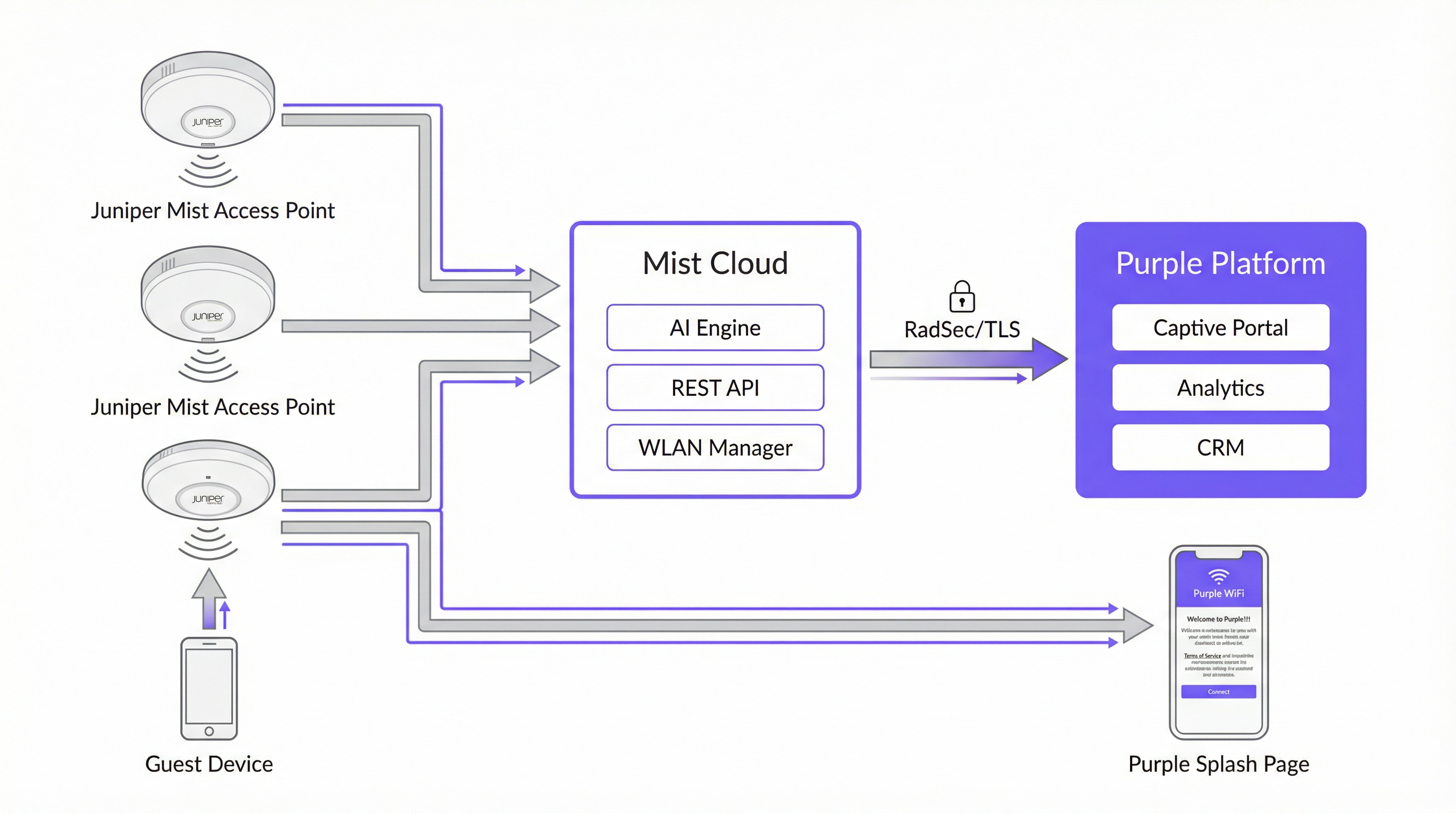
The table below summarises the role of each component in the integration.
| Component | Role |
|---|---|
| Juniper Mist Access Points | Provide wireless coverage; enforce WLAN policies; redirect unauthenticated guests to the Purple captive portal via HTTP 302. |
| Juniper Mist Cloud | Centralised cloud management platform. Hosts WLAN configuration, AI-driven RRM, Wi-Fi Assurance SLEs, and the REST API used for guest device authorisation. |
| Purple Platform | Hosts the external captive portal; captures and stores guest data compliantly; provides analytics dashboards, CRM integration, and marketing automation. |
| Mist API Secret | A per-WLAN cryptographic key (HMAC-SHA1) that secures the authorisation handshake between Purple and the Mist Cloud. |
| PurpleConnex (Passpoint) | A second WLAN using WPA2/WPA3-Enterprise and Passpoint to provide automatic, secure connectivity for returning guests without requiring portal re-authentication. |
| RadSec (RFC 6614) | RADIUS over TLS. Secures authentication traffic between the Mist Cloud and Purple's RADIUS servers for the PurpleConnex WLAN. |
The Captive Portal Authentication Flow
When a guest device associates with the guest SSID, Mist checks whether the device's MAC address has been previously authorised. If it has not, Mist intercepts the guest's first HTTP request and issues a 302 redirect to the Purple portal URL. This redirect appends several parameters that Purple requires to complete the authorisation cycle:
| Parameter | Description | Required? |
|---|---|---|
wlan_id |
UUID of the WLAN object in Mist | Yes |
ap_mac |
MAC address of the serving access point | Yes |
client_mac |
MAC address of the guest device | Yes |
url |
The original URL the guest requested | No |
ap_name |
Human-readable name of the AP | No |
site_name |
Human-readable name of the site | No |
Once the guest completes the login form on the Purple portal, Purple constructs a signed authorisation request to the Mist backend at portal.mist.com/authorize. This request includes an HMAC-SHA1 signature computed using the WLAN's API Secret, a base64-encoded token containing the wlan_id, ap_mac, client_mac, and session duration, and an expiry timestamp. Mist validates the signature and, if valid, authorises the guest device for internet access.
Key architectural note: Juniper Mist does not support RADIUS authentication or accounting for the captive portal flow. This means that real-time user count reports and certain network session metrics within the Mist dashboard will not reflect captive portal sessions. Purple's own analytics platform provides comprehensive session reporting and should be used as the primary source of guest WiFi intelligence.
PurpleConnex: Passpoint and RadSec
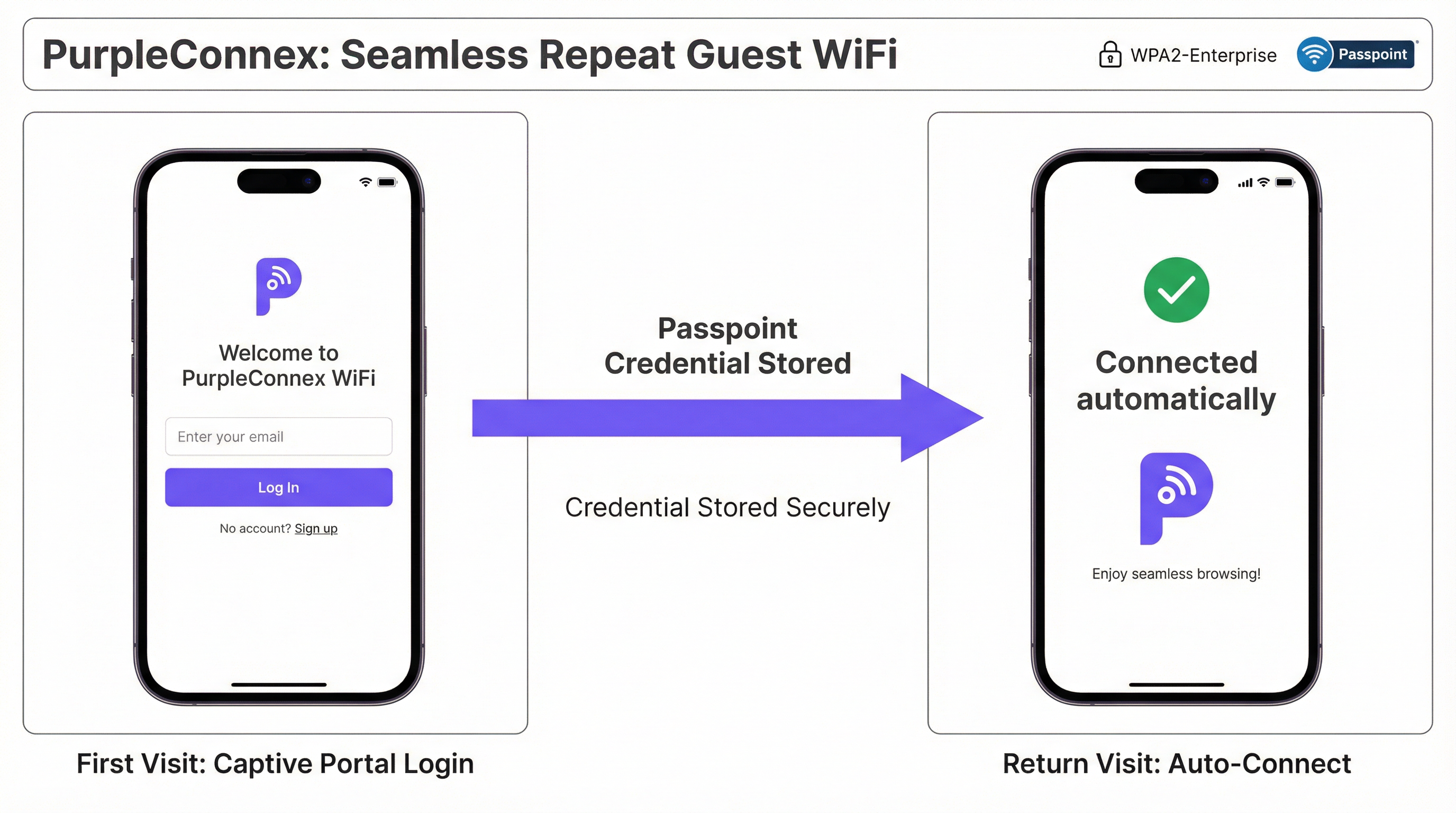
For venues with a significant proportion of repeat visitors — hotels, corporate campuses, retail chains — the PurpleConnex solution eliminates the need for repeated portal authentication. After a guest's first login through the captive portal, Purple provisions a Passpoint (Hotspot 2.0) profile to the guest's device. On all subsequent visits, the device automatically selects the PurpleConnex SSID and authenticates silently using WPA2-Enterprise (or WPA3-Enterprise on 6 GHz-capable APs) via EAP-TTLS against Purple's RadSec servers.
The RadSec configuration in Mist requires two server entries — rad1-secure.purple.ai and rad2-secure.purple.ai, both on port 2083 — and the installation of Purple's RadSec certificate in the Mist Organisation Settings. The NAS Identifier should be set to MIST-{{DEVICE_MAC}} to ensure that Purple can correctly identify the authenticating access point.
Implementation Guide
The following steps assume administrative access to both the Juniper Mist Cloud dashboard (manage.mist.com) and the Purple portal. For multi-site deployments, steps 1 through 3 should be performed within a Mist Organisation Template rather than at the site level.
Phase 1: Guest WLAN Configuration (Mist)
Step 1. Log in to manage.mist.com and navigate to Network > WLANs. Click Add WLAN.
Step 2. Configure the WLAN with the following parameters:
| Setting | Value |
|---|---|
| SSID | Guest WiFi (or your preferred name) |
| WLAN Status | Enabled |
| Security Type | Open Access |
| Guest Portal | Forward to an external portal |
| Portal URL | Provided by Purple (your venue's access URL) |
| Allowed Hostnames | All Purple domains — refer to Purple's Walled Garden Domain Whitelist |
| Bypass portal on exception | Leave unticked (recommended) |
Step 3. Click Save. Re-open the WLAN and locate the API Secret. Copy this value.
Phase 2: Purple Venue Configuration
Step 4. Log in to the Purple portal and navigate to your venue's settings.
Step 5. Paste the Mist API Secret into the Mist API secret field.
Step 6. Confirm that the Portal URL in the Mist WLAN matches the access URL shown in the Purple venue settings.
Phase 3: PurpleConnex (Passpoint) WLAN Configuration (Optional but Recommended)
Step 7. In the Mist dashboard, create a second WLAN with the following settings:
| Setting | Value |
|---|---|
| SSID | PurpleConnex |
| Security Type | WPA2 Enterprise (802.1X) |
| Passpoint | Enabled |
| Operators | OpenRoaming-Settlement-Free |
| Venue Name | Your venue name |
| Domain Name | securewifi.purple.ai |
| Roaming Consortium ID | 5A03BA0000, 004096 |
| NAI Realm Name | securewifi.purple.ai |
| NAI Realm EAP Type | TTLS |
| Auth Server Type | RadSec |
| Auth Server 1 | rad1-secure.purple.ai, Port 2083 |
| Auth Server 2 | rad2-secure.purple.ai, Port 2083 |
| NAS Identifier | MIST-{{DEVICE_MAC}} |
| Guest Portal | No portal (direct internet access) |
Step 8. Navigate to Organisation Settings and upload Purple's RadSec certificate under RadSec Certificates.
Best Practices
Use Organisation Templates for Multi-Site Deployments. For any deployment spanning more than one site, configure both WLANs within a Mist Organisation Template. This ensures configuration consistency across the entire estate and allows changes to be pushed to all sites simultaneously. A retail chain managing fifty stores, for example, can update its guest portal URL or walled garden entries once and have the change propagate to every site within minutes.
Maintain a Complete and Current Walled Garden. The walled garden is the single most common source of integration failures. An incomplete walled garden means that unauthenticated guests cannot reach the captive portal, resulting in a broken WiFi experience. Maintain a current list of all required Purple domains, social login provider domains, and any other resources that the portal depends on. Review this list whenever you add new authentication methods to the portal.
Plan for Two SSIDs from Day One. Deploy both the open Guest WiFi SSID and the PurpleConnex Passpoint SSID from the outset, even if Passpoint adoption is initially low. As the installed base of Passpoint-capable devices grows — and it is growing rapidly, with the majority of modern iOS and Android devices supporting the standard — the seamless repeat-visitor experience will become increasingly valuable.
Align with IEEE 802.1X and WPA3 Roadmaps. For any new Mist deployment, particularly those incorporating 6 GHz radio bands, plan for WPA3-Enterprise on the PurpleConnex SSID. WPA3 is mandatory on 6 GHz networks and provides significantly stronger encryption through its 192-bit security mode. This also positions the deployment for long-term compliance with evolving security standards.
Integrate Purple with Your CRM. The guest data captured through the captive portal has significant value beyond WiFi management. Connecting Purple to your CRM — whether that is Salesforce, HubSpot, or a hospitality-specific PMS — creates a unified customer profile that can drive personalised marketing, loyalty programme integration, and improved guest service.
Troubleshooting & Risk Mitigation
| Symptom | Likely Cause | Resolution |
|---|---|---|
| Guest is not redirected to the captive portal | Incorrect Portal URL in Mist WLAN, or WLAN is not set to "Forward to external portal" | Verify the Portal URL and the Guest Portal setting in the Mist WLAN configuration. |
| Captive portal page fails to load | Incomplete walled garden — Purple domains are blocked for unauthenticated users | Add all required Purple domains and social login provider domains to the Mist WLAN's Allowed Hostnames list. |
| Guest completes login but does not receive internet access | Incorrect API Secret in Purple venue settings, or firewall blocking traffic to portal.mist.com |
Verify the API Secret and check firewall rules. Ensure that portal.mist.com (or the regional equivalent) is reachable from the Mist Cloud. |
| PurpleConnex SSID not appearing on guest devices | Passpoint not enabled on WLAN, or device does not have a Passpoint profile provisioned | Confirm Passpoint is enabled in the Mist WLAN settings. Verify that the guest has previously authenticated through the captive portal and that the Passpoint profile has been provisioned. |
| RadSec authentication failures for PurpleConnex | Missing or incorrect RadSec certificate, or incorrect server addresses/port | Re-upload the RadSec certificate from Purple's support documentation. Verify server addresses and port 2083. |
| Real-time user count reports unavailable in Mist | Expected behaviour — Mist does not support RADIUS accounting for captive portal sessions | Use Purple's analytics dashboard for guest session reporting. This is the correct and intended data source for this integration. |
ROI & Business Impact

The business case for a Juniper Mist and Purple deployment extends well beyond connectivity. The integration creates a data collection and engagement infrastructure that delivers measurable returns across multiple dimensions.
Guest Engagement and Marketing Automation. Every guest who authenticates through the Purple captive portal becomes a known contact. Purple's marketing automation tools allow venue operators to send targeted, consent-based communications — post-visit surveys, promotional offers, event notifications — that drive repeat visits and increase average spend. For a hotel chain, this translates directly to improved direct booking rates and reduced reliance on OTA commissions.
Operational Intelligence. Purple's footfall analytics provide venue operations teams with granular data on visitor behaviour: which areas of a venue attract the most dwell time, how footfall patterns change by time of day and day of week, and how repeat visitor rates trend over time. This intelligence informs staffing decisions, store layout optimisation, and event planning.
Revenue Generation. For venues such as airports, conference centres, and stadiums, Purple's tiered bandwidth capabilities enable the monetisation of premium WiFi access. One airport operator reported an 842% ROI after implementing Purple's tiered access model, demonstrating the significant revenue potential of a well-configured guest WiFi deployment.
Compliance Risk Mitigation. A GDPR or CCPA violation carries substantial financial and reputational risk. Purple's built-in consent management, data subject rights tools, and compliant data processing architecture significantly reduce this risk, providing a defensible compliance posture that satisfies both legal teams and data protection officers.
This guide is maintained by Purple's Technical Content team. For the latest configuration details, refer to the Purple Support Portal and the Juniper Mist Documentation.
Key Terms & Definitions
Captive Portal
A web page presented to newly connected WiFi users before they are granted broader network access. It is the primary mechanism for guest authentication, data capture, and terms-of-service acceptance in a guest WiFi deployment.
In the Mist-Purple integration, the captive portal is hosted by Purple and is triggered by a Mist HTTP 302 redirect. IT teams configure the Portal URL in the Mist WLAN settings and the API Secret in Purple to link the two platforms.
Walled Garden
A restricted set of hostnames and IP ranges that unauthenticated users on a captive portal network are permitted to access before completing the login process. The walled garden must include the portal itself and all resources it depends on.
Network engineers must configure the Allowed Hostnames list in the Mist WLAN settings to include all Purple domains and any social login provider domains. An incomplete walled garden is the most common cause of captive portal failures.
API Secret (Mist)
A per-WLAN cryptographic key automatically generated by Mist when a Guest WLAN with an external portal is created. It is used as the HMAC-SHA1 signing key for the authorisation requests that Purple sends to the Mist backend to grant guest devices internet access.
The API Secret must be copied from the Mist WLAN configuration and pasted into the Purple venue settings. It is the trust anchor for the entire integration and should be treated as a sensitive credential.
Passpoint (Hotspot 2.0)
An IEEE 802.11u-based standard that enables mobile devices to automatically discover, select, and connect to WiFi networks using pre-provisioned credentials, without requiring user interaction or portal authentication.
PurpleConnex uses Passpoint to provide a seamless, automatic connection experience for repeat guests. After an initial captive portal login, a Passpoint profile is provisioned to the guest's device, enabling silent authentication on all future visits.
RadSec (RADIUS over TLS)
A protocol defined in RFC 6614 that secures RADIUS authentication and accounting traffic by tunnelling it over a TLS connection. It replaces the traditional UDP-based RADIUS transport, which is vulnerable to interception and replay attacks.
The PurpleConnex WLAN uses RadSec to secure authentication traffic between the Mist Cloud and Purple's RADIUS servers. Network engineers must configure the RadSec server addresses, port (2083), and certificate in the Mist WLAN and Organisation Settings.
IEEE 802.1X
An IEEE standard for port-based Network Access Control that provides an authentication framework for devices connecting to a LAN or WLAN. It requires each user or device to authenticate with unique credentials before gaining network access.
The PurpleConnex WLAN uses WPA2/WPA3-Enterprise with 802.1X to provide strong, per-user authentication for repeat guests. This is the same authentication framework used in corporate enterprise networks and is significantly more secure than pre-shared key (PSK) authentication.
Mist AI (Wi-Fi Assurance)
Juniper Mist's cloud-based machine learning engine that continuously analyses wireless network telemetry to optimise radio resource management, predict and resolve connectivity issues, and provide service level experience (SLE) metrics for each user session.
While Mist AI operates independently of the Purple integration, it is a key reason why Mist is selected as the infrastructure platform for enterprise guest WiFi deployments. Its proactive fault detection and automated RRM reduce the operational burden on IT teams and improve the reliability of the guest WiFi experience.
GDPR (General Data Protection Regulation)
EU Regulation 2016/679, which governs the collection, processing, and storage of personal data of individuals in the European Union and European Economic Area. It requires explicit, informed consent for data collection and grants individuals rights over their personal data.
Any guest WiFi deployment that collects personal data — including email addresses, names, or device identifiers — from EU residents must comply with GDPR. Purple's platform provides built-in consent management tools, data subject rights workflows, and compliant data processing agreements to support GDPR compliance.
OpenRoaming
A Wireless Broadband Alliance (WBA) initiative that enables seamless, automatic WiFi roaming across participating networks globally, using Passpoint technology and a federated identity framework. The Settlement-Free tier allows users to roam without per-session charges.
The PurpleConnex WLAN is configured with the OpenRoaming-Settlement-Free operator profile, which enables devices with OpenRoaming credentials from other providers to connect automatically to the PurpleConnex SSID. This extends the seamless connectivity benefit beyond Purple's own user base.
NAS Identifier
A RADIUS attribute (Attribute 32) that identifies the Network Access Server — in this context, the Mist access point — to the RADIUS server. It is used by the RADIUS server to apply per-AP policies and to log authentication events with AP-level granularity.
In the PurpleConnex WLAN configuration, the NAS Identifier is set to MIST-{{DEVICE_MAC}}, where {{DEVICE_MAC}} is a Mist variable that is replaced with the MAC address of the authenticating AP at runtime. This allows Purple's RADIUS servers to identify the specific AP handling each authentication request.
Case Studies
A 200-room four-star hotel wants to provide a seamless WiFi experience for guests. The general manager requires that first-time guests see a branded captive portal, that repeat guests connect automatically without a login prompt, and that the marketing team can send post-stay email campaigns to guests who have consented. How would you configure the Juniper Mist and Purple integration to meet these requirements?
The solution requires a dual-SSID architecture. First, create a 'Guest WiFi' WLAN in the Mist dashboard with Open Access security and the Guest Portal set to 'Forward to an external portal', using the Purple portal URL. Configure the walled garden with all required Purple domains. Retrieve the Mist API Secret and enter it into the Purple venue settings. In Purple, configure the captive portal with the hotel's branding, a simple email-and-name form, and explicit marketing consent checkboxes that comply with GDPR Article 7. Second, create a 'PurpleConnex' WLAN with WPA2-Enterprise, Passpoint enabled, and the RadSec server details from Purple. Upload Purple's RadSec certificate to the Mist Organisation Settings. After a guest's first login through the captive portal, Purple automatically provisions a Passpoint profile to their device. On all subsequent visits, the device silently connects to PurpleConnex. The marketing team can then use Purple's CRM integration to push consented guest email addresses into the hotel's email marketing platform for post-stay campaigns.
A retail chain with 75 stores across the UK and Ireland wants to deploy guest WiFi to understand foot traffic patterns, measure the impact of store layout changes on dwell time, and send targeted promotions to opted-in customers. The IT team has a small central team and cannot manage per-site configurations individually. How should the Mist and Purple deployment be structured?
The deployment should be built around Mist's Organisation Templates for centralised management. Create a single WLAN template containing both the 'Guest WiFi' (open, captive portal) and 'PurpleConnex' (WPA2-Enterprise, Passpoint) WLANs, and apply this template to all 75 sites. This ensures that any configuration change — such as updating the walled garden or rotating the API Secret — propagates to all sites simultaneously without manual intervention. In Purple, create a location hierarchy that mirrors the retail estate: group stores by region or country to enable segmented analytics. Configure Purple's foot traffic analytics to track dwell time by zone within each store, using the AP placement data from Mist to map signal coverage to physical store areas. Integrate Purple with the retailer's existing marketing platform via Purple's API or native CRM connectors. Use Purple's campaign tools to send geo-targeted promotions — for example, a discount notification to customers who have been in the store for more than 15 minutes without making a purchase.
Scenario Analysis
Q1. A 500-seat conference centre is deploying a Mist and Purple guest WiFi solution. The events team wants to offer a free basic tier (2 Mbps per device) and a paid premium tier (20 Mbps per device) for delegates who need reliable video conferencing. The IT team has two network engineers and cannot manage per-event configurations manually. How would you structure the deployment to meet these requirements?
💡 Hint:Consider how Purple's tiered bandwidth feature works alongside Mist's WLAN configuration, and how Mist Organisation Templates reduce operational overhead.
Show Recommended Approach
Deploy a single 'Guest WiFi' SSID configured in a Mist Organisation Template with the Purple captive portal redirect. In Purple, configure two access tiers: a free tier with a 2 Mbps per-device bandwidth cap and a paid premium tier at 20 Mbps, with a payment gateway integrated into the portal for premium access purchases. The captive portal should clearly present both options to connecting guests. Use Purple's event management features to create event-specific portal pages that can be activated by the events team without IT involvement, reducing the operational burden on the two-engineer team. For the PurpleConnex Passpoint SSID, configure it to automatically grant premium-tier bandwidth to returning guests who have previously purchased a premium pass, using Purple's CRM data to identify them.
Q2. A hotel group's IT security team has raised a concern that the Open Access guest SSID creates a risk of guest-to-guest traffic interception. The network architect needs to address this concern without removing the captive portal functionality. What Mist configuration options are available, and how do they interact with the Purple integration?
💡 Hint:Consider Mist's client isolation features and how they apply to an Open Access WLAN. Also consider the role of WPA3 OWE (Opportunistic Wireless Encryption).
Show Recommended Approach
There are two primary mitigations. First, enable client isolation on the Guest WiFi WLAN in Mist. This prevents guest devices from communicating directly with each other at the Layer 2 level, eliminating the risk of ARP spoofing and direct traffic interception between guests on the same SSID. This setting does not affect the captive portal redirect or the Purple authorisation flow. Second, for deployments on APs that support it, consider enabling WPA3 OWE (Opportunistic Wireless Encryption) on the guest SSID. OWE provides per-session encryption for open networks without requiring a password, protecting guest traffic from passive eavesdropping. OWE is transparent to the captive portal flow — Mist still redirects unauthenticated devices to Purple regardless of the encryption mode. Note that OWE requires client device support, which is now widespread on modern iOS and Android devices but may not be universal across all guest devices.
Q3. After deploying the Mist-Purple integration at a 30-store retail chain, the IT team reports that approximately 15% of guests are completing the captive portal login but not receiving internet access. The remaining 85% are connecting successfully. What is the most likely cause, and what is the diagnostic approach?
💡 Hint:Think about what could cause the Mist authorisation API call from Purple to fail for a subset of users. Consider timing, firewall rules, and the API Secret.
Show Recommended Approach
The most likely cause is a race condition or timeout in the Purple-to-Mist authorisation API call, potentially caused by firewall rules at specific stores blocking outbound HTTPS traffic to portal.mist.com, or by network latency causing the authorisation request to expire before Mist processes it. The diagnostic approach is: (1) Check Purple's server-side logs for authorisation API call failures — Purple's support team can provide these. Look for HTTP error codes (401 Unauthorized suggests an API Secret mismatch; 504 Gateway Timeout suggests a connectivity issue). (2) Identify whether the failures are concentrated at specific stores, which would point to a per-site firewall or routing issue rather than a platform-wide problem. (3) Verify that the API Secret in Purple matches the API Secret in the Mist WLAN for the affected stores — if Organisation Templates were not used consistently, there may be mismatches. (4) Check that the correct regional Mist portal endpoint is being used — Mist API endpoints vary by region (US, EU, APAC), and using the wrong endpoint will cause authorisation failures.
Q4. A public-sector organisation — a local council — wants to deploy free guest WiFi across 12 libraries using Mist and Purple. Their data protection officer has specified that no personal data may be collected without explicit, granular consent, and that the organisation must be able to demonstrate compliance with a subject access request within 30 days. How should the Purple captive portal be configured to meet these requirements?
💡 Hint:Focus on GDPR Articles 7 (consent), 15 (right of access), and 17 (right to erasure). Consider how Purple's compliance features map to these requirements.
Show Recommended Approach
Configure the Purple captive portal with the following GDPR-compliant settings: (1) Use a simple, unbundled consent mechanism — present separate, opt-in checkboxes for each data processing purpose (e.g., 'I consent to my email being used for service notifications' and 'I consent to my usage data being used for analytics'). Pre-ticked boxes are not valid consent under GDPR Article 7. (2) Link to a clear, plain-English privacy notice that identifies the council as the data controller, lists the categories of data collected, and explains the legal basis for processing. (3) Configure Purple to capture only the minimum data necessary — for a public-sector library, this may be as simple as a device identifier and session timestamp, with no personal data required for basic access. (4) Enable Purple's data subject rights tools, which allow the DPO to respond to subject access requests by exporting all data associated with a specific email address or device, and to process erasure requests within the statutory 30-day window. (5) Ensure that a Data Processing Agreement (DPA) is in place between the council and Purple, as Purple processes personal data on behalf of the council as a data processor under GDPR Article 28.
Key Takeaways
- ✓The Juniper Mist and Purple integration uses Mist's external captive portal redirect and a per-WLAN API Secret to securely authenticate guest devices and capture visitor data through Purple's hosted portal.
- ✓A dual-SSID architecture — an open Guest WiFi SSID for first-time visitors and a WPA2/WPA3-Enterprise PurpleConnex SSID for repeat guests — is the industry best practice for balancing accessibility, security, and user experience.
- ✓The walled garden configuration in Mist is the most common source of integration failures; always ensure all Purple domains and social login provider domains are included in the Allowed Hostnames list before going live.
- ✓For multi-site deployments, Mist Organisation Templates are essential — they enable consistent configuration across the entire estate and allow changes to propagate to all sites simultaneously, dramatically reducing operational overhead.
- ✓Juniper Mist does not support RADIUS accounting for captive portal sessions; use Purple's analytics platform as the primary source of guest session reporting and business intelligence.
- ✓Purple's GDPR and CCPA compliance tools — including granular consent management, data subject rights workflows, and Data Processing Agreements — are critical for any deployment that collects personal data from EU or California residents.
- ✓The ROI of a Mist-Purple deployment extends beyond connectivity: guest data analytics, marketing automation, CRM integration, and tiered bandwidth monetisation can deliver measurable returns that far exceed the cost of the infrastructure.




