

Staff WiFi: A Comprehensive Guide to Secure and Efficient Network Access for Employees
A comprehensive technical reference for IT leaders on designing, deploying, and managing secure, high-performance staff WiFi networks. This guide provides actionable best practices for authentication, network segmentation, and bandwidth management to enhance operational efficiency and mitigate security risks.
🎧 Listen to this Guide
View Transcript

Executive Summary
For any modern enterprise operating in hospitality, retail, or large-scale public venues, staff WiFi is no longer a convenience; it is critical operational infrastructure. A well-architected staff wireless network directly translates to enhanced productivity, improved customer service, and a strengthened security posture. Conversely, a poorly configured network introduces significant compliance risks, operational bottlenecks, and vulnerabilities. This guide serves as a definitive technical reference for IT managers, network architects, and CTOs tasked with delivering secure and efficient wireless access to employees. It moves beyond academic theory to provide vendor-neutral, actionable guidance grounded in real-world deployment scenarios. We will cover the essential architectural principles of network segmentation, the critical importance of IEEE 802.1X authentication over insecure pre-shared keys, and the business case for migrating to the WPA3-Enterprise security standard. Furthermore, this document provides a step-by-step implementation framework, detailed case studies from relevant industries, and practical tools for measuring the return on investment (ROI) of a properly engineered staff WiFi solution. The core takeaway is that a strategic investment in staff WiFi is an investment in the operational backbone of the entire organisation.
Technical Deep-Dive
The Architectural Imperative: Segmentation
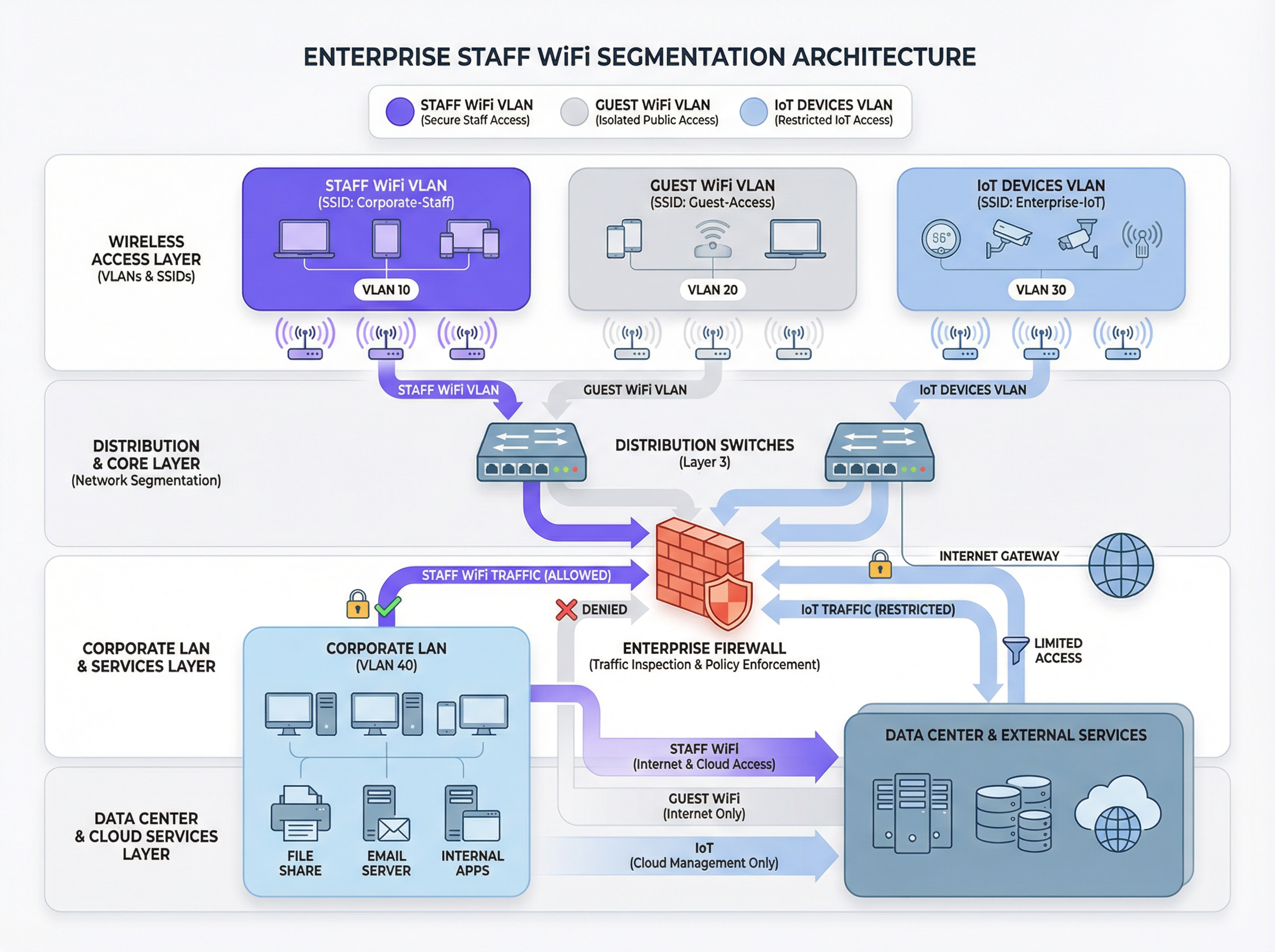
The foundational principle of secure staff WiFi is network segmentation. A flat network where staff devices, guest devices, IoT hardware, and sensitive back-office systems coexist is a significant security liability. The primary mechanism for achieving segmentation in a wireless environment is the use of VLANs (Virtual Local Area Networks). Each SSID should map to a distinct VLAN, creating logically isolated broadcast domains that are enforced at the network switch level.
A typical best-practice architecture includes at least three separate VLANs:
- Staff VLAN: For corporate-owned and managed devices used by employees. This VLAN is granted controlled access to internal resources such as file servers, Point-of-Sale (POS) systems, and Property Management Systems (PMS) through specific firewall rules.
- Guest VLAN: For public-facing WiFi access. This VLAN must be completely isolated from all internal corporate resources. Traffic from this VLAN should be routed directly to the internet, with client isolation enabled to prevent guest devices from communicating with each other.
- IoT VLAN: For 'headless' devices like security cameras, digital signage, and HVAC systems. These devices often have simpler security capabilities and should be isolated on their own network segment with highly restrictive rules, permitting access only to the specific servers they need to function.
This segmented approach is not merely a recommendation; for any organisation subject to the Payment Card Industry Data Security Standard (PCI DSS), it is a mandatory requirement [1]. Failure to segment the cardholder data environment from other networks constitutes a major compliance failure.
Authentication and Access Control: Beyond the Pre-Shared Key
The most common and critical mistake in staff WiFi deployment is the use of a single Pre-Shared Key (PSK) for all employees. While simple to set up, a PSK provides no individual accountability and creates a significant security risk when an employee leaves the organisation. The industry-standard solution is IEEE 802.1X, which provides port-based network access control.
In an 802.1X deployment, a central RADIUS (Remote Authentication Dial-In User Service) server acts as the authentication authority. The workflow is as follows:
- Supplicant (Client Device): The employee's device requests access to the staff SSID.
- Authenticator (Wireless Access Point): The AP intercepts the request and asks for credentials.
- Authentication Server (RADIUS): The AP forwards the credentials to the RADIUS server, which validates them against a user directory (e.g., Active Directory, LDAP, or a cloud identity provider like Azure AD or Okta).
- Authorisation: Upon successful authentication, the RADIUS server sends an
Access-Acceptmessage back to the AP, which then grants the device access to the network. The RADIUS server can also pass back authorisation attributes, such as a specific VLAN ID or a Quality of Service profile, enabling role-based access control.
This model provides per-user authentication and a detailed audit trail, which is essential for security investigations and compliance reporting.
Security Protocols: WPA2-Enterprise vs. WPA3-Enterprise
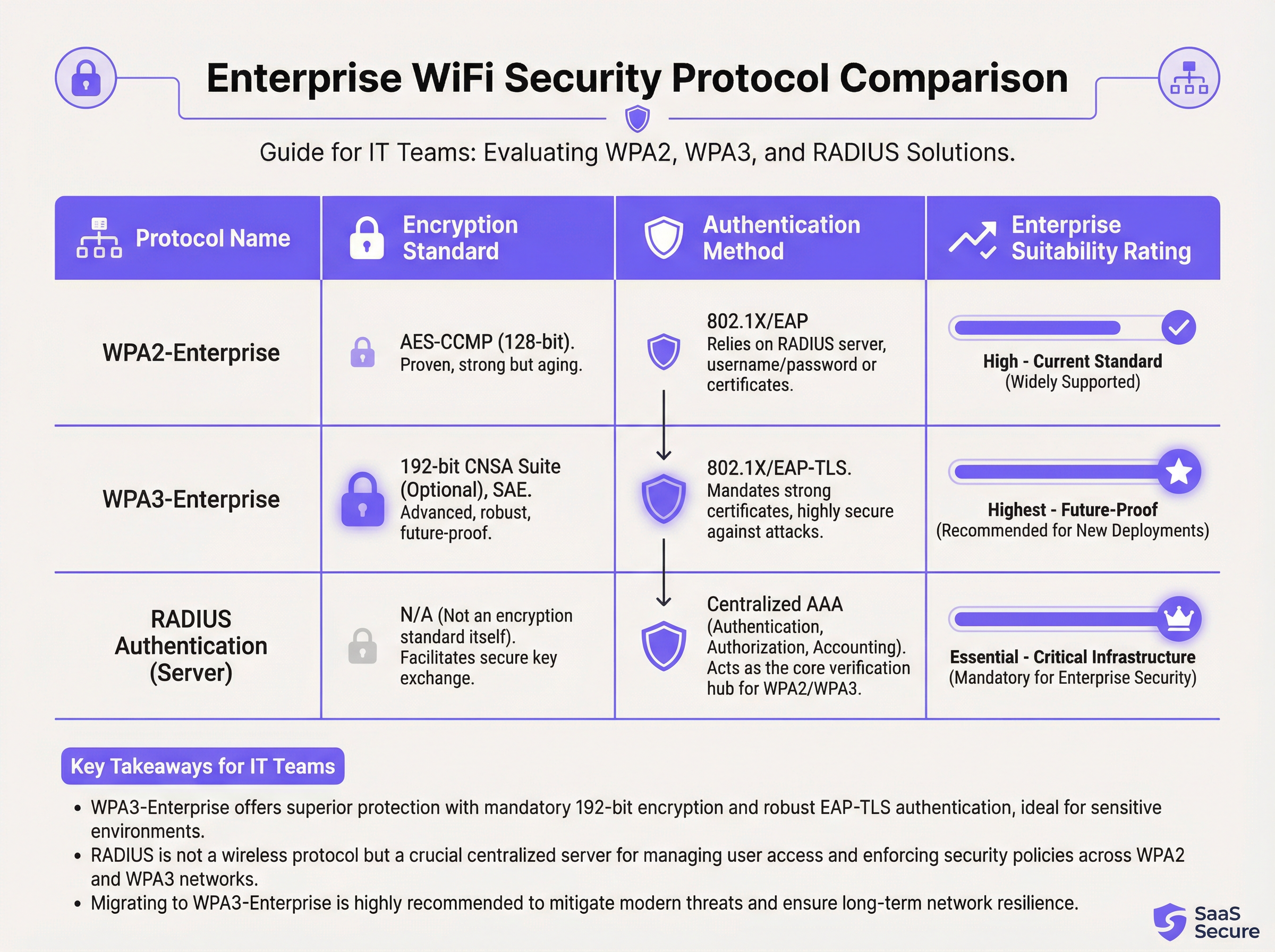
While 802.1X handles authentication, the wireless traffic itself must be encrypted. The choice of protocol has significant security implications.
- WPA2-Enterprise (Wi-Fi Protected Access 2): The long-standing enterprise standard, using AES-CCMP 128-bit encryption. It is robust and widely supported. However, it is vulnerable to offline dictionary attacks if an attacker can capture the initial four-way handshake.
- WPA3-Enterprise (Wi-Fi Protected Access 3): The current generation of security. It replaces the WPA2 handshake with Simultaneous Authentication of Equals (SAE), which is resistant to offline dictionary attacks. WPA3-Enterprise also mandates the use of Protected Management Frames (PMF) to prevent eavesdropping and forging of management traffic. For high-security environments, it offers an optional 192-bit security suite aligned with the Commercial National Security Algorithm (CNSA) Suite [2].
For any new deployments or hardware refreshes, WPA3-Enterprise should be the default standard. The security benefits far outweigh the minimal implementation overhead, provided the client devices and infrastructure support it.
Implementation Guide
Deploying a secure and efficient staff WiFi network is a multi-stage process that requires careful planning.
Phase 1: Discovery and Design
- Audit Existing Infrastructure: Identify all devices that require wireless access and categorise them (staff, guest, IoT, BYOD).
- Define Access Policies: For each category, define what network resources they need to access. Create a policy matrix that will inform your firewall rules.
- Design VLAN and IP Schema: Design your VLAN architecture and assign IP subnets for each VLAN. Ensure your core network switches and routers are configured to support the new VLANs.
Phase 2: Infrastructure Deployment
- Deploy RADIUS Server(s): Set up a primary and a secondary RADIUS server for redundancy. Integrate with your chosen user directory.
- Configure Wireless LAN Controller (WLC): Create the new SSIDs (e.g.,
Staff-Secure,Guest-WiFi). Configure the staff SSID for WPA3-Enterprise with 802.1X authentication, pointing to your RADIUS servers. - Map SSIDs to VLANs: Ensure each SSID is correctly tagged with its corresponding VLAN ID.
Phase 3: Testing and Rollout
- Pilot Testing: Enrol a small group of IT and operational staff into a pilot programme. Test authentication, access to resources, and roaming performance.
- Device Onboarding: Develop a clear process for enrolling new and existing devices. For corporate-owned devices, this should be automated via a Mobile Device Management (MDM) platform.
- Full Rollout: Once pilot testing is successful, proceed with a phased rollout across the organisation. Provide clear documentation and support for end-users.
Phase 4: Monitoring and Optimisation
- Implement Monitoring: Use a network intelligence platform like Purple to monitor authentication success/failure rates, network performance, and device-level activity.
- Configure QoS: Implement Quality of Service policies to prioritise critical applications (e.g., voice, POS traffic) and prevent non-essential traffic from consuming all available bandwidth.
- Regular Audits: Schedule quarterly reviews of firewall rules, user access rights, and network performance metrics.
Best Practices
- Enforce Certificate-Based Authentication: For corporate-owned devices, use EAP-TLS, which relies on digital certificates instead of usernames and passwords. This eliminates the risk of credential phishing and provides the strongest form of authentication.
- Implement Fast Roaming (802.11r): In large venues, ensure fast and seamless roaming between access points to prevent dropped connections for mobile staff.
- Isolate BYOD Traffic: If you allow employees to connect personal devices (Bring Your Own Device), place them on a separate, more restrictive VLAN than corporate-owned devices.
- Conduct Regular RF Surveys: Perform radio frequency (RF) surveys to identify and mitigate sources of interference and ensure optimal AP placement for both coverage and capacity.
- Disable Legacy Protocols: Actively disable outdated and insecure protocols like WEP, WPA, and TKIP on your wireless infrastructure.
Troubleshooting & Risk Mitigation
| Common Issue | Root Cause | Mitigation Strategy |
|---|---|---|
| Authentication Failures | Incorrect credentials, expired certificates, RADIUS server outage. | Implement robust monitoring on RADIUS servers. Use MDM to automate certificate renewal. Provide clear user guidance on credential management. |
| Poor Roaming Performance | Lack of 802.11r/k/v support, misconfigured AP power levels. | Ensure controller and APs are configured for fast roaming standards. Conduct a post-deployment RF survey to optimise AP settings. |
| Network Congestion | Insufficient bandwidth, lack of QoS, non-essential traffic saturation. | Implement QoS policies to prioritise critical traffic. Use a network analytics platform to identify and rate-limit bandwidth-hungry applications. |
| Rogue Access Points | Unauthorised APs plugged into the corporate network by employees. | Enable rogue AP detection on your wireless controller. Use 802.1X port security on wired switches to prevent unauthorised devices from gaining network access. |
ROI & Business Impact
The investment in a secure staff WiFi network delivers measurable returns across several domains:
- Increased Productivity: Reliable, high-performance WiFi allows staff to use mobile applications, access information, and communicate without interruption, directly improving operational efficiency. A study by the Wi-Fi Alliance found that WiFi contributes over $5 trillion in annual global economic value [3].
- Reduced Security Incidents: Proper segmentation and strong authentication dramatically reduce the attack surface, leading to fewer security incidents, lower remediation costs, and a reduced risk of costly data breaches.
- Streamlined Compliance: An 802.1X-based network with detailed logging simplifies compliance audits for standards like PCI DSS, GDPR, and HIPAA, saving hundreds of man-hours.
- Enhanced Business Agility: A scalable and secure wireless foundation enables the rapid deployment of new mobile-first initiatives, from tableside ordering in restaurants to mobile point-of-sale in retail.
To calculate ROI, compare the total cost of ownership (TCO) of the new infrastructure against the quantifiable benefits, such as time saved through improved efficiency, the cost avoidance of a potential data breach, and reduced compliance audit costs.
References
[1] PCI Security Standards Council. (2022). Payment Card Industry Data Security Standard (PCI DSS) v4.0. https://www.pcisecuritystandards.org/documents/PCI-DSS-v4_0.pdf [2] Wi-Fi Alliance. (2024). WPA3™ Specification. https://www.wi-fi.org/discover-wi-fi/security [3] Wi-Fi Alliance. (2021). The Global Economic Value of Wi-Fi. https://www.wi-fi.org/file/the-global-economic-value-of-wi-fi
Key Terms & Definitions
IEEE 802.1X
An IEEE standard for port-based Network Access Control (PNAC). It provides an authentication mechanism to devices wishing to attach to a LAN or WLAN.
This is the core technology that enables per-user authentication on a WiFi network, moving away from insecure shared passwords. IT teams implement 802.1X to meet compliance requirements and enable robust access control.
RADIUS
A networking protocol that provides centralized Authentication, Authorization, and Accounting (AAA) management for users who connect and use a network service.
The RADIUS server is the 'brain' of an 802.1X deployment. It checks the user's credentials against a directory and tells the access point whether to allow or deny access. A failed RADIUS server means no one can log in.
VLAN
A Virtual Local Area Network is any broadcast domain that is partitioned and isolated in a computer network at the data link layer (OSI layer 2).
VLANs are the primary tool for segmenting a network. IT teams use VLANs to create separate, isolated networks for staff, guests, and IoT devices on the same physical hardware, preventing traffic from one from spilling over into another.
WPA3-Enterprise
The third generation of the Wi-Fi Protected Access security protocol, designed for enterprise environments. It uses 192-bit encryption and replaces the PSK handshake with Simultaneous Authentication of Equals (SAE).
This is the current, most secure standard for enterprise WiFi. Network architects should specify WPA3-Enterprise for all new deployments to protect against modern threats and ensure long-term security.
EAP-TLS
Extensible Authentication Protocol-Transport Layer Security. An EAP method that uses digital certificates for mutual authentication between the client and the server.
This is the gold standard for 802.1X authentication. Instead of a user typing a password, the device presents a certificate that is cryptographically verified. It is immune to phishing and credential theft.
QoS (Quality of Service)
The use of mechanisms or technologies to control traffic and ensure the performance of critical applications to the level required by the business.
In a staff WiFi context, QoS is used to prioritize applications like voice calls or payment processing over less important traffic like software updates or web browsing, ensuring operational systems are always responsive.
Client Isolation
A security feature on a wireless access point that prevents wireless clients connected to the same AP from communicating with each other.
This is a mandatory feature for guest WiFi networks. It prevents a malicious guest from attacking another guest's device on the same network. It should be enabled on all non-staff VLANs.
PCI DSS
The Payment Card Industry Data Security Standard is an information security standard for organizations that handle branded credit cards from the major card schemes.
For any business that processes, stores, or transmits credit card information, PCI DSS compliance is mandatory. A key requirement is the segmentation of the network that handles card data from all other networks, which directly impacts staff WiFi design.
Case Studies
A 300-room luxury hotel needs to upgrade its staff WiFi network. The current system uses a single PSK for all staff, including front desk, housekeeping, and management. The hotel uses a cloud-based Property Management System (PMS) and has corporate-owned tablets for housekeeping staff and BYOD for most other employees. They must comply with PCI DSS.
- Architecture: Design a three-VLAN architecture:
VLAN 10 (Staff-Corp)for corporate tablets,VLAN 20 (Staff-BYOD)for personal devices, andVLAN 30 (Guest). - Authentication: Deploy a redundant cloud-based RADIUS solution integrated with the hotel's Azure AD. Configure two SSIDs:
Hotel-Staffusing WPA3-Enterprise with EAP-TLS (certificate-based) for the corporate tablets, andHotel-BYODusing WPA2-Enterprise with PEAP-MSCHAPv2 (credential-based) for personal devices. - Access Control: The
Staff-CorpVLAN is granted access to the PMS cloud endpoints and internal management systems. TheStaff-BYODVLAN is only allowed internet access and access to the PMS cloud endpoints. TheGuestVLAN is completely isolated and routes directly to the internet. - Onboarding: Use the hotel's MDM (e.g., Intune) to automatically provision certificates and the
Hotel-Staffprofile to all corporate tablets. Provide a self-service portal for BYOD users to connect to theHotel-BYODnetwork after authenticating with their Azure AD credentials.
A retail chain with 50 stores wants to deploy staff WiFi for inventory management scanners and manager tablets. The scanners are ruggedized Android devices, and the tablets are iPads. The primary goal is to ensure reliable connectivity in both the front-of-store and back-of-house/stockroom areas, with secure access to the central inventory management system.
- RF Design: Conduct a predictive RF survey for a template store layout, focusing on achieving -67 dBm or better signal strength in all operational areas, especially the dense shelving of the stockroom. Plan for sufficient AP density to handle the capacity of all devices operating concurrently.
- Network Design: Implement a standardized two-VLAN staff architecture across all stores:
VLAN 50 (Scanners)andVLAN 60 (Management). Both SSIDs will use WPA3-Enterprise with 802.1X authentication against a central RADIUS server located at the corporate data center. - Authentication: Use certificate-based authentication (EAP-TLS) for both the Android scanners and the iPads, managed via an MDM platform. This avoids staff having to type complex passwords on devices without full keyboards.
- QoS: Configure QoS policies to prioritize the inventory management application's traffic over any other traffic on the network. This ensures that scanner updates and lookups are always responsive, even during busy periods.
- Roaming: Enable 802.11r (Fast BSS Transition) to ensure the inventory scanners, which are constantly in motion, can roam seamlessly between access points without dropping their connection to the inventory system.
Scenario Analysis
Q1. A large conference center is hosting a high-profile tech event with 1,000 attendees and 200 event staff. The staff need reliable access to an event management app, while attendees need basic internet access. How would you structure the wireless network to ensure the staff app remains performant?
💡 Hint:Consider both segmentation and bandwidth management.
Show Recommended Approach
Deploy at least two SSIDs: Event-Staff and Event-Guest. The Event-Staff SSID would be on its own VLAN with WPA2/3-Enterprise authentication. Crucially, implement QoS policies to prioritize the event management app's traffic and assign a guaranteed minimum bandwidth (e.g., 20% of total capacity) to the Staff VLAN. The Event-Guest SSID would be on an isolated VLAN with a per-client bandwidth limit to prevent attendees from impacting staff network performance.
Q2. Your CFO has questioned the expense of deploying a RADIUS server, suggesting that a complex, rotating PSK would be sufficient for the 150 employees in your office. How do you justify the need for 802.1X?
💡 Hint:Focus on accountability, compliance, and operational overhead.
Show Recommended Approach
The justification has three parts: 1. Accountability: With a PSK, all actions are anonymous. With 802.1X, every connection is logged against a specific user, which is essential for security incident response. 2. Compliance: Many regulatory frameworks (like PCI DSS or HIPAA) require individual accountability, making a shared key non-compliant. 3. Operational Efficiency: With 802.1X, terminating an employee's access is as simple as disabling their Active Directory account. With a PSK, the entire key must be changed and redistributed to all 149 other employees, which is inefficient and disruptive.
Q3. You are deploying a new staff WiFi network in a hospital. The primary users are doctors and nurses using corporate-owned tablets to access patient records (EHR). What is the single most effective security configuration you can implement, and why?
💡 Hint:Think beyond just encryption. How do you provide the strongest possible authentication for sensitive data?
Show Recommended Approach
The single most effective configuration is WPA3-Enterprise with EAP-TLS (certificate-based) authentication. The use of WPA3 provides the strongest available encryption. However, the critical element is EAP-TLS. By using device-specific digital certificates managed by an MDM platform, you eliminate passwords entirely for this user group. This prevents credential theft via phishing or social engineering, which is a major attack vector. Given the sensitivity of patient data (EHR), removing the password from the equation provides a fundamental security uplift that credential-based methods cannot match.
Key Takeaways
- ✓Staff WiFi is not a convenience; it is critical operational infrastructure.
- ✓Always segment staff, guest, and IoT traffic using separate VLANs.
- ✓Use IEEE 802.1X with a RADIUS server for authentication; never use a Pre-Shared Key (PSK).
- ✓Deploy WPA3-Enterprise for all new networks to ensure the strongest encryption.
- ✓For corporate-owned devices, use certificate-based authentication (EAP-TLS) to eliminate password-related risks.
- ✓Implement Quality of Service (QoS) to prioritize critical applications and guarantee performance.
- ✓A well-architected staff WiFi network delivers measurable ROI through increased productivity and reduced security risk.




