

VLAN Configuration for WiFi Networks
This guide provides a technical deep-dive into VLAN configuration for enterprise WiFi networks, offering actionable guidance for IT leaders and network architects. It covers VLAN fundamentals, SSID-to-VLAN mapping, implementation best practices, and the business impact of proper network segmentation for security, performance, and compliance in venues like hotels, retail chains, and stadiums.
🎧 Listen to this Guide
View Transcript

Executive Summary
For any modern enterprise operating a large-scale WiFi network—be it a multi-site retail chain, a sprawling hotel resort, or a high-density stadium—network segmentation is no longer a recommendation; it is a fundamental requirement for security, performance, and operational efficiency. Virtual Local Area Networks (VLANs) provide the primary mechanism for achieving this segmentation in a scalable and cost-effective manner. By logically partitioning a single physical network infrastructure into multiple, isolated broadcast domains, VLANs enable IT teams to enforce distinct security policies, manage traffic, and enhance user experience across different user groups and device types. For instance, guest WiFi traffic can be completely isolated from sensitive corporate resources like Point-of-Sale (POS) systems or internal servers, directly mitigating risk and simplifying compliance with standards like PCI DSS and GDPR. This guide serves as an authoritative technical reference for network architects and IT managers, providing a practical framework for designing, implementing, and managing a robust VLAN architecture for enterprise WiFi deployments. It moves beyond academic theory to offer vendor-neutral, actionable guidance grounded in real-world scenarios and industry best practices, focusing on the direct correlation between proper VLAN configuration and measurable business outcomes such as improved network throughput, enhanced security posture, and greater operational agility.
Technical Deep-Dive
At its core, a VLAN is a logical grouping of network devices that communicate as if they were on the same physical LAN, regardless of their physical location. The technology that underpins this is the IEEE 802.1Q standard, which defines a system of VLAN tagging. When an Ethernet frame travels across a network link configured as a "trunk," a 4-byte tag is inserted into the frame header. This tag contains a VLAN Identifier (VID), a 12-bit number that uniquely identifies the VLAN to which the frame belongs (allowing for up to 4,094 VLANs). Network switches use this VID to make forwarding decisions, ensuring that frames from a specific VLAN are only delivered to ports belonging to that same VLAN or to other trunk ports.
SSID to VLAN Mapping
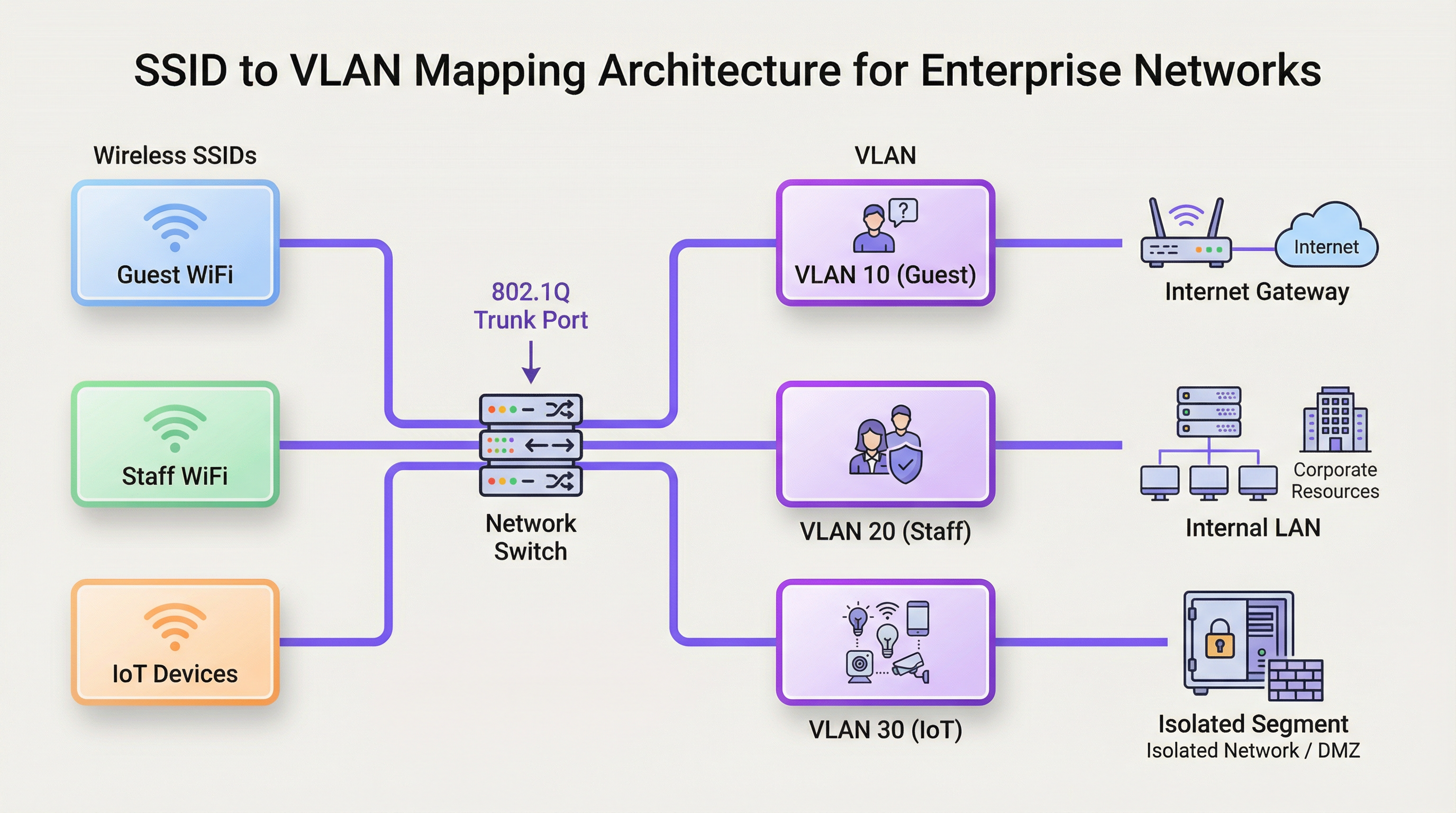
The most common application of VLANs in a WiFi context is mapping a specific Service Set Identifier (SSID)—the public name of a WiFi network—to a dedicated VLAN. This creates a seamless bridge between the wireless and wired network segments. For example:
- SSID:
Guest-WiFi-> VLAN 10 (Internet access only, client isolation enabled) - SSID:
Staff-Internal-> VLAN 20 (Access to corporate servers, printers, and internal applications) - SSID:
POS-Terminals-> VLAN 30 (Highly restricted, access only to payment processing gateways, PCI DSS compliant) - SSID:
IoT-Devices-> VLAN 40 (Isolated segment for building management, HVAC, and security cameras)
This architecture is realised through the configuration of the wireless Access Points (APs) and the network switches. The APs are configured to tag wireless traffic from each SSID with the corresponding VID. The switch ports connected to these APs are configured as trunk ports, allowing them to carry traffic for multiple VLANs simultaneously. When the tagged traffic reaches the switch, the switch forwards it based on the VID, ensuring it remains isolated within its designated broadcast domain.
Broadcast Domains and Network Performance
Without VLANs, a large network is a single broadcast domain. Every broadcast frame (e.g., from an ARP request) is sent to every single device on the network. In a high-density environment with hundreds or thousands of devices, this broadcast traffic can create significant network congestion, a phenomenon known as a "broadcast storm," which severely degrades performance for all users. By segmenting the network into smaller VLANs, broadcasts are confined to their respective VLAN. An ARP request on the Guest WiFi VLAN, for instance, will not be seen by devices on the Staff VLAN, drastically reducing overhead and improving overall network throughput and stability.
Implementation Guide
Implementing a VLAN strategy requires careful planning and configuration of key network hardware. The goal is to create a resilient and scalable architecture that aligns with the organisation's security and operational requirements.
Hardware Requirements
- VLAN-Aware Switches: The core of any VLAN deployment is the network switch. All switches in the data path must be "managed" or "smart" switches that support the IEEE 802.1Q standard. Unmanaged switches cannot process VLAN tags and will either drop the tagged frames or strip the tags, breaking the segmentation.
- VLAN-Aware Wireless Access Points: Enterprise-grade APs are required. These APs must support multiple SSIDs and have the capability to tag traffic from each SSID with a specific VLAN ID.
- Router / Layer 3 Switch: Since VLANs create logically separate networks, a device capable of routing between them is necessary if any inter-VLAN communication is required (e.g., allowing staff devices to access a printer on a different VLAN). This function is typically performed by a core router or a Layer 3 switch. Access Control Lists (ACLs) are configured on this device to strictly control which traffic is allowed to cross VLAN boundaries.
Vendor-Neutral Configuration Steps
- Define Your VLAN Scheme: Plan your VLANs based on user groups, trust levels, and traffic types. Assign a name and a unique VID to each (e.g., VLAN 10 - Guests, VLAN 20 - Staff, VLAN 30 - PCI, VLAN 40 - IoT). Crucially, do not use VLAN 1, the default VLAN, for any production traffic. It is a common security risk.
- Configure VLANs on Switches: Access the management interface of your switches and create the defined VLANs. This typically involves giving each VLAN a name and its corresponding VID.
- Configure Trunk Ports: Identify the switch ports that will connect to your APs and other switches. Configure these ports as "trunk" ports and specify which VLANs are allowed to traverse the trunk. For security, only allow the necessary VLANs, not all of them.
- Configure Access Ports: For ports connecting to end devices that are not VLAN-aware (like a desktop PC), configure them as "access" ports and assign them to a single, untagged VLAN.
- Configure APs: In your wireless controller or AP management interface, create your SSIDs. For each SSID, assign it to the corresponding VLAN ID. This is the step that tags the wireless traffic.
- Configure Inter-VLAN Routing: On your router or Layer 3 switch, create a virtual interface for each VLAN and assign it an IP address. This address will serve as the default gateway for all devices within that VLAN. Implement ACLs to define the rules for traffic flowing between VLANs.
Best Practices
- Isolate High-Risk Traffic: Always place guest networks, IoT devices, and systems subject to compliance (like PCI DSS) in their own dedicated, highly restricted VLANs.
- Use a Dedicated Management VLAN: Network infrastructure devices (switches, APs, controllers) should reside on their own isolated management VLAN to protect them from end-user traffic and potential attacks.
- Implement 802.1X for Dynamic VLAN Assignment: For enhanced security, use the IEEE 802.1X standard with a RADIUS server. This allows for dynamic VLAN assignment on a per-user or per-device basis upon successful authentication, rather than relying solely on the SSID they connect to.
- Prune Unused VLANs from Trunks: For performance and security, configure trunk ports to only allow VLANs that are actively required on that link. This prevents unnecessary broadcast traffic from propagating across the network.
- Align with Security Standards: Ensure your VLAN architecture supports compliance with relevant regulations. For example, PCI DSS Requirement 1.2.1 mandates the segmentation of the cardholder data environment from the rest of the network.
Troubleshooting & Risk Mitigation
- Problem: Devices not getting an IP address.
- Cause: Often a DHCP scope is not configured for the new VLAN, or the router/L3 switch is not correctly configured to relay DHCP requests.
- Mitigation: Ensure a DHCP server has a scope for each VLAN's subnet and that an IP helper-address is configured on the VLAN interface on your router.
- Problem: Devices can connect to WiFi but have no network access.
- Cause: A VLAN tagging mismatch between the AP and the switch trunk port, or the VLAN is not being allowed on a trunk link somewhere in the path.
- Mitigation: Systematically verify the trunk port configuration on every switch in the path from the AP to the core router.
- Risk: VLAN Hopping.
- Cause: An attacker on a lower-security VLAN attempts to gain access to a higher-security one. This can be done via techniques like switch spoofing or double tagging.
- Mitigation: Use modern security best practices: disable Dynamic Trunking Protocol (DTP) on switches, manually configure trunk ports, and ensure your native VLAN on trunks is an unused, dedicated VLAN, not VLAN 1.
ROI & Business Impact
The investment in designing and implementing a proper VLAN architecture yields significant returns. The primary ROI is in risk mitigation. A single breach on an improperly segmented network can expose the entire organisation, leading to catastrophic financial and reputational damage. By isolating critical systems, the attack surface is dramatically reduced. Furthermore, performance improvements from reduced broadcast traffic lead to a better user experience for both guests and staff, which can translate to higher customer satisfaction in a hotel or greater employee productivity in an office. Finally, a well-documented, segmented network simplifies management and troubleshooting, reducing operational overhead and allowing IT teams to respond to issues and deploy new services more efficiently.
Key Terms & Definitions
VLAN (Virtual Local Area Network)
A logical grouping of devices on one or more physical LANs that are configured to communicate as if they were attached to the same wire, when in fact they are located on a number of different LAN segments.
IT teams use VLANs to segment a network for security and performance reasons, such as separating guest WiFi traffic from internal corporate traffic without needing separate physical hardware for each.
IEEE 802.1Q
The networking standard that defines how VLAN information is inserted into Ethernet frames. It specifies the use of a "tag" in the frame header to identify the VLAN membership.
This is the core technology that makes VLANs work across multiple switches from different vendors. When a switch is "802.1Q compliant," it means it can understand and process these VLAN tags.
SSID (Service Set Identifier)
The public name of a wireless local area network (WLAN) that is broadcast into the air by access points. It is the name you see when you search for WiFi networks on your device.
In a VLAN deployment, IT teams map each SSID to a specific VLAN to automatically segment users based on the WiFi network they connect to (e.g., `Guest-WiFi` SSID maps to the Guest VLAN).
Trunk Port
A port on a network switch configured to carry traffic for multiple VLANs simultaneously. It uses the 802.1Q tagging standard to differentiate between the traffic of different VLANs.
Trunk ports are essential for connecting switches to each other and for connecting switches to VLAN-aware access points. They are the multi-lane highways of a VLAN architecture.
Access Port
A port on a network switch that carries traffic for only one VLAN. It is configured to connect to end-user devices like computers or printers that are not VLAN-aware.
This is the most common port configuration. When a device is plugged into an access port, it becomes a member of that port's assigned VLAN without needing any special configuration on the device itself.
Network Segmentation
The practice of splitting a computer network into smaller, isolated subnetworks or segments. Each segment acts as its own small network, and traffic between segments is controlled.
VLANs are the primary tool for achieving network segmentation. This is a critical security practice for reducing the attack surface and a performance tool for limiting broadcast traffic.
Broadcast Domain
A logical division of a computer network in which all nodes can reach each other by broadcast at the data link layer. A broadcast frame sent from one device will be received by all other devices in the same broadcast domain.
By default, a switched network is one large broadcast domain. VLANs break up the network into multiple, smaller broadcast domains, which improves performance by reducing unnecessary broadcast traffic.
RADIUS (Remote Authentication Dial-In User Service)
A client/server protocol that provides centralized Authentication, Authorization, and Accounting (AAA) management for users who connect to a network service.
In advanced WiFi deployments, a RADIUS server is used with 802.1X to authenticate users. Based on the user's credentials, the RADIUS server can tell the switch or AP to dynamically assign the user to a specific VLAN, providing a very high level of security and flexibility.
Case Studies
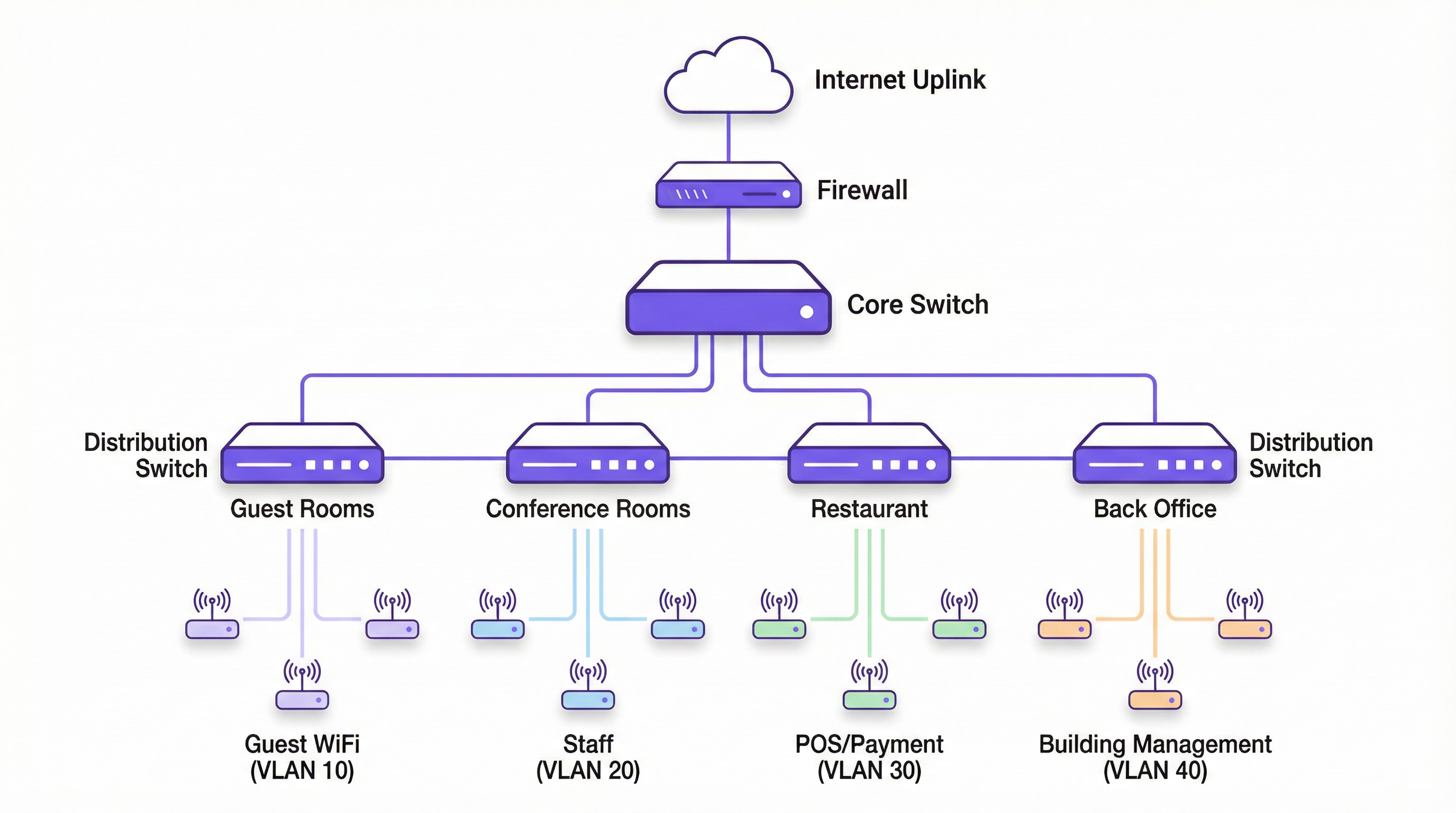
A 200-room luxury hotel needs to replace its aging WiFi network. They require secure, high-performance internet for guests, a separate network for corporate staff, a PCI-compliant network for payment systems at the front desk and restaurant, and a network for building management systems (HVAC, smart locks).
- VLAN Planning: Define four primary VLANs: VLAN 10 (Guests), VLAN 20 (Staff), VLAN 30 (PCI-DSS), and VLAN 40 (Building Management). Also, define VLAN 99 for network management.
- IP Addressing: Assign a unique /24 subnet to each VLAN (e.g., 10.10.10.0/24 for Guests, 10.10.20.0/24 for Staff).
- Hardware Configuration: Deploy managed 802.1Q-capable switches. Configure switch-to-switch ports and AP-connected ports as 802.1Q trunks, allowing VLANs 10, 20, 30, 40, and 99.
- SSID Mapping: Configure four SSIDs on the enterprise APs:
Hotel-Guest-WiFi-> VLAN 10,Hotel-Staff-> VLAN 20 (using WPA3-Enterprise with 802.1X),Hotel-POS-> VLAN 30 (hidden SSID), andHotel-IoT-> VLAN 40. - Routing & Security: Use a Layer 3 core switch for inter-VLAN routing. Create strict ACLs: VLAN 10 can only route to the internet. VLAN 30 can only communicate with the payment gateway IP address. VLAN 20 can access internal servers but not VLAN 30. VLAN 40 is completely isolated.
A retail chain with 50 stores wants to provide free guest WiFi while ensuring the security of their in-store POS systems and inventory scanners, which are also wireless.
- Standardised VLAN Template: Create a corporate-wide VLAN template to be deployed at each store: VLAN 110 (Guest WiFi), VLAN 120 (Corporate/Staff), VLAN 130 (POS), VLAN 140 (Inventory Scanners). Using higher VLAN numbers avoids conflicts with default setups.
- Centralised Management: Use a cloud-managed wireless and switching solution (like Purple's platform) to push the standardised configuration to all 50 stores.
- SSID Configuration:
Retail-Guest-> VLAN 110 (with client isolation and a captive portal for marketing).Retail-Staff-> VLAN 120 (WPA3-Enterprise).Retail-POS-> VLAN 130 (hidden SSID, MAC filtering).Retail-Inventory-> VLAN 140 (WPA3-Enterprise). - Firewall Policy: The on-site firewall at each store acts as the router. It is configured with rules to ensure VLAN 110 is internet-only. VLAN 130 traffic is restricted to the payment processor. VLAN 120 and 140 can communicate with the central corporate data centre over a VPN but are blocked from accessing the guest or POS VLANs directly.
Scenario Analysis
Q1. A conference centre is hosting a major tech event with 5,000 attendees, 200 event staff, and a dedicated press corps. How would you structure the VLANs and SSIDs to ensure a secure and performant network experience for all groups?
💡 Hint:Consider the different bandwidth, access, and security requirements for each group. Think about traffic density and potential interference.
Show Recommended Approach
- VLANs: Create at least three primary VLANs: VLAN 100 (Attendees), VLAN 200 (Staff), VLAN 300 (Press).
- SSIDs:
Event-Guest(VLAN 100) with a captive portal for registration and aggressive bandwidth limiting.Event-Staff(VLAN 200) with WPA3-Enterprise and access to production servers.Event-Press(VLAN 300) with higher bandwidth allocation and less restrictive filtering to allow for media uploads. - Network Design: Use a high-density AP deployment. Isolate the VLANs and implement strict inter-VLAN routing rules. The Attendee VLAN should be internet-only with client isolation enabled to prevent peer-to-peer attacks.
Q2. Your organisation has implemented VLANs, but users on the Staff VLAN (VLAN 20) are complaining of slow performance. The Guest VLAN (VLAN 10) seems unaffected. What are the first three things you would investigate?
💡 Hint:Think about the path traffic takes and what could cause congestion specific to one VLAN.
Show Recommended Approach
- Broadcast Traffic: Check for a broadcast storm within VLAN 20. A misconfigured device or a network loop affecting only that VLAN could be flooding it with traffic. Use a packet analyser to inspect traffic on a VLAN 20 access port.
- Uplink Saturation: Check the utilisation of the trunk links carrying VLAN 20 traffic. It's possible that staff activities (e.g., large file transfers to a server) are saturating the uplink, while guest traffic (mostly internet-bound) uses a different path or is shaped differently.
- DHCP/DNS Issues: Verify that the DHCP server for the VLAN 20 subnet is responsive and has available leases. Check the DNS servers assigned to VLAN 20 clients for latency or resolution failures. A problem with these core services can manifest as slow network performance.
Q3. A new security audit requires that all payment terminals be on a network segment that is completely isolated and compliant with PCI DSS. The terminals are currently connected to the same switches as regular staff computers. What is the most cost-effective way to achieve this?
💡 Hint:How can you achieve logical isolation without buying an entire new set of physical hardware?
Show Recommended Approach
The most cost-effective solution is to create a new, dedicated PCI VLAN (e.g., VLAN 30). Assign the switch ports connected to the payment terminals as access ports for VLAN 30. Then, at the router or Layer 3 switch, create a strict firewall rule (ACL) that only allows traffic from the VLAN 30 subnet to communicate with the specific IP addresses of the payment processor, and block all other traffic, including all inter-VLAN traffic. This logically isolates the terminals on the existing hardware, meeting the core requirement of PCI DSS segmentation without capital expenditure on new switches.
Key Takeaways
- ✓VLANs logically segment a physical network into multiple isolated broadcast domains.
- ✓Map SSIDs to specific VLANs to automatically enforce security policies for different user groups (e.g., Guest vs. Staff).
- ✓Use 802.1Q compliant switches and APs to implement a VLAN architecture.
- ✓Isolating guest, corporate, and sensitive (e.g., PCI) traffic into separate VLANs is critical for security and compliance.
- ✓VLANs improve network performance by reducing the size of broadcast domains and mitigating broadcast storms.
- ✓Always use a dedicated, unused VLAN for management and for the native VLAN on trunk ports; avoid using the default VLAN 1.
- ✓For maximum security, combine VLANs with 802.1X and a RADIUS server for dynamic, per-user VLAN assignment.




