

Access Point Firmware Management Best Practices
This guide provides an authoritative reference on Access Point (AP) firmware management for enterprise environments. It details why a strategic approach to firmware is critical for security, performance, and compliance, offering actionable best practices for IT leaders to implement robust, scalable update processes in venues like hotels, retail chains, and stadiums.
🎧 Listen to this Guide
View Transcript

Executive Summary
For the modern enterprise, WiFi is no longer a simple amenity; it is the central nervous system for customer engagement, operational efficiency, and data analytics. The firmware running on the access points (APs) that power this ecosystem is a foundational layer that dictates its security posture, performance capabilities, and overall reliability. Neglecting access point firmware management is a significant source of business risk, introducing vulnerabilities that can be exploited for data breaches, causing network instability that disrupts operations, and preventing the adoption of new, efficiency-boosting wireless standards. A proactive, strategic approach to firmware management is therefore not merely an IT maintenance task, but a crucial business continuity function. This guide provides a vendor-neutral framework for IT managers, network architects, and technology directors to design and implement a scalable firmware management strategy. It covers the technical imperatives, step-by-step implementation processes, and the business case for investing in a structured update lifecycle, moving from a reactive, ad-hoc model to a predictable, automated, and risk-aware methodology that protects the network and maximizes its return on investment (ROI).
Technical Deep-Dive
Access point firmware is the embedded software that governs the hardware's operation, from radio frequency (RF) modulation to handling security authentication. Its management is a multi-faceted discipline impacting three core pillars of network health: security, performance, and compliance.
Security Posture: Firmware is a primary target for threat actors seeking to compromise networks. Vulnerabilities, catalogued as Common Vulnerabilities and Exposures (CVEs), are regularly discovered in AP firmware. Failure to apply patches promptly leaves the network exposed to exploits ranging from denial-of-service (DoS) attacks to full network takeover. An effective AP firmware update strategy is the first line of defense, ensuring that security patches are tested and deployed in a timely manner. Furthermore, modern security standards like WPA3 are introduced via firmware updates, providing enhanced protection against password guessing attempts and strengthening user privacy with individualized data encryption. Without regular updates, networks remain stuck on legacy protocols, failing to meet modern security expectations.
Performance and Reliability: WiFi technology is in a constant state of evolution, with new IEEE standards like 802.11ax (Wi-Fi 6) and 802.11be (Wi-Fi 7) offering dramatic improvements in throughput, client capacity, and spectral efficiency. These benefits are unlocked directly through firmware updates. Vendors continuously refine their code to optimize radio resource management, improve client roaming behavior, and squash bugs that cause intermittent connectivity drops or performance degradation. A network running on outdated firmware is not operating at its full potential, leading to a poor user experience, reduced operational efficiency, and a lower return on hardware investment.
Compliance and Feature Enablement: For many organizations, regulatory compliance is non-negotiable. Standards like the Payment Card Industry Data Security Standard (PCI DSS) mandate secure network configurations and timely patching of security vulnerabilities. Similarly, the General Data Protection Regulation (GDPR) requires robust security measures to protect personal data. A documented and consistent firmware management process is essential for demonstrating compliance and avoiding significant financial penalties. Beyond compliance, firmware updates often enable new features within a network management platform, such as advanced analytics, location services, or IoT integration, which can be leveraged to create new business value.
Implementation Guide
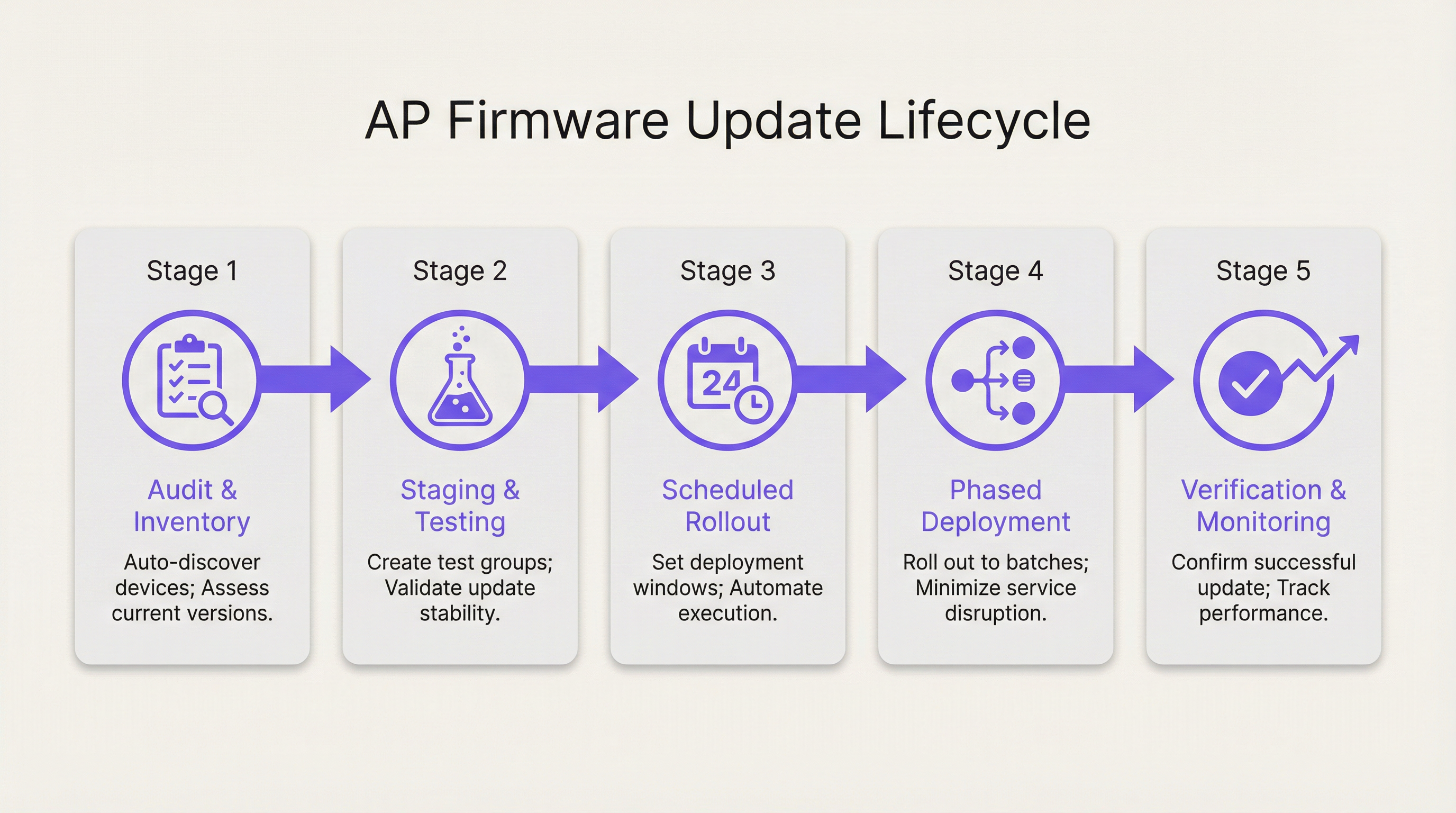
Transitioning to a structured firmware management strategy involves a clear, repeatable process. The following steps provide a vendor-neutral blueprint for deploying updates at scale while minimizing risk and service disruption.
Step 1: Discovery, Inventory, and Grouping Before any updates can be performed, a complete and accurate inventory of all access points on the network is required. This should include the hardware model, current firmware version, and physical location or assigned venue area. Modern network management platforms can automate this discovery process. Once inventoried, APs should be organized into logical groups based on risk profile, physical area, and hardware model. For example, a hotel might have groups for 'Guest Rooms - Floor 1', 'Lobby & Public Areas', 'Conference Center', and 'Back of House'. This grouping is fundamental to enabling phased rollouts.
Step 2: Staging and Canary Testing The most critical step in mitigating risk is to test new firmware in a controlled, non-production or low-impact environment. Create a 'Canary' group consisting of a small number of representative APs. This group should ideally include at least one of each AP model in your fleet and be located in an area where you can closely monitor its behavior and solicit feedback from a small group of users. Deploy the new firmware exclusively to this canary group and monitor its stability, performance, and client compatibility for a predefined period (e.g., 48-72 hours). A successful canary test provides the confidence needed to proceed with a wider deployment.
Step 3: Scheduling and Phased Rollouts Never update an entire network simultaneously. Leverage the groups defined in Step 1 to build a phased rollout schedule. Begin with the lowest-risk groups, such as back-of-house or administrative areas. Schedule the updates during periods of minimal network activity (e.g., 2:00 AM - 4:00 AM) to minimize user disruption. A typical phased rollout schedule might look like this:
- Phase 1: Back of House, IT Department (10% of APs)
- Phase 2: Guest Rooms - Low Occupancy Floors (30% of APs)
- Phase 3: Guest Rooms - High Occupancy Floors (30% of APs)
- Phase 4: Public Areas, Lobbies, Restaurants (20% of APs)
- Phase 5: Conference Center, Ballrooms (10% of APs)
Allow a monitoring period between each phase to verify success and ensure no new issues have been introduced.
Step 4: Verification, Monitoring, and Rollback After each deployment phase, actively monitor key performance indicators (KPIs) for the updated APs. This includes client connection counts, throughput, latency, and error rates. Compare these metrics against the pre-update baseline. Crucially, ensure you have a simple, automated rollback plan. If a significant issue is detected, you must be able to revert the affected group of APs to the previous stable firmware version with a single action. This is a critical safety net that prevents localized issues from escalating into major network-wide outages.
Best Practices
Adhering to WiFi firmware best practices elevates management from a reactive chore to a strategic advantage.
- Establish a Firmware Policy: Document a formal policy that defines the process for testing, scheduling, and deploying firmware updates. This should include roles and responsibilities, risk assessment criteria, and communication protocols.
- Use a Centralized Management Platform: Managing firmware across hundreds or thousands of APs is not feasible without a centralized platform that provides inventory, scheduling, automation, and monitoring capabilities.
- Prioritize Security Patches: Not all updates are created equal. Critical security vulnerabilities should trigger an accelerated deployment process. Your policy should define a Service Level Agreement (SLA) for deploying critical patches (e.g., within 72 hours of a successful canary test).
- Read the Release Notes: Always review the firmware release notes provided by the vendor before deployment. They contain critical information about bug fixes, new features, known issues, and potential compatibility problems.
- Maintain a Rollback Plan: As emphasized in the implementation guide, a tested and automated rollback capability is non-negotiable. It is the single most important tool for risk mitigation.
Troubleshooting & Risk Mitigation
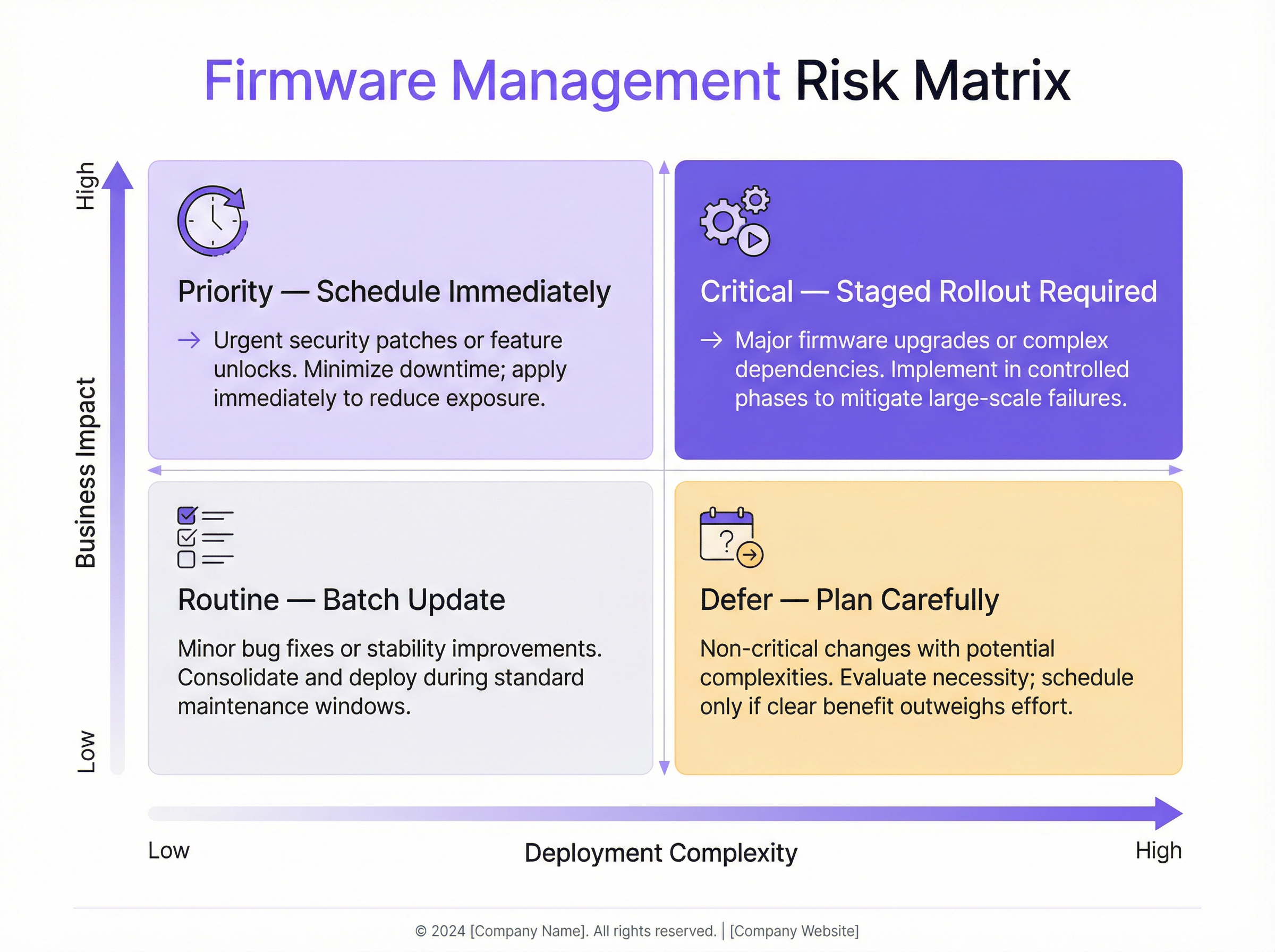
Common failure modes in firmware management often stem from a lack of process. The primary risk is deploying a buggy firmware version that causes widespread service disruption. This can manifest as clients being unable to connect, poor performance, or even APs going offline entirely. The mitigation strategy is a robust testing and phased rollout process, as described above. Another common issue is firmware incompatibility between different AP models or with backend systems like RADIUS servers. Thorough testing with the canary group helps identify these issues before they impact the production network. The risk matrix below helps in prioritizing update efforts based on business impact and deployment complexity.
ROI & Business Impact
The investment in a structured firmware management process yields a significant return. The primary ROI is risk reduction. The cost of a single data breach or major network outage—in terms of financial penalties, reputational damage, and lost revenue—far exceeds the operational cost of proactive management. Secondly, there is a clear ROI in performance. By keeping firmware current, the network operates at its peak capability, enhancing the customer experience and improving employee productivity. A stable, high-performing WiFi network is a key differentiator for hotels, a driver of sales in retail, and an essential service in modern venues. Finally, automation drives operational efficiency. By automating the discovery, scheduling, and deployment process, IT teams can free up valuable time to focus on strategic initiatives rather than manual, repetitive maintenance tasks.
Key Terms & Definitions
Firmware
The permanent software programmed into a hardware device's read-only memory that provides low-level control for the device's specific hardware.
For an access point, the firmware is its operating system. IT teams interact with it during updates that patch security holes, improve performance, or add new features.
Staged Rollout
A method of deploying an update in phases to subsets of devices, rather than all at once, to minimize the potential impact of any unforeseen issues.
Instead of pushing a firmware update to all 1,000 APs in a stadium at once, an IT manager would deploy it to one section, then another, monitoring stability at each stage.
Canary Testing
A testing strategy where a new firmware version is deployed to a small, representative group of devices (the 'canaries') in the production environment to gauge its performance and stability before a wider rollout.
Before a national retail chain updates thousands of APs, the IT team first deploys the firmware to five test stores to ensure it doesn't interfere with critical systems like payment terminals.
Rollback Plan
A documented and preferably automated procedure to revert devices to their previous, stable firmware version in the event that a new update causes critical problems.
If a firmware update causes WiFi outages in a hotel's conference center during an event, the network architect uses the one-click rollback feature to immediately restore the previous stable version and get services back online.
WPA3 (Wi-Fi Protected Access 3)
The latest generation of WiFi security protocol, offering enhanced security against password-guessing attempts and providing more robust encryption for public networks.
To comply with new corporate security policies, a CTO mandates that all company APs must be updated to a firmware version that supports WPA3 to protect sensitive data.
PCI DSS (Payment Card Industry Data Security Standard)
A set of security standards designed to ensure that all companies that accept, process, store or transmit credit card information maintain a secure environment.
A retail venue operator must demonstrate to auditors that all network devices, including WiFi access points, have the latest security patches applied as part of their PCI DSS compliance.
Scheduled Firmware Updates
The practice of planning and automating firmware deployments to occur during specific, low-traffic maintenance windows to minimize disruption to users and business operations.
An IT manager for a 24/7 hospital schedules non-critical AP firmware updates to occur on a rolling basis between 2:00 AM and 4:00 AM, ensuring patient care systems are not impacted.
Zero-Day Vulnerability
A security flaw in software or hardware that is unknown to the vendor and for which no official patch or update has been released.
When a zero-day vulnerability for a popular AP model is announced, a network architect with a mature firmware management process can quickly test and deploy an emergency patch from the vendor within hours, while others may take weeks, leaving their networks exposed.
Case Studies
A 500-room luxury hotel with three restaurants and a large conference center needs to deploy a critical security patch for their 400 access points (a mix of Cisco and Meraki hardware) with minimal disruption to high-paying guests.
- Immediate Action: Use the network management platform to identify all vulnerable APs. 2. Grouping: Create a 'Canary' group with two APs in the IT office and two in a back-of-house area. Create phased deployment groups: 'Back of House' (50 APs), 'Guest Floors 1-5' (150 APs), 'Guest Floors 6-10' (150 APs), and 'Public Areas & Conference' (50 APs). 3. Testing: Deploy the patch to the Canary group immediately. Monitor for 24 hours, checking for any anomalous behavior in client connectivity or performance. 4. Scheduling: Once the canary test is passed, schedule the phased rollout to occur between 1:00 AM and 5:00 AM over two nights. Night 1: Deploy to 'Back of House' and 'Guest Floors 1-5'. Night 2: Deploy to 'Guest Floors 6-10' and 'Public Areas & Conference'. 5. Communication: Notify the hotel operations manager and front desk staff of the planned maintenance window, providing them with a script for any guest inquiries. 6. Verification: After each phase, verify successful patching and monitor network health dashboards. Keep the one-click rollback plan ready.
A retail chain with 150 stores across the country wants to update their AP firmware to enable a new location analytics feature. Each store has 5-10 APs (Aruba). The goal is to complete the rollout within two weeks.
- Pilot Group: Select 5 stores in a single geographic region to act as the pilot group. These stores should represent a mix of high and low traffic locations. 2. Staging: Deploy the new firmware to the pilot group and enable the location analytics feature. Work closely with the regional manager and store managers to validate that Point-of-Sale (POS) systems, staff devices, and guest WiFi are all functioning correctly. Monitor for one week. 3. National Rollout: After a successful pilot, schedule the national rollout. Divide the remaining 145 stores into two waves. Wave 1 (70 stores) and Wave 2 (75 stores). 4. Automated Scheduling: Use the central management platform to schedule the updates for all stores in Wave 1 to occur on a Tuesday night (typically low retail traffic) outside of business hours. 5. Verification & Go/No-Go: On Wednesday morning, verify the success of Wave 1. If KPIs are normal, schedule Wave 2 for the following Tuesday night. If issues are found, halt the rollout, resolve the issue, and restart the process with the affected stores. 6. Rollback: The rollback plan should be configured to revert an entire store's APs to the previous version with a single command from the central dashboard.
Scenario Analysis
Q1. A zero-day vulnerability has been announced for your primary AP vendor. The vendor has released an emergency patch. Your network consists of 2,000 APs across a multi-building university campus. What are your immediate first three steps?
💡 Hint:Think about speed, safety, and scale. How do you balance the urgency to patch with the risk of disrupting a large, active network?
Show Recommended Approach
- Deploy to Canary Group: Immediately deploy the patch to a pre-defined canary group of APs located in non-critical areas like the IT department and a library storage room. 2. Accelerated Testing: Begin an accelerated 4-6 hour monitoring period on the canary group, specifically looking for any signs of instability, client disconnections, or authentication issues. 3. Prepare Phased Rollout: While the test is running, prepare an emergency phased rollout plan that prioritizes high-density, high-risk areas like lecture halls and student dormitories, to be executed the moment the canary test is successfully passed.
Q2. You have just completed a firmware update on a group of 50 APs in a hotel lobby. Post-deployment monitoring shows that while overall throughput is up, about 5% of clients (all older Android models) are experiencing intermittent connection drops. What is your decision?
💡 Hint:Consider the impact versus the benefit. Is the issue contained? What is the safest course of action for the guest experience?
Show Recommended Approach
The correct decision is to immediately execute the rollback plan for that specific group of 50 APs, reverting them to the previous stable firmware. While the performance gain is positive, the negative impact of connection drops for even a small percentage of guests is a more significant issue in a hospitality environment. After rolling back, the issue should be documented and reported to the vendor with the specific client device details. The wider rollout should be halted until a fix is provided.
Q3. Your Director of Operations wants to know the ROI of purchasing a new network management platform that automates firmware updates. How would you frame the business case, focusing on metrics beyond just IT time savings?
💡 Hint:Translate technical benefits into business value. Think about risk, guest satisfaction, and future growth.
Show Recommended Approach
The ROI case should be built on three pillars: 1. Risk Mitigation: Quantify the potential financial impact of a security breach (fines, legal fees) or a major network outage (lost revenue, service credits). The platform is an insurance policy against these catastrophic costs. 2. Enhanced Customer Experience: A stable, high-performing network directly impacts guest satisfaction scores and reviews. By ensuring APs are always running optimal firmware, we are improving a key part of the customer journey, which has a direct link to loyalty and revenue. 3. Future-Proofing and Agility: The platform allows us to quickly adopt new technologies (like WPA3 or Wi-Fi 6) that improve our service offering. It also enables us to respond to security threats in hours, not weeks, making the business more resilient. This agility is a competitive advantage.
Key Takeaways
- ✓Neglecting firmware management is a major source of security, performance, and compliance risk.
- ✓Implement a phased rollout strategy using logical AP groups to minimize the blast radius of any issue.
- ✓Always use a 'canary' test group to validate new firmware in your live environment before a wide deployment.
- ✓An automated, one-click rollback plan is a non-negotiable safety net for risk mitigation.
- ✓Schedule all updates during low-impact maintenance windows to avoid disrupting users and business operations.
- ✓Read vendor release notes carefully and maintain a full inventory of all network access points.
- ✓A centralized management platform is essential for executing a scalable and efficient firmware strategy.




