

Guest WiFi Marketing: The Ultimate Guide to Capturing Leads, Driving Sales, and Enhancing Customer Experience
This guide provides a technical deep-dive into leveraging guest WiFi for marketing, lead capture, and customer analytics. It offers actionable strategies for IT managers and venue operators to transform their WiFi from a cost centre into a powerful, ROI-driven marketing platform, covering architecture, implementation, and compliance.
🎧 Listen to this Guide
View Transcript
Executive Summary
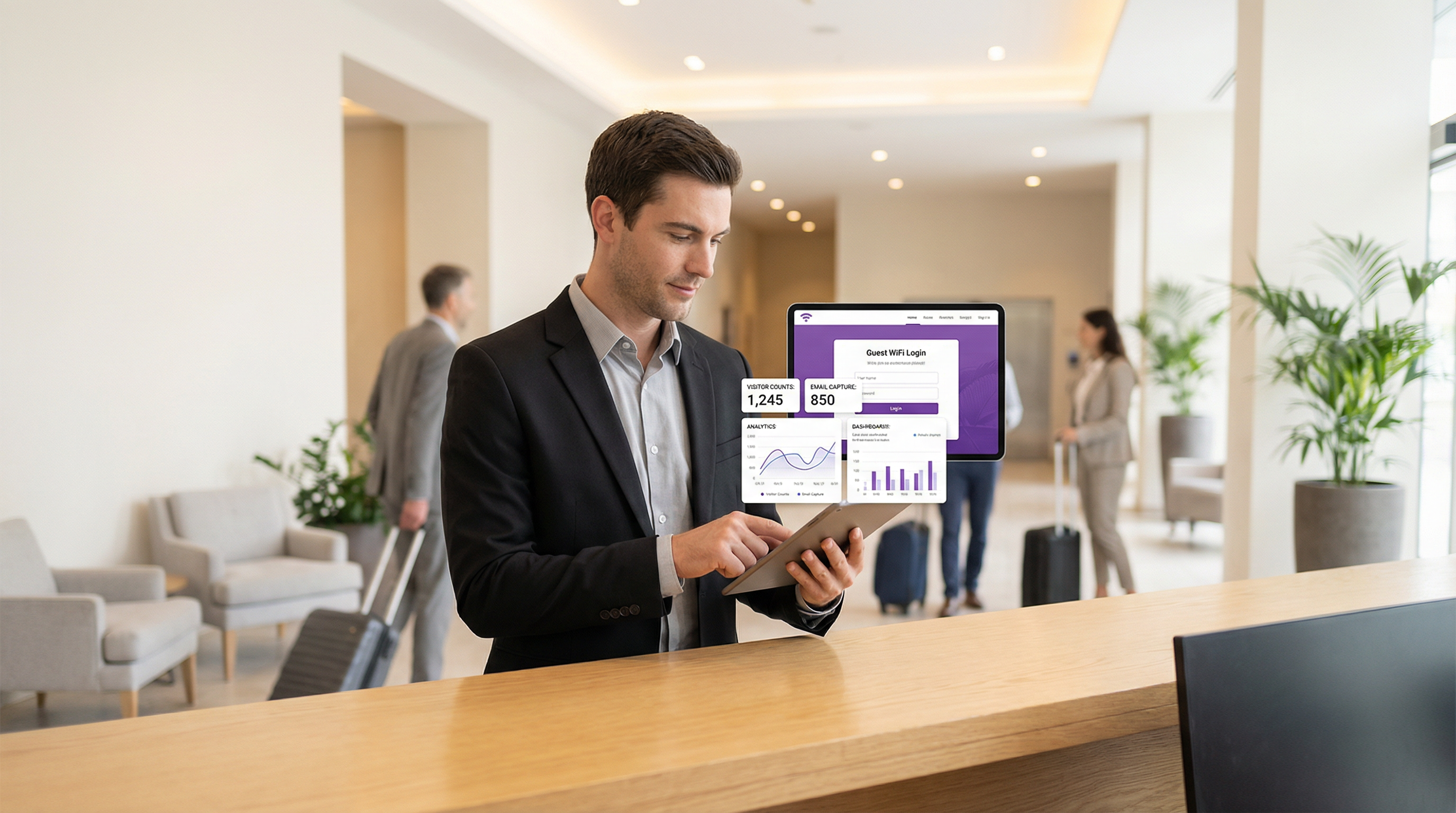
Guest WiFi is no longer a mere amenity; it is a strategic asset capable of delivering substantial business value. For CTOs, IT managers, and venue directors, the imperative is to shift the perception of guest WiFi from a necessary operational expense to a proactive marketing and analytics engine. This guide provides a technical and strategic framework for achieving that transformation. By deploying a marketing-enabled guest WiFi solution, organisations can capture rich, first-party customer data, understand visitor behaviour in physical spaces, and drive targeted marketing campaigns that yield a measurable Return on Investment (ROI). The core components involve a robust network infrastructure, a sophisticated captive portal for data acquisition, and seamless integration with CRM and marketing automation platforms. Critically, this must be executed within a secure and compliant framework, adhering to standards like WPA3 for network security and GDPR for data privacy. The result is a powerful tool that bridges the gap between the digital and physical customer journey, enabling personalised experiences and driving revenue.
Technical Deep-Dive
The architecture of a guest WiFi marketing solution consists of three primary layers: the Network Infrastructure, the Captive Portal & Marketing Platform, and the Integration & Analytics Layer.
Network Infrastructure: The foundation is your existing WiFi hardware—access points (APs), controllers, and gateways. For effective location analytics, AP density must be sufficient to triangulate device positions accurately. Network segmentation is paramount; guest traffic must be isolated from the corporate network using VLANs (Virtual LANs) and strict firewall rules. This mitigates the risk of a security breach originating from the public-facing network. Adherence to IEEE 802.1X for port-based network access control and WPA3 for robust encryption is a baseline requirement for enterprise-grade security.
Captive Portal & Marketing Platform: This is the software layer that sits atop your network hardware. When a user connects to the guest SSID, they are redirected to a captive portal. Unlike a simple password entry page, a marketing portal offers multiple authentication methods:
- Email/Form Fill: The most direct method for lead capture.
- Social Login: (e.g., Google, LinkedIn, Facebook) Provides richer, validated demographic data with user consent.
- Voucher/Access Code: Enables tiered access and time-limited sessions, common in hospitality.
The platform captures this data, links it to the device's MAC address, and stores it in a centralized database. This is where compliance with GDPR and other data privacy regulations is enforced through explicit consent checkboxes and clear links to privacy policies.
- Integration & Analytics Layer: The captured data's true value is unlocked through integration. Using REST APIs and Webhooks, the WiFi marketing platform should feed data in real-time to external systems:
- CRM Systems (Salesforce, HubSpot): To enrich customer profiles with in-venue behaviour.
- Marketing Automation (Mailchimp, Klaviyo): To trigger automated email/SMS campaigns (e.g., a "welcome back" offer for a returning visitor).
- Business Intelligence (BI) Tools: To correlate WiFi analytics with sales data.
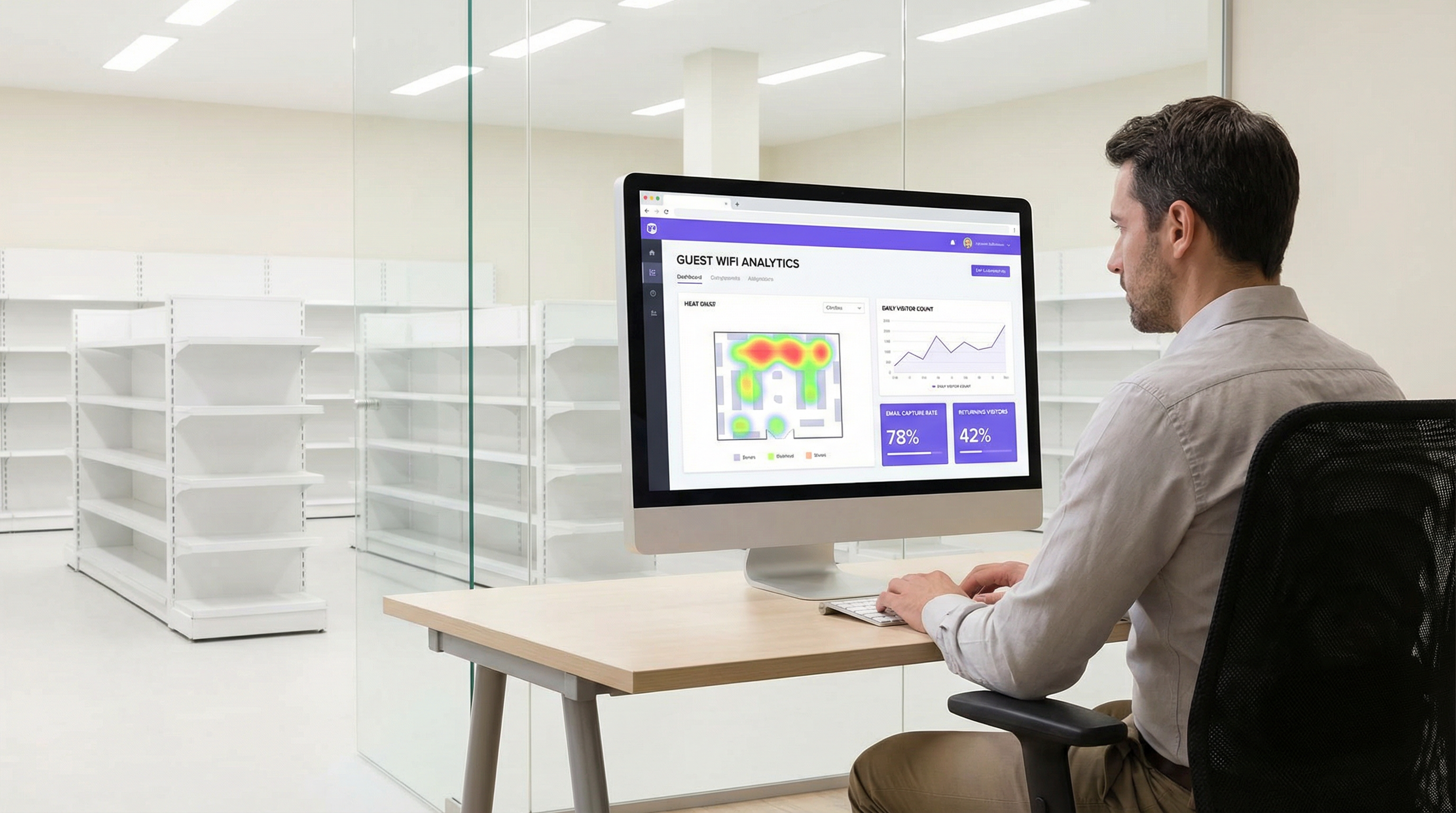
This layer also provides the analytics dashboard, offering insights into footfall, dwell times, visitor loyalty, and location heatmaps.
Implementation Guide
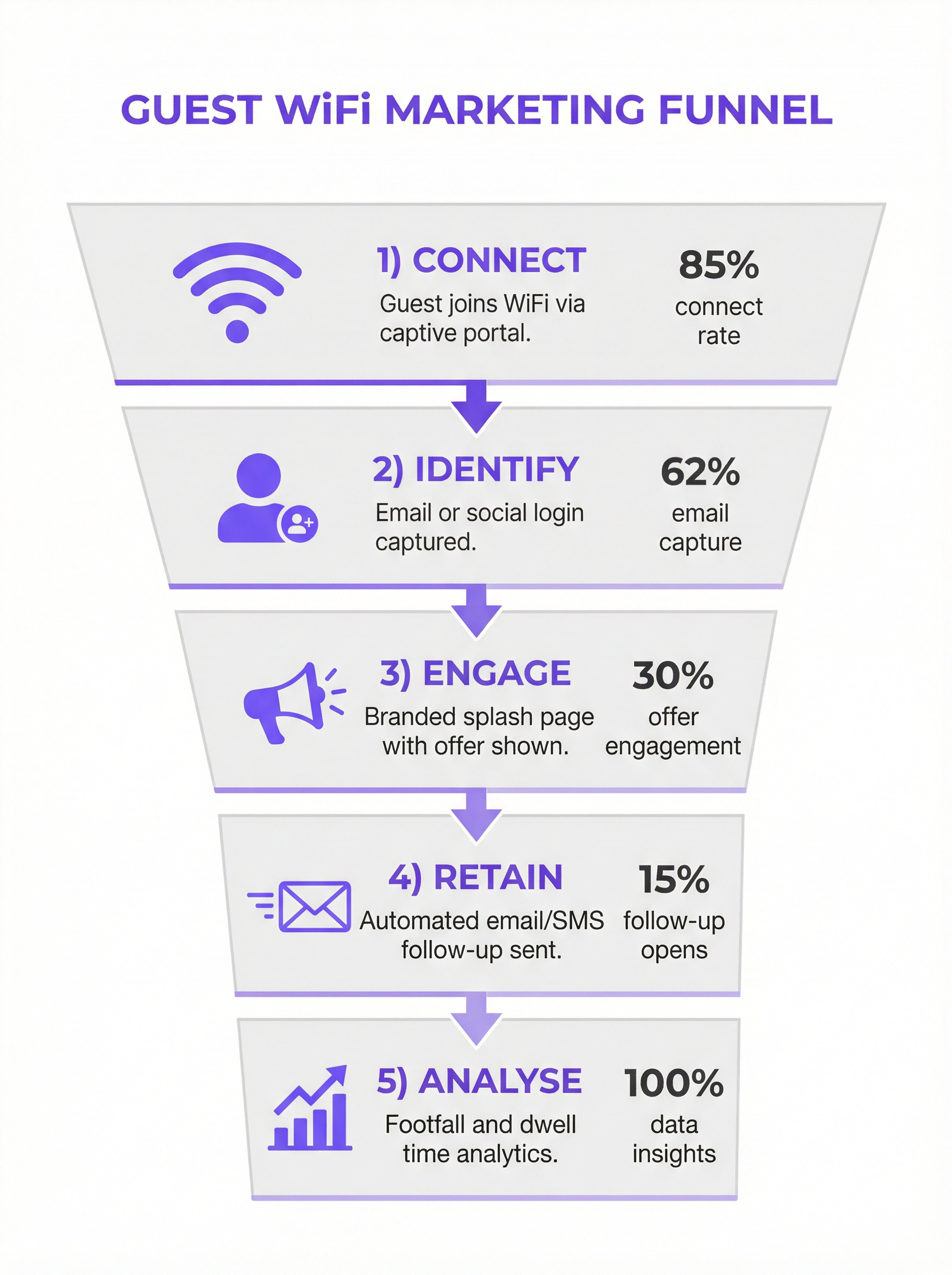
Deploying a guest WiFi marketing solution requires a phased approach:
Define Business Objectives: What are the primary goals? Increase mailing list size by 25%? Drive a 10% uplift in repeat business? Link 5% of in-store sales to a WiFi-based promotion? Clear KPIs are essential.
Infrastructure Audit: Assess your current network. Is AP coverage adequate for location analytics? Does your gateway support integration with third-party captive portal platforms? A thorough site survey is often required.
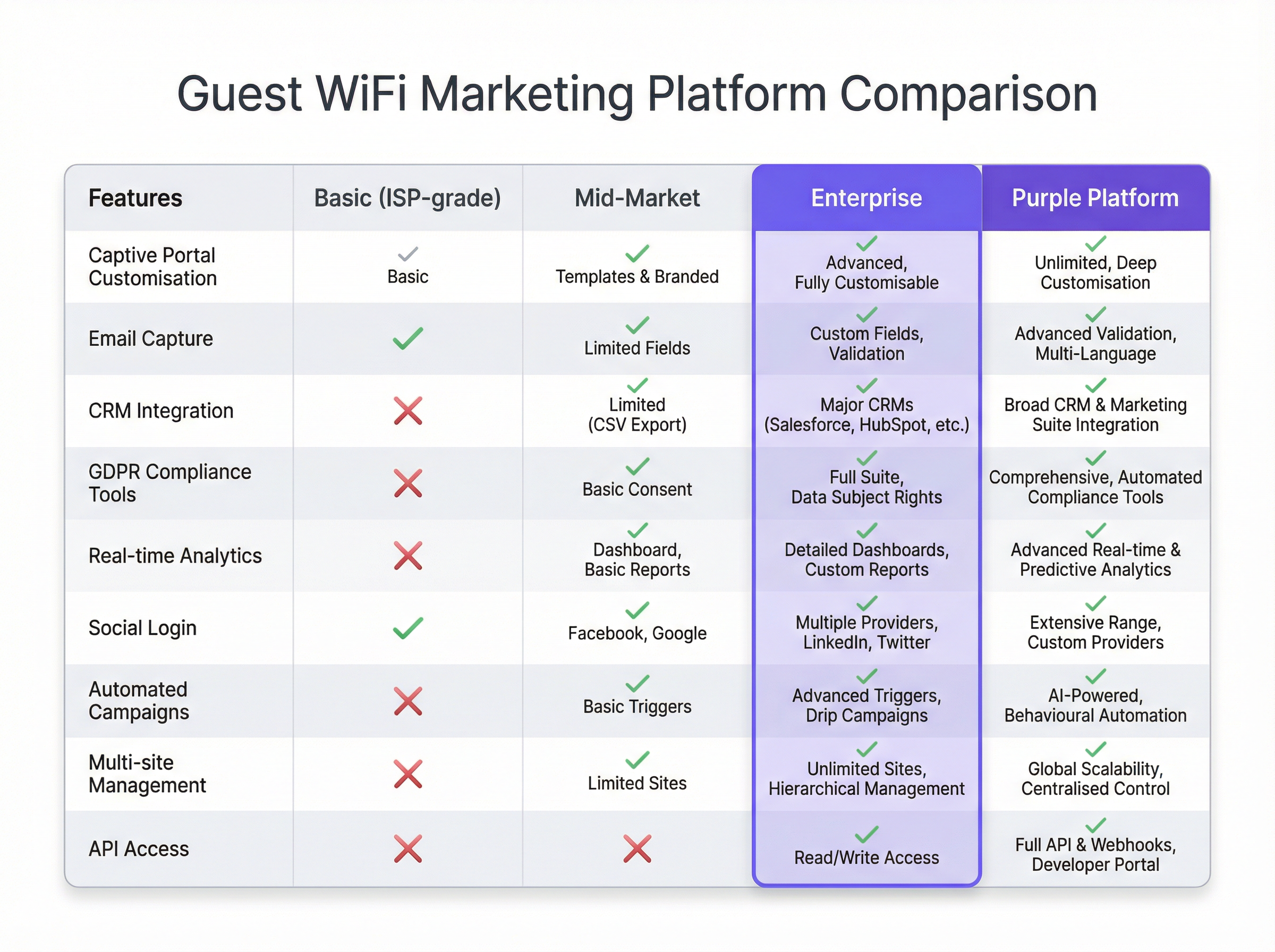
Platform Selection: Choose a platform that meets your objectives. Key considerations include the breadth of CRM integrations, the sophistication of its analytics, and the robustness of its compliance tools. See the comparison chart below for a vendor-neutral overview.
Design the Customer Journey: Map out the user experience from connection to post-visit communication. Design a clean, mobile-first captive portal with a clear value exchange (e.g., "Free WiFi in exchange for your email and a 15% discount voucher").
Configure & Integrate: Configure the captive portal, set up the marketing automation triggers, and establish the API links to your CRM. This is a technical task requiring collaboration between network and marketing teams.
Pilot & Iterate: Launch in a limited number of locations. Monitor connection rates, data capture quality, and campaign performance. Use the insights to refine the approach before a full rollout.
Best Practices
- Prioritise the User Experience: A slow, complex, or unreliable login process will kill adoption. Keep forms short and the connection process seamless.
- Offer a Clear Value Exchange: Users are more willing to share data if they receive tangible value in return. This could be premium speed, a discount, or exclusive content.
- Embed Compliance in the Design: Data privacy is not an afterthought. Ensure every step, from consent on the captive portal to data management in the CRM, is GDPR/CCPA compliant.
- Segment and Personalise: Don't send the same message to every user. Use the data to segment your audience (e.g., first-time vs. repeat visitors) and personalise the communication.
- Secure the Network: Regularly audit your network segmentation and firewall rules. Guest networks are a common attack vector.
Troubleshooting & Risk Mitigation
- Low Connection Rates: Often caused by a poor user experience. Simplify the login process, improve network performance, or increase the visibility of the WiFi service.
- Poor Data Quality: Implement real-time email validation on your captive portal to reduce fake or mistyped entries. Prefer social logins for higher-quality, verified data.
- Compliance Violations: The biggest risk. Work with legal teams to ensure your entire data flow is compliant. Use a platform with built-in, automated compliance tools to manage consent and data subject requests.
- Negative ROI: This occurs when data is collected but not acted upon. Ensure the integration layer is working and that marketing teams are actively using the data to run targeted campaigns.
ROI & Business Impact
The ROI of guest WiFi marketing is measured across several axes:
- Marketing Database Growth: Track the net new contacts acquired via the WiFi platform. Assign a value to each lead based on industry benchmarks.
- Increased Sales: Attribute revenue to WiFi-driven promotions. For example, track the redemption rate of discount codes offered on the captive portal.
- Improved Customer Loyalty: Measure the increase in repeat visits from known customers after the system is implemented.
- Operational Efficiency: Use footfall and dwell time data to optimise staffing levels, store layouts, and opening hours.
By connecting offline behaviour to digital profiles, guest WiFi marketing provides the missing link in the omnichannel customer journey, delivering a clear and measurable impact on the bottom line.
Key Terms & Definitions
Captive Portal
A web page that the user of a public-access network is obliged to view and interact with before access is granted. In a marketing context, it's the primary tool for data capture.
IT teams deploy captive portals as the gateway to the guest network. It's the bridge between the network infrastructure and the marketing platform.
MAC Address (Media Access Control)
A unique identifier assigned to a network interface controller (NIC) for use as a network address in communications within a network segment.
The WiFi marketing platform links a user's captured data (e.g., email) to their device's MAC address to track their presence and behaviour (dwell time, repeat visits) anonymously.
VLAN (Virtual Local Area Network)
A logical grouping of devices in the same broadcast domain. VLANs are usually configured on switches by placing some interfaces into one broadcast domain and some into another.
This is the fundamental mechanism IT teams use to segregate the guest WiFi network from the secure internal corporate network, preventing lateral movement by attackers.
GDPR (General Data Protection Regulation)
A regulation in EU law on data protection and privacy in the European Union and the European Economic Area.
For any organisation collecting data from EU citizens, GDPR compliance is mandatory. IT and marketing teams must ensure the WiFi platform provides tools for explicit consent, data access requests, and the right to be forgotten.
Webhook
An automated message sent from an app when something happens. It has a message—or payload—and is sent to a unique URL—a webhook URL.
This is how a WiFi platform can instantly notify a CRM when a new guest connects. For example, a webhook can trigger an action in Salesforce to create a new lead record the moment a guest logs into the WiFi.
Presence Analytics
The analysis of data from WiFi signals to understand how many people are in a physical space, without identifying them personally.
Venue operators use this data to understand footfall patterns, peak hours, and popular areas, allowing them to optimise staffing, layout, and operations.
Location Analytics
A more granular form of analytics that uses the signal strength from multiple access points to triangulate a device's position within a venue.
This provides heatmaps and path analysis, showing where visitors spend the most time and the routes they take. It requires a higher density of APs than simple presence analytics.
WPA3 (Wi-Fi Protected Access 3)
The latest generation of security for wireless networks. It provides more robust authentication and increased cryptographic strength.
Network architects should specify WPA3-compatible hardware for all new deployments to provide the highest level of security for guest and corporate wireless networks.
Case Studies
A 200-room luxury hotel wants to increase direct bookings and build a guest database for marketing, moving away from reliance on Online Travel Agencies (OTAs). They have a modern Cisco Meraki network infrastructure.
The hotel integrates Purple with their Meraki dashboard. They configure a captive portal offering two tiers of WiFi: a free, standard-speed service requiring email and consent for marketing, and a paid, high-speed premium service. The captured email is sent via webhook to their HubSpot CRM and added to a 'New Guest' workflow. This workflow sends a welcome email with a 10% discount code for their next direct booking. The hotel also uses the presence analytics to understand guest flow in the lobby, bar, and spa, helping them optimise staffing.
A retail chain with 50 stores wants to understand in-store customer behaviour and drive footfall through targeted promotions. They use a mix of Aruba and Ruckus hardware.
The chain deploys a hardware-agnostic platform like Purple across all 50 stores. They use a social login (Facebook/Google) on their captive portal to gather rich demographic data. This data is fed into their central BI tool. They identify that their highest-value customers (those with high repeat visits and long dwell times) are predominantly in the 25-34 age bracket. They then run a targeted Facebook ad campaign aimed at this demographic in the geographic areas around their underperforming stores, promoting a new product line. The WiFi analytics are then used to measure the uplift in footfall from this specific demographic post-campaign.
Scenario Analysis
Q1. A large conference centre is hosting a 3-day tech event with 5,000 attendees. They want to provide WiFi while also giving event sponsors opportunities for lead generation. How would you architect the WiFi solution?
💡 Hint:Consider tiered access and how to provide value to both attendees and sponsors.
Show Recommended Approach
Implement a two-tiered WiFi system. Tier 1 is a free, baseline-speed service for all attendees, with a captive portal that requires only email registration. This builds the centre's own marketing list. Tier 2 is a sponsored, high-speed premium service. Attendees can access it by opting-in to share their details (name, email, company) with a specific sponsor. Each major sponsor gets their own 'branded' access portal. This provides high-quality leads for sponsors and a clear value exchange for attendees (premium speed for data). The network must be robust with high AP density in breakout rooms and the main hall to handle the load.
Q2. A public library wants to offer free WiFi but is concerned about GDPR compliance and data security. They have a limited budget and minimal IT staff. What is the most critical first step in their deployment?
💡 Hint:What is the single most important security measure for any guest network?
Show Recommended Approach
The most critical first step is to ensure complete network segmentation. Using a VLAN, the guest WiFi network must be entirely isolated from the library's internal administrative network. This prevents any possibility of a user on the public network accessing sensitive internal systems, like the library management system or staff computers. Before even considering data capture, this fundamental security measure must be implemented and verified. A simple, reliable firewall rule blocking all traffic between the guest VLAN and the internal VLAN is essential.
Q3. A restaurant chain notices a high connection rate on their guest WiFi but a very low open rate on their marketing emails. What is the likely cause and how would you troubleshoot it?
💡 Hint:Think about the quality of the data being captured at the source.
Show Recommended Approach
The most likely cause is poor data quality, specifically fake or mistyped email addresses being entered on the captive portal. To troubleshoot, first analyse the captured data for obvious fake domains (e.g., test@test.com). The best long-term solution is to implement real-time email validation via an API on the captive portal. This checks if an email address is valid before the user is granted access. An alternative or complementary solution is to incentivise social logins, which provide verified email addresses and richer data, leading to higher engagement.
Key Takeaways
- ✓Guest WiFi can be transformed from a cost centre into a powerful marketing and analytics tool.
- ✓A captive portal is the gateway for capturing valuable first-party customer data with their consent.
- ✓Seamless integration with CRM and marketing platforms is crucial for acting on captured data and proving ROI.
- ✓Network segmentation (using VLANs) is the most critical security measure to protect your corporate network.
- ✓Compliance with data privacy regulations like GDPR is non-negotiable and must be built into the system design.
- ✓A clear value exchange (e.g., a discount for an email) is essential to maximise user adoption and data capture rates.
- ✓WiFi analytics provide unprecedented insight into customer behaviour in physical spaces, bridging the online-offline gap.




