

LAN vs WAN: Understanding the Difference in WiFi Deployments
A technical reference for IT leaders and venue operators on the critical differences between LAN and WAN in enterprise WiFi deployments. This guide provides actionable architectural insights, implementation best practices, and clarifies how understanding this distinction drives ROI for guest WiFi and operational intelligence.
🎧 Listen to this Guide
View Transcript
Executive Summary
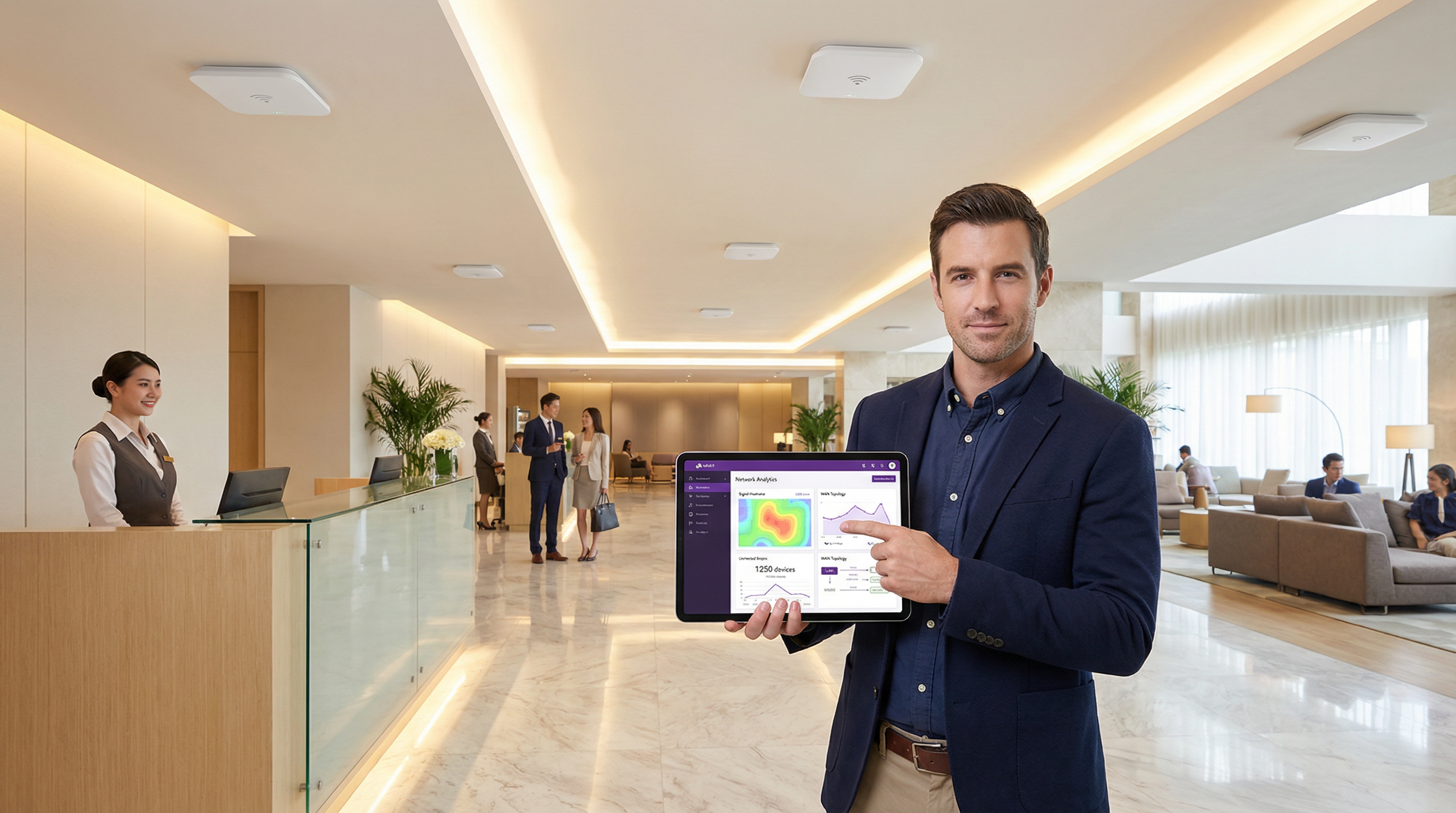
For IT executives and network architects, the distinction between a Local Area Network (LAN) and a Wide Area Network (WAN) is foundational, yet its practical application in large-scale WiFi deployments is often a source of significant complexity and budget overruns. A LAN provides high-speed, low-latency connectivity within a limited physical area—a single hotel, a retail store, a conference floor. A WAN, in contrast, connects multiple LANs over a large geographical distance, enabling a retail chain to link its stores or a hotel group to connect its properties to a central data centre. Misunderstanding this boundary leads to poor network design, resulting in performance bottlenecks, security vulnerabilities, and a compromised user experience. This guide serves as a practical reference, demystifying the core concepts and providing a strategic framework for designing, deploying, and managing enterprise-grade WiFi networks. We will explore the architectural decisions, security considerations under standards like WPA3 and PCI DSS, and the business impact of a well-architected network, contextualising where a WiFi intelligence platform like Purple adds a critical layer of value for driving revenue and understanding customer behaviour.
Technical Deep-Dive
Understanding the LAN/WAN boundary is crucial for effective WiFi network design. The LAN is your internal domain of control, encompassing all on-site hardware, whereas the WAN is the external fabric connecting your sites, typically managed by an Internet Service Provider (ISP) or a telecom carrier.
The Local Area Network (LAN): The On-Site Powerhouse
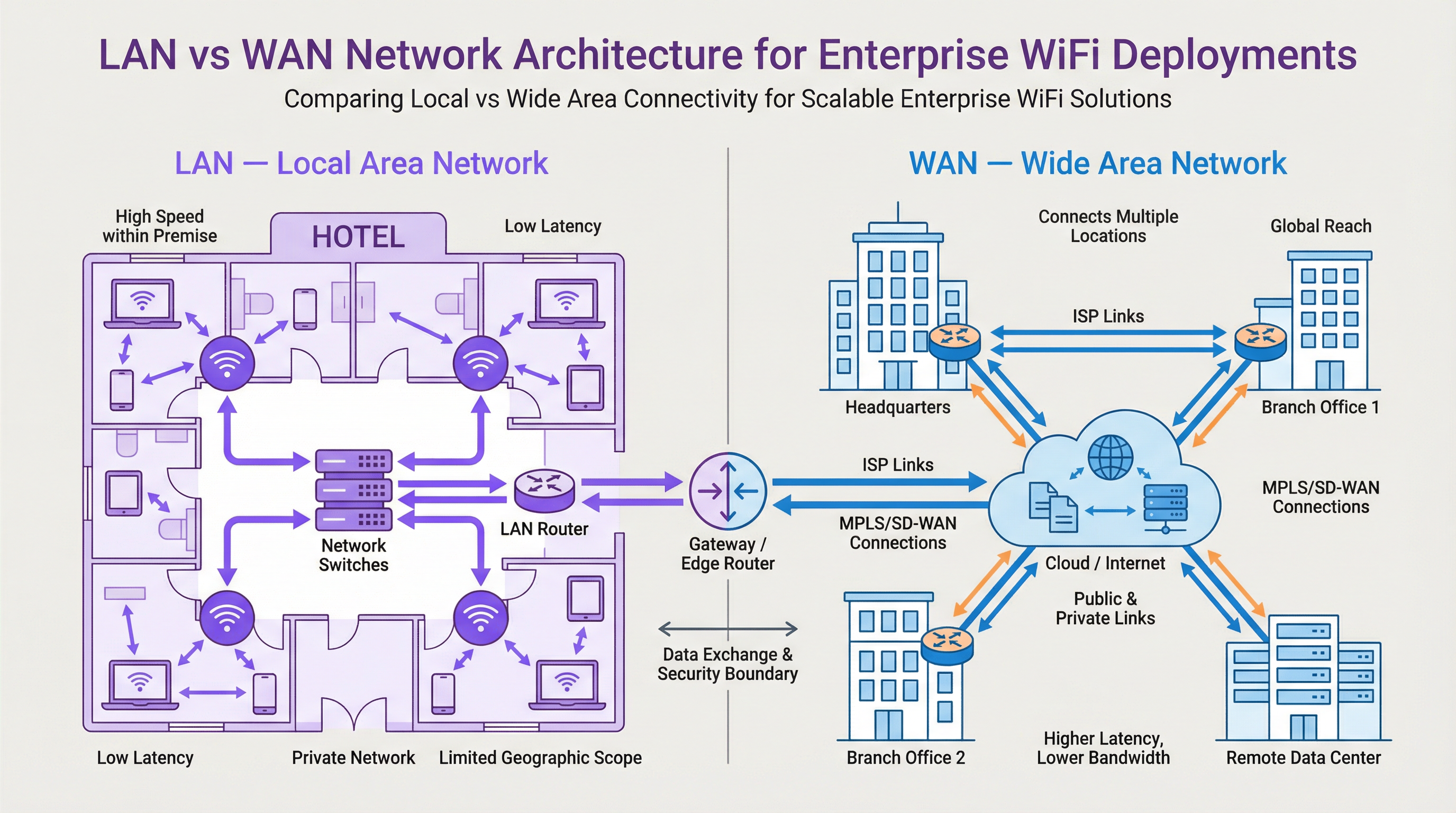
A LAN is a private network confined to a single geographic location, such as an office building, a stadium, or a hotel. Its primary purpose is to facilitate high-speed data exchange between interconnected devices within that perimeter. In a modern WiFi deployment, the LAN is not just about cables; it's a sophisticated ecosystem of components working in concert.
- Components: Key hardware includes Wireless Access Points (APs) that broadcast the WiFi signal (e.g., operating on IEEE 802.11ax/Wi-Fi 6 standards), Network Switches that aggregate traffic from APs and other wired devices, and a central Router or Layer 3 switch that manages traffic flow and directs data to its destination, including to the WAN gateway.
- Performance: LANs are characterized by very high bandwidth (typically 1 Gbps to 10 Gbps or more over Ethernet) and extremely low latency (often sub-millisecond). This is essential for supporting high-density environments like conference centres or applications requiring real-time data, such as point-of-sale (POS) systems in retail.
- Control & Security: As the LAN is privately owned, IT teams have full control over its architecture and security posture. This allows for the implementation of granular access controls using IEEE 802.1X, network segmentation with VLANs to isolate guest traffic from corporate traffic, and robust encryption protocols like WPA3 to protect data in transit.
The Wide Area Network (WAN): Connecting the Enterprise
A WAN interconnects multiple LANs across broad geographical areas, from a few miles to across the globe. The internet itself is the largest WAN, but for enterprises, a WAN typically refers to the private or public links used to connect distributed sites.
- Connectivity: WAN links are procured from third-party service providers and can include various technologies like fiber optic lines, MPLS (Multi-Protocol Label Switching), or increasingly, SD-WAN (Software-Defined WAN). SD-WAN offers a more flexible, cost-effective, and application-aware approach to managing WAN connectivity, allowing IT teams to dynamically route traffic over multiple link types (e.g., MPLS, broadband, 4G/5G) based on application priority.
- Performance: WAN performance is constrained by the cost and availability of service provider links. Bandwidth is significantly lower and more expensive than on the LAN, and latency is much higher due to the physical distances involved. A cross-country link might have a latency of 50-100ms, a stark contrast to the sub-1ms latency on the LAN.
- Security & Management: Securing the WAN involves firewalls, VPNs (Virtual Private Networks), and intrusion detection systems at the network edge. Managing a WAN is complex, as it involves coordinating with multiple carriers and ensuring consistent policy enforcement across all sites. This is another area where SD-WAN provides significant advantages through centralized control and simplified policy orchestration.
Where Purple Sits in the Stack
Purple is an overlay platform that operates on top of your existing LAN and WAN infrastructure. It integrates with the WiFi APs on your LAN to manage the guest user experience through a captive portal. When a guest connects, their authentication and subsequent web traffic are managed by Purple's cloud platform, accessed via your site's WAN connection. Purple then captures anonymized location and presence analytics data, processes it in the cloud, and presents it back to venue operators through a dashboard. This intelligence layer does not replace your LAN or WAN infrastructure but leverages it to unlock powerful insights into visitor behaviour, enabling you to drive loyalty, increase revenue, and improve operational efficiency.
Implementation Guide
- Define Site Requirements: For each location, document the physical area, expected device density, and application performance needs. A hotel requires seamless coverage across rooms and common areas, while a retail store needs to support POS systems, guest WiFi, and staff devices.
- LAN Design & AP Placement: Conduct a wireless site survey to determine the optimal number and placement of APs. Use tools that can model RF propagation for your specific building layout. Ensure your switching infrastructure has sufficient port capacity and Power over Ethernet (PoE) budget to support all APs.
- Network Segmentation Strategy: Implement VLANs to logically separate different traffic types. A standard model includes separate VLANs for: Guest WiFi, Corporate Wireless, IoT devices (e.g., smart thermostats, security cameras), and management traffic.
- WAN Connectivity Procurement: Evaluate WAN options based on site criticality and bandwidth needs. For a flagship retail store, a primary fiber link with a 4G/5G backup via SD-WAN provides high availability. For smaller satellite offices, a single business broadband connection may suffice.
- Edge Security Configuration: Deploy a next-generation firewall (NGFW) at the WAN edge of each LAN. Configure policies to enforce access controls, prevent intrusions, and ensure compliance with standards like PCI DSS if payment card data is handled.
- Integrate Purple: Once the underlying network is stable, integrate your WiFi controller or APs with the Purple cloud platform. This typically involves pointing the captive portal or RADIUS authentication settings to Purple's service endpoints. Test the guest journey thoroughly from connection to authentication and internet access.
Best Practices
- Centralized Management: Use a cloud-based network management platform to configure and monitor your APs, switches, and firewalls across all sites. This simplifies policy updates and provides a single pane of glass for troubleshooting.
- Role-Based Access Control (RBAC): Enforce the principle of least privilege. Use IEEE 802.1X to authenticate users and devices, assigning them to the appropriate VLAN and applying specific access policies based on their role.
- Compliance by Design: When designing your network, build in controls to meet regulatory requirements from the start. For GDPR, this means ensuring guest consent is properly captured at the captive portal. For PCI DSS, it requires strict separation of the cardholder data environment from all other networks, including guest WiFi.
- Regular Audits: Periodically audit your network configuration, firewall rules, and access logs to identify potential security gaps or misconfigurations. Automated tools can help streamline this process.

Troubleshooting & Risk Mitigation
- Common Failure Mode: WAN Link Saturation. A common issue is when guest WiFi traffic saturates the primary WAN link, impacting critical business applications. Mitigation: Implement Quality of Service (QoS) policies on your edge router/firewall to prioritize business-critical traffic (e.g., POS, voice) over guest traffic. Rate-limit guest users to a reasonable bandwidth cap.
- Common Failure Mode: IP Address Exhaustion. In a busy venue, the DHCP scope for the guest VLAN can run out of available IP addresses, preventing new users from connecting. Mitigation: Use a /22 or /21 subnet for your guest VLAN to provide thousands of available addresses. Monitor DHCP scope utilization and set up alerts for when it exceeds 80%.
- Risk: Insecure Guest Network. A poorly configured guest network can be a pivot point for an attacker to access the corporate LAN. Mitigation: Ensure
Key Terms & Definitions
Local Area Network (LAN)
A private computer network covering a small physical area, like a home, office, or a single building in a campus.
This is your on-site network. IT teams have full control over the LAN, making it the domain for high-speed, secure, internal communications and WiFi access.
Wide Area Network (WAN)
A computer network that extends over a large geographical distance, connecting multiple LANs together.
This is how your different sites (e.g., multiple stores or hotels) connect to each other and to the internet. Performance and cost are key considerations, as it relies on third-party carriers.
Access Point (AP)
A hardware device that allows other Wi-Fi devices to connect to a wired network. An AP acts as a central transmitter and receiver of wireless radio signals.
These are the devices that create your WiFi network. Proper placement and configuration of APs are critical for ensuring good coverage and performance.
Router
A network device that forwards data packets between computer networks. Routers perform the traffic directing functions on the internet.
The router is the gateway of your LAN. It connects your internal network to the external WAN (the internet) and makes decisions about where to send traffic.
Switch
A network device that connects devices together on a computer network by using packet switching to receive, process, and forward data to the destination device.
Switches are the backbone of your wired LAN, connecting your APs, servers, and other wired devices together at high speed.
VLAN (Virtual LAN)
A virtual local area network is any broadcast domain that is partitioned and isolated in a computer network at the data link layer (OSI layer 2).
VLANs are a critical security tool. They allow you to create separate, isolated networks on the same physical hardware, for example, to keep guest traffic completely separate from your corporate traffic.
SD-WAN (Software-Defined WAN)
A software-defined wide area network is a virtual WAN architecture that allows enterprises to leverage any combination of transport services – including MPLS, LTE, and broadband internet services – to securely connect users to applications.
For businesses with multiple sites, SD-WAN offers a more intelligent, cost-effective, and resilient way to manage WAN connectivity compared to traditional approaches.
Captive Portal
A web page that the user of a public-access network is obliged to view and interact with before access is granted.
This is the login page guests see when they connect to your WiFi. Purple uses the captive portal to manage authentication, present terms and conditions, and offer marketing opt-ins.
Case Studies
A 200-room luxury hotel wants to upgrade its WiFi to provide a seamless, high-performance experience for guests while securely separating this traffic from its internal property management system (PMS). The hotel group also wants to centralize guest data analytics across its 10 properties.
The solution involves a two-pronged approach. On the LAN, each hotel will deploy a high-density Wi-Fi 6 (802.11ax) network with APs in every room and common area. A core switch aggregates traffic, and VLANs are used to create logically separate networks: VLAN 10 for Guests, VLAN 20 for Staff, VLAN 30 for IoT (smart locks, minibars), and VLAN 40 for the PMS. An on-site firewall inspects all traffic. For the WAN, each hotel is connected to the internet via a primary 1Gbps fiber link and a secondary 5G wireless link, managed by an SD-WAN appliance. The SD-WAN is configured to route Purple guest analytics data and PMS data over the secure, low-latency fiber link, while general guest internet traffic can be backhauled or routed directly to the internet at the local site. Purple is integrated with the on-site WiFi controller, using RADIUS to authenticate guests against its cloud platform, allowing the hotel group to view analytics for all 10 properties in a single dashboard.
A retail chain with 50 stores across the UK needs to deploy guest WiFi to drive its loyalty app adoption. The stores have limited on-site IT staff and the company needs to ensure a consistent, secure deployment across all locations.
A template-based, zero-touch provisioning model is the optimal solution. For the LAN, each store gets a standardized set of hardware: 5-10 APs and a single integrated security gateway appliance that combines routing, switching, and firewalling. The configuration is standardized via a cloud management platform. For the WAN, a dual-broadband solution at each site, managed by an SD-WAN overlay, provides a cost-effective and resilient connection. The key is the centralized configuration: a single network template is created in the cloud controller. This template defines the SSIDs, VLANs (Guest, Corporate, POS), firewall rules, and QoS policies. When a new store is brought online, a local staff member simply plugs in the gateway, which then automatically downloads its entire configuration from the cloud. Purple is integrated at the template level, so every store automatically uses the same branded captive portal, which prominently features a link to download the loyalty app.
Scenario Analysis
Q1. You are designing the network for a new 5-floor conference centre. The venue will host multiple events simultaneously, with up to 1,000 concurrent users per floor. How would you structure your VLAN and IP addressing strategy for the guest network?
💡 Hint:Consider the number of devices, broadcast traffic, and the need for isolation between different events.
Show Recommended Approach
A single, large VLAN for all guests would be inefficient and create a massive broadcast domain. A better approach is to use a separate VLAN for each floor (e.g., VLAN 101 for Floor 1, VLAN 102 for Floor 2). Each VLAN would be assigned a /21 subnet (e.g., 10.101.0.0/21), providing 2,046 usable IP addresses, which is more than sufficient for 1,000 users. To provide isolation between different events on the same floor, you could use Private VLANs or simply rely on AP client isolation. All guest VLANs would be routed through a common firewall policy that strictly limits their access to the internet only.
Q2. A retail chain is experiencing slow point-of-sale (POS) transaction times at its stores during peak hours. They have a single 100 Mbps broadband connection at each site, which is shared by the POS terminals, staff devices, and the free guest WiFi. What is the most likely cause and what immediate steps should you take?
💡 Hint:Think about traffic contention on the WAN link.
Show Recommended Approach
The most likely cause is WAN link saturation, where the high volume of guest WiFi traffic is consuming all available bandwidth, leaving little for the latency-sensitive POS transactions. The immediate steps are: 1) Implement a Quality of Service (QoS) policy on the edge router to guarantee a certain percentage of bandwidth for the POS system's traffic and give it the highest priority. 2) Apply a bandwidth limit (e.g., 5 Mbps per user) to the guest WiFi users to prevent them from monopolizing the connection. A long-term solution would be to add a secondary WAN link and use SD-WAN to route POS traffic over the more reliable link.
Q3. Your company is deploying a guest WiFi solution across 100 stadium venues. The CISO is concerned about the security risks of allowing 50,000+ unknown devices onto the network per event. What key security control must be enabled on the wireless infrastructure to mitigate a significant portion of this risk?
💡 Hint:How do you prevent connected guests from attacking each other or other devices on the same network?
Show Recommended Approach
The single most critical security control in this high-density, public-facing scenario is Client Isolation (also known as AP Isolation or Port Isolation). When enabled on the guest SSID, this feature prevents wireless clients from communicating directly with each other at Layer 2. Each device can only communicate with the gateway (the router), not with any other device on the same WiFi network. This effectively neutralizes the risk of a compromised guest device attempting to scan, attack, or infect other users' devices, dramatically reducing the internal attack surface of the guest network.
Key Takeaways
- ✓A LAN is your private, on-site network (a building); a WAN connects your sites together (a highway).
- ✓Effective WiFi design depends on understanding the LAN/WAN boundary to manage performance and cost.
- ✓Use VLANs to segment traffic for security (e.g., Guest vs. Corporate).
- ✓Use QoS on your WAN link to prioritize critical business traffic over guest browsing.
- ✓SD-WAN provides a flexible and resilient way to manage connectivity for multi-site businesses.
- ✓Client Isolation is a critical security feature for any public-facing guest WiFi network.
- ✓WiFi analytics platforms like Purple are an overlay service that leverages your LAN/WAN to provide business intelligence.




