

MAC Address Randomization: A Deep Dive into Privacy Enhancement and its Impact on Network Management
This guide provides a comprehensive technical overview of MAC address randomization, a critical privacy feature now default on iOS, Android, and Windows devices. It details the direct impact on enterprise WiFi network management — from broken MAC-based authentication and inflated analytics to security monitoring gaps — and offers actionable, identity-driven strategies for IT leaders in hospitality, retail, stadiums, and public-sector organisations to adapt their infrastructure. By shifting from hardware-based to credential-based network management, organisations can simultaneously enhance security, achieve privacy compliance, and unlock richer customer insights.
🎧 Listen to this Guide
View Transcript

Executive Summary
MAC address randomization is a privacy-enhancing technology now enabled by default on iOS 14+, Android 10+, and Windows 10, designed to prevent long-term tracking of devices across WiFi networks. By broadcasting a temporary, randomized hardware address instead of the permanent factory-assigned identifier, modern devices protect user privacy at the cost of disrupting legacy network management workflows. For enterprise operators in hospitality, retail, events, and the public sector, this creates three immediate operational challenges: MAC-based access control systems fail to recognise returning devices; security monitoring logs become harder to interpret as devices change identities; and WiFi analytics platforms report severely inflated unique visitor counts, rendering footfall and dwell-time data unreliable. The strategic response is not to fight this technology but to embrace a more sophisticated, identity-centric architecture. Deploying IEEE 802.1X with WPA3-Enterprise for corporate networks, and modern captive portals with identity integration for guest networks, resolves all three challenges simultaneously. This guide provides the technical depth and practical implementation guidance needed to plan and execute that transition this quarter.
Technical Deep-Dive
Understanding MAC address randomization requires a clear view of its purpose, mechanics, and the standards that govern its implementation. Its primary goal is to reduce the ability of network observers to build a long-term profile of a user's movements and habits by linking their activity to a single, persistent device identifier.
The Mechanics of Randomization
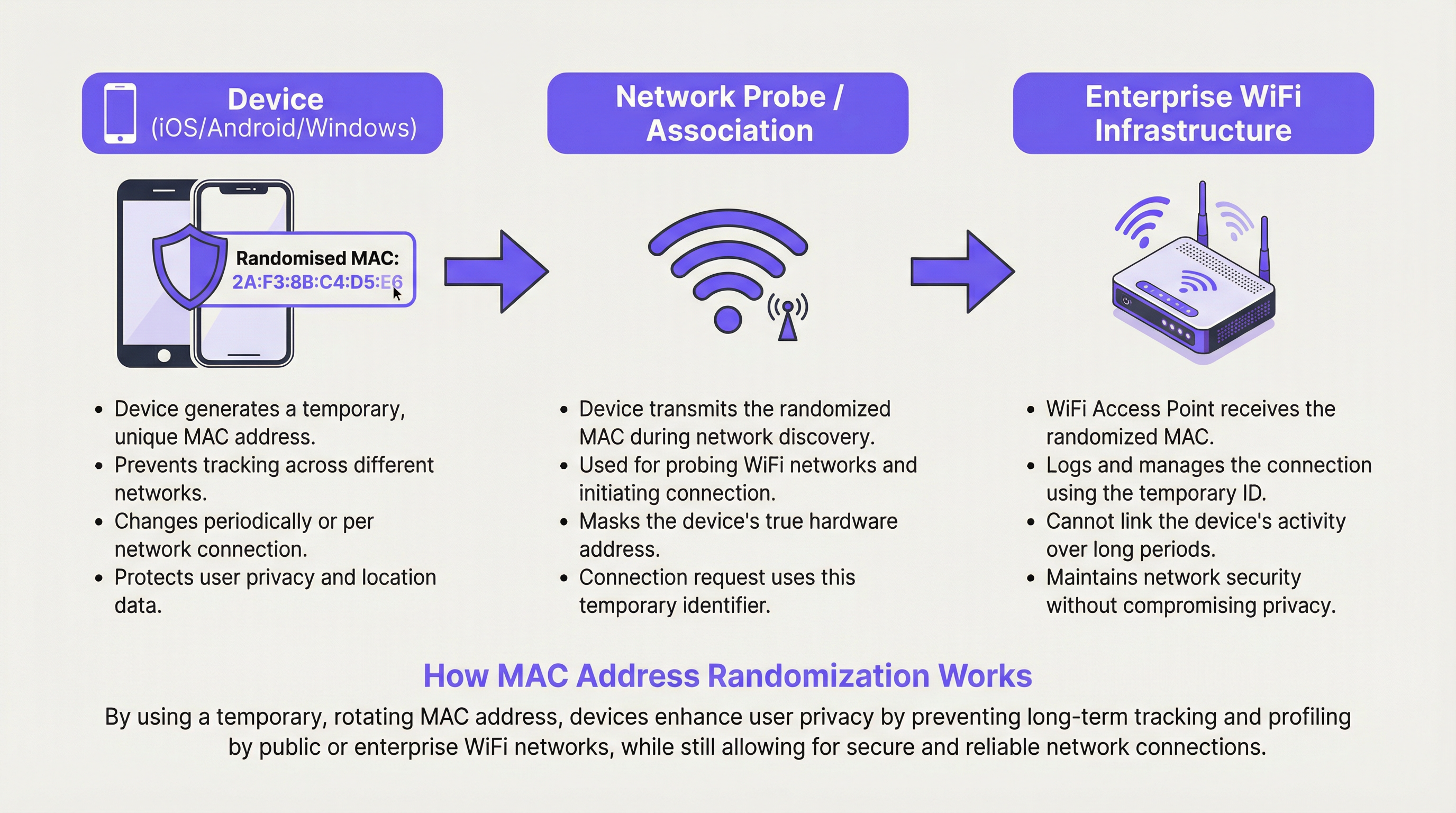
A device's operating system generates a randomized MAC address in one of two scenarios: either for scanning for nearby networks (probe requests) or for connecting to a specific network (association). The implementation varies between operating systems, but the general principle is consistent across all major platforms.
During network discovery, the device sends out probe requests using a temporary address. When it decides to connect to a network, it may use a new randomized address specific to that connection. The frequency of change is a key variable. Modern implementations — including iOS 14+ and Android 10+ — create a unique, persistent randomized MAC address for each saved WiFi network (SSID). The device will consistently use the same randomized address for a given network on repeated connections, but a completely different randomized address for any other network. This provides a stable connection experience on trusted networks while preventing cross-location correlation.
The critical implication for network administrators is that while a device may appear stable within a single venue over time, there is no guarantee of permanence. Address rotation can be triggered by a device reset, a network profile deletion, or an OS update. Any system that treats a MAC address as a permanent, reliable identifier is operating on a false assumption.
Types of MAC Address Randomization
There are two primary forms of MAC address randomization that network architects must understand. Probe Request Randomization was the initial implementation, where devices use a random MAC only when scanning for networks but reveal their real MAC upon connection. This still protects privacy for non-connecting devices but is less effective once a connection is established. Association Randomization is the more robust and now standard approach, where a randomized MAC is used for the actual connection to an access point. This is the form that has the most significant impact on enterprise network management, as it affects all connected devices.
The distinction between per-SSID and per-connection randomization is also operationally important. Per-SSID randomization (the current iOS and Android default) means the same random address is reused for the same network name, providing some stability. Per-connection randomization, which some privacy-focused configurations or future OS versions may adopt, would generate a new address on every single connection, making any form of session continuity impossible without an identity layer.
OS-Specific Implementation
| Operating System | Default Behaviour | Management Path | Notes |
|---|---|---|---|
| iOS 14+ | Enabled by default per SSID | Settings > Wi-Fi > (i) > Private Wi-Fi Address | A unique randomized MAC is generated for each network. Rotates if not connected for a period. |
| Android 10+ | Enabled by default per SSID | Settings > Network > Wi-Fi > Advanced > Privacy | Behaviour can vary by device manufacturer (OEM). |
| Windows 10/11 | Off by default | Settings > Network > Wi-Fi > Manage known networks > Properties | Can be set to On, Off, or Change Daily per network. |
| macOS (Ventura+) | Enabled by default per SSID | System Settings > Wi-Fi > Details > Rotate Wi-Fi address | Aligns with iOS behaviour. |
Implementation Guide
Adapting to MAC address randomization is a structured process. The following steps provide a vendor-neutral deployment framework for enterprise environments.
Step 1: Conduct a MAC Dependency Audit. Before making any changes, identify every system in your environment that uses a MAC address as a primary identifier. This includes firewall rules, DHCP reservations, access control lists (ACLs), network monitoring tools, and analytics platforms. Document each dependency and classify it as either a security control, an operational tool, or an analytics input. This audit forms the basis of your remediation roadmap.
Step 2: Decommission MAC-Based Security Controls. Any security rule that grants or denies access based solely on a MAC address must be replaced. This is not optional; it is a security imperative. MAC addresses are not a reliable authentication factor. Replace these rules with IEEE 802.1X authentication, which requires devices to present verifiable credentials to a RADIUS server. This is the only method that provides both security and resilience to MAC randomization.
Step 3: Deploy WPA3-Enterprise. Ensure your wireless infrastructure supports WPA3. Most access points manufactured after 2020 are WPA3-capable, but verify your firmware is current. WPA3-Enterprise provides Simultaneous Authentication of Equals (SAE) and, in its 192-bit mode, meets the security requirements of sensitive environments including those subject to PCI DSS and public-sector security frameworks.
Step 4: Modernise Your Guest Network Portal. Replace any simple splash page with an identity-driven captive portal. The portal should offer at minimum one of the following: email registration with verification, social login (OAuth), loyalty programme integration, or a pre-shared access code. Each of these provides a stable user identifier that persists across sessions and device address changes. Ensure the portal and its data collection practices are fully GDPR-compliant, with explicit consent mechanisms.
Step 5: Upgrade Your Analytics Platform. Engage your WiFi analytics vendor and ask them directly how their platform handles MAC randomization. A modern platform should focus on session-based analytics, authenticated user flows, and probabilistic device clustering rather than raw MAC address counts. Establish new baseline metrics for visitor counting that account for the change in methodology.
Best Practices
The following best practices reflect current industry standards and vendor-neutral guidance for operating enterprise WiFi in the age of MAC address randomization.
Adopt an Identity-First Architecture. The overarching principle is to treat user and device identity as a credential-based assertion, not a hardware observation. Every access decision, analytics event, and security log entry should be anchored to a verified identity where possible. This aligns with Zero Trust Network Access (ZTNA) principles, which assume no device is inherently trustworthy by virtue of its hardware attributes alone.
Implement 802.1X with Certificate-Based Authentication for Managed Devices. For corporate-owned devices, deploy device certificates via your Mobile Device Management (MDM) platform. This allows the device to authenticate to the network automatically and securely using a certificate, providing a seamless user experience while maintaining strong security. This is the most robust implementation of 802.1X and is recommended for environments subject to compliance frameworks.
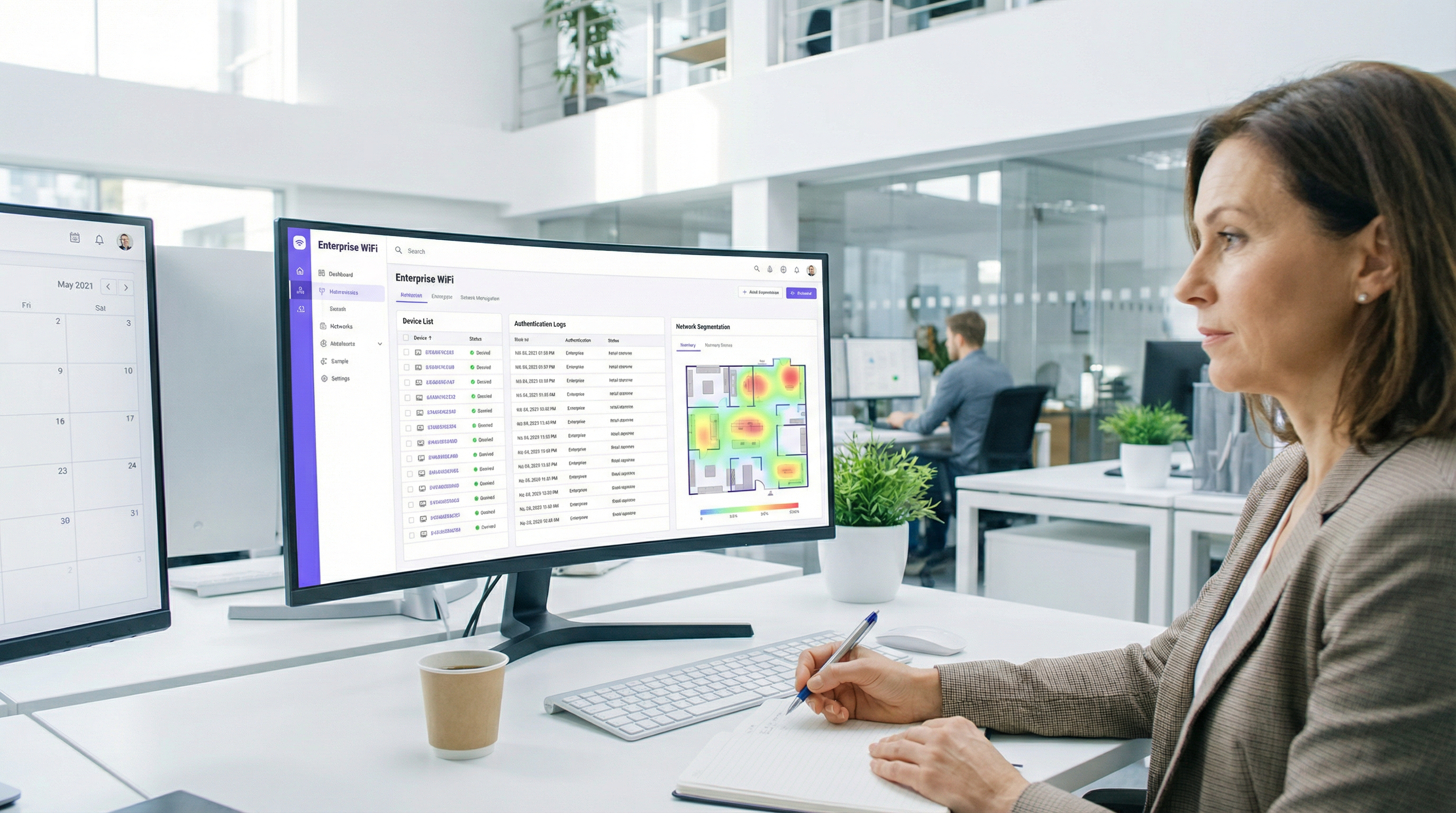
Use VLAN Assignment via RADIUS for Network Segmentation. Rather than using MAC-based ACLs for segmentation, configure your RADIUS server to assign devices to specific VLANs based on their authenticated identity. A guest user gets the guest VLAN; a corporate device gets the corporate VLAN; a POS terminal gets the payment VLAN. This is dynamic, scalable, and immune to MAC randomization.
Align with GDPR and Data Minimisation Principles. Under GDPR, a MAC address that can be linked to an individual is considered personal data. The shift to identity-based management, where data collection is explicit and consent-based, is not just a technical improvement — it is a compliance improvement. Ensure your data retention policies for network logs and analytics data are reviewed in light of these principles.
Troubleshooting & Risk Mitigation
The following are the most common failure modes encountered during and after the transition away from MAC-based network management.
Failure Mode 1: Devices repeatedly blocked or forced to re-authenticate. The root cause is almost always a residual MAC-based ACL or a security system that has not been fully migrated. Conduct a thorough review of all firewall and network access policies. Use your network management platform to identify any rules that reference specific MAC addresses and replace them with identity-based equivalents.
Failure Mode 2: Analytics data shows a massive spike in unique devices. This is the direct result of an analytics platform using MAC addresses as the primary unique identifier. The immediate mitigation is to flag all historical data collected before the audit as unreliable for absolute counts. Going forward, establish new baselines using your upgraded, identity-aware analytics platform. Focus reporting on trends and authenticated user metrics rather than raw device counts.
Failure Mode 3: Roaming issues in large venues. In environments with many access points, a device may change its randomized MAC address when it roams from one access point (BSSID) to another, particularly if the device treats each BSSID as a distinct network. This can cause session drops and re-authentication prompts. The mitigation is to ensure your wireless infrastructure uses proper 802.11r (Fast BSS Transition) and that all access points under the same SSID are configured as a single mobility domain, minimising the triggers for address rotation.
Failure Mode 4: DHCP pool exhaustion. In environments where DHCP leases are long and the pool is small, a high volume of devices connecting with new randomized MACs can exhaust the available IP addresses. Mitigate this by reviewing and shortening DHCP lease times for guest networks, and by ensuring your DHCP pool is appropriately sized for peak concurrent connections rather than unique devices over time.
ROI & Business Impact
Adapting to MAC address randomization is an investment with a clear and measurable return across multiple dimensions.
Security ROI. Replacing MAC whitelisting with 802.1X authentication eliminates a class of vulnerability that is frequently exploited. MAC spoofing — where an attacker clones a known-good MAC address to bypass access controls — is trivially easy and widely documented. Moving to credential-based authentication removes this attack vector entirely. The cost of a single network breach, including incident response, regulatory notification, and reputational damage, far exceeds the cost of a network infrastructure refresh.
Compliance ROI. For organisations subject to GDPR, PCI DSS, or public-sector security frameworks, the shift to identity-based network management directly supports compliance objectives. GDPR's data minimisation principle is served by collecting only the data you need, with explicit consent. PCI DSS requires robust network segmentation that cannot be achieved reliably with MAC-based controls. Avoiding a single significant fine under either framework provides a compelling financial justification for the investment.
Analytics and Revenue ROI. The transition to an identity-driven guest portal creates a direct channel for customer engagement and data collection. Organisations that have implemented loyalty-integrated WiFi portals report measurable improvements in email list growth, repeat visit rates, and the accuracy of customer journey analytics. For a retail chain or hotel group, the ability to accurately identify and engage returning customers through a consented data channel has direct revenue implications. The shift from tracking anonymous devices to engaging known customers is a fundamental improvement in data quality and business intelligence capability.
Key Terms & Definitions
MAC Address (Media Access Control Address)
A unique, 48-bit hardware identifier assigned to a network interface controller (NIC) by the manufacturer. It is used as a network address for communications within a network segment and is structured as six pairs of hexadecimal digits (e.g., 00:1A:2B:3C:4D:5E).
Traditionally used by IT teams as a stable, unique identifier for devices on a WiFi network. Its reliability as a persistent identifier has been fundamentally undermined by MAC randomization, making it unsuitable as a primary key for security, access control, or analytics.
MAC Address Randomization
A privacy feature implemented in modern operating systems (iOS 14+, Android 10+, Windows 10+) where the device temporarily replaces its real, factory-assigned MAC address with a randomly generated one when connecting to or scanning for WiFi networks.
The central challenge for enterprise network managers. It prevents tracking of a device across different WiFi networks and over time, but disrupts legacy systems that depend on a stable MAC address for authentication, logging, and analytics.
IEEE 802.1X
An IEEE standard for port-based Network Access Control (PNAC). It provides an authentication mechanism requiring devices to present verifiable credentials to a RADIUS server before being granted access to a LAN or WLAN.
The gold-standard replacement for MAC-based access control. By authenticating the user or device via credentials rather than hardware attributes, it provides security that is entirely immune to MAC randomization. Essential for any enterprise network refresh.
WPA3-Enterprise
The latest generation of WiFi security protocol for enterprise environments, building on IEEE 802.1X. It offers enhanced encryption (up to 192-bit in its highest security mode) and protection against offline dictionary attacks and key reinstallation attacks.
The recommended security standard for corporate WiFi networks. Deploying WPA3-Enterprise alongside 802.1X is the definitive technical response to the security challenges posed by MAC randomization.
RADIUS (Remote Authentication Dial-In User Service)
A networking protocol that provides centralised Authentication, Authorisation, and Accounting (AAA) management for users who connect and use a network service.
The server-side component of an 802.1X deployment. When a device attempts to connect, the access point forwards the authentication request to the RADIUS server, which validates the credential and instructs the access point to grant or deny access — and optionally assign the device to a specific VLAN.
Captive Portal
A web page that a user of a public-access network is required to view and interact with before network access is granted. Portals are used for authentication, terms of service acceptance, payment, or marketing data collection.
For guest networks, the captive portal is the primary mechanism for establishing user identity in a post-MAC-randomization environment. A well-designed portal with a loyalty or social login integration provides a stable user identifier that replaces the MAC address for analytics and session management.
SSID (Service Set Identifier)
The public name of a WiFi network, broadcast by access points and visible to devices scanning for available connections.
Modern devices generate a unique, persistent randomized MAC address for each different SSID they connect to. This means a device will appear with a different MAC address on your 'Corporate' network versus your 'Guest' network, a critical detail for network segmentation and analytics.
GDPR (General Data Protection Regulation)
EU Regulation 2016/679, which governs the processing of personal data of individuals within the European Union. It requires a lawful basis for data processing, mandates data minimisation, and grants individuals rights over their data.
A static MAC address that can be linked to an individual is considered personal data under GDPR. Network managers must ensure that any system collecting or processing MAC addresses — or the new identity-based alternatives — has a documented lawful basis and appropriate data retention policies.
Zero Trust Network Access (ZTNA)
A security framework that requires all users and devices to be authenticated, authorised, and continuously validated before being granted access to applications and data, regardless of whether they are inside or outside the network perimeter.
MAC randomization is, in a sense, forcing enterprise networks toward Zero Trust principles by removing the ability to implicitly trust a device based on its hardware address. Adopting a ZTNA framework provides a coherent strategic context for the technical changes required.
Case Studies
A 200-room luxury hotel wants to provide a seamless, 'just-works' WiFi experience for returning guests, allowing them to connect automatically without a portal on subsequent visits. Their current system relies on MAC whitelisting for registered guests, which is now failing due to MAC randomization, generating a high volume of front-desk support calls.
The recommended solution is to deploy a WPA3-Enterprise network with 802.1X authentication, integrated with the hotel's Property Management System (PMS).
Infrastructure Upgrade: Verify all access points are WPA3-Enterprise certified and update firmware. Deploy or upgrade a RADIUS server (e.g., FreeRADIUS, Cisco ISE, or a cloud-hosted equivalent).
PMS Integration: Configure the PMS to automatically generate a unique, time-limited WiFi credential (username and a strong random password) for each guest at check-in. This credential is tied to their reservation and expires at check-out.
Guest Onboarding: At first connection, the guest is directed to a simple, branded captive portal where they enter their room number and last name to retrieve their credential. The device is then configured to trust the network's certificate and save the 802.1X profile.
Seamless Re-connection: On all subsequent connections during their stay — whether returning to the room, moving through the lobby, or using the restaurant WiFi — the device uses its saved 802.1X profile to authenticate seamlessly and securely in the background, with no user interaction required. The randomized MAC address is entirely irrelevant, as authentication is based on the credential.
Loyalty Integration (Phase 2): For returning guests across multiple stays, integrate the portal with the hotel's loyalty programme. Loyalty members can authenticate with their loyalty credentials, enabling the hotel to recognise them as returning guests and offer personalised welcome experiences.
A large retail chain with 150 stores uses WiFi analytics to measure footfall, dwell time in different departments, and queue lengths at checkout to optimise staffing and store layout. Since iOS 14 rolled out, their analytics platform is reporting inaccurate data, showing apparent unique visitor counts that are three to four times higher than actual footfall, and 'returning visitor' rates have dropped to near zero.
The retailer should transition to a multi-layered analytics strategy that de-emphasises MAC addresses as the primary identifier.
Upgrade Analytics Platform: Engage the current analytics vendor to understand their roadmap for MAC randomization. If the platform does not have a credible solution, evaluate alternatives that are designed for the post-randomization era. Modern platforms focus on session-based analysis and use probabilistic algorithms to estimate unique visitors, clearly distinguishing between 'devices seen' and 'estimated unique visitors'.
Implement an Identity Layer: Redesign the guest WiFi portal to offer a compelling reason for customers to log in. Options include a discount voucher on first login, access to a store loyalty account, or entry into a prize draw. Each login provides a stable identifier (email address, loyalty ID) that can be used to accurately track repeat visits across sessions and dates.
Augment with Non-WiFi Sensors: Deploy privacy-respecting IR beam counters or video analytics (people-counting only, no facial recognition) at store entrances and key department thresholds. This provides a ground-truth for absolute footfall counts, which can be used to calibrate and validate the WiFi analytics data.
Redefine KPIs: Work with the analytics team to redefine the key performance indicators. Shift from 'unique devices' to 'authenticated sessions', 'loyalty member visits', and 'estimated footfall' (from sensor data). Establish new baselines from the point of the platform upgrade and treat all historical MAC-based data as directionally useful but not absolutely accurate.
Scenario Analysis
Q1. You are the network architect for a multi-site conference centre. An event organiser wants to offer tiered WiFi access: a free, basic service for all attendees, and a paid, high-speed service for VIPs. Your current system uses MAC-based firewall rules to assign bandwidth tiers. How would you design a new solution that is resilient to MAC randomization and can scale across multiple simultaneous events?
💡 Hint:Consider how you can differentiate users at the point of authentication using a credential or payment token, and how RADIUS can dynamically assign network policies based on that identity.
Show Recommended Approach
The recommended design uses a single SSID with a captive portal that routes users to different authentication paths, with RADIUS handling dynamic policy assignment. The portal presents two options: 'Free Access' and 'VIP/Paid Access'. For the free tier, users accept terms and conditions and optionally provide an email address. The portal authenticates them to the RADIUS server, which assigns them to a VLAN with a bandwidth policy capped at, for example, 5 Mbps. For the VIP tier, users either enter a pre-purchased access code (distributed with their VIP ticket) or complete a payment via an integrated gateway. Upon successful validation, the RADIUS server assigns them to a separate VLAN with a high-speed policy. This design is entirely credential-driven, scales to any number of simultaneous events by issuing different access codes per event, and is completely immune to MAC randomization because no access decision is based on the device's hardware address.
Q2. A stadium is experiencing widespread connectivity complaints during a major event. The network logs show thousands of 802.11 authentication failures from devices with MAC addresses not present in the access control list. The security policy, implemented five years ago, blocks any MAC address not seen on the network in the previous 90 days. What is the root cause, what is the immediate remediation, and what is the long-term architectural fix?
💡 Hint:Consider the behaviour of devices belonging to fans who attend infrequently, and the fundamental incompatibility between time-based MAC whitelisting and address randomization.
Show Recommended Approach
Root cause: The 90-day MAC whitelist is fundamentally incompatible with MAC address randomization. A fan who attended a match more than 90 days ago will connect with a new randomized MAC address. The security system sees this as an unknown device and blocks it. For a stadium with infrequent events, the vast majority of fans will fall outside the 90-day window, causing mass authentication failures. Immediate remediation: Disable the MAC-based ACL immediately. It is causing a denial-of-service for legitimate users and providing negligible security value, as MAC spoofing trivially bypasses it. Replace it with an open network or a simple captive portal with terms-of-service acceptance to restore connectivity for the event. Long-term fix: Design a proper guest network architecture. For a public venue like a stadium, a captive portal with social login or ticketing system integration is the appropriate solution. This provides a user identity, enables analytics, and supports future loyalty and engagement programmes, without any dependence on MAC addresses.
Q3. Your retail chain's marketing team wants to run a 'welcome back' campaign, offering a personalised discount to customers who have visited a store more than three times in the past month. They want to deliver this offer via the guest WiFi portal. Explain why a MAC-address-based tracking system will fail to deliver this, and design an alternative technical architecture that will work reliably.
💡 Hint:Focus on what constitutes a reliable, persistent customer identifier versus a mutable hardware attribute, and how the captive portal can bridge the gap between an anonymous device and a known customer.
Show Recommended Approach
A MAC-based system will fail because the device's randomized MAC address will likely differ between visits, making each visit appear to be from a new, unknown device. It would be impossible to build a reliable visit history or identify returning customers. The alternative architecture is an identity-based loyalty WiFi programme. Implementation: 1) Customers register once via the captive portal, providing an email address or phone number, or linking their existing loyalty account. 2) On each subsequent visit, they log in to the WiFi using their loyalty credentials (a simple username/password or a one-tap social login). 3) The system records a 'visit event' against the stable loyalty ID, not the MAC address. 4) When the visit count for a specific loyalty ID reaches three within a rolling 30-day window, the portal's post-authentication landing page automatically displays the personalised discount offer. This architecture is accurate, consent-based, GDPR-compliant, and provides the marketing team with a rich, reliable dataset for campaign analysis and customer journey mapping.
Key Takeaways
- ✓MAC address randomization is the default setting on virtually all modern smartphones and laptops, making it the baseline assumption for any enterprise WiFi deployment.
- ✓Legacy MAC-based security controls (whitelists, ACLs) are now both ineffective and operationally disruptive — they must be replaced with IEEE 802.1X and WPA3-Enterprise.
- ✓WiFi analytics platforms that use MAC addresses as unique identifiers will report severely inflated visitor counts and near-zero returning visitor rates — a platform upgrade or reconfiguration is essential.
- ✓The strategic response is to shift from identity-by-hardware to identity-by-credential: authenticate users, not devices.
- ✓Modern captive portals with loyalty, social, or email login integrations provide a stable user identifier that is more accurate, more valuable, and more GDPR-compliant than MAC tracking.
- ✓Adapting to MAC randomization is not just a technical fix — it is an opportunity to build a more secure, compliant, and customer-centric network architecture.
- ✓Conduct a MAC dependency audit this quarter: identify every system that relies on a static MAC address and classify it for immediate replacement or upgrade.




