

WiFi Captive Portals: The Ultimate Guide to Setup, Security, and Customization
This authoritative technical reference guide covers the full lifecycle of enterprise WiFi captive portal deployment, from network architecture and security hardening to GDPR and CCPA compliance and measurable business ROI. It is designed for IT managers, network architects, and CTOs at hotels, retail chains, stadiums, and public-sector organisations who need actionable, vendor-neutral guidance to implement, secure, and optimise guest WiFi infrastructure. The guide includes step-by-step configuration instructions, real-world case studies, security checklists, compliance frameworks, and a discussion of how captive portals drive first-party data acquisition and customer analytics at scale.
🎧 Listen to this Guide
View Transcript
Executive Summary
For IT leaders at multi-location enterprises, guest WiFi is no longer a simple amenity; it is a critical component of the customer experience and a rich source of first-party data. A well-architected WiFi captive portal is the key to unlocking this value, serving as the strategic gateway for secure access, legal compliance, and personalised marketing. This guide provides a comprehensive technical reference for deploying enterprise-grade captive portals, covering the essential architecture, security controls, and compliance mandates necessary to mitigate risk and maximise ROI. We move beyond basic setup to address the specific challenges of scale, from centralised management and VLAN segmentation to GDPR consent logging and measuring business impact. For the CTO, this guide offers a framework for evaluating the security posture and commercial return of your guest WiFi estate. For the IT manager and network architect, it provides actionable, vendor-neutral guidance for immediate implementation, ensuring your deployment is secure, compliant, and capable of delivering measurable business outcomes.
Technical Deep-Dive
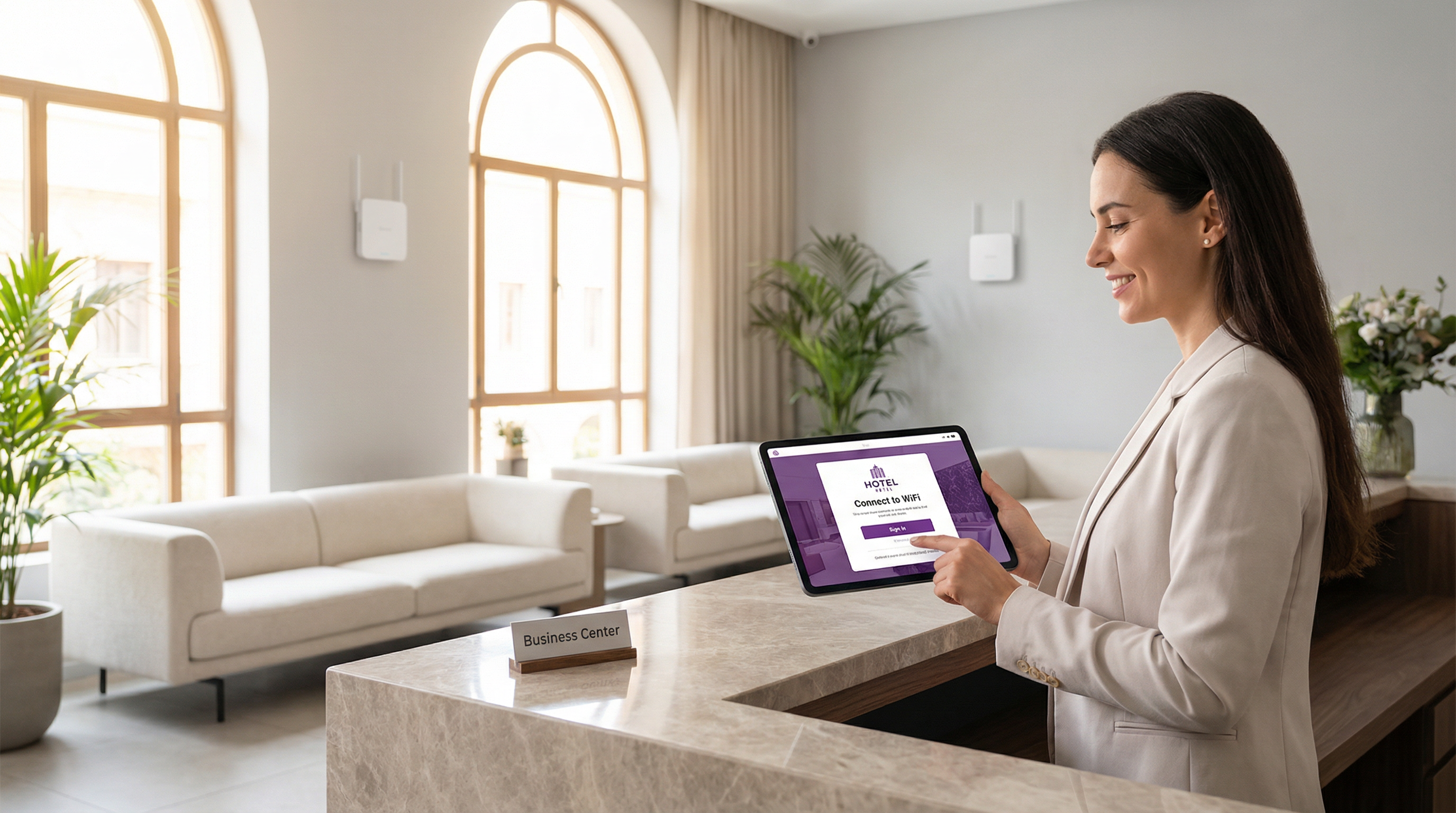
The modern captive portal is a sophisticated system that balances user experience, security, and commercial objectives. At its core, the portal intercepts a user's initial web request and redirects them to a branded splash page for authentication or consent. The most prevalent mechanism is an HTTP 302 redirect. When a new device connects to the guest SSID, its operating system attempts to contact a known detection URL — Apple uses captive.apple.com, Google uses connectivitycheck.gstatic.com, and Microsoft uses www.msftconnecttest.com. The network's wireless controller intercepts this request and returns an HTTP 302 (Found) status code, directing the client's browser to the captive portal URL. This process is seamless across all major operating systems and is the recommended approach for enterprise deployments.
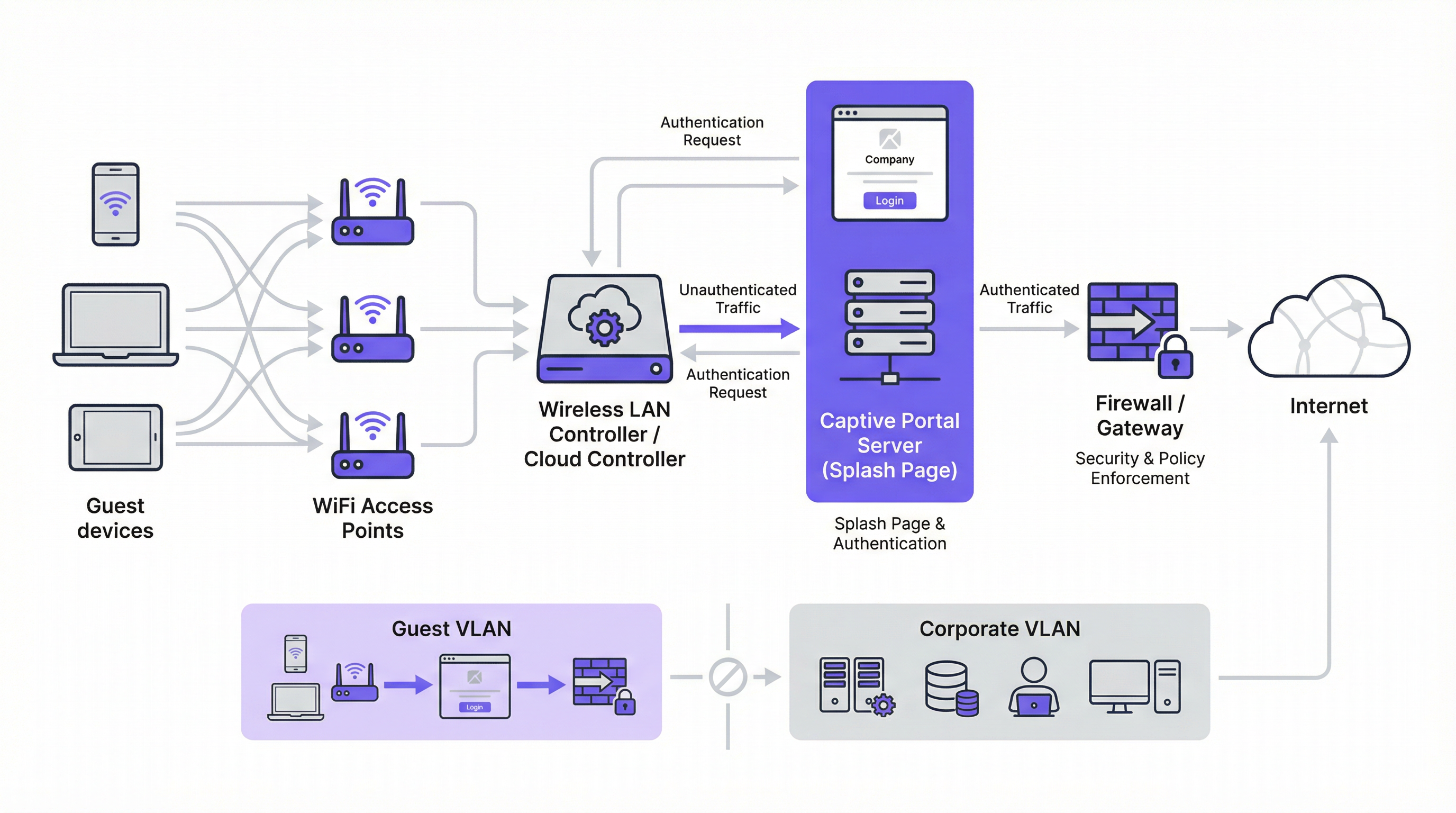
Two alternative redirect mechanisms exist. DNS redirect works by configuring the firewall to ensure unauthenticated clients can only access the network's designated DNS resolver, which in turn resolves all hostnames to the portal's IP address. While effective, this approach is architecturally equivalent to DNS hijacking and must be implemented with care. ICMP redirect operates at Layer 3 to instruct routing changes at the packet level; it is less common in modern deployments and carries inherent security risks that make it unsuitable for most enterprise environments.
Architecturally, the cornerstone of any secure enterprise deployment is VLAN segmentation. Guest traffic must be logically isolated from the corporate network on its own Virtual Local Area Network. This prevents any possibility of lateral movement from a potentially compromised guest device to sensitive internal systems such as point-of-sale terminals, HR databases, or corporate file servers. The guest VLAN should have its own DHCP scope and a restrictive firewall policy that explicitly blocks all access to RFC 1918 private IP address ranges, permitting only the traffic necessary for portal authentication and subsequent internet access.
Before authentication, a walled garden must be configured to allow access to specific external resources. This includes the portal's hosting domain, CDN endpoints serving portal assets, and the OAuth endpoints for any social login providers. A minimally permissive walled garden — whitelisting specific endpoints rather than entire domains — is a critical security control that limits the pre-authentication attack surface.
Authentication methods span a broad spectrum, from zero-friction click-through to high-assurance RADIUS integration:
| Authentication Method | Primary Use Case | Key Consideration |
|---|---|---|
| Click-Through (ToS) | Public spaces, low-friction access | No data capture; minimal user friction. |
| Social Login (OAuth) | Retail, Hospitality | Rich data capture; requires walled garden for OAuth endpoints. |
| Email / Form | Lead generation, loyalty | Direct first-party data; requires GDPR/CCPA compliance. |
| SMS OTP | High-value access, loyalty programmes | Verifies phone number; adds identity assurance layer. |
| Voucher Code | Conferences, paid access | Time-limited, controlled access per user. |
| RADIUS / IEEE 802.1X | Corporate guest networks | Enterprise identity integration; full audit trail. |
From a standards perspective, the industry is moving toward WPA3-Enterprise, which combines the robust IEEE 802.1X authentication framework with a 192-bit security suite. For open guest networks, WPA3's Opportunistic Wireless Encryption (OWE) provides a significant security enhancement by encrypting traffic between each client and the access point without requiring a pre-shared key, directly mitigating passive eavesdropping attacks that are endemic to traditional open WiFi networks.
Implementation Guide
Deploying a captive portal at enterprise scale requires a methodical approach. The following steps provide a vendor-neutral roadmap for a secure and effective implementation.
Step 1 — Network Foundation: Create a dedicated guest SSID and associate it with a new, isolated VLAN (e.g., VLAN 100). Define a DHCP scope large enough to accommodate your peak concurrent user count. For a 200-room hotel, a /22 subnet (1,022 usable addresses) is a safe starting point; for a 20,000-capacity stadium, a /19 or larger is appropriate.
Step 2 — Firewall and Security Policy: On your core firewall, create a policy for the guest VLAN with a default deny all stance. Add explicit allow rules for DNS (UDP/TCP port 53) and DHCP (UDP ports 67–68). Create a pre-authentication rule allowing HTTP and HTTPS access only to the IP addresses listed in your walled garden. Block all traffic destined for RFC 1918 address space (10.0.0.0/8, 172.16.0.0/12, 192.168.0.0/16).
Step 3 — Controller Configuration: In your wireless LAN controller — whether Cisco Meraki, Aruba ClearPass, Ruckus SmartZone, or a cloud-managed platform — configure the guest SSID to use external captive portal authentication, pointing to your portal server URL. Set session timeout (8 hours for hospitality, 2–4 hours for retail, 1 hour for events). Set per-client bandwidth limits (e.g., 5 Mbps download, 2 Mbps upload) to ensure fair usage and prevent network abuse.
Step 4 — Portal Design and Compliance: Design your splash page for speed and clarity. The page must be served over HTTPS with a valid TLS certificate from a trusted Certificate Authority. For GDPR compliance, include a link to your privacy policy and an unticked checkbox for marketing consent, presented separately from the main terms of service agreement. For CCPA, include a clearly labelled "Do Not Sell My Personal Information" link. All consent actions must be logged with a timestamp and the user's IP address for regulatory audit purposes.
Step 5 — Authentication and Walled Garden: Configure your chosen authentication method(s) and the corresponding walled garden rules. If using social login, whitelist the specific OAuth endpoints for each provider. Test the complete authentication flow from iOS, Android, Windows, and macOS devices before go-live.
Step 6 — Logging and Monitoring: Enable RADIUS accounting on your controller to send detailed session data — MAC address, IP address, session start and stop times, data volume transferred — to a centralised logging server or SIEM. Retain connection metadata in accordance with your jurisdiction's requirements (typically 12 months in the UK and many EU member states). Implement DNS query rate monitoring to detect potential tunnelling bypass attempts.
Best Practices
Adherence to industry best practices is essential for mitigating risk and ensuring a high-quality user experience. These recommendations are grounded in established security frameworks including PCI DSS, GDPR, and vendor-neutral wireless security guidance.
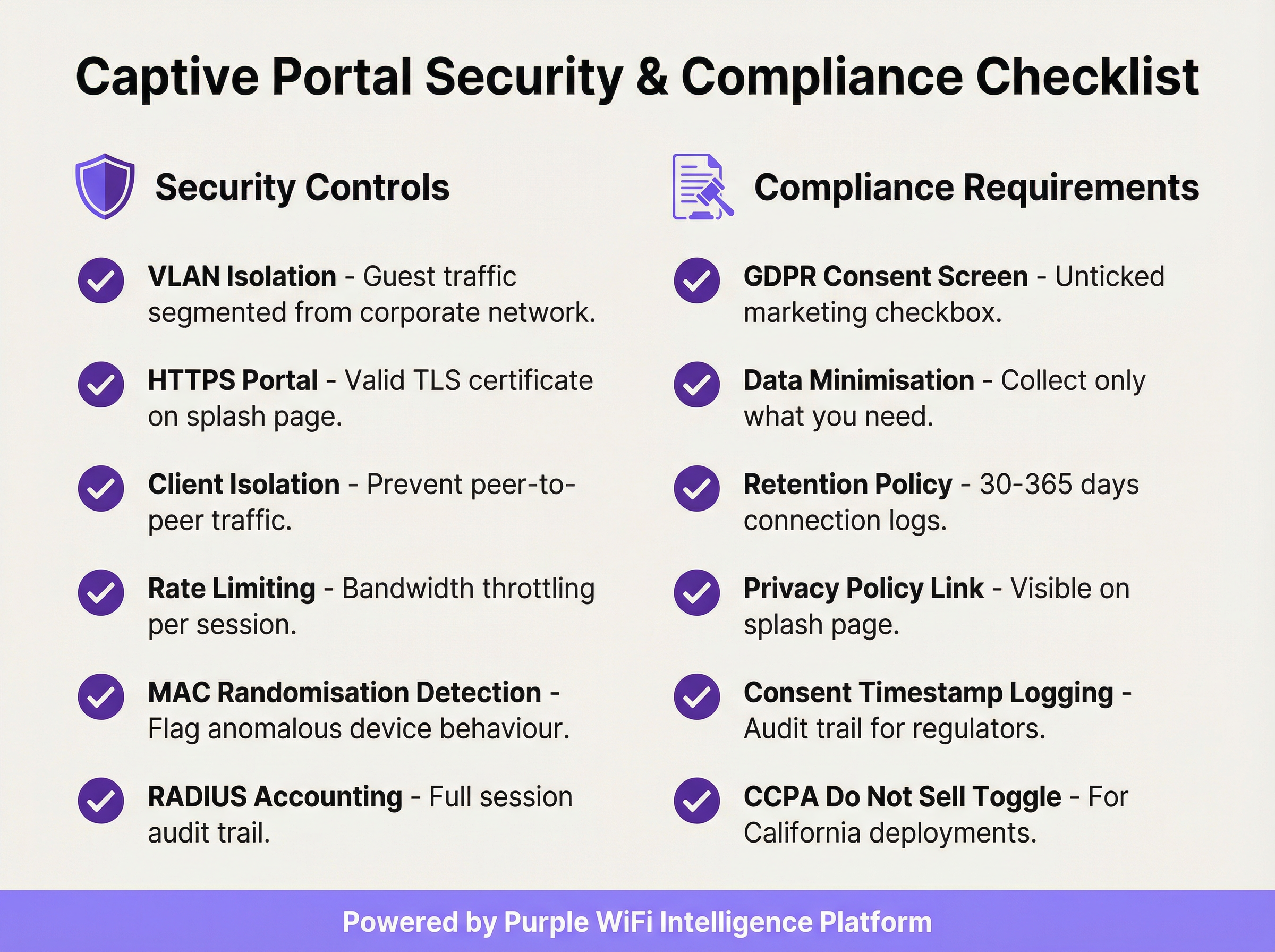
Enforce Client Isolation: This wireless controller setting prevents guest devices on the same network segment from communicating directly with each other, significantly reducing the risk of peer-to-peer attacks and lateral movement between guest devices.
Validate Your TLS Certificate: All communication with the captive portal must be encrypted with a valid, trusted TLS certificate. An expired or self-signed certificate will trigger browser security warnings, degrading the user experience and undermining trust in your brand.
Implement Data Minimisation: Collect only the data you need for the specific service you are providing. If your use case requires only an email address for marketing, do not request a phone number or date of birth. This is a core principle of GDPR Article 5(1)(c) and reduces your regulatory exposure.
Maintain a Documented Data Retention Policy: Establish and document separate retention schedules for connection logs (typically 30–365 days depending on jurisdiction) and marketing data (purge inactive contacts and maintain evidence of consent throughout the retention period). Penalties for GDPR non-compliance can reach €20 million or 4% of global annual turnover.
Audit Your Walled Garden Quarterly: Over time, walled gardens accumulate unnecessary entries. A quarterly audit ensures every whitelisted domain is still required and that entries are as specific as possible, minimising the pre-authentication attack surface.
Plan for PCI DSS Scope: If your venue processes card payments, ensure your guest WiFi network is completely isolated from any payment card infrastructure. A Qualified Security Assessor (QSA) should review the network segmentation if there is any ambiguity about scope.
Troubleshooting & Risk Mitigation
The most common failure modes in captive portal deployments typically relate to device compatibility, certificate issues, or network misconfiguration.
Portal page does not load automatically: The most frequent cause is the device's Captive Network Assistant (CNA) failing to trigger. This can occur if the firewall is blocking access to the OS-specific detection URLs, or if the portal has an invalid TLS certificate. Verify that your pre-authentication rules allow access to captive.apple.com, connectivitycheck.gstatic.com, and www.msftconnecttest.com. Ensure the portal certificate is valid and trusted.
Users receive a browser security warning: This almost always indicates a TLS certificate issue — expired, self-signed, or mismatched domain. Use a certificate from a trusted CA and ensure the portal URL exactly matches the certificate's Subject Alternative Name (SAN). Automate certificate renewal using Let's Encrypt or a similar service to prevent expiry-related outages.
DNS tunnelling bypass: Some technically sophisticated users may attempt to bypass the portal by encoding traffic within DNS queries. Mitigate this by blocking all outbound DNS traffic from unauthenticated clients except to your designated internal resolver, and by implementing DNS query rate limiting — flagging any client that generates more than a defined threshold of queries per second before authentication.
MAC address spoofing: An attacker can clone the MAC address of an authenticated device to bypass the portal. Mitigate this through RADIUS accounting with session binding to both MAC address and IP address, and by monitoring for duplicate MAC address entries in your DHCP lease table. Client isolation also reduces the risk by preventing the attacker from observing other clients' MAC addresses.
High portal load times degrading opt-in rates: Every additional second of portal load time reduces authentication completion rates. Host portal assets on a CDN, optimise images, and minimise third-party script dependencies. Target a Time to Interactive (TTI) of under 2 seconds on a 4G mobile connection.
ROI & Business Impact
The deployment of an enterprise captive portal should be viewed as a strategic investment. The return is realised through three primary channels: first-party data acquisition, customer and location analytics, and direct revenue or brand value generation.
First-Party Data Acquisition: In a landscape of disappearing third-party cookies and increasing signal loss from privacy-focused browser updates, a captive portal is one of the most effective tools for building a rich, consent-based marketing database. A well-designed portal in a high-traffic retail or hospitality venue can capture hundreds to thousands of new, opted-in email addresses per month, providing a direct channel for personalised marketing, loyalty programme enrolment, and post-visit engagement.
Customer and Location Analytics: By analysing connection data — unique visitors, dwell time, visit frequency, peak traffic periods — venues gain actionable intelligence for operational optimisation. Retailers can measure the in-store impact of marketing campaigns, identify their most loyal repeat customers, and optimise staffing levels based on real-time footfall data. Hospitality operators can correlate WiFi connection patterns with F&B spend or spa bookings to identify upsell opportunities.

Direct Revenue and Brand Reinforcement: In airports, conference centres, and transport hubs, WiFi can be monetised directly through tiered access plans. In retail and hospitality, the portal serves as a powerful brand touchpoint at the moment of connection, enabling the promotion of special offers, loyalty schemes, and partner brands. A consistent, branded welcome experience across hundreds of locations reinforces brand identity and demonstrates operational professionalism.
A typical ROI calculation weighs the platform and operational costs against the lifetime value of the acquired marketing contacts, the operational efficiencies gained from footfall analytics, and any direct revenue generated from paid access or marketing partnerships. For most enterprise deployments, the value of the first-party data asset alone — particularly in the context of GDPR-compliant, consent-based marketing — provides a compelling and defensible business case.
Key Terms & Definitions
Captive Portal
A network gateway mechanism that intercepts a connecting device's initial HTTP request and redirects it to a web page requiring user interaction — such as authentication, terms of service acceptance, or payment — before granting full internet access. Technically implemented via HTTP 302 redirect, DNS redirect, or ICMP redirect.
IT teams encounter this as the core technology underpinning guest WiFi access control in any public or semi-public venue. The design and configuration of the captive portal directly determines the security posture, compliance status, and commercial value of the guest WiFi deployment.
VLAN (Virtual Local Area Network)
A logical network segment created within a physical network infrastructure that isolates traffic between different groups of devices. In captive portal deployments, a dedicated guest VLAN ensures that guest device traffic is completely separated from corporate network infrastructure, preventing lateral movement and limiting the blast radius of any security incident on the guest network.
Network architects must configure a dedicated guest VLAN as the foundational security control for any captive portal deployment. Without VLAN isolation, a compromised guest device could potentially access corporate systems, creating significant security and compliance risk.
Walled Garden
A pre-authentication whitelist of network resources (IP addresses, hostnames, or domains) that an unauthenticated guest device is permitted to access before completing the captive portal process. Typically includes the portal server itself, CDN endpoints, and OAuth endpoints for social login providers.
IT teams must configure and maintain the walled garden carefully. An overly permissive walled garden expands the pre-authentication attack surface; an overly restrictive one breaks social login functionality or prevents the portal page from loading correctly.
IEEE 802.1X
An IEEE standard for port-based Network Access Control (PNAC) that provides an authentication framework for devices wishing to connect to a LAN or WLAN. It defines the Extensible Authentication Protocol (EAP) transport mechanism and requires a supplicant (client), authenticator (switch or AP), and authentication server (typically RADIUS) to complete the authentication exchange.
Network architects deploying captive portals for corporate guest environments should consider 802.1X integration for the highest level of identity assurance. It provides mutual authentication and a full audit trail, and is the authentication framework underpinning WPA2-Enterprise and WPA3-Enterprise.
WPA3-OWE (Opportunistic Wireless Encryption)
A WPA3 security mode defined in IEEE 802.11i that provides over-the-air encryption on open (no-password) WiFi networks without requiring user authentication. Each client-to-AP connection is encrypted with a unique key, preventing passive eavesdropping by other devices on the same network, even though no password is required to connect.
IT architects planning new captive portal deployments should evaluate OWE as a security enhancement for open guest SSIDs. It addresses the fundamental vulnerability of traditional open WiFi — unencrypted over-the-air traffic — while maintaining the zero-friction connection experience that guests expect.
RADIUS (Remote Authentication Dial-In User Service)
A networking protocol that provides centralised Authentication, Authorisation, and Accounting (AAA) management for users who connect to a network service. In captive portal deployments, RADIUS accounting records detailed session information — including MAC address, IP address, session duration, and data volume — to a central server.
RADIUS accounting is the mechanism by which IT teams maintain a comprehensive audit trail of guest WiFi sessions. This audit trail is essential for regulatory compliance (data retention laws), security investigations, and the analytics that underpin ROI measurement.
DNS Tunnelling
A network bypass technique in which a client encodes arbitrary internet traffic (e.g., HTTP requests) within DNS query packets, which are typically permitted through firewalls even for unauthenticated clients. An attacker or technically sophisticated user can use a DNS tunnelling tool to bypass a captive portal and access the internet without authenticating.
Network security teams should implement DNS query rate monitoring and anomaly detection to identify potential tunnelling activity. Blocking outbound DNS traffic from unauthenticated clients to all servers except the designated internal resolver is the primary mitigation.
MAC Address Spoofing
A technique in which a device's network interface is configured to broadcast a different MAC (Media Access Control) address than the one burned into the hardware. In captive portal environments, an attacker can clone the MAC address of an already-authenticated device to bypass the portal's access control, as many portals use MAC address as the primary session identifier.
IT security teams should be aware that MAC-based authentication alone is not sufficient for high-security environments. RADIUS accounting with session binding to both MAC address and IP address, combined with client isolation to prevent MAC address observation, provides a more robust defence.
Splash Page
The branded web page presented to a user by a captive portal before internet access is granted. The splash page typically contains the venue's branding, a login or consent form, a link to the privacy policy, and terms of service. It is the primary user-facing element of the captive portal system and the key touchpoint for data capture and brand communication.
Marketing and IT teams must collaborate on splash page design. From an IT perspective, the page must be served over HTTPS, load in under 2 seconds, and contain all legally required consent elements. From a marketing perspective, it must be on-brand, clear, and designed to maximise opt-in rates.
GDPR (General Data Protection Regulation)
The European Union's primary data protection regulation (Regulation 2016/679), which governs the collection, processing, storage, and transfer of personal data relating to EU residents. For captive portal deployments, GDPR mandates freely given, specific, and unambiguous consent for data collection; data minimisation; documented retention policies; and the ability to demonstrate compliance through audit trails.
Any captive portal that collects personal data (email addresses, names, phone numbers) from EU or UK residents must comply with GDPR. Non-compliance penalties can reach €20 million or 4% of global annual turnover. IT and legal teams must collaborate to ensure the portal's consent mechanism, data storage, and retention policies meet the regulation's requirements.
Case Studies
A 250-room luxury hotel group with 12 properties needs to deploy a unified captive portal solution that captures guest email addresses for their loyalty programme, complies with GDPR across all EU properties, and provides the IT team with centralised management. The properties use a mix of Cisco Meraki and Aruba access points. What architecture and implementation approach should they adopt?
The recommended approach is a cloud-managed, hardware-agnostic captive portal platform (such as Purple) that integrates with both Meraki and Aruba controllers via external portal redirect. The implementation proceeds as follows:
VLAN Architecture: Configure a dedicated guest VLAN (e.g., VLAN 200) on all properties, with a consistent IP addressing scheme (e.g., 10.200.x.0/22 per property) to simplify firewall policy management across the estate.
Controller Configuration: On Meraki, navigate to Wireless > SSIDs > [Guest SSID] > Splash page and select 'Click-through' or 'Sign-on splash page', entering the external portal URL. On Aruba, configure a Captive Portal profile in ClearPass Policy Manager pointing to the same external portal URL. Set session timeout to 8 hours and per-client bandwidth to 10 Mbps down / 5 Mbps up.
Portal Design: Build a single portal template with the group's master brand. Use location-specific branding overrides (logo, colour scheme) for each property. The form captures first name, last name, and email. The GDPR consent screen presents two separate, unticked checkboxes: one for the terms of service (required for access) and one for marketing communications (optional). The privacy policy link is prominently displayed.
Compliance Configuration: Enable consent timestamp logging for every session. Configure a data retention policy: connection logs retained for 12 months (UK GDPR requirement), marketing contacts purged after 24 months of inactivity. Export audit logs monthly to the group's central compliance repository.
Loyalty Integration: Connect the portal's API to the hotel group's CRM/loyalty platform. On successful email capture with marketing consent, automatically enrol the guest in the loyalty programme and trigger a welcome email within 15 minutes.
Testing and Rollout: Pilot at one property for 30 days, measuring email capture rate (target: >60% of connecting guests), portal load time (target: <2 seconds), and authentication error rate (target: <1%). Roll out to remaining properties in batches of three.
A national retail chain with 80 stores wants to use their guest WiFi captive portal to measure the effectiveness of their in-store marketing campaigns, specifically whether customers who receive a promotional email visit the store within 14 days. The IT team is concerned about PCI DSS compliance, as the stores also process card payments. How should this be architected?
This deployment requires careful attention to both the analytics use case and PCI DSS network segmentation requirements.
PCI DSS Segmentation: The guest WiFi network must be completely isolated from the payment card environment (PCE). Implement a three-VLAN architecture: VLAN 10 for POS/payment systems, VLAN 20 for corporate/staff systems, VLAN 30 for guest WiFi. The firewall must have explicit
denyrules preventing any traffic between VLAN 30 and VLANs 10 and 20. Engage a QSA to validate the segmentation before go-live.Guest SSID and Portal: Deploy the guest SSID on VLAN 30 with an email-capture portal. The form collects email address and optionally a loyalty card number. GDPR-compliant marketing consent checkbox is included.
Campaign Attribution Architecture: The portal platform assigns each authenticated session a unique session ID linked to the guest's email address and the store location (identified by the access point's location tag). When a promotional email is sent, it contains a unique tracking pixel and a store-specific UTM parameter on the call-to-action link.
Visit Attribution: When a customer who received the promotional email returns to a store and connects to WiFi within 14 days, the portal platform matches their email address to the campaign cohort and records the return visit. This creates a closed-loop attribution model: email sent → store visit detected via WiFi connection → conversion recorded.
Analytics Dashboard: The central analytics platform aggregates data across all 80 stores, providing campaign attribution reports showing email-to-visit conversion rates by store, region, and campaign. Typical metrics: unique visitors per store per day, email capture rate, 14-day return visit rate for campaign cohort vs. control group.
Data Governance: All guest data is stored in a GDPR-compliant data warehouse with role-based access control. Marketing data is retained for 24 months from last interaction. Connection logs are retained for 12 months.
Scenario Analysis
Q1. A conference centre hosts 50 events per year, ranging from 200-person seminars to 5,000-person trade shows. They want to deploy a captive portal that provides event-specific branding for each event, captures attendee email addresses for post-event marketing, and can scale from 200 to 5,000 concurrent connections. The venue's IT team has limited capacity for per-event configuration. What platform architecture and configuration approach would you recommend?
💡 Hint:Consider the operational overhead of per-event portal customisation, the DHCP scope sizing requirements for peak concurrent users, and the GDPR implications of sharing attendee data with event organisers.
Show Recommended Approach
The recommended architecture uses a cloud-managed captive portal platform with a self-service portal builder. The venue's IT team creates a master portal template with the venue's base branding and GDPR consent framework. For each event, the organiser is given access to a restricted portal customisation interface where they can upload their logo, set brand colours, and add event-specific messaging — without touching any network configuration. The DHCP scope for the guest VLAN should be sized for the maximum expected concurrent connections (5,000), using a /19 subnet (8,190 usable addresses) to provide headroom. The wireless controller should be configured with dynamic bandwidth management to automatically adjust per-client limits based on current network load. For GDPR, the data controller relationship must be clearly defined: if attendee data is shared with event organisers, a Data Processing Agreement (DPA) is required, and the privacy policy must disclose this sharing. Attendees should be able to opt out of data sharing with the event organiser while still accepting the venue's terms of service for WiFi access.
Q2. A hospital trust wants to deploy guest WiFi with a captive portal across 5 sites. Clinical staff have raised concerns that the guest WiFi could be used to access patient records if the network segmentation is not correctly implemented. The IT security team also needs to ensure the deployment does not bring any clinical systems into scope for additional regulatory review. How do you address these concerns?
💡 Hint:Consider the network segmentation requirements, the specific clinical systems that must be protected, and the regulatory frameworks (NHS Data Security and Protection Toolkit, Cyber Essentials) that apply in addition to GDPR.
Show Recommended Approach
The deployment requires a minimum three-tier network architecture: a clinical VLAN for patient records systems (EPR, PACS, clinical workstations), a staff VLAN for administrative systems, and a guest VLAN for patient and visitor WiFi. The firewall policy must include explicit deny rules preventing any traffic from the guest VLAN to the clinical and staff VLANs, with the default stance being deny-all for inter-VLAN traffic. The guest SSID should be on a completely separate DHCP scope with no route to RFC 1918 clinical address space. The captive portal itself should be hosted externally (cloud-based) or on a dedicated DMZ server, not on any system within the clinical network. For regulatory compliance, the IT security team should document the network segmentation design and have it reviewed by an independent assessor as part of the NHS Data Security and Protection Toolkit submission. The guest WiFi network should be explicitly scoped out of any clinical system security assessments. GDPR compliance for the portal requires a healthcare-specific privacy notice that discloses the limited data collected (connection metadata, optional email) and the retention period.
Q3. Your organisation's captive portal has been in production for 18 months. A security audit has identified three issues: (1) the portal TLS certificate expired 3 weeks ago and users are receiving browser warnings, (2) the walled garden contains 47 entries, many of which appear to be from a social login provider that was removed 12 months ago, and (3) RADIUS accounting logs show that 15% of guest sessions have a duration of over 30 days, suggesting that session timeouts are not being enforced. Prioritise and address these issues.
💡 Hint:Consider the security and user experience impact of each issue, the speed of remediation required, and the root cause of the session timeout failure.
Show Recommended Approach
Prioritise in order of security and user experience impact. Issue 1 (expired TLS certificate) is the most urgent: it is actively degrading the user experience (browser security warnings) and represents a security risk (users may be trained to click through certificate warnings, making them vulnerable to genuine MITM attacks). Immediate action: renew the certificate from a trusted CA and deploy it to the portal server. Implement automated certificate renewal (e.g., using Let's Encrypt with auto-renewal) to prevent recurrence. Issue 3 (30-day sessions) is the second priority: sessions lasting 30 days represent a significant security risk, as a device that was authenticated 30 days ago may no longer be in the possession of the original user. Investigate the root cause — likely a misconfigured session timeout value on the wireless controller or a controller firmware bug. Set the session timeout to 8 hours (or appropriate for the venue type) and force-terminate all existing sessions over 24 hours old. Issue 2 (walled garden hygiene) is the third priority: while a security concern, stale walled garden entries from a removed provider are lower risk than the first two issues. Audit all 47 entries, remove those associated with the deprecated social login provider, and document the purpose of each remaining entry. Implement a quarterly walled garden review process to prevent recurrence.
Key Takeaways
- ✓VLAN segmentation is the non-negotiable foundation of any enterprise captive portal deployment — guest traffic must be completely isolated from corporate infrastructure before any portal configuration begins.
- ✓The captive portal must be served over HTTPS with a valid TLS certificate from a trusted Certificate Authority; HTTP-only portals are a security liability and will be deprecated by modern browsers.
- ✓GDPR compliance requires a separate, unticked marketing consent checkbox distinct from the terms of service acceptance, with all consent states and timestamps logged for regulatory audit purposes.
- ✓The walled garden should whitelist specific endpoints rather than entire domains, and should be audited quarterly to remove unnecessary entries that expand the pre-authentication attack surface.
- ✓WPA3's Opportunistic Wireless Encryption (OWE) mode should be evaluated for all new deployments, as it provides over-the-air encryption on open networks without requiring a password, directly mitigating passive eavesdropping.
- ✓Portal load time directly impacts opt-in rates — target a Time to Interactive of under 2 seconds by hosting assets on a CDN and minimising third-party script dependencies.
- ✓The commercial ROI of a captive portal is realised through three channels: first-party data acquisition for marketing, customer and location analytics for operational intelligence, and direct revenue or brand value from the connection experience — all of which should be quantified in the business case.




