

WiFi Hotspot 2.0 (Passpoint): The Ultimate Guide to Seamless and Secure WiFi Roaming
This guide provides a comprehensive technical overview of WiFi Hotspot 2.0 (Passpoint) for IT leaders. It details the technology, security benefits, and a step-by-step implementation framework for deploying seamless, secure WiFi roaming in enterprise environments like hotels, retail, and large venues, ultimately improving user experience and reducing operational overhead.
🎧 Listen to this Guide
View Transcript
 \n\n## Executive Summary\n\nFor the modern enterprise, delivering a seamless and secure WiFi experience is no longer a luxury—it is a core operational requirement. WiFi Hotspot 2.0, also known as Passpoint, is an industry-standard framework designed to eliminate the friction and security risks associated with traditional public and guest WiFi. It enables mobile devices to automatically discover and authenticate to WiFi networks with enterprise-grade WPA3 security, mirroring the seamless roaming experience of cellular networks. For a CTO or IT Director, this translates to a significant reduction in user-facing connection issues, a hardened security posture against common WiFi attacks, and a streamlined authentication process that is both GDPR-compliant and immune to the challenges of MAC address randomization. By replacing insecure, high-friction captive portals with zero-touch, credential-based authentication, Passpoint enhances guest satisfaction, reduces IT support overhead, and provides a scalable foundation for inter-venue roaming and data offload strategies. This guide provides the technical details and deployment framework necessary to integrate Passpoint into your network infrastructure, driving tangible improvements in both security and user experience.\n\n\n\n## Technical Deep-Dive\n\nHotspot 2.0 and its underlying certification, Passpoint, represent a fundamental architectural shift in how WiFi networks are discovered and accessed. The technology is built upon the IEEE 802.11u amendment, which enables pre-association communication between a client device and an access point. This allows a device to gather critical information about a network before committing to a connection, moving from a legacy model of SSID recognition to a more intelligent model of credential recognition.\n\n### Core Protocols: ANQP, GAS, and 802.11u\n\nThe primary mechanism enabling this pre-association dialogue is a combination of the Generic Advertisement Service (GAS) and the Access Network Query Protocol (ANQP). Here’s how they interact:\n\n1. IEEE 802.11u Beaconing: A Passpoint-enabled Access Point (AP) includes an Interworking Element (IE) in its beacon frames. This acts as a flag, advertising to nearby devices that it supports advanced network discovery.\n2. GAS and ANQP Exchange: A client device detecting this IE can initiate a GAS query to the AP. Within this query, it uses ANQP to ask specific questions about the network’s identity and capabilities. The most critical query is for the Roaming Consortium Organizational Identifiers (RCOIs) supported by the network.\n3. Credential Matching: The AP responds with its list of supported RCOIs. If any of these match a credential profile stored on the client device (e.g., a profile for a mobile carrier, a hotel brand, or a corporate network), the device knows it can authenticate and proceeds to the next step. If no match is found, the device simply ignores the network, all without any user interaction.\n\n
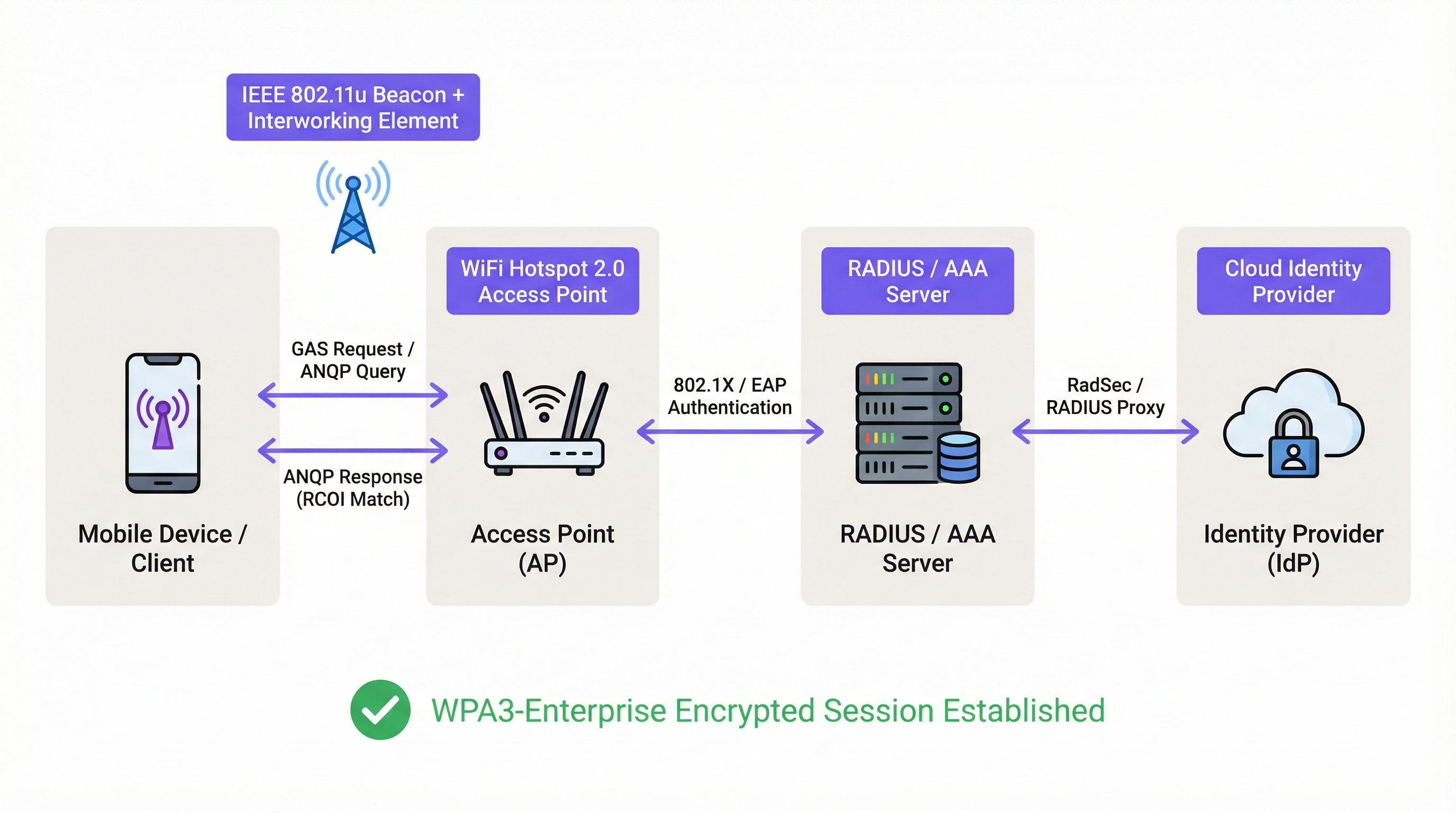 \n\n### Authentication and Security Framework\n\nOnce a credential match is confirmed, Passpoint leverages the robust security of IEEE 802.1X for authentication, typically with WPA2-Enterprise or the more secure WPA3-Enterprise encryption. This is the same port-based network access control standard trusted in secure wired enterprise networks. The authentication is handled via an Extensible Authentication Protocol (EAP) method, such as:\n\n* EAP-TLS: Certificate-based authentication, considered the gold standard for security. Both the client and the server present certificates to prove their identity.\n* EAP-TTLS/PEAP: Tunnels a legacy authentication method (like username/password) within a secure TLS tunnel.\n* EAP-SIM/AKA/AKA': SIM-based authentication, allowing mobile network operators to seamlessly roam their subscribers onto trusted WiFi networks.\n\nThis process ensures mutual authentication: the client validates the network is legitimate (preventing ‘Evil Twin’ AP attacks), and the network validates the client is authorized. All subsequent traffic is encrypted, mitigating the risk of man-in-the-middle (MITM) attacks common on open or PSK-based networks.\n\n### Passpoint vs. OpenRoaming\n\nIt is crucial to distinguish between Passpoint and OpenRoaming:\n\n> Passpoint is the vehicle; OpenRoaming is the highway system.\n
- Passpoint is the technical standard (802.11u, ANQP/GAS, 802.1X) that enables a device to automatically discover and authenticate to a single network or a group of networks under the same administrative control.\n* WBA OpenRoaming is a global federation framework managed by the Wireless Broadband Alliance. It creates a trust ecosystem between thousands of Identity Providers (IdPs) like mobile carriers and Access Network Providers (ANPs) like hotels, airports, and retail chains. This allows a user with a credential from any member IdP to automatically connect at any member ANP venue, without requiring complex bilateral roaming agreements.\n
For maximum compatibility in an OpenRoaming environment, network architects should broadcast both the standard settlement-free RCOI (
5A-03-BA) and the legacy Cisco RCOI (00-40-96).\n\n## Implementation Guide\n\nDeploying Passpoint is a structured process that moves from auditing your existing infrastructure to a phased rollout and optimization. Following this roadmap will ensure a smooth transition and mitigate common deployment pitfalls.\n\n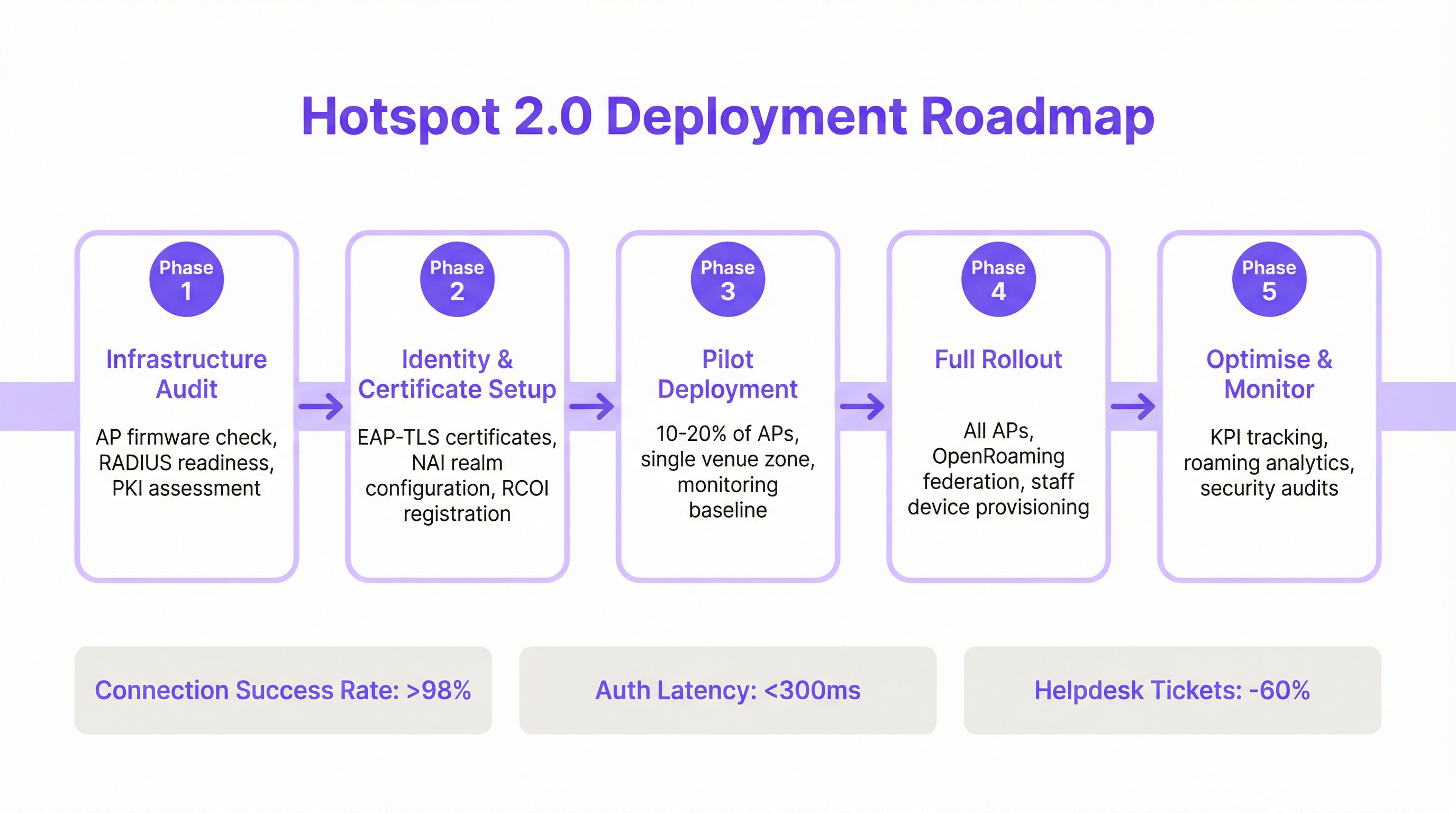 \n\n### Phase 1: Infrastructure Audit\n\nBefore beginning, assess your current network hardware and software. Key audit points include:\n* Access Point Compatibility: Verify that your APs support IEEE 802.11u. Most enterprise-grade APs manufactured after 2015 (from vendors like Cisco, HPE Aruba, Juniper Mist, Ruckus) have the necessary hardware, but may require a firmware upgrade.\n* RADIUS Server Readiness: You will need a RADIUS (or AAA) server capable of handling 802.1X EAP authentication. This can be an on-premise solution like Cisco ISE or a cloud-based service like SecureW2, Foxpass, or Google Cloud Identity.\n* PKI Assessment: For EAP-TLS deployments, a Public Key Infrastructure (PKI) is required to issue and manage digital certificates for client devices and servers.\n
Phase 2: Identity & Certificate Setup\n\nThis phase involves configuring the core authentication components:\n* NAI Realm Configuration: Define your Network Access Identifier (NAI) realms, which identify your authentication domain (e.g., @yourcompany.com).\n* RCOI Registration: If participating in a roaming consortium like OpenRoaming, register your RCOIs with the WBA.\n* Certificate Generation: For EAP-TLS, generate and deploy client certificates to your managed devices via a Mobile Device Management (MDM) solution. For guest access, you will need a mechanism to provision a profile with the necessary certificate trust chain.\n
Phase 3: Pilot Deployment\n\nStart with a controlled pilot in a limited area, such as a single floor or a specific venue zone, covering 10-20% of your APs. The goals of the pilot are to:\n* Establish a Baseline: Measure current connection success rates, authentication latency, and the volume of WiFi-related helpdesk tickets.\n* Test Device Matrix: Test the onboarding and connection experience across a wide range of devices (iOS, various Android manufacturers like Samsung and Google Pixel, Windows, macOS).\n* Refine Onboarding: Fine-tune the process for getting the Passpoint profile onto unmanaged guest devices.\n
Phase 4: Full Rollout\n\nOnce the pilot has met its success criteria (e.g., >98% connection success, auth latency <300ms), proceed with a full rollout across all APs and venues. This phase includes:\n* Full AP Configuration: Push the standardized Passpoint WLAN configuration to all access points.\n* Staff & Corporate Device Provisioning: Ensure all corporate-owned devices are provisioned with the Passpoint profile via MDM.\n* Enable OpenRoaming Federation: If applicable, enable the RADIUS proxying rules to participate in the OpenRoaming federation.\n
Phase 5: Optimise & Monitor\n\nPost-rollout, continuously monitor the network’s performance and security:\n* KPI Tracking: Track key performance indicators, comparing them against the pilot baseline. Key metrics include connection success rate, authentication latency, roaming success, and data throughput.\n* Roaming Analytics: Use analytics to understand roaming patterns between your venues and with roaming partners.\n* Security Audits: Conduct regular security audits to ensure the integrity of your RADIUS and PKI infrastructure.\n\n## Best Practices\n\nTo maximize the success and security of your Passpoint deployment, adhere to the following industry-standard best practices.\n
| Category | Best Practice | Rationale |\n| :--- | :--- | :--- |\n| Security | Mandate WPA3-Enterprise | WPA3 provides the highest level of security, with 192-bit cryptographic strength and Protected Management Frames (PMF) to prevent de-authentication attacks. |\n| Security | Use EAP-TLS for Corporate Devices | Certificate-based authentication is more secure than password-based methods and is immune to phishing and credential theft. |\n| Compatibility | Broadcast Multiple RCOIs | To ensure broad device support, broadcast both the modern OpenRoaming RCOI (5A-03-BA) and the legacy Cisco RCOI (00-40-96). |\n| User Experience | Streamline Profile Onboarding | The initial onboarding is the only point of friction. Use a simple, one-time captive portal or a lightweight app to make profile installation as easy as possible. |\n| Network Design | Segment IoT Devices | Most IoT devices do not support 802.1X. They should be segmented onto a separate, appropriately secured SSID (e.g., using MPSK or MAC authentication) and not mixed with Passpoint traffic. |\n| Operations | Integrate with Analytics | To retain visibility into guest behavior in the absence of a captive portal, integrate your Passpoint authentication logs with a WiFi analytics platform like Purple. |\n\n## Troubleshooting & Risk Mitigation\n\nEven well-planned deployments can encounter issues. Here are common failure modes and how to mitigate them.\n
| Symptom | Potential Cause | Mitigation Strategy |\n| :--- | :--- | :--- |\n| Devices not attempting to connect | RCOI Mismatch or Missing RCOI | Verify that your APs are broadcasting the correct RCOIs, including the legacy 00-40-96 OI. Use a WiFi analyzer tool to inspect beacon frames. |\n| Authentication failures (EAP) | RADIUS Server Misconfiguration / Certificate Issues | Check RADIUS logs for detailed error codes. Ensure client certificates are valid and the server trusts the client’s issuing CA. Verify the server certificate is valid and trusted by clients. |\n| High authentication latency | Slow RADIUS response / Network Path Issues | Ensure low latency between APs and the RADIUS server. If using a cloud RADIUS, check for any network congestion or routing issues. Target a sub-300ms response time. |\n| Inconsistent Android behavior | OEM-specific ANQP/GAS Implementation | Test thoroughly on a range of Android devices during the pilot phase. Some older or less common Android builds may have buggy 802.11u implementations. |\n| Roaming failures between venues | Inconsistent WLAN Configuration | Ensure that the Passpoint WLAN profile (SSID, security settings, RCOIs) is absolutely identical across all venues intended for seamless roaming. |\n\n## ROI & Business Impact\n\nWhile Passpoint is a technical solution, its impact is measured in business outcomes. The return on investment is driven by improvements in operational efficiency, user experience, and security posture.\n
Cost-Benefit Analysis\n
Investment Costs:\n* Hardware: Potential AP upgrades if existing hardware is not 802.11u compliant.\n* Software/Licensing: Costs for RADIUS server licenses (e.g., Cisco ISE) or cloud AAA services.\n* Federation Fees: Annual membership fees for participating in WBA OpenRoaming.\n* Implementation: Professional services or internal staff time for configuration, testing, and rollout.\n
Expected Returns & Benefits:\n* Reduced IT Overhead: A significant reduction in WiFi-related helpdesk tickets. A common outcome is a 40-60% decrease in tickets related to WiFi connectivity problems.\n* Increased Guest Satisfaction: The removal of login friction leads to higher Net Promoter Scores (NPS) and better reviews, particularly in hospitality.\n* Enhanced Security & Compliance: Mitigates risk of data breaches from WiFi-based attacks, supporting PCI DSS and GDPR compliance and reducing potential financial penalties.\n* Improved Data Offload: For mobile operators and their venue partners, Passpoint enables automatic and secure offloading of cellular data to WiFi, reducing strain on the cellular network.\n* Increased Engagement: A seamless connection encourages users to stay on-site longer and engage more with digital services, driving revenue in retail and hospitality environments.\n
By measuring KPIs such as helpdesk ticket volume, guest satisfaction scores, and connection success rates before and after deployment, IT teams can build a compelling business case demonstrating a clear and measurable ROI.\n\n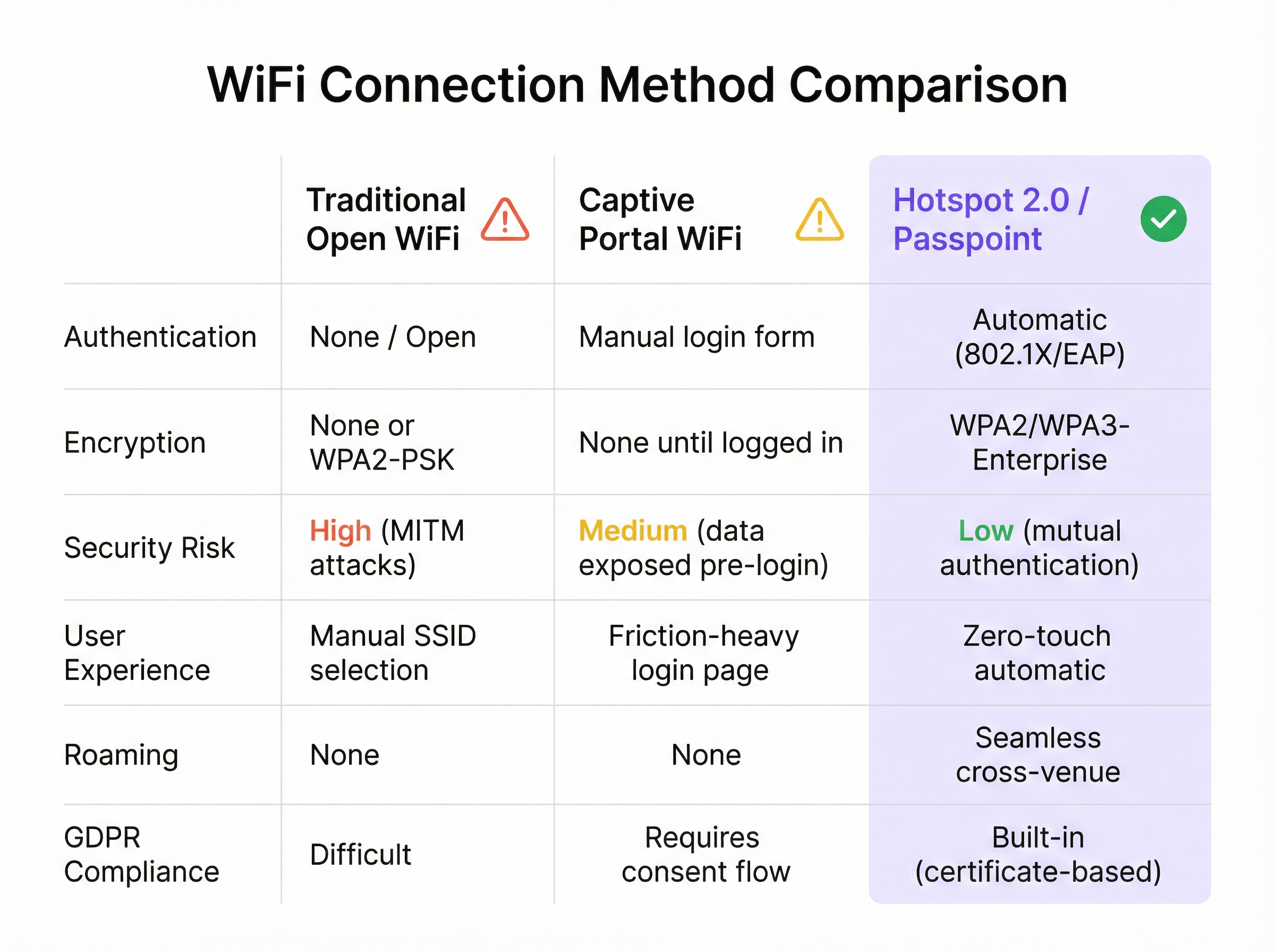
Key Terms & Definitions
IEEE 802.11u
An amendment to the IEEE 802.11 standard that enables 'interworking with external networks'. It allows client devices to exchange information with an access point before establishing a connection.
This is the foundational protocol that makes Hotspot 2.0 possible. When an IT team sees that an AP is '802.11u capable', it means it can support the discovery mechanisms required for Passpoint.
ANQP (Access Network Query Protocol)
The specific protocol used by a client device to query an access point about its capabilities, such as roaming partners, venue type, and authentication methods.
Network architects will configure ANQP elements on their wireless controllers to advertise network services. Troubleshooting often involves analyzing ANQP frames to see what information the AP is providing to clients.
GAS (Generic Advertisement Service)
The transport mechanism defined in 802.11u that carries ANQP frames between the client and the access point before an association is formed.
GAS and ANQP work together. GAS is the 'envelope' and ANQP is the 'letter' inside. When troubleshooting, packet captures will show GAS frames containing the ANQP queries and responses.
RCOI (Roaming Consortium Organizational Identifier)
A unique identifier that represents a group of network providers who have a roaming agreement. It's the primary piece of information a device looks for to decide if it can automatically connect.
This is a critical configuration item. An IT manager must ensure their APs are broadcasting the correct RCOIs for their own organization and any roaming partners like OpenRoaming. A missing or incorrect RCOI is a common cause of connection failures.
WPA3-Enterprise
The highest level of WiFi security, which uses 192-bit encryption and requires 802.1X authentication. It provides robust protection against eavesdropping and other sophisticated attacks.
For any organization concerned with security and compliance (PCI DSS, GDPR), deploying WPA3-Enterprise is a non-negotiable best practice. Passpoint is the most user-friendly way to implement it at scale.
EAP-TLS (Extensible Authentication Protocol-Transport Layer Security)
An EAP method that uses client-side and server-side digital certificates for mutual authentication. It is considered the most secure EAP method.
This is the recommended method for securing corporate-owned devices. IT teams will use an MDM to push certificates to devices, enabling zero-touch, highly secure network access.
RadSec (RADIUS over TLS)
A protocol that secures RADIUS authentication traffic by tunneling it through a TLS-encrypted connection (typically over TCP port 2083).
When setting up roaming with OpenRoaming or other external partners, network architects will use RadSec to ensure that authentication requests traversing the public internet are fully encrypted and secure.
NAI (Network Access Identifier)
A standardized way of identifying a user in an 802.1X authentication request, typically formatted like an email address (e.g., 'user@realm'). The realm portion is used to route the request to the correct home RADIUS server.
IT teams configure NAI realms to define their authentication domains. In a roaming scenario, the realm of the user's NAI determines which Identity Provider's RADIUS server needs to process the authentication request.
Case Studies
A 500-room luxury hotel with multiple conference wings wants to eliminate its cumbersome captive portal. Corporate guests frequently complain about having to re-authenticate multiple times per day as they move between their room, the conference centre, and the restaurant. The hotel needs to maintain PCI DSS compliance for its payment systems.
The recommended solution is a phased Passpoint deployment integrated with WBA OpenRoaming. Phase 1 (Pilot): Deploy Passpoint in the main conference wing and on one floor of guest rooms. Configure the WLAN to broadcast the hotel's own RCOI and the OpenRoaming RCOI. Use EAP-TLS for corporate-managed devices (provisioned via MDM by their employers) and provide a simple, one-time onboarding portal for guests to install a Passpoint profile with an EAP-TTLS credential. Phase 2 (Rollout): After a successful pilot, extend the Passpoint WLAN to all guest rooms, public areas, and restaurants. Decommission the legacy captive portal SSID, but keep a single, hidden SSID for specific back-of-house devices that do not support 802.1X. Security: The use of WPA3-Enterprise and 802.1X provides traffic encryption and mutual authentication, satisfying key PCI DSS requirements for securing wireless environments.
A large retail chain with 200 stores across the country wants to offer seamless WiFi to its loyalty program members. They also want to offload traffic from their in-store staff's cellular devices to the corporate WiFi to ensure reliable access to inventory and POS applications. The existing infrastructure is a mix of Cisco Meraki and Aruba hardware.
The solution is to create a unified Passpoint strategy across the mixed-vendor environment. Step 1 (Onboarding): Integrate Passpoint profile generation into the loyalty program's mobile app. When a user signs into the app, it automatically installs the Passpoint profile with a unique EAP-TTLS credential. Step 2 (Staff Provisioning): Use the company's MDM to push a separate Passpoint profile to all corporate-owned staff devices, configured for EAP-TLS using device certificates for zero-touch authentication. Step 3 (Network Configuration): In both Cisco Meraki and Aruba Central dashboards, create a new WLAN profile for Passpoint. Enable Hotspot 2.0, set security to WPA3-Enterprise, and add the company's RCOI and the OpenRoaming RCOI. Point authentication to a central cloud RADIUS server to ensure consistent policy enforcement across all stores. Step 4 (Analytics): Ingest RADIUS authentication logs into the Purple analytics platform to correlate WiFi connections with loyalty member IDs, tracking visit frequency and dwell time without a captive portal.
Scenario Analysis
Q1. You are the network architect for a large international airport. You want to implement Passpoint to provide seamless roaming for travelers from major cellular carriers. During your pilot, you notice that a large number of Android devices are not automatically connecting, while iOS devices are connecting successfully. What is the most likely cause and your first troubleshooting step?
💡 Hint:Consider the differences in how various device manufacturers implement the 802.11u standard and what specific information they look for during discovery.
Show Recommended Approach
The most likely cause is a misconfiguration of the Roaming Consortium Organizational Identifiers (RCOIs). Many Android devices, particularly older models or those with manufacturer-customized operating systems, rely on the legacy Cisco RCOI (00-40-96) to initiate an ANQP query. If only the modern OpenRoaming RCOI (5A-03-BA) is being broadcast, these devices will not attempt to connect. The first troubleshooting step is to use a WiFi analysis tool to inspect the beacon frames from the pilot APs and verify that both the OpenRoaming and the legacy Cisco RCOIs are being broadcast.
Q2. A retail chain has successfully deployed Passpoint with OpenRoaming in all its stores. The marketing team now wants to know if they can still gather customer analytics, such as visit frequency and dwell time, which they previously collected via the captive portal. What is your recommendation?
💡 Hint:Where in the new authentication flow can user identity be correlated with a connection event? Can this be done while respecting privacy and the principles of the OpenRoaming federation?
Show Recommended Approach
While Passpoint eliminates the captive portal, it is still possible to gather valuable analytics. The recommended approach is to leverage the RADIUS authentication logs. Each time a user connects, an authentication request is sent to the RADIUS server, which contains the user's Network Access Identifier (NAI). By integrating the RADIUS server with an analytics platform like Purple, the NAI can be used as a persistent anonymous identifier to track visit frequency and dwell time. This provides the marketing team with the data they need without reintroducing login friction for the user. It's important to ensure this process is compliant with privacy policies and the terms of the roaming federation.
Q3. A conference centre is setting up a Passpoint network. They plan to use EAP-TLS for staff and event organizers, but need a solution for thousands of temporary attendees. They are considering using EAP-TTLS with usernames and passwords distributed at registration. What is a significant security risk of this approach and what is a better alternative?
💡 Hint:Think about the lifecycle of shared credentials and the security of the 'inner' authentication method in EAP-TTLS.
Show Recommended Approach
The significant risk of using shared EAP-TTLS credentials (username/password) is the lack of revocation and accountability. If a credential pair is compromised, it can be used by an unauthorized party until it expires, and it's difficult to trace activity back to a specific individual. A better and more secure alternative is to use an onboarding portal that generates a unique Passpoint profile for each attendee. This can be done by having the attendee scan a QR code or visit a one-time URL. The portal generates a profile containing a unique, short-lived digital certificate (for EAP-TLS) or a unique EAP-TTLS credential. This ensures that each user has a distinct identity, and access can be revoked on a per-user basis if necessary, providing much stronger security and accountability.
Key Takeaways
- ✓WiFi Hotspot 2.0 (Passpoint) enables seamless, zero-touch roaming for users by automatically authenticating devices to trusted WiFi networks.
- ✓It replaces insecure, high-friction captive portals with credential-based authentication using the enterprise-grade WPA3-Enterprise security standard.
- ✓The core technology relies on the IEEE 802.11u standard, which allows devices to query network information (via ANQP/GAS) before connecting.
- ✓Mutual authentication (802.1X) is a key security benefit, protecting against 'Evil Twin' and Man-in-the-Middle (MITM) attacks.
- ✓OpenRoaming is a global federation that works with Passpoint to allow seamless roaming across thousands of different network providers.
- ✓A successful deployment requires a phased approach: audit your infrastructure, run a pilot to test across all device types, and then perform a full rollout.
- ✓Key business benefits include reduced IT helpdesk costs, improved guest satisfaction, enhanced security compliance (PCI DSS, GDPR), and new opportunities for data offload and analytics.




