
Multi-site daycare and childcare WiFi providers checklist: K-12 filtering, staff tablets and parent sign-in
Use this checklist to specify and shortlist a daycare group WiFi provider that separates observation tablets, staff devices and visitors at every location. You will be able to set certificate-based tablet access, replace shared room passwords with staff identity, and hold per-location filtering logs that match CIPA filtering and monitoring standards.
By Iain JewittPublished
📖 15 min read3,270 words3 worked examples12 key definitions
Part of our core series: Enterprise WiFi security and authentication: the complete guide →
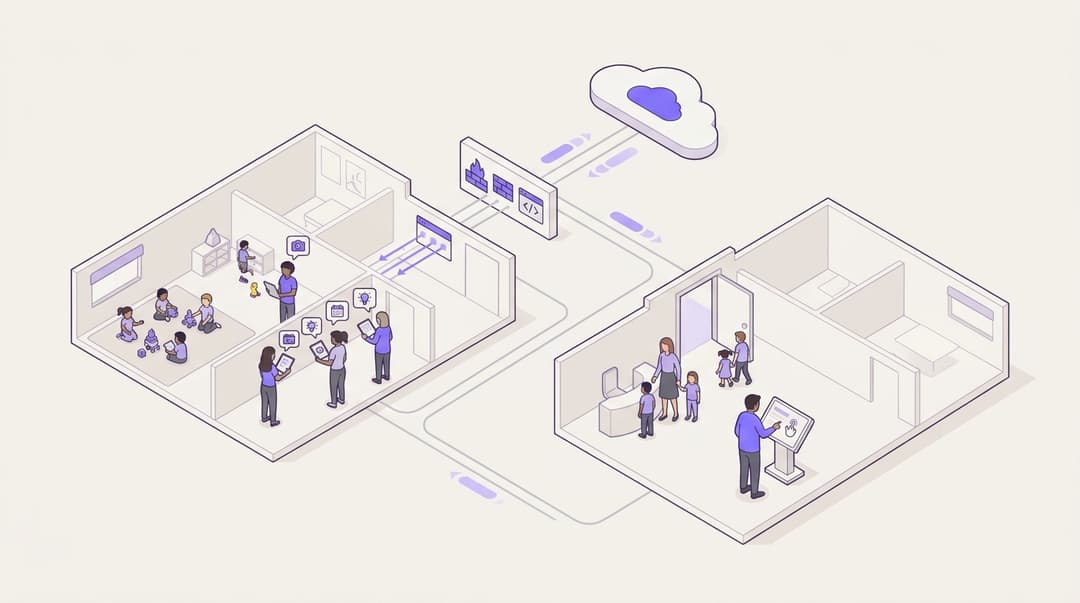
A daycare group WiFi provider should give every location three separate networks. Observation tablets join with a device certificate and stay off public networks. Staff sign in with their own identity, never a shared room password. Parents, inspectors and therapists use a filtered visitor network. Filtering and monitoring logs are held per location and managed centrally.
What does a daycare group WiFi provider actually need to deliver?
A daycare room is not an office. The network carries photographs of children, observation notes and safeguarding records. It also carries a parent's cell phone at pick-up and a visiting therapist's laptop. Most locations have no IT staff on site, so the room leader becomes the help desk by default.
A common starting point in childcare groups is one router per site and one password per room. That password often reaches staff personal cell phones. It stays valid after a member of staff leaves. It can also put a parent's cell phone on the same network as the tablet holding photographs of other children.
Your provider's job is to replace that setup with three separated networks at every location, all managed from one place:
- Observation tablets. These are enrolled and authenticated by certificate. Each sits on its own VLAN (virtual LAN, a logically separate network running on the same hardware).
- Staff devices. Each member of staff signs in with their own account, so their access ends when their employment ends.
- Visitors. Parents, inspectors and external specialists sign in through a captive portal. A captive portal is the web page that appears before access is granted. Visitors land on an isolated, filtered network.
What compliance standards expect from your network
Early childhood settings work to strict standards. Two areas matter most.
Child safety frameworks require a safeguarding policy. That policy must cover cell phones, cameras and other electronic devices with imaging and sharing capabilities. Your network design is how you enforce that policy rather than only write it down.
Online safety standards require appropriate filtering and monitoring. Best practice guidelines ask you to:
- name a senior leader responsible for filtering and monitoring;
- review your provision at least once a year;
- block harmful and inappropriate content without unreasonably affecting teaching and learning;
- keep logs that identify the device name or ID and IP address, and where possible the individual;
- record the time and date of the attempt and the search term or content blocked.
Registered childcare providers also fall under safety mandates to restrict harmful and unlawful content. That is why blocking unlawful terrorist content belongs in your filtering policy.
The logging requirement is the hardest to meet with one router per site. A broadband filter sees a single public IP address for the whole building. It cannot tell an observation tablet from a parent's phone.
What do you need in place before you choose a provider?
Collect the following before the first sales call. It shortens procurement and exposes weak answers quickly.
- A setting register. List every site and every room, with the number of observation tablets per room and the internet service provider.
- Your access points. Record the make and model at each site. Mixed estates are common after acquisitions.
- Your identity provider. Name it: Microsoft Entra ID, Okta or Google Workspace. Check that every staff member has an account, including temporary and substitute staff.
- Your MDM. Mobile device management (MDM) is the system that enrolls and configures tablets centrally. Note whether tablets are enrolled through Apple Business Manager or Android Enterprise.
- Your child protection and cell phone policy. Name the designated safety officer and the senior leader responsible for filtering and monitoring.
- Your data protection position. You need privacy notices for staff and visitors, plus a retention period for logs.
If any of these is missing, fix it first. No provider can enforce a cell phone policy that does not exist.
How do you set up separate networks for tablets, staff and visitors?
The steps below describe the design. Vendor-specific configuration lives in Purple's support documentation for your access point make. Your provider should complete those steps centrally, not hand them to a lead teacher.
Step 1: map every device and person to a network
Start with a decision matrix. It becomes the specification you give every provider on your shortlist.
| Who or what | Network | How it authenticates | Filtering applied | What the log records |
|---|---|---|---|---|
| Daycare-room observation tablet | Tablet VLAN | Device certificate (802.1X EAP-TLS) pushed by MDM | Strict early-years policy, learning journal app allowed | Device, setting, time, content blocked |
| Staff laptop or office PC | Staff VLAN | Own account in Microsoft Entra ID, Okta or Google Workspace | Staff policy | Named staff member, device, setting, time |
| Staff personal cell phone | None in rooms, or a separate staff phone network | Own staff account, internet only | Staff policy | Named staff member, setting, time |
| Parent, inspector, therapist | Visitor VLAN | Captive portal sign-in, time-limited | Visitor policy blocking harmful content | Visitor session, setting, time |
| Printers, door entry, cameras | Infrastructure VLAN | iPSK key per device | Named services only | Device, setting, time |
Step 2: enroll observation tablets and connect them with certificates
IEEE 802.1X is the standard for network access control: a device proves who it is before it gets network access. EAP-TLS is the 802.1X method that uses a certificate on the device instead of a password. RADIUS is the server that checks the certificate and decides which network the device joins.
For daycare staff tablet WiFi, the flow runs like this:
- Enroll each tablet in your MDM. iPads enrolled through Apple Business Manager can be supervised, so staff in the room cannot remove the management profile.
- The MDM pushes a WiFi profile and a unique certificate to each tablet.
- Purple's cloud RADIUS checks the certificate and places the tablet on the tablet VLAN at whichever setting it is in.
- Staff never see or type a network password.
Because the credential is a certificate, a tablet moved between settings connects without reconfiguration. If a tablet is lost, you retire it in the MDM and revoke its certificate. It then stops connecting at every setting.
If you use Purple MDM, tablet enrollment sits alongside your network policies. If you keep another MDM, ask the provider to confirm that their RADIUS trusts the certificates it issues.
Step 3: replace shared room passwords with staff identity
Purple Staff WiFi uses Identity-Based Networks: each member of staff authenticates with the account they already hold. Sign-in runs through SAML (Security Assertion Markup Language), the standard that passes a verified login from your identity provider to the network.
Joiners, movers and leavers (JML) then run from your identity provider. When HR disables a leaver's account, their next connection attempt fails at every setting. Temporary and agency staff get time-limited accounts that expire at the end of the booking.
Step 4: stop staff personal cell phones reaching the tablet network
This is the control safeguarding leads ask about most. Four measures close the gap.
- Require a certificate. The tablet network admits only devices holding a certificate issued by your MDM. A personal cell phone has none, and there is no password to share.
- Do not rely on a hidden network name. Devices still reveal hidden network names when they search for them. Hiding a network name is not access control.
- Isolate clients. Turn on client isolation on the tablet VLAN. Tablets then cannot talk to each other or reach anything beyond the services they need.
- Match your early childhood policy. If cell phones stay in lockers during sessions, offer no staff cell phone network in rooms. If staff use cell phones on breaks, give them a separate, filtered network that cannot reach the tablets.
Step 5: give visitors a separate, filtered network
Parents at settling-in sessions, Ofsted inspectors, speech and language therapists, health visitors and special educational needs specialists all need internet access. None of them needs access to your network. Purple Guest WiFi puts them on a visitor VLAN through a captive portal.
- Time-limit sessions to the visit, for example one day for an inspection.
- Turn on client isolation, so visitor devices cannot see each other or your printers.
- Filter the visitor network too. Children are in the building, and content on any screen there is your concern.
- Collect only what you need. Visitor sign-in data is personal data under the CCPA/CPRA. Conscious-choice opt-ins keep marketing consent separate from internet access.
Healthcare settings handle visiting clinicians in a similar way. Purple's approach for Healthcare follows the same separation principle.
Step 6: apply filtering and keep logs per setting
Purple Shield applies filtering policies to each network and keeps safeguarding logs for each setting. Because each log entry is tied to the network the device joined, you can tell an observation tablet from a visitor's phone. That meets the logging detail the DfE standards describe.
Ask for role-based views. Each setting manager should see their own setting, and the group safeguarding lead should see every setting.
Got questions about your specific setup?
Our team works with venue operators, IT managers, and network engineers across 80,000 venues. Book a 20-minute call and we will show you how others like you solved it.
Guaranteed response within 4 business hours - No commitment required
What should you ask a day care group WiFi provider?
Use this checklist in every provider conversation. A provider that cannot answer each row clearly should not make your shortlist.
| Question to ask | What a good answer looks like | Why it matters |
|---|---|---|
| How do observation tablets connect? | 802.1X EAP-TLS certificates pushed by MDM, on their own VLAN | No password to leak, and one tablet can be revoked alone |
| How do staff sign in? | Own account through Microsoft Entra ID, Okta or Google Workspace | Offboarded employees lose access when their account is disabled |
| What stops a staff cell phone joining the tablet network? | A certificate requirement: no certificate, no connection | Enforces your EYFS cell phone policy |
| How are visitors separated? | Captive portal, visitor VLAN, client isolation, time-limited sessions | Parents never share a network with children's photographs |
| What do filtering logs show? | Device, network, setting, time and content blocked | Matches the DfE filtering and monitoring standards |
| Which block lists does the filter apply? | The Internet Watch Foundation (IWF) list and the Counter-Terrorism Internet Referral Unit (CTIRU) list | Covers illegal content and your Prevent duty |
| Have you answered the UK Safer Internet Centre filtering definitions? | A published response you can read | Independent framing for your annual review |
| Who manages this with no on-site IT? | A central dashboard, with policies applied to each setting from one place | Room leaders never change network settings |
| What certifications do you hold? | ISO 27001, Cyber Essentials, CCPA/CPRA compliance | Evidence for your data protection impact assessment |
For a wider view of why segmentation matters, read Why is it important to secure a network? a 2026 guide.
How do you check it works at each setting?
Run these checks at your first setting before rolling out to the rest. Repeat them each year as part of your filtering and monitoring review.
- Tablet test. Switch on an enrolled tablet. It should connect without a password and land on the tablet VLAN. Confirm the learning journal app uploads an observation.
- Cell phone test. Try to join the tablet network from a personal cell phone. The attempt should fail.
- Visitor test. Join the visitor network. Confirm you cannot reach a printer or tablet, and that the session ends on time.
- Filtering test. Run SWGfL's Test Filtering tool from each network. It checks whether the filtering covers its test categories.
- Log test. Find the step 4 attempts in the log. Each entry should show device, network, setting and time.
- Leaver test. Disable a test staff account. Confirm it cannot connect at any setting.
- Record the result. Note the date, who checked and what failed. The named senior leader signs it off as evidence of your annual review.
What goes wrong, and how do you fix it?
Tablets stop connecting overnight
Cause: the device certificates have expired.
Fix: set the MDM to renew certificates well before expiry. Add an expiry alert to the group IT lead's dashboard.
Over-blocking breaks the learning journal app
Cause: a strict filtering policy blocks the domains the app uses.
Fix: allow those named domains on the tablet network only. The DfE standards warn against filtering that unreasonably affects learning, so record each allow decision.
Staff share one login between devices
Cause: personal accounts replace shared passwords, but habits persist.
Fix: look for one account active on several devices at once in the logs. Then address it through your staff code of conduct.
MAC-based rules fail on newer cell phones
Cause: iOS and Android use private WiFi addresses that change. Rules tied to a device's MAC address (its hardware address) break.
Fix: base access on certificates and accounts, never on MAC addresses. Identity-Based Networks do this by design.
An acquired daycare runs different hardware
Cause: growth by acquisition brings a new access point make.
Fix: a hardware-agnostic cloud overlay applies the same three networks to the new site without replacement. See Why your next WiFi upgrade doesn't need new hardware.
What does this look like in practice?
The two scenarios below are worked examples built from common deployment patterns. They are not named references.
Worked scenario 1: a city's family hubs (public sector)
Situation. A local government runs nine family hubs, six with day care rooms. Its 40 observation tablets sit across 18 rooms, each room with its own password. Visiting health specialists and therapists asked staff for the room password. Every password change meant a visit from the city's central IT team.
What was done. The city enrolled the tablets in its MDM and moved them to certificate-based access on a tablet VLAN. Staff now sign in with their city Microsoft Entra ID accounts. Health specialists and therapists use a time-limited visitor network through a captive portal. Shield filtering applies to each network, with logs per hub.
Outcome. Shared passwords in circulation fell from 18 to zero. A departing employee now loses access at all nine hubs when HR disables one account. Filtering logs attribute each blocked request to a hub and a network type, not one IP address per building.
Worked scenario 2: a resort group's day cares (hospitality)
Situation. A resort operator runs licensed day cares at 12 locations. Day care tablets shared the resort guest network with every guest's device. Seasonal day care staff joined using a password printed in the break room.
What was done. The operator kept its guest network, the same model Purple runs for Hotels, and isolated it from the day cares. Day care tablets moved to a certificate-only VLAN on the existing access points. Day care staff now sign in to Staff WiFi with their own accounts, and Shield filters the day care network.
Outcome. The day care network now admits 24 enrolled tablets, two per resort, and no guest devices. The operator bought no new access points. At season end, departing employees lose access when their accounts are disabled, with no password changes needed at any of the 12 resorts.
Nonprofit and pharmacy groups face similar volunteer and visitor questions. See Charity retail and community hub WiFi providers checklist: volunteer access, donor sign-in and safeguarding and Pharmacy and optician chain WiFi providers checklist: consultation networks, patient access and rollout.
What does it cost, and what do you get back?
Four factors drive the cost of childcare group WiFi:
- Number of settings. Your setting register defines the scope.
- Hardware. If your access points are Cisco Meraki, HPE Aruba, Ruckus, Juniper Mist, Ubiquiti UniFi, Cambium, Extreme or Fortinet, you replace none of them.
- Plan and add-ons. You choose Connect, Capture or Engage, with Shield for filtering and safeguarding logs. SecurePass is available where you need it.
- Your own time. The one-time inventory and policy work comes before rollout.
Purple does not publish a flat price. Ask for a quote built on your facility register, so every day care and room is costed from the start.
What you get back is measurable against your current routine:
- Room passwords and the site visits to change them disappear.
- Leavers lose access at every facility through one account change.
- Each facility holds filtering logs and annual review evidence ready for inspection.
Behind that sits Purple's own operating record. Purple was founded in 2012 and runs across 80,000+ live venues in over 90 countries. It handles 500 million users and logins a year. Purple delivers 99.999% uptime and is ISO 27001, Cyber Essentials and B Corp certified. To understand how these protections work at network level, read WiFi networking explained: How it stays secure.
Frequently asked questions
Do we need new access points to separate tablet, staff and visitor networks?
No. Purple is hardware-agnostic and runs as a cloud overlay on the access points you already own. That includes Cisco Meraki, HPE Aruba, Ruckus, Juniper Mist, Ubiquiti UniFi, Cambium, Extreme and Fortinet. This matters for day care groups that grow by acquisition and inherit a different make at each facility. Some older models may need a firmware update for certificate-based access, so share your access point list before you sign.
Does KCSIE apply to a private day care group?
Not directly. KCSIE is statutory for schools and colleges, including pre-K classes in schools. Private, voluntary and independent day cares work to the EYFS statutory framework. EYFS requires a safeguarding policy covering cell phones, cameras and devices that can share images. Aligning with KCSIE and the DfE filtering and monitoring standards gives you a clear, published benchmark for filtering, logging and annual review.
How is Purple priced for a multi-site childcare group?
Pricing depends on the number of facilities, the plan you choose and the add-ons you need. Connect, Capture and Engage are the core plans, and Shield adds filtering and safeguarding logs. If your access points are on the supported list, the quote carries no hardware line. Ask for a quote built on your facility register, so every day care and room is priced from day one.
Can we keep our current MDM for day care iPads?
Yes, in most cases. Certificate-based WiFi needs an MDM that can push a WiFi profile and a device certificate to each tablet. Mainstream MDM platforms do this for supervised iPads and Android Enterprise tablets. Ask the provider to confirm that their RADIUS trusts certificates from your MDM. If you are choosing an MDM now, Purple MDM keeps tablet enrollment alongside your network policies.
How do we stop staff using personal phones on the daycare tablet network?
Make the tablet network admit only devices holding a certificate issued by your MDM. A personal phone has no certificate, so it cannot join, and there is no password to share. Back this with your mobile phone policy. Either offer no staff phone network in rooms, or provide a separate, filtered staff network that cannot reach the tablets.
Is visitor sign-in data held in line with CCPA/CPRA?
Yes. Purple is ISO 27001 certified and GDPR compliant, and the captive portal collects only the fields you configure. You remain the data controller, so set a retention period and publish a privacy notice at each setting. Conscious-choice opt-ins keep marketing consent separate from internet access. A parent or therapist can get online without agreeing to anything else.
How much work is needed at each preschool during rollout?
Little at the setting itself, where access points are already cloud-managed. Network names, policies, and filtering are configured centrally and applied to each setting. Tablets receive their certificates through the MDM. The on-site tasks are the checks: an enrolled tablet connects, a personal phone fails, the visitor network is isolated, and logs appear. Most of the effort is the inventory you complete beforehand.
How does this compare with filtering on our broadband router?
A router filter sees one internet address for the whole site, so its logs cannot tell an observation tablet from a parent's phone. Content filtering standards expect logs that identify the device and, where possible, the individual. Filtering applied per network, with staff signed in under their own accounts, gives you that detail for each setting from one central view.
Key Definitions
IEEE 802.1X
The IEEE standard for port-based network access control. It defines how a device (the supplicant) proves its identity through the access point (the authenticator) to an authentication server before any network access is granted, carrying EAP messages over the LAN.
You meet it when specifying how observation tablets connect. Requiring 802.1X on the tablet network is what stops a staff personal phone from joining, because there is no shared password to type.
EAP-TLS
The Extensible Authentication Protocol method defined in RFC 5216 that uses mutual TLS certificate authentication. The device presents a unique client certificate rather than a password, and the server presents its own certificate.
Your MDM pushes a certificate to each tablet. If a tablet is lost, you revoke that one certificate and it stops connecting at every location, with no password change elsewhere.
RADIUS
Remote Authentication Dial-In User Service, specified in RFC 2865. It is the authentication, authorization and accounting protocol an access point uses to ask a server whether a device may connect and which network policy to apply.
Purple's cloud RADIUS checks each tablet certificate and places it on the tablet VLAN. If you keep your own MDM, confirm the provider's RADIUS trusts the certificates it issues.
VLAN
A virtual LAN, defined by IEEE 802.1Q tagging, that runs a logically separate network on the same physical switches and access points, keeping traffic from different groups apart.
Tablets, staff devices, visitors and infrastructure such as printers each get their own VLAN, so a parent's phone never shares a network with children's photographs.
Captive portal
The web page a device is redirected to after joining a network and before internet access is granted, used to present terms, collect sign-in details and record consent.
Parents, inspectors and therapists sign in through it onto a time-limited visitor network. Sign-in data is personal data under the CCPA/CPRA, so collect only the fields you need.
SAML
Security Assertion Markup Language, the OASIS XML standard that lets an identity provider pass a verified login assertion to a service, so the service never handles the user's password directly.
Staff WiFi sign-in runs through SAML from Microsoft Entra ID, Okta or Google Workspace, so joiners, movers and leavers are handled in your identity provider rather than at each preschool.
Mobile device management (MDM)
The system that enrolls and configures devices centrally, using Apple Business Manager supervision for iPads or Android Enterprise for Android tablets, and pushes WiFi profiles and device certificates.
Supervised enrollment stops staff in the room removing the management profile, and MDM certificate renewal prevents tablets dropping off the network overnight when certificates expire.
iPSK
Identity pre-shared key: a unique WPA2 or WPA3 passphrase issued per device on a single network name, so each device's key can be tied to a policy and revoked on its own.
Printers, door entry systems and cameras that cannot hold a certificate join an infrastructure VLAN with their own iPSK key, restricted to named services only.
Child Online Safety Standards
Statutory guidance for schools and educational institutions, including early childhood programs. It requires appropriate filtering and monitoring and points to published student safety standards.
Private, voluntary and independent childcare groups are not directly bound by specific state regulations, but these guidelines are the clearest published benchmark for online safety and a sound default for your filtering policy.
CIPA and Student Safety Filtering Standards
The education technology standards for schools and daycare centers. They require a named leader, an annual review, blocking harmful content without unreasonably affecting learning, and logs recording device name or ID, IP address, where possible the individual, the time and date and the content blocked.
The logging detail is the requirement a single router per site cannot meet, and it is the benchmark your per-setting logs and annual review evidence should match.
Cybersecurity and Content Safety Compliance
The requirement that obligates registered childcare and education providers to take reasonable steps to prevent access to harmful, dangerous, or illegal online material.
It is why blocking unlawful or harmful content belongs in your filtering policy and in your questions to every provider.
Early Childhood Education Regulatory Framework
The DfE Early Years Foundation Stage statutory framework for early years settings in England. It requires a safeguarding policy covering mobile phones, cameras and other electronic devices with imaging and sharing capabilities.
Your network design enforces this policy: either no staff phone network in rooms, or a separate filtered staff network that cannot reach the observation tablets.
Worked Examples
A local government agency runs nine family centers, six with daycare rooms. Its 40 observation tablets sit across 18 rooms, each with its own password. Visiting health specialists and therapists ask staff for room passwords, and every password change needs a visit from central IT. How should the agency restructure access?
The agency enrolled the tablets in its MDM and moved them to certificate-based access on a dedicated tablet VLAN. Staff now sign in with their agency Microsoft Entra ID accounts. Visiting specialists and therapists use a time-limited visitor network through a captive portal. Shield filtering applies to each network, with logs held per location. Shared passwords in circulation fell from 18 to zero. A leaver now loses access at all nine locations when HR disables one account. Filtering logs attribute each blocked request to a location and a network type, rather than one IP address per building, which matches state and federal logging detail.
A resort operator runs state-licensed daycares at 12 locations. Daycare tablets share the resort guest network with every guest's device, and seasonal daycare staff join using a password printed in the staff breakroom. How do you separate the daycares without new hardware?
The operator kept its guest network and isolated it from the daycares. Daycare tablets moved to a certificate-only VLAN on the existing access points, so no hardware was replaced. Daycare staff now sign in to Staff WiFi with their own accounts, and Shield filters the daycare network. The daycare network now admits 24 enrolled tablets, two per location, and no guest devices. At season end, leavers lose access when their accounts are disabled. No password changes are needed at any of the 12 locations, which removes the printed staff breakroom password entirely.
After moving to a strict early-childhood filtering policy, the learning journal app on observation tablets stops uploading observations. How do you restore it without weakening filtering across the group?
The cause is a strict policy blocking the domains the app relies on. Allow those named domains on the tablet network only, leaving the staff and visitor policies unchanged. CIPA filtering standards warn against filtering that unreasonably affects instruction and learning, so record each allow decision. That record then forms part of the evidence the designated administrator signs off at your annual review. Confirm the fix with the tablet test: an enrolled tablet connects without a password, lands on the tablet VLAN and uploads an observation.
Frequently asked questions
Do we need new access points to separate tablet, staff and visitor networks?
No. Purple is hardware-agnostic and runs as a cloud overlay on the access points you already own. That includes Cisco Meraki, HPE Aruba, Ruckus, Juniper Mist, Ubiquiti UniFi, Cambium, Extreme and Fortinet. This matters for daycare groups that grow by acquisition and inherit a different make at each location. Some older models may need a firmware update for certificate-based access, so share your access point list before you sign.
Does KCSIE apply to a private daycare group?
Not directly. KCSIE is statutory for schools and colleges, including preschool classes in schools. Private, voluntary and independent daycares work to the EYFS statutory framework. EYFS requires a safeguarding policy covering cell phones, cameras and devices that can share images. Aligning with KCSIE and the DfE filtering and monitoring standards gives you a clear, published benchmark for filtering, logging and annual review.
How is Purple priced for a multi-site childcare group?
Pricing depends on the number of locations, the plan you choose and the add-ons you need. Connect, Capture and Engage are the core plans, and Shield adds filtering and safeguarding logs. If your access points are on the supported list, the quote carries no hardware line. Ask for a quote built on your location register, so every daycare and room is priced from day one.
Can we keep our current MDM for daycare iPads?
Yes, in most cases. Certificate-based WiFi needs an MDM that can push a WiFi profile and a device certificate to each tablet. Mainstream MDM platforms do this for supervised iPads and Android Enterprise tablets. Ask the provider to confirm that their RADIUS trusts certificates from your MDM. If you are choosing an MDM now, Purple MDM keeps tablet enrollment alongside your network policies.
How do we stop staff using personal phones on the daycare tablet network?
Make the tablet network admit only devices holding a certificate issued by your MDM. A personal phone has no certificate, so it cannot join, and there is no password to share. Back this with your EYFS cell phone policy. Either offer no staff phone network in rooms, or provide a separate, filtered staff network that cannot reach the tablets.
Is visitor sign-in data held in line with CCPA/CPRA?
Yes. Purple is ISO 27001 certified and CCPA/CPRA compliant, and the captive portal collects only the fields you configure. You remain the data controller, so set a retention period and publish a privacy notice at each setting. Conscious-choice opt-ins keep marketing consent separate from internet access. A parent or therapist can get online without agreeing to anything else.
How much work is needed at each preschool during rollout?
Little at the setting itself, where access points are already cloud-managed. Network names, policies, and filtering are configured centrally and applied to each setting. Tablets receive their certificates through the MDM. The on-site tasks are the checks: an enrolled tablet connects, a personal phone fails, the visitor network is isolated and logs appear. Most of the effort is the inventory you complete beforehand.
How does this compare with filtering on our broadband router?
A router filter sees one internet address for the whole site, so its logs cannot tell an observation tablet from a parent's phone. Content filtering standards expect logs that identify the device and, where possible, the individual. Filtering applied per network, with staff signed in under their own accounts, gives you that detail for each setting from one central view.
Sources
- DfE: Keeping children safe in education
- DfE: Filtering and monitoring standards for schools and colleges
- DfE: Early years foundation stage statutory framework
- Counter-Terrorism and Security Act 2015
- RFC 5216: The EAP-TLS authentication protocol
- RFC 2865: Remote Authentication Dial In User Service (RADIUS)
- ICO: UK GDPR guidance and resources
- SWGfL Test Filtering
Continue reading in this series
Pharmacy and optician chain WiFi providers checklist: consultation networks, patient access and rollout
You will be able to design five segmented networks for every pharmacy or optician branch and replace shared passwords with named staff and locum sign-in. You can apply protective DNS per segment, roll one template out across hundreds of branches on existing access points, and shortlist providers using logs that evidence HIPAA and PCI DSS controls.
Independent school WiFi procurement checklist: boarding house keys, KCSIE filtering and staff 802.1X
Use this checklist to specify independent school WiFi that puts staff and school-owned devices on certificate-based IEEE 802.1X, gives every boarder a personal key and filters by grade level and time of day under KCSIE. You can then write RFP questions, acceptance tests and a phased rollout that produce safeguarding reports naming the student behind every blocked request.
Dental group WiFi providers checklist: patient WiFi, clinical networks and multi-practice rollout
Use this checklist to shortlist a dental practice WiFi provider that separates patient, staff, clinical and payment networks identically at every practice. You can then pilot the design at one practice, run seven isolation checks and roll it out in batches. You will also know which WiFi evidence to keep for PCI DSS, CCPA/CPRA, HIPAA and SOC 2 Type II.
Got questions about your specific setup?
Our team works with venue operators, IT managers, and network engineers across 80,000 venues. Book a 20-minute call and we will show you how others like you solved it.
Guaranteed response within 4 business hours - No commitment required