

Autenticación 802.1X: Protección del acceso a la red en dispositivos modernos
This guide provides a comprehensive, actionable overview of IEEE 802.1X authentication for senior IT professionals and network architects. It details the critical steps for securing network access across diverse enterprise environments, focusing on practical, vendor-neutral deployment guidance to mitigate risk, ensure compliance, and deliver a seamless, secure user experience.
🎧 Listen to this Guide
View Transcript
Resumen ejecutivo
Esta guía proporciona una descripción general completa y práctica de la autenticación IEEE 802.1X para profesionales de TI sénior y arquitectos de redes. Detalla los pasos críticos para proteger el acceso a la red en diversos entornos empresariales, desde la hostelería y el comercio minorista hasta recintos públicos a gran escala. Vamos más allá de la teoría académica para ofrecer una guía de implementación práctica e independiente del proveedor, centrada en mitigar riesgos, garantizar el cumplimiento de normativas como PCI DSS y GDPR, y ofrecer una experiencia de usuario fluida y segura en dispositivos modernos, incluidos iOS y Android. Al aprovechar 802.1X, las organizaciones pueden sustituir las vulnerables claves precompartidas por un control de acceso sólido basado en la identidad, garantizando que solo los dispositivos autorizados y de confianza puedan conectarse a los recursos de la red corporativa. Este documento sirve como referencia estratégica para planificar y ejecutar una implementación exitosa de 802.1X, abarcando la arquitectura, la selección del método EAP, la gestión de certificados y el análisis del ROI para ayudarle a tomar decisiones informadas que mejoren su postura de seguridad y respalden los objetivos empresariales.
Análisis técnico en profundidad
El estándar IEEE 802.1X define un mecanismo de control de acceso a la red basado en puertos (PNAC) para proporcionar acceso autenticado a redes Ethernet y redes inalámbricas 802.11. Representa un cambio fundamental con respecto a los protocolos de seguridad heredados, que a menudo dependían de una única contraseña compartida (clave precompartida o PSK) para todos los usuarios. Un marco 802.1X autentica al usuario o dispositivo antes de que se le asigne una dirección IP y se le conceda acceso a la red, creando un potente límite de seguridad en el punto de entrada.
La arquitectura se compone de tres elementos principales:
- Suplicante (Supplicant): El dispositivo cliente que busca conectarse a la red (por ejemplo, un portátil, un smartphone o un dispositivo IoT). El suplicante es el software del dispositivo cliente que proporciona las credenciales al autenticador.
- Autenticador (Authenticator): El dispositivo de red que controla el acceso a la red, normalmente un punto de acceso inalámbrico (AP) o un switch. El autenticador actúa como intermediario, transmitiendo los mensajes de autenticación entre el suplicante y el servidor de autenticación.
- Servidor de autenticación (AS): El servidor centralizado que valida las credenciales del suplicante y toma la decisión final sobre si conceder o denegar el acceso. En casi todas las implementaciones empresariales, esta función la desempeña un servidor RADIUS (Remote Authentication Dial-In User Service).
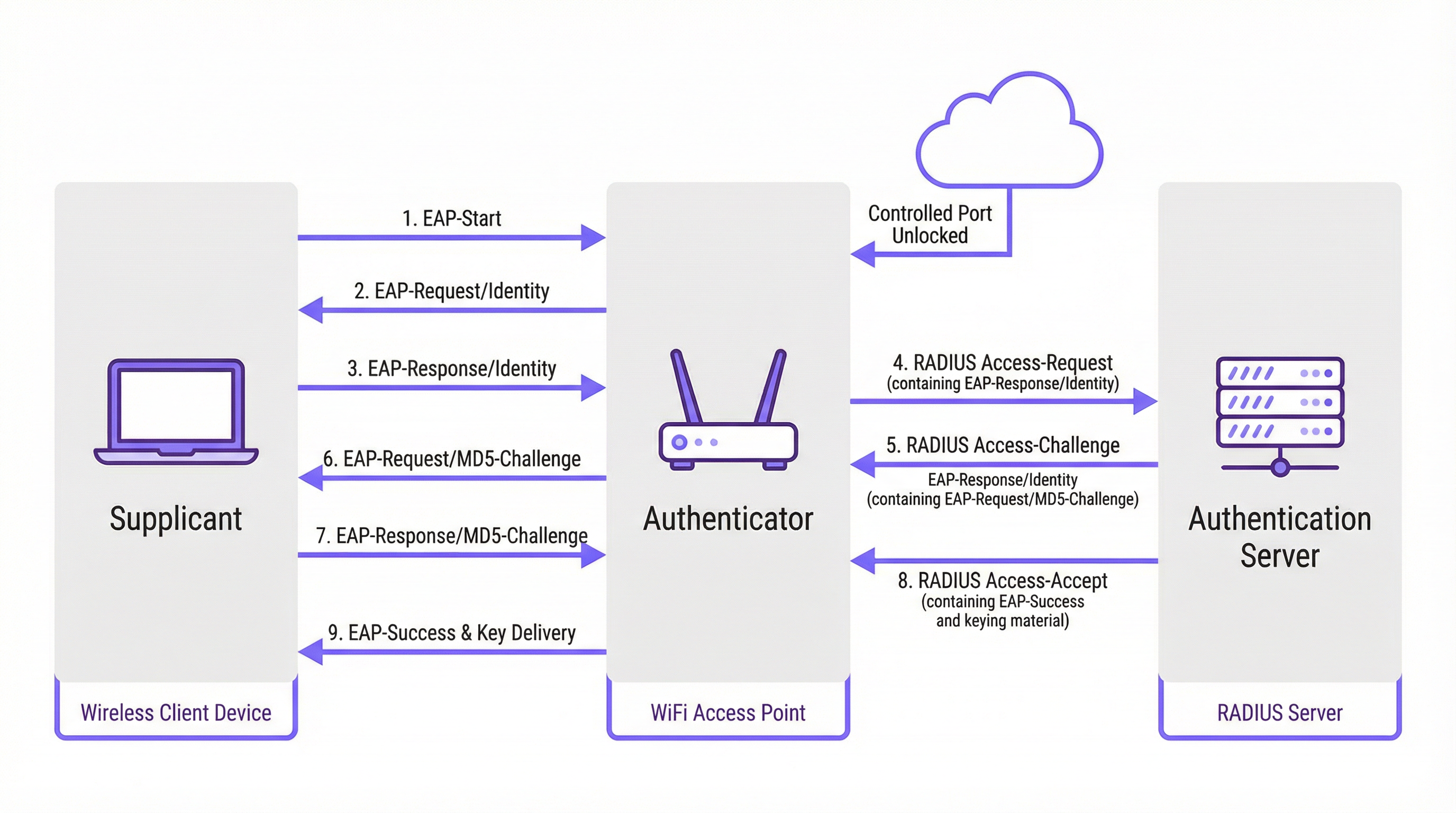
El proceso de autenticación sigue un intercambio de mensajes estructurado y orquestado por el Protocolo de Autenticación Extensible (EAP). EAP es un marco flexible que admite varios métodos de autenticación (tipos de EAP), lo que permite a las organizaciones elegir el que mejor se adapte a sus requisitos de seguridad e infraestructura existente.
Comparativa de métodos EAP
Elegir el método EAP adecuado es una decisión de implementación crítica. Los métodos principales utilizados en las redes empresariales modernas son EAP-TLS, PEAP y EAP-TTLS.
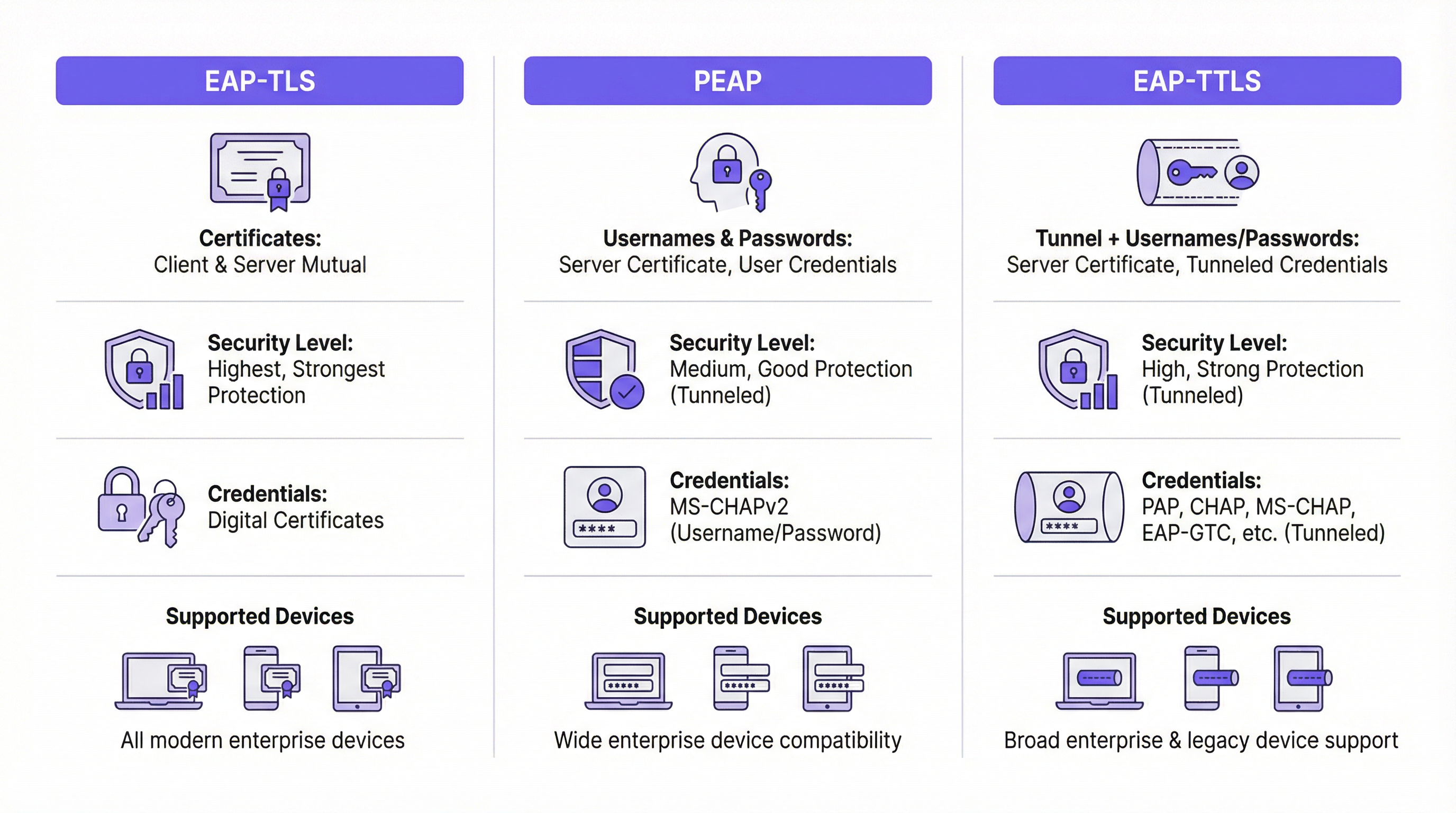
| Característica | EAP-TLS (Transport Layer Security) | PEAP (Protected EAP) | EAP-TTLS (Tunneled TLS) |
|---|---|---|---|
| Nivel de seguridad | El más alto. Proporciona autenticación mutua basada en certificados. | Alto. Cifra el intercambio de credenciales dentro de un túnel TLS. | Alto. Similar a PEAP, cifra el intercambio de credenciales. |
| Credenciales | Certificados digitales de cliente y servidor | Certificado de servidor, credenciales de usuario (por ejemplo, usuario/contraseña) | Certificado de servidor, credenciales de usuario (opciones más flexibles) |
| Complejidad | Alta. Requiere una infraestructura de clave pública (PKI) para gestionar los certificados de todos los dispositivos. | Media. Aprovecha las credenciales de directorio existentes (por ejemplo, Active Directory). | Media. Similar a PEAP, pero ofrece mayor flexibilidad para los protocolos de autenticación. |
| Caso de uso | Dispositivos corporativos donde la implementación de certificados se puede automatizar a través de MDM. Entornos de alta seguridad. | Entornos BYOD y corporativos donde se prefiere la autenticación mediante usuario/contraseña. | Entornos diversos con una combinación de sistemas operativos cliente (por ejemplo, macOS, Linux). |
EAP-TLS está considerado de forma generalizada como el estándar de oro para la seguridad 802.1X. Requiere que tanto el cliente como el servidor tengan un certificado digital, lo que permite la autenticación mutua. Esto elimina el riesgo de ataques basados en contraseñas, pero introduce la carga de trabajo adicional de implementar y gestionar un certificado en cada dispositivo cliente.
PEAP es el tipo de EAP más común en entornos empresariales. Simplifica la implementación al requerir únicamente un certificado en el servidor de autenticación. El cliente verifica la identidad del servidor y luego crea un túnel TLS cifrado. Dentro de este túnel, el cliente se autentica utilizando métodos menos complejos, normalmente MS-CHAPv2 (usuario y contraseña). Aunque es seguro, sigue siendo vulnerable a ataques de phishing si se engaña a los usuarios para que se conecten a un AP no autorizado con un certificado de servidor de apariencia válida.
EAP-TTLS es funcionalmente similar a PEAP, pero ofrece más flexibilidad. También crea un túnel TLS, pero permite una gama más amplia de protocolos de autenticación internos, como PAP, CHAP o EAP-MD5, lo que lo convierte en una opción versátil para entornos con sistemas heredados o diversos tipos de clientes.
Guía de implementación
Una implementación exitosa de 802.1X requiere una planificación cuidadosa y una ejecución por fases. Los siguientes pasos proporcionan una hoja de ruta independiente del proveedor.
Fase 1: Infraestructura y planificación
- Seleccione su servidor RADIUS: Elija un servidor RADIUS que se adapte a su infraestructura existente. El Servidor de directivas de redes (NPS) de Microsoft es una opción común para entornos centrados en Windows, mientras que las opciones de código abierto como FreeRADIUS son muy flexibles. Los servicios RADIUS basados en la nube también son cada vez más populares por su escalabilidad y la reducción de la carga de gestión.
- Elija su método EAP: Basándose en la comparativa anterior, seleccione el método EAP que mejor equilibre sus requisitos de seguridad, base de usuarios y capacidades administrativas. Para la mayoría de los entornos corporativos, PEAP ofrece un buen equilibrio. Para implementaciones de alta seguridad, EAP-TLS es la vía recomendada.
- Planifique su estrategia de certificados: Este es el paso más crítico. Para PEAP o EAP-TTLS, necesitará un certificado de servidor para su servidor RADIUS. Este certificado DEBE ser emitido por una Autoridad de Certificación (CA) pública de confianza. El uso de un certificado autofirmado provocará advertencias de seguridad en todos los dispositivos cliente, lo que socavará la confianza del usuario y la seguridad.
Fase 2: Configuración
- Configure el servidor RADIUS: Instale y configure el servidor RADIUS elegido. Esto implica:
- Instalar el certificado del servidor.
- Definir los clientes RADIUS (sus puntos de acceso y switches).
- Crear directivas de solicitud de conexión para procesar las solicitudes entrantes.
- Crear directivas de red que definan las condiciones, restricciones y configuraciones para la autenticación. Por ejemplo, una directiva podría establecer que solo los miembros de un grupo específico de Active Directory pueden conectarse.
- Configure el autenticador (AP inalámbricos/switches):
- Configure su controlador de LAN inalámbrica o los puntos de acceso individuales con la dirección IP de su servidor RADIUS y el secreto compartido.
- Cree una nueva WLAN/SSID dedicada a 802.1X. No intente ejecutar 802.1X en una red abierta o PSK existente.
- Asegúrese de que el SSID esté configurado para WPA2-Enterprise o WPA3-Enterprise.
Fase 3: Incorporación e implementación de clientes
- Dispositivos corporativos: Utilice una solución de gestión de dispositivos móviles (MDM) o directiva de grupo (GPO) para configurar automáticamente los dispositivos propiedad de la empresa. El MDM/GPO puede enviar el perfil de red inalámbrica, incluido el SSID, el tipo de EAP y cualquier certificado de CA necesario, al dispositivo. Esto proporciona una experiencia "zero-touch" (sin intervención) para el usuario final.
- BYOD (Trae tu propio dispositivo): La incorporación de dispositivos personales es más compleja. La mejor práctica es utilizar una solución de incorporación dedicada. Estas soluciones proporcionan un SSID de "incorporación" abierto y temporal. Cuando un usuario se conecta, es redirigido a un Captive Portal donde puede autenticarse y descargar una utilidad de configuración o perfil que configura automáticamente su dispositivo para la red segura 802.1X.
Mejores prácticas
- Segmente su red: Utilice la asignación dinámica de VLAN basada en atributos RADIUS. Esto le permite colocar diferentes grupos de usuarios (por ejemplo, empleados, contratistas, invitados) en diferentes VLAN con distintas políticas de acceso, incluso cuando se conectan al mismo SSID.
- Utilice siempre un certificado de confianza pública: Nunca se insistirá lo suficiente en la importancia de utilizar un certificado público en su servidor RADIUS. Es la piedra angular de la confianza del cliente y evita los ataques de intermediario (man-in-the-middle).
- Supervise y registre: Supervise activamente los registros de autenticación RADIUS. Esto es inestimable para solucionar problemas de conexión y para auditorías de seguridad. Los intentos de autenticación fallidos pueden ser un indicador temprano de un posible ataque.
- Prefiera WPA3-Enterprise: Siempre que su hardware y sus clientes lo admitan, WPA3-Enterprise ofrece mejoras de seguridad significativas con respecto a WPA2-Enterprise, incluidos los marcos de administración protegidos (PMF) para evitar ataques de desautenticación.
Resolución de problemas y mitigación de riesgos
| Problema común | Causa | Estrategia de mitigación |
|---|---|---|
| Fallo de conexión | Discrepancia en los tipos de EAP entre el cliente y el servidor. Secreto compartido RADIUS incorrecto. El firewall bloquea los puertos RADIUS (UDP 1812/1813). | Verifique la configuración de EAP tanto en el cliente como en el servidor. Compruebe el secreto compartido en el AP y en el servidor RADIUS. Asegúrese de que los firewalls permiten el tráfico RADIUS. |
| Advertencias de certificado | El servidor RADIUS está utilizando un certificado autofirmado o que no es de confianza. | Sustituya el certificado autofirmado por uno de una CA pública de confianza (por ejemplo, DigiCert, Sectigo). |
| Conexiones lentas | El servidor RADIUS está infraaprovisionado o tiene una alta latencia con el servicio de directorio. | Supervise el rendimiento del servidor RADIUS. Garantice una conectividad de baja latencia entre el servidor RADIUS y los controladores de dominio. |
| Phishing/AP no autorizados | Se engaña a los usuarios para que se conecten a un AP malicioso que emite el mismo SSID. | Utilice EAP-TLS para eliminar las contraseñas. Para PEAP/EAP-TTLS, asegúrese de que los clientes estén configurados para validar el certificado y el nombre del servidor. |
ROI e impacto empresarial
Aunque la implementación de 802.1X requiere una inversión inicial de tiempo y recursos, el retorno de la inversión (ROI) es significativo, especialmente en recintos a gran escala.
- Postura de seguridad mejorada: Al pasar de una única contraseña compartida a credenciales únicas por usuario o por dispositivo, se reduce drásticamente el riesgo de acceso no autorizado. Este es un paso crítico para mitigar las filtraciones de datos.
- Cumplimiento normativo: Para las organizaciones sujetas a PCI DSS, GDPR o HIPAA, 802.1X es un control clave para demostrar que se han implementado medidas sólidas de control de acceso. El coste de una auditoría fallida o de una sanción por incumplimiento supera con creces el coste de la implementación.
- Eficiencia operativa: La automatización de la incorporación y el uso de VLAN dinámicas reducen la carga administrativa de los equipos de TI. A los nuevos empleados se les puede conceder acceso automáticamente en función de su grupo de directorio, y el acceso se revoca al instante cuando son eliminados.
- Experiencia de usuario mejorada: Cuando se implementa correctamente con una incorporación automatizada, 802.1X proporciona una experiencia de conexión fluida y segura. Los usuarios simplemente encienden su dispositivo y este se conecta sin necesidad de volver a introducir una contraseña. Esta es una mejora significativa con respecto a los Captive Portals o las PSK complejas.
Key Terms & Definitions
RADIUS
Remote Authentication Dial-In User Service. A networking protocol that provides centralized Authentication, Authorization, and Accounting (AAA) management for users and devices that attempt to access a network service.
In an 802.1X context, the RADIUS server is the 'brain' of the operation. It's the server that checks the user's or device's credentials and tells the access point whether to grant or deny access. IT teams will spend most of their time configuring policies on the RADIUS server.
EAP
Extensible Authentication Protocol. An authentication framework, not a specific authentication mechanism. It provides a standardized way for clients and servers to negotiate an authentication method.
EAP is the language spoken between the client device, the access point, and the RADIUS server. Understanding that EAP is a framework helps explain why there are so many different 'types' of 802.1X (EAP-TLS, PEAP, etc.). The choice of EAP type is the most important decision in an 802.1X deployment.
Supplicant
The software on a client device (like a laptop or smartphone) that is responsible for responding to the authenticator's requests for credentials.
The supplicant is built into modern operating systems like Windows, macOS, iOS, and Android. IT teams rarely interact with the supplicant directly, but they configure it via network profiles, telling it which EAP type to use and which server to trust.
Authenticator
The network device that acts as a gatekeeper, blocking or allowing traffic from the supplicant. In a wireless network, this is the access point (AP).
The authenticator doesn't make the authentication decision itself. It's a middleman that simply passes EAP messages between the supplicant and the authentication server. Its primary job is to enforce the decision made by the RADIUS server.
PKI
Public Key Infrastructure. A set of roles, policies, hardware, software, and procedures needed to create, manage, distribute, use, store, and revoke digital certificates.
A PKI is essential for deploying EAP-TLS, the most secure form of 802.1X. While the term sounds intimidating, a basic PKI can be set up using Microsoft Active Directory Certificate Services or a cloud-based service. It's the foundation for a certificate-based security model.
MDM
Mobile Device Management. Software that allows IT administrators to control, secure, and enforce policies on smartphones, tablets, and other endpoints.
MDM is the key to a scalable and seamless 802.1X deployment for corporate-owned devices. IT teams use the MDM to automatically push the WiFi profile and client certificate to devices, meaning users can connect securely with zero manual configuration.
Dynamic VLAN Assignment
A feature that allows the RADIUS server to assign a user or device to a specific VLAN based on their identity or group membership.
This is a powerful tool for network segmentation. Instead of having multiple SSIDs for different user groups, you can have one secure SSID. The RADIUS server then places employees in the corporate VLAN, guests in the guest VLAN, and IoT devices in their own isolated VLAN, all based on the credentials they present.
WPA3-Enterprise
The latest generation of Wi-Fi security for enterprise networks, building on WPA2-Enterprise by adding stronger encryption and protection against de-authentication attacks.
When procuring new network hardware, IT managers should ensure it supports WPA3-Enterprise. It provides a significant security uplift over its predecessor and is a key component of a modern, secure wireless infrastructure. It's the 'Enterprise' version that integrates with 802.1X.
Case Studies
A 500-room luxury hotel needs to provide secure WiFi for staff (on corporate-issued tablets) and a separate, seamless experience for guests. The hotel must comply with PCI DSS due to its payment systems.
Staff Network: Implement an 802.1X EAP-TLS network. Deploy a RADIUS server and an internal Certificate Authority (or use a cloud PKI service). Use an MDM to automatically provision the corporate tablets with client certificates and the WPA2/WPA3-Enterprise network profile. This provides the highest level of security for devices handling sensitive operational data. Guest Network: Implement a separate SSID using a captive portal with a straightforward, time-limited voucher or social login. This network should be completely isolated from the staff and PCI networks using VLANs and firewall rules. This approach balances high security for corporate assets with ease of use for transient guests.
A large retail chain with 200 stores needs to secure its in-store network, which is used by Point-of-Sale (POS) terminals, employee-used handheld inventory scanners, and a guest WiFi network.
POS & Inventory Scanners: Deploy a single, hidden SSID using 802.1X EAP-TLS. Since these are corporate-controlled devices, certificates can be pre-loaded before deployment. Use MAC Authentication Bypass (MAB) as a fallback for legacy devices that may not support 802.1X, but this should be an exception. Assign this network to a secure, firewalled VLAN that only allows traffic to the payment processor and inventory management servers. Guest WiFi: Deploy a separate, public-facing SSID with a branded captive portal that requires acceptance of terms and conditions. This network must be completely isolated from the secure store network.
Scenario Analysis
Q1. Your CFO is concerned about the cost of a commercial certificate for the RADIUS server and suggests using a self-signed certificate from your internal Windows CA. How do you respond?
💡 Hint:Consider the user experience and the security implications of a client not being able to automatically trust the server.
Show Recommended Approach
A self-signed certificate will cause a security warning on every single device that connects to the network for the first time. This trains users to ignore security warnings, which is a significant security risk. A publicly trusted certificate is automatically recognized by all modern devices, providing a seamless connection experience and ensuring that clients can verify they are connecting to the legitimate server, which is crucial for preventing man-in-the-middle attacks. The annual cost of a public certificate is a small price to pay for the enhanced security and improved user experience.
Q2. A conference centre wants to use 802.1X for event attendees. They have thousands of new users each week. Is EAP-TLS a viable option? Why or why not?
💡 Hint:Think about the lifecycle of a guest user and the administrative overhead of certificate management.
Show Recommended Approach
EAP-TLS is likely not a viable option for this scenario. The primary challenge is the administrative overhead of provisioning a unique digital certificate for thousands of transient users each week. The process of generating, distributing, and then revoking these certificates would be operationally complex and costly. A better approach would be to use a simpler authentication method for guests, such as a captive portal with voucher codes or social login, while reserving 802.1X for staff and permanent infrastructure.
Q3. You are deploying a PEAP-MS-CHAPv2 network. A user reports that they can connect from their Windows laptop but not from their personal Android phone. What is the most likely cause of this issue?
💡 Hint:Consider how different operating systems handle certificate validation and network profiles.
Show Recommended Approach
The most likely cause is that the Android phone has not been configured to properly trust the RADIUS server's certificate. While a Windows laptop joined to a domain might automatically trust the certificate (if the root CA is pushed via Group Policy), a personal Android device needs to be manually configured. The user likely needs to install the root CA certificate on their phone and/or explicitly configure the network profile to validate the server certificate and specify the correct domain name. This highlights the importance of a clear and simple onboarding process for BYOD users.
Key Takeaways
- ✓802.1X provides port-based network access control, authenticating users or devices before granting network access.
- ✓The core components are the Supplicant (client), Authenticator (AP/switch), and Authentication Server (RADIUS).
- ✓EAP-TLS is the most secure method, using mutual certificate authentication, but has higher administrative overhead.
- ✓PEAP and EAP-TTLS are widely used, balancing strong security with easier deployment by using server-side certificates and user credentials.
- ✓Always use a publicly trusted certificate for your RADIUS server to avoid security warnings and prevent man-in-the-middle attacks.
- ✓Automate client configuration using MDM for corporate devices and a dedicated onboarding portal for BYOD.
- ✓Use dynamic VLAN assignment to segment users and devices into different network zones based on their identity and permissions.




