

Band Steering y balanceo de carga para WiFi de alta densidad
This authoritative technical reference equips IT managers, network architects, and venue operations directors with the knowledge to design, configure, and optimise high-density WiFi networks using band steering and load balancing. It covers the architectural principles behind 2.4 GHz vs. 5 GHz band selection, AP load distribution strategies, and vendor-neutral configuration best practices for demanding environments such as stadiums, hotels, and conference centres. By applying these strategies, organisations can measurably improve wireless throughput, reduce user complaints, and transform their network infrastructure into a strategic business asset.
🎧 Listen to this Guide
View Transcript

Resumen ejecutivo
Para las organizaciones que gestionan entornos inalámbricos de alta densidad, mantener un rendimiento óptimo del WiFi es un desafío operativo crítico. A medida que aumenta el número de dispositivos conectados por metro cuadrado en lugares como aeropuertos, centros de conferencias y centros comerciales, las configuraciones de red convencionales fallan, lo que provoca una mala experiencia del usuario, caídas de conexión y una reducción del rendimiento de los datos. Esta guía aborda estos desafíos de frente al proporcionar un análisis técnico exhaustivo de dos estrategias de optimización fundamentales: el band steering (direccionamiento de banda) y el balanceo de carga. Exploramos los principios arquitectónicos que diferencian las bandas de frecuencia de 2,4 GHz y 5 GHz, y detallamos cómo dirigir de forma inteligente a los clientes de doble banda hacia el espectro de 5 GHz, que está menos congestionado y tiene mayor capacidad. Además, analizamos las técnicas de balanceo de carga de los puntos de acceso (AP) que distribuyen las conexiones de los clientes de manera uniforme entre los recursos de red disponibles, evitando que los AP individuales se conviertan en cuellos de botella para el rendimiento. Al implementar las mejores prácticas independientes del proveedor y las pautas de configuración que se describen aquí, los directores de TI y los arquitectos de red pueden ofrecer una experiencia inalámbrica superior y más fiable, lo que repercute directamente en la satisfacción del cliente, la eficiencia operativa y el ROI del negocio. Esta referencia está diseñada para su aplicación práctica, ofreciendo escenarios de implementación concretos y resultados medibles para fundamentar su estrategia de infraestructura de red este trimestre.
Análisis técnico exhaustivo
Entendiendo las bandas de frecuencia: 2,4 GHz frente a 5 GHz
La base de una gestión eficaz del WiFi en entornos de alta densidad radica en comprender las diferencias fundamentales entre las bandas de frecuencia de 2,4 GHz y 5 GHz. No se trata simplemente de dos vías para los datos; son entornos de RF distintos con características de propagación únicas que dictan su idoneidad para diferentes casos de uso y escenarios de implementación.
| Característica | Banda de 2,4 GHz | Banda de 5 GHz |
|---|---|---|
| Alcance | Mayor longitud de onda, mejor penetración en paredes | Menor longitud de onda, se obstruye con mayor facilidad |
| Interferencia | Alta (Microondas, Bluetooth, teléfonos inalámbricos) | Baja (Menos saturada, más canales) |
| Canales | 11-14 canales, solo 3 sin solapamiento | Más de 23 canales sin solapamiento |
| Ancho de banda | Menores velocidades de datos potenciales | Mayores velocidades de datos potenciales (p. ej., con 802.11ac/ax) |
| Idoneidad | Conectividad básica, IoT, dispositivos heredados | Aplicaciones de gran ancho de banda (vídeo, voz), áreas densas |
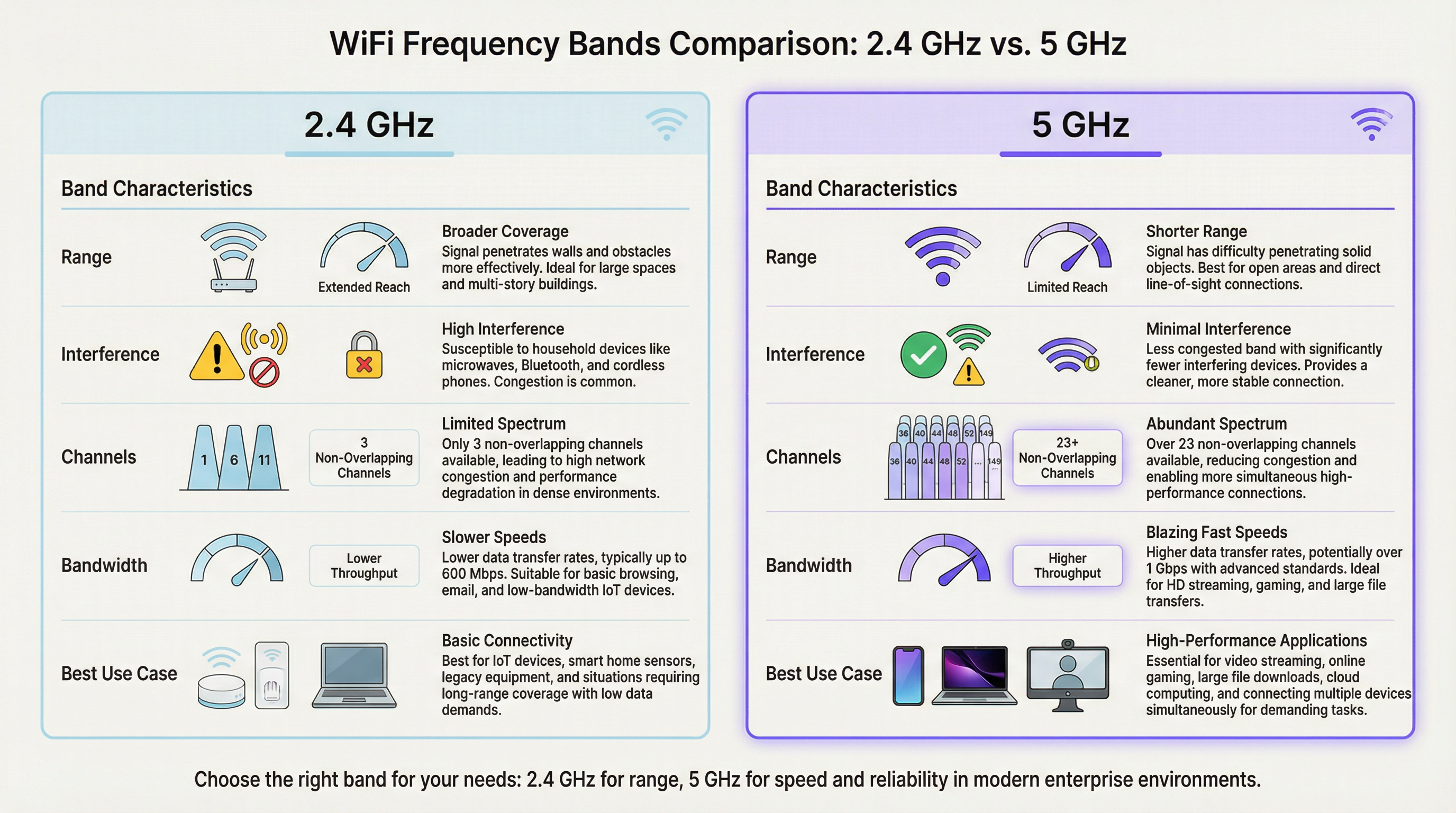
En un entorno de alta densidad, como un estadio o una sala de conferencias, la banda de 2,4 GHz se satura rápidamente. Con solo tres canales sin solapamiento (1, 6 y 11 en Norteamérica), la interferencia cocanal es un inhibidor del rendimiento significativo y persistente. Cada AP adicional que opera en el mismo canal en la misma área degrada el rendimiento de todos los demás. La banda de 5 GHz, por el contrario, ofrece un espectro mucho más amplio con numerosos canales sin solapamiento, lo que la convierte en la opción preferida para aplicaciones críticas para el rendimiento. El objetivo principal de las implementaciones de band steering WiFi es trasladar de forma proactiva los dispositivos cliente compatibles de la congestionada banda de 2,4 GHz a la banda de 5 GHz, que es más limpia y rápida, reservando el espectro de 2,4 GHz para sensores IoT, dispositivos heredados y clientes en el límite de la cobertura.
Cómo funciona el Band Steering
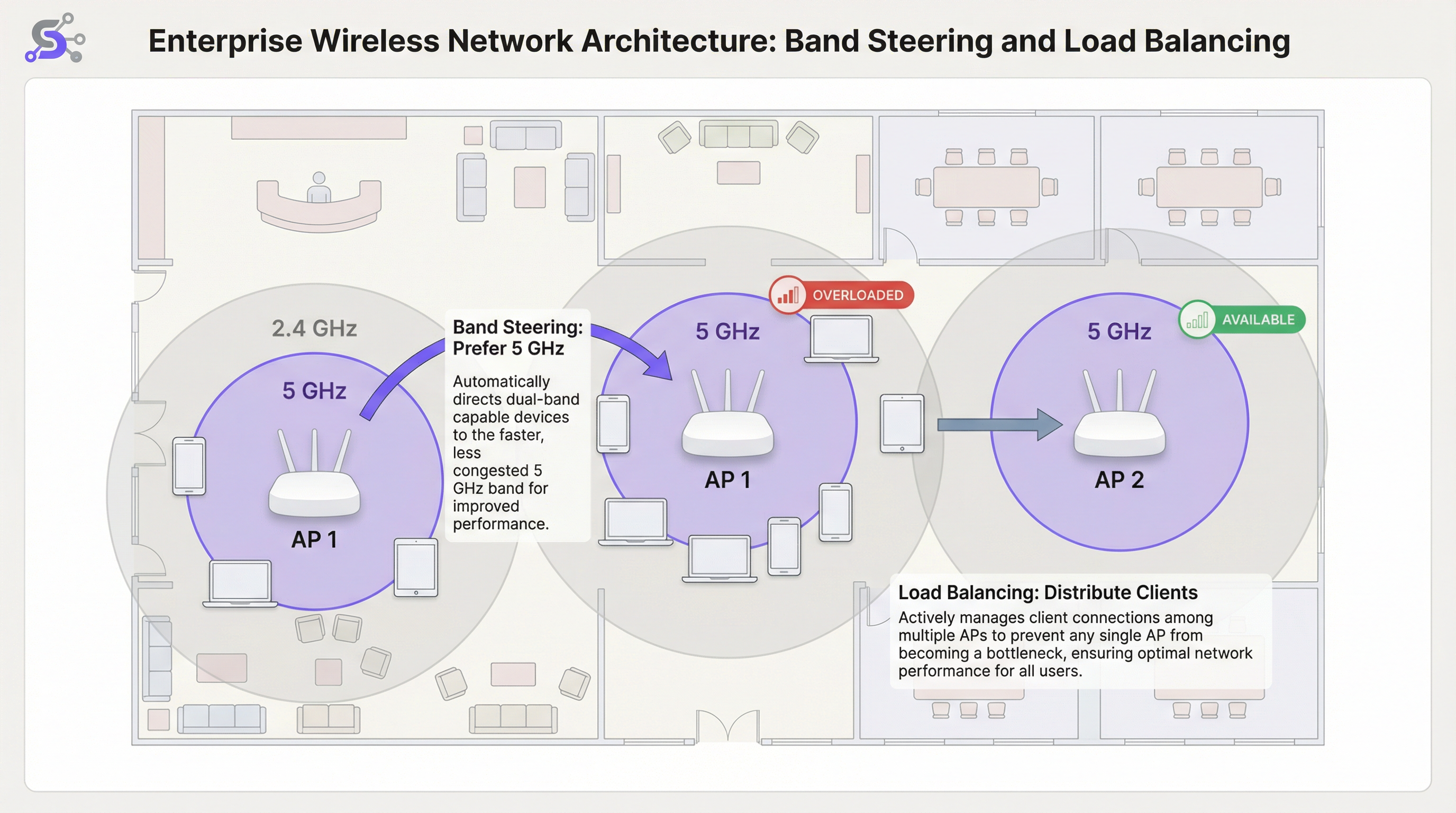
El band steering no es un estándar formal del IEEE, sino una técnica patentada implementada por proveedores de WiFi empresarial. Aunque los algoritmos específicos varían entre los fabricantes, el mecanismo general implica que el punto de acceso (AP) anime o fuerce activamente a un cliente de doble banda a conectarse a la radio de 5 GHz. Esto se logra normalmente a través de varios métodos que operan a nivel de las tramas de gestión 802.11.
El primero son las respuestas de sondeo retrasadas (Delayed Probe Responses): cuando un cliente de doble banda envía una solicitud de sondeo en ambas bandas simultáneamente, el AP puede retrasar intencionadamente su respuesta en la frecuencia de 2,4 GHz varios cientos de milisegundos. El cliente, al ver una respuesta más rápida en 5 GHz, prefiere de forma natural la banda superior y se conecta a ella. El segundo es la supresión de respuestas de sondeo (Probe Response Suppression): el AP puede ignorar las solicitudes de sondeo de 2,4 GHz de los clientes que ha identificado como compatibles con 5 GHz, haciendo que la red de 2,4 GHz sea invisible para ellos durante la fase de descubrimiento inicial. El tercer enfoque, y el más moderno, es la gestión de transición BSS IEEE 802.11v: esta trama estándar permite al AP solicitar explícitamente que un cliente pase a un BSS (Basic Service Set) diferente, en este caso, la radio de 5 GHz en el mismo AP. Se trata de un método cooperativo que depende de la compatibilidad del cliente con el estándar 802.11v y es el enfoque recomendado para implementaciones empresariales, ya que evita las técnicas de supresión agresivas que pueden causar problemas de conectividad con clientes no compatibles.
Balanceo de carga de AP
Mientras que el band steering optimiza la selección de la banda de frecuencia por cada AP, el balanceo de carga WiFi aborda el desafío más amplio de distribuir a los clientes de manera uniforme entre múltiples AP en un área determinada. En una terminal de aeropuerto concurrida o en el vestíbulo de un hotel, es común que los usuarios se congreguen cerca de un único AP ubicado en el centro, sobrecargándolo mientras los AP adyacentes permanecen infrautilizados. Esto crea una disparidad de rendimiento significativa: los usuarios cerca del AP sobrecargado experimentan un servicio degradado, mientras que los usuarios cerca de los AP inactivos no obtienen todo el beneficio de la infraestructura disponible. Los algoritmos de balanceo de carga evitan esto estableciendo umbrales para el recuento de clientes o la utilización de la radio en cada AP.
Cuando un AP alcanza su umbral de carga configurado, puede rechazar nuevas solicitudes de asociación. Esto anima al nuevo dispositivo cliente a escanear de nuevo y descubrir un AP cercano menos congestionado. Los sistemas más sofisticados aprovechan el 802.11v para sugerir de forma proactiva un AP alternativo específico al cliente, haciendo que la transición sea fluida y transparente para el usuario final. Las implementaciones más avanzadas utilizan algoritmos predictivos que anticipan los aumentos de carga basándose en patrones históricos y comienzan a redistribuir a los clientes antes de que se forme un cuello de botella.
El papel del controlador LAN inalámbrico (WLC)
En las implementaciones empresariales, el band steering y el balanceo de carga no se gestionan a nivel de AP individual, sino que están orquestados por un controlador LAN inalámbrico (WLC) centralizado o una plataforma de gestión basada en la nube. El WLC mantiene una visión global de todos los clientes asociados, la intensidad de sus señales, la carga actual en cada AP y el entorno de RF en todo el sitio. Esta inteligencia centralizada es lo que hace posible un balanceo de carga sofisticado: el controlador puede tomar decisiones informadas sobre dónde redirigir a un nuevo cliente basándose en datos en tiempo real de toda la red, no solo en la visión local limitada de un único AP.
Las plataformas gestionadas en la nube, como las que ofrecen Cisco Meraki, Aruba Central y Juniper Mist, amplían aún más este concepto al incorporar la gestión de recursos de radio (RRM) impulsada por IA. Estos sistemas analizan continuamente los datos de RF, el comportamiento del cliente y el rendimiento de las aplicaciones para ajustar dinámicamente las asignaciones de canales, la potencia de transmisión y los umbrales de direccionamiento sin intervención manual. Para los operadores de grandes recintos que gestionan docenas o cientos de AP en múltiples plantas o edificios, este nivel de automatización no es un lujo, sino una necesidad operativa práctica.
WiFi 6 y Band Steering en la era de los 6 GHz
La introducción de WiFi 6E (IEEE 802.11ax) y la apertura regulatoria de la banda de espectro de 6 GHz representan una evolución significativa para la arquitectura WiFi de alta densidad. La banda de 6 GHz ofrece hasta 1.200 MHz de espectro limpio adicional, con 59 canales de 20 MHz sin solapamiento disponibles en mercados como Estados Unidos y el Reino Unido. Para los recintos que implementan AP compatibles con WiFi 6E, la estrategia de band steering debe evolucionar hacia un modelo de tres bandas: dirigir los dispositivos heredados a 2,4 GHz, los dispositivos compatibles a 5 GHz y los clientes WiFi 6E más recientes a la impecable banda de 6 GHz. Este enfoque por niveles maximiza la utilización de todo el espectro disponible y garantiza que los dispositivos más nuevos y de mayor rendimiento se beneficien del entorno de RF más limpio posible, libre de las interferencias heredadas que se acumulan en las bandas más antiguas.
Guía de implementación
Paso 1: Estudio de cobertura (Site Survey) previo a la implementación
Un estudio de cobertura predictivo utilizando herramientas profesionales como Ekahau Site Survey o iBwave Design es innegociable para cualquier implementación de alta densidad. No se trata simplemente de verificar la cobertura, sino de planificar la capacidad. Su objetivo es identificar zonas de alta densidad de dispositivos, modelar las características de propagación de RF del espacio físico y planificar la ubicación de los AP y la asignación de canales para minimizar la interferencia cocanal. El estudio también debe tener en cuenta la densidad de clientes esperada durante los períodos de máximo uso, que para un centro de conferencias podría ser una sesión principal y para un estadio es la ventana de 30 minutos antes del inicio del partido, cuando decenas de miles de aficionados intentan conectarse simultáneamente.
Paso 2: Configuración del Band Steering
En su controlador LAN inalámbrico (WLC) o panel de gestión en la nube, encontrará un ajuste para Band Steering o Band Select. Los parámetros clave de configuración del band steering incluyen los siguientes. Modo: la mayoría de los proveedores empresariales ofrecen opciones como Preferir 5 GHz, Forzar 5 GHz o Balancear bandas. Para recintos de alta densidad, Preferir 5 GHz es el punto de partida recomendado. Forzar puede ser demasiado agresivo y puede denegar el servicio a clientes heredados que solo admiten 2,4 GHz, generando tickets de soporte innecesarios. Umbral de direccionamiento (RSSI): establezca una intensidad de señal mínima para que un cliente sea dirigido a 5 GHz. Un valor inicial típico es -65 dBm. Si la señal de 5 GHz del cliente es más débil que este umbral, en realidad puede tener una mejor experiencia en 2,4 GHz a pesar de la interferencia, particularmente en entornos con paredes gruesas o materiales de construcción significativos que atenúan la frecuencia más alta.
Paso 3: Configuración del balanceo de carga
Umbral de recuento de clientes: establezca un número máximo de clientes por radio de AP. Para un área de alta densidad, esto podría ser tan bajo como 25 a 30 clientes para garantizar la calidad del servicio, incluso si el hardware del AP admite técnicamente más asociaciones simultáneas. Umbral de utilización: un enfoque más dinámico y recomendado es balancear en función de la utilización de la radio, expresada como el porcentaje de tiempo que el medio de radio está ocupado transmitiendo o recibiendo. Un umbral del 60 al 70 por ciento es una mejor práctica ampliamente aceptada, ya que deja suficiente margen para el tráfico en ráfagas sin permitir que ningún AP individual se convierta en un cuello de botella sostenido.
Paso 4: Validación y monitorización
Después de la implementación, la monitorización continua es esencial. Utilice su WLC o plataforma de gestión en la nube para realizar un seguimiento de la proporción de clientes en 5 GHz frente a 2,4 GHz, la distribución de clientes entre los AP en cada zona y las velocidades medias de datos de los clientes a lo largo del tiempo. Establezca una línea base durante un período operativo normal y utilícela para identificar anomalías. Un aumento repentino en las asociaciones de 2,4 GHz o una distribución desigual de los clientes a menudo indica una desviación en la configuración, una nueva fuente de interferencia o un fallo de hardware en uno de los AP.
Mejores prácticas
Estrategia de SSID único: utilice un único SSID para las bandas de 2,4 GHz y 5 GHz. Este es un requisito previo innegociable para un band steering eficaz, ya que permite al cliente y a la red negociar la mejor banda de forma transparente en segundo plano. Los SSID separados para cada banda requieren que los usuarios hagan una elección manual, lo que anula el propósito del direccionamiento automatizado y crea una carga de soporte cuando los usuarios eligen sistemáticamente la banda equivocada.
Desactivar velocidades de datos bajas: para evitar que los clientes lentos consuman un tiempo de transmisión excesivo, desactive las velocidades de datos heredadas por debajo de 12 Mbps en ambas bandas. Esto mejora el rendimiento general de la celda a través de una práctica conocida como equidad de tiempo de transmisión (airtime fairness). En entornos muy densos, como estadios o grandes salas de conferencias, es aconsejable elevar la velocidad mínima a 24 Mbps, ya que reduce significativamente la sobrecarga de las tramas de gestión y garantiza que el tiempo de transmisión disponible se utilice de manera eficiente.
Ancho de canal: en áreas de alta densidad, prefiera canales más estrechos de 20 MHz para 5 GHz. Aunque los canales de 40 MHz u 80 MHz ofrecen velocidades máximas más altas para clientes individuales, reducen el número total de canales sin solapamiento disponibles, lo que aumenta el riesgo de interferencia cocanal en un entorno con múltiples AP. La capacidad agregada de la red, medida como el rendimiento total disponible en todos los AP, es mucho más importante que la velocidad máxima de cualquier conexión de cliente individual.
Control de potencia de transmisión (TPC): no ejecute los AP a la máxima potencia de transmisión. Esto es contrario a la intuición, pero es una de las mejores prácticas con mayor impacto en el diseño de WiFi de alta densidad. La alta potencia aumenta la interferencia cocanal, crea grandes celdas superpuestas que dificultan el roaming de los clientes y, de hecho, puede reducir la capacidad total de la red. Utilice algoritmos TPC automatizados o ajuste manualmente la potencia para crear celdas más pequeñas y densas que aumenten la capacidad general de la red y mejoren la relación señal a interferencia más ruido (SINR) para todos los clientes.
Resolución de problemas y mitigación de riesgos
Clientes pegajosos (Sticky Clients): el problema operativo más común en el WiFi empresarial es el cliente pegajoso que permanece asociado a un AP distante a pesar de tener una mejor opción disponible. Este es un problema de lógica de roaming del lado del cliente que no puede ser resuelto completamente solo por la red. Un balanceo de carga agresivo y unos ajustes de potencia de AP optimizados pueden ayudar a mitigar esto al reducir la superposición de cobertura y animar a los clientes a hacer roaming con más frecuencia. Habilitar 802.11k (informes de vecinos) y 802.11r (transición rápida de BSS) junto con 802.11v crea la trifecta de roaming que brinda a los clientes tanto la información como el incentivo para tomar mejores decisiones de roaming.
Clientes incompatibles: algunos dispositivos cliente más antiguos o de menor coste no implementan correctamente los mecanismos de respuesta al band steering. Supervise su red en busca de clientes que fallen repetidamente al asociarse o que generen eventos de desautenticación, y considere crear un SSID dedicado para dispositivos heredados si son críticos para el negocio. Esto aísla su impacto en la red principal de alto rendimiento y evita que su deficiente comportamiento de roaming degrade la experiencia de otros usuarios.
Configuración demasiado agresiva: una política de Forzar 5 GHz combinada con un umbral de balanceo de carga muy estricto puede provocar que los clientes no puedan conectarse en absoluto, particularmente en entornos donde la señal de 5 GHz se ve atenuada por los materiales de construcción. Pruebe siempre los cambios de configuración en un entorno controlado o durante las horas de menor actividad, y supervise de cerca las tasas de fallos de asociación y los problemas de conectividad reportados por los clientes después de cualquier cambio.
ROI e impacto empresarial
La inversión en una red WiFi de alta densidad correctamente diseñada genera retornos significativos y medibles en todo tipo de recintos. Para un hotel, un WiFi fiable de alto rendimiento se cita constantemente como uno de los principales factores en las puntuaciones de satisfacción de los huéspedes y en las reseñas online, lo que influye directamente en las tasas de reserva y en los ingresos por habitación disponible. Para una cadena minorista, permite el funcionamiento fiable de los sistemas POS, los escáneres de gestión de inventario y las plataformas de análisis de WiFi para invitados como Purple, que dependen de una conectividad constante para capturar el tiempo de permanencia, los patrones de afluencia y los datos de comportamiento del cliente que fundamentan las decisiones de comercialización y dotación de personal.
En un recinto de conferencias y eventos, la calidad de la red es un factor primordial para atraer y retener eventos corporativos a gran escala. Un solo fallo de conectividad de alto perfil durante una presentación principal puede resultar en la pérdida de futuras reservas por un valor significativamente mayor que el coste de la actualización de la red que lo habría evitado. Los indicadores clave de rendimiento para medir el éxito incluyen: una reducción en los tickets de problemas reportados por los usuarios; un aumento en las velocidades medias de datos de los clientes; una mayor proporción de clientes en 5 GHz frente a 2,4 GHz, con un objetivo del 70 al 80 por ciento de los clientes con capacidad de doble banda en 5 GHz; y una distribución uniforme de los clientes entre los AP en una zona determinada, sin que ningún AP individual soporte sistemáticamente más de un 20 por ciento por encima de la carga media. Al centrarse en estas optimizaciones técnicas, las organizaciones pueden transformar su WiFi de un servicio básico a un activo estratégico que mejora la experiencia del cliente, permite operaciones basadas en datos e impulsa resultados empresariales medibles.
Key Terms & Definitions
Band Steering
A technique used by WiFi access points to encourage dual-band client devices to connect to the less congested 5 GHz frequency band instead of the 2.4 GHz band, typically by manipulating probe responses or using IEEE 802.11v BSS Transition Management frames.
IT teams implement band steering WiFi configurations to improve overall network performance in areas with many connected devices. It is a foundational feature of any high-density WiFi deployment and is configured at the wireless LAN controller or cloud management layer.
WiFi Load Balancing
A process that distributes client connections evenly across multiple access points in a network to prevent any single AP from becoming overloaded, typically enforced by setting client count or radio utilisation thresholds on the wireless LAN controller.
In a busy area like a conference hall or retail floor, network architects use load balancing to ensure a stable experience for all users. It works in conjunction with band steering: steering handles the frequency band, while load balancing handles the AP selection.
RSSI (Received Signal Strength Indicator)
A measurement of the power level that a client device is receiving from an access point, expressed in decibels-milliwatts (dBm) as a negative value. A value closer to zero (e.g., -40 dBm) indicates a stronger signal than a value further from zero (e.g., -80 dBm).
A network engineer uses RSSI values to determine connection quality and to set thresholds for roaming and band steering decisions. A typical steering threshold is -65 dBm, meaning a client will only be pushed to 5 GHz if its signal on that band is at least this strong.
Co-Channel Interference (CCI)
Performance degradation that occurs when two or more access points in close proximity are operating on the same wireless channel, causing their transmissions to collide and forcing devices to wait before transmitting, which reduces overall throughput.
Proper channel planning is the primary mitigation for CCI. This is a major reason why the 5 GHz band, with its many non-overlapping channels, is preferred for high-density deployments. Poor channel planning is one of the most common causes of underperforming WiFi networks.
Airtime Fairness
A feature that allocates wireless airtime equitably across all connected clients, preventing a slow or distant device from consuming a disproportionate share of the available transmission time and degrading performance for all other users on that AP.
Venue operators enable airtime fairness to guarantee a more consistent level of performance, especially when a mix of old and new devices are connecting to the same network. It is often implemented alongside the disabling of low data rates.
IEEE 802.11v (BSS Transition Management)
An IEEE standard that allows a wireless network to send a request to a client device to transition to a different access point or frequency band, providing a cooperative and more seamless handoff than forceful deauthentication.
Modern enterprise networks leverage 802.11v to make band steering and load balancing more efficient. It is part of the 802.11k/v/r trifecta that underpins intelligent client roaming in enterprise WiFi deployments.
Single SSID
The practice of broadcasting the same network name (SSID) for both the 2.4 GHz and 5 GHz bands on a dual-band access point, presenting one unified network identity to users while the infrastructure manages band selection in the background.
Using a single SSID is a non-negotiable prerequisite for effective band steering. If separate SSIDs exist for each band, the user must manually choose, and the network loses its ability to optimise band allocation automatically.
Sticky Client
A client device that remains associated with a distant access point with a weak signal, even when a closer AP with a stronger signal is available, due to the client's conservative roaming algorithm prioritising connection stability over performance.
IT support teams frequently troubleshoot sticky client issues in enterprise environments. The primary mitigations are optimising AP transmit power to create smaller cells, and enabling 802.11k/v/r to give clients the information and incentive to roam more aggressively.
Microcell Architecture
A high-density WiFi deployment strategy that uses a large number of low-power access points, each covering a small area, rather than a small number of high-power APs covering large areas. This maximises total network capacity by increasing the number of simultaneous, non-interfering transmissions.
Microcell architecture is the standard approach for ultra-high-density venues like stadiums and arenas. It is the WiFi equivalent of the small-cell strategy used in modern cellular networks and is the key to supporting tens of thousands of simultaneous connections.
Case Studies
A 50,000-seat sports stadium is upgrading its WiFi network to support fan engagement apps, mobile ticketing, and cashless payments. The primary challenge is extreme device density during the 3-hour peak of a game. How should they configure band steering and load balancing?
Step 1 - AP Placement: Deploy a high number of low-power APs, with directional antennas focused on specific seating sections (under-seat or handrail mounting). This creates small, manageable microcells, each serving a limited number of seats.
Step 2 - Band Steering: Implement an aggressive Prefer 5 GHz policy. Given the modern smartphones expected at a live event, the vast majority of devices will be dual-band capable. Set a steering RSSI threshold of -67 dBm to strongly encourage 5 GHz connections.
Step 3 - Load Balancing: Configure a strict client count limit of 25 clients per radio. This seems low, but in such a dense RF environment, it is critical to maintain airtime fairness and prevent any single AP from degrading the experience for an entire seating section. Enable 802.11v to assist with steering and load balancing transitions.
Step 4 - Data Rates and Channels: Disable all data rates below 24 Mbps. Use only 20 MHz channel widths on the 5 GHz band to maximise the number of unique channels and minimise interference. Manually plan the channel reuse pattern across the stadium bowl to avoid co-channel interference between adjacent sections.
A historic 200-room hotel with thick masonry walls struggles with WiFi performance. Guests complain about slow speeds and dropped connections. They have modern dual-band APs, but performance is still poor. What is the likely issue and solution?
Step 1 - Problem Analysis: The thick walls cause significant attenuation of the 5 GHz signal. An aggressive band steering policy might be forcing clients onto a weak 5 GHz connection when the more resilient 2.4 GHz signal would actually provide a better experience. This is a classic case where the physical environment overrides standard best practices.
Step 2 - Site Survey: Conduct a physical walkthrough survey to measure signal strength for both bands in representative guest rooms. Pay close attention to the RSSI difference between the 5 GHz and 2.4 GHz signals from the same AP. If 5 GHz is consistently below -70 dBm in rooms, the steering policy needs adjustment.
Step 3 - Configuration Adjustment: Relax the band steering policy. Instead of Prefer 5 GHz, use a Balance Bands setting. Adjust the steering RSSI threshold to be more conservative, for example -60 dBm. This means a client will only be steered to 5 GHz if the signal is genuinely strong enough to deliver a good experience.
Step 4 - AP Power: Ensure Transmit Power Control is enabled and correctly calibrated. The APs in the corridors should be running at a power level that provides adequate coverage inside the rooms without being excessively high and causing interference with adjacent rooms on the same channel.
Scenario Analysis
Q1. You are deploying WiFi in a new multi-floor conference centre. The main keynote hall on the ground floor holds 2,000 attendees, while the upper floors have 20 smaller breakout rooms of 50 people each. How would your channel plan and band steering configuration differ between the two areas?
💡 Hint:Consider the density of APs, the potential for co-channel interference, and the physical separation between areas in each zone.
Show Recommended Approach
In the large, open keynote hall, I would deploy a high number of APs using a meticulous manual channel plan with only 20 MHz channel widths. The goal is to maximise the number of non-overlapping channels (e.g., 36, 40, 44, 48, 149, 153, 157, 161) and create a non-repeating reuse pattern to avoid CCI. Band steering would be set to Prefer 5 GHz with an aggressive RSSI threshold of -65 dBm, and load balancing would be set to a strict 25 clients per radio. On the upper floors, the walls between breakout rooms provide natural RF separation, reducing CCI risk. Here, I could use an automated RRM system and potentially allow 40 MHz channels in some rooms if density is lower. Band steering configuration would remain the same, but load balancing thresholds could be slightly more relaxed, perhaps 35 clients per radio, given the lower absolute density per room.
Q2. A retail chain uses your WiFi network for both guest access and wireless payment terminals (which must be PCI DSS compliant). The payment terminals are 2.4 GHz only. How would you configure the network to ensure the reliability of payments while still offering good performance for guests?
💡 Hint:Consider network segmentation, PCI DSS requirements for network isolation, and how to protect the 2.4 GHz spectrum for critical devices.
Show Recommended Approach
The correct approach is network segmentation with dual SSIDs. First, I would create a hidden SSID with WPA3-Enterprise security using 802.1X authentication, operating exclusively on the 2.4 GHz band and mapped to a dedicated VLAN that is PCI DSS scoped. This isolates payment terminal traffic from all other network traffic, satisfying PCI DSS segmentation requirements. Second, I would create a guest SSID broadcast on both bands with an aggressive Prefer 5 GHz band steering policy. This actively moves guest devices off the 2.4 GHz band, leaving that spectrum as clean as possible for the critical payment terminals. Load balancing would be active on the guest network. The payment terminal SSID would not use load balancing, ensuring terminals always connect to their nearest AP without being redirected.
Q3. A user reports that their laptop keeps disconnecting from the WiFi in the office. You check the controller logs and see the device has a good signal strength (-55 dBm) but is repeatedly being deauthenticated by the AP. What is the most likely cause related to band steering, and what is the remediation?
💡 Hint:Consider what happens when a band steering policy is too aggressive for a specific client device that does not correctly implement 802.11v.
Show Recommended Approach
This is a classic symptom of a client that is not correctly handling the band steering mechanism. The AP is likely sending an 802.11v BSS Transition Management request to move the client to the 5 GHz band. The client, either due to a driver bug or a non-compliant 802.11v implementation, is not responding correctly. The AP, after a timeout, may be sending a deauthentication frame to forcibly disconnect the client, expecting it to re-associate on the 5 GHz band. The remediation has two steps: first, update the client's wireless adapter driver to the latest version. Second, if the problem persists, create a client-specific policy on the WLC to disable band steering for that device's MAC address, or use a vendor feature to add it to a band steering exclusion list. If the problem is widespread across a device model, consider relaxing the overall steering policy from Prefer to Balance for that network zone.
Key Takeaways
- ✓High-density WiFi requires a fundamental shift in mindset from coverage to capacity: the goal is to maximise available airtime, not just signal strength.
- ✓Band steering intelligently pushes dual-band clients to the cleaner, faster 5 GHz band, reducing congestion on the overloaded 2.4 GHz spectrum.
- ✓Load balancing prevents any single Access Point from becoming a performance bottleneck by distributing clients evenly across available infrastructure.
- ✓A single SSID for both bands is a non-negotiable prerequisite for effective band steering: never separate them into distinct network names.
- ✓Disable low data rates (below 12 Mbps) and use narrow 20 MHz channels in dense environments to maximise airtime efficiency and channel reuse.
- ✓Run APs at optimised, not maximum, transmit power to reduce co-channel interference and create smaller, more efficient microcells.
- ✓Measure success by tracking the ratio of 5 GHz clients (target: 70-80%), evenness of client distribution across APs, and reduction in user-reported connectivity issues.




