

Redes de área de campus (CAN): Guía exhaustiva de diseño, implementación y gestión
This comprehensive technical reference guide covers the full lifecycle of Campus Area Networks (CANs) — from architectural design and technology selection to implementation, security hardening, and ongoing management. It is written for IT managers, network architects, and CTOs at hotels, retail chains, stadiums, and corporate campuses who need to build or modernise a high-performance, resilient connectivity backbone. By combining vendor-neutral best practices, real-world case studies, and actionable frameworks, this guide equips senior technical professionals to make informed decisions that deliver measurable ROI and support long-term strategic objectives.
🎧 Listen to this Guide
View Transcript
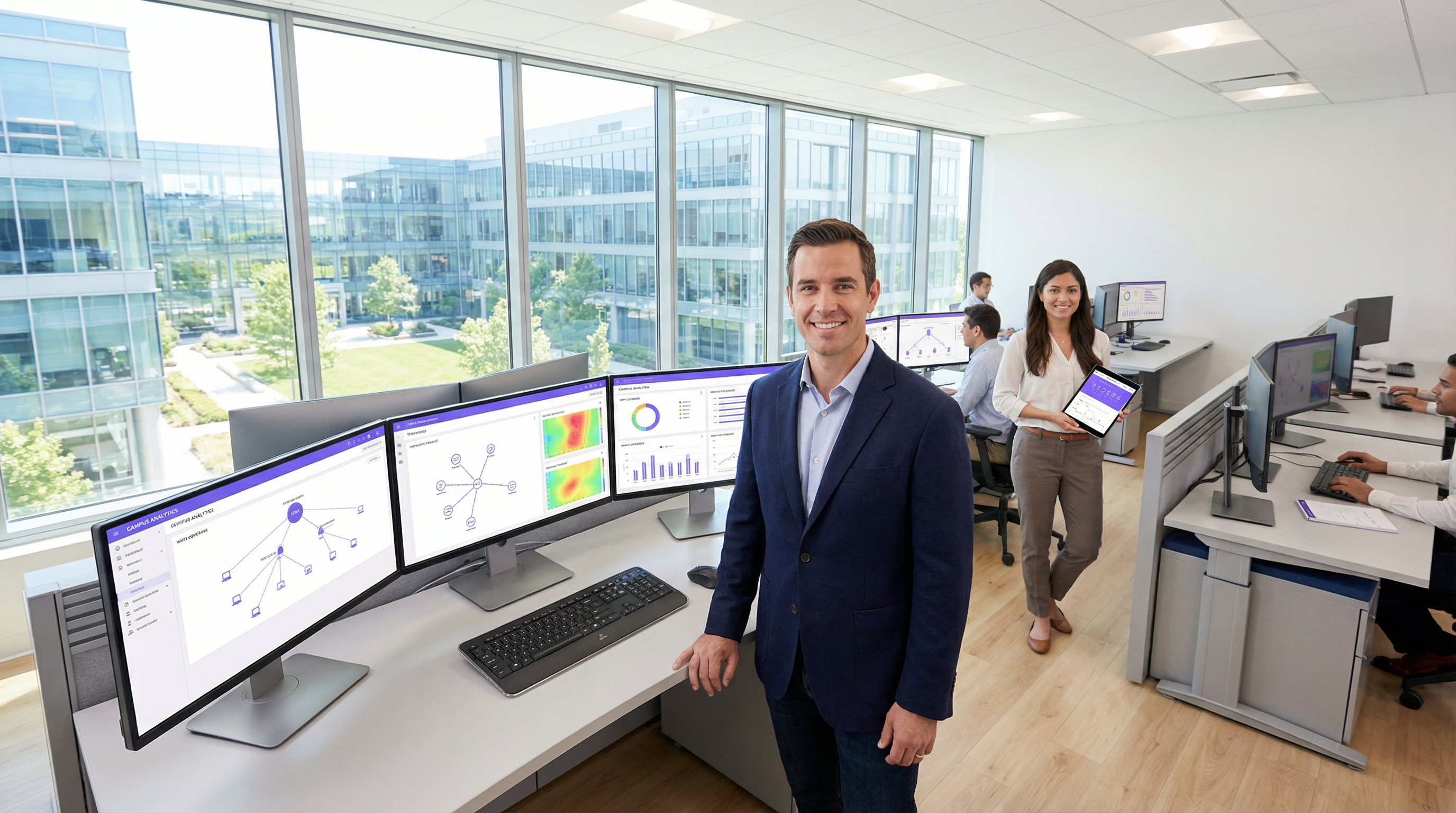
Resumen ejecutivo
Una red de área de campus (CAN, por sus siglas en inglés) es un componente de infraestructura crítico para cualquier recinto a gran escala, desde campus corporativos y educativos hasta complejos hoteleros, parques comerciales y estadios. Proporciona la red troncal de conectividad de alta velocidad, fiable y segura necesaria para respaldar las operaciones digitales modernas, los servicios para huéspedes y las implementaciones de IoT. Para los directores de TI, arquitectos de redes y CTO, una CAN bien diseñada no es simplemente un centro de costes, sino un activo estratégico que mejora la eficiencia operativa, perfecciona la experiencia del usuario y abre nuevas oportunidades de ingresos.
Esta guía proporciona un marco práctico y neutral en cuanto a proveedores para diseñar, implementar y gestionar una CAN de alto rendimiento. Cubre la arquitectura jerárquica esencial de tres niveles, las opciones tecnológicas clave, incluidas la fibra óptica y los estándares modernos de Wi-Fi, y las mejores prácticas para garantizar la seguridad, la escalabilidad y la redundancia. Al seguir los principios aquí descritos, las organizaciones pueden construir una red preparada para el futuro que ofrezca un ROI medible y respalde sus objetivos estratégicos durante años.
Análisis técnico en profundidad
El modelo jerárquico de tres niveles
La arquitectura más adoptada y probada para una red de área de campus escalable y resiliente es el modelo jerárquico de tres niveles. Este diseño segmenta la red en tres capas distintas: núcleo (Core), distribución (Distribution) y acceso (Access). Esta modularidad simplifica el diseño, mejora el aislamiento de fallos y permite una escalabilidad predecible.
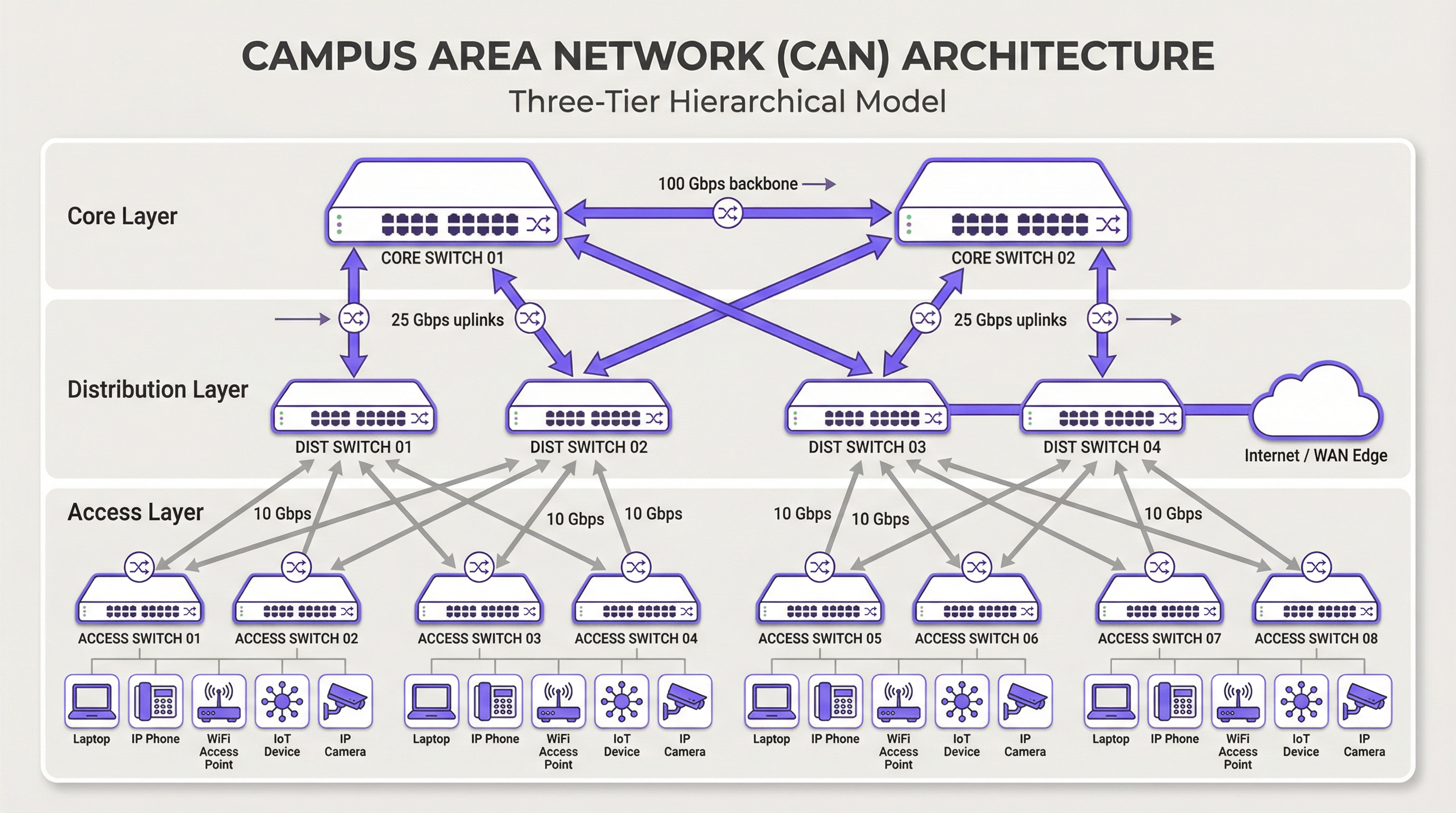
Capa de núcleo (Core): El núcleo es la red troncal de alta velocidad. Su único propósito es conmutar el tráfico lo más rápido posible entre los dispositivos de la capa de distribución. El núcleo debe mantenerse ágil y simple, evitando la implementación de políticas complejas o la manipulación de paquetes. Las características clave incluyen alta redundancia (generalmente con switches y enlaces redundantes), alto rendimiento (a menudo 100 Gbps o superior) y rápida convergencia en caso de fallo. La capa de núcleo garantiza que el tráfico entre las diferentes partes del campus no cree cuellos de botella.
Capa de distribución: Esta capa actúa como centro de comunicaciones entre las capas de acceso y núcleo. Es un punto crítico para implementar políticas de red, incluyendo enrutamiento, listas de control de acceso (ACL), calidad de servicio (QoS) y filtrado de seguridad. La capa de distribución agrega el tráfico de múltiples switches de la capa de acceso antes de reenviarlo al núcleo. Define los dominios de difusión (broadcast) y proporciona conexiones redundantes tanto a la capa de acceso como a la de núcleo, utilizando a menudo tecnologías como EtherChannel para la agregación de enlaces y la redundancia.
Capa de acceso: Aquí es donde los dispositivos de los usuarios finales se conectan a la red: estaciones de trabajo, portátiles, teléfonos IP, impresoras, dispositivos IoT y, de manera crucial, los puntos de acceso inalámbrico (AP). La capa de acceso proporciona seguridad a nivel de puerto, alimentación a través de Ethernet (PoE) para dispositivos como AP y cámaras, y segmentación de VLAN para aislar diferentes tipos de tráfico (por ejemplo, corporativo, invitados, IoT). Los switches en esta capa deben proporcionar una alta densidad de puertos y soporte para estándares modernos como Ethernet multigigabit (IEEE 802.3bz) para gestionar las demandas de ancho de banda de Wi-Fi 6/6E y versiones posteriores.
Tecnologías principales
El cableado de fibra óptica es el estándar para la conectividad troncal dentro de una CAN, conectando edificios y enlazando las capas de núcleo y distribución. Su alto ancho de banda, baja latencia e inmunidad a las interferencias electromagnéticas lo hacen ideal para enlaces de alta velocidad en las distancias habituales de un campus. La fibra monomodo se utiliza normalmente para tramos más largos entre edificios, mientras que la fibra multimodo puede utilizarse para enlaces más cortos y de alto ancho de banda dentro del centro de datos de un edificio.
La LAN inalámbrica (WLAN) ya no es solo una red superpuesta, sino una parte integral de la capa de acceso. Las CAN modernas deben diseñarse con una mentalidad centrada en el Wi-Fi ("Wi-Fi first"). Esto requiere una planificación cuidadosa para la ubicación de los AP mediante estudios de cobertura de RF, asignación de canales y planificación de capacidad. El último estándar, Wi-Fi 6E (802.11ax), que opera en la banda de 6 GHz, ofrece una capacidad significativamente mayor y menos interferencias, lo que lo convierte en una tecnología crítica para entornos de alta densidad como centros de conferencias y estadios.
Power over Ethernet (PoE) es esencial para simplificar la implementación de dispositivos en la capa de acceso. Estándares como IEEE 802.3bt (PoE++) pueden suministrar hasta 90 W de potencia, soportando no solo AP de Wi-Fi, sino también cámaras de seguridad de alta definición, señalización digital e incluso algunos switches pequeños. Esto elimina la necesidad de tomas de corriente independientes para cada dispositivo, reduciendo los costes y la complejidad de la instalación.
Guía de implementación
Un enfoque estructurado y por fases para la implementación de una CAN es esencial para gestionar los riesgos y garantizar resultados de calidad.
Fase 1 — Recopilación de requisitos y estudio del emplazamiento: Comience por definir los requisitos comerciales. ¿Qué aplicaciones se ejecutarán en la red? ¿Cuáles son las expectativas de densidad de usuarios y tipos de dispositivos? Realice un estudio físico exhaustivo del emplazamiento para identificar la distribución de los edificios, las posibles fuentes de interferencia de RF y las ubicaciones de los armarios de cableado (IDF) y el centro de datos principal (MDF). Esta fase también debe incluir una revisión de la infraestructura existente para identificar qué se puede conservar o actualizar.
Fase 2 — Diseño arquitectónico: Basándose en los requisitos, diseñe la arquitectura de tres niveles. Determine el número de switches de acceso necesarios por planta y edificio, la capacidad requerida en la capa de distribución y el rendimiento necesario para la red troncal del núcleo. Planifique su estrategia de segmentación de VLAN para separar lógicamente los tipos de tráfico. Documente el diseño de forma exhaustiva: esto se convertirá en su especificación de construcción y en la línea base para la gestión de cambios.
Fase 3 — Selección de tecnología y proveedores: Seleccione el hardware que cumpla con sus especificaciones de diseño. Tenga en cuenta factores como la compatibilidad con estándares abiertos, las opciones de interfaz de gestión (CLI frente a gestión en la nube), el presupuesto de PoE y las condiciones de la garantía. Para una CAN a gran escala, una plataforma de gestión centralizada es crucial para lograr operaciones eficientes y debe seleccionarse junto con el hardware.
Fase 4 — Instalación física: Tienda el cableado de fibra óptica entre los edificios y hacia cada IDF. Instale los switches en los racks, garantizando una alimentación y refrigeración adecuadas. Monte los puntos de acceso inalámbrico de acuerdo con el plan del estudio de RF. Una gestión y etiquetado meticulosos de los cables en esta etapa ahorrarán un tiempo significativo durante la resolución de problemas y futuras actualizaciones.
Fase 5 — Configuración y puesta en marcha: Configure los switches comenzando desde el núcleo y descendiendo hasta la capa de acceso. Implemente VLAN, protocolos de enrutamiento (por ejemplo, OSPF), políticas de seguridad (802.1X) y QoS. Ponga la red en línea de forma escalonada, probando la conectividad en cada etapa. Valide la cobertura y el rendimiento inalámbricos frente a los objetivos de diseño iniciales antes de declarar que la red está lista para producción.
Mejores prácticas
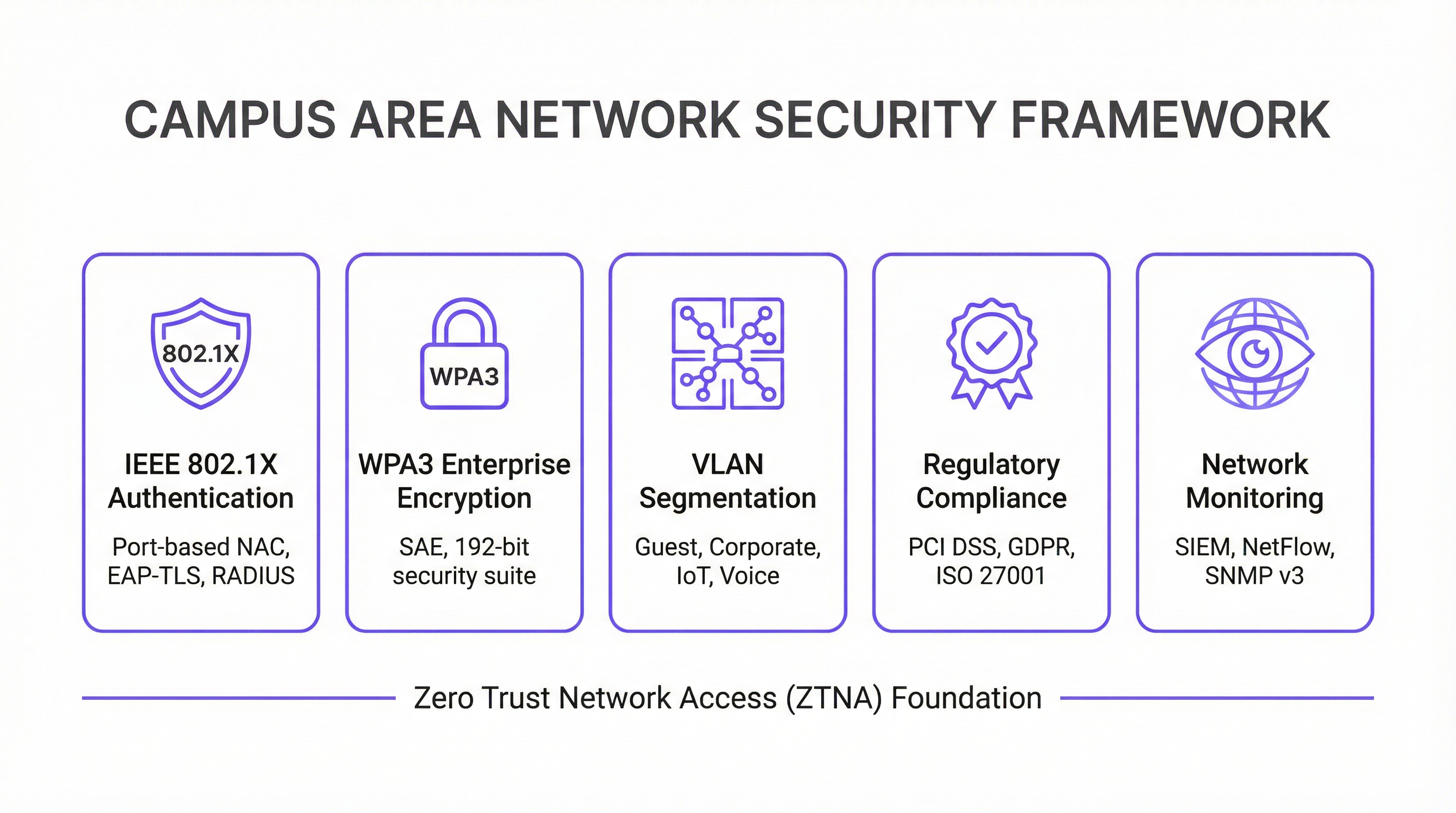
La seguridad es lo primero — Arquitectura Zero Trust: Implemente un modelo de seguridad Zero Trust (Confianza Cero) desde el primer día. Utilice IEEE 802.1X para el control de acceso a la red (NAC) basado en puertos para autenticar cada dispositivo que se conecte a la red cableada o inalámbrica. Aplique un cifrado sólido con WPA3-Enterprise en su WLAN. Segmente la red con VLAN para contener las amenazas y restringir el movimiento lateral. Todo el tráfico de gestión de la red debe utilizar protocolos seguros como SSH y SNMPv3. Para las organizaciones que manejan datos de tarjetas de pago, el cumplimiento de PCI DSS requiere una estricta segmentación de la red y control de acceso, algo que una CAN bien diseñada facilita implementar y auditar.
Diseño para la redundancia: Elimine los puntos únicos de fallo en cada capa. Utilice switches redundantes en las capas de núcleo y distribución. Emplee la agregación de enlaces (EtherChannel/LACP) para proporcionar tanto un mayor ancho de banda como redundancia de enlaces. Garantice fuentes de alimentación redundantes en los switches críticos y diversas rutas de fibra entre edificios siempre que sea posible. Para entornos de misión crítica, considere el uso de sistemas de alimentación ininterrumpida (SAI) para todos los equipos de red.
Planificación de la escalabilidad: Diseñe pensando en los próximos cinco años, no solo en el presente. Asegúrese de que sus capas de núcleo y distribución tengan capacidad suficiente para gestionar el crecimiento futuro del tráfico y de los dispositivos conectados. Utilice un chasis modular en la capa de distribución o núcleo para permitir una fácil expansión. Elija fibra con un mayor número de hilos del que se necesita de inmediato para adaptarse a los requisitos futuros sin tener que realizar un costoso recableado.
Gestión y monitorización centralizadas: Una CAN de gran tamaño es demasiado compleja para gestionarse dispositivo por dispositivo. Utilice un sistema de gestión de red (NMS) centralizado para automatizar la configuración, monitorizar el rendimiento y recibir alertas. Plataformas como la solución de inteligencia WiFi de Purple proporcionan información detallada sobre el comportamiento del usuario y el estado de la red, lo que permite una gestión y optimización proactivas. El cumplimiento del GDPR también requiere visibilidad de los flujos de datos y el acceso de los usuarios, algo que facilita una plataforma de gestión centralizada.
Resolución de problemas y mitigación de riesgos
Los problemas de la capa física son la causa más común de las incidencias de red. Los cables en mal estado, los transceptores defectuosos y las conexiones sueltas representan una proporción significativa de las interrupciones de la red. Una metodología estructurada de resolución de problemas siguiendo el modelo OSI (comenzando en la Capa 1 o Física y ascendiendo) es el enfoque más eficiente. Invierta en equipos de prueba de cables de calidad y mantenga un inventario de piezas de repuesto para los componentes críticos.
La interferencia de RF en un entorno inalámbrico denso puede degradar gravemente el rendimiento. Las interferencias cocanal y de canal adyacente son las principales culpables. Utilice una herramienta de monitorización de RF para identificar las fuentes de interferencia, que pueden incluir redes vecinas, hornos microondas y dispositivos Bluetooth. Los algoritmos de asignación dinámica de canales (DCA) en los controladores inalámbricos modernos pueden ayudar, pero a veces es necesario un ajuste manual en entornos complejos.
La desviación de la configuración se produce cuando los cambios manuales en dispositivos individuales crean inconsistencias en toda la red a lo largo del tiempo. Esto provoca un comportamiento inesperado y complica la resolución de problemas. Utilice una herramienta de gestión de la configuración para realizar un seguimiento de los cambios, aplicar plantillas estándar y revertir las modificaciones incorrectas. Todos los cambios deben realizarse a través de un proceso formal de gestión de cambios.
Vulnerabilidades de seguridad: El firmware sin parchear es un riesgo persistente. Establezca un calendario de parches regular para todos los dispositivos de red. Monitorice los patrones de tráfico anómalos utilizando un sistema SIEM (Gestión de Eventos e Información de Seguridad). Realice pruebas de penetración periódicas para identificar las debilidades antes de que lo hagan los atacantes.
ROI e impacto comercial
Una red de área de campus bien ejecutada ofrece un valor comercial significativo y medible en múltiples dimensiones.
| Resultado comercial | Métrica clave | Mejora típica |
|---|---|---|
| Satisfacción del huésped | NPS / Puntuaciones de reseñas | +25-40 % en puntuaciones relacionadas con la conectividad |
| Eficiencia operativa de TI | Tickets de soporte | Reducción del 40-60 % en tickets relacionados con la red |
| Tiempo de auditoría de cumplimiento | Días para completar la auditoría PCI DSS | Reducción del 50-70 % |
| Tiempo de actividad de la red | % de disponibilidad | 99,9 %+ con diseño redundante |
| Ingresos por nuevos servicios | Servicios de IoT / Analítica habilitados | Desbloquea analítica de ubicación, seguimiento de activos |
Mejora de la productividad: Una conectividad fiable y de alta velocidad permite a los empleados y huéspedes trabajar de forma eficiente y sin interrupciones. En un contexto de hostelería, esto se traduce directamente en puntuaciones de satisfacción de los huéspedes y en la repetición de reservas.
Mejora de la experiencia del huésped y del cliente: En los sectores de la hostelería y el retail, un Wi-Fi rápido y sin interrupciones es un factor clave para la satisfacción y fidelidad del cliente. La analítica derivada de la red Wi-Fi (como el tiempo de permanencia, los patrones de afluencia y el recuento de dispositivos) se puede utilizar para personalizar las experiencias de los huéspedes y optimizar las operaciones del recinto.
Eficiencia operativa: Una CAN gestionada de forma centralizada reduce la carga operativa para el equipo de TI. PoE simplifica la implementación de nuevos dispositivos y una arquitectura resiliente minimiza los costosos tiempos de inactividad. La capacidad de gestionar toda la infraestructura desde una única consola es especialmente valiosa para las organizaciones con múltiples sedes.
Habilitación de nuevos servicios: La CAN es la base para una gran cantidad de servicios de recintos inteligentes, incluyendo la automatización de edificios basada en IoT, servicios basados en la ubicación, seguimiento de activos y sistemas de seguridad mejorados. Estos servicios representan nuevas fuentes de ingresos y diferenciadores competitivos que simplemente no son posibles sin una red subyacente robusta.
Al medir métricas como el tiempo de actividad de la red, el rendimiento medio, el número de tickets de soporte y las puntuaciones de satisfacción de los huéspedes, las organizaciones pueden cuantificar el ROI positivo de su inversión en una red de área de campus moderna. Para la mayoría de las implementaciones empresariales, una CAN bien diseñada logra la amortización en un plazo de 18 a 36 meses a través de una combinación de reducción de costes operativos e ingresos por nuevos servicios.
Key Terms & Definitions
Campus Area Network (CAN)
A computer network that interconnects multiple local area networks (LANs) within a geographically bounded area, such as a corporate campus, hotel resort, university, or large retail estate. A CAN is typically owned and operated by a single organisation and provides high-speed, low-latency connectivity between buildings.
IT teams encounter this term when planning network infrastructure for any multi-building facility. It is the correct technical term for what is often colloquially called 'the campus network' or 'the site network'. Understanding the distinction between a CAN, a LAN, and a WAN is essential for scoping infrastructure projects and vendor conversations.
Three-Tier Hierarchical Model
The industry-standard architectural framework for enterprise campus networks, comprising three distinct layers: the Access Layer (where end devices connect), the Distribution Layer (where policy is enforced and traffic is aggregated), and the Core Layer (the high-speed backbone). Each layer has a specific, well-defined role.
This model is the starting point for virtually every enterprise CAN design. IT teams use it to structure their design conversations, allocate budget, and plan for scalability. Deviating from this model (e.g., using a flat, single-tier design) is a common cause of scalability and performance problems in growing organisations.
IEEE 802.1X
An IEEE standard for port-based Network Access Control (NAC) that provides an authentication mechanism for devices wishing to connect to a LAN or WLAN. It uses the Extensible Authentication Protocol (EAP) and requires a RADIUS server to authenticate users and devices before granting network access.
IT teams implement 802.1X to ensure that only authorised devices can connect to the network. It is a foundational security control for PCI DSS compliance (Requirement 1.3) and is a key component of a Zero Trust network architecture. Without 802.1X, any device that can physically connect to a network port or associate with a Wi-Fi SSID can gain network access.
WPA3-Enterprise
The latest generation of Wi-Fi security protocol for enterprise environments, ratified by the Wi-Fi Alliance. WPA3-Enterprise mandates the use of 192-bit minimum-strength security protocols and uses Simultaneous Authentication of Equals (SAE) to replace the older Pre-Shared Key (PSK) mechanism, providing stronger protection against offline dictionary attacks.
IT teams should be migrating to WPA3-Enterprise as the standard for all corporate and sensitive Wi-Fi SSIDs. WPA2 remains acceptable for guest networks in many contexts, but WPA3 is the requirement for networks handling sensitive data. It is increasingly referenced in security frameworks and is expected to become mandatory in future PCI DSS and ISO 27001 guidance.
VLAN (Virtual Local Area Network)
A logical subdivision of a physical network that groups devices into separate broadcast domains, regardless of their physical location. VLANs are defined by IEEE 802.1Q and are implemented on managed switches. Traffic between VLANs requires routing (a Layer 3 function), which provides a natural security boundary.
VLAN segmentation is the primary tool for isolating different types of traffic on a shared physical network. IT teams use VLANs to separate guest traffic from corporate traffic, isolate IoT devices, and create a dedicated PCI DSS cardholder data environment. Incorrect VLAN configuration is a common cause of both security incidents and network performance problems.
Power over Ethernet (PoE)
A technology that allows network cables to carry electrical power, enabling devices like Wi-Fi access points, IP cameras, and VoIP phones to receive power through the same Ethernet cable used for data. Key standards include IEEE 802.3af (15.4W), IEEE 802.3at (30W), and IEEE 802.3bt (90W, also known as PoE++).
PoE is a critical consideration when specifying access layer switches for a CAN. IT teams must calculate the total PoE budget required for all connected devices and ensure the switch's power supply can meet that demand. Underestimating PoE requirements is a common and costly mistake, as it can require switch replacements or additional power injectors.
Wi-Fi 6E (IEEE 802.11ax)
The latest generation of the Wi-Fi standard, extending Wi-Fi 6 into the 6 GHz frequency band. Wi-Fi 6E provides access to up to 1,200 MHz of additional spectrum, significantly increasing capacity and reducing congestion compared to the 2.4 GHz and 5 GHz bands. It supports theoretical throughput of up to 9.6 Gbps.
IT teams planning new CAN deployments should specify Wi-Fi 6E-capable access points as the standard. The 6 GHz band is particularly valuable in high-density environments (conference centres, stadiums, hotel lobbies) where the 2.4 GHz and 5 GHz bands are congested. Note that client devices must also support Wi-Fi 6E to benefit from the 6 GHz band.
EtherChannel / LACP
EtherChannel is a port link aggregation technology that bundles multiple physical Ethernet links into a single logical link, providing both increased bandwidth and link redundancy. LACP (Link Aggregation Control Protocol), defined in IEEE 802.3ad, is the open-standard protocol used to negotiate and manage EtherChannel bundles.
IT teams use EtherChannel/LACP on uplinks between the access, distribution, and core layers to eliminate single points of failure and increase available bandwidth. It is a standard component of any redundant CAN design. When a single link in the bundle fails, traffic is automatically redistributed across the remaining links without interruption.
Zero Trust Network Access (ZTNA)
A security framework based on the principle of 'never trust, always verify'. In a ZTNA model, no user or device is trusted by default, regardless of whether they are inside or outside the network perimeter. Access is granted on a least-privilege basis, based on continuous verification of identity, device health, and context.
ZTNA is increasingly the recommended security architecture for enterprise CANs, replacing the older 'castle and moat' perimeter security model. IT teams implement ZTNA through a combination of 802.1X, micro-segmentation, multi-factor authentication, and continuous monitoring. It is particularly relevant for organisations with IoT devices, guest access, and remote workers connecting to campus resources.
Case Studies
A 450-room international hotel group is experiencing persistent guest complaints about Wi-Fi quality. Their current network is a flat, single-VLAN design with consumer-grade access points installed five years ago. The hotel has a main building, a conference centre, and a spa/leisure wing. The IT Director has a budget for a full network refresh and needs to deliver a measurable improvement in guest satisfaction within six months. How should the network be redesigned?
The solution requires a full three-tier CAN deployment across the property. Step 1: Conduct a detailed RF site survey across all three buildings to determine optimal AP placement, identify sources of interference, and plan for high-density areas (conference rooms, restaurant, lobby). Step 2: Design a redundant core in the main data centre, with dual core switches connected via 100 Gbps links. Step 3: Deploy distribution switches on each floor of each building, connected to the core via dual 25 Gbps fiber uplinks. Step 4: Install Wi-Fi 6E access points — one per room corridor (covering 4-6 rooms each), plus dedicated high-density APs in the conference centre and lobby. Step 5: Implement strict VLAN segmentation: VLAN 10 for guest Wi-Fi (internet access only, isolated from corporate network), VLAN 20 for staff devices (access to PMS and operational systems), VLAN 30 for building management systems (HVAC, door locks, CCTV), VLAN 40 for voice (IP phones). Step 6: Deploy IEEE 802.1X for staff devices and WPA3-Personal with a captive portal for guest access. Step 7: Integrate with Purple's WiFi intelligence platform for real-time monitoring, guest analytics, and automated alerting.
A regional retail chain operates 12 stores across a large shopping centre campus. Each store currently has its own isolated network, managed independently. The IT team is struggling with PCI DSS compliance audits (which take two weeks each time), inconsistent security policies, and an inability to deploy new services like in-store analytics and digital signage centrally. The CTO wants a unified campus network that addresses all three problems. What architecture should be recommended?
The solution is a campus-wide CAN with a shared core infrastructure and per-store logical isolation via VLANs. Step 1: Deploy a redundant core in the shopping centre's main data centre (or a dedicated co-location space), with dual core switches and diverse fiber paths to each store. Step 2: Each store gets a distribution switch connected to the core via dedicated fiber, with a separate VLAN per store for corporate traffic and a shared VLAN for guest Wi-Fi. Step 3: Implement IEEE 802.1X for all point-of-sale (POS) devices, with a dedicated PCI DSS-compliant VLAN that is strictly isolated from all other traffic. Step 4: Deploy WPA3-Enterprise for staff devices and a captive portal for customer Wi-Fi. Step 5: Centralise all management through a single NMS, giving the IT team a unified view of all 12 locations. Step 6: Integrate Purple's analytics platform to capture footfall data, dwell time, and customer device counts across the estate. Step 7: Use the centralised management platform to push consistent security policies, firmware updates, and new service configurations to all stores simultaneously.
Scenario Analysis
Q1. You are the IT Director of a 600-room conference hotel. Your network currently has 98% uptime but guests in the conference centre consistently report poor Wi-Fi during large events (500+ attendees). Your access points are Wi-Fi 5 (802.11ac) and were installed four years ago. You have budget for either (a) replacing all APs with Wi-Fi 6E models, or (b) a full network refresh including new distribution switches, fiber uplinks, and Wi-Fi 6E APs. Which option do you choose, and why?
💡 Hint:Consider where the bottleneck actually is. Is the problem at the wireless layer, the wired layer, or both? What happens to the traffic once it leaves the access point?
Show Recommended Approach
Option (b) — the full network refresh — is the correct choice, though it requires justification. The symptoms (poor performance in high-density areas during peak load) could be caused by wireless congestion (too many clients per AP, insufficient spectrum), wired bottlenecks (insufficient uplink capacity from APs to distribution switches), or both. Simply replacing the APs with Wi-Fi 6E models (Option a) addresses the wireless layer but leaves the wired infrastructure unchanged. If the distribution switches or uplinks are already at capacity, the new APs will still be bottlenecked. Furthermore, Wi-Fi 6E APs with 2.5 Gbps or 5 Gbps ports require multi-gigabit Ethernet (IEEE 802.3bz) uplinks to realise their full throughput — which older distribution switches may not support. The full refresh ensures the entire path from client to core is capable of handling the load. The additional cost of the wired infrastructure upgrade is typically 30-40% of the total project cost but eliminates the risk of a second, more disruptive upgrade within 12-18 months. Present this to the CTO as a five-year investment, not a one-time fix.
Q2. Your organisation is a retail chain preparing for its annual PCI DSS audit. The auditor has flagged that your point-of-sale (POS) terminals share a VLAN with your staff Wi-Fi network, creating an overly broad cardholder data environment (CDE) scope. You have 30 days before the audit. What immediate and medium-term actions do you take?
💡 Hint:PCI DSS Requirement 1.3 mandates that the CDE is isolated from all other networks. Focus on network segmentation as the primary control. Consider what is achievable in 30 days versus what requires a longer project.
Show Recommended Approach
Immediate actions (within 30 days): Create a dedicated VLAN (e.g., VLAN 50) for all POS terminals and configure ACLs on the distribution switches to restrict traffic from this VLAN to only the payment gateway and necessary management systems. Remove all POS terminals from the shared staff VLAN. Implement IEEE 802.1X on POS switch ports to ensure only authorised POS devices can connect to VLAN 50. Document the new network topology and VLAN map for the auditor. This reduces the CDE scope to only the POS VLAN and its connections, significantly simplifying the audit. Medium-term actions (within 90 days): Conduct a full network segmentation review to ensure all VLANs are correctly configured and that no unintended paths exist between the CDE and other network segments. Deploy a SIEM to monitor traffic to and from the CDE VLAN. Consider a penetration test specifically targeting the CDE segmentation to validate the controls. The key principle is that network segmentation is the most effective way to reduce PCI DSS audit scope and cost. Every device that is not in the CDE is outside the scope of the audit.
Q3. You are designing a CAN for a 15,000-seat stadium that hosts 80 events per year, ranging from football matches to concerts. The venue has 12 buildings (including the main bowl, corporate hospitality suites, media centre, and operations centre) connected by an existing but aging fiber ring. Peak concurrent users are estimated at 18,000 (including staff). What are the three most critical design decisions you need to make, and what is your recommendation for each?
💡 Hint:Think about the unique characteristics of a stadium environment: extreme density, highly variable load (near-zero between events, maximum during events), diverse user types (fans, corporate guests, media, staff, operations), and the need for the network to support both public-facing and operational systems.
Show Recommended Approach
Decision 1 — Wireless Density and AP Placement: In a stadium, the density challenge is extreme. The recommendation is to deploy under-seat APs in the bowl (one AP per 4-6 rows of seats), supplemented by overhead APs for concourse areas. Wi-Fi 6E is mandatory — the 6 GHz band provides the additional spectrum needed to handle 18,000 concurrent users. Each AP should be configured with a narrow beam pattern directed at the seating rows, not broadcasting broadly. Decision 2 — Network Segmentation: Implement strict VLAN segmentation for at least five zones: Fan Wi-Fi (internet access only), Corporate Hospitality (higher bandwidth, access to streaming services), Media (dedicated high-bandwidth VLAN for broadcast and press), Operations (CCTV, access control, building management), and Staff (operational systems). Each zone has different performance and security requirements. Decision 3 — Scalability of the Core and Fiber Infrastructure: The existing fiber ring must be assessed. If it is a single ring with no redundancy, it is a critical risk. The recommendation is to upgrade to a dual-ring or mesh fiber topology between buildings, with the core switches in a geographically separate location from the main distribution point. The core must be sized for 100 Gbps+ throughput to handle peak event load. Critically, the network must be designed for peak load (event day), not average load — this is the opposite of most enterprise network designs.
Key Takeaways
- ✓The three-tier hierarchical model (Core, Distribution, Access) is the proven architectural foundation for any enterprise Campus Area Network — it provides modularity, scalability, and fault isolation that flat or two-tier designs cannot match.
- ✓Security must be designed in from the start, not bolted on afterwards. IEEE 802.1X for port-based authentication, WPA3-Enterprise for wireless encryption, and strict VLAN segmentation are the non-negotiable baseline controls for any professional CAN.
- ✓Design for redundancy at every layer: dual core switches, dual distribution uplinks, redundant power supplies, and diverse fiber paths between buildings. The cost of redundancy is always less than the cost of an unplanned outage.
- ✓Wi-Fi 6E (802.11ax) in the 6 GHz band is the current standard for new deployments in high-density environments. Specifying Wi-Fi 5 or earlier for a new build is a false economy that will require premature replacement.
- ✓Centralised management is not optional for a multi-building CAN. A Network Management System (NMS) and a WiFi intelligence platform like Purple are essential for maintaining consistent security policies, monitoring performance, and demonstrating compliance during audits.
- ✓The Fiber Surplus Principle: always install at least twice as many fiber strands as you need today. Re-cabling a campus is far more expensive and disruptive than the marginal cost of additional strands during initial installation.
- ✓A well-executed CAN delivers measurable ROI through improved guest satisfaction, reduced IT support overhead, faster compliance audits, and the ability to deploy new revenue-generating services like location analytics and IoT-based building automation.




