

Soluciones de Captive Portal: La guía definitiva para empresas de todos los tamaños
This guide provides a comprehensive technical reference for IT managers, network architects, and CTOs on deploying effective captive portal solutions. It offers actionable guidance on architecture, vendor selection, and implementation to transform a network access point into a strategic asset for data collection, customer engagement, and ROI generation.
🎧 Listen to this Guide
View Transcript
Soluciones de Captive Portal: La guía definitiva para empresas de todos los tamaños

Resumen ejecutivo
Para cualquier organización que ofrezca WiFi para invitados, el Captive Portal ha pasado de ser una simple página de inicio de sesión a un activo estratégico para la seguridad, el cumplimiento normativo y el marketing. Esta guía proporciona una referencia técnica exhaustiva para directores de TI, arquitectos de redes y CTO sobre cómo implementar soluciones de Captive Portal eficaces. Va más allá de la teoría para ofrecer orientación práctica sobre arquitectura, selección de proveedores e implementación, demostrando cómo transformar un punto de acceso a la red en una potente herramienta para la recopilación de datos, la fidelización de clientes y la generación de ROI. Exploraremos cómo aprovechar los Captive Portals para mejorar la experiencia de los huéspedes en el sector hotelero, impulsar las ventas en el sector retail y garantizar una seguridad sólida en cualquier entorno de cara al público, todo ello mientras navegamos por el complejo panorama de las normativas de privacidad de datos como el GDPR. No se trata de un resumen académico; es un manual práctico para implementar una solución que ofrezca un impacto empresarial medible este mismo trimestre.
Análisis técnico en profundidad
Un Captive Portal funciona como una puerta de enlace, interceptando la solicitud web inicial de un usuario y redirigiéndolo a una página de autenticación dedicada antes de concederle un acceso más amplio a la red. Esta interacción controlada es fundamental para su funcionamiento, ya que permite la autenticación, la aplicación de políticas y las acciones de marketing. El proceso se basa en una secuencia coordinada de eventos de red, que normalmente implica un controlador LAN inalámbrico (WLC), una puerta de enlace o firewall, y un servidor de portal externo o interno.
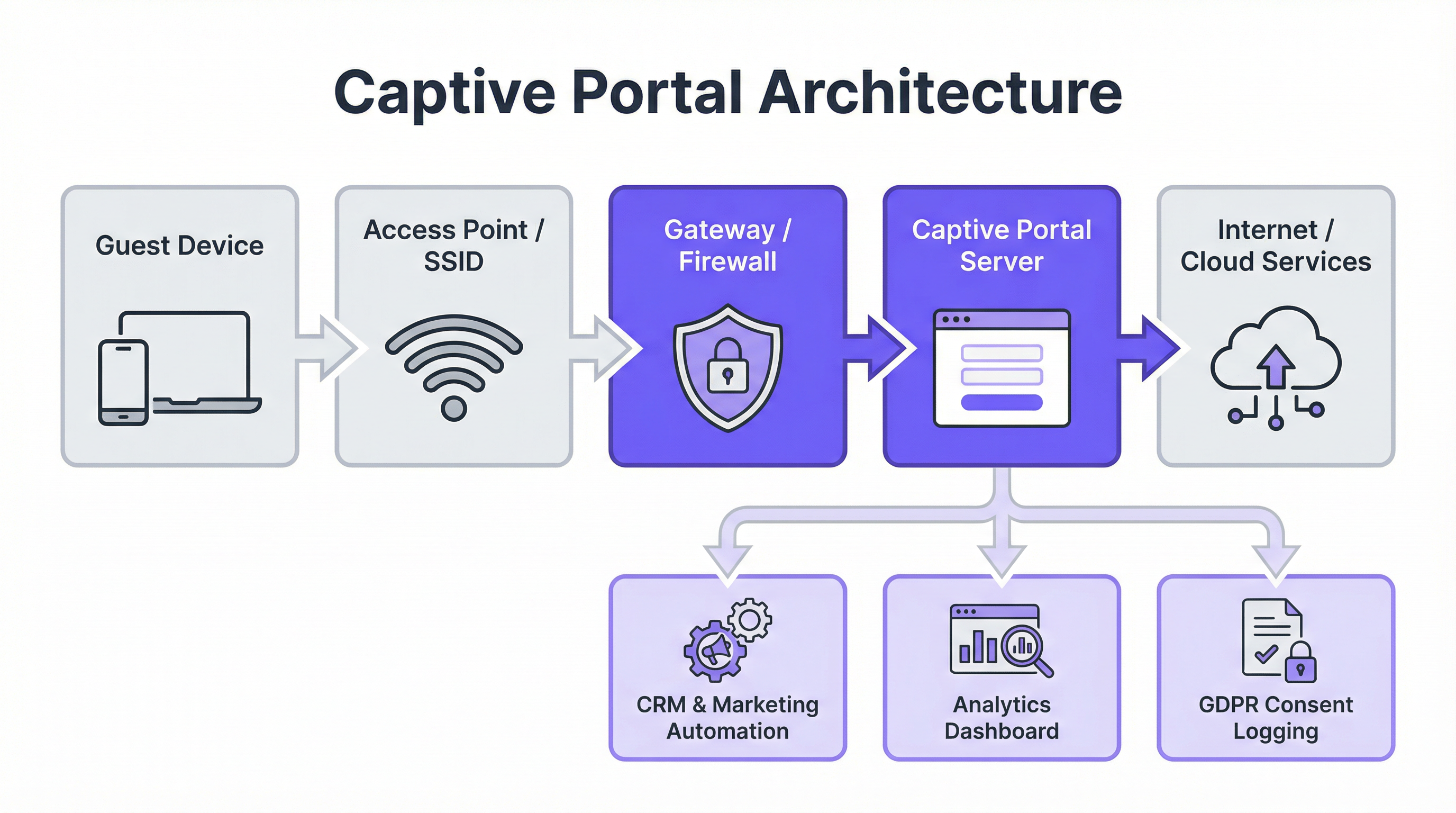
Componentes arquitectónicos principales:
- Conexión del dispositivo invitado: El proceso comienza cuando un usuario conecta su dispositivo al SSID de invitados. El sistema operativo del dispositivo suele realizar una comprobación de "actividad" intentando contactar con una URL predefinida (por ejemplo,
http://captive.apple.com/hotspot-detect.htmlpara iOS). - Intercepción de DNS y HTTP: La puerta de enlace o firewall de la red intercepta esta solicitud HTTP inicial. En lugar de permitir que se resuelva, devuelve una respuesta DNS que dirige el navegador del usuario a la dirección IP del servidor del Captive Portal. Esto se suele lograr mediante una redirección DNS o respondiendo con una redirección HTTP 302/307.
- Autenticación en el portal: Al usuario se le muestra la página de inicio (splash page) del Captive Portal. Aquí debe completar una acción requerida, como introducir un correo electrónico, iniciar sesión a través de un proveedor de redes sociales (OAuth 2.0), introducir un código de cupón o simplemente aceptar los Términos de servicio. Toda la comunicación en esta etapa debe estar protegida mediante HTTPS para salvaguardar las credenciales del usuario.
- Autenticación y autorización: El servidor del portal valida las credenciales o la acción del usuario. Tras una autenticación exitosa, se comunica con el controlador de red o la puerta de enlace, indicando que el dispositivo (identificado por su dirección MAC) ahora está autorizado para acceder. A continuación, el controlador actualiza su lista de control de acceso (ACL) para permitir el tráfico de ese dispositivo hacia Internet.
Estándares y protocolos clave:
- IEEE 802.1X: Aunque a menudo se utiliza para el acceso a redes corporativas, el 802.1X proporciona un marco para el control de acceso a la red basado en puertos que se puede integrar con los Captive Portals para una autenticación más sólida basada en certificados.
- WPA3-Enterprise: El estándar de seguridad más reciente, que ofrece una protección mejorada contra ataques de diccionario sin conexión y garantiza un cifrado más fuerte para los datos confidenciales.
- RADIUS (Remote Authentication Dial-In User Service): Un protocolo de red que proporciona una gestión centralizada de Autenticación, Autorización y Contabilización (AAA) para los usuarios que se conectan y utilizan un servicio de red. Los Captive Portals utilizan con frecuencia un servidor RADIUS en el backend para gestionar las sesiones de los usuarios.
- GDPR y privacidad de datos: El Reglamento General de Protección de Datos exige un consentimiento explícito e informado para la recopilación de datos. Un Captive Portal que cumpla la normativa debe indicar claramente qué datos se están recopilando, con qué fin, y proporcionar una casilla de aceptación (opt-in) separada y desmarcada por defecto para las comunicaciones de marketing.
Guía de implementación
La implementación de una solución de Captive Portal requiere una planificación cuidadosa que se alinee con su infraestructura existente y sus objetivos empresariales. La elección entre un portal basado en controlador (interno) y una solución externa basada en la nube es un punto de decisión fundamental.
Proceso de implementación paso a paso:
- Definir los requisitos: Determine el objetivo principal. ¿Es un acceso sencillo y seguro? ¿La captura de datos para marketing? ¿Ancho de banda por niveles para generar ingresos? Sus objetivos dictarán las funciones necesarias.
- Evaluar la infraestructura: Identifique su hardware inalámbrico actual (puntos de acceso, controladores) y su proveedor de puerta de enlace de red (por ejemplo, Cisco, Aruba, Meraki, Ruckus). La solución de portal que elija debe ser compatible con su stack tecnológico.
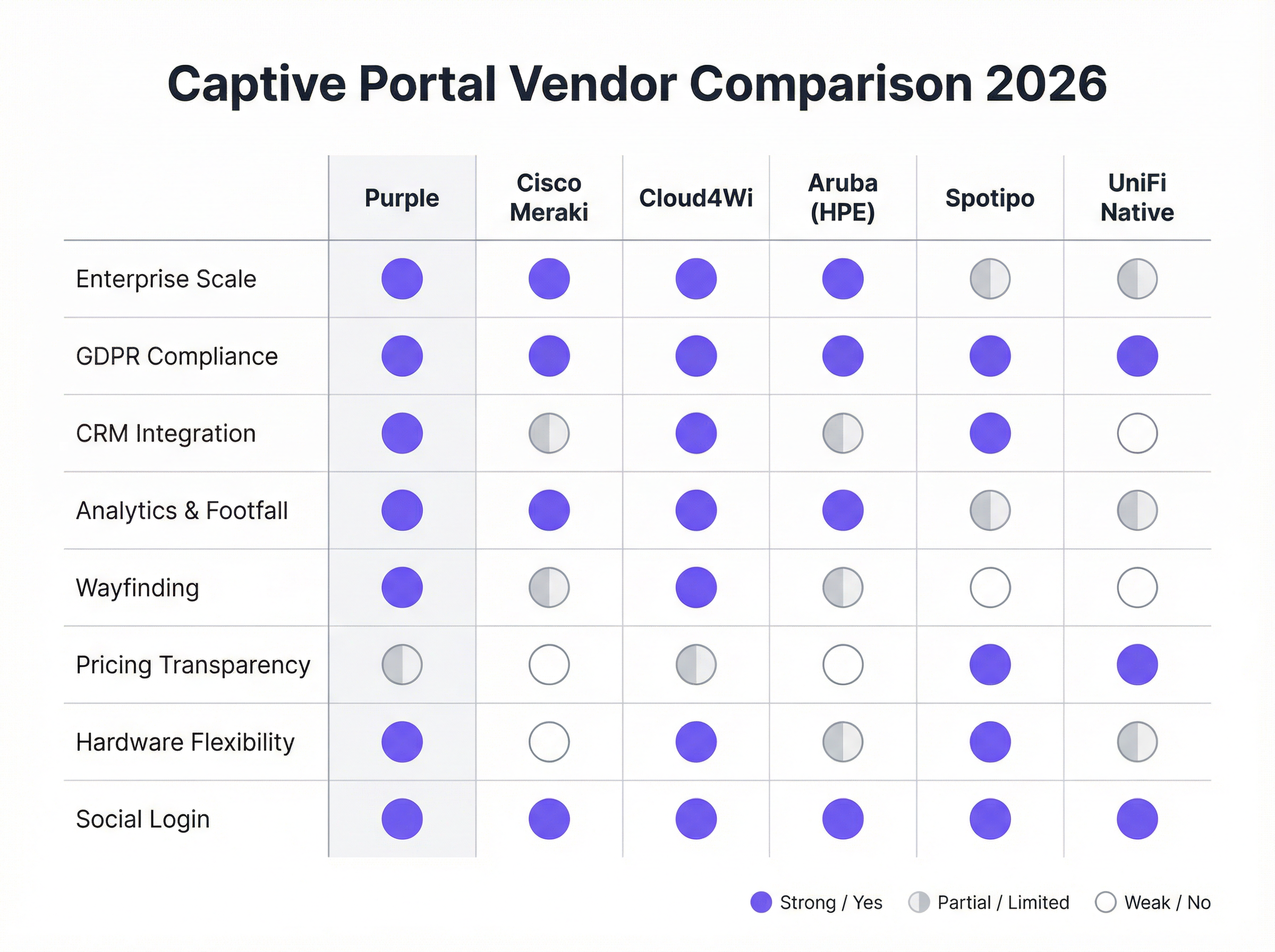
- Seleccionar un proveedor/solución:
- Portales nativos de hardware (por ejemplo, UniFi Native Portal): Se incluyen de forma gratuita con el hardware. Son buenos para el control de acceso básico, pero carecen de funciones avanzadas de marketing e integración con CRM.
- Plataformas especializadas en la nube (por ejemplo, Purple, Cloud4Wi, Spotipo): Ofrecen amplios conjuntos de funciones, gran compatibilidad de hardware y profundas integraciones. Son ideales para empresas centradas en el marketing y la analítica.
- Soluciones Full-Stack (por ejemplo, Cisco Meraki): Proporcionan hardware y software estrechamente integrados, lo que simplifica la implementación pero crea dependencia del proveedor (vendor lock-in).
- Configurar la página de inicio (Splash Page): Diseñe la página de inicio de sesión orientada al usuario. Asegúrese de que sea adaptable a dispositivos móviles (mobile-responsive), refleje su identidad de marca y presente claramente los métodos de inicio de sesión requeridos y las casillas de verificación de cumplimiento normativo.
- Integrar con sistemas backend: Conecte el portal a su CRM (por ejemplo, Salesforce, HubSpot), plataforma de automatización de marketing (por ejemplo, Klaviyo) y cualquier sistema de gestión de propiedades (PMS) para el sector hotelero.
- Probar el recorrido del usuario (User Journey): Pruebe a fondo el proceso de conexión y autenticación en varios dispositivos (iOS, Android, portátiles) para garantizar una experiencia fluida. Verifique que los datos fluyen correctamente hacia sus sistemas integrados.
- Monitorizar y optimizar: Utilice la analítica de la plataforma para monitorizar el uso, realizar un seguimiento de las tasas de éxito de inicio de sesión y medir el ROI del marketing. Perfeccione su página de inicio y sus ofertas en función de los datos de rendimiento.
Mejores prácticas
- Priorizar la experiencia del usuario: Un proceso de inicio de sesión lento, confuso o de varios pasos provocará altas tasas de abandono. Ofrezca opciones de inicio de sesión sin fricciones, como redes sociales o un simple "clic para conectar" cuando sea apropiado.
- Garantizar el cumplimiento del GDPR/CCPA: Nunca marque previamente las casillas de aceptación de marketing. Proporcione enlaces claros a su Política de privacidad y Términos de servicio. Registre el consentimiento del usuario con marcas de tiempo para fines de auditoría.
- Segmentar su red: Ejecute siempre su WiFi para invitados en una VLAN separada, completamente aislada de su red corporativa, para mitigar los riesgos de seguridad.
- Utilizar HTTPS en todo momento: La propia página del Captive Portal y todas las interacciones posteriores deben estar cifradas con SSL/TLS para proteger los datos del usuario en tránsito.
- Aprovechar los datos para la personalización: Utilice los datos recopilados para personalizar la experiencia posterior al inicio de sesión. Por ejemplo, a un huésped de hotel que regresa se le podría saludar por su nombre y ofrecerle un descuento de fidelidad.
Resolución de problemas y mitigación de riesgos
- Problema: Falla la redirección (atascado en "Conectando"): A menudo se debe a problemas de DNS o reglas de firewall que bloquean la redirección. Asegúrese de que la puerta de enlace pueda resolver y redirigir correctamente al servidor del portal. Algunos dispositivos con VPN o configuraciones de DNS personalizadas también pueden fallar al redirigir.
- Problema: Falla el inicio de sesión social: Esto puede ocurrir si la dirección IP del servidor del portal no está en la lista blanca de la consola de desarrolladores del proveedor de redes sociales (por ejemplo, Facebook Login for Business). Las claves de la API y las URI de redirección permitidas deben estar configuradas correctamente.
- Riesgo: Ataques de "Gemelo malvado" (Evil Twin): Un atacante configura un punto de acceso no autorizado con el mismo SSID que su red legítima. Los usuarios se conectan sin saberlo a la red del atacante, que presenta un Captive Portal falso para robar credenciales. La mitigación implica implementar un Sistema de prevención de intrusiones inalámbricas (WIPS) y utilizar la seguridad WPA3-Enterprise.
- Riesgo: Brecha de datos: Si el servidor del Captive Portal o su base de datos conectada se ven comprometidos, todos los datos recopilados de los usuarios están en riesgo. La mitigación requiere una sólida seguridad del servidor, cifrado de datos en reposo y cumplimiento de los estándares PCI DSS si se procesan pagos.
ROI e impacto empresarial
El caso de negocio para una solución estratégica de Captive Portal va mucho más allá de proporcionar acceso a Internet. El ROI se mide a través de la generación de ingresos directos e indirectos, la mejora de las capacidades de marketing y una mayor eficiencia operativa.
- Ingresos directos: Los hoteles y centros de conferencias pueden ofrecer ancho de banda por niveles, cobrando un suplemento por el acceso de alta velocidad adecuado para el streaming de vídeo o las videoconferencias.
- Crecimiento de la base de datos de marketing: Para una cadena de retail, captar 5000 nuevas direcciones de correo electrónico de alta intención al mes de los visitantes de la tienda proporciona un canal directo para promociones segmentadas, impulsando las visitas recurrentes y las ventas.
- Aumento del valor del ciclo de vida del cliente (CLV): Al integrarse con un CRM, las empresas pueden identificar a los visitantes recurrentes e inscribirlos en programas de fidelización, aumentando la frecuencia de las visitas y el gasto medio.
- Información operativa: La analítica de afluencia, los datos de tiempo de permanencia y los mapas de flujo de visitantes permiten a los recintos optimizar la dotación de personal, la distribución de las tiendas e incluso las tarifas de alquiler de zonas específicas en un centro comercial.

Al considerar el WiFi para invitados como un canal de inteligencia de clientes en lugar de un centro de costes de TI, las organizaciones pueden desbloquear un valor significativo y medible que repercute directamente en la cuenta de resultados.
Key Terms & Definitions
Captive Portal
A web page that the user of a public-access network is obliged to view and interact with before access is granted. It acts as a customizable gateway for authentication, policy acceptance, and marketing.
This is the core technology being discussed. IT teams deploy it to control and monetize guest WiFi access in venues like hotels, retail stores, and stadiums.
SSID (Service Set Identifier)
The name of a wireless network that is broadcasted by an access point. It's the name you see when you search for WiFi networks on your device.
IT teams configure a specific SSID for guest access (e.g., \'Hotel Guest WiFi\') which is then associated with the captive portal policy. Clear and distinct SSIDs are crucial for user experience and security.
VLAN (Virtual Local Area Network)
A method of creating logically separate networks on the same physical network infrastructure. Traffic from one VLAN is isolated from another.
This is a critical security best practice. IT architects MUST place the guest WiFi network on a separate VLAN from the corporate network to prevent guests from accessing sensitive internal resources.
MAC Address (Media Access Control Address)
A unique identifier assigned to a network interface controller (NIC) for use as a network address in communications within a network segment.
The captive portal system uses the device's MAC address to identify it and track its authentication status. Once a device is authenticated, its MAC address is added to an allow list on the gateway.
GDPR (General Data Protection Regulation)
A regulation in EU law on data protection and privacy for all individuals within the European Union and the European Economic Area. It governs how personal data is collected, processed, and stored.
For any business operating in or serving customers from the EU, the captive portal must be GDPR-compliant. This means obtaining explicit, un-coerced consent for data collection and marketing, which has major implications for portal design and data handling.
CRM (Customer Relationship Management)
Software that helps companies manage and analyze customer interactions and data throughout the customer lifecycle, with the goal of improving business relationships.
Integrating the captive portal with a CRM like Salesforce or HubSpot is how you turn WiFi access into a marketing asset. It allows guest data (email, name) to be automatically synced for targeted campaigns.
WPA3 (Wi-Fi Protected Access 3)
The latest generation of WiFi security standard, offering enhanced security features over its predecessor, WPA2, including protection against brute-force attacks.
Network architects should specify WPA3-Enterprise for the highest level of security on their guest networks. It ensures that the connection between the user's device and the access point is strongly encrypted.
Footfall Analytics
The process of analyzing data about customer traffic and behavior in a physical location, such as a retail store or a shopping mall.
Advanced captive portal solutions like Purple provide footfall analytics by analyzing WiFi connection data. This gives venue operators valuable insights into visitor numbers, dwell times, and movement patterns, which can be used to optimize operations and marketing.
Case Studies
A 250-room upscale hotel wants to replace its outdated, unreliable guest WiFi system. The goals are to provide a seamless, premium connectivity experience, gather guest data to personalize marketing, and create a new revenue stream from high-speed internet access. The existing hardware is a mix of older Cisco and Ruckus access points.
- Infrastructure Upgrade & Vendor Selection: The mixed hardware is inefficient. Standardize on a single vendor for new WiFi 6/6E access points. Select a cloud-based captive portal provider like Purple that offers broad hardware compatibility and robust PMS integration. 2. Portal Configuration: Design a branded splash page that authenticates users via Room Number + Surname. This validates their guest status via a real-time PMS lookup. 3. Tiered Access Model: Configure two tiers: a) Standard Access (Free): 5 Mbps, suitable for email and web browsing, offered complimentary. b) Premium Access ($15/day): 100 Mbps, for streaming 4K video and video conferencing. The PMS integration allows the charge to be automatically added to the guest's room bill. 4. Marketing Integration: On successful login, redirect guests to a welcome page promoting hotel amenities (spa, restaurant). Use the collected email addresses (with GDPR-compliant consent) for post-stay feedback surveys and targeted offers for future bookings. 5. Security: Deploy the guest network on a separate VLAN, isolated from the hotel's corporate and operational networks. Enforce WPA3 security on the new access points.
A national retail chain with 200 stores wants to leverage in-store guest WiFi to increase its loyalty program membership and measure the impact of digital advertising on physical foot traffic. They currently use Cisco Meraki across all locations.
- Vendor Selection: Since the hardware is standardized on Cisco Meraki, a solution with deep Meraki integration is ideal. Adentro (formerly Zenreach) is a strong candidate due to its focus on the 'Walk-Through Rate' metric, but Purple also offers robust Meraki integration with more flexible pricing. Let's proceed with Purple for its balance of features and cost-effectiveness. 2. Portal Configuration: Configure the captive portal to offer two login methods: a) Social Login (Facebook/Google) for quick access, and b) 'Join Our Loyalty Program' form that captures name, email, and mobile number in exchange for a 10% off digital coupon. 3. CRM & Ad Platform Integration: Connect the portal directly to the company's Salesforce CRM and Facebook Ads account. New loyalty sign-ups are automatically added to Salesforce. The platform will capture the MAC addresses of devices that connect to WiFi. 4. Attribution Measurement: When a customer who has previously logged into the WiFi sees a Facebook ad for the brand and subsequently enters a store (their device is detected by the WiFi network), this is recorded as a 'Walk-Through'. This allows the marketing team to directly measure the ROI of their ad spend on driving in-store traffic. 5. Analytics: Use the platform's analytics dashboard to monitor new loyalty sign-ups per store, identify peak traffic hours, and analyze customer dwell times to optimize store layouts and staffing.
Scenario Analysis
Q1. Your organization is a fast-growing chain of 50 coffee shops using a mix of different consumer-grade routers. The marketing team wants to build a customer email list. What is your primary recommendation for a captive portal strategy?
💡 Hint:Consider the challenges of managing a diverse and non-enterprise hardware environment and the primary goal of marketing data collection.
Show Recommended Approach
The primary recommendation is to deploy a hardware-agnostic, cloud-based captive portal solution like Spotipo or Purple. This approach avoids a costly and immediate hardware replacement across all 50 stores. These platforms are designed to work with a wide range of hardware and provide the centralized management and CRM integration needed to meet the marketing team's goal of building an email list. A simple, email-based login should be implemented to maximize sign-ups.
Q2. A large conference center is hosting a cybersecurity summit and needs to provide WiFi for 5,000 attendees. The summit organizers are concerned about security. How would you configure the captive portal and network?
💡 Hint:Focus on security and scalability. How do you authenticate a large number of users securely while protecting them and your network?
Show Recommended Approach
- Network Segmentation: Create a dedicated VLAN for attendee WiFi, completely isolated from the center's operational network. 2. Security Protocol: Enforce WPA3-Enterprise for robust encryption. 3. Authentication: Use a voucher-based system. Each attendee receives a unique, single-use code upon registration. This prevents unauthorized access and provides a clear audit trail. 4. Portal Configuration: The portal should be minimal, requiring only the voucher code. Disable social logins or open forms to reduce the attack surface. 5. Bandwidth Management: Implement per-user bandwidth limits to ensure fair usage and prevent network saturation. 6. Monitoring: Actively monitor the network for rogue access points or suspicious activity using a WIPS.
Q3. A hospital wants to provide guest WiFi in its waiting rooms but is extremely concerned about HIPAA compliance and protecting patient data. What is the most critical architectural decision to ensure security?
💡 Hint:What is the single most important measure to prevent any possibility of guest traffic interfering with sensitive internal systems?
Show Recommended Approach
The most critical architectural decision is the strict implementation of network segmentation using a VLAN. The guest WiFi network must be on its own VLAN, completely firewalled off from the hospital's internal clinical network where Electronic Health Records (EHR) and other sensitive patient data reside. There should be no routes and no trust between the guest VLAN and the internal VLAN. This ensures that even if a guest device is compromised, it has no network path to access sensitive internal systems, forming the foundation of a HIPAA-compliant guest WiFi strategy.
Key Takeaways
- ✓A captive portal is a strategic asset for security, compliance, and marketing, not just a login page.
- ✓The core architecture involves DNS/HTTP interception to redirect users to a portal for authentication before granting internet access.
- ✓Choosing between hardware-native portals and specialist cloud platforms depends on your business goals, particularly regarding marketing and data analytics.
- ✓GDPR and CCPA compliance are non-negotiable; portals must be designed for explicit, logged user consent.
- ✓Security best practices, like network segmentation (VLANs) and WPA3 encryption, are critical to mitigate risks like 'Evil Twin' attacks.
- ✓The ROI of a captive portal is measured in direct revenue (tiered access), marketing database growth, and operational insights from footfall analytics.
- ✓A seamless user experience is paramount; a complex login process will lead to high abandonment and low data capture.




