

dotdigital (anteriormente Dotmailer): Guía de integración, mejores prácticas y resolución de problemas para usuarios de Purple AI
This guide provides Purple AI users — particularly IT managers, network architects, and CTOs at hotels, retail chains, stadiums, and conference centres — with a definitive technical reference for deploying and optimising the dotdigital (formerly Dotmailer) connector. It covers the end-to-end integration architecture, step-by-step configuration, GDPR-compliant data handling, automation programme design, and a structured troubleshooting framework. Organisations that implement this integration correctly convert guest WiFi logins into a high-value, consent-gated marketing database that drives measurable revenue outcomes.
🎧 Listen to this Guide
View Transcript

Resumen ejecutivo
La plataforma Purple AI captura datos de origen de los invitados en el punto de autenticación WiFi en hoteles, establecimientos minoristas, estadios y recintos del sector público. El conector de dotdigital (anteriormente conocido como Dotmailer) transforma esa captura de datos sin procesar en un canal de automatización de marketing de nivel de producción. Cuando un invitado se conecta a su WiFi y da su consentimiento para recibir comunicaciones de marketing, Purple envía su perfil a una libreta de direcciones designada de dotdigital en tiempo real. A partir de ese momento, el motor de automatización de dotdigital puede activar recorridos de bienvenida, invitaciones a programas de fidelización, campañas de reactivación y comunicaciones omnicanal a través de correo electrónico, SMS y notificaciones push.
El caso comercial está bien documentado. Harrods creó una base de datos de 3,6 millones de contactos mediante la captura de datos a través de WiFi y logró un retorno de 54 veces su inversión en Purple en un solo año. AGS Airports obtuvo un ROI del 842 %. El Aeropuerto de Bruselas Sur Charleroi registró un ROI del 10 630 % utilizando las MicroSurveys de Purple en combinación con la automatización de marketing posterior. Estos resultados no son excepcionales; son el resultado esperado de una integración bien configurada e implementada con un diseño de programa deliberado.
Esta guía proporciona la profundidad técnica necesaria para implementar, optimizar y solucionar problemas de la integración entre Purple y dotdigital a escala empresarial. Está estructurada para el profesional de TI que necesita implementar una solución este trimestre, no evaluar una el próximo año.
Análisis técnico en profundidad
Arquitectura de integración
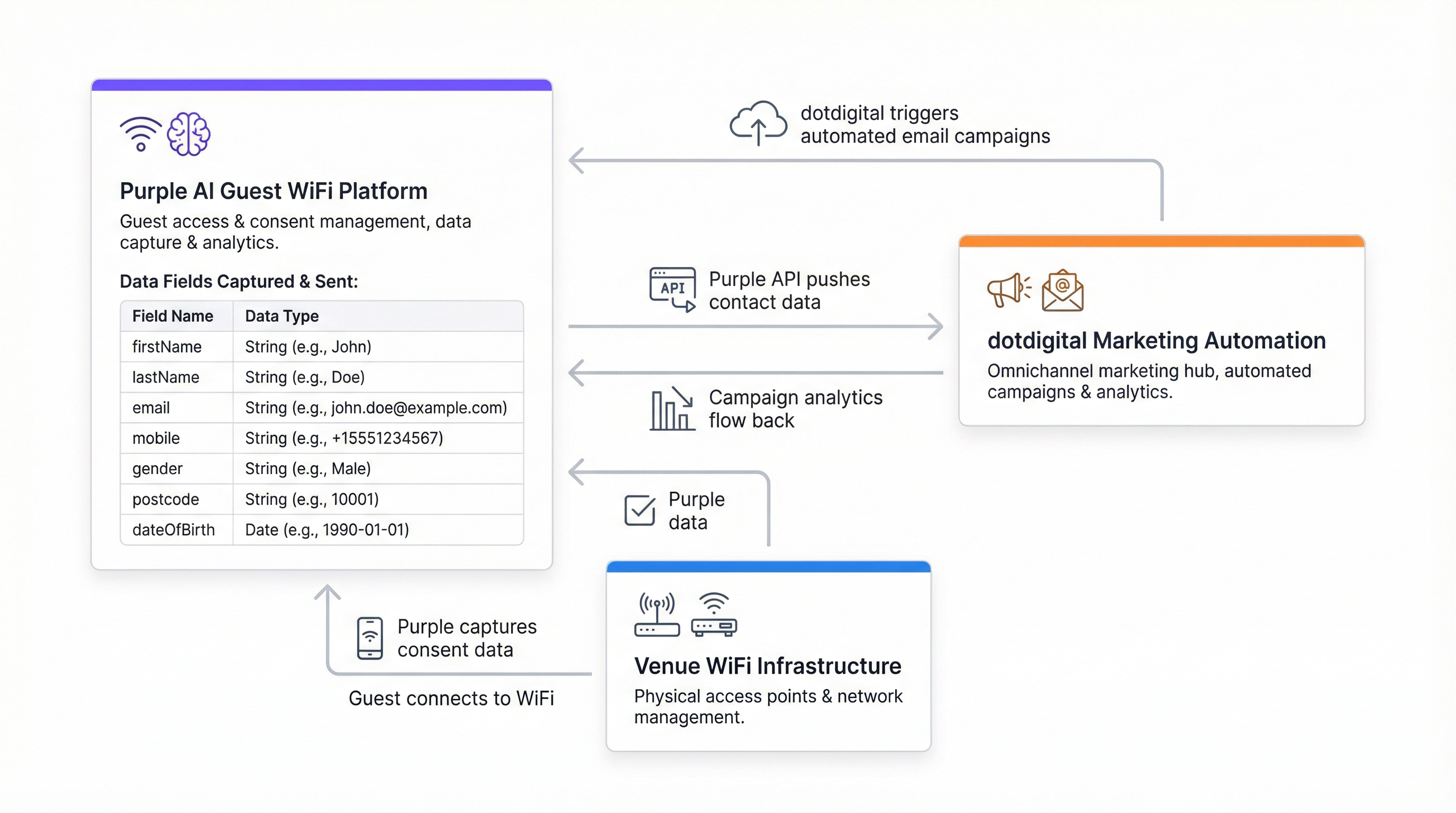
El conector de Purple y dotdigital funciona como una integración de API REST de servidor a servidor. Purple funciona como el productor de datos y dotdigital como el consumidor. La conexión se autentica mediante el mecanismo Basic Auth de dotdigital: una cuenta de usuario de API dedicada (dirección de correo electrónico y contraseña) creada dentro de la plataforma dotdigital, combinada con una URL de endpoint de API específica de la región.
La arquitectura es unidireccional por defecto: Purple envía los registros de contactos a dotdigital en el punto de autenticación WiFi. Para las organizaciones que requieren sincronización bidireccional (por ejemplo, para reflejar las bajas o las actualizaciones de la lista de supresión en Purple), se necesita una configuración adicional a través del marco de webhooks de dotdigital.
| Componente | Función | Notas |
|---|---|---|
| Captive Portal de Purple | Autenticación de invitados y captura de consentimiento | Página de inicio (splash page) presentada al iniciar sesión en el WiFi |
| Motor de conectores de Purple | Transformación de datos y envío de API | Configurado en Management > Connectors |
| API REST de dotdigital | Ingesta de contactos y gestión de libretas de direcciones | Se requiere un endpoint específico de la región |
| Libreta de direcciones de dotdigital | Capa de almacenamiento y segmentación de contactos | Una o más libretas por recinto/propiedad |
| Program Builder de dotdigital | Ejecución de programas de automatización | Se activa al añadir un contacto a la libreta de direcciones |
Carga útil de datos y asignación de campos
Purple transmite ocho campos de datos a dotdigital por cada invitado que da su consentimiento. Estos campos se asignan directamente al modelo de datos de contacto estándar de dotdigital y no requieren la configuración de campos personalizados para implementaciones básicas.
| Nombre del campo | Tipo de datos | Descripción |
|---|---|---|
firstName |
Cadena (String) | Nombre del invitado |
lastName |
Cadena (String) | Apellido del invitado |
userID |
Entero (Integer) | Identificador de usuario interno de Purple |
email |
Cadena (String) | Dirección de contacto principal; utilizada como clave de deduplicación |
mobile |
Cadena (String) | Número de teléfono móvil (se recomienda el formato E.164) |
gender |
Cadena (String) | Género autodeclarado en la página de inicio |
postcode |
Cadena (String) | Código postal; permite la segmentación geográfica |
dateOfBirth |
Cadena (String) | Formato: AAAA-MM-DD; permite la segmentación por franjas de edad y activadores de cumpleaños |
La transmisión de datos está sujeta al consentimiento a nivel de plataforma. Purple no enviará un registro de contacto a dotdigital a menos que el invitado haya aceptado explícitamente recibir comunicaciones de marketing a través de la casilla de consentimiento de la página de inicio. Esta es una imposición estricta (no una opción configurable) y es el mecanismo principal por el cual la integración mantiene el cumplimiento del GDPR del Reino Unido, el Reglamento General de Protección de Datos de la UE (GDPR) y la CCPA.
Autenticación y configuración del endpoint
dotdigital utiliza la autenticación HTTP Basic para su API REST. Las credenciales consisten en una dirección de correo electrónico y una contraseña de usuario de la API, que deben crearse como un usuario dedicado dentro de la cuenta de dotdigital (no el inicio de sesión de la cuenta principal). La URL del endpoint de la API es específica de la cuenta y depende de la región. Se obtiene en Account Settings > Access dentro de la plataforma dotdigital. Un endpoint típico tiene el formato https://r1-api.dotdigital.com para las cuentas de la región uno.
Esta especificidad del endpoint es la causa más común de fallos en la verificación del conector. Los equipos que intenten utilizar una URL genérica o de ejemplo de la documentación se encontrarán con errores de autenticación. Obtenga siempre el valor del endpoint directamente de la cuenta de dotdigital en uso.
Niveles de implementación del conector
Purple admite dos niveles de implementación para el conector de dotdigital:
El nivel de cliente (Customer level) aplica la configuración del conector a toda la cuenta de Purple, enrutando a todos los invitados que dan su consentimiento de todos los recintos a una única libreta de direcciones de dotdigital. Esto es adecuado para operadores de un solo recinto u organizaciones con un conjunto de recintos homogéneo.
El nivel de recinto (Venue level) permite asignar cada recinto individual a una libreta de direcciones de dotdigital distinta. Esta es la configuración recomendada para operadores de múltiples propiedades (grupos hoteleros, cadenas minoristas, operadores de estadios) donde se requiere segmentación a nivel de recinto para marketing dirigido, ofertas localizadas o identidades de marca separadas.
Guía de implementación
Paso 1: Preparar su cuenta de dotdigital
Antes de configurar el conector de Purple, complete lo siguiente en su cuenta de dotdigital. Vaya a Account Settings y cree un nuevo usuario de API con una dirección de correo electrónico dedicada y una contraseña segura. Anote la URL del endpoint de la API que aparece en la parte superior de la página Access. Cree la libreta o libretas de direcciones que recibirán los contactos de Purple (se recomienda una por recinto para implementaciones en múltiples propiedades). Opcionalmente, cree campos de datos personalizados en dotdigital si tiene la intención de capturar atributos adicionales más allá de los ocho campos estándar de Purple.
Paso 2: Configurar el conector de Purple
Dentro de la plataforma Purple, vaya a Management > Connectors. Localice el conector de dotdigital y seleccione Add. Complete los cuatro campos obligatorios: el nombre del conector (una etiqueta descriptiva para su referencia), el correo electrónico de la API de dotdigital, la contraseña de la API de dotdigital y la URL del endpoint de la API de dotdigital. Seleccione Verify. Si la verificación es correcta, aparecerá un menú desplegable con las libretas de direcciones disponibles en su cuenta de dotdigital. Seleccione la libreta de direcciones de destino y guarde la configuración.
Para implementaciones en múltiples recintos, repita este proceso a nivel de recinto para cada propiedad, asignando cada una a su libreta de direcciones designada.
Paso 3: Configurar el mecanismo de consentimiento de la página de inicio
La casilla de consentimiento de marketing en su página de inicio de Purple es la puerta de entrada a toda la integración. Vaya a la configuración de su página de inicio y asegúrese de que la casilla de aceptación de marketing esté habilitada y claramente etiquetada. El lenguaje de consentimiento debe ser explícito, específico e inequívoco en virtud del artículo 7 del GDPR del Reino Unido. Un ejemplo que cumple con la normativa: "Acepto recibir comunicaciones de marketing de [Nombre de la organización] sobre ofertas, eventos y noticias. Puede darse de baja en cualquier momento". No marque esta casilla previamente.
Si su programa de marketing incluye SMS, asegúrese de que el lenguaje de consentimiento cubra explícitamente las comunicaciones por SMS. Se permite una sola casilla que cubra tanto el correo electrónico como los SMS, siempre que el lenguaje sea claro.
Paso 4: Crear sus programas de automatización de dotdigital
Implemente programas de automatización en dotdigital antes de que el conector entre en funcionamiento. Como mínimo, configure un programa de bienvenida que se active al añadir un contacto a la libreta de direcciones. Un recorrido de bienvenida recomendado de tres etapas:
- Inmediato (0 minutos): Correo electrónico de bienvenida confirmando el acceso al WiFi, con una introducción de marca a su recinto o servicios.
- Día 2 (48 horas): Correo electrónico de seguimiento con una oferta relevante, una guía del recinto o un contenido adaptado al contexto del invitado.
- Día 30 (reactivación): Correo electrónico automatizado de reactivación para los contactos que no han regresado, con un incentivo para volver a visitarlo.
Para la integración de programas de fidelización, utilice el Program Builder de dotdigital para inscribir a los contactos que cumplan criterios específicos (por ejemplo, los contactos que respondieron afirmativamente a una pregunta personalizada en la página de inicio sobre su interés en el programa de fidelización).
Paso 5: Configurar la sincronización de supresión bidireccional
Configure un webhook de dotdigital para notificar a Purple cuando un contacto se dé de baja. Esto garantiza que un contacto suprimido no se vuelva a añadir a dotdigital en su próximo inicio de sesión en el WiFi. Sin este paso, la integración está técnicamente incompleta desde el punto de vista del cumplimiento del GDPR.
Paso 6: Validar y poner en marcha
Realice una prueba integral autenticando un dispositivo de prueba en el WiFi, completando la página de inicio con una dirección de correo electrónico de prueba y el consentimiento de marketing, y verificando que el contacto aparezca en la libreta de direcciones correcta de dotdigital en un plazo de dos a tres minutos. Confirme que el programa de automatización de bienvenida se activa correctamente. Documente los resultados de la prueba y proceda a la implementación en producción.
Mejores prácticas
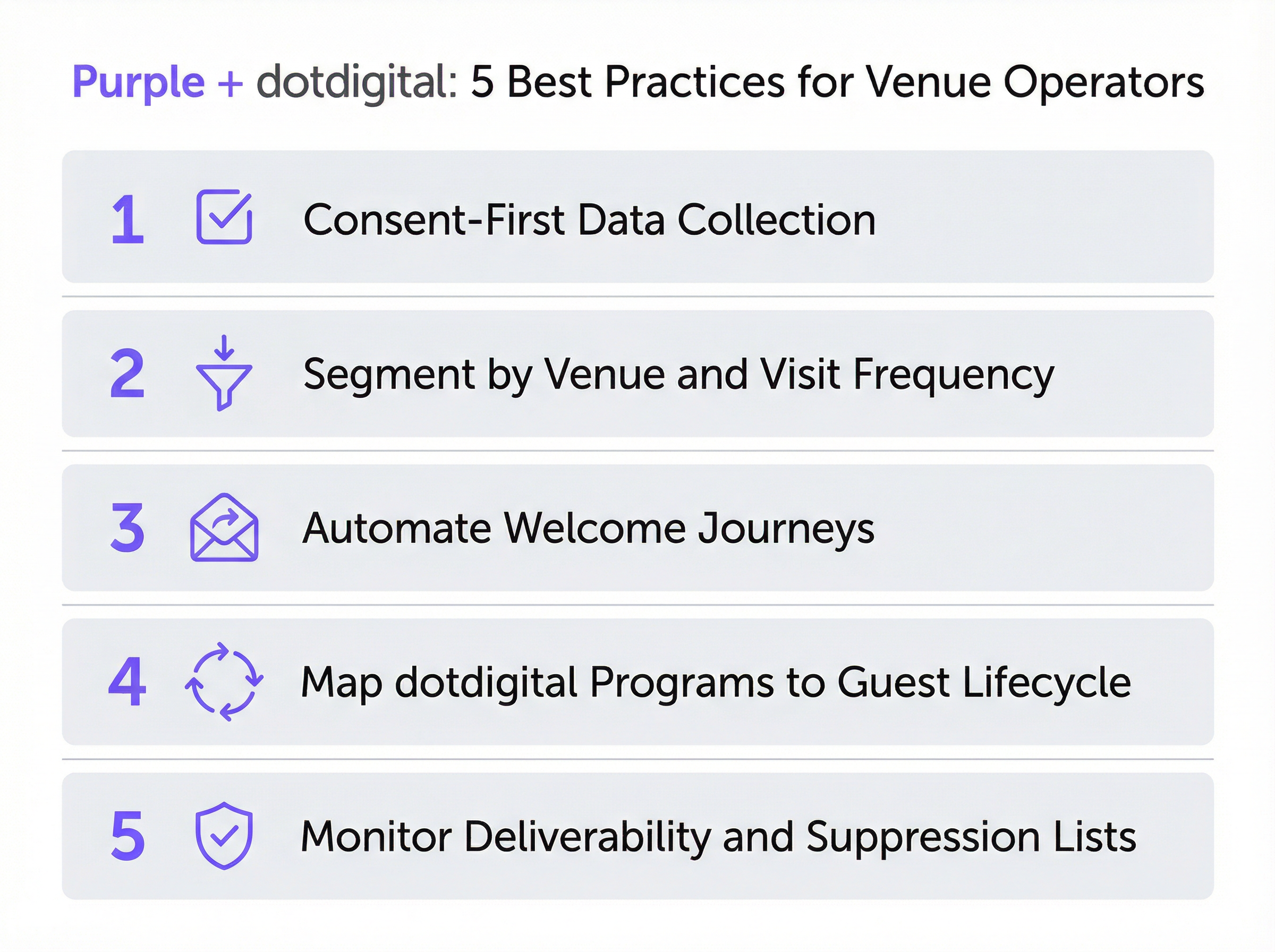
Arquitectura de consentimiento
La calidad de su base de datos de usuarios suscritos es una función directa de su arquitectura de consentimiento. Las organizaciones que invierten en un lenguaje de consentimiento claro y honesto (incluso si reduce marginalmente las tasas de aceptación) crean listas de contactos más comprometidas y de mayor valor. Una tasa de aceptación del 30 % a partir de un mecanismo de consentimiento transparente superará sistemáticamente a una tasa de aceptación del 60 % a partir de uno ambiguo o engañoso, porque el primer grupo realmente desea recibir información suya. Harrods logró una tasa de aceptación del 38 % entre 581 000 usuarios de WiFi, una tasa coherente con un lenguaje de consentimiento transparente y de intercambio de valor.
Taxonomía de la libreta de direcciones
Diseñe la estructura de su libreta de direcciones de dotdigital antes de conectar Purple. Para un grupo hotelero que opera 20 propiedades, esto podría significar 20 libretas de direcciones específicas por recinto, además de una libreta consolidada maestra para campañas entre propiedades. Para una cadena minorista, podría significar libretas segmentadas por región o formato de tienda. El principio clave es que la estructura de la libreta de direcciones determina su capacidad de segmentación posterior; modificarla después de haber recopilado los datos es costoso y perjudicial.
Profundidad del programa de automatización
Las implementaciones más eficaces de Purple y dotdigital utilizan toda la capacidad de los programas de dotdigital: recorridos de bienvenida, campañas de cumpleaños activadas por el campo dateOfBirth, secuencias de reactivación para contactos inactivos y encuestas posteriores a la visita. El campo postcode permite la segmentación geográfica para ofertas localizadas. El campo gender permite la personalización demográfica. El campo dateOfBirth permite la segmentación por franjas de edad y los activadores de cumpleaños. Utilice los ocho campos: representan una rica base de segmentación que la mayoría de las organizaciones infrautilizan.
Gestión de la entregabilidad
Supervise el panel de entregabilidad de dotdigital semanalmente durante los primeros 90 días de implementación. Puntos de referencia clave: tasa de apertura superior al 20 %, tasa de clics superior al 2 %, tasa de rebote inferior al 2 %, tasa de bajas inferior al 0,5 %. Si las tasas de rebote son elevadas, implemente el flujo de trabajo de doble opt-in de dotdigital para verificar las direcciones de correo electrónico antes de que entren en su base de datos activa. Esto es especialmente relevante para recintos con un alto tránsito peatonal (aeropuertos, estaciones de tren, centros de conferencias), donde los invitados pueden introducir direcciones de correo electrónico temporales o incorrectas.
Cumplimiento del GDPR y PECR
La integración está diseñada para cumplir con la normativa por defecto, pero el cumplimiento es una responsabilidad compartida. Purple aplica el consentimiento en la capa de captura de datos; dotdigital lo aplica en la capa de comunicaciones. Su organización es responsable del lenguaje de consentimiento en la página de inicio, del contenido de las comunicaciones de marketing y del mantenimiento de las listas de supresión. Realice una Evaluación de Impacto de Protección de Datos antes de implementar la integración en jurisdicciones cubiertas por el GDPR del Reino Unido o el GDPR de la UE, especialmente para organizaciones del sector público sujetas a obligaciones adicionales en virtud de la Ley de Protección de Datos de 2018.
Resolución de problemas y mitigación de riesgos
Fallos en la verificación del conector
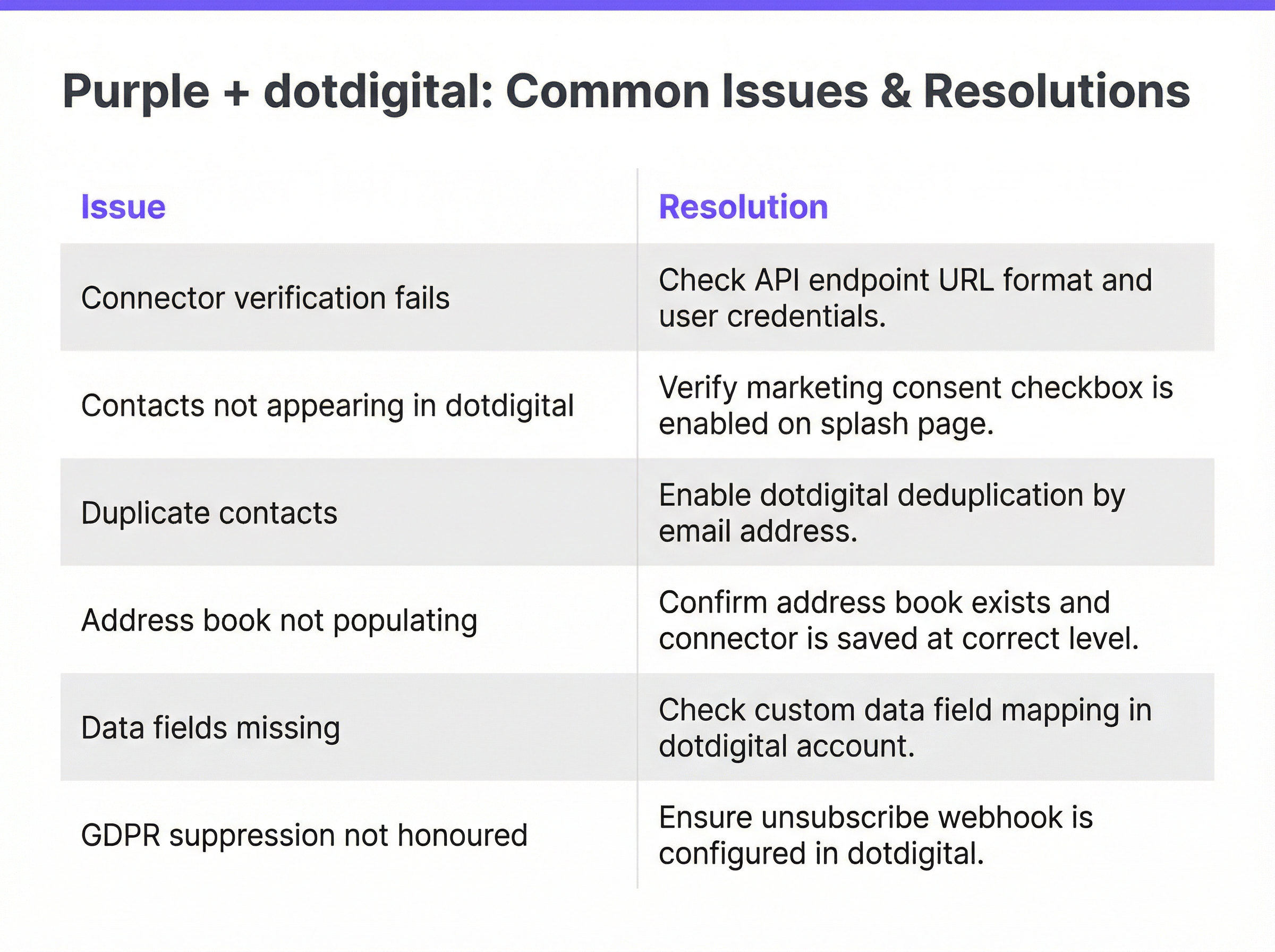
El problema de implementación más frecuente. Causado en la mayoría de los casos por una URL de endpoint de API incorrecta. Resolución: inicie sesión en dotdigital, vaya a Account Settings > Access y copie la URL del endpoint exactamente como se muestra. Asegúrese de que no se incluya ninguna barra diagonal final ni espacios en blanco. Verifique que las credenciales de usuario de la API correspondan a una cuenta de usuario de API dedicada, no al inicio de sesión de la cuenta principal. Si la verificación sigue fallando, confirme que la cuenta de dotdigital tiene habilitado el acceso a la API (esta es una función que el soporte de dotdigital puede tener que activar para algunos niveles de cuenta).
Los contactos no aparecen en dotdigital
Si el conector se verifica correctamente pero los contactos no aparecen en la libreta de direcciones de destino, la causa principal es que la casilla de consentimiento de marketing no está habilitada en la página de inicio. Purple no transmitirá datos sin consentimiento explícito. Las causas secundarias incluyen que el conector esté configurado en el nivel incorrecto (cliente frente a recinto) o que el ID de la libreta de direcciones haya cambiado desde que se guardó el conector. Resolución: verifique la configuración de consentimiento de la página de inicio, confirme el nivel del conector y vuelva a verificar el conector para actualizar la selección de la libreta de direcciones.
Registros de contactos duplicados
Ocurre cuando se envía la misma dirección de correo electrónico en múltiples sesiones de WiFi, generalmente en recintos con gran afluencia de público. Resolución: asegúrese de que la libreta de direcciones de dotdigital esté configurada para actualizar los contactos existentes si coinciden las direcciones de correo electrónico en lugar de crear nuevos registros. Esto se controla dentro de la configuración de importación de contactos de dotdigital. Además, revise si el conector de Purple está configurado tanto a nivel de cliente como de recinto para el mismo recinto (una configuración dual dará como resultado envíos duplicados).
Campos de datos faltantes
Si los contactos aparecen en dotdigital pero ciertos campos están vacíos, la causa más probable es que los invitados no completaron esos campos en la página de inicio. Purple solo transmite los campos que se proporcionaron durante la autenticación. Para campos opcionales como el número de teléfono móvil o la fecha de nacimiento, algunos invitados se negarán a proporcionarlos. Si la integridad de campos específicos es fundamental para su estrategia de segmentación, considere hacer que esos campos sean obligatorios en la página de inicio, pero tenga en cuenta que cada campo obligatorio adicional reducirá su tasa de conversión de aceptación general.
No se respeta la supresión del GDPR
Si los contactos dados de baja se vuelven a añadir a dotdigital en inicios de sesión de WiFi posteriores, no se ha configurado el webhook de supresión bidireccional. Esto supone un riesgo de cumplimiento. Resolución: configure un webhook de dotdigital que se active en eventos de baja y actualice el registro de contacto correspondiente en Purple. Consulte la documentación para desarrolladores de dotdigital para obtener orientación sobre la configuración de webhooks.
Marco de mitigación de riesgos
| Riesgo | Probabilidad | Impacto | Mitigación |
|---|---|---|---|
| Endpoint de API incorrecto | Alta | Medio | Obtener el endpoint directamente de la cuenta de dotdigital |
| Casilla de consentimiento deshabilitada | Media | Alto | Incluir en la lista de verificación previa al lanzamiento; probar con un dispositivo real |
| Contactos duplicados | Media | Bajo | Configurar la deduplicación basada en correo electrónico en dotdigital |
| Supresión no sincronizada | Baja | Alto | Implementar el webhook de baja antes de la puesta en marcha |
| Integridad de los campos de datos | Alta | Bajo | Establecer los requisitos de los campos en función de las necesidades de segmentación |
| Exposición de credenciales de API | Baja | Alto | Utilizar un usuario de API dedicado; rotar las credenciales trimestralmente |
ROI e impacto empresarial
Medición del éxito
La integración de Purple y dotdigital aporta valor en dos dimensiones distintas: el crecimiento de la base de datos y la atribución de ingresos. El crecimiento de la base de datos se mide por el número de nuevos contactos suscritos añadidos al mes, la tasa de aceptación como porcentaje del total de autenticaciones WiFi y la tasa de integridad de los datos de contacto (porcentaje de contactos con los ocho campos completados). La atribución de ingresos se mide mediante el seguimiento de compras, inscripciones en programas de fidelización u otros eventos de conversión que puedan vincularse a contactos que entraron en la base de datos a través del inicio de sesión en el WiFi.
El conjunto de informes de dotdigital proporciona análisis a nivel de campaña (tasas de apertura, tasas de clics, tasas de conversión) que pueden utilizarse para calcular la contribución a los ingresos de cada programa de automatización. El panel de análisis de Purple proporciona los datos de afluencia y autenticación necesarios para calcular el coste por contacto adquirido.
Puntos de referencia y resultados esperados
Basado en implementaciones documentadas en todo el entorno de Purple:
| Tipo de recinto | Tasa de aceptación típica | Plazo de ROI esperado | Impulsor clave de ingresos |
|---|---|---|---|
| Comercio minorista de lujo | 35–45 % | 6–12 meses | Conversión del programa de fidelización |
| Hotel (mercado medio) | 25–35 % | 12–18 meses | Reactivación de reservas directas |
| Aeropuerto / Centro de transporte | 15–25 % | 18–24 meses | Ventas adicionales (upsell) de tiendas y restauración |
| Estadio / Recinto de eventos | 20–30 % | 12–18 meses | Ventas adicionales (upsell) de merchandising y entradas |
| Centro de conferencias | 30–40 % | 6–12 meses | Nuevas reservas de eventos y patrocinios |
Consideraciones de coste-beneficio
El coste marginal del conector de dotdigital dentro de Purple es bajo en relación con el potencial de ingresos. La inversión principal se centra en el diseño del programa y la creación de contenido: los recorridos de automatización, las plantillas de correo electrónico y la lógica de segmentación que determinan la eficacia con la que se monetiza la base de datos de contactos. Las organizaciones que traten la integración como un canal de datos que se configura y se olvida verán rendimientos modestos. Aquellas que inviertan en la optimización continua del programa (pruebas A/B de líneas de asunto, refinamiento de la segmentación, ampliación de la profundidad de la automatización) verán rendimientos coherentes con los puntos de referencia de Harrods y AGS Airports documentados anteriormente.
Una regla general práctica: por cada 10 000 contactos suscritos adquiridos a través del WiFi, un programa de dotdigital bien configurado debería generar ingresos incrementales medibles en los 90 días posteriores a la implementación, asumiendo una tasa de apertura mínima del 20 % y una tasa de clics del 2 % en la serie de bienvenida.
Key Terms & Definitions
Captive Portal
A web page presented to a guest before they are granted access to a WiFi network. Purple's captive portal — also called a splash page — is the interface through which guests authenticate, provide profile data, and give marketing consent. It is the entry point for all data flowing into the dotdigital integration.
IT teams encounter this during network configuration and splash page design. The captive portal's consent checkbox is the legal and technical gateway to the entire marketing automation pipeline.
Address Book (dotdigital)
A named list of contacts within dotdigital, analogous to a mailing list or CRM segment. Address books are the primary organisational unit in dotdigital and serve as the target destination for Purple's data push. Automation programmes are triggered by contact addition to a specific address book.
The address book taxonomy — how many books, how named, at what level — is the most consequential architectural decision in a multi-venue deployment. It determines segmentation capability for all downstream marketing activity.
Automation Programme (dotdigital)
A configured sequence of automated actions in dotdigital, triggered by a defined event such as a contact being added to an address book. Programmes can include email sends, SMS messages, wait periods, conditional branches, and contact scoring updates. They are the mechanism through which Purple's data capture is converted into marketing communications.
IT teams are responsible for ensuring the connector triggers programme enrolment correctly. Marketing teams design the programme content. The 'Include contacts added via API' setting is a common configuration oversight that prevents programme triggering.
API Endpoint (dotdigital)
The base URL for dotdigital's REST API, specific to the regional data centre assigned to each account. It takes the form `https://r{n}-api.dotdigital.com` where `{n}` is the region number. It is retrieved from Account Settings > Access within the dotdigital platform.
This is the single most common source of connector verification failures. It must be retrieved directly from the dotdigital account — it cannot be guessed or copied from generic documentation.
Consent-Gated Data Push
A data transmission mechanism that only activates when explicit user consent has been recorded. In the Purple-dotdigital integration, Purple will only push a contact record to dotdigital if the guest has ticked the marketing consent checkbox on the splash page. This is a platform-level enforcement, not a configurable option.
This mechanism is the primary GDPR compliance control in the integration. It ensures that only genuinely opted-in contacts enter the marketing database, protecting the organisation from regulatory risk and protecting deliverability from low-engagement contacts.
Double Opt-In
A two-stage consent verification process in which a contact, after initially opting in, receives a confirmation email and must click a link to verify their email address and confirm their subscription. dotdigital supports double opt-in natively. It converts contacts from 'Pending' to 'Subscribed' status and provides an additional layer of consent documentation.
Recommended for venues with high transient footfall — airports, conference centres, train stations — where guests may enter incorrect or temporary email addresses. Double opt-in reduces bounce rates and improves deliverability, at the cost of a lower initial conversion rate.
Suppression List
A list of email addresses or contacts that must not receive marketing communications, typically because they have unsubscribed, complained, or been identified as invalid. dotdigital maintains suppression lists automatically. The Purple-dotdigital integration requires a webhook to sync suppressions back to Purple, preventing re-addition of suppressed contacts on subsequent WiFi logins.
Failure to implement bidirectional suppression sync is a GDPR compliance risk and a deliverability risk. It is a mandatory configuration step in any production deployment.
Venue-Level Connector
A Purple connector configuration scoped to a single venue, as opposed to a customer-level configuration that applies across the entire Purple account. Venue-level connectors allow different venues to be routed to different dotdigital address books, enabling venue-specific segmentation and personalisation.
Essential for multi-property operators. Hotel groups, retail chains, and stadium operators should always use venue-level configuration to maintain clean data segmentation across their estate.
First-Party Data
Data collected directly from individuals by the organisation that will use it for marketing, with the individual's knowledge and consent. WiFi login data captured through Purple's captive portal is first-party data. It is distinct from third-party data (purchased lists) and second-party data (data shared by partners). First-party data is the most valuable and most compliant form of marketing data in the post-cookie, post-GDPR landscape.
The strategic value of the Purple-dotdigital integration is that it generates high-quality first-party data at scale, from physical venue visits. This data is not available through any digital marketing channel and represents a genuine competitive advantage for venue operators.
PECR (Privacy and Electronic Communications Regulations)
UK regulations that govern direct marketing by electronic means, including email and SMS. PECR requires prior consent for marketing emails to individuals (as opposed to businesses). It works in conjunction with UK GDPR to define the legal basis for marketing communications triggered by the Purple-dotdigital integration.
IT and marketing teams must ensure that the splash page consent language covers all channels used for marketing — email, SMS, and push — and that the consent is specific to each channel where required.
Case Studies
A 450-room city-centre hotel group with 12 properties across the UK wants to use Purple's dotdigital connector to build a direct booking re-engagement programme. Each property has its own Purple venue configuration. The marketing team wants to send property-specific offers to guests who have stayed at a particular hotel, while also being able to run group-wide campaigns. How should the integration be architected?
The correct architecture uses venue-level connector configuration in Purple, with each of the 12 properties mapped to a dedicated dotdigital address book. This gives the marketing team clean, venue-specific contact lists for property-level targeting. In parallel, a dotdigital segment is created that aggregates contacts across all 12 address books — this segment is used for group-wide campaigns without duplicating contact records.
Step 1: In dotdigital, create 12 address books named by property (e.g., 'Purple - Manchester City Centre', 'Purple - Edinburgh Royal Mile'). Create a master segment using the 'Contact is in any of these address books' condition covering all 12 books.
Step 2: In Purple, navigate to each venue's settings under Management > Venues. For each venue, add a dotdigital connector at venue level, using the same API credentials but selecting the property-specific address book.
Step 3: Build a welcome automation programme in dotdigital triggered by contact addition to any of the 12 address books. Use dynamic content blocks in the email template to personalise the message based on the address book (property) the contact was added to — for example, featuring the specific hotel's amenities and a direct booking link.
Step 4: Build a re-engagement programme that fires 30 days after the last WiFi login, with a property-specific offer. Use dotdigital's contact scoring to identify high-value guests (multiple visits, high data completeness) for premium re-engagement campaigns.
Step 5: For group-wide campaigns — seasonal promotions, loyalty programme launches — use the master segment to reach the full opted-in database without duplicating sends to contacts who appear in multiple property address books.
A national retail chain with 85 stores has deployed Purple WiFi across its estate. After six months, the marketing team reports that contacts are appearing in dotdigital but the welcome automation programme is not triggering for approximately 15% of new contacts. The IT team has confirmed the connector is verified and contacts are being added to the correct address book. What is the most likely cause and how should it be resolved?
The most likely cause is a race condition between contact creation and programme enrolment in dotdigital, combined with contacts being added via the API rather than through dotdigital's native import. When contacts are added to an address book via the API — as Purple does — dotdigital's programme trigger logic may not fire if the programme is configured to trigger on 'contact added to address book via import' rather than 'contact added via API'.
Resolution Step 1: In dotdigital's Program Builder, open the welcome programme and inspect the enrolment trigger. Verify that the trigger condition is set to 'Contact added to address book' and that the 'Include contacts added via API' option is enabled. This option is not enabled by default in all dotdigital account configurations.
Resolution Step 2: If the trigger condition is correct, check whether the affected contacts have an opt-in status of 'Unknown' rather than 'Subscribed' in dotdigital. Contacts with 'Unknown' status may be excluded from programme enrolment depending on programme settings. Resolution: configure the programme to include contacts with 'Unknown' opt-in status, or implement dotdigital's double opt-in workflow to convert contacts to 'Subscribed' status on confirmation.
Resolution Step 3: Review the programme's enrolment frequency setting. If set to 'Enrol once only', contacts who have previously been enrolled — for example, from a prior WiFi session at a different store — will not be re-enrolled. For a retail chain where guests may visit multiple stores, consider whether re-enrolment on each new store visit is appropriate, and configure accordingly.
Resolution Step 4: Check for programme enrolment limits. Some dotdigital account configurations impose a maximum daily enrolment rate. If the retail chain's WiFi generates a high volume of new contacts on peak trading days, this limit may be causing the 15% gap.
Scenario Analysis
Q1. A conference centre operator runs a single Purple account covering three venues: a main auditorium, a breakout suite, and an exhibition hall. They want to use dotdigital to send post-event follow-up emails to attendees, with content specific to which space they visited. Their current connector is configured at customer level, routing all three venues into a single dotdigital address book. What change should they make, and what are the implications?
💡 Hint:Consider how venue-level configuration changes the address book structure, and what additional steps are required in dotdigital to support venue-specific content.
Show Recommended Approach
The operator should reconfigure the connector at venue level, creating three separate dotdigital address books — one per venue. This allows dotdigital to identify which venue a contact was added from, enabling venue-specific content in automation programmes. The implications are: (1) existing contacts in the single customer-level address book will need to be migrated or re-segmented; (2) three separate automation programmes will need to be created or a single programme with dynamic content blocks will need to be configured; (3) for group-wide communications, a dotdigital segment aggregating all three address books should be created. The migration of existing contacts is the most operationally complex step — it requires identifying which venue each existing contact was associated with, which may require cross-referencing Purple's analytics data with the dotdigital contact records.
Q2. A hotel group's IT team has deployed the Purple-dotdigital connector across 8 properties. Three months after go-live, the marketing team reports that the welcome email open rate is 12% — significantly below the 25% benchmark for hospitality welcome emails. Bounce rates are at 4.2%. What are the most likely causes and what remediation steps should the IT team recommend?
💡 Hint:A 4.2% bounce rate is a strong signal about data quality at the point of collection. Consider what happens to email deliverability when bounce rates are elevated, and how the consent mechanism may be contributing.
Show Recommended Approach
The 4.2% bounce rate is the primary issue and is almost certainly causing the low open rate. When bounce rates exceed 2%, inbox providers begin to treat the sending domain as a source of low-quality email, reducing inbox placement rates across the entire database — including valid, engaged contacts. The root cause of the high bounce rate is likely guests entering incorrect or temporary email addresses at the splash page, which is common in transient hospitality environments. Remediation: implement dotdigital's double opt-in workflow to verify email addresses before they enter the active database. This will reduce the volume of new contacts but will significantly improve data quality. Additionally, review whether the splash page requires email address confirmation (entering the address twice) — this simple UX change reduces typo-based bounces. For the open rate, review the welcome email send timing — if the email is sent hours after check-in rather than within minutes of WiFi connection, the contextual relevance is reduced. Also review the subject line and sender name for relevance and trust signals.
Q3. A large retail chain's data protection officer has raised a concern that the Purple-dotdigital integration may be re-adding previously unsubscribed contacts to the marketing database when they visit a store and connect to WiFi. The IT team needs to confirm whether this is happening and, if so, implement a fix. What steps should they take?
💡 Hint:This is a GDPR compliance issue, not just a technical one. Consider the data flow in both directions and what configuration is required to prevent re-addition of suppressed contacts.
Show Recommended Approach
This is a genuine GDPR risk. The scenario occurs when: (1) a contact unsubscribes from dotdigital marketing; (2) the unsubscribe is not synced back to Purple; (3) the contact subsequently visits a store and connects to WiFi; (4) Purple, unaware of the suppression, pushes the contact record to dotdigital again; (5) dotdigital re-adds the contact to the address book. To confirm whether this is happening, cross-reference dotdigital's suppression list with recent address book additions — any email address appearing in both lists indicates the problem is occurring. The fix requires two steps: (1) configure a dotdigital webhook that fires on unsubscribe events and updates the corresponding contact record in Purple to mark them as suppressed; (2) implement a pre-push check in the connector configuration to verify that the contact's email address is not on the dotdigital suppression list before transmitting. The DPO should also be advised that a Data Protection Impact Assessment should be conducted if one has not already been completed for this integration, given the cross-system personal data processing involved.
Q4. A stadium operator wants to use the Purple-dotdigital integration to send personalised post-match emails to fans who connected to the stadium WiFi during an event. They want to include the match result, a link to match highlights, and a personalised merchandise offer based on the fan's team affiliation. The current integration only captures the eight standard Purple data fields. What additional configuration is required to support this use case?
💡 Hint:Consider how event-specific data (match date, teams, result) can be associated with contacts in dotdigital, and how team affiliation can be captured at the splash page level.
Show Recommended Approach
This use case requires two enhancements beyond the standard integration. First, team affiliation must be captured at the splash page level using Purple's custom question feature on the splash page. A dropdown or radio button question — 'Which team are you supporting today?' — captures the affiliation at authentication time. This data can be passed to dotdigital as a custom contact data field, which must be created in dotdigital's account settings before the connector is configured. Second, event-specific data (match date, opponent, result) needs to be associated with the contact's session. This can be achieved by creating a separate dotdigital address book for each event, named with the match details, and configuring the Purple connector to route that event's WiFi logins to the event-specific address book. The post-match automation programme is then triggered by addition to that address book, with the match details embedded in the email template. For the merchandise offer, dotdigital's dynamic content feature can serve different product recommendations based on the team affiliation custom data field. This is a more complex deployment that benefits from Purple's Professional Services team involvement during the initial configuration.
Key Takeaways
- ✓The Purple-dotdigital connector is a real-time, consent-gated API integration that pushes eight guest profile fields to dotdigital at the point of WiFi authentication — but only when the guest has explicitly opted in to marketing communications.
- ✓Connector configuration requires four inputs: a connector name, a dotdigital API user email, the corresponding password, and the account-specific API endpoint URL retrieved from dotdigital's Account Settings > Access page. Incorrect endpoint URL is the leading cause of verification failures.
- ✓Deploy the connector at venue level for multi-property organisations to maintain clean address book segmentation per property; use customer level only for single-venue operators.
- ✓Build and test dotdigital automation programmes before activating the connector — the welcome email sent within minutes of WiFi login is the highest-engagement communication in the guest lifecycle and should not be missed.
- ✓Implement the dotdigital unsubscribe webhook to sync suppressions back to Purple; without this, the integration is non-compliant with UK GDPR and PECR and will generate deliverability problems over time.
- ✓Documented ROI benchmarks from the Purple estate include 54x return at Harrods, 842% at AGS Airports, and 10,630% at Brussels South Charleroi Airport — outcomes driven by deliberate programme design, not just a connected API.
- ✓Monitor deliverability metrics weekly during the first 90 days: target open rate above 20%, bounce rate below 2%, unsubscribe rate below 0.5%. Elevated bounce rates are the primary signal of data quality issues at the consent capture layer.




