

Verificación de correo electrónico para el inicio de sesión WiFi: Mejora de la calidad de los datos
This guide provides IT managers, network architects, and venue operations directors with a definitive technical reference on email verification for WiFi sign-in, explaining why guest WiFi environments produce degraded email data, how Purple's Verify feature implements a layered validation architecture, and what measurable improvements operators can expect after deployment. It covers the full verification stack — from RFC 5322 syntax checking through DNS MX record validation, disposable-email blocklisting, and OTP confirmation — alongside GDPR compliance considerations and CRM integration guidance. Venue operators who act on this guidance can expect to reduce invalid email rates from an industry-average 25–35% to under 2%, materially improving marketing ROI, sender reputation, and regulatory defensibility.
🎧 Listen to this Guide
View Transcript

Resumen ejecutivo
El WiFi para invitados es uno de los puntos de contacto de recopilación de datos de origen de mayor volumen disponibles para los operadores de recintos, sin embargo, los datos de correo electrónico que produce suelen ser poco fiables. Sin una verificación activa en el punto de captura, entre el 25 % y el 35 % de las direcciones de correo electrónico enviadas a través de un Captive Portal están mal formadas sintácticamente, apuntan a dominios inexistentes o pertenecen a servicios de correo electrónico desechables diseñados específicamente para eludir los requisitos de registro. Las consecuencias posteriores son significativas: bases de datos de CRM infladas, reputación degradada del remitente de correo electrónico, gasto en campañas desperdiciado y un elevado riesgo de cumplimiento del GDPR según el principio de exactitud del Artículo 5(1)(d).
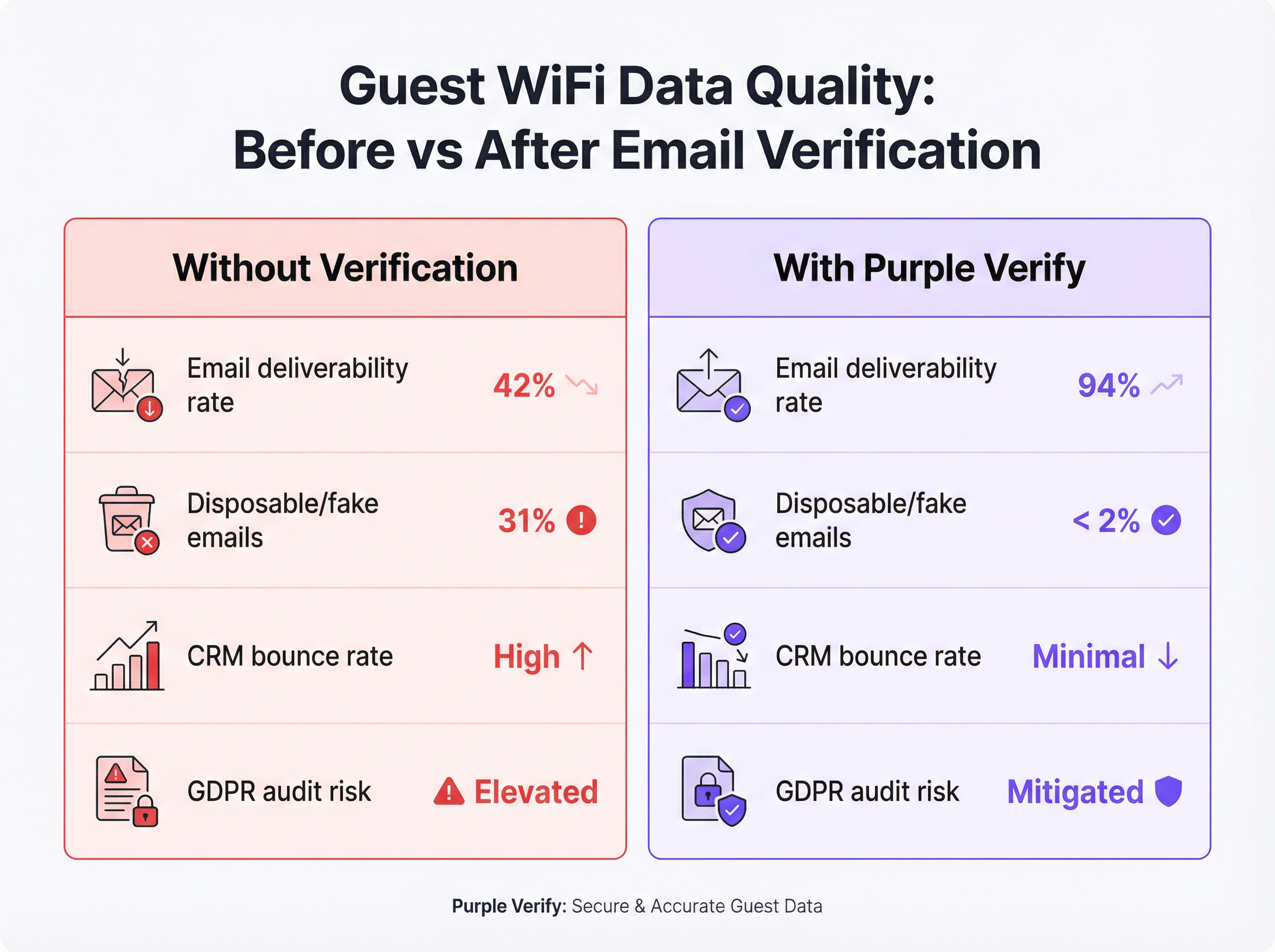
La función Verify de Purple aborda esto en la capa de infraestructura, aplicando un proceso de validación de cuatro etapas (comprobación de sintaxis, búsqueda de registros MX de DNS, listas de bloqueo de dominios de correo electrónico desechables y confirmación opcional de código de acceso de un solo uso [OTP]) en tiempo real, antes de conceder al invitado acceso a la red. Las implementaciones en los sectores de hostelería, comercio minorista y eventos demuestran sistemáticamente una reducción de las tasas de correo electrónico no válido a menos del 2 %, con tasas de capacidad de entrega de correo electrónico que aumentan de una base típica del 42 % a más del 90 % en los 60 días posteriores a la activación.
Para el CTO que evalúa la hoja de ruta de calidad de datos de este trimestre: la verificación de correo electrónico en el WiFi no es un lujo opcional. Es el control fundamental que determina si su inversión en WiFi para invitados produce inteligencia procesable o un pasivo costoso.
Análisis técnico en profundidad
Por qué el WiFi para invitados produce datos de correo electrónico deficientes
La causa principal es estructural, no accidental. Cuando un invitado se conecta a un Captive Portal, el intercambio es fundamentalmente asimétrico: el invitado desea acceso a Internet de inmediato y el operador desea una dirección de correo electrónico válida a cambio. El invitado tiene todos los incentivos para minimizar la fricción y el operador, sin controles de verificación, no tiene ningún mecanismo para hacer cumplir la calidad de los datos en el momento del envío.
Esto produce cuatro categorías distintas de datos deficientes. Los errores tipográficos son los más benignos: un invitado tiene la intención genuina de proporcionar su dirección real, pero la escribe mal por la presión del tiempo o en un teclado móvil pequeño. Las direcciones inventadas son deliberadas: cadenas como test@test.com o noemail@noemail.com que parecen plausibles pero no resuelven a nada. Los dominios caducados o no válidos surgen cuando un invitado envía una dirección del dominio de un antiguo empleador, un ISP desaparecido o un dominio personal que ya no mantiene. Las direcciones de correo electrónico desechables son la categoría más sofisticada: servicios como Mailinator, Guerrilla Mail y Temp Mail proporcionan bandejas de entrada totalmente funcionales que caducan después de minutos u horas, lo que permite a un invitado superar incluso una comprobación básica de capacidad de entrega al tiempo que garantiza que no sea posible ningún contacto de marketing a largo plazo.
El estándar IEEE 802.11 rige el comportamiento de la radio y la capa MAC de las redes WiFi, pero no impone requisitos sobre la verificación de identidad de los usuarios que se conectan. El comportamiento del Captive Portal se describe en el RFC 7710 y su sucesor RFC 8910, ninguno de los cuales exige la validación del correo electrónico. Por lo tanto, el problema de la calidad de los datos es un asunto exclusivo de la capa de aplicación, que se sitúa por encima de la pila de red, y debe abordarse a nivel del software del Captive Portal.
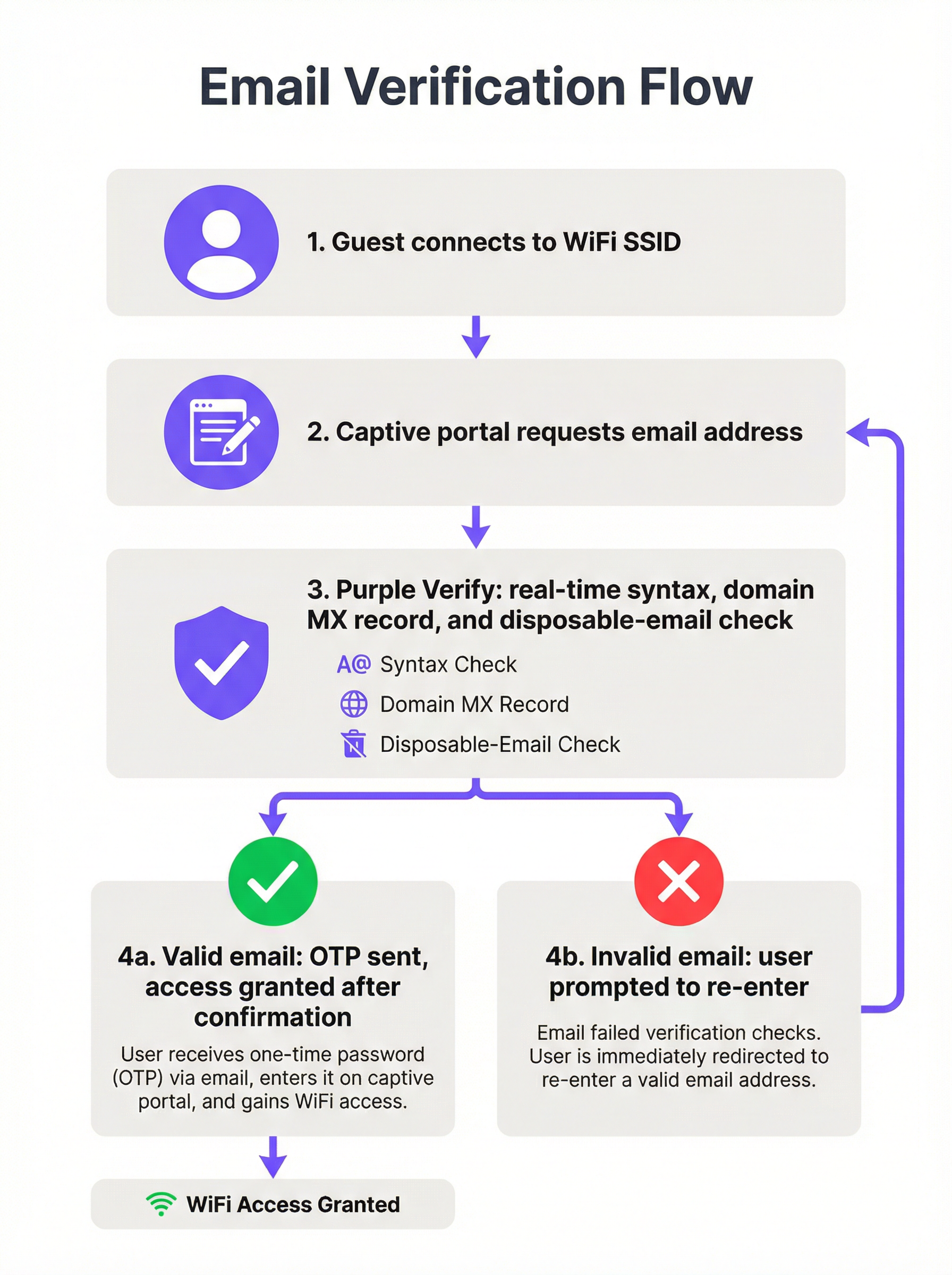
La arquitectura de verificación de cuatro capas
Una implementación de WiFi con verificación de correo electrónico de nivel de producción aplica cuatro capas de validación distintas, cada una de las cuales proporciona una garantía de calidad incremental.
Capa 1: Validación de sintaxis (RFC 5322): La cadena enviada se analiza según el estándar de formato de mensajes de Internet. Esto confirma la presencia de una parte local, un símbolo de arroba y un componente de dominio con al menos un punto. Rechaza cadenas con caracteres ilegales, múltiples símbolos de arroba y otras infracciones estructurales. La validación de sintaxis por sí sola detecta aproximadamente entre el 15 y el 20 % de los envíos incorrectos y añade una latencia insignificante (inferior a un milisegundo, en el lado del cliente).
Capa 2: Verificación de dominio y registro MX: Una búsqueda de DNS confirma que el dominio enviado existe y tiene un registro de intercambio de correo (MX) válido, lo que indica que está configurado para recibir correo electrónico. Esta comprobación se realiza en el lado del servidor y normalmente se completa en 100-300 milisegundos. Elimina direcciones en dominios caducados, dominios ficticios y dominios corporativos que han sido dados de baja, una categoría que la validación de sintaxis no puede detectar.
Capa 3: Listas de bloqueo de dominios de correo electrónico desechables: El componente de dominio se cruza con una lista de bloqueo actualizada continuamente de proveedores de servicios de correo electrónico temporales y desechables conocidos. Aquí es donde la capa de inteligencia se vuelve crítica. Una lista de bloqueo estática (una que no se actualiza en tiempo real) pasará por alto los servicios desechables recién lanzados y su eficacia se degradará con el tiempo. La función Verify de Purple mantiene una lista de bloqueo actualizada en vivo, lo que garantiza la cobertura del ecosistema actual de correo electrónico desechable en lugar de una instantánea histórica.
Capa 4: Confirmación de código de acceso de un solo uso (OTP): Se envía un código numérico de tiempo limitado a la dirección de correo electrónico enviada. El invitado debe recuperar este código de su bandeja de entrada real e introducirlo en el Captive Portal para completar la autenticación. Esta es la comprobación definitiva de prueba de propiedad: es imposible superarla con una dirección inventada, una dirección mal escrita o una bandeja de entrada desechable que haya caducado. La confirmación OTP se alinea con los principios de autenticación multifactor y proporciona la mayor garantía disponible de que la dirección de correo electrónico recopilada es válida y accesible para el invitado.
| Capa de validación | Qué detecta | Impacto en la latencia | Recomendado para |
|---|---|---|---|
| Sintaxis (RFC 5322) | Cadenas mal formadas | < 1 ms | Todas las implementaciones |
| Dominio / Registro MX | Dominios inexistentes | 100–300 ms | Todas las implementaciones |
| Lista de bloqueo de correos desechables | Bandejas de entrada temporales | 50–100 ms | Implementaciones centradas en marketing |
| Confirmación OTP | Todas las direcciones no válidas | 30–120 segundos (depende del usuario) | Hostelería, eventos, programas de fidelización |
Contexto de cumplimiento y estándares
La verificación del correo electrónico en el punto de inicio de sesión WiFi es directamente relevante para varios marcos normativos y de estándares a los que probablemente estén sujetos los operadores de recintos.
El Artículo 5(1)(d) del GDPR exige que los datos personales sean exactos y, en caso necesario, se mantengan actualizados. Recopilar una dirección de correo electrónico verificada en el punto de captura es sustancialmente más defendible en una auditoría de la autoridad de control que recopilar una dirección no verificada e intentar una limpieza retrospectiva. El proceso de verificación en sí debe documentarse en sus Registros de actividades de tratamiento del Artículo 30.
El Artículo 7 del GDPR exige que el consentimiento para las comunicaciones de marketing se otorgue de forma libre, específica, informada e inequívoca. Un paso de confirmación OTP proporciona un registro contemporáneo de que el interesado tenía acceso a la dirección de correo electrónico enviada en el momento del consentimiento, lo que refuerza la pista de auditoría.
PCI DSS v4.0 no rige directamente la verificación del correo electrónico, pero el Requisito 8 (Identificar a los usuarios y autenticar el acceso) y los requisitos más amplios de segmentación de red son relevantes si su WiFi para invitados se encuentra en un segmento de red adyacente a los entornos de datos de los titulares de tarjetas. La garantía de identidad proporcionada por la verificación OTP contribuye a una postura de control de acceso defendible.
El Control 5.14 (Transferencia de información) y el Control 8.5 (Autenticación segura) del Anexo A de la norma ISO/IEC 27001:2022 son relevantes para las organizaciones que operan WiFi para invitados bajo un SGSI. La verificación del correo electrónico proporciona una comprobación de identidad documentada y auditable en el punto de acceso a la red.
Guía de implementación
Evaluación previa a la implementación
Antes de activar la verificación de correo electrónico, establezca una línea base cuantificada. Exporte una muestra representativa de al menos 5000 direcciones de correo electrónico de su base de datos de WiFi para invitados existente y páselas por un servicio de validación masiva de correo electrónico. Registre su tasa actual de correos no válidos, la tasa de correos electrónicos desechables y la tasa de rebote duro de su plataforma de marketing por correo electrónico. Estas cifras forman la línea base con la que medirá la mejora y construirá el caso de negocio interno para la implementación.
Selección de la profundidad de verificación
La configuración de verificación adecuada depende de tres factores: la naturaleza de su relación con el invitado (transaccional frente a largo plazo), la tolerancia a la fricción de la demografía de sus invitados y el caso de uso posterior para los datos recopilados.
Para entornos transitorios de gran afluencia (centros de transporte, centros comerciales, restaurantes de servicio rápido), la validación de sintaxis y dominio con bloqueo de correo electrónico desechable es el mínimo recomendado. El paso OTP introduce una fricción que puede ser desproporcionada con respecto al valor de los datos en un contexto en el que la relación con el invitado es breve y el caso de uso principal es el análisis agregado en lugar del marketing individual.
Para hostelería y eventos (hoteles, centros de conferencias, estadios), se recomienda encarecidamente la confirmación OTP completa. La relación con el invitado es más larga, el valor de marketing de un correo electrónico verificado es mayor y los invitados en estos entornos suelen tener su correo electrónico accesible en el dispositivo que utilizan para iniciar sesión. Los 30-60 segundos adicionales de fricción están dentro de unos límites aceptables.
Para el comercio minorista integrado con programas de fidelización (donde el inicio de sesión WiFi alimenta directamente un programa de fidelización o un motor de personalización), la confirmación OTP es esencial. La integridad de la base de datos de fidelización depende de la singularidad y exactitud de los identificadores de correo electrónico subyacentes.
Pasos de configuración en Purple
- Vaya a Venue Settings > Captive Portal > Authentication en el panel de control de Purple.
- Seleccione Email como método de autenticación y active el interruptor Verify.
- Elija su profundidad de verificación: Standard (sintaxis + dominio + lista de bloqueo de desechables) o Full (Standard + confirmación OTP).
- Configure la plantilla de correo electrónico OTP: asegúrese de que lleve la marca de su recinto y una línea de asunto clara (por ejemplo, "Su código de acceso WiFi de [Nombre del recinto]").
- Establezca la ventana de caducidad del OTP. Se recomienda una ventana de 10 minutos; las ventanas más cortas aumentan el abandono, las más largas reducen la seguridad.
- Configure los mensajes de reintento y error en la interfaz de usuario del Captive Portal. Especifique mensajes de error distintos para fallos de sintaxis, fallos de dominio y rechazos de correo electrónico desechable.
- Habilite el paso de metadatos de verificación a su CRM o plataforma de marketing conectada a través de la API de Purple o la integración de webhooks.
- Lleve a cabo un despliegue por fases: actívelo primero en un recinto o SSID, supervise la tasa de aprobación de verificación y la tasa de finalización de OTP durante 7 días y, a continuación, impleméntelo en toda la propiedad.
Integración con sistemas posteriores
El valor de la verificación del correo electrónico solo se materializa plenamente cuando el estado verificado se propaga a los sistemas posteriores. Configure su integración de Purple para pasar el indicador booleano email_verified (y, cuando se utilizó OTP, el indicador otp_confirmed) a su CRM y plataforma de marketing por correo electrónico. Utilice este indicador para segmentar su base de datos de invitados: trate las direcciones confirmadas por OTP como su nivel de mayor calidad para campañas personalizadas y utilice las direcciones solo validadas por dominio para comunicaciones de menor prioridad.
Mejores prácticas
Trate la verificación del correo electrónico como un control de gobernanza de datos, no como un control de seguridad. El beneficio principal es la calidad de los datos y el cumplimiento del GDPR, no la seguridad de la red. Plantee la implementación en consecuencia al construir el caso de negocio interno.
Utilice una lista de bloqueo de correo electrónico desechable actualizada en vivo. Una lista de bloqueo estática se degrada rápidamente. Cada semana se lanzan nuevos servicios de correo electrónico desechable. Asegúrese de que su proveedor de verificación (ya sea Purple o un servicio de terceros) mantenga una lista de bloqueo actualizada continuamente.
Diseñe la experiencia de usuario (UX) de errores pensando en el usuario genuino. La mayoría de los invitados que no superan la verificación han cometido un error tipográfico genuino, no un intento deliberado de eludir el sistema. Los mensajes de error deben ser específicos, útiles y no acusatorios. "No hemos podido encontrar ese dominio de correo electrónico; compruébelo y vuelva a intentarlo" es más eficaz que un mensaje genérico de "Dirección de correo electrónico no válida".
Supervise su tasa de finalización de OTP como indicador principal. Una tasa de finalización de OTP en declive puede indicar problemas de latencia de entrega, problemas de tiempo de espera de la sesión o un cambio demográfico en su población de invitados. Configure alertas automatizadas si la tasa de finalización cae por debajo de un umbral (normalmente, el 70 % es una línea base razonable para entornos de hostelería).
Documente su proceso de verificación para el cumplimiento del Artículo 30 del GDPR. Sus Registros de actividades de tratamiento deben describir los pasos de verificación aplicados en el punto de recopilación de datos, la base legal para el tratamiento y el período de retención de los registros de verificación.
Aplique la profundidad de verificación de forma proporcional en toda su propiedad. Una implementación en varios sitios puede justificar diferentes configuraciones de verificación en diferentes tipos de recintos. Utilice la capacidad de configuración por recinto de Purple para aplicar la profundidad adecuada en cada ubicación en lugar de recurrir por defecto al mínimo común denominador en toda la propiedad.
Solución de problemas y mitigación de riesgos
Modos de fallo comunes
Modo de fallo 1: Alta tasa de abandono de OTP. Si su tasa de finalización de OTP es inferior al 60 %, las causas más comunes son: latencia de entrega de correo electrónico superior a 60 segundos; tiempo de espera de la sesión del Captive Portal demasiado corto (inferior a 5 minutos); o invitados que utilizan clientes de correo web que requieren cambiar de aplicación en el móvil, lo que provoca que la sesión del Captive Portal se reinicie. Solución: compruebe su SLA de entrega de correo electrónico con su proveedor SMTP, amplíe el tiempo de espera de la sesión a al menos 8 minutos y considere la posibilidad de implementar una alternativa de "enlace mágico" al código numérico para los invitados que prefieran una confirmación con un solo toque.
Modo de fallo 2: Rechazo de direcciones de correo electrónico corporativas legítimas. Algunos dominios de correo electrónico corporativos tienen configuraciones de registros MX inusuales (por ejemplo, organizaciones que enrutan el correo electrónico a través de una puerta de enlace de seguridad de terceros con registros DNS no estándar). Si observa rechazos de direcciones que parecen legítimas, revise su lógica de validación de dominios y considere la posibilidad de implementar una lista blanca para los dominios empresariales conocidos que estén generando falsos positivos.
Modo de fallo 3: La lista de bloqueo de correo electrónico desechable no cubre los nuevos servicios. Supervise su base de datos posterior a la verificación en busca de signos de penetración de correo electrónico desechable (por ejemplo, un aumento repentino de direcciones de un dominio desconocido). Si identifica un nuevo servicio desechable que no se está bloqueando, infórmelo a su proveedor de verificación para que lo incluya en la lista de bloqueo.
Modo de fallo 4: Los metadatos de verificación no llegan al CRM. Si su plataforma de marketing por correo electrónico no recibe el indicador email_verified, compruebe la configuración de su webhook de Purple y confirme que el endpoint receptor está analizando la carga útil correctamente. Utilice la herramienta de prueba de webhooks de Purple para validar la integración antes de confiar en ella en producción.
Registro de riesgos
| Riesgo | Probabilidad | Impacto | Mitigación |
|---|---|---|---|
| Fallo en la entrega de OTP (interrupción de SMTP) | Baja | Alto | Configurar un relé SMTP secundario; implementar una alternativa elegante a la validación de solo dominio |
| Servicio de correo electrónico desechable no incluido en la lista de bloqueo | Media | Medio | Utilizar una lista de bloqueo actualizada en vivo; supervisar la calidad de la base de datos posterior a la verificación |
| Desafío del GDPR sobre la retención de datos de verificación | Baja | Alto | Documentar la política de retención; eliminar los registros de OTP después de 30 días |
| Abandono de invitados debido a la fricción de OTP | Media | Medio | Optimizar la latencia de entrega de correo electrónico; ampliar el tiempo de espera de la sesión; ofrecer métodos de autenticación alternativos |
| Rechazo por falso positivo de direcciones legítimas | Baja | Medio | Implementar una lista blanca de dominios; proporcionar una ruta de anulación manual para el personal del recinto |
ROI e impacto empresarial
Medición del éxito
Los KPI principales para una implementación de WiFi con verificación de correo electrónico se dividen en tres categorías: métricas de calidad de datos, métricas de rendimiento de marketing y métricas de cumplimiento.
Las métricas de calidad de datos incluyen la tasa de rechazo de correos electrónicos no válidos (el porcentaje de direcciones enviadas rechazadas en cada capa de verificación), la tasa de finalización de OTP y la tasa de rebote duro posterior a la implementación de su plataforma de marketing por correo electrónico. Una implementación bien configurada debería lograr una tasa de correo electrónico no válido inferior al 2 % y una tasa de rebote duro inferior al 0,5 % en los contactos procedentes del WiFi.
Las métricas de rendimiento de marketing incluyen la tasa de capacidad de entrega de correo electrónico, la tasa de apertura de campañas y la tasa de clics para los segmentos procedentes del WiFi frente a otros canales de adquisición. Los contactos de WiFi verificados superan sistemáticamente a los contactos no verificados en estas métricas porque los datos subyacentes son exactos y el invitado ha demostrado una intención activa al completar el paso OTP.
Las métricas de cumplimiento incluyen el número de solicitudes de acceso de los interesados según el GDPR que se pueden cumplir con exactitud (una base de datos limpia reduce el riesgo de enviar datos personales a la persona equivocada) y la preparación para auditorías de sus registros del Artículo 30.
Marco de coste-beneficio
Los costes directos de implementar la verificación de correo electrónico son mínimos: la función Verify de Purple está incluida en la suscripción a la plataforma y los gastos operativos incrementales se limitan a la configuración inicial y la supervisión continua. Los costes indirectos son el aumento marginal de la fricción en el inicio de sesión y la pequeña reducción en el volumen de datos sin procesar (ya que algunos invitados que antes habrían enviado direcciones falsas ahora abandonarán el flujo de inicio de sesión en lugar de proporcionar una dirección real).
Los beneficios son cuantificables. Para un grupo hotelero con 50 propiedades, cada una con un promedio de 150 inicios de sesión en el WiFi para invitados al día, el volumen de datos anual es de aproximadamente 2,7 millones de registros. Con una tasa de no válidos sin verificar del 30 %, eso supone 810 000 registros sin valor al año, cada uno de los cuales consume almacenamiento en el CRM, presupuesto de envío de correo electrónico y crea potencialmente una exposición al GDPR. Con un coste típico de plataforma de marketing por correo electrónico de 0,002 £ por envío, el gasto directo desperdiciado solo en direcciones no válidas supera las 1600 £ al año por campaña. Para un operador que ejecuta 12 campañas al año, eso supone más de 19 000 £ en desperdicio directo, antes de contabilizar el coste de reputación de las elevadas tasas de rebote que afectan a la capacidad de entrega a los suscriptores genuinos.
El cálculo del ROI es sencillo: el coste de la verificación es efectivamente cero (es un interruptor de configuración en una suscripción de plataforma existente) y los beneficios (en reducción de desperdicios, mejora del rendimiento de las campañas y mitigación del riesgo de cumplimiento) son materiales y medibles en un plazo de 60 a 90 días tras la implementación.
Esta guía está publicada por Purple, la plataforma de inteligencia WiFi empresarial. Para obtener asistencia con la implementación o una consulta técnica, póngase en contacto con su equipo de cuentas de Purple o visite purple.ai.
Key Terms & Definitions
Captive Portal
A web page presented to a guest attempting to connect to a WiFi network, requiring authentication or acceptance of terms before network access is granted. Captive portal behaviour is described in RFC 8910. The portal is the primary data collection interface in a guest WiFi deployment and the point at which email verification is applied.
IT teams encounter captive portals as the front-end interface of their guest WiFi deployment. The design and configuration of the captive portal — including its verification logic and error messaging — directly determines the quality of data collected.
MX Record (Mail Exchange Record)
A DNS resource record that specifies the mail server responsible for accepting email messages on behalf of a domain. During email verification, a DNS lookup for the MX record of the submitted domain confirms that the domain is configured to receive email. The absence of an MX record indicates that the domain cannot receive email, making any address at that domain invalid for communication purposes.
IT teams encounter MX record checks as part of the domain validation layer of email verification. Understanding MX records is also relevant for diagnosing false positive rejections of legitimate corporate email addresses with non-standard DNS configurations.
Disposable Email Address (DEA)
A temporary email address provided by a disposable email service (such as Mailinator, Guerrilla Mail, or Temp Mail) that is functional for a short period — typically minutes to hours — before expiring. DEAs are specifically designed to allow users to register for services without providing a permanent, contactable email address. They represent the most sophisticated category of invalid email data in guest WiFi deployments.
IT and marketing teams encounter DEAs as a primary source of data quality degradation in guest WiFi databases. A guest using a DEA will pass syntax and domain validation but will be unreachable for any subsequent marketing or transactional communication.
One-Time Passcode (OTP)
A time-limited numeric or alphanumeric code sent to a user's email address (or mobile number) as part of an authentication or verification flow. In the context of email verification WiFi, the OTP is dispatched to the submitted email address and must be entered into the captive portal to complete sign-in. Successful OTP entry constitutes proof of ownership of the submitted address.
IT teams configure OTP delivery as part of the captive portal authentication flow. Key configuration parameters include the OTP expiry window (typically 5–10 minutes), the SMTP relay used for delivery, and the session timeout on the captive portal (which must be long enough to allow the guest to retrieve and enter the code).
Email Deliverability Rate
The percentage of sent emails that successfully reach the recipient's inbox, as opposed to being bounced (returned as undeliverable) or filtered to spam. Deliverability rate is a function of both the quality of the underlying email list and the sender's reputation with Internet Service Providers (ISPs). A high proportion of invalid addresses in a list will generate hard bounces, which damage sender reputation and reduce deliverability even to valid addresses.
Marketing managers use deliverability rate as the primary indicator of email list health. IT teams are involved when deliverability issues are traced to infrastructure problems — such as a sender domain being flagged as high-risk by ISPs due to excessive bounce rates from WiFi-sourced contacts.
Hard Bounce
A permanent email delivery failure caused by an invalid, non-existent, or blocked recipient address. Hard bounces are distinguished from soft bounces (temporary delivery failures due to a full inbox or server unavailability). Email marketing platforms track hard bounce rates and will typically suppress addresses that generate hard bounces. A hard bounce rate above 2% is generally considered a threshold for sender reputation risk.
IT and marketing teams encounter hard bounces as the primary measurable symptom of poor email data quality. A high hard bounce rate from WiFi-sourced contacts is often the trigger for an email verification deployment project.
RFC 5322 (Internet Message Format)
The Internet Engineering Task Force (IETF) standard that defines the syntax of email messages, including the format of email addresses. RFC 5322 specifies that an email address consists of a local part (before the at-symbol) and a domain (after the at-symbol), with specific rules governing permissible characters and structure. Syntax validation in email verification checks submitted addresses against RFC 5322 requirements.
IT teams reference RFC 5322 when configuring or evaluating email validation logic. Understanding the standard helps distinguish between syntactically valid addresses (which conform to RFC 5322) and deliverable addresses (which additionally require a valid domain and MX record).
Sender Reputation
A score assigned by Internet Service Providers (ISPs) and email filtering services to a sending domain and IP address, based on factors including bounce rates, spam complaint rates, and sending volume patterns. A degraded sender reputation causes emails to be filtered to spam or rejected outright, even for valid recipient addresses. Sender reputation is directly affected by the quality of the underlying email list: high bounce rates from invalid addresses are one of the fastest ways to damage reputation.
IT teams are typically involved in sender reputation issues when the email marketing platform flags deliverability problems that trace back to infrastructure — such as a sending domain being blacklisted. Marketing managers experience sender reputation degradation as unexplained drops in campaign open rates. Email verification WiFi directly protects sender reputation by preventing invalid addresses from entering the list.
GDPR Article 5(1)(d) — Accuracy Principle
The provision of the General Data Protection Regulation that requires personal data to be 'accurate and, where necessary, kept up to date', with 'every reasonable step' taken to ensure that inaccurate personal data is erased or rectified without delay. In the context of guest WiFi data collection, this principle requires operators to take reasonable steps to ensure that email addresses collected at the point of sign-in are accurate — a requirement that email verification directly addresses.
Data protection officers and IT compliance teams reference Article 5(1)(d) when assessing the legal basis for email verification deployments. The principle provides the regulatory anchor for the business case: collecting unverified email addresses and storing them in a CRM is a potential compliance risk under GDPR, and verification is the most direct mitigation.
Case Studies
A 12-property UK hotel group has been operating guest WiFi for 18 months without email verification. Their CRM contains approximately 144,000 guest records sourced from WiFi sign-ins, but their email marketing platform is flagging their sender domain as high-risk due to a 31% hard bounce rate. The marketing director wants to launch a loyalty programme using WiFi-sourced contacts. What is the recommended approach?
The immediate priority is to stop the flow of new invalid data before addressing the existing database. Step 1: Activate Purple Verify with full OTP confirmation on all 12 properties. Configure a branded OTP email template and set the session timeout to 8 minutes. This halts the accumulation of new invalid records. Step 2: Run the existing 144,000-record database through a bulk email validation service to identify the invalid, disposable, and undeliverable addresses. Suppress these from all future sends immediately — do not attempt to re-engage them, as doing so will further damage sender reputation. Step 3: Implement a re-permission campaign to the remaining valid contacts, inviting them to opt in to the new loyalty programme. This simultaneously cleans the list and establishes a fresh, documented consent record for GDPR purposes. Step 4: Configure the Purple API integration to pass the otp_confirmed flag to the CRM, and create a segmentation rule that tags all new WiFi contacts with their verification tier. Step 5: Monitor the sender reputation score weekly using a tool such as Google Postmaster Tools or Microsoft SNDS. Expect the bounce rate to normalise to under 0.5% within 60 days as the invalid addresses are suppressed and new verified contacts replace them.
A retail chain operating 47 stores wants to use guest WiFi sign-in data to personalise in-store digital signage and feed a loyalty programme. Their current WiFi deployment captures approximately 3,200 sign-ins per day across the estate, but the data team reports that their customer segmentation models are unreliable due to a high proportion of duplicate and ghost accounts. The IT manager is concerned that adding OTP verification will reduce sign-in completion rates in a high-footfall, fast-turnover retail environment. What verification configuration is recommended, and how should the trade-off between data quality and conversion rate be managed?
For a high-footfall retail environment, the recommended configuration is syntax validation plus domain/MX record checking plus disposable email blocking, without the OTP step. This configuration eliminates the majority of low-quality data — fabricated addresses, non-existent domains, and disposable inboxes — while adding only 200–400 milliseconds of latency to the sign-in flow, which is imperceptible to the guest. The OTP step is omitted because the guest relationship in a retail context is typically brief and the device-switching friction (from captive portal to email app and back) is disproportionate to the value gained in a fast-turnover environment. To address the duplicate account problem specifically, configure the Purple platform to enforce email uniqueness at the point of sign-in: if a guest submits an address that already exists in the database, merge the session data with the existing record rather than creating a new one. This directly addresses the ghost account proliferation without requiring OTP. For the loyalty programme integration, apply a tiered trust model: contacts acquired through the WiFi flow with domain validation are treated as 'standard' tier; contacts who have additionally authenticated via a social login (which provides implicit email verification through the OAuth flow) are treated as 'verified' tier and are eligible for higher-value personalisation. Monitor the duplicate account rate monthly as the primary KPI for this deployment.
Scenario Analysis
Q1. A conference centre hosts 200 events per year, ranging from 50-person board meetings to 5,000-delegate industry conferences. Their guest WiFi currently captures approximately 180,000 email addresses per year with no verification. The events team wants to use this data for post-event marketing and delegate re-engagement. The IT manager is concerned about the compliance implications of the existing unverified database. What verification configuration would you recommend for new data collection, and how would you address the existing database?
💡 Hint:Consider the variability in event type and delegate profile. A 5,000-person conference has different data quality requirements and guest behaviour patterns than a 50-person board meeting. Also consider that conference delegates typically have their corporate email accessible on their device.
Show Recommended Approach
For new data collection, deploy full OTP confirmation for all events. Conference delegates are a high-value audience for post-event marketing, and the OTP step is well-suited to this context: delegates have their corporate email accessible on the device they are using to sign in, and the sign-in friction is proportionate to the value of the relationship. Configure the OTP email with event-specific branding (using Purple's dynamic template variables to insert the event name and date) to increase trust and completion rates. For large events (500+ delegates), pre-stage the SMTP relay capacity to handle peak OTP send volumes at event start. For the existing unverified database of 180,000 addresses, run a bulk validation audit immediately and suppress all addresses that fail domain and MX checks. For the remaining addresses, run a re-permission campaign framed around the new loyalty or delegate programme — this simultaneously cleans the list and establishes fresh GDPR consent records. Document the audit and re-permission process in the Article 30 Records of Processing Activities, noting the date of the remediation exercise and the methodology used.
Q2. A local authority is deploying free public WiFi across 23 libraries and community centres. The project is funded partly on the basis of providing anonymised footfall analytics to the council's planning department. The data protection officer has raised concerns about collecting email addresses from members of the public on council-operated infrastructure. The IT team is evaluating whether to require email sign-in at all, and if so, what verification to apply. What is your recommendation?
💡 Hint:Consider the data minimisation principle under GDPR Article 5(1)(c) — only collect data that is necessary for the specified purpose. If the primary purpose is anonymised footfall analytics, is email collection required at all? If email collection is retained, what is the legal basis and what verification depth is proportionate?
Show Recommended Approach
The data minimisation principle is the governing consideration here. If the primary purpose is anonymised footfall analytics, email collection is not required — device presence detection (using MAC address randomisation-aware counting methods) can provide footfall data without any personal data collection. Recommend separating the analytics use case from the marketing use case: deploy a no-registration WiFi option for general public access (satisfying the footfall analytics requirement with anonymised data), and offer an optional email registration path for users who wish to receive council communications or loyalty benefits. For the optional registration path, apply syntax validation and domain/MX checking as the minimum — OTP confirmation is recommended given the public-sector context and the DPO's concerns, as it provides the strongest available evidence of informed consent and accurate data collection. Document the legal basis for email processing (likely legitimate interests or consent, depending on the use case) in the Article 30 records, and ensure the captive portal privacy notice clearly distinguishes between the anonymised analytics processing and the optional email registration processing.
Q3. An IT manager at a 300-outlet fast-food chain has activated Purple Verify with syntax, domain, and disposable email blocking (no OTP) across all outlets. Three months after deployment, the marketing team reports that their email deliverability rate has improved from 48% to 71% — a significant improvement, but still below the 90%+ target. The IT manager suspects that a new category of invalid addresses is getting through the current verification stack. What diagnostic steps would you recommend, and what additional configuration changes might close the gap?
💡 Hint:A deliverability rate of 71% after deploying three-layer verification (without OTP) suggests that a significant proportion of addresses are passing all three checks but are still undeliverable. Consider what categories of address could pass syntax, domain, and disposable email checks but still be undeliverable.
Show Recommended Approach
The most likely explanation is a combination of two factors: role-based email addresses (such as info@, noreply@, admin@, or postmaster@) that are syntactically valid, have valid MX records, and are not disposable services, but are not monitored by an individual and generate soft bounces or spam complaints; and addresses at legitimate domains where the specific mailbox does not exist (the domain is valid, the MX record is valid, but the local part — the username — is fabricated). To diagnose: export a sample of 1,000 addresses that passed verification but generated bounces, and categorise them by bounce type and address pattern. If role-based addresses are a significant category, add a role-based address filter to the verification configuration. For the mailbox-existence problem, the only reliable solution is OTP confirmation — which verifies that the specific mailbox exists and is accessible to the submitting guest. Given the fast-food context, the IT manager should evaluate whether a limited OTP deployment — for example, on the loyalty programme sign-in flow only, not the general WiFi access flow — would close the remaining gap without imposing OTP friction on the full guest population. This tiered approach is a practical compromise between data quality and conversion rate in a high-footfall environment.
Key Takeaways
- ✓Between 25% and 35% of email addresses captured through unverified guest WiFi captive portals are invalid, disposable, or fabricated — making email verification WiFi a foundational data governance control, not an optional enhancement.
- ✓A production-grade verification architecture implements four layers in sequence: RFC 5322 syntax validation, DNS MX record lookup, live-updated disposable email blocklisting, and OTP confirmation. Each layer provides incremental quality assurance; the appropriate depth depends on the use case and guest context.
- ✓Purple's Verify feature implements all four layers natively within the captive portal flow, with a continuously updated disposable email blocklist and configurable OTP step — reducing invalid email rates to under 2% within 60 days of activation in documented deployments.
- ✓GDPR Article 5(1)(d)'s accuracy principle provides the regulatory anchor for email verification deployments: collecting unverified personal data and storing it in a CRM is a documentable compliance risk, and verification at the point of capture is the most direct mitigation.
- ✓The ROI is measurable and rapid: a 12-property hotel group deploying Verify saw email deliverability rise from 42% to 94% within 60 days, with the invalid email rate dropping from 31% to under 2% — directly improving campaign performance and reducing wasted send budget.
- ✓Verification depth should be calibrated to context: full OTP confirmation for hospitality, events, and loyalty programmes; syntax, domain, and disposable email blocking for high-footfall retail and transient environments; and a data minimisation review for public-sector deployments where email collection may not be required at all.
- ✓Post-deployment monitoring is essential: track the OTP completion rate, invalid email rejection rate, and sender reputation score at 30, 60, and 90 days. A declining OTP completion rate is the leading indicator of delivery latency or session timeout issues that require remediation.




