

Captive Portals para WiFi de invitados: La guía definitiva para crear una experiencia de usuario fluida y segura
This guide provides IT leaders and venue operators with a comprehensive technical reference for designing, implementing, and securing guest WiFi captive portals at enterprise scale. It covers the full authentication architecture from RADIUS to CRM integration, GDPR compliance requirements, advanced customisation options including A/B testing and personalised content delivery for Purple AI users, and a proven ROI framework with real-world case studies from hospitality and retail environments.
🎧 Listen to this Guide
View Transcript

Resumen ejecutivo
Para los directores de TI, arquitectos de redes y operadores de recintos, la red WiFi de invitados ha pasado de ser una simple comodidad a un activo empresarial fundamental. Un Captive Portal para WiFi de invitados bien ejecutado es la puerta de entrada a este activo: el primer punto de interacción con clientes y visitantes, y un potente motor para la recopilación de datos, la fidelización de la marca y la generación de ingresos. Esta guía proporciona una referencia técnica exhaustiva para diseñar, implementar y proteger los Captive Portals con el fin de crear una experiencia de usuario fluida al tiempo que se genera un importante valor empresarial.
Exploramos los componentes principales de la arquitectura del Captive Portal, desde la asociación inicial del usuario hasta la autenticación en el backend y la integración con el CRM. Los temas clave incluyen el cumplimiento de normativas de privacidad de datos como el GDPR y el GDPR del Reino Unido, la implementación de medidas de seguridad sólidas alineadas con WPA3 e IEEE 802.1X, opciones de personalización avanzadas que incluyen pruebas A/B y entrega de contenido personalizado, y estrategias para maximizar el retorno de la inversión. Para los profesionales sénior de TI, esta guía ofrece recomendaciones prácticas y neutrales en cuanto a proveedores para fundamentar las decisiones de compra y las estrategias de implementación de este trimestre. Al centrarse en un recorrido del usuario sin fricciones, una postura de seguridad sólida y una personalización basada en datos, las organizaciones pueden transformar su WiFi de invitados de un centro de costes a una potente herramienta para la interacción con el cliente y la inteligencia empresarial.
Análisis técnico en profundidad
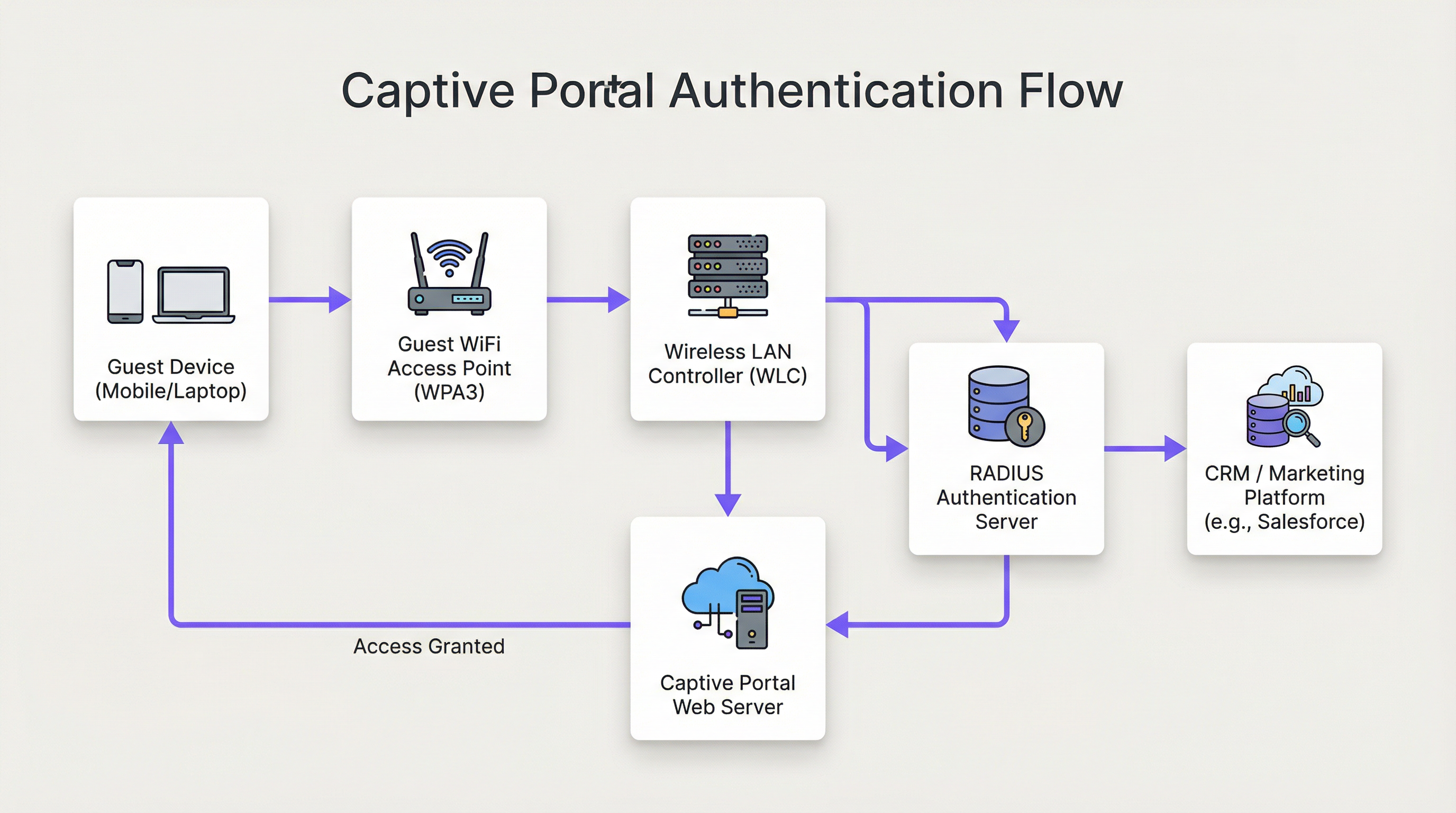
La arquitectura de una solución moderna de Captive Portal para WiFi de invitados implica una sofisticada interacción entre el hardware de red, el software y los servicios en la nube. En esencia, el Captive Portal intercepta el tráfico web de un usuario y lo redirige a una página web específica para su autenticación antes de concederle un acceso más amplio a la red. Comprender este flujo en detalle es esencial para cualquier arquitecto de redes responsable de implementar o mantener un sistema de este tipo.
Fase 1 — Asociación inalámbrica: El dispositivo del usuario descubre y se conecta al SSID del WiFi de invitados. En esta fase, el dispositivo se encuentra en un estado de jardín vallado (walled-garden) previo a la autenticación. El WLC o AP asigna al dispositivo una dirección IP a través de DHCP, pero restringe todo el tráfico saliente excepto a una lista definida de dominios en la lista blanca y al propio host del Captive Portal.
Fase 2 — Redirección HTTP/S: Cuando el usuario abre un navegador o cualquier aplicación que realiza una solicitud HTTP/S, el WLC la intercepta. Mediante el secuestro de DNS (donde todas las consultas DNS se responden con la IP del portal) o la redirección HTTP 302, el usuario es reenviado al servidor web del Captive Portal. Para las implementaciones modernas, se prefiere la redirección HTTP por su fiabilidad en clientes iOS, Android y Windows.
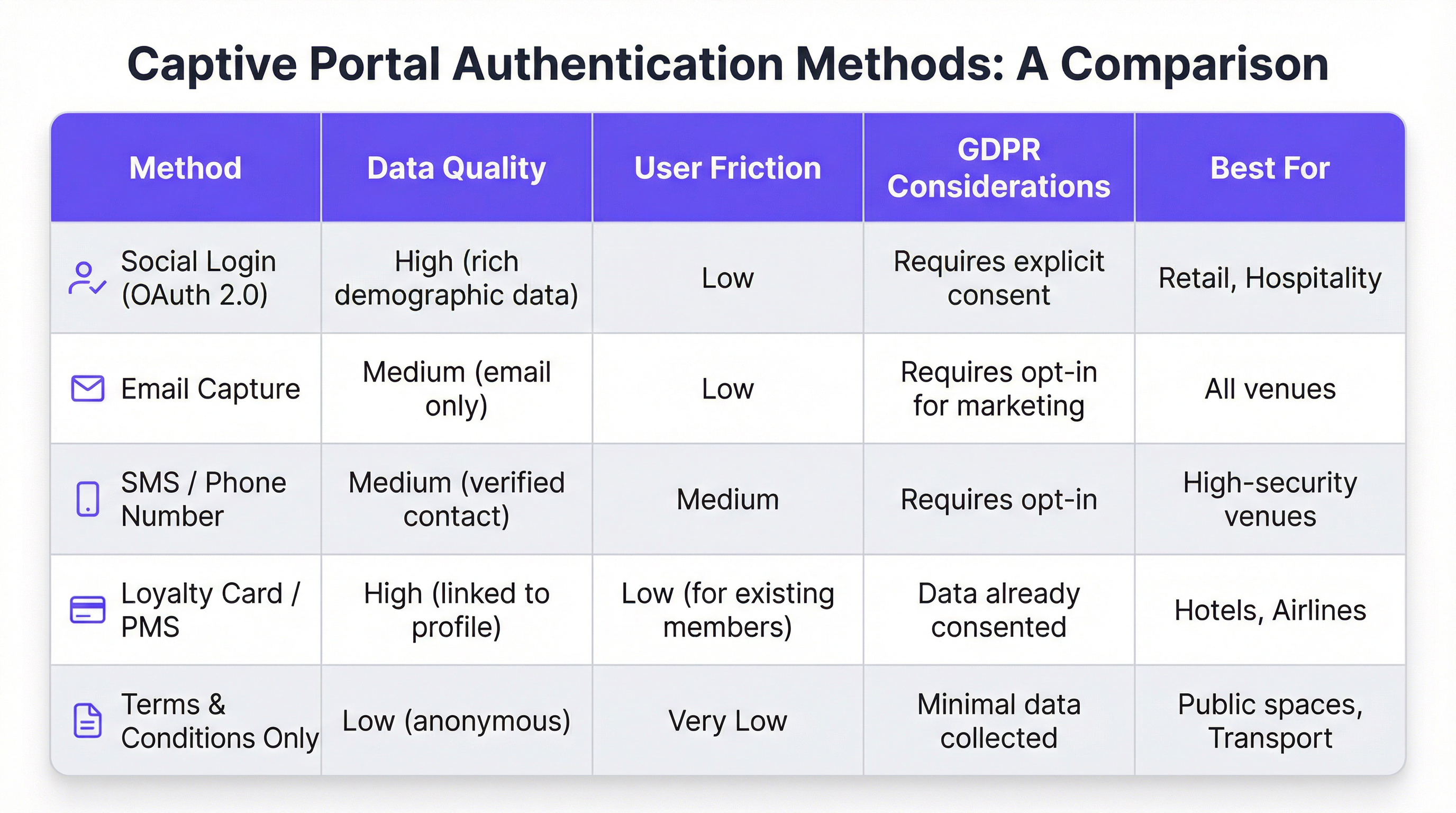
Fase 3 — Interacción con el portal y autenticación: Al usuario se le presenta la página del Captive Portal. Los métodos de autenticación incluyen el inicio de sesión social a través de OAuth 2.0 (Facebook, Google, LinkedIn), la captura de correo electrónico o SMS, la aceptación de términos y condiciones, o la integración con un programa de fidelización o un sistema de gestión de propiedades (PMS) a través de una API REST. La elección del método rige directamente la calidad de los datos capturados y la fricción introducida en el recorrido del usuario.
Fase 4 — Autenticación RADIUS: Tras el envío del formulario, el servicio del portal se comunica con un servidor RADIUS (RFC 2865). El servidor RADIUS valida las credenciales frente a un almacén de datos backend: una base de datos local, un directorio LDAP, un CRM o una plataforma de automatización de marketing. Los atributos RADIUS, como Session-Timeout e Idle-Timeout, se utilizan para aplicar las políticas de sesión.
Fase 5 — Acceso concedido: Tras una autenticación exitosa, el servidor RADIUS indica al WLC que cambie el estado de autorización del usuario, concediéndole acceso completo a Internet. Las políticas de ancho de banda, las reglas de filtrado de contenido y los límites de duración de la sesión se aplican en este punto a través del motor de políticas del WLC.
Desde el punto de vista de la seguridad, WPA3-Enterprise con IEEE 802.1X proporciona el nivel más alto de protección, cifrando el tráfico entre el cliente y el AP mediante seguridad de 192 bits en modo WPA3-Enterprise. Para el propio portal, todas las comunicaciones deben utilizar HTTPS con TLS 1.2 o superior. El cumplimiento de PCI DSS v4.0 es obligatorio siempre que se produzca cualquier procesamiento de pagos dentro del flujo del portal.
Para los usuarios de Purple AI, las capacidades de personalización avanzadas amplían significativamente esta arquitectura. La plataforma Purple admite pruebas A/B de diseños de portales a nivel de recinto, lo que permite a los operadores probar diferentes diseños, llamadas a la acción y flujos de autenticación para optimizar las tasas de conversión. La entrega de contenido personalizado después del inicio de sesión (como ofertas dirigidas basadas en el perfil del CRM de un invitado o su nivel de fidelización) se logra mediante llamadas a la API en tiempo real a Salesforce, HubSpot o cualquier plataforma de automatización de marketing con una API REST. El motor de análisis de Purple también proporciona superposiciones de mapas de calor y análisis del tiempo de permanencia, lo que permite a los operadores de los recintos correlacionar los datos de interacción del WiFi con los patrones físicos de afluencia.
Guía de implementación
La implementación de un Captive Portal para WiFi de invitados a escala empresarial requiere un enfoque estructurado y por fases. El siguiente marco es neutral en cuanto a proveedores y aplicable en entornos de hostelería, comercio minorista, eventos y el sector público.
Fase 1 — Definir los objetivos empresariales: Antes de comenzar cualquier trabajo técnico, documente los objetivos específicos del servicio WiFi de invitados. Los objetivos comunes incluyen la creación de una base de datos de marketing propia, el aumento de la afluencia a áreas específicas de un recinto, el incremento de los ingresos complementarios a través de promociones dirigidas o, simplemente, proporcionar un servicio fiable. Estos objetivos determinarán cada decisión de diseño posterior, desde el método de autenticación hasta la estrategia de contenido posterior al inicio de sesión.
Fase 2 — Evaluación de la infraestructura de red: Realice una auditoría completa de su infraestructura inalámbrica existente. Verifique que sus AP y WLC admitan la redirección del Captive Portal, el etiquetado de VLAN y la integración RADIUS externa. Para entornos de alta densidad (estadios, centros de conferencias, centros de transporte), encargue un estudio de cobertura de RF profesional para garantizar una cobertura y capacidad adecuadas. Una red con un rendimiento deficiente socavará incluso el portal mejor diseñado.
Fase 3 — Selección de la plataforma: Evalúe las plataformas de Captive Portal en función de sus objetivos empresariales. Los criterios clave incluyen la independencia del hardware (fundamental para entornos de múltiples proveedores), la profundidad de las integraciones de CRM y automatización de marketing, la calidad de los análisis y los informes, las herramientas de cumplimiento del GDPR y la capacidad de personalizar el diseño del portal sin recursos de desarrollo. Para las organizaciones con requisitos de integración complejos, evalúe la documentación de la API de la plataforma y la compatibilidad con webhooks.
Fase 4 — Diseño del recorrido del usuario: Trace la experiencia completa del usuario, desde el descubrimiento del WiFi hasta la interacción posterior al inicio de sesión. Apunte a un máximo de tres interacciones antes de que el usuario obtenga acceso a Internet. Realice pruebas A/B de diferentes diseños de portal para identificar la disposición y el flujo de autenticación que maximicen las tasas de finalización. Asegúrese de que el portal sea totalmente responsivo y esté optimizado para un consumo mobile-first.
Fase 5 — Configuración e integración: Configure el WLC para redirigir a los usuarios no autenticados a la URL del portal. Defina el jardín vallado para permitir el acceso al host del portal, a los dominios de inicio de sesión social (accounts.google.com, www.facebook.com, www.linkedin.com) y a cualquier recurso de CDN necesario para renderizar el portal. Configure los secretos compartidos de RADIUS y pruebe el flujo de autenticación completo de extremo a extremo antes de la puesta en marcha.
Fase 6 — Piloto y despliegue: Implemente en una única ubicación piloto y supervise las tasas de autenticación, la duración de las sesiones y los registros de errores durante un mínimo de dos semanas antes de un despliegue completo. Establezca los KPI de referencia con los que medirá el éxito de la implementación.
Mejores prácticas
Priorice la experiencia del usuario: Un Captive Portal lento, confuso o poco fiable daña la imagen de su marca. Fije como objetivo un tiempo de autenticación de extremo a extremo inferior a 15 segundos. Mantenga un diseño de portal limpio, instrucciones inequívocas y una llamada a la acción destacada. Cada clic o campo de formulario adicional que añada reducirá su tasa de finalización.
Aplique un diseño Mobile-First: Más del 75 % de las conexiones WiFi de invitados provienen de dispositivos móviles. Su portal debe ser totalmente responsivo, con elementos de interfaz de usuario táctiles y texto que sea legible sin necesidad de hacer zoom. Pruebe tanto en iOS como en Android en varios tamaños de pantalla antes de la implementación.
Sea transparente sobre la recopilación de datos: Presente una explicación clara y en lenguaje sencillo de los datos que está recopilando y cómo se utilizarán. Proporcione un enlace a su política de privacidad y asegúrese de que su mecanismo de consentimiento cumpla con el Artículo 7 del GDPR. Las casillas de consentimiento marcadas previamente no son válidas según el GDPR.
Segmente su red de forma rigurosa: Utilice VLAN para aislar el tráfico de invitados de su red corporativa. Este es un control de seguridad fundamental. Implemente reglas de firewall para evitar que los dispositivos de los invitados accedan al espacio de direcciones RFC 1918 en su red corporativa. Habilite el aislamiento de clientes en sus AP para evitar que los dispositivos de los invitados se comuniquen entre sí.
Mantenimiento y supervisión: Las implementaciones de Captive Portal no se configuran y se olvidan. Establezca una cadencia regular para revisar los registros de autenticación, actualizar el firmware en los AP y WLC, y auditar la configuración de su jardín vallado. Configure alertas para los picos en la tasa de fallos de autenticación, que a menudo son el primer indicador de una configuración incorrecta o un incidente de seguridad.
Resolución de problemas y mitigación de riesgos
El modo de fallo más común en las implementaciones de Captive Portal para WiFi de invitados es que el portal no se cargue. Esto casi siempre se debe a uno de estos tres problemas: fallo en la resolución DNS (el cliente no puede resolver el nombre de host del portal), un jardín vallado excesivamente restrictivo (los recursos de la CDN del portal están bloqueados) o una regla de firewall que impide el acceso al servidor web del portal en el puerto 443. Un diagnóstico sistemático mediante la captura de paquetes en la interfaz de enlace ascendente del WLC identificará rápidamente la causa raíz.
Los fallos de autenticación son el segundo problema más común. Por lo general, se derivan de secretos compartidos de RADIUS incorrectos, desajustes de reloj entre el WLC y el servidor RADIUS (lo que provoca fallos de autenticación EAP) o problemas con el almacén de datos backend. Habilitar el registro detallado de RADIUS y correlacionar las marcas de tiempo en los registros del WLC, el servidor RADIUS y la aplicación del portal es el enfoque de diagnóstico más eficiente.
Desde la perspectiva del riesgo de seguridad, el vector de amenaza más importante para una red WiFi de invitados es un SSID sin cifrar o con un cifrado débil. Un SSID abierto sin cifrado expone todo el tráfico del usuario a la interceptación pasiva. Aplique siempre el cifrado WPA2 o WPA3. Escanee regularmente su espacio aéreo en busca de puntos de acceso no autorizados que transmitan su SSID: un vector de ataque común conocido como ataque de "gemelo malvado". Implemente capacidades de detección y prevención de intrusiones inalámbricas (WIDS/WIPS) en su WLC o como un sistema superpuesto independiente.
ROI e impacto empresarial
El caso de negocio para un Captive Portal para WiFi de invitados sofisticado va mucho más allá de proporcionar una conexión básica a Internet. La siguiente tabla resume los principales impulsores del ROI en diferentes tipos de recintos:
| Tipo de recinto | Impulsor principal del ROI | KPI típico | Ejemplo de resultado |
|---|---|---|---|
| Hotel | Aumento de ingresos complementarios | Reservas de spa/restauración de usuarios de WiFi | +42 % en reservas de spa (caso de estudio de hotel de 200 habitaciones) |
| Comercio minorista | Crecimiento de la base de datos de marketing | Nuevos contactos suscritos al mes | Más de 8000 contactos en 6 meses (caso de estudio de comercio minorista de 500 tiendas) |
| Estadio / Eventos | Activación de patrocinadores | Impresiones del portal de marca | Tasa de finalización del portal superior al 95 % en grandes eventos |
| Centro de conferencias | Interacción de los delegados | Tasa de registro en sesiones vía WiFi | Datos de asistencia en tiempo real para los organizadores de eventos |
| Sector público | Participación ciudadana | Tasa de finalización de encuestas | Anuncios públicos dirigidos a residentes verificados |
El cálculo del ROI para una inversión en WiFi de invitados debe tener en cuenta tanto el impacto directo en los ingresos (ventas complementarias, ingresos por campañas de marketing) como los beneficios indirectos (mejora de las puntuaciones de satisfacción del cliente, reducción de la rotación, datos propios más ricos). Para un hotel de 200 habitaciones y una ocupación media del 70 %, un aumento del 42 % en las reservas de spa atribuible a las promociones impulsadas por el WiFi puede representar decenas de miles de euros en ingresos anuales incrementales: un retorno que normalmente justifica la inversión en la plataforma durante el primer año de implementación.
Key Terms & Definitions
Captive Portal
A web page that a network operator presents to a newly connected user before granting broader access to the internet. The portal intercepts all HTTP/S traffic from the unauthenticated device and redirects it to a designated URL.
This is the primary mechanism for authenticating, communicating with, and collecting data from users on a guest WiFi network. IT teams configure this at the WLC or AP level to control access and gather marketing consent.
RADIUS (Remote Authentication Dial-In User Service)
A networking protocol (RFC 2865) that provides centralised Authentication, Authorization, and Accounting (AAA) management for users connecting to a network service. It operates over UDP and uses a shared secret for security.
RADIUS is the backend authentication engine for most enterprise captive portal deployments. When a user submits their login credentials, the portal sends an Access-Request to the RADIUS server, which responds with an Access-Accept or Access-Reject. IT teams must configure the correct RADIUS shared secret on both the WLC and the portal platform.
Walled Garden
A restricted network environment in which a pre-authenticated user can only access a defined list of approved domains and IP addresses, typically limited to the captive portal itself and any resources required to render it.
Before a user completes the captive portal login, they are in a walled garden. Network architects must carefully define the walled garden whitelist to include all resources required for the portal to function (including social login provider domains) while blocking all other internet access.
IEEE 802.1X
An IEEE standard for port-based Network Access Control (PNAC) that provides an authentication mechanism for devices wishing to attach to a LAN or WLAN. It requires a supplicant (client device), an authenticator (AP or switch), and an authentication server (RADIUS).
802.1X is the foundation of enterprise-grade wireless security. When combined with WPA3-Enterprise, it provides per-user, per-session encryption keys and strong mutual authentication. Network architects should specify 802.1X for any deployment where security is a primary concern.
WPA3 (Wi-Fi Protected Access 3)
The third generation of the WPA security certification programme for wireless networks, introduced by the Wi-Fi Alliance in 2018. WPA3-Personal uses Simultaneous Authentication of Equals (SAE) to replace the vulnerable PSK handshake, while WPA3-Enterprise offers 192-bit security mode.
WPA3 should be the default security protocol for any new guest WiFi deployment. It provides significant security improvements over WPA2, including protection against offline dictionary attacks and forward secrecy. IT teams should verify WPA3 client support before mandating it as the sole security mode.
GDPR (General Data Protection Regulation)
A regulation in EU law (Regulation 2016/679) on data protection and privacy, applicable to all organisations processing personal data of individuals in the EU/EEA. The UK GDPR is a retained version of the regulation applicable in the United Kingdom post-Brexit.
GDPR compliance is a legal obligation for any organisation collecting personal data via a guest WiFi captive portal. Key requirements include a lawful basis for processing (typically consent), transparent privacy notices, the right to erasure, and data minimisation. Non-compliance can result in fines of up to €20 million or 4% of global annual turnover, whichever is higher.
OAuth 2.0
An open standard for access delegation (RFC 6749) that allows users to grant third-party applications limited access to their accounts on other services without exposing their passwords. It is the protocol underpinning social login functionality.
OAuth 2.0 is the technology that powers 'Log in with Google/Facebook/LinkedIn' on captive portals. It provides a secure, user-friendly authentication flow and, with the user's consent, allows the portal to retrieve profile data (name, email, age range, gender) from the social platform. IT teams must register the portal as an OAuth application with each social provider and configure the correct redirect URIs.
PCI DSS (Payment Card Industry Data Security Standard)
A set of security standards (currently v4.0) designed to ensure that all companies that accept, process, store, or transmit credit card information maintain a secure environment. Compliance is mandated by the major card schemes.
PCI DSS compliance is mandatory for any captive portal that processes payments for premium WiFi access or any other service. Key requirements include network segmentation, encryption of cardholder data in transit and at rest, and regular penetration testing. IT teams should engage a Qualified Security Assessor (QSA) to validate compliance.
VLAN (Virtual Local Area Network)
A logical segmentation of a physical network into multiple isolated broadcast domains, configured at the switch or WLC level. Traffic on one VLAN cannot communicate with traffic on another VLAN without passing through a router or firewall.
VLAN segmentation is the primary mechanism for isolating guest WiFi traffic from the corporate network. IT teams should assign guest WiFi traffic to a dedicated VLAN and enforce strict firewall rules at the inter-VLAN routing point to prevent guest devices from accessing internal resources.
Case Studies
A 200-room luxury hotel wants to replace its outdated voucher-based guest WiFi system with a modern captive portal. The goals are to provide a seamless login experience for guests, promote hotel amenities, and integrate with their existing CRM (Salesforce) to track guest preferences. The hotel has a mixed-vendor wireless estate comprising both Cisco WLCs and Meraki cloud-managed APs.
The recommended approach is to deploy a cloud-based, hardware-agnostic captive portal platform such as Purple, which offers native support for both Cisco and Meraki hardware and a pre-built Salesforce integration. The implementation proceeds as follows: (1) Create a dedicated guest SSID on both the Cisco WLC and Meraki dashboard, tagged to a guest VLAN (e.g., VLAN 100) that is isolated from the corporate network. (2) Configure both controllers to redirect unauthenticated HTTP/S traffic to the Purple-hosted captive portal URL. Define the walled garden to permit access to the portal host, Salesforce domains, and social login providers. (3) Design a branded portal with two authentication paths: social login (LinkedIn, Facebook) for transient guests, and room number plus surname authentication for registered guests, validated in real-time against the hotel's PMS via a REST API call. (4) Configure the post-login redirect to a personalised welcome page that queries Salesforce for the guest's loyalty tier and surfaces relevant offers for the hotel's spa and restaurant. (5) Configure Purple's Salesforce connector to push all login events, demographic data, and session metadata to Salesforce in real-time, enriching the guest's contact record. (6) Enable Purple's analytics dashboard to track daily active users, authentication method split, and dwell time by venue zone. Establish a baseline and review monthly.
A national retail chain with 500 stores wants to implement guest WiFi to track in-store footfall, build a first-party marketing database, and send personalised promotional offers to customers. The IT team is concerned about the cost and disruption of replacing the diverse range of wireless hardware across the estate, which includes equipment from at least four different vendors.
The critical success factor for this deployment is hardware agnosticism. Select a cloud-based captive portal platform that supports all four vendors via standard RADIUS and HTTP redirection protocols, avoiding any hardware replacement. The implementation proceeds as follows: (1) Conduct a hardware audit across all 500 stores to document AP and controller models, firmware versions, and current SSID configurations. Identify any hardware that cannot support external RADIUS or HTTP redirection and plan for targeted upgrades at those locations only. (2) Deploy the captive portal platform in a phased rollout, starting with a 20-store pilot in a single region. Configure each store's hardware to redirect guest traffic to the centralised portal. (3) Design a single, mobile-optimised portal page with email capture as the primary authentication method, supplemented by social login. Ensure the consent mechanism is GDPR-compliant with a clear opt-in for marketing communications. (4) Configure the platform's marketing automation connector to push new contacts to the chain's email marketing platform (e.g., Klaviyo or Salesforce Marketing Cloud) in real-time. (5) Implement Purple's footfall analytics to track dwell time and repeat visit frequency by store. Use this data to identify high-performing stores and replicate their layout and offer strategies. (6) After a 4-week pilot, review KPIs (authentication rate, opt-in rate, email open rate) and iterate on the portal design before rolling out to the remaining 480 stores.
Scenario Analysis
Q1. A 500-store national retail chain wants to implement guest WiFi across its entire estate to build a first-party marketing database. The IT director has confirmed that the chain uses wireless hardware from four different vendors and has no budget for hardware replacement. The marketing director wants to send personalised promotional emails to customers within 24 hours of their in-store WiFi session. What is the most critical platform selection criterion, and what integration architecture would you recommend?
💡 Hint:Consider the hardware diversity challenge and the real-time data pipeline requirement between the captive portal and the email marketing platform.
Show Recommended Approach
The most critical platform selection criterion is hardware agnosticism — the platform must support all four wireless vendors via standard RADIUS and HTTP redirection protocols without requiring proprietary hardware or firmware modifications. For the integration architecture, configure the platform to push login events and contact data to the email marketing platform via a real-time webhook or API connector. This ensures that new contacts are available for campaign targeting within minutes of authentication, well within the 24-hour window. Ensure the consent mechanism on the portal captures explicit opt-in for marketing emails (GDPR Article 7), and configure the email platform to suppress contacts who have not opted in. Implement a data deduplication process to handle users who log in at multiple stores.
Q2. A conference centre is hosting a high-profile international event for 5,000 attendees over three days. The event organiser wants to provide a fast, seamless WiFi experience with a branded captive portal, but the centre's IT team is concerned about: (a) the security implications of 5,000 unknown devices on the network, (b) the performance of the captive portal under peak load, and (c) GDPR compliance given the international audience. What are your recommendations for each concern?
💡 Hint:Address each concern separately: security (segmentation and encryption), performance (load testing and CDN), and GDPR (consent mechanism and data residency).
Show Recommended Approach
(a) Security: Implement WPA3-Personal or WPA3-Enterprise on the event SSID. Create a dedicated VLAN for event traffic, completely isolated from the centre's corporate network. Enable client isolation on all APs to prevent device-to-device communication. Deploy a content filtering policy to block known malicious domains. Enable WIDS/WIPS to detect rogue APs. (b) Performance: Load test the captive portal platform to verify it can handle 5,000 concurrent authentication requests. Use a cloud-based portal platform with auto-scaling capabilities. Ensure the portal page is served from a CDN to minimise latency for international attendees. Pre-stage the RADIUS server with event attendee credentials if using pre-registration, to reduce authentication latency. (c) GDPR: Ensure the consent mechanism is available in all relevant languages. Use a cloud-based portal platform with data residency options to ensure EU citizen data is processed and stored within the EU/EEA. Implement a data retention policy that deletes personal data within the timeframe specified in your privacy notice. Appoint a Data Protection Officer if not already in place.
Q3. Following a routine security audit, your organisation's penetration testers have identified that the guest WiFi captive portal at your flagship venue is being served over HTTP rather than HTTPS, and that the guest VLAN has a misconfigured firewall rule that permits access to a subnet containing file servers. Describe the specific risks these two findings present and the remediation steps you would take.
💡 Hint:Consider the attack vectors enabled by each misconfiguration: man-in-the-middle for the HTTP finding, and lateral movement for the VLAN finding.
Show Recommended Approach
Finding 1 (HTTP portal): The risk is a man-in-the-middle (MitM) attack. An attacker on the same network segment can intercept the unencrypted HTTP traffic between the user's device and the portal server, capturing login credentials, session tokens, and any personal data submitted via the portal form. Remediation: Immediately provision a TLS certificate for the portal domain (a free Let's Encrypt certificate is acceptable for most deployments) and configure the portal web server to enforce HTTPS and redirect all HTTP requests to HTTPS. Update the WLC redirect URL to use HTTPS. Verify the certificate chain is valid and that HSTS is configured. Finding 2 (VLAN misconfiguration): The risk is lateral movement. A guest device that has authenticated to the WiFi network could access the file server subnet, potentially exfiltrating sensitive data or deploying malware. Remediation: Immediately review and correct the firewall ACL at the inter-VLAN routing point to deny all traffic from the guest VLAN to the file server subnet. Implement a default-deny policy on the guest VLAN firewall rule set, with explicit permit rules only for internet-bound traffic. Review all inter-VLAN rules as part of a broader firewall audit.
Key Takeaways
- ✓A guest WiFi captive portal is a strategic business asset — not a utility. It is the primary mechanism for customer data collection, brand engagement, and revenue generation from your wireless network.
- ✓The authentication method you choose (social login, email capture, PMS integration, T&C only) directly determines the quality of data you collect and the friction you introduce. Match the method to your business objectives.
- ✓Security is non-negotiable: enforce WPA3 encryption, segment guest traffic onto a dedicated VLAN, serve the portal over HTTPS, and comply with PCI DSS if processing payments.
- ✓GDPR compliance requires a valid lawful basis for processing (typically explicit consent), a transparent privacy notice, and a documented data retention and deletion policy. Fines of up to 4% of global turnover apply for non-compliance.
- ✓Hardware agnosticism is the most critical platform selection criterion for multi-site, multi-vendor deployments. A cloud-based platform avoids costly hardware replacement programmes.
- ✓The 15-Second Rule: if end-to-end authentication takes longer than 15 seconds, completion rates will drop significantly. Benchmark and optimise your RADIUS response times and portal page load speed.
- ✓Measure ROI using concrete business metrics: marketing database growth, ancillary revenue uplift, customer dwell time, and repeat visit frequency. These metrics justify the investment and guide ongoing optimisation.




