

Aleatorización de direcciones MAC: un análisis exhaustivo sobre la mejora de la privacidad y su impacto en la gestión de redes
This guide provides a comprehensive technical overview of MAC address randomization, a critical privacy feature now default on iOS, Android, and Windows devices. It details the direct impact on enterprise WiFi network management — from broken MAC-based authentication and inflated analytics to security monitoring gaps — and offers actionable, identity-driven strategies for IT leaders in hospitality, retail, stadiums, and public-sector organisations to adapt their infrastructure. By shifting from hardware-based to credential-based network management, organisations can simultaneously enhance security, achieve privacy compliance, and unlock richer customer insights.
🎧 Listen to this Guide
View Transcript

Resumen ejecutivo
La aleatorización de direcciones MAC es una tecnología que mejora la privacidad, ahora habilitada por defecto en iOS 14+, Android 10+ y Windows 10, diseñada para evitar el seguimiento a largo plazo de dispositivos a través de redes WiFi. Al emitir una dirección de hardware temporal y aleatoria en lugar del identificador permanente asignado de fábrica, los dispositivos modernos protegen la privacidad del usuario a costa de interrumpir los flujos de trabajo de gestión de redes heredados. Para los operadores empresariales de los sectores de hostelería, retail, eventos y el sector público, esto crea tres retos operativos inmediatos: los sistemas de control de acceso basados en MAC no reconocen los dispositivos recurrentes; los registros de monitorización de seguridad se vuelven más difíciles de interpretar a medida que los dispositivos cambian de identidad; y las plataformas de analítica WiFi reportan recuentos de visitantes únicos gravemente inflados, lo que hace que los datos de afluencia y tiempo de permanencia no sean fiables. La respuesta estratégica no es luchar contra esta tecnología, sino adoptar una arquitectura más sofisticada y centrada en la identidad. La implementación de IEEE 802.1X con WPA3-Enterprise para redes corporativas, y de un Captive Portal moderno con integración de identidad para redes de invitados, resuelve los tres retos simultáneamente. Esta guía proporciona la profundidad técnica y la orientación práctica de implementación necesarias para planificar y ejecutar dicha transición este trimestre.
Análisis técnico exhaustivo
Comprender la aleatorización de direcciones MAC requiere una visión clara de su propósito, su mecánica y los estándares que rigen su implementación. Su objetivo principal es reducir la capacidad de los observadores de la red para crear un perfil a largo plazo de los movimientos y hábitos de un usuario al vincular su actividad a un identificador de dispositivo único y persistente.
La mecánica de la aleatorización
El sistema operativo de un dispositivo genera una dirección MAC aleatoria en uno de dos escenarios: para buscar redes cercanas (solicitudes de sondeo) o para conectarse a una red específica (asociación). La implementación varía entre sistemas operativos, pero el principio general es coherente en todas las plataformas principales.
Durante el descubrimiento de redes, el dispositivo envía solicitudes de sondeo utilizando una dirección temporal. Cuando decide conectarse a una red, puede utilizar una nueva dirección aleatoria específica para esa conexión. La frecuencia de cambio es una variable clave. Las implementaciones modernas, incluyendo iOS 14+ y Android 10+, crean una dirección MAC aleatoria única y persistente para cada red WiFi guardada (SSID). El dispositivo utilizará sistemáticamente la misma dirección aleatoria para una red determinada en conexiones repetidas, pero una dirección aleatoria completamente diferente para cualquier otra red. Esto proporciona una experiencia de conexión estable en redes de confianza al tiempo que evita la correlación entre ubicaciones.
La implicación crítica para los administradores de red es que, aunque un dispositivo pueda parecer estable dentro de un único recinto a lo largo del tiempo, no hay garantía de permanencia. La rotación de direcciones puede desencadenarse por un restablecimiento del dispositivo, la eliminación de un perfil de red o una actualización del sistema operativo. Cualquier sistema que trate una dirección MAC como un identificador permanente y fiable está operando bajo una suposición falsa.
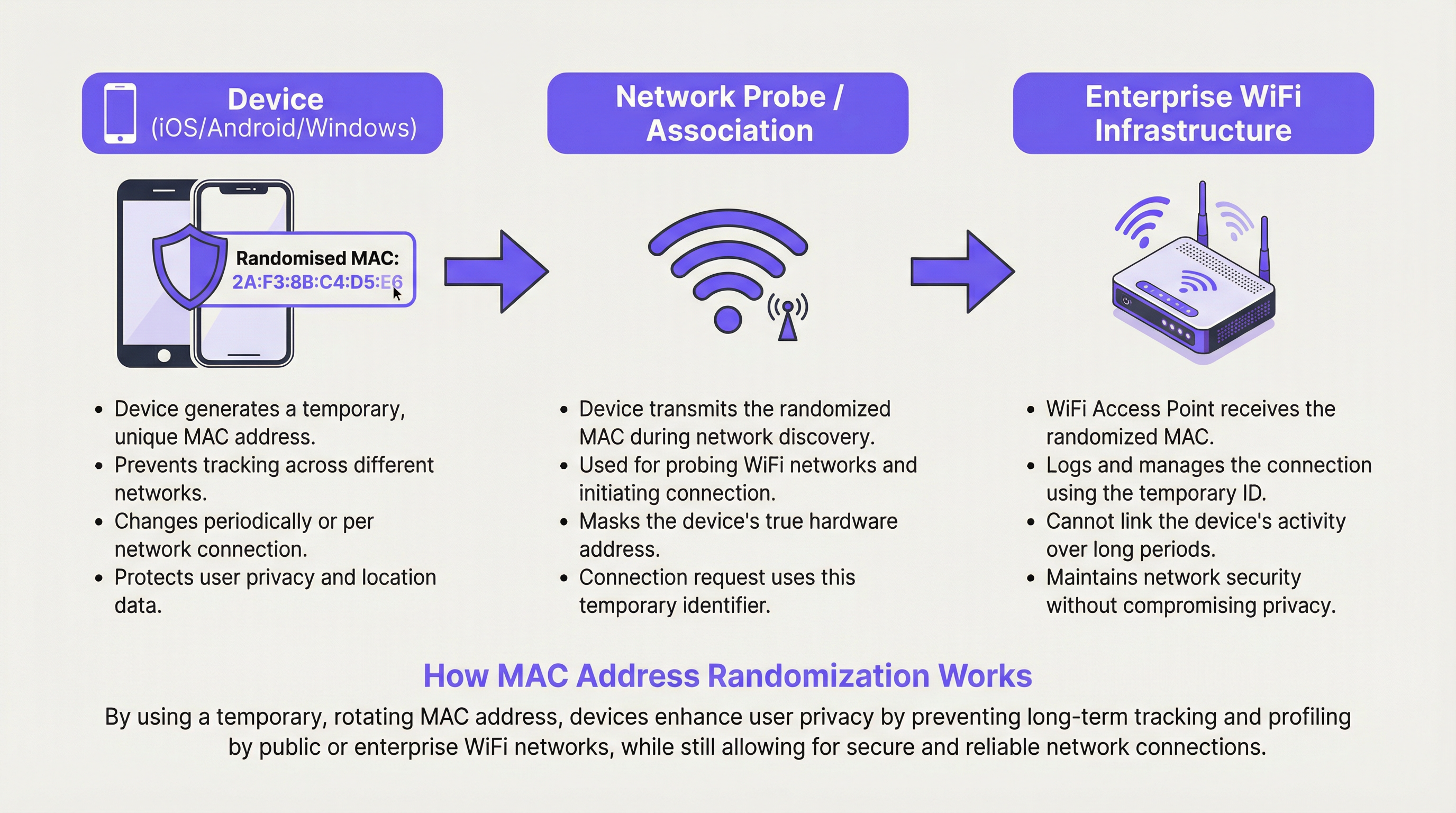
Tipos de aleatorización de direcciones MAC
Existen dos formas principales de aleatorización de direcciones MAC que los arquitectos de red deben comprender. La aleatorización de solicitudes de sondeo fue la implementación inicial, donde los dispositivos utilizan una MAC aleatoria solo al buscar redes, pero revelan su MAC real al conectarse. Esto sigue protegiendo la privacidad de los dispositivos que no se conectan, pero es menos eficaz una vez establecida la conexión. La aleatorización de asociación es el enfoque más robusto y ahora estándar, donde se utiliza una MAC aleatoria para la conexión real a un punto de acceso. Esta es la forma que tiene el impacto más significativo en la gestión de redes empresariales, ya que afecta a todos los dispositivos conectados.
La distinción entre la aleatorización por SSID y por conexión también es operativamente importante. La aleatorización por SSID (el valor predeterminado actual en iOS y Android) significa que se reutiliza la misma dirección aleatoria para el mismo nombre de red, lo que proporciona cierta estabilidad. La aleatorización por conexión, que podrían adoptar algunas configuraciones centradas en la privacidad o futuras versiones del sistema operativo, generaría una nueva dirección en cada conexión, haciendo imposible cualquier forma de continuidad de sesión sin una capa de identidad.
Implementación específica por sistema operativo
| Sistema operativo | Comportamiento predeterminado | Ruta de gestión | Notas |
|---|---|---|---|
| iOS 14+ | Habilitado por defecto por SSID | Ajustes > Wi-Fi > (i) > Dirección Wi-Fi privada | Se genera una MAC aleatoria única para cada red. Rota si no se conecta durante un periodo. |
| Android 10+ | Habilitado por defecto por SSID | Ajustes > Red > Wi-Fi > Avanzado > Privacidad | El comportamiento puede variar según el fabricante del dispositivo (OEM). |
| Windows 10/11 | Deshabilitado por defecto | Configuración > Red > Wi-Fi > Administrar redes conocidas > Propiedades | Se puede configurar como Activado, Desactivado o Cambiar diariamente por red. |
| macOS (Ventura+) | Habilitado por defecto por SSID | Ajustes del sistema > Wi-Fi > Detalles > Rotar dirección Wi-Fi | Se alinea con el comportamiento de iOS. |
Guía de implementación
La adaptación a la aleatorización de direcciones MAC es un proceso estructurado. Los siguientes pasos proporcionan un marco de implementación neutral en cuanto a proveedores para entornos empresariales.
Paso 1: Realizar una auditoría de dependencias MAC. Antes de realizar cualquier cambio, identifique todos los sistemas de su entorno que utilicen una dirección MAC como identificador principal. Esto incluye reglas de firewall, reservas DHCP, listas de control de acceso (ACL), herramientas de monitorización de red y plataformas de analítica. Documente cada dependencia y clasifíquela como control de seguridad, herramienta operativa o entrada de analítica. Esta auditoría constituye la base de su hoja de ruta de corrección.
Paso 2: Retirar los controles de seguridad basados en MAC. Cualquier regla de seguridad que conceda o deniegue el acceso basándose únicamente en una dirección MAC debe ser sustituida. Esto no es opcional; es un imperativo de seguridad. Las direcciones MAC no son un factor de autenticación fiable. Sustituya estas reglas por la autenticación IEEE 802.1X, que requiere que los dispositivos presenten credenciales verificables a un servidor RADIUS. Este es el único método que proporciona tanto seguridad como resiliencia frente a la aleatorización MAC.
Paso 3: Implementar WPA3-Enterprise. Asegúrese de que su infraestructura inalámbrica soporta WPA3. La mayoría de los puntos de acceso fabricados después de 2020 son compatibles con WPA3, pero verifique que su firmware esté actualizado. WPA3-Enterprise proporciona Autenticación Simultánea de Iguales (SAE) y, en su modo de 192 bits, cumple con los requisitos de seguridad de entornos sensibles, incluidos aquellos sujetos a PCI DSS y a los marcos de seguridad del sector público.
Paso 4: Modernizar el portal de la red de invitados. Sustituya cualquier página de inicio básica por un Captive Portal basado en la identidad. El portal debe ofrecer como mínimo una de las siguientes opciones: registro por correo electrónico con verificación, inicio de sesión social (OAuth), integración con programas de fidelización o un código de acceso precompartido. Cada una de estas opciones proporciona un identificador de usuario estable que persiste a través de las sesiones y los cambios de dirección del dispositivo. Asegúrese de que el portal y sus prácticas de recopilación de datos cumplen plenamente con el GDPR, con mecanismos de consentimiento explícito.
Paso 5: Actualizar su plataforma de analítica. Póngase en contacto con su proveedor de analítica WiFi y pregúntele directamente cómo gestiona su plataforma la aleatorización MAC. Una plataforma moderna debe centrarse en la analítica basada en sesiones, los flujos de usuarios autenticados y la agrupación probabilística de dispositivos en lugar de los recuentos brutos de direcciones MAC. Establezca nuevas métricas de referencia para el recuento de visitantes que tengan en cuenta el cambio de metodología.
Mejores prácticas
Las siguientes mejores prácticas reflejan los estándares actuales del sector y la orientación neutral en cuanto a proveedores para operar redes WiFi empresariales en la era de la aleatorización de direcciones MAC.
Adoptar una arquitectura centrada en la identidad (Identity-First). El principio fundamental es tratar la identidad del usuario y del dispositivo como una afirmación basada en credenciales, no como una observación de hardware. Cada decisión de acceso, evento de analítica y entrada de registro de seguridad debe estar anclada a una identidad verificada siempre que sea posible. Esto se alinea con los principios de Acceso a la Red de Confianza Cero (ZTNA), que asumen que ningún dispositivo es inherentemente fiable únicamente en virtud de sus atributos de hardware.
Implementar 802.1X con autenticación basada en certificados para dispositivos gestionados. Para los dispositivos corporativos, implemente certificados de dispositivo a través de su plataforma de Gestión de Dispositivos Móviles (MDM). Esto permite que el dispositivo se autentique en la red de forma automática y segura mediante un certificado, proporcionando una experiencia de usuario fluida al tiempo que se mantiene una seguridad sólida. Esta es la implementación más robusta de 802.1X y se recomienda para entornos sujetos a marcos de cumplimiento.
Utilizar la asignación de VLAN a través de RADIUS para la segmentación de red. En lugar de utilizar ACL basadas en MAC para la segmentación, configure su servidor RADIUS para asignar dispositivos a VLAN específicas en función de su identidad autenticada. Un usuario invitado obtiene la VLAN de invitados; un dispositivo corporativo obtiene la VLAN corporativa; un terminal TPV obtiene la VLAN de pagos. Esto es dinámico, escalable e inmune a la aleatorización MAC.
Alinearse con el GDPR y los principios de minimización de datos. Según el GDPR, una dirección MAC que puede vincularse a un individuo se considera un dato personal. El cambio hacia una gestión basada en la identidad, donde la recopilación de datos es explícita y se basa en el consentimiento, no es solo una mejora técnica: es una mejora del cumplimiento normativo. Asegúrese de que sus políticas de retención de datos para los registros de red y los datos de analítica se revisen a la luz de estos principios.
Resolución de problemas y mitigación de riesgos
A continuación se detallan los modos de fallo más comunes encontrados durante y después de la transición para abandonar la gestión de redes basada en MAC.
Modo de fallo 1: Dispositivos bloqueados repetidamente u obligados a reautenticarse. La causa raíz es casi siempre una ACL residual basada en MAC o un sistema de seguridad que no se ha migrado por completo. Realice una revisión exhaustiva de todas las políticas de firewall y acceso a la red. Utilice su plataforma de gestión de red para identificar cualquier regla que haga referencia a direcciones MAC específicas y sustitúyalas por equivalentes basados en la identidad.
Modo de fallo 2: Los datos de analítica muestran un pico masivo de dispositivos únicos. Este es el resultado directo de una plataforma de analítica que utiliza direcciones MAC como identificador único principal. La mitigación inmediata es marcar todos los datos históricos recopilados antes de la auditoría como no fiables para los recuentos absolutos. De cara al futuro, establezca nuevas líneas base utilizando su plataforma de analítica actualizada y consciente de la identidad. Centre los informes en las tendencias y en las métricas de usuarios autenticados en lugar de en los recuentos brutos de dispositivos.
Modo de fallo 3: Problemas de itinerancia (roaming) en recintos grandes. En entornos con muchos puntos de acceso, un dispositivo puede cambiar su dirección MAC aleatoria cuando pasa de un punto de acceso (BSSID) a otro, especialmente si el dispositivo trata cada BSSID como una red distinta. Esto puede provocar caídas de sesión y solicitudes de reautenticación. La mitigación consiste en garantizar que su infraestructura inalámbrica utilice correctamente 802.11r (Transición Rápida BSS) y que todos los puntos de acceso bajo el mismo SSID estén configurados como un único dominio de movilidad, minimizando los desencadenantes de la rotación de direcciones.
Modo de fallo 4: Agotamiento del pool DHCP. En entornos donde las concesiones DHCP son largas y el pool es pequeño, un alto volumen de dispositivos que se conectan con nuevas MAC aleatorias puede agotar las direcciones IP disponibles. Mitigue esto revisando y acortando los tiempos de concesión DHCP para las redes de invitados, y asegurándose de que su pool DHCP tenga el tamaño adecuado para los picos de conexiones simultáneas en lugar de para dispositivos únicos a lo largo del tiempo.
ROI e impacto empresarial
La adaptación a la aleatorización de direcciones MAC es una inversión con un retorno claro y medible en múltiples dimensiones.
ROI en seguridad. Sustituir las listas blancas de MAC por la autenticación 802.1X elimina una clase de vulnerabilidad que se explota con frecuencia. La suplantación de MAC (MAC spoofing), donde un atacante clona una dirección MAC válida conocida para eludir los controles de acceso, es trivialmente fácil y está ampliamente documentada. Pasar a la autenticación basada en credenciales elimina por completo este vector de ataque. El coste de una sola brecha de red, incluyendo la respuesta a incidentes, la notificación regulatoria y el daño reputacional, supera con creces el coste de una actualización de la infraestructura de red.
ROI en cumplimiento normativo. Para las organizaciones sujetas al GDPR, PCI DSS o a los marcos de seguridad del sector público, el cambio a la gestión de redes basada en la identidad apoya directamente los objetivos de cumplimiento. El principio de minimización de datos del GDPR se cumple recopilando solo los datos necesarios, con consentimiento explícito. PCI DSS requiere una segmentación de red robusta que no se puede lograr de forma fiable con controles basados en MAC. Evitar una sola multa significativa bajo cualquiera de los marcos proporciona una justificación financiera convincente para la inversión.
ROI en analítica e ingresos. La transición a un portal de invitados basado en la identidad crea un canal directo para el engagement del cliente y la recopilación de datos. Las organizaciones que han implementado portales WiFi integrados con programas de fidelización reportan mejoras medibles en el crecimiento de las listas de correo electrónico, las tasas de visitas recurrentes y la precisión de la analítica del recorrido del cliente. Para una cadena de retail o un grupo hotelero, la capacidad de identificar con precisión y fidelizar a los clientes recurrentes a través de un canal de datos consentido tiene implicaciones directas en los ingresos. El cambio de rastrear dispositivos anónimos a interactuar con clientes conocidos es una mejora fundamental en la calidad de los datos y en la capacidad de inteligencia empresarial.
Key Terms & Definitions
MAC Address (Media Access Control Address)
A unique, 48-bit hardware identifier assigned to a network interface controller (NIC) by the manufacturer. It is used as a network address for communications within a network segment and is structured as six pairs of hexadecimal digits (e.g., 00:1A:2B:3C:4D:5E).
Traditionally used by IT teams as a stable, unique identifier for devices on a WiFi network. Its reliability as a persistent identifier has been fundamentally undermined by MAC randomization, making it unsuitable as a primary key for security, access control, or analytics.
MAC Address Randomization
A privacy feature implemented in modern operating systems (iOS 14+, Android 10+, Windows 10+) where the device temporarily replaces its real, factory-assigned MAC address with a randomly generated one when connecting to or scanning for WiFi networks.
The central challenge for enterprise network managers. It prevents tracking of a device across different WiFi networks and over time, but disrupts legacy systems that depend on a stable MAC address for authentication, logging, and analytics.
IEEE 802.1X
An IEEE standard for port-based Network Access Control (PNAC). It provides an authentication mechanism requiring devices to present verifiable credentials to a RADIUS server before being granted access to a LAN or WLAN.
The gold-standard replacement for MAC-based access control. By authenticating the user or device via credentials rather than hardware attributes, it provides security that is entirely immune to MAC randomization. Essential for any enterprise network refresh.
WPA3-Enterprise
The latest generation of WiFi security protocol for enterprise environments, building on IEEE 802.1X. It offers enhanced encryption (up to 192-bit in its highest security mode) and protection against offline dictionary attacks and key reinstallation attacks.
The recommended security standard for corporate WiFi networks. Deploying WPA3-Enterprise alongside 802.1X is the definitive technical response to the security challenges posed by MAC randomization.
RADIUS (Remote Authentication Dial-In User Service)
A networking protocol that provides centralised Authentication, Authorisation, and Accounting (AAA) management for users who connect and use a network service.
The server-side component of an 802.1X deployment. When a device attempts to connect, the access point forwards the authentication request to the RADIUS server, which validates the credential and instructs the access point to grant or deny access — and optionally assign the device to a specific VLAN.
Captive Portal
A web page that a user of a public-access network is required to view and interact with before network access is granted. Portals are used for authentication, terms of service acceptance, payment, or marketing data collection.
For guest networks, the captive portal is the primary mechanism for establishing user identity in a post-MAC-randomization environment. A well-designed portal with a loyalty or social login integration provides a stable user identifier that replaces the MAC address for analytics and session management.
SSID (Service Set Identifier)
The public name of a WiFi network, broadcast by access points and visible to devices scanning for available connections.
Modern devices generate a unique, persistent randomized MAC address for each different SSID they connect to. This means a device will appear with a different MAC address on your 'Corporate' network versus your 'Guest' network, a critical detail for network segmentation and analytics.
GDPR (General Data Protection Regulation)
EU Regulation 2016/679, which governs the processing of personal data of individuals within the European Union. It requires a lawful basis for data processing, mandates data minimisation, and grants individuals rights over their data.
A static MAC address that can be linked to an individual is considered personal data under GDPR. Network managers must ensure that any system collecting or processing MAC addresses — or the new identity-based alternatives — has a documented lawful basis and appropriate data retention policies.
Zero Trust Network Access (ZTNA)
A security framework that requires all users and devices to be authenticated, authorised, and continuously validated before being granted access to applications and data, regardless of whether they are inside or outside the network perimeter.
MAC randomization is, in a sense, forcing enterprise networks toward Zero Trust principles by removing the ability to implicitly trust a device based on its hardware address. Adopting a ZTNA framework provides a coherent strategic context for the technical changes required.
Case Studies
A 200-room luxury hotel wants to provide a seamless, 'just-works' WiFi experience for returning guests, allowing them to connect automatically without a portal on subsequent visits. Their current system relies on MAC whitelisting for registered guests, which is now failing due to MAC randomization, generating a high volume of front-desk support calls.
The recommended solution is to deploy a WPA3-Enterprise network with 802.1X authentication, integrated with the hotel's Property Management System (PMS).
Infrastructure Upgrade: Verify all access points are WPA3-Enterprise certified and update firmware. Deploy or upgrade a RADIUS server (e.g., FreeRADIUS, Cisco ISE, or a cloud-hosted equivalent).
PMS Integration: Configure the PMS to automatically generate a unique, time-limited WiFi credential (username and a strong random password) for each guest at check-in. This credential is tied to their reservation and expires at check-out.
Guest Onboarding: At first connection, the guest is directed to a simple, branded captive portal where they enter their room number and last name to retrieve their credential. The device is then configured to trust the network's certificate and save the 802.1X profile.
Seamless Re-connection: On all subsequent connections during their stay — whether returning to the room, moving through the lobby, or using the restaurant WiFi — the device uses its saved 802.1X profile to authenticate seamlessly and securely in the background, with no user interaction required. The randomized MAC address is entirely irrelevant, as authentication is based on the credential.
Loyalty Integration (Phase 2): For returning guests across multiple stays, integrate the portal with the hotel's loyalty programme. Loyalty members can authenticate with their loyalty credentials, enabling the hotel to recognise them as returning guests and offer personalised welcome experiences.
A large retail chain with 150 stores uses WiFi analytics to measure footfall, dwell time in different departments, and queue lengths at checkout to optimise staffing and store layout. Since iOS 14 rolled out, their analytics platform is reporting inaccurate data, showing apparent unique visitor counts that are three to four times higher than actual footfall, and 'returning visitor' rates have dropped to near zero.
The retailer should transition to a multi-layered analytics strategy that de-emphasises MAC addresses as the primary identifier.
Upgrade Analytics Platform: Engage the current analytics vendor to understand their roadmap for MAC randomization. If the platform does not have a credible solution, evaluate alternatives that are designed for the post-randomization era. Modern platforms focus on session-based analysis and use probabilistic algorithms to estimate unique visitors, clearly distinguishing between 'devices seen' and 'estimated unique visitors'.
Implement an Identity Layer: Redesign the guest WiFi portal to offer a compelling reason for customers to log in. Options include a discount voucher on first login, access to a store loyalty account, or entry into a prize draw. Each login provides a stable identifier (email address, loyalty ID) that can be used to accurately track repeat visits across sessions and dates.
Augment with Non-WiFi Sensors: Deploy privacy-respecting IR beam counters or video analytics (people-counting only, no facial recognition) at store entrances and key department thresholds. This provides a ground-truth for absolute footfall counts, which can be used to calibrate and validate the WiFi analytics data.
Redefine KPIs: Work with the analytics team to redefine the key performance indicators. Shift from 'unique devices' to 'authenticated sessions', 'loyalty member visits', and 'estimated footfall' (from sensor data). Establish new baselines from the point of the platform upgrade and treat all historical MAC-based data as directionally useful but not absolutely accurate.
Scenario Analysis
Q1. You are the network architect for a multi-site conference centre. An event organiser wants to offer tiered WiFi access: a free, basic service for all attendees, and a paid, high-speed service for VIPs. Your current system uses MAC-based firewall rules to assign bandwidth tiers. How would you design a new solution that is resilient to MAC randomization and can scale across multiple simultaneous events?
💡 Hint:Consider how you can differentiate users at the point of authentication using a credential or payment token, and how RADIUS can dynamically assign network policies based on that identity.
Show Recommended Approach
The recommended design uses a single SSID with a captive portal that routes users to different authentication paths, with RADIUS handling dynamic policy assignment. The portal presents two options: 'Free Access' and 'VIP/Paid Access'. For the free tier, users accept terms and conditions and optionally provide an email address. The portal authenticates them to the RADIUS server, which assigns them to a VLAN with a bandwidth policy capped at, for example, 5 Mbps. For the VIP tier, users either enter a pre-purchased access code (distributed with their VIP ticket) or complete a payment via an integrated gateway. Upon successful validation, the RADIUS server assigns them to a separate VLAN with a high-speed policy. This design is entirely credential-driven, scales to any number of simultaneous events by issuing different access codes per event, and is completely immune to MAC randomization because no access decision is based on the device's hardware address.
Q2. A stadium is experiencing widespread connectivity complaints during a major event. The network logs show thousands of 802.11 authentication failures from devices with MAC addresses not present in the access control list. The security policy, implemented five years ago, blocks any MAC address not seen on the network in the previous 90 days. What is the root cause, what is the immediate remediation, and what is the long-term architectural fix?
💡 Hint:Consider the behaviour of devices belonging to fans who attend infrequently, and the fundamental incompatibility between time-based MAC whitelisting and address randomization.
Show Recommended Approach
Root cause: The 90-day MAC whitelist is fundamentally incompatible with MAC address randomization. A fan who attended a match more than 90 days ago will connect with a new randomized MAC address. The security system sees this as an unknown device and blocks it. For a stadium with infrequent events, the vast majority of fans will fall outside the 90-day window, causing mass authentication failures. Immediate remediation: Disable the MAC-based ACL immediately. It is causing a denial-of-service for legitimate users and providing negligible security value, as MAC spoofing trivially bypasses it. Replace it with an open network or a simple captive portal with terms-of-service acceptance to restore connectivity for the event. Long-term fix: Design a proper guest network architecture. For a public venue like a stadium, a captive portal with social login or ticketing system integration is the appropriate solution. This provides a user identity, enables analytics, and supports future loyalty and engagement programmes, without any dependence on MAC addresses.
Q3. Your retail chain's marketing team wants to run a 'welcome back' campaign, offering a personalised discount to customers who have visited a store more than three times in the past month. They want to deliver this offer via the guest WiFi portal. Explain why a MAC-address-based tracking system will fail to deliver this, and design an alternative technical architecture that will work reliably.
💡 Hint:Focus on what constitutes a reliable, persistent customer identifier versus a mutable hardware attribute, and how the captive portal can bridge the gap between an anonymous device and a known customer.
Show Recommended Approach
A MAC-based system will fail because the device's randomized MAC address will likely differ between visits, making each visit appear to be from a new, unknown device. It would be impossible to build a reliable visit history or identify returning customers. The alternative architecture is an identity-based loyalty WiFi programme. Implementation: 1) Customers register once via the captive portal, providing an email address or phone number, or linking their existing loyalty account. 2) On each subsequent visit, they log in to the WiFi using their loyalty credentials (a simple username/password or a one-tap social login). 3) The system records a 'visit event' against the stable loyalty ID, not the MAC address. 4) When the visit count for a specific loyalty ID reaches three within a rolling 30-day window, the portal's post-authentication landing page automatically displays the personalised discount offer. This architecture is accurate, consent-based, GDPR-compliant, and provides the marketing team with a rich, reliable dataset for campaign analysis and customer journey mapping.
Key Takeaways
- ✓MAC address randomization is the default setting on virtually all modern smartphones and laptops, making it the baseline assumption for any enterprise WiFi deployment.
- ✓Legacy MAC-based security controls (whitelists, ACLs) are now both ineffective and operationally disruptive — they must be replaced with IEEE 802.1X and WPA3-Enterprise.
- ✓WiFi analytics platforms that use MAC addresses as unique identifiers will report severely inflated visitor counts and near-zero returning visitor rates — a platform upgrade or reconfiguration is essential.
- ✓The strategic response is to shift from identity-by-hardware to identity-by-credential: authenticate users, not devices.
- ✓Modern captive portals with loyalty, social, or email login integrations provide a stable user identifier that is more accurate, more valuable, and more GDPR-compliant than MAC tracking.
- ✓Adapting to MAC randomization is not just a technical fix — it is an opportunity to build a more secure, compliant, and customer-centric network architecture.
- ✓Conduct a MAC dependency audit this quarter: identify every system that relies on a static MAC address and classify it for immediate replacement or upgrade.




