

Passpoint (Hotspot 2.0): Una guía completa para un roaming WiFi seguro y sin interrupciones
This guide provides a comprehensive technical overview of Passpoint (Hotspot 2.0) for IT leaders and network architects, covering the IEEE 802.11u standard, GAS/ANQP discovery protocols, WPA3-Enterprise security, and the WBA OpenRoaming federation. It delivers a vendor-neutral implementation framework with phased deployment guidance, real-world case studies from hospitality and retail, and a clear analysis of the ROI and compliance benefits for enterprise venue operators.
🎧 Listen to this Guide
View Transcript

Resumen ejecutivo
Para los ejecutivos de TI y arquitectos de redes en recintos de gran escala, ofrecer una experiencia WiFi segura y fluida ya no es una comodidad, sino un imperativo operativo fundamental. El reto radica en eliminar la fricción de los Captive Portal y las redes abiertas inseguras, al tiempo que se mantiene una seguridad sólida y se obtiene información valiosa sobre los usuarios. Passpoint, también conocido como Hotspot 2.0, aborda directamente este desafío. Es un protocolo certificado por la Wi-Fi Alliance basado en el estándar IEEE 802.11u que permite a los dispositivos móviles descubrir y autenticarse automáticamente en redes WiFi con seguridad WPA3 de nivel empresarial, reflejando la experiencia fluida del roaming móvil.
Esta guía sirve como referencia práctica para los responsables de la toma de decisiones, proporcionando un análisis técnico exhaustivo de la arquitectura de Passpoint, un marco de implementación independiente del proveedor y un análisis de su ROI. Al aprovechar Passpoint, las organizaciones pueden mejorar significativamente la experiencia de los huéspedes, reducir los costes generales de soporte de TI, fortalecer su postura de seguridad y desbloquear nuevas oportunidades para la interacción basada en datos, transformando en última instancia su infraestructura WiFi de un centro de costes a un activo estratégico.
Análisis técnico exhaustivo
Passpoint cambia fundamentalmente el paradigma de conexión WiFi, pasando de centrarse en la red (conectarse a un SSID específico) a centrarse en el usuario (conectarse a cualquier red que confíe en las credenciales del usuario). Esto se logra mediante una serie de consultas previas a la asociación y un sólido marco de seguridad basado en estándares establecidos de la industria.
Arquitectura principal: GAS y ANQP
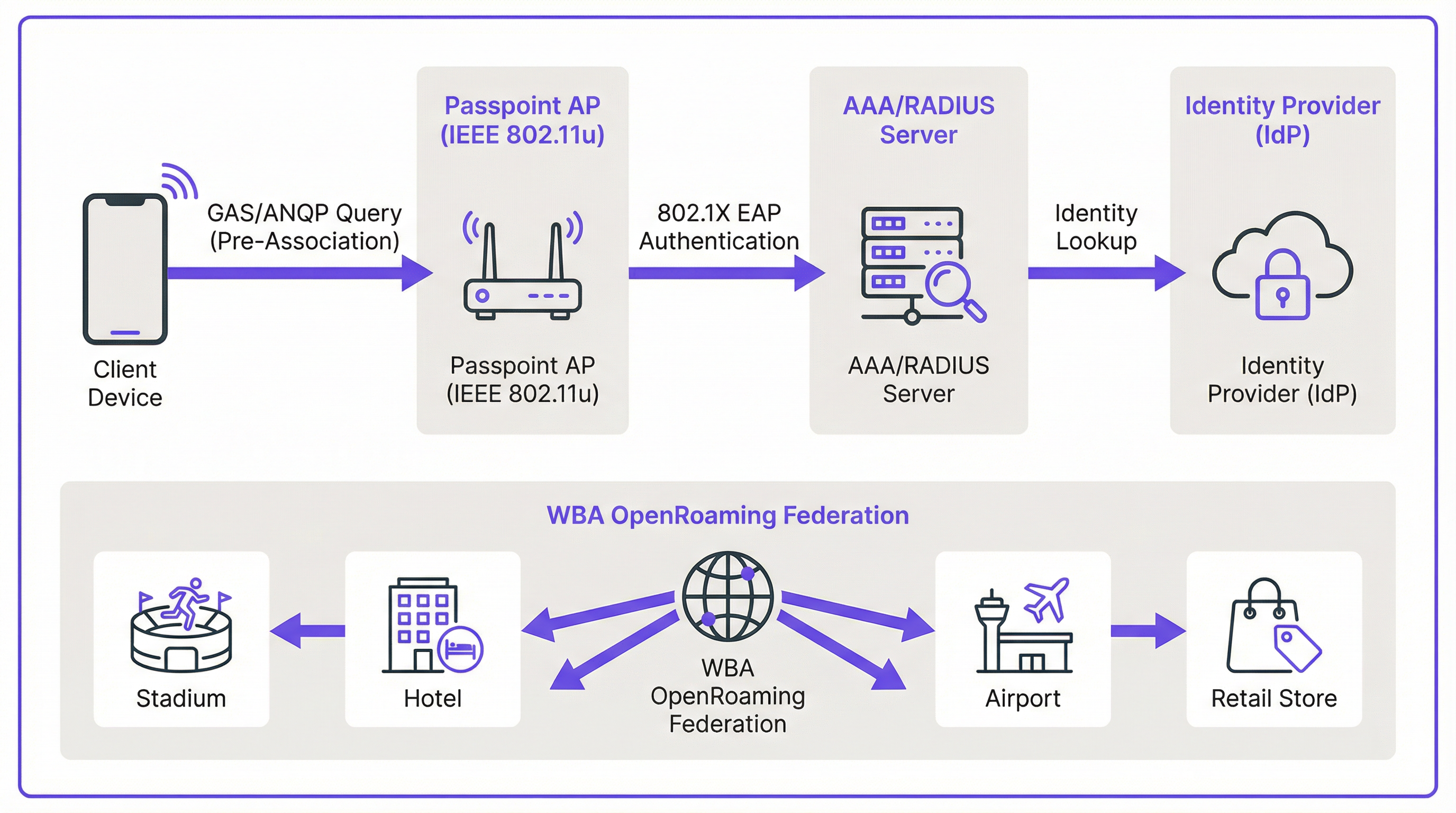
El mecanismo que permite el descubrimiento fluido está definido en la enmienda IEEE 802.11u. Antes de que un dispositivo cliente intente siquiera asociarse con un punto de acceso, puede consultar a la red para determinar si existe un acuerdo de roaming. Esta conversación previa a la asociación utiliza dos protocolos clave que funcionan en conjunto.
El Generic Advertisement Service (GAS) proporciona la capa de transporte para las tramas de anuncio entre una estación cliente y un servidor antes de que se produzca la autenticación. El Access Network Query Protocol (ANQP) es el protocolo de consulta en sí, transportado dentro de las tramas GAS. El dispositivo cliente utiliza ANQP para hacer preguntas específicas a la red, siendo la más crítica: ¿qué consorcios de roaming o proveedores de identidad admite?
El flujo de conexión se desarrolla de la siguiente manera. Un punto de acceso (AP) compatible con Passpoint incluye un Interworking Element en sus tramas de baliza, actuando como un indicador que anuncia las capacidades de Hotspot 2.0. Un dispositivo compatible ve este indicador y envía una solicitud GAS que contiene una consulta ANQP al AP. La consulta pregunta qué identificadores organizativos del consorcio de roaming (RCOI) admite la red. Si la respuesta del AP contiene un RCOI que coincide con un perfil en el dispositivo (por ejemplo, un perfil de un operador móvil o un perfil de WBA OpenRoaming), el dispositivo procede con el protocolo de enlace seguro 802.1X.
Seguridad: WPA3-Enterprise y 802.1X
La seguridad es la piedra angular de Passpoint. A diferencia de los Captive Portal que frecuentemente se sitúan sobre una red abierta y sin cifrar, Passpoint exige el uso de WPA2-Enterprise o WPA3-Enterprise. Esto impone la autenticación 802.1X, donde el dispositivo de cada usuario se autentica individualmente a través de un servidor RADIUS. Esta arquitectura proporciona varias ventajas de seguridad críticas que son directamente relevantes para las obligaciones de cumplimiento de PCI DSS y GDPR.
Todo el tráfico entre el dispositivo cliente y el punto de acceso se cifra individualmente, eliminando el riesgo de escuchas pasivas. Debido a que la autenticación se basa en credenciales y certificados de confianza, los usuarios están protegidos contra ataques de "gemelo malvado" (evil twin), donde un actor malintencionado transmite un SSID falso para interceptar el tráfico. No hay claves precompartidas (PSK) que, de verse comprometidas, podrían exponer toda la red a movimientos laterales.
Passpoint frente a OpenRoaming: Una distinción fundamental
Es esencial distinguir entre el estándar Passpoint y el marco WBA OpenRoaming, ya que ambos términos se confunden con frecuencia. La analogía más útil es la diferencia entre un coche y un sistema de autopistas.
Passpoint es el vehículo: el estándar técnico (IEEE 802.11u) y la certificación de la Wi-Fi Alliance que permite a un dispositivo descubrir y conectarse a una red automáticamente. OpenRoaming es la autopista: un marco de federación global gestionado por la Wireless Broadband Alliance (WBA) que crea un ecosistema de confianza entre miles de proveedores de identidad (IdP), como operadores móviles y fabricantes de dispositivos, y proveedores de redes de acceso (ANP), como hoteles, estadios y cadenas minoristas. Una implementación privada de Passpoint puede funcionar sin OpenRoaming, pero la participación en OpenRoaming requiere Passpoint.
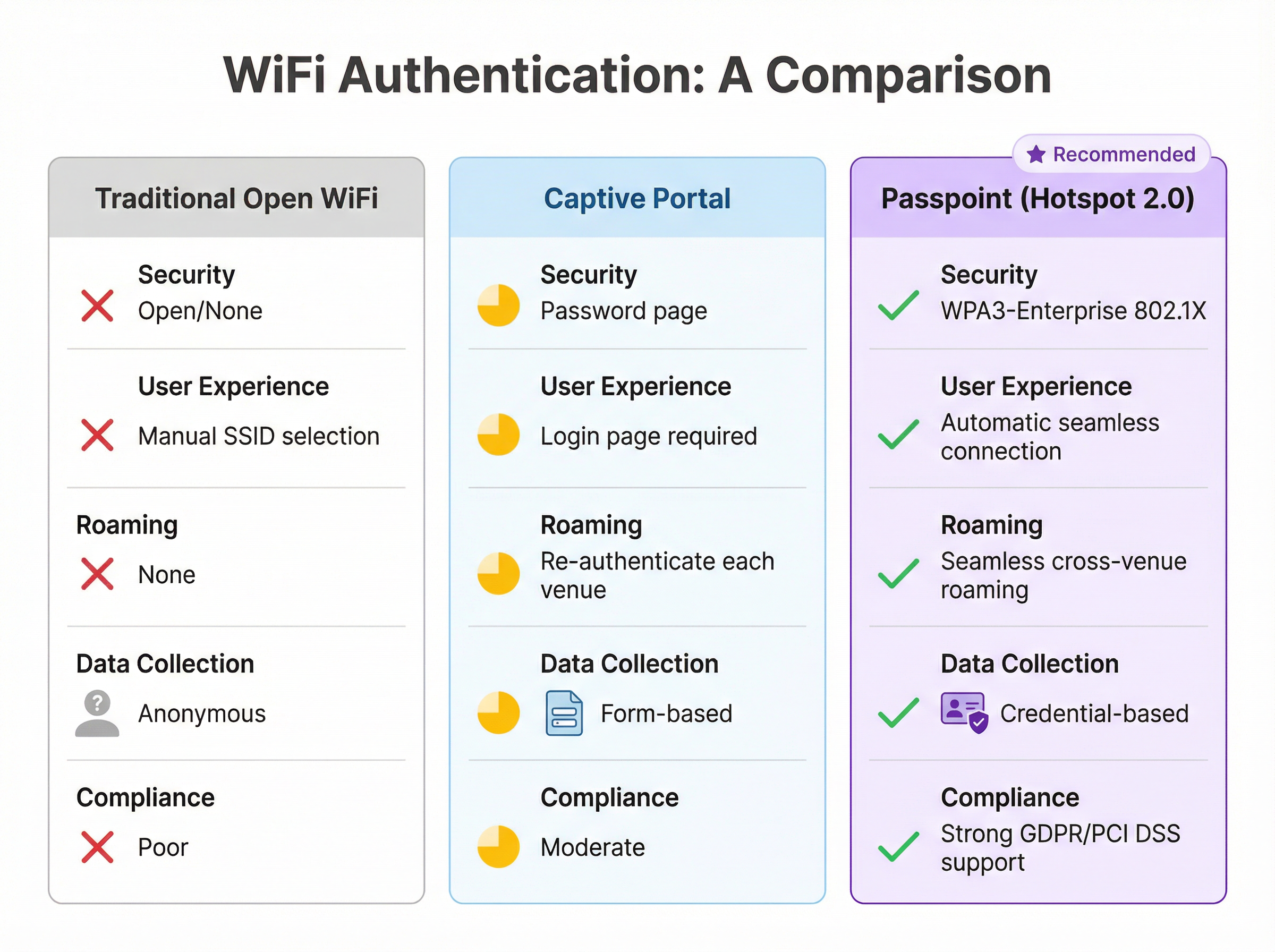
| Característica | WiFi abierta tradicional | Captive Portal | Passpoint (Hotspot 2.0) |
|---|---|---|---|
| Estándar de seguridad | Ninguno (Abierta) | Variable (a menudo abierta) | WPA3-Enterprise (802.1X) |
| Experiencia del usuario | Selección manual de SSID | Requiere página de inicio de sesión | Totalmente automática |
| Roaming entre recintos | Ninguno | Reautenticación cada vez | Sin interrupciones |
| Recopilación de datos | Anónima | Basada en formularios (riesgo de GDPR) | Basada en credenciales |
| Alineación con PCI DSS | Deficiente | Moderada | Sólida |
Guía de implementación
La implementación de Passpoint es un proceso estructurado que abarca desde la evaluación hasta la configuración de la infraestructura, las pruebas piloto y el despliegue completo. Un enfoque por fases garantiza una transición fluida y minimiza las interrupciones para los usuarios existentes.
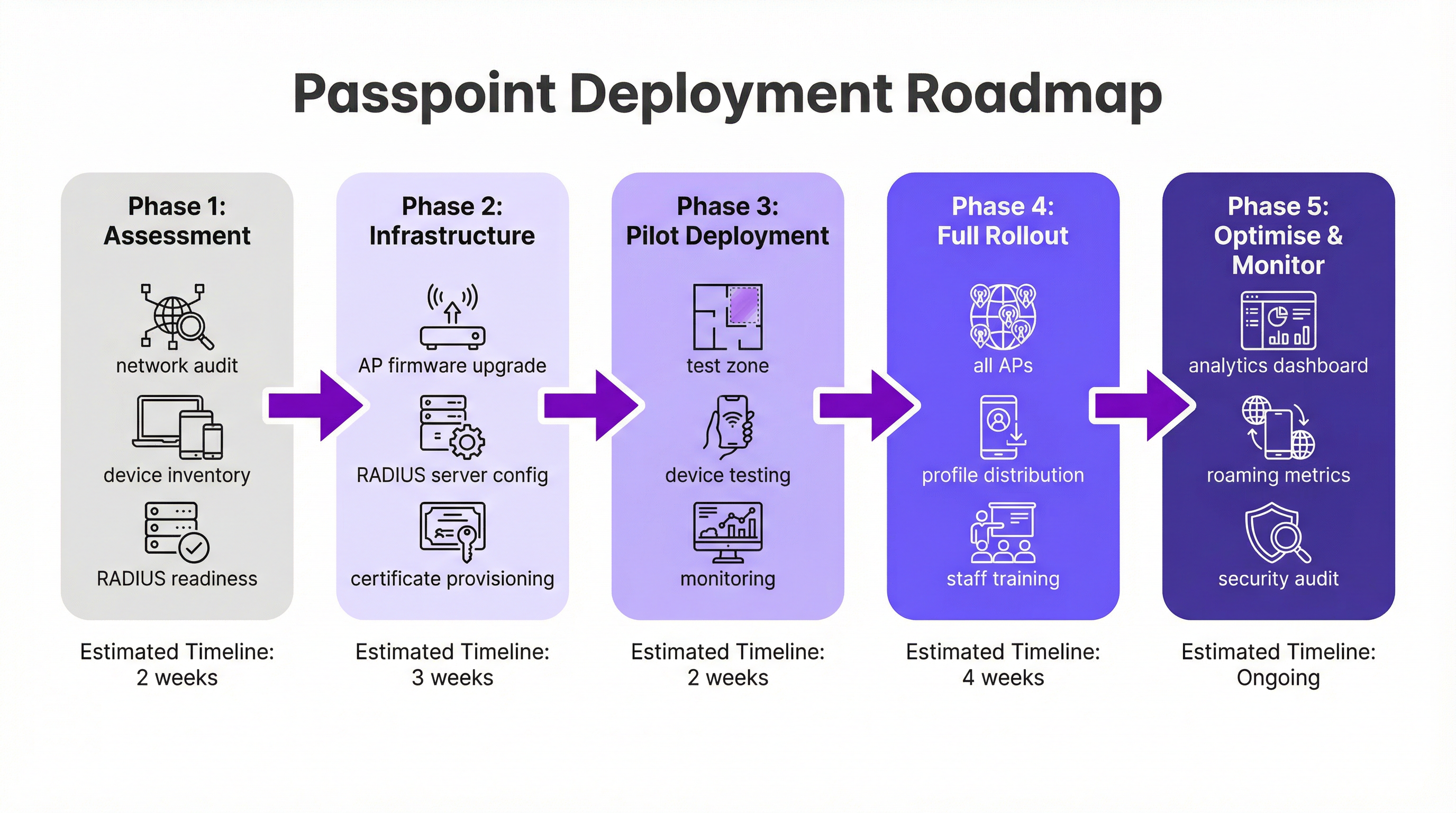
Fase 1: Evaluación y planificación (2 semanas). Comience con una auditoría completa de la red para verificar que su hardware WiFi existente admita las funciones requeridas de IEEE 802.11u. La mayoría del hardware de nivel empresarial fabricado en los últimos cinco a siete años es compatible, pero con frecuencia es necesaria una actualización de firmware. Simultáneamente, evalúe su infraestructura RADIUS en cuanto a capacidad, alta disponibilidad y su capacidad para manejar métodos EAP basados en certificados. Defina su estrategia de identidad: ¿autenticará a los usuarios mediante una base de datos de un programa de fidelización, se integrará con un operador móvil asociado o se unirá a la federación WBA OpenRoaming?
Fase 2: Configuración de la infraestructura (3 semanas). Implemente actualizaciones de firmware en todos los AP y controladores. Configure su servidor RADIUS para admitir los tipos de EAP elegidos: EAP-TLS es la opción más segura para la autenticación basada en certificados, mientras que EAP-TTLS proporciona una alternativa más flexible. Si participa en OpenRoaming, obtenga los certificados PKI de WBA necesarios. Cree un perfil WLAN dedicado configurado para WPA3-Enterprise con las funciones de Hotspot 2.0 habilitadas, incluidos los RCOI pertinentes. Para lograr la máxima compatibilidad de dispositivos, transmita tanto el RCOI estándar sin liquidación (5A-03-BA) como el RCOI heredado de Cisco (00-40-96).
Fase 3: Despliegue piloto (2 semanas). Designe un área limitada y controlada de su recinto (una sola planta, una sala de conferencias específica o una zona de una tienda minorista) para el piloto. Incorpore dispositivos de prueba en las plataformas iOS, Android y Windows. Supervise de cerca los registros de RADIUS y el rendimiento de la red para validar el descubrimiento fluido, la autenticación y el roaming de AP a AP.
Fase 4: Despliegue completo y distribución de perfiles (4 semanas). Aplique la configuración validada a todos los AP en todo el recinto. Determine su estrategia de distribución de perfiles: la integración en una aplicación móvil de la marca es el estándar de oro para la hostelería y el comercio minorista, mientras que una plataforma MDM es el canal adecuado para entornos corporativos. Forme al personal de soporte de TI sobre la nueva arquitectura y los procedimientos comunes de resolución de problemas.
Fase 5: Optimización y monitorización (Continuo). Aproveche los análisis de red para supervisar los patrones de roaming, las tasas de éxito de autenticación y las distribuciones de tipos de dispositivos. Utilice estos datos para perfeccionar la experiencia del usuario y explorar oportunidades para una integración más profunda con plataformas de CRM, PMS o automatización de marketing. Realice auditorías de seguridad periódicas para mantener el cumplimiento de los requisitos de PCI DSS y GDPR.
Mejores prácticas
Han surgido varias mejores prácticas independientes del proveedor a partir de implementaciones de Passpoint a gran escala en los sectores de la hostelería, el comercio minorista y el transporte.
La transmisión de múltiples RCOI es esencial para la compatibilidad. El RCOI estándar sin liquidación (5A-03-BA) cubre la mayoría de los dispositivos modernos inscritos en OpenRoaming, mientras que el RCOI heredado de Cisco (00-40-96) es fundamental para los dispositivos Android más antiguos y los teléfonos Samsung que ejecutan OneUI. Omitir el RCOI heredado puede excluir silenciosamente a una parte significativa de su base de usuarios.
WPA3-Enterprise debería ser la opción predeterminada para todas las nuevas implementaciones. Aunque WPA2-Enterprise sigue siendo compatible, WPA3 introduce las tramas de gestión protegidas (PMF) como una función obligatoria, proporcionando una capa adicional de protección contra ataques de desautenticación.
Para las marcas con una aplicación de fidelización o para huéspedes, integrar la instalación del perfil de Passpoint directamente en la aplicación es el mecanismo de distribución más eficaz. El perfil se puede enviar automáticamente en el primer inicio de sesión del usuario, creando una experiencia de incorporación completamente libre de fricciones que no requiere ninguna acción por parte del usuario en visitas posteriores.
La segmentación de la red a través de VLAN es una mejor práctica innegociable para el cumplimiento normativo. El tráfico de Passpoint debe estar aislado de las redes corporativas internas y de cualquier sistema que maneje datos de tarjetas de pago, garantizando un límite de alcance de PCI DSS limpio.
Resolución de problemas y mitigación de riesgos
Comprender los modos de fallo más comunes antes de la implementación reduce significativamente el riesgo de una puesta en marcha problemática.
El problema más frecuente es que un dispositivo no se conecte automáticamente. La causa raíz es casi siempre un perfil de Passpoint ausente, con formato incorrecto o caducado en el dispositivo cliente. Verifique que el perfil esté instalado correctamente y que el RCOI que especifica coincida con el RCOI que transmite la red. En iOS, los perfiles se pueden inspeccionar a través de la aplicación Ajustes; en Android, el proceso varía según el fabricante.
Los fallos de autenticación son el segundo problema más común. Los registros del servidor RADIUS son la herramienta de diagnóstico definitiva. Los fallos suelen derivarse de formatos de credenciales incorrectos, certificados caducados o una relación de confianza rota con un proveedor de identidad ascendente. Al unirse a OpenRoaming, asegúrese de que los certificados raíz de WBA estén instalados correctamente en el almacén de confianza de su servidor RADIUS.
La configuración incorrecta del firewall es un riesgo que bloquea la implementación y que se pasa por alto fácilmente. El tráfico RadSec (puerto TCP 2083) debe estar permitido entre su servidor RADIUS y cualquier socio de roaming federado o servidor proxy de OpenRoaming. Valide esta regla explícitamente antes de la puesta en marcha.
La alta disponibilidad de la infraestructura RADIUS es el riesgo operativo más crítico. Una interrupción del servidor RADIUS impedirá toda autenticación de Passpoint, lo que efectivamente dejará inactiva la red para todos los usuarios inscritos. Implemente un par de servidores RADIUS en clúster o geográficamente redundantes y pruebe el mecanismo de conmutación por error antes del despliegue en producción.
ROI e impacto empresarial
La implementación de Passpoint ofrece un valor empresarial medible en varios dominios, lo que hace que el caso de inversión sea convincente tanto para TI como para la empresa en general.
El beneficio operativo más inmediato es una reducción en los costes de soporte de TI. Al eliminar la necesidad de que los usuarios seleccionen manualmente los SSID, introduzcan contraseñas o se vuelvan a autenticar después de que se agote el tiempo de espera de la sesión, Passpoint reduce drásticamente el volumen de tickets de soporte relacionados con el WiFi. Para un gran hotel o centro de conferencias, esto puede traducirse en una reducción significativa de la carga de trabajo en la recepción y en el servicio de asistencia de TI.
La satisfacción de los huéspedes es un resultado directo y medible. En el sector de la hostelería, la calidad del WiFi se sitúa constantemente entre los principales factores en las encuestas de satisfacción de los huéspedes. Una experiencia de conexión automática y sin interrupciones (especialmente para los huéspedes recurrentes que son reconocidos y conectados sin ninguna acción por su parte) crea una poderosa impresión positiva que impulsa la fidelidad y la repetición de negocios.
El cambio de datos anónimos de red abierta a datos de Passpoint basados en credenciales desbloquea un valor analítico significativo. Los recintos pueden comprender la frecuencia de las visitas, el tiempo de permanencia por ubicación y la demografía de los dispositivos con un nivel de precisión que simplemente no es posible con un Captive Portal. Estos datos, cuando se integran con plataformas de CRM y marketing, permiten una interacción personalizada que impulsa ingresos incrementales a través de promociones dirigidas y oportunidades de venta cruzada.
Por último, no se debe subestimar el valor de cumplimiento y mitigación de riesgos de Passpoint. En un entorno de creciente escrutinio normativo bajo GDPR y PCI DSS, la seguridad de nivel empresarial de WPA3-Enterprise proporciona una postura de seguridad demostrablemente más sólida que las redes abiertas o basadas en PSK. Esto reduce el riesgo de una violación de datos y las consecuencias financieras y de reputación asociadas.
Key Terms & Definitions
IEEE 802.11u
An amendment to the IEEE 802.11 WiFi standard that enables network discovery and information exchange between a client device and an access point before an association is established. It is the foundational standard underpinning Passpoint.
When evaluating WiFi hardware for a Passpoint deployment, IT teams should verify that the access points and controllers explicitly list IEEE 802.11u support in their technical specifications. Its presence confirms the hardware is capable of Hotspot 2.0 features.
ANQP (Access Network Query Protocol)
The protocol used by a client device to query a Hotspot 2.0-enabled access point for information before associating, including its roaming partners, venue name, IP address type availability, and network capabilities.
During troubleshooting, a network architect can use a wireless packet analyser to inspect ANQP frames and confirm that the AP is correctly advertising its roaming consortium OIs and that the client is receiving and processing the response.
RCOI (Roaming Consortium Organizational Identifier)
A unique identifier that represents a group of network providers who have a roaming agreement. A client device will only attempt to connect to a Passpoint network if the RCOI broadcast by the AP matches an RCOI specified in one of its installed Passpoint profiles.
This is the most critical configuration parameter in a Passpoint deployment. Incorrect or missing RCOIs are the most common cause of devices failing to connect automatically. The standard OpenRoaming RCOI is 5A-03-BA; the legacy Cisco RCOI is 00-40-96.
RADIUS (Remote Authentication Dial-In User Service)
A networking protocol providing centralised Authentication, Authorization, and Accounting (AAA) management for users connecting to a network service. In a Passpoint deployment, the RADIUS server is the core authentication engine.
The RADIUS server is the single most critical piece of infrastructure in a Passpoint deployment. Its availability directly determines the availability of the Passpoint network. IT teams should deploy RADIUS in a high-availability cluster and monitor it proactively.
EAP (Extensible Authentication Protocol)
An authentication framework used in 802.1X networks that supports multiple authentication methods. Common EAP types used with Passpoint include EAP-TLS (certificate-based, highest security), EAP-TTLS (tunnelled credentials), and EAP-SIM/AKA (SIM-card based, used by mobile carriers).
The choice of EAP method determines the security level and operational complexity of the deployment. EAP-TLS requires a PKI to issue client certificates, which is operationally demanding but provides the strongest security. EAP-TTLS is a common, more manageable alternative for enterprise deployments.
WBA (Wireless Broadband Alliance)
A global industry organisation that promotes the adoption of interoperable wireless services. The WBA manages the OpenRoaming federation, including its PKI, policy framework, and the onboarding of Identity Providers and Access Network Providers.
When a venue operator decides to join OpenRoaming, they are entering into a legal and technical framework governed by the WBA. This involves signing a participation agreement, obtaining WBA PKI certificates, and configuring their network to comply with the OpenRoaming technical specifications.
Identity Provider (IdP)
An entity that creates, maintains, and manages identity information and provides authentication services to relying parties. In the Passpoint/OpenRoaming ecosystem, IdPs include mobile carriers (e.g., Verizon, EE), device manufacturers (e.g., Samsung), and enterprises.
Understanding the IdP model is essential for scoping a Passpoint deployment. The venue operator (as the Access Network Provider) does not need to manage user identities; it delegates that responsibility to trusted IdPs via the roaming federation.
RadSec (RADIUS over TLS)
A protocol that secures RADIUS communication by tunnelling it over Transport Layer Security (TLS), typically on TCP port 2083. It replaces the traditional UDP-based RADIUS transport, providing encryption and mutual authentication for RADIUS traffic.
RadSec is a mandatory component of the OpenRoaming framework. IT teams must ensure that firewall rules explicitly permit TCP port 2083 between their RADIUS server and the OpenRoaming proxy servers. This is a frequently overlooked configuration step that can block all federated authentication.
Case Studies
A 500-room luxury hotel with a large conference centre wants to replace its legacy captive portal system. The goal is to provide seamless, secure WiFi for hotel guests, conference attendees, and staff, while also enabling personalised engagement through the hotel's loyalty app.
The recommended approach is a phased Passpoint deployment integrated with the hotel's loyalty programme. Begin with a full audit of the existing Cisco Meraki network to confirm all APs support Hotspot 2.0. Configure the hotel's RADIUS server to authenticate loyalty members using EAP-TTLS against the loyalty programme's member database. Update the hotel's mobile app to include a Passpoint profile installation flow, triggered automatically upon the user's first login. Create two distinct WLAN profiles: one for guests and loyalty members broadcasting the hotel's specific RCOI, and a second for conference attendees that utilises the WBA OpenRoaming RCOI (5A-03-BA) to allow attendees from diverse organisations to connect automatically without any pre-registration. In the loyalty app, configure a trigger to send a personalised welcome notification upon guest arrival, detected via the Passpoint connection event, including their room number and a link to book restaurant reservations.
A large retail chain with 300 stores across the country uses a basic open guest WiFi network. They face challenges with network abuse, a poor user experience, and an inability to gather meaningful customer data. They need a scalable, secure solution that can be managed centrally.
The retailer should implement a Passpoint solution federated with WBA OpenRoaming, managed via a centralised cloud platform. Replace the existing consumer-grade access points with enterprise-grade hardware from a vendor such as HPE Aruba Networking, managed through Aruba Central. Deploy a cloud-based RADIUS infrastructure for scalability and simplified management across all 300 locations. Configure the WLAN profile on Aruba Central to enable Passpoint and broadcast the OpenRoaming RCOI. The RADIUS server proxies all authentication requests to the OpenRoaming federation, meaning any shopper with a Passpoint profile from their mobile carrier can connect automatically and securely at any of the 300 stores without any pre-registration. Leverage the anonymised, credential-based data from RADIUS accounting logs to analyse footfall and dwell times by store zone, without collecting personal information via a captive portal, thereby simplifying GDPR compliance significantly.
Scenario Analysis
Q1. You are the network architect for a major international airport. You have been tasked with improving the passenger WiFi experience, which currently uses a slow, cumbersome captive portal. The airport hosts dozens of different airlines, and passengers arrive from all over the world with devices from hundreds of different carriers. What is your recommended strategy for implementing Passpoint?
💡 Hint:Consider the diversity of users and the need for a globally interoperable solution. How can you avoid the operational burden of managing bilateral roaming agreements with hundreds of mobile carriers?
Show Recommended Approach
The optimal strategy is to deploy a Passpoint-certified network and join the WBA OpenRoaming federation. This allows the airport to accept credentials from a vast ecosystem of identity providers — including major global mobile carriers and device manufacturers — without negotiating individual roaming agreements. The implementation involves upgrading the airport's WiFi infrastructure to be Passpoint-compliant (802.11u-capable APs with current firmware), configuring the RADIUS servers to proxy authentication requests to the OpenRoaming network via RadSec, and broadcasting the standard OpenRoaming RCOI (5A-03-BA) alongside the legacy Cisco RCOI (00-40-96) for compatibility. This provides a seamless, secure, automatic connection experience for the majority of travellers, dramatically improving satisfaction scores and reducing WiFi-related support burden.
Q2. A large university campus wants to extend its secure Eduroam WiFi service into the surrounding student-heavy cafes and local businesses. The goal is to allow students and staff to seamlessly roam from the campus network to these partner venues. How would you use Passpoint to achieve this?
💡 Hint:Eduroam is itself a roaming federation based on 802.1X. Consider how you can extend the university's identity trust to third-party venues without requiring those venues to manage student credentials directly.
Show Recommended Approach
This is a well-suited use case for a private Passpoint federation. The university acts as the central Identity Provider. The partner cafes and shops become Access Network Providers. The university's IT department provides the partner venues with access to a cloud-based RADIUS proxy that is configured to trust the university's main RADIUS server. The cafes' APs are configured to broadcast a specific RCOI designated for this 'Campus Community' network. The university then updates the Passpoint profile on student and staff devices — distributed via the university's MDM platform — to include this new RCOI. When a student enters a partner cafe, their device recognises the RCOI, initiates an 802.1X connection, and the cafe's network proxies the authentication back to the university's trusted RADIUS server. Students are connected automatically and securely; the cafe never handles student credentials directly.
Q3. Your organisation has deployed Passpoint in its corporate headquarters. During the pilot phase, Android devices are connecting successfully, but a significant number of corporate-issued iPhones are failing to connect automatically. What is the most likely cause and how would you systematically troubleshoot it?
💡 Hint:Device operating systems handle Passpoint profiles differently. In a corporate environment, consider how profiles are created, signed, and distributed to managed iOS devices.
Show Recommended Approach
The most likely cause is an issue with the Passpoint configuration profile on the managed iPhones. iOS devices in a corporate environment are typically managed via an MDM platform, and Passpoint profiles must be correctly structured as Apple Configuration Profiles (.mobileconfig). The systematic troubleshooting process is: (1) Check the MDM console to confirm the profile has been successfully pushed to the affected devices; (2) On a test iPhone, navigate to Settings > General > VPN & Device Management to verify the profile is installed and not showing an error; (3) Manually install a known-good, manually created profile on a test iPhone to determine if the issue is with the profile content or the MDM delivery mechanism; (4) Inspect the RADIUS server logs for authentication attempts from the failing iPhones — the rejection reason (e.g., 'client certificate not trusted', 'unknown EAP type') will identify the specific misconfiguration; (5) Verify that the trusted root certificate for the RADIUS server is included in the MDM-pushed profile, as iOS requires explicit trust for the server certificate used in EAP authentication.
Key Takeaways
- ✓Passpoint (Hotspot 2.0) is a Wi-Fi Alliance certification based on IEEE 802.11u that enables automatic, secure WiFi connection without manual SSID selection or captive portal login.
- ✓The technology uses GAS and ANQP protocols for pre-association network discovery, allowing devices to identify compatible networks using Roaming Consortium Organizational Identifiers (RCOIs) before committing to a connection.
- ✓All Passpoint connections are secured with WPA2 or WPA3-Enterprise and 802.1X authentication, providing enterprise-grade encryption and eliminating the risk of rogue AP attacks.
- ✓WBA OpenRoaming is a global federation built on Passpoint that enables large-scale, interoperable roaming between thousands of networks without bilateral agreements — the recommended approach for large public venues.
- ✓A successful deployment requires three pillars: compliant 802.11u infrastructure, a highly available RADIUS server, and a clear strategy for distributing Passpoint profiles to user devices.
- ✓The business case is compelling: reduced IT support costs, measurably improved guest satisfaction, richer credential-based analytics, and a stronger compliance posture under GDPR and PCI DSS.
- ✓For maximum device compatibility, always broadcast both the standard OpenRoaming RCOI (5A-03-BA) and the legacy Cisco RCOI (00-40-96) on your Passpoint WLAN.




