

Purple Portal API: Qué puede hacer con ella
A technical reference for IT managers and network architects on leveraging the Purple Portal API. This guide details available endpoints, authentication, and real-world use cases for integrating guest WiFi data with enterprise systems to enhance business intelligence and operational efficiency. It covers both REST API and Webhook integration patterns, with concrete case studies from hospitality, retail, and events sectors.
🎧 Listen to this Guide
View Transcript

Resumen ejecutivo
Para los líderes de TI en recintos con múltiples sedes (hoteles, cadenas minoristas, estadios y centros de conferencias), la red WiFi para invitados es más que un simple servicio. Es una fuente rica y continuamente renovada de datos de origen (first-party data) que puede generar un impacto comercial medible en marketing, operaciones y experiencia del cliente. La Purple Portal API proporciona la interfaz programática necesaria para aprovechar este valor a gran escala. Permite a los equipos técnicos ir más allá de los paneles de análisis integrados y crear integraciones sólidas y automatizadas que introducen datos de visitantes que cumplen con el GDPR directamente en los sistemas empresariales centrales, desde plataformas CRM y herramientas de automatización de marketing hasta programas de fidelización y almacenes de datos de inteligencia empresarial.
Esta guía es una referencia práctica y procesable para arquitectos de soluciones, directores de TI y desarrolladores sénior. Detalla el modelo de autenticación, los endpoints disponibles, los patrones de integración y los escenarios de implementación en el mundo real que demuestran cómo la Purple WiFi API puede transformar una implementación de WiFi de un centro de costes a un activo de datos estratégico. Tanto si está evaluando la API por primera vez como si está planificando una integración a nivel de producción, este documento proporciona la base técnica y los marcos de decisión que necesita para avanzar con confianza.
Análisis técnico en profundidad
Autenticación y control de versiones de la API
La Purple Portal API utiliza la autenticación mediante API Key, un modelo sencillo y seguro muy adecuado para integraciones de servidor a servidor. A diferencia de los flujos de OAuth 2.0, que requieren ciclos de intercambio y actualización de tokens, la autenticación mediante API Key implica incluir un secreto estático en los encabezados de la solicitud. Esta simplicidad reduce la sobrecarga de integración sin comprometer la seguridad, siempre que la clave se almacene de forma segura y se rote periódicamente como parte de su política estándar de gestión de credenciales.
La versión de producción actual es la v1.7, que introdujo varias mejoras importantes con respecto a la v1.6.2. Lo más significativo es que la propiedad unsubscribed en el objeto de datos del usuario ahora distingue claramente entre un usuario que se dio de baja activamente del marketing después de haber estado suscrito, y un usuario que nunca se suscribió. Esta distinción es fundamental para el cumplimiento del GDPR y para una segmentación precisa de la audiencia. Además, los endpoints Visitors y Venues ahora devuelven una respuesta HTTP 200 OK cuando no se encuentran datos, en lugar de un 404 Not Found, lo que anteriormente causaba confusión en la lógica de monitorización y gestión de errores.
Endpoints disponibles
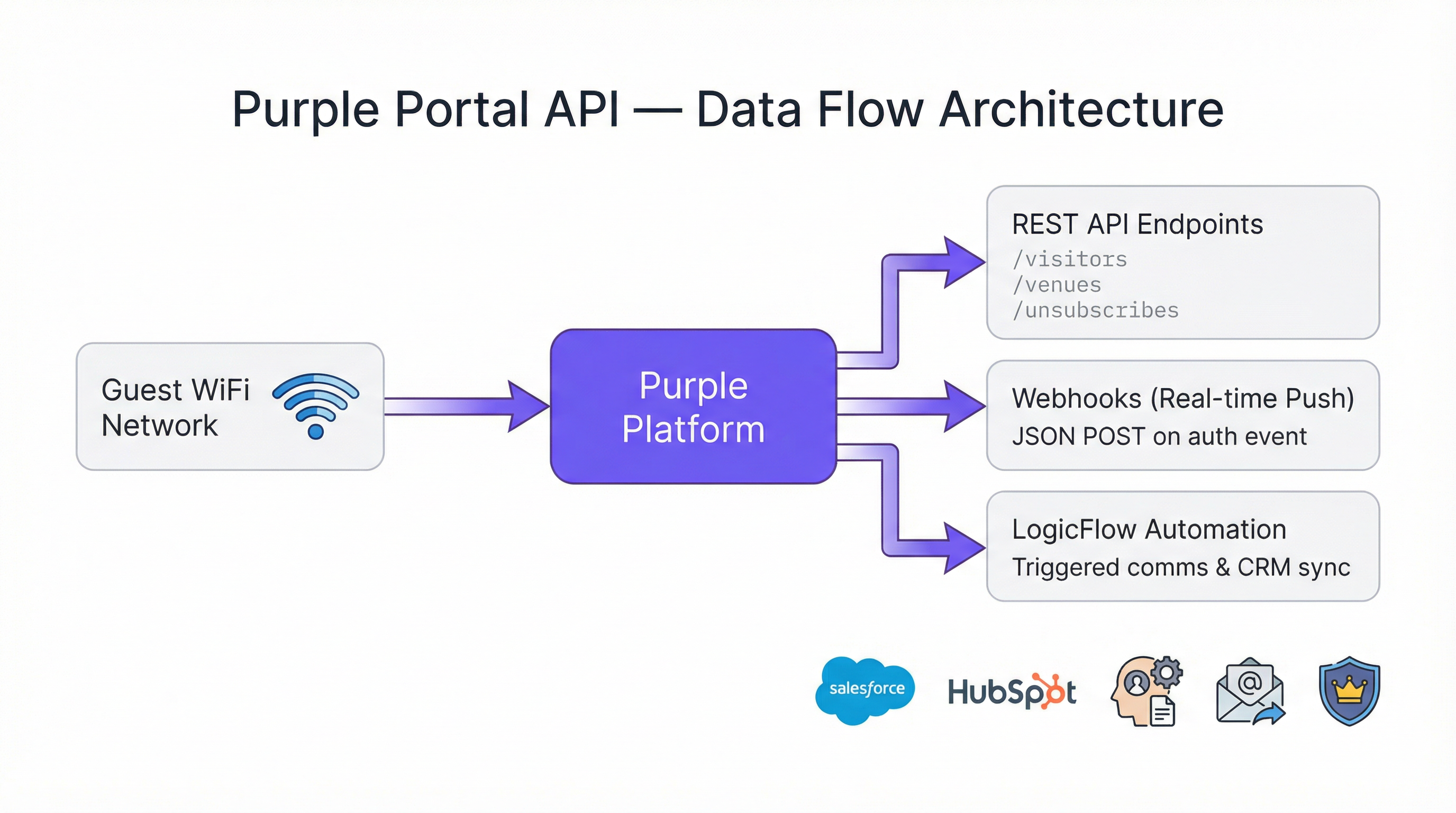
La API de Portal Company expone tres categorías principales de endpoints con las que los equipos de TI interactuarán de forma habitual.
| Endpoint | Método | Propósito |
|---|---|---|
/visitors |
GET | Recuperar perfiles de visitantes invitados, incluidos datos de contacto, datos demográficos e historial de visitas |
/venues |
GET | Recuperar datos a nivel de recinto y metadatos de configuración |
/unsubscribes |
GET | Recuperar una lista de usuarios que se han dado de baja de las comunicaciones de marketing |
Todos los endpoints devuelven datos en formato JSON. El endpoint visitors es el más utilizado, ya que expone toda la riqueza de los datos del perfil del invitado recopilados durante el proceso de autenticación del Captive Portal. Esto incluye nombre, apellidos, dirección de correo electrónico, sexo, fecha de nacimiento, número de teléfono móvil, código postal, proveedor de autenticación (por ejemplo, formulario de registro, inicio de sesión social), recuento de visitas por recinto y cualquier campo personalizado configurado en la página de inicio.
Límites de tasa (Rate Limits)
Una ventaja arquitectónica clave de la Purple Portal API es que no hay límites de tasa (rate limits). La plataforma está diseñada para soportar cualquier volumen de solicitudes o transacciones, lo que la hace adecuada para implementaciones a gran escala donde los scripts pueden necesitar procesar miles de registros de recintos o millones de perfiles de visitantes. Esto elimina una restricción común que complica el diseño de integración con otras plataformas y suprime la necesidad de limitar las solicitudes (throttling) o de implementar lógica de retroceso (back-off) en el código de su cliente.
Patrones de integración: Pull frente a Push
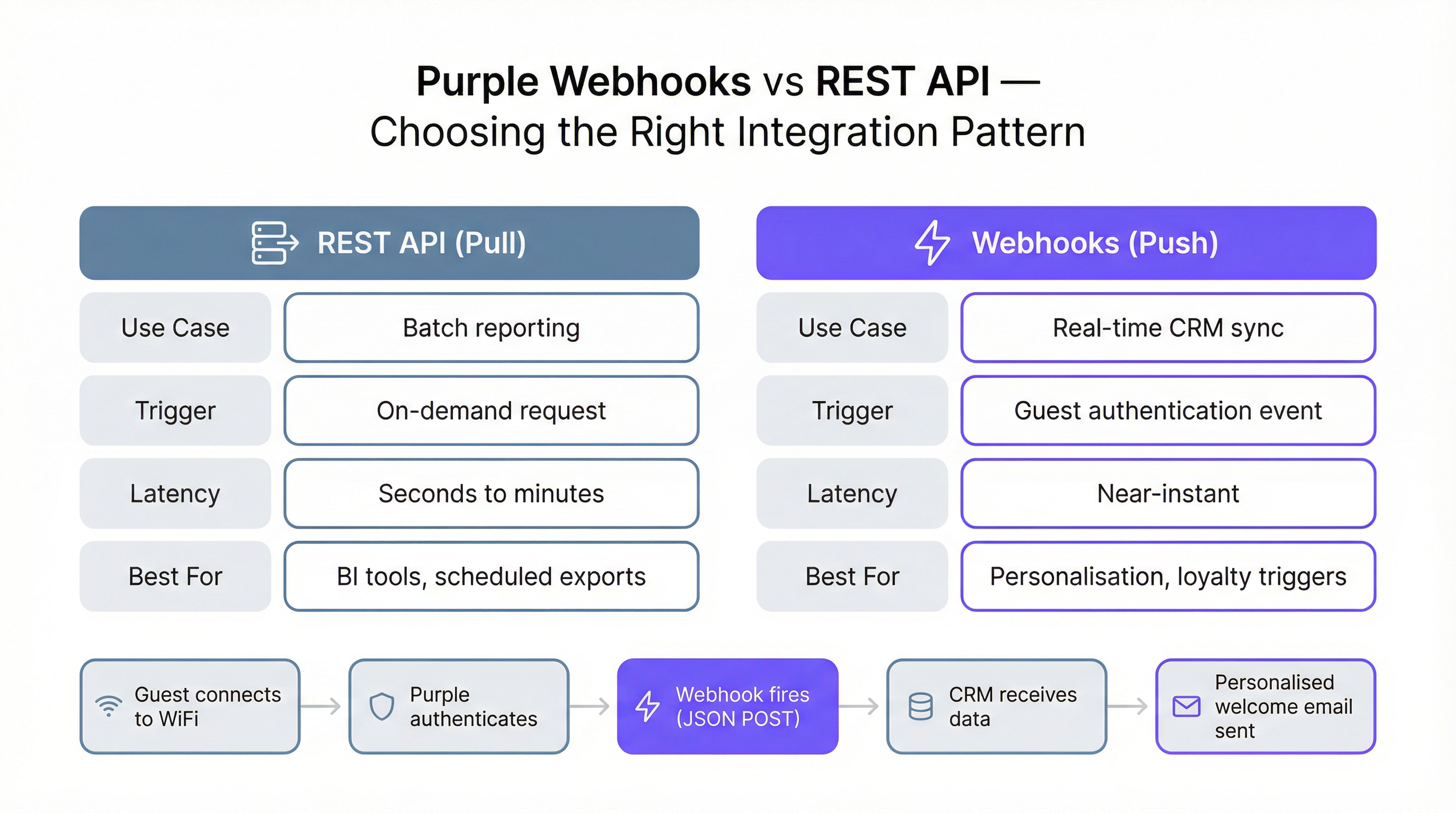
La Purple WiFi API admite dos patrones de integración fundamentalmente diferentes, cada uno adecuado para distintos casos de uso. Entender qué patrón aplicar en un escenario determinado es la decisión arquitectónica más importante que tomará.
El patrón pull de la API REST implica que su sistema realice solicitudes bajo demanda o programadas a los endpoints de la API para recuperar datos. Este es el enfoque correcto para el procesamiento por lotes (batch), la elaboración de informes y la inteligencia empresarial. Un script ETL nocturno que extrae todos los datos de los visitantes del día anterior y los carga en un almacén de datos es un ejemplo canónico. El patrón pull le otorga un control total sobre cuándo y cuántos datos recupera.
El patrón push mediante Webhook implica que Purple envía datos a su sistema en el momento en que ocurre un evento específico; en concreto, cuando un invitado se autentica en la red WiFi. Su sistema debe exponer un endpoint HTTP de acceso público y protegido por SSL (un 'listener' o receptor) que pueda recibir y procesar estos payloads POST en JSON. El patrón Webhook es la opción correcta para cualquier caso de uso que requiera datos casi en tiempo real, como activar un mensaje de bienvenida personalizado, actualizar el estado de 'última vez visto' de un cliente en un CRM o notificar a un gerente de hostelería que ha llegado un invitado VIP.
Estructura del payload del Webhook
El payload JSON entregado por un Webhook de Purple está estructurado en cuatro objetos principales, cada uno de los cuales proporciona una dimensión diferente de contexto para el evento de autenticación.
| Objeto | Campos clave | Descripción |
|---|---|---|
client |
mac, userAgent |
Identificadores a nivel de dispositivo |
company |
id, name, uniqId |
Detalles de la cuenta de su empresa |
venue |
id, name, latitude, longitude |
La ubicación específica donde se produjo la autenticación |
session |
authenticationTime |
Marca de tiempo ISO 8601 del evento de autenticación |
user |
email, firstName, lastName, gender, provider, visitCountForVenues, customFields |
Datos completos del perfil del invitado |
El objeto user.visitCountForVenues es especialmente valioso para los operadores con múltiples sedes. Proporciona un recuento de visitas por recinto junto con las marcas de tiempo firstVisit y lastVisit, lo que le permite identificar a los visitantes primerizos frente a los clientes habituales y leales en el momento de la autenticación, sin necesidad de realizar llamadas adicionales a la API.
Guía de implementación
Requisitos previos y configuración
El acceso a la Portal API requiere una licencia Engage. Una vez obtenida la licencia, genere su API Key desde la configuración del portal de Purple. Para el desarrollo y las pruebas iniciales, Postman es la herramienta recomendada; Purple proporciona una guía de configuración dedicada para establecer las variables de entorno y los encabezados de solicitud correctos. También hay disponible un archivo de demostración en PHP para los equipos que prefieran un punto de partida de scripting del lado del servidor.
Configuración de una integración de Webhook
La implementación de una integración de Webhook consta de cinco pasos. Primero, cree e implemente su endpoint receptor (listener) en una URL de acceso público y protegida por SSL. Una función sin servidor (AWS Lambda, Azure Functions o Google Cloud Functions) es una opción arquitectónicamente sólida: se escala automáticamente, incurre en un coste mínimo a volúmenes bajos y maneja solicitudes simultáneas sin configuración. Segundo, valide la URL del receptor en el portal de Purple navegando a Management > Venues > Webhooks. Purple enviará una solicitud de prueba para confirmar que el endpoint es accesible y devuelve el encabezado wifiWebhookListener: 1 requerido. Tercero, cree o edite un LogicFlow en el portal y añada un Webhook Action Node, seleccionando su URL validada. Cuarto, asegúrese de que el LogicFlow esté configurado en estado 'Online'. Quinto, adjunte el LogicFlow al Access Journey correspondiente. A partir de este momento, cada autenticación de invitado en ese trayecto activará su Webhook.
Gestión de reintentos e idempotencia
Su receptor debe estar diseñado para manejar las realidades de los sistemas distribuidos. Purple reintentará la entrega de un Webhook fallido después de tres horas si su receptor no responde (el tiempo de espera supera los 10 segundos) o devuelve un estado de error. Esto significa que su receptor puede recibir el mismo evento varias veces. Además, una sola visita de un invitado puede desencadenar múltiples eventos de autenticación; por ejemplo, cuando un dispositivo se vuelve a conectar después de que se bloquee la pantalla, o cuando un usuario se desplaza entre puntos de acceso. Por lo tanto, su lógica de procesamiento debe ser idempotente: aplicar el mismo evento dos veces debería producir el mismo resultado que aplicarlo una vez. Un patrón de implementación común es comprobar si una acción (como enviar un correo electrónico de bienvenida) ya se ha realizado para un ID de usuario determinado dentro de un margen de tiempo definido antes de ejecutarla.
Mejores prácticas
Varios principios deben guiar cualquier implementación en producción de la Purple Portal API. Implemente siempre en la última versión de la API (v1.7) y actualice las rutas de sus URL y la lógica de análisis de respuestas cuando se publiquen nuevas versiones. Trate su API Key como una credencial confidencial: almacénela en un gestor de secretos (como AWS Secrets Manager o Azure Key Vault) en lugar de en el código fuente o en variables de entorno en sistemas compartidos. Para los receptores de Webhook, implemente un registro estructurado (logging) de cada payload entrante y respuesta para facilitar la depuración y las pistas de auditoría. Respete los campos unsubscribed y unsubscribedDate en el objeto de usuario; procesar acciones de marketing dirigidas a usuarios que se han dado de baja constituye una infracción del GDPR. Por último, pruebe su integración frente a toda la gama de casos extremos: usuarios sin dirección de correo electrónico, usuarios con campos personalizados nulos y eventos de autenticación que llegan fuera de orden cronológico.
Resolución de problemas y mitigación de riesgos
El modo de fallo más común en una integración de Webhook es un receptor lento o no disponible. Si el endpoint falla sistemáticamente a la hora de responder en un plazo de 10 segundos, Purple desactivará automáticamente el Webhook tras un periodo prolongado de falta de respuesta, lo que requerirá una reverificación manual en el portal. Para mitigar este riesgo, implemente un endpoint de comprobación de estado (health check) en el mismo servidor que su receptor e inclúyalo en la monitorización de su infraestructura. Asegúrese de que su receptor realice solo un procesamiento sincrónico mínimo antes de devolver una respuesta 200 OK; descargue cualquier cálculo pesado o llamadas a la API posteriores en una cola asíncrona.
Para las integraciones de la API REST, el riesgo principal es la obsolescencia de los datos en los sistemas posteriores si el trabajo pull programado falla de forma silenciosa. Implemente alertas en sus scripts ETL para notificar al equipo de operaciones si una ejecución falla o no produce resultados de forma inesperada. Al migrar de la API v1.6.2 a la v1.7, audite todo el código que haga referencia al campo unsubscribed y al endpoint Unsubscribes, ya que el nombre de la propiedad se corrigió de unsubcribers a unsubscribers en la v1.7.
ROI e impacto comercial
El caso de negocio para la integración con la Purple Portal API está bien consolidado en múltiples sectores verticales. En el sector de la hostelería, los hoteles que utilizan integraciones de CRM activadas por Webhook informan de mejoras significativas en las tasas de apertura de correos electrónicos para comunicaciones personalizadas en comparación con las campañas de difusión genéricas, ya que el mensaje se entrega en el momento de máxima relevancia: cuando el invitado se encuentra físicamente en las instalaciones. En el sector minorista, conectar los datos de la red WiFi para invitados a un programa de fidelización permite a los operadores identificar y recompensar a los visitantes de alta frecuencia, aumentando el gasto medio y las tasas de visitas repetidas. Para grandes recintos públicos y centros de conferencias, los análisis impulsados por la API proporcionan los datos granulares de afluencia necesarios para justificar las valoraciones de patrocinio y optimizar la ubicación de las concesiones.
La ausencia de límites de tasa en la Purple WiFi API significa que el coste de integración se escala con su infraestructura, no con el volumen de datos que procesa. Para una cadena minorista nacional que procesa cientos de miles de autenticaciones diarias, esto supone una ventaja material sobre las plataformas que cobran por llamada a la API o imponen límites de rendimiento. Por lo tanto, el coste total de propiedad de una integración de la API de Purple bien diseñada es principalmente el coste de desarrollo único y el coste de infraestructura continuo del receptor, los cuales suelen recuperarse durante el primer trimestre solo gracias a la mejora de las tasas de conversión de marketing.

Casos de estudio
Caso de estudio 1: Hostelería — Whitbread Group
Whitbread, la mayor empresa de hoteles y restaurantes del Reino Unido, opera miles de puntos de acceso WiFi para invitados en sus instalaciones de Premier Inn y restaurantes. Al integrar la Purple Portal API con su plataforma CRM, el grupo pudo crear un perfil de invitado unificado que combinaba los datos de reservas online con el comportamiento de las visitas físicas capturado en el Captive Portal de la red WiFi. La integración del Webhook se activa en cada autenticación de un invitado, enriqueciendo el registro del CRM con la última marca de tiempo de la visita, la ubicación del recinto y la información del dispositivo. Esto permite al equipo de marketing segmentar las audiencias por novedad, frecuencia y ubicación, y activar campañas de reactivación altamente personalizadas. El resultado técnico clave fue una reducción del tiempo transcurrido entre la llegada de un invitado y su entrada en un proceso de marketing activo, pasando de 24 horas (bajo el modelo anterior de sondeo por lotes) a menos de 60 segundos.
Caso de estudio 2: Retail — Minorista de moda con múltiples sedes
Un minorista de moda nacional con más de 80 tiendas implementó la Purple Portal API para abordar una brecha crítica en su estrategia de datos de clientes: tenían sólidos datos de comercio electrónico, pero prácticamente ninguna información sobre el comportamiento de los visitantes en la tienda. Al conectar la API de la red WiFi para invitados de Purple a su almacén de datos existente a través de un proceso ETL nocturno, crearon por primera vez una visión omnicanal del cliente. Se consultó el endpoint /visitors para cada tienda todas las noches, y los datos se unieron a los registros de transacciones de comercio electrónico utilizando la dirección de correo electrónico como clave común. En tres meses, el equipo de análisis había identificado que los clientes que se conectaban a la red WiFi de la tienda tenían un valor medio de pedido un 34 % mayor en su siguiente compra online, lo que proporcionó un caso de negocio convincente para seguir invirtiendo en la experiencia digital en la tienda. La integración no requirió cambios en la infraestructura de comercio electrónico existente, lo que demuestra la naturaleza de baja fricción del patrón pull de la API REST.
Caso de estudio 3: Eventos — Centro de conferencias
Un importante centro de conferencias del Reino Unido utilizó la Purple Portal API para proporcionar a los patrocinadores datos de afluencia verificados por primera vez. Anteriormente, los informes de los patrocinadores se basaban en recuentos manuales y escaneos de acreditaciones, lo que requería mucho trabajo y era inexacto. Al exponer recuentos de visitantes agregados y anonimizados por zona (asignados a los ID de los recintos en la plataforma de Purple) a través de la API, el equipo de eventos pudo proporcionar a los patrocinadores paneles en tiempo real que mostraban el tiempo de permanencia y el volumen de visitantes en las áreas patrocinadas. Los datos se extraían a través de la API REST cada 15 minutos durante los eventos y se mostraban en un portal de patrocinadores creado a medida. Esta capacidad contribuyó directamente a un aumento del 22 % en las tasas de renovación de patrocinios en el primer año, ya que los patrocinadores ahora podían cuantificar el alcance de sus activaciones con datos de origen (first-party data) verificados.
Key Terms & Definitions
Webhook
An automated mechanism where a server sends a real-time data notification (a push) to another application when a specific event occurs, via an HTTP POST request.
In the Purple context, a Webhook sends a JSON payload with visitor data to your system the moment a guest authenticates on the WiFi network. This is critical for real-time marketing and CRM updates.
REST API
A standardized architectural style for building web services that allows one system to request (or pull) data from another using standard HTTP methods such as GET and POST.
IT teams use the Purple REST API to write scripts that pull bulk visitor and venue data for analysis in business intelligence tools like Power BI or Tableau.
API Key Authentication
A security model where access to an API is granted by providing a unique secret token (the key) with each request, typically in the HTTP Authorization header.
This is simpler than OAuth and ideal for server-to-server integrations. Your scripts must include the valid API Key in the request headers to access Purple's data.
Idempotency
A property of an operation meaning that it can be applied multiple times without changing the result beyond the initial application.
Your Webhook listener should be idempotent. If it receives the same authentication event twice (which can happen due to retries or device reconnections), it should not, for example, send two welcome emails.
JSON (JavaScript Object Notation)
A lightweight, text-based format for data interchange that is easy for humans to read and for machines to parse and generate.
The Purple API and Webhooks deliver all data in JSON format. Your application will need to parse this JSON to extract fields like email, name, and visit count.
LogicFlow
Purple's visual, drag-and-drop tool for creating automated marketing and engagement workflows that can trigger actions based on visitor behaviour and demographics.
You use LogicFlow to define the guest journey. It is where you attach your Webhook, telling the system to fire it when a user reaches the 'Online' state of their access journey.
Captive Portal
The web page that a user sees and must interact with before being granted access to a public WiFi network, typically requiring authentication or data capture.
The Purple platform powers the captive portal, and the data entered by the user on this page (e.g., name, email, custom fields) is what becomes available via the Portal API.
GDPR (General Data Protection Regulation)
A comprehensive data privacy law in the European Union that governs the collection, processing, and storage of personal data of EU residents.
The Purple API provides the tools to build GDPR-compliant integrations, such as respecting the unsubscribed status of a user and enabling data export for subject access requests. The v1.7 API update specifically improved the clarity of the unsubscribed field to support compliance.
ETL (Extract, Transform, Load)
A data integration process that involves extracting data from a source system, transforming it into the required format, and loading it into a destination system such as a data warehouse.
The REST API pull pattern is typically implemented as an ETL process, where data is extracted from Purple's /visitors endpoint, transformed to match the destination schema, and loaded into a CRM or data warehouse.
Case Studies
A 200-room hotel wants to automatically add new guest WiFi users to their Salesforce Marketing Cloud journey and send a welcome email.
- In the Purple Portal, validate a new Webhook URL pointing to a secure endpoint (e.g., a serverless function on AWS Lambda). 2. Create an 'Online' LogicFlow that includes the Webhook node, configured to use the validated URL. 3. Assign this LogicFlow to the hotel's guest WiFi access journey. 4. The serverless function receives the JSON payload on guest authentication, extracts the user's email and name, and makes an API call to Salesforce Marketing Cloud to add the user to the 'New Guest' journey. 5. The function returns a 200 OK response to Purple within the 10-second timeout window.
A retail chain with 50 stores wants to build a central dashboard in Power BI to analyze visitor trends across all locations.
- Create a script (e.g., in Python) that runs on a nightly schedule. 2. The script authenticates to the Purple Portal API using the company's API key. 3. It iterates through each of the 50 venue IDs, making a call to the /visitors endpoint for each to retrieve all visitor data from the previous day. 4. The script transforms and loads this data into a central data warehouse (e.g., Azure SQL or BigQuery). 5. Power BI is connected to the data warehouse to create the cross-venue analytics dashboard.
Scenario Analysis
Q1. A stadium wants to identify VIP season ticket holders when they connect to the WiFi and send a notification to the nearest hospitality manager's dashboard. Which integration pattern should they use and why?
💡 Hint:Consider the required speed of the notification and whether the action is triggered by an event.
Show Recommended Approach
They should use the Webhook (push) pattern. This is a real-time requirement: when the VIP connects, a Webhook fires immediately to a service that looks up the user's email or MAC address against the season ticket holder database. If a match is found, it pushes a notification to the relevant hospitality dashboard. A REST API (pull) pattern would be too slow, as it relies on periodic polling and could introduce delays of minutes or hours.
Q2. You are tasked with creating a daily report of the top 10 most visited venues in your national chain of coffee shops. How would you retrieve the necessary data from Purple?
💡 Hint:Is this a real-time or a batch reporting requirement? What endpoint would you query?
Show Recommended Approach
This is a batch reporting task, so the REST API (pull) pattern is appropriate. A scheduled script would run daily, query the /visitors endpoint for each venue, aggregate the visit counts for the previous day, and then calculate the top 10. There is no need for the near-instant notification provided by Webhooks. The absence of rate limits means all venues can be queried in a single script run without throttling concerns.
Q3. Your Webhook listener endpoint is failing. You check the logs and see a timeout error. What is the most likely cause according to Purple's documentation, and what are the two immediate consequences?
💡 Hint:Think about the performance requirements of a listener and what Purple does when it cannot deliver a payload.
Show Recommended Approach
The most likely cause is that the listener is taking longer than 10 seconds to process the incoming JSON payload and return a 200 OK response. The two immediate consequences are: (1) Purple will stop trying to send the current request and will requeue it for a retry attempt in 3 hours, meaning data delivery is delayed; and (2) if this continues for a prolonged period, Purple will automatically disable the Webhook entirely, requiring manual re-verification in the portal before it can be re-enabled.
Key Takeaways
- ✓The Purple Portal API provides programmatic access to guest WiFi data using simple API Key authentication, with no rate limits.
- ✓It requires an Engage license and currently operates on version v1.7, which improved GDPR compliance through clearer unsubscribed status handling.
- ✓Use the REST API (pull) for batch data exports, ETL processes, and analytics dashboards.
- ✓Use Webhooks (push) for real-time, event-driven actions like CRM syncs, personalised messaging, and loyalty triggers.
- ✓Webhook listeners must be SSL-secured, respond within 10 seconds, and be designed to handle duplicate events idempotently.
- ✓Key use cases span hospitality (real-time CRM enrichment), retail (cross-channel analytics), and events (verified footfall data for sponsors).
- ✓The API enables organizations to transform their WiFi infrastructure from a cost centre into a strategic data asset with a clear, measurable ROI.




