

Mejores prácticas de gestión de SSID para implementaciones en múltiples sedes
This guide provides a technical reference for IT leaders on managing SSIDs in multi-venue deployments. It debunks common myths about SSID count impacting performance and offers actionable best practices for balancing security, user experience, and network manageability across hospitality, retail, and large public venues.
🎧 Listen to this Guide
View Transcript

Resumen ejecutivo
Para los CTO, directores de TI y arquitectos de redes que supervisan empresas con múltiples sedes, la gestión de SSID presenta un desafío persistente: equilibrar la necesidad de un acceso segmentado con el imperativo de mantener un WiFi fiable y de alto rendimiento. Un mito común en el sector sugiere que la implementación de múltiples identificadores de conjuntos de servicios (SSID) degrada inherentemente el rendimiento de la red debido a la sobrecarga de gestión. Esta guía ofrece un análisis técnico exhaustivo y riguroso que desmiente este mito y establece un marco claro para una arquitectura de SSID basada en las mejores prácticas. Demostraremos que, cuando una red se construye sobre una base sólida de diseño de RF profesional y estándares de configuración modernos, el impacto en el rendimiento de los SSID adicionales es insignificante. Los verdaderos culpables de la ralentización de la red son casi siempre la interferencia cocanal, el soporte para velocidades de datos heredadas lentas y una mala planificación de RF. Al implementar una «Regla de tres» estratégica (segmentando el tráfico en redes para invitados, personal e IoT/operaciones) y aprovechar tecnologías como WPA3-Enterprise y las VLAN dinámicas, las organizaciones pueden lograr una seguridad y un cumplimiento normativo sólidos sin sacrificar el rendimiento. Esta guía ofrece recomendaciones prácticas e independientes del proveedor, así como casos de estudio reales, para capacitar a los líderes de TI en el diseño y la gestión de redes inalámbricas escalables y de alto rendimiento que respalden los objetivos empresariales y ofrezcan una experiencia de usuario superior en toda su cartera.
Análisis técnico exhaustivo
El temor a la proliferación de SSID tiene su origen en el concepto de sobrecarga de tramas de baliza (beacon frame overhead). Cada SSID emitido por un punto de acceso (AP) debe enviar periódicamente estas tramas de gestión para anunciar su presencia. Según el estándar IEEE 802.11, las balizas se transmiten aproximadamente cada 100 milisegundos a la velocidad de datos obligatoria más baja para garantizar que incluso los dispositivos más antiguos puedan recibirlas. Aunque esto parezca mucho tráfico, el tiempo de transmisión real consumido es mínimo. Como se muestra en la siguiente infografía, la sobrecarga está muy lejos de las cifras catastróficas que se suelen citar. Incluso con cinco SSID distintos, la sobrecarga total de balizas es poco más de medio punto porcentual del tiempo de transmisión total del canal, un valor que la mayoría de los profesionales de redes considerarían insignificante.
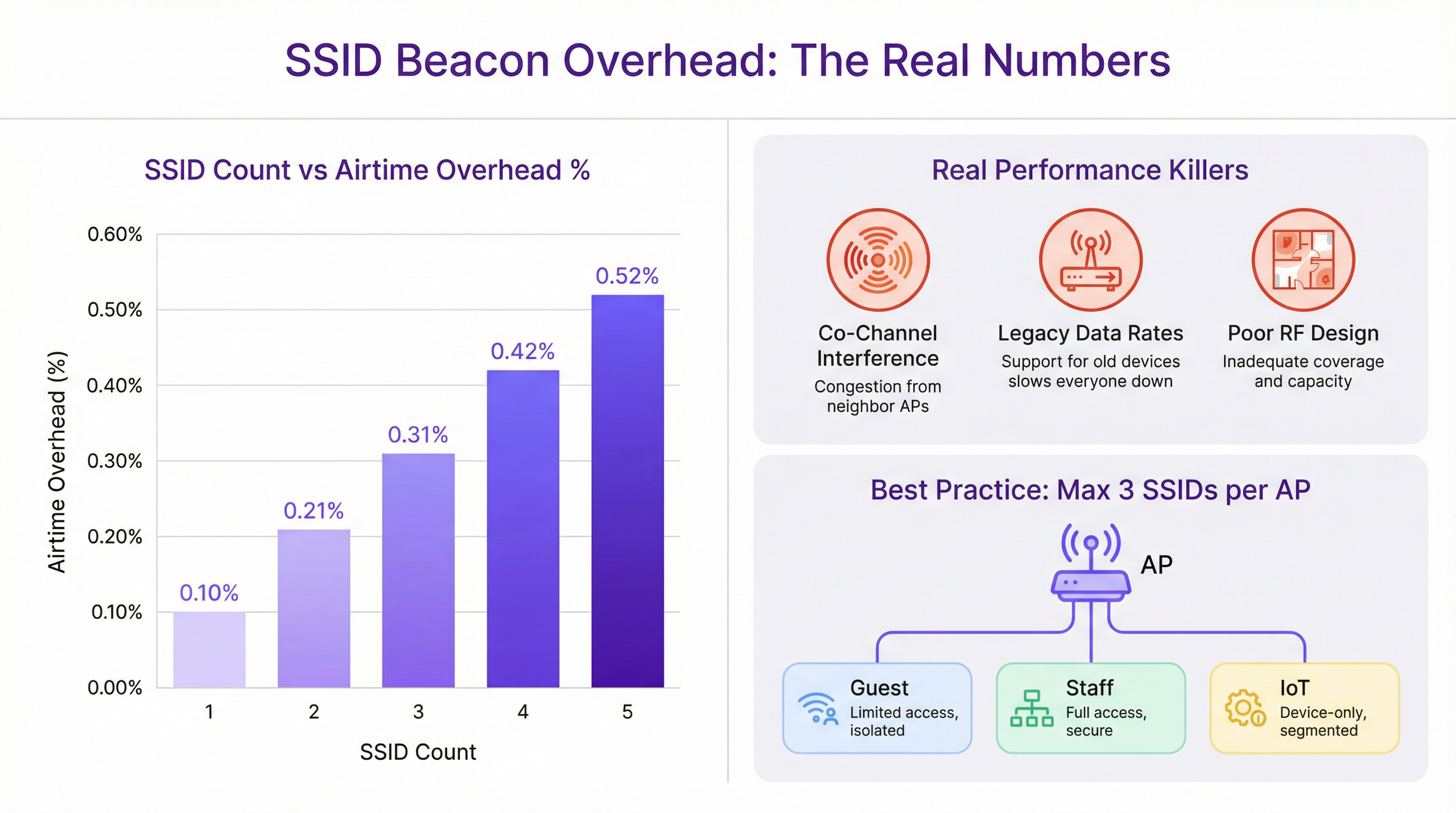
La degradación del rendimiento que a menudo se atribuye a múltiples SSID casi siempre se diagnostica erróneamente. Los verdaderos culpables son fallos de diseño de red más fundamentales:
Interferencia cocanal (CCI): Cuando varios AP muy próximos operan en el mismo canal WiFi, todos deben competir por el mismo tiempo de transmisión. Este efecto de «vecino ruidoso» es la causa más importante de degradación del rendimiento en implementaciones de alta densidad. Es fundamental realizar una planificación de canales adecuada, garantizando que los AP adyacentes se encuentren en canales que no se superpongan (por ejemplo, 1, 6, 11 en la banda de 2,4 GHz).
Velocidades de datos heredadas: Admitir velocidades de datos 802.11b obsoletas (1, 2, 5,5 y 11 Mbps) obliga a que todo el tráfico de gestión, incluidas las balizas, se transmita a un ritmo extremadamente lento. Esto consume una cantidad desproporcionada de tiempo de transmisión. Desactivar estas velocidades heredadas y establecer una velocidad mínima obligatoria de 12 Mbps o superior es un paso de optimización crucial.
Mal diseño de RF: Sin un estudio de cobertura de radiofrecuencia (RF) profesional, la ubicación de los AP es una conjetura. Esto provoca lagunas de cobertura, una CCI excesiva y un rendimiento de itinerancia (roaming) deficiente. Una base de RF sólida es el requisito previo para cualquier red inalámbrica de alto rendimiento, independientemente del número de SSID.
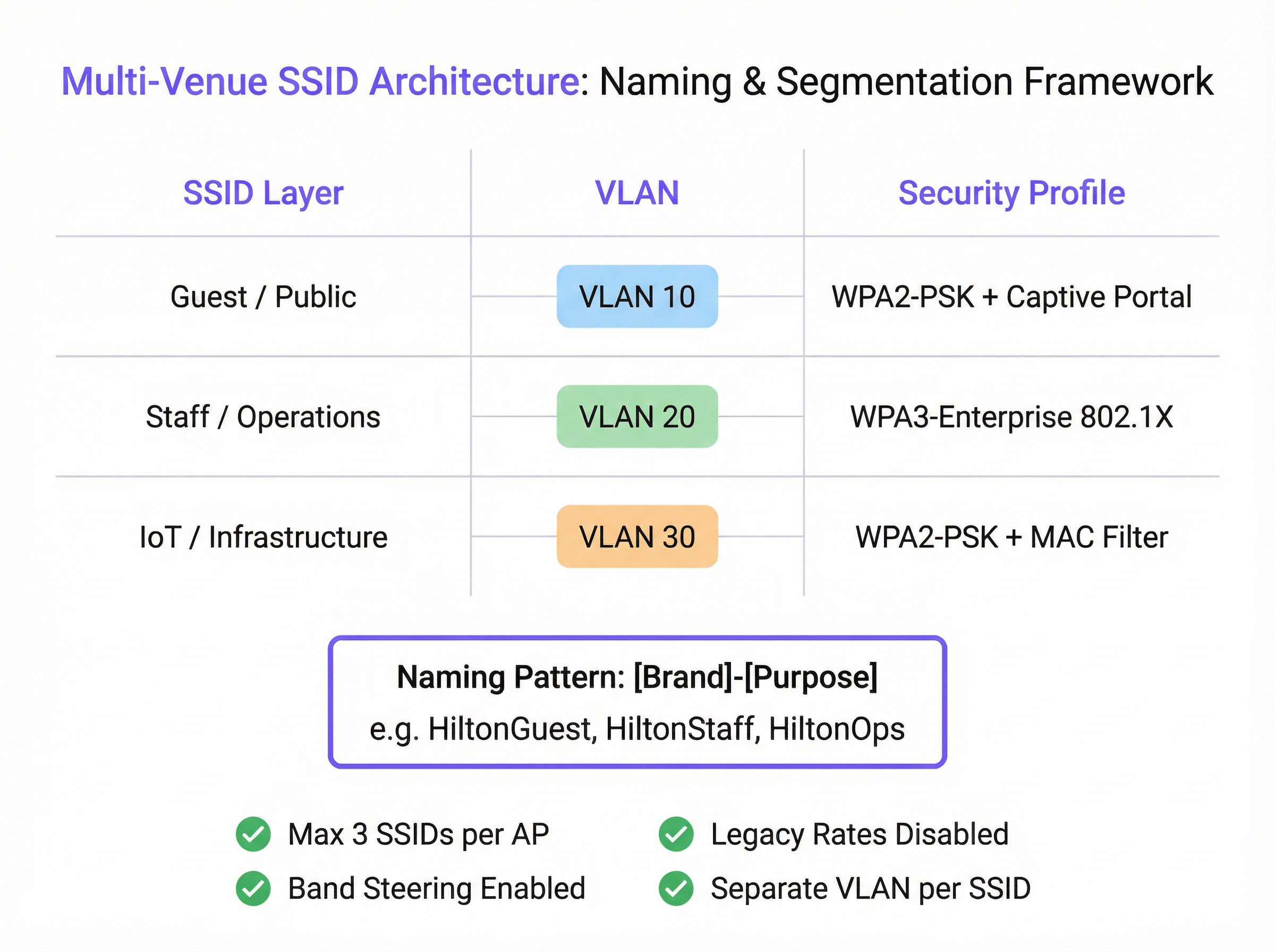
La arquitectura de red moderna proporciona herramientas para lograr la segmentación sin un exceso de SSID. IEEE 802.1X es un estándar de control de acceso a la red basado en puertos que proporciona un mecanismo de autenticación sólido. Cuando un usuario se conecta a un SSID protegido por 802.1X, un servidor RADIUS puede autenticar sus credenciales y asignarlo dinámicamente a una VLAN específica con su correspondiente política de seguridad. Esto permite que un único SSID seguro (por ejemplo, «Marca-Personal») atienda a múltiples roles de usuario con diferentes derechos de acceso, lo que reduce drásticamente la necesidad de tener SSID separados para cada departamento o grupo de usuarios.
Guía de implementación
La implementación de una arquitectura de SSID escalable y manejable en múltiples sedes requiere un proceso estandarizado y repetible. Los siguientes pasos proporcionan un marco independiente del proveedor.
Paso 1: Defina sus niveles de acceso Antes de configurar cualquier hardware, clasifique todos los requisitos de acceso a la red en distintos niveles. Para la mayoría de las organizaciones con múltiples sedes, esto dará como resultado tres niveles principales:
- Invitados/Público: Para visitantes, clientes y el público en general. El acceso suele estar limitado en tiempo, restringido en ancho de banda y aislado de todas las redes internas.
- Personal/Operaciones: Para empleados y contratistas de confianza. Este nivel proporciona acceso seguro a recursos internos, aplicaciones corporativas y plataformas de comunicación.
- IoT/Infraestructura: Para dispositivos «sin interfaz» (headless) como terminales de punto de venta (POS), señalización digital, sistemas HVAC y cámaras de seguridad. Esta red debe estar muy restringida, con el tráfico limitado a las funciones operativas esenciales.
Paso 2: Diseñe el esquema de VLAN e IP Cada nivel de acceso debe asignarse a una VLAN dedicada para garantizar una segmentación completa de la red. Asigne un ID de VLAN único y una subred IP correspondiente para cada SSID en toda su infraestructura. Por ejemplo:
- SSID de invitados -> VLAN 10 -> 10.10.0.0/16
- SSID de personal -> VLAN 20 -> 10.20.0.0/16
- SSID de IoT -> VLAN 30 -> 10.30.0.0/16 Esta separación lógica es fundamental para la seguridad y el cumplimiento de normativas como PCI DSS.
Paso 3: Configure los perfiles de seguridad
- SSID de invitados: Utilice WPA2-PSK con un Captive Portal. El portal es esencial para la autenticación de usuarios, la presentación de términos y condiciones (para el cumplimiento del GDPR) y la creación de oportunidades de interacción de marketing. La plataforma de Purple destaca por ofrecer esta funcionalidad.
- SSID de personal: Implemente WPA3-Enterprise con autenticación 802.1X. Este es el estándar de oro para la seguridad inalámbrica corporativa. Requiere que cada usuario tenga credenciales únicas, lo que elimina los riesgos de las contraseñas compartidas y permite la responsabilidad por usuario.
- SSID de IoT: Utilice WPA2-PSK con una contraseña segura y compleja. Siempre que sea posible, añada una capa adicional de seguridad implementando una lista blanca de direcciones MAC, garantizando que solo los dispositivos preaprobados puedan conectarse.
Paso 4: Estandarice la nomenclatura de los SSID
Adopte una convención de nomenclatura lógica y coherente en todas las sedes para facilitar una itinerancia fluida y simplificar la gestión. Un patrón recomendado es [NombreDeMarca]-[Propósito]. Por ejemplo: Arena-Guest, Arena-Staff, Arena-POS. Esto evita la confusión del usuario y garantiza que los dispositivos puedan conectarse automáticamente a la red correcta independientemente de la ubicación.
Mejores prácticas
- La regla de tres: Como principio rector, intente emitir un máximo de tres SSID por punto de acceso. Esto proporciona la segmentación necesaria para la mayoría de los casos de uso y, al mismo tiempo, mantiene el tráfico de gestión al mínimo.
- Desactive las velocidades heredadas: En su controlador inalámbrico, desactive todas las velocidades de datos 802.11b. Establezca la velocidad de datos obligatoria más baja en 12 Mbps o superior para garantizar que las tramas de gestión se transmitan de forma eficiente.
- Habilite el Band Steering (dirección de banda): Configure sus AP para animar activamente a los clientes de doble banda a conectarse a las bandas de 5 GHz y 6 GHz, que están menos congestionadas, reservando la banda de 2,4 GHz para los dispositivos heredados que la requieran.
- Disponibilidad de SSID por AP: No emita todos los SSID desde todos los AP. Es posible que solo se necesite una red de invitados en las zonas públicas, mientras que una red IoT para los escáneres del almacén solo sea necesaria en la zona de almacenamiento. Utilice la configuración de SSID por AP o basada en grupos para limitar las emisiones únicamente a los lugares donde sean necesarias.
Resolución de problemas y mitigación de riesgos
- Síntoma: Rendimiento lento en la red del personal tras implementar un nuevo SSID de invitados.
- Causa probable: No es el SSID de invitados en sí, sino la interferencia cocanal subyacente o el soporte para velocidades de datos heredadas. La carga adicional de clientes de la red de invitados simplemente ha expuesto una debilidad preexistente.
- Mitigación: Realice una auditoría de RF para validar su plan de canales. Utilice un analizador WiFi para comprobar si hay velocidades de datos heredadas y desactívelas en el controlador de red.
- Síntoma: Los dispositivos se desconectan con frecuencia o no logran realizar la itinerancia entre los AP.
- Causa probable: Nombres de SSID o configuraciones de seguridad incoherentes entre los AP. Los niveles de potencia desajustados entre AP adyacentes también pueden causar problemas de «clientes pegajosos» (sticky clients).
- Mitigación: Asegúrese de que el nombre del SSID, el tipo de seguridad y el etiquetado de VLAN sean idénticos en todos los AP que emiten esa red. Utilice las funciones de gestión de RF de su controlador inalámbrico para equilibrar los niveles de potencia de los AP.
ROI e impacto empresarial
Una estrategia de SSID bien diseñada ofrece un ROI significativo más allá de la conectividad básica. Al segmentar el tráfico de invitados a través de una plataforma como Purple, los recintos pueden capturar valiosos datos de afluencia, comprender el comportamiento de los visitantes y crear campañas de marketing dirigidas, convirtiendo un centro de costes en un motor de ingresos. Para un hotel de 200 habitaciones, la capacidad de interactuar con los huéspedes a través de un Captive Portal de marca puede generar un aumento medible en las inscripciones al programa de fidelización y en las reservas directas. Para una cadena minorista, comprender los tiempos de permanencia y la frecuencia de las visitas en múltiples tiendas proporciona una potente inteligencia empresarial. El acceso seguro y basado en roles para el personal mejora la eficiencia operativa, mientras que una red adecuadamente aislada para los sistemas de pago es un componente innegociable del cumplimiento de la normativa PCI DSS, lo que mitiga importantes riesgos financieros y de reputación.
Key Terms & Definitions
SSID (Service Set Identifier)
The public name of a WiFi network. It is a human-readable string of up to 32 characters that differentiates one wireless network from another.
IT teams configure SSIDs to provide tailored network access for different user groups, such as 'Guest' or 'Staff'. Consistent naming is crucial for roaming in multi-venue deployments.
Beacon Frame
A management frame sent periodically by an access point to announce its presence and provide network information. Each SSID has its own stream of beacons.
The fear of 'beacon overhead' is often cited as a reason to limit SSID count, but in a well-configured network, their performance impact is negligible.
VLAN (Virtual Local Area Network)
A method of creating logically separate networks on the same physical infrastructure. Traffic on one VLAN is isolated from traffic on another.
VLANs are the primary tool for segmenting different user groups (e.g., Guest vs. Staff) to enhance security and ensure compliance with standards like PCI DSS.
IEEE 802.1X
An IEEE standard for port-based Network Access Control (PNAC). It provides an authentication mechanism for devices wishing to attach to a LAN or WLAN.
This is the foundation of enterprise-grade WiFi security. IT teams use 802.1X with a RADIUS server to grant network access based on individual user credentials, rather than a shared password.
RADIUS (Remote Authentication Dial-In User Service)
A networking protocol that provides centralized Authentication, Authorization, and Accounting (AAA) management for users who connect and use a network service.
In an 802.1X deployment, the RADIUS server is what checks the user's credentials and tells the access point which VLAN and security policy to assign to that user.
Band Steering
A technique used by dual-band access points to encourage capable client devices to connect to the less-congested 5 GHz or 6 GHz frequency bands.
Network architects enable band steering to improve overall network performance by balancing the client load across available frequency bands, freeing up the crowded 2.4 GHz band.
WPA3-Enterprise
The latest generation of WiFi security for enterprise networks, combining the robust authentication of 802.1X with stronger cryptographic protocols.
For any new deployment, CTOs should mandate WPA3-Enterprise for all internal and staff networks to ensure the highest level of security and future-proof the infrastructure.
Captive Portal
A web page that is displayed to newly connected users of a WiFi network before they are granted broader access to network resources.
Venue operators use captive portals on guest networks to present terms of service, capture user data for marketing (with consent), and display branding, often managed through a platform like Purple.
Case Studies
A 200-room hotel needs to provide WiFi for guests, staff, and a new deployment of in-room smart TVs (IoT). They are concerned about performance and PCI DSS compliance for their front-desk payment terminals.
Implement a three-SSID strategy. 1. Guest SSID (HotelGuest): WPA2-PSK with a captive portal on VLAN 10. Apply bandwidth limits per user. 2. Staff SSID (HotelStaff): WPA3-Enterprise with 802.1X on VLAN 20, authenticating against the hotel's directory service. 3. IoT SSID (HotelIoT): WPA2-PSK with a complex key and MAC filtering on VLAN 30 for the smart TVs. The front-desk terminals should be on a separate, wired VLAN and completely isolated from all wireless networks to ensure PCI DSS compliance.
A retail chain with 50 stores wants to standardize its WiFi. They need to support corporate users, store associates with handheld scanners, and a public guest network. Centralized management is key.
Deploy a cloud-managed wireless solution. Use a standardized three-SSID template pushed to all stores. 1. Guest SSID (ShopFreeWiFi): Captive portal on VLAN 100. 2. Staff SSID (ShopStaff): 802.1X on VLAN 110, allowing corporate users and store associates to authenticate with their network credentials. Use RADIUS to assign store associates to a more restrictive security policy. 3. POS SSID (ShopPOS): WPA2-PSK on VLAN 120, with MAC filtering for the handheld scanners and POS devices. Use per-AP SSID availability to ensure the POS SSID is only broadcast in secure staff areas.
Scenario Analysis
Q1. You are taking over a network for a conference center that has 12 different SSIDs, one for each meeting room. Users complain of frequent disconnects when moving between rooms. What is the most likely cause and your first corrective action?
💡 Hint:Consider how client devices handle roaming between access points.
Show Recommended Approach
The most likely cause is the use of unique SSIDs for each room, which breaks client roaming. The first action is to consolidate these into a single 'Conference-Guest' SSID broadcast from all APs. This allows devices to roam seamlessly. Further segmentation for different events can be handled with different pre-shared keys or by using a captive portal with event-specific access codes.
Q2. A stadium is deploying a new high-density WiFi 6E network. They want to provide access for fans, press, and operational staff. How would you structure the SSIDs, and what key feature of the APs would you leverage heavily?
💡 Hint:Think about the different frequency bands available and how to manage congestion.
Show Recommended Approach
I would use a three-SSID model: 'Stadium-Fan', 'Stadium-Press', and 'Stadium-Ops'. I would heavily leverage band steering to push as many capable fan and press devices as possible onto the 6 GHz and 5 GHz bands, leaving the 2.4 GHz band for legacy devices and reducing overall network congestion. The 'Stadium-Press' SSID could have a higher QoS priority and a larger per-client bandwidth limit.
Q3. Your CFO is questioning the expense of a professional RF site survey for a new 5-story office building, suggesting you can 'just add more APs if the signal is weak'. How do you justify the investment in a site survey?
💡 Hint:Focus on the risks and hidden costs of not performing a survey.
Show Recommended Approach
I would explain that 'just adding more APs' without a survey is the primary cause of co-channel interference, which cripples network performance. A professional site survey is not about signal strength alone; it's about creating a precise channel and power plan to ensure APs work together, not against each other. The cost of the survey is a fraction of the productivity lost from a poorly performing network and the expense of troubleshooting and remediating it later. It's a foundational investment in network reliability and performance.
Key Takeaways
- ✓The performance impact of multiple SSIDs is negligible; the real culprits are co-channel interference and legacy data rates.
- ✓Adopt the 'Rule of Three': aim for a maximum of three SSIDs per AP (e.g., Guest, Staff, IoT).
- ✓Use VLANs to segment each SSID, creating logically separate and secure networks on the same hardware.
- ✓Secure staff networks with WPA3-Enterprise and 802.1X for robust, per-user authentication.
- ✓Always disable slow, legacy data rates (below 12 Mbps) to improve management traffic efficiency.
- ✓A professional RF site survey is a non-negotiable prerequisite for any high-performing multi-venue WiFi deployment.
- ✓Standardize SSID naming across all venues to ensure seamless client roaming and simplify management.




