

La guía definitiva para la selección de canales WiFi: optimización del rendimiento y prevención de interferencias
This guide provides a comprehensive, step-by-step explanation of how to change WiFi channels on different routers and operating systems. It covers the reasons for changing channels (interference, congestion), how to identify the least congested channels using WiFi analyzer tools (with specific recommendations and screenshots), and the potential impact on network performance. It differentiates itself by offering practical advice for both home and business users, including advanced configurations and troubleshooting tips for common issues.
🎧 Listen to this Guide
View Transcript
Resumen ejecutivo
Para los líderes de TI que gestionan la conectividad en espacios comerciales de alto tráfico, un rendimiento WiFi deficiente no es un simple inconveniente; es un obstáculo directo para los ingresos y la eficiencia operativa. Esta guía proporciona un marco de trabajo autoritativo y procesable para la selección de canales WiFi, yendo más allá de la teoría académica para ofrecer orientación práctica de implementación. Abordamos los desafíos generalizados de la interferencia de radiofrecuencia (RF) y la congestión de canales que degradan el rendimiento y la fiabilidad de la red en entornos densos como hoteles, cadenas minoristas y estadios. La tesis central es que una estrategia de gestión de canales deliberada y basada en datos no es un ajuste opcional, sino un componente fundamental de la arquitectura inalámbrica de nivel empresarial. Al dominar los principios de los canales no superpuestos en la banda de 2,4 GHz, aprovechar estratégicamente los anchos de canal en la banda de 5 GHz y comprender las implicaciones operativas de la Selección Dinámica de Frecuencia (DFS), los arquitectos de red pueden mitigar riesgos, mejorar la experiencia del usuario y maximizar el ROI de su infraestructura inalámbrica. Esta referencia proporciona un análisis técnico exhaustivo, pasos de implementación independientes del proveedor y un análisis del impacto comercial necesarios para justificar y ejecutar un proyecto sólido de optimización de canales.
Análisis técnico exhaustivo
El espectro de radiofrecuencia (RF) es un recurso finito y compartido regido por leyes físicas y dominios regulatorios. Una gestión eficaz de los canales WiFi depende de una comprensión profunda de cómo se asigna este espectro y de las características inherentes de las bandas de frecuencia principales: 2,4 GHz y 5 GHz.
La banda de 2,4 GHz: un carril de servicio saturado
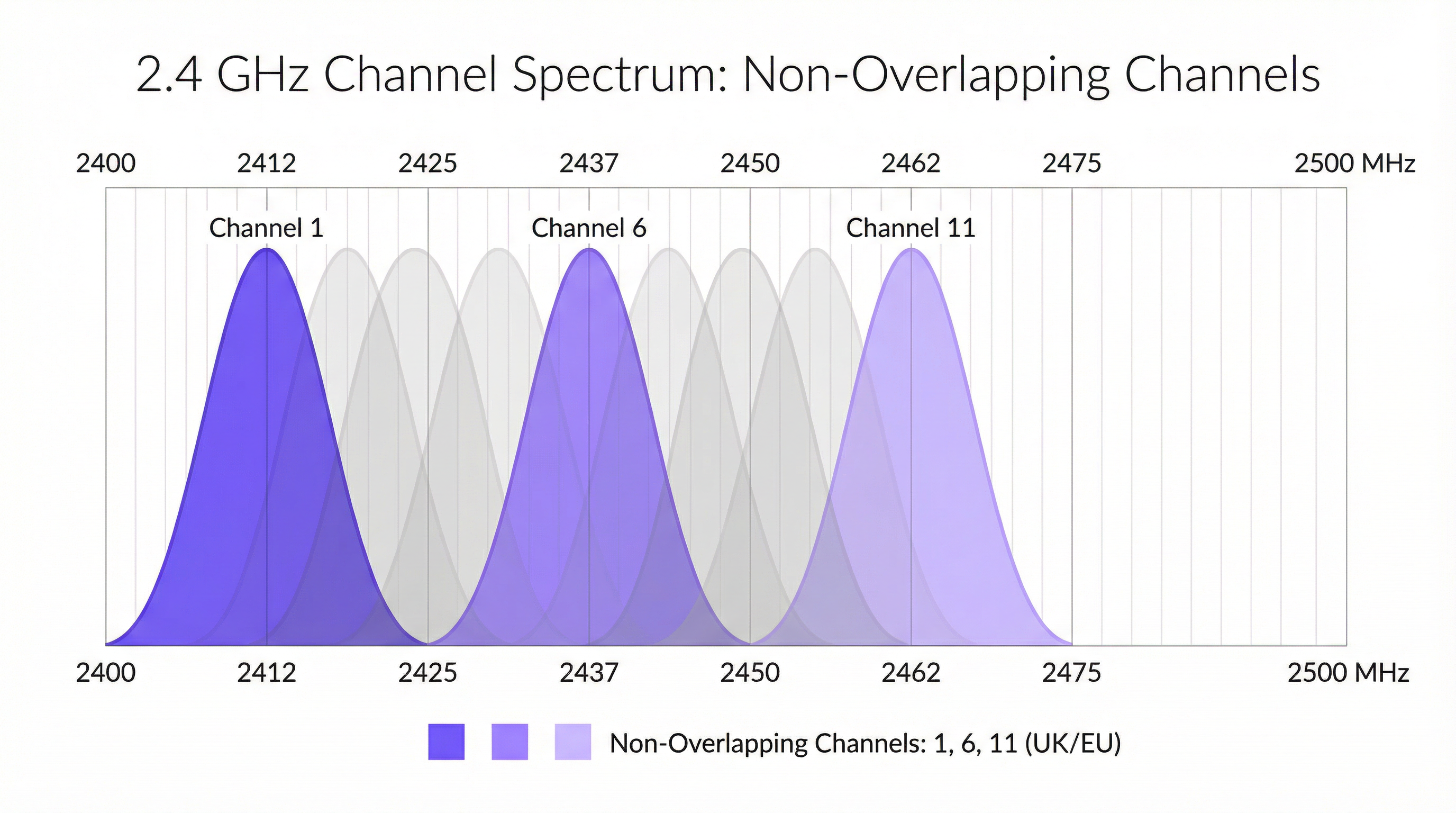
La banda de 2,4 GHz es el caballo de batalla tradicional del WiFi, ofreciendo una excelente propagación de la señal y penetración en paredes. Sin embargo, es notoriamente concurrida y susceptible a interferencias. En el Reino Unido y Europa, esta banda se divide en 13 canales, pero debido a su estrecha separación (5 MHz) y ancho (20-22 MHz), se superponen significativamente. Esto crea interferencias de canal adyacente y cocanal, donde los puntos de acceso (AP) esencialmente gritan unos sobre otros, corrompiendo los paquetes de datos y forzando retransmisiones. La única forma de mitigar esto es utilizar los tres canales que no se superponen: 1, 6 y 11. Esta es una práctica recomendada innegociable para cualquier implementación profesional. Cualquier AP configurado en un canal distinto al 1, 6 u 11 contribuye activamente a la contaminación del espectro.
Además, la banda de 2,4 GHz es un espectro sin licencia, lo que significa que es de uso libre para innumerables dispositivos, incluidos periféricos Bluetooth, hornos microondas, teléfonos inalámbricos y sensores IoT basados en Zigbee. Esta interferencia ajena al WiFi añade otra capa de ruido impredecible que puede degradar gravemente el rendimiento.
La banda de 5 GHz: la autopista de alta velocidad
La banda de 5 GHz es la clave para un WiFi de alto rendimiento. Ofrece significativamente más canales (más de 20 en el Reino Unido) que no se superponen por diseño, y sufre muchas menos interferencias ajenas al WiFi. Esto la convierte en la opción obligatoria para aplicaciones que consumen mucho ancho de banda, como la transmisión de vídeo, la voz sobre IP (VoIP) y las transferencias de archivos grandes. Sin embargo, sus señales de mayor frecuencia tienen un alcance más corto y se atenúan más fácilmente por obstrucciones físicas como paredes y suelos.
Dentro de la banda de 5 GHz, los arquitectos de red también pueden configurar el ancho de canal para aumentar el rendimiento:
- 20 MHz: El ancho de referencia. Ofrece el menor potencial de interferencia y es ideal para entornos de alta densidad donde coexisten muchos AP.
- 40 MHz: Une dos canales de 20 MHz. Duplica la velocidad de datos potencial, pero también duplica la huella del espectro, haciéndolo más susceptible a interferencias.
- 80 MHz: Une cuatro canales de 20 MHz. Ofrece velocidades de datos muy altas, pero solo debe usarse en entornos de RF limpios con baja densidad de AP.
- 160 MHz: Une ocho canales de 2,4 GHz. Aunque es compatible con 802.11ac/ax, rara vez es práctico en entornos empresariales debido a su consumo masivo de espectro.
Selección Dinámica de Frecuencia (DFS)
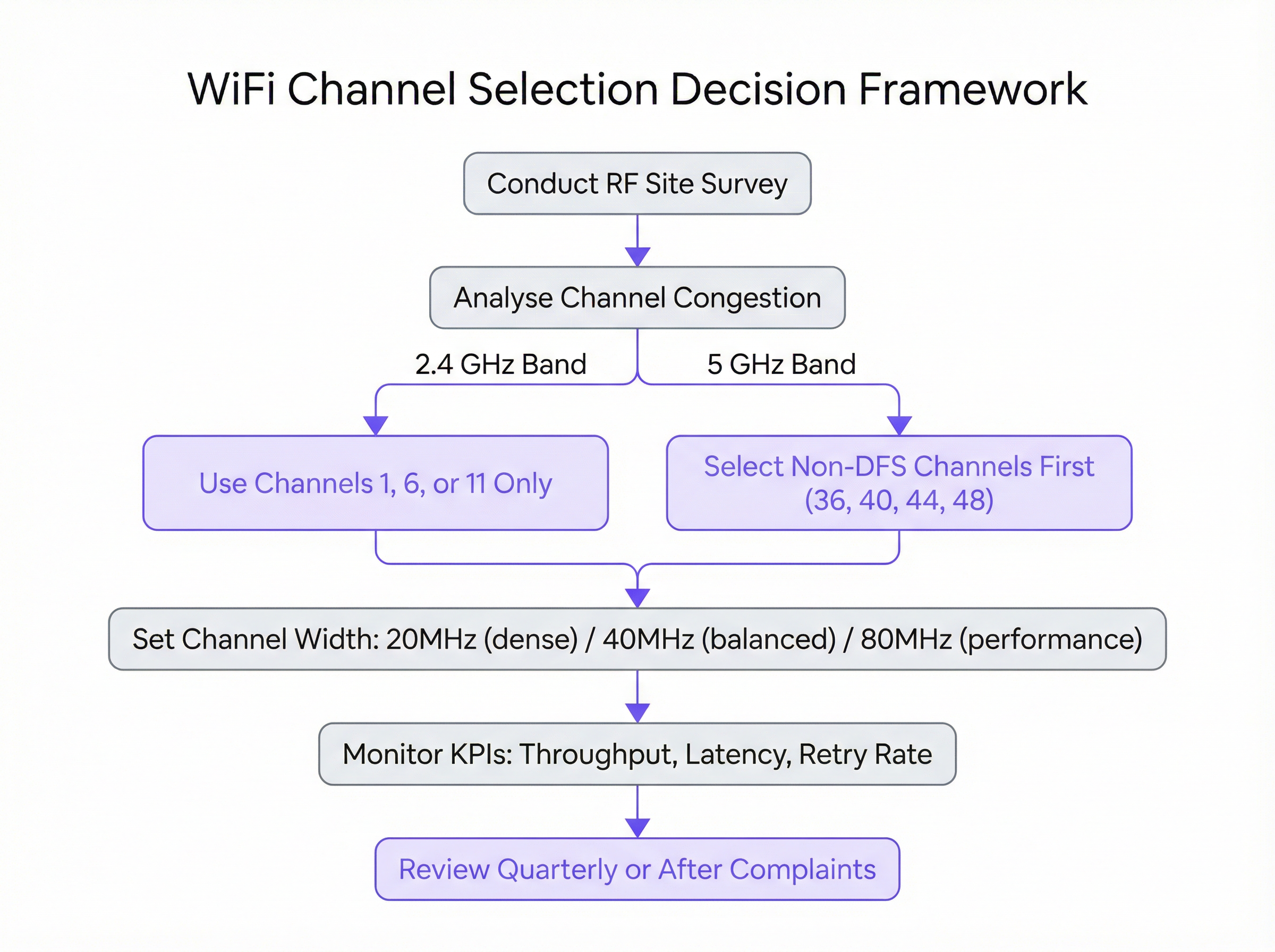
Una consideración crítica en la banda de 5 GHz es la Selección Dinámica de Frecuencia (DFS). Ciertos canales en las bandas UNII-2 y UNII-2e se comparten con sistemas de radar meteorológico y militar. El estándar IEEE 802.11h exige que si un AP detecta una señal de radar en un canal DFS, debe abandonar inmediatamente ese canal durante al menos 30 minutos. Para los usuarios, esto puede causar una caída de conexión abrupta, aunque breve. Si bien los canales DFS abren una gran cantidad de espectro adicional, su uso requiere una planificación cuidadosa. Un estudio de cobertura (site survey) es esencial para determinar el riesgo de eventos de radar en una ubicación específica. Para implementaciones de misión crítica, a menudo es prudente restringir inicialmente los AP a los canales no DFS (por ejemplo, 36, 40, 44, 48) para garantizar la máxima estabilidad.
Guía de implementación
La transición de la teoría a un entorno de producción en vivo requiere un enfoque metódico y con aversión al riesgo. Los siguientes pasos proporcionan un plan de acción independiente del proveedor para ejecutar una actualización del plan de canales.
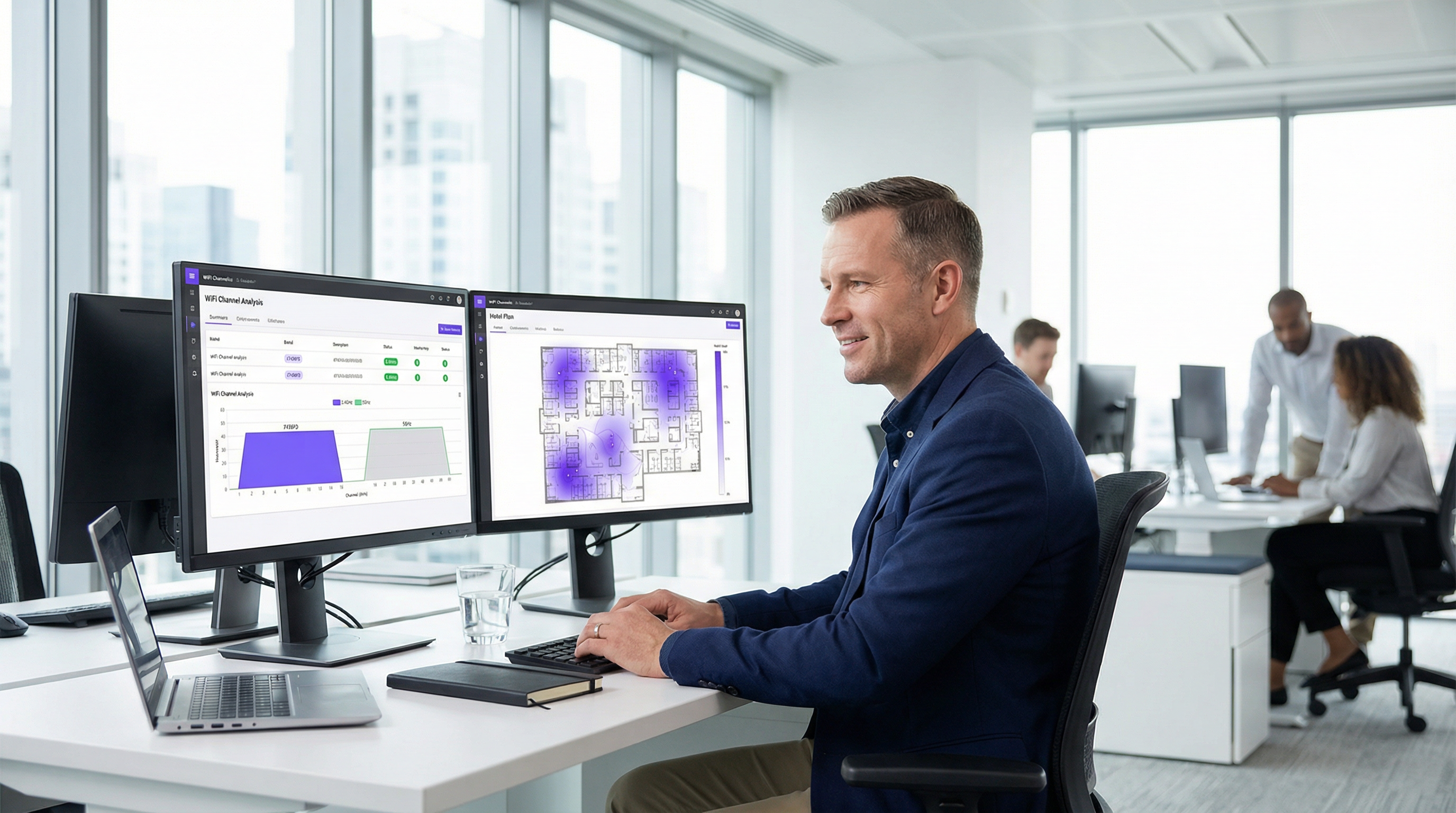
Paso 1: Realizar un estudio de cobertura de RF de referencia Antes de realizar cualquier cambio, debe comprender su entorno de RF actual. Utilizando una herramienta profesional de análisis de WiFi (por ejemplo, Ekahau, NetSpot o las herramientas integradas en su controlador WLAN empresarial), realice un estudio de cobertura exhaustivo durante las horas pico de funcionamiento. El objetivo es mapear todas las redes WiFi existentes, identificando sus canales, intensidades de señal (RSSI) y anchos de canal. Estos datos forman la base empírica de su nuevo plan de canales.
Paso 2: Desarrollar el plan de canales Basándose en el estudio de cobertura, cree un plan de canales formal.
- Para 2,4 GHz: Asigne los canales 1, 6 y 11 en un patrón rotativo en todos sus AP, asegurándose de que no haya dos AP adyacentes que compartan el mismo canal. El objetivo es maximizar la distancia física entre los AP en el mismo canal.
- Para 5 GHz: Comience asignando canales únicos no DFS con un ancho de 20 MHz a cada AP. Si tiene más AP que canales no DFS disponibles, puede comenzar a reutilizar canales, asegurando nuevamente la máxima separación física. Solo considere anchos de 40 MHz u 80 MHz en áreas con baja densidad de AP y una necesidad demostrada de mayor rendimiento.
Paso 3: Implementación por fases Nunca aplique cambios de canal a toda su red simultáneamente. Implemente el nuevo plan de manera gradual, comenzando con un solo AP o un área pequeña de bajo riesgo. Esto le permite validar el impacto del cambio de manera controlada. Si el cambio es exitoso, puede continuar con el siguiente grupo de AP.
Paso 4: Configuración específica del proveedor Aunque los principios son universales, los pasos de configuración específicos varían según el proveedor:
- Cisco Meraki: Vaya a
Wireless > Radio settings. Puede configurar los canales manualmente por AP o configurar el perfilAuto RFpara usar solo los canales designados. - Aruba Central: En
Devices > Access Points > Config > Radios, puede configurar los ajustes deAdaptive Radio Management (ARM)para definir canales y anchos de canal válidos. - Ruckus SmartZone: Utilice
ChannelFlyyBackground Scanningpara la gestión automatizada, o anúlelos por AP para el control manual. - Juniper Mist: Defina una
RF Templateen la pestañaOrganizationpara especificar su configuración de canales y potencia, que el motor de IA de Mist utilizará luego como sus restricciones operativas.

Prácticas recomendadas
Cumplir con las prácticas recomendadas de la industria garantiza una red inalámbrica estable, escalable y de alto rendimiento.
- Priorizar 5 GHz: Dirija agresivamente los dispositivos cliente compatibles hacia la banda de 5 GHz. Esto reserva el espectro de 5 GHz, más limpio y rápido, para los dispositivos que pueden aprovecharlo, dejando la banda de 2,4 GHz para clientes heredados y dispositivos IoT.
- Controlar la potencia de transmisión: Una alta potencia de transmisión no siempre es mejor. Los AP que transmiten a máxima potencia pueden aumentar la interferencia cocanal y hacer que los dispositivos cliente con radios más débiles (como los smartphones) se queden anclados a un AP distante. Utilice el control automático de potencia o ajuste manualmente los niveles de potencia para crear celdas de cobertura del tamaño adecuado.
- Realizar auditorías periódicas: El entorno de RF es dinámico. Aparecen nuevas redes vecinas y la distribución de los edificios cambia. Realice una breve auditoría de RF trimestralmente y un estudio de cobertura completo anualmente para garantizar que su plan de canales siga siendo óptimo.
- Documentar todo: Mantenga una documentación detallada de su plan de canales, incluidos mapas de planta que muestren las ubicaciones de los AP y sus canales asignados. Esto es inestimable para la resolución de problemas y futuras expansiones.
Resolución de problemas y mitigación de riesgos
Incluso con un plan bien diseñado, pueden surgir problemas. El modo de fallo más común después de un cambio de canal es encontrar interferencias imprevistas. Si el rendimiento se degrada, el principal sospechoso es la interferencia intermitente ajena al WiFi. Un analizador de espectro (a diferencia de un analizador de WiFi) puede ayudar a identificar dichas fuentes.
Otro problema común es el del "cliente pegajoso" (sticky client), donde un dispositivo permanece asociado a un AP distante a pesar de tener uno más cercano disponible. Esto suele ser el resultado de una potencia de transmisión configurada demasiado alta en los AP. Reducir la potencia de transmisión del AP puede ayudar a reducir las celdas de cobertura y animar a los clientes a hacer roaming hacia un AP mejor antes.
Para mitigar riesgos, tenga siempre un plan de reversión. Documente la configuración original de los canales antes de realizar cualquier cambio y asegúrese de tener una ventana de mantenimiento para volver a la configuración anterior si el nuevo plan causa problemas operativos significativos.
ROI e impacto comercial
La inversión en una gestión adecuada de canales ofrece un retorno de la inversión (ROI) claro y medible. Para un hotel, se traduce en puntuaciones más altas de satisfacción de los huéspedes y menos reseñas negativas relacionadas con un WiFi deficiente. Para una tienda minorista, garantiza la fiabilidad de los sistemas de punto de venta móvil (mPOS) y permite una experiencia fluida para los clientes que utilizan la red de invitados. En un centro de conferencias, significa ofrecer la conectividad fiable que exigen los organizadores de eventos y los asistentes.
Los principales impactos comerciales son:
- Mayor rendimiento: Un canal limpio puede aumentar el rendimiento de datos entre un 50 % y un 100 % o más, lo que impacta directamente en el rendimiento de las aplicaciones.
- Reducción de tickets de soporte: La gestión proactiva de canales reduce drásticamente los problemas reportados por los usuarios relacionados con velocidades lentas y conexiones caídas, liberando recursos de TI.
- Mejora de la experiencia del usuario: La conectividad fiable es ahora una expectativa fundamental. Una red bien optimizada contribuye directamente a la satisfacción y lealtad de clientes y empleados.
- Maximización del ROI del hardware: Una gestión adecuada de RF garantiza que obtenga el máximo rendimiento de su hardware de puntos de acceso existente, lo que podría retrasar costosas actualizaciones.
Key Terms & Definitions
Radio Frequency (RF)
A frequency or range of frequencies in the electromagnetic spectrum suitable for transmission of information. WiFi operates in the 2.4 GHz and 5 GHz RF bands.
IT teams must manage the RF environment to minimize interference and ensure reliable communication for their wireless networks.
Channel Congestion
A scenario where multiple WiFi networks are operating on the same or overlapping channels in the same physical area, forcing devices to wait for their turn to transmit.
In a dense urban environment, high channel congestion is the primary cause of slow WiFi speeds. Identifying and moving to a less congested channel is the main goal of channel optimization.
RSSI (Received Signal Strength Indicator)
A measurement of the power present in a received radio signal, typically expressed in negative decibels-milliwatts (-dBm).
When analyzing a WiFi network, an RSSI of -50 dBm indicates a very strong signal, while -90 dBm is very weak. It's used to determine the coverage area of an AP and the potential for interference from other APs.
Co-Channel Interference (CCI)
Interference that occurs when two or more access points operating on the same channel are in close proximity. The APs must contend for the same airtime, reducing throughput for all.
A proper channel plan using staggered channels (e.g., 1, 6, 11) is designed specifically to minimize co-channel interference between a venue's own access points.
Adjacent-Channel Interference (ACI)
Interference that occurs when access points are on overlapping (but not identical) channels, such as channels 2 and 3 in the 2.4 GHz band.
ACI is a major problem in the 2.4 GHz band and is why the 1, 6, 11 channel plan is critical. It is not a significant issue in the 5 GHz band where channels do not overlap.
Dynamic Frequency Selection (DFS)
A mechanism that allows WiFi devices to use 5 GHz channels that are also used by radar systems. If radar is detected, the device must automatically switch to a different channel.
IT teams must decide whether the benefit of extra channels outweighs the risk of potential service interruptions when using DFS channels, especially in locations near airports or weather stations.
Channel Width
The width of the radio band that a WiFi channel uses to transmit data, measured in megahertz (MHz). Wider channels allow for higher data rates.
Network architects must choose an appropriate channel width (20, 40, or 80 MHz) as a trade-off between single-client speed and overall network capacity in a dense environment.
Site Survey
The process of planning and designing a wireless network to provide a solution that will deliver the required wireless coverage, data rates, network capacity, and quality of service.
A site survey is a mandatory first step before any significant WiFi deployment or optimization project. It provides the empirical data needed to make informed decisions about AP placement and channel selection.
Case Studies
A 200-room luxury hotel is experiencing frequent guest complaints about slow and unreliable WiFi, particularly during the evenings when occupancy is high. The hotel has a mix of 802.11ac and 802.11ax access points. How would you diagnose and resolve the issue?
- Diagnosis: Conduct an RF site survey between 7 PM and 10 PM to capture the network state under peak load. Use a WiFi analyzer to map channel usage on both 2.4 GHz and 5 GHz bands across all floors. The likely hypothesis is high co-channel interference from the hotel's own APs and neighboring residential networks. Pay close attention to the retransmission rate KPI in the WLAN controller, which is likely to be high.
- Channel Plan Redesign: Based on the survey, create a new channel plan. For the 2.4 GHz radios, ensure all APs are strictly on channels 1, 6, or 11, with no adjacent APs on the same channel. For the 5 GHz radios, set a uniform 20 MHz channel width to maximize the number of available channels and reduce interference in the high-density environment. Assign unique non-DFS channels first (36, 40, 44, 48, etc.).
- Implementation: Implement the new channel plan floor by floor during a low-traffic period (e.g., mid-morning). Disable lower data rates (below 12 Mbps) to encourage faster roaming and prevent clients from sticking to distant APs.
- Validation: Monitor throughput and latency metrics post-change. Solicit feedback from staff and a few friendly guests to confirm a tangible improvement in user experience.
A national retail chain with 50+ stores wants to ensure reliable performance for its new mobile point-of-sale (mPOS) terminals and guest WiFi network. The stores are often located in busy shopping malls with high levels of RF interference. What is a scalable strategy for channel management?
- Create a Standardized RF Template: Instead of creating a bespoke channel plan for each store, develop a standardized RF template within their central WLAN management platform (e.g., Meraki, Aruba Central). This template will enforce best practices across the entire estate.
- Template Configuration: The template should mandate that 2.4 GHz radios are disabled on every other AP to reduce interference, with the remaining APs locked to channels 1, 6, and 11. For the 5 GHz radios, the template should restrict channels to the non-DFS UNII-1 and UNII-3 bands (e.g., 36, 40, 44, 48 and 149, 153, 157, 161) and enforce a 20 MHz channel width. This provides a stable, predictable RF environment for the critical mPOS devices.
- Automated Deployment & Monitoring: Apply this template to all stores. Leverage the platform's automated RF management for transmit power control, but with the channel assignments locked by the template. Use the platform's reporting tools to centrally monitor key metrics like transaction success rates on the mPOS VLAN and guest WiFi satisfaction scores.
- Exception Handling: For stores that still report issues, an on-site survey can be performed to create a custom plan, but this becomes the exception rather than the rule.
Scenario Analysis
Q1. You are deploying WiFi in a new, multi-floor conference centre. The client requires seamless roaming for VoIP calls and support for high-bandwidth video streaming in the main auditorium. How do you approach your 5 GHz channel and power plan?
💡 Hint:Consider the different requirements of coverage (roaming) and capacity (auditorium). Think about how transmit power affects cell size.
Show Recommended Approach
For the general conference space, I would design a 5 GHz plan with 20 MHz channels to maximize the number of channels and minimize co-channel interference, supporting seamless roaming. Transmit power would be carefully tuned to create smaller, well-defined coverage cells to encourage clients to roam effectively. In the main auditorium, a high-density area, I would use directional antennas and a higher density of APs, also on 20 MHz channels. For the specific high-bandwidth requirement, I might consider using 40 MHz channels if the RF survey shows the spectrum is clean enough, but stability for the large number of users would be the priority.
Q2. A stadium deployment is experiencing major performance degradation during events. The existing network uses the vendor's 'auto-channel' feature. A site survey reveals extreme levels of co-channel interference on both bands. What is your immediate recommendation?
💡 Hint:Is an automated system appropriate for such a high-density, high-stakes environment?
Show Recommended Approach
My immediate recommendation is to disable the 'auto-channel' feature and implement a static, manually assigned channel plan based on a professional site survey. Automated systems are not suitable for extreme-density environments like stadiums, as they can cause unpredictable channel changes during peak usage. A meticulous manual plan, likely using 20 MHz channels on 5 GHz and a minimal 2.4 GHz deployment, is required to provide predictable capacity and performance.
Q3. Your company is located near a regional airport. You want to use 5 GHz channels to improve performance, but you are concerned about DFS events causing drops for your executive video conferencing system. What is a safe, phased approach to introducing 5 GHz?
💡 Hint:Are all 5 GHz channels DFS channels? How can you test the waters?
Show Recommended Approach
The safest approach is to begin by exclusively using the non-DFS channels (UNII-1 and UNII-3 bands). Configure the executive video conferencing system's dedicated APs to use only these channels (e.g., 36, 40, 44, 48). For the general office network, you can enable DFS channels but closely monitor the WLAN controller for any radar detection events over a period of several weeks. If no events are detected, you can be more confident in rolling out DFS channels more broadly, while still keeping the mission-critical systems on the guaranteed-stable non-DFS channels.
Key Takeaways
- ✓In the 2.4 GHz band, only use channels 1, 6, and 11 to avoid interference.
- ✓The 5 GHz band is superior for performance; use it for all critical and high-bandwidth applications.
- ✓Use 20 MHz channel widths in high-density environments to maximize capacity and stability.
- ✓A data-driven site survey is the mandatory first step before any channel plan changes.
- ✓Manual channel planning almost always outperforms automatic selection in complex, high-density venues.
- ✓Be cautious with DFS channels in locations near airports or weather radar, as they can cause connection drops.
- ✓Proper channel management delivers measurable ROI through increased throughput, reduced support tickets, and improved user experience.




