

WiFi Captive Portals: La guía definitiva de configuración, seguridad y personalización
This authoritative technical reference guide covers the full lifecycle of enterprise WiFi captive portal deployment, from network architecture and security hardening to GDPR and CCPA compliance and measurable business ROI. It is designed for IT managers, network architects, and CTOs at hotels, retail chains, stadiums, and public-sector organisations who need actionable, vendor-neutral guidance to implement, secure, and optimise guest WiFi infrastructure. The guide includes step-by-step configuration instructions, real-world case studies, security checklists, compliance frameworks, and a discussion of how captive portals drive first-party data acquisition and customer analytics at scale.
🎧 Listen to this Guide
View Transcript
Resumen ejecutivo
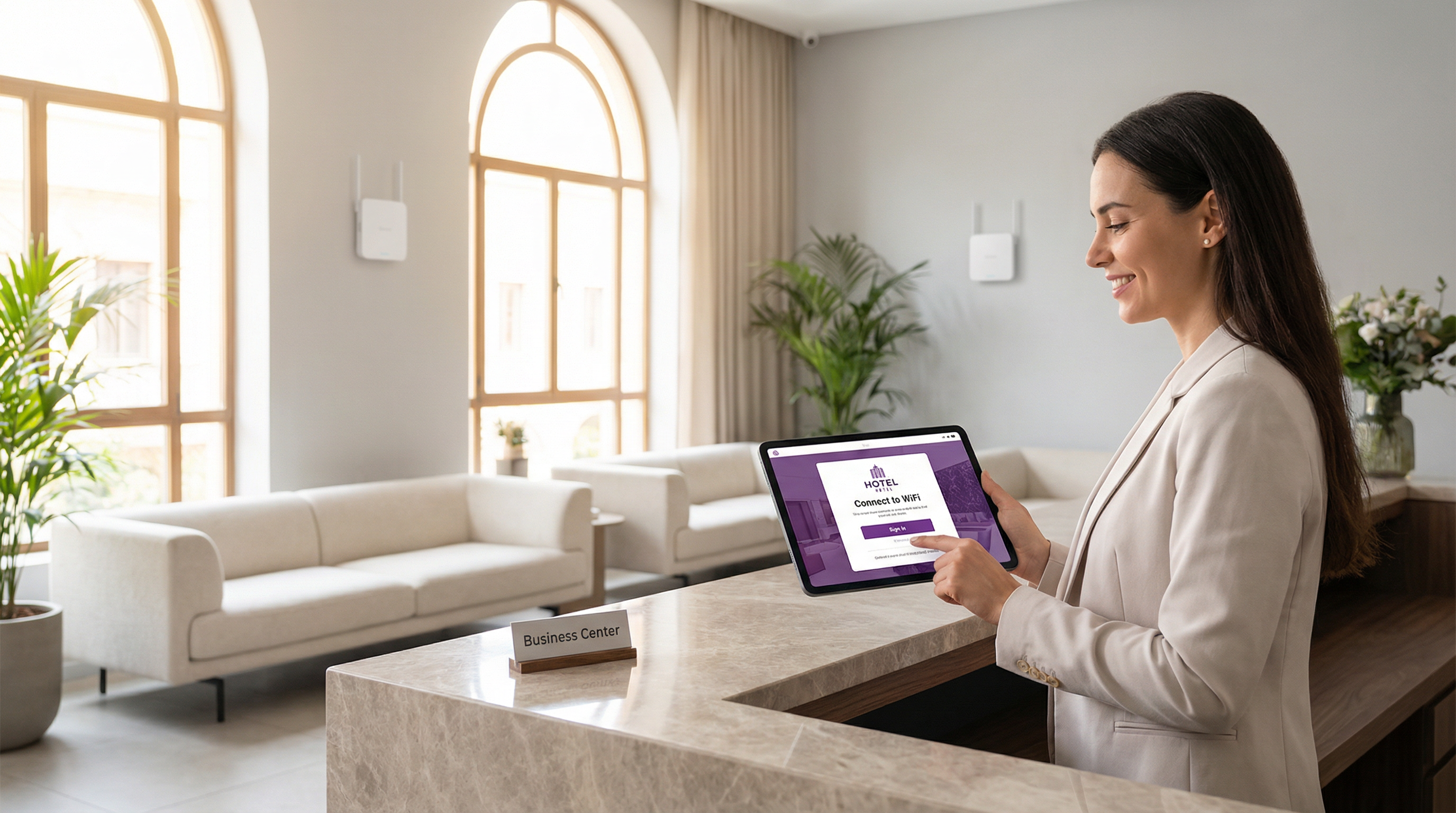
Para los líderes de TI en empresas con múltiples ubicaciones, el WiFi para invitados ya no es una simple comodidad; es un componente crítico de la experiencia del cliente y una rica fuente de datos de origen (first-party data). Un Captive Portal WiFi bien diseñado es la clave para desbloquear este valor, sirviendo como puerta de enlace estratégica para el acceso seguro, el cumplimiento legal y el marketing personalizado. Esta guía proporciona una referencia técnica exhaustiva para implementar Captive Portals de nivel empresarial, cubriendo la arquitectura esencial, los controles de seguridad y los mandatos de cumplimiento necesarios para mitigar riesgos y maximizar el ROI. Vamos más allá de la configuración básica para abordar los desafíos específicos de la escalabilidad, desde la gestión centralizada y la segmentación de VLAN hasta el registro de consentimientos del GDPR y la medición del impacto comercial. Para el CTO, esta guía ofrece un marco para evaluar la postura de seguridad y el retorno comercial de su infraestructura de WiFi para invitados. Para el director de TI y el arquitecto de redes, proporciona una orientación práctica e independiente del proveedor para una implementación inmediata, garantizando que su despliegue sea seguro, cumpla con las normativas y sea capaz de ofrecer resultados comerciales medibles.
Análisis técnico en profundidad
El Captive Portal moderno es un sistema sofisticado que equilibra la experiencia del usuario, la seguridad y los objetivos comerciales. En esencia, el portal intercepta la solicitud web inicial de un usuario y lo redirige a una página de inicio (splash page) con la imagen de la marca para su autenticación o consentimiento. El mecanismo más frecuente es una redirección HTTP 302. Cuando un nuevo dispositivo se conecta al SSID de invitados, su sistema operativo intenta contactar con una URL de detección conocida: Apple utiliza captive.apple.com, Google utiliza connectivitycheck.gstatic.com y Microsoft utiliza www.msftconnecttest.com. El controlador inalámbrico de la red intercepta esta solicitud y devuelve un código de estado HTTP 302 (Encontrado), dirigiendo el navegador del cliente a la URL del Captive Portal. Este proceso es transparente en todos los principales sistemas operativos y es el enfoque recomendado para implementaciones empresariales.
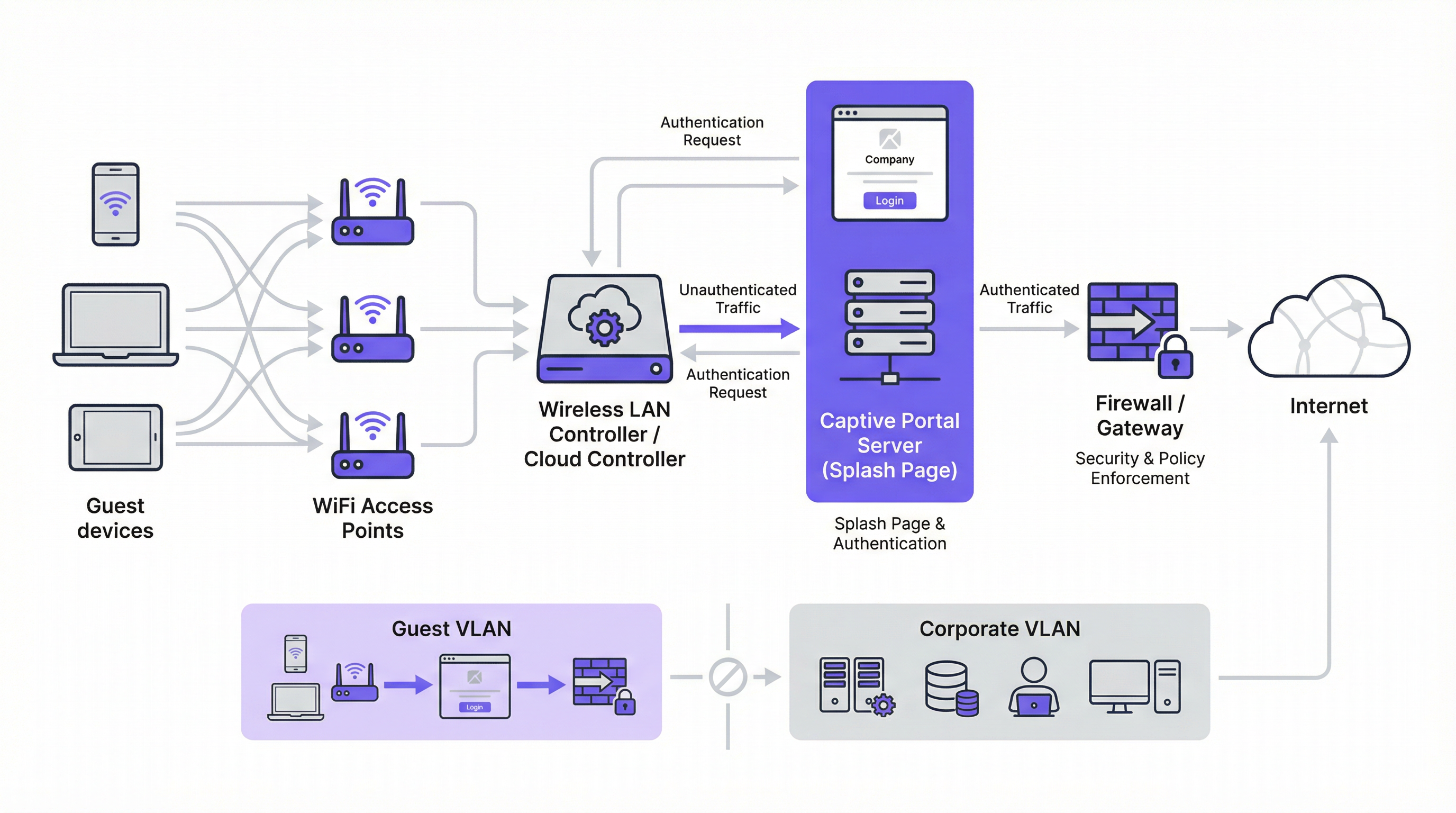
Existen dos mecanismos de redirección alternativos. La redirección DNS funciona configurando el firewall para garantizar que los clientes no autenticados solo puedan acceder al resolutor DNS designado de la red, que a su vez resuelve todos los nombres de host a la dirección IP del portal. Aunque es eficaz, este enfoque es arquitectónicamente equivalente al secuestro de DNS (DNS hijacking) y debe implementarse con cuidado. La redirección ICMP opera en la Capa 3 para instruir cambios de enrutamiento a nivel de paquetes; es menos común en implementaciones modernas y conlleva riesgos de seguridad inherentes que lo hacen inadecuado para la mayoría de los entornos empresariales.
A nivel arquitectónico, la piedra angular de cualquier implementación empresarial segura es la segmentación de VLAN. El tráfico de invitados debe estar lógicamente aislado de la red corporativa en su propia red de área local virtual (VLAN). Esto evita cualquier posibilidad de movimiento lateral desde un dispositivo de invitado potencialmente comprometido hacia sistemas internos sensibles, como terminales de punto de venta, bases de datos de recursos humanos o servidores de archivos corporativos. La VLAN de invitados debe tener su propio ámbito DHCP y una política de firewall restrictiva que bloquee explícitamente todo acceso a los rangos de direcciones IP privadas RFC 1918, permitiendo únicamente el tráfico necesario para la autenticación en el portal y el posterior acceso a Internet.
Antes de la autenticación, se debe configurar un walled garden (jardín vallado) para permitir el acceso a recursos externos específicos. Esto incluye el dominio de alojamiento del portal, los endpoints de la CDN que sirven los activos del portal y los endpoints de OAuth para cualquier proveedor de inicio de sesión social. Un walled garden mínimamente permisivo (que incluya en la lista blanca endpoints específicos en lugar de dominios enteros) es un control de seguridad crítico que limita la superficie de ataque previa a la autenticación.
Los métodos de autenticación abarcan un amplio espectro, desde el acceso mediante un clic sin fricción hasta la integración RADIUS de alta seguridad:
| Método de autenticación | Caso de uso principal | Consideración clave |
|---|---|---|
| Clic de acceso (Términos de servicio) | Espacios públicos, acceso de baja fricción | Sin captura de datos; fricción mínima para el usuario. |
| Inicio de sesión social (OAuth) | Retail, hostelería | Captura de datos enriquecida; requiere un walled garden para los endpoints de OAuth. |
| Correo electrónico / Formulario | Generación de leads, fidelización | Datos de origen directos; requiere cumplimiento del GDPR/CCPA. |
| OTP por SMS | Acceso de alto valor, programas de fidelización | Verifica el número de teléfono; añade una capa de garantía de identidad. |
| Código de cupón | Conferencias, acceso de pago | Acceso controlado y por tiempo limitado por usuario. |
| RADIUS / IEEE 802.1X | Redes de invitados corporativas | Integración de identidad empresarial; pista de auditoría completa. |
Desde la perspectiva de los estándares, la industria avanza hacia WPA3-Enterprise, que combina el robusto marco de autenticación IEEE 802.1X con una suite de seguridad de 192 bits. Para las redes de invitados abiertas, el Cifrado Inalámbrico Oportunista (OWE) de WPA3 proporciona una mejora de seguridad significativa al cifrar el tráfico entre cada cliente y el punto de acceso sin requerir una clave precompartida, mitigando directamente los ataques de escucha pasiva que son endémicos en las redes WiFi abiertas tradicionales.
Guía de implementación
La implementación de un Captive Portal a escala empresarial requiere un enfoque metódico. Los siguientes pasos proporcionan una hoja de ruta independiente del proveedor para una implementación segura y eficaz.
Paso 1 — Base de la red: Cree un SSID dedicado para invitados y asócielo a una nueva VLAN aislada (por ejemplo, VLAN 100). Defina un ámbito DHCP lo suficientemente grande como para acomodar su número máximo de usuarios simultáneos. Para un hotel de 200 habitaciones, una subred /22 (1.022 direcciones utilizables) es un punto de partida seguro; para un estadio con capacidad para 20.000 personas, una /19 o superior es adecuada.
Paso 2 — Firewall y política de seguridad: En su firewall principal, cree una política para la VLAN de invitados con una postura predeterminada de deny all (denegar todo). Añada reglas explícitas de allow (permitir) para DNS (puerto UDP/TCP 53) y DHCP (puertos UDP 67–68). Cree una regla previa a la autenticación que permita el acceso HTTP y HTTPS únicamente a las direcciones IP enumeradas en su walled garden. Bloquee todo el tráfico destinado al espacio de direcciones RFC 1918 (10.0.0.0/8, 172.16.0.0/12, 192.168.0.0/16).
Paso 3 — Configuración del controlador: En su controlador de LAN inalámbrica (ya sea Cisco Meraki, Aruba ClearPass, Ruckus SmartZone o una plataforma gestionada en la nube), configure el SSID de invitados para utilizar la autenticación externa del Captive Portal, apuntando a la URL del servidor de su portal. Establezca el tiempo de espera de la sesión (8 horas para hostelería, 2–4 horas para retail, 1 hora para eventos). Establezca límites de ancho de banda por cliente (por ejemplo, 5 Mbps de descarga, 2 Mbps de subida) para garantizar un uso justo y evitar abusos en la red.
Paso 4 — Diseño del portal y cumplimiento normativo: Diseñe su página de inicio (splash page) para que sea rápida y clara. La página debe servirse a través de HTTPS con un certificado TLS válido de una Autoridad de Certificación de confianza. Para cumplir con el GDPR, incluya un enlace a su política de privacidad y una casilla de verificación desmarcada para el consentimiento de marketing, presentada por separado del acuerdo principal de términos de servicio. Para la CCPA, incluya un enlace claramente etiquetado como "No vender mi información personal". Todas las acciones de consentimiento deben registrarse con una marca de tiempo y la dirección IP del usuario para fines de auditoría regulatoria.
Paso 5 — Autenticación y Walled Garden: Configure el método o métodos de autenticación elegidos y las reglas correspondientes del walled garden. Si utiliza el inicio de sesión social, incluya en la lista blanca los endpoints de OAuth específicos para cada proveedor. Pruebe el flujo de autenticación completo desde dispositivos iOS, Android, Windows y macOS antes de la puesta en marcha.
Paso 6 — Registro y monitorización: Habilite el accounting RADIUS en su controlador para enviar datos de sesión detallados (dirección MAC, dirección IP, horas de inicio y finalización de la sesión, volumen de datos transferidos) a un servidor de registro centralizado o SIEM. Conserve los metadatos de conexión de acuerdo con los requisitos de su jurisdicción (normalmente 12 meses en el Reino Unido y muchos estados miembros de la UE). Implemente la monitorización de la tasa de consultas DNS para detectar posibles intentos de evasión mediante túneles (tunnelling).
Mejores prácticas
El cumplimiento de las mejores prácticas de la industria es esencial para mitigar riesgos y garantizar una experiencia de usuario de alta calidad. Estas recomendaciones se basan en marcos de seguridad establecidos, incluyendo PCI DSS, GDPR y directrices de seguridad inalámbrica independientes del proveedor.
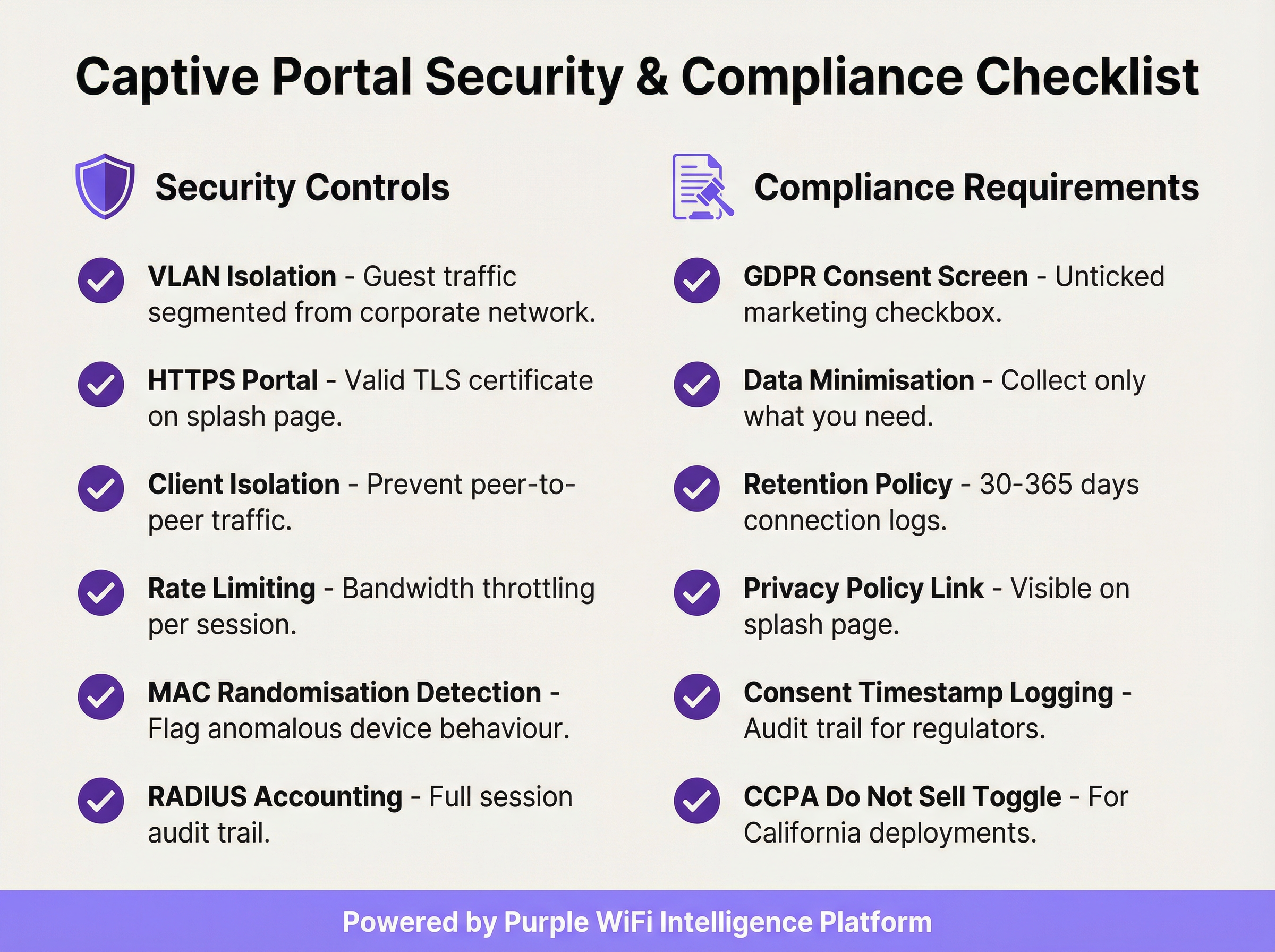
Aplicar el aislamiento de clientes (Client Isolation): Esta configuración del controlador inalámbrico evita que los dispositivos de invitados en el mismo segmento de red se comuniquen directamente entre sí, reduciendo significativamente el riesgo de ataques peer-to-peer y el movimiento lateral entre dispositivos de invitados.
Validar su certificado TLS: Toda la comunicación con el Captive Portal debe estar cifrada con un certificado TLS válido y de confianza. Un certificado caducado o autofirmado activará advertencias de seguridad en el navegador, degradando la experiencia del usuario y socavando la confianza en su marca.
Implementar la minimización de datos: Recopile únicamente los datos que necesite para el servicio específico que está proporcionando. Si su caso de uso solo requiere una dirección de correo electrónico para marketing, no solicite un número de teléfono ni la fecha de nacimiento. Este es un principio fundamental del Artículo 5(1)(c) del GDPR y reduce su exposición regulatoria.
Mantener una política de retención de datos documentada: Establezca y documente calendarios de retención separados para los registros de conexión (normalmente de 30 a 365 días, dependiendo de la jurisdicción) y los datos de marketing (elimine los contactos inactivos y mantenga pruebas del consentimiento durante todo el período de retención). Las sanciones por incumplimiento del GDPR pueden alcanzar los 20 millones de euros o el 4 % de la facturación anual global.
Auditar su Walled Garden trimestralmente: Con el tiempo, los walled gardens acumulan entradas innecesarias. Una auditoría trimestral garantiza que cada dominio en la lista blanca siga siendo necesario y que las entradas sean lo más específicas posible, minimizando la superficie de ataque previa a la autenticación.
Planificar el alcance de PCI DSS: Si su establecimiento procesa pagos con tarjeta, asegúrese de que su red WiFi para invitados esté completamente aislada de cualquier infraestructura de tarjetas de pago. Un Asesor de Seguridad Cualificado (QSA) debe revisar la segmentación de la red si existe alguna ambigüedad sobre el alcance.
Resolución de problemas y mitigación de riesgos
Los modos de fallo más comunes en las implementaciones de un Captive Portal suelen estar relacionados con la compatibilidad de dispositivos, problemas de certificados o una configuración incorrecta de la red.
La página del portal no se carga automáticamente: La causa más frecuente es que el Asistente de Red Cautiva (CNA) del dispositivo no se active. Esto puede ocurrir si el firewall está bloqueando el acceso a las URL de detección específicas del sistema operativo, o si el portal tiene un certificado TLS no válido. Verifique que sus reglas previas a la autenticación permitan el acceso a captive.apple.com, connectivitycheck.gstatic.com y www.msftconnecttest.com. Asegúrese de que el certificado del portal sea válido y de confianza.
Los usuarios reciben una advertencia de seguridad en el navegador: Esto casi siempre indica un problema con el certificado TLS (caducado, autofirmado o dominio no coincidente). Utilice un certificado de una CA de confianza y asegúrese de que la URL del portal coincida exactamente con el Nombre Alternativo del Sujeto (SAN) del certificado. Automatice la renovación de certificados utilizando Let's Encrypt o un servicio similar para evitar interrupciones relacionadas con la caducidad.
Evasión mediante túneles DNS (DNS tunnelling): Algunos usuarios técnicamente sofisticados pueden intentar eludir el portal codificando el tráfico dentro de consultas DNS. Mitigue esto bloqueando todo el tráfico DNS saliente de clientes no autenticados, excepto hacia su resolutor interno designado, e implementando la limitación de la tasa de consultas DNS (marcando cualquier cliente que genere más de un umbral definido de consultas por segundo antes de la autenticación).
Suplantación de direcciones MAC (MAC spoofing): Un atacante puede clonar la dirección MAC de un dispositivo autenticado para eludir el portal. Mitigue esto a través del accounting RADIUS con vinculación de sesión tanto a la dirección MAC como a la dirección IP, y monitorizando las entradas de direcciones MAC duplicadas en su tabla de concesiones DHCP. El aislamiento de clientes también reduce el riesgo al evitar que el atacante observe las direcciones MAC de otros clientes.
Altos tiempos de carga del portal que degradan las tasas de suscripción (opt-in): Cada segundo adicional de tiempo de carga del portal reduce las tasas de finalización de la autenticación. Aloje los activos del portal en una CDN, optimice las imágenes y minimice las dependencias de scripts de terceros. Apunte a un Tiempo hasta ser Interactivo (TTI) inferior a 2 segundos en una conexión móvil 4G.
ROI e impacto comercial
La implementación de un Captive Portal empresarial debe considerarse como una inversión estratégica. El retorno se materializa a través de tres canales principales: la adquisición de datos de origen (first-party data), la analítica de clientes y ubicaciones, y la generación directa de ingresos o valor de marca.
Adquisición de datos de origen (First-Party Data): En un panorama de desaparición de las cookies de terceros y de creciente pérdida de señales debido a las actualizaciones de navegadores centradas en la privacidad, un Captive Portal es una de las herramientas más eficaces para construir una rica base de datos de marketing basada en el consentimiento. Un portal bien diseñado en un establecimiento de retail o de hostelería con mucho tráfico puede capturar de cientos a miles de nuevas direcciones de correo electrónico suscritas al mes, proporcionando un canal directo para el marketing personalizado, la inscripción en programas de fidelización y el engagement posterior a la visita.
Analítica de clientes y ubicaciones: Al analizar los datos de conexión (visitantes únicos, tiempo de permanencia, frecuencia de visitas, períodos de tráfico máximo), los establecimientos obtienen inteligencia procesable para la optimización operativa. Los retailers pueden medir el impacto en la tienda de las campañas de marketing, identificar a sus clientes recurrentes más leales y optimizar los niveles de personal en función de los datos de afluencia en tiempo real. Los operadores de hostelería pueden correlacionar los patrones de conexión WiFi con el gasto en alimentos y bebidas (F&B) o las reservas de spa para identificar oportunidades de ventas adicionales (upsell).

Ingresos directos y refuerzo de marca: En aeropuertos, centros de conferencias y centros de transporte, el WiFi se puede monetizar directamente a través de planes de acceso por niveles. En retail y hostelería, el portal sirve como un poderoso punto de contacto de la marca en el momento de la conexión, permitiendo la promoción de ofertas especiales, programas de fidelización y marcas asociadas. Una experiencia de bienvenida de marca coherente en cientos de ubicaciones refuerza la identidad de la marca y demuestra profesionalidad operativa.
Un cálculo típico del ROI sopesa los costes operativos y de la plataforma frente al valor del ciclo de vida (LTV) de los contactos de marketing adquiridos, las eficiencias operativas obtenidas de la analítica de afluencia y cualquier ingreso directo generado por el acceso de pago o las asociaciones de marketing. Para la mayoría de las implementaciones empresariales, el valor del activo de datos de origen por sí solo (particularmente en el contexto del marketing basado en el consentimiento y que cumple con el GDPR) proporciona un caso de negocio convincente y defendible.
Key Terms & Definitions
Captive Portal
A network gateway mechanism that intercepts a connecting device's initial HTTP request and redirects it to a web page requiring user interaction — such as authentication, terms of service acceptance, or payment — before granting full internet access. Technically implemented via HTTP 302 redirect, DNS redirect, or ICMP redirect.
IT teams encounter this as the core technology underpinning guest WiFi access control in any public or semi-public venue. The design and configuration of the captive portal directly determines the security posture, compliance status, and commercial value of the guest WiFi deployment.
VLAN (Virtual Local Area Network)
A logical network segment created within a physical network infrastructure that isolates traffic between different groups of devices. In captive portal deployments, a dedicated guest VLAN ensures that guest device traffic is completely separated from corporate network infrastructure, preventing lateral movement and limiting the blast radius of any security incident on the guest network.
Network architects must configure a dedicated guest VLAN as the foundational security control for any captive portal deployment. Without VLAN isolation, a compromised guest device could potentially access corporate systems, creating significant security and compliance risk.
Walled Garden
A pre-authentication whitelist of network resources (IP addresses, hostnames, or domains) that an unauthenticated guest device is permitted to access before completing the captive portal process. Typically includes the portal server itself, CDN endpoints, and OAuth endpoints for social login providers.
IT teams must configure and maintain the walled garden carefully. An overly permissive walled garden expands the pre-authentication attack surface; an overly restrictive one breaks social login functionality or prevents the portal page from loading correctly.
IEEE 802.1X
An IEEE standard for port-based Network Access Control (PNAC) that provides an authentication framework for devices wishing to connect to a LAN or WLAN. It defines the Extensible Authentication Protocol (EAP) transport mechanism and requires a supplicant (client), authenticator (switch or AP), and authentication server (typically RADIUS) to complete the authentication exchange.
Network architects deploying captive portals for corporate guest environments should consider 802.1X integration for the highest level of identity assurance. It provides mutual authentication and a full audit trail, and is the authentication framework underpinning WPA2-Enterprise and WPA3-Enterprise.
WPA3-OWE (Opportunistic Wireless Encryption)
A WPA3 security mode defined in IEEE 802.11i that provides over-the-air encryption on open (no-password) WiFi networks without requiring user authentication. Each client-to-AP connection is encrypted with a unique key, preventing passive eavesdropping by other devices on the same network, even though no password is required to connect.
IT architects planning new captive portal deployments should evaluate OWE as a security enhancement for open guest SSIDs. It addresses the fundamental vulnerability of traditional open WiFi — unencrypted over-the-air traffic — while maintaining the zero-friction connection experience that guests expect.
RADIUS (Remote Authentication Dial-In User Service)
A networking protocol that provides centralised Authentication, Authorisation, and Accounting (AAA) management for users who connect to a network service. In captive portal deployments, RADIUS accounting records detailed session information — including MAC address, IP address, session duration, and data volume — to a central server.
RADIUS accounting is the mechanism by which IT teams maintain a comprehensive audit trail of guest WiFi sessions. This audit trail is essential for regulatory compliance (data retention laws), security investigations, and the analytics that underpin ROI measurement.
DNS Tunnelling
A network bypass technique in which a client encodes arbitrary internet traffic (e.g., HTTP requests) within DNS query packets, which are typically permitted through firewalls even for unauthenticated clients. An attacker or technically sophisticated user can use a DNS tunnelling tool to bypass a captive portal and access the internet without authenticating.
Network security teams should implement DNS query rate monitoring and anomaly detection to identify potential tunnelling activity. Blocking outbound DNS traffic from unauthenticated clients to all servers except the designated internal resolver is the primary mitigation.
MAC Address Spoofing
A technique in which a device's network interface is configured to broadcast a different MAC (Media Access Control) address than the one burned into the hardware. In captive portal environments, an attacker can clone the MAC address of an already-authenticated device to bypass the portal's access control, as many portals use MAC address as the primary session identifier.
IT security teams should be aware that MAC-based authentication alone is not sufficient for high-security environments. RADIUS accounting with session binding to both MAC address and IP address, combined with client isolation to prevent MAC address observation, provides a more robust defence.
Splash Page
The branded web page presented to a user by a captive portal before internet access is granted. The splash page typically contains the venue's branding, a login or consent form, a link to the privacy policy, and terms of service. It is the primary user-facing element of the captive portal system and the key touchpoint for data capture and brand communication.
Marketing and IT teams must collaborate on splash page design. From an IT perspective, the page must be served over HTTPS, load in under 2 seconds, and contain all legally required consent elements. From a marketing perspective, it must be on-brand, clear, and designed to maximise opt-in rates.
GDPR (General Data Protection Regulation)
The European Union's primary data protection regulation (Regulation 2016/679), which governs the collection, processing, storage, and transfer of personal data relating to EU residents. For captive portal deployments, GDPR mandates freely given, specific, and unambiguous consent for data collection; data minimisation; documented retention policies; and the ability to demonstrate compliance through audit trails.
Any captive portal that collects personal data (email addresses, names, phone numbers) from EU or UK residents must comply with GDPR. Non-compliance penalties can reach €20 million or 4% of global annual turnover. IT and legal teams must collaborate to ensure the portal's consent mechanism, data storage, and retention policies meet the regulation's requirements.
Case Studies
A 250-room luxury hotel group with 12 properties needs to deploy a unified captive portal solution that captures guest email addresses for their loyalty programme, complies with GDPR across all EU properties, and provides the IT team with centralised management. The properties use a mix of Cisco Meraki and Aruba access points. What architecture and implementation approach should they adopt?
The recommended approach is a cloud-managed, hardware-agnostic captive portal platform (such as Purple) that integrates with both Meraki and Aruba controllers via external portal redirect. The implementation proceeds as follows:
VLAN Architecture: Configure a dedicated guest VLAN (e.g., VLAN 200) on all properties, with a consistent IP addressing scheme (e.g., 10.200.x.0/22 per property) to simplify firewall policy management across the estate.
Controller Configuration: On Meraki, navigate to Wireless > SSIDs > [Guest SSID] > Splash page and select 'Click-through' or 'Sign-on splash page', entering the external portal URL. On Aruba, configure a Captive Portal profile in ClearPass Policy Manager pointing to the same external portal URL. Set session timeout to 8 hours and per-client bandwidth to 10 Mbps down / 5 Mbps up.
Portal Design: Build a single portal template with the group's master brand. Use location-specific branding overrides (logo, colour scheme) for each property. The form captures first name, last name, and email. The GDPR consent screen presents two separate, unticked checkboxes: one for the terms of service (required for access) and one for marketing communications (optional). The privacy policy link is prominently displayed.
Compliance Configuration: Enable consent timestamp logging for every session. Configure a data retention policy: connection logs retained for 12 months (UK GDPR requirement), marketing contacts purged after 24 months of inactivity. Export audit logs monthly to the group's central compliance repository.
Loyalty Integration: Connect the portal's API to the hotel group's CRM/loyalty platform. On successful email capture with marketing consent, automatically enrol the guest in the loyalty programme and trigger a welcome email within 15 minutes.
Testing and Rollout: Pilot at one property for 30 days, measuring email capture rate (target: >60% of connecting guests), portal load time (target: <2 seconds), and authentication error rate (target: <1%). Roll out to remaining properties in batches of three.
A national retail chain with 80 stores wants to use their guest WiFi captive portal to measure the effectiveness of their in-store marketing campaigns, specifically whether customers who receive a promotional email visit the store within 14 days. The IT team is concerned about PCI DSS compliance, as the stores also process card payments. How should this be architected?
This deployment requires careful attention to both the analytics use case and PCI DSS network segmentation requirements.
PCI DSS Segmentation: The guest WiFi network must be completely isolated from the payment card environment (PCE). Implement a three-VLAN architecture: VLAN 10 for POS/payment systems, VLAN 20 for corporate/staff systems, VLAN 30 for guest WiFi. The firewall must have explicit
denyrules preventing any traffic between VLAN 30 and VLANs 10 and 20. Engage a QSA to validate the segmentation before go-live.Guest SSID and Portal: Deploy the guest SSID on VLAN 30 with an email-capture portal. The form collects email address and optionally a loyalty card number. GDPR-compliant marketing consent checkbox is included.
Campaign Attribution Architecture: The portal platform assigns each authenticated session a unique session ID linked to the guest's email address and the store location (identified by the access point's location tag). When a promotional email is sent, it contains a unique tracking pixel and a store-specific UTM parameter on the call-to-action link.
Visit Attribution: When a customer who received the promotional email returns to a store and connects to WiFi within 14 days, the portal platform matches their email address to the campaign cohort and records the return visit. This creates a closed-loop attribution model: email sent → store visit detected via WiFi connection → conversion recorded.
Analytics Dashboard: The central analytics platform aggregates data across all 80 stores, providing campaign attribution reports showing email-to-visit conversion rates by store, region, and campaign. Typical metrics: unique visitors per store per day, email capture rate, 14-day return visit rate for campaign cohort vs. control group.
Data Governance: All guest data is stored in a GDPR-compliant data warehouse with role-based access control. Marketing data is retained for 24 months from last interaction. Connection logs are retained for 12 months.
Scenario Analysis
Q1. A conference centre hosts 50 events per year, ranging from 200-person seminars to 5,000-person trade shows. They want to deploy a captive portal that provides event-specific branding for each event, captures attendee email addresses for post-event marketing, and can scale from 200 to 5,000 concurrent connections. The venue's IT team has limited capacity for per-event configuration. What platform architecture and configuration approach would you recommend?
💡 Hint:Consider the operational overhead of per-event portal customisation, the DHCP scope sizing requirements for peak concurrent users, and the GDPR implications of sharing attendee data with event organisers.
Show Recommended Approach
The recommended architecture uses a cloud-managed captive portal platform with a self-service portal builder. The venue's IT team creates a master portal template with the venue's base branding and GDPR consent framework. For each event, the organiser is given access to a restricted portal customisation interface where they can upload their logo, set brand colours, and add event-specific messaging — without touching any network configuration. The DHCP scope for the guest VLAN should be sized for the maximum expected concurrent connections (5,000), using a /19 subnet (8,190 usable addresses) to provide headroom. The wireless controller should be configured with dynamic bandwidth management to automatically adjust per-client limits based on current network load. For GDPR, the data controller relationship must be clearly defined: if attendee data is shared with event organisers, a Data Processing Agreement (DPA) is required, and the privacy policy must disclose this sharing. Attendees should be able to opt out of data sharing with the event organiser while still accepting the venue's terms of service for WiFi access.
Q2. A hospital trust wants to deploy guest WiFi with a captive portal across 5 sites. Clinical staff have raised concerns that the guest WiFi could be used to access patient records if the network segmentation is not correctly implemented. The IT security team also needs to ensure the deployment does not bring any clinical systems into scope for additional regulatory review. How do you address these concerns?
💡 Hint:Consider the network segmentation requirements, the specific clinical systems that must be protected, and the regulatory frameworks (NHS Data Security and Protection Toolkit, Cyber Essentials) that apply in addition to GDPR.
Show Recommended Approach
The deployment requires a minimum three-tier network architecture: a clinical VLAN for patient records systems (EPR, PACS, clinical workstations), a staff VLAN for administrative systems, and a guest VLAN for patient and visitor WiFi. The firewall policy must include explicit deny rules preventing any traffic from the guest VLAN to the clinical and staff VLANs, with the default stance being deny-all for inter-VLAN traffic. The guest SSID should be on a completely separate DHCP scope with no route to RFC 1918 clinical address space. The captive portal itself should be hosted externally (cloud-based) or on a dedicated DMZ server, not on any system within the clinical network. For regulatory compliance, the IT security team should document the network segmentation design and have it reviewed by an independent assessor as part of the NHS Data Security and Protection Toolkit submission. The guest WiFi network should be explicitly scoped out of any clinical system security assessments. GDPR compliance for the portal requires a healthcare-specific privacy notice that discloses the limited data collected (connection metadata, optional email) and the retention period.
Q3. Your organisation's captive portal has been in production for 18 months. A security audit has identified three issues: (1) the portal TLS certificate expired 3 weeks ago and users are receiving browser warnings, (2) the walled garden contains 47 entries, many of which appear to be from a social login provider that was removed 12 months ago, and (3) RADIUS accounting logs show that 15% of guest sessions have a duration of over 30 days, suggesting that session timeouts are not being enforced. Prioritise and address these issues.
💡 Hint:Consider the security and user experience impact of each issue, the speed of remediation required, and the root cause of the session timeout failure.
Show Recommended Approach
Prioritise in order of security and user experience impact. Issue 1 (expired TLS certificate) is the most urgent: it is actively degrading the user experience (browser security warnings) and represents a security risk (users may be trained to click through certificate warnings, making them vulnerable to genuine MITM attacks). Immediate action: renew the certificate from a trusted CA and deploy it to the portal server. Implement automated certificate renewal (e.g., using Let's Encrypt with auto-renewal) to prevent recurrence. Issue 3 (30-day sessions) is the second priority: sessions lasting 30 days represent a significant security risk, as a device that was authenticated 30 days ago may no longer be in the possession of the original user. Investigate the root cause — likely a misconfigured session timeout value on the wireless controller or a controller firmware bug. Set the session timeout to 8 hours (or appropriate for the venue type) and force-terminate all existing sessions over 24 hours old. Issue 2 (walled garden hygiene) is the third priority: while a security concern, stale walled garden entries from a removed provider are lower risk than the first two issues. Audit all 47 entries, remove those associated with the deprecated social login provider, and document the purpose of each remaining entry. Implement a quarterly walled garden review process to prevent recurrence.
Key Takeaways
- ✓VLAN segmentation is the non-negotiable foundation of any enterprise captive portal deployment — guest traffic must be completely isolated from corporate infrastructure before any portal configuration begins.
- ✓The captive portal must be served over HTTPS with a valid TLS certificate from a trusted Certificate Authority; HTTP-only portals are a security liability and will be deprecated by modern browsers.
- ✓GDPR compliance requires a separate, unticked marketing consent checkbox distinct from the terms of service acceptance, with all consent states and timestamps logged for regulatory audit purposes.
- ✓The walled garden should whitelist specific endpoints rather than entire domains, and should be audited quarterly to remove unnecessary entries that expand the pre-authentication attack surface.
- ✓WPA3's Opportunistic Wireless Encryption (OWE) mode should be evaluated for all new deployments, as it provides over-the-air encryption on open networks without requiring a password, directly mitigating passive eavesdropping.
- ✓Portal load time directly impacts opt-in rates — target a Time to Interactive of under 2 seconds by hosting assets on a CDN and minimising third-party script dependencies.
- ✓The commercial ROI of a captive portal is realised through three channels: first-party data acquisition for marketing, customer and location analytics for operational intelligence, and direct revenue or brand value from the connection experience — all of which should be quantified in the business case.




