

WPA3-Enterprise: Guía completa de implementación
This guide provides enterprise IT teams, network architects, and CTOs with a definitive, vendor-neutral reference for deploying WPA3-Enterprise across hospitality, retail, events, and public-sector environments. It covers the full deployment lifecycle — from hardware and RADIUS infrastructure requirements through phased migration strategy and client device configuration — while addressing the specific security improvements WPA3-Enterprise delivers over WPA2-Enterprise, including mandatory Protected Management Frames, enforced server certificate validation, and forward secrecy. Teams will find actionable configuration guidance, real-world case studies, and a structured troubleshooting framework to de-risk their migration and demonstrate compliance with PCI DSS v4.0 and GDPR Article 32.
🎧 Listen to this Guide
View Transcript
Resumen ejecutivo

WPA3-Enterprise representa la actualización más importante en la seguridad inalámbrica empresarial desde la introducción de la autenticación 802.1X. Para las organizaciones que operan en los sectores de la hostelería, el comercio minorista, los eventos o el sector público, la migración desde WPA2-Enterprise no es una cuestión de si debe hacerse, sino de cuándo y cómo ejecutarla sin interrupciones operativas.
Las principales mejoras de seguridad son concretas y cuantificables. Los marcos de gestión protegidos (PMF, por sus siglas en inglés) pasan a ser obligatorios, lo que elimina el vector de ataque de desautenticación que se ha explotado durante mucho tiempo en recintos de alta densidad. Se impone la validación del certificado del servidor durante el protocolo de enlace 802.1X, cerrando así la brecha de robo de credenciales mediante puntos de acceso falsos que la validación opcional de WPA2 dejaba abierta. La derivación de claves por sesión introduce el secreto perfecto hacia adelante (forward secrecy), garantizando que el tráfico histórico no pueda descifrarse retroactivamente, incluso si las claves de sesión se ven comprometidas más adelante.
Para las organizaciones sujetas a normativas, WPA3-Enterprise cumple con el Requisito 4.2.1 de PCI DSS v4.0 sobre criptografía sólida en tránsito y se alinea con el mandato del Artículo 32 del GDPR relativo a las medidas de seguridad técnicas adecuadas. El modo de seguridad de 192 bits cumple con los requisitos de la suite CNSA de la NSA y NIST SP 800-187 para entornos gubernamentales y financieros sensibles.
Esta guía proporciona una hoja de ruta de implementación estructurada: auditoría de la infraestructura, configuración de RADIUS, despliegue gradual del SSID mediante el modo de transición, configuración de los dispositivos cliente a través de MDM y una ruta de escalado clara para los cinco modos de fallo más comunes.
Análisis técnico en profundidad
La arquitectura de seguridad de WPA3-Enterprise
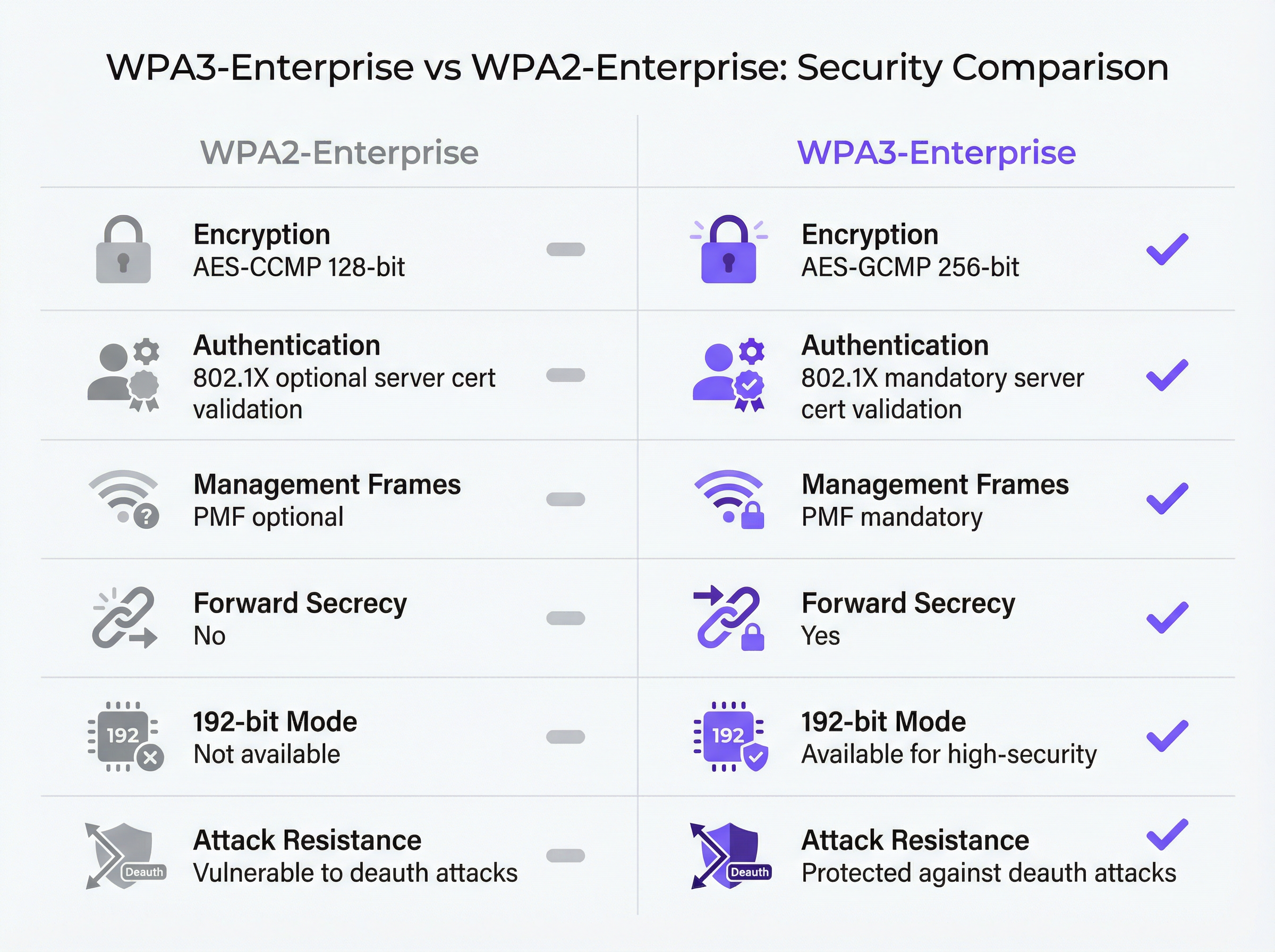
WPA3-Enterprise está definido por la especificación WPA3 de la Wi-Fi Alliance (versión actual 3.3) y se basa directamente en el marco de seguridad IEEE 802.11i. La capa de autenticación sigue siendo IEEE 802.1X (el mismo estándar de control de acceso a la red basado en puertos que sustenta WPA2-Enterprise), pero con tres mejoras obligatorias fundamentales que WPA2 trataba como opcionales.
Los marcos de gestión protegidos (IEEE 802.11w) son obligatorios para todas las conexiones WPA3. En WPA2, los marcos de gestión (los mensajes de control 802.11 que rigen la asociación, disociación y desautenticación) se transmiten en texto plano. Un atacante con un adaptador inalámbrico convencional puede falsificar marcos de desautenticación y expulsar a los clientes de la red a voluntad. Este ataque no requiere credenciales ni herramientas sofisticadas. En entornos de alta densidad, como centros de conferencias, estadios y vestíbulos de hoteles, representa un riesgo operativo real. El PMF obligatorio de WPA3 autentica criptográficamente los marcos de gestión, lo que neutraliza esta clase de ataques.
La validación obligatoria del certificado del servidor cierra el vector de ataque de los puntos de acceso falsos. En WPA2-Enterprise, no se exige que el suplicante 802.1X de un dispositivo cliente valide el certificado del servidor RADIUS antes de enviar las credenciales de autenticación. En la práctica, muchas implementaciones empresariales omiten esta configuración o la aplican incorrectamente, dejando a los usuarios vulnerables al robo de credenciales mediante puntos de acceso gemelos maliciosos (evil twins). WPA3-Enterprise exige que los clientes verifiquen el certificado del servidor RADIUS frente a una CA de confianza antes de proceder con la autenticación. Este único cambio elimina toda una clase de ataques de intermediario (man-in-the-middle).
El secreto perfecto hacia adelante (forward secrecy) mediante la derivación de claves por sesión garantiza que el compromiso de las claves de una sesión no exponga las sesiones históricas o futuras. En WPA2, la ausencia de este mecanismo significa que un atacante que capture tráfico cifrado y obtenga posteriormente las claves de sesión (a través de una vulneración independiente) puede descifrar todo el tráfico capturado con anterioridad. Para las organizaciones que manejan datos de tarjetas de pago, información personal de salud o comunicaciones comercialmente sensibles, esto supone un riesgo importante.
Modos de funcionamiento de WPA3-Enterprise
Existen tres modos de funcionamiento distintos, y seleccionar el adecuado es la primera decisión arquitectónica en cualquier implementación.
| Modo | Cifrado | Métodos EAP | PMF | Caso de uso |
|---|---|---|---|---|
| WPA3-Enterprise (Estándar) | AES-CCMP-128 | PEAP, EAP-TLS, EAP-TTLS | Obligatorio | Empresa en general, hostelería, comercio minorista |
| WPA3-Enterprise 192 bits | AES-GCMP-256 + HMAC-SHA-384 | Solo EAP-TLS | Obligatorio | Gobierno, finanzas, defensa, infraestructuras críticas |
| Transición WPA2/WPA3-Enterprise | AES-CCMP-128 / GCMP-256 | PEAP, EAP-TLS, EAP-TTLS | Opcional | Fase de migración, flotas de dispositivos mixtas |
WPA3-Enterprise estándar es la opción adecuada para la mayoría de las implementaciones empresariales. Ofrece las tres mejoras de seguridad principales (PMF obligatorio, validación obligatoria del certificado del servidor y secreto perfecto hacia adelante) al tiempo que admite toda la gama de métodos EAP, incluido PEAP-MSCHAPv2, que permite la autenticación con nombre de usuario y contraseña frente a Active Directory o LDAP. La compatibilidad con los dispositivos cliente es amplia: Windows 10 versión 1903 y posteriores, macOS 10.15 (Catalina) y posteriores, iOS 13 y posteriores, y Android 10 y posteriores son compatibles con WPA3-Enterprise estándar.
El modo de seguridad WPA3-Enterprise de 192 bits está diseñado para entornos con requisitos normativos o de seguridad elevados. La suite de cifrado (AES-GCMP-256 para la confidencialidad de los datos, HMAC-SHA-384 para la integridad de los mensajes y ECDH/ECDSA-384 para el intercambio de claves y la autenticación) se alinea con la suite de algoritmos de seguridad nacional comercial (CNSA) de la NSA y NIST SP 800-187. La principal limitación es que EAP-TLS con autenticación mutua de certificados es el único método EAP permitido. No se admite la autenticación mediante nombre de usuario y contraseña. Este modo requiere una infraestructura PKI madura y no es adecuado para entornos con dispositivos no gestionados o BYOD.
El modo de transición permite que los clientes WPA2 y WPA3 se conecten al mismo SSID simultáneamente. Los clientes negocian la versión de seguridad más alta que admiten. Este es el punto de partida recomendado para cualquier migración, ya que elimina el riesgo de interrumpir los dispositivos heredados al tiempo que habilita WPA3 para los clientes compatibles desde el primer día.
El flujo de autenticación 802.1X
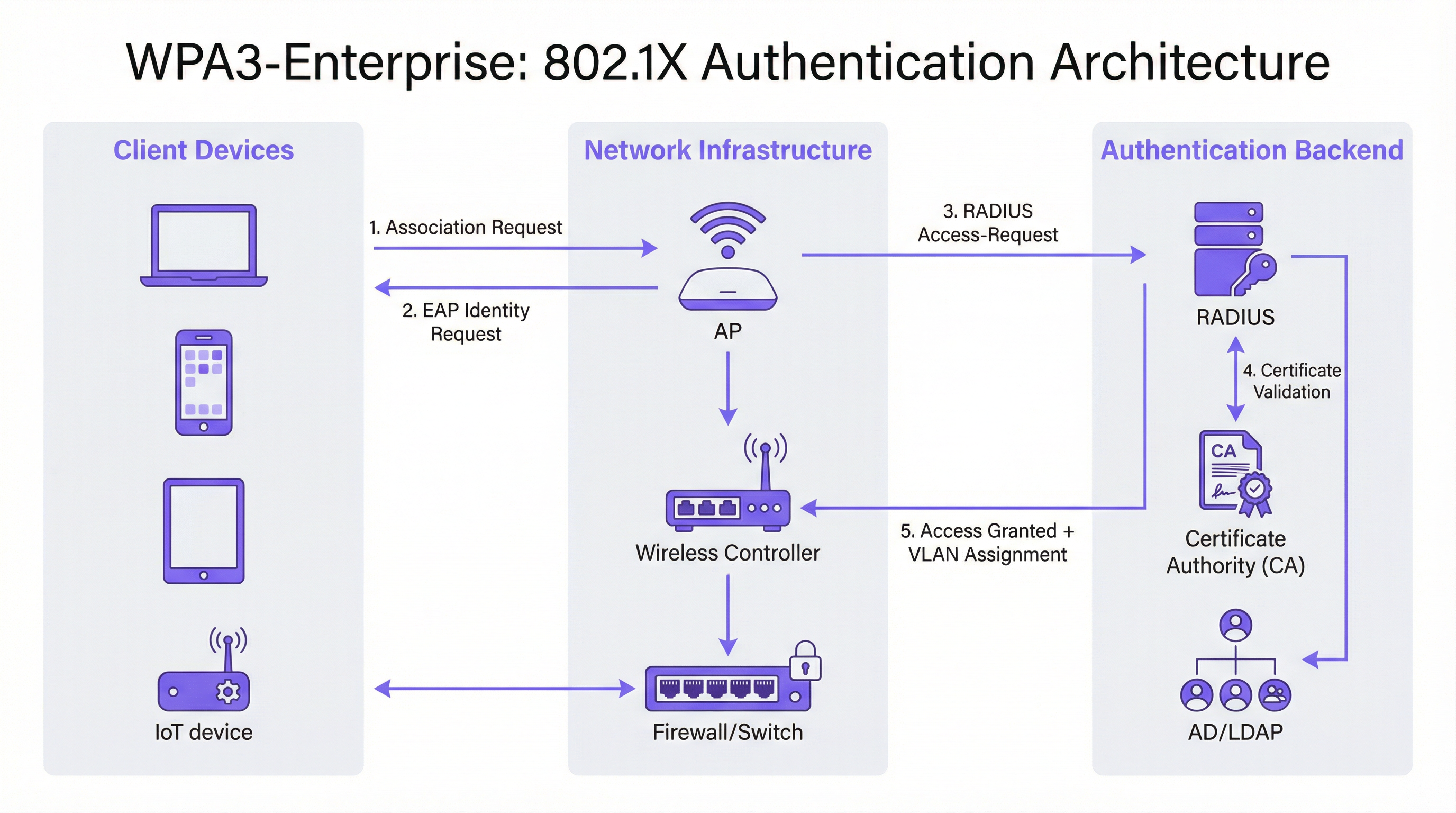
El intercambio de autenticación 802.1X en WPA3-Enterprise implica tres roles: el suplicante (dispositivo cliente), el autenticador (punto de acceso o controlador inalámbrico) y el servidor de autenticación (servidor RADIUS). El flujo se desarrolla de la siguiente manera.
El dispositivo cliente se asocia con el punto de acceso e inicia un intercambio EAP. El punto de acceso actúa como un proxy transparente, reenviando los mensajes EAP entre el cliente y el servidor RADIUS a través de paquetes Access-Request y Access-Challenge de RADIUS. El servidor RADIUS presenta su certificado al cliente, que ahora debe validarlo frente a su almacén de CA de confianza (este es el paso de validación obligatorio que introduce WPA3). Una vez que el cliente ha verificado la identidad del servidor, procede al envío de credenciales (PEAP) o al intercambio mutuo de certificados (EAP-TLS). Si la autenticación se realiza correctamente, el servidor RADIUS devuelve un mensaje Access-Accept, que opcionalmente incluye atributos de asignación de VLAN (Tunnel-Type, Tunnel-Medium-Type, Tunnel-Private-Group-ID) que el punto de acceso utiliza para ubicar al cliente en el segmento de red adecuado.
Guía de implementación
Fase 1: Auditoría de la infraestructura y evaluación de la preparación
Antes de realizar cualquier cambio de configuración, es fundamental realizar un inventario exhaustivo del entorno existente. La auditoría debe abarcar cuatro áreas.
Firmware de los puntos de acceso y controladores: Verifique que todos los AP y el controlador inalámbrico sean compatibles con WPA3. La mayor parte del hardware de nivel empresarial comercializado a partir de 2019 es compatible con WPA3 mediante una actualización de firmware, pero la versión específica requerida varía según el proveedor. Consulte las notas de la versión del proveedor y asegúrese de que todos los AP ejecutan una versión de firmware compatible con WPA3 antes de continuar.
Inventario de dispositivos cliente: Clasifique los dispositivos según su compatibilidad con WPA3. Los endpoints gestionados (portátiles corporativos, tabletas, smartphones inscritos en MDM) deberían ser fáciles de evaluar. Los dispositivos no gestionados y del IoT (impresoras, cerraduras inteligentes, controladores de climatización, terminales de punto de venta) requieren una evaluación individual. Los dispositivos que no admiten WPA3 deben identificarse de forma temprana, ya que requerirán un SSID WPA2 independiente o su ubicación en modo de transición.
Infraestructura RADIUS: Evalúe el servidor RADIUS existente en cuanto a compatibilidad con métodos EAP, capacidad y redundancia. Si va a migrar a EAP-TLS, determine si existe una PKI interna o si se requiere una autoridad de certificación alojada en la nube. Evalúe si la infraestructura RADIUS actual cuenta con una configuración de alta disponibilidad (un único servidor RADIUS sin conmutación por error es un punto único de fallo inaceptable en una implementación de producción).
Segmentación de la red: Revise la arquitectura de VLAN existente. Las implementaciones de WPA3-Enterprise suelen beneficiarse de la asignación dinámica de VLAN mediante atributos RADIUS, lo que permite que un único SSID preste servicio a múltiples grupos de usuarios con el aislamiento de red adecuado. Confirme que la infraestructura de conmutación admite el etiquetado de VLAN 802.1Q y que el servidor RADIUS está configurado para devolver los atributos de VLAN correctos.
Fase 2: Configuración del servidor RADIUS
El servidor RADIUS es la columna vertebral de autenticación de cualquier implementación 802.1X. Los requisitos de configuración varían según la plataforma, pero los siguientes pasos se aplican independientemente del proveedor.
Definir las entradas del servidor de acceso a la red (NAS): Para cada punto de acceso o controlador inalámbrico que vaya a enviar solicitudes de autenticación al servidor RADIUS, cree una entrada NAS especificando la dirección IP de origen y un secreto compartido. Este secreto compartido debe ser complejo (mínimo 24 caracteres, mayúsculas y minúsculas, números y símbolos) y único para cada entrada NAS.
Configurar el método EAP y el certificado: Para las implementaciones de PEAP-MSCHAPv2, instale un certificado de servidor en el servidor RADIUS emitido por una CA en la que confíen los clientes. Para las implementaciones de EAP-TLS, configure la validación de certificados tanto en el lado del servidor como en el del cliente. El nombre común (Common Name) o el nombre alternativo del sujeto (Subject Alternative Name) del certificado del servidor RADIUS debe coincidir con el valor configurado en los perfiles de los clientes, o la validación del certificado fallará.
Integración con el directorio de usuarios: Conecte el servidor RADIUS a Active Directory, LDAP o a un proveedor de identidad en la nube para la validación de credenciales. Para las implementaciones de EAP-TLS, configure la autenticación basada en certificados con la plantilla de certificado adecuada y la comprobación de revocación (OCSP o CRL).
Configurar el registro contable (accounting) de RADIUS: Habilite el registro contable en el servidor RADIUS y configure el controlador inalámbrico para que envíe registros de inicio, intermedios y de finalización. Esto proporciona la pista de auditoría necesaria para el Requisito 8 de PCI DSS (responsabilidad individual del usuario) y facilita la investigación de incidentes.
Configurar la asignación dinámica de VLAN: Defina los atributos RADIUS para cada grupo de usuarios o perfil de certificado: Tunnel-Type (valor 13, VLAN), Tunnel-Medium-Type (valor 6, 802) y Tunnel-Private-Group-ID (el ID de la VLAN como cadena de texto). Esto permite al servidor RADIUS ubicar a los clientes autenticados en el segmento de red adecuado en función de su identidad o certificado.
Fase 3: Configuración del SSID
Configure el SSID de WPA3-Enterprise en el controlador inalámbrico con los siguientes parámetros.
- Modo de seguridad: WPA2/WPA3-Enterprise (modo de transición) para la implementación inicial
- PMF: Opcional (modo de transición) u Obligatorio (modo solo WPA3)
- Método EAP: PEAP o EAP-TLS, según corresponda
- Servidor RADIUS: Direcciones IP de los servidores RADIUS primario y secundario, puertos (1812 para autenticación, 1813 para registro contable) y secretos compartidos
- Registro contable de RADIUS: Habilitado, con el servidor de registro contable configurado
- VLAN dinámica: Habilitada si se utiliza la asignación de VLAN basada en RADIUS
Fase 4: Configuración de los dispositivos cliente
La configuración de los clientes es la fase de la implementación que requiere más trabajo operativo. Para los dispositivos gestionados, utilice MDM o directivas de grupo (Group Policy) para implementar los siguientes elementos de configuración.
Certificado de la CA de RADIUS: El certificado de la CA que emitió el certificado de autenticación del servidor RADIUS debe implementarse en el almacén de certificados raíz de confianza del cliente. Sin esto, la validación del certificado fallará o (si los clientes están mal configurados para omitir la validación) se anulará la ventaja de seguridad de WPA3-Enterprise.
Perfil del SSID: Configure el nombre del SSID, el tipo de seguridad (WPA3-Enterprise o WPA2/WPA3-Enterprise), el método EAP y los parámetros de validación del certificado del servidor, incluido el nombre del servidor esperado o el sujeto del certificado.
Para implementaciones de EAP-TLS: Implemente certificados de cliente en cada dispositivo a través de SCEP (Protocolo de inscripción de certificados simple) o mediante instalación manual. Automatice la renovación de los certificados para evitar fallos de autenticación cuando estos caduquen.
Fase 5: Monitorización y finalización de la migración
Una vez que el modo de transición esté activo, monitorice el controlador inalámbrico o la plataforma de gestión en la nube para obtener métricas de adopción de WPA3. Realice un seguimiento del porcentaje de asociaciones de clientes que utilizan WPA3 frente a WPA2. Cuando la adopción de WPA3 supere el 95 % y se hayan identificado todos los clientes WPA2 restantes y se hayan migrado o segmentado a un SSID heredado dedicado, cambie el SSID principal al modo solo WPA3.
Mejores prácticas
Implemente servidores RADIUS redundantes desde el primer día. El fallo de un único servidor RADIUS hace caer toda la red autenticada. Configure servidores RADIUS primarios y secundarios en cada AP y controlador, con conmutación por error automática. Para las implementaciones en múltiples sedes, considere la posibilidad de utilizar un servicio RADIUS alojado en la nube con redundancia geográfica integrada.
Imponga la validación del certificado del servidor en todos los clientes. Este es el elemento de configuración más importante en una implementación de WPA3-Enterprise. Implementar WPA3-Enterprise sin la validación obligatoria del certificado del servidor en los clientes no proporciona ninguna protección contra los ataques de puntos de acceso falsos. Valide esta configuración de forma explícita durante las pruebas (no asuma que los perfiles MDM se han aplicado correctamente).
Utilice la asignación dinámica de VLAN para la segmentación de la red. En lugar de implementar múltiples SSID para diferentes grupos de usuarios, utilice la asignación dinámica de VLAN basada en RADIUS para ubicar a los usuarios en el segmento de red adecuado en función de su identidad. Esto reduce la congestión de RF (menos SSID), simplifica la arquitectura inalámbrica y mantiene el aislamiento de la red por usuario.
Mantenga un SSID heredado dedicado para los dispositivos IoT no gestionados. Los dispositivos que no admiten WPA3 (terminales de punto de venta heredados, impresoras antiguas, sensores IoT) deben ubicarse en un SSID WPA2-Enterprise independiente con un estricto aislamiento de VLAN y reglas de firewall. No permita que estos dispositivos bloqueen la migración de la red principal del personal a WPA3.
Tome como referencia IEEE 802.1X y la especificación WPA3 v3.3 de la Wi-Fi Alliance como estándares de autoridad para la documentación de su implementación. A efectos de cumplimiento normativo, documente las suites de cifrado específicas, los métodos EAP y la configuración de PMF en su política de seguridad de red, haciendo referencia explícita a estos estándares.
Alinee su estrategia con el Requisito 4.2.1 de PCI DSS v4.0 documentando que WPA3-Enterprise con cifrado AES-GCMP satisface el requisito de criptografía sólida para los datos en tránsito. Conserve los registros contables de RADIUS durante el periodo exigido por su marco de cumplimiento (normalmente 12 meses en línea y 12 meses archivados).
Resolución de problemas y mitigación de riesgos

La siguiente tabla resume los cinco modos de fallo más comunes en las implementaciones de WPA3-Enterprise, sus causas principales y las soluciones recomendadas.
| Modo de fallo | Causa principal | Solución |
|---|---|---|
| El cliente no se conecta, error de PMF | Dispositivo heredado con implementación de PMF defectuosa | Cambiar al modo de transición (PMF opcional) o mover el dispositivo al SSID WPA2 |
| Falla la autenticación, error de certificado | El certificado de la CA de RADIUS no está en el almacén de confianza del cliente | Implementar el certificado de la CA a través de MDM antes de desplegar el perfil del SSID |
| Fallos de autenticación intermitentes | Capacidad del servidor RADIUS o tiempo de espera de EAP agotado | Escalar la infraestructura RADIUS; aumentar el tiempo de espera de EAP a más de 30 s para RADIUS en la nube |
| No se aplica la asignación de VLAN | Atributos RADIUS incorrectos | Verificar Tunnel-Type (13), Tunnel-Medium-Type (6), Tunnel-Private-Group-ID (ID de VLAN como cadena de texto) |
| Los dispositivos con Windows 10 no se conectan | Controlador o compilación del SO obsoletos | Asegurarse de que Windows Update esté actualizado; actualizar el controlador del adaptador inalámbrico; probar con Windows 11 |
Problemas de compatibilidad con PMF: Los marcos de gestión protegidos son obligatorios en WPA3-Enterprise, pero algunos dispositivos heredados (en particular, los teléfonos Android más antiguos, las impresoras heredadas y ciertos dispositivos IoT) tienen implementaciones de PMF que no cumplen con los estándares y provocan fallos de conexión. La solución inmediata es habilitar el modo de transición, que establece el PMF como opcional en lugar de obligatorio. A largo plazo, estos dispositivos deberían migrarse a un SSID WPA2 dedicado con el aislamiento de VLAN adecuado.
Fallos en la cadena de confianza de los certificados: La causa más frecuente de los fallos de autenticación EAP en las nuevas implementaciones de WPA3-Enterprise es la ausencia del certificado de la CA del servidor RADIUS en el almacén raíz de confianza del cliente. Esto se manifiesta como un fallo de autenticación con un error de validación de certificado en el registro de eventos del cliente. La solución es sencilla (implementar el certificado de la CA a través de MDM), pero debe hacerse antes de enviar el perfil del SSID a los clientes. Se recomienda encarecidamente probar la implementación del certificado en un grupo piloto de dispositivos antes de realizar un despliegue generalizado.
Capacidad del servidor RADIUS: En implementaciones de gran tamaño, especialmente durante los picos de inicio de sesión matutinos, el servidor RADIUS puede convertirse en un cuello de botella. Monitorice el uso de la CPU y la memoria del servidor RADIUS durante los periodos de máxima actividad. Para implementaciones que superen los 500 usuarios simultáneos, considere la posibilidad de implementar varios servidores RADIUS detrás de un equilibrador de carga, o utilizar un servicio RADIUS alojado en la nube con escalado automático.
Fragmentación de dispositivos Android: La implementación de WPA3-Enterprise en Android varía significativamente entre fabricantes y versiones de Android. Android 10 introdujo la compatibilidad con WPA3, pero la calidad de la implementación varía. Realice pruebas con una muestra representativa de la flota de dispositivos Android (incluidos modelos de fabricantes específicos) antes del despliegue generalizado. Algunos dispositivos requieren parámetros de configuración EAP específicos que difieren del perfil estándar.
ROI e impacto empresarial
El caso de negocio para la migración a WPA3-Enterprise se basa en tres pilares: reducción de riesgos, eficiencia en el cumplimiento normativo y resiliencia operativa.
Reducción de riesgos: La eliminación de los ataques de desautenticación es especialmente valiosa en entornos críticos para los ingresos. Un centro de conferencias o un hotel que sufra un ataque de denegación de servicio inalámbrico durante un evento importante se enfrenta a una pérdida directa de ingresos y a daños en su reputación. El PMF obligatorio elimina por completo este vector de ataque. El cierre de la brecha de robo de credenciales mediante puntos de acceso falsos reduce el riesgo de robo de credenciales que conduzca a un compromiso más amplio de la red (un incidente que, en virtud del GDPR, conlleva posibles multas de hasta el 4 % de la facturación anual global).
Eficiencia en el cumplimiento normativo: Las organizaciones sujetas a PCI DSS v4.0 se benefician de una postura de cumplimiento más clara. WPA3-Enterprise con cifrado AES-GCMP satisface el Requisito 4.2.1 de criptografía sólida, y los registros contables de RADIUS satisfacen el Requisito 8 de responsabilidad individual del usuario. Documentar una implementación de WPA3-Enterprise es sustancialmente más sencillo que justificar una implementación de WPA2 frente a los requisitos actuales de PCI DSS, que examinan cada vez más el uso de protocolos heredados.
Resiliencia operativa: El enfoque de migración por fases (comenzando con el modo de transición y monitorizando la adopción de WPA3) permite a las organizaciones mejorar su postura de seguridad sin un cambio disruptivo. La inversión en redundancia de la infraestructura RADIUS, la automatización de la gestión de certificados y la configuración de clientes basada en MDM rinde frutos más allá de WPA3: estas capacidades sustentan cualquier iniciativa futura de control de acceso a la red.
Resultados cuantificables: Las organizaciones que han completado implementaciones de WPA3-Enterprise informan de la eliminación de incidentes basados en la desautenticación, la reducción de eventos de seguridad relacionados con credenciales y la optimización de los procesos de auditoría de PCI DSS. Para un grupo hotelero de 400 habitaciones que procesa datos de tarjetas de pago, las ganancias en eficiencia de cumplimiento por sí solas (reducción del alcance de la auditoría, paquetes de pruebas más claros) suelen justificar la inversión en la implementación dentro del primer ciclo de cumplimiento.
Key Terms & Definitions
WPA3-Enterprise
The enterprise mode of Wi-Fi Protected Access 3, defined by the Wi-Fi Alliance WPA3 Specification. It uses IEEE 802.1X for authentication, mandatory Protected Management Frames (IEEE 802.11w), mandatory server certificate validation, and AES-GCMP encryption. It is available in standard (128-bit) and 192-bit security modes.
IT teams encounter this when planning a wireless security upgrade from WPA2-Enterprise. It is the current best-practice standard for enterprise wireless security and is referenced in PCI DSS v4.0, NIST SP 800-187, and GDPR Article 32 compliance discussions.
IEEE 802.1X
An IEEE standard for port-based network access control. It defines an authentication framework involving three roles: the supplicant (client device), the authenticator (access point or switch), and the authentication server (RADIUS). 802.1X is the authentication backbone of both WPA2-Enterprise and WPA3-Enterprise.
Network architects encounter 802.1X when designing enterprise wireless or wired network access control. Understanding the three-party authentication model is essential for troubleshooting authentication failures and configuring RADIUS servers correctly.
RADIUS (Remote Authentication Dial-In User Service)
A networking protocol (RFC 2865) that provides centralised authentication, authorisation, and accounting (AAA) for network access. In WPA3-Enterprise deployments, the RADIUS server validates client credentials or certificates and returns access decisions, optionally including VLAN assignment attributes.
IT teams encounter RADIUS as the authentication server in any 802.1X deployment. Common implementations include Microsoft NPS (Windows Server), FreeRADIUS (open source), Cisco ISE, and Aruba ClearPass. Cloud-hosted RADIUS services are increasingly common for distributed enterprise estates.
Protected Management Frames (PMF / IEEE 802.11w)
A Wi-Fi security mechanism that cryptographically authenticates 802.11 management frames — the control messages governing device association, disassociation, and deauthentication. PMF prevents attackers from forging deauthentication frames to force clients off the network. Mandatory in WPA3; optional in WPA2.
Network architects encounter PMF when configuring WPA3-Enterprise SSIDs and when troubleshooting legacy device connectivity issues. Devices with non-compliant PMF implementations will fail to connect when PMF is set to 'required', necessitating transition mode or a separate WPA2 SSID.
EAP-TLS (Extensible Authentication Protocol - Transport Layer Security)
An EAP method that uses X.509 digital certificates for mutual authentication between the client and the RADIUS server. Both the client and the server present certificates, providing the strongest authentication assurance of any EAP method. Required for WPA3-Enterprise 192-bit mode.
IT teams encounter EAP-TLS when deploying certificate-based wireless authentication. It requires a PKI infrastructure (internal CA or cloud-hosted) and MDM-based certificate deployment to client devices. It eliminates the credential theft risk entirely, as there are no passwords to steal.
PEAP-MSCHAPv2 (Protected EAP with Microsoft Challenge Handshake Authentication Protocol v2)
An EAP method that tunnels MSCHAPv2 username and password authentication inside a TLS session established with the RADIUS server's certificate. It is the most widely deployed EAP method in enterprise wireless networks, supporting authentication against Active Directory and LDAP directories.
IT teams encounter PEAP-MSCHAPv2 as the default EAP method for WPA2-Enterprise and standard WPA3-Enterprise deployments. It is appropriate for environments with managed devices and an existing Active Directory infrastructure. Server certificate validation must be configured on clients to prevent credential interception.
Dynamic VLAN Assignment
A RADIUS feature that allows the authentication server to assign a client to a specific VLAN at authentication time, based on the user's identity, group membership, or certificate attributes. The RADIUS server returns three attributes in the Access-Accept message: Tunnel-Type (13/VLAN), Tunnel-Medium-Type (6/802), and Tunnel-Private-Group-ID (VLAN ID).
Network architects use dynamic VLAN assignment to implement per-user or per-role network segmentation without deploying multiple SSIDs. It is particularly valuable in hospitality and retail environments where different user populations (staff, management, contractors) require different network access levels.
Forward Secrecy
A cryptographic property that ensures that the compromise of a session key does not expose past or future session traffic. WPA3-Enterprise achieves forward secrecy through per-session key derivation, meaning each authentication session generates a unique key that is discarded after the session ends.
CTOs and security architects encounter forward secrecy in discussions about data protection risk. In WPA2, the absence of forward secrecy means that an attacker who captures encrypted wireless traffic today and later obtains session keys through a separate compromise can decrypt all historical traffic. Forward secrecy eliminates this retroactive decryption risk.
Transition Mode (WPA2/WPA3-Enterprise Mixed Mode)
A WPA3 operating mode that allows both WPA2-Enterprise and WPA3-Enterprise clients to connect to the same SSID simultaneously. Clients negotiate the highest security version they support. PMF is set to optional rather than required in this mode, ensuring compatibility with legacy devices.
IT teams use transition mode as the standard starting point for WPA3-Enterprise migrations. It eliminates the risk of disrupting legacy devices while enabling WPA3 for capable clients immediately. Most organisations maintain transition mode for 12-24 months before switching to WPA3-only.
WPA3-Enterprise 192-bit Security Mode
An optional high-security mode of WPA3-Enterprise using AES-GCMP-256 encryption, HMAC-SHA-384 for message integrity, and ECDH/ECDSA-384 for key exchange. Only EAP-TLS is permitted. Aligns with NIST SP 800-187 and the NSA's Commercial National Security Algorithm (CNSA) suite.
Network architects in government, financial services, and defence sectors encounter this mode when deploying wireless networks for sensitive or classified environments. It requires a mature PKI infrastructure and is not appropriate for environments with unmanaged or BYOD devices.
Case Studies
A 400-room hotel group with 12 UK properties needs to migrate their staff wireless network from WPA2-Enterprise to WPA3-Enterprise. The estate includes managed Windows laptops, iOS devices enrolled in MDM, legacy CCTV cameras running embedded firmware, and smart door lock controllers that are WPA2-only. They process payment card data through a cloud-based PMS and must maintain PCI DSS v4.0 compliance throughout the migration.
The deployment follows a five-phase approach. Phase 1 (Weeks 1-2): Conduct a full device inventory across all 12 properties. Categorise devices into three groups: WPA3-capable managed endpoints (Windows 10 1903+, iOS 13+), WPA3-incapable IoT devices (CCTV, door locks), and unknown/unmanaged devices. Audit AP firmware versions across the estate — most enterprise APs from 2019 onwards support WPA3 via firmware update. Phase 2 (Weeks 3-4): Configure the cloud-hosted RADIUS server (or Windows Server NPS at each property) with PEAP-MSCHAPv2 against Active Directory. Install a valid server certificate from a trusted CA. Configure NAS entries for each AP/controller. Enable RADIUS accounting. Phase 3 (Week 5): Deploy the RADIUS CA certificate to all managed devices via Intune MDM. Push a WPA2/WPA3-Enterprise transition mode SSID profile to managed devices, including the server certificate validation configuration pointing to the deployed CA cert. Phase 4 (Weeks 6-8): Enable the transition mode SSID on all APs. Monitor WPA3 vs WPA2 association statistics on the wireless controller. Simultaneously, create a dedicated WPA2-Enterprise SSID on a separate VLAN for CCTV cameras and door lock controllers, with strict firewall rules permitting only the specific traffic these devices require. Phase 5 (Month 3+): When WPA3 adoption on the staff SSID exceeds 95%, schedule a maintenance window to switch the staff SSID from transition mode to WPA3-only. Retain the WPA2 IoT SSID indefinitely for legacy devices. Document the configuration for PCI DSS evidence: cipher suites (AES-CCMP-128 minimum), PMF status (required), RADIUS accounting enabled, per-device authentication logs retained for 12 months.
A European retail chain with 250 stores needs to secure their staff mobile device network (tablets used for inventory management and customer service) with WPA3-Enterprise, while maintaining PCI DSS compliance for their existing WPA2-Enterprise POS terminal network. The IT team has limited on-site technical resource and needs a solution that can be managed centrally.
The architecture separates the POS and staff mobile networks at the SSID level. The POS network remains on WPA2-Enterprise with 802.1X, isolated on a dedicated VLAN with ACLs permitting only traffic to the payment processor's IP range and the PMS. This network is not migrated to WPA3 until POS terminal firmware supports it. The staff mobile network is deployed as a new WPA3-Enterprise SSID using EAP-TLS with client certificates. A cloud-hosted RADIUS service (such as Cisco ISE, Aruba ClearPass, or a cloud-native option) is selected to eliminate the need for on-site RADIUS infrastructure at each store. Certificates are deployed to staff tablets via MDM (Microsoft Intune or Jamf) using SCEP, with automatic renewal 30 days before expiry. The RADIUS server is configured for dynamic VLAN assignment: store manager tablets receive a management VLAN with broader access; standard staff tablets receive a restricted VLAN permitting only inventory system and customer service application traffic. RADIUS accounting logs are centralised and retained for 12 months to satisfy PCI DSS Requirement 8. The cloud RADIUS service provides geographic redundancy across two AWS regions, eliminating the single-point-of-failure risk. Rollout proceeds store-by-store over an 8-week period, with the IT team using the cloud management console to monitor authentication success rates and WPA3 adoption per store.
Scenario Analysis
Q1. Your organisation operates a 50,000-seat stadium with a mixed device fleet: 800 managed Windows staff laptops, 200 Android tablets used by event staff (enrolled in MDM), 150 legacy POS terminals running Windows Embedded (WPA2-only), and approximately 400 IoT devices including turnstile controllers and digital signage. You have been asked to deploy WPA3-Enterprise for the staff network within 90 days while maintaining PCI DSS compliance for the POS network. Outline your deployment architecture and phased rollout plan.
💡 Hint:Consider the POS terminals and IoT devices separately from the managed staff endpoints. The 90-day timeline requires a phased approach — identify which network segments can be migrated first and which require longer-term planning. Think about RADIUS redundancy given the high-density, event-driven nature of the environment.
Show Recommended Approach
The deployment requires a three-SSID architecture. First, a WPA3-Enterprise SSID in transition mode for managed staff devices (Windows laptops and Android tablets), using PEAP-MSCHAPv2 against Active Directory, with dynamic VLAN assignment separating operational staff from management. Second, a WPA2-Enterprise SSID for POS terminals, isolated on a dedicated VLAN with ACLs permitting only payment processor traffic — this network is not migrated to WPA3 until POS firmware supports it. Third, a WPA2 SSID for IoT devices (turnstile controllers, digital signage) on a separate VLAN with strict firewall rules. The RADIUS infrastructure must be sized for event-day peaks — a stadium environment may see 1,000+ simultaneous authentications during staff check-in. Deploy primary and secondary RADIUS servers (or a cloud-hosted service with redundancy) and test failover before the first major event. The 90-day timeline is achievable: weeks 1-2 for infrastructure audit and RADIUS configuration, weeks 3-4 for CA certificate deployment via MDM and pilot SSID testing, weeks 5-8 for phased rollout across the venue, weeks 9-12 for monitoring and documentation. The POS and IoT networks remain on WPA2 indefinitely until those device populations can be refreshed.
Q2. A government department is deploying a new wireless network for a sensitive operational environment. The security team has specified WPA3-Enterprise 192-bit security mode. The device fleet consists entirely of managed Windows 11 laptops and iOS 16 iPads, all enrolled in MDM. The IT team has no existing PKI infrastructure. What are the key prerequisites for this deployment, and what is the recommended approach to certificate management?
💡 Hint:WPA3-Enterprise 192-bit mode has specific EAP method restrictions. Consider what certificate infrastructure is required and whether an internal PKI or cloud-hosted CA is more appropriate for a government environment. Also consider the certificate lifecycle management requirements.
Show Recommended Approach
WPA3-Enterprise 192-bit mode requires EAP-TLS with mutual certificate authentication — there is no alternative EAP method. The prerequisites are: (1) a Certificate Authority infrastructure capable of issuing certificates meeting the 192-bit mode requirements (ECDSA-384 or RSA-3072 minimum); (2) a RADIUS server that supports EAP-TLS with the required cipher suites (AES-GCMP-256, HMAC-SHA-384); (3) MDM infrastructure capable of deploying client certificates via SCEP. For a government environment without existing PKI, the recommended approach is to deploy an internal CA using Windows Server Certificate Services (ADCS) with an offline root CA and an online issuing CA — this provides the audit control and air-gap security appropriate for a sensitive environment. The RADIUS server certificate should be issued by the issuing CA. Client certificates should be deployed to devices via SCEP through the MDM platform, with automatic renewal triggered 30 days before expiry. The CA root certificate must be deployed to all client devices' trusted root stores before the SSID profile is pushed. Certificate revocation should be implemented via OCSP for real-time revocation checking, with CRL as a fallback. The RADIUS server must be configured to check revocation status on every authentication. Document the PKI architecture, certificate policies, and revocation procedures for the security accreditation package.
Q3. Six weeks after deploying WPA3-Enterprise in transition mode at a 300-room hotel, your wireless controller dashboard shows that only 60% of client associations are using WPA3, with 40% still using WPA2. The IT team wants to understand why adoption is lower than expected and whether it is safe to switch to WPA3-only mode. What diagnostic steps would you take, and what criteria must be met before switching to WPA3-only?
💡 Hint:The 40% WPA2 figure could represent legacy devices that cannot support WPA3, managed devices with misconfigured profiles, or devices where the MDM profile has not yet been applied. Distinguish between devices that cannot support WPA3 and devices that have not yet been configured for it. The criteria for WPA3-only should address both categories.
Show Recommended Approach
The diagnostic process starts with identifying the WPA2 clients by MAC address and device type using the wireless controller's client association logs. Export the list of WPA2-connected clients and cross-reference against the device inventory. This will typically reveal three categories: (1) devices that are WPA3-capable but have not received the updated MDM profile (configuration issue); (2) devices that are WPA3-capable but have a driver or OS version issue preventing WPA3 association (remediation required); (3) devices that are genuinely WPA2-only — legacy IoT, older guest devices, or unmanaged personal devices (architecture decision required). For category 1, verify MDM profile deployment status and force a profile sync on affected devices. For category 2, check Windows Update and wireless adapter driver versions — many WPA3 compatibility issues are resolved by driver updates. For category 3, these devices must be accommodated: either maintain transition mode permanently, or move them to a dedicated WPA2 SSID before switching the main SSID to WPA3-only. The criteria for switching to WPA3-only are: (a) all remaining WPA2 clients have been identified by device type and owner; (b) WPA3-capable devices with configuration issues have been remediated; (c) WPA2-only devices have been moved to a dedicated SSID or the decision has been made to maintain transition mode; (d) the WPA3 adoption rate among the target device population (managed staff devices) is 100%, even if overall adoption including guest devices is lower. Do not switch to WPA3-only based solely on the overall percentage — ensure the managed device fleet is fully migrated first.
Key Takeaways
- ✓WPA3-Enterprise delivers three concrete security improvements over WPA2-Enterprise: mandatory Protected Management Frames (eliminating deauthentication attacks), mandatory server certificate validation (closing the rogue access point credential-harvesting gap), and forward secrecy through per-session key derivation.
- ✓Always begin migration in WPA2/WPA3 transition mode — never switch directly to WPA3-only. Transition mode allows both protocol versions on the same SSID and gives you a safe migration runway while you identify and accommodate legacy devices.
- ✓The RADIUS server's CA certificate must be deployed to all client devices via MDM before the SSID profile is pushed. This single sequencing rule prevents the most common cause of first-day deployment failures.
- ✓WPA3-Enterprise 192-bit security mode is for genuinely high-security environments (government, finance, defence) and requires EAP-TLS with mutual certificate authentication. For most enterprise deployments, standard WPA3-Enterprise with PEAP-MSCHAPv2 is the correct choice.
- ✓RADIUS redundancy is a hard requirement, not an optional enhancement. A single RADIUS server failure takes down the entire authenticated network. Deploy primary and secondary RADIUS servers with tested failover before go-live.
- ✓Legacy IoT devices, POS terminals, and older embedded-OS equipment are the long tail of every WPA3 migration. Identify them early, segment them on a dedicated WPA2 SSID with VLAN isolation, and do not allow them to block the migration of the primary staff network.
- ✓WPA3-Enterprise satisfies PCI DSS v4.0 Requirement 4.2.1 for strong cryptography in transit and supports GDPR Article 32 compliance. RADIUS accounting logs provide the per-device authentication audit trail required for PCI DSS Requirement 8.




