

Ubicación de puntos de acceso y planificación de cobertura para recintos
A technical reference for IT leaders on designing high-performance WiFi networks in complex venues. This guide provides actionable best practices for access point placement, coverage planning, and capacity calculation to improve guest experience and operational ROI.
🎧 Listen to this Guide
View Transcript

Resumen ejecutivo
El diseño eficaz de una red WiFi es un componente de infraestructura crítico para cualquier recinto moderno, ya que afecta directamente la satisfacción del cliente, la eficiencia operativa y la generación de ingresos. Esta guía sirve como referencia técnica para gerentes de TI, arquitectos de redes y operadores de recintos, proporcionando mejores prácticas aplicables y neutrales respecto a los proveedores para la ubicación de puntos de acceso (AP) y la planificación de la cobertura. Vamos más allá de los conceptos teóricos para ofrecer estrategias de implementación prácticas adaptadas a los desafíos únicos de la hotelería, el comercio minorista, los grandes recintos públicos y los entornos corporativos. El enfoque se centra en equilibrar los pilares fundamentales de una implementación de WiFi exitosa: cobertura, capacidad y experiencia del cliente. Al seguir los principios descritos, las organizaciones pueden garantizar un roaming sin interrupciones, mitigar la interferencia y ofrecer la conectividad de alto rendimiento que requiere la base de usuarios actual, caracterizada por una alta densidad de dispositivos. Este documento proporciona los marcos de trabajo para calcular la densidad adecuada de AP, planificar la superposición de señales y la canalización, y evitar los errores de implementación comunes, lo que en última instancia permite una experiencia inalámbrica superior y más confiable que ofrece un retorno de inversión medible.
Análisis técnico profundo
El éxito de la implementación de WiFi depende de una comprensión profunda del comportamiento de la radiofrecuencia (RF). El objetivo principal es crear un mapa de cobertura generalizado y confiable, al mismo tiempo que se proporciona la capacidad suficiente para manejar la densidad esperada de dispositivos cliente. Esto requiere un enfoque sistemático para la planificación.
Cálculo de la densidad y capacidad de los AP
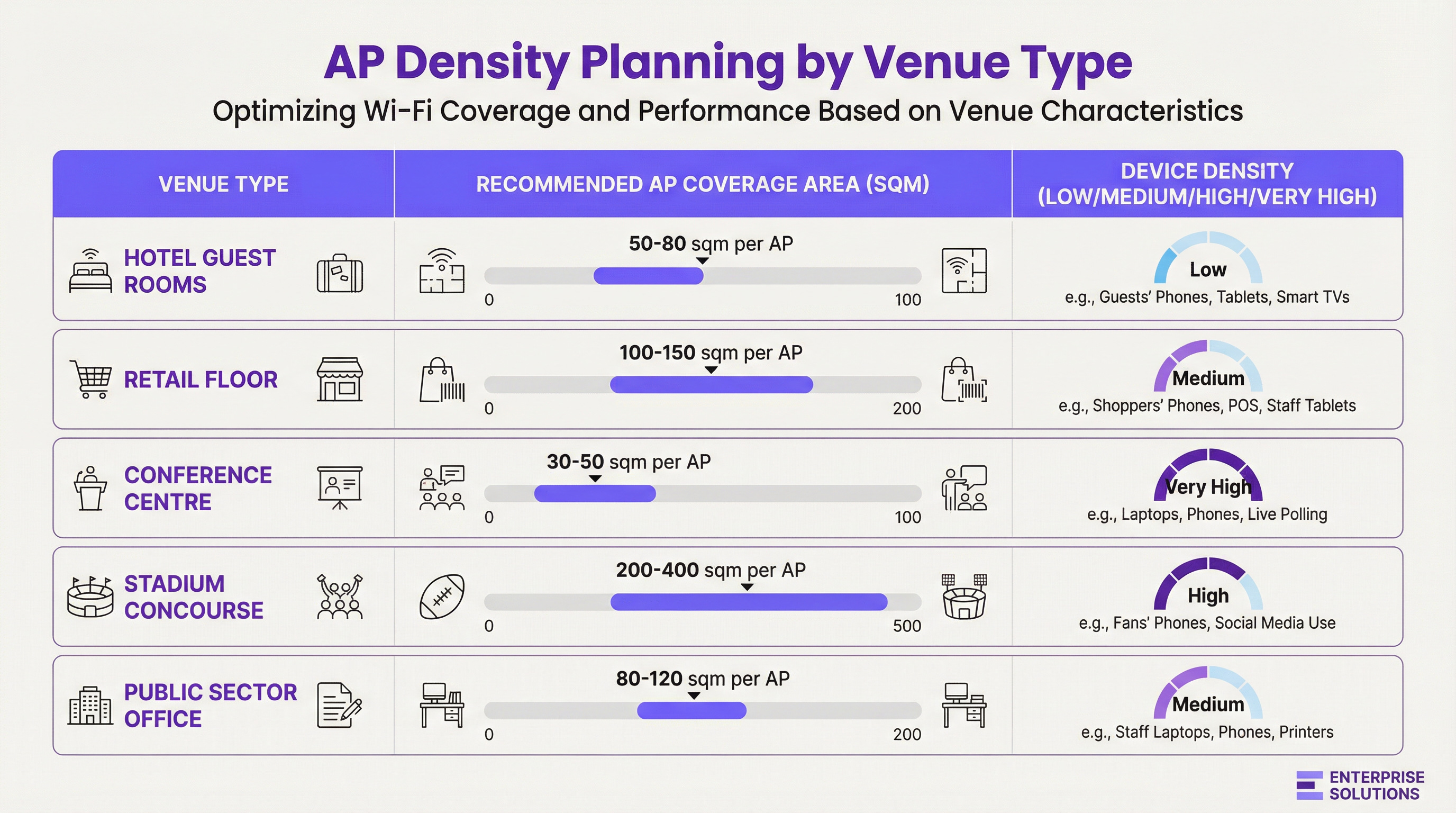
La densidad de AP no es una métrica única para todos los casos. Es una función de tres variables: el tamaño físico del área, el número de usuarios simultáneos y los tipos de aplicaciones que utilizarán.
- Diseño orientado a la cobertura: En entornos como hoteles o almacenes, el objetivo principal es proporcionar una señal constante en un área grande. Aquí, la planificación comienza con el radio de cobertura efectivo del AP, teniendo en cuenta la atenuación de los materiales de construcción.
- Diseño orientado a la capacidad: En entornos de alta densidad como centros de conferencias o estadios, el plan debe priorizar el número de conexiones simultáneas que un AP puede manejar. Esto a menudo lleva a implementar más AP de los necesarios solo para la cobertura, operando a una menor potencia de transmisión para crear celdas más pequeñas y enfocadas.
Atenuación de la señal e impacto de los materiales
Las señales de RF son absorbidas, reflejadas y difractadas por los materiales de construcción. Un estudio de sitio exhaustivo (site survey) debe tener en cuenta la pérdida de dB causada por obstrucciones comunes:
| Material | Atenuación en 2.4 GHz (Aprox.) | Atenuación en 5 GHz (Aprox.) | Impacto en la ubicación |
|---|---|---|---|
| Panel de yeso (Drywall) | -3 dB | -4 a -5 dB | Impacto mínimo, estándar para entornos de oficina. |
| Muro de concreto | -10 a -15 dB | -15 a -20 dB | Alto impacto; requiere AP en ambos lados. |
| Ventana de vidrio | -4 dB | -7 dB | Impacto moderado; puede causar reflejos. |
| Puerta de metal/Elevador | -15 a -25 dB | -20 a -30 dB | Crea sombras de RF; planifique la cobertura a su alrededor. |
Planificación de canales y superposición de señales
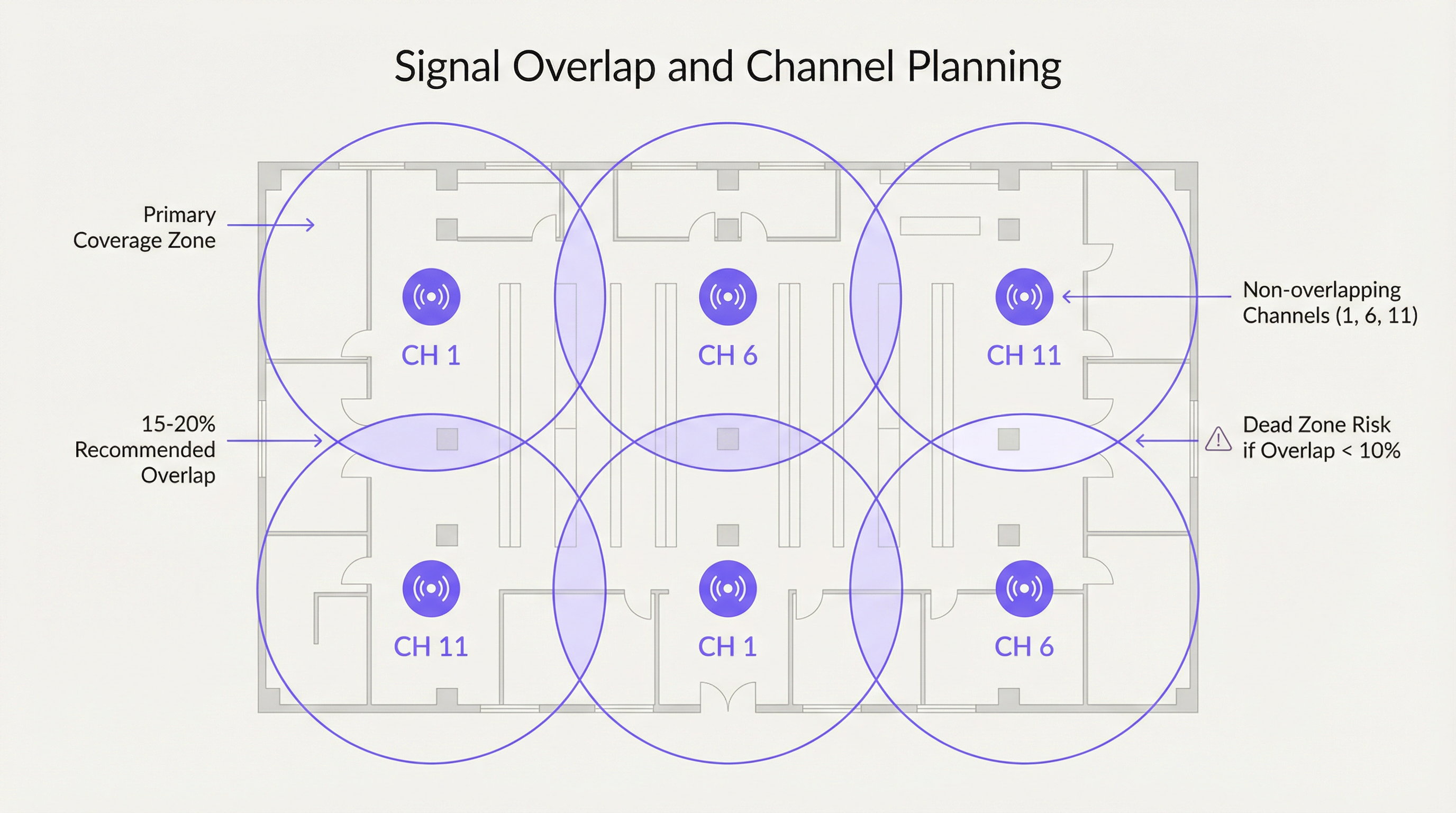
Para garantizar un roaming sin interrupciones, se recomienda una superposición deliberada del 15-20% entre las celdas de cobertura de los AP adyacentes. Esto permite que un dispositivo cliente descubra y se asocie con un nuevo AP antes de perder la señal del anterior. Sin embargo, esta superposición debe gestionarse con un plan de canales adecuado para evitar interferencias.
- Interferencia cocanal (CCI): Ocurre cuando dos AP en el mismo canal están demasiado cerca. Deben competir por el tiempo de transmisión (airtime), lo que reduce el rendimiento para todos los clientes conectados.
- Interferencia de canal adyacente (ACI): Ocurre cuando los AP en canales superpuestos están demasiado cerca (por ejemplo, los canales 1 y 2 en la banda de 2.4 GHz).
Para la banda de 2.4 GHz, solo los canales 1, 6 y 11 no se superponen y deben usarse exclusivamente en cualquier implementación empresarial. La banda de 5 GHz ofrece un número mucho mayor de canales que no se superponen, lo que la convierte en la opción preferida para diseños orientados a la capacidad.
Guía de implementación
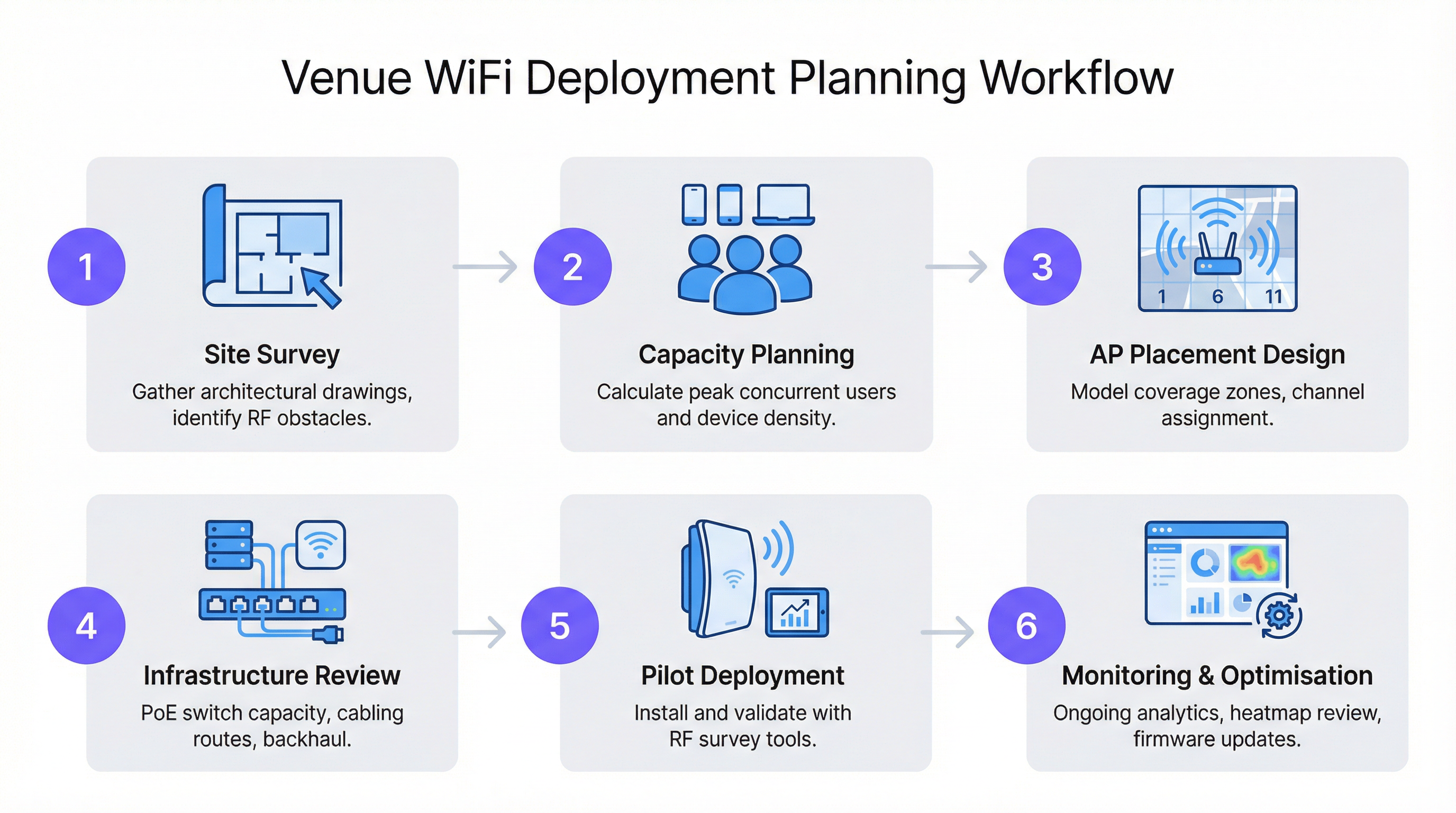
Seguir un flujo de trabajo estructurado es fundamental para una implementación de WiFi exitosa y escalable. Este proceso garantiza que se consideren todas las variables, desde la planificación inicial hasta la optimización posterior a la instalación.
Paso 1: El estudio de sitio (Site Survey)
Un estudio de sitio profesional es la piedra angular de cualquier diseño de red. Consta de dos fases:
- Estudio predictivo: Uso de planos de planta y software como Ekahau o AirMagnet para modelar la propagación de RF y crear un mapa inicial de ubicación de los AP.
- Estudio físico: Un recorrido por el recinto con un analizador de espectro y una herramienta de estudio para validar el modelo predictivo, identificar fuentes de interferencia de RF (como hornos de microondas o redes vecinas) y confirmar las propiedades de RF de los materiales de construcción.
Paso 2: Montaje y ubicación
- Montaje en techo: Ideal para áreas abiertas con techos altos (3-5 metros), como pisos de tiendas minoristas o salones de baile. Utilice un patrón de antena con inclinación hacia abajo (down-tilt) para una cobertura enfocada.
- Montaje en pared: Preferido en hotelería (habitaciones de hotel) y oficinas. Monte los AP a una altura de 2.5 a 3 metros para colocarlos por encima de la mayoría de los muebles y obstrucciones.
- Evitar los falsos plafones: Colocar los AP en el espacio por encima de un techo falso puede reducir la intensidad de la señal entre 3 y 5 dB y dificulta el acceso físico para el mantenimiento.
- Escalonamiento vertical: En edificios de varios pisos, los AP no deben colocarse en la misma ubicación en cada piso. Escalonar la ubicación ayuda a mitigar la interferencia cocanal entre pisos.
Mejores prácticas
- Priorizar 5 GHz: Dirija a los clientes compatibles hacia la banda de 5 GHz. Tiene más canales, menos interferencia y ofrece velocidades de datos más altas. Utilice las funciones de band-steering en sus AP para fomentar esto.
- Ajustar la potencia de transmisión: La potencia máxima no siempre es la mejor. En diseños de alta densidad, reducir la potencia de transmisión crea microceldas más pequeñas, lo que aumenta la capacidad general de la red al permitir una reutilización de canales más frecuente.
- Aprovechar los estándares modernos: Implemente AP compatibles con Wi-Fi 6 (802.11ax) o Wi-Fi 6E. Funciones como OFDMA y MU-MIMO están diseñadas específicamente para mejorar el rendimiento en entornos congestionados.
- Planificar el backhaul: Asegúrese de que su infraestructura de switching pueda proporcionar el presupuesto de energía a través de Ethernet (PoE) necesario (PoE+ o PoE++ para AP de alto rendimiento) y tenga suficiente capacidad de enlace ascendente (uplink) para manejar el tráfico inalámbrico agregado.
Solución de problemas y mitigación de riesgos
- Síntoma: Velocidades lentas a pesar de una señal fuerte. Causa: Probable interferencia cocanal o un AP sobresaturado. Solución: Realice un análisis de espectro para identificar redes competidoras. Revise la carga de clientes del AP y considere agregar capacidad o equilibrar la carga de los clientes.
- Síntoma: Caídas de conexión al moverse. Causa: Superposición de cobertura insuficiente (<10%) o configuración de roaming inadecuada. Solución: Aumente la densidad de AP en el área afectada o ajuste la potencia de transmisión de los AP adyacentes para crear una zona de superposición más grande.
- Síntoma: Ciertas áreas no tienen cobertura (zonas muertas). Causa: Obstrucciones de RF imprevistas (por ejemplo, estanterías de metal nuevas). Solución: Realice un estudio posterior a la instalación para identificar la zona muerta e implemente un AP adicional para cubrir el vacío.
ROI e impacto en el negocio
Una red WiFi bien diseñada no es un centro de costos; es un habilitador de inteligencia empresarial y de una mejor experiencia del cliente. Para una cadena minorista, los datos recopilados de una red WiFi habilitada por Purple pueden fundamentar las decisiones sobre el diseño de la tienda, medir la afluencia de público e impulsar el marketing personalizado. En la hotelería, es un factor clave en las puntuaciones de satisfacción de los huéspedes y permite servicios como el check-in móvil y el streaming en la habitación. El ROI se mide en:
- Mayor satisfacción y lealtad de los huéspedes: El WiFi de alto rendimiento es ahora una comodidad principal que influye en las decisiones de reserva.
- Mayor eficiencia operativa: La conectividad confiable para los dispositivos del personal (sistemas POS, escáneres de inventario, herramientas de comunicación) reduce el tiempo de inactividad.
- Nuevas fuentes de ingresos: Los análisis basados en la ubicación y el marketing a través del Captive Portal pueden crear nuevas oportunidades de interacción y ventas.
Key Terms & Definitions
Access Point (AP)
A networking hardware device that allows a Wi-Fi compliant device to connect to a wired network. APs are the bridge between the wireless and wired worlds.
This is the fundamental building block of your WiFi network. IT teams will be physically deploying and configuring these devices based on the network plan.
Site Survey
The process of planning and designing a wireless network to provide a solution that will deliver the required wireless coverage, data rates, network capacity, roaming capability and Quality of Service (QoS).
This is the most critical pre-deployment step. Skipping or rushing a site survey is the number one cause of poor WiFi performance. It provides the data needed to justify AP count and placement to management.
AP Density
The concentration of access points within a given physical area. High density refers to a large number of APs in a small area, typically for capacity reasons.
This term is central to budget discussions. A CTO needs to understand why a high-density area like a conference room requires a higher AP density (and thus cost) than a hallway.
Signal-to-Noise Ratio (SNR)
A measure that compares the level of a desired signal to the level of background noise. It is expressed in decibels (dB). A higher SNR means a cleaner, more reliable signal.
When troubleshooting a user's complaint of 'bad WiFi', SNR is a key metric. A strong signal is useless if the background noise (from other networks, microwaves, etc.) is also high. Aim for an SNR of 25 dB or higher for good performance.
Co-Channel Interference (CCI)
Interference that occurs when two or more access points on the same channel operate in close proximity. They are forced to share the available airtime, reducing throughput for all clients.
This is why channel planning is crucial. A network architect must design the AP layout to minimize CCI by reusing channels effectively across the venue.
Roaming
The process of a wireless client device moving from one access point to another within the same network without losing connectivity.
For venue operations, seamless roaming is essential for staff using mobile devices (e.g., scanners, tablets) and for guests on calls. It relies on having sufficient coverage overlap between APs.
Power over Ethernet (PoE)
A standard that allows electrical power to be passed along with data on twisted-pair Ethernet cabling. This allows a single cable to provide both data connection and electrical power to devices like APs.
This simplifies deployment and reduces costs by eliminating the need for a separate power outlet at every AP location. Network architects must ensure their switches have a large enough PoE budget to power all planned APs.
Wi-Fi 6 (802.11ax)
The latest generation of Wi-Fi technology, offering faster speeds and, more importantly, better performance in congested, high-density environments through technologies like OFDMA and MU-MIMO.
When planning a new deployment, especially for a high-traffic venue, specifying Wi-Fi 6 is a form of future-proofing and risk mitigation. It ensures the network can handle the increasing number of devices per user.
Case Studies
A 200-room, 5-story luxury hotel needs to upgrade its WiFi. The building is concrete and steel. The goal is to provide high-performance streaming for guests and reliable connectivity for staff operations.
A capacity-driven design is required. Plan for one AP per 2-4 guest rooms, depending on wall density. Given the concrete construction, placing APs in hallways is not viable; an in-room or near-room wall-plate AP strategy is necessary. For example, a wall-plate AP in every other room, with careful channel planning to avoid interference with rooms on adjacent floors. A staggered floor-by-floor layout is critical. For common areas like the lobby and restaurant, a ceiling-mounted, high-density AP solution is required, with APs placed approximately 10-15 meters apart. The entire network should be designed using Wi-Fi 6 APs to handle the high number of devices and streaming applications. A physical site survey is mandatory to validate RF penetration through the hotel's specific wall types.
A large retail store (5,000 sq. meters) wants to deploy guest WiFi and support staff inventory scanners and POS devices. The store has high ceilings and wide, open aisles, but also dense shelving units.
A mixed-coverage and capacity approach is needed. The primary design should be coverage-oriented, using ceiling-mounted APs with omnidirectional antennas placed in a grid pattern across the open floor areas, approximately 15-20 meters apart. However, a secondary survey must be done to identify potential RF dead zones created by high, metal shelving units. In these areas, additional, lower-power APs may be needed, mounted to the ends of aisles or on pillars. Channel planning should use a standard 1, 6, 11 rotation for 2.4 GHz and a wider range of non-overlapping channels for 5 GHz. The network must be configured with separate SSIDs and VLANs for guest and corporate traffic, in line with PCI DSS compliance for the POS systems.
Scenario Analysis
Q1. You are designing WiFi for a historic hotel with thick plaster and lath walls. A predictive survey suggests a single AP in the corridor can cover four rooms. What is your primary concern and how do you validate your design?
💡 Hint:Historic building materials are notoriously unpredictable for RF signals.
Show Recommended Approach
The primary concern is that the predictive model is inaccurate due to the variable density of the plaster and lath walls. The model should not be trusted. The only way to validate the design is with a physical pilot test. Place a single AP on a temporary stand in the corridor and use a survey tool (like Ekahau Sidekick) to measure the actual signal strength inside each of the four rooms. It is highly likely that an in-room or two-room deployment model will be required.
Q2. A conference is reporting that WiFi performance is excellent in the main hall but becomes unusable in the smaller breakout rooms. All APs are the same model. What is the most likely cause?
💡 Hint:Think about user density and the difference between a large hall and a small room.
Show Recommended Approach
The most likely cause is a capacity issue, not a coverage one. The AP density was likely planned for the lower-density main hall and not adjusted for the much higher user density in the breakout rooms. During breakout sessions, a large number of users move into small spaces, overwhelming the few APs covering those rooms. The solution is to increase the AP density in the breakout rooms and potentially use directional antennas to focus coverage and limit interference.
Q3. Your company is deploying a new network in a multi-tenant office building. You do not control the other tenants' networks. What is the most critical step in your site survey process?
💡 Hint:You can't control your neighbours, but you need to account for them.
Show Recommended Approach
The most critical step is a thorough spectrum analysis. In a multi-tenant building, the RF environment is chaotic. You must identify all other WiFi networks operating in the space, paying close attention to the channels they are using and their signal strength in your deployment area. This analysis is crucial for creating a channel plan that avoids the most congested channels, mitigating co-channel and adjacent channel interference from networks you do not control. You may need to rely more heavily on the 5 GHz band and potentially use narrower channel widths (e.g., 20 MHz) to find clean spectrum.
Key Takeaways
- ✓AP placement is a balance of providing wide coverage and sufficient capacity for users.
- ✓A physical site survey is non-negotiable to understand a building's unique RF characteristics.
- ✓Plan for 15-20% signal overlap between APs to ensure seamless roaming.
- ✓In the 2.4 GHz band, only ever use channels 1, 6, and 11 to avoid interference.
- ✓High-density venues like conference halls require more APs for capacity, not just coverage.
- ✓Deploy Wi-Fi 6 (802.11ax) for better performance in crowded environments.
- ✓A WiFi network is not 'set and forget'; it requires continuous monitoring and optimisation.




