

Crea tu propia aplicación de Captive Portal: Guía para desarrolladores (con ejemplos de código)
This technical guide provides developers and IT leaders with a comprehensive framework for building custom captive portal applications. It covers architectural design, platform selection (iOS, Android, Web), security best practices (802.1X, GDPR), and API integration strategies to transform guest WiFi into a powerful tool for customer engagement and data analytics.
🎧 Listen to this Guide
View Transcript
Resumen ejecutivo
Esta guía proporciona una referencia técnica exhaustiva para gerentes de TI, arquitectos de redes y desarrolladores sobre la creación de aplicaciones de Captive Portal personalizadas. Aborda la necesidad crítica de los recintos de controlar el acceso a la red y, al mismo tiempo, crear oportunidades valiosas para la interacción con los invitados y el análisis de datos. Profundizamos en las decisiones arquitectónicas, las opciones de plataforma (iOS, Android, Web) y los protocolos de seguridad esenciales para una implementación exitosa. Para el CTO, esta guía ofrece una visión estratégica del ROI, los riesgos de cumplimiento y el impacto comercial de una estrategia de Captive Portal bien ejecutada, yendo más allá de una simple puerta de enlace de conectividad para convertirse en una poderosa herramienta que mejora la experiencia del cliente e impulsa los ingresos.
Análisis técnico detallado
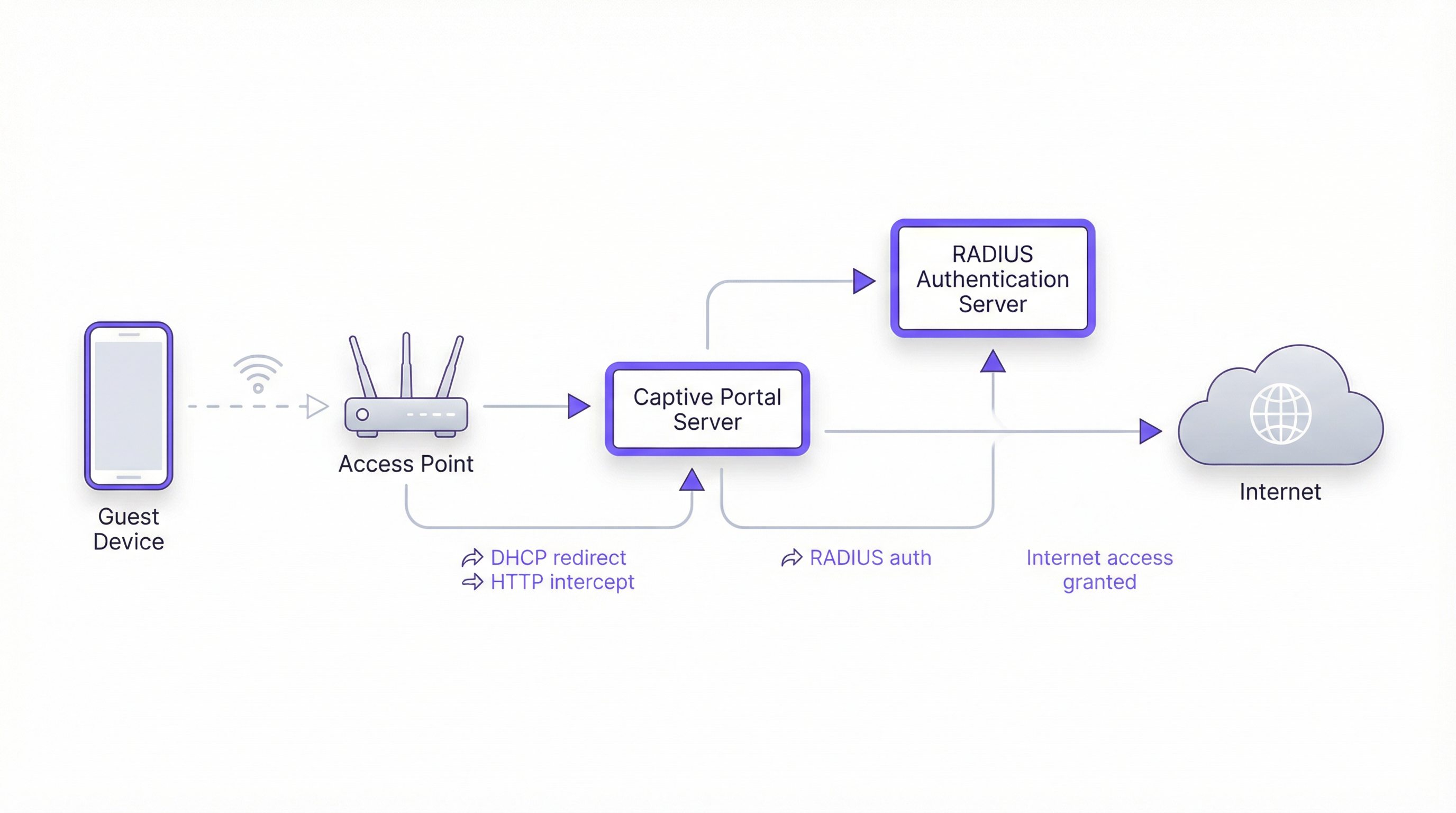
La creación de un Captive Portal implica una sofisticada interacción entre protocolos de red, tecnologías web y sistemas de autenticación backend. El objetivo fundamental es interceptar el tráfico web de un usuario y redirigirlo a un portal dedicado para su autenticación antes de otorgarle un acceso más amplio a la red. Este proceso depende de algunos componentes centrales.
Arquitectura central
- Punto de acceso (AP): El hardware inalámbrico que transmite la señal WiFi. Los AP modernos de nivel empresarial tienen capacidades integradas para admitir Captive Portals.
- Servidor DHCP: Asigna una dirección IP al dispositivo que se conecta. En una configuración de Captive Portal, el servidor DHCP también puede proporcionar la URL al endpoint de la API del Captive Portal (a través de la Opción 114 de DHCP), un método estandarizado en RFC7710bis que mejora la confiabilidad de detección en clientes modernos como Android 11+.
- Intercepción/Redirección de DNS: Cuando el dispositivo del usuario intenta resolver un nombre de dominio (por ejemplo,
google.com), el servidor DNS de la red devuelve inicialmente la dirección IP del servidor del Captive Portal. Este es el enfoque clásico de "jardín vallado" (walled garden). - Servidor de Captive Portal: Un servidor web que aloja la página de inicio de sesión o splash page. Esta es la aplicación con la que interactúa el usuario final. Es responsable de presentar el formulario de inicio de sesión, validar las credenciales y comunicarse con el backend de autenticación.
- Servidor de autenticación (RADIUS): El Servicio de Usuario de Acceso Telefónico de Autenticación Remota (RADIUS) es el backend estándar de la industria para la autenticación de red. Cuando un usuario envía sus credenciales en el portal, el servidor del portal las reenvía al servidor RADIUS, que las verifica en una base de datos de usuarios autorizados. Es fundamental para aplicar políticas basadas en los estándares IEEE 802.1X.
Opciones de plataforma y framework
Los desarrolladores tienen tres vías principales para crear la aplicación de Captive Portal orientada al usuario. La elección tiene implicaciones significativas para la implementación, la experiencia del usuario y los gastos generales de mantenimiento.
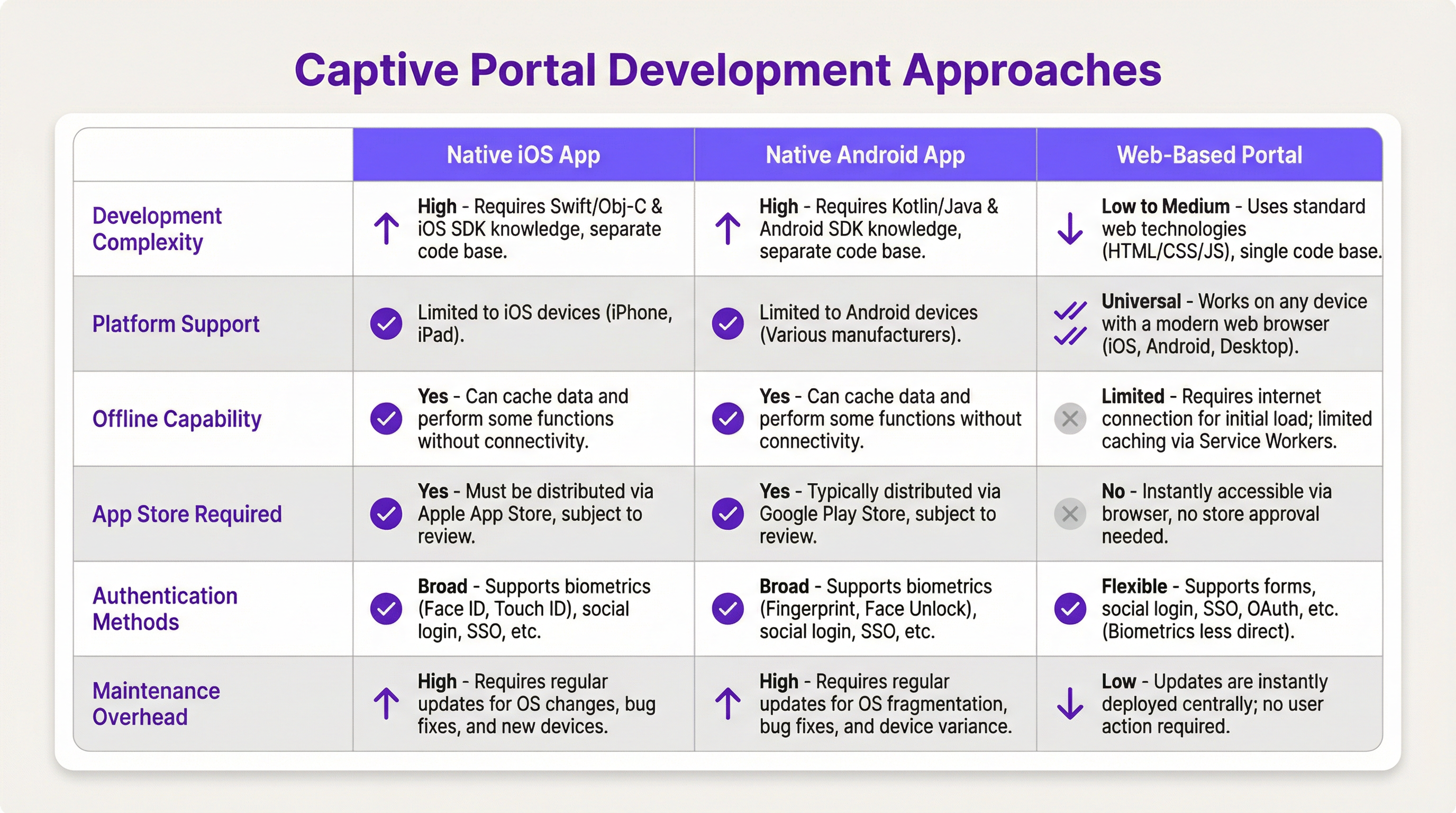
- Aplicación nativa para iOS/Android: Ofrece la experiencia de usuario más completa, incluida una integración perfecta con las funciones del dispositivo, como la biometría (Face ID, huella digital) y capacidades sin conexión. Sin embargo, este camino requiere bases de código separadas (Swift/Objective-C para iOS, Kotlin/Java para Android), procesos de revisión en la App Store y obliga a los usuarios a descargar una aplicación, lo que puede ser una barrera de entrada importante.
- Portal basado en web: El enfoque más común y flexible. Se sirve una aplicación web responsiva (HTML, CSS, JavaScript) al navegador del usuario. Es independiente de la plataforma, no requiere instalación y las actualizaciones se implementan al instante. Las tecnologías web modernas, como los Service Workers, pueden proporcionar cierta funcionalidad sin conexión, pero generalmente es más limitada que en las aplicaciones nativas.
Guía de implementación
Esta sección proporciona un tutorial de alto nivel, independiente del proveedor, para implementar un Captive Portal basado en web.
Paso 1: Configuración de red y hardware
- Seleccionar AP de nivel empresarial: Elija puntos de acceso de proveedores como Cisco Meraki, Ruckus o Aruba que admitan explícitamente Captive Portals externos y autenticación RADIUS.
- Configurar VLAN: Aísle el tráfico de invitados de su red corporativa interna utilizando una VLAN dedicada. Esta es una medida de seguridad crítica.
- Configurar DHCP y DNS: Configure su servidor DHCP para asignar direcciones IP en la VLAN de invitados y su servidor DNS para realizar la redirección inicial a su servidor de portal.
Paso 2: Desarrollar la aplicación del portal web
- Frontend: Utilice un framework de JavaScript moderno como React, Vue o Svelte para lograr una experiencia de usuario dinámica. Asegúrese de que el diseño sea responsivo y priorice los dispositivos móviles (mobile-first).
- Backend: Se necesita un backend ligero (por ejemplo, Node.js con Express, Python con Flask) para servir el frontend y manejar la comunicación con el servidor RADIUS.
- Lógica de autenticación: El flujo de trabajo principal es el siguiente:
- El usuario se conecta al WiFi.
- El dispositivo es redirigido a la URL del portal.
- El usuario envía sus credenciales (por ejemplo, número de habitación y apellido, correo electrónico, inicio de sesión social).
- El backend del portal envía un
Access-Requestal servidor RADIUS con las credenciales del usuario. - El servidor RADIUS valida las credenciales y, si tiene éxito, devuelve un mensaje
Access-Accept. - El backend del portal indica al controlador/puerta de enlace de la red que abra el acceso para la dirección MAC del dispositivo del usuario.
Paso 3: Integraciones de API
- Sistema de gestión de propiedades (PMS): Para los hoteles, la integración con el PMS (por ejemplo, Oracle Opera) permite la autenticación mediante las reservas de los huéspedes (número de habitación + apellido).
- CRM: La sincronización de los datos recopilados (por ejemplo, direcciones de correo electrónico) con un CRM como Salesforce permite una potente automatización del marketing.
- Inicio de sesión social: Utilice OAuth2 para permitir a los usuarios iniciar sesión con sus cuentas de redes sociales (Facebook, Google, LinkedIn). Esto proporciona datos demográficos más completos, pero requiere un manejo cuidadoso de la privacidad y el consentimiento en virtud del GDPR.
Mejores prácticas
- La seguridad es lo primero: Utilice siempre HTTPS para su Captive Portal a fin de cifrar las credenciales del usuario en tránsito. Implemente la limitación de velocidad (rate limiting) para evitar ataques de fuerza bruta. Cumpla con PCI DSS si procesa pagos.
- Cumplimiento: Sea transparente sobre la recopilación de datos. La splash page de su portal debe incluir un enlace claro a su política de privacidad y obtener el consentimiento explícito según lo exigen el GDPR y otras normativas de protección de datos.
- Experiencia del usuario: Mantenga el proceso de inicio de sesión lo más fluido posible. Para recintos con múltiples ubicaciones, implemente un roaming continuo donde un usuario autenticado en una ubicación se conecte automáticamente en otra.
- Gestión del ancho de banda: Implemente políticas de Calidad de Servicio (QoS) para garantizar una asignación justa del ancho de banda y evitar que unos pocos usuarios degraden la experiencia de los demás.
Solución de problemas y mitigación de riesgos
- Problemas de detección de dispositivos: No todos los dispositivos funcionan bien con los Captive Portals. La tendencia hacia direcciones MAC aleatorias en iOS y Android puede complicar el seguimiento de los dispositivos. La API de Captive Portal (RFC7710bis) es el método de detección más confiable.
- Fallos de inicio de sesión: Implemente un registro (logging) robusto en su portal y servidor RADIUS para diagnosticar problemas de autenticación. Los problemas comunes incluyen credenciales incorrectas, cuentas caducadas o problemas de conectividad de red entre el portal y el servidor RADIUS.
- Riesgos de seguridad: Un Captive Portal mal protegido puede ser un vector para ataques de intermediario (man-in-the-middle). Asegúrese de que toda la comunicación esté cifrada y de que su servidor de portal esté reforzado contra las vulnerabilidades web comunes.
ROI e impacto comercial
Un Captive Portal no es solo un gasto de TI; es un activo estratégico. El ROI se mide a través de:
- Mayor interacción con el cliente: Utilice el portal para promocionar servicios en el lugar, mostrar horarios de eventos u ofrecer descuentos exclusivos.
- Análisis de datos mejorado: Al analizar los datos de inicio de sesión, los recintos pueden comprender los patrones de tráfico peatonal, los tiempos de permanencia y la demografía de los clientes, lo que conduce a mejores decisiones operativas.
- Nuevas fuentes de ingresos: Para centros de conferencias o aeropuertos, el acceso por niveles (por ejemplo, WiFi básico gratuito, WiFi premium de pago) puede generar ingresos directos. El portal también se puede utilizar para publicidad de terceros.
- Mejor percepción de la marca: Una experiencia WiFi fluida y confiable es ahora una expectativa básica. Un Captive Portal profesional mejora la percepción de su marca como moderna y centrada en el cliente.
Key Terms & Definitions
Captive Portal
A web page that the user of a public-access network is obliged to view and interact with before access is granted. It intercepts traffic until the user completes a required action, such as authentication or accepting terms of service.
This is the core component IT teams build to manage guest WiFi. It's the gateway that controls access and provides a branding and data collection opportunity.
RADIUS (Remote Authentication Dial-In User Service)
A client/server protocol (IETF standard) that provides centralized Authentication, Authorization, and Accounting (AAA) management for users who connect and use a network service.
For developers, this is the definitive backend protocol for network authentication. Your captive portal app will act as a RADIUS client to validate users against a central directory.
IEEE 802.1X
An IEEE standard for port-based Network Access Control (PNAC). It provides an authentication mechanism to devices wishing to attach to a LAN or WLAN.
This is the enterprise-grade security standard that underpins secure WiFi. While a captive portal is a web-layer solution, 802.1X provides a deeper, more secure authentication framework that can work in conjunction with it.
VLAN (Virtual Local Area Network)
A logical grouping of devices in the same broadcast domain. A VLAN partitions a single physical network into multiple, isolated logical networks.
This is a critical security tool for network architects. Guest WiFi traffic must always be segregated onto its own VLAN to prevent any possibility of access to the internal corporate network.
DHCP (Dynamic Host Configuration Protocol)
A network management protocol used on IP networks for automatically assigning IP addresses and other communication parameters to devices.
In a captive portal context, DHCP is not just for IP assignment. Using DHCP Option 114, it can also inform client devices of the captive portal API location, improving detection reliability.
GDPR (General Data Protection Regulation)
A regulation in EU law on data protection and privacy for all individuals within the European Union and the European Economic Area. It also addresses the transfer of personal data outside the EU and EEA areas.
If your venue serves European citizens (regardless of where the venue is located), your captive portal's data collection and handling practices must be GDPR compliant. This has major implications for consent and data transparency.
PCI DSS (Payment Card Industry Data Security Standard)
An information security standard for organizations that handle branded credit cards from the major card schemes.
If your captive portal involves any form of payment (e.g., for premium access), the entire application and infrastructure falls within the scope of PCI DSS, requiring stringent security controls and regular audits.
OAuth 2.0
An open standard for access delegation, commonly used as a way for Internet users to grant websites or applications access to their information on other websites but without giving them the passwords.
This is the framework developers use to implement 'Login with Google/Facebook' functionality. It provides a secure way to authenticate users and retrieve profile data without handling their actual social media passwords.
Case Studies
A 500-room luxury hotel wants to replace its generic WiFi login with a branded captive portal. The goal is to authenticate guests using their room number and last name, offer tiered bandwidth options (free standard, paid premium), and promote spa services. The existing network uses Cisco Meraki hardware.
- Architecture: Deploy a web-based captive portal hosted on a cloud server (AWS/Azure). 2. Network Configuration: Configure the Meraki dashboard to use an external captive portal, pointing to the URL of your new web app. Create two SSIDs on a guest VLAN: 'HotelGuest_Free' and 'HotelGuest_Premium'. 3. Application Development: Build a responsive web app. The landing page will have fields for 'Room Number' and 'Last Name'. 4. API Integration: Use the hotel's PMS API (e.g., Oracle Hospitality) to validate the guest credentials in real-time. On successful validation, the app makes a RADIUS request. 5. RADIUS Configuration: Set up a RADIUS server (e.g., FreeRADIUS) with policies. If the user is on the 'Premium' SSID, the RADIUS server returns attributes to the Meraki controller to unlock higher bandwidth for that user's MAC address. 6. Post-Login Experience: After authentication, redirect the user to a page featuring a prominent advertisement for the hotel spa with a 'Book Now' button.
A national retail chain with 200 stores wants to offer free guest WiFi to gather customer email addresses for its loyalty program. The solution must be centrally managed, GDPR compliant, and provide basic analytics on visitor counts and dwell times.
- Architecture: A centralized, cloud-hosted, multi-tenant web portal is the only viable option for this scale. 2. Authentication: The portal will feature a simple form asking for an email address. A checkbox for 'I agree to the terms and consent to receive marketing communications' is mandatory and must not be pre-checked. 3. Backend: The portal backend validates the email format and sends it via API to the central CRM/loyalty database. It then sends a RADIUS Access-Request. 4. RADIUS & Analytics: The RADIUS server logs the authentication event (with a timestamp and the store ID, passed as a RADIUS attribute from the local AP). This data is used for analytics. The RADIUS accounting records (Start and Stop messages) provide the data needed to calculate session duration (dwell time). 5. Deployment: The same portal URL is configured across all 200 stores. The local network at each store is configured to pass a unique 'NAS-Identifier' attribute to the RADIUS server so that analytics can be segmented by location.
Scenario Analysis
Q1. A stadium with a capacity of 50,000 needs to provide guest WiFi. The primary goal is to manage congestion and ensure fair bandwidth usage. A secondary goal is to display advertisements for upcoming events. What is the most critical technical feature to implement?
💡 Hint:Think about network performance at scale, not just authentication.
Show Recommended Approach
The most critical feature is Quality of Service (QoS) and bandwidth throttling. With 50,000 potential users, the network would be unusable without strict policies to limit each user's bandwidth and prevent a small number of users from consuming all available throughput. While authentication and advertising are important, ensuring the core service is stable is the top priority.
Q2. A hospital wants to provide WiFi for patients and visitors. They need to comply with HIPAA regulations regarding data privacy. They also want to allow users to access the hospital's patient portal. How should they design their captive portal authentication?
💡 Hint:Consider the sensitivity of healthcare data and the need for secure, but simple, access.
Show Recommended Approach
The solution requires a two-tiered approach. 1. A simple, click-through captive portal for general internet access that collects no personal data, thus minimizing HIPAA scope. This portal should clearly state the terms of use. 2. For access to the patient portal, the user should be redirected to the portal's separate, secure login page, which uses multi-factor authentication. The captive portal itself should not handle patient portal credentials. The guest network must be strictly isolated from the hospital's internal clinical network via VLANs and firewalls.
Q3. You are deploying a captive portal for a coffee shop chain. The marketing team wants to allow login via Facebook to gather customer demographic data. What are the key technical and compliance steps you must take?
💡 Hint:Focus on the intersection of OAuth, data collection, and privacy regulations like GDPR.
Show Recommended Approach
- Technical: Implement the OAuth 2.0 protocol to securely connect with Facebook's API. Ensure you only request the minimum necessary data permissions (e.g., public profile and email). 2. Compliance (GDPR): On the login page, before the user clicks 'Login with Facebook', you must display a clear statement explaining what data will be collected and for what purpose. You must include a link to your privacy policy. The user must actively consent (e.g., by clicking the login button after reading the notice); you cannot assume consent. 3. Backend: Your backend must securely store the access tokens and handle the collected data in accordance with your privacy policy.
Key Takeaways
- ✓A captive portal is a strategic asset for controlling network access and driving guest engagement.
- ✓The industry-standard architecture uses a web-based portal with a RADIUS server for authentication.
- ✓Always segregate guest traffic onto a dedicated VLAN and enforce HTTPS for security.
- ✓Compliance with GDPR and other privacy laws requires explicit, informed user consent before data collection.
- ✓Leverage API integrations with PMS and CRM systems to automate authentication and marketing.
- ✓Focus on a frictionless user experience to enhance brand perception and guest satisfaction.
- ✓Measure ROI through increased engagement, data analytics, and new revenue opportunities.




