

Aplicaciones de inicio de sesión de Captive Portal: Cómo elegir la solución adecuada para su empresa (características, seguridad y precios)
This guide provides a comprehensive technical reference for IT leaders evaluating, deploying, and managing captive portal login solutions across enterprise venues. It covers critical features, security protocols, authentication methods, pricing models, and integration capabilities to help businesses enhance network security, ensure regulatory compliance, and maximise the ROI of their guest WiFi infrastructure.
🎧 Listen to this Guide
View Transcript

Resumen ejecutivo
Para la empresa moderna, el WiFi para invitados ya no es una simple comodidad: es un activo de infraestructura crítico que impacta directamente en la postura de seguridad, el cumplimiento normativo y la interacción con el cliente. Una aplicación de inicio de sesión de Captive Portal sirve como puerta de enlace principal a este activo, actuando como un portero digital que autentica a los usuarios, hace cumplir las políticas de uso aceptable y desbloquea inteligencia empresarial procesable de cada conexión. El panorama de las soluciones de Captive Portal es complejo y abarca desde acuerdos básicos de un solo clic hasta sofisticados sistemas de acceso basados en la identidad e integrados con proveedores de identidad empresariales. Seleccionar la solución incorrecta introduce vulnerabilidades de seguridad significativas, exposición legal bajo regulaciones como el GDPR y PCI DSS, y la pérdida de oportunidades para extraer valor de los datos de tráfico de la red. Esta guía proporciona un marco neutral en cuanto a proveedores para que los CTO, gerentes de TI y arquitectos de redes evalúen y seleccionen la solución de Captive Portal adecuada. Analizamos los componentes técnicos principales, comparamos las arquitecturas de autenticación, describimos una metodología de implementación por fases y proporcionamos un modelo claro para medir el impacto comercial y el ROI. El enfoque está en ir más allá de una simple página de inicio de sesión hacia una capa de acceso a la red segura, inteligente y que cumpla con las normativas, la cual respalde objetivos comerciales más amplios en los sectores de hotelería, comercio minorista y grandes recintos públicos.
Análisis técnico detallado
La función principal de un Captive Portal es interceptar todo el tráfico web de un dispositivo recién conectado y redirigirlo a una página web dedicada, creando un "jardín vallado" (walled garden). El acceso a Internet en general se bloquea hasta que el usuario completa con éxito una acción requerida en esta página. Este proceso implica una secuencia coordinada entre el dispositivo cliente, el punto de acceso inalámbrico (AP), una puerta de enlace o controlador de red y, a menudo, una plataforma de gestión basada en la nube.
Arquitectura principal y flujo de tráfico
Comprender la secuencia técnica es esencial para la correcta configuración y resolución de problemas. El flujo comienza en el momento en que un dispositivo se asocia con el SSID de invitados. El dispositivo envía inmediatamente un sondeo de conectividad HTTP; por ejemplo, los dispositivos iOS consultan http://captive.apple.com y los dispositivos Android consultan http://connectivitycheck.gstatic.com. El firewall o la puerta de enlace de la red se configura para interceptar este tráfico inicial de cualquier dirección MAC no autenticada y realizar una redirección DNS, respondiendo no con la IP de destino legítima, sino con la dirección IP del servidor del Captive Portal. Esto obliga al Asistente de Red Cautiva (CNA) del dispositivo o al navegador a cargar la página de inicio de sesión del portal. Tras una autenticación exitosa, el backend del portal indica a la puerta de enlace que actualice su tabla de sesiones, marcando la dirección MAC del dispositivo como autorizada. A continuación, la puerta de enlace permite que el tráfico de ese dispositivo pase a Internet durante una duración de sesión predeterminada.
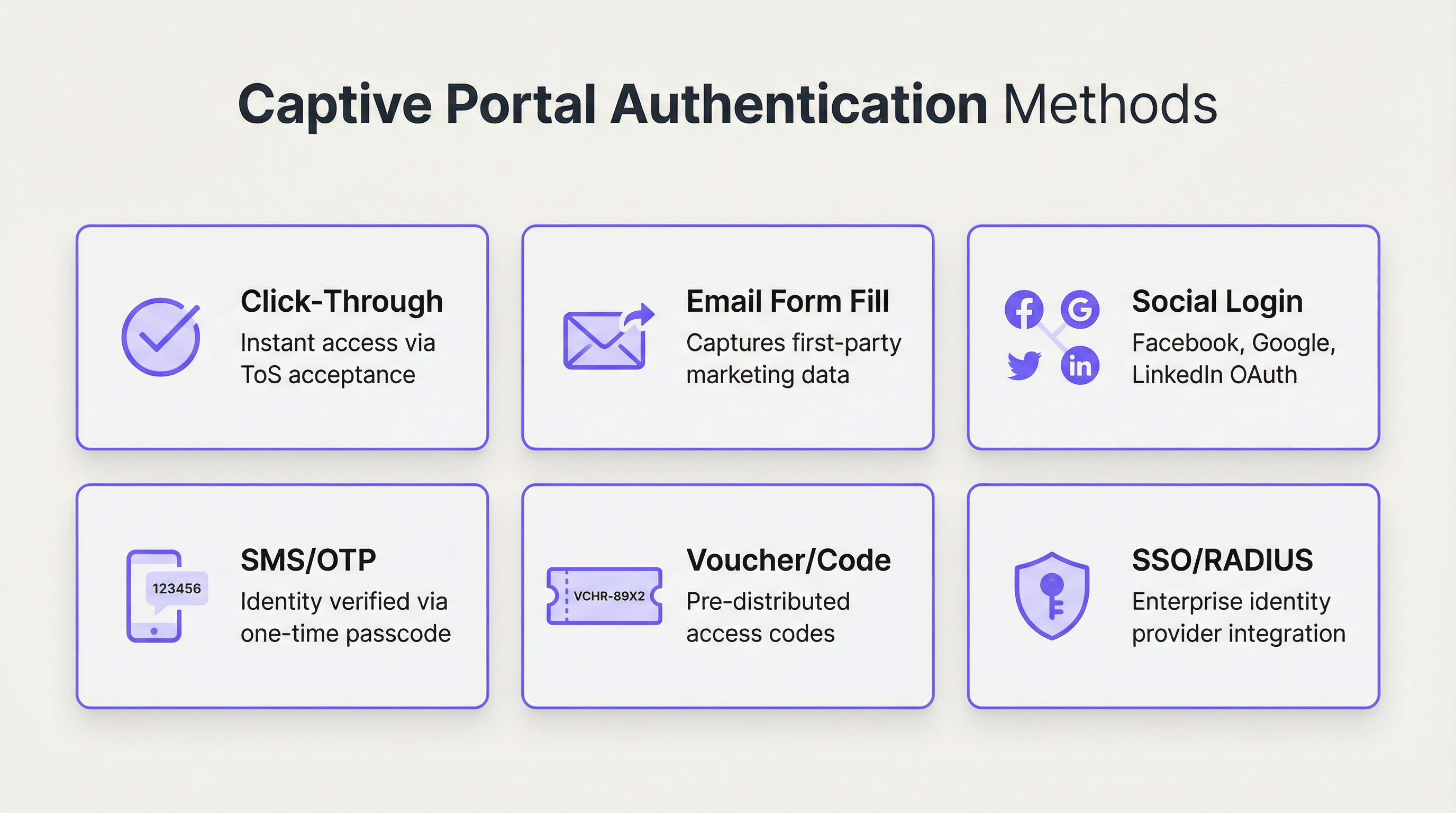
Métodos de autenticación: un análisis comparativo
La elección del método de autenticación es la decisión de diseño más importante, ya que equilibra directamente la fricción del usuario frente a los requisitos de seguridad y los objetivos de recopilación de datos. Las plataformas empresariales modernas admiten una amplia gama de opciones, cada una adecuada para diferentes entornos operativos.
| Método | Caso de uso principal | Nivel de seguridad | Potencial de captura de datos | Fricción del usuario |
|---|---|---|---|---|
| Un solo clic (Click-Through) | Espacios públicos, comercio minorista de servicio rápido | Muy bajo | Ninguno | Muy baja |
| Correo electrónico / Formulario | Comercio minorista centrado en marketing, hotelería | Bajo | Alto (datos de origen) | Media |
| Inicio de sesión social | Recintos orientados al marketing de consumo | Bajo–Medio | Medio (perfil social) | Baja–Media |
| SMS / OTP | Hoteles, centros de conferencias, transporte | Medio | Medio (número de teléfono) | Media |
| Cupón / Código | WiFi de pago, eventos, acceso limitado | Medio | Bajo | Media–Alta |
| RADIUS / 802.1X | Corporativo, educación, gobierno | Muy alto | Alto (datos de directorio) | Baja (para usuarios) |
| SSO (SAML / OIDC) | Invitados empresariales y acceso interno | Muy alto | Alto (datos del IdP) | Muy baja |
Protocolos y estándares de seguridad
Una solución robusta de Captive Portal debe construirse sobre una base de estándares de seguridad sólidos y reconocidos por la industria. Depender de una red abierta no cifrada ya no es aceptable en ningún contexto empresarial.
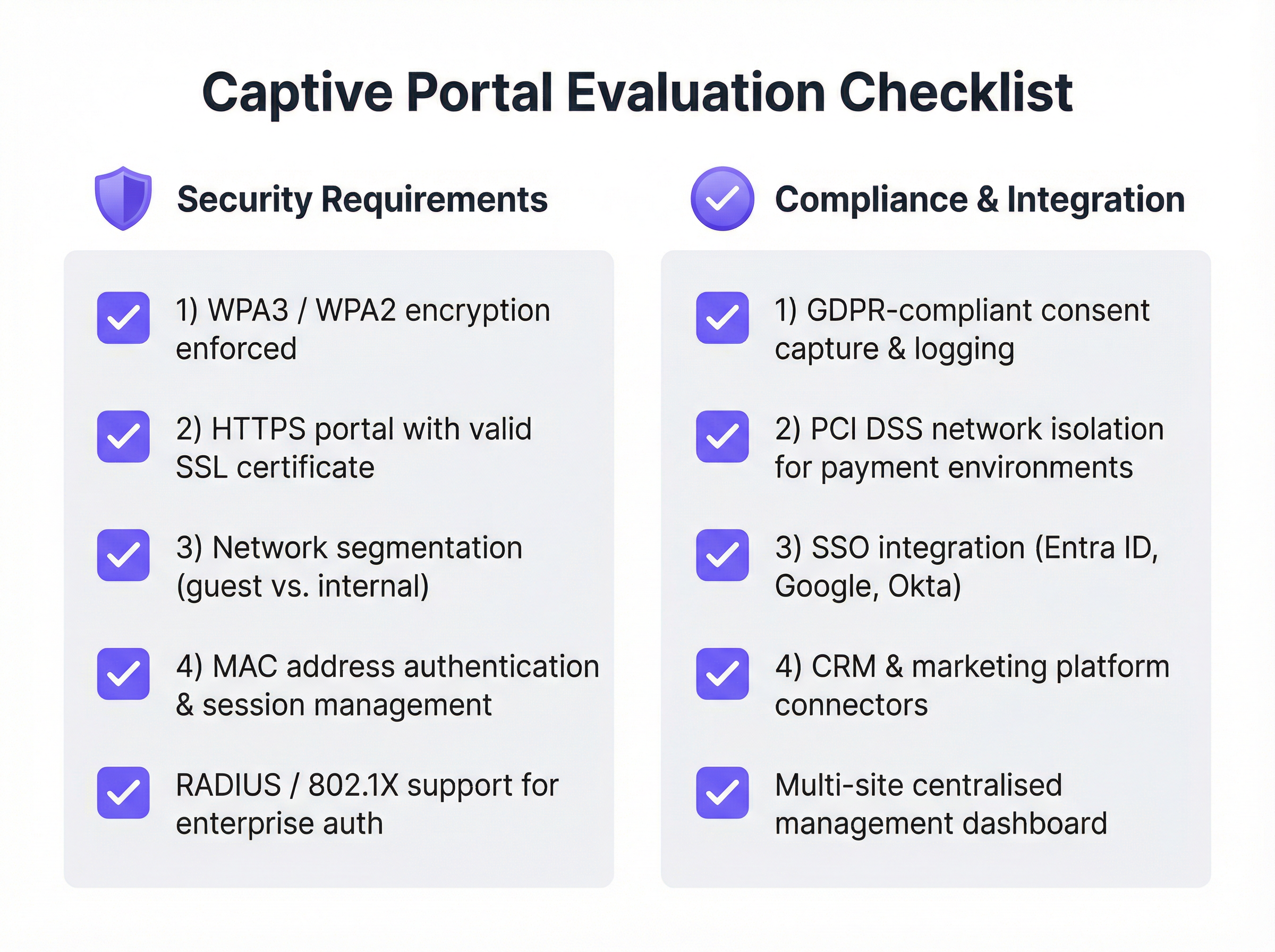
Se debe aplicar WPA3 / WPA2-Enterprise en la capa inalámbrica, a menudo junto con IEEE 802.1X. Esto cifra el tráfico entre el dispositivo cliente y el punto de acceso desde el primer paquete de datos, evitando las escuchas pasivas. La página del Captive Portal en sí debe servirse a través de HTTPS con un certificado SSL válido y de confianza pública. Esto previene los ataques de intermediario (man-in-the-middle) en los que un atacante podría falsificar la página del portal para recopilar credenciales. La segmentación de la red es el control de seguridad más crítico: la red de invitados debe estar completamente aislada de la red corporativa interna mediante VLAN y reglas estrictas de firewall. Por último, se debe habilitar el aislamiento del cliente en los puntos de acceso para evitar que los dispositivos de invitados conectados se comuniquen entre sí, mitigando la propagación lateral de malware.
Guía de implementación
La implementación de una solución de Captive Portal de nivel empresarial requiere una planificación cuidadosa y un enfoque por fases. El objetivo es un sistema seguro, confiable y escalable que cumpla con los requisitos tanto de TI como del negocio.
Fase 1: Recopilación de requisitos y selección de proveedores. Defina el objetivo principal, ya sea un simple acceso seguro, la generación de leads, ofertas de servicios por niveles o el cumplimiento normativo. Identifique a todas las partes interesadas, incluidos los departamentos de TI, marketing, legal y operaciones, para garantizar que se capturen todos los requisitos. Audite su hardware de red actual (AP, switches, firewalls) para verificar su compatibilidad con las soluciones modernas de Captive Portal, ya que la mayoría de las plataformas líderes se integran con los principales proveedores, incluidos Cisco Meraki, Aruba y Ubiquiti. Evalúe a los proveedores utilizando la lista de verificación a continuación, priorice las plataformas administradas en la nube para mayor escalabilidad y ejecute una prueba de concepto en un área limitada antes de comprometerse con una implementación completa.
Fase 2: Diseño y configuración. Finalice la arquitectura de la red, incluido el diseño de la VLAN para la segmentación del tráfico de invitados, el direccionamiento IP y la configuración de DNS. Elija el método o métodos de autenticación que se alineen con sus objetivos y configure las integraciones con cualquier sistema externo, como un servidor RADIUS o un proveedor de identidad SSO. Diseñe las páginas del portal orientadas al usuario con una marca coherente y un recorrido del usuario claro. Redacte la Política de uso aceptable (AUP) en colaboración con su equipo legal y configure las políticas de usuario, incluidos los límites de tiempo de sesión, la limitación del ancho de banda y las reglas de filtrado de contenido.
Fase 3: Implementación y pruebas. Implemente la solución primero en un solo sitio o en una pequeña sección de un recinto grande. Pruebe el recorrido completo del usuario en una variedad de dispositivos (iOS, Android, Windows y macOS) para garantizar un comportamiento coherente en los diferentes Asistentes de Red Cautiva. Capacite al personal en el sitio sobre cómo ayudar a los usuarios y solucionar problemas comunes.
Fase 4: Monitoreo y optimización. Revise periódicamente el panel de análisis de la plataforma para monitorear las tasas de éxito de las conexiones, el volumen de usuarios y el estado del hardware. Recopile comentarios de los usuarios y del personal para identificar puntos de fricción, y utilice los datos para refinar el diseño del portal, ajustar las políticas de ancho de banda y optimizar la experiencia general.
Mejores prácticas
Priorice la seguridad desde el primer día. Nunca implemente una red de invitados abierta y sin cifrar. Aplique WPA3 o WPA2 y asegúrese de que su portal funcione a través de HTTPS. La segmentación de la red entre el tráfico de invitados y el interno no es negociable, independientemente del tamaño de la implementación.
Adopte la gestión centralizada en la nube. Para las organizaciones con múltiples sitios, una plataforma de gestión basada en la nube es esencial para la aplicación coherente de políticas, la generación de informes centralizados y la administración simplificada. Las soluciones exclusivamente locales (on-premise) generan una carga operativa significativa e introducen desviaciones de configuración entre los sitios.
Cumpla con las regulaciones de privacidad de datos. Si recopila algún dato personal, incluida una dirección de correo electrónico o un perfil social, debe cumplir con el GDPR, la CCPA y otras regulaciones locales aplicables. Esto requiere obtener un consentimiento explícito e informado, registrar ese consentimiento con una marca de tiempo y proporcionar a los usuarios un mecanismo claro para administrar o eliminar sus datos. Trabaje con un asesor legal para redactar una AUP y una política de privacidad que cumplan con las normativas antes del lanzamiento.
Diseñe pensando en la experiencia del usuario. Un proceso de inicio de sesión frustrante daña la imagen de su marca y aumenta la carga de soporte. Mantenga un diseño limpio, minimice la cantidad de clics y proporcione instrucciones claras. Para entornos empresariales, aproveche el SSO o la autenticación basada en certificados para lograr una experiencia verdaderamente fluida que no requiera ninguna interacción por parte del usuario.
Intégrelo con su stack tecnológico existente. El verdadero poder de un Captive Portal moderno se desbloquea a través de la integración. Conéctelo a su CRM para la automatización del marketing, a su Sistema de Gestión de Propiedades (PMS) en hotelería para experiencias personalizadas, o a su plataforma de inteligencia empresarial para obtener análisis de afluencia más profundos.
Resolución de problemas y mitigación de riesgos
| Problema o riesgo | Estrategia de mitigación |
|---|---|
| La página del portal no carga | Verifique las reglas de intercepción y redirección de DNS en la puerta de enlace. Compruebe las reglas del firewall que bloquean el acceso al servidor del portal. Confirme que el dispositivo tenga una dirección IP válida del alcance DHCP de invitados. |
| Advertencias de certificado SSL | Utilice un certificado SSL válido y de confianza pública. Los certificados autofirmados activan advertencias de seguridad en todos los navegadores y sistemas operativos modernos, y bloquearán el acceso en iOS y Android. |
| Bucles de conectividad del dispositivo | Algunos dispositivos Android reintentan agresivamente las comprobaciones de conectividad. Asegúrese de que el portal tenga un buen rendimiento y de que la puerta de enlace incluya correctamente en la lista blanca las URL de comprobación de conectividad necesarias para todos los sistemas operativos principales. |
| Infracciones de cumplimiento del GDPR | Obtenga un consentimiento explícito y registrado antes de recopilar cualquier dato personal. Implemente una política de retención de datos y un mecanismo para que los usuarios soliciten su eliminación. Realice una Evaluación de Impacto de Protección de Datos (DPIA) para implementaciones a gran escala. |
| Brecha en la red de invitados | Trate la red de invitados como un entorno hostil y no confiable. Implemente una estricta segmentación de VLAN y aislamiento de clientes. Considere implementar un Firewall de Aplicaciones Web (WAF) para proteger el propio Captive Portal de ataques basados en la web. |
| Alto volumen de llamadas de soporte | Invierta en un diseño de UX del portal claro y sencillo. Proporcione al personal una guía de resolución de problemas de referencia rápida. Implemente un mecanismo de autoservicio para restablecer contraseñas o cupones siempre que sea posible. |
ROI e impacto comercial
La inversión en una solución empresarial de Captive Portal ofrece retornos medibles en seguridad, operaciones y marketing. Cuantificar este retorno requiere realizar un seguimiento de las métricas en tres dominios.
Las métricas de seguridad y cumplimiento incluyen una reducción en los tickets de soporte de TI relacionados con el acceso de invitados, resultados exitosos en las auditorías de cumplimiento para PCI DSS y GDPR, y cero incidentes de seguridad originados en la red de invitados. El costo de una sola brecha de datos (incluidas las multas regulatorias, el daño a la reputación y los costos de remediación) generalmente eclipsa el costo anual de una solución robusta de Captive Portal.
Las métricas operativas incluyen una mayor adopción del WiFi para invitados, puntuaciones positivas de satisfacción del usuario y una reducción del tiempo de incorporación de los invitados. Para un hotel, la integración del portal con el PMS elimina un paso de registro manual para el acceso al WiFi, lo que reduce directamente la carga de trabajo en la recepción.
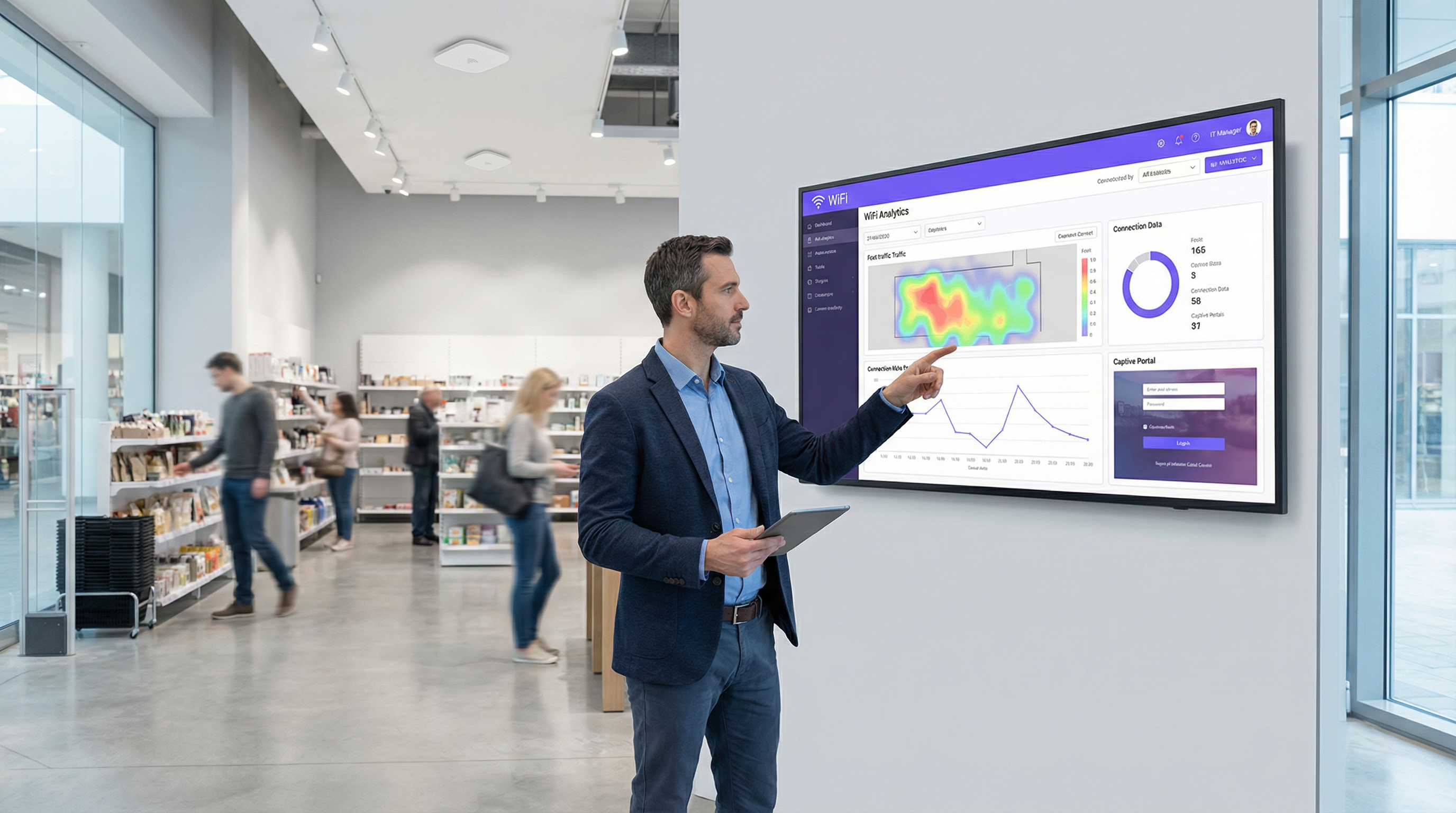
Las métricas comerciales y de marketing incluyen el crecimiento de la base de datos de correo electrónico de marketing, la cantidad de registros en programas de lealtad a través del portal, los ingresos provenientes de niveles de acceso de pago o por niveles, y el valor de los datos de afluencia y tiempo de permanencia capturados a través de los análisis de WiFi. Para una cadena minorista que captura 10 000 nuevas direcciones de correo electrónico de clientes por mes, los ingresos incrementales de una sola campaña de correo electrónico dirigida pueden justificar el costo anual completo de la plataforma. Para un hotel que promociona un paquete de spa en la página de bienvenida posterior al inicio de sesión, la tasa de conversión es directamente medible y atribuible. Un Captive Portal moderno transforma el WiFi para invitados de un centro de costos necesario a un activo estratégico con un ROI positivo.
Key Terms & Definitions
Captive Portal
A web-based gateway that intercepts all HTTP/HTTPS traffic from a newly connected device on a WiFi network, redirecting it to a controlled landing page where the user must complete an action before being granted internet access.
IT teams encounter captive portals as the primary mechanism for managing guest WiFi access. Understanding their architecture is essential for correct configuration, troubleshooting, and security design.
RADIUS (Remote Authentication Dial-In User Service)
A networking protocol that provides centralised Authentication, Authorisation, and Accounting (AAA) management for users connecting to a network service, typically integrating with a directory service such as Microsoft Active Directory.
For enterprise IT teams, RADIUS is the robust, scalable method for integrating WiFi authentication with a central user directory. It enables user-based policies, provides a detailed audit log, and is a cornerstone of IEEE 802.1X-based network access control.
IEEE 802.1X
An IEEE standard for port-based Network Access Control (PNAC) that provides an authentication mechanism for devices wishing to attach to a LAN or WLAN, preventing unauthorised devices from connecting before credentials are verified.
Network architects specify 802.1X when designing high-security wireless environments. It works in conjunction with RADIUS to ensure that a device must be authenticated by the network before it receives an IP address or can communicate with any other network resource.
WPA3 (Wi-Fi Protected Access 3)
The third generation of the WPA security certification programme, offering enhanced protection against offline dictionary attacks via Simultaneous Authentication of Equals (SAE), and providing Opportunistic Wireless Encryption (OWE) for open networks.
CTOs and security architects should mandate WPA3 support as a minimum requirement for any new wireless hardware procurement. It is a critical component of a modern, forward-looking security posture.
Network Segmentation (VLAN)
The practice of dividing a physical network into multiple, logically isolated virtual networks (VLANs) using network switches and firewalls, ensuring that traffic from one segment cannot reach another without explicit permission.
This is the single most important security control in a guest WiFi deployment. Without strict VLAN segmentation, a compromised guest device could potentially access internal corporate systems, POS terminals, or sensitive data stores.
SSO (Single Sign-On)
An authentication scheme that allows a user to authenticate once with a central identity provider (IdP) and gain access to multiple systems without re-entering credentials, typically implemented using SAML 2.0 or OpenID Connect (OIDC) protocols.
Enterprise IT managers use SSO to allow employees to access the corporate WiFi network using their existing credentials from providers like Microsoft Entra ID, Google Workspace, or Okta. This eliminates password management overhead and provides a seamless, secure user experience.
Passpoint (Hotspot 2.0)
A Wi-Fi Alliance certification programme based on the IEEE 802.11u standard that enables mobile devices to automatically discover and securely connect to WiFi networks without requiring any user interaction or captive portal login.
Venue operators and network architects should be aware of Passpoint as the emerging alternative to traditional captive portals. It provides a cellular-like connection experience and is increasingly supported by major identity federations through OpenRoaming.
GDPR (General Data Protection Regulation)
A regulation in EU law on data protection and privacy that mandates how organisations collect, store, process, and protect the personal data of EU residents, with significant financial penalties for non-compliance.
Any organisation deploying a captive portal that collects personal data — including email addresses, phone numbers, or social profiles — must ensure their solution and processes are fully GDPR-compliant. This includes obtaining explicit, informed consent, providing a clear privacy policy, and enabling users to exercise their data rights.
iPSK (Individual Pre-Shared Key)
A security method where each device or user is assigned a unique, individually managed pre-shared key to access a WiFi network, providing device-level accountability without requiring 802.1X infrastructure.
IT teams use iPSK as a pragmatic solution for connecting devices that do not support 802.1X, such as IoT sensors, smart displays, or legacy hardware. It provides a level of accountability and revocability that a single shared password cannot offer.
Case Studies
A 250-room upscale hotel wants to replace its outdated, unreliable guest WiFi system. The goals are to provide a seamless, secure experience for guests, reduce front-desk support calls, and use the WiFi to promote on-site amenities like the spa and restaurant. How should the captive portal be configured?
Step 1 — Infrastructure: Deploy a cloud-managed WiFi solution (such as Purple integrated with Cisco Meraki or Aruba hardware) with full venue coverage and redundant access points in high-density areas such as the lobby and conference rooms.
Step 2 — Network Design: Create two primary SSIDs. A secure WPA3-Enterprise network for staff, authenticated via RADIUS integrated with Active Directory. A guest SSID using WPA2 with a captive portal. Implement strict VLAN segmentation between guest, staff, and management networks, with firewall rules preventing any cross-VLAN traffic.
Step 3 — Guest Authentication: Configure the captive portal with a primary authentication method of 'Room Number + Surname', integrated with the hotel's Property Management System (PMS) via API. This ensures only registered guests can connect, eliminates anonymous access, and ties WiFi sessions to a known guest record.
Step 4 — Portal Logic: Upon successful PMS authentication, present guests with a branded welcome page featuring dynamic content: a 'Book a Spa Treatment' button (deep-linking to the spa booking page) and a 'View Restaurant Menu' link. These are served dynamically based on the guest's stay dates and any existing bookings.
Step 5 — Tiered Access: Implement a two-tier bandwidth policy. A complimentary 5 Mbps tier for standard browsing and email. A premium 50 Mbps tier offered for a daily fee, targeted at business travellers and families streaming content. This is presented as a clear upsell option on the welcome page.
Step 6 — Staff Training: Train front-desk staff to assist guests with the PMS login process and explain the premium speed option, with a simple troubleshooting guide for the five most common issues.
A retail chain with 50 stores across the country wants to understand customer behaviour in-store and grow its loyalty programme. They currently offer a basic, unsecured guest WiFi network with no login. What captive portal strategy should they adopt?
Step 1 — Platform Selection: Choose a captive portal platform with strong analytics, CRM integration, and multi-site management capabilities. The platform must support centralised policy management so that changes can be pushed to all 50 stores simultaneously.
Step 2 — Authentication Strategy: Set the primary authentication method to 'Email Form Fill' with an optional 'Social Login' (Google or Facebook). To incentivise sign-ups, present a 10% discount voucher on the welcome page, delivered to the user's email address after successful login. This creates a clear value exchange.
Step 3 — Loyalty Integration: Use the platform's API to connect the captive portal to the chain's loyalty programme database. When a known loyalty member logs in with their registered email, the portal displays their current points balance and a personalised offer, enhancing the experience for existing customers.
Step 4 — Analytics Deployment: Activate the platform's WiFi analytics features to generate foot traffic heatmaps, dwell time reports, and visit frequency data for each store. This data is surfaced in a centralised dashboard accessible to the operations and marketing teams.
Step 5 — Marketing Automation: Configure an integration with the company's CRM (such as HubSpot or Salesforce). All new email addresses captured via the portal are automatically added to a 'New In-Store WiFi Subscribers' segment, triggering a welcome email series and enrolling them in the loyalty programme.
Step 6 — Staged Rollout: Deploy and test at three to five pilot stores before a full chain-wide rollout. Monitor analytics to measure the impact on loyalty sign-ups, email list growth, and customer dwell time before scaling.
Scenario Analysis
Q1. You are the network architect for a large conference centre that hosts multiple simultaneous events for different corporate clients. Each client wants a branded WiFi experience for their attendees, and access must be restricted to registered attendees only. How would you design the captive portal solution to support this multi-tenant requirement?
💡 Hint:Consider how you can provide multi-tenancy and dynamic branding while ensuring secure, segregated access for each event running concurrently.
Show Recommended Approach
Implement a cloud-managed captive portal platform that supports multi-tenancy and dynamic portal customisation via API. For each event, create a unique SSID or a unique portal URL, each mapped to a separate VLAN to ensure complete traffic isolation between events. Use the Voucher or Code authentication method. Generate a batch of unique, single-use access codes for each event and provide them to the event organiser for distribution to their registered attendees. The portal for each event is dynamically branded with the client's logo, colours, and welcome message, configured via the platform's API or management dashboard. All event networks are on separate VLANs with firewall rules preventing inter-event traffic. A centralised dashboard allows the venue's IT team to monitor all events simultaneously.
Q2. A city council wants to provide free public WiFi in its downtown core. The legal department is concerned about liability for illicit user activity and the IT department is concerned about network abuse. The marketing department wants to gather data to justify the ongoing expense. What captive portal configuration would you recommend?
💡 Hint:Balance the need for maximum public accessibility with the requirements for legal protection, network stability, and justifiable data collection.
Show Recommended Approach
Deploy a Click-Through portal as the primary access method to ensure the lowest possible friction for public access. The portal must present a clear and concise Acceptable Use Policy that users must explicitly accept before connecting, with consent logged server-side. This provides a layer of legal protection by establishing that users have agreed to the terms of use. To address the IT department's concerns, implement per-user bandwidth throttling (for example, 5 Mbps per device) and DNS-based content filtering to block known malicious and illegal sites. For the marketing department, include an optional, clearly marked email sign-up form on the portal page, with a transparent explanation of how the data will be used. This captures data on a fully consented, GDPR-compliant basis while keeping the primary access path friction-free. Monthly analytics reports on connection volumes, peak usage times, and geographic distribution of access points provide the data needed to justify the infrastructure investment.
Q3. Your company is deploying a new guest WiFi network across 100 global offices. The CISO demands that guest access be as secure and auditable as employee access. The Head of HR wants employees to be able to connect their personal devices to the guest network without needing to contact IT for a password. How do you reconcile these requirements in a single architecture?
💡 Hint:Consider enterprise-grade authentication methods that provide both high security and a seamless user experience. How can you differentiate between trusted employees and external guests on the same network?
Show Recommended Approach
Deploy a unified captive portal solution that supports multiple authentication methods on the same SSID. Configure the primary authentication method as Single Sign-On integrated with the company's identity provider, for example Microsoft Entra ID. Employees can then connect their personal devices to the guest network by authenticating with their corporate credentials. This satisfies the CISO's requirement for security and auditability, as every connection is tied to a known corporate identity and logged in the IdP's audit trail. It also satisfies HR's requirement, as employees can self-serve without contacting IT. For non-employee guests and visitors, configure a secondary option on the portal for self-registration via email or SMS OTP, generating a time-limited session (for example, 8 hours) that requires renewal. This creates a two-tiered system on a single network infrastructure, with different session policies and bandwidth allocations applied based on the authentication method used. All connections are logged centrally, providing the CISO with a complete audit trail.
Key Takeaways
- ✓A captive portal is a strategic network gateway that enforces authentication, compliance, and engagement at the point of WiFi access — it is far more than a simple login page.
- ✓The choice of authentication method is the most consequential design decision, requiring a deliberate balance between user friction, security requirements, and data collection objectives.
- ✓Security is non-negotiable: enforce WPA3 or WPA2 encryption, serve the portal over HTTPS with a valid certificate, and implement strict VLAN segmentation to isolate guest traffic from internal systems.
- ✓Modern cloud-managed platforms offer centralised multi-site control, deep analytics, and seamless integration with CRM, identity providers, and property management systems.
- ✓Compliance with GDPR and other data privacy regulations is a legal requirement for any portal that collects personal data, necessitating explicit consent, audit logging, and a clear privacy policy.
- ✓Real-world deployments in hospitality and retail demonstrate that a well-configured captive portal can generate measurable ROI through ancillary revenue, loyalty programme growth, and actionable footfall analytics.
- ✓The industry is evolving towards seamless, identity-based access via Passpoint and OpenRoaming, but traditional captive portals remain the most effective tool for venues that require user engagement, data capture, or explicit terms acceptance.




