

WiFi para invitados: La guía definitiva para que las empresas mejoren la experiencia del cliente y recopilen datos valiosos
This guide is the definitive technical reference for IT leaders and venue operators on deploying enterprise-grade guest WiFi. It provides actionable guidance on network architecture, security, and data analytics to transform guest WiFi from a cost centre into a powerful tool for enhancing customer experience and driving business intelligence.
🎧 Listen to this Guide
View Transcript

Resumen ejecutivo
Para los profesionales de TI de alto nivel y directores de operaciones, el WiFi para invitados ha evolucionado mucho más allá de ser una simple comodidad. Antes considerado un servicio necesario pero periférico, ahora representa un activo estratégico capaz de ofrecer un ROI significativo. Una red de WiFi para invitados diseñada profesionalmente ya no se trata solo de proporcionar acceso a Internet; es un vehículo principal para mejorar la experiencia del cliente, recopilar datos incomparables sobre el comportamiento en el lugar y crear nuevas oportunidades de marketing. Esta guía sirve como una referencia técnica y práctica para diseñar, implementar y gestionar una solución de WiFi para invitados segura y de alto rendimiento. Iremos más allá de la teoría académica para proporcionar información procesable basada en implementaciones del mundo real en los sectores de hospitalidad, comercio minorista y grandes espacios públicos. El enfoque se centra en una estrategia de tres pilares: 1) Seguridad y arquitectura: Implementación de una segmentación de red robusta y controles de acceso para mitigar riesgos. 2) Datos y analítica: Aprovechamiento de un Captive Portal y una plataforma de inteligencia de WiFi para comprender quiénes son sus clientes y cómo se comportan en su espacio. 3) Impacto comercial: Traducción de esos datos en resultados medibles, desde una mayor eficiencia operativa hasta un aumento en la lealtad del cliente y los ingresos. Para el CTO, esta guía proporciona el marco para justificar la inversión en una plataforma moderna de inteligencia de WiFi como Purple AI, cambiando la conversación de un tema de costos a uno de valor estratégico.
Análisis técnico detallado
Una implementación exitosa de WiFi para invitados se basa en una arquitectura técnica sólida. El objetivo principal es proporcionar acceso a Internet fluido y de alto rendimiento a los invitados sin comprometer la seguridad o el rendimiento de la red corporativa interna. Esto requiere un enfoque de múltiples capas que aborde el hardware, el diseño de la red y los protocolos de seguridad.
Arquitectura central: La segmentación no es negociable
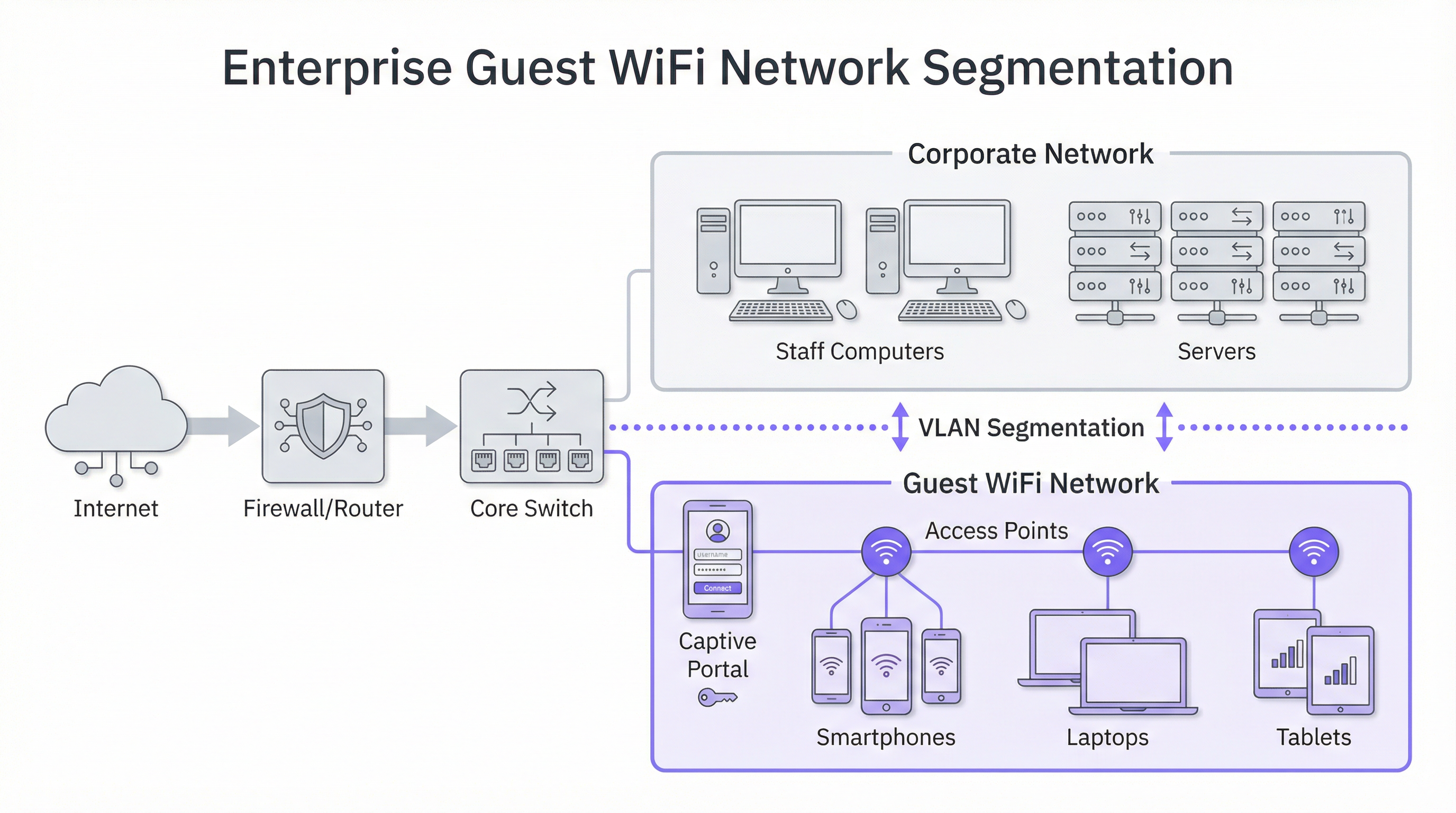
El principio más crítico en la seguridad del WiFi para invitados es la segmentación de la red. Una red "plana", donde los dispositivos de los invitados y los sistemas corporativos internos (por ejemplo, terminales de punto de venta, computadoras del personal, servidores de archivos) comparten la misma red lógica, representa un riesgo de seguridad inaceptable. Una brecha en un solo dispositivo de invitado podría exponer potencialmente toda su infraestructura corporativa. La solución estándar de la industria es la implementación de VLAN (Redes de Área Local Virtuales). Una VLAN divide lógicamente una sola red física en múltiples dominios de transmisión aislados. En este modelo, todo el tráfico de invitados se confina a su propia VLAN dedicada, que se enruta directamente a Internet y se aísla mediante un firewall de cualquier VLAN corporativa interna. Esto garantiza que, incluso si un dispositivo de invitado se ve comprometido, la superficie de ataque se limite estrictamente a la propia red de invitados.
Consideraciones de hardware: Puntos de acceso y controladores
La calidad de la experiencia del usuario está directamente ligada a la calidad y ubicación de sus puntos de acceso inalámbricos (AP). La selección de hardware debe guiarse por las demandas específicas de su entorno:
- Espacios de alta densidad (estadios, centros de conferencias): Requieren AP de alta capacidad 4x4 MU-MIMO (múltiples usuarios, múltiples entradas, múltiples salidas), que a menudo admiten los últimos estándares WiFi 6 (802.11ax) o WiFi 6E. Estos están diseñados para manejar una gran cantidad de conexiones simultáneas en un área concentrada, mitigando la interferencia y garantizando una asignación justa del tiempo de transmisión.
- Hospitalidad y comercio minorista (hoteles, tiendas): La cobertura y la estética suelen ser clave. Los AP en la habitación o en la placa de pared pueden proporcionar una cobertura excelente y específica en las habitaciones de hotel, mientras que los AP montados en el techo con un diseño discreto son adecuados para pisos de tiendas y áreas públicas. Un estudio de sitio de RF (radiofrecuencia) profesional es esencial antes de la implementación para identificar las ubicaciones óptimas de los AP, minimizar la interferencia de canales y eliminar las brechas de cobertura.
Protocolos de seguridad y control de acceso
Más allá de la segmentación, se deben implementar varias capas de seguridad:
- Cifrado WPA3: El estándar de seguridad actual para redes WiFi. WPA3-Enterprise ofrece el nivel más alto de seguridad al proporcionar a cada usuario una clave de cifrado individual, pero para las redes públicas de invitados, WPA3-Personal es más común. La clave es alejarse de los protocolos heredados como WEP y WPA/WPA2 siempre que sea posible.
- Aislamiento del cliente: Esta es una función crucial en su controlador inalámbrico o AP que evita que los dispositivos de los invitados en la misma red WiFi se comuniquen entre sí. Efectivamente, coloca a cada invitado en su propia burbuja digital, previniendo ataques de igual a igual y la propagación de malware dentro de la red de invitados.
- Captive Portal: El Captive Portal es la página web a la que se redirige a un usuario antes de que se le otorgue acceso completo a la red. Desde una perspectiva técnica, sirve como una puerta de enlace de autenticación y autorización. Intercepta la solicitud HTTP inicial del usuario y la redirige a un servidor de inicio de sesión. Una vez que el usuario cumple con los criterios definidos (por ejemplo, acepta los términos, ingresa un correo electrónico, inicia sesión a través de las redes sociales), el portal autoriza la dirección MAC de su dispositivo con el controlador de red, que luego permite que el tráfico pase a Internet.
Guía de implementación
La implementación de una red de WiFi para invitados se puede dividir en un proyecto por fases, pasando de la planificación y el diseño a la configuración y las pruebas.
Fase 1: Descubrimiento y planificación
- Definir los objetivos comerciales: ¿Cuál es el objetivo principal? ¿Es la recopilación de datos para marketing, mejorar la experiencia en el lugar o simplemente proporcionar acceso básico? La respuesta dicta las características y el presupuesto requeridos.
- Evaluar la infraestructura existente: ¿Su hardware de conmutación y enrutamiento actual admite VLAN? ¿Su red de retorno (backhaul) de Internet es suficiente para la cantidad esperada de usuarios simultáneos? Una regla general es presupuestar entre 5 y 10 Mbps por usuario simultáneo esperado para lograr una buena experiencia.
- Realizar un estudio de sitio: Contrate a un ingeniero de redes para realizar un estudio físico y de RF del sitio. Esto determinará la cantidad y la ubicación de los AP necesarios para proporcionar una cobertura y capacidad adecuadas.
Fase 2: Diseño y configuración
- Esquema de VLAN e IP: Diseñe la topología de su red. Defina una VLAN y una subred IP separadas para la red de invitados (por ejemplo, VLAN 100, 10.100.0.0/16). Configure su conmutador central para enlazar (trunk) esta VLAN a su controlador inalámbrico y firewall.
- Política de firewall: Cree una política de firewall estricta para la VLAN de invitados. Esta política debe bloquear TODO el tráfico destinado a las subredes corporativas internas y permitir solo el tráfico saliente en los puertos web estándar (80, 443) y otros servicios necesarios (por ejemplo, DNS, DHCP).
- Configuración del controlador inalámbrico/AP:
- Cree una nueva WLAN/SSID (por ejemplo, "BrandName Free WiFi").
- Asigne este SSID a la VLAN de invitados.
- Habilite el aislamiento del cliente.
- Configure los ajustes de seguridad (WPA2/WPA3 con una clave precompartida).
- Configure los ajustes del Captive Portal, apuntando a su plataforma de inteligencia de WiFi (como Purple).
Fase 3: Integración y pruebas
- Integración del Captive Portal: Configure su plataforma de análisis de WiFi. Esto implica agregar su sitio, definir el proceso de inicio de sesión (por ejemplo, inicio de sesión social, llenado de formularios) y personalizar la marca de las páginas del portal.
- Pruebas: Pruebe exhaustivamente todo el recorrido del usuario desde múltiples tipos de dispositivos (iOS, Android, computadora portátil). Verifique que la segmentación de VLAN funcione correctamente intentando acceder a recursos internos desde la red de invitados (estos intentos deberían fallar).
- Lanzamiento: Una vez que se completen las pruebas, transmita el SSID y monitoree las conexiones iniciales a través de su panel de análisis.
Mejores prácticas
- Priorice la experiencia del usuario: El proceso de inicio de sesión debe ser lo más fluido posible. Un proceso complejo de varios pasos generará altas tasas de abandono. Ofrezca múltiples opciones de inicio de sesión, como cuentas de redes sociales, para acelerar el proceso.
- Sea transparente sobre la recopilación de datos: Los términos y condiciones de su Captive Portal deben indicar claramente qué datos está recopilando y cómo pretende usarlos, en cumplimiento con regulaciones como el GDPR. Proporcione un enlace a su política de privacidad completa.
- Centralice la gestión: Para las organizaciones con múltiples sitios, una plataforma de gestión basada en la nube es esencial. Permite que un pequeño equipo de TI monitoree, administre y actualice miles de AP en cientos de ubicaciones desde un solo panel.
- Intégrese con otros sistemas: El valor de los datos del WiFi para invitados se magnifica cuando se integra con otros sistemas comerciales. Por ejemplo, la integración con un CRM puede enriquecer los perfiles de los clientes, mientras que la integración con una plataforma de automatización de marketing puede activar campañas de correo electrónico dirigidas en función del comportamiento de los visitantes.
Solución de problemas y mitigación de riesgos
Modos de falla comunes:
- Bajo rendimiento: A menudo causado por un ancho de banda de Internet insuficiente, una mala ubicación de los AP (brechas de cobertura) o interferencia de canales en entornos densos. El monitoreo regular del estado y la utilización de la red es clave.
- Problemas con el Captive Portal: Es posible que los usuarios no sean redirigidos a la página de inicio de sesión. Esto puede deberse a problemas de DNS o configuraciones específicas del dispositivo (por ejemplo, retransmisión privada). Asegúrese de que su alcance de DHCP proporcione un servidor DNS público confiable.
- Fallas de autenticación: La configuración incorrecta de RADIUS (para WPA-Enterprise) o las integraciones de la API con el Captive Portal pueden impedir que los usuarios se conecten. Verifique los registros tanto en el controlador de red como en la plataforma del portal.
Estrategias de mitigación de riesgos:
- Auditorías de seguridad periódicas: Realice pruebas de penetración periódicamente en su red de invitados para identificar y remediar vulnerabilidades.
- Filtrado de contenido: Implemente un servicio de filtrado de contenido basado en DNS en la red de invitados para bloquear el acceso a sitios web maliciosos o inapropiados.
- Tiempos de espera de sesión: Aplique límites de duración de la sesión (por ejemplo, 8 horas) para desconectar automáticamente los dispositivos inactivos y liberar recursos de la red.
ROI e impacto comercial
La inversión en una plataforma empresarial de WiFi para invitados ofrece retornos en múltiples dominios:
- Mayor lealtad del cliente: Una experiencia de WiFi confiable y de alto rendimiento es ahora una expectativa. Cumplir con esta expectativa mejora la satisfacción del cliente y fomenta las visitas repetidas.
- Operaciones basadas en datos: Los análisis de afluencia y tiempo de permanencia proporcionan datos concretos para optimizar los diseños de las tiendas, los horarios del personal e incluso las negociaciones de alquiler en propiedades comerciales. Por ejemplo, una tienda minorista puede usar datos de mapas de calor para colocar productos de alto margen en las zonas de mayor tráfico.
- Capacidades de marketing mejoradas: Al convertir a los visitantes anónimos en clientes conocidos a través del Captive Portal, se construye una valiosa base de datos de marketing. Esto permite una comunicación personalizada posterior a la visita, promociones dirigidas y la inscripción en programas de lealtad.
- Generación directa de ingresos: En algunos lugares como aeropuertos o centros de conferencias, un modelo de ancho de banda por niveles (por ejemplo, acceso básico gratuito, acceso premium de pago) puede crear una fuente de ingresos directa.
En última instancia, el impacto comercial es la transformación de un espacio físico en un lugar inteligente. Los datos recopilados de la red WiFi proporcionan el mismo nivel de conocimiento del cliente que los sitios web de comercio electrónico han disfrutado durante años, cerrando finalmente la brecha entre el recorrido físico y digital del cliente.

Referencias
[1]: Estándar IEEE 802.1X "Control de acceso a la red basado en puertos" [2]: Consejo de Estándares de Seguridad de la PCI "Estándar de seguridad de datos de la industria de tarjetas de pago" [3]: Información oficial del GDPR "Reglamento General de Protección de Datos (GDPR)"
Key Terms & Definitions
Captive Portal
The web page a user is required to view and interact with before being granted access to a public network. It 'captures' them to force an action, such as accepting terms, providing an email, or completing a social login.
This is the primary tool for IT teams to enforce acceptable use policies and for marketing teams to convert anonymous visitors into known customers. It is the gateway between providing a utility and gathering intelligence.
VLAN (Virtual LAN)
A technology that allows network administrators to logically segment a single physical network into multiple, isolated networks. Devices in one VLAN cannot communicate with devices in another unless explicitly allowed by a router or firewall.
For IT architects, this is the most fundamental tool for securing a guest WiFi network. It ensures that any security event on the guest network is contained and cannot impact the sensitive corporate network.
Client Isolation
A security feature on a wireless access point or controller that prevents devices connected to the same WiFi network from communicating with each other. It creates a private virtual network for each user.
In a public venue, you have no control over the security posture of guest devices. Client Isolation is a critical risk mitigation tool that prevents malware from spreading between laptops in a hotel lobby or conference hall.
SSID (Service Set Identifier)
The public name of a Wireless Local Area Network (WLAN). It is the name you see and select from the list of available WiFi networks on your device.
While a simple concept, the SSID is part of the brand experience. It should be clear, professional, and consistent across all locations (e.g., 'BrandName_Free_WiFi').
802.1X
An IEEE standard for Port-Based Network Access Control (PNAC). It provides an authentication mechanism to devices wishing to attach to a LAN or WLAN. It is often used in corporate environments to grant access based on user or machine credentials.
While typically used for corporate networks, network architects may encounter 802.1X in more advanced guest scenarios, such as providing secure, seamless access for conference attendees who are part of an educational roaming federation (eduroam).
GDPR (General Data Protection Regulation)
A regulation in EU law on data protection and privacy for all individuals within the European Union and the European Economic Area. It governs how personal data is collected, processed, and stored.
For any business with a European presence, GDPR compliance is mandatory. A guest WiFi platform must provide tools for obtaining explicit consent for data collection via the captive portal and for managing user data access requests.
Heatmap
A graphical representation of data where values are depicted by colour. In the context of WiFi analytics, it shows the physical areas of a venue with the highest and lowest concentrations of visitor devices.
For venue operations directors, heatmaps provide immediate, visual insight into how their space is being used. It helps answer questions like 'What are the most popular paths through my store?' or 'Which seating area in my lobby is underutilised?'
Dwell Time
A metric that measures the amount of time a visitor spends in a specific area or in the venue as a whole. It is calculated by tracking the duration a device is associated with the WiFi network.
This is a critical KPI for retail and hospitality. It helps managers understand engagement. Longer dwell times in a retail store often correlate with higher sales, while tracking dwell time in a restaurant can help optimise table turnover.
Case Studies
A 250-room luxury hotel wants to replace its outdated and slow guest WiFi. The goals are to provide seamless, high-performance coverage in all rooms and public areas, eliminate negative reviews about connectivity, and gather data to better understand guest behaviour in the lobby, bar, and restaurant.
- Infrastructure Upgrade: Deploy a new network core with a 10Gbps-capable firewall and core switch. 2. Site Survey & APs: Conduct a full RF site survey. Deploy one WiFi 6 wall-plate AP in each guest room for perfect coverage. Deploy ceiling-mounted WiFi 6E APs in public areas like the lobby, bar, and conference rooms to handle high device density. 3. Network Design: Create three separate VLANs: Corporate (for hotel staff and systems), Guest (for hotel visitors), and IoT (for smart room devices like thermostats and TVs). Implement strict firewall rules to prevent inter-VLAN routing. 4. Platform Integration: Integrate the network controller with the Purple AI platform. Configure the captive portal with a simple, branded login page offering two options: 'Connect with Room Number & Last Name' (integrating with the hotel's Property Management System) or a quick social media login. 5. Data Analytics: Use the Purple dashboard to create reports on dwell time in the bar, footfall patterns in the lobby throughout the day, and the percentage of guests who are repeat visitors.
A retail chain with 50 stores across the country wants to understand in-store customer behaviour. They currently offer no guest WiFi. The primary goal is to measure footfall, identify popular zones within stores, and build a marketing list, all while minimising the management burden on a small central IT team.
- Hardware Selection: Choose a template of 3-5 cost-effective, cloud-managed WiFi 6 APs per store, depending on the average store size. 2. Centralised Management: Select a cloud-native network vendor and the Purple AI platform. This allows the central IT team to configure, monitor, and manage all 50 stores from a single web-based dashboard without needing to travel to each site. 3. Deployment: Use a third-party contractor for the physical installation of APs at each store, following the template design. The central IT team can then remotely provision the devices once they are online. 4. Captive Portal: Design a simple, mobile-first captive portal that offers a 10% discount voucher in exchange for an email address. This provides a clear value exchange for the customer. 5. ROI Measurement: Use the Purple analytics dashboard to track the growth of the marketing database, view aggregated footfall across all stores, and compare dwell-time heatmaps between high-performing and low-performing locations to identify layout optimisation opportunities.
Scenario Analysis
Q1. A large conference centre is hosting a 3-day tech event with 5,000 attendees, each carrying at least two devices (laptop and smartphone). The event organiser wants to provide free, high-performance WiFi. What are the three most critical technical considerations for the network architect to ensure a successful deployment?
💡 Hint:Think about capacity, interference, and traffic management in a high-density environment.
Show Recommended Approach
- Capacity & Density Planning: The primary concern is the sheer number of concurrent connections. The architect must use high-density WiFi 6 or 6E APs and perform a detailed RF site survey to ensure sufficient APs are deployed in session halls and common areas. 2. Backhaul & Throughput: The internet connection must be able to handle the aggregated load. A 10Gbps (or higher) redundant internet connection is likely required. QoS (Quality of Service) policies should be implemented to prioritise interactive traffic (like web browsing) over bulk traffic. 3. Efficient Onboarding: With thousands of users connecting at once, the authentication process must be extremely efficient. An open network (no encryption) with a simple, click-through captive portal is the most practical approach to avoid configuration issues for non-technical users and minimise support requests.
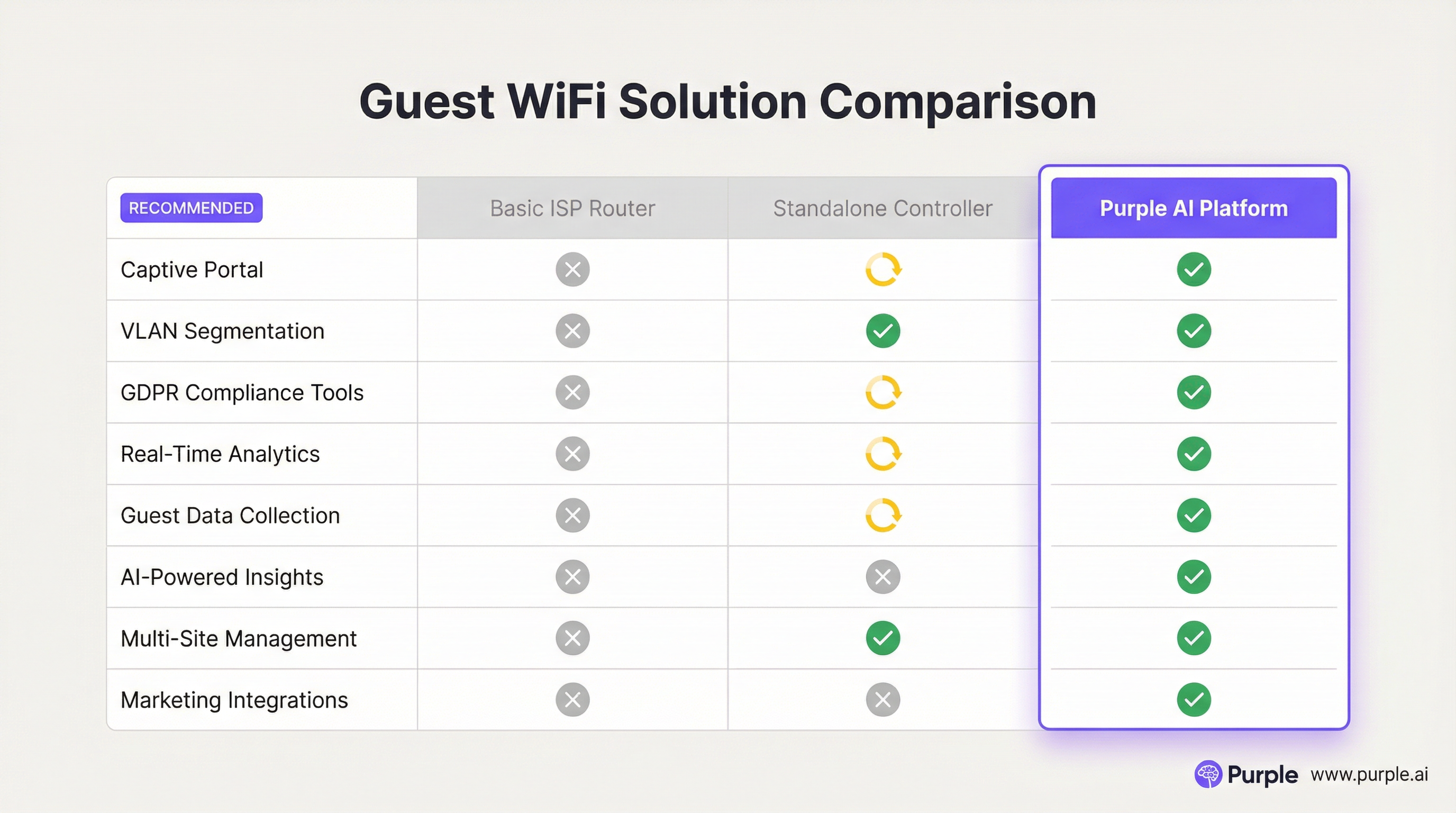
Q2. A restaurant chain is using a basic guest WiFi solution from their ISP. They have noticed that the WiFi performance is slow during peak hours, and they have no visibility into who is using the network. What is the most compelling argument for the IT manager to make to the CTO to justify an upgrade to a platform like Purple AI?
💡 Hint:Focus on the transition from a cost/utility to a business intelligence tool.
Show Recommended Approach
The most compelling argument is the shift from viewing WiFi as a cost centre to an ROI-generating asset. The IT manager should frame the investment not as an IT upgrade, but as a business intelligence project. The key points would be: 1) Problem/Opportunity: We are currently blind to our customer behaviour. We don't know our ratio of new vs. repeat diners, our busiest times by actual customer count (not just sales), or how long customers stay. 2) Solution: A platform like Purple AI will not only solve the performance issues with better hardware management but will give us a dashboard to visualise this critical data. 3. ROI: By collecting emails via a captive portal, we can build a marketing database to drive repeat business. By analysing dwell times, we can optimise seating and staffing for peak periods, improving table turnover and revenue. The cost of the platform is offset by the value of this new data and the marketing capabilities it unlocks.
Q3. A hospital wants to provide guest WiFi to patients and visitors. The hospital's CIO is extremely concerned about the security of patient data and compliance with healthcare regulations (like HIPAA). How would you design the guest network to address these specific concerns?
💡 Hint:Security and isolation are paramount. How do you create a 'hermetically sealed' guest network?
Show Recommended Approach
The design must prioritise security above all else. 1. Extreme Segmentation: Implement a guest VLAN that is completely firewalled from all other hospital networks, especially those containing Electronic Health Records (EHR). The firewall rules should be 'deny-all' by default, with an explicit rule to only allow guest VLAN traffic out to the internet. There should be absolutely no route from the guest network to any internal network. 2. Physical & Logical Separation: Where possible, use a physically separate internet line for guest traffic. If not feasible, use a high-end firewall capable of deep packet inspection and intrusion prevention on the guest traffic. 3. Strict Access Control: Enable Client Isolation on all APs to prevent any patient or visitor devices from communicating with each other. Implement a captive portal that requires acceptance of a stringent acceptable use policy and displays clear warnings against attempting to access clinical systems. 4. No Data Collection: For maximum privacy and minimum risk, the captive portal should be a simple 'click-to-accept' with no personal data collection (no email, no social login). The focus is purely on providing access, not marketing.
Key Takeaways
- ✓Guest WiFi is no longer a simple amenity; it is a strategic tool for data collection and customer engagement.
- ✓Network segmentation (using VLANs) is the most critical security measure to protect your corporate network.
- ✓A captive portal is the gateway to converting anonymous visitors into known customers and enforcing legal terms.
- ✓High-quality Access Points and a professional RF site survey are essential for a positive user experience.
- ✓WiFi analytics platforms like Purple AI provide actionable insights into footfall, dwell time, and visitor behaviour.
- ✓Compliance with data privacy regulations like GDPR is mandatory and must be designed into your solution.
- ✓The ROI of a professional guest WiFi solution is realised through improved operations, enhanced marketing, and increased customer loyalty.




