

Integración de Juniper Mist con Purple WiFi
This guide provides a comprehensive technical reference for integrating Juniper Mist's AI-driven wireless platform with Purple's enterprise guest WiFi and analytics solution. It covers the full integration architecture — from the Mist external captive portal and REST API authorisation flow through to PurpleConnex Passpoint and RadSec configuration for seamless repeat-visitor connectivity. Venue operators and IT teams will find actionable deployment guidance, real-world implementation scenarios, and a clear framework for measuring the business impact of a Mist-Purple deployment.
🎧 Listen to this Guide
View Transcript

Resumen ejecutivo
La integración de Juniper Mist WiFi con Purple representa una de las combinaciones más potentes disponibles en la actualidad para los operadores de recintos empresariales. La plataforma inalámbrica de Mist, nativa de la nube e impulsada por IA, ofrece la confiabilidad de infraestructura y la inteligencia operativa que exigen los arquitectos de red, mientras que la capa de Captive Portal, analítica y automatización de marketing de Purple transforma esa infraestructura en un activo comercial medible. La integración funciona a través del mecanismo de redirección de portal externo de Mist, protegido por un API Secret por WLAN, y se complementa con una solución de WiFi seguro basada en Passpoint (PurpleConnex) para una conectividad sin fricciones para visitantes recurrentes mediante WPA2/WPA3-Enterprise y RadSec. Para los líderes de TI que evalúan esta implementación, los puntos de decisión clave son: si implementar solo la integración básica del Captive Portal o implementar también PurpleConnex para invitados recurrentes; cómo estructurar el walled garden; y cómo aprovechar la analítica de Purple para ofrecer un ROI medible. Esta guía aborda los tres aspectos en profundidad, con detalles de configuración, ejemplos prácticos de entornos de hotelería y retail, y un marco claro para la resolución de problemas.
Análisis técnico detallado
La integración de Juniper Mist y Purple se basa en una clara separación de responsabilidades. Mist controla el entorno de radiofrecuencia, la gestión de los puntos de acceso y la capa de aplicación de políticas. Purple controla la experiencia del invitado, la captura de datos y la capa de analítica e interacción. Ambas plataformas se comunican a través de un contrato de API bien definido que es seguro y fácil de configurar.
Arquitectura de integración
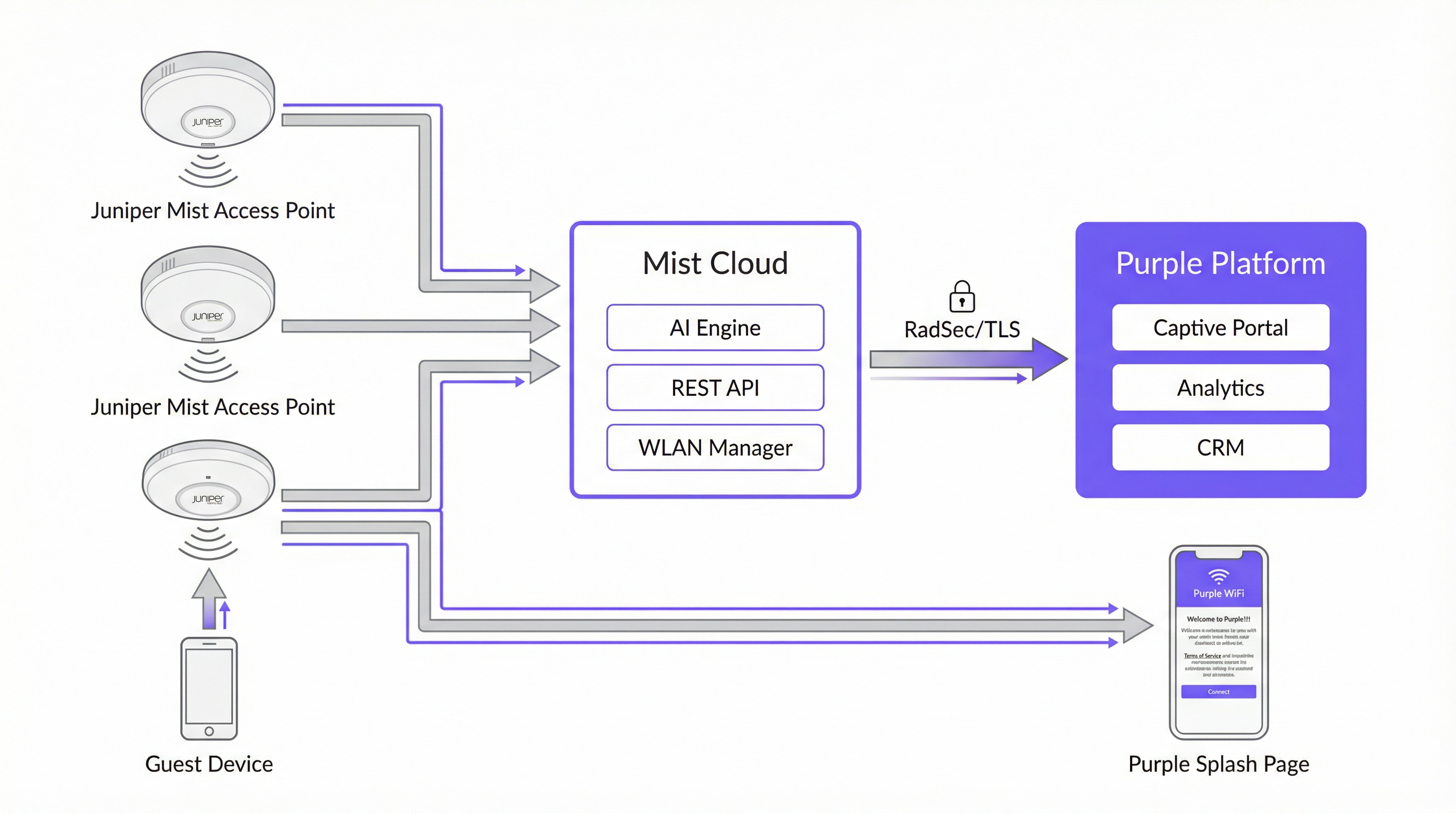
La siguiente tabla resume la función de cada componente en la integración.
| Componente | Función |
|---|---|
| Puntos de acceso de Juniper Mist | Proporcionan cobertura inalámbrica; aplican políticas de WLAN; redirigen a los invitados no autenticados al Captive Portal de Purple mediante HTTP 302. |
| Juniper Mist Cloud | Plataforma de gestión centralizada en la nube. Aloja la configuración de WLAN, RRM impulsado por IA, SLE de Wi-Fi Assurance y la API REST utilizada para la autorización de dispositivos de invitados. |
| Plataforma de Purple | Aloja el Captive Portal externo; captura y almacena los datos de los invitados en cumplimiento con las normativas; proporciona paneles de analítica, integración con CRM y automatización de marketing. |
| API Secret de Mist | Una clave criptográfica por WLAN (HMAC-SHA1) que protege el protocolo de enlace de autorización entre Purple y Mist Cloud. |
| PurpleConnex (Passpoint) | Una segunda WLAN que utiliza WPA2/WPA3-Enterprise y Passpoint para proporcionar conectividad automática y segura a los invitados recurrentes sin requerir una nueva autenticación en el portal. |
| RadSec (RFC 6614) | RADIUS sobre TLS. Protege el tráfico de autenticación entre Mist Cloud y los servidores RADIUS de Purple para la WLAN de PurpleConnex. |
El flujo de autenticación del Captive Portal
Cuando el dispositivo de un invitado se asocia con el SSID de invitados, Mist verifica si la dirección MAC del dispositivo ha sido autorizada previamente. Si no es así, Mist intercepta la primera solicitud HTTP del invitado y emite una redirección 302 a la URL del portal de Purple. Esta redirección agrega varios parámetros que Purple requiere para completar el ciclo de autorización:
| Parámetro | Descripción | ¿Requerido? |
|---|---|---|
wlan_id |
UUID del objeto WLAN en Mist | Sí |
ap_mac |
Dirección MAC del punto de acceso de servicio | Sí |
client_mac |
Dirección MAC del dispositivo del invitado | Sí |
url |
La URL original que solicitó el invitado | No |
ap_name |
Nombre legible por humanos del AP | No |
site_name |
Nombre legible por humanos del sitio | No |
Una vez que el invitado completa el formulario de inicio de sesión en el portal de Purple, Purple crea una solicitud de autorización firmada para el backend de Mist en portal.mist.com/authorize. Esta solicitud incluye una firma HMAC-SHA1 calculada mediante el API Secret de la WLAN, un token codificado en base64 que contiene el wlan_id, ap_mac, client_mac y la duración de la sesión, además de una marca de tiempo de vencimiento. Mist valida la firma y, si es válida, autoriza el dispositivo del invitado para acceder a Internet.
Nota arquitectónica clave: Juniper Mist no es compatible con la autenticación o contabilidad RADIUS para el flujo del Captive Portal. Esto significa que los informes de recuento de usuarios en tiempo real y ciertas métricas de sesión de red dentro del panel de Mist no reflejarán las sesiones del Captive Portal. La propia plataforma de analítica de Purple proporciona informes de sesión completos y debe utilizarse como la fuente principal de inteligencia del WiFi para invitados.
PurpleConnex: Passpoint y RadSec
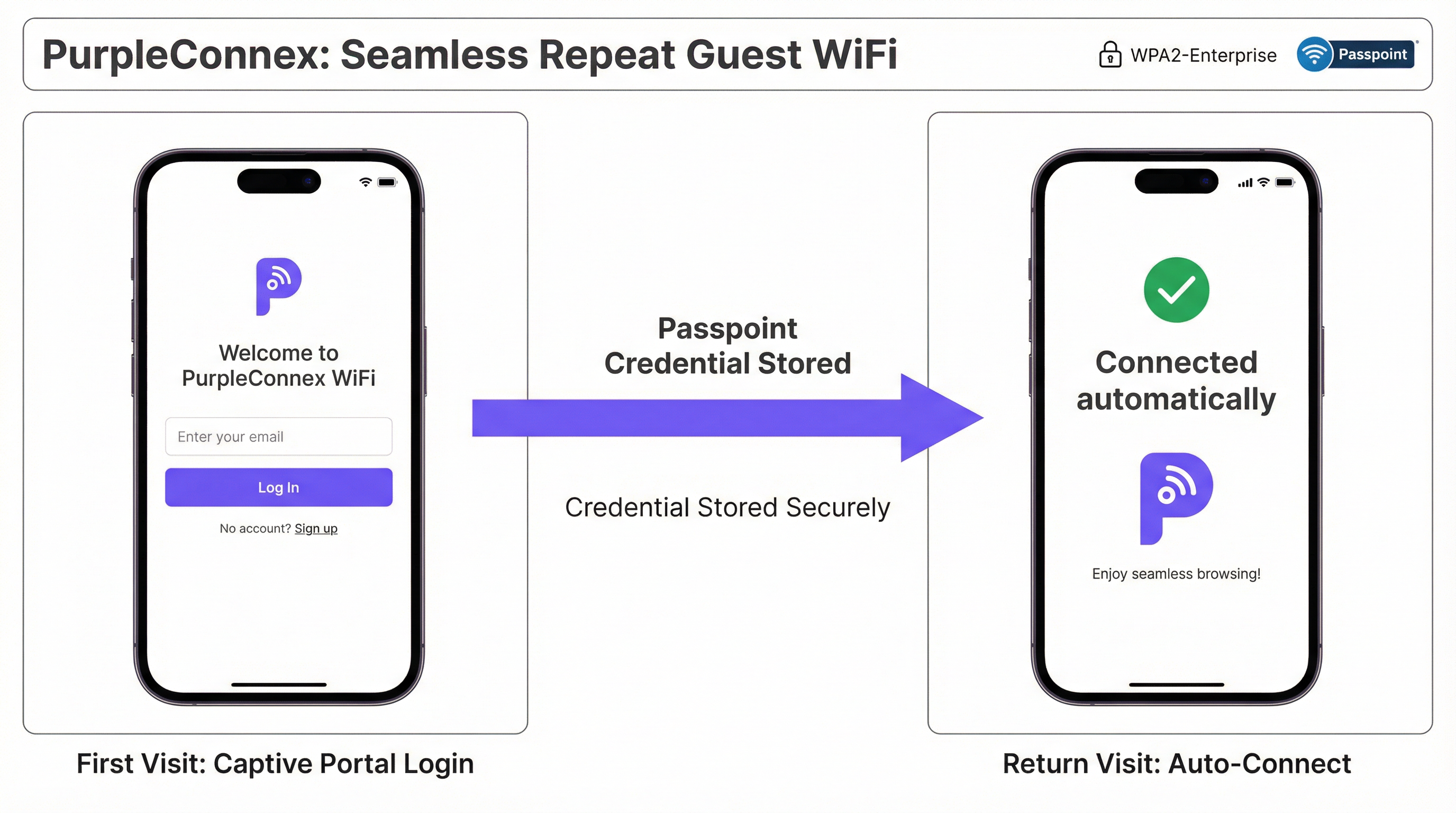
Para los recintos con una proporción significativa de visitantes recurrentes (hoteles, campus corporativos, cadenas de retail), la solución PurpleConnex elimina la necesidad de autenticarse repetidamente en el portal. Después del primer inicio de sesión de un invitado a través del Captive Portal, Purple aprovisiona un perfil de Passpoint (Hotspot 2.0) en el dispositivo del invitado. En todas las visitas posteriores, el dispositivo selecciona automáticamente el SSID de PurpleConnex y se autentica de forma silenciosa mediante WPA2-Enterprise (o WPA3-Enterprise en AP compatibles con 6 GHz) a través de EAP-TTLS contra los servidores RadSec de Purple.
La configuración de RadSec en Mist requiere dos entradas de servidor (rad1-secure.purple.ai y rad2-secure.purple.ai, ambas en el puerto 2083) y la instalación del certificado RadSec de Purple en la configuración de la organización (Organisation Settings) de Mist. El identificador NAS debe establecerse en MIST-{{DEVICE_MAC}} para garantizar que Purple pueda identificar correctamente el punto de acceso que se está autenticando.
Guía de implementación
Los siguientes pasos asumen que se tiene acceso administrativo tanto al panel de Juniper Mist Cloud (manage.mist.com) como al portal de Purple. Para implementaciones en múltiples sitios, los pasos del 1 al 3 deben realizarse dentro de una plantilla de organización (Organisation Template) de Mist en lugar de a nivel de sitio.
Fase 1: Configuración de la WLAN de invitados (Mist)
Paso 1. Inicie sesión en manage.mist.com y navegue hasta Network > WLANs. Haga clic en Add WLAN.
Paso 2. Configure la WLAN con los siguientes parámetros:
| Configuración | Valor |
|---|---|
| SSID | Guest WiFi (o el nombre de su preferencia) |
| WLAN Status | Habilitado (Enabled) |
| Security Type | Acceso abierto (Open Access) |
| Guest Portal | Reenviar a un portal externo (Forward to an external portal) |
| Portal URL | Proporcionada por Purple (la URL de acceso de su recinto) |
| Allowed Hostnames | Todos los dominios de Purple (consulte la lista blanca de dominios del walled garden de Purple) |
| Bypass portal on exception | Dejar sin marcar (recomendado) |
Paso 3. Haga clic en Save (Guardar). Vuelva a abrir la WLAN y localice el API Secret. Copie este valor.
Fase 2: Configuración del recinto en Purple
Paso 4. Inicie sesión en el portal de Purple y navegue hasta la configuración de su recinto.
Paso 5. Pegue el API Secret de Mist en el campo Mist API secret.
Paso 6. Confirme que la URL del portal en la WLAN de Mist coincida con la URL de acceso que se muestra en la configuración del recinto en Purple.
Fase 3: Configuración de la WLAN de PurpleConnex (Passpoint) (Opcional pero recomendado)
Paso 7. En el panel de Mist, cree una segunda WLAN con la siguiente configuración:
| Configuración | Valor |
|---|---|
| SSID | PurpleConnex |
| Security Type | WPA2 Enterprise (802.1X) |
| Passpoint | Habilitado (Enabled) |
| Operators | OpenRoaming-Settlement-Free |
| Venue Name | El nombre de su recinto |
| Domain Name | securewifi.purple.ai |
| Roaming Consortium ID | 5A03BA0000, 004096 |
| NAI Realm Name | securewifi.purple.ai |
| NAI Realm EAP Type | TTLS |
| Auth Server Type | RadSec |
| Auth Server 1 | rad1-secure.purple.ai, Puerto 2083 |
| Auth Server 2 | rad2-secure.purple.ai, Puerto 2083 |
| NAS Identifier | MIST-{{DEVICE_MAC}} |
| Guest Portal | Sin portal (acceso directo a Internet) |
Paso 8. Navegue hasta Organisation Settings (Configuración de la organización) y cargue el certificado RadSec de Purple en RadSec Certificates (Certificados RadSec).
Mejores prácticas
Utilice plantillas de organización para implementaciones en múltiples sitios. Para cualquier implementación que abarque más de un sitio, configure ambas WLAN dentro de una plantilla de organización de Mist. Esto garantiza la coherencia de la configuración en toda la infraestructura y permite que los cambios se implementen en todos los sitios simultáneamente. Una cadena de retail que gestiona cincuenta tiendas, por ejemplo, puede actualizar la URL de su portal de invitados o las entradas del walled garden una sola vez y hacer que el cambio se propague a cada sitio en cuestión de minutos.
Mantenga un walled garden completo y actualizado. El walled garden es la fuente más común de fallas de integración. Un walled garden incompleto significa que los invitados no autenticados no pueden acceder al Captive Portal, lo que resulta en una experiencia de WiFi deficiente. Mantenga una lista actualizada de todos los dominios de Purple requeridos, los dominios de proveedores de inicio de sesión social y cualquier otro recurso del que dependa el portal. Revise esta lista siempre que agregue nuevos métodos de autenticación al portal.
Planifique dos SSID desde el primer día. Implemente tanto el SSID abierto de Guest WiFi como el SSID de Passpoint de PurpleConnex desde el principio, incluso si la adopción de Passpoint es baja inicialmente. A medida que crece la base instalada de dispositivos compatibles con Passpoint (y está creciendo rápidamente, ya que la mayoría de los dispositivos iOS y Android modernos son compatibles con el estándar), la experiencia fluida para los visitantes recurrentes se volverá cada vez más valiosa.
Alineación con las hojas de ruta de IEEE 802.1X y WPA3. Para cualquier nueva implementación de Mist, en particular aquellas que incorporan bandas de radio de 6 GHz, planifique el uso de WPA3-Enterprise en el SSID de PurpleConnex. WPA3 es obligatorio en las redes de 6 GHz y proporciona un cifrado significativamente más fuerte a través de su modo de seguridad de 192 bits. Esto también posiciona la implementación para el cumplimiento a largo plazo con los estándares de seguridad en evolución.
Integre Purple con su CRM. Los datos de los invitados capturados a través del Captive Portal tienen un valor significativo más allá de la gestión del WiFi. Conectar Purple a su CRM (ya sea Salesforce, HubSpot o un PMS específico de hotelería) crea un perfil de cliente unificado que puede impulsar el marketing personalizado, la integración de programas de lealtad y un mejor servicio al invitado.
Resolución de problemas y mitigación de riesgos
| Síntoma | Causa probable | Resolución |
|---|---|---|
| El invitado no es redirigido al Captive Portal | URL del portal incorrecta en la WLAN de Mist, o la WLAN no está configurada en "Forward to external portal" | Verifique la URL del portal y la configuración de Guest Portal en la configuración de la WLAN de Mist. |
| La página del Captive Portal no se carga | Walled garden incompleto: los dominios de Purple están bloqueados para usuarios no autenticados | Agregue todos los dominios de Purple requeridos y los dominios de proveedores de inicio de sesión social a la lista de Allowed Hostnames de la WLAN de Mist. |
| El invitado completa el inicio de sesión pero no recibe acceso a Internet | API Secret incorrecto en la configuración del recinto en Purple, o el firewall bloquea el tráfico a portal.mist.com |
Verifique el API Secret y revise las reglas del firewall. Asegúrese de que portal.mist.com (o el equivalente regional) sea accesible desde Mist Cloud. |
| El SSID de PurpleConnex no aparece en los dispositivos de los invitados | Passpoint no está habilitado en la WLAN, o el dispositivo no tiene un perfil de Passpoint aprovisionado | Confirme que Passpoint esté habilitado en la configuración de la WLAN de Mist. Verifique que el invitado se haya autenticado previamente a través del Captive Portal y que se haya aprovisionado el perfil de Passpoint. |
| Fallas de autenticación RadSec para PurpleConnex | Certificado RadSec faltante o incorrecto, o direcciones/puerto del servidor incorrectos | Vuelva a cargar el certificado RadSec desde la documentación de soporte de Purple. Verifique las direcciones del servidor y el puerto 2083. |
| Los informes de recuento de usuarios en tiempo real no están disponibles en Mist | Comportamiento esperado: Mist no es compatible con la contabilidad RADIUS para las sesiones del Captive Portal | Utilice el panel de analítica de Purple para los informes de sesiones de invitados. Esta es la fuente de datos correcta y prevista para esta integración. |
ROI e impacto comercial

El caso de negocio para una implementación de Juniper Mist y Purple va mucho más allá de la conectividad. La integración crea una infraestructura de recopilación de datos e interacción que ofrece retornos medibles en múltiples dimensiones.
Interacción con los invitados y automatización de marketing. Cada invitado que se autentica a través del Captive Portal de Purple se convierte en un contacto conocido. Las herramientas de automatización de marketing de Purple permiten a los operadores de recintos enviar comunicaciones dirigidas y basadas en el consentimiento (encuestas posteriores a la visita, ofertas promocionales, notificaciones de eventos) que impulsan las visitas recurrentes y aumentan el gasto promedio. Para una cadena hotelera, esto se traduce directamente en mejores tasas de reserva directa y una menor dependencia de las comisiones de las OTA.
Inteligencia operativa. La analítica de tráfico peatonal de Purple proporciona a los equipos de operaciones del recinto datos granulares sobre el comportamiento de los visitantes: qué áreas de un recinto atraen el mayor tiempo de permanencia, cómo cambian los patrones de tráfico según la hora del día y el día de la semana, y cómo evolucionan las tasas de visitantes recurrentes con el tiempo. Esta inteligencia fundamenta las decisiones de personal, la optimización del diseño de la tienda y la planificación de eventos.
Generación de ingresos. Para recintos como aeropuertos, centros de conferencias y estadios, las capacidades de ancho de banda por niveles de Purple permiten la monetización del acceso WiFi premium. Un operador aeroportuario reportó un ROI del 842 % después de implementar el modelo de acceso por niveles de Purple, lo que demuestra el importante potencial de ingresos de una implementación de WiFi para invitados bien configurada.
Mitigación de riesgos de cumplimiento. Una infracción del GDPR o la CCPA conlleva un riesgo financiero y de reputación sustancial. La gestión de consentimiento integrada de Purple, las herramientas de derechos de los interesados y la arquitectura de procesamiento de datos en cumplimiento reducen significativamente este riesgo, proporcionando una postura de cumplimiento defendible que satisface tanto a los equipos legales como a los responsables de protección de datos.
Esta guía es mantenida por el equipo de Contenido Técnico de Purple. Para obtener los detalles de configuración más recientes, consulte el Portal de soporte de Purple y la Documentación de Juniper Mist.
Key Terms & Definitions
Captive Portal
A web page presented to newly connected WiFi users before they are granted broader network access. It is the primary mechanism for guest authentication, data capture, and terms-of-service acceptance in a guest WiFi deployment.
In the Mist-Purple integration, the captive portal is hosted by Purple and is triggered by a Mist HTTP 302 redirect. IT teams configure the Portal URL in the Mist WLAN settings and the API Secret in Purple to link the two platforms.
Walled Garden
A restricted set of hostnames and IP ranges that unauthenticated users on a captive portal network are permitted to access before completing the login process. The walled garden must include the portal itself and all resources it depends on.
Network engineers must configure the Allowed Hostnames list in the Mist WLAN settings to include all Purple domains and any social login provider domains. An incomplete walled garden is the most common cause of captive portal failures.
API Secret (Mist)
A per-WLAN cryptographic key automatically generated by Mist when a Guest WLAN with an external portal is created. It is used as the HMAC-SHA1 signing key for the authorisation requests that Purple sends to the Mist backend to grant guest devices internet access.
The API Secret must be copied from the Mist WLAN configuration and pasted into the Purple venue settings. It is the trust anchor for the entire integration and should be treated as a sensitive credential.
Passpoint (Hotspot 2.0)
An IEEE 802.11u-based standard that enables mobile devices to automatically discover, select, and connect to WiFi networks using pre-provisioned credentials, without requiring user interaction or portal authentication.
PurpleConnex uses Passpoint to provide a seamless, automatic connection experience for repeat guests. After an initial captive portal login, a Passpoint profile is provisioned to the guest's device, enabling silent authentication on all future visits.
RadSec (RADIUS over TLS)
A protocol defined in RFC 6614 that secures RADIUS authentication and accounting traffic by tunnelling it over a TLS connection. It replaces the traditional UDP-based RADIUS transport, which is vulnerable to interception and replay attacks.
The PurpleConnex WLAN uses RadSec to secure authentication traffic between the Mist Cloud and Purple's RADIUS servers. Network engineers must configure the RadSec server addresses, port (2083), and certificate in the Mist WLAN and Organisation Settings.
IEEE 802.1X
An IEEE standard for port-based Network Access Control that provides an authentication framework for devices connecting to a LAN or WLAN. It requires each user or device to authenticate with unique credentials before gaining network access.
The PurpleConnex WLAN uses WPA2/WPA3-Enterprise with 802.1X to provide strong, per-user authentication for repeat guests. This is the same authentication framework used in corporate enterprise networks and is significantly more secure than pre-shared key (PSK) authentication.
Mist AI (Wi-Fi Assurance)
Juniper Mist's cloud-based machine learning engine that continuously analyses wireless network telemetry to optimise radio resource management, predict and resolve connectivity issues, and provide service level experience (SLE) metrics for each user session.
While Mist AI operates independently of the Purple integration, it is a key reason why Mist is selected as the infrastructure platform for enterprise guest WiFi deployments. Its proactive fault detection and automated RRM reduce the operational burden on IT teams and improve the reliability of the guest WiFi experience.
GDPR (General Data Protection Regulation)
EU Regulation 2016/679, which governs the collection, processing, and storage of personal data of individuals in the European Union and European Economic Area. It requires explicit, informed consent for data collection and grants individuals rights over their personal data.
Any guest WiFi deployment that collects personal data — including email addresses, names, or device identifiers — from EU residents must comply with GDPR. Purple's platform provides built-in consent management tools, data subject rights workflows, and compliant data processing agreements to support GDPR compliance.
OpenRoaming
A Wireless Broadband Alliance (WBA) initiative that enables seamless, automatic WiFi roaming across participating networks globally, using Passpoint technology and a federated identity framework. The Settlement-Free tier allows users to roam without per-session charges.
The PurpleConnex WLAN is configured with the OpenRoaming-Settlement-Free operator profile, which enables devices with OpenRoaming credentials from other providers to connect automatically to the PurpleConnex SSID. This extends the seamless connectivity benefit beyond Purple's own user base.
NAS Identifier
A RADIUS attribute (Attribute 32) that identifies the Network Access Server — in this context, the Mist access point — to the RADIUS server. It is used by the RADIUS server to apply per-AP policies and to log authentication events with AP-level granularity.
In the PurpleConnex WLAN configuration, the NAS Identifier is set to MIST-{{DEVICE_MAC}}, where {{DEVICE_MAC}} is a Mist variable that is replaced with the MAC address of the authenticating AP at runtime. This allows Purple's RADIUS servers to identify the specific AP handling each authentication request.
Case Studies
A 200-room four-star hotel wants to provide a seamless WiFi experience for guests. The general manager requires that first-time guests see a branded captive portal, that repeat guests connect automatically without a login prompt, and that the marketing team can send post-stay email campaigns to guests who have consented. How would you configure the Juniper Mist and Purple integration to meet these requirements?
The solution requires a dual-SSID architecture. First, create a 'Guest WiFi' WLAN in the Mist dashboard with Open Access security and the Guest Portal set to 'Forward to an external portal', using the Purple portal URL. Configure the walled garden with all required Purple domains. Retrieve the Mist API Secret and enter it into the Purple venue settings. In Purple, configure the captive portal with the hotel's branding, a simple email-and-name form, and explicit marketing consent checkboxes that comply with GDPR Article 7. Second, create a 'PurpleConnex' WLAN with WPA2-Enterprise, Passpoint enabled, and the RadSec server details from Purple. Upload Purple's RadSec certificate to the Mist Organisation Settings. After a guest's first login through the captive portal, Purple automatically provisions a Passpoint profile to their device. On all subsequent visits, the device silently connects to PurpleConnex. The marketing team can then use Purple's CRM integration to push consented guest email addresses into the hotel's email marketing platform for post-stay campaigns.
A retail chain with 75 stores across the UK and Ireland wants to deploy guest WiFi to understand foot traffic patterns, measure the impact of store layout changes on dwell time, and send targeted promotions to opted-in customers. The IT team has a small central team and cannot manage per-site configurations individually. How should the Mist and Purple deployment be structured?
The deployment should be built around Mist's Organisation Templates for centralised management. Create a single WLAN template containing both the 'Guest WiFi' (open, captive portal) and 'PurpleConnex' (WPA2-Enterprise, Passpoint) WLANs, and apply this template to all 75 sites. This ensures that any configuration change — such as updating the walled garden or rotating the API Secret — propagates to all sites simultaneously without manual intervention. In Purple, create a location hierarchy that mirrors the retail estate: group stores by region or country to enable segmented analytics. Configure Purple's foot traffic analytics to track dwell time by zone within each store, using the AP placement data from Mist to map signal coverage to physical store areas. Integrate Purple with the retailer's existing marketing platform via Purple's API or native CRM connectors. Use Purple's campaign tools to send geo-targeted promotions — for example, a discount notification to customers who have been in the store for more than 15 minutes without making a purchase.
Scenario Analysis
Q1. A 500-seat conference centre is deploying a Mist and Purple guest WiFi solution. The events team wants to offer a free basic tier (2 Mbps per device) and a paid premium tier (20 Mbps per device) for delegates who need reliable video conferencing. The IT team has two network engineers and cannot manage per-event configurations manually. How would you structure the deployment to meet these requirements?
💡 Hint:Consider how Purple's tiered bandwidth feature works alongside Mist's WLAN configuration, and how Mist Organisation Templates reduce operational overhead.
Show Recommended Approach
Deploy a single 'Guest WiFi' SSID configured in a Mist Organisation Template with the Purple captive portal redirect. In Purple, configure two access tiers: a free tier with a 2 Mbps per-device bandwidth cap and a paid premium tier at 20 Mbps, with a payment gateway integrated into the portal for premium access purchases. The captive portal should clearly present both options to connecting guests. Use Purple's event management features to create event-specific portal pages that can be activated by the events team without IT involvement, reducing the operational burden on the two-engineer team. For the PurpleConnex Passpoint SSID, configure it to automatically grant premium-tier bandwidth to returning guests who have previously purchased a premium pass, using Purple's CRM data to identify them.
Q2. A hotel group's IT security team has raised a concern that the Open Access guest SSID creates a risk of guest-to-guest traffic interception. The network architect needs to address this concern without removing the captive portal functionality. What Mist configuration options are available, and how do they interact with the Purple integration?
💡 Hint:Consider Mist's client isolation features and how they apply to an Open Access WLAN. Also consider the role of WPA3 OWE (Opportunistic Wireless Encryption).
Show Recommended Approach
There are two primary mitigations. First, enable client isolation on the Guest WiFi WLAN in Mist. This prevents guest devices from communicating directly with each other at the Layer 2 level, eliminating the risk of ARP spoofing and direct traffic interception between guests on the same SSID. This setting does not affect the captive portal redirect or the Purple authorisation flow. Second, for deployments on APs that support it, consider enabling WPA3 OWE (Opportunistic Wireless Encryption) on the guest SSID. OWE provides per-session encryption for open networks without requiring a password, protecting guest traffic from passive eavesdropping. OWE is transparent to the captive portal flow — Mist still redirects unauthenticated devices to Purple regardless of the encryption mode. Note that OWE requires client device support, which is now widespread on modern iOS and Android devices but may not be universal across all guest devices.
Q3. After deploying the Mist-Purple integration at a 30-store retail chain, the IT team reports that approximately 15% of guests are completing the captive portal login but not receiving internet access. The remaining 85% are connecting successfully. What is the most likely cause, and what is the diagnostic approach?
💡 Hint:Think about what could cause the Mist authorisation API call from Purple to fail for a subset of users. Consider timing, firewall rules, and the API Secret.
Show Recommended Approach
The most likely cause is a race condition or timeout in the Purple-to-Mist authorisation API call, potentially caused by firewall rules at specific stores blocking outbound HTTPS traffic to portal.mist.com, or by network latency causing the authorisation request to expire before Mist processes it. The diagnostic approach is: (1) Check Purple's server-side logs for authorisation API call failures — Purple's support team can provide these. Look for HTTP error codes (401 Unauthorized suggests an API Secret mismatch; 504 Gateway Timeout suggests a connectivity issue). (2) Identify whether the failures are concentrated at specific stores, which would point to a per-site firewall or routing issue rather than a platform-wide problem. (3) Verify that the API Secret in Purple matches the API Secret in the Mist WLAN for the affected stores — if Organisation Templates were not used consistently, there may be mismatches. (4) Check that the correct regional Mist portal endpoint is being used — Mist API endpoints vary by region (US, EU, APAC), and using the wrong endpoint will cause authorisation failures.
Q4. A public-sector organisation — a local council — wants to deploy free guest WiFi across 12 libraries using Mist and Purple. Their data protection officer has specified that no personal data may be collected without explicit, granular consent, and that the organisation must be able to demonstrate compliance with a subject access request within 30 days. How should the Purple captive portal be configured to meet these requirements?
💡 Hint:Focus on GDPR Articles 7 (consent), 15 (right of access), and 17 (right to erasure). Consider how Purple's compliance features map to these requirements.
Show Recommended Approach
Configure the Purple captive portal with the following GDPR-compliant settings: (1) Use a simple, unbundled consent mechanism — present separate, opt-in checkboxes for each data processing purpose (e.g., 'I consent to my email being used for service notifications' and 'I consent to my usage data being used for analytics'). Pre-ticked boxes are not valid consent under GDPR Article 7. (2) Link to a clear, plain-English privacy notice that identifies the council as the data controller, lists the categories of data collected, and explains the legal basis for processing. (3) Configure Purple to capture only the minimum data necessary — for a public-sector library, this may be as simple as a device identifier and session timestamp, with no personal data required for basic access. (4) Enable Purple's data subject rights tools, which allow the DPO to respond to subject access requests by exporting all data associated with a specific email address or device, and to process erasure requests within the statutory 30-day window. (5) Ensure that a Data Processing Agreement (DPA) is in place between the council and Purple, as Purple processes personal data on behalf of the council as a data processor under GDPR Article 28.
Key Takeaways
- ✓The Juniper Mist and Purple integration uses Mist's external captive portal redirect and a per-WLAN API Secret to securely authenticate guest devices and capture visitor data through Purple's hosted portal.
- ✓A dual-SSID architecture — an open Guest WiFi SSID for first-time visitors and a WPA2/WPA3-Enterprise PurpleConnex SSID for repeat guests — is the industry best practice for balancing accessibility, security, and user experience.
- ✓The walled garden configuration in Mist is the most common source of integration failures; always ensure all Purple domains and social login provider domains are included in the Allowed Hostnames list before going live.
- ✓For multi-site deployments, Mist Organisation Templates are essential — they enable consistent configuration across the entire estate and allow changes to propagate to all sites simultaneously, dramatically reducing operational overhead.
- ✓Juniper Mist does not support RADIUS accounting for captive portal sessions; use Purple's analytics platform as the primary source of guest session reporting and business intelligence.
- ✓Purple's GDPR and CCPA compliance tools — including granular consent management, data subject rights workflows, and Data Processing Agreements — are critical for any deployment that collects personal data from EU or California residents.
- ✓The ROI of a Mist-Purple deployment extends beyond connectivity: guest data analytics, marketing automation, CRM integration, and tiered bandwidth monetisation can deliver measurable returns that far exceed the cost of the infrastructure.




