

LogicFlow: Automatización de eventos y disparadores de WiFi
This authoritative technical reference guide covers Purple's LogicFlow, an enterprise-grade WiFi event automation engine that enables IT managers and network architects to build intelligent, trigger-based workflows across hospitality, retail, stadium, and public-sector venues. It details the platform's Event-Decision-Action architecture, explores the full range of available triggers, and provides concrete implementation guidance with real-world case studies from hotel and retail deployments. For venue operators and IT teams, this guide demonstrates how to transform passive WiFi infrastructure into a proactive, revenue-generating, and operationally efficient platform.
🎧 Listen to this Guide
View Transcript
Resumen ejecutivo
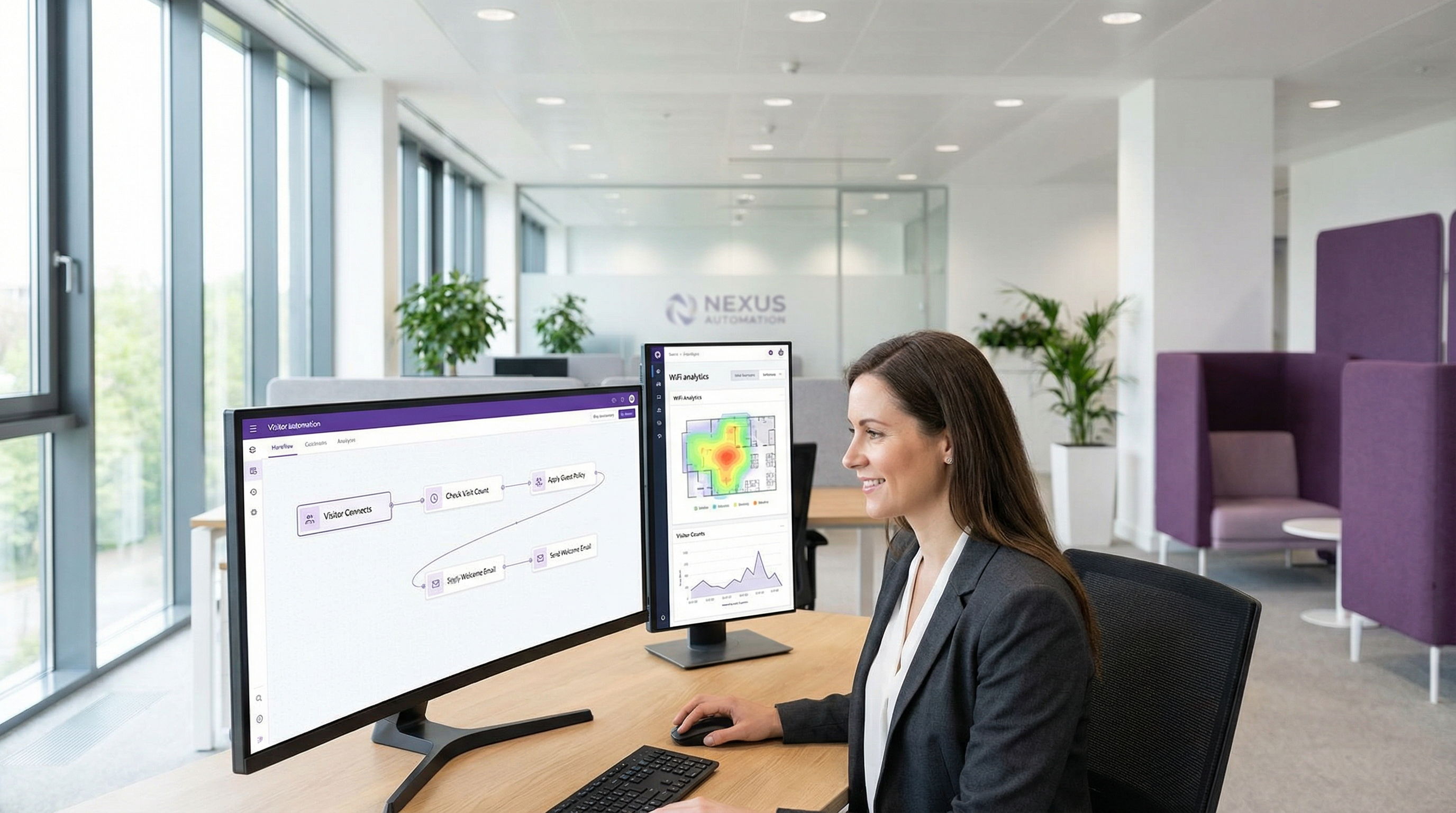
En el competitivo panorama de las redes empresariales, la capacidad de automatizar respuestas a eventos en tiempo real ya no es un lujo, sino un requisito operativo fundamental. Para los gerentes de TI, arquitectos de redes y operadores de recintos, el desafío radica en traducir los datos sin procesar de la red en acciones inmediatas y de valor. LogicFlow de Purple es un motor de automatización de nivel empresarial diseñado para abordar este desafío directamente. Proporciona una interfaz visual de arrastrar y soltar para crear flujos de trabajo sofisticados activados por una amplia gama de eventos relacionados con el WiFi y los visitantes. Esta guía sirve como un análisis técnico profundo de LogicFlow, yendo más allá de los resúmenes de marketing para proporcionar orientación práctica de implementación. Analizaremos la arquitectura de la plataforma, exploraremos escenarios de implementación comunes en industrias como la hotelería y el comercio minorista, y cuantificaremos el ROI en términos de eficiencia operativa, mayor interacción con los huéspedes y mitigación de riesgos. Para el CTO, este documento describe una estrategia para aprovechar la infraestructura de WiFi existente como un sistema proactivo e inteligente que impulsa los resultados comerciales. Para el gerente de TI y el desarrollador, es un manual práctico para implementar flujos de trabajo robustos y automatizados que se alinean con estándares de cumplimiento clave como GDPR y PCI DSS, garantizando tanto la seguridad como una experiencia de usuario fluida.
Análisis técnico profundo
LogicFlow opera como el sistema nervioso central de la plataforma Purple, procesando un flujo continuo de puntos de datos para activar acciones predefinidas. Su arquitectura se basa en tres conceptos centrales: Eventos, Decisiones y Acciones. Este modelo permite la creación de flujos de trabajo complejos y con estado que pueden adaptarse a condiciones cambiantes en tiempo real.
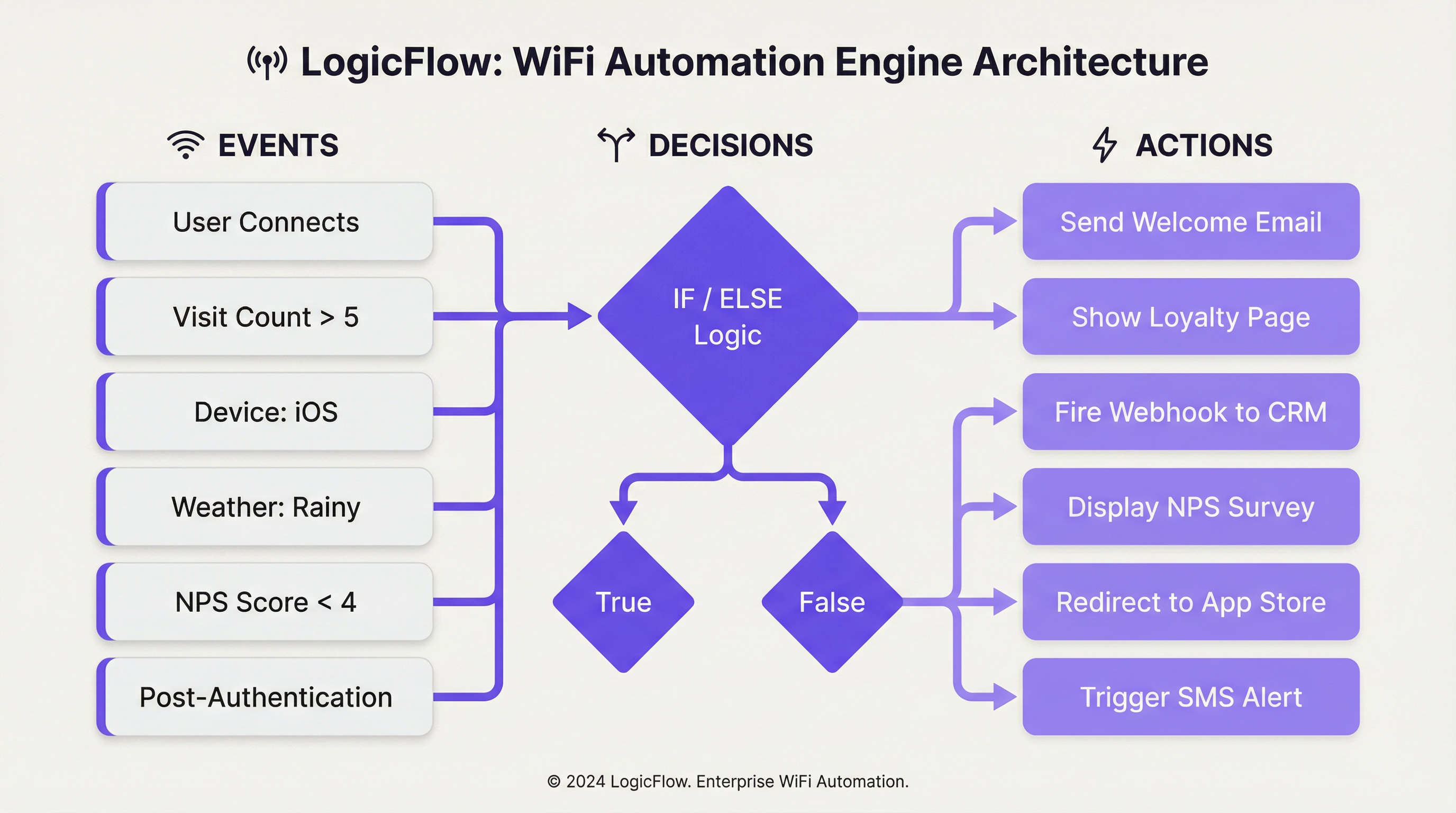
Disparadores de eventos: El proceso comienza cuando se detecta un evento. LogicFlow admite un conjunto completo de disparadores, que se pueden categorizar a grandes rasgos:
| Categoría | Disparadores específicos | Contexto técnico |
|---|---|---|
| Eventos de incorporación | Preautenticación, Postautenticación, En línea | Estos corresponden a las distintas fases del recorrido de conexión WiFi del huésped. Las acciones previas a la autenticación son limitadas, ya que el usuario aún no está en línea, mientras que los disparadores posteriores a la autenticación y en línea pueden aprovechar un conjunto de datos más rico. |
| Datos demográficos del visitante | Edad, Género, Idioma, Dirección de correo electrónico, Recuento de visitas | Obtenidos del formulario de inicio de sesión del Captive Portal o del inicio de sesión social, estos datos permiten recorridos de usuario altamente personalizados. El cumplimiento de las normativas de privacidad de datos como GDPR es primordial al utilizar estos datos. |
| Dispositivo y red | Sistema operativo, Navegador, SSID, MAC/Nombre del punto de acceso, Fabricante | Esencial para la optimización específica del dispositivo (por ejemplo, impulsar la descarga de una aplicación a usuarios de iOS) o acciones específicas de la ubicación basadas en a qué AP está conectado un usuario. |
| Datos ambientales | Ubicación del recinto (País, Etiquetas), Clima (Condición, Temperatura), Hora/Día/Fecha | Permite una automatización consciente del contexto, como mostrar una oferta de 'día lluvioso' en la página de inicio de una tienda minorista o alterar el contenido según los días festivos nacionales. |
| Comportamiento del usuario | Respuesta NPS, Respuestas a microencuestas, Método de inicio de sesión, Plan de WiFi de pago | Disparadores basados en comentarios directos o elecciones del usuario, lo que permite la recuperación inmediata del servicio u oportunidades de ventas adicionales. |
Nodos de decisión: Una vez que se activa un evento, se pasa a un Nodo de decisión. Aquí es donde reside la 'lógica' en LogicFlow. Utilizando declaraciones de 'Verdadero/Falso' o 'Si/Sino', los administradores pueden construir rutas de ramificación basadas en las condiciones que cumplen los datos del evento. Por ejemplo, un nodo 'Si/Sino' podría verificar el visit_count de un visitante. Si es mayor a 5 (un cliente leal), sigue la ruta 'Verdadero'; de lo contrario, sigue la ruta 'Falso' para nuevos visitantes. Se pueden agrupar múltiples condiciones utilizando la lógica 'Y'/'O', lo que permite una segmentación altamente granular.
Nodos de acción: El paso final es el Nodo de acción, que ejecuta una tarea específica. Las acciones dependen del contexto según el tipo de evento.
- Preautenticación: Principalmente la acción
Splash Page, que permite una personalización de marca dinámica basada en la ubicación o la hora del día. - Postautenticación: Hay disponible una gama más amplia de acciones, que incluyen la presentación de
NPS/Micro-survey, el disparo de unWebhooka un sistema de terceros, la visualización deMedia(por ejemplo, un anuncio de video) o la asignación a un nivel dePaid WiFi. - En línea: Acciones que ocurren una vez que el usuario tiene acceso completo a la red, como
Redirecta una URL específica, el envío de unaEmail/SMS Campaigno la visualización de unaSplash Pagediferente en su próxima visita.
Este enfoque estructurado garantiza que los flujos de trabajo sean potentes y fáciles de mantener, cumpliendo con las mejores prácticas estándar para la automatización y la arquitectura basada en eventos.
Guía de implementación
Implementar LogicFlow de manera efectiva requiere un enfoque estructurado, pasando de los objetivos estratégicos a la configuración táctica. Los siguientes pasos proporcionan un marco de implementación independiente del proveedor.
Paso 1 — Definir los objetivos comerciales: Antes de crear cualquier flujo de trabajo, defina claramente el resultado deseado. ¿El objetivo es aumentar las descargas de la aplicación de lealtad, mejorar las puntuaciones de satisfacción de los huéspedes o impulsar el tráfico peatonal a un área específica? Un objetivo claro dicta los disparadores y acciones requeridos.
Paso 2 — Mapear el recorrido del cliente: Identifique los puntos de contacto clave en la experiencia del visitante donde la automatización puede agregar valor. Esto generalmente se alinea con las fases de Preautenticación, Postautenticación y En línea del recorrido de acceso WiFi.
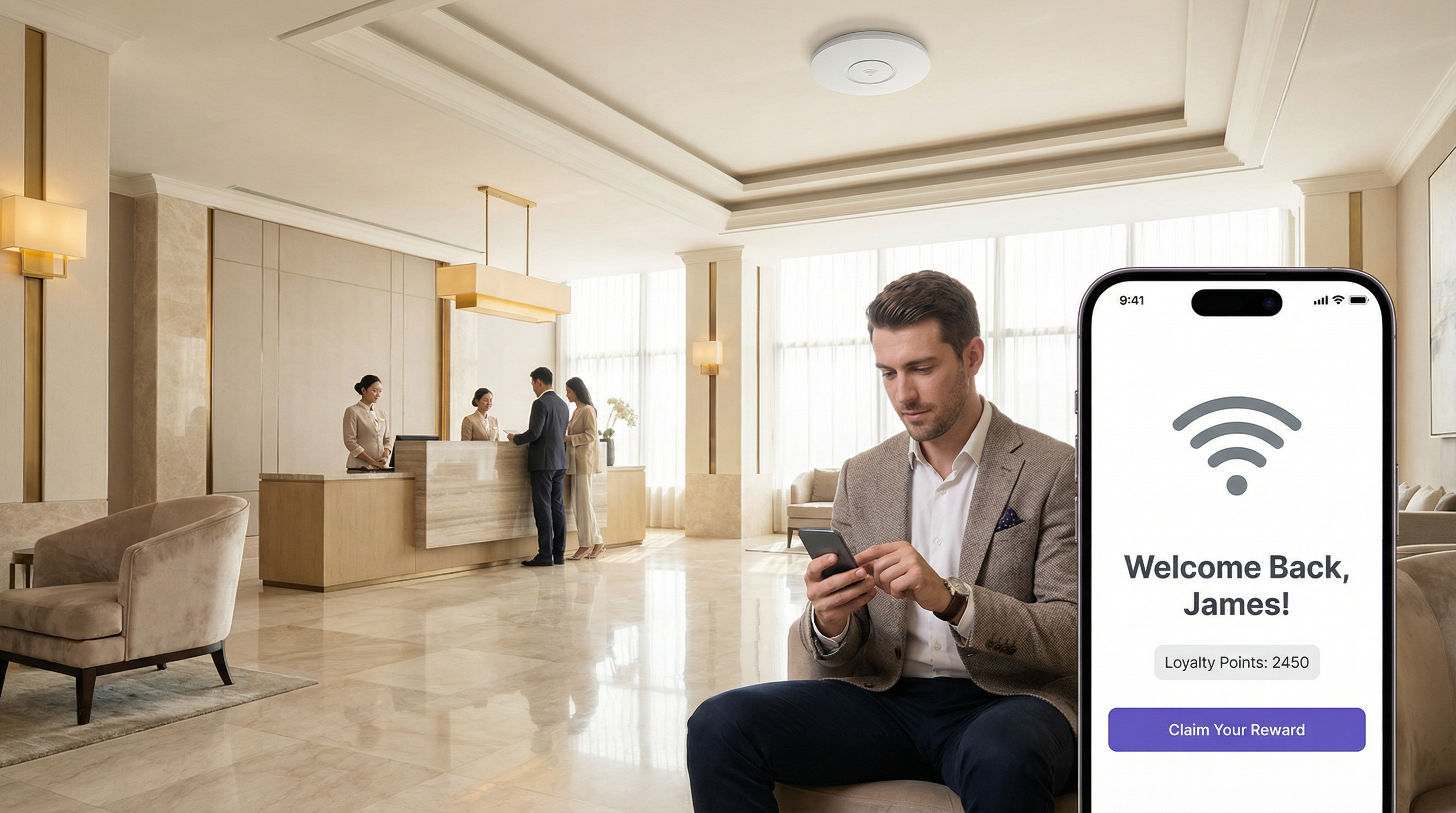
Paso 3 — Construir el flujo de trabajo: Comience con un flujo de trabajo único y sencillo. Por ejemplo, un mensaje de 'Bienvenido de nuevo' para los visitantes recurrentes. Dentro de LogicFlow v2, seleccione 'Add logic flow' y elija el tipo de evento adecuado. Arrastre un nodo de decisión 'Visitor' al lienzo y configúrelo con una condición de 'Verdadero/Falso': visit_count es greater than 1. Para la ruta 'Verdadero', agregue un nodo de acción Email Campaign y seleccione una plantilla de correo electrónico preconfigurada de 'Bienvenido de nuevo'. Para la ruta 'Falso' (nuevos visitantes), agregue una acción diferente, como un correo electrónico de 'Descuento de primera visita'. Conecte todos los nodos, asegurándose de que cada ruta termine con un nodo 'End'.
Paso 4 — Validar y publicar: Utilice la herramienta integrada 'Validate' para comprobar si hay errores en la lógica. Una vez validado, seleccione 'Publish' para publicar el flujo de trabajo.
Paso 5 — Asignar al Access Journey: Vincule el LogicFlow publicado a un Access Journey específico (la experiencia del Captive Portal para un recinto o SSID determinado). Esto activa el flujo de trabajo.
Paso 6 — Monitorear e iterar: Utilice los análisis de la plataforma para medir el impacto del flujo de trabajo. Realice un seguimiento de las tasas de apertura de correos electrónicos, las tasas de canje y la frecuencia de las visitas. Utilice estos datos para refinar la lógica y mejorar el rendimiento con el tiempo.
Mejores prácticas
Comience de forma sencilla, escale de forma inteligente: Evite crear flujos de trabajo monolíticos y demasiado complejos desde el principio. Comience con flujos de un solo propósito y combínelos a medida que gane confianza y recopile datos. Un solo flujo de trabajo bien ajustado que ofrezca resultados medibles vale más que diez mal segmentados.
Cumpla con los estándares de cumplimiento: Al utilizar datos demográficos, asegúrese de que su lógica respete el consentimiento del usuario y se alinee con normativas como GDPR. Construya un nodo de decisión que verifique el indicador emailable antes de activar cualquier acción de marketing. Para los recintos que manejan datos de pago, asegúrese de que los flujos de trabajo que involucran transacciones financieras se revisen según los requisitos de PCI DSS.
Aproveche los Webhooks para la integración: Los Webhooks son una herramienta poderosa para ampliar las capacidades de LogicFlow. Úselos para enviar datos a sistemas CRM externos, activar alertas en paneles operativos (como Slack o Microsoft Teams) o integrarse con sistemas de gestión de edificios. Esto promueve una estrategia de integración neutral en cuanto a proveedores y centrada en API que protege su inversión tecnológica.
Utilice convenciones de nomenclatura: A medida que crece el número de flujos de trabajo, una convención de nomenclatura coherente (por ejemplo, [Recinto]-[Objetivo]-[Disparador]) se vuelve esencial para el mantenimiento y la colaboración en equipo.
Audite y depure periódicamente: Revise periódicamente todos los flujos de trabajo activos para asegurarse de que sigan alineados con los objetivos comerciales actuales. Desactive o archive los flujos obsoletos para reducir la complejidad y mitigar el riesgo de consecuencias no deseadas.
Solución de problemas y mitigación de riesgos
Problema — El flujo de trabajo no se activa: El problema más común es una configuración incorrecta en la asignación. Verifique que el LogicFlow esté publicado y asignado correctamente al Access Journey activo para el recinto o SSID de destino. Verifique también la lógica dentro de los nodos de decisión; una condición demasiado restrictiva puede evitar que se dispare el evento.
Problema — Experiencia de usuario no deseada: Un flujo de trabajo complejo con muchas ramificaciones puede generar resultados inesperados. Utilice la herramienta 'Validate' y pruebe exhaustivamente con un SSID que no sea de producción antes de implementarlo en un entorno en vivo. Considere el orden de las operaciones, especialmente en los flujos de Postautenticación donde múltiples acciones (por ejemplo, una encuesta y una redirección) podrían competir.
Riesgo — Fatiga de alertas: La automatización de alertas a través de correos electrónicos o webhooks es poderosa, pero puede provocar 'fatiga de alertas' si no se gestiona con cuidado. Implemente una lógica de decisión que solo active alertas para eventos de alta prioridad (por ejemplo, una puntuación NPS de 1 a 3, lo que indica una falla significativa en el servicio) en lugar de hacerlo para cada evento de conexión individual.
Riesgo — Violación de la privacidad de datos: El uso de datos personales (edad, género, correo electrónico) es una característica clave, pero también una responsabilidad importante. La mitigación implica el cumplimiento estricto del principio de minimización de datos. Recopile solo los datos necesarios para un propósito específico y definido, y asegúrese de que todos los flujos de trabajo que utilizan estos datos verifiquen el consentimiento del usuario. Revise periódicamente los flujos frente a las obligaciones de GDPR y mantenga un registro de procesamiento de datos actualizado.
ROI e impacto comercial
Eficiencia operativa: La automatización de tareas como las alertas de recuperación de servicio o las inscripciones en programas de lealtad reduce la carga de trabajo manual del personal. Un hotel puede activar automáticamente un ticket de mantenimiento y alertar al gerente de recepción si un huésped deja una mala calificación de NPS después de conectarse al WiFi, lo que permite una intervención inmediata. Esto se traduce directamente en una reducción de los gastos operativos y una resolución de problemas más rápida, medible en horas de personal ahorradas y puntuaciones de satisfacción de los huéspedes.
Aumento del valor de vida del cliente (CLV): Al personalizar la experiencia del huésped, los recintos pueden aumentar la lealtad y la repetición de negocios. Una cadena minorista que utiliza LogicFlow para enviar un cupón de descuento específico a los visitantes que no han sido vistos en 90 días está trabajando activamente para evitar la pérdida de clientes. El éxito de esto se puede medir mediante el seguimiento de la tasa de canje de estas ofertas y la frecuencia de visitas posterior de la cohorte objetivo.
Inteligencia de recinto mejorada: Los datos generados por LogicFlow proporcionan información profunda sobre el comportamiento de los visitantes. Un estadio puede analizar qué áreas de concesión son más populares durante períodos específicos mediante el seguimiento de la densidad de dispositivos cerca de APs específicos, y utilizar estos datos para optimizar la dotación de personal y el inventario para eventos futuros. Este enfoque basado en datos para la gestión de recintos conduce a un mayor rendimiento y un aumento de los ingresos por visitante.
Cumplimiento y mitigación de riesgos: La automatización de las comprobaciones de cumplimiento (como garantizar que a cada usuario se le presenten los últimos Términos y condiciones en su primera visita del año) reduce el riesgo legal y financiero. El costo del incumplimiento de normativas como GDPR puede ser sustancial, lo que hace que la aplicación automatizada sea un componente crítico de cualquier cálculo de ROI.
Key Terms & Definitions
LogicFlow
A visual, drag-and-drop workflow automation engine within the Purple platform that enables the triggering of specific actions based on a wide range of WiFi events, visitor demographics, device data, and environmental context.
IT teams use LogicFlow to move beyond providing simple connectivity, transforming their WiFi network into an intelligent, responsive system that can drive marketing, operational, and security objectives without manual intervention.
Event-Driven Architecture (EDA)
A software architecture paradigm that promotes the production, detection, consumption of, and reaction to events. LogicFlow is a practical, no-code application of EDA principles for enterprise WiFi networks.
For a network architect, understanding that LogicFlow is based on EDA principles clarifies its asynchronous, non-blocking nature. It is not about polling for status; it is about reacting instantly when a specific event, such as a new user connection or a negative survey response, occurs.
Webhook
An automated HTTP callback sent from one application to another when a specific event occurs. In LogicFlow, a webhook is an action node that can push data to an external system in real-time upon a trigger condition being met.
A developer can use a webhook action in LogicFlow to send guest data to a corporate CRM, trigger an alert in a Slack channel, or instruct a building management system to take an action, providing limitless integration possibilities with any platform that exposes a REST API.
Access Journey
The complete sequence of steps and pages a visitor interacts with from the moment they connect to a WiFi SSID to the point they are granted online access. A published LogicFlow must be assigned to an Access Journey to become active.
Venue operations directors are concerned with the Access Journey as a whole. LogicFlow gives them the power to make this journey dynamic, ensuring the branding, messaging, and any required steps are appropriate for the specific venue, event, or user type.
Captive Portal
A web page that is displayed to newly connected users of a WiFi network before they are granted broader access to network resources. It is the primary source of demographic and consent data for many LogicFlow triggers.
While IT managers deploy captive portals for authentication and security, LogicFlow allows them to transform the portal from a simple gatekeeper into a strategic tool for data collection and personalised engagement, without requiring changes to the underlying network infrastructure.
Decision Node
A component in the LogicFlow canvas that evaluates incoming event data against a set of predefined conditions and directs the workflow down a specific path based on the outcome, using True/False or If/Else logic.
For an IT professional configuring a workflow, the Decision Node is the core component for creating targeted logic. It is where the 'if-then' intelligence of the automation is defined, ensuring actions are only performed on the intended segment of users.
SSID (Service Set Identifier)
The public name of a wireless local area network (WLAN). A single venue may broadcast multiple SSIDs — for example, 'Hotel-Guest', 'Hotel-Conference', and 'Hotel-Staff' — each of which can be assigned a different Access Journey and LogicFlow.
Network architects can use the SSID as a trigger in LogicFlow to apply completely different automation rules depending on which network a user connects to, ensuring that a conference delegate and a hotel guest in the same building have entirely different and contextually appropriate online experiences.
GDPR (General Data Protection Regulation)
A regulation in EU law on data protection and privacy for all individuals within the European Union and the European Economic Area, governing how personal data is collected, processed, and stored.
When a CTO or IT Manager designs a LogicFlow that uses personal data such as email address or age, they must build in checks to ensure compliance with GDPR. This means using LogicFlow's capabilities to verify consent before triggering any marketing actions, mitigating significant legal and financial risk.
NPS (Net Promoter Score)
A widely used customer experience metric that measures customer loyalty by asking respondents to rate, on a scale of 0 to 10, how likely they are to recommend a product or service. Scores of 9–10 are Promoters, 7–8 are Passives, and 0–6 are Detractors.
In LogicFlow, an NPS survey can be presented as a Post-Authentication or Online action, and the resulting score can be used as a decision trigger. This enables real-time service recovery for Detractors and automated review solicitation for Promoters, directly impacting online reputation management.
Case Studies
A 500-room luxury hotel wants to improve its guest satisfaction scores and encourage positive online reviews. They have identified two key visitor segments: first-time guests and returning VIP members. How can they use LogicFlow to create a tailored experience for each segment?
The IT Director implements a multi-path LogicFlow triggered on the 'Post-Authentication' event.
Workflow Configuration:
- Start Node: Triggers after a guest successfully authenticates on the hotel WiFi.
- Decision Node 1 (If/Else): Checks the visitor's profile for a 'VIP Member' tag, synced from the hotel's Property Management System via the Purple API.
- IF True (VIP Member): Route to Path A.
- ELSE (First-Time or Regular Guest): Route to Path B.
- Path A — VIP Member:
- Action Node 1:
Redirectthe guest to a personalised welcome page (https://hotel.com/vip-welcome) with exclusive offers and an upgrade prompt. - Action Node 2:
Email Campaigntriggered with a 1-hour delay, sending a 'Welcome Back' email with a direct link to book spa treatments.
- Action Node 1:
- Path B — First-Time Guest:
- Action Node 1:
NPS Surveypresented immediately to capture initial sentiment. - Decision Node 2 (If/Else): Evaluates the NPS Survey response.
- IF
NPS Scoreis between 9 and 10 (Promoter): Trigger anEmail Campaignwith a 24-hour delay, thanking the guest and providing a direct link to leave a review on TripAdvisor. - ELSE (Score 0–8): Trigger a
Webhookaction that sends an immediate alert to the Front Desk Manager's Slack channel with the guest's name and room number, enabling proactive service recovery.
- IF
- Action Node 1:
- End Node: All paths terminate here.
A large retail shopping centre with over 200 stores wants to increase downloads of its new loyalty and wayfinding app. How can they leverage their existing guest WiFi infrastructure to drive app adoption without disrupting the experience for loyal customers?
The Head of Digital Marketing deploys a LogicFlow that specifically targets users based on device type and visit frequency.
Workflow Configuration:
- Start Node: Triggers on the 'Online' event, once the visitor has full network access.
- Decision Node 1 (True/False): Checks if
visit_countisless than3. This targets newer visitors who are less likely to have downloaded the app. - Decision Node 2 (True/False): Nested under the 'True' path of Node 1. Checks if
Operating SystemisiOSORAndroid. This filters out laptops and other non-mobile devices where an app download is not relevant. - Action Node (True path of Node 2):
Redirectthe user to a custom, mobile-friendly landing page. This page explains the benefits of the app — interactive maps, exclusive offers, loyalty points — and has prominent, one-click buttons to the Apple App Store and Google Play Store. - Alternative Paths: The 'False' path from either decision node (a visitor with more than 3 visits, or a laptop user) proceeds without any redirect, ensuring a standard browsing experience for loyal customers or those on non-mobile devices.
- End Node: All paths terminate here.
Scenario Analysis
Q1. A multi-national coffee chain wants to ensure a consistent global brand experience while also promoting location-specific specials. How would you configure LogicFlow to show a global branding page to all visitors, but also surface a location-specific offer for visitors in specific cities?
💡 Hint:Consider using a combination of Pre-Authentication and Online event triggers. How can venue tags or venue names be used as decision criteria?
Show Recommended Approach
You would implement two LogicFlows. The first is a Pre-Authentication flow assigned globally to all venues. It contains a single Action node to display the main corporate-branded Splash Page, ensuring brand consistency across all locations. The second is an Online flow. It uses a Decision node based on 'Venue Name' or 'Venue Tags'. For each specific venue (e.g., tagged 'London-Covent-Garden'), you create a path that redirects the user to a page for the local special offer. Venues without a specific tag follow a default path with no redirect. This layered approach meets both requirements without requiring separate infrastructure configurations per venue.
Q2. A stadium is hosting a major sporting event and wants to manage network congestion. How could LogicFlow be used to mitigate performance issues for general attendees while preserving bandwidth for press and VIP guests?
💡 Hint:Think about how different SSIDs can be used in conjunction with LogicFlow. What actions can influence user behaviour to reduce bandwidth consumption during peak periods?
Show Recommended Approach
The network architect should configure multiple SSIDs: 'Stadium-Public', 'Stadium-VIP', and 'Stadium-Press'. The VIP and Press SSIDs receive higher QoS priority at the network infrastructure level (IEEE 802.11e/WMM). A LogicFlow is then applied to the 'Stadium-Public' Access Journey with a 'Day/Time' decision node. During peak periods such as halftime, the flow triggers a 'Redirect' action that sends public users to a cached, lightweight page with game statistics and social media feeds rather than allowing unrestricted internet access. This contains traffic and reduces load on the main internet uplink. The VIP and Press SSIDs have no such restriction, preserving their performance for critical use cases.
Q3. A conference centre wants to gather feedback on individual speaker sessions. How can they use LogicFlow to send a targeted micro-survey to attendees shortly after a specific session ends, without surveying attendees who were in a different room?
💡 Hint:This requires integrating location data from the network infrastructure. How can AP naming conventions and time-based triggers be combined to achieve room-level targeting?
Show Recommended Approach
This use case requires precise AP naming. Each conference room's access points are named with a room identifier (e.g., 'Room-101-AP1'). An Online LogicFlow uses a Decision node checking the 'Access Point Name' field. If a user was associated with an AP containing 'Room-101' between the session start and end times (using the 'Time' decision node), they are added to a tagged segment. A second LogicFlow, triggered 15 minutes after the session end time, sends an Email Campaign or Micro Survey to all visitors in that segment, asking specifically about the session in Room 101. This requires disciplined AP naming conventions and careful time-based logic, but delivers highly relevant, timely feedback that is directly attributable to a specific session.
Key Takeaways
- ✓LogicFlow is Purple's visual, event-driven automation engine that transforms passive WiFi infrastructure into an intelligent, responsive business platform.
- ✓Every workflow follows the Event-Decision-Action architecture: a trigger event feeds into If/Else logic, which executes a targeted action.
- ✓Key trigger categories include visitor demographics, device and network data, environmental context (including real-time weather), and user behaviour such as NPS responses.
- ✓Common high-value use cases include real-time service recovery, personalised loyalty engagement, targeted app download campaigns, and dynamic venue branding.
- ✓Webhooks are the primary integration mechanism, enabling LogicFlow to communicate with external CRMs, operational dashboards, and building management systems via REST APIs.
- ✓GDPR compliance must be built into every marketing workflow by checking user consent flags before triggering any communications.
- ✓Implementation best practice is to start with single-purpose, clearly-scoped workflows, validate thoroughly on a non-production SSID, and iterate based on measurable outcomes.




