

MDU Login: Simplificando el acceso WiFi en unidades de viviendas múltiples
This technical reference guide provides IT managers, network architects, and CTOs with a definitive framework for deploying and managing WiFi access in Multi-Dwelling Units (MDUs), covering the trade-offs between shared PSK, WPA3-Enterprise 802.1X, and Identity PSK (iPSK) authentication models. It addresses the core operational challenges of RF interference, security segmentation, and resident lifecycle management, and demonstrates how a managed WiFi platform such as Purple transforms connectivity from a cost centre into a measurable revenue asset. Drawing on real-world deployment scenarios and referencing standards including IEEE 802.1X, WPA3, GDPR, and PCI DSS, the guide equips venue operators with the architecture, implementation steps, and ROI metrics needed to make an informed investment decision this quarter.
🎧 Listen to this Guide
View Transcript
Resumen ejecutivo
El WiFi en las unidades de viviendas múltiples (MDU) ya no es un diferenciador: es el servicio principal. Los residentes de apartamentos de alquiler, residencias de estudiantes y espacios de co-living ahora valoran la conectividad a internet confiable por encima del estacionamiento, el acceso al gimnasio y la lavandería en la unidad al evaluar una propiedad. Para los equipos de TI y operaciones responsables de brindar esa conectividad, el desafío es triple: proporcionar una experiencia de MDU login fluida que funcione para todos los dispositivos, mantener una seguridad de nivel empresarial en cientos de usuarios simultáneos y administrar la red sin un ejército de técnicos en el sitio.
Los enfoques tradicionales (una contraseña compartida para el edificio o un banco de enrutadores de consumo en cada apartamento) son arquitectónicamente deficientes. El primero crea una red plana e insegura donde los residentes pueden ver los dispositivos de los demás y una sola contraseña filtrada compromete a todo el edificio. El segundo crea una pesadilla de interferencia de radiofrecuencia (RF) y un parque de hardware inmanejable. La respuesta moderna es una plataforma WiFi administrada basada en Identity PSK (iPSK), que ofrece una credencial de red privada y única por apartamento, aplica el aislamiento de dispositivos de Capa 2 a través de Redes de Área Personal (PAN) y automatiza todo el ciclo de vida del residente mediante la integración con su Sistema de Gestión de Propiedades (PMS). Esta guía explica cómo diseñar, implementar y medir dicha solución.
Análisis técnico detallado
Los tres modelos de MDU Login: un análisis comparativo
Cada implementación de WiFi en MDU se basa en uno de tres paradigmas de autenticación, cada uno con distintas implicaciones de seguridad, usabilidad y operación.
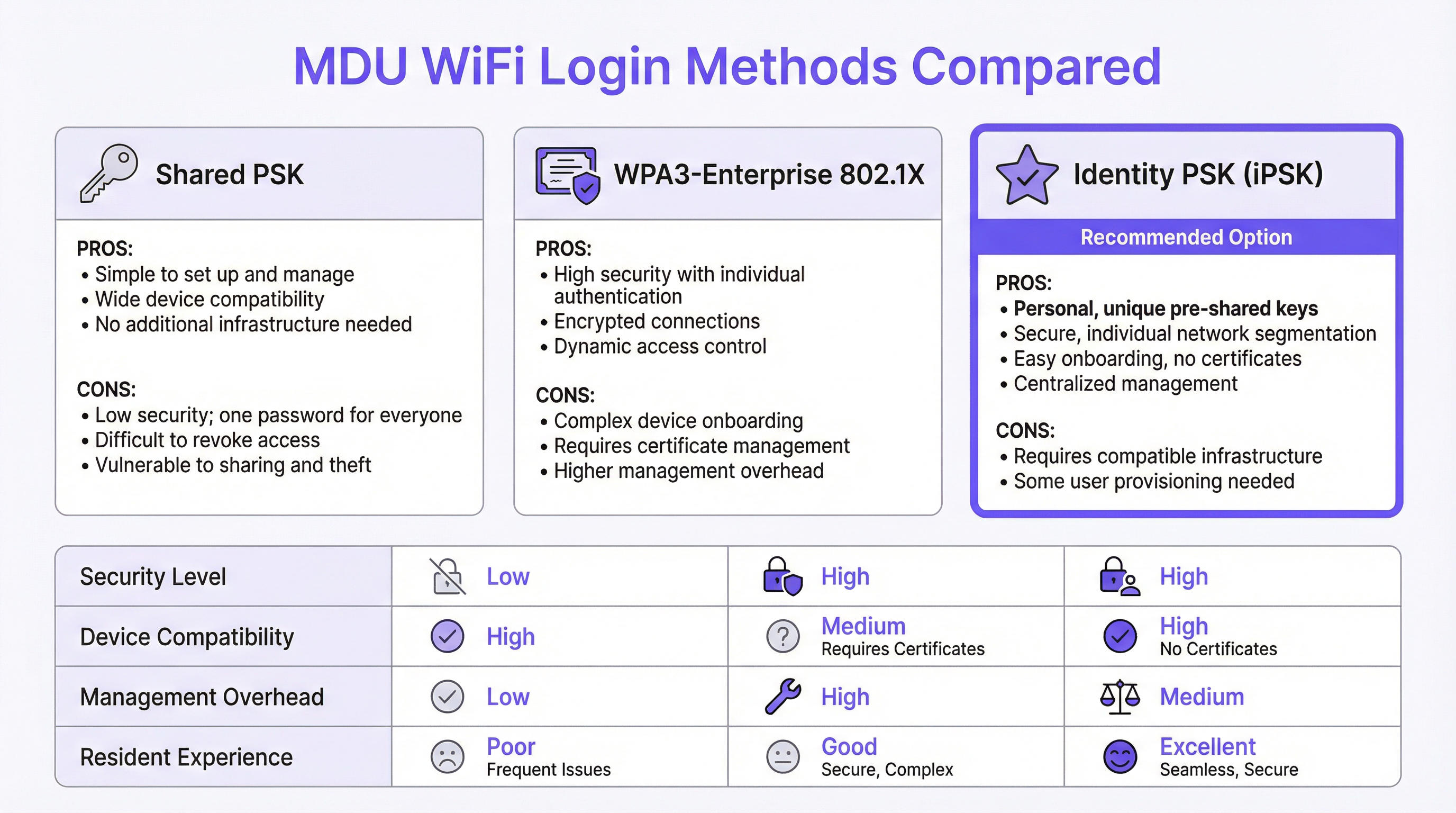
La Clave Precompartida Compartida (Shared PSK) es la opción predeterminada para la mayoría de las implementaciones heredadas. Se distribuye un solo SSID y contraseña a todos los residentes, generalmente publicados en un paquete de bienvenida o comunicados verbalmente por el personal del edificio. La simplicidad operativa es su única virtud. Desde el punto de vista de la seguridad, es fundamentalmente incompatible con entornos multiinquilino: no existe un mecanismo para la segmentación por usuario, lo que significa que todos los dispositivos de los residentes comparten un único dominio de transmisión. Un residente con un dispositivo mal configurado o con intenciones maliciosas puede enumerar trivialmente los activos conectados a la red de sus vecinos. Revocar el acceso de un inquilino que se marcha requiere cambiar la contraseña de todo el edificio, lo que crea una interrupción operativa que la mayoría de los operadores simplemente evitan, dejando a los antiguos residentes con acceso indefinido a la red.
WPA3-Enterprise con IEEE 802.1X representa el enfoque centrado en la seguridad, estándar en entornos corporativos. Cada usuario se autentica con credenciales individuales o un certificado digital, validado contra un servidor RADIUS. El protocolo proporciona claves de cifrado por sesión, autenticación mutua sólida y políticas de control de acceso granulares. Sin embargo, no se adapta bien al contexto residencial por una razón fundamental: una proporción significativa de dispositivos de consumo e IoT (incluidos televisores inteligentes, consolas de videojuegos, asistentes de voz y concentradores de hogares inteligentes) no admiten suplicantes 802.1X. Obligar a los residentes a lidiar con el aprovisionamiento de certificados para una PlayStation o un termostato Nest genera un volumen desproporcionado de tickets de soporte y crea una percepción de mal servicio, independientemente de la calidad de la red subyacente.
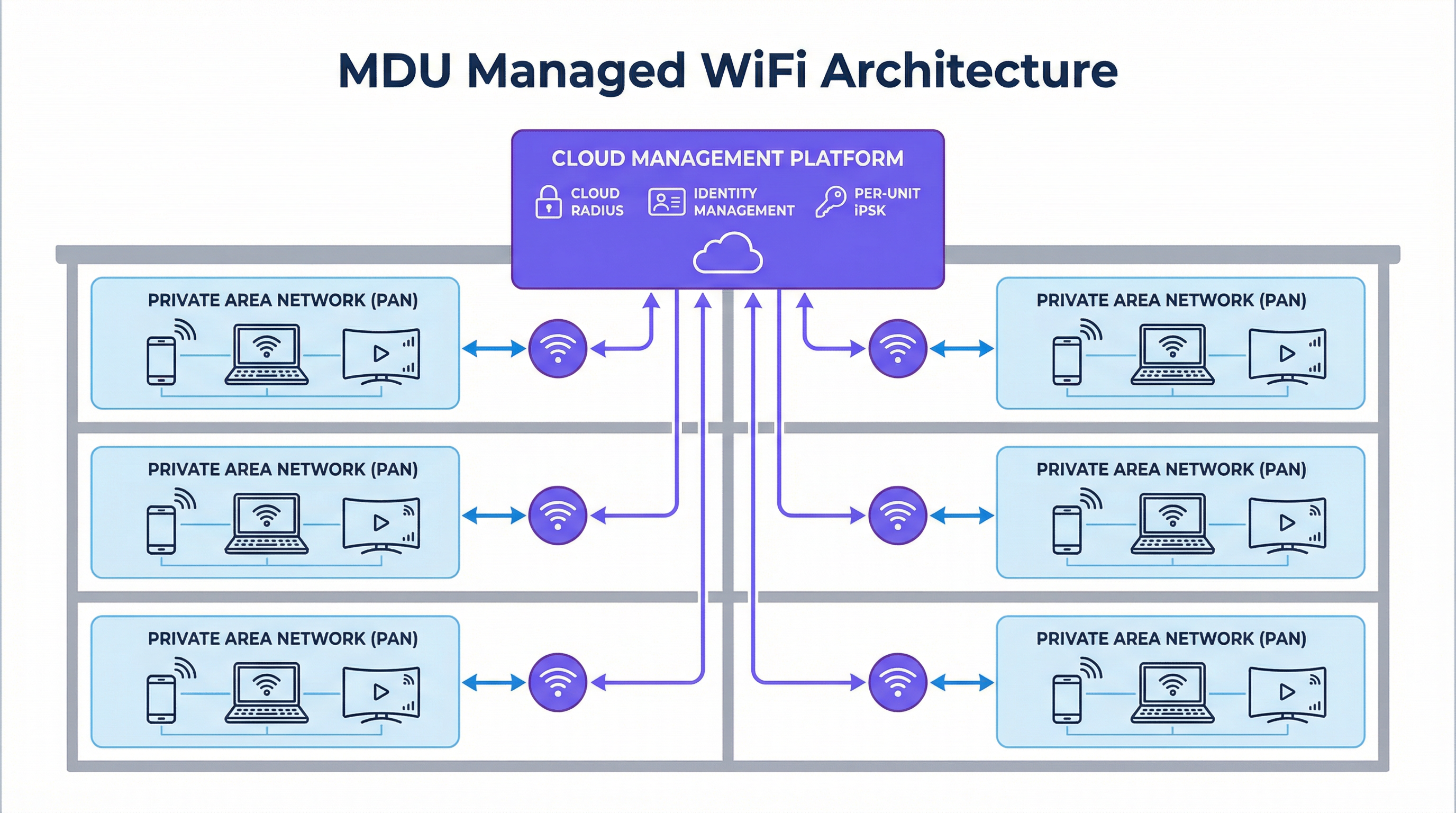
Identity PSK (iPSK) resuelve esta tensión. A cada apartamento o residente se le asigna una clave precompartida única, generada y administrada de forma centralizada por la plataforma. Para el residente, la experiencia es indistinguible de conectarse a un enrutador doméstico privado: ingresan una contraseña y están en línea. En el lado de la infraestructura, el servidor RADIUS asigna cada clave única a un perfil de política específico, colocando los dispositivos del residente en una Red de Área Privada (PAN) dedicada: un microsegmento aislado de Capa 2 que es lógicamente invisible para todos los demás residentes en la misma infraestructura física. La plataforma admite la reflexión mDNS dentro de la PAN, lo que permite a los residentes transmitir a su propio Chromecast o imprimir en su propia impresora sin ninguna visibilidad entre inquilinos. Este modelo es compatible con el 100 % de los dispositivos de consumo, no requiere infraestructura de certificados y se administra en su totalidad a través de un panel en la nube.
| Atributo | Shared PSK | WPA3-Enterprise (802.1X) | Identity PSK (iPSK) |
|---|---|---|---|
| Segmentación de seguridad | Ninguna | Por usuario | Por usuario |
| Soporte para IoT / Dispositivos sin interfaz | Completo | Limitado | Completo |
| Carga de administración | Baja (estática) | Alta | Media (automatizada) |
| Fricción en la incorporación de residentes | Baja | Alta | Baja |
| Baja de inquilinos | Disruptiva | Granular | Granular (automatizada) |
| Alineación con GDPR | Deficiente | Sólida | Sólida |
| Recomendado para MDU | No | No | Sí |
Arquitectura de RF: eliminando el problema de interferencia
El entorno de RF en una MDU densa es uno de los más desafiantes en las redes empresariales. Una implementación convencional (un enrutador de consumo por unidad) da como resultado docenas o cientos de radios independientes de 2.4 GHz y 5 GHz compitiendo por el mismo espectro. La interferencia cocanal degrada el rendimiento para todos los usuarios simultáneamente, y el problema se agrava a medida que aumenta la ocupación. Un edificio de 200 unidades con un enrutador por apartamento genera un mínimo de 200 radios de 2.4 GHz compitiendo, a menudo operando en canales superpuestos.
Una implementación de iPSK administrada reemplaza esto con una arquitectura de radio planificada y centralizada. Los puntos de acceso de nivel empresarial se posicionan en función de un estudio de sitio de RF profesional, utilizando canales no superpuestos, potencia de transmisión controlada y dirección de banda para distribuir a los clientes de manera óptima en las bandas de 2.4 GHz, 5 GHz y, en implementaciones de WiFi 6E y WiFi 7, la banda de 6 GHz. El resultado es una reducción drástica de la interferencia cocanal y una mejora medible en el rendimiento por usuario. Fundamentalmente, debido a que la red se administra de forma centralizada, el operador puede ajustar los parámetros de radio, aplicar actualizaciones de firmware y diagnosticar problemas de forma remota, sin enviar a un ingeniero a las unidades individuales.
Seguridad, cumplimiento y panorama regulatorio
Para los operadores que administran propiedades MDU que incluyen tiendas minoristas en la planta baja, alimentos y bebidas o espacios de co-working, los requisitos de cumplimiento se extienden más allá de la privacidad básica. PCI DSS exige una estricta segmentación de la red entre los entornos de datos de los titulares de tarjetas y cualquier infraestructura de red compartida. Una red MDU plana que mezcla el tráfico residencial y minorista crea una exposición directa de cumplimiento. iPSK con etiquetado de VLAN por perfil de política proporciona el límite de segmentación requerido para satisfacer el Requisito 1.3 de PCI DSS, aislando los sistemas de pago del tráfico residencial en la capa de red.
GDPR introduce un conjunto diferente de obligaciones. Cualquier red que capture datos de usuarios (incluidas direcciones MAC, marcas de tiempo de conexión y metadatos de navegación) debe hacerlo con una base legal y debe implementar las salvaguardas técnicas adecuadas. Una plataforma WiFi administrada con un Captive Portal compatible o un flujo de incorporación basado en una aplicación proporciona el mecanismo de consentimiento y los controles de minimización de datos requeridos en virtud de los Artículos 5 y 6 del GDPR. Los operadores deben asegurarse de que la plataforma elegida proporcione un Acuerdo de Procesamiento de Datos (DPA) y opere dentro de los límites jurisdiccionales apropiados para el almacenamiento de datos.
Guía de implementación
Fase 1: Descubrimiento y diseño (Semanas 1–2)
Comience con un estudio de sitio exhaustivo. Esto no es opcional. Un modelo de RF predictivo, validado con un recorrido físico utilizando un analizador de espectro, identificará zonas muertas, fuentes de interferencia y ubicaciones óptimas para los puntos de acceso. Documente los materiales de construcción del edificio (el hormigón y el acero atenúan las señales significativamente más que la construcción con estructura de madera) y mapee las ubicaciones de todas las fuentes de interferencia eléctrica, incluidos hornos microondas, teléfonos DECT y redes vecinas.
Durante el descubrimiento, audite su infraestructura existente. Identifique si su parque de conmutación admite el etiquetado de VLAN 802.1Q (necesario para la segmentación del tráfico), si su enlace ascendente proporciona suficiente margen de ancho de banda (planifique un mínimo de 25 Mbps por unidad para una implementación residencial estándar, con 50–100 Mbps para niveles premium) y si su Sistema de Gestión de Propiedades expone una API para el aprovisionamiento automatizado de usuarios.
Fase 2: Implementación de la infraestructura (Semanas 3–6)
Implemente puntos de acceso de nivel empresarial de acuerdo con el plan del estudio de sitio. Para una MDU residencial estándar, un punto de acceso por cada dos a cuatro unidades es un punto de partida razonable, ajustado según la construcción del edificio y la densidad de unidades. Asegúrese de que todos los puntos de acceso estén alimentados a través de PoE+ (IEEE 802.3at) o PoE++ (IEEE 802.3bt) para eliminar la necesidad de tomas de corriente locales en techos o pasillos.
Configure su infraestructura de conmutación con las VLAN requeridas: un mínimo de una VLAN de administración, una VLAN de datos por residente (o una VLAN compartida con aplicación de PAN en la capa del controlador) y una VLAN de invitados/visitantes. Establezca su conexión RADIUS en la nube y valide los flujos de autenticación antes de incorporar a cualquier residente.
Fase 3: Integración de identidad e incorporación (Semanas 5–8)
Integre la plataforma WiFi administrada con su Sistema de Gestión de Propiedades a través de la API. Configure el flujo de trabajo de aprovisionamiento automatizado: cuando se crea un nuevo contrato de arrendamiento en el PMS, la plataforma debe generar automáticamente una iPSK única, asociarla con el perfil de política correcto (VLAN, nivel de ancho de banda, grupo PAN) y entregar las credenciales al residente por correo electrónico o mediante la aplicación para residentes. Pruebe el flujo de trabajo completo de extremo a extremo antes de la puesta en marcha, incluida la ruta de baja: la revocación de credenciales debe ser inmediata y completa al finalizar el contrato de arrendamiento.
Para los residentes con dispositivos IoT sin interfaz, proporcione un portal de autoservicio o un flujo basado en una aplicación que genere una clave secundaria específica del dispositivo dentro de la misma PAN. Esto permite que un televisor inteligente o una consola de videojuegos se una a la red sin comprometer la arquitectura de seguridad.
Fase 4: Puesta en marcha y optimización (Semana 8 en adelante)
Realice un lanzamiento por etapas, comenzando con un piso o edificio piloto antes de la implementación completa. Supervise las tasas de éxito de conexión, las fallas de autenticación y el recuento de clientes por AP en el panel de administración. Ajuste la potencia de transmisión y las asignaciones de canales en función de los datos de RF en vivo. Establezca una línea base para el volumen de tickets de soporte en los primeros 30 días; una solución WiFi administrada bien implementada debería reducir las solicitudes de soporte relacionadas con la conectividad entre un 70 % y un 80 % en comparación con una implementación heredada de PSK compartida.
Mejores prácticas
Las siguientes recomendaciones neutrales en cuanto a proveedores reflejan el consenso actual de la industria para implementaciones de WiFi en MDU a escala.
Aplique WPA3 siempre que sea posible. WPA3-SAE (Autenticación Simultánea de Iguales) elimina la vulnerabilidad de ataque de diccionario fuera de línea presente en WPA2-PSK. Para implementaciones de iPSK, habilite el Modo de Transición WPA3 para mantener la compatibilidad con dispositivos más antiguos mientras migra progresivamente el parque a WPA3 a medida que se reemplazan los dispositivos.
Implemente 802.11r (Transición Rápida BSS) y 802.11k/v (Gestión de Recursos de Radio). En grandes implementaciones de MDU, los residentes se mueven entre áreas comunes, pasillos y sus propias unidades. Sin un roaming rápido, un dispositivo puede aferrarse a un punto de acceso distante mucho después de que haya uno más cercano disponible, degradando el rendimiento. 802.11r permite transferencias de roaming de menos de 100 ms, mientras que 802.11k y 802.11v proporcionan al cliente informes de vecinos y solicitudes de gestión de transición BSS para facilitar decisiones de roaming inteligentes.
Separe el tráfico de IoT en la capa de red. Incluso dentro de una PAN, considere colocar los dispositivos IoT en un SSID dedicado con acceso restringido a internet y sin enrutamiento intra-PAN. Esto limita el radio de impacto de un dispositivo IoT comprometido y se alinea con los principios de red de confianza cero.
Mantenga un proceso de gestión de cambios documentado. Las redes MDU son entornos en vivo con una rotación continua de residentes. Cada cambio de configuración (modificación de VLAN, actualización de firmware, cambio de política) debe probarse en un entorno de ensayo y lanzarse durante una ventana de mantenimiento definida con un procedimiento de reversión validado.
Solución de problemas y mitigación de riesgos
Modos de falla comunes
Fallas de autenticación a escala. Si una proporción significativa de residentes no puede conectarse después de una actualización de la plataforma o un cambio de infraestructura, la causa más probable es una mala configuración del servidor RADIUS o el vencimiento de un certificado en el endpoint de RADIUS en la nube. Valide el secreto compartido de RADIUS, verifique las fechas de validez del certificado y confirme que los puntos de acceso pueden comunicarse con el servidor RADIUS en los puertos UDP 1812 y 1813. Una arquitectura RADIUS alojada en la nube elimina el riesgo de un único punto de falla de un servidor local.
Conectividad intermitente en unidades específicas. Los problemas de conectividad persistentes en unidades aisladas son casi siempre un problema de cobertura de RF, no un problema de autenticación. Utilice los datos de asociación de clientes por AP de la plataforma de administración para identificar si los residentes afectados se están conectando a un punto de acceso distante. Ajuste la potencia de transmisión o implemente un punto de acceso adicional para eliminar la brecha de cobertura.
Fallas en la incorporación de dispositivos IoT. Los dispositivos que no logran conectarse a pesar de tener una contraseña correcta generalmente intentan negociar un protocolo (como 802.1X) que el SSID no admite, o están siendo rechazados por un filtro de direcciones MAC. Confirme que el SSID esté configurado para WPA2/WPA3-Personal (no Enterprise), deshabilite el filtrado MAC en el SSID del residente y verifique que la configuración de red del dispositivo no esté codificada de forma rígida para una banda de frecuencia específica que no esté disponible.
Fuga de tráfico de residente a residente. Si los residentes informan que pueden ver los dispositivos de los vecinos, la política de aplicación de PAN no se ha aplicado correctamente. Verifique que el atributo RADIUS que devuelve la VLAN o la política de grupo correcta esté presente en la respuesta Access-Accept, y que el firmware del punto de acceso admita el mecanismo de aplicación de PAN específico utilizado por la plataforma (generalmente un Atributo Específico del Proveedor o una asignación dinámica de VLAN).
Podcast informativo técnico de Purple — Escuche la sesión informativa completa de 10 minutos para consultores sobre estrategias de MDU WiFi login, recomendaciones de implementación y análisis de ROI.
ROI e impacto comercial
Cuantificación del caso de inversión
El caso financiero para una implementación de WiFi en MDU administrada opera a través de tres flujos de valor distintos.
Reducción de costos operativos. Una implementación heredada de enrutadores de consumo (uno por unidad en un edificio de 200 unidades) conlleva un ciclo de reemplazo de hardware de tres a cinco años, además de los costos de soporte continuo para los problemas informados por los residentes. El WiFi administrado consolida esto en una cantidad menor de puntos de acceso de nivel empresarial con un ciclo de vida de siete a diez años, una única suscripción de administración en la nube y un volumen de tickets de soporte drásticamente reducido. Los operadores informan constantemente de una reducción del 70 % al 80 % en las solicitudes de soporte relacionadas con WiFi después de una implementación administrada, lo que se traduce directamente en una reducción del tiempo del personal y de los costos de soporte de terceros.
Generación de ingresos. La arquitectura basada en identidad de iPSK permite ofertas de servicios por niveles. Se puede incluir un nivel residencial estándar en el cargo por servicio, mientras que los niveles premium (mayor ancho de banda, QoS dedicada para juegos o videoconferencias) se pueden ofrecer como actualizaciones opcionales por una tarifa mensual. En un edificio de 200 unidades, incluso una adopción del 30 % de un nivel premium de £10/mes genera £7,200 en ingresos incrementales anuales. Para los operadores con propiedades de uso mixto, la misma infraestructura puede servir a inquilinos minoristas y de co-working en perfiles de políticas separados, cada uno con los SLA y la facturación adecuados.
Valor del activo y retención de inquilinos. En el sector de alquiler de viviendas, la calidad del WiFi se cita constantemente como uno de los tres factores principales en las encuestas de satisfacción de los inquilinos. Las propiedades con una conectividad demostrablemente superior exigen una prima de alquiler y experimentan tasas de desocupación más bajas. El valor capitalizado de los períodos de desocupación reducidos (incluso una mejora de un punto porcentual en la ocupación en un edificio de 200 unidades con un alquiler promedio de £1,500/mes) representa £36,000 en ingresos anuales, una cifra que eclipsa el costo anual de una suscripción de WiFi administrado.
| Flujo de valor | Edificio de 200 unidades (Anual) | Base |
|---|---|---|
| Reducción de costos de soporte | £15,000–£25,000 | Reducción del 75 % en tickets de soporte de WiFi |
| Ingresos de nivel premium | £7,200+ | Adopción del 30 % a £10/mes |
| Tasa de desocupación reducida (mejora del 1 %) | £36,000 | Alquiler promedio de £1,500/mes |
| Beneficio anual indicativo total | £58,200–£68,200 |
Estas cifras son indicativas y variarán según el mercado, el tipo de propiedad y la línea base de la infraestructura existente. Se debe realizar un análisis formal de ROI utilizando los datos reales de costos e ingresos del operador.
Key Terms & Definitions
MDU Login
The authentication mechanism by which residents, guests, or devices in a Multi-Dwelling Unit gain access to the shared WiFi network. MDU login methods range from simple shared passwords to identity-based systems that assign unique credentials per unit or per user.
IT teams encounter this term when scoping a WiFi deployment for apartment buildings, student accommodation, co-living spaces, or extended-stay hotels. The choice of MDU login method determines the security architecture, management overhead, and resident experience of the entire deployment.
Identity PSK (iPSK)
A WiFi authentication method in which each user, device, or unit is assigned a unique pre-shared key. The RADIUS server maps each key to a specific policy profile — including VLAN assignment, bandwidth limits, and PAN group membership — enabling per-user segmentation without requiring 802.1X certificate infrastructure.
iPSK is the recommended authentication model for MDU deployments because it combines the simplicity of a password-based connection (compatible with all consumer devices) with the granular access control and segmentation of an enterprise network. IT architects encounter iPSK as the primary differentiator between basic managed WiFi platforms and enterprise-grade MDU solutions.
Private Area Network (PAN)
A logical network segment that isolates a specific group of devices — typically those belonging to a single resident or apartment — from all other devices on the same physical infrastructure. PANs enforce Layer 2 isolation while enabling intra-group device discovery via mDNS reflection.
PANs are the technical mechanism that delivers the 'private home network' experience in a shared MDU infrastructure. Network architects specify PAN support as a mandatory requirement when evaluating managed WiFi platforms for residential deployments, particularly where IoT device interoperability (Chromecast, AirPlay, smart-home hubs) is a resident expectation.
IEEE 802.1X
An IEEE standard for port-based network access control that provides an authentication framework for devices connecting to a LAN or WLAN. It requires a supplicant (client), an authenticator (access point), and an authentication server (RADIUS), and supports multiple EAP methods including EAP-TLS (certificate-based) and PEAP (username/password).
802.1X is the authentication standard underpinning WPA3-Enterprise deployments. IT teams encounter it when evaluating whether their existing infrastructure can support enterprise WiFi, and when assessing the device compatibility implications of an enterprise-only SSID in a mixed residential/commercial environment.
RADIUS (Remote Authentication Dial-In User Service)
A networking protocol that provides centralised authentication, authorisation, and accounting (AAA) for users connecting to a network. In WiFi deployments, the RADIUS server validates credentials and returns policy attributes (VLAN, bandwidth tier, PAN group) to the access point in the Access-Accept response.
RADIUS is the back-end infrastructure component that makes iPSK and 802.1X authentication possible. IT teams must decide between on-premises RADIUS (higher control, single point of failure) and cloud RADIUS (lower maintenance overhead, high availability). For MDU deployments, cloud RADIUS is strongly preferred to eliminate the operational burden of server maintenance.
WPA3-SAE (Simultaneous Authentication of Equals)
The authentication handshake introduced in WPA3 that replaces the WPA2 4-way handshake for personal (PSK) networks. SAE is resistant to offline dictionary attacks because it does not expose the password hash in the handshake, even if an attacker captures the full exchange.
WPA3-SAE is the current best practice for PSK-based WiFi security. IT teams should specify WPA3 Transition Mode (supporting both WPA2 and WPA3 clients) for new MDU deployments to progressively improve security as older devices are replaced, without creating compatibility issues for existing residents.
RF Site Survey
A systematic assessment of the radio frequency environment in a physical space, used to determine optimal access point placement, channel assignments, and transmit power settings. A site survey includes both a predictive model (using building plans and construction materials) and a physical validation walk using a spectrum analyser.
An RF site survey is the mandatory first step in any MDU WiFi deployment. IT teams and network architects commission site surveys to avoid the most common deployment failure: coverage gaps and co-channel interference caused by suboptimal AP placement. The survey output directly informs the bill of materials and the installation plan.
Co-Channel Interference (CCI)
Signal degradation caused by multiple access points or devices transmitting on the same WiFi channel simultaneously. In dense MDU environments, CCI is the primary cause of throughput degradation and is significantly worsened by the deployment of multiple consumer routers operating on default channel settings.
CCI is the technical explanation for why adding more consumer routers to an MDU makes the network worse, not better. Network architects use CCI analysis — typically visualised as a channel utilisation heatmap — to justify the transition from distributed consumer hardware to a centrally managed enterprise AP deployment with coordinated channel planning.
Property Management System (PMS) Integration
The API-level connection between a managed WiFi platform and the property management software used to administer tenancies, leases, and resident records. PMS integration enables automated WiFi credential provisioning at lease signing and immediate credential revocation at tenancy termination.
PMS integration is the operational feature that separates a scalable MDU WiFi deployment from one that creates ongoing manual management overhead. IT teams should treat PMS integration as a mandatory requirement — not a nice-to-have — when evaluating managed WiFi platforms for deployments of more than 50 units.
mDNS Reflection
A network function that forwards multicast DNS (mDNS) packets between devices within a defined group (such as a PAN), enabling device discovery protocols like Apple Bonjour, Google Cast, and AirPlay to function across VLAN boundaries within the same logical segment.
mDNS reflection is the specific technical capability that enables IoT and smart-home devices to function correctly within a PAN. Without it, a resident's Chromecast or AirPlay-enabled speaker will be invisible to their phone, even if both devices are on the same iPSK. IT architects must verify mDNS reflection support when evaluating managed WiFi platforms for residential deployments.
Case Studies
A 350-unit build-to-rent development in Manchester is preparing to launch. The developer currently plans to install a consumer router in each apartment and provide residents with a building-wide shared WiFi password for common areas. The IT director has been asked to evaluate whether this approach is fit for purpose and, if not, to propose an alternative architecture for the board.
The proposed architecture has three critical failure modes that will manifest within the first quarter of operation. First, the shared password for common areas provides no tenant isolation: residents will be able to enumerate each other's devices in the lobby, gym, and co-working space, creating both a privacy risk and a GDPR exposure. Second, 350 consumer routers operating simultaneously will create severe RF interference across the 2.4 GHz and 5 GHz bands, degrading throughput for all residents and generating a disproportionate volume of support requests. Third, the absence of centralised management means that every connectivity issue requires a physical visit to the affected unit.
The recommended architecture is a managed iPSK deployment using enterprise-grade access points positioned based on a professional RF site survey — approximately 120–140 APs for a building of this density, depending on construction materials. Each apartment is assigned a unique iPSK, delivered automatically via integration with the developer's property management system at the point of lease signing. Common areas are served by the same infrastructure, with residents' PANs extending seamlessly as they move through the building. A dedicated guest SSID with a captive portal provides visitor access without exposing the resident network.
Configuration steps: (1) Commission RF site survey and produce AP placement plan. (2) Deploy structured cabling to all AP locations with PoE+ switching. (3) Configure cloud management platform with per-unit iPSK policy profiles and VLAN assignments. (4) Integrate platform API with the PMS for automated provisioning and offboarding. (5) Configure 802.11r/k/v for seamless roaming across common areas. (6) Deploy resident app for self-service device management and speed tier upgrades. (7) Conduct staged go-live by floor, monitoring authentication success rates and AP client counts.
A 120-room extended-stay hotel in London is experiencing a high volume of WiFi complaints from long-term guests (stays of 30+ days). Investigation reveals that guests are using the same shared hotel WiFi password as transient guests, and several long-term guests have reported that their smart-home devices (Alexa, Chromecast, smart plugs) do not work reliably. The hotel's IT manager needs to design a solution that provides long-term guests with a private, home-like WiFi experience without replacing the existing Cisco Meraki access point infrastructure.
The existing Cisco Meraki infrastructure is fully compatible with an iPSK deployment when combined with a managed WiFi platform such as Purple. The solution does not require hardware replacement; it requires a configuration change at the platform layer and the addition of a cloud RADIUS service.
The architecture separates guests into two distinct profiles. Transient guests (stays under 7 days) continue to use the existing captive portal SSID with a shared PSK, which is appropriate for their use case. Long-term guests (stays of 7+ days) are migrated to a dedicated SSID configured for iPSK authentication. At check-in, the property management system triggers the automatic generation of a unique iPSK for the guest's room, delivered via the hotel's pre-arrival email sequence. The guest enters this key once on their primary device; all subsequent devices in the room connect using the same key and are automatically placed in the same PAN.
For smart-home devices that cannot display a password entry screen, the hotel app generates a QR code that the guest scans with their phone to provision the device directly. The PAN ensures that the guest's Alexa, Chromecast, and smart plugs can communicate with each other but remain completely invisible to other guests on the network. Upon checkout, the iPSK is automatically revoked, and the room's PAN is dissolved.
Configuration steps: (1) Enable RADIUS authentication on the long-stay SSID in Cisco Meraki dashboard. (2) Configure Purple as the cloud RADIUS provider with the Meraki shared secret. (3) Map long-stay guest profiles in the PMS to iPSK policy profiles in Purple. (4) Configure PAN enforcement via dynamic VLAN assignment per iPSK. (5) Enable mDNS reflection within PANs for IoT device discovery. (6) Test full lifecycle: provisioning, device onboarding, mDNS functionality, and revocation.
Scenario Analysis
Q1. A 500-unit mixed-use development includes 450 residential apartments, 30 retail units, and a ground-floor food hall. The developer wants a single managed WiFi platform to serve all tenants. The retail units include a café that processes card payments via a cloud-based POS system. What are the critical network segmentation requirements, and how should the WiFi architecture be structured to meet them?
💡 Hint:Consider the PCI DSS requirement for cardholder data environment isolation and how VLAN tagging per policy profile can satisfy this alongside the residential PAN requirement.
Show Recommended Approach
The critical requirement is strict Layer 3 segmentation between the retail cardholder data environment (CDE) and all other network traffic, as mandated by PCI DSS Requirement 1.3. The architecture should implement at minimum four distinct network segments: (1) a residential iPSK segment with per-unit PANs for the 450 apartments; (2) a retail general-purpose segment for non-payment retail devices; (3) a dedicated CDE segment for POS terminals and payment infrastructure, with no routing to any other segment; and (4) a visitor/guest segment with captive portal access for food hall customers. Each segment is implemented as a separate VLAN, with inter-VLAN routing disabled by default and explicit firewall rules permitting only the specific flows required (e.g., POS terminals to payment gateway over HTTPS). The managed WiFi platform must support dynamic VLAN assignment per iPSK policy profile to enable this segmentation without deploying separate physical SSIDs for each segment. A quarterly PCI DSS scope review should verify that no new devices have been inadvertently placed in the CDE VLAN.
Q2. An IT manager at a 200-unit student accommodation block reports that WiFi performance degrades significantly between 7pm and 11pm each evening, with residents in upper floors experiencing the worst throughput. The current deployment uses a shared PSK and a mix of consumer routers provided by residents and a small number of building-managed access points in corridors. What is the most likely cause, and what is the remediation path?
💡 Hint:Consider the RF environment in a dense residential building during peak usage hours and the impact of uncoordinated consumer router deployments on co-channel interference.
Show Recommended Approach
The most likely cause is severe co-channel interference during peak usage hours. With 200 units, each potentially containing one or more consumer routers operating on default channel settings (typically channel 6 on 2.4 GHz and channel 36 or 40 on 5 GHz), the RF environment becomes saturated as usage peaks in the evening. Upper floors typically experience worse performance because the signal from lower-floor routers propagates upward, increasing the number of competing radios visible to upper-floor devices. The remediation path has two phases: immediate and structural. The immediate mitigation is to conduct an RF spectrum scan to identify the most congested channels and manually configure the building-managed APs to use the least-congested non-overlapping channels (1, 6, 11 on 2.4 GHz; 36, 40, 44, 48 on 5 GHz). The structural remediation is to migrate to a managed iPSK deployment that eliminates resident-owned routers entirely, replacing them with a planned enterprise AP deployment with coordinated channel assignment and transmit power control. This removes the root cause of the interference rather than managing around it.
Q3. A property management company is evaluating two managed WiFi platforms for a 300-unit build-to-rent portfolio. Platform A offers a lower per-unit monthly cost but does not provide a PMS integration API, requiring manual credential management. Platform B costs 40% more per unit but provides full bidirectional API integration with the operator's existing PMS. The finance director is pushing for Platform A on cost grounds. How do you construct the business case for Platform B?
💡 Hint:Quantify the operational cost of manual credential management at scale, including the security risk of delayed offboarding, and compare against the incremental cost of Platform B.
Show Recommended Approach
The business case for Platform B rests on three quantified arguments. First, operational cost: manual credential management for a 300-unit portfolio with typical BTR churn of 30–40% annually means 90–120 manual provisioning and revocation events per year. At a conservative 30 minutes of staff time per event (including error correction and resident communication), this represents 45–60 hours of management time annually, or approximately £1,350–£1,800 at a £30/hour blended rate. The incremental cost of Platform B at 40% more — assuming a base cost of £5/unit/month, the premium is £2/unit/month, or £7,200/year for 300 units — is not offset by staff savings alone. Second, security risk: delayed offboarding creates a quantifiable compliance exposure. Under GDPR, continued network access by a former tenant whose data should have been deleted constitutes a data breach risk. A single ICO investigation or data breach notification event carries costs — legal, reputational, and potential fines — that dwarf the annual platform cost differential. Third, revenue enablement: Platform B's API integration enables automated tiered service upgrades, allowing the operator to offer premium bandwidth tiers as a self-service upsell. Even a 20% uptake of a £5/month premium tier across 300 units generates £3,600/year in incremental revenue. The combined case — staff savings, risk mitigation, and revenue enablement — comfortably justifies the Platform B premium.
Key Takeaways
- ✓Shared PSK is architecturally incompatible with MDU environments of any meaningful scale: it provides no security segmentation, no device isolation, and no granular offboarding capability. It should be treated as a legacy configuration, not a deployment option.
- ✓Identity PSK (iPSK) is the current best-practice authentication model for MDUs, delivering per-unit credential uniqueness, Layer 2 device isolation via Private Area Networks, and full compatibility with IoT and consumer devices — without the certificate complexity of WPA3-Enterprise 802.1X.
- ✓RF interference from uncoordinated consumer router deployments is the primary cause of poor WiFi performance in dense MDUs. Replacing distributed consumer hardware with a planned enterprise AP deployment, guided by a professional site survey, resolves the root cause rather than managing around it.
- ✓PMS integration is not optional at scale. Automated credential provisioning and revocation — triggered directly by tenancy events in the property management system — is the operational mechanism that makes a managed WiFi deployment sustainable for portfolios of 50 units or more.
- ✓Compliance requirements (GDPR, PCI DSS) are best addressed at the network architecture layer, not through policy alone. Per-user segmentation via PANs and VLAN isolation of cardholder data environments are the technical controls that demonstrate compliance to auditors.
- ✓The ROI case for managed MDU WiFi operates across three value streams: operational cost reduction (fewer support tickets, no per-unit hardware), revenue generation (tiered service offerings), and asset value improvement (higher tenant satisfaction, lower void rates). The combined annual benefit for a 200-unit building typically ranges from £58,000 to £68,000.
- ✓WPA3 Transition Mode is the recommended security configuration for new MDU deployments: it enforces WPA3-SAE for capable clients while maintaining backward compatibility for legacy devices, progressively improving the security posture of the estate without creating connectivity disruptions.




