

Protección de redes con Wi-Fi 7: un análisis técnico profundo
This guide provides a comprehensive technical reference on Wi-Fi 7 security features for enterprise IT teams, covering the mandatory enforcement of WPA3 encryption, the security implications of Multi-Link Operation (MLO), and the practical challenges of supporting legacy devices during migration. It equips network architects, IT managers, and CTOs at hotels, retail chains, stadiums, and public-sector organisations with actionable deployment strategies, compliance guidance aligned to PCI DSS and GDPR, and real-world case studies with measurable outcomes. Understanding these changes is critical for any organisation planning a wireless infrastructure upgrade this year, as Wi-Fi 7 represents a fundamental shift in the security baseline for enterprise wireless networks.
🎧 Listen to this Guide
View Transcript

Resumen ejecutivo
Wi-Fi 7 (IEEE 802.11be) no es una simple actualización de hardware. Es la mejora de seguridad más importante en redes inalámbricas empresariales desde que WPA2 reemplazó a WEP, y conlleva implicaciones de cumplimiento obligatorio que todo CTO y director de TI debe comprender antes de aprobar un plan de gastos de capital.
El cambio principal es claro: el cifrado WPA3 es obligatorio para todos los dispositivos Wi-Fi 7 que operen con Multi-Link Operation (MLO) y velocidades de datos 802.11be completas. Este mandato se extiende a todas las bandas de radio simultáneamente, cerrando los vectores de ataque de degradación (downgrade) que han persistido en las redes inalámbricas empresariales durante años. Junto con WPA3, Wi-Fi 7 introduce el cifrado GCMP-256 (que reemplaza a AES-128 CCMP), Protected Management Frames (802.11w) obligatorios y Opportunistic Wireless Encryption (OWE) para redes abiertas con Captive Portal.
Para los operadores de recintos (hoteles, cadenas de retail, estadios, centros de conferencias y organizaciones del sector público), las implicaciones prácticas son tres. Primero, su parque de dispositivos IoT heredados (terminales POS, controladores de habitaciones, sistemas IPTV) requerirá segmentación de red, no un reemplazo inmediato. Segundo, su postura de cumplimiento bajo PCI DSS v4.0 y GDPR mejora sustancialmente con una arquitectura Wi-Fi 7 correctamente implementada. Tercero, las mejoras de rendimiento de MLO (operación multibanda simultánea que ofrece un rendimiento teórico de hasta 46 Gbps) solo son accesibles para los dispositivos que cumplen con el requisito de seguridad WPA3.
Las organizaciones que traten esto como una actualización de seguridad estratégica, en lugar de un simple cambio de hardware, obtendrán una postura de riesgo significativamente más sólida y una infraestructura de red preparada para la próxima década.
Análisis técnico profundo
El mandato de WPA3 y lo que realmente cambia
El estándar IEEE 802.11be exige la compatibilidad con WPA3 para todos los dispositivos que busquen operar con las funciones de Wi-Fi 7. Esto supone un cambio respecto a las generaciones anteriores: los puntos de acceso Wi-Fi 6 y Wi-Fi 6E podían ejecutar WPA2 sin restricciones. Con Wi-Fi 7, WPA3 es un requisito previo para Multi-Link Operation y las velocidades de datos EHT (Extremely High Throughput) completas. El programa de certificación de la Wi-Fi Alliance impone este requisito, lo que significa que cualquier dispositivo que lleve el distintivo de certificación Wi-Fi 7 debe ser compatible con WPA3.
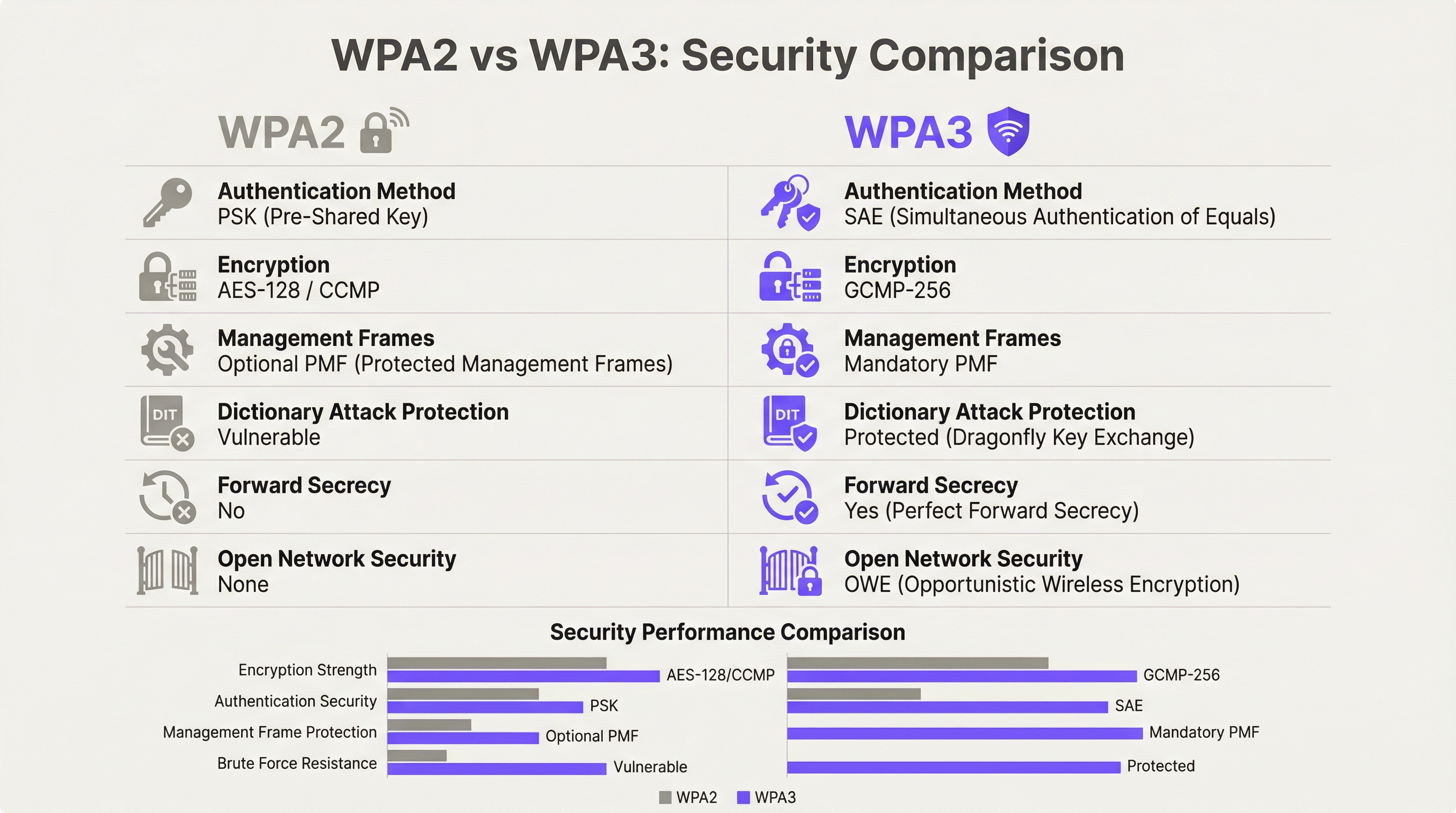
WPA3 ofrece cuatro mejoras de seguridad sustanciales respecto a su predecesor.
Autenticación: SAE reemplaza a PSK. WPA3-Personal sustituye el modelo de clave precompartida (PSK) por la Autenticación Simultánea de Iguales (SAE), que utiliza el protocolo de intercambio de claves Dragonfly. SAE es resistente a los ataques de diccionario sin conexión, una vulnerabilidad crítica en WPA2-PSK donde un handshake de cuatro vías capturado podía someterse a intentos ilimitados de fuerza bruta sin conexión. El mecanismo de prueba de conocimiento cero de SAE garantiza que incluso un handshake capturado no proporcione información explotable sin acceso a la frase de contraseña original.
Cifrado: GCMP-256 reemplaza a AES-128 CCMP. Wi-Fi 7 introduce el protocolo Galois/Counter Mode con claves de 256 bits (GCMP-256) como suite de cifrado principal. GCMP-256 cifra el campo Frame Body de cada MPDU, proporcionando confidencialidad de datos, autenticación, integridad y protección contra ataques de repetición simultáneamente. Los puntos de acceso Wi-Fi 7 anuncian tanto GCMP-256 como el antiguo AES-128 CCMP en sus elementos de información RSN, lo que permite a los clientes más antiguos conectarse con una fuerza de cifrado reducida mientras que los clientes más nuevos negocian el protocolo más robusto.
Protección de tramas de gestión: 802.11w obligatorio. Con WPA2, las tramas de gestión (las señales de control 802.11 que rigen la asociación, desasociación y roaming) se transmitían en texto plano. Esto permitía ataques de desautenticación y la suplantación de puntos de acceso mediante gemelos malvados (evil twin). WPA3 exige 802.11w (Protected Management Frames o PMF), que autentica y cifra las tramas de gestión unicast y broadcast. Esto es obligatorio tanto para la operación de enlace único como para la de enlace múltiple en Wi-Fi 7.
Seguridad en redes abiertas: OWE. Opportunistic Wireless Encryption proporciona cifrado por sesión en redes abiertas sin requerir contraseña. Cada dispositivo que se conecta negocia una sesión cifrada individualizada mediante el intercambio de claves Diffie-Hellman, lo que significa que el tráfico en una red abierta compartida está cifrado y no puede ser interceptado por otros usuarios en el mismo SSID. Para los operadores del sector hotelero y público que gestionan redes WiFi para invitados con Captive Portal, OWE es el mecanismo que aporta protección de datos alineada con el GDPR al acceso inalámbrico abierto.
Multi-Link Operation: Rendimiento y arquitectura de seguridad
MLO es la característica de rendimiento definitoria de Wi-Fi 7, que permite a un solo dispositivo mantener conexiones activas simultáneamente en las bandas de 2,4 GHz, 5 GHz y 6 GHz. La arquitectura de seguridad de MLO es más exigente que la operación de enlace único, y comprenderla es esencial para la planificación de implementaciones empresariales.
El estándar IEEE 802.11be introduce dos nuevas suites de Autenticación y Gestión de Claves (AKM) específicamente para MLO: AKM 24 (00-0F-AC:24) y AKM 25 (00-0F-AC:25). Estas proporcionan autenticación por MLD (Multi-Link Device), estableciendo una única Pairwise Master Key (PMK) que se sincroniza en todos los enlaces activos. Este diseño garantiza que la jerarquía de claves sea coherente en todas las bandas, evitando un escenario en el que un enlace comprometido de menor seguridad pudiera utilizarse para atacar la sesión en una banda de mayor seguridad.
De manera crítica, el estándar prohíbe explícitamente el modo de transición WPA3 en cualquier conexión compatible con MLO. El modo de transición (la configuración mixta WPA2/WPA3 que permite ambas versiones del protocolo en un solo SSID) está prohibido para MLO. Esta es una medida deliberada contra la degradación. En un entorno de modo de transición, un adversario puede forzar a un cliente a negociar WPA2 incluso cuando WPA3 está disponible; la arquitectura de seguridad de MLO elimina este vector de ataque por completo al requerir WPA3 en cada enlace.
Para los arquitectos empresariales, esto tiene una implicación directa: cualquier dispositivo que no sea compatible con WPA3 no puede participar en MLO. Dichos dispositivos volverán a la operación de banda única y enlace único en la banda que admitan, con el nivel de seguridad que soporten. Esto no es un fallo de la red; es el comportamiento correcto de una implementación de Wi-Fi 7 configurada adecuadamente.
Modo WPA3-Enterprise de 192 bits
Para las organizaciones que operan en industrias reguladas (gobierno, defensa, atención médica y servicios financieros), el modo WPA3-Enterprise de 192 bits (Suite B) proporciona el perfil de seguridad inalámbrica más alto disponible. Este modo utiliza GCMP-256 para el cifrado de datos, SHA-384 para el hash y ECDH/ECDSA con curvas elípticas de 384 bits para el intercambio de claves y la autenticación. Se alinea con los requisitos de la Suite CNSA (Commercial National Security Algorithm) y es adecuado para redes que manejan datos clasificados o altamente confidenciales.
Guía de implementación
Fase 1: Auditoría de dispositivos y diseño de segmentación
Antes de instalar un solo punto de acceso, realice una auditoría exhaustiva de los dispositivos. Cada dispositivo en su red debe clasificarse según su protocolo de seguridad máximo admitido: WPA3-Enterprise, WPA3-Personal, WPA2-Enterprise, WPA2-Personal o heredado (WPA/TKIP). Esta auditoría guía cada decisión arquitectónica posterior.
El resultado de esta auditoría debe definir tres niveles de red:
| Nivel | Banda | Protocolo de seguridad | Dispositivos objetivo |
|---|---|---|---|
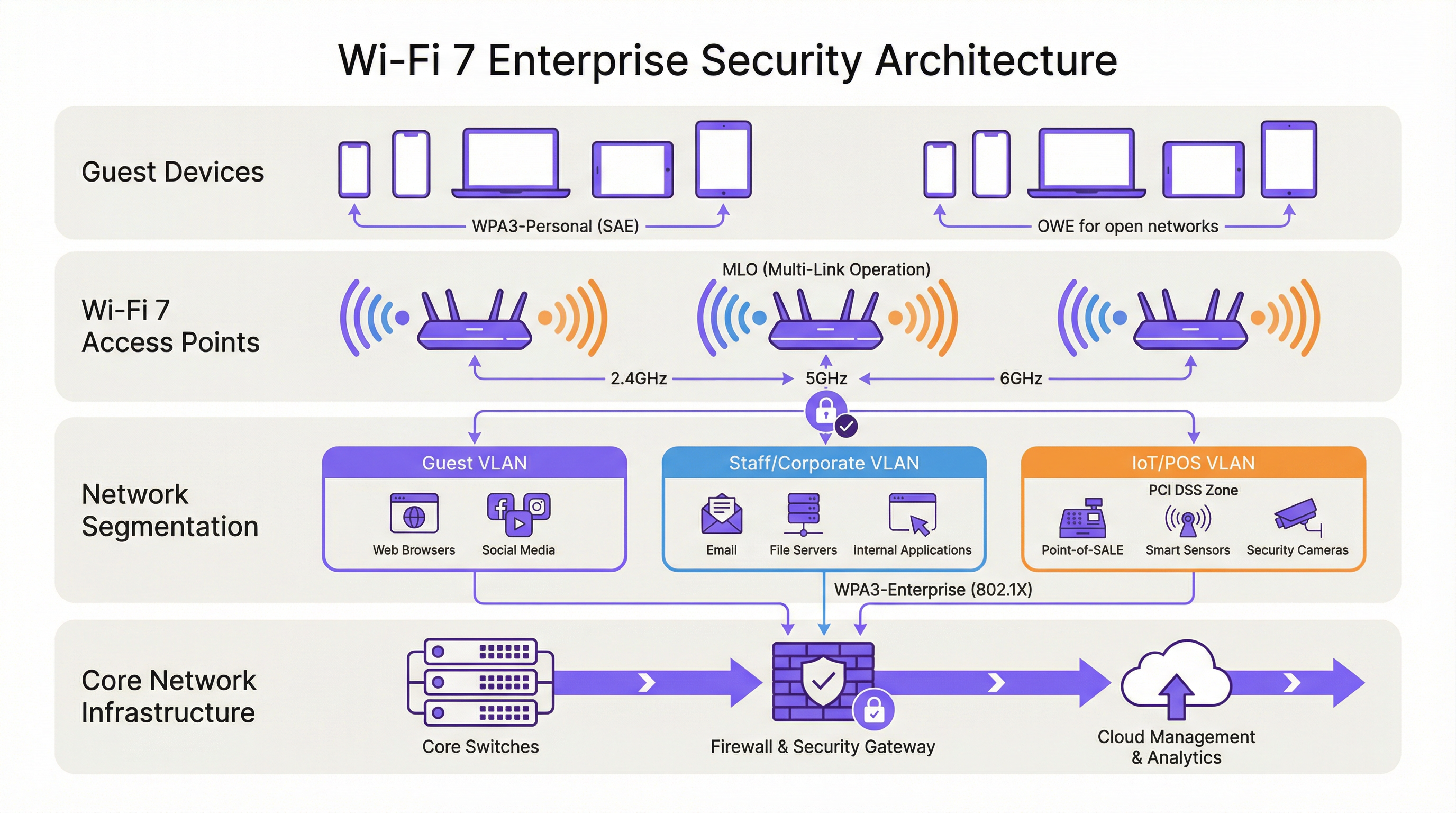
| Nivel 1 — Corporativo/Personal | 6 GHz | WPA3-Enterprise (802.1X) | Laptops del personal, dispositivos móviles corporativos, endpoints Wi-Fi 7 |
| Nivel 2 — Invitados/BYOD | 5 GHz | WPA3-Personal (SAE) o WPA3-Enterprise | Dispositivos de invitados, BYOD, smartphones modernos |
| Nivel 3 — Heredado/IoT | 2,4 GHz | WPA2-Personal (VLAN aislada) | Terminales POS, controladores de habitaciones, IPTV, escáneres heredados |
Cada nivel debe estar aislado mediante VLAN con políticas de firewall inter-VLAN que denieguen explícitamente el movimiento lateral. Los dispositivos del Nivel 3 no deben tener acceso a los segmentos de red del Nivel 1 o Nivel 2, y el acceso a Internet debe restringirse a los destinos específicos requeridos para el funcionamiento del dispositivo.
Fase 2: Preparación de la infraestructura RADIUS y PKI
Las implementaciones de WPA3-Enterprise requieren un servidor RADIUS (generalmente FreeRADIUS, Cisco ISE o Aruba ClearPass) configurado para admitir EAP-TLS con suites de cifrado modernas. Verifique que su implementación RADIUS sea compatible con TLS 1.2 o 1.3, y que su infraestructura de autoridad de certificación sea capaz de emitir certificados de cliente a la escala requerida. Para el modo WPA3-Enterprise de 192 bits, confirme que su servidor RADIUS admite EAP-TLS con las suites de cifrado Suite B.
Si su infraestructura RADIUS actual se implementó hace más de cinco años, es recomendable realizar una evaluación de preparación antes de comprometerse con un cronograma de despliegue de Wi-Fi 7.
Fase 3: Arquitectura de SSID y cómo evitar el modo de transición
Configure sus SSID de acuerdo con el modelo de tres niveles anterior. Resista la tentación de implementar el modo de transición WPA3 como una configuración permanente. El modo de transición es una medida a corto plazo adecuada durante una migración controlada, pero no debe ser el estado final. El modo de transición anuncia tanto WPA2 como WPA3 simultáneamente en el mismo SSID; cualquier dispositivo que negocie WPA2 en ese SSID reduce la seguridad efectiva de todo el segmento de red a los niveles de WPA2.
La arquitectura correcta a largo plazo es WPA3 estricto en los SSID de Nivel 1 y Nivel 2, con los dispositivos heredados asignados explícitamente al SSID aislado de Nivel 3. Este enfoque proporciona la postura de seguridad más sólida para los dispositivos modernos mientras mantiene la continuidad operativa para el hardware heredado.
Fase 4: Implementación de OWE para redes de invitados
Para las redes de invitados con Captive Portal, implemente OWE como mecanismo de seguridad. OWE opera de forma transparente para los usuarios finales: no se requiere contraseña y el flujo de autenticación del Captive Portal no cambia. La diferencia es que el tráfico de cada dispositivo se cifra con una clave de sesión individualizada, proporcionando protección de datos alineada con el GDPR sin añadir fricción a la experiencia de conexión del invitado.
Tenga en cuenta que el modo de transición OWE (análogo al modo de transición WPA3) permite que los dispositivos que no son OWE se conecten al mismo SSID. Al igual que con el modo de transición WPA3, esto debe tratarse como una medida temporal durante la migración, no como una configuración permanente.
Fase 5: Monitoreo, políticas y gobernanza continua
Implemente un Sistema de Prevención de Intrusiones Inalámbricas (WIPS) para monitorear puntos de acceso no autorizados (rogue AP), ataques de desautenticación y dispositivos no autorizados. Si bien el PMF obligatorio de WPA3 reduce significativamente la efectividad de los ataques de desautenticación, un WIPS proporciona la capa de visibilidad necesaria para la respuesta a incidentes y los informes de cumplimiento.
Actualice su política de seguridad de la información para exigir la compatibilidad con WPA3 como requisito mínimo para la adquisición de todos los nuevos dispositivos inalámbricos. Este cambio de política es la medida a largo plazo más eficaz para reducir la acumulación de dispositivos heredados.
Mejores prácticas
Las siguientes mejores prácticas, independientes del proveedor, reflejan los estándares actuales de la industria y son aplicables a todas las principales plataformas inalámbricas empresariales.
La segmentación de la red no es negociable. El control de acceso a la red basado en IEEE 802.1X, combinado con la segmentación de VLAN, es la base de una arquitectura inalámbrica empresarial defendible. Ninguna categoría de dispositivo (invitados, personal, IoT o POS) debe compartir un segmento de red con dispositivos de un nivel de confianza diferente.
Evite el modo de transición WPA3 como configuración permanente. Como han documentado los investigadores de seguridad, el modo de transición es explotable para ataques de degradación. Úselo solo como una ayuda de migración por tiempo limitado, con una fecha de finalización definida para el soporte de WPA2 en cada SSID.
Imponga la autenticación basada en certificados para las redes del personal. WPA3-Enterprise con EAP-TLS y certificados de cliente proporciona la postura de autenticación más sólida para los endpoints corporativos. Los métodos EAP basados en contraseñas (PEAP-MSCHAPv2) siguen siendo vulnerables al robo de credenciales; la autenticación basada en certificados elimina este riesgo.
Trate la banda de 6 GHz como exclusiva para WPA3 por diseño. La banda de 6 GHz ha sido exclusiva de WPA3 desde Wi-Fi 6E. Utilice esta banda exclusivamente para su nivel de mayor seguridad y rendimiento. No intente extender el soporte de dispositivos heredados a 6 GHz.
Implemente el Control de Acceso a la Red (NAC) para la creación de perfiles de dispositivos. Una solución NAC que perfile los dispositivos que se conectan y aplique políticas de seguridad basadas en el tipo de dispositivo y el estado de cumplimiento es esencial en entornos de dispositivos mixtos. Los dispositivos que no cumplan con la política de seguridad mínima deben ser puestos en cuarentena o redirigidos a una VLAN de remediación.
Alinee la política de adquisiciones con los requisitos de seguridad de Wi-Fi 7. Cualquier dispositivo nuevo adquirido para su uso en su red debe ser compatible con WPA3 como mínimo. Esta política, aplicada de manera consistente, reducirá naturalmente su parque de dispositivos heredados durante un ciclo de actualización de hardware de tres a cinco años.
Solución de problemas y mitigación de riesgos
Fallos de conectividad en dispositivos heredados. El problema de implementación más común es que los dispositivos heredados no logran conectarse después de un despliegue de Wi-Fi 7. La causa principal es casi siempre que el dispositivo no es compatible con WPA3 y el SSID se ha configurado en modo WPA3 estricto. Resolución: confirme el protocolo de seguridad máximo admitido por el dispositivo, asígnelo al SSID de Nivel 3 adecuado y asegúrese de que el SSID esté transmitiendo en una banda que el dispositivo admita (2,4 GHz para la mayoría de los dispositivos IoT heredados).
Ataques de degradación en el modo de transición WPA3. Si está ejecutando el modo de transición durante la migración, monitoree su WIPS en busca de clientes que se conecten a través de WPA2 en SSID compatibles con WPA3. Esto puede indicar un ataque de degradación en curso o un cliente mal configurado. Investigue y solucione el problema de inmediato.
Fallos de autenticación RADIUS con WPA3-Enterprise. Si los clientes fallan en la autenticación 802.1X después de una migración a WPA3-Enterprise, verifique que el certificado TLS del servidor RADIUS sea de confianza para los dispositivos cliente, que el método EAP esté configurado correctamente tanto en el servidor RADIUS como en el suplicante del cliente, y que el servidor RADIUS admita las suites de cifrado requeridas por WPA3-Enterprise.
Problemas de conectividad MLO. Los dispositivos que son compatibles con Wi-Fi 7 pero no logran establecer conexiones MLO generalmente se enfrentan a un fallo de negociación WPA3 en una o más bandas. Verifique que todas las bandas en el punto de acceso estén configuradas para WPA3 y que el controlador Wi-Fi 7 del cliente esté actualizado. Las actualizaciones de controladores para la compatibilidad con MLO de Wi-Fi 7 se han lanzado activamente a lo largo de 2024 y 2025.
Detección de puntos de acceso no autorizados. El PMF obligatorio en WPA3 reduce significativamente la efectividad de los ataques de gemelo malvado (evil twin), pero no elimina el riesgo de puntos de acceso no autorizados en su red. Mantenga un WIPS con escaneo activo y alertas sobre cualquier punto de acceso que transmita sus SSID y que no esté en su inventario de AP autorizados.
ROI e impacto comercial

Reducción de riesgos de cumplimiento
El ROI más cuantificable de una implementación de seguridad Wi-Fi 7 es la reducción de riesgos de cumplimiento. Bajo PCI DSS v4.0, el Requisito 4 exige una criptografía sólida para los datos de los titulares de tarjetas en tránsito. El cifrado GCMP-256 de WPA3 satisface este requisito; el AES-128 CCMP de WPA2 es cada vez más examinado por los QSA como insuficiente para nuevas implementaciones. Una arquitectura Wi-Fi 7 correctamente segmentada con WPA3-Enterprise en los segmentos de red POS reduce el alcance de su auditoría PCI DSS y los costos de remediación asociados.
Bajo el GDPR, el Artículo 25 (Protección de datos desde el diseño y por defecto) y el Artículo 32 (Seguridad del procesamiento) requieren medidas técnicas apropiadas para proteger los datos personales. OWE en redes de invitados, combinado con WPA3 en redes autenticadas, proporciona un control técnico demostrable que respalda la documentación de cumplimiento del GDPR.
Mejoras en la eficiencia operativa
La capacidad MLO de Wi-Fi 7 ofrece mejoras de rendimiento medibles en entornos de alta densidad. En implementaciones en estadios y centros de conferencias, donde cientos o miles de usuarios simultáneos compiten por el ancho de banda, la capacidad de MLO para agregar capacidad en múltiples bandas simultáneamente reduce la congestión y mejora la experiencia del usuario. Para los operadores de hoteles, esto se traduce directamente en puntuaciones de satisfacción de los huéspedes y en una reducción de las llamadas de soporte relacionadas con el rendimiento del WiFi.
Prevención de costos por incidentes de seguridad
El costo promedio de una violación de datos en el Reino Unido supera los 3,4 millones de libras esterlinas según los puntos de referencia de la industria. El compromiso de la red inalámbrica (a través del robo de credenciales facilitado por vulnerabilidades de WPA2-PSK, ataques de desautenticación o intercepción de puntos de acceso no autorizados) es un vector de ataque documentado en entornos de hotelería y retail. La autenticación SAE de WPA3, el PMF obligatorio y el cifrado OWE por sesión eliminan colectivamente los vectores de ataque inalámbricos más comunes, reduciendo la probabilidad de una brecha originada en la capa inalámbrica.
Planificación de gastos de capital
Un despliegue de Wi-Fi 7 por fases (comenzando con áreas de alto tráfico y alto valor, y extendiendo progresivamente la cobertura) permite a las organizaciones distribuir los gastos de capital mientras brindan beneficios de seguridad inmediatos en las áreas de mayor riesgo. La banda de 6 GHz, disponible solo para dispositivos Wi-Fi 7 y Wi-Fi 6E, proporciona un entorno limpio exclusivo para WPA3 que se puede implementar de inmediato sin problemas de compatibilidad heredada, mientras que las bandas de 2,4 y 5 GHz continúan sirviendo al parque de dispositivos existente durante el período de transición.
Key Terms & Definitions
WPA3 (Wi-Fi Protected Access 3)
The third generation of the Wi-Fi Protected Access security certification, introduced by the Wi-Fi Alliance in 2018 and mandated for all Wi-Fi 7 devices. WPA3 replaces PSK authentication with SAE, upgrades encryption to GCMP-256, mandates Protected Management Frames (802.11w), and introduces OWE for open networks. WPA3 comes in two variants: WPA3-Personal (using SAE) and WPA3-Enterprise (using 802.1X/EAP authentication).
IT teams encounter WPA3 as the mandatory security baseline for Wi-Fi 7 deployments. Understanding the distinction between WPA3-Personal and WPA3-Enterprise is essential for designing the correct authentication architecture for each network segment.
SAE (Simultaneous Authentication of Equals)
The authentication protocol used in WPA3-Personal, replacing the Pre-Shared Key (PSK) model of WPA2. SAE uses the Dragonfly key exchange mechanism, a zero-knowledge proof protocol that is resistant to offline dictionary attacks. Even if an attacker captures the SAE handshake, they cannot perform offline brute-force attacks against the passphrase.
SAE is the reason WPA3-Personal is materially more secure than WPA2-PSK for environments where a shared passphrase is used, such as hotel guest WiFi with a posted password or retail customer WiFi.
MLO (Multi-Link Operation)
Wi-Fi 7's headline performance feature, enabling a single device (a Multi-Link Device, or MLD) to simultaneously maintain active connections across multiple radio bands — 2.4 GHz, 5 GHz, and 6 GHz — at the same time. MLO aggregates bandwidth across bands, reduces latency through load balancing, and improves resilience by maintaining connectivity if one band becomes congested. WPA3 is mandatory on all links in an MLO connection.
Network architects need to understand MLO's WPA3 requirement when planning device compatibility. Devices that cannot support WPA3 will not benefit from MLO and will connect as single-link clients.
OWE (Opportunistic Wireless Encryption)
A Wi-Fi security mechanism that provides per-session encryption on open networks without requiring a password. OWE uses Diffie-Hellman key exchange to establish an individualised encrypted session for each connecting device, preventing other users on the same open network from intercepting traffic. OWE is transparent to end users.
OWE is the recommended security mechanism for captive portal guest networks in hospitality, retail, and public-sector environments. It provides GDPR-aligned data protection without adding friction to the guest onboarding experience.
PMF (Protected Management Frames) / 802.11w
An IEEE 802.11 amendment that authenticates and encrypts wireless management frames, including deauthentication and disassociation frames. Without PMF, these frames are transmitted in plaintext and can be spoofed by an attacker to forcibly disconnect devices from the network. PMF is mandatory in WPA3 and is a prerequisite for all Wi-Fi 7 connections.
PMF is the technical control that prevents deauthentication attacks and significantly reduces the effectiveness of evil twin access point attacks. IT security teams should verify that PMF is enabled on all WPA3-capable SSIDs.
GCMP-256 (Galois/Counter Mode Protocol, 256-bit)
The primary cipher suite for Wi-Fi 7, replacing AES-128 CCMP used in WPA2. GCMP-256 uses 256-bit keys and provides authenticated encryption with associated data (AEAD), simultaneously providing confidentiality, integrity, and authentication for each transmitted frame. GCMP-256 is computationally more efficient than CCMP at high data rates.
GCMP-256 is the encryption standard that satisfies PCI DSS v4.0 Requirement 4's mandate for strong cryptography in cardholder data environments. IT teams should verify that their wireless infrastructure supports GCMP-256 and that it is correctly negotiated by WPA3-capable clients.
WPA3-Enterprise 192-Bit Mode (Suite B)
The highest-security WPA3 profile, using GCMP-256 for data encryption, SHA-384 for hashing, and ECDH/ECDSA with 384-bit elliptic curves for key exchange and authentication. Suite B aligns with the US NSA's Commercial National Security Algorithm (CNSA) Suite and is designed for government, defence, healthcare, and financial services environments.
Public-sector and regulated-industry organisations should evaluate WPA3-Enterprise 192-bit mode for their highest-security network segments. Deployment requires a RADIUS server and PKI infrastructure capable of supporting Suite B cipher suites.
802.1X (Port-Based Network Access Control)
An IEEE standard for port-based network access control, providing an authentication framework for devices attempting to connect to a network. In wireless deployments, 802.1X is used with WPA3-Enterprise to authenticate users or devices against a RADIUS server using EAP methods such as EAP-TLS (certificate-based) or PEAP-MSCHAPv2 (password-based).
802.1X is the authentication backbone of WPA3-Enterprise deployments. IT teams planning a Wi-Fi 7 rollout must ensure their RADIUS infrastructure is correctly configured and that client supplicants are configured to use the correct EAP method.
MLD (Multi-Link Device)
A Wi-Fi 7 device capable of Multi-Link Operation, maintaining simultaneous connections across multiple radio bands. An MLD has a single MAC address at the logical layer (the MLD MAC address) but may have multiple physical radio interfaces. Authentication in Wi-Fi 7 is performed at the MLD level, with a single Pairwise Master Key shared across all links.
Network architects should be aware that MLDs present differently in network management tools than single-link devices. DHCP leases, RADIUS accounting records, and network monitoring data will reference the MLD MAC address, not the individual link MAC addresses.
WPA3 Transition Mode
A configuration mode in which a single SSID advertises support for both WPA2 and WPA3 simultaneously, allowing devices that support only WPA2 to connect alongside WPA3-capable devices. Transition mode is intended as a temporary migration aid. It is explicitly prohibited for Multi-Link Operation in Wi-Fi 7 and is vulnerable to downgrade attacks.
IT teams should use WPA3 transition mode only as a time-limited migration measure, with a defined sunset date. Transition mode should never be the permanent configuration for any SSID that carries sensitive data or is within PCI DSS scope.
Case Studies
A 350-room hotel is upgrading from Wi-Fi 5 to Wi-Fi 7. The property runs a captive portal guest WiFi network, a staff network used by front-of-house and back-office employees, and a building management network serving IPTV systems, door lock controllers, and HVAC sensors. The IPTV system vendor has confirmed that their devices only support WPA2-Personal. The hotel's IT director wants to achieve WPA3 across the entire property and meet PCI DSS requirements for the payment terminals at the front desk. How should the network be architected?
The deployment should be structured across four distinct network segments, each mapped to a dedicated SSID and VLAN. Segment 1 (Staff/Corporate): WPA3-Enterprise with 802.1X authentication on the 6 GHz band. All staff laptops, tablets, and corporate mobile devices connect here. The RADIUS server authenticates users against Active Directory using EAP-TLS with client certificates. This segment has full access to the hotel's PMS, back-office applications, and internet. Segment 2 (PCI DSS Zone): A separate WPA3-Enterprise SSID, also 802.1X authenticated, dedicated exclusively to payment terminals at the front desk and any other card-present transaction points. This segment is isolated by firewall from all other VLANs, with outbound traffic restricted to the payment processor's IP ranges. This satisfies PCI DSS v4.0 Requirement 4 and reduces the audit scope to this segment alone. Segment 3 (Guest WiFi): An OWE-enabled SSID on the 5 GHz band, fronted by the captive portal. OWE provides per-session encryption without requiring a password, satisfying GDPR Article 32's requirement for appropriate technical measures. The captive portal collects only the minimum data required for network access. This segment has internet access only, with no access to hotel internal resources. Segment 4 (Legacy IoT/Building Management): A WPA2-Personal SSID on the 2.4 GHz band, isolated in its own VLAN. The IPTV systems, door lock controllers, and HVAC sensors connect here. Strict firewall rules permit only the specific traffic flows required for device operation. No internet access. No access to any other VLAN. A Network Access Control policy enforces a device allowlist, preventing unauthorised devices from joining this segment. The migration timeline should prioritise Segments 1 and 2 (staff and PCI) in the first phase, followed by guest WiFi (Segment 3), with the legacy IoT segment (Segment 4) maintained on the existing Wi-Fi 5 infrastructure until a planned replacement cycle for the IPTV system.
A national retail chain with 120 stores is planning a Wi-Fi 7 rollout. Each store has a mix of devices: modern Android and iOS point-of-sale tablets (WPA3 capable), legacy barcode scanners running embedded Linux firmware that only supports WPA2-Personal, customer-facing WiFi for in-store browsing, and a back-office network for inventory management systems. The IT security team has flagged that the current WPA2-PSK network for barcode scanners uses a single shared passphrase that has not been rotated in three years. How should the security architecture be designed, and what is the recommended approach for the legacy scanner estate?
The retail architecture should deploy four SSIDs per store, managed centrally via a cloud-based wireless management platform. SSID 1 (POS Tablets — WPA3-Enterprise): The modern POS tablets connect to a WPA3-Enterprise SSID using 802.1X with certificate-based EAP-TLS. Certificates are issued and managed via the chain's PKI, with automatic renewal. This SSID operates on the 5 GHz and 6 GHz bands. The POS VLAN is isolated and has outbound access only to the payment processor and the chain's retail management platform. SSID 2 (Customer WiFi — OWE + Captive Portal): An OWE-enabled SSID on the 5 GHz band provides encrypted guest access. The captive portal is configured to collect only the data required for GDPR-compliant marketing consent. Customer traffic is internet-only with no access to store internal systems. SSID 3 (Back Office — WPA3-Personal or WPA3-Enterprise): Inventory management systems and back-office PCs connect to a WPA3 SSID. If device management allows, WPA3-Enterprise with 802.1X is preferred. SSID 4 (Legacy Scanners — WPA2-Personal, Isolated VLAN): The legacy barcode scanners are assigned to a dedicated WPA2-Personal SSID on the 2.4 GHz band. The immediate priority is passphrase rotation — the three-year-old shared passphrase represents a critical risk. The central management platform should enforce a passphrase rotation policy (minimum 90-day rotation) and generate unique passphrases per store to limit blast radius in the event of a compromise. The VLAN for this segment should have access only to the inventory management system's specific API endpoints, with all other traffic blocked. A device allowlist should be implemented to prevent unauthorised devices joining this segment. The medium-term roadmap should include a business case for replacing the legacy scanners with WPA3-capable hardware at the next refresh cycle, targeting complete elimination of WPA2 from the estate within 24 months.
Scenario Analysis
Q1. A conference centre hosts 50 events per year, ranging from small boardroom meetings to 5,000-delegate conferences. The venue's IT team is planning a Wi-Fi 7 upgrade. During a site survey, they discover that the venue's digital signage system — 120 screens throughout the building — uses embedded WiFi adapters that only support WPA2-Personal with a shared passphrase. The signage vendor has stated that a firmware update to support WPA3 is 'on the roadmap' but has no committed delivery date. The IT director wants to deploy WPA3-only across the entire venue. What is the recommended approach, and what risks must be documented?
💡 Hint:Consider the operational impact of the signage system going offline, the security risk of maintaining WPA2 for the signage VLAN, and the contractual leverage available with the signage vendor.
Show Recommended Approach
The recommended approach is to deploy a dedicated WPA2-Personal SSID on the 2.4 GHz band exclusively for the digital signage system, isolated in its own VLAN with firewall rules permitting only the specific traffic required for signage operation. All other SSIDs should be configured for WPA3. The risks to document are: (1) the signage VLAN represents a persistent WPA2 segment — implement MAC address allowlisting and monitor for unauthorised associations; (2) the shared passphrase for the signage system should be rotated immediately and managed centrally with a rotation schedule; (3) the vendor's firmware roadmap commitment should be formalised in writing with a contractual deadline for WPA3 support delivery; (4) if the signage system handles any data within GDPR or PCI DSS scope, this must be assessed and documented. The IT director's goal of WPA3-only is achievable for all other network segments; the signage system represents a time-limited exception that should be governed by a formal risk acceptance process and a documented remediation timeline.
Q2. A regional hospital trust is deploying Wi-Fi 7 across three hospital sites. The trust's CISO has mandated WPA3-Enterprise 192-bit mode for all clinical networks carrying patient data. The network architect has identified that the trust's existing RADIUS infrastructure (FreeRADIUS 3.0, deployed six years ago) may not support Suite B cipher suites. The project timeline requires the first site to go live in eight weeks. How should the architect proceed?
💡 Hint:Consider the RADIUS infrastructure upgrade path, the risk of delaying the go-live, and whether a phased approach to 192-bit mode is feasible.
Show Recommended Approach
The architect should immediately conduct a RADIUS capability assessment to confirm whether the existing FreeRADIUS 3.0 deployment supports EAP-TLS with Suite B cipher suites. FreeRADIUS 3.0 has limited Suite B support; FreeRADIUS 3.2 and later versions provide full Suite B capability. If the existing deployment cannot support 192-bit mode, the architect has two options: (1) upgrade FreeRADIUS to version 3.2 or later before the go-live date — this is the preferred path if the eight-week timeline permits; (2) deploy WPA3-Enterprise standard mode (128-bit) for the initial go-live, with a documented plan to migrate to 192-bit mode following the RADIUS upgrade. Option 2 is acceptable as an interim measure because WPA3-Enterprise standard mode still provides materially stronger security than WPA2-Enterprise. The risk acceptance for Option 2 must be documented and approved by the CISO, with a committed timeline for the 192-bit mode migration. The PKI infrastructure must also be assessed: 192-bit mode requires ECDSA certificates with P-384 curves, which may require new certificate templates and CA configuration.
Q3. A large retail bank is conducting a PCI DSS v4.0 compliance assessment. The QSA has flagged that the bank's branch WiFi networks — used by customer-facing staff for tablet-based banking applications — are running WPA3 transition mode, with WPA2 clients still connecting. The QSA has indicated that the transition mode configuration may not satisfy Requirement 4.2.1's mandate for strong cryptography. The bank's IT team argues that WPA3 is available on the SSID and that the WPA2 clients are legacy devices being phased out. How should the bank respond to the QSA's finding, and what remediation steps are required?
💡 Hint:Focus on the QSA's specific concern about Requirement 4.2.1, the definition of 'strong cryptography' in PCI DSS v4.0, and the practical steps to demonstrate compliance.
Show Recommended Approach
The QSA's finding is technically valid. WPA3 transition mode allows WPA2 clients to connect to the same SSID, and any WPA2 connection on that SSID is subject to WPA2's AES-128 CCMP encryption, not WPA3's GCMP-256. PCI DSS v4.0 Requirement 4.2.1 requires that strong cryptography is used to safeguard PAN during transmission over open, public networks. The bank's response should acknowledge the finding and present a remediation plan with three components: (1) Immediate: identify all WPA2 clients connecting to the branch WiFi SSIDs within PCI DSS scope. Provide the QSA with a documented inventory and a committed timeline for their replacement or removal. (2) Short-term (within 90 days): migrate all WPA2 clients to WPA3-capable hardware or remove them from PCI DSS scope by assigning them to a separate, isolated SSID that does not carry cardholder data. (3) Medium-term: convert all PCI DSS scope SSIDs to strict WPA3-Enterprise mode, eliminating transition mode. The bank should also present evidence that the WPA2 clients are not handling cardholder data directly — if the tablet-based banking applications are the primary PCI DSS scope devices and they are all WPA3-capable, the QSA may accept a compensating control while the legacy device remediation is completed.
Key Takeaways
- ✓Wi-Fi 7 (IEEE 802.11be) mandates WPA3 encryption for all devices using Multi-Link Operation and full 802.11be data rates — this is not optional, and it is the most significant security baseline change in enterprise wireless since WPA2.
- ✓WPA3 delivers four critical improvements over WPA2: SAE authentication (resistant to offline dictionary attacks), GCMP-256 encryption (256-bit vs AES-128), mandatory Protected Management Frames (802.11w), and OWE for encrypted open networks.
- ✓MLO requires WPA3 on every simultaneous band connection — WPA3 transition mode is explicitly prohibited for MLO connections, eliminating the downgrade attack vector that has persisted in enterprise wireless.
- ✓Legacy device compatibility requires a three-tier SSID architecture: WPA3-Enterprise on 6 GHz for modern corporate devices, WPA3-Personal/OWE on 5 GHz for guests and BYOD, and WPA2-Personal on 2.4 GHz in an isolated VLAN for legacy IoT — never mix security tiers on the same SSID.
- ✓WPA3 transition mode is a migration tool, not a destination — every SSID running transition mode must have a documented sunset date, as it is vulnerable to downgrade attacks and does not provide WPA3-level security for WPA2 clients.
- ✓PCI DSS v4.0 Requirement 4 and GDPR Article 32 are both materially satisfied by a properly deployed Wi-Fi 7 architecture: GCMP-256 for cardholder data networks, OWE for guest networks, and 802.1X for staff authentication.
- ✓Conduct a device audit before designing your architecture — the audit output determines your SSID design, VLAN structure, migration timeline, and hardware replacement roadmap, and skipping it is the primary cause of deployment failures.




