

Inicio de sesión social para WiFi de invitados: Facebook, Google, Apple y LinkedIn
This guide provides a comprehensive technical reference for IT managers, network architects, and venue operators deploying social login on guest WiFi networks. It covers the OAuth 2.0 Authorization Code Flow underpinning Facebook, Google, Apple, and LinkedIn authentication, the specific data each platform provides, and the critical iOS compatibility constraints affecting Google OAuth in captive portal environments. Compliance obligations under UK GDPR, platform selection frameworks, and real-world deployment case studies from hospitality and retail are included to support implementation decisions this quarter.
🎧 Listen to this Guide
View Transcript
Resumen ejecutivo
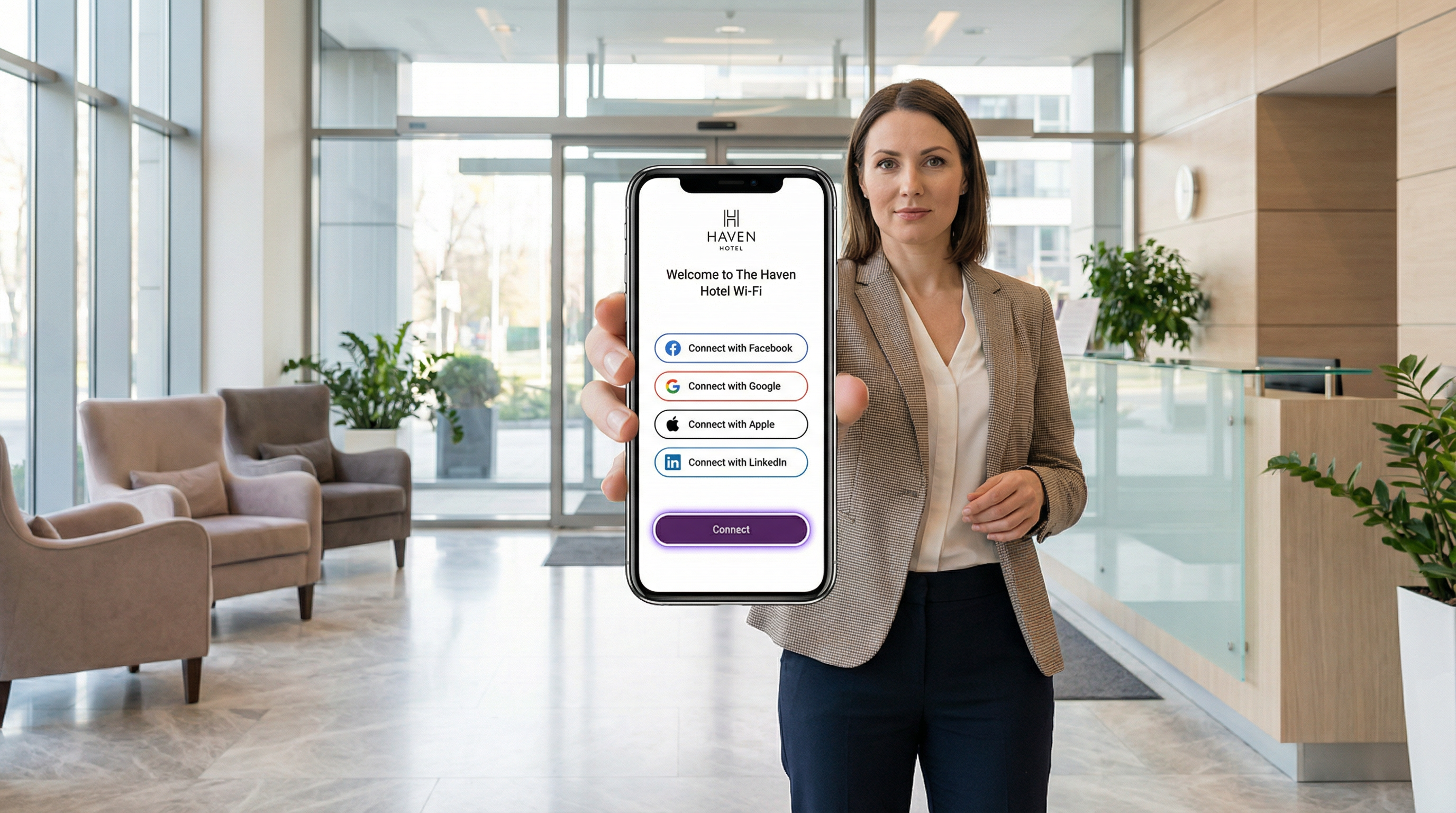
El WiFi con inicio de sesión social permite a los operadores de recintos reemplazar el acceso anónimo mediante clics por una autenticación de identidad verificada, convirtiendo cada conexión WiFi de invitados en un activo de datos de origen (first-party data). Al integrar OAuth 2.0 con Facebook, Google, Apple ID o LinkedIn, las organizaciones de los sectores de hotelería, comercio minorista, eventos y el sector público pueden capturar perfiles de invitados verificados (nombre, correo electrónico, atributos demográficos y, en el caso de LinkedIn, contexto profesional) en el punto de acceso a la red.
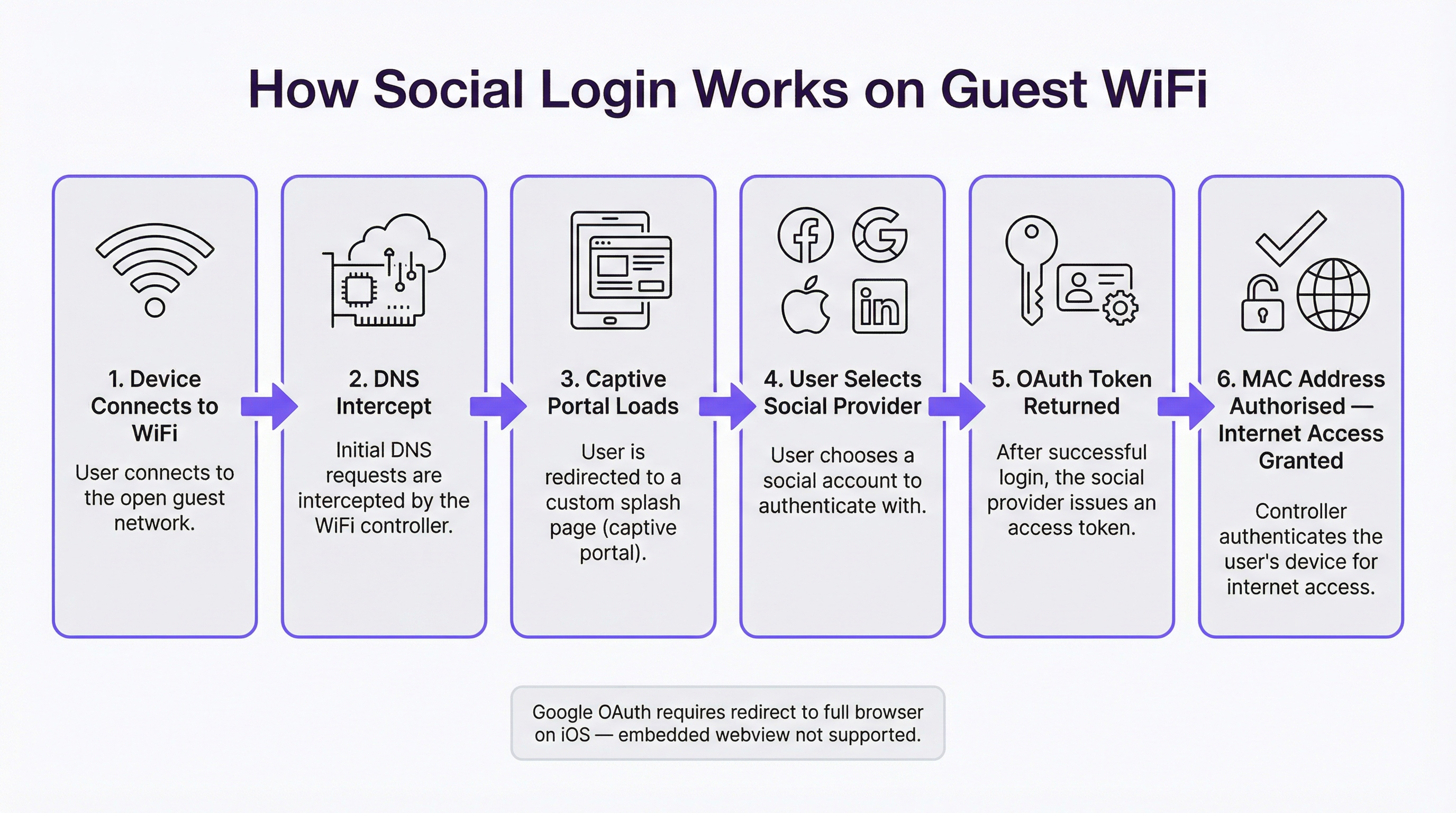
La arquitectura técnica es sencilla: un Captive Portal intercepta la solicitud DNS inicial del invitado, presenta una página de inicio (splash page) con la marca y comienza un flujo de código de autorización OAuth (OAuth Authorization Code Flow) con el proveedor de identidad seleccionado. El token de acceso resultante se utiliza para recuperar los datos del perfil, que se almacenan vinculados a la dirección MAC del invitado antes de otorgar el acceso a la red. El flujo completo se realiza en tres a ocho segundos en condiciones normales.
Sin embargo, las restricciones específicas de cada plataforma (la más crítica es la prohibición de Google sobre OAuth en webviews integrados, lo que afecta directamente el comportamiento del Captive Portal en iOS) requieren decisiones de ingeniería deliberadas antes del lanzamiento. El cumplimiento del GDPR, las obligaciones de minimización de datos y la aplicación de políticas de retención son innegociables para cualquier implementación en el Reino Unido o la UE. Esta guía prepara a su equipo para elegir la plataforma adecuada, implementarla correctamente y operar dentro de los límites normativos.
Análisis técnico detallado
El flujo de código de autorización OAuth 2.0 en el contexto de un Captive Portal
OAuth 2.0 es un marco de autorización abierto definido en el RFC 6749 que permite a una aplicación de terceros (en este caso, su Captive Portal) obtener acceso limitado a la cuenta de un usuario en una plataforma social, sin requerir que el usuario comparta su contraseña. Para las implementaciones de WiFi para invitados, el flujo relevante es el Authorization Code Flow (a veces llamado flujo OAuth de tres vías), que es la variante más segura y la exigida por las cuatro plataformas principales.
El flujo se desarrolla de la siguiente manera. Cuando un invitado se conecta al SSID del WiFi, el sistema operativo de su dispositivo envía una solicitud de sondeo (generalmente un HTTP GET a una URL conocida como captive.apple.com o connectivitycheck.gstatic.com) para determinar si hay acceso a Internet disponible. El controlador de red intercepta esta solicitud mediante secuestro de DNS (DNS hijacking) o redirección HTTP y, en su lugar, devuelve la página de inicio del Captive Portal. El dispositivo del invitado muestra esta página, ya sea en un mininavegador dedicado llamado Captive Network Assistant (CNA) en iOS y macOS, o en el navegador del sistema en Android.
Cuando el invitado selecciona un proveedor de inicio de sesión social, el portal genera una solicitud de autorización que contiene el client_id de la aplicación, los scopes solicitados (permisos de datos), un redirect_uri que apunta de vuelta al endpoint de callback del portal y un parámetro state para protección CSRF. El invitado es redirigido al endpoint de autorización del proveedor de identidad (por ejemplo, accounts.google.com/o/oauth2/v2/auth). El proveedor autentica al usuario (usando su cookie de sesión existente si ya ha iniciado sesión, o solicitando credenciales si no lo ha hecho), presenta una pantalla de consentimiento que enumera los permisos solicitados y, tras la aprobación, redirige de vuelta a la URI de callback del portal con un authorisation code de corta duración.
El componente del lado del servidor del portal realiza entonces una solicitud POST en segundo plano al endpoint de tokens del proveedor, intercambiando el código de autorización por un access token y un ID token (este último es un JSON Web Token que contiene las declaraciones del perfil del usuario). El portal llama al endpoint de la API userinfo del proveedor utilizando el token de acceso para recuperar los datos del perfil del invitado, crea o actualiza un registro de invitado en su base de datos y, finalmente, indica al controlador de red que agregue la dirección MAC del invitado a la lista de clientes autorizados. Se otorga el acceso a Internet.
Análisis de datos por plataforma
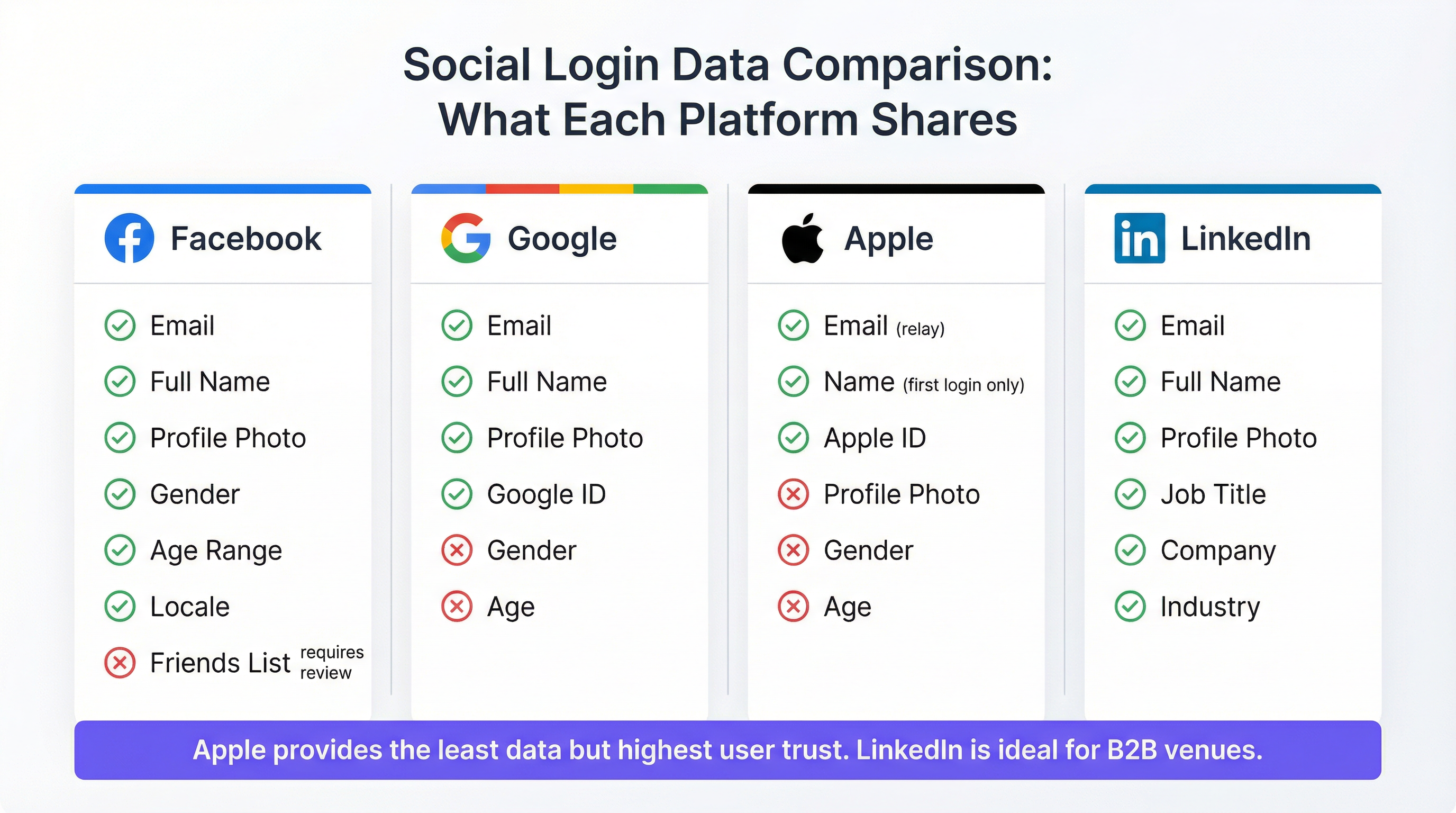
Los datos disponibles a través de la implementación de OAuth de cada plataforma varían considerablemente, y estas diferencias tienen implicaciones directas para la estrategia de marketing y la capacidad de análisis.
Facebook sigue siendo la opción más rica en datos para implementaciones en recintos de consumo. Los scopes estándar public_profile y email proporcionan el nombre, la dirección de correo electrónico, la fotografía de perfil, el ID de usuario de Facebook, el género, el rango de edad y la configuración regional sin requerir una revisión adicional de la aplicación. Los permisos extendidos (como la lista de amigos o datos de ubicación detallados) requieren el proceso formal de revisión de aplicaciones de Facebook y rara vez se otorgan para casos de uso de WiFi. Es importante tener en cuenta que Facebook descontinuó su producto dedicado "Facebook WiFi" en 2023; las integraciones actuales utilizan el flujo OAuth estándar de la Graph API. Los permisos de la API de Facebook se han restringido progresivamente desde 2018 en respuesta al incidente de Cambridge Analytica, y los operadores deben revisar la guía de permisos actual en developers.facebook.com antes de definir el alcance de su integración.
Google proporciona el correo electrónico, el nombre completo, la fotografía de perfil y un ID de Google único a través de los scopes estándar openid, email y profile. El género, la edad y la ubicación no están disponibles a través de los scopes estándar. La principal restricción de Google para las implementaciones de Captive Portal es su política de webviews integrados, aplicada desde septiembre de 2021: Google no procesará solicitudes OAuth que se originen en componentes de navegador integrados como WKWebView en iOS o Android WebView. Dado que el Captive Network Assistant de Apple utiliza un webview integrado para mostrar el Captive Portal, la autenticación de Google fallará en iOS a menos que el portal redirija explícitamente al usuario para abrir Safari. Esto se analiza en detalle en la sección de Solución de problemas.
Apple ID (Iniciar sesión con Apple) es la opción que más preserva la privacidad. Proporciona el nombre y la dirección de correo electrónico del usuario, con dos advertencias críticas. El nombre del usuario se transmite solo en la primera autenticación; los inicios de sesión posteriores no vuelven a compartir los datos del nombre, lo que requiere que el portal conserve el nombre del inicio de sesión inicial. Apple también ofrece a los usuarios la opción de ocultar su dirección de correo electrónico real, sustituyéndola por una dirección de retransmisión única con el formato [random-string]@privaterelay.appleid.com. Los correos electrónicos enviados a esta dirección de retransmisión se reenvían a la bandeja de entrada real del usuario, lo que la hace funcional para comunicaciones de marketing, pero impide el cruce de datos con otras fuentes. Apple no proporciona fotografía de perfil, género, edad ni datos de ubicación. Apple exige que cualquier aplicación que ofrezca inicio de sesión social de terceros también debe ofrecer Iniciar sesión con Apple, lo que lo convierte en un requisito de cumplimiento para cualquier portal que incluya otras opciones sociales.
LinkedIn es la opción estratégicamente más diferenciada para contextos de recintos profesionales. La implementación de OpenID Connect de LinkedIn proporciona el correo electrónico, el nombre completo, la fotografía de perfil, el cargo, el nombre de la empresa y el sector industrial. Estos datos de contexto profesional no están disponibles en ningún otro proveedor de inicio de sesión social y son particularmente valiosos para centros de conferencias, espacios de coworking, salas VIP de negocios en aeropuertos e instalaciones para reuniones y eventos en hoteles. La API v2 de LinkedIn restringe el acceso a campos de perfil extendidos sin un acuerdo de asociación formal, pero los campos disponibles a través de los scopes estándar openid, profile y email son suficientes para la mayoría de los casos de uso de análisis de recintos.
| Plataforma | Correo electrónico | Nombre | Foto | Género | Rango de edad | Datos profesionales | Compatible con CNA de iOS |
|---|---|---|---|---|---|---|---|
| Sí | Sí | Sí | Sí | Sí | No | Sí | |
| Sí | Sí | Sí | No | No | No | No — requiere redirección a Safari | |
| Apple ID | Sí (retransmisión) | Solo primer inicio de sesión | No | No | No | No | Sí |
| Sí | Sí | Sí | No | No | Cargo, empresa, industria | Sí |
Consideraciones sobre la arquitectura de red
El WiFi con inicio de sesión social opera en la capa de aplicación (Capa 7) y es arquitectónicamente independiente de la capa de seguridad inalámbrica. Los SSID de invitados que implementan el inicio de sesión social suelen utilizar WPA3-SAE (Simultaneous Authentication of Equals) o WPA2-PSK para el cifrado inalámbrico, mientras que el Captive Portal maneja la verificación de identidad a nivel de aplicación. Esto es distinto del control de acceso a la red basado en puertos IEEE 802.1X, que es el marco adecuado para redes corporativas y de personal y opera en la Capa 2.
La arquitectura de red recomendada separa el tráfico de invitados y corporativo a nivel de SSID, enrutando el SSID de invitados a través de una VLAN dedicada hacia un punto de salida a Internet. El controlador del Captive Portal (ya sea alojado en la nube, como en la plataforma de Purple, o local) se sitúa en línea o en una ruta de redirección, interceptando el tráfico no autenticado y liberándolo una vez que se completa el flujo OAuth. La autorización por dirección MAC es el mecanismo estándar para otorgar acceso después de la autenticación; las políticas de duración de la sesión y ancho de banda se aplican a nivel del controlador.
Para recintos con múltiples puntos de acceso en una propiedad extensa (un hotel con 200 habitaciones, una cadena minorista con 50 sucursales o un estadio con cobertura distribuida), es preferible una arquitectura gestionada en la nube en lugar de controladores locales, tanto por la escalabilidad operativa como por la agregación centralizada de datos de los invitados.
Guía de implementación
Lista de verificación previa a la implementación
Antes de configurar el inicio de sesión social en su WiFi de invitados, deben cumplirse los siguientes requisitos previos. Cada plataforma social requiere una aplicación de desarrollador registrada: una Facebook App (a través de developers.facebook.com), un proyecto de Google Cloud con credenciales OAuth 2.0 (a través de console.cloud.google.com), una cuenta de Apple Developer con la capacidad Iniciar sesión con Apple habilitada y una aplicación de LinkedIn Developer (a través de developer.linkedin.com). El registro de cada aplicación requiere una URI de redirección verificada que coincida con el endpoint de callback de su Captive Portal; esta URI debe usar HTTPS.
Su plataforma de Captive Portal debe admitir flujos OAuth 2.0 del lado del servidor. Los flujos del lado del cliente (implícitos) están obsoletos en todos los proveedores principales y no deben utilizarse. Confirme que su plataforma almacena el parámetro state de OAuth y lo valida en el callback para evitar ataques CSRF.
Se debe completar una Evaluación de Impacto de Protección de Datos (DPIA) antes del lanzamiento para cualquier implementación que recopile datos personales de residentes de la UE o el Reino Unido, especialmente cuando los datos se utilizarán para la elaboración de perfiles de marketing. Su aviso de privacidad debe actualizarse para reflejar la recopilación de datos del inicio de sesión social, los proveedores de identidad involucrados y los fines para los cuales se utilizarán los datos.
Implementación paso a paso
El proceso de implementación sigue un patrón consistente independientemente de los proveedores sociales que esté habilitando. Comience registrando su aplicación en la consola de desarrolladores de cada proveedor y obteniendo el client ID y el client secret. Configure estas credenciales en su plataforma de Captive Portal; en el caso de Purple, esto se hace a través de la interfaz de configuración del portal, que maneja el flujo OAuth del lado del servidor.
A continuación, configure la página de inicio de su portal para presentar las opciones de inicio de sesión social adecuadas para su tipo de recinto. Para la hotelería de consumo, Facebook y Google son las opciones de mayor conversión; agregue Apple ID para maximizar la cobertura de los usuarios de iOS; agregue LinkedIn para recintos profesionales. Asegúrese de que siempre esté disponible un método de autenticación de respaldo (registro por correo electrónico o aceptación de términos mediante clic).
Para la autenticación de Google específicamente, implemente la detección de CNA en iOS. El Captive Network Assistant en iOS envía una cadena de user agent distintiva. Cuando se detecta este user agent, el portal debe presentar un mensaje de "Toque aquí para abrir en Safari" en lugar de intentar renderizar el flujo OAuth de Google en línea. Este único paso de implementación evita el modo de falla más común en las implementaciones de WiFi social.
Configure la captura de consentimiento del GDPR. La pantalla de consentimiento debe presentar el aviso de privacidad, identificar a cada proveedor social como fuente de datos y obtener un opt-in explícito para cualquier uso de marketing de los datos. El acceso al WiFi en sí no debe estar condicionado al consentimiento de marketing; ambos deben ser separables. Implemente un registro de auditoría de consentimiento para registrar la marca de tiempo, la dirección IP y las opciones de consentimiento de cada invitado.
Finalmente, defina y configure su política de retención de datos. Establezca la eliminación o anonimización automatizada de los registros de invitados en su horizonte de retención definido (generalmente 12 meses para huéspedes de hotelería transitorios, hasta 24 meses para miembros de programas de lealtad).
Mejores prácticas
Las siguientes recomendaciones reflejan la práctica estándar de la industria para implementaciones empresariales de WiFi para invitados y se basan en los requisitos del GDPR del Reino Unido, los principios de segmentación de red IEEE 802.1X y las realidades operativas de las propiedades de recintos con múltiples sitios.
Ofrezca siempre múltiples proveedores de inicio de sesión social. Un portal de un solo proveedor crea fricciones innecesarias y excluye a los invitados que han desactivado o no utilizan esa plataforma. Las investigaciones muestran consistentemente que ofrecer de tres a cuatro opciones maximiza la conversión de inicio de sesión sin abrumar a los usuarios. La combinación de Facebook, Google, Apple ID y un formulario de correo electrónico de respaldo cubre la gran mayoría de los perfiles de dispositivos de los invitados.
Aísle el tráfico de invitados y corporativo a nivel de SSID. El WiFi de invitados (independientemente del método de autenticación) debe estar en un SSID y VLAN separados de la infraestructura corporativa. El inicio de sesión social no proporciona las garantías de seguridad de la autenticación basada en certificados 802.1X; es un mecanismo de identidad y captura de datos, no un control de seguridad de red.
Implemente HTTPS en todo el flujo del Captive Portal. Todas las páginas del portal, las redirecciones OAuth y los endpoints de callback deben usar TLS. Los Captive Portals HTTP están obsoletos y activarán advertencias de seguridad del navegador en dispositivos modernos. Obtenga un certificado válido de una CA de confianza para el dominio de su portal.
Aplique la minimización de datos rigurosamente. Solicite solo los scopes de OAuth para los que tenga un propósito específico y documentado. Si su plataforma de análisis no utiliza datos de género, no solicite el scope de género a Facebook. La recopilación de datos innecesaria aumenta el riesgo de cumplimiento sin agregar valor comercial.
Pruebe en dispositivos iOS físicos utilizando el Captive Network Assistant. Las pruebas basadas en navegador no replican el entorno CNA. Antes del lanzamiento, conecte un iPhone físico a la red de prueba y verifique que cada opción de inicio de sesión social se complete con éxito a través de la ventana emergente del CNA, no a través de Safari abierto manualmente.
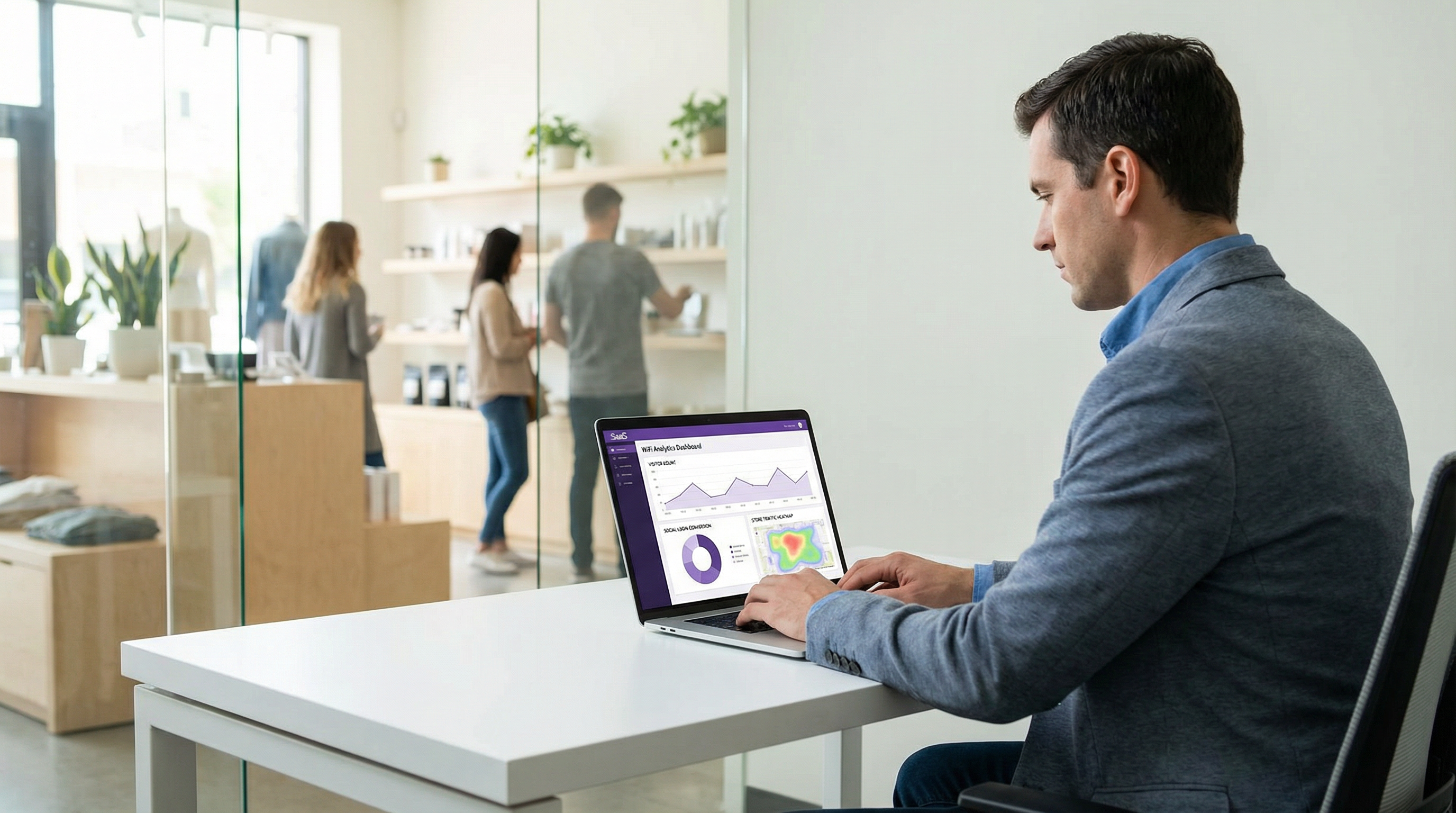
Monitoree las tasas de conversión de inicio de sesión por proveedor. Una implementación bien instrumentada rastrea qué proveedor social utiliza cada invitado, la tasa de finalización del flujo OAuth de cada proveedor y los puntos de abandono. Estos datos identifican problemas específicos de la plataforma (como el problema de Google en iOS) e informan las decisiones sobre qué proveedores priorizar en la interfaz de usuario del portal.
Solución de problemas y mitigación de riesgos
Falla de Google OAuth en iOS
Este es el problema que se encuentra con mayor frecuencia en las implementaciones de WiFi social. Síntomas: los invitados con iPhones seleccionan "Conectar con Google" y reciben un mensaje de error, una pantalla en blanco o regresan al portal sin completar la autenticación. Causa raíz: la política de webviews integrados de Google, aplicada desde septiembre de 2021, bloquea las solicitudes OAuth del componente WKWebView utilizado por el Captive Network Assistant de Apple.
Resolución: Implemente la detección de user agent en el Captive Portal. Cuando se detecta el user agent del CNA (identificable por la cadena CaptiveNetworkSupport o la ausencia de identificadores estándar de Safari), reemplace el botón de Google OAuth en línea con un mensaje que indique al usuario que abra el portal en Safari. La URL a abrir debe ser la URL completa del portal, que Safari cargará como una página web estándar donde Google OAuth funciona normalmente. Algunas plataformas de portal manejan esto automáticamente; verifíquelo con su proveedor.
La retransmisión de correo electrónico de Apple causa fallas de coincidencia en el CRM
Síntomas: Los registros de invitados creados a través del inicio de sesión con Apple ID no se pueden cruzar con los registros de CRM existentes o las bases de datos de programas de lealtad. Causa raíz: La retransmisión de correo electrónico de Apple genera una dirección única por aplicación, que no coincide con la dirección de correo electrónico real del invitado almacenada en otros sistemas.
Resolución: Acepte la dirección de retransmisión como el identificador canónico para los usuarios de Apple ID. No intente resolver la dirección de retransmisión al correo electrónico real (Apple no proporciona un mecanismo para esto, y tratar de eludirlo viola los términos de servicio de Apple). Para la integración del programa de lealtad, solicite a los usuarios de Apple ID que vinculen manualmente su cuenta de lealtad después de conectarse al WiFi.
Invalidación del consentimiento del GDPR
Síntomas: Una solicitud de acceso del titular de los datos o una auditoría regulatoria revela que el consentimiento de marketing se agrupó con el consentimiento de acceso al WiFi, o que el aviso de privacidad no se presentó antes de la recopilación de datos. Riesgo: Acción de cumplimiento en virtud del Artículo 83 del GDPR del Reino Unido, con multas de hasta £17.5 millones o el 4% de la facturación anual global.
Resolución: Audite su flujo de captura de consentimiento. El acceso al WiFi y el opt-in de marketing deben presentarse como opciones separadas y seleccionables de forma independiente. El aviso de privacidad debe aparecer antes de que el invitado envíe su inicio de sesión social, no después. Implemente una plataforma de gestión de consentimiento o asegúrese de que las herramientas de consentimiento integradas de su proveedor de Captive Portal cumplan con estos requisitos.
Aleatorización de direcciones MAC
Síntomas: Los invitados recurrentes no son reconocidos como visitantes recurrentes; los datos de la sesión parecen fragmentados. Causa raíz: iOS 14 y versiones posteriores, Android 10 y versiones posteriores, y Windows 10 implementan la aleatorización de direcciones MAC de forma predeterminada, generando una nueva dirección MAC pseudoaleatoria para cada asociación de red WiFi.
Resolución: Utilice el identificador de usuario derivado de OAuth (Facebook ID, Google ID, Apple ID o LinkedIn ID) como el identificador principal del invitado en lugar de la dirección MAC. La dirección MAC debe usarse solo para la autorización de red de la sesión actual, no como un identificador persistente. Asegúrese de que su plataforma de Captive Portal utilice el ID social como clave principal para los registros de invitados.
ROI e impacto comercial
Medición del éxito
El caso de negocio para el WiFi con inicio de sesión social se basa en tres impulsores de valor: adquisición de datos de origen (first-party data), calidad de la experiencia del invitado y eficiencia operativa. Cada uno se puede medir con KPI específicos.
La adquisición de datos de origen se mide por la tasa de contacto verificado (el porcentaje de sesiones WiFi que resultan en una dirección de correo electrónico verificada y un registro de perfil). El inicio de sesión social supera consistentemente al registro mediante llenado de formularios (que sufre de altas tasas de direcciones de correo electrónico falsas o mal escritas) y supera significativamente al acceso mediante clics (que no captura ningún dato en absoluto). Una implementación de WiFi social bien desplegada en un entorno de hotelería generalmente logra una tasa de contacto verificado del 55 al 70 por ciento del total de sesiones WiFi.
La calidad de la experiencia del invitado se mide por el tiempo de finalización del inicio de sesión (objetivo: menos de 10 segundos para usuarios recurrentes con una sesión social activa) y la tasa de abandono (objetivo: por debajo del 15 por ciento). Un abandono superior al 20 por ciento generalmente indica un problema de UX: demasiados pasos, un proveedor que falla o un flujo de consentimiento demasiado complejo.
Las ganancias de eficiencia operativa incluyen la eliminación de los gastos generales de gestión de códigos de cupones, la reducción de las consultas de soporte de WiFi en la recepción y la automatización de la captura de datos de los invitados que de otro modo requeriría la recopilación manual de formularios.
Caso de estudio 1: Hotel de negocios de 200 habitaciones, centro de Londres
Un hotel de negocios de 200 habitaciones en el centro de Londres reemplazó un sistema de WiFi para invitados con código de cupón por un inicio de sesión social (Facebook, Google, Apple ID) integrado con la plataforma de Purple. Antes de la implementación, el hotel capturaba datos de contacto de los invitados de aproximadamente el 12 por ciento de las sesiones WiFi (invitados que proporcionaban voluntariamente su correo electrónico al registrarse). Después de la implementación, la tasa de contacto verificado alcanzó el 61 por ciento de las sesiones WiFi durante el primer trimestre. El equipo de marketing del hotel utilizó los datos de origen resultantes para crear campañas de correo electrónico segmentadas, logrando una tasa de apertura del 34 por ciento en las comunicaciones posteriores a la estadía (significativamente por encima del promedio de la industria hotelera del 21 por ciento). Posteriormente, se agregó la opción de LinkedIn para las instalaciones de reuniones y eventos del hotel, proporcionando datos demográficos profesionales sobre los delegados de la conferencia que informaron una exitosa negociación de tarifas corporativas con una importante firma de servicios financieros.
Caso de estudio 2: Cadena minorista de 45 tiendas, Reino Unido
Una cadena minorista del mercado medio del Reino Unido con 45 tiendas implementó WiFi social en toda su propiedad, ofreciendo inicio de sesión con Facebook y Google con un respaldo de correo electrónico. El objetivo principal era construir un activo de datos de clientes de origen como cobertura contra la depreciación de las cookies de terceros. En seis meses, la cadena había capturado 280,000 perfiles de invitados verificados, de los cuales el 67 por ciento había optado por recibir comunicaciones de marketing. Los datos de inicio de sesión social (particularmente el rango de edad y la configuración regional de Facebook) permitieron al equipo de marketing identificar que una proporción significativa de usuarios de WiFi en las tiendas del norte de Inglaterra se encontraban en el grupo de edad de 45 a 54 años, un grupo demográfico subrepresentado en el programa de lealtad existente de la cadena. Esta información guio directamente una campaña de adquisición dirigida. El equipo de TI de la cadena notó que el problema de Google en iOS afectó aproximadamente al 8 por ciento de los intentos de inicio de sesión de Google antes de que se implementara la redirección a Safari (una cifra que se redujo a menos del 1 por ciento después de la corrección).
Resultados esperados por tipo de recinto
| Tipo de recinto | Proveedores recomendados | Tasa de contacto verificado esperada | Valor de datos principal |
|---|---|---|---|
| Hotel (ocio) | Facebook, Google, Apple ID | 55–65% | Correo electrónico, rango de edad, configuración regional |
| Hotel (negocios) | Google, LinkedIn, Apple ID | 45–55% | Perfil profesional, empresa |
| Comercio minorista | Facebook, Google | 50–60% | Rango de edad, género, configuración regional |
| Centro de conferencias | LinkedIn, Google | 40–50% | Cargo, empresa, industria |
| Estadio / eventos | Facebook, Google, Apple ID | 60–70% | Rango de edad, género |
| Sector público | Respaldo de correo electrónico principal | 30–40% | Solo correo electrónico (conservador con el GDPR) |
Esta guía es producida por Purple, la plataforma empresarial de inteligencia WiFi. Para obtener soporte de implementación, documentación de la plataforma y herramientas de cumplimiento del GDPR, visite purple.ai.
Key Terms & Definitions
OAuth 2.0
An open authorisation framework (RFC 6749) that allows a third-party application to obtain limited access to a user's account on a social platform without requiring the user to share their password. In guest WiFi contexts, OAuth 2.0 is the protocol that enables the captive portal to retrieve a guest's profile data from Facebook, Google, Apple, or LinkedIn.
IT teams encounter OAuth 2.0 when configuring social login integrations. Understanding the Authorization Code Flow — specifically the distinction between the authorisation code, access token, and ID token — is essential for debugging authentication failures and for scoping the correct API permissions.
Captive Portal
A web page presented to a newly connected network user before they are granted full internet access. The captive portal intercepts the user's initial HTTP or DNS request and redirects it to a branded splash page where authentication or terms acceptance occurs. In social WiFi deployments, the captive portal hosts the OAuth login flow.
Captive portals are the user-facing component of guest WiFi systems. IT teams are responsible for configuring the portal's authentication methods, branding, consent capture, and integration with the network controller for MAC address authorisation.
Captive Network Assistant (CNA)
The system component on iOS and macOS that automatically detects captive WiFi networks and presents the captive portal in a mini-browser popup. The CNA uses an embedded WKWebView component rather than the full Safari browser, which has significant implications for social login compatibility — specifically, Google OAuth will not function in the CNA due to Google's embedded webview policy.
The CNA is the source of the most common social WiFi compatibility issue: Google authentication failing on iPhones. IT teams must implement a Safari redirect mechanism to route Google OAuth flows out of the CNA and into the full Safari browser.
Authorization Code Flow
The OAuth 2.0 flow in which the identity provider returns a short-lived authorisation code to the client application, which the application then exchanges for an access token via a back-channel server-to-server request. This is the most secure OAuth flow and is required by all major social login providers for web-based applications.
IT teams should verify that their captive portal platform uses the Authorization Code Flow (not the deprecated Implicit Flow) for all social login integrations. The back-channel token exchange is a security requirement — it prevents access tokens from being exposed in browser history or server logs.
Access Token
A credential issued by an identity provider after a successful OAuth authorisation that allows the client application to access the user's data on the provider's API. Access tokens are short-lived (typically one hour) and scoped to specific permissions. In guest WiFi contexts, the access token is used to call the provider's userinfo endpoint to retrieve the guest's profile data.
IT teams encounter access tokens when debugging social login integrations. A common failure mode is attempting to use an expired access token — the portal should handle token expiry gracefully by re-initiating the OAuth flow rather than presenting an error to the guest.
OAuth Scope
A parameter in an OAuth authorisation request that specifies which user data or API capabilities the application is requesting access to. For social login, scopes determine which profile fields are available. Examples include 'email' (email address), 'profile' (name and photo), and LinkedIn's 'r_liteprofile' (basic professional profile).
Scope selection is a GDPR data minimisation decision as well as a technical configuration choice. IT teams and data protection officers should jointly review the scopes requested for each social login integration and remove any scope for which there is no documented, specific business purpose.
MAC Address Authorisation
The mechanism by which a network controller grants internet access to a specific device after the captive portal authentication flow completes. The controller adds the device's MAC address to an authorised client list, allowing its traffic to pass through to the internet. Session duration and bandwidth policies are enforced at the MAC address level.
MAC address authorisation is the bridge between the application-layer OAuth flow and the network-layer access control. IT teams must understand that MAC address randomisation (default on iOS 14+, Android 10+, Windows 10+) means MAC addresses cannot be used as persistent guest identifiers — the OAuth-derived social ID must be used instead.
Apple Private Email Relay
A privacy feature of Sign in with Apple that allows users to hide their real email address from third-party applications. When enabled, Apple generates a unique relay address (in the format [random-string]@privaterelay.appleid.com) that forwards emails to the user's real inbox. The venue operator receives the relay address, not the user's real email.
IT teams and marketing managers must understand the email relay when planning CRM integration for Apple ID logins. The relay address is functional for email marketing but cannot be matched against existing customer records. Loyalty programme integration for Apple ID users requires a manual linking step.
IEEE 802.1X
An IEEE standard for port-based network access control that provides an authentication framework for devices wishing to attach to a LAN or WLAN. 802.1X uses the Extensible Authentication Protocol (EAP) and typically integrates with a RADIUS server for credential verification. It is the appropriate authentication standard for corporate and staff networks.
IT teams must clearly distinguish between 802.1X (for corporate/staff networks) and social login via captive portal (for guest networks). These are complementary, not competing, technologies. A correctly architected venue network uses 802.1X on the corporate SSID and social login on a separate, isolated guest SSID.
GDPR Data Minimisation
The principle under UK GDPR Article 5(1)(c) that personal data collected must be adequate, relevant, and limited to what is necessary for the specified purpose. In the context of social WiFi, this means requesting only the OAuth scopes for which there is a documented, specific business purpose — not requesting all available data by default.
Data minimisation is both a legal obligation and a risk management principle. IT teams and DPOs should conduct a joint review of social login scopes at deployment and annually thereafter, removing any scope that cannot be justified against a specific, documented data use case.
Case Studies
A 200-room business hotel in London wants to deploy social WiFi login to capture guest data for its CRM and post-stay marketing campaigns. The hotel's guest mix is approximately 60% corporate travellers and 40% leisure guests. The IT manager is concerned about iOS compatibility and GDPR compliance. Which social login providers should be configured, and what are the key implementation steps?
Given the mixed corporate and leisure guest profile, the recommended provider configuration is Google (primary for corporate guests), Facebook (primary for leisure guests), Apple ID (mandatory for iOS conversion), and LinkedIn (for meeting and events facilities). The implementation proceeds as follows.
Step 1 — Developer Application Registration. Register a Google Cloud project at console.cloud.google.com with OAuth 2.0 credentials, a Facebook App at developers.facebook.com with the public_profile and email permissions, an Apple Developer account with Sign in with Apple enabled, and a LinkedIn Developer application at developer.linkedin.com. All redirect URIs must use HTTPS and match the captive portal callback endpoint exactly.
Step 2 — Portal Configuration. Configure the captive portal (Purple or equivalent) with the client ID and client secret for each provider. Set the portal to present all four social options plus an email fallback. Configure the portal's splash page with the hotel's branding.
Step 3 — Google iOS Fix. Implement CNA user agent detection. When the portal detects the iOS Captive Network Assistant, replace the inline Google OAuth button with a 'Tap to open in Safari' prompt. Verify this works on a physical iPhone before go-live.
Step 4 — GDPR Consent Flow. Configure the consent screen to present: (a) a link to the privacy notice, (b) acceptance of terms of use as a condition of WiFi access, and (c) a separate, optional checkbox for marketing communications. Ensure these are not bundled. Implement a consent audit log.
Step 5 — Data Retention. Set automated deletion of guest records after 12 months for transient guests. For guests who opt into the loyalty programme, extend to 24 months with a re-consent prompt at 12 months.
Step 6 — Testing. Test each provider on iOS (via CNA), Android, Windows, and macOS. Verify that the Google Safari redirect works. Verify that Apple ID relay emails are stored correctly. Verify that LinkedIn job title and company fields are populated.
A national retail chain with 80 stores is planning to deploy social WiFi across its estate. The marketing director wants to use the data to build audience segments for targeted advertising and to measure footfall attribution. The legal team has flagged GDPR concerns. The IT team is worried about the operational overhead of managing social login credentials across 80 sites. How should this deployment be architected?
Architecture Decision — Cloud-Managed Platform. For an 80-site estate, a cloud-managed captive portal platform is essential. On-premises controllers at each site create an unmanageable operational overhead and prevent centralised data aggregation. The social login credentials (client IDs and secrets) are configured once at the platform level and applied across all sites — the IT team does not manage per-site OAuth configuration.
Provider Selection. For a consumer retail environment, Facebook and Google are the primary providers, with an email fallback. Apple ID should be included to maximise iOS conversion. LinkedIn is not recommended for a general retail context.
Data Architecture. The platform must use the OAuth-derived social ID (not MAC address) as the primary guest identifier to handle MAC address randomisation. Guest records should include: social ID, email, name, age range (Facebook), gender (Facebook), locale, first visit date, visit frequency, and store location. This data structure supports the footfall attribution and audience segmentation use cases.
GDPR Compliance. The legal team's concerns are valid. Key mitigations: (1) Consent must be granular — WiFi access separate from marketing opt-in. (2) A Data Protection Impact Assessment must be completed before go-live, given the scale of data collection and the profiling use case. (3) The privacy notice must explicitly describe the use of data for advertising audience creation. (4) If data is shared with advertising platforms (Meta Custom Audiences, Google Customer Match), this must be disclosed and a Data Processing Agreement must be in place with each platform. (5) A 12-month retention period with automated deletion should be enforced.
Operational Model. Designate a central IT owner for the social login developer applications. Rotate client secrets annually. Monitor login conversion rates centrally via the platform dashboard. Implement alerting for provider-level failures (e.g., a Facebook API outage affecting all 80 sites simultaneously).
A major conference centre hosts 150 events per year, with attendees ranging from technology professionals to government officials. The venue director wants to use guest WiFi data to demonstrate audience demographics to potential event sponsors. The IT manager is evaluating whether LinkedIn login is worth the additional implementation complexity. What is the recommendation?
Recommendation: Yes, implement LinkedIn login as the primary option for this venue.
The conference centre use case is precisely the scenario for which LinkedIn login provides unique value unavailable from any other social provider. The ability to capture job title, company name, and industry sector transforms the WiFi analytics from a basic visitor count into a professional audience profile — the kind of data that event sponsors pay significant premiums to access.
Implementation Approach. Register a LinkedIn Developer application and enable the Sign In with LinkedIn using OpenID Connect product. Request the openid, profile, and email scopes. Configure the captive portal to present LinkedIn as the featured option (top of the list) for conference events, with Google and email fallback as secondary options. Consider event-specific portal configurations — for a technology conference, LinkedIn is the obvious primary; for a consumer trade show, Facebook may be more appropriate.
Data Use for Sponsorship. Aggregate the LinkedIn-derived data (job titles, companies, industries) into anonymised audience reports. A report showing that 68% of WiFi users at a financial services conference were C-suite or VP-level professionals from FTSE 350 companies is a compelling sponsorship proposition. Ensure that these reports use aggregated, anonymised data — individual profiles must not be shared with sponsors without explicit consent from each guest.
GDPR Note. The purpose of collecting professional data for sponsorship reporting must be disclosed in the privacy notice. This is a legitimate interest use case, but it requires a Legitimate Interests Assessment (LIA) or explicit consent, depending on how the data is used. Consult your DPO before implementing sponsorship reporting.
Scenario Analysis
Q1. Your venue is a 500-seat conference centre that hosts 120 events per year. The commercial director wants to offer event sponsors an audience demographics report based on WiFi login data. The IT manager has configured Facebook and Google social login. The data protection officer has raised concerns. What changes, if any, should be made to the social login configuration and the data use policy?
💡 Hint:Consider both the provider selection (is LinkedIn missing?) and the GDPR implications of using guest data for commercial sponsorship reporting. What lawful basis applies, and what must be disclosed to guests?
Show Recommended Approach
Three changes are required. First, add LinkedIn as a social login option — it is the only provider that supplies professional demographic data (job title, company, industry), which is the data of highest value for sponsorship audience reports. Facebook and Google do not provide this. Second, update the privacy notice on the captive portal to explicitly disclose that anonymised, aggregated audience data may be used for commercial reporting purposes. This is a new processing purpose that was not covered by the original privacy notice and must be disclosed before data collection. Third, conduct a Legitimate Interests Assessment (LIA) for the sponsorship reporting use case, or obtain explicit consent from guests for this purpose. Using guest data for commercial benefit beyond the direct provision of WiFi service requires a clearly documented lawful basis under UK GDPR Article 6. The DPO's concerns are valid and must be resolved before the sponsorship reporting programme launches. Ensure that all sponsorship reports use aggregated, anonymised data — individual guest profiles must never be shared with sponsors.
Q2. A hotel's IT team reports that approximately 15% of guests who attempt to log in with Google on their iPhones are failing to complete authentication and abandoning the WiFi login entirely. The portal is otherwise functioning correctly. What is the most likely root cause, and what is the remediation?
💡 Hint:Consider the interaction between Google's OAuth policy (enforced since September 2021) and Apple's Captive Network Assistant. What browser environment does the CNA use, and why does this cause Google OAuth to fail?
Show Recommended Approach
The root cause is Google's embedded webview policy. Apple's Captive Network Assistant (CNA) — the system that automatically displays the captive portal popup when an iPhone joins a new WiFi network — uses a WKWebView embedded browser component, not the full Safari browser. Since September 2021, Google has blocked OAuth 2.0 authorisation requests originating from embedded webviews, returning a 'disallowed_useragent' error. The remediation is to implement iOS CNA detection on the captive portal. When the portal detects the CNA user agent string, it should replace the inline Google OAuth button with a prompt directing the user to open the portal URL in Safari (e.g., 'Tap here to sign in with Google in Safari'). Once the user opens the portal in Safari, the Google OAuth flow completes normally. This fix should be tested on a physical iPhone using the CNA — not by opening the portal URL in Safari directly — before deployment. After implementing the fix, the 15% abandonment rate for Google on iOS should drop to below 2%.
Q3. A retail chain's marketing team wants to use social WiFi data to create Custom Audience segments on Meta's advertising platform (Facebook Ads). The IT manager needs to assess the technical and compliance requirements. What are the key considerations?
💡 Hint:Consider the data flow: guest data is collected at the captive portal, then shared with Meta for audience creation. What GDPR obligations apply to this data sharing? What technical mechanism is used to create Custom Audiences from email data?
Show Recommended Approach
There are three key considerations. First, the lawful basis for data sharing with Meta must be established. Collecting an email address for WiFi access does not automatically authorise sharing that email with Meta for advertising purposes. The privacy notice must explicitly disclose that email addresses may be shared with Meta for Custom Audience creation, and either explicit consent or a documented Legitimate Interests Assessment is required. Second, a Data Processing Agreement must be in place with Meta, as Meta is acting as a data processor when creating Custom Audiences from the retailer's first-party data. Third, the technical mechanism for Custom Audience creation is hashed email matching — the retailer uploads a hashed (SHA-256) list of guest email addresses to Meta's Ads Manager, and Meta matches these against its user database to create the audience segment. The hashing provides a degree of privacy protection but does not remove the GDPR obligation to disclose the data sharing. Apple ID relay email addresses will not match against Meta's database (since the relay address is not the user's Facebook-registered email), so Apple ID users will be excluded from Custom Audience matching — this is an expected limitation, not a technical error.
Q4. A venue operator is planning a new guest WiFi deployment and is deciding between offering only Facebook login (simplest to implement) versus a multi-provider setup (Facebook, Google, Apple ID, email fallback). The IT manager argues that Facebook alone is sufficient since it has the highest adoption. What is the counter-argument, and what is the recommended approach?
💡 Hint:Consider the trends in Facebook account ownership, the iOS user base in UK hospitality, and the GDPR implications of a single-provider approach that excludes guests who do not have Facebook accounts.
Show Recommended Approach
The counter-argument rests on three points. First, Facebook account ownership has declined significantly among younger demographics and among privacy-conscious users — a meaningful proportion of guests, particularly in business travel contexts, will not have an active Facebook account or will be unwilling to use it for WiFi authentication. A single-provider portal that offers only Facebook will generate a higher abandonment rate than a multi-provider portal. Second, iPhone users represent a significant proportion of guests in UK hospitality — typically 50 to 60 percent of devices. Apple's App Store guidelines require that any application offering third-party social login must also offer Sign in with Apple. While this rule applies to native apps rather than web-based portals, offering Apple ID alongside other providers maximises conversion among iOS users who prefer the native Apple authentication experience. Third, from a GDPR perspective, a portal that offers only Facebook as a social login option and no fallback creates a situation where guests who do not have Facebook accounts cannot access the WiFi without providing personal data — this may be challenged as coercive data collection. The recommended approach is a multi-provider portal with at minimum Facebook, Google, Apple ID, and an email/click-through fallback. The marginal implementation cost of adding Google and Apple ID to an existing Facebook integration is low, and the conversion rate improvement justifies it.
Key Takeaways
- ✓Social login WiFi uses the OAuth 2.0 Authorization Code Flow to authenticate guests via Facebook, Google, Apple ID, or LinkedIn, capturing verified profile data and authorising network access via MAC address — the full flow completes in three to eight seconds.
- ✓Google OAuth is incompatible with Apple's Captive Network Assistant (iOS embedded webview) due to Google's embedded webview policy enforced since September 2021 — a Safari redirect must be implemented for Google login to function on iPhones.
- ✓Each platform provides a distinct data profile: Facebook offers the richest demographic data (age range, gender, locale); Google provides clean identity data; Apple ID maximises user trust but provides minimal data and may relay email addresses; LinkedIn uniquely provides professional context (job title, company, industry) and is the preferred option for B2B venues.
- ✓Under UK GDPR, WiFi access and marketing consent must be presented as separate, independently selectable choices — bundling them invalidates the consent and exposes the operator to enforcement risk under Article 83.
- ✓MAC address randomisation (default on iOS 14+, Android 10+, Windows 10+) makes MAC addresses unsuitable as persistent guest identifiers — the OAuth-derived social ID must be used as the primary key in the guest data model.
- ✓Always offer multiple social login providers plus a non-social fallback (email registration or click-through) — a single-provider portal creates unnecessary friction and may exclude a significant proportion of guests.
- ✓The business case for social WiFi rests on first-party data acquisition: a well-deployed implementation in hospitality achieves a verified contact rate of 55 to 70 percent of WiFi sessions, significantly outperforming voucher codes or click-through access.




