

WiFi para el personal: Una guía integral para el acceso seguro y eficiente a la red para empleados
A comprehensive technical reference for IT leaders on designing, deploying, and managing secure, high-performance staff WiFi networks. This guide provides actionable best practices for authentication, network segmentation, and bandwidth management to enhance operational efficiency and mitigate security risks.
🎧 Listen to this Guide
View Transcript

Resumen ejecutivo
Para cualquier empresa moderna que opere en el sector hotelero, minorista o en recintos públicos de gran escala, el WiFi para el personal ya no es una comodidad; es una infraestructura operativa crítica. Una red inalámbrica para el personal bien diseñada se traduce directamente en una mayor productividad, un mejor servicio al cliente y una postura de seguridad fortalecida. Por el contrario, una red mal configurada introduce riesgos significativos de cumplimiento, cuellos de botella operativos y vulnerabilidades. Esta guía sirve como una referencia técnica definitiva para gerentes de TI, arquitectos de red y CTOs encargados de brindar un acceso inalámbrico seguro y eficiente a los empleados. Va más allá de la teoría académica para proporcionar una guía práctica, independiente de proveedores y basada en escenarios de implementación del mundo real. Cubriremos los principios arquitectónicos esenciales de la segmentación de red, la importancia crítica de la autenticación IEEE 802.1X sobre las claves precompartidas inseguras y el caso de negocio para migrar al estándar de seguridad WPA3-Enterprise. Además, este documento proporciona un marco de implementación paso a paso, estudios de caso detallados de industrias relevantes y herramientas prácticas para medir el retorno de inversión (ROI) de una solución de WiFi para el personal correctamente diseñada. La conclusión principal es que una inversión estratégica en el WiFi para el personal es una inversión en la columna vertebral operativa de toda la organización.
Análisis técnico profundo
El imperativo arquitectónico: Segmentación
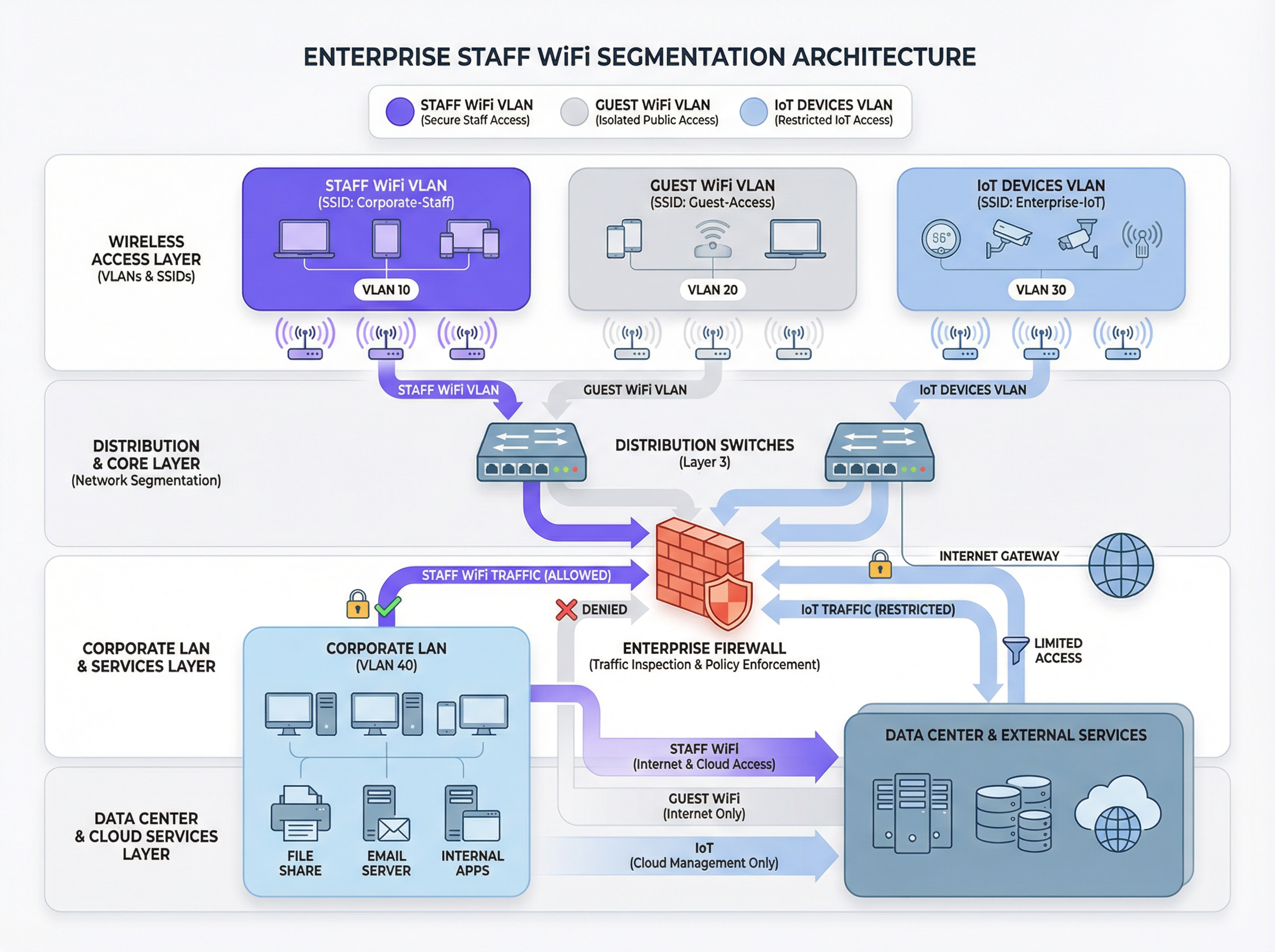
El principio fundamental de un WiFi seguro para el personal es la segmentación de red. Una red plana donde coexisten dispositivos del personal, dispositivos de invitados, hardware de IoT y sistemas confidenciales de back-office es un riesgo de seguridad significativo. El mecanismo principal para lograr la segmentación en un entorno inalámbrico es el uso de VLANs (Redes de Área Local Virtuales). Cada SSID debe asignarse a una VLAN distinta, creando dominios de transmisión lógicamente aislados que se aplican a nivel del switch de red.
Una arquitectura típica de mejores prácticas incluye al menos tres VLANs separadas:
- VLAN del personal: Para dispositivos corporativos y administrados utilizados por los empleados. A esta VLAN se le otorga acceso controlado a recursos internos como servidores de archivos, sistemas de punto de venta (POS) y sistemas de gestión de propiedades (PMS) a través de reglas de firewall específicas.
- VLAN de invitados: Para acceso WiFi público. Esta VLAN debe estar completamente aislada de todos los recursos corporativos internos. El tráfico de esta VLAN debe enrutarse directamente a Internet, con el aislamiento de clientes habilitado para evitar que los dispositivos de los invitados se comuniquen entre sí.
- VLAN de IoT: Para dispositivos "sin interfaz" (headless) como cámaras de seguridad, señalización digital y sistemas HVAC. Estos dispositivos a menudo tienen capacidades de seguridad más simples y deben aislarse en su propio segmento de red con reglas altamente restrictivas, permitiendo el acceso solo a los servidores específicos que necesitan para funcionar.
Este enfoque segmentado no es simplemente una recomendación; para cualquier organización sujeta al Estándar de Seguridad de Datos de la Industria de Tarjetas de Pago (PCI DSS), es un requisito obligatorio [1]. No segmentar el entorno de datos del titular de la tarjeta de otras redes constituye una falla de cumplimiento grave.
Autenticación y control de acceso: Más allá de la clave precompartida
El error más común y crítico en la implementación del WiFi para el personal es el uso de una única Clave Precompartida (PSK) para todos los empleados. Aunque es fácil de configurar, una PSK no proporciona responsabilidad individual y crea un riesgo de seguridad significativo cuando un empleado deja la organización. La solución estándar de la industria es IEEE 802.1X, que proporciona control de acceso a la red basado en puertos.
En una implementación 802.1X, un servidor central RADIUS (Servicio de Usuario de Acceso Telefónico de Autenticación Remota) actúa como la autoridad de autenticación. El flujo de trabajo es el siguiente:
- Suplicante (Dispositivo cliente): El dispositivo del empleado solicita acceso al SSID del personal.
- Autenticador (Punto de acceso inalámbrico): El AP intercepta la solicitud y pide las credenciales.
- Servidor de autenticación (RADIUS): El AP reenvía las credenciales al servidor RADIUS, que las valida contra un directorio de usuarios (por ejemplo, Active Directory, LDAP o un proveedor de identidad en la nube como Azure AD u Okta).
- Autorización: Tras una autenticación exitosa, el servidor RADIUS envía un mensaje
Access-Acceptde vuelta al AP, que luego otorga al dispositivo acceso a la red. El servidor RADIUS también puede devolver atributos de autorización, como un ID de VLAN específico o un perfil de Calidad de Servicio (QoS), permitiendo el control de acceso basado en roles.
Este modelo proporciona autenticación por usuario y un registro de auditoría detallado, lo cual es esencial para investigaciones de seguridad y reportes de cumplimiento.
Protocolos de seguridad: WPA2-Enterprise vs. WPA3-Enterprise
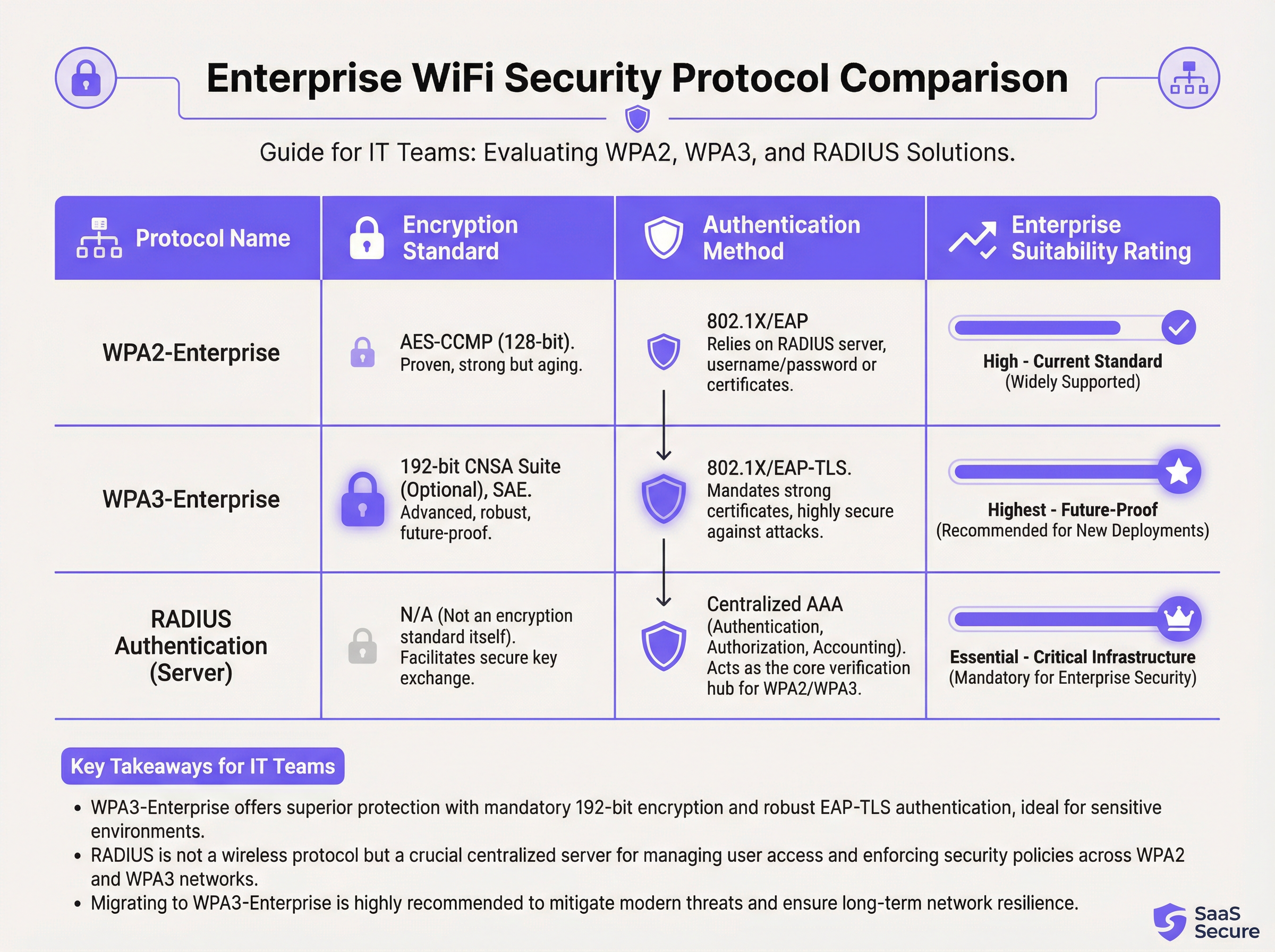
Mientras que 802.1X maneja la autenticación, el tráfico inalámbrico en sí debe estar encriptado. La elección del protocolo tiene implicaciones de seguridad significativas.
- WPA2-Enterprise (Wi-Fi Protected Access 2): El estándar empresarial de larga data, que utiliza encriptación AES-CCMP de 128 bits. Es robusto y ampliamente compatible. Sin embargo, es vulnerable a ataques de diccionario fuera de línea si un atacante puede capturar el protocolo de enlace inicial de cuatro vías (four-way handshake).
- WPA3-Enterprise (Wi-Fi Protected Access 3): La generación actual de seguridad. Reemplaza el protocolo de enlace de WPA2 con la Autenticación Simultánea de Iguales (SAE), que es resistente a los ataques de diccionario fuera de línea. WPA3-Enterprise también exige el uso de Marcos de Administración Protegidos (PMF) para evitar la interceptación y falsificación del tráfico de administración. Para entornos de alta seguridad, ofrece una suite de seguridad opcional de 192 bits alineada con la Suite de Algoritmos de Seguridad Nacional Comercial (CNSA) [2].
Para cualquier nueva implementación o actualización de hardware, WPA3-Enterprise debe ser el estándar predeterminado. Los beneficios de seguridad superan con creces la mínima carga de implementación, siempre que los dispositivos cliente y la infraestructura lo soporten.
Guía de implementación
Implementar una red WiFi segura y eficiente para el personal es un proceso de múltiples etapas que requiere una planificación cuidadosa.
Fase 1: Descubrimiento y diseño
- Auditar la infraestructura existente: Identifique todos los dispositivos que requieren acceso inalámbrico y categorícelos (personal, invitados, IoT, BYOD).
- Definir políticas de acceso: Para cada categoría, defina a qué recursos de red necesitan acceder. Cree una matriz de políticas que guiará sus reglas de firewall.
- Diseñar el esquema de VLAN e IP: Diseñe su arquitectura de VLAN y asigne subredes IP para cada VLAN. Asegúrese de que sus switches y enrutadores de red principales estén configurados para soportar las nuevas VLANs.
Fase 2: Implementación de la infraestructura
- Implementar servidor(es) RADIUS: Configure un servidor RADIUS primario y uno secundario para redundancia. Intégrelos con el directorio de usuarios de su elección.
- Configurar el Controlador de LAN Inalámbrica (WLC): Cree los nuevos SSIDs (por ejemplo,
Staff-Secure,Guest-WiFi). Configure el SSID del personal para WPA3-Enterprise con autenticación 802.1X, apuntando a sus servidores RADIUS. - Asignar SSIDs a VLANs: Asegúrese de que cada SSID esté correctamente etiquetado con su ID de VLAN correspondiente.
Fase 3: Pruebas y lanzamiento
- Pruebas piloto: Inscriba a un pequeño grupo de personal de TI y operativo en un programa piloto. Pruebe la autenticación, el acceso a los recursos y el rendimiento del roaming.
- Incorporación de dispositivos: Desarrolle un proceso claro para inscribir dispositivos nuevos y existentes. Para los dispositivos corporativos, esto debe automatizarse a través de una plataforma de Gestión de Dispositivos Móviles (MDM).
- Lanzamiento completo: Una vez que las pruebas piloto sean exitosas, proceda con un lanzamiento por fases en toda la organización. Proporcione documentación clara y soporte para los usuarios finales.
Fase 4: Monitoreo y optimización
- Implementar monitoreo: Utilice una plataforma de inteligencia de red como Purple para monitorear las tasas de éxito/falla de autenticación, el rendimiento de la red y la actividad a nivel de dispositivo.
- Configurar QoS: Implemente políticas de Calidad de Servicio para priorizar aplicaciones críticas (por ejemplo, voz, tráfico de POS) y evitar que el tráfico no esencial consuma todo el ancho de banda disponible.
- Auditorías periódicas: Programe revisiones trimestrales de las reglas de firewall, los derechos de acceso de los usuarios y las métricas de rendimiento de la red.
Mejores prácticas
- Exigir autenticación basada en certificados: Para dispositivos corporativos, utilice EAP-TLS, que se basa en certificados digitales en lugar de nombres de usuario y contraseñas. Esto elimina el riesgo de phishing de credenciales y proporciona la forma más sólida de autenticación.
- Implementar Fast Roaming (802.11r): En recintos grandes, asegure un roaming rápido y sin interrupciones entre los puntos de acceso para evitar caídas de conexión en el personal móvil.
- Aislar el tráfico BYOD: Si permite que los empleados conecten dispositivos personales (Bring Your Own Device), colóquelos en una VLAN separada y más restrictiva que la de los dispositivos corporativos.
- Realizar estudios de RF periódicos: Realice estudios de radiofrecuencia (RF) para identificar y mitigar fuentes de interferencia y garantizar una ubicación óptima de los AP tanto para cobertura como para capacidad.
- Deshabilitar protocolos heredados: Deshabilite activamente protocolos obsoletos e inseguros como WEP, WPA y TKIP en su infraestructura inalámbrica.
Solución de problemas y mitigación de riesgos
| Problema común | Causa raíz | Estrategia de mitigación |
|---|---|---|
| Fallas de autenticación | Credenciales incorrectas, certificados caducados, interrupción del servidor RADIUS. | Implementar un monitoreo robusto en los servidores RADIUS. Usar MDM para automatizar la renovación de certificados. Proporcionar una guía clara al usuario sobre la gestión de credenciales. |
| Rendimiento deficiente de roaming | Falta de soporte 802.11r/k/v, niveles de potencia de AP mal configurados. | Asegurar que el controlador y los APs estén configurados para estándares de fast roaming. Realizar un estudio de RF posterior a la implementación para optimizar la configuración de los APs. |
| Congestión de red | Ancho de banda insuficiente, falta de QoS, saturación por tráfico no esencial. | Implementar políticas de QoS para priorizar el tráfico crítico. Usar una plataforma de análisis de red para identificar y limitar la velocidad de las aplicaciones que consumen mucho ancho de banda. |
| Puntos de acceso no autorizados (Rogue APs) | APs no autorizados conectados a la red corporativa por los empleados. | Habilitar la detección de Rogue APs en su controlador inalámbrico. Usar seguridad de puerto 802.1X en switches cableados para evitar que dispositivos no autorizados obtengan acceso a la red. |
ROI e impacto comercial
La inversión en una red WiFi segura para el personal ofrece retornos medibles en varios dominios:
- Mayor productividad: Un WiFi confiable y de alto rendimiento permite al personal usar aplicaciones móviles, acceder a información y comunicarse sin interrupciones, mejorando directamente la eficiencia operativa. Un estudio de la Wi-Fi Alliance encontró que el WiFi contribuye con más de $5 billones de dólares en valor económico global anual [3].
- Reducción de incidentes de seguridad: Una segmentación adecuada y una autenticación sólida reducen drásticamente la superficie de ataque, lo que resulta en menos incidentes de seguridad, menores costos de remediación y un menor riesgo de costosas filtraciones de datos.
- Cumplimiento simplificado: Una red basada en 802.1X con registros detallados simplifica las auditorías de cumplimiento para estándares como PCI DSS, GDPR e HIPAA, ahorrando cientos de horas de trabajo.
- Mayor agilidad comercial: Una base inalámbrica escalable y segura permite la rápida implementación de nuevas iniciativas centradas en dispositivos móviles (mobile-first), desde pedidos en la mesa en restaurantes hasta puntos de venta móviles en el comercio minorista.
Para calcular el ROI, compare el costo total de propiedad (TCO) de la nueva infraestructura con los beneficios cuantificables, como el tiempo ahorrado a través de una mayor eficiencia, la evasión de costos de una posible filtración de datos y la reducción de los costos de auditoría de cumplimiento.
Referencias
[1] PCI Security Standards Council. (2022). Payment Card Industry Data Security Standard (PCI DSS) v4.0. https://www.pcisecuritystandards.org/documents/PCI-DSS-v4_0.pdf [2] Wi-Fi Alliance. (2024). WPA3™ Specification. https://www.wi-fi.org/discover-wi-fi/security [3] Wi-Fi Alliance. (2021). The Global Economic Value of Wi-Fi. https://www.wi-fi.org/file/the-global-economic-value-of-wi-fi
Key Terms & Definitions
IEEE 802.1X
An IEEE standard for port-based Network Access Control (PNAC). It provides an authentication mechanism to devices wishing to attach to a LAN or WLAN.
This is the core technology that enables per-user authentication on a WiFi network, moving away from insecure shared passwords. IT teams implement 802.1X to meet compliance requirements and enable robust access control.
RADIUS
A networking protocol that provides centralized Authentication, Authorization, and Accounting (AAA) management for users who connect and use a network service.
The RADIUS server is the 'brain' of an 802.1X deployment. It checks the user's credentials against a directory and tells the access point whether to allow or deny access. A failed RADIUS server means no one can log in.
VLAN
A Virtual Local Area Network is any broadcast domain that is partitioned and isolated in a computer network at the data link layer (OSI layer 2).
VLANs are the primary tool for segmenting a network. IT teams use VLANs to create separate, isolated networks for staff, guests, and IoT devices on the same physical hardware, preventing traffic from one from spilling over into another.
WPA3-Enterprise
The third generation of the Wi-Fi Protected Access security protocol, designed for enterprise environments. It uses 192-bit encryption and replaces the PSK handshake with Simultaneous Authentication of Equals (SAE).
This is the current, most secure standard for enterprise WiFi. Network architects should specify WPA3-Enterprise for all new deployments to protect against modern threats and ensure long-term security.
EAP-TLS
Extensible Authentication Protocol-Transport Layer Security. An EAP method that uses digital certificates for mutual authentication between the client and the server.
This is the gold standard for 802.1X authentication. Instead of a user typing a password, the device presents a certificate that is cryptographically verified. It is immune to phishing and credential theft.
QoS (Quality of Service)
The use of mechanisms or technologies to control traffic and ensure the performance of critical applications to the level required by the business.
In a staff WiFi context, QoS is used to prioritize applications like voice calls or payment processing over less important traffic like software updates or web browsing, ensuring operational systems are always responsive.
Client Isolation
A security feature on a wireless access point that prevents wireless clients connected to the same AP from communicating with each other.
This is a mandatory feature for guest WiFi networks. It prevents a malicious guest from attacking another guest's device on the same network. It should be enabled on all non-staff VLANs.
PCI DSS
The Payment Card Industry Data Security Standard is an information security standard for organizations that handle branded credit cards from the major card schemes.
For any business that processes, stores, or transmits credit card information, PCI DSS compliance is mandatory. A key requirement is the segmentation of the network that handles card data from all other networks, which directly impacts staff WiFi design.
Case Studies
A 300-room luxury hotel needs to upgrade its staff WiFi network. The current system uses a single PSK for all staff, including front desk, housekeeping, and management. The hotel uses a cloud-based Property Management System (PMS) and has corporate-owned tablets for housekeeping staff and BYOD for most other employees. They must comply with PCI DSS.
- Architecture: Design a three-VLAN architecture:
VLAN 10 (Staff-Corp)for corporate tablets,VLAN 20 (Staff-BYOD)for personal devices, andVLAN 30 (Guest). - Authentication: Deploy a redundant cloud-based RADIUS solution integrated with the hotel's Azure AD. Configure two SSIDs:
Hotel-Staffusing WPA3-Enterprise with EAP-TLS (certificate-based) for the corporate tablets, andHotel-BYODusing WPA2-Enterprise with PEAP-MSCHAPv2 (credential-based) for personal devices. - Access Control: The
Staff-CorpVLAN is granted access to the PMS cloud endpoints and internal management systems. TheStaff-BYODVLAN is only allowed internet access and access to the PMS cloud endpoints. TheGuestVLAN is completely isolated and routes directly to the internet. - Onboarding: Use the hotel's MDM (e.g., Intune) to automatically provision certificates and the
Hotel-Staffprofile to all corporate tablets. Provide a self-service portal for BYOD users to connect to theHotel-BYODnetwork after authenticating with their Azure AD credentials.
A retail chain with 50 stores wants to deploy staff WiFi for inventory management scanners and manager tablets. The scanners are ruggedized Android devices, and the tablets are iPads. The primary goal is to ensure reliable connectivity in both the front-of-store and back-of-house/stockroom areas, with secure access to the central inventory management system.
- RF Design: Conduct a predictive RF survey for a template store layout, focusing on achieving -67 dBm or better signal strength in all operational areas, especially the dense shelving of the stockroom. Plan for sufficient AP density to handle the capacity of all devices operating concurrently.
- Network Design: Implement a standardized two-VLAN staff architecture across all stores:
VLAN 50 (Scanners)andVLAN 60 (Management). Both SSIDs will use WPA3-Enterprise with 802.1X authentication against a central RADIUS server located at the corporate data center. - Authentication: Use certificate-based authentication (EAP-TLS) for both the Android scanners and the iPads, managed via an MDM platform. This avoids staff having to type complex passwords on devices without full keyboards.
- QoS: Configure QoS policies to prioritize the inventory management application's traffic over any other traffic on the network. This ensures that scanner updates and lookups are always responsive, even during busy periods.
- Roaming: Enable 802.11r (Fast BSS Transition) to ensure the inventory scanners, which are constantly in motion, can roam seamlessly between access points without dropping their connection to the inventory system.
Scenario Analysis
Q1. A large conference center is hosting a high-profile tech event with 1,000 attendees and 200 event staff. The staff need reliable access to an event management app, while attendees need basic internet access. How would you structure the wireless network to ensure the staff app remains performant?
💡 Hint:Consider both segmentation and bandwidth management.
Show Recommended Approach
Deploy at least two SSIDs: Event-Staff and Event-Guest. The Event-Staff SSID would be on its own VLAN with WPA2/3-Enterprise authentication. Crucially, implement QoS policies to prioritize the event management app's traffic and assign a guaranteed minimum bandwidth (e.g., 20% of total capacity) to the Staff VLAN. The Event-Guest SSID would be on an isolated VLAN with a per-client bandwidth limit to prevent attendees from impacting staff network performance.
Q2. Your CFO has questioned the expense of deploying a RADIUS server, suggesting that a complex, rotating PSK would be sufficient for the 150 employees in your office. How do you justify the need for 802.1X?
💡 Hint:Focus on accountability, compliance, and operational overhead.
Show Recommended Approach
The justification has three parts: 1. Accountability: With a PSK, all actions are anonymous. With 802.1X, every connection is logged against a specific user, which is essential for security incident response. 2. Compliance: Many regulatory frameworks (like PCI DSS or HIPAA) require individual accountability, making a shared key non-compliant. 3. Operational Efficiency: With 802.1X, terminating an employee's access is as simple as disabling their Active Directory account. With a PSK, the entire key must be changed and redistributed to all 149 other employees, which is inefficient and disruptive.
Q3. You are deploying a new staff WiFi network in a hospital. The primary users are doctors and nurses using corporate-owned tablets to access patient records (EHR). What is the single most effective security configuration you can implement, and why?
💡 Hint:Think beyond just encryption. How do you provide the strongest possible authentication for sensitive data?
Show Recommended Approach
The single most effective configuration is WPA3-Enterprise with EAP-TLS (certificate-based) authentication. The use of WPA3 provides the strongest available encryption. However, the critical element is EAP-TLS. By using device-specific digital certificates managed by an MDM platform, you eliminate passwords entirely for this user group. This prevents credential theft via phishing or social engineering, which is a major attack vector. Given the sensitivity of patient data (EHR), removing the password from the equation provides a fundamental security uplift that credential-based methods cannot match.
Key Takeaways
- ✓Staff WiFi is not a convenience; it is critical operational infrastructure.
- ✓Always segment staff, guest, and IoT traffic using separate VLANs.
- ✓Use IEEE 802.1X with a RADIUS server for authentication; never use a Pre-Shared Key (PSK).
- ✓Deploy WPA3-Enterprise for all new networks to ensure the strongest encryption.
- ✓For corporate-owned devices, use certificate-based authentication (EAP-TLS) to eliminate password-related risks.
- ✓Implement Quality of Service (QoS) to prioritize critical applications and guarantee performance.
- ✓A well-architected staff WiFi network delivers measurable ROI through increased productivity and reduced security risk.




