

WiFi Hotspot 2.0 (Passpoint): La guía definitiva para un roaming de WiFi fluido y seguro
This guide provides a comprehensive technical overview of WiFi Hotspot 2.0 (Passpoint) for IT leaders. It details the technology, security benefits, and a step-by-step implementation framework for deploying seamless, secure WiFi roaming in enterprise environments like hotels, retail, and large venues, ultimately improving user experience and reducing operational overhead.
🎧 Listen to this Guide
View Transcript
 \n\n## Resumen ejecutivo\n\nPara la empresa moderna, ofrecer una experiencia de WiFi fluida y segura ya no es un lujo, sino un requisito operativo fundamental. WiFi Hotspot 2.0, también conocido como Passpoint, es un marco estándar de la industria diseñado para eliminar la fricción y los riesgos de seguridad asociados con el WiFi público y de invitados tradicional. Permite que los dispositivos móviles descubran y se autentiquen automáticamente en redes WiFi con seguridad WPA3 de nivel empresarial, reflejando la experiencia de roaming fluido de las redes celulares. Para un CTO o Director de TI, esto se traduce en una reducción significativa de los problemas de conexión para los usuarios, una postura de seguridad reforzada contra ataques de WiFi comunes y un proceso de autenticación optimizado que cumple con el GDPR y es inmune a los desafíos de la aleatorización de direcciones MAC. Al reemplazar los Captive Portal inseguros y de alta fricción con una autenticación basada en credenciales y sin intervención (zero-touch), Passpoint mejora la satisfacción de los invitados, reduce la carga de soporte de TI y proporciona una base escalable para el roaming entre ubicaciones y las estrategias de descarga de datos. Esta guía proporciona los detalles técnicos y el marco de implementación necesarios para integrar Passpoint en su infraestructura de red, impulsando mejoras tangibles tanto en la seguridad como en la experiencia del usuario.\n\n\n\n## Análisis técnico detallado\n\nHotspot 2.0 y su certificación subyacente, Passpoint, representan un cambio arquitectónico fundamental en la forma en que se descubren y acceden a las redes WiFi. La tecnología se basa en la enmienda IEEE 802.11u, que permite la comunicación previa a la asociación entre un dispositivo cliente y un punto de acceso. Esto permite que un dispositivo recopile información crítica sobre una red antes de comprometerse a una conexión, pasando de un modelo heredado de reconocimiento de SSID a un modelo más inteligente de reconocimiento de credenciales.\n\n### Protocolos principales: ANQP, GAS y 802.11u\n\nEl mecanismo principal que permite este diálogo previo a la asociación es una combinación del Servicio de Anuncio Genérico (GAS) y el Protocolo de Consulta de Red de Acceso (ANQP). Así es como interactúan:\n\n1. Balizamiento IEEE 802.11u: Un punto de acceso (AP) habilitado para Passpoint incluye un Elemento de Interfuncionamiento (IE) en sus tramas de baliza. Esto actúa como un indicador, anunciando a los dispositivos cercanos que admite el descubrimiento avanzado de redes.\n2. Intercambio de GAS y ANQP: Un dispositivo cliente que detecta este IE puede iniciar una consulta GAS al AP. Dentro de esta consulta, utiliza ANQP para hacer preguntas específicas sobre la identidad y las capacidades de la red. La consulta más crítica es sobre los Identificadores Organizacionales del Consorcio de Roaming (RCOI) compatibles con la red.\n3. Coincidencia de credenciales: El AP responde con su lista de RCOI compatibles. Si alguno de estos coincide con un perfil de credenciales almacenado en el dispositivo cliente (por ejemplo, un perfil para un operador móvil, una marca de hotel o una red corporativa), el dispositivo sabe que puede autenticarse y pasa al siguiente paso. Si no se encuentra ninguna coincidencia, el dispositivo simplemente ignora la red, todo sin ninguna interacción del usuario.\n\n
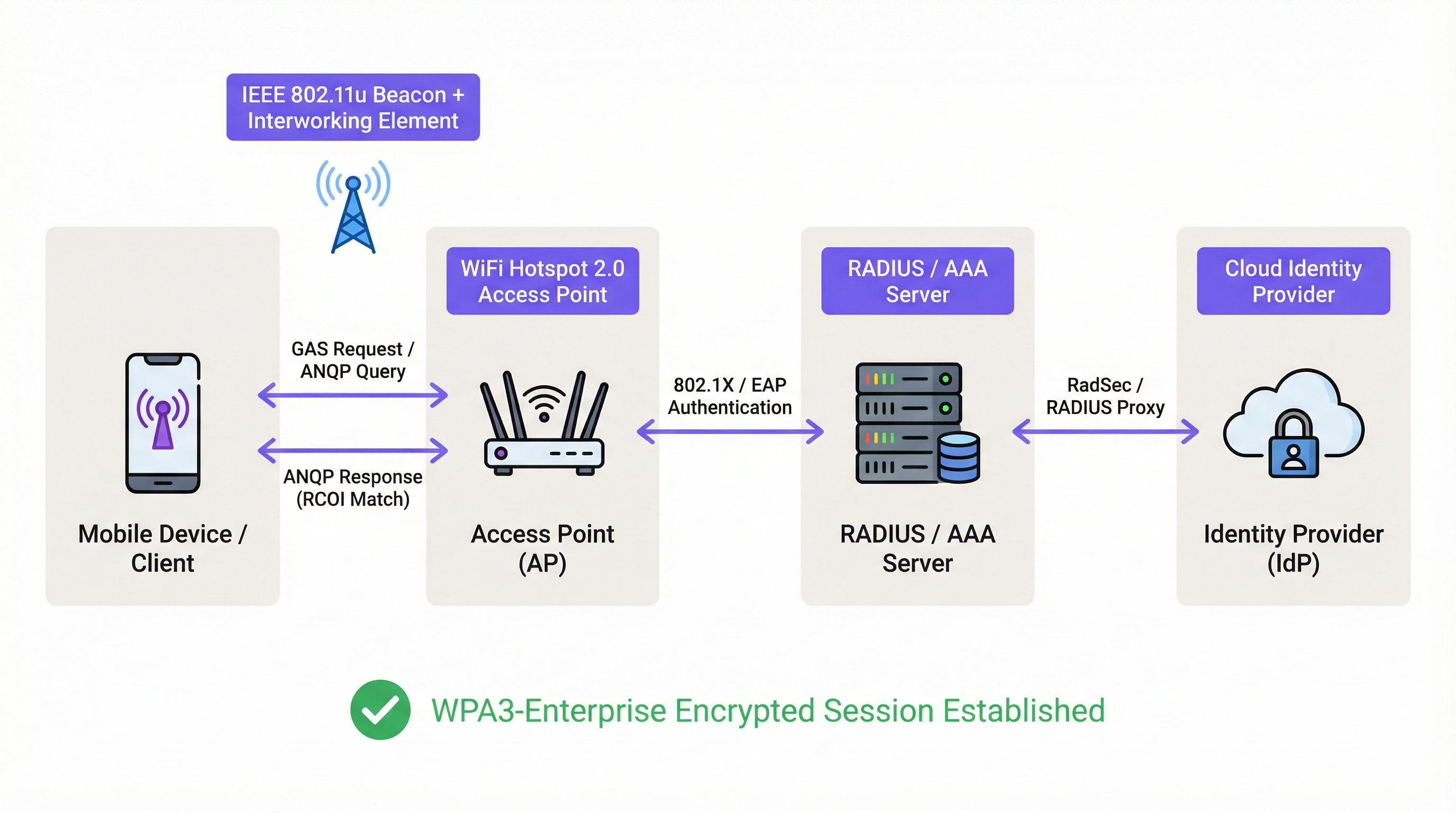 \n\n### Marco de autenticación y seguridad\n\nUna vez que se confirma una coincidencia de credenciales, Passpoint aprovecha la sólida seguridad de IEEE 802.1X para la autenticación, generalmente con cifrado WPA2-Enterprise o el más seguro WPA3-Enterprise. Este es el mismo estándar de control de acceso a la red basado en puertos en el que confían las redes empresariales cableadas seguras. La autenticación se maneja a través de un método de Protocolo de Autenticación Extensible (EAP), como:\n\n* EAP-TLS: Autenticación basada en certificados, considerada el estándar de oro en seguridad. Tanto el cliente como el servidor presentan certificados para demostrar su identidad.\n* EAP-TTLS/PEAP: Tuneliza un método de autenticación heredado (como nombre de usuario/contraseña) dentro de un túnel TLS seguro.\n* EAP-SIM/AKA/AKA': Autenticación basada en SIM, que permite a los operadores de redes móviles hacer roaming de sus suscriptores de manera fluida hacia redes WiFi de confianza.\n\nEste proceso garantiza la autenticación mutua: el cliente valida que la red es legítima (evitando ataques de AP 'Evil Twin'), y la red valida que el cliente está autorizado. Todo el tráfico posterior se cifra, mitigando el riesgo de ataques de intermediario (MITM) comunes en redes abiertas o basadas en PSK.\n\n### Passpoint vs. OpenRoaming\n\nEs crucial distinguir entre Passpoint y OpenRoaming:\n\n> Passpoint es el vehículo; OpenRoaming es el sistema de autopistas.\n
- Passpoint es el estándar técnico (802.11u, ANQP/GAS, 802.1X) que permite a un dispositivo descubrir y autenticarse automáticamente en una sola red o en un grupo de redes bajo el mismo control administrativo.\n* WBA OpenRoaming es un marco de federación global gestionado por la Wireless Broadband Alliance. Crea un ecosistema de confianza entre miles de Proveedores de Identidad (IdP), como operadores móviles, y Proveedores de Redes de Acceso (ANP), como hoteles, aeropuertos y cadenas minoristas. Esto permite que un usuario con una credencial de cualquier IdP miembro se conecte automáticamente en cualquier ubicación de un ANP miembro, sin requerir complejos acuerdos bilaterales de roaming.\n
Para lograr la máxima compatibilidad en un entorno OpenRoaming, los arquitectos de red deben transmitir tanto el RCOI estándar sin liquidación (
5A-03-BA) como el RCOI heredado de Cisco (00-40-96).\n\n## Guía de implementación\n\nLa implementación de Passpoint es un proceso estructurado que va desde la auditoría de su infraestructura existente hasta un despliegue y optimización por fases. Seguir esta hoja de ruta garantizará una transición fluida y mitigará los problemas comunes de implementación.\n\n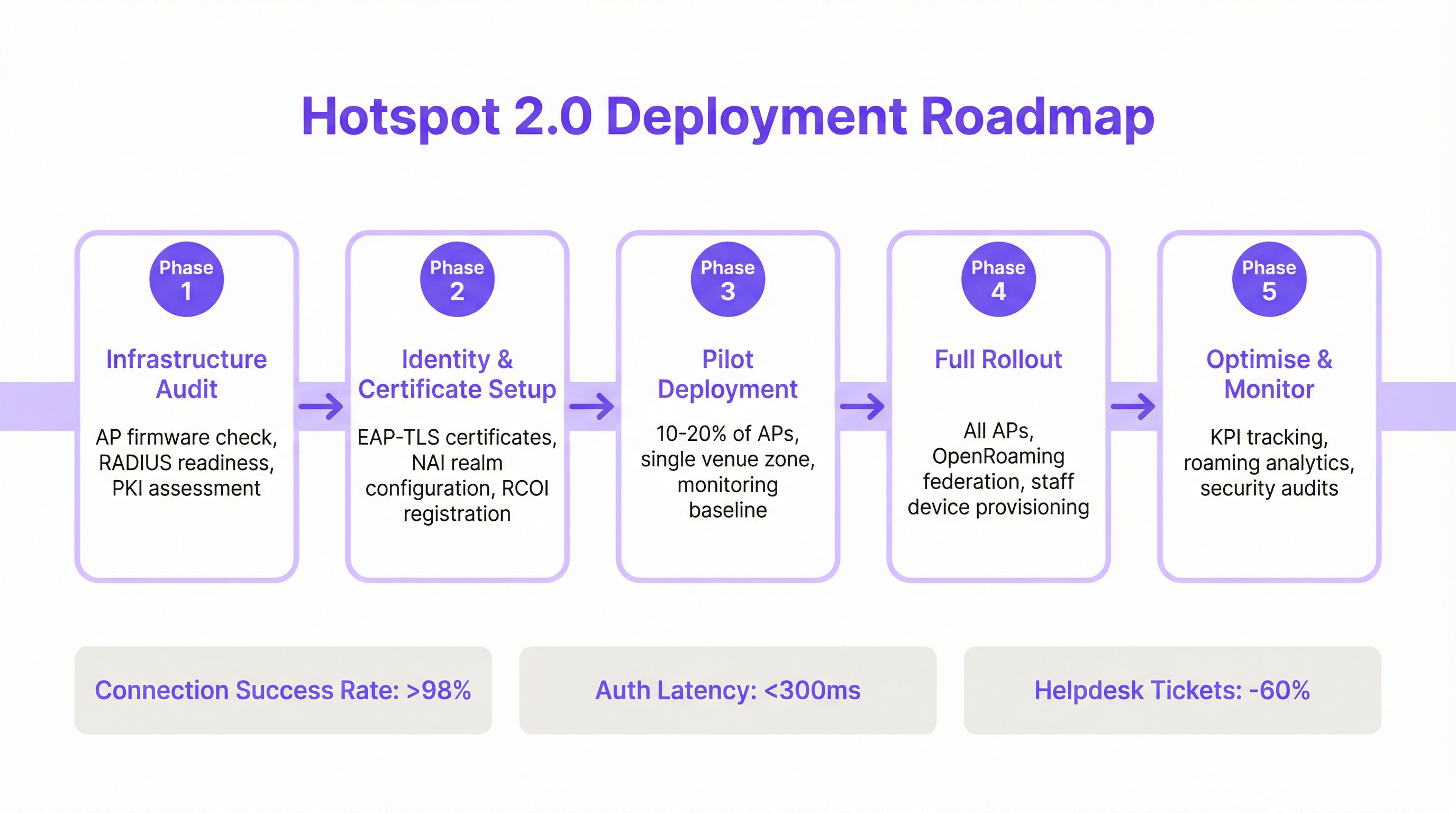 \n\n### Fase 1: Auditoría de infraestructura\n\nAntes de comenzar, evalúe su hardware y software de red actuales. Los puntos clave de la auditoría incluyen:\n* Compatibilidad de los puntos de acceso: Verifique que sus AP admitan IEEE 802.11u. La mayoría de los AP de nivel empresarial fabricados después de 2015 (de proveedores como Cisco, HPE Aruba, Juniper Mist, Ruckus) tienen el hardware necesario, pero pueden requerir una actualización de firmware.\n* Preparación del servidor RADIUS: Necesitará un servidor RADIUS (o AAA) capaz de manejar la autenticación EAP 802.1X. Esta puede ser una solución local como Cisco ISE o un servicio basado en la nube como SecureW2, Foxpass o Google Cloud Identity.\n* Evaluación de PKI: Para las implementaciones de EAP-TLS, se requiere una Infraestructura de Clave Pública (PKI) para emitir y administrar certificados digitales para dispositivos cliente y servidores.\n
Fase 2: Configuración de identidad y certificados\n\nEsta fase implica configurar los componentes principales de autenticación:\n* Configuración del dominio NAI: Defina sus dominios de Identificador de Acceso a la Red (NAI), que identifican su dominio de autenticación (por ejemplo, @suempresa.com).\n* Registro de RCOI: Si participa en un consorcio de roaming como OpenRoaming, registre sus RCOI en la WBA.\n* Generación de certificados: Para EAP-TLS, genere e implemente certificados de cliente en sus dispositivos administrados a través de una solución de Gestión de Dispositivos Móviles (MDM). Para el acceso de invitados, necesitará un mecanismo para aprovisionar un perfil con la cadena de confianza de certificados necesaria.\n
Fase 3: Implementación piloto\n\nComience con un piloto controlado en un área limitada, como un solo piso o una zona específica de la ubicación, cubriendo entre el 10 y el 20 % de sus AP. Los objetivos del piloto son:\n* Establecer una línea base: Mida las tasas actuales de éxito de conexión, la latencia de autenticación y el volumen de tickets de la mesa de ayuda relacionados con el WiFi.\n* Matriz de prueba de dispositivos: Pruebe la experiencia de incorporación y conexión en una amplia gama de dispositivos (iOS, varios fabricantes de Android como Samsung y Google Pixel, Windows, macOS).\n* Perfeccionar la incorporación: Ajuste el proceso para instalar el perfil de Passpoint en dispositivos de invitados no administrados.\n
Fase 4: Despliegue completo\n\nUna vez que el piloto haya cumplido con sus criterios de éxito (por ejemplo, >98 % de éxito de conexión, latencia de autenticación <300 ms), proceda con un despliegue completo en todos los AP y ubicaciones. Esta fase incluye:\n* Configuración completa de AP: Envíe la configuración WLAN estandarizada de Passpoint a todos los puntos de acceso.\n* Aprovisionamiento de dispositivos corporativos y del personal: Asegúrese de que todos los dispositivos propiedad de la empresa estén aprovisionados con el perfil de Passpoint a través de MDM.\n* Habilitar la federación OpenRoaming: Si corresponde, habilite las reglas de proxy RADIUS para participar en la federación OpenRoaming.\n
Fase 5: Optimización y monitoreo\n\nDespués del despliegue, monitoree continuamente el rendimiento y la seguridad de la red:\n* Seguimiento de KPI: Realice un seguimiento de los indicadores clave de rendimiento, comparándolos con la línea base del piloto. Las métricas clave incluyen la tasa de éxito de conexión, la latencia de autenticación, el éxito del roaming y el rendimiento de datos.\n* Análisis de roaming: Utilice análisis para comprender los patrones de roaming entre sus ubicaciones y con los socios de roaming.\n* Auditorías de seguridad: Realice auditorías de seguridad periódicas para garantizar la integridad de su infraestructura RADIUS y PKI.\n\n## Mejores prácticas\n\nPara maximizar el éxito y la seguridad de su implementación de Passpoint, cumpla con las siguientes mejores prácticas estándar de la industria.\n
| Categoría | Mejor práctica | Justificación |\n| :--- | :--- | :--- |\n| Seguridad | Exigir WPA3-Enterprise | WPA3 proporciona el nivel más alto de seguridad, con una solidez criptográfica de 192 bits y Tramas de Administración Protegidas (PMF) para evitar ataques de desautenticación. |\n| Seguridad | Usar EAP-TLS para dispositivos corporativos | La autenticación basada en certificados es más segura que los métodos basados en contraseñas y es inmune al phishing y al robo de credenciales. |\n| Compatibilidad | Transmitir múltiples RCOI | Para garantizar una amplia compatibilidad de dispositivos, transmita tanto el RCOI moderno de OpenRoaming (5A-03-BA) como el RCOI heredado de Cisco (00-40-96). |\n| Experiencia del usuario | Optimizar la incorporación de perfiles | La incorporación inicial es el único punto de fricción. Utilice un Captive Portal simple de un solo uso o una aplicación ligera para que la instalación del perfil sea lo más fácil posible. |\n| Diseño de red | Segmentar dispositivos IoT | La mayoría de los dispositivos IoT no admiten 802.1X. Deben segmentarse en un SSID separado y debidamente protegido (por ejemplo, mediante MPSK o autenticación MAC) y no mezclarse con el tráfico de Passpoint. |\n| Operaciones | Integrar con análisis | Para mantener la visibilidad del comportamiento de los invitados en ausencia de un Captive Portal, integre sus registros de autenticación de Passpoint con una plataforma de análisis de WiFi como Purple. |\n\n## Solución de problemas y mitigación de riesgos\n\nIncluso las implementaciones bien planificadas pueden encontrar problemas. A continuación, se presentan los modos de falla comunes y cómo mitigarlos.\n
| Síntoma | Causa potencial | Estrategia de mitigación |\n| :--- | :--- | :--- |\n| Los dispositivos no intentan conectarse | Discrepancia de RCOI o RCOI faltante | Verifique que sus AP estén transmitiendo los RCOI correctos, incluido el OI heredado 00-40-96. Utilice una herramienta de análisis de WiFi para inspeccionar las tramas de baliza. |\n| Fallas de autenticación (EAP) | Mala configuración del servidor RADIUS / Problemas de certificados | Revise los registros de RADIUS para obtener códigos de error detallados. Asegúrese de que los certificados de cliente sean válidos y que el servidor confíe en la CA emisora del cliente. Verifique que el certificado del servidor sea válido y que los clientes confíen en él. |\n| Alta latencia de autenticación | Respuesta lenta de RADIUS / Problemas de ruta de red | Asegure una baja latencia entre los AP y el servidor RADIUS. Si utiliza un RADIUS en la nube, verifique si hay congestión en la red o problemas de enrutamiento. Apunte a un tiempo de respuesta inferior a 300 ms. |\n| Comportamiento inconsistente de Android | Implementación de ANQP/GAS específica del OEM | Pruebe exhaustivamente en una variedad de dispositivos Android durante la fase piloto. Algunas versiones de Android más antiguas o menos comunes pueden tener implementaciones de 802.11u con errores. |\n| Fallas de roaming entre ubicaciones | Configuración WLAN inconsistente | Asegúrese de que el perfil WLAN de Passpoint (SSID, configuración de seguridad, RCOI) sea absolutamente idéntico en todas las ubicaciones destinadas a un roaming fluido. |\n\n## ROI e impacto comercial\n\nSi bien Passpoint es una solución técnica, su impacto se mide en resultados comerciales. El retorno de la inversión está impulsado por mejoras en la eficiencia operativa, la experiencia del usuario y la postura de seguridad.\n
Análisis de costo-beneficio\n
Costos de inversión:\n* Hardware: Posibles actualizaciones de AP si el hardware existente no cumple con 802.11u.\n* Software/Licencias: Costos de licencias de servidor RADIUS (por ejemplo, Cisco ISE) o servicios AAA en la nube.\n* Tarifas de federación: Cuotas de membresía anuales por participar en WBA OpenRoaming.\n* Implementación: Servicios profesionales o tiempo del personal interno para la configuración, las pruebas y el despliegue.\n
Retornos y beneficios esperados:\n* Reducción de la carga de TI: Una reducción significativa en los tickets de la mesa de ayuda relacionados con el WiFi. Un resultado común es una disminución del 40-60 % en los tickets relacionados con problemas de conectividad WiFi.\n* Mayor satisfacción de los invitados: La eliminación de la fricción de inicio de sesión conduce a un mayor Net Promoter Score (NPS) y mejores reseñas, particularmente en la industria hotelera.\n* Seguridad y cumplimiento mejorados: Mitiga el riesgo de violaciones de datos por ataques basados en WiFi, respaldando el cumplimiento de PCI DSS y GDPR y reduciendo posibles sanciones financieras.\n* Descarga de datos mejorada: Para los operadores móviles y sus socios de ubicación, Passpoint permite la descarga automática y segura de datos celulares a WiFi, reduciendo la carga en la red celular.\n* Mayor participación: Una conexión fluida anima a los usuarios a permanecer más tiempo en el lugar y a interactuar más con los servicios digitales, impulsando los ingresos en entornos minoristas y hoteleros.\n
Al medir los KPI, como el volumen de tickets de la mesa de ayuda, las puntuaciones de satisfacción de los invitados y las tasas de éxito de conexión antes y después de la implementación, los equipos de TI pueden construir un caso de negocio convincente que demuestre un ROI claro y medible.\n\n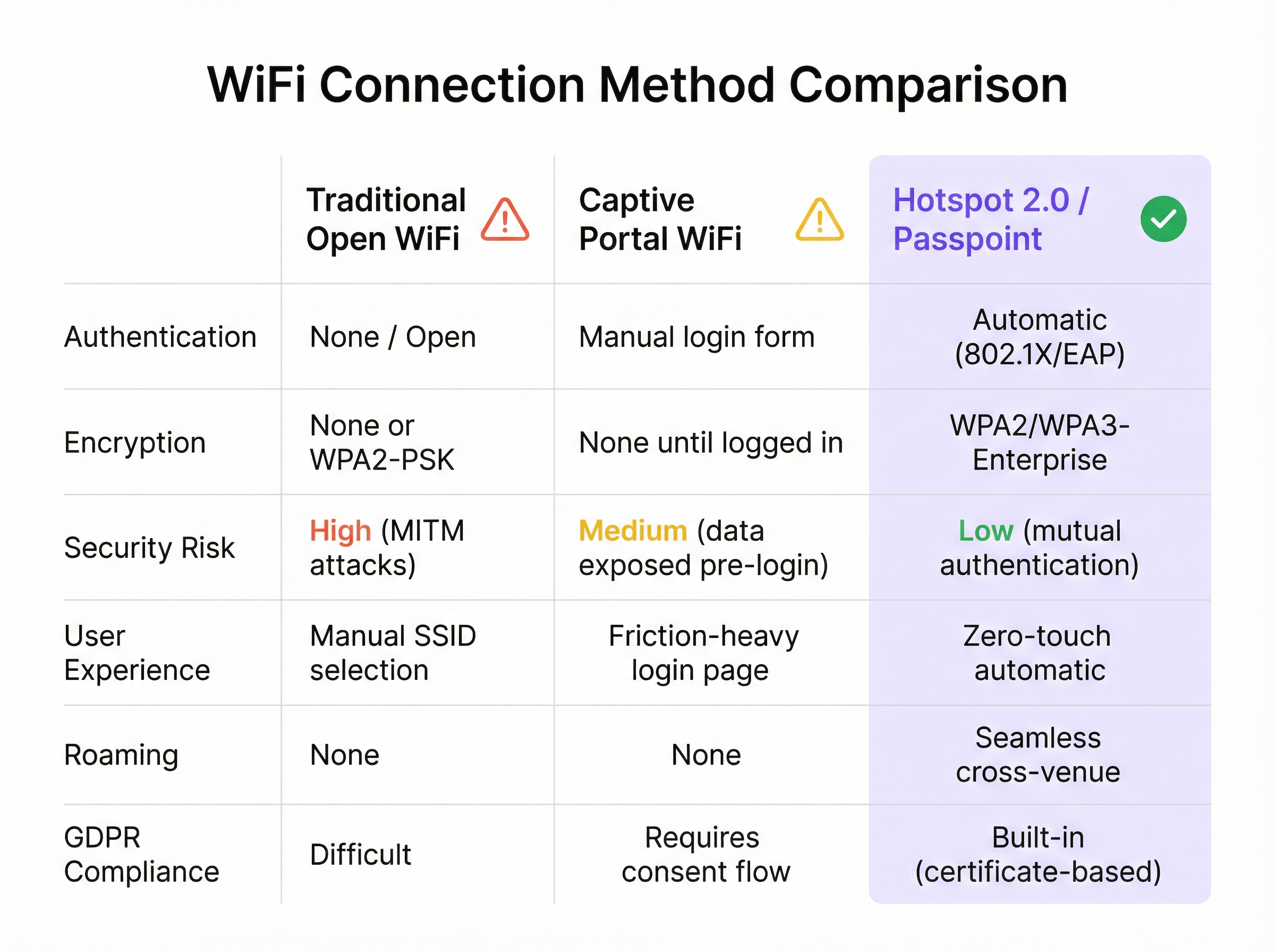
Key Terms & Definitions
IEEE 802.11u
An amendment to the IEEE 802.11 standard that enables 'interworking with external networks'. It allows client devices to exchange information with an access point before establishing a connection.
This is the foundational protocol that makes Hotspot 2.0 possible. When an IT team sees that an AP is '802.11u capable', it means it can support the discovery mechanisms required for Passpoint.
ANQP (Access Network Query Protocol)
The specific protocol used by a client device to query an access point about its capabilities, such as roaming partners, venue type, and authentication methods.
Network architects will configure ANQP elements on their wireless controllers to advertise network services. Troubleshooting often involves analyzing ANQP frames to see what information the AP is providing to clients.
GAS (Generic Advertisement Service)
The transport mechanism defined in 802.11u that carries ANQP frames between the client and the access point before an association is formed.
GAS and ANQP work together. GAS is the 'envelope' and ANQP is the 'letter' inside. When troubleshooting, packet captures will show GAS frames containing the ANQP queries and responses.
RCOI (Roaming Consortium Organizational Identifier)
A unique identifier that represents a group of network providers who have a roaming agreement. It's the primary piece of information a device looks for to decide if it can automatically connect.
This is a critical configuration item. An IT manager must ensure their APs are broadcasting the correct RCOIs for their own organization and any roaming partners like OpenRoaming. A missing or incorrect RCOI is a common cause of connection failures.
WPA3-Enterprise
The highest level of WiFi security, which uses 192-bit encryption and requires 802.1X authentication. It provides robust protection against eavesdropping and other sophisticated attacks.
For any organization concerned with security and compliance (PCI DSS, GDPR), deploying WPA3-Enterprise is a non-negotiable best practice. Passpoint is the most user-friendly way to implement it at scale.
EAP-TLS (Extensible Authentication Protocol-Transport Layer Security)
An EAP method that uses client-side and server-side digital certificates for mutual authentication. It is considered the most secure EAP method.
This is the recommended method for securing corporate-owned devices. IT teams will use an MDM to push certificates to devices, enabling zero-touch, highly secure network access.
RadSec (RADIUS over TLS)
A protocol that secures RADIUS authentication traffic by tunneling it through a TLS-encrypted connection (typically over TCP port 2083).
When setting up roaming with OpenRoaming or other external partners, network architects will use RadSec to ensure that authentication requests traversing the public internet are fully encrypted and secure.
NAI (Network Access Identifier)
A standardized way of identifying a user in an 802.1X authentication request, typically formatted like an email address (e.g., 'user@realm'). The realm portion is used to route the request to the correct home RADIUS server.
IT teams configure NAI realms to define their authentication domains. In a roaming scenario, the realm of the user's NAI determines which Identity Provider's RADIUS server needs to process the authentication request.
Case Studies
A 500-room luxury hotel with multiple conference wings wants to eliminate its cumbersome captive portal. Corporate guests frequently complain about having to re-authenticate multiple times per day as they move between their room, the conference centre, and the restaurant. The hotel needs to maintain PCI DSS compliance for its payment systems.
The recommended solution is a phased Passpoint deployment integrated with WBA OpenRoaming. Phase 1 (Pilot): Deploy Passpoint in the main conference wing and on one floor of guest rooms. Configure the WLAN to broadcast the hotel's own RCOI and the OpenRoaming RCOI. Use EAP-TLS for corporate-managed devices (provisioned via MDM by their employers) and provide a simple, one-time onboarding portal for guests to install a Passpoint profile with an EAP-TTLS credential. Phase 2 (Rollout): After a successful pilot, extend the Passpoint WLAN to all guest rooms, public areas, and restaurants. Decommission the legacy captive portal SSID, but keep a single, hidden SSID for specific back-of-house devices that do not support 802.1X. Security: The use of WPA3-Enterprise and 802.1X provides traffic encryption and mutual authentication, satisfying key PCI DSS requirements for securing wireless environments.
A large retail chain with 200 stores across the country wants to offer seamless WiFi to its loyalty program members. They also want to offload traffic from their in-store staff's cellular devices to the corporate WiFi to ensure reliable access to inventory and POS applications. The existing infrastructure is a mix of Cisco Meraki and Aruba hardware.
The solution is to create a unified Passpoint strategy across the mixed-vendor environment. Step 1 (Onboarding): Integrate Passpoint profile generation into the loyalty program's mobile app. When a user signs into the app, it automatically installs the Passpoint profile with a unique EAP-TTLS credential. Step 2 (Staff Provisioning): Use the company's MDM to push a separate Passpoint profile to all corporate-owned staff devices, configured for EAP-TLS using device certificates for zero-touch authentication. Step 3 (Network Configuration): In both Cisco Meraki and Aruba Central dashboards, create a new WLAN profile for Passpoint. Enable Hotspot 2.0, set security to WPA3-Enterprise, and add the company's RCOI and the OpenRoaming RCOI. Point authentication to a central cloud RADIUS server to ensure consistent policy enforcement across all stores. Step 4 (Analytics): Ingest RADIUS authentication logs into the Purple analytics platform to correlate WiFi connections with loyalty member IDs, tracking visit frequency and dwell time without a captive portal.
Scenario Analysis
Q1. You are the network architect for a large international airport. You want to implement Passpoint to provide seamless roaming for travelers from major cellular carriers. During your pilot, you notice that a large number of Android devices are not automatically connecting, while iOS devices are connecting successfully. What is the most likely cause and your first troubleshooting step?
💡 Hint:Consider the differences in how various device manufacturers implement the 802.11u standard and what specific information they look for during discovery.
Show Recommended Approach
The most likely cause is a misconfiguration of the Roaming Consortium Organizational Identifiers (RCOIs). Many Android devices, particularly older models or those with manufacturer-customized operating systems, rely on the legacy Cisco RCOI (00-40-96) to initiate an ANQP query. If only the modern OpenRoaming RCOI (5A-03-BA) is being broadcast, these devices will not attempt to connect. The first troubleshooting step is to use a WiFi analysis tool to inspect the beacon frames from the pilot APs and verify that both the OpenRoaming and the legacy Cisco RCOIs are being broadcast.
Q2. A retail chain has successfully deployed Passpoint with OpenRoaming in all its stores. The marketing team now wants to know if they can still gather customer analytics, such as visit frequency and dwell time, which they previously collected via the captive portal. What is your recommendation?
💡 Hint:Where in the new authentication flow can user identity be correlated with a connection event? Can this be done while respecting privacy and the principles of the OpenRoaming federation?
Show Recommended Approach
While Passpoint eliminates the captive portal, it is still possible to gather valuable analytics. The recommended approach is to leverage the RADIUS authentication logs. Each time a user connects, an authentication request is sent to the RADIUS server, which contains the user's Network Access Identifier (NAI). By integrating the RADIUS server with an analytics platform like Purple, the NAI can be used as a persistent anonymous identifier to track visit frequency and dwell time. This provides the marketing team with the data they need without reintroducing login friction for the user. It's important to ensure this process is compliant with privacy policies and the terms of the roaming federation.
Q3. A conference centre is setting up a Passpoint network. They plan to use EAP-TLS for staff and event organizers, but need a solution for thousands of temporary attendees. They are considering using EAP-TTLS with usernames and passwords distributed at registration. What is a significant security risk of this approach and what is a better alternative?
💡 Hint:Think about the lifecycle of shared credentials and the security of the 'inner' authentication method in EAP-TTLS.
Show Recommended Approach
The significant risk of using shared EAP-TTLS credentials (username/password) is the lack of revocation and accountability. If a credential pair is compromised, it can be used by an unauthorized party until it expires, and it's difficult to trace activity back to a specific individual. A better and more secure alternative is to use an onboarding portal that generates a unique Passpoint profile for each attendee. This can be done by having the attendee scan a QR code or visit a one-time URL. The portal generates a profile containing a unique, short-lived digital certificate (for EAP-TLS) or a unique EAP-TTLS credential. This ensures that each user has a distinct identity, and access can be revoked on a per-user basis if necessary, providing much stronger security and accountability.
Key Takeaways
- ✓WiFi Hotspot 2.0 (Passpoint) enables seamless, zero-touch roaming for users by automatically authenticating devices to trusted WiFi networks.
- ✓It replaces insecure, high-friction captive portals with credential-based authentication using the enterprise-grade WPA3-Enterprise security standard.
- ✓The core technology relies on the IEEE 802.11u standard, which allows devices to query network information (via ANQP/GAS) before connecting.
- ✓Mutual authentication (802.1X) is a key security benefit, protecting against 'Evil Twin' and Man-in-the-Middle (MITM) attacks.
- ✓OpenRoaming is a global federation that works with Passpoint to allow seamless roaming across thousands of different network providers.
- ✓A successful deployment requires a phased approach: audit your infrastructure, run a pilot to test across all device types, and then perform a full rollout.
- ✓Key business benefits include reduced IT helpdesk costs, improved guest satisfaction, enhanced security compliance (PCI DSS, GDPR), and new opportunities for data offload and analytics.




