

Roaming y Handoff de WiFi: Explicación de 802.11r y 802.11k
This guide provides a senior-level technical deep-dive into WiFi roaming protocols — specifically 802.11r (Fast BSS Transition), 802.11k (Neighbor Reports), and 802.11v (BSS Transition Management) — and their combined role in delivering seamless connectivity across enterprise venues. It equips IT managers, network architects, and venue operations directors with the architectural understanding, implementation steps, and business-impact metrics needed to deploy and validate fast roaming in hospitality, retail, events, and public-sector environments. The guide also addresses the critical interaction between roaming and captive portals, a common deployment failure point in guest WiFi networks.
🎧 Listen to this Guide
View Transcript

Resumen Ejecutivo
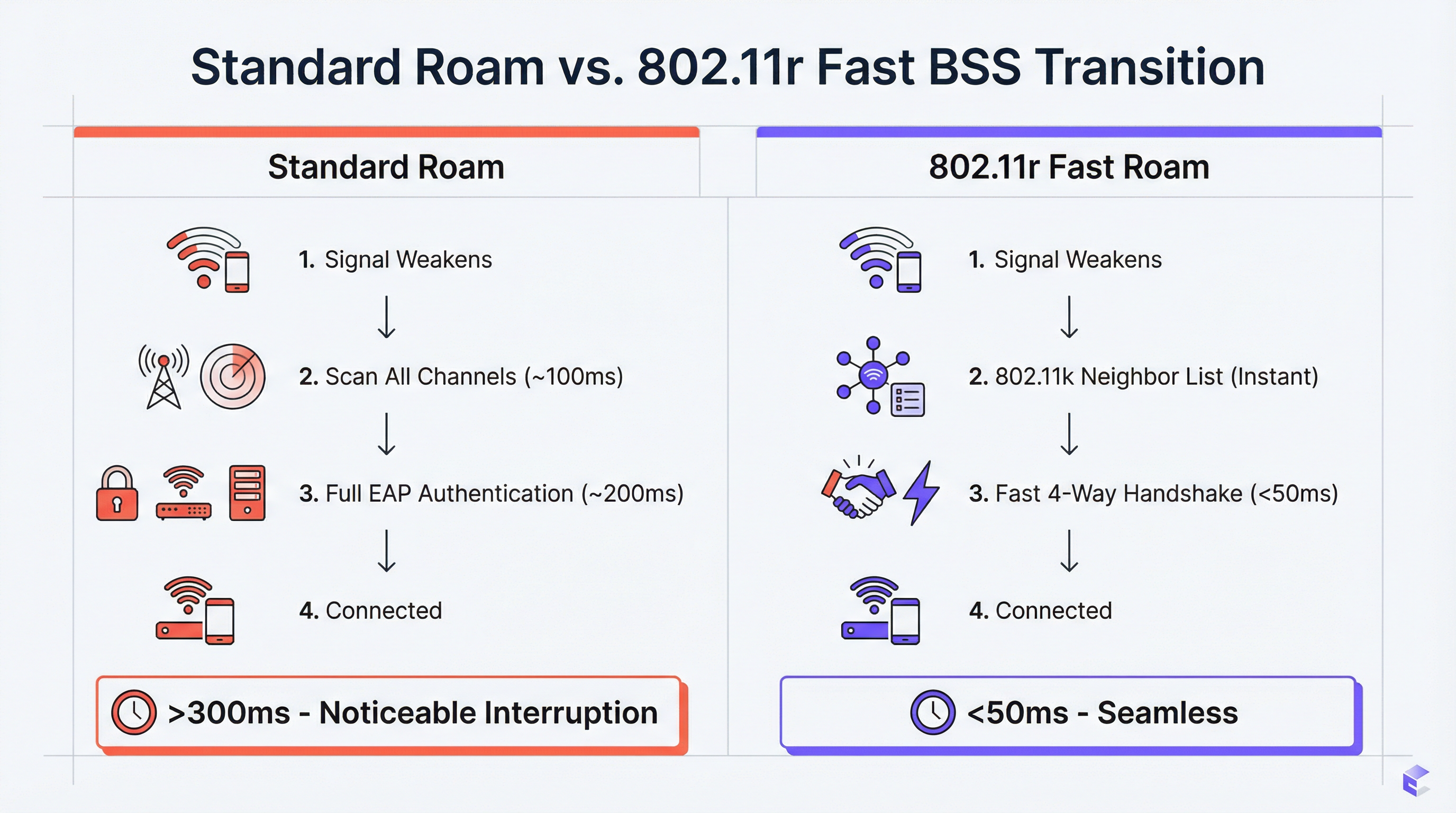
Para los recintos empresariales (hoteles, cadenas de retail, estadios, centros de conferencias), contar con un WiFi sin interrupciones es un requisito operativo fundamental. A medida que los usuarios se desplazan por un espacio físico, sus dispositivos deben cambiar entre puntos de acceso (AP) sin perder la conexión. Un rendimiento deficiente del roaming provoca caídas en llamadas VoIP, interrupciones en transmisiones de video y frustración en los usuarios, lo que impacta directamente en las puntuaciones de satisfacción de los huéspedes y en las métricas de productividad del personal. La solución radica en tres enmiendas complementarias del IEEE 802.11: 802.11k, 802.11v y 802.11r. Juntas, forman un marco de asistencia de roaming que dota a los dispositivos cliente de la inteligencia necesaria para tomar decisiones de handoff más rápidas y precisas, y proporciona a la red las herramientas para guiar activamente dichas decisiones. El estándar 802.11k ofrece una lista depurada de AP candidatos, eliminando los lentos escaneos de canales. El 802.11r (Fast BSS Transition) comprime el protocolo de enlace (handshake) de reautenticación de 200–300 ms a menos de 50 ms. El 802.11v permite a la red dirigir proactivamente a los clientes para equilibrar la carga. Implementar estos estándares correctamente, junto con una plataforma de WiFi para invitados bien diseñada, es el camino definitivo hacia la experiencia inalámbrica móvil y de alto rendimiento que exigen los entornos empresariales modernos.
Análisis Técnico Detallado
El Reto: Roaming Lento y el Problema del Cliente Adherido (Sticky Client)
En una implementación de WiFi estándar sin asistencia de roaming, el dispositivo cliente es el único responsable de decidir cuándo realizar el roaming. El resultado típico es que los dispositivos se mantienen conectados a su AP actual mucho más tiempo del óptimo, incluso cuando hay una señal significativamente más fuerte disponible desde un AP cercano. Este es el problema del cliente adherido (sticky client), y es endémico en entornos empresariales donde una mezcla de tipos de dispositivos (smartphones, laptops, sensores IoT, escáneres portátiles) implementan sus propios algoritmos de roaming con distintos grados de sofisticación.
Cuando el cliente finalmente decide hacer roaming, debe completar un ciclo completo de reautenticación con el nuevo AP. En una red WPA2-Enterprise o WPA3-Enterprise, esto implica múltiples intercambios EAP (Extensible Authentication Protocol) entre el cliente, el AP y un servidor RADIUS en el backend. Este proceso puede consumir entre 200 y 400 milisegundos. Para aplicaciones en tiempo real (VoIP, videoconferencias, puntos de venta móviles), esta latencia es inaceptable. El resultado son llamadas caídas, cuadros de video congelados y transacciones fallidas.
802.11k: Gestión de Recursos de Radio y Reportes de Vecinos
La enmienda 802.11k introduce la Gestión de Recursos de Radio (RRM), un marco que permite a los AP y a los clientes intercambiar información sobre el entorno de RF. La función más significativa a nivel operativo es el Reporte de Vecinos (Neighbor Report). Un AP compatible con 802.11k puede responder a la solicitud de un cliente con una lista estructurada de AP vecinos, incluyendo sus BSSID, canales operativos y características de señal. Esto elimina la necesidad de que el cliente realice un escaneo pasivo o activo en todos los canales disponibles, un proceso que por sí solo puede tardar 100 ms o más en una red multibanda.
El efecto práctico es que un cliente que se acerca al límite de la zona de cobertura de un AP ya tiene una lista clasificada de candidatos para el handoff antes de necesitar hacer el roaming. La decisión se toma con información completa, no mediante una búsqueda lenta y a ciegas.
802.11r: Transición Rápida de BSS (FT)
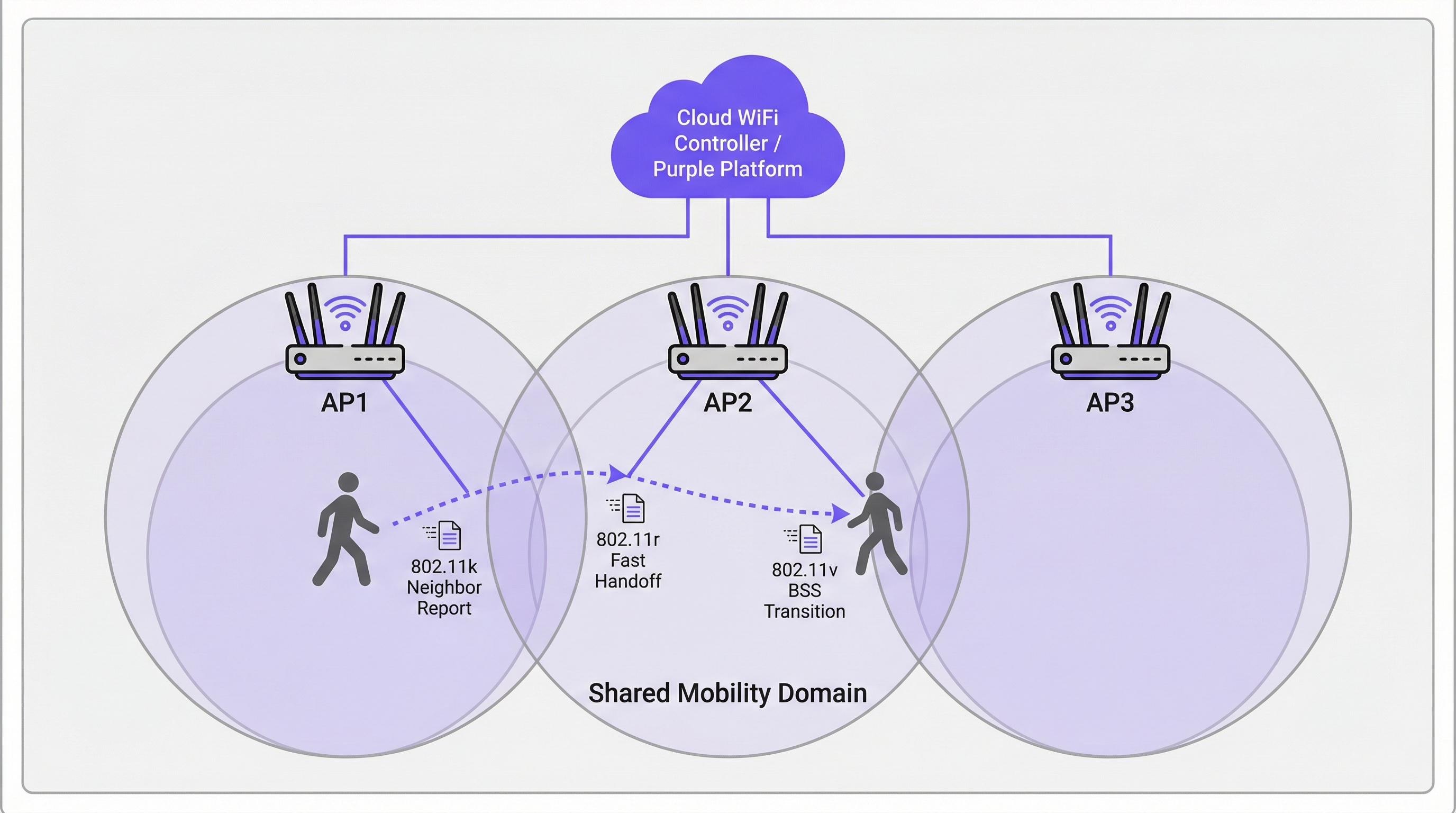
El 802.11r es la piedra angular del roaming rápido. Su principal innovación es la predistribución de material de claves entre los AP dentro de un Dominio de Movilidad definido. Cuando un cliente se autentica por primera vez en una red habilitada para 802.11r, establece una Clave Maestra por Pares (PMK) a través del proceso EAP estándar. Con FT habilitado, un derivado de esta clave (la PMK-R1) se predistribuye a todos los AP en el Dominio de Movilidad a través del controlador o sistema de distribución.
Cuando el cliente hace roaming a un nuevo AP, en lugar de iniciar un intercambio EAP completo, realiza un handshake de 4 vías comprimido utilizando la PMK-R1 precompartida. Esto reduce el tiempo de autenticación del handoff a menos de 50 milisegundos, el umbral crítico por debajo del cual un roaming es imperceptible para el usuario final durante una sesión de voz o video.
El 802.11r soporta dos modos operativos. En FT over-the-Air, el cliente se comunica directamente con el AP de destino durante el handoff, lo cual es más sencillo y el enfoque recomendado para la mayoría de las implementaciones. FT over-the-DS (Sistema de Distribución) enruta las tramas FT a través de la red cableada mediante el AP actual, lo que puede ser útil en arquitecturas de controladores específicas, pero añade complejidad.
802.11v: Gestión de Transición BSS
Mientras que el 802.11k es reactivo (proporciona información cuando el cliente la solicita) y el 802.11r es transaccional (acelera el handoff), el 802.11v es proactivo. Permite a la red enviar Solicitudes de Gestión de Transición BSS a los dispositivos cliente, sugiriendo o dirigiéndolos a hacer roaming a un AP específico. Esta es la principal herramienta de la red para el balanceo de carga. Si un AP se acerca a su capacidad máxima, el controlador puede identificar clientes conectados con una señal fuerte hacia un AP cercano menos congestionado y enviarles una solicitud de transición. El cliente no está obligado a cumplirla, pero los clientes bien implementados (dispositivos modernos con iOS, Android y Windows) generalmente respetarán la solicitud.
Esta capacidad de dirección proactiva transforma la red de una infraestructura pasiva a un participante activo en la optimización de la experiencia del usuario en todo el recinto.
Cómo Interactúan los Captive Portal con el Roaming
Un punto de falla crítico y frecuentemente pasado por alto en las implementaciones de WiFi para invitados es la interacción entre el roaming y la autenticación del Captive Portal. Si un invitado se autentica a través de un Captive Portal en el AP1 y luego hace roaming al AP2, una implementación deficiente volverá a presentar el Captive Portal, forzando la reautenticación. Esto es un fallo fundamental en la experiencia del usuario (UX).
El enfoque arquitectónico correcto es centralizar la gestión del estado de la sesión en la plataforma de WiFi para invitados (como Purple). Una vez que un usuario se autentica, su dirección MAC y token de sesión se almacenan de forma centralizada. Cuando hace roaming, el nuevo AP consulta a la plataforma central, la cual confirma la sesión activa y omite el Captive Portal automáticamente. Esto requiere que la plataforma de WiFi para invitados esté estrechamente integrada con la infraestructura inalámbrica, una consideración clave al evaluar soluciones de proveedores.
Guía de Implementación
Los siguientes pasos representan un marco de implementación neutral en cuanto a proveedores, aplicable a cualquier infraestructura inalámbrica de nivel empresarial.
Paso 1 — Auditoría de Hardware y Software. Verifique que sus AP, el controlador de LAN inalámbrica (WLC) o la plataforma de gestión en la nube, y los dispositivos cliente de destino soporten 802.11k, 802.11v y 802.11r. El soporte en AP y controladores es casi universal en el hardware empresarial moderno (Cisco Catalyst, Aruba, Juniper Mist, Ruckus). El soporte en los clientes varía; verifique las hojas de especificaciones de los dispositivos, particularmente para hardware especializado como escáneres de códigos de barras, dispositivos médicos o sensores IoT.
Paso 2 — Habilitar los Estándares en el SSID de Destino. En su WLC o panel de control en la nube, navegue hasta la configuración del SSID y habilite 802.11k (Reportes de Vecinos), 802.11v (Gestión de Transición BSS) y 802.11r (Transición Rápida de BSS). Para 802.11r, seleccione FT over-the-Air como el modo predeterminado a menos que su arquitectura requiera específicamente over-the-DS.
Paso 3 — Configurar el Dominio de Movilidad. Asegúrese de que todos los AP dentro de la misma área física de roaming estén asignados al mismo Dominio de Movilidad. Este es el requisito previo para el intercambio de claves FT. Verifique que la red de gestión tenga conectividad total entre todos los AP del dominio.
Paso 4 — Configuración de Seguridad. El 802.11r ofrece el mayor beneficio con la autenticación WPA2/WPA3-Enterprise, ya que es el complejo proceso EAP el que FT está diseñado para acelerar. Para redes corporativas y de personal, esto no es negociable tanto desde la perspectiva del rendimiento como del cumplimiento de PCI DSS. Para redes de invitados que utilizan un Captive Portal con una Clave Precompartida (PSK), el 802.11r sigue aportando beneficios, pero las mejoras son menos drásticas.
Paso 5 — Validar con Captura de Paquetes. Utilice una herramienta de análisis de WiFi (Wireshark con un adaptador 802.11 compatible, o una herramienta comercial como Ekahau o AirMagnet) para capturar los eventos de roaming. Confirme la presencia de intercambios de Reportes de Vecinos 802.11k, tramas de Gestión de Transición BSS 802.11v y la secuencia abreviada de autenticación FT 802.11r. Mida el tiempo desde la última trama de datos en el AP antiguo hasta la primera trama de datos en el nuevo AP. Su objetivo es estar consistentemente por debajo de los 50 ms.
Paso 6 — Despliegue en Producción por Fases. Una vez validado en un SSID de prueba, despliegue la configuración en los SSID de producción por fases, comenzando con un solo piso o zona. Supervise si hay problemas de compatibilidad con los clientes y escale cualquier anomalía antes de expandirlo a todo el recinto.
Mejores Prácticas
Las siguientes recomendaciones reflejan las directrices estándar de la industria y son aplicables a las plataformas de distintos proveedores.
Diseñe para el Dominio de Movilidad, no para la VLAN. Una configuración errónea común es definir el Dominio de Movilidad según los límites de la VLAN en lugar de los límites físicos de roaming. Un usuario que camina entre dos pisos debe estar en el mismo Dominio de Movilidad, incluso si cruza el límite de una VLAN. Asegúrese de que la arquitectura de su controlador soporte esto.
Mantenga un SSID Heredado (Legacy) para Dispositivos No Compatibles. Algunos dispositivos tienen implementaciones de 802.11r con errores o inexistentes. En lugar de deshabilitar FT en toda la red para adaptarse a ellos, mantenga un SSID secundario sin FT para dispositivos heredados. Esto evita una 'carrera hacia el fondo' donde las capacidades de toda la red se ven limitadas por el dispositivo más antiguo.
Alineación con Estándares de Seguridad. Para entornos de retail, asegúrese de que su configuración de seguridad inalámbrica se alinee con los requisitos de PCI DSS 4.0, particularmente en torno a la segmentación de red y el cifrado. Para implementaciones en el sector público y la hospitalidad que manejan datos personales, asegúrese de que sus prácticas de datos de WiFi para invitados cumplan con el GDPR y la legislación nacional pertinente sobre protección de datos. WPA3-Enterprise, donde sea compatible, proporciona la postura de seguridad más sólida.
Documente la Topología de su Dominio de Movilidad. Mantenga un registro actualizado de qué AP pertenecen a qué Dominio de Movilidad. Esto es esencial para la resolución de problemas y para la integración de nuevos AP durante la expansión de la infraestructura.
Resolución de Problemas y Mitigación de Riesgos
| Síntoma | Causa Probable | Acción Recomendada |
|---|---|---|
| El dispositivo no puede conectarse tras habilitar 802.11r | El cliente tiene una implementación FT con errores | Deshabilite FT en el SSID o cree un SSID heredado sin FT para el dispositivo afectado |
| Los tiempos de roaming siguen siendo >100 ms a pesar de 802.11r | Los AP no están en el mismo Dominio de Movilidad | Verifique la configuración del Dominio de Movilidad en el controlador; revise la conectividad de la red de gestión entre los AP |
| El invitado se topa con el Captive Portal después de cada roaming | El estado de la sesión no está centralizado | Asegúrese de que la plataforma de WiFi para invitados esté rastreando las direcciones MAC y los tokens de sesión de forma centralizada en todos los AP |
| Clientes adheridos (sticky clients) que no responden a la dirección 802.11v | El cliente no soporta o ignora 802.11v | Ajuste la potencia de transmisión del AP para reducir la superposición de cobertura, forzando al cliente a hacer roaming en un umbral RSSI más fuerte |
| Desconexiones intermitentes en áreas de alta densidad | Bucle de roaming entre dos AP | Ajuste los umbrales de transición 802.11v; asegúrese de que la ubicación de los AP minimice la superposición excesiva de cobertura |
ROI e Impacto Comercial
El caso de negocio para invertir en una red de roaming correctamente configurada es claro. En la hospitalidad, un WiFi sin interrupciones se correlaciona directamente con las puntuaciones de satisfacción de los huéspedes. Un huésped cuya llamada de Teams se corta en el pasillo calificará mal el WiFi del hotel, independientemente de las velocidades anunciadas en la conexión de la habitación. Para el retail, la conectividad confiable de los escáneres portátiles se traduce directamente en precisión de inventario y eficiencia del personal: una cadena de 200 tiendas que elimina las desconexiones de los escáneres puede recuperar importantes horas de trabajo anualmente. Para conferencias y eventos, el costo reputacional de una mala experiencia de conectividad durante un evento insignia puede superar con creces el costo de la inversión en infraestructura.
Los KPI medibles para una implementación de roaming exitosa son: duración promedio del evento de roaming (objetivo: <50 ms), número de caídas de llamadas VoIP por hora (objetivo: cero) y puntuaciones de satisfacción del WiFi para invitados (rastreadas a través de encuestas posteriores a la visita). Una red bien configurada con 802.11k, 802.11v y 802.11r debería ofrecer mejoras medibles en las tres métricas durante el primer mes de implementación.
Key Terms & Definitions
BSS (Basic Service Set)
A fundamental building block of a WiFi network, consisting of one Access Point and all the client devices associated with it. Each BSS is identified by a unique BSSID (the AP's MAC address).
When discussing roaming, a client transitions from the BSS of its current AP to the BSS of a new AP. 'Fast BSS Transition' (802.11r) is literally a faster mechanism for executing this switch.
SSID (Service Set Identifier)
The human-readable name of a WiFi network — the name users see and select on their devices. An SSID can be broadcast by multiple APs simultaneously to create a single logical network across a large area.
For roaming to function, all APs in the roaming area must broadcast the same SSID. Users should experience a single, continuous network, not a series of separate networks named 'Hotel_WiFi_Floor1', 'Hotel_WiFi_Floor2', etc.
WPA2/WPA3-Enterprise
A WiFi security standard that authenticates each user or device individually using a RADIUS server and the EAP protocol, rather than a shared password. It is the required security method for corporate and PCI DSS-compliant networks.
802.11r provides the greatest performance benefit in Enterprise networks, as it is the complex, multi-step EAP authentication process that FT is specifically designed to accelerate.
RADIUS (Remote Authentication Dial-In User Service)
A networking protocol that provides centralised Authentication, Authorisation, and Accounting (AAA) for network access. In a WiFi context, the AP acts as a RADIUS client, forwarding user credentials to the RADIUS server for validation.
In a standard WPA2-Enterprise roam, the client must complete a full EAP exchange with the RADIUS server for every new AP. 802.11r eliminates this requirement by pre-distributing key material, so the RADIUS server is only consulted during the initial authentication.
Pairwise Master Key (PMK)
The top-level cryptographic key in the WPA2/WPA3 security hierarchy, derived during the initial EAP authentication process between the client and the RADIUS server.
802.11r works by deriving a hierarchy of keys from the PMK. A derivative key (PMK-R1) is pre-distributed to APs in the Mobility Domain, allowing a roaming client to perform a fast handshake without re-deriving the PMK from scratch.
Mobility Domain
A set of APs, managed by the same controller or cloud platform, that are configured to share Fast Transition key material and allow seamless 802.11r roaming between them.
This is the foundational configuration element for 802.11r. If two APs are not in the same Mobility Domain, a client roaming between them will fall back to a full, slow re-authentication. Correctly defining Mobility Domain boundaries is the most critical implementation step.
Sticky Client
A wireless client device that fails to roam to a nearby AP with a significantly stronger signal, instead maintaining its association with a distant AP with a weak signal, resulting in degraded throughput and increased latency.
This is the primary user-experience problem that 802.11k and 802.11v are designed to address. 802.11k gives the client better information; 802.11v gives the network the ability to actively encourage the client to move.
Captive Portal
A web page that intercepts a user's initial HTTP request and redirects them to an authentication or registration page before granting full network access. Widely used in hospitality, retail, and public WiFi deployments.
A poorly architected captive portal will re-present itself every time a user roams to a new AP, breaking the seamless experience. The solution is centralised session management on the guest WiFi platform, which recognises authenticated users by their MAC address across all APs.
EAP (Extensible Authentication Protocol)
An authentication framework used in WPA2/WPA3-Enterprise networks. It supports multiple authentication methods (EAP-TLS, PEAP, EAP-TTLS) and involves a multi-step exchange between the client, the AP, and a RADIUS server.
The EAP exchange is the primary source of latency in a standard WiFi roam. 802.11r is specifically designed to bypass the need to repeat this exchange on every roam, replacing it with a much faster 4-way handshake.
Case Studies
A 500-room luxury hotel is experiencing guest complaints of dropped WiFi calls and poor connectivity in hallways and common areas. Their infrastructure consists of enterprise-grade APs from a major vendor, but roaming assistance is not configured. How would you design and implement a solution?
Phase 1 — Baseline Assessment. Conduct a site survey to confirm RF coverage and identify roaming boundaries. Use a WiFi analyser to benchmark current roaming performance. Capture packet traces in the problem corridors to measure actual handoff times. Expect to find values of 200–400 ms, confirming the slow re-authentication hypothesis.
Phase 2 — Pilot Configuration. On the hotel's Wireless LAN Controller, create a test SSID (e.g., 'HotelGuest_FT_Test'). Enable 802.11k (Neighbor Reports), 802.11v (BSS Transition Management), and 802.11r (Fast BSS Transition, over-the-Air mode) on this SSID. Set security to WPA2-Enterprise, integrating with the hotel's existing RADIUS infrastructure. Assign all APs in the pilot zone to the same Mobility Domain.
Phase 3 — Validation. Using a modern smartphone (iOS 14+ or Android 10+), connect to the test SSID and initiate a VoIP call. Walk through the previously identified problem areas. The call should remain clear and uninterrupted. Capture packets to confirm handoff times are now consistently below 50 ms.
Phase 4 — Production Rollout. Apply the configuration to the primary guest and staff SSIDs in a phased rollout, floor by floor. Monitor for client compatibility issues. Communicate the changes to the IT team and set up alerting on the management platform for any roaming anomalies.
A large retail chain wants to deploy handheld inventory scanners across its 200 stores. The scanners must maintain a persistent, low-latency connection to the central inventory management system as employees move throughout stockrooms and sales floors. What are the critical WiFi configuration requirements, and what are the key risks?
Step 1 — Device Procurement Requirement. The absolute first step is to mandate 802.11r, 802.11k, and 802.11v support as a non-negotiable requirement in the scanner procurement specification. This must be confirmed against the manufacturer's data sheet, not assumed. Failure to do this at the procurement stage is the single most common cause of project failure in IoT and specialist device deployments.
Step 2 — Dedicated SSID Architecture. Create a dedicated, hidden SSID for the scanners. This network should be configured for WPA2/WPA3-Enterprise with certificate-based authentication (EAP-TLS) using device certificates provisioned during the scanner build process. This eliminates password management overhead and provides a strong, auditable security posture aligned with PCI DSS requirements for retail networks.
Step 3 — Enable Fast Roaming. On the dedicated SSID, enable 802.11k, 802.11v, and 802.11r. Define a Mobility Domain that encompasses all APs in each store.
Step 4 — QoS Configuration. Implement Quality of Service (QoS) policies to prioritise scanner traffic (DSCP marking) over less critical traffic such as the guest WiFi network. This ensures inventory data is always given network precedence during periods of congestion.
Step 5 — Centralised Management and Monitoring. Deploy a cloud management platform that provides a single-pane-of-glass view across all 200 stores. Configure alerting for roaming failures and AP health events. This allows the central IT team to identify and remediate issues without dispatching on-site engineers.
Scenario Analysis
Q1. You are designing the WiFi for a new conference centre. The main auditorium will host 2,000 concurrent users during keynote sessions, while 20 breakout rooms need reliable connectivity for video conferencing. The AV team will be using wireless microphone systems and tablet-based presentation controllers. Which roaming standard is the single most critical to enable on the AV and staff SSID, and why?
💡 Hint:Consider the latency tolerance of the applications being used by the AV team and presenters.
Show Recommended Approach
802.11r (Fast BSS Transition) is the most critical standard for the AV and staff SSID. The AV team and presenters are running latency-sensitive, real-time applications — wireless microphone control, tablet presentation software, and video feeds — where any interruption is immediately visible to the audience. 802.11k and 802.11v are important supporting standards that help the client make better roaming decisions, but the raw speed of the handoff (the domain of 802.11r) is the primary determinant of whether a roam is noticeable. The target is consistently under 50 ms. For the general attendee SSID, all three standards should be enabled, but 802.11v's load-balancing capability becomes particularly valuable for managing 2,000 concurrent users across the auditorium's AP array.
Q2. A hotel guest complains that their WiFi is slow in their room, despite showing full signal bars on their device. A quick check on the controller shows the guest is connected to an AP two floors below them at a high RSSI, rather than the AP directly above their room. What is the technical term for this condition, and which standard is designed to address it?
💡 Hint:The problem is not signal strength — the device has a strong signal. The problem is which AP it has chosen to associate with.
Show Recommended Approach
This is the classic sticky client problem. The guest's device has associated with a distant AP that happens to have a strong signal (perhaps due to building geometry or AP placement) and is refusing to roam to the closer, more appropriate AP. The standard designed to address this is 802.11v (BSS Transition Management). With 802.11v enabled, the network controller can detect this suboptimal association — the guest is connected to an AP two floors away when a perfectly capable AP is directly above them — and send a BSS Transition Management Request to the client, suggesting it roam to the more appropriate AP. A well-implemented client (modern iOS, Android, Windows) will honour this request.
Q3. An IT administrator enables 802.11r on a hospital's staff WiFi network. Within hours, the helpdesk receives calls from nurses whose older mobile clinical workstations can no longer connect to the network at all. The workstations are running a legacy operating system and were purchased five years ago. What is the most likely cause, and what is the safest remediation strategy that does not require disabling 802.11r for all users?
💡 Hint:The problem is specific to the older devices. The solution should be targeted at those devices, not the entire network.
Show Recommended Approach
The most likely cause is that the legacy clinical workstations have a buggy or absent implementation of 802.11r. Some older devices fail to correctly negotiate the FT capability during the association process, resulting in a connection failure rather than a graceful fallback to standard authentication. The safest remediation strategy is SSID segmentation. Create a secondary staff SSID (e.g., 'ClinicalStaff_Legacy') with 802.11r disabled but 802.11k and 802.11v still enabled. Configure the legacy workstations to connect to this SSID. The primary staff SSID retains 802.11r for all modern devices. This approach avoids a 'race to the bottom' where the entire network's capabilities are constrained by the oldest device, while ensuring the legacy workstations remain operational. The long-term recommendation is to include 802.11r support as a mandatory requirement in the next device refresh cycle.
Key Takeaways
- ✓Seamless WiFi roaming is a critical operational requirement for enterprise venues — poor handoff performance directly impacts guest satisfaction and staff productivity.
- ✓802.11k eliminates slow channel scanning by providing client devices with a curated Neighbor Report of candidate APs before they need to roam.
- ✓802.11r (Fast BSS Transition) is the most impactful standard, reducing AP handoff authentication time from 200–400 ms to under 50 ms by pre-distributing cryptographic key material across the Mobility Domain.
- ✓802.11v enables the network to proactively steer sticky clients to better APs for load balancing, transforming the network from a passive infrastructure into an active participant in optimising user experience.
- ✓Client device compatibility is the most common deployment risk — always verify 802.11r/k/v support against device specification sheets at the procurement stage, not after purchase.
- ✓Captive portals must be backed by centralised session management to prevent re-authentication on every roam — this is a platform architecture requirement, not just a configuration setting.
- ✓Validate every deployment with packet captures measuring actual handoff duration; the target benchmark is consistently under 50 milliseconds.




