

Authentification 802.1X : Sécuriser l'accès réseau sur les appareils modernes
This guide provides a comprehensive, actionable overview of IEEE 802.1X authentication for senior IT professionals and network architects. It details the critical steps for securing network access across diverse enterprise environments, focusing on practical, vendor-neutral deployment guidance to mitigate risk, ensure compliance, and deliver a seamless, secure user experience.
🎧 Écouter ce guide
Voir la transcription
Synthèse
Ce guide fournit un aperçu complet et exploitable de l'authentification IEEE 802.1X pour les professionnels de l'informatique et les architectes réseau. Il détaille les étapes critiques pour sécuriser l'accès réseau dans divers environnements d'entreprise, de l'hôtellerie et la vente au détail aux grands lieux publics. Nous allons au-delà de la théorie académique pour offrir des conseils de déploiement pratiques et indépendants des fournisseurs, axés sur l'atténuation des risques, la garantie de la conformité aux normes telles que PCI DSS et GDPR, et l'offre d'une expérience utilisateur fluide et sécurisée sur les appareils modernes, y compris iOS et Android. En tirant parti du 802.1X, les organisations peuvent remplacer les clés pré-partagées vulnérables par un contrôle d'accès robuste basé sur l'identité, garantissant que seuls les appareils autorisés et de confiance peuvent se connecter aux ressources du réseau d'entreprise. Ce document sert de référence stratégique pour planifier et exécuter une implémentation 802.1X réussie, couvrant l'architecture, la sélection de la méthode EAP, la gestion des certificats et l'analyse du retour sur investissement (ROI) pour vous aider à prendre des décisions éclairées qui renforcent votre posture de sécurité et soutiennent vos objectifs commerciaux.
Analyse technique approfondie
La norme IEEE 802.1X définit un mécanisme de contrôle d'accès réseau basé sur les ports (PNAC) pour fournir un accès réseau authentifié aux réseaux Ethernet et sans fil 802.11. Elle représente un changement fondamental par rapport aux protocoles de sécurité hérités, qui reposaient souvent sur un mot de passe unique et partagé (Pre-Shared Key ou PSK) pour tous les utilisateurs. Un framework 802.1X authentifie l'utilisateur ou l'appareil avant qu'une adresse IP ne lui soit attribuée et que l'accès au réseau ne lui soit accordé, créant ainsi une puissante barrière de sécurité au point d'entrée.
L'architecture se compose de trois éléments principaux :
- Supplicant : L'appareil client cherchant à se connecter au réseau (par ex., un ordinateur portable, un smartphone ou un appareil IoT). Le supplicant est le logiciel sur l'appareil client qui fournit les identifiants à l'authentificateur.
- Authentificateur : L'équipement réseau qui contrôle l'accès au réseau, généralement un point d'accès sans fil (AP) ou un commutateur (switch). L'authentificateur agit comme un intermédiaire, transmettant les messages d'authentification entre le supplicant et le serveur d'authentification.
- Serveur d'authentification (AS) : Le serveur centralisé qui valide les identifiants du supplicant et prend la décision finale d'accorder ou de refuser l'accès. Dans presque tous les déploiements d'entreprise, ce rôle est rempli par un serveur RADIUS (Remote Authentication Dial-In User Service).
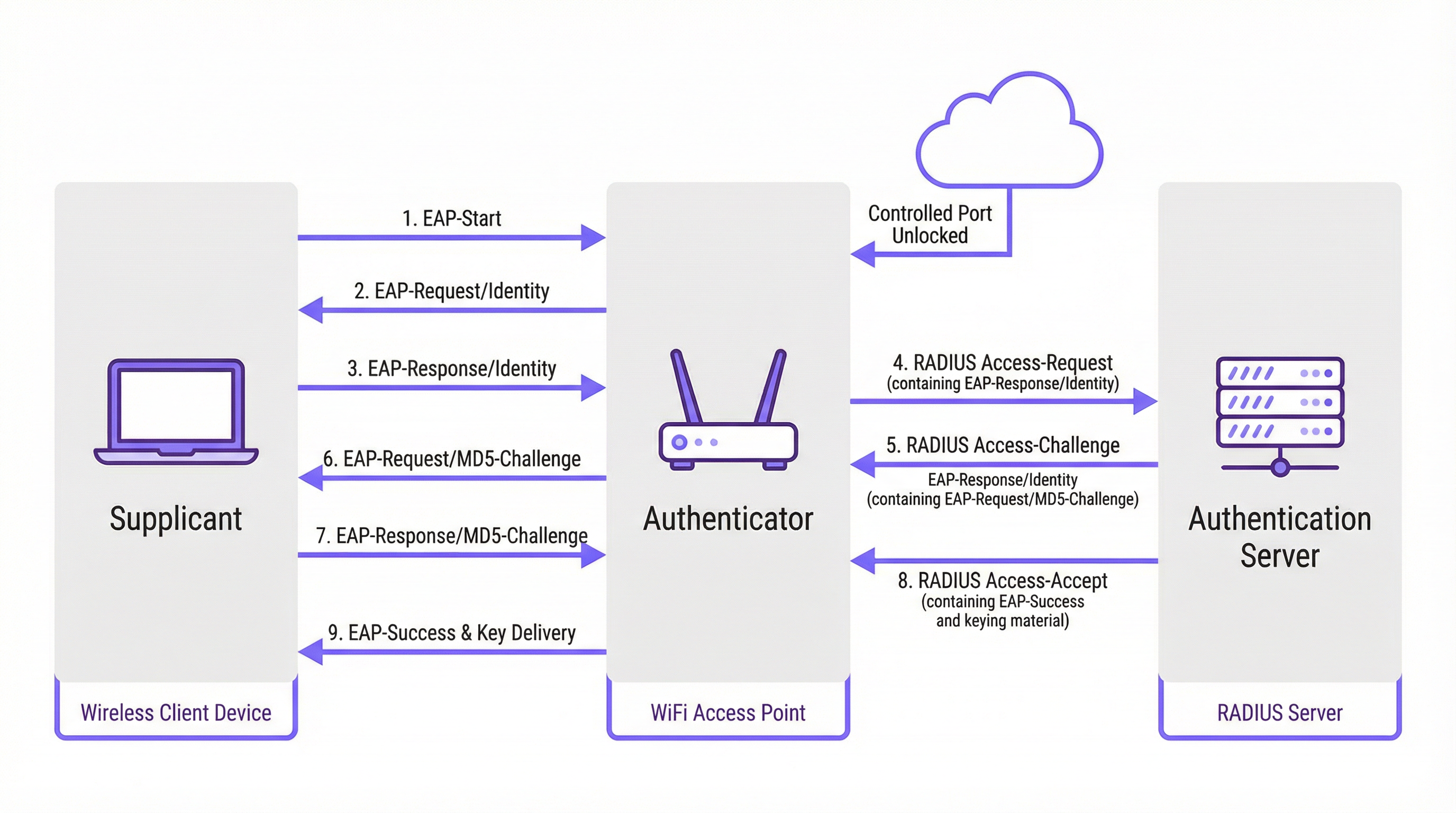
Le processus d'authentification suit un échange de messages structuré orchestré par le protocole EAP (Extensible Authentication Protocol). EAP est un framework flexible qui prend en charge diverses méthodes d'authentification (types EAP), permettant aux organisations de choisir celle qui correspond le mieux à leurs exigences de sécurité et à leur infrastructure existante.
Comparaison des méthodes EAP
Le choix de la bonne méthode EAP est une décision de déploiement critique. Les principales méthodes utilisées dans les réseaux d'entreprise modernes sont EAP-TLS, PEAP et EAP-TTLS.
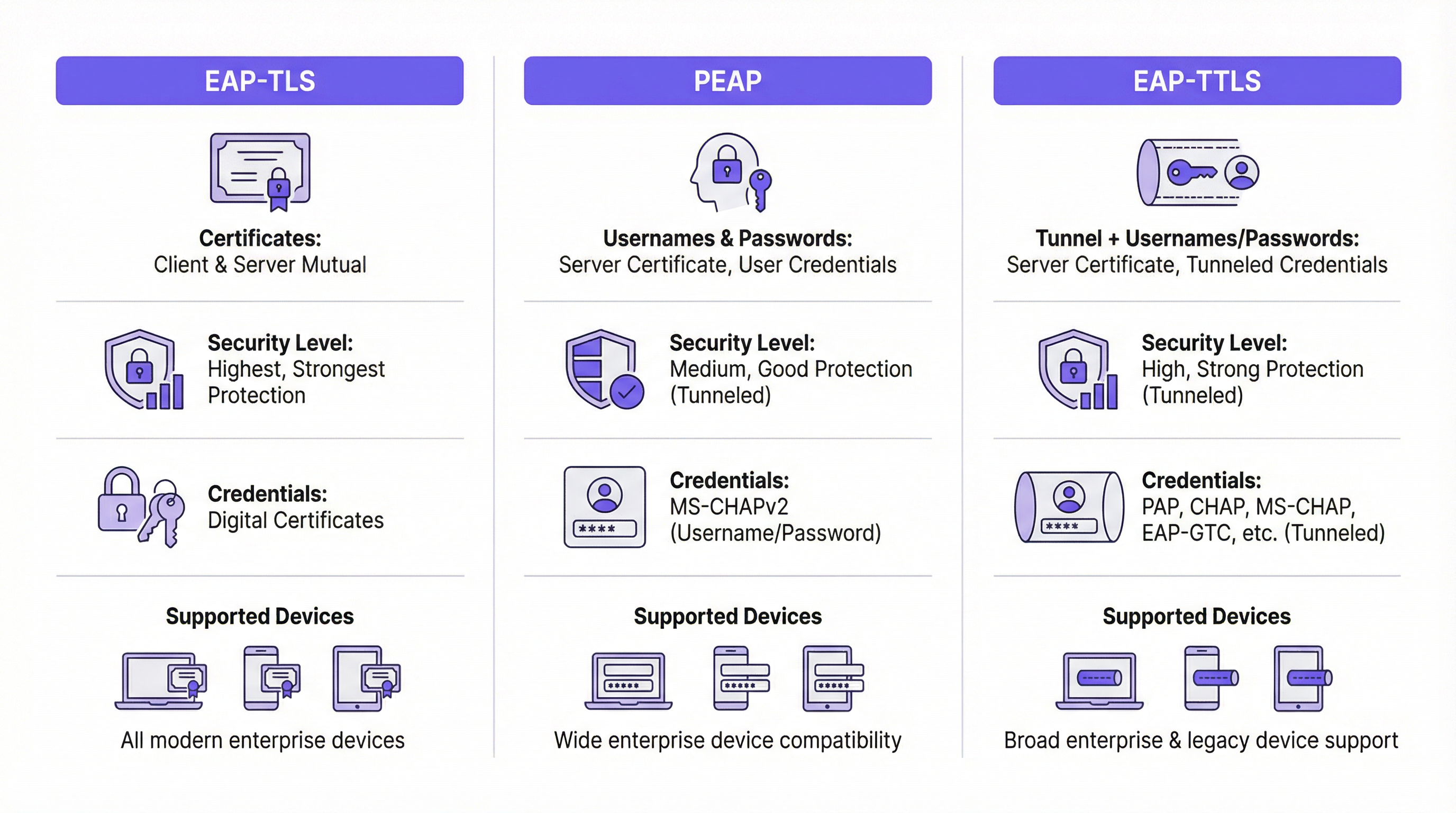
| Fonctionnalité | EAP-TLS (Transport Layer Security) | PEAP (Protected EAP) | EAP-TTLS (Tunneled TLS) |
|---|---|---|---|
| Niveau de sécurité | Très élevé. Fournit une authentification mutuelle basée sur des certificats. | Élevé. Chiffre l'échange d'identifiants dans un tunnel TLS. | Élevé. Similaire à PEAP, chiffre l'échange d'identifiants. |
| Identifiants | Certificats numériques client et serveur | Certificat serveur, identifiants utilisateur (par ex., nom d'utilisateur/mot de passe) | Certificat serveur, identifiants utilisateur (options plus flexibles) |
| Complexité | Élevée. Nécessite une infrastructure à clé publique (PKI) pour gérer les certificats de tous les appareils. | Moyenne. Exploite les identifiants d'annuaire existants (par ex., Active Directory). | Moyenne. Similaire à PEAP mais offre une plus grande flexibilité pour les protocoles d'authentification. |
| Cas d'usage | Appareils d'entreprise où le déploiement de certificats peut être automatisé via MDM. Environnements de haute sécurité. | BYOD et environnements d'entreprise où l'authentification par nom d'utilisateur/mot de passe est privilégiée. | Environnements diversifiés avec un mélange de systèmes d'exploitation clients (par ex., macOS, Linux). |
EAP-TLS est largement considéré comme la référence en matière de sécurité 802.1X. Il exige que le client et le serveur disposent tous deux d'un certificat numérique, permettant une authentification mutuelle. Cela élimine le risque d'attaques basées sur les mots de passe, mais introduit la charge supplémentaire de déployer et de gérer un certificat sur chaque appareil client.
PEAP est le type EAP le plus courant dans les environnements d'entreprise. Il simplifie le déploiement en ne nécessitant un certificat que sur le serveur d'authentification. Le client vérifie l'identité du serveur puis crée un tunnel TLS chiffré. À l'intérieur de ce tunnel, le client s'authentifie à l'aide de méthodes moins complexes, généralement MS-CHAPv2 (nom d'utilisateur et mot de passe). Bien que sécurisé, il reste vulnérable aux attaques de phishing si les utilisateurs sont trompés et se connectent à un point d'accès malveillant doté d'un certificat serveur d'apparence valide.
EAP-TTLS est fonctionnellement similaire à PEAP mais offre plus de flexibilité. Il crée également un tunnel TLS mais autorise une gamme plus large de protocoles d'authentification internes, tels que PAP, CHAP ou EAP-MD5, ce qui en fait un choix polyvalent pour les environnements dotés de systèmes hérités ou de types de clients diversifiés.
Guide d'implémentation
Un déploiement 802.1X réussi nécessite une planification minutieuse et une exécution par étapes. Les étapes suivantes fournissent une feuille de route indépendante des fournisseurs.
Phase 1 : Infrastructure et planification
- Sélectionnez votre serveur RADIUS : Choisissez un serveur RADIUS adapté à votre infrastructure existante. Le Network Policy Server (NPS) de Microsoft est un choix courant pour les environnements Windows, tandis que les options open source comme FreeRADIUS sont très flexibles. Les services RADIUS basés sur le cloud sont également de plus en plus populaires pour leur évolutivité et la réduction de la charge de gestion.
- Choisissez votre méthode EAP : Sur la base de la comparaison ci-dessus, sélectionnez la méthode EAP qui équilibre le mieux vos exigences de sécurité, votre base d'utilisateurs et vos capacités administratives. Pour la plupart des environnements d'entreprise, PEAP offre un excellent compromis. Pour les déploiements de haute sécurité, EAP-TLS est la voie recommandée.
- Planifiez votre stratégie de certificats : Il s'agit de l'étape la plus critique. Pour PEAP ou EAP-TTLS, vous aurez besoin d'un certificat serveur pour votre serveur RADIUS. Ce certificat DOIT être émis par une autorité de certification (CA) publique de confiance. L'utilisation d'un certificat auto-signé entraînera des avertissements de sécurité sur tous les appareils clients, compromettant la confiance des utilisateurs et la sécurité.
Phase 2 : Configuration
- Configurez le serveur RADIUS : Installez et configurez le serveur RADIUS de votre choix. Cela implique :
- L'installation du certificat serveur.
- La définition des clients RADIUS (vos points d'accès et commutateurs).
- La création de stratégies de demande de connexion pour traiter les requêtes entrantes.
- La création de stratégies réseau qui définissent les conditions, les contraintes et les paramètres d'authentification. Par exemple, une stratégie peut stipuler que seuls les membres d'un groupe Active Directory spécifique sont autorisés à se connecter.
- Configurez l'authentificateur (points d'accès sans fil/commutateurs) :
- Configurez votre contrôleur de réseau local sans fil ou vos points d'accès individuels avec l'adresse IP de votre serveur RADIUS et le secret partagé.
- Créez un nouveau WLAN/SSID dédié au 802.1X. N'essayez pas d'exécuter le 802.1X sur un réseau PSK ou ouvert existant.
- Assurez-vous que le SSID est configuré pour WPA2-Enterprise ou WPA3-Enterprise.
Phase 3 : Intégration et déploiement des clients
- Appareils d'entreprise : Utilisez une solution de gestion des appareils mobiles (MDM) ou de stratégie de groupe (GPO) pour configurer automatiquement les appareils appartenant à l'entreprise. Le MDM/GPO peut pousser le profil du réseau sans fil, y compris le SSID, le type EAP et tous les certificats CA nécessaires, vers l'appareil. Cela offre une expérience "zero-touch" à l'utilisateur final.
- BYOD (Bring Your Own Device) : L'intégration des appareils personnels est plus complexe. La meilleure pratique consiste à utiliser une solution d'intégration dédiée. Ces solutions fournissent un SSID d'intégration temporaire et ouvert. Lorsqu'un utilisateur se connecte, il est redirigé vers un Captive Portal où il peut s'authentifier et télécharger un utilitaire de configuration ou un profil qui configure automatiquement son appareil pour le réseau 802.1X sécurisé.
Bonnes pratiques
- Segmentez votre réseau : Utilisez l'attribution dynamique de VLAN basée sur les attributs RADIUS. Cela vous permet de placer différents groupes d'utilisateurs (par ex., employés, sous-traitants, invités) dans différents VLAN avec des stratégies d'accès distinctes, même lorsqu'ils se connectent au même SSID.
- Utilisez toujours un certificat public de confiance : L'importance d'utiliser un certificat public sur votre serveur RADIUS ne saurait être surestimée. C'est la pierre angulaire de la confiance des clients et cela empêche les attaques de l'homme du milieu (man-in-the-middle).
- Surveillez et journalisez : Surveillez activement les journaux d'authentification RADIUS. C'est inestimable pour le dépannage des problèmes de connexion et pour l'audit de sécurité. Les tentatives d'authentification échouées peuvent être un indicateur précoce d'une attaque potentielle.
- Privilégiez WPA3-Enterprise : Là où votre matériel et vos clients le prennent en charge, WPA3-Enterprise offre des améliorations de sécurité significatives par rapport à WPA2-Enterprise, notamment les trames de gestion protégées (PMF) pour empêcher les attaques par désauthentification.
Dépannage et atténuation des risques
| Problème courant | Cause | Stratégie d'atténuation |
|---|---|---|
| Échec de la connexion | Incompatibilité des types EAP entre le client et le serveur. Secret partagé RADIUS incorrect. Pare-feu bloquant les ports RADIUS (UDP 1812/1813). | Vérifiez les paramètres EAP sur le client et le serveur. Revérifiez le secret partagé sur l'AP et le serveur RADIUS. Assurez-vous que les pare-feu autorisent le trafic RADIUS. |
| Avertissements de certificat | Le serveur RADIUS utilise un certificat auto-signé ou non approuvé. | Remplacez le certificat auto-signé par celui d'une autorité de certification publique de confiance (par ex., DigiCert, Sectigo). |
| Connexions lentes | Le serveur RADIUS est sous-dimensionné ou présente une latence élevée vers le service d'annuaire. | Surveillez les performances du serveur RADIUS. Assurez une connectivité à faible latence entre le serveur RADIUS et les contrôleurs de domaine. |
| Phishing/Points d'accès malveillants | Les utilisateurs sont trompés et se connectent à un point d'accès malveillant diffusant le même SSID. | Utilisez EAP-TLS pour éliminer les mots de passe. Pour PEAP/EAP-TTLS, assurez-vous que les clients sont configurés pour valider le certificat et le nom du serveur. |
ROI et impact commercial
Bien que la mise en œuvre du 802.1X nécessite un investissement initial en temps et en ressources, le retour sur investissement (ROI) est significatif, en particulier pour les sites à grande échelle.
- Posture de sécurité renforcée : En passant d'un mot de passe partagé unique à des identifiants uniques par utilisateur ou par appareil, vous réduisez considérablement le risque d'accès non autorisé. Il s'agit d'une étape critique dans l'atténuation des violations de données.
- Conformité : Pour les organisations soumises aux normes PCI DSS, GDPR ou HIPAA, le 802.1X est un contrôle clé pour démontrer que vous avez mis en œuvre des mesures de contrôle d'accès strictes. Le coût d'un audit échoué ou d'une pénalité de conformité dépasse de loin le coût du déploiement.
- Efficacité opérationnelle : L'automatisation de l'intégration et l'utilisation de VLAN dynamiques réduisent la charge administrative des équipes informatiques. Les nouveaux employés peuvent obtenir un accès automatiquement en fonction de leur groupe d'annuaire, et l'accès est instantanément révoqué lorsqu'ils en sont retirés.
- Expérience utilisateur améliorée : Lorsqu'il est déployé correctement avec une intégration automatisée, le 802.1X offre une expérience de connexion fluide et sécurisée. Les utilisateurs allument simplement leur appareil, et il se connecte sans qu'ils aient besoin de saisir à nouveau un mot de passe. Il s'agit d'une amélioration significative par rapport aux Captive Portals ou aux PSK complexes.
Termes clés et définitions
RADIUS
Remote Authentication Dial-In User Service. A networking protocol that provides centralized Authentication, Authorization, and Accounting (AAA) management for users and devices that attempt to access a network service.
In an 802.1X context, the RADIUS server is the 'brain' of the operation. It's the server that checks the user's or device's credentials and tells the access point whether to grant or deny access. IT teams will spend most of their time configuring policies on the RADIUS server.
EAP
Extensible Authentication Protocol. An authentication framework, not a specific authentication mechanism. It provides a standardized way for clients and servers to negotiate an authentication method.
EAP is the language spoken between the client device, the access point, and the RADIUS server. Understanding that EAP is a framework helps explain why there are so many different 'types' of 802.1X (EAP-TLS, PEAP, etc.). The choice of EAP type is the most important decision in an 802.1X deployment.
Supplicant
The software on a client device (like a laptop or smartphone) that is responsible for responding to the authenticator's requests for credentials.
The supplicant is built into modern operating systems like Windows, macOS, iOS, and Android. IT teams rarely interact with the supplicant directly, but they configure it via network profiles, telling it which EAP type to use and which server to trust.
Authenticator
The network device that acts as a gatekeeper, blocking or allowing traffic from the supplicant. In a wireless network, this is the access point (AP).
The authenticator doesn't make the authentication decision itself. It's a middleman that simply passes EAP messages between the supplicant and the authentication server. Its primary job is to enforce the decision made by the RADIUS server.
PKI
Public Key Infrastructure. A set of roles, policies, hardware, software, and procedures needed to create, manage, distribute, use, store, and revoke digital certificates.
A PKI is essential for deploying EAP-TLS, the most secure form of 802.1X. While the term sounds intimidating, a basic PKI can be set up using Microsoft Active Directory Certificate Services or a cloud-based service. It's the foundation for a certificate-based security model.
MDM
Mobile Device Management. Software that allows IT administrators to control, secure, and enforce policies on smartphones, tablets, and other endpoints.
MDM is the key to a scalable and seamless 802.1X deployment for corporate-owned devices. IT teams use the MDM to automatically push the WiFi profile and client certificate to devices, meaning users can connect securely with zero manual configuration.
Dynamic VLAN Assignment
A feature that allows the RADIUS server to assign a user or device to a specific VLAN based on their identity or group membership.
This is a powerful tool for network segmentation. Instead of having multiple SSIDs for different user groups, you can have one secure SSID. The RADIUS server then places employees in the corporate VLAN, guests in the guest VLAN, and IoT devices in their own isolated VLAN, all based on the credentials they present.
WPA3-Enterprise
The latest generation of Wi-Fi security for enterprise networks, building on WPA2-Enterprise by adding stronger encryption and protection against de-authentication attacks.
When procuring new network hardware, IT managers should ensure it supports WPA3-Enterprise. It provides a significant security uplift over its predecessor and is a key component of a modern, secure wireless infrastructure. It's the 'Enterprise' version that integrates with 802.1X.
Études de cas
A 500-room luxury hotel needs to provide secure WiFi for staff (on corporate-issued tablets) and a separate, seamless experience for guests. The hotel must comply with PCI DSS due to its payment systems.
Staff Network: Implement an 802.1X EAP-TLS network. Deploy a RADIUS server and an internal Certificate Authority (or use a cloud PKI service). Use an MDM to automatically provision the corporate tablets with client certificates and the WPA2/WPA3-Enterprise network profile. This provides the highest level of security for devices handling sensitive operational data. Guest Network: Implement a separate SSID using a captive portal with a straightforward, time-limited voucher or social login. This network should be completely isolated from the staff and PCI networks using VLANs and firewall rules. This approach balances high security for corporate assets with ease of use for transient guests.
A large retail chain with 200 stores needs to secure its in-store network, which is used by Point-of-Sale (POS) terminals, employee-used handheld inventory scanners, and a guest WiFi network.
POS & Inventory Scanners: Deploy a single, hidden SSID using 802.1X EAP-TLS. Since these are corporate-controlled devices, certificates can be pre-loaded before deployment. Use MAC Authentication Bypass (MAB) as a fallback for legacy devices that may not support 802.1X, but this should be an exception. Assign this network to a secure, firewalled VLAN that only allows traffic to the payment processor and inventory management servers. Guest WiFi: Deploy a separate, public-facing SSID with a branded captive portal that requires acceptance of terms and conditions. This network must be completely isolated from the secure store network.
Analyse de scénario
Q1. Your CFO is concerned about the cost of a commercial certificate for the RADIUS server and suggests using a self-signed certificate from your internal Windows CA. How do you respond?
💡 Astuce :Consider the user experience and the security implications of a client not being able to automatically trust the server.
Afficher l'approche recommandée
A self-signed certificate will cause a security warning on every single device that connects to the network for the first time. This trains users to ignore security warnings, which is a significant security risk. A publicly trusted certificate is automatically recognized by all modern devices, providing a seamless connection experience and ensuring that clients can verify they are connecting to the legitimate server, which is crucial for preventing man-in-the-middle attacks. The annual cost of a public certificate is a small price to pay for the enhanced security and improved user experience.
Q2. A conference centre wants to use 802.1X for event attendees. They have thousands of new users each week. Is EAP-TLS a viable option? Why or why not?
💡 Astuce :Think about the lifecycle of a guest user and the administrative overhead of certificate management.
Afficher l'approche recommandée
EAP-TLS is likely not a viable option for this scenario. The primary challenge is the administrative overhead of provisioning a unique digital certificate for thousands of transient users each week. The process of generating, distributing, and then revoking these certificates would be operationally complex and costly. A better approach would be to use a simpler authentication method for guests, such as a captive portal with voucher codes or social login, while reserving 802.1X for staff and permanent infrastructure.
Q3. You are deploying a PEAP-MS-CHAPv2 network. A user reports that they can connect from their Windows laptop but not from their personal Android phone. What is the most likely cause of this issue?
💡 Astuce :Consider how different operating systems handle certificate validation and network profiles.
Afficher l'approche recommandée
The most likely cause is that the Android phone has not been configured to properly trust the RADIUS server's certificate. While a Windows laptop joined to a domain might automatically trust the certificate (if the root CA is pushed via Group Policy), a personal Android device needs to be manually configured. The user likely needs to install the root CA certificate on their phone and/or explicitly configure the network profile to validate the server certificate and specify the correct domain name. This highlights the importance of a clear and simple onboarding process for BYOD users.
Points clés à retenir
- ✓802.1X provides port-based network access control, authenticating users or devices before granting network access.
- ✓The core components are the Supplicant (client), Authenticator (AP/switch), and Authentication Server (RADIUS).
- ✓EAP-TLS is the most secure method, using mutual certificate authentication, but has higher administrative overhead.
- ✓PEAP and EAP-TTLS are widely used, balancing strong security with easier deployment by using server-side certificates and user credentials.
- ✓Always use a publicly trusted certificate for your RADIUS server to avoid security warnings and prevent man-in-the-middle attacks.
- ✓Automate client configuration using MDM for corporate devices and a dedicated onboarding portal for BYOD.
- ✓Use dynamic VLAN assignment to segment users and devices into different network zones based on their identity and permissions.




