

Band Steering et équilibrage de charge pour le WiFi haute densité
This authoritative technical reference equips IT managers, network architects, and venue operations directors with the knowledge to design, configure, and optimise high-density WiFi networks using band steering and load balancing. It covers the architectural principles behind 2.4 GHz vs. 5 GHz band selection, AP load distribution strategies, and vendor-neutral configuration best practices for demanding environments such as stadiums, hotels, and conference centres. By applying these strategies, organisations can measurably improve wireless throughput, reduce user complaints, and transform their network infrastructure into a strategic business asset.
🎧 Écouter ce guide
Voir la transcription

Synthèse
Pour les entreprises gérant des environnements sans fil à haute densité, le maintien de performances WiFi optimales constitue un défi opérationnel critique. À mesure que le nombre d'appareils connectés par mètre carré augmente dans des lieux tels que les aéroports, les centres de conférence et les centres commerciaux, les configurations réseau conventionnelles faiblissent, entraînant une mauvaise expérience utilisateur, des pertes de connexion et une réduction du débit de données. Ce guide aborde ces défis de front en proposant une analyse technique approfondie de deux stratégies d'optimisation fondamentales : le band steering et l'équilibrage de charge. Nous explorons les principes architecturaux qui différencient les bandes de fréquences 2,4 GHz et 5 GHz, et détaillons comment orienter intelligemment les clients double bande vers le spectre 5 GHz, moins encombré et de plus grande capacité. De plus, nous analysons les techniques d'équilibrage de charge des points d'accès (AP) qui répartissent uniformément les connexions clientes sur les ressources réseau disponibles, évitant ainsi que des AP individuels ne deviennent des goulots d'étranglement. En mettant en œuvre les bonnes pratiques agnostiques et les conseils de configuration décrits ici, les responsables informatiques et les architectes réseau peuvent offrir une expérience sans fil supérieure et plus fiable, ayant un impact direct sur la satisfaction client, l'efficacité opérationnelle et le retour sur investissement (ROI) de l'entreprise. Cette référence est conçue pour une application pratique, offrant des scénarios de déploiement concrets et des résultats mesurables pour éclairer votre stratégie d'infrastructure réseau ce trimestre.
Analyse technique approfondie
Comprendre les bandes de fréquences : 2,4 GHz vs 5 GHz
La base d'une gestion WiFi efficace dans les environnements à haute densité repose sur la compréhension des différences fondamentales entre les bandes de fréquences 2,4 GHz et 5 GHz. Il ne s'agit pas simplement de deux voies pour les données ; ce sont des environnements RF distincts avec des caractéristiques de propagation uniques qui dictent leur adéquation à différents cas d'usage et scénarios de déploiement.
| Caractéristique | Bande 2,4 GHz | Bande 5 GHz |
|---|---|---|
| Portée | Longueur d'onde plus longue, meilleure pénétration des murs | Longueur d'onde plus courte, plus facilement obstruée |
| Interférences | Élevées (Micro-ondes, Bluetooth, téléphones sans fil) | Faibles (Moins encombrée, plus de canaux) |
| Canaux | 11 à 14 canaux, seulement 3 non chevauchants | Plus de 23 canaux non chevauchants |
| Bande passante | Débits de données potentiels plus faibles | Débits de données potentiels plus élevés (ex. avec 802.11ac/ax) |
| Adéquation | Connectivité de base, IoT, appareils d'ancienne génération | Applications à large bande passante (vidéo, voix), zones denses |
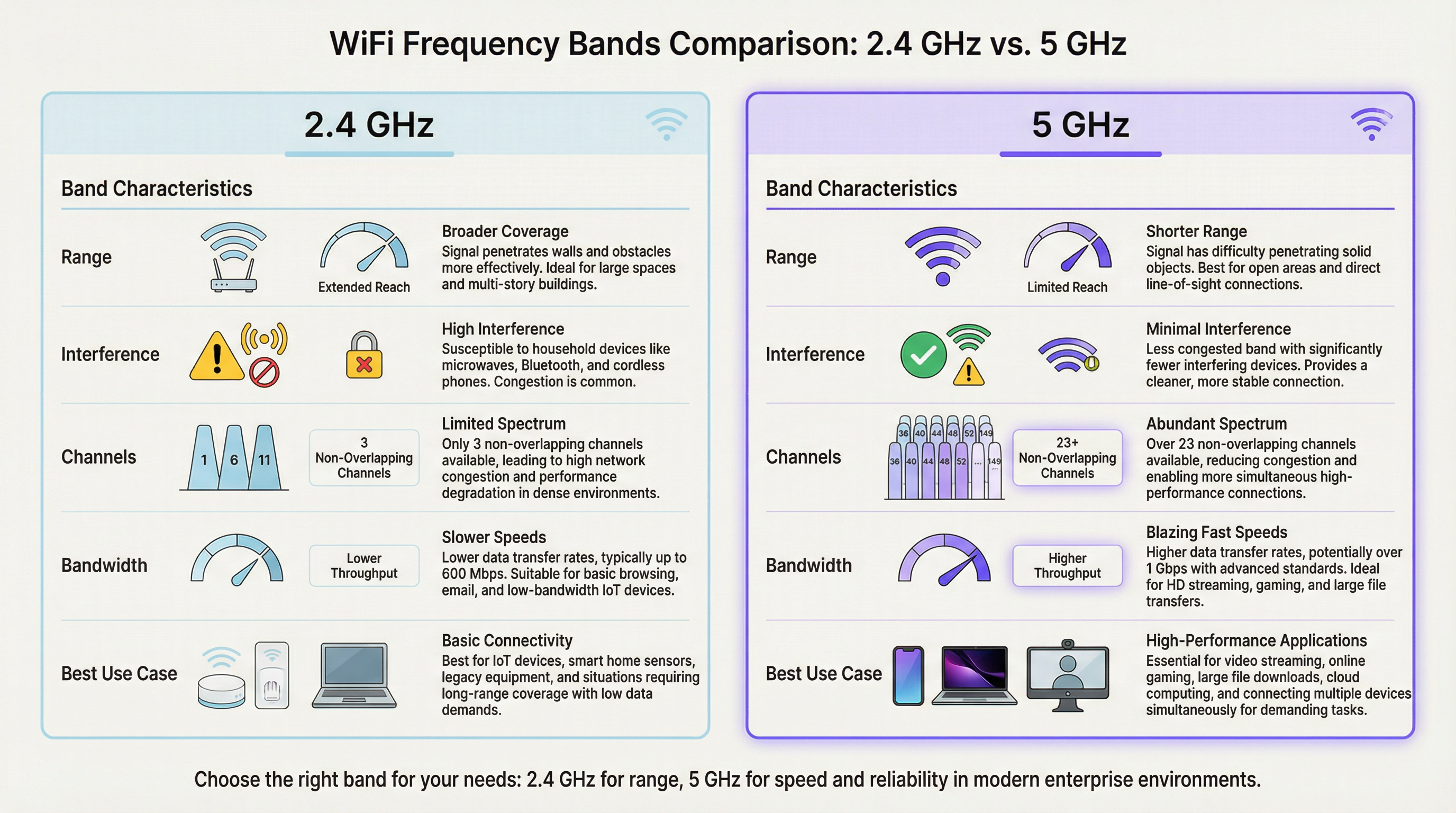
Dans un environnement à haute densité comme un stade ou un amphithéâtre, la bande 2,4 GHz sature rapidement. Avec seulement trois canaux non chevauchants (1, 6 et 11 en Amérique du Nord), les interférences co-canal constituent un frein important et persistant aux performances. Chaque AP supplémentaire fonctionnant sur le même canal dans la même zone dégrade les performances de tous les autres. La bande 5 GHz, en revanche, offre un spectre beaucoup plus large avec de nombreux canaux non chevauchants, ce qui en fait le choix privilégié pour les applications critiques en termes de performances. L'objectif principal des implémentations de band steering WiFi est de déplacer de manière proactive les appareils clients compatibles de la bande 2,4 GHz encombrée vers la bande 5 GHz, plus propre et plus rapide, en réservant le spectre 2,4 GHz aux capteurs IoT, aux appareils d'ancienne génération et aux clients en limite de couverture.
Comment fonctionne le Band Steering
Le band steering n'est pas une norme IEEE officielle, mais une technique propriétaire mise en œuvre par les fournisseurs de WiFi d'entreprise. Bien que les algorithmes spécifiques varient selon les fabricants, le mécanisme général implique que le point d'accès encourage activement ou oblige un client double bande à se connecter à la radio 5 GHz. Cela s'accomplit généralement par plusieurs méthodes qui opèrent au niveau des trames de gestion 802.11.
La première est la réponse différée aux requêtes de sondage (Delayed Probe Responses) : lorsqu'un client double bande envoie simultanément une requête de sondage sur les deux bandes, l'AP peut retarder intentionnellement sa réponse sur la fréquence 2,4 GHz de plusieurs centaines de millisecondes. Le client, constatant une réponse plus rapide sur le 5 GHz, préfère naturellement cette bande supérieure et s'y connecte. La deuxième est la suppression des réponses de sondage (Probe Response Suppression) : l'AP peut ignorer les requêtes de sondage 2,4 GHz des clients qu'il a identifiés comme compatibles 5 GHz, rendant ainsi le réseau 2,4 GHz invisible pour eux lors de la phase de découverte initiale. La troisième approche, la plus moderne, est la gestion de transition BSS IEEE 802.11v : cette trame standard permet à l'AP de demander explicitement à un client de passer à un autre BSS (Basic Service Set), en l'occurrence, la radio 5 GHz sur le même AP. Il s'agit d'une méthode coopérative qui repose sur la prise en charge de la norme 802.11v côté client. C'est l'approche recommandée pour les déploiements d'entreprise, car elle évite les techniques de suppression agressives pouvant causer des problèmes de connectivité avec les clients non conformes.
Équilibrage de charge des AP
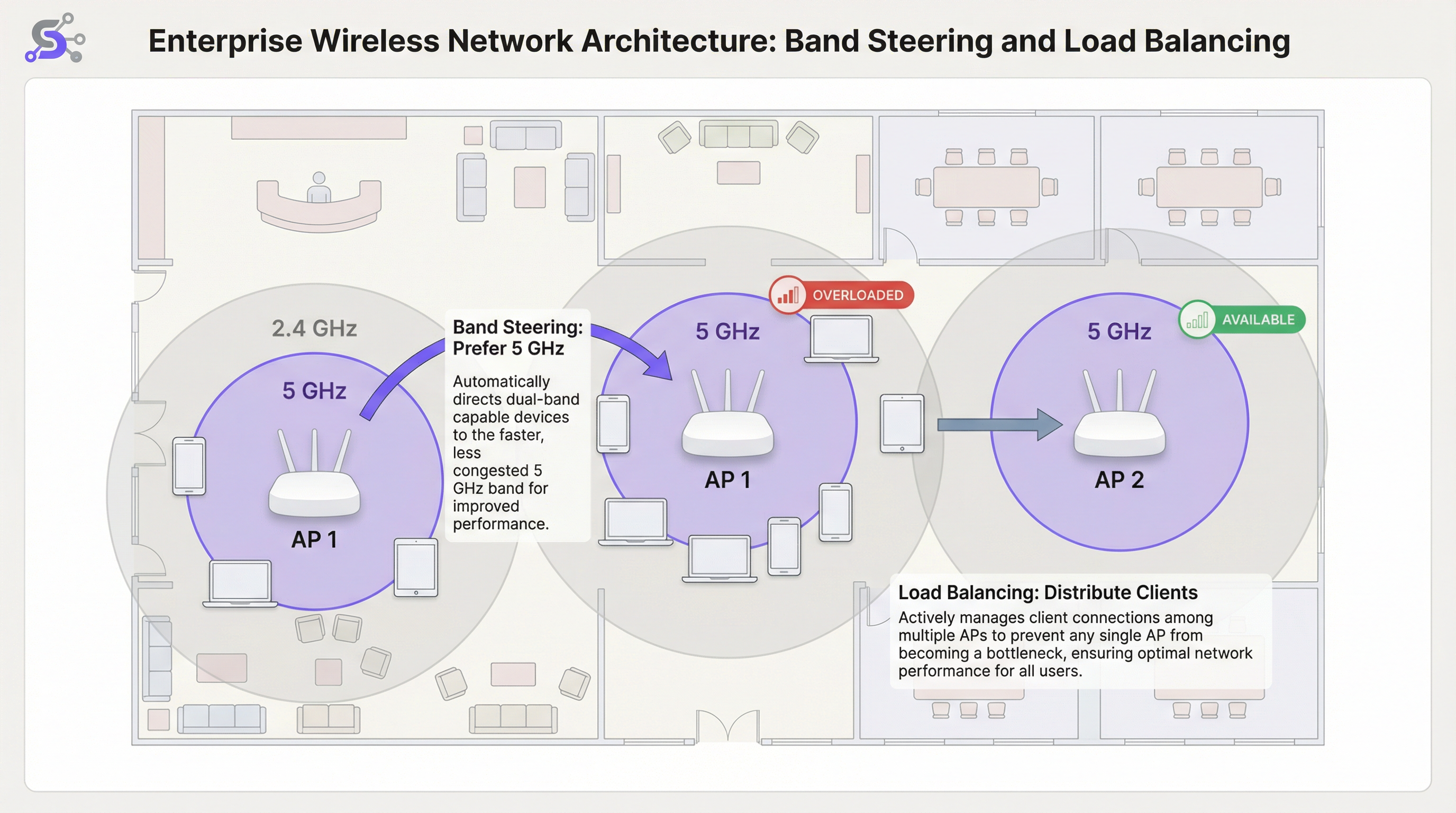
Alors que le band steering optimise la sélection de la bande de fréquences pour chaque AP, l'équilibrage de charge WiFi répond au défi plus large de la répartition uniforme des clients sur plusieurs AP dans une zone donnée. Dans un terminal d'aéroport ou un hall d'hôtel très fréquenté, il est courant que les utilisateurs se rassemblent près d'un seul AP situé au centre, le surchargeant tandis que les AP adjacents restent sous-utilisés. Cela crée une disparité de performances significative : les utilisateurs proches de l'AP surchargé subissent un service dégradé, tandis que ceux proches des AP inactifs ne profitent pas pleinement de l'infrastructure disponible. Les algorithmes d'équilibrage de charge évitent cela en définissant des seuils pour le nombre de clients ou l'utilisation de la radio sur chaque AP.
Lorsqu'un AP atteint son seuil de charge configuré, il peut refuser les nouvelles requêtes d'association. Cela encourage le nouvel appareil client à effectuer une nouvelle analyse et à découvrir un AP à proximité moins encombré. Les systèmes plus sophistiqués exploitent la norme 802.11v pour suggérer de manière proactive un AP alternatif spécifique au client, rendant la transition fluide et transparente pour l'utilisateur final. Les implémentations les plus avancées utilisent des algorithmes prédictifs qui anticipent les augmentations de charge en fonction des modèles historiques et commencent à redistribuer les clients avant qu'un goulot d'étranglement ne se forme.
Le rôle du contrôleur LAN sans fil (WLC)
Dans les déploiements d'entreprise, le band steering et l'équilibrage de charge ne sont pas gérés au niveau de chaque AP individuel, mais sont orchestrés par un contrôleur LAN sans fil (WLC) centralisé ou une plateforme de gestion basée sur le cloud. Le WLC maintient une vue globale de tous les clients associés, de la force de leurs signaux, de la charge actuelle sur chaque AP et de l'environnement RF sur l'ensemble du site. Cette intelligence centralisée est ce qui rend possible un équilibrage de charge sophistiqué : le contrôleur peut prendre des décisions éclairées sur l'endroit où rediriger un nouveau client en fonction des données en temps réel de l'ensemble du réseau, et non pas seulement de la vue locale limitée d'un seul AP.
Les plateformes gérées dans le cloud, telles que celles proposées par Cisco Meraki, Aruba Central et Juniper Mist, poussent ce concept plus loin en intégrant une gestion des ressources radio (RRM) pilotée par l'IA. Ces systèmes analysent en permanence les données RF, le comportement des clients et les performances des applications pour ajuster dynamiquement les attributions de canaux, la puissance de transmission et les seuils d'orientation sans intervention manuelle. Pour les exploitants de grands sites gérant des dizaines ou des centaines d'AP sur plusieurs étages ou bâtiments, ce niveau d'automatisation n'est pas un luxe mais une nécessité opérationnelle pratique.
Le WiFi 6 et le Band Steering à l'ère du 6 GHz
L'introduction du WiFi 6E (IEEE 802.11ax) et l'ouverture réglementaire de la bande de spectre 6 GHz représentent une évolution significative pour l'architecture WiFi haute densité. La bande 6 GHz offre jusqu'à 1 200 MHz de spectre propre supplémentaire, avec 59 canaux non chevauchants de 20 MHz disponibles sur des marchés tels que les États-Unis et le Royaume-Uni. Pour les sites déployant des AP compatibles WiFi 6E, la stratégie de band steering doit évoluer vers un modèle à trois bandes : orienter les appareils d'ancienne génération vers le 2,4 GHz, les appareils compatibles vers le 5 GHz et les derniers clients WiFi 6E vers la bande vierge de 6 GHz. Cette approche par niveaux maximise l'utilisation de tout le spectre disponible et garantit que les appareils les plus récents et les plus performants bénéficient de l'environnement RF le plus propre possible, exempt des interférences héritées qui s'accumulent dans les bandes plus anciennes.
Guide d'implémentation
Étape 1 : Étude de site pré-déploiement
Une étude de site prédictive à l'aide d'outils professionnels tels qu'Ekahau Site Survey ou iBwave Design est non négociable pour tout déploiement à haute densité. Il ne s'agit pas seulement de vérifier la couverture, mais aussi de planifier la capacité. Votre objectif est d'identifier les zones à forte densité d'appareils, de modéliser les caractéristiques de propagation RF de l'espace physique, et de planifier le placement des AP ainsi que l'allocation des canaux pour minimiser les interférences co-canal. L'étude doit également tenir compte de la densité de clients attendue pendant les périodes de pointe, ce qui, pour un centre de conférence, peut correspondre à une session plénière, et pour un stade, à la fenêtre de 30 minutes précédant le coup d'envoi, lorsque des dizaines de milliers de fans tentent de se connecter simultanément.
Étape 2 : Configuration du Band Steering
Dans votre contrôleur LAN sans fil (WLC) ou votre tableau de bord de gestion cloud, vous trouverez un paramètre pour le Band Steering ou la sélection de bande. Les principaux paramètres de configuration du band steering incluent les éléments suivants. Mode : la plupart des fournisseurs d'entreprise proposent des options telles que Préférer 5 GHz, Forcer 5 GHz ou Équilibrer les bandes. Pour les lieux à haute densité, Préférer 5 GHz est le point de départ recommandé. Forcer peut s'avérer trop agressif et refuser le service aux clients d'ancienne génération fonctionnant uniquement sur 2,4 GHz, générant ainsi des tickets de support inutiles. Seuil d'orientation (RSSI) : définissez une force de signal minimale pour qu'un client soit orienté vers le 5 GHz. Une valeur de départ typique est de -65 dBm. Si le signal 5 GHz du client est inférieur à ce seuil, il pourrait en réalité bénéficier d'une meilleure expérience sur le 2,4 GHz malgré les interférences, en particulier dans les environnements avec des murs épais ou des matériaux de construction importants qui atténuent la fréquence la plus élevée.
Étape 3 : Configuration de l'équilibrage de charge
Seuil du nombre de clients : définissez un nombre maximum de clients par radio AP. Pour une zone à haute densité, cela peut descendre à 25 ou 30 clients pour garantir la qualité de service, même si le matériel de l'AP prend techniquement en charge davantage d'associations simultanées. Seuil d'utilisation : une approche plus dynamique et recommandée consiste à équilibrer en fonction de l'utilisation de la radio, exprimée en pourcentage du temps pendant lequel le support radio est occupé à transmettre ou à recevoir. Un seuil de 60 à 70 % est une bonne pratique largement acceptée, car il laisse une marge suffisante pour le trafic en rafale sans permettre à un seul AP de devenir un goulot d'étranglement prolongé.
Étape 4 : Validation et surveillance
Après le déploiement, une surveillance continue est essentielle. Utilisez votre WLC ou votre plateforme de gestion cloud pour suivre le ratio de clients sur 5 GHz par rapport au 2,4 GHz, la répartition des clients sur les AP dans chaque zone et les débits de données moyens des clients au fil du temps. Établissez une base de référence pendant une période de fonctionnement normal et utilisez-la pour identifier les anomalies. Une augmentation soudaine des associations 2,4 GHz ou une répartition inégale des clients indique souvent une dérive de configuration, une nouvelle source d'interférences ou une défaillance matérielle sur l'un des AP.
Bonnes pratiques
Stratégie de SSID unique : utilisez un seul SSID pour les bandes 2,4 GHz et 5 GHz. Il s'agit d'un prérequis non négociable pour un band steering efficace, car cela permet au client et au réseau de négocier la meilleure bande de manière transparente en arrière-plan. Des SSID séparés pour chaque bande obligent les utilisateurs à faire un choix manuel, ce qui va à l'encontre de l'objectif de l'orientation automatisée et crée une charge de support lorsque les utilisateurs choisissent systématiquement la mauvaise bande.
Désactiver les faibles débits de données : pour éviter que les clients lents ne consomment un temps d'antenne excessif, désactivez les débits de données d'ancienne génération inférieurs à 12 Mbps sur les deux bandes. Cela améliore les performances globales de la cellule grâce à une pratique connue sous le nom d'équité du temps d'antenne (airtime fairness). Dans les environnements très denses tels que les stades ou les grandes salles de conférence, il est conseillé d'augmenter le débit minimum à 24 Mbps, car cela réduit considérablement la surcharge liée aux trames de gestion et garantit une utilisation efficace du temps d'antenne disponible.
Largeur de canal : dans les zones à haute densité, privilégiez des canaux plus étroits de 20 MHz pour le 5 GHz. Bien que les canaux de 40 MHz ou 80 MHz offrent des vitesses de pointe plus élevées pour les clients individuels, ils réduisent le nombre total de canaux non chevauchants disponibles, augmentant ainsi le risque d'interférences co-canal dans un environnement multi-AP. La capacité globale du réseau, mesurée comme le débit total disponible sur l'ensemble des AP, est bien plus importante que la vitesse de pointe d'une seule connexion client.
Contrôle de la puissance de transmission (TPC) : ne faites pas fonctionner les AP à leur puissance de transmission maximale. Cela est contre-intuitif mais constitue l'une des bonnes pratiques les plus percutantes dans la conception de WiFi haute densité. Une puissance élevée augmente les interférences co-canal, crée de grandes cellules qui se chevauchent, ce qui rend l'itinérance plus difficile pour les clients, et peut en réalité réduire la capacité totale du réseau. Utilisez des algorithmes TPC automatisés ou réglez manuellement la puissance pour créer des cellules plus petites et plus denses qui augmentent la capacité globale du réseau et améliorent le rapport signal sur interférence plus bruit (SINR) pour tous les clients.
Dépannage et atténuation des risques
Clients collants (Sticky Clients) : le problème opérationnel le plus courant dans le WiFi d'entreprise est le client collant qui reste associé à un AP distant malgré la disponibilité d'une meilleure option. Il s'agit d'un problème de logique d'itinérance côté client qui ne peut pas être entièrement résolu par le réseau seul. Un équilibrage de charge agressif et des paramètres de puissance d'AP optimisés peuvent aider à atténuer ce problème en réduisant le chevauchement de couverture et en encourageant les clients à se déplacer plus fréquemment. L'activation du 802.11k (rapports de voisinage) et du 802.11r (transition BSS rapide) aux côtés du 802.11v crée le trio gagnant de l'itinérance qui donne aux clients à la fois les informations et l'incitation nécessaires pour prendre de meilleures décisions d'itinérance.
Clients incompatibles : certains appareils clients plus anciens ou à bas coût n'implémentent pas correctement les mécanismes de réponse au band steering. Surveillez votre réseau pour repérer les clients qui échouent de manière répétée à s'associer ou qui génèrent des événements de désauthentification, et envisagez de créer un SSID dédié pour les appareils d'ancienne génération s'ils sont critiques pour l'entreprise. Cela isole leur impact sur le réseau principal à hautes performances et empêche leur mauvais comportement d'itinérance de dégrader l'expérience des autres utilisateurs.
Configuration trop agressive : une politique Forcer 5 GHz combinée à un seuil d'équilibrage de charge très strict peut empêcher totalement les clients de se connecter, en particulier dans les environnements où le signal 5 GHz est atténué par les matériaux de construction. Testez toujours les modifications de configuration dans un environnement contrôlé ou en dehors des heures de pointe, et surveillez de près les taux d'échec d'association ainsi que les problèmes de connectivité signalés par les clients après tout changement.
ROI et impact commercial
L'investissement dans un réseau WiFi haute densité correctement architecturé génère des rendements significatifs et mesurables pour tous les types de lieux. Pour un hôtel, un WiFi fiable et performant est systématiquement cité comme l'un des principaux facteurs dans les scores de satisfaction des clients et les avis en ligne, influençant directement les taux de réservation et le revenu par chambre disponible. Pour une chaîne de magasins, il permet le fonctionnement fiable des systèmes de point de vente (POS), des scanners de gestion des stocks et des plateformes d'analyse du WiFi invité telles que Purple, qui dépendent d'une connectivité constante pour capturer le temps de séjour, les modèles de fréquentation et les données de comportement des clients qui éclairent les décisions de merchandising et de dotation en personnel.
Dans un lieu de conférence et d'événements, la qualité du réseau est un facteur primordial pour attirer et fidéliser les événements d'entreprise à grande échelle. Une seule défaillance de connectivité très médiatisée lors d'une présentation plénière peut entraîner la perte de futures réservations d'une valeur bien supérieure au coût de la mise à niveau du réseau qui l'aurait évitée. Les indicateurs clés de performance pour mesurer le succès incluent : une réduction des tickets d'incident signalés par les utilisateurs ; une augmentation des débits de données moyens des clients ; un ratio plus élevé de clients sur le 5 GHz par rapport au 2,4 GHz, avec un objectif de 70 à 80 % des clients compatibles double bande sur le 5 GHz ; et une répartition uniforme des clients sur les AP dans une zone donnée, aucun AP ne supportant systématiquement plus de 20 % au-dessus de la charge moyenne. En se concentrant sur ces optimisations techniques, les entreprises peuvent transformer leur WiFi d'un simple service de base en un atout stratégique qui améliore l'expérience client, permet des opérations basées sur les données et génère des résultats commerciaux mesurables.
Termes clés et définitions
Band Steering
A technique used by WiFi access points to encourage dual-band client devices to connect to the less congested 5 GHz frequency band instead of the 2.4 GHz band, typically by manipulating probe responses or using IEEE 802.11v BSS Transition Management frames.
IT teams implement band steering WiFi configurations to improve overall network performance in areas with many connected devices. It is a foundational feature of any high-density WiFi deployment and is configured at the wireless LAN controller or cloud management layer.
WiFi Load Balancing
A process that distributes client connections evenly across multiple access points in a network to prevent any single AP from becoming overloaded, typically enforced by setting client count or radio utilisation thresholds on the wireless LAN controller.
In a busy area like a conference hall or retail floor, network architects use load balancing to ensure a stable experience for all users. It works in conjunction with band steering: steering handles the frequency band, while load balancing handles the AP selection.
RSSI (Received Signal Strength Indicator)
A measurement of the power level that a client device is receiving from an access point, expressed in decibels-milliwatts (dBm) as a negative value. A value closer to zero (e.g., -40 dBm) indicates a stronger signal than a value further from zero (e.g., -80 dBm).
A network engineer uses RSSI values to determine connection quality and to set thresholds for roaming and band steering decisions. A typical steering threshold is -65 dBm, meaning a client will only be pushed to 5 GHz if its signal on that band is at least this strong.
Co-Channel Interference (CCI)
Performance degradation that occurs when two or more access points in close proximity are operating on the same wireless channel, causing their transmissions to collide and forcing devices to wait before transmitting, which reduces overall throughput.
Proper channel planning is the primary mitigation for CCI. This is a major reason why the 5 GHz band, with its many non-overlapping channels, is preferred for high-density deployments. Poor channel planning is one of the most common causes of underperforming WiFi networks.
Airtime Fairness
A feature that allocates wireless airtime equitably across all connected clients, preventing a slow or distant device from consuming a disproportionate share of the available transmission time and degrading performance for all other users on that AP.
Venue operators enable airtime fairness to guarantee a more consistent level of performance, especially when a mix of old and new devices are connecting to the same network. It is often implemented alongside the disabling of low data rates.
IEEE 802.11v (BSS Transition Management)
An IEEE standard that allows a wireless network to send a request to a client device to transition to a different access point or frequency band, providing a cooperative and more seamless handoff than forceful deauthentication.
Modern enterprise networks leverage 802.11v to make band steering and load balancing more efficient. It is part of the 802.11k/v/r trifecta that underpins intelligent client roaming in enterprise WiFi deployments.
Single SSID
The practice of broadcasting the same network name (SSID) for both the 2.4 GHz and 5 GHz bands on a dual-band access point, presenting one unified network identity to users while the infrastructure manages band selection in the background.
Using a single SSID is a non-negotiable prerequisite for effective band steering. If separate SSIDs exist for each band, the user must manually choose, and the network loses its ability to optimise band allocation automatically.
Sticky Client
A client device that remains associated with a distant access point with a weak signal, even when a closer AP with a stronger signal is available, due to the client's conservative roaming algorithm prioritising connection stability over performance.
IT support teams frequently troubleshoot sticky client issues in enterprise environments. The primary mitigations are optimising AP transmit power to create smaller cells, and enabling 802.11k/v/r to give clients the information and incentive to roam more aggressively.
Microcell Architecture
A high-density WiFi deployment strategy that uses a large number of low-power access points, each covering a small area, rather than a small number of high-power APs covering large areas. This maximises total network capacity by increasing the number of simultaneous, non-interfering transmissions.
Microcell architecture is the standard approach for ultra-high-density venues like stadiums and arenas. It is the WiFi equivalent of the small-cell strategy used in modern cellular networks and is the key to supporting tens of thousands of simultaneous connections.
Études de cas
A 50,000-seat sports stadium is upgrading its WiFi network to support fan engagement apps, mobile ticketing, and cashless payments. The primary challenge is extreme device density during the 3-hour peak of a game. How should they configure band steering and load balancing?
Step 1 - AP Placement: Deploy a high number of low-power APs, with directional antennas focused on specific seating sections (under-seat or handrail mounting). This creates small, manageable microcells, each serving a limited number of seats.
Step 2 - Band Steering: Implement an aggressive Prefer 5 GHz policy. Given the modern smartphones expected at a live event, the vast majority of devices will be dual-band capable. Set a steering RSSI threshold of -67 dBm to strongly encourage 5 GHz connections.
Step 3 - Load Balancing: Configure a strict client count limit of 25 clients per radio. This seems low, but in such a dense RF environment, it is critical to maintain airtime fairness and prevent any single AP from degrading the experience for an entire seating section. Enable 802.11v to assist with steering and load balancing transitions.
Step 4 - Data Rates and Channels: Disable all data rates below 24 Mbps. Use only 20 MHz channel widths on the 5 GHz band to maximise the number of unique channels and minimise interference. Manually plan the channel reuse pattern across the stadium bowl to avoid co-channel interference between adjacent sections.
A historic 200-room hotel with thick masonry walls struggles with WiFi performance. Guests complain about slow speeds and dropped connections. They have modern dual-band APs, but performance is still poor. What is the likely issue and solution?
Step 1 - Problem Analysis: The thick walls cause significant attenuation of the 5 GHz signal. An aggressive band steering policy might be forcing clients onto a weak 5 GHz connection when the more resilient 2.4 GHz signal would actually provide a better experience. This is a classic case where the physical environment overrides standard best practices.
Step 2 - Site Survey: Conduct a physical walkthrough survey to measure signal strength for both bands in representative guest rooms. Pay close attention to the RSSI difference between the 5 GHz and 2.4 GHz signals from the same AP. If 5 GHz is consistently below -70 dBm in rooms, the steering policy needs adjustment.
Step 3 - Configuration Adjustment: Relax the band steering policy. Instead of Prefer 5 GHz, use a Balance Bands setting. Adjust the steering RSSI threshold to be more conservative, for example -60 dBm. This means a client will only be steered to 5 GHz if the signal is genuinely strong enough to deliver a good experience.
Step 4 - AP Power: Ensure Transmit Power Control is enabled and correctly calibrated. The APs in the corridors should be running at a power level that provides adequate coverage inside the rooms without being excessively high and causing interference with adjacent rooms on the same channel.
Analyse de scénario
Q1. You are deploying WiFi in a new multi-floor conference centre. The main keynote hall on the ground floor holds 2,000 attendees, while the upper floors have 20 smaller breakout rooms of 50 people each. How would your channel plan and band steering configuration differ between the two areas?
💡 Astuce :Consider the density of APs, the potential for co-channel interference, and the physical separation between areas in each zone.
Afficher l'approche recommandée
In the large, open keynote hall, I would deploy a high number of APs using a meticulous manual channel plan with only 20 MHz channel widths. The goal is to maximise the number of non-overlapping channels (e.g., 36, 40, 44, 48, 149, 153, 157, 161) and create a non-repeating reuse pattern to avoid CCI. Band steering would be set to Prefer 5 GHz with an aggressive RSSI threshold of -65 dBm, and load balancing would be set to a strict 25 clients per radio. On the upper floors, the walls between breakout rooms provide natural RF separation, reducing CCI risk. Here, I could use an automated RRM system and potentially allow 40 MHz channels in some rooms if density is lower. Band steering configuration would remain the same, but load balancing thresholds could be slightly more relaxed, perhaps 35 clients per radio, given the lower absolute density per room.
Q2. A retail chain uses your WiFi network for both guest access and wireless payment terminals (which must be PCI DSS compliant). The payment terminals are 2.4 GHz only. How would you configure the network to ensure the reliability of payments while still offering good performance for guests?
💡 Astuce :Consider network segmentation, PCI DSS requirements for network isolation, and how to protect the 2.4 GHz spectrum for critical devices.
Afficher l'approche recommandée
The correct approach is network segmentation with dual SSIDs. First, I would create a hidden SSID with WPA3-Enterprise security using 802.1X authentication, operating exclusively on the 2.4 GHz band and mapped to a dedicated VLAN that is PCI DSS scoped. This isolates payment terminal traffic from all other network traffic, satisfying PCI DSS segmentation requirements. Second, I would create a guest SSID broadcast on both bands with an aggressive Prefer 5 GHz band steering policy. This actively moves guest devices off the 2.4 GHz band, leaving that spectrum as clean as possible for the critical payment terminals. Load balancing would be active on the guest network. The payment terminal SSID would not use load balancing, ensuring terminals always connect to their nearest AP without being redirected.
Q3. A user reports that their laptop keeps disconnecting from the WiFi in the office. You check the controller logs and see the device has a good signal strength (-55 dBm) but is repeatedly being deauthenticated by the AP. What is the most likely cause related to band steering, and what is the remediation?
💡 Astuce :Consider what happens when a band steering policy is too aggressive for a specific client device that does not correctly implement 802.11v.
Afficher l'approche recommandée
This is a classic symptom of a client that is not correctly handling the band steering mechanism. The AP is likely sending an 802.11v BSS Transition Management request to move the client to the 5 GHz band. The client, either due to a driver bug or a non-compliant 802.11v implementation, is not responding correctly. The AP, after a timeout, may be sending a deauthentication frame to forcibly disconnect the client, expecting it to re-associate on the 5 GHz band. The remediation has two steps: first, update the client's wireless adapter driver to the latest version. Second, if the problem persists, create a client-specific policy on the WLC to disable band steering for that device's MAC address, or use a vendor feature to add it to a band steering exclusion list. If the problem is widespread across a device model, consider relaxing the overall steering policy from Prefer to Balance for that network zone.
Points clés à retenir
- ✓High-density WiFi requires a fundamental shift in mindset from coverage to capacity: the goal is to maximise available airtime, not just signal strength.
- ✓Band steering intelligently pushes dual-band clients to the cleaner, faster 5 GHz band, reducing congestion on the overloaded 2.4 GHz spectrum.
- ✓Load balancing prevents any single Access Point from becoming a performance bottleneck by distributing clients evenly across available infrastructure.
- ✓A single SSID for both bands is a non-negotiable prerequisite for effective band steering: never separate them into distinct network names.
- ✓Disable low data rates (below 12 Mbps) and use narrow 20 MHz channels in dense environments to maximise airtime efficiency and channel reuse.
- ✓Run APs at optimised, not maximum, transmit power to reduce co-channel interference and create smaller, more efficient microcells.
- ✓Measure success by tracking the ratio of 5 GHz clients (target: 70-80%), evenness of client distribution across APs, and reduction in user-reported connectivity issues.




