

Créez votre propre application de Captive Portal : Un guide pour les développeurs (avec exemples de code)
This technical guide provides developers and IT leaders with a comprehensive framework for building custom captive portal applications. It covers architectural design, platform selection (iOS, Android, Web), security best practices (802.1X, GDPR), and API integration strategies to transform guest WiFi into a powerful tool for customer engagement and data analytics.
🎧 Écouter ce guide
Voir la transcription
Résumé exécutif
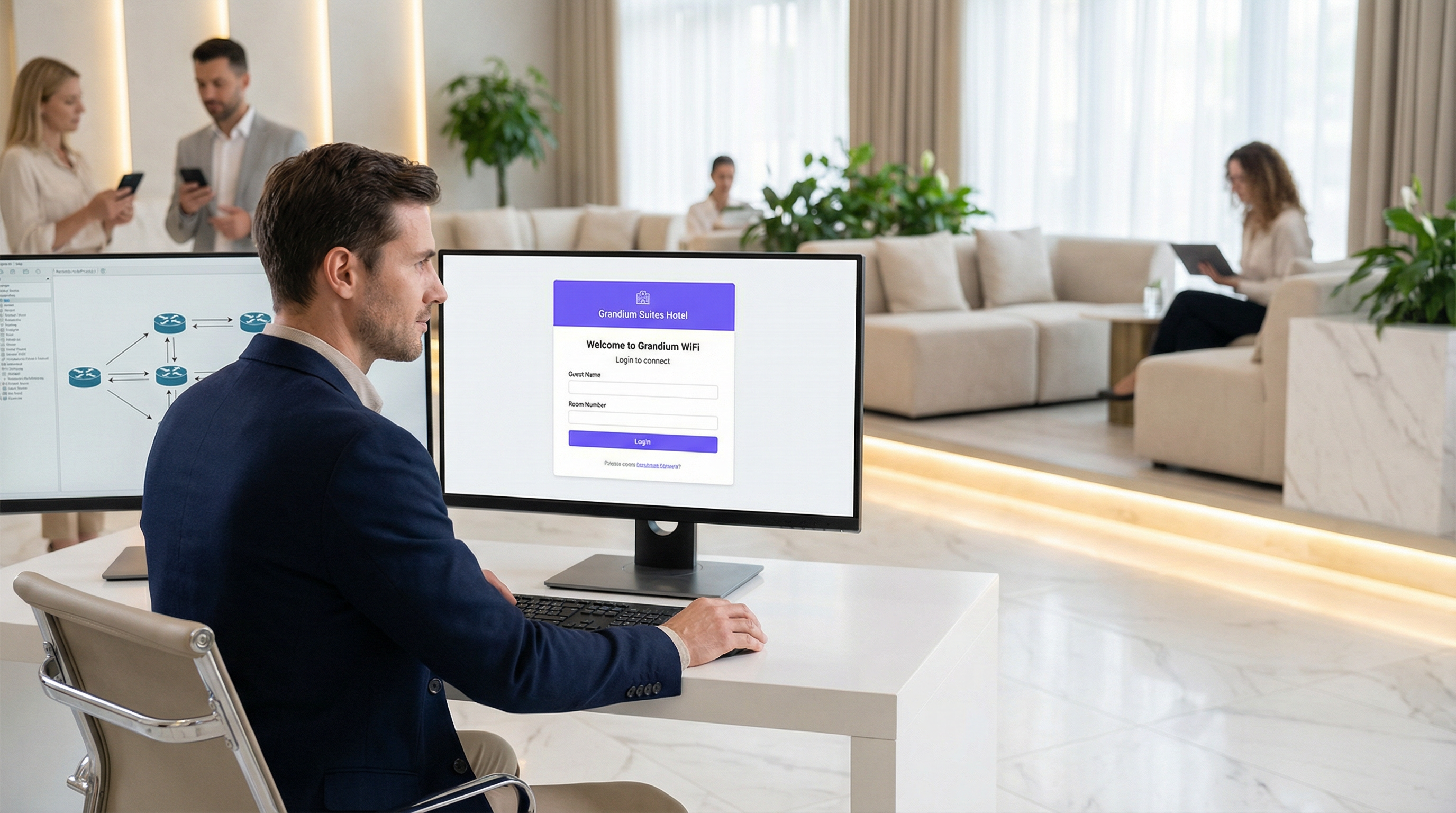
Ce guide fournit une référence technique complète aux responsables informatiques, architectes réseau et développeurs pour la création d'applications de Captive Portal sur mesure. Il répond au besoin critique des établissements de contrôler l'accès au réseau tout en créant de précieuses opportunités d'engagement client et d'analyse de données. Nous examinons les décisions architecturales, les choix de plateformes (iOS, Android, Web) et les protocoles de sécurité essentiels à un déploiement réussi. Pour le CTO, ce guide offre un aperçu stratégique du ROI, des risques de conformité et de l'impact commercial d'une stratégie de Captive Portal bien exécutée, allant au-delà d'une simple passerelle de connectivité pour devenir un outil puissant d'amélioration de l'expérience client et de génération de revenus.
Analyse technique approfondie
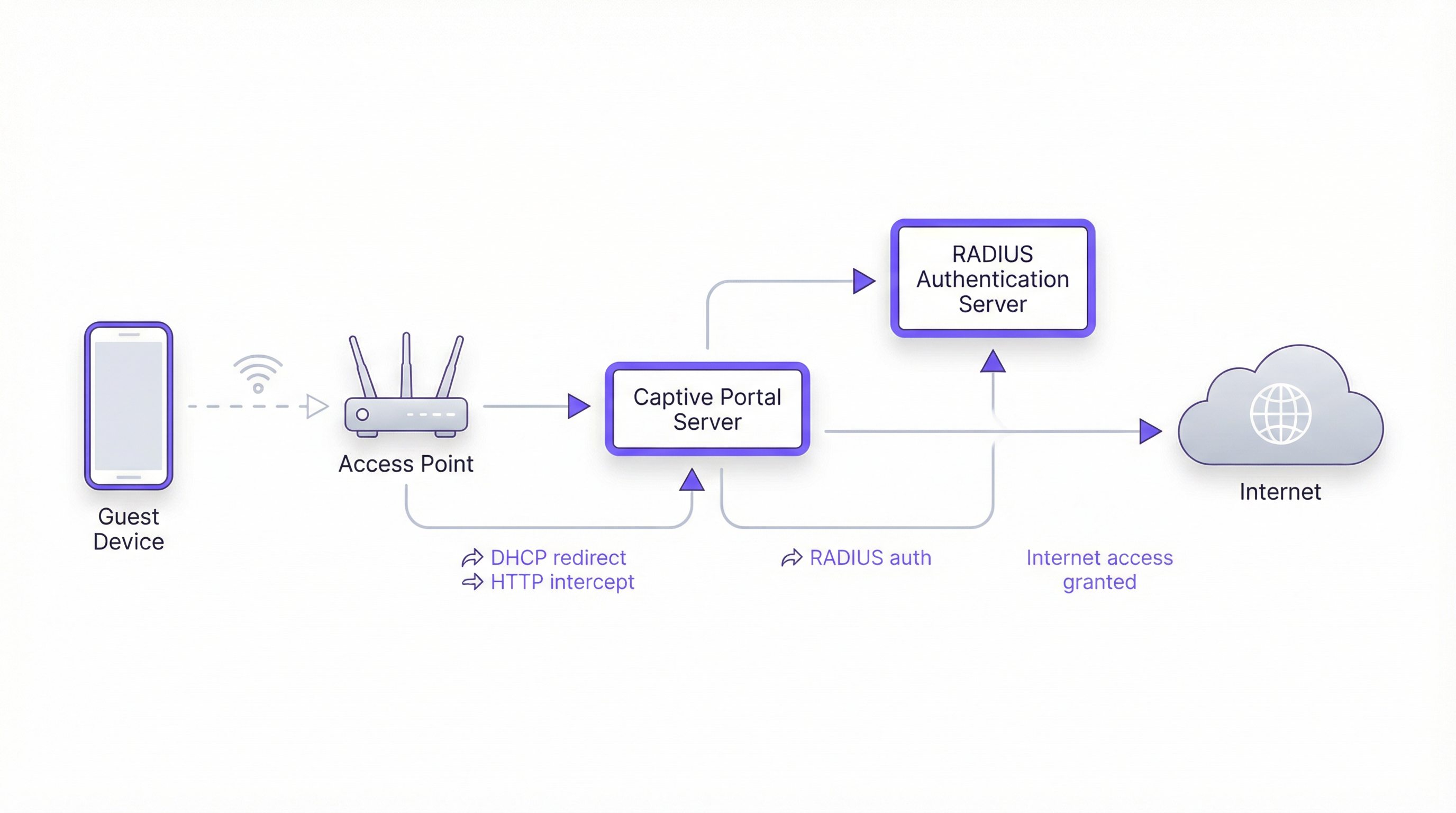
La création d'un Captive Portal implique une interaction sophistiquée entre les protocoles réseau, les technologies web et les systèmes d'authentification backend. L'objectif fondamental est d'intercepter le trafic web d'un utilisateur et de le rediriger vers un portail dédié pour l'authentification avant d'accorder un accès plus large au réseau. Ce processus repose sur quelques composants essentiels.
Architecture de base
- Point d'accès (AP) : Le matériel sans fil qui diffuse le signal WiFi. Les points d'accès modernes de niveau entreprise intègrent des fonctionnalités prenant en charge les Captive Portals.
- Serveur DHCP : Attribue une adresse IP à l'appareil qui se connecte. Dans une configuration de Captive Portal, le serveur DHCP peut également fournir l'URL du point de terminaison de l'API du Captive Portal (via l'option DHCP 114), une méthode standardisée dans la RFC7710bis qui améliore la fiabilité de détection sur les clients modernes comme Android 11+.
- Interception/Redirection DNS : Lorsque l'appareil de l'utilisateur tente de résoudre un nom de domaine (par ex.,
google.com), le serveur DNS du réseau renvoie initialement l'adresse IP du serveur du Captive Portal. Il s'agit de l'approche classique du « jardin clos » (walled garden). - Serveur de Captive Portal : Un serveur web qui héberge la page de connexion/d'accueil. C'est l'application avec laquelle l'utilisateur final interagit. Il est chargé de présenter le formulaire de connexion, de valider les identifiants et de communiquer avec le backend d'authentification.
- Serveur d'authentification (RADIUS) : Le service RADIUS (Remote Authentication Dial-In User Service) est le backend standard de l'industrie pour l'authentification réseau. Lorsqu'un utilisateur soumet ses identifiants sur le portail, le serveur du portail les transmet au serveur RADIUS, qui les vérifie par rapport à une base de données d'utilisateurs autorisés. Il est essentiel pour l'application des politiques basées sur les normes IEEE 802.1X.
Choix des plateformes et frameworks
Les développeurs disposent de trois voies principales pour créer l'application de Captive Portal destinée aux utilisateurs. Ce choix a des implications significatives sur le déploiement, l'expérience utilisateur et les coûts de maintenance.
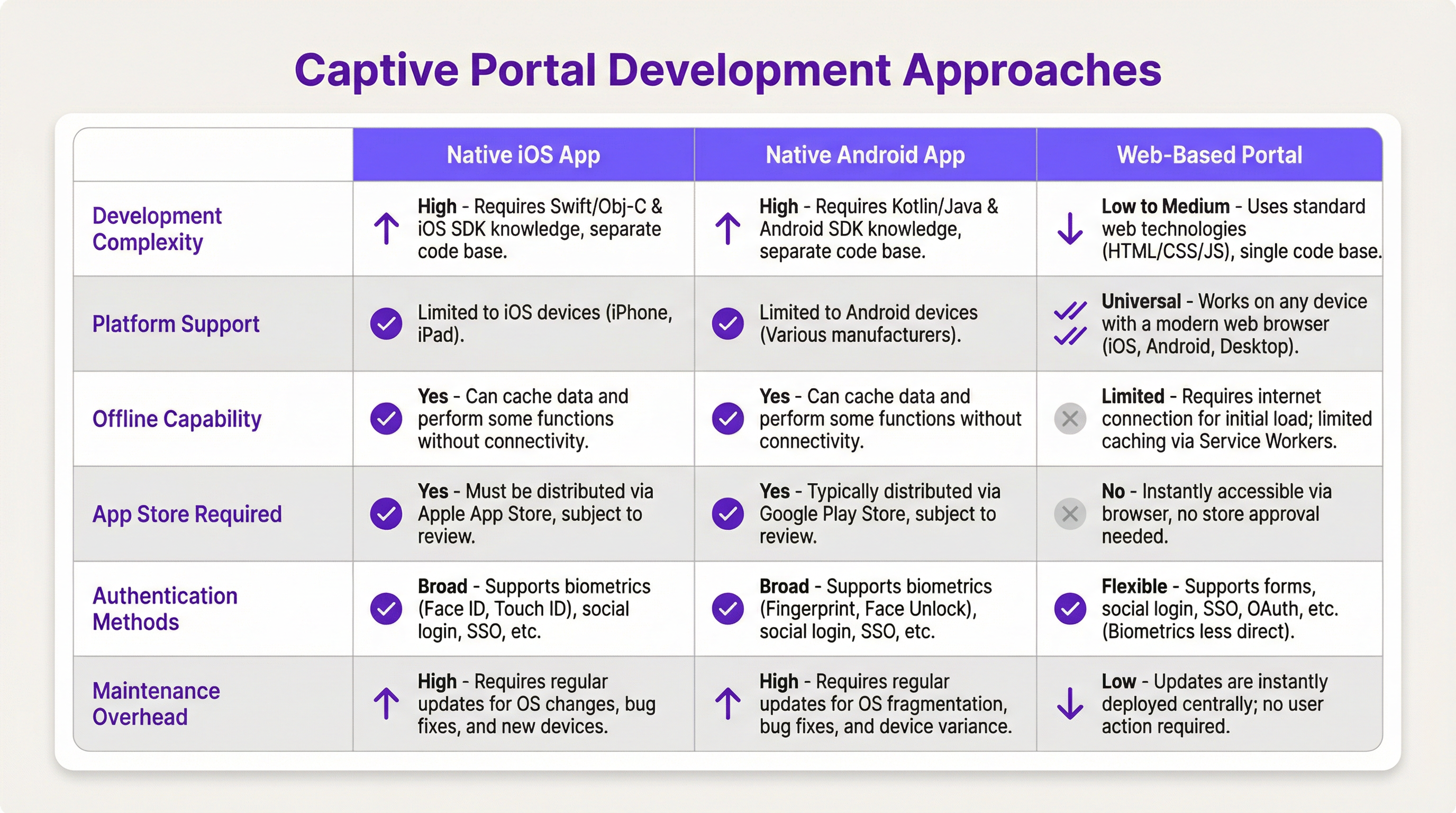
- Application native iOS/Android : Offre l'expérience utilisateur la plus riche, y compris une intégration fluide avec les fonctionnalités de l'appareil telles que la biométrie (Face ID, empreinte digitale) et des capacités hors ligne. Cependant, cette voie nécessite des bases de code distinctes (Swift/Objective-C pour iOS, Kotlin/Java pour Android), des processus d'évaluation sur l'App Store, et oblige les utilisateurs à télécharger une application, ce qui peut constituer une barrière à l'entrée importante.
- Portail web : L'approche la plus courante et la plus flexible. Une application web responsive (HTML, CSS, JavaScript) est fournie au navigateur de l'utilisateur. Elle est indépendante de la plateforme, ne nécessite aucune installation et les mises à jour sont déployées instantanément. Les technologies web modernes telles que les Service Workers peuvent offrir certaines fonctionnalités hors ligne, mais elles sont généralement plus limitées que celles des applications natives.
Guide d'implémentation
Cette section propose une présentation de haut niveau, indépendante des fournisseurs, pour le déploiement d'un Captive Portal basé sur le web.
Étape 1 : Configuration du réseau et du matériel
- Sélectionner des points d'accès d'entreprise : Choisissez des points d'accès de fournisseurs tels que Cisco Meraki, Ruckus ou Aruba qui prennent explicitement en charge les Captive Portals externes et l'authentification RADIUS.
- Configurer les VLAN : Isolez le trafic invité de votre réseau d'entreprise interne à l'aide d'un VLAN dédié. Il s'agit d'une mesure de sécurité critique.
- Configurer le DHCP et le DNS : Configurez votre serveur DHCP pour attribuer des adresses IP sur le VLAN invité et votre serveur DNS pour effectuer la redirection initiale vers le serveur de votre portail.
Étape 2 : Développer l'application du portail web
- Frontend : Utilisez un framework JavaScript moderne comme React, Vue ou Svelte pour une expérience utilisateur dynamique. Assurez-vous que le design est responsive et orienté mobile-first.
- Backend : Un backend léger (par ex., Node.js avec Express, Python avec Flask) est nécessaire pour servir le frontend et gérer la communication avec le serveur RADIUS.
- Logique d'authentification : Le flux de travail principal est le suivant :
- L'utilisateur se connecte au WiFi.
- L'appareil est redirigé vers l'URL du portail.
- L'utilisateur soumet ses identifiants (par ex., numéro de chambre et nom de famille, e-mail, connexion sociale).
- Le backend du portail envoie un
Access-Requestau serveur RADIUS avec les identifiants de l'utilisateur. - Le serveur RADIUS valide les identifiants et, en cas de succès, renvoie un message
Access-Accept. - Le backend du portail signale au contrôleur/à la passerelle réseau d'ouvrir l'accès pour l'adresse MAC de l'appareil de l'utilisateur.
Étape 3 : Intégrations API
- Système de gestion hôtelière (PMS) : Pour les hôtels, l'intégration avec le PMS (par ex., Oracle Opera) permet l'authentification par rapport aux réservations des clients (numéro de chambre + nom de famille).
- CRM : La synchronisation des données collectées (par ex., adresses e-mail) avec un CRM comme Salesforce permet une automatisation marketing performante.
- Connexion sociale : Utilisez OAuth2 pour permettre aux utilisateurs de se connecter avec leurs comptes de réseaux sociaux (Facebook, Google, LinkedIn). Cela fournit des données démographiques plus riches mais nécessite une gestion rigoureuse de la confidentialité et du consentement conformément au GDPR.
Bonnes pratiques
- La sécurité avant tout : Utilisez toujours le protocole HTTPS pour votre Captive Portal afin de chiffrer les identifiants des utilisateurs en transit. Implémentez une limitation de débit (rate limiting) pour prévenir les attaques par force brute. Conformez-vous à la norme PCI DSS si vous traitez des paiements.
- Conformité : Soyez transparent sur la collecte des données. La page d'accueil de votre portail doit inclure un lien clair vers votre politique de confidentialité et obtenir un consentement explicite, tel que l'exigent le GDPR et les autres réglementations sur la protection des données.
- Expérience utilisateur : Maintenez un processus de connexion aussi fluide que possible. Pour les établissements multi-sites, mettez en place une itinérance transparente (seamless roaming) où un utilisateur authentifié sur un site est automatiquement connecté sur un autre.
- Gestion de la bande passante : Mettez en œuvre des politiques de qualité de service (QoS) pour garantir une allocation équitable de la bande passante et éviter que quelques utilisateurs ne dégradent l'expérience de tous.
Dépannage et atténuation des risques
- Problèmes de détection des appareils : Tous les appareils ne fonctionnent pas parfaitement avec les Captive Portals. La tendance aux adresses MAC aléatoires sous iOS et Android peut compliquer le suivi des appareils. L'API du Captive Portal (RFC7710bis) constitue la méthode de détection la plus fiable.
- Échecs de connexion : Implémentez une journalisation robuste sur votre portail et votre serveur RADIUS pour diagnostiquer les problèmes d'authentification. Les problèmes courants incluent des identifiants incorrects, des comptes expirés ou des problèmes de connectivité réseau entre le portail et le serveur RADIUS.
- Risques de sécurité : Un Captive Portal mal sécurisé peut être un vecteur d'attaques de l'homme du milieu (man-in-the-middle). Assurez-vous que toutes les communications sont chiffrées et que le serveur de votre portail est renforcé contre les vulnérabilités web courantes.
ROI et impact commercial
Un Captive Portal n'est pas seulement une dépense informatique ; c'est un atout stratégique. Le ROI se mesure à travers :
- Engagement client accru : Utilisez le portail pour promouvoir des services sur place, afficher les horaires d'événements ou offrir des réductions exclusives.
- Analyse de données améliorée : En analysant les données de connexion, les établissements peuvent comprendre les modèles de fréquentation, les temps de séjour et les données démographiques des clients, ce qui permet de prendre de meilleures décisions opérationnelles.
- Nouvelles sources de revenus : Pour les centres de conférence ou les aéroports, un accès par paliers (par ex., WiFi de base gratuit, WiFi premium payant) peut générer des revenus directs. Le portail peut également être utilisé pour de la publicité tierce.
- Perception de la marque améliorée : Une expérience WiFi fluide et fiable est désormais une attente de base. Un Captive Portal professionnel renforce l'image de votre marque en tant qu'entité moderne et orientée client.
Termes clés et définitions
Captive Portal
A web page that the user of a public-access network is obliged to view and interact with before access is granted. It intercepts traffic until the user completes a required action, such as authentication or accepting terms of service.
This is the core component IT teams build to manage guest WiFi. It's the gateway that controls access and provides a branding and data collection opportunity.
RADIUS (Remote Authentication Dial-In User Service)
A client/server protocol (IETF standard) that provides centralized Authentication, Authorization, and Accounting (AAA) management for users who connect and use a network service.
For developers, this is the definitive backend protocol for network authentication. Your captive portal app will act as a RADIUS client to validate users against a central directory.
IEEE 802.1X
An IEEE standard for port-based Network Access Control (PNAC). It provides an authentication mechanism to devices wishing to attach to a LAN or WLAN.
This is the enterprise-grade security standard that underpins secure WiFi. While a captive portal is a web-layer solution, 802.1X provides a deeper, more secure authentication framework that can work in conjunction with it.
VLAN (Virtual Local Area Network)
A logical grouping of devices in the same broadcast domain. A VLAN partitions a single physical network into multiple, isolated logical networks.
This is a critical security tool for network architects. Guest WiFi traffic must always be segregated onto its own VLAN to prevent any possibility of access to the internal corporate network.
DHCP (Dynamic Host Configuration Protocol)
A network management protocol used on IP networks for automatically assigning IP addresses and other communication parameters to devices.
In a captive portal context, DHCP is not just for IP assignment. Using DHCP Option 114, it can also inform client devices of the captive portal API location, improving detection reliability.
GDPR (General Data Protection Regulation)
A regulation in EU law on data protection and privacy for all individuals within the European Union and the European Economic Area. It also addresses the transfer of personal data outside the EU and EEA areas.
If your venue serves European citizens (regardless of where the venue is located), your captive portal's data collection and handling practices must be GDPR compliant. This has major implications for consent and data transparency.
PCI DSS (Payment Card Industry Data Security Standard)
An information security standard for organizations that handle branded credit cards from the major card schemes.
If your captive portal involves any form of payment (e.g., for premium access), the entire application and infrastructure falls within the scope of PCI DSS, requiring stringent security controls and regular audits.
OAuth 2.0
An open standard for access delegation, commonly used as a way for Internet users to grant websites or applications access to their information on other websites but without giving them the passwords.
This is the framework developers use to implement 'Login with Google/Facebook' functionality. It provides a secure way to authenticate users and retrieve profile data without handling their actual social media passwords.
Études de cas
A 500-room luxury hotel wants to replace its generic WiFi login with a branded captive portal. The goal is to authenticate guests using their room number and last name, offer tiered bandwidth options (free standard, paid premium), and promote spa services. The existing network uses Cisco Meraki hardware.
- Architecture: Deploy a web-based captive portal hosted on a cloud server (AWS/Azure). 2. Network Configuration: Configure the Meraki dashboard to use an external captive portal, pointing to the URL of your new web app. Create two SSIDs on a guest VLAN: 'HotelGuest_Free' and 'HotelGuest_Premium'. 3. Application Development: Build a responsive web app. The landing page will have fields for 'Room Number' and 'Last Name'. 4. API Integration: Use the hotel's PMS API (e.g., Oracle Hospitality) to validate the guest credentials in real-time. On successful validation, the app makes a RADIUS request. 5. RADIUS Configuration: Set up a RADIUS server (e.g., FreeRADIUS) with policies. If the user is on the 'Premium' SSID, the RADIUS server returns attributes to the Meraki controller to unlock higher bandwidth for that user's MAC address. 6. Post-Login Experience: After authentication, redirect the user to a page featuring a prominent advertisement for the hotel spa with a 'Book Now' button.
A national retail chain with 200 stores wants to offer free guest WiFi to gather customer email addresses for its loyalty program. The solution must be centrally managed, GDPR compliant, and provide basic analytics on visitor counts and dwell times.
- Architecture: A centralized, cloud-hosted, multi-tenant web portal is the only viable option for this scale. 2. Authentication: The portal will feature a simple form asking for an email address. A checkbox for 'I agree to the terms and consent to receive marketing communications' is mandatory and must not be pre-checked. 3. Backend: The portal backend validates the email format and sends it via API to the central CRM/loyalty database. It then sends a RADIUS Access-Request. 4. RADIUS & Analytics: The RADIUS server logs the authentication event (with a timestamp and the store ID, passed as a RADIUS attribute from the local AP). This data is used for analytics. The RADIUS accounting records (Start and Stop messages) provide the data needed to calculate session duration (dwell time). 5. Deployment: The same portal URL is configured across all 200 stores. The local network at each store is configured to pass a unique 'NAS-Identifier' attribute to the RADIUS server so that analytics can be segmented by location.
Analyse de scénario
Q1. A stadium with a capacity of 50,000 needs to provide guest WiFi. The primary goal is to manage congestion and ensure fair bandwidth usage. A secondary goal is to display advertisements for upcoming events. What is the most critical technical feature to implement?
💡 Astuce :Think about network performance at scale, not just authentication.
Afficher l'approche recommandée
The most critical feature is Quality of Service (QoS) and bandwidth throttling. With 50,000 potential users, the network would be unusable without strict policies to limit each user's bandwidth and prevent a small number of users from consuming all available throughput. While authentication and advertising are important, ensuring the core service is stable is the top priority.
Q2. A hospital wants to provide WiFi for patients and visitors. They need to comply with HIPAA regulations regarding data privacy. They also want to allow users to access the hospital's patient portal. How should they design their captive portal authentication?
💡 Astuce :Consider the sensitivity of healthcare data and the need for secure, but simple, access.
Afficher l'approche recommandée
The solution requires a two-tiered approach. 1. A simple, click-through captive portal for general internet access that collects no personal data, thus minimizing HIPAA scope. This portal should clearly state the terms of use. 2. For access to the patient portal, the user should be redirected to the portal's separate, secure login page, which uses multi-factor authentication. The captive portal itself should not handle patient portal credentials. The guest network must be strictly isolated from the hospital's internal clinical network via VLANs and firewalls.
Q3. You are deploying a captive portal for a coffee shop chain. The marketing team wants to allow login via Facebook to gather customer demographic data. What are the key technical and compliance steps you must take?
💡 Astuce :Focus on the intersection of OAuth, data collection, and privacy regulations like GDPR.
Afficher l'approche recommandée
- Technical: Implement the OAuth 2.0 protocol to securely connect with Facebook's API. Ensure you only request the minimum necessary data permissions (e.g., public profile and email). 2. Compliance (GDPR): On the login page, before the user clicks 'Login with Facebook', you must display a clear statement explaining what data will be collected and for what purpose. You must include a link to your privacy policy. The user must actively consent (e.g., by clicking the login button after reading the notice); you cannot assume consent. 3. Backend: Your backend must securely store the access tokens and handle the collected data in accordance with your privacy policy.
Points clés à retenir
- ✓A captive portal is a strategic asset for controlling network access and driving guest engagement.
- ✓The industry-standard architecture uses a web-based portal with a RADIUS server for authentication.
- ✓Always segregate guest traffic onto a dedicated VLAN and enforce HTTPS for security.
- ✓Compliance with GDPR and other privacy laws requires explicit, informed user consent before data collection.
- ✓Leverage API integrations with PMS and CRM systems to automate authentication and marketing.
- ✓Focus on a frictionless user experience to enhance brand perception and guest satisfaction.
- ✓Measure ROI through increased engagement, data analytics, and new revenue opportunities.




