

Réseaux de Campus (CAN) : Guide complet de conception, de déploiement et de gestion
This comprehensive technical reference guide covers the full lifecycle of Campus Area Networks (CANs) — from architectural design and technology selection to implementation, security hardening, and ongoing management. It is written for IT managers, network architects, and CTOs at hotels, retail chains, stadiums, and corporate campuses who need to build or modernise a high-performance, resilient connectivity backbone. By combining vendor-neutral best practices, real-world case studies, and actionable frameworks, this guide equips senior technical professionals to make informed decisions that deliver measurable ROI and support long-term strategic objectives.
🎧 Écouter ce guide
Voir la transcription
Synthèse
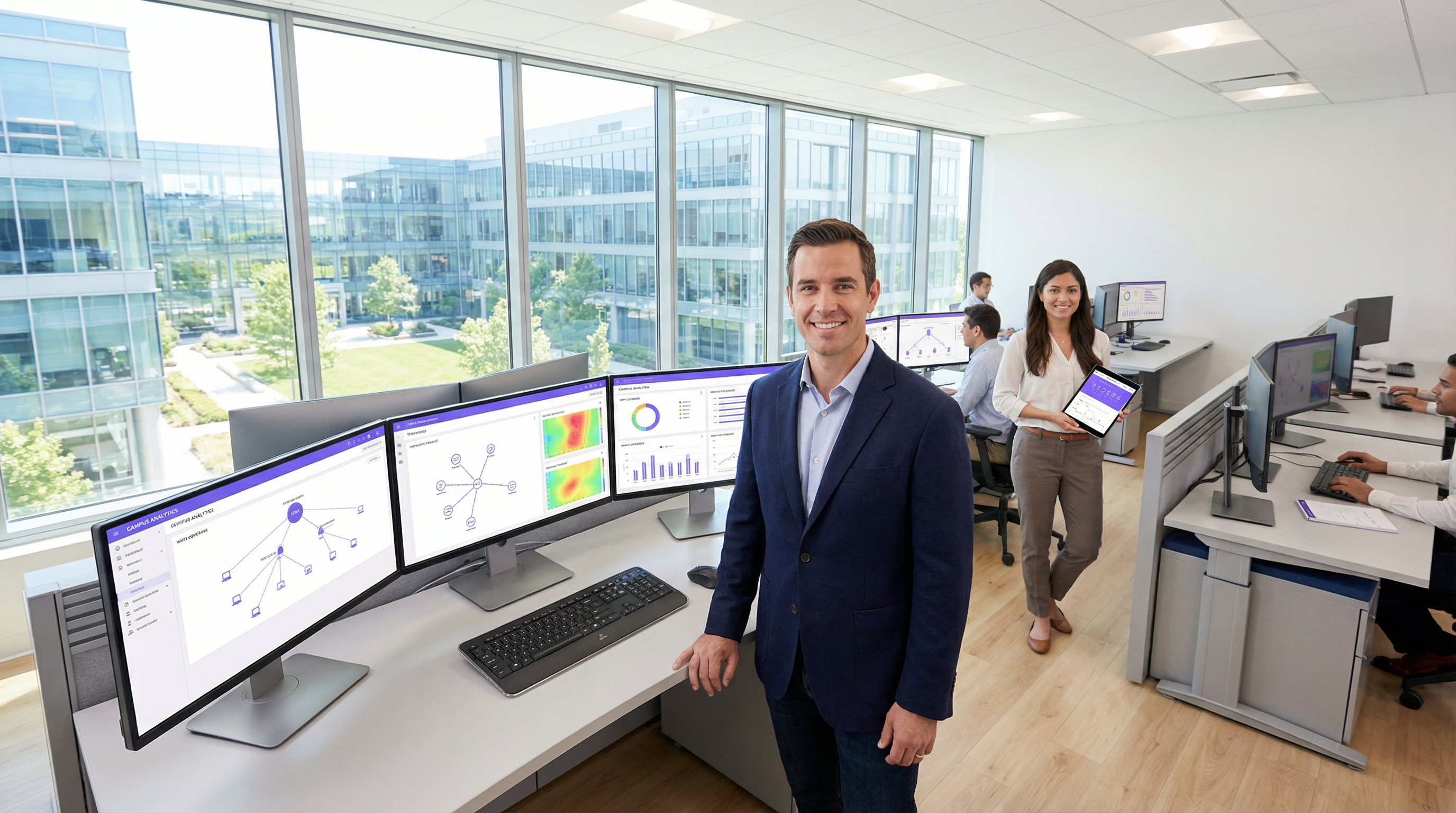
Un réseau de campus (CAN - Campus Area Network) est un composant d'infrastructure critique pour tout site de grande envergure, des campus d'entreprises et universitaires aux complexes hôteliers, parcs commerciaux et stades. Il fournit l'épine dorsale de connectivité haut débit, fiable et sécurisée nécessaire pour prendre en charge les opérations numériques modernes, les services aux clients et les déploiements IoT. Pour les responsables informatiques, les architectes réseau et les directeurs techniques (CTO), un CAN bien conçu n'est pas simplement un centre de coûts, mais un atout stratégique qui renforce l'efficacité opérationnelle, améliore l'expérience utilisateur et débloque de nouvelles opportunités de revenus.
Ce guide fournit un cadre pratique et indépendant des fournisseurs pour la conception, le déploiement et la gestion d'un CAN haute performance. Il couvre l'architecture hiérarchique essentielle à trois niveaux, les choix technologiques clés, notamment la fibre optique et les normes Wi-Fi modernes, ainsi que les meilleures pratiques pour garantir la sécurité, l'évolutivité et la redondance. En suivant les principes énoncés ici, les entreprises peuvent construire un réseau pérenne qui offre un retour sur investissement (ROI) mesurable et soutient leurs objectifs stratégiques pour les années à venir.
Analyse technique approfondie
Le modèle hiérarchique à trois niveaux
L'architecture la plus largement adoptée et éprouvée pour un réseau de campus évolutif et résilient est le modèle hiérarchique à trois niveaux. Cette conception segmente le réseau en trois couches distinctes : les couches Cœur (Core), Distribution et Accès. Cette modularité simplifie la conception, améliore l'isolation des pannes et permet une évolutivité prévisible.
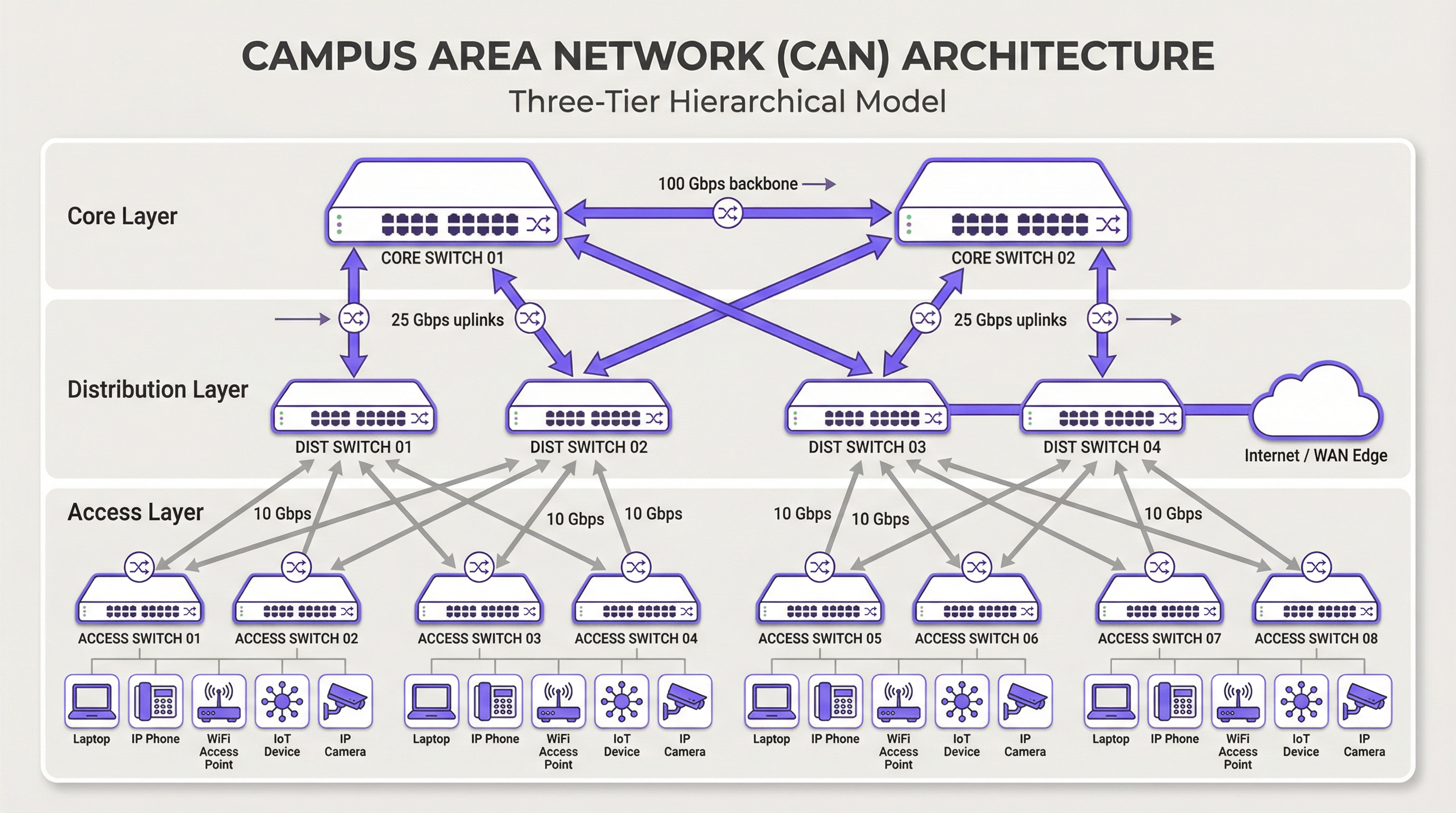
Couche Cœur (Core) : Le cœur est l'épine dorsale à haut débit du réseau. Son seul objectif est de commuter le trafic aussi rapidement que possible entre les équipements de la couche de distribution. Le cœur doit rester épuré et simple, en évitant la mise en œuvre de politiques complexes ou la manipulation de paquets. Ses caractéristiques clés incluent une haute redondance (généralement avec des commutateurs et des liaisons redondants), un débit élevé (souvent 100 Gbps ou plus) et une convergence rapide en cas de panne. La couche cœur garantit que le trafic entre les différentes parties du campus ne crée pas de goulot d'étranglement.
Couche de Distribution : Cette couche agit comme le centre de communication entre les couches d'accès et de cœur. C'est un point critique pour l'application des politiques réseau, y compris le routage, les listes de contrôle d'accès (ACL), la qualité de service (QoS) et le filtrage de sécurité. La couche de distribution agrège le trafic provenant de plusieurs commutateurs de la couche d'accès avant de le transmettre au cœur. Elle définit les domaines de diffusion et fournit des connexions redondantes aux couches d'accès et de cœur, en utilisant souvent des technologies comme EtherChannel pour l'agrégation de liens et la redondance.
Couche d'Accès : C'est ici que les appareils des utilisateurs finaux se connectent au réseau : postes de travail, ordinateurs portables, téléphones IP, imprimantes, appareils IoT et, surtout, les points d'accès sans fil (AP). La couche d'accès offre une sécurité au niveau des ports, l'alimentation par Ethernet (PoE) pour des appareils tels que les AP et les caméras, ainsi qu'une segmentation VLAN pour isoler différents types de trafic (par ex. entreprise, invités, IoT). Les commutateurs de cette couche doivent offrir une haute densité de ports et prendre en charge les normes modernes telles que l'Ethernet multi-gigabit (IEEE 802.3bz) pour répondre aux exigences de bande passante du Wi-Fi 6/6E et au-delà.
Technologies clés
Le câblage en fibre optique est la norme pour la connectivité de l'épine dorsale au sein d'un CAN, reliant les bâtiments et connectant les couches de cœur et de distribution. Sa bande passante élevée, sa faible latence et son immunité aux interférences électromagnétiques le rendent idéal pour les liaisons à haut débit sur les distances rencontrées sur un campus. La fibre monomode est généralement utilisée pour les trajets plus longs entre les bâtiments, tandis que la fibre multimode peut être utilisée pour des liaisons plus courtes et à large bande passante au sein du centre de données d'un bâtiment.
Le réseau local sans fil (WLAN) n'est plus une simple superposition, mais fait partie intégrante de la couche d'accès. Les CAN modernes doivent être conçus avec une mentalité « Wi-Fi first ». Cela nécessite une planification minutieuse du placement des AP via des études de site RF, l'allocation des canaux et la planification de la capacité. La dernière norme, le Wi-Fi 6E (802.11ax), qui fonctionne dans la bande des 6 GHz, offre une capacité nettement supérieure et moins d'interférences, ce qui en fait une technologie essentielle pour les environnements à haute densité comme les centres de conférence et les stades.
L'alimentation par Ethernet (PoE) est essentielle pour simplifier le déploiement des équipements de la couche d'accès. Des normes telles que l'IEEE 802.3bt (PoE++) peuvent fournir jusqu'à 90 W de puissance, prenant en charge non seulement les AP Wi-Fi, mais aussi les caméras de sécurité haute définition, l'affichage dynamique et même certains petits commutateurs. Cela élimine le besoin de prises de courant séparées pour chaque appareil, réduisant ainsi les coûts et la complexité d'installation.
Guide de déploiement
Une approche structurée et par étapes du déploiement d'un CAN est essentielle pour gérer les risques et garantir des résultats de qualité.
Phase 1 — Recueil des besoins et étude de site : Commencez par définir les exigences métiers. Quelles applications fonctionneront sur le réseau ? Quelles sont les attentes en matière de densité d'utilisateurs et de types d'appareils ? Réalisez une étude de site physique approfondie pour identifier la configuration des bâtiments, les sources potentielles d'interférences RF et les emplacements des répartiteurs (IDF) et du centre de données principal (MDF). Cette phase doit également inclure un examen de l'infrastructure existante pour identifier ce qui peut être conservé ou mis à niveau.
Phase 2 — Conception architecturale : Sur la base des exigences, concevez l'architecture à trois niveaux. Déterminez le nombre de commutateurs d'accès nécessaires par étage et par bâtiment, la capacité requise au niveau de la couche de distribution et le débit nécessaire pour l'épine dorsale du cœur. Planifiez votre stratégie de segmentation VLAN pour séparer logiquement les types de trafic. Documentez la conception de manière exhaustive : elle deviendra votre spécification de construction et votre base de référence pour la gestion des changements.
Phase 3 — Sélection des technologies et des fournisseurs : Sélectionnez le matériel qui répond à vos spécifications de conception. Tenez compte de facteurs tels que la prise en charge des normes ouvertes, les options d'interface de gestion (CLI vs gestion cloud), le budget PoE et les conditions de garantie. Pour un CAN à grande échelle, une plateforme de gestion centralisée est cruciale pour des opérations efficaces et doit être sélectionnée en même temps que le matériel.
Phase 4 — Installation physique : Tirez le câblage en fibre optique entre les bâtiments et vers chaque IDF. Installez les commutateurs dans les baies, en assurant une alimentation et un refroidissement adéquats. Montez les points d'accès sans fil conformément au plan de l'étude RF. Une gestion et un étiquetage méticuleux des câbles à ce stade permettront de gagner un temps précieux lors du dépannage et des futures mises à niveau.
Phase 5 — Configuration et mise en service : Configurez les commutateurs en partant du cœur vers la couche d'accès. Mettez en œuvre les VLAN, les protocoles de routage (par ex. OSPF), les politiques de sécurité (802.1X) et la QoS. Mettez le réseau en ligne de manière progressive, en testant la connectivité à chaque étape. Validez la couverture et les performances sans fil par rapport aux objectifs de conception initiaux avant de déclarer le réseau prêt pour la production.
Meilleures pratiques
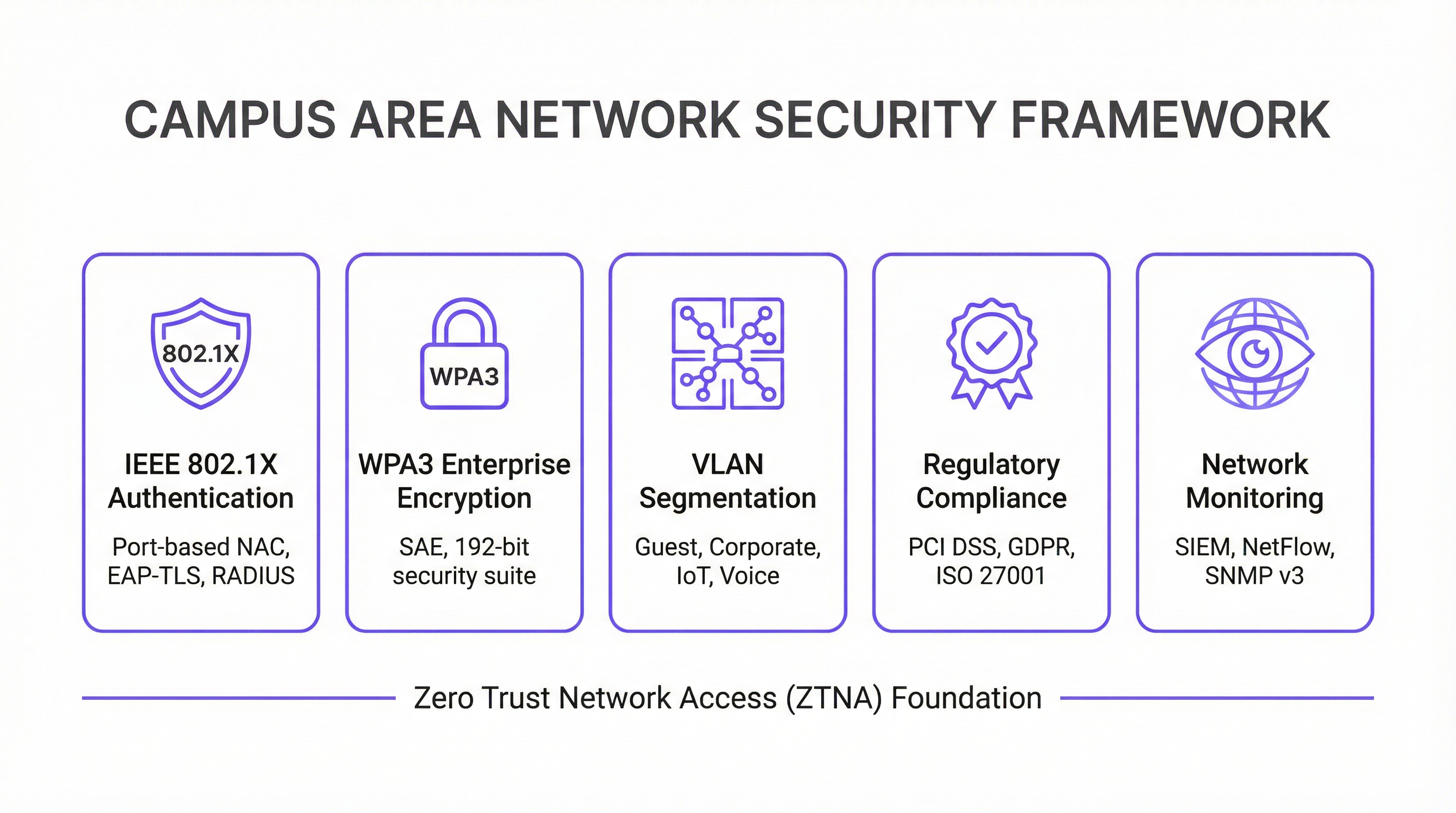
La sécurité avant tout — Architecture Zero Trust : Mettez en œuvre un modèle de sécurité Zero Trust dès le premier jour. Utilisez IEEE 802.1X pour le contrôle d'accès au réseau (NAC) basé sur les ports afin d'authentifier chaque appareil se connectant au réseau filaire ou sans fil. Appliquez un chiffrement fort avec WPA3-Enterprise sur votre WLAN. Segmentez le réseau avec des VLAN pour contenir les menaces et restreindre les mouvements latéraux. Tout le trafic de gestion du réseau doit utiliser des protocoles sécurisés comme SSH et SNMPv3. Pour les entreprises traitant des données de cartes de paiement, la conformité PCI DSS exige une segmentation stricte du réseau et un contrôle d'accès, ce qu'un CAN bien conçu permet de mettre en œuvre et d'auditer facilement.
Conception axée sur la redondance : Éliminez les points de défaillance uniques à chaque couche. Utilisez des commutateurs redondants aux couches de cœur et de distribution. Utilisez l'agrégation de liens (EtherChannel/LACP) pour offrir à la fois une bande passante accrue et une redondance des liaisons. Assurez-vous de disposer d'alimentations redondantes dans les commutateurs critiques et de chemins de fibre diversifiés entre les bâtiments lorsque cela est possible. Pour les environnements critiques, envisagez des onduleurs (UPS) pour l'ensemble des équipements réseau.
Planification de l'évolutivité : Concevez pour les cinq prochaines années, pas seulement pour aujourd'hui. Assurez-vous que vos couches de cœur et de distribution ont une capacité suffisante pour gérer la croissance future du trafic et des appareils connectés. Utilisez un châssis modulaire au niveau de la couche de distribution ou de cœur pour permettre une expansion facile. Choisissez une fibre avec un nombre de brins supérieur à ce qui est immédiatement nécessaire pour répondre aux exigences futures sans recâblage coûteux.
Gestion et surveillance centralisées : Un grand CAN est trop complexe pour être géré appareil par appareil. Utilisez un système de gestion de réseau (NMS) centralisé pour automatiser la configuration, surveiller les performances et recevoir des alertes. Des plateformes comme la solution d'intelligence WiFi de Purple fournissent des informations approfondies sur le comportement des utilisateurs et la santé du réseau, permettant une gestion et une optimisation proactives. La conformité au GDPR exige également une visibilité sur les flux de données et l'accès des utilisateurs, ce qu'une plateforme de gestion centralisée facilite.
Dépannage et atténuation des risques
Les problèmes de couche physique sont la cause la plus fréquente des problèmes de réseau. Les câbles défectueux, les émetteurs-récepteurs en panne et les connexions desserrées représentent une proportion importante des pannes de réseau. Une méthodologie de dépannage structurée suivant le modèle OSI — en commençant par la couche 1 (Physique) et en remontant — est l'approche la plus efficace. Investissez dans un équipement de test de câbles de qualité et maintenez un stock de pièces de rechange pour les composants critiques.
Les interférences RF dans un environnement sans fil dense peuvent gravement dégrader les performances. Les interférences co-canal et de canal adjacent sont les principaux coupables. Utilisez un outil de surveillance RF pour identifier les sources d'interférences, qui peuvent inclure les réseaux voisins, les fours à micro-ondes et les appareils Bluetooth. Les algorithmes d'attribution dynamique de canaux (DCA) dans les contrôleurs sans fil modernes peuvent aider, mais un réglage manuel est parfois nécessaire dans les environnements complexes.
La dérive de configuration se produit lorsque des modifications manuelles apportées à des appareils individuels créent des incohérences sur le réseau au fil du temps. Cela entraîne un comportement inattendu et complique le dépannage. Utilisez un outil de gestion de configuration pour suivre les modifications, appliquer des modèles standard et annuler les modifications incorrectes. Toutes les modifications doivent être effectuées via un processus formel de gestion des changements.
Vulnérabilités de sécurité : Les micrologiciels non corrigés constituent un risque persistant. Établissez un calendrier de correctifs régulier pour tous les équipements réseau. Surveillez les modèles de trafic anormaux à l'aide d'un système SIEM (Security Information and Event Management). Effectuez des tests d'intrusion périodiques pour identifier les faiblesses avant que les attaquants ne le fassent.
ROI et impact commercial
Un réseau de campus bien exécuté offre une valeur commerciale significative et mesurable à plusieurs niveaux.
| Résultat commercial | Indicateur clé | Amélioration typique |
|---|---|---|
| Satisfaction client | NPS / Notes des avis | +25 à 40 % pour les notes liées à la connectivité |
| Efficacité opérationnelle IT | Tickets d'assistance | Réduction de 40 à 60 % des tickets liés au réseau |
| Temps d'audit de conformité | Jours pour réaliser l'audit PCI DSS | Réduction de 50 à 70 % |
| Temps de disponibilité du réseau | % de disponibilité | 99,9 %+ avec une conception redondante |
| Revenus de nouveaux services | Services IoT / Analytique activés | Débloque l'analyse de localisation, le suivi des actifs |
Productivité accrue : Une connectivité fiable et à haut débit permet aux employés et aux clients de travailler efficacement sans interruption. Dans le contexte de l'hôtellerie, cela se traduit directement par des scores de satisfaction client et des réservations répétées.
Amélioration de l'expérience client et invité : Dans l'hôtellerie et le commerce de détail, un Wi-Fi rapide et fluide est un moteur clé de la satisfaction et de la fidélité des clients. Les analyses dérivées du réseau Wi-Fi — telles que le temps de séjour, les modèles de fréquentation et le nombre d'appareils — peuvent être utilisées pour personnaliser les expériences des clients et optimiser les opérations du site.
Efficacité opérationnelle : Un CAN géré de manière centralisée réduit la charge opérationnelle pour l'équipe informatique. Le PoE simplifie le déploiement de nouveaux appareils, et une architecture résiliente minimise les temps d'arrêt coûteux. La capacité de gérer l'ensemble du parc à partir d'une seule console est particulièrement précieuse pour les entreprises multisites.
Activation de nouveaux services : Le CAN est la fondation d'une multitude de services pour les sites intelligents, notamment l'automatisation des bâtiments basée sur l'IoT, les services géolocalisés, le suivi des actifs et les systèmes de sécurité améliorés. Ces services représentent de nouvelles sources de revenus et des différenciateurs concurrentiels qui sont tout simplement impossibles sans un réseau sous-jacent robuste.
En mesurant des indicateurs tels que le temps de disponibilité du réseau, le débit moyen, le nombre de tickets d'assistance et les scores de satisfaction client, les entreprises peuvent quantifier le ROI positif de leur investissement dans un réseau de campus moderne. Pour la plupart des déploiements d'entreprise, un CAN bien conçu est rentabilisé en 18 à 36 mois grâce à une combinaison de réduction des coûts opérationnels et de revenus générés par de nouveaux services.
Termes clés et définitions
Campus Area Network (CAN)
A computer network that interconnects multiple local area networks (LANs) within a geographically bounded area, such as a corporate campus, hotel resort, university, or large retail estate. A CAN is typically owned and operated by a single organisation and provides high-speed, low-latency connectivity between buildings.
IT teams encounter this term when planning network infrastructure for any multi-building facility. It is the correct technical term for what is often colloquially called 'the campus network' or 'the site network'. Understanding the distinction between a CAN, a LAN, and a WAN is essential for scoping infrastructure projects and vendor conversations.
Three-Tier Hierarchical Model
The industry-standard architectural framework for enterprise campus networks, comprising three distinct layers: the Access Layer (where end devices connect), the Distribution Layer (where policy is enforced and traffic is aggregated), and the Core Layer (the high-speed backbone). Each layer has a specific, well-defined role.
This model is the starting point for virtually every enterprise CAN design. IT teams use it to structure their design conversations, allocate budget, and plan for scalability. Deviating from this model (e.g., using a flat, single-tier design) is a common cause of scalability and performance problems in growing organisations.
IEEE 802.1X
An IEEE standard for port-based Network Access Control (NAC) that provides an authentication mechanism for devices wishing to connect to a LAN or WLAN. It uses the Extensible Authentication Protocol (EAP) and requires a RADIUS server to authenticate users and devices before granting network access.
IT teams implement 802.1X to ensure that only authorised devices can connect to the network. It is a foundational security control for PCI DSS compliance (Requirement 1.3) and is a key component of a Zero Trust network architecture. Without 802.1X, any device that can physically connect to a network port or associate with a Wi-Fi SSID can gain network access.
WPA3-Enterprise
The latest generation of Wi-Fi security protocol for enterprise environments, ratified by the Wi-Fi Alliance. WPA3-Enterprise mandates the use of 192-bit minimum-strength security protocols and uses Simultaneous Authentication of Equals (SAE) to replace the older Pre-Shared Key (PSK) mechanism, providing stronger protection against offline dictionary attacks.
IT teams should be migrating to WPA3-Enterprise as the standard for all corporate and sensitive Wi-Fi SSIDs. WPA2 remains acceptable for guest networks in many contexts, but WPA3 is the requirement for networks handling sensitive data. It is increasingly referenced in security frameworks and is expected to become mandatory in future PCI DSS and ISO 27001 guidance.
VLAN (Virtual Local Area Network)
A logical subdivision of a physical network that groups devices into separate broadcast domains, regardless of their physical location. VLANs are defined by IEEE 802.1Q and are implemented on managed switches. Traffic between VLANs requires routing (a Layer 3 function), which provides a natural security boundary.
VLAN segmentation is the primary tool for isolating different types of traffic on a shared physical network. IT teams use VLANs to separate guest traffic from corporate traffic, isolate IoT devices, and create a dedicated PCI DSS cardholder data environment. Incorrect VLAN configuration is a common cause of both security incidents and network performance problems.
Power over Ethernet (PoE)
A technology that allows network cables to carry electrical power, enabling devices like Wi-Fi access points, IP cameras, and VoIP phones to receive power through the same Ethernet cable used for data. Key standards include IEEE 802.3af (15.4W), IEEE 802.3at (30W), and IEEE 802.3bt (90W, also known as PoE++).
PoE is a critical consideration when specifying access layer switches for a CAN. IT teams must calculate the total PoE budget required for all connected devices and ensure the switch's power supply can meet that demand. Underestimating PoE requirements is a common and costly mistake, as it can require switch replacements or additional power injectors.
Wi-Fi 6E (IEEE 802.11ax)
The latest generation of the Wi-Fi standard, extending Wi-Fi 6 into the 6 GHz frequency band. Wi-Fi 6E provides access to up to 1,200 MHz of additional spectrum, significantly increasing capacity and reducing congestion compared to the 2.4 GHz and 5 GHz bands. It supports theoretical throughput of up to 9.6 Gbps.
IT teams planning new CAN deployments should specify Wi-Fi 6E-capable access points as the standard. The 6 GHz band is particularly valuable in high-density environments (conference centres, stadiums, hotel lobbies) where the 2.4 GHz and 5 GHz bands are congested. Note that client devices must also support Wi-Fi 6E to benefit from the 6 GHz band.
EtherChannel / LACP
EtherChannel is a port link aggregation technology that bundles multiple physical Ethernet links into a single logical link, providing both increased bandwidth and link redundancy. LACP (Link Aggregation Control Protocol), defined in IEEE 802.3ad, is the open-standard protocol used to negotiate and manage EtherChannel bundles.
IT teams use EtherChannel/LACP on uplinks between the access, distribution, and core layers to eliminate single points of failure and increase available bandwidth. It is a standard component of any redundant CAN design. When a single link in the bundle fails, traffic is automatically redistributed across the remaining links without interruption.
Zero Trust Network Access (ZTNA)
A security framework based on the principle of 'never trust, always verify'. In a ZTNA model, no user or device is trusted by default, regardless of whether they are inside or outside the network perimeter. Access is granted on a least-privilege basis, based on continuous verification of identity, device health, and context.
ZTNA is increasingly the recommended security architecture for enterprise CANs, replacing the older 'castle and moat' perimeter security model. IT teams implement ZTNA through a combination of 802.1X, micro-segmentation, multi-factor authentication, and continuous monitoring. It is particularly relevant for organisations with IoT devices, guest access, and remote workers connecting to campus resources.
Études de cas
A 450-room international hotel group is experiencing persistent guest complaints about Wi-Fi quality. Their current network is a flat, single-VLAN design with consumer-grade access points installed five years ago. The hotel has a main building, a conference centre, and a spa/leisure wing. The IT Director has a budget for a full network refresh and needs to deliver a measurable improvement in guest satisfaction within six months. How should the network be redesigned?
The solution requires a full three-tier CAN deployment across the property. Step 1: Conduct a detailed RF site survey across all three buildings to determine optimal AP placement, identify sources of interference, and plan for high-density areas (conference rooms, restaurant, lobby). Step 2: Design a redundant core in the main data centre, with dual core switches connected via 100 Gbps links. Step 3: Deploy distribution switches on each floor of each building, connected to the core via dual 25 Gbps fiber uplinks. Step 4: Install Wi-Fi 6E access points — one per room corridor (covering 4-6 rooms each), plus dedicated high-density APs in the conference centre and lobby. Step 5: Implement strict VLAN segmentation: VLAN 10 for guest Wi-Fi (internet access only, isolated from corporate network), VLAN 20 for staff devices (access to PMS and operational systems), VLAN 30 for building management systems (HVAC, door locks, CCTV), VLAN 40 for voice (IP phones). Step 6: Deploy IEEE 802.1X for staff devices and WPA3-Personal with a captive portal for guest access. Step 7: Integrate with Purple's WiFi intelligence platform for real-time monitoring, guest analytics, and automated alerting.
A regional retail chain operates 12 stores across a large shopping centre campus. Each store currently has its own isolated network, managed independently. The IT team is struggling with PCI DSS compliance audits (which take two weeks each time), inconsistent security policies, and an inability to deploy new services like in-store analytics and digital signage centrally. The CTO wants a unified campus network that addresses all three problems. What architecture should be recommended?
The solution is a campus-wide CAN with a shared core infrastructure and per-store logical isolation via VLANs. Step 1: Deploy a redundant core in the shopping centre's main data centre (or a dedicated co-location space), with dual core switches and diverse fiber paths to each store. Step 2: Each store gets a distribution switch connected to the core via dedicated fiber, with a separate VLAN per store for corporate traffic and a shared VLAN for guest Wi-Fi. Step 3: Implement IEEE 802.1X for all point-of-sale (POS) devices, with a dedicated PCI DSS-compliant VLAN that is strictly isolated from all other traffic. Step 4: Deploy WPA3-Enterprise for staff devices and a captive portal for customer Wi-Fi. Step 5: Centralise all management through a single NMS, giving the IT team a unified view of all 12 locations. Step 6: Integrate Purple's analytics platform to capture footfall data, dwell time, and customer device counts across the estate. Step 7: Use the centralised management platform to push consistent security policies, firmware updates, and new service configurations to all stores simultaneously.
Analyse de scénario
Q1. You are the IT Director of a 600-room conference hotel. Your network currently has 98% uptime but guests in the conference centre consistently report poor Wi-Fi during large events (500+ attendees). Your access points are Wi-Fi 5 (802.11ac) and were installed four years ago. You have budget for either (a) replacing all APs with Wi-Fi 6E models, or (b) a full network refresh including new distribution switches, fiber uplinks, and Wi-Fi 6E APs. Which option do you choose, and why?
💡 Astuce :Consider where the bottleneck actually is. Is the problem at the wireless layer, the wired layer, or both? What happens to the traffic once it leaves the access point?
Afficher l'approche recommandée
Option (b) — the full network refresh — is the correct choice, though it requires justification. The symptoms (poor performance in high-density areas during peak load) could be caused by wireless congestion (too many clients per AP, insufficient spectrum), wired bottlenecks (insufficient uplink capacity from APs to distribution switches), or both. Simply replacing the APs with Wi-Fi 6E models (Option a) addresses the wireless layer but leaves the wired infrastructure unchanged. If the distribution switches or uplinks are already at capacity, the new APs will still be bottlenecked. Furthermore, Wi-Fi 6E APs with 2.5 Gbps or 5 Gbps ports require multi-gigabit Ethernet (IEEE 802.3bz) uplinks to realise their full throughput — which older distribution switches may not support. The full refresh ensures the entire path from client to core is capable of handling the load. The additional cost of the wired infrastructure upgrade is typically 30-40% of the total project cost but eliminates the risk of a second, more disruptive upgrade within 12-18 months. Present this to the CTO as a five-year investment, not a one-time fix.
Q2. Your organisation is a retail chain preparing for its annual PCI DSS audit. The auditor has flagged that your point-of-sale (POS) terminals share a VLAN with your staff Wi-Fi network, creating an overly broad cardholder data environment (CDE) scope. You have 30 days before the audit. What immediate and medium-term actions do you take?
💡 Astuce :PCI DSS Requirement 1.3 mandates that the CDE is isolated from all other networks. Focus on network segmentation as the primary control. Consider what is achievable in 30 days versus what requires a longer project.
Afficher l'approche recommandée
Immediate actions (within 30 days): Create a dedicated VLAN (e.g., VLAN 50) for all POS terminals and configure ACLs on the distribution switches to restrict traffic from this VLAN to only the payment gateway and necessary management systems. Remove all POS terminals from the shared staff VLAN. Implement IEEE 802.1X on POS switch ports to ensure only authorised POS devices can connect to VLAN 50. Document the new network topology and VLAN map for the auditor. This reduces the CDE scope to only the POS VLAN and its connections, significantly simplifying the audit. Medium-term actions (within 90 days): Conduct a full network segmentation review to ensure all VLANs are correctly configured and that no unintended paths exist between the CDE and other network segments. Deploy a SIEM to monitor traffic to and from the CDE VLAN. Consider a penetration test specifically targeting the CDE segmentation to validate the controls. The key principle is that network segmentation is the most effective way to reduce PCI DSS audit scope and cost. Every device that is not in the CDE is outside the scope of the audit.
Q3. You are designing a CAN for a 15,000-seat stadium that hosts 80 events per year, ranging from football matches to concerts. The venue has 12 buildings (including the main bowl, corporate hospitality suites, media centre, and operations centre) connected by an existing but aging fiber ring. Peak concurrent users are estimated at 18,000 (including staff). What are the three most critical design decisions you need to make, and what is your recommendation for each?
💡 Astuce :Think about the unique characteristics of a stadium environment: extreme density, highly variable load (near-zero between events, maximum during events), diverse user types (fans, corporate guests, media, staff, operations), and the need for the network to support both public-facing and operational systems.
Afficher l'approche recommandée
Decision 1 — Wireless Density and AP Placement: In a stadium, the density challenge is extreme. The recommendation is to deploy under-seat APs in the bowl (one AP per 4-6 rows of seats), supplemented by overhead APs for concourse areas. Wi-Fi 6E is mandatory — the 6 GHz band provides the additional spectrum needed to handle 18,000 concurrent users. Each AP should be configured with a narrow beam pattern directed at the seating rows, not broadcasting broadly. Decision 2 — Network Segmentation: Implement strict VLAN segmentation for at least five zones: Fan Wi-Fi (internet access only), Corporate Hospitality (higher bandwidth, access to streaming services), Media (dedicated high-bandwidth VLAN for broadcast and press), Operations (CCTV, access control, building management), and Staff (operational systems). Each zone has different performance and security requirements. Decision 3 — Scalability of the Core and Fiber Infrastructure: The existing fiber ring must be assessed. If it is a single ring with no redundancy, it is a critical risk. The recommendation is to upgrade to a dual-ring or mesh fiber topology between buildings, with the core switches in a geographically separate location from the main distribution point. The core must be sized for 100 Gbps+ throughput to handle peak event load. Critically, the network must be designed for peak load (event day), not average load — this is the opposite of most enterprise network designs.
Points clés à retenir
- ✓The three-tier hierarchical model (Core, Distribution, Access) is the proven architectural foundation for any enterprise Campus Area Network — it provides modularity, scalability, and fault isolation that flat or two-tier designs cannot match.
- ✓Security must be designed in from the start, not bolted on afterwards. IEEE 802.1X for port-based authentication, WPA3-Enterprise for wireless encryption, and strict VLAN segmentation are the non-negotiable baseline controls for any professional CAN.
- ✓Design for redundancy at every layer: dual core switches, dual distribution uplinks, redundant power supplies, and diverse fiber paths between buildings. The cost of redundancy is always less than the cost of an unplanned outage.
- ✓Wi-Fi 6E (802.11ax) in the 6 GHz band is the current standard for new deployments in high-density environments. Specifying Wi-Fi 5 or earlier for a new build is a false economy that will require premature replacement.
- ✓Centralised management is not optional for a multi-building CAN. A Network Management System (NMS) and a WiFi intelligence platform like Purple are essential for maintaining consistent security policies, monitoring performance, and demonstrating compliance during audits.
- ✓The Fiber Surplus Principle: always install at least twice as many fiber strands as you need today. Re-cabling a campus is far more expensive and disruptive than the marginal cost of additional strands during initial installation.
- ✓A well-executed CAN delivers measurable ROI through improved guest satisfaction, reduced IT support overhead, faster compliance audits, and the ability to deploy new revenue-generating services like location analytics and IoT-based building automation.




