

Architecture du Captive Portal : Une analyse technique approfondie
This technical reference guide provides a comprehensive architectural breakdown of captive portal systems for enterprise guest WiFi deployments. It examines how network-level redirection, RADIUS authentication, access node policy enforcement, and walled garden configuration interact to create a secure and scalable access control framework. Designed for IT managers, network architects, and venue operations directors, this guide delivers actionable implementation guidance, real-world case studies, and compliance-aligned best practices that directly support deployment decisions in hospitality, retail, events, and public-sector environments.
🎧 Écouter ce guide
Voir la transcription
Synthèse
Ce guide propose une analyse technique approfondie de l'architecture du Captive Portal, conçue pour les responsables informatiques, les architectes réseau et les directeurs des opérations. Il déconstruit les composants principaux — du nœud d'accès au serveur RADIUS — en expliquant comment la redirection au niveau du réseau, l'authentification et les mécanismes de contrôle d'accès fonctionnent à l'unisson. En explorant des normes telles que 802.1X, le rôle du walled garden et des scénarios de déploiement réels, ce document fournit aux professionnels de la technologie de haut niveau les informations exploitables nécessaires pour concevoir, mettre en œuvre et gérer un réseau WiFi invité sécurisé, évolutif et performant, offrant à la fois une expérience utilisateur fluide et un solide retour sur investissement.
Analyse technique approfondie
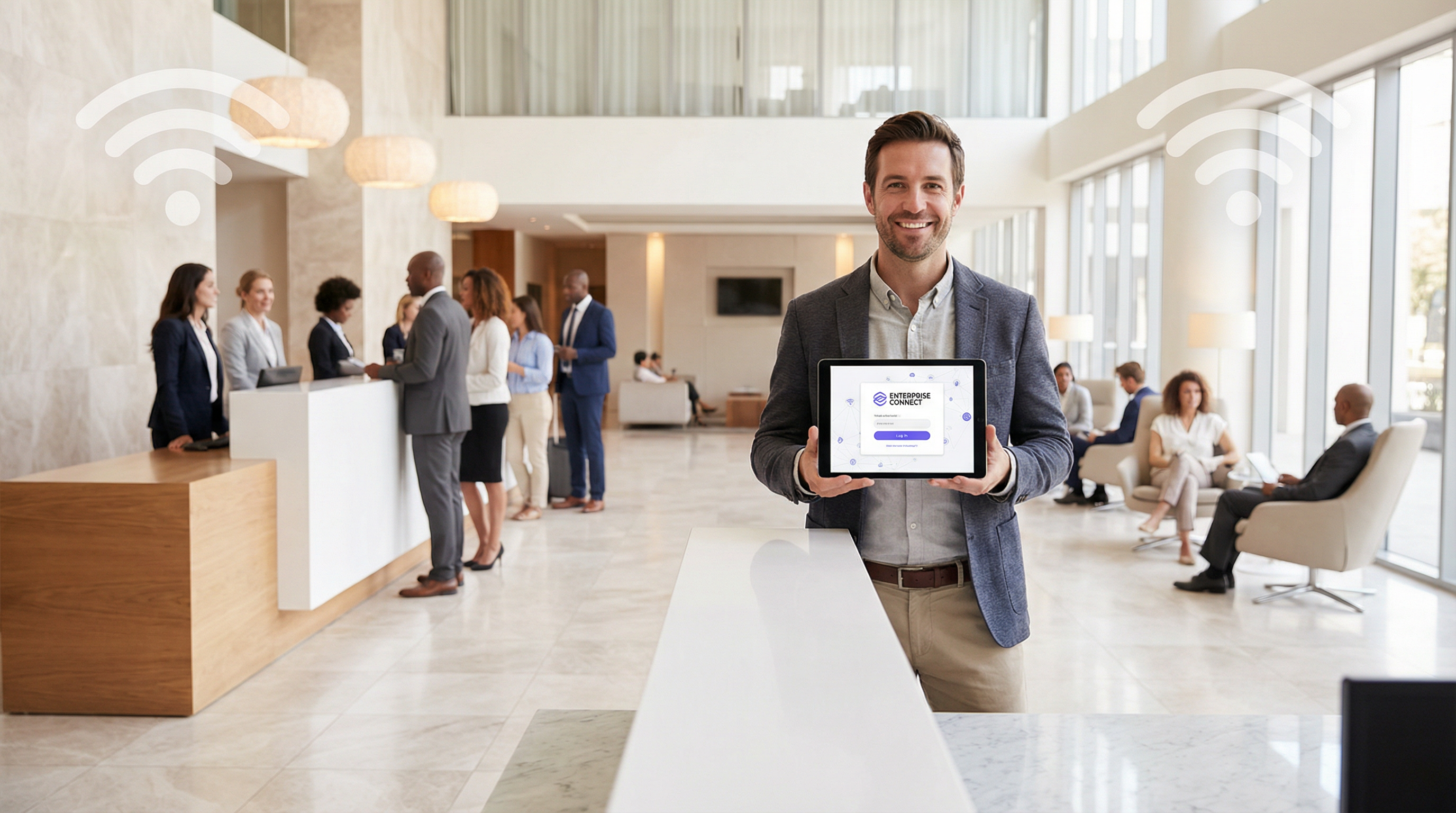
Un Captive Portal est la passerelle vers le WiFi invité, mais son apparente simplicité cache une architecture sophistiquée. Comprendre cette architecture est fondamental pour déployer une solution sécurisée, évolutive et conforme. Cette analyse approfondie examine le parcours d'un utilisateur, de la connexion à l'authentification, en détaillant le rôle de chaque composant au niveau du réseau.
La connexion initiale et la redirection
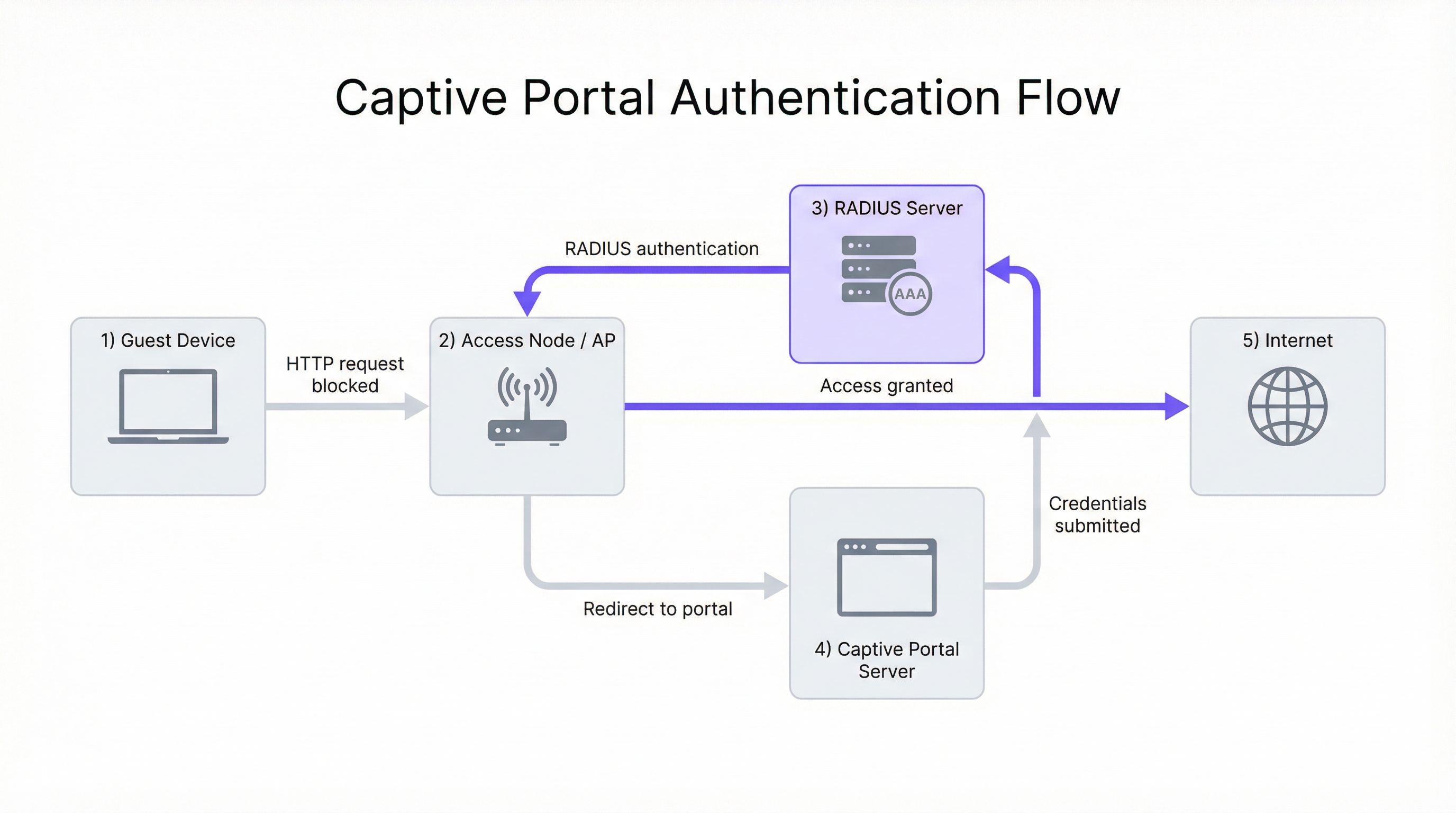
Le processus commence lorsqu'un appareil utilisateur (le suppliant) s'associe à un nœud d'accès (AN) sans fil, généralement un point d'accès (AP) WiFi. À ce stade, l'appareil dispose d'une connexion de couche 2, mais d'aucun accès réseau plus large. L'AN, fonctionnant conjointement avec une passerelle réseau ou un pare-feu, est configuré pour intercepter tout le trafic web sortant des utilisateurs non authentifiés.
Le principal défi consiste à forcer le navigateur web de l'utilisateur vers la page de connexion du Captive Portal. Deux méthodes principales sont utilisées :
Redirection HTTP : Lorsque l'utilisateur tente d'accéder à un site web HTTP, la passerelle réseau intercepte le paquet TCP SYN. Au lieu de le transférer, la passerelle termine la poignée de main TCP avec le client et, à la réception de la requête HTTP GET, renvoie une réponse HTTP/1.1 302 Found ou 307 Temporary Redirect. Cette réponse contient un en-tête Location pointant vers l'URL du Captive Portal. Le navigateur du client, conforme à la norme RFC 2616, navigue automatiquement vers la page du portail.
Redirection DNS : Dans ce modèle, le serveur DNS du réseau est configuré pour résoudre tous les noms d'hôtes externes demandés par les utilisateurs non authentifiés vers l'adresse IP unique du serveur du Captive Portal. Lorsque le navigateur de l'utilisateur tente de résoudre un domaine tel que purple.ai, il reçoit l'adresse IP du portail. Le navigateur initie alors une connexion au portail, qui affiche la page de connexion. Cette méthode peut s'avérer problématique avec les clients modernes qui utilisent le DNS over HTTPS (DoH) ou qui ont des entrées DNS en cache.
Le rôle du serveur RADIUS
Une fois que l'utilisateur a soumis ses identifiants (par ex., e-mail, connexion sociale, code de bon d'accès) sur le portail, le serveur du Captive Portal orchestre le processus d'authentification. Généralement, il ne stocke pas lui-même les identifiants des utilisateurs. Il agit plutôt comme un client auprès d'un serveur centralisé AAA (Authentication, Authorization, and Accounting), utilisant presque universellement le protocole RADIUS (Remote Authentication Dial-In User Service), tel que défini dans la norme RFC 2865.
Le flux est le suivant. Premièrement, l'authentification : le serveur du portail regroupe les identifiants de l'utilisateur et les informations d'identification (y compris l'adresse MAC du client) dans un paquet RADIUS Access-Request envoyé au serveur RADIUS. Deuxièmement, l'autorisation : le serveur RADIUS valide les identifiants par rapport à sa base de données interne ou transmet la requête à une source d'identité externe — le système de gestion hôtelière (PMS) d'un hôtel, Microsoft Active Directory ou un fournisseur d'identité sociale via OAuth. Si l'authentification réussit, le serveur RADIUS renvoie un message Access-Accept contenant des attributs RADIUS cruciaux qui définissent la politique de session de l'utilisateur, notamment Session-Timeout, Idle-Timeout et les attributs de bande passante WISPr. Troisièmement, la comptabilité (Accounting) : à la réception du message Access-Accept, le serveur du portail signale au nœud d'accès ou à la passerelle d'autoriser le trafic de l'utilisateur et envoie simultanément un paquet RADIUS Accounting-Request (Start) pour commencer l'enregistrement de la session, permettant un suivi détaillé de l'utilisation à des fins de conformité et d'analyse.
Le Walled Garden : Accès pré-authentification
Un composant critique de l'architecture est le walled garden. Il s'agit d'un ensemble spécifique d'adresses IP, de noms de domaine ou de protocoles auxquels un utilisateur non authentifié est autorisé à accéder. Il est mis en œuvre via des règles de pare-feu ou des listes de contrôle d'accès (ACL) sur la passerelle réseau.
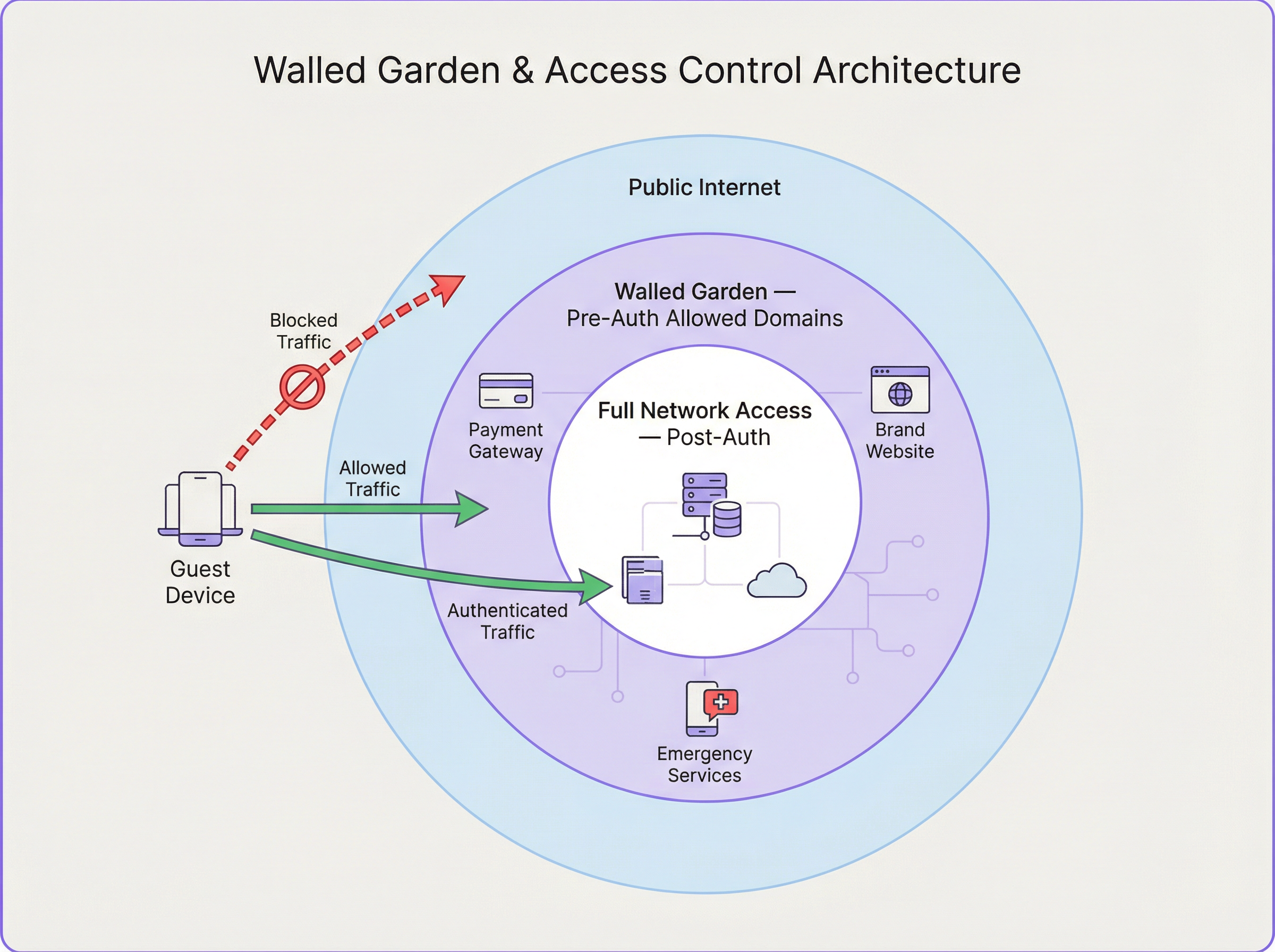
Les cas d'usage courants du walled garden incluent les fournisseurs d'identité de connexion sociale (Google, Facebook, LinkedIn), les passerelles de paiement (Stripe, PayPal), les propriétés web appartenant à la marque et les ressources des services d'urgence. La configuration correcte du walled garden est un point de défaillance fréquent lors des déploiements. Une liste incomplète peut interrompre les flux d'authentification, tandis qu'une liste trop permissive peut créer des failles de sécurité.
Guide de mise en œuvre
Le déploiement d'une architecture de Captive Portal robuste nécessite une planification minutieuse dans plusieurs domaines.
Étape 1 — Conception du réseau et sélection des composants : Sélectionnez des points d'accès (AP) de niveau entreprise qui prennent en charge le WPA3 et offrent de solides capacités d'intégration avec les serveurs RADIUS pour les requêtes de changement d'autorisation (CoA) (RFC 5176), permettant des mises à jour dynamiques des politiques en cours de session. Assurez-vous que votre passerelle réseau dispose de la flexibilité nécessaire pour mettre en œuvre des règles de redirection et de walled garden sophistiquées. Pour les déploiements multisites tels qu'une chaîne de magasins, un serveur RADIUS centralisé hébergé dans le cloud garantit la cohérence et simplifie la gestion.
Étape 2 — Configuration du flux d'authentification : Configurez le SSID invité sur vos points d'accès. Bien que les réseaux ouverts soient courants, l'utilisation de WPA3-Enhanced Open (OWE) offre un chiffrement des données individualisé entre chaque client et le point d'accès, empêchant ainsi les écoutes passives. Sur votre passerelle, créez les règles d'interception pour les clients non authentifiés. Documentez et mettez en œuvre méticuleusement les règles de pare-feu pour votre walled garden, en révisant cette liste régulièrement à mesure que les services tiers modifient la structure de leurs domaines.
Étape 3 — Expérience utilisateur et intégration (Onboarding) : La page du portail doit être réactive, à chargement rapide, clairement à l'image de la marque et optimisée pour les appareils mobiles. Proposez plusieurs méthodes d'authentification — connexions sociales, capture d'e-mails et codes de bons d'accès — alignées sur les objectifs commerciaux de l'établissement. Le portail est un point critique pour obtenir le consentement de l'utilisateur dans le cadre du GDPR ; assurez-vous que votre politique de confidentialité est clairement accessible via un lien et qu'un consentement explicite est obtenu pour tout traitement de données.
Bonnes pratiques
Utilisez le HTTPS pour la page du Captive Portal et chiffrez toutes les communications entre le portail et le serveur RADIUS en utilisant RADIUS over TLS ou IPsec. Dans les environnements multisites, centralisez le Captive Portal et l'infrastructure RADIUS pour garantir l'uniformité des politiques, de l'image de marque et de la collecte des données. Mettez en œuvre une journalisation et des analyses robustes pour suivre les taux de réussite/d'échec de l'authentification, la durée des sessions et l'utilisation de la bande passante. Concevez en prévision des pannes : définissez une politique claire pour déterminer si le système doit s'ouvrir (fail-open) ou se fermer (fail-closed) en cas de défaillance lorsque le serveur RADIUS est injoignable, avec des messages d'erreur clairs pour l'utilisateur.
Dépannage et atténuation des risques
| Problème courant | Cause(s) fondamentale(s) | Stratégie d'atténuation |
|---|---|---|
| L'utilisateur n'est pas redirigé vers le portail | Problèmes DNS (mise en cache côté client, DoH) ; mauvaise configuration de la règle de redirection ; client utilisant une adresse IP statique. | Mettez en œuvre les redirections HTTP et DNS comme solutions de secours. Imposez le DHCP. Utilisez l'isolation des clients au niveau du point d'accès (AP). |
| Les boutons de connexion sociale ne fonctionnent pas | Walled garden incomplet ; les domaines du fournisseur d'identité sont bloqués. | Utilisez les outils de développement du navigateur pour identifier les domaines bloqués et ajoutez-les aux ACL du walled garden. |
| Temps de connexion lents | Serveur RADIUS ou de portail sous-dimensionné ; latence élevée vers le fournisseur d'identité externe. | Effectuez des tests de charge sur l'infrastructure d'authentification. Utilisez des services cloud répartis géographiquement. |
| L'utilisateur est fréquemment déconnecté | Délais d'expiration de session ou d'inactivité trop agressifs sur le serveur RADIUS ; signal WiFi faible provoquant une réassociation. | Révisez les attributs de session RADIUS. Effectuez une étude de site sans fil pour garantir une couverture adéquate. |
ROI et impact commercial
Un Captive Portal bien conçu est plus qu'un simple utilitaire réseau ; c'est un atout commercial. Le ROI se mesure à travers plusieurs vecteurs. Marketing basé sur les données : la capture des données utilisateurs (avec consentement) permet de mener des campagnes marketing ciblées et de fidéliser la clientèle. Pour une chaîne de magasins, lier l'utilisation du WiFi aux visites en magasin offre de puissants modèles d'attribution. Expérience client améliorée : un processus de connexion fluide, rapide et sécurisé améliore la satisfaction des invités, ce qui a un impact direct sur les avis et la fidélité dans le secteur de l'hôtellerie. Efficacité opérationnelle : la gestion centralisée réduit la charge administrative des équipes informatiques, tandis que les analyses sur la fréquentation et le temps de séjour peuvent orienter les niveaux de personnel et l'agencement des magasins. Conformité et atténuation des risques : une architecture robuste garantit la conformité avec le GDPR et la norme PCI DSS, atténuant ainsi le risque de sanctions financières importantes.
En considérant le Captive Portal non pas comme un centre de coûts mais comme une plateforme d'engagement, les entreprises peuvent dégager une valeur commerciale significative de leur infrastructure WiFi invité.
Termes clés et définitions
Captive Portal
A web-based authentication mechanism that intercepts a user's HTTP or HTTPS traffic and redirects them to a login page before granting access to the broader network. It operates at the application layer (Layer 7) of the OSI model.
IT teams encounter this as the primary mechanism for controlling guest access to WiFi networks in hotels, retail spaces, stadiums, and public venues. It is the enforcement point for both security policies and business data-capture objectives.
Access Node (AN)
A network device—typically a Wireless Access Point (AP) or a network switch—that provides the physical or wireless connection point for end-user devices. In a captive portal architecture, the AN is responsible for enforcing the access policy dictated by the RADIUS server, either permitting or blocking a user's traffic based on their authentication state.
The AN is the 'gatekeeper' at the edge of the network. Its ability to support features like CoA (Change of Authorization) is critical for dynamic policy updates, such as upgrading a user from a free to a paid tier without requiring them to re-authenticate.
RADIUS (Remote Authentication Dial-In User Service)
A client-server networking protocol defined in RFC 2865 that provides centralized Authentication, Authorization, and Accounting (AAA) management for users connecting to a network service. It uses UDP for transport (ports 1812 for authentication, 1813 for accounting) and a shared secret for message integrity.
RADIUS is the backbone of enterprise network access control. In a captive portal deployment, it is the authoritative source for user identity validation and session policy. IT teams must ensure RADIUS server redundancy and secure communication channels.
Walled Garden
A controlled network environment in which an unauthenticated user's internet access is restricted to a pre-defined set of whitelisted IP addresses, domain names, or services. It is implemented via firewall rules or ACLs on the network gateway.
The walled garden is essential for enabling the authentication process itself (e.g., allowing access to social login providers) and for providing a degree of service before authentication (e.g., access to the venue's own website). Misconfiguration is a leading cause of captive portal authentication failures.
RADIUS Redirect
A mechanism by which the RADIUS server, within an Access-Accept response, includes a vendor-specific attribute (VSA) that instructs the Access Node or gateway to redirect the user's browser to a specific URL—typically the captive portal login page. This is an alternative to gateway-level HTTP interception.
RADIUS redirect is commonly used in architectures where the AP itself handles the redirection logic, rather than a separate gateway. It is supported by most enterprise-grade AP vendors and is particularly useful in distributed deployments where a centralised gateway is not present.
Change of Authorization (CoA)
An extension to the RADIUS protocol defined in RFC 5176 that allows the RADIUS server to dynamically modify an active user session. This enables the server to push new policy attributes (e.g., increased bandwidth) or terminate a session entirely, without requiring the user to re-authenticate.
CoA is the mechanism that enables tiered access models in real time. For example, when a hotel guest upgrades from a free to a paid WiFi tier, the payment system triggers a CoA request to the RADIUS server, which then pushes the new bandwidth policy to the Access Node instantly.
WPA3-Enhanced Open (OWE)
A WiFi security mode defined in IEEE 802.11 that provides opportunistic wireless encryption on open (no-password) networks. Each client device negotiates an individual encryption key with the AP, preventing passive eavesdropping by other users on the same network, without requiring a password.
OWE is the recommended security mode for guest WiFi networks that use a captive portal for authentication. It provides a significant security improvement over traditional open networks (which transmit all data in plaintext) while maintaining the seamless connection experience users expect from public WiFi.
AAA (Authentication, Authorization, and Accounting)
A security framework for controlling access to network resources. Authentication verifies identity, Authorization determines what the authenticated user is permitted to do, and Accounting records what the user did and for how long. RADIUS is the most common protocol implementing this framework.
The AAA framework is the conceptual foundation of all enterprise network access control. For venue operators, the Accounting component is particularly valuable, as it provides the audit trail required for regulatory compliance and the usage data needed for network capacity planning.
IEEE 802.1X
An IEEE standard for port-based Network Access Control (PNAC). It provides an authentication mechanism for devices wishing to attach to a LAN or WLAN, operating at Layer 2 before an IP address is assigned. It requires a supplicant (client software), an authenticator (the AP or switch), and an authentication server (typically RADIUS).
802.1X is the standard for corporate device authentication (e.g., employee laptops) and is distinct from captive portal authentication. IT teams should understand the difference: 802.1X is more secure but requires client-side configuration, making it unsuitable for guest devices. A well-designed network uses both — 802.1X for corporate devices and a captive portal for guests.
Études de cas
A 350-room international hotel brand is deploying a new guest WiFi system across its flagship London property. The CTO requires social login (Google and Facebook), email capture for the loyalty programme, PCI DSS compliance for a premium paid-access tier, and GDPR-compliant consent management. The existing network uses a mix of Cisco and Aruba access points. How should the captive portal architecture be designed?
The recommended architecture is a cloud-hosted captive portal platform (such as Purple) integrated with a centralized cloud RADIUS server. The deployment proceeds as follows:
- SSID Configuration: Create two SSIDs — a guest SSID (WPA3-OWE) for the captive portal flow, and a management SSID (WPA3-Enterprise, 802.1X) for staff devices. Segment these into separate VLANs.
- Redirection: Configure the gateway firewall with HTTP 302 redirect rules for the guest VLAN, targeting the cloud portal URL. Implement DNS redirection as a secondary fallback.
- Walled Garden: Whitelist the following domain groups:
accounts.google.com,*.googleapis.com(Google Login);*.facebook.com,*.fbcdn.net(Facebook Login); the hotel's own domain; the payment gateway's domains (e.g.,*.stripe.com). This is critical for the social login flow to function. - RADIUS Integration: Configure the cloud portal to send RADIUS
Access-Requestpackets to the centralized RADIUS server. Define two user groups: 'Free' (bandwidth-limited via WISPr attributes: 5 Mbps down, 2 Mbps up; 1-hour session timeout) and 'Premium' (unlimited bandwidth; 24-hour session timeout). The premium tier is unlocked after a payment transaction, with the RADIUS server dynamically updating the user's policy via a Change of Authorization (CoA) request per RFC 5176. - GDPR Consent: The portal landing page presents a clear, unbundled consent form. Users must actively tick a checkbox to consent to marketing communications — pre-ticked boxes are non-compliant under GDPR. The consent timestamp and method are logged and stored.
- PCI DSS: The payment page is hosted on the payment gateway's domain (within the walled garden), ensuring that card data never transits the hotel's network infrastructure, significantly reducing the PCI DSS scope.
A national retail chain with 280 stores wants to deploy a unified guest WiFi platform. Each store has between 2 and 8 access points. The business objective is to capture customer email addresses and link WiFi sessions to in-store purchase data from the EPOS system. The IT team is small and cannot manage per-store configurations. How should the architecture be structured for scale?
A centralised, cloud-managed architecture is the only viable approach at this scale. The deployment model is as follows:
- Centralised Management: Deploy a cloud-managed WiFi platform where all 280 stores are managed from a single dashboard. Access nodes at each store are zero-touch provisioned — they connect to the cloud controller on first boot and receive their full configuration automatically. No per-store manual configuration is required.
- Standardised SSID and Portal Template: Define a single SSID template and a single branded portal template that is pushed to all stores. Any changes to the portal design or authentication policy are made once and propagated to all 280 locations simultaneously.
- Centralised RADIUS: All authentication requests from all stores are directed to a pair of redundant, cloud-hosted RADIUS servers. This provides a single point of policy management and a unified data store for all user sessions.
- EPOS Integration: The WiFi platform's API is integrated with the EPOS system. The customer's email address (captured at WiFi login) is used as the matching key. When a customer makes a purchase, the EPOS system queries the WiFi platform's API to check if a WiFi session was active for that email address within the store's geographic boundary, creating an attribution record.
- Walled Garden: A single, centrally-managed walled garden policy is applied to all stores, covering the email validation service and any social login providers used.
Analyse de scénario
Q1. A stadium with a capacity of 60,000 is deploying guest WiFi for a major sporting event. The network team expects 40,000 concurrent device connections, with a peak authentication burst of approximately 8,000 logins per minute at kick-off. The venue's IT director wants to use a social login (Google/Facebook) captive portal. What are the three most critical architectural decisions the network architect must address to ensure the authentication system does not become a bottleneck?
💡 Astuce :Consider the load on each component in the authentication chain: the portal server, the RADIUS server, and the external identity provider. Also consider the network-level implications of 40,000 concurrent DHCP leases and ARP tables.
Afficher l'approche recommandée
The three most critical architectural decisions are: (1) RADIUS Server Scalability: A single RADIUS server instance will be unable to handle 8,000 authentication requests per minute. The architect must deploy a horizontally scaled cluster of RADIUS servers behind a load balancer, with session state shared via a distributed cache (e.g., Redis). The RADIUS server's database connection pool must also be sized appropriately. (2) Captive Portal Server Scalability: Similarly, the portal server must be horizontally scaled. A cloud-hosted portal platform with auto-scaling capabilities is strongly recommended over on-premise servers, which cannot be rapidly provisioned. (3) Walled Garden and External Identity Provider Latency: Social logins introduce a dependency on external services (Google/Facebook). Under high load, the round-trip time to these providers can increase significantly. The architect should consider offering a faster, lower-friction alternative (e.g., a simple click-through or SMS OTP) as the primary authentication method for the mass audience, reserving social login for users who specifically prefer it. Additionally, the DHCP server must be configured with a large enough pool for 40,000+ leases, and the network gateway must be capable of maintaining state for 40,000 concurrent sessions without exhausting its connection table.
Q2. A large NHS hospital trust is evaluating a guest WiFi deployment for patient and visitor use. The information governance team has raised concerns about GDPR compliance, specifically around data retention, the right to erasure, and the lawful basis for processing patient data. The proposed portal design captures email addresses and allows social logins. What changes to the architecture and portal design are required to achieve compliance?
💡 Astuce :Consider the distinction between patients (a potentially special category of data subject under GDPR Article 9) and general visitors. Also consider the lawful basis for processing — is consent the appropriate basis, or could legitimate interest apply? What are the implications of each?
Afficher l'approche recommandée
Several architectural and design changes are required. First, Lawful Basis: For a public-sector body, consent is typically the most appropriate lawful basis for processing guest WiFi data. However, the trust's Data Protection Officer (DPO) must confirm this. The portal must present a clear, unbundled consent request — separate checkboxes for 'access to WiFi' and 'marketing communications', with the former not conditional on the latter. Second, Data Minimisation: The portal should only capture the minimum data necessary. For a hospital environment, capturing email addresses may be justifiable for service notifications, but social logins (which can expose additional profile data) should be evaluated carefully. Consider whether a simple click-through with IP logging (for network security purposes) is sufficient. Third, Right to Erasure: The backend system must support a data erasure workflow. When a user submits a right-to-erasure request, all associated data (email, session logs, usage data) must be deleted within 30 days. This requires a clear data map of where user data is stored across the portal, RADIUS, and analytics systems. Fourth, Data Retention Policy: Define and enforce a clear retention period for session logs. Retaining data for longer than necessary is a GDPR violation. A 90-day rolling retention window for session logs is a common and defensible policy. Fifth, Special Category Data: The trust must ensure that the WiFi system does not inadvertently capture or infer health-related data. The portal must not ask questions about the user's reason for visiting the hospital.
Q3. A network engineer is troubleshooting a captive portal deployment at a conference centre. Attendees report that they are successfully connecting to the WiFi and reaching the portal login page, but when they attempt to log in using their LinkedIn credentials, the social login button appears to load briefly and then fails silently. Email/password login works correctly. What is the most likely cause, and what is the diagnostic process?
💡 Astuce :The fact that the portal page loads correctly and email login works rules out issues with the portal server itself and the RADIUS integration. The problem is specific to the LinkedIn OAuth flow. Consider what network resources the LinkedIn login process requires that the email login does not.
Afficher l'approche recommandée
The most likely cause is an incomplete walled garden configuration. The LinkedIn OAuth flow requires the user's browser to make requests to multiple LinkedIn domains and CDN resources. If these domains are not whitelisted in the pre-authentication firewall rules, the browser will silently fail to load the necessary JavaScript or complete the OAuth redirect. The diagnostic process is as follows: (1) Open the browser's developer tools (F12) on a device connected to the guest WiFi but not yet authenticated. (2) Navigate to the portal page and attempt the LinkedIn login. (3) In the 'Network' tab of developer tools, filter for failed requests (status 0, ERR_CONNECTION_REFUSED, or similar). (4) Identify the specific domains that are being blocked. Common LinkedIn domains that must be whitelisted include www.linkedin.com, platform.linkedin.com, static.licdn.com, and media.licdn.com. (5) Add the identified domains to the walled garden ACLs on the network gateway. (6) Re-test. If the issue persists, repeat the diagnostic process to identify any remaining blocked domains. This is a methodical process — use the browser's network inspector as your primary diagnostic tool for walled garden issues.
Points clés à retenir
- ✓Captive portal architecture is a five-component system: Guest Device, Access Node, Gateway/Firewall, Captive Portal Server, and RADIUS Server — each with a distinct and interdependent role in the authentication flow.
- ✓Network-level redirection is achieved via HTTP 302 redirects (gateway intercepts TCP and returns a redirect response) or DNS redirection (all hostnames resolve to the portal IP). Modern deployments should implement both as fallbacks.
- ✓The walled garden is a pre-authentication whitelist of IP addresses and domains that must be meticulously configured to include all social login provider domains, payment gateways, and brand assets — incomplete walled gardens are the most common cause of authentication failures.
- ✓RADIUS is the authoritative AAA engine: it validates credentials, returns session policy attributes (bandwidth, timeout), and supports dynamic policy updates via Change of Authorization (CoA, RFC 5176), enabling real-time tier upgrades without re-authentication.
- ✓For deployments exceeding 10 sites, a cloud-hosted, centrally managed architecture is the only operationally viable approach — zero-touch provisioning and centralised policy management are non-negotiable for small IT teams managing large estates.
- ✓GDPR and PCI DSS compliance must be designed into the architecture from the outset, not retrofitted: the portal is the primary consent-capture point, and the payment flow must be scoped to the payment gateway's domain to minimise PCI DSS obligations.
- ✓A well-architected captive portal delivers measurable ROI through customer data capture, marketing attribution, and enhanced guest experience — it should be positioned as a business intelligence platform, not merely a network access utility.




