

Applications de connexion au Captive Portal : Choisir la bonne solution pour votre entreprise (Fonctionnalités, sécurité et tarification)
This guide provides a comprehensive technical reference for IT leaders evaluating, deploying, and managing captive portal login solutions across enterprise venues. It covers critical features, security protocols, authentication methods, pricing models, and integration capabilities to help businesses enhance network security, ensure regulatory compliance, and maximise the ROI of their guest WiFi infrastructure.
🎧 Écouter ce guide
Voir la transcription

Synthèse
Pour l'entreprise moderne, le WiFi invité n'est plus une simple commodité : c'est un actif d'infrastructure critique qui a un impact direct sur la posture de sécurité, la conformité réglementaire et l'engagement client. Une application de connexion au Captive Portal sert de passerelle principale vers cet actif, agissant comme un portier numérique qui authentifie les utilisateurs, applique les politiques d'utilisation acceptable et débloque des informations commerciales exploitables à partir de chaque connexion. Le paysage des solutions de Captive Portal est complexe, allant des simples accords de type "clic" aux systèmes d'accès sophistiqués basés sur l'identité et intégrés aux fournisseurs d'identité de l'entreprise. Choisir la mauvaise solution introduit des vulnérabilités de sécurité importantes, une exposition juridique en vertu de réglementations telles que le GDPR et la norme PCI DSS, et une occasion manquée d'extraire de la valeur des données de trafic réseau. Ce guide fournit un cadre neutre vis-à-vis des fournisseurs pour les directeurs techniques (CTO), les responsables informatiques et les architectes réseau afin d'évaluer et de sélectionner la bonne solution de Captive Portal. Nous décortiquons les composants techniques de base, comparons les architectures d'authentification, décrivons une méthodologie de déploiement par phases et fournissons un modèle clair pour mesurer l'impact commercial et le retour sur investissement (ROI). L'objectif est d'aller au-delà d'une simple page de connexion vers une couche d'accès réseau sécurisée, conforme et intelligente qui soutient des objectifs commerciaux plus larges dans l'hôtellerie, la vente au détail et les grands lieux publics.
Analyse technique approfondie
La fonction principale d'un Captive Portal est d'intercepter tout le trafic web d'un appareil nouvellement connecté et de le rediriger vers une page web dédiée, créant ainsi un « jardin clos ». L'accès à l'internet au sens large est bloqué jusqu'à ce que l'utilisateur effectue avec succès une action requise sur cette page. Ce processus implique une séquence coordonnée entre l'appareil client, le point d'accès sans fil (AP), une passerelle ou un contrôleur réseau, et souvent une plateforme de gestion basée sur le cloud.
Architecture de base et flux de trafic
Comprendre la séquence technique est essentiel pour une configuration et un dépannage corrects. Le flux commence au moment où un appareil s'associe au SSID invité. L'appareil envoie immédiatement une sonde de connectivité HTTP — par exemple, les appareils iOS interrogent http://captive.apple.com et les appareils Android interrogent http://connectivitycheck.gstatic.com. Le pare-feu ou la passerelle du réseau est configuré pour intercepter ce trafic initial provenant de toute adresse MAC non authentifiée et effectuer une redirection DNS, en répondant non pas avec l'IP de destination légitime, mais avec l'adresse IP du serveur du Captive Portal. Cela force le Captive Network Assistant (CNA) de l'appareil ou le navigateur à charger la page de connexion du portail. Une fois l'authentification réussie, le backend du portail demande à la passerelle de mettre à jour sa table de session, marquant l'adresse MAC de l'appareil comme autorisée. La passerelle autorise ensuite le trafic de cet appareil à transiter vers internet pour une durée de session prédéterminée.
Méthodes d'authentification : Une analyse comparative
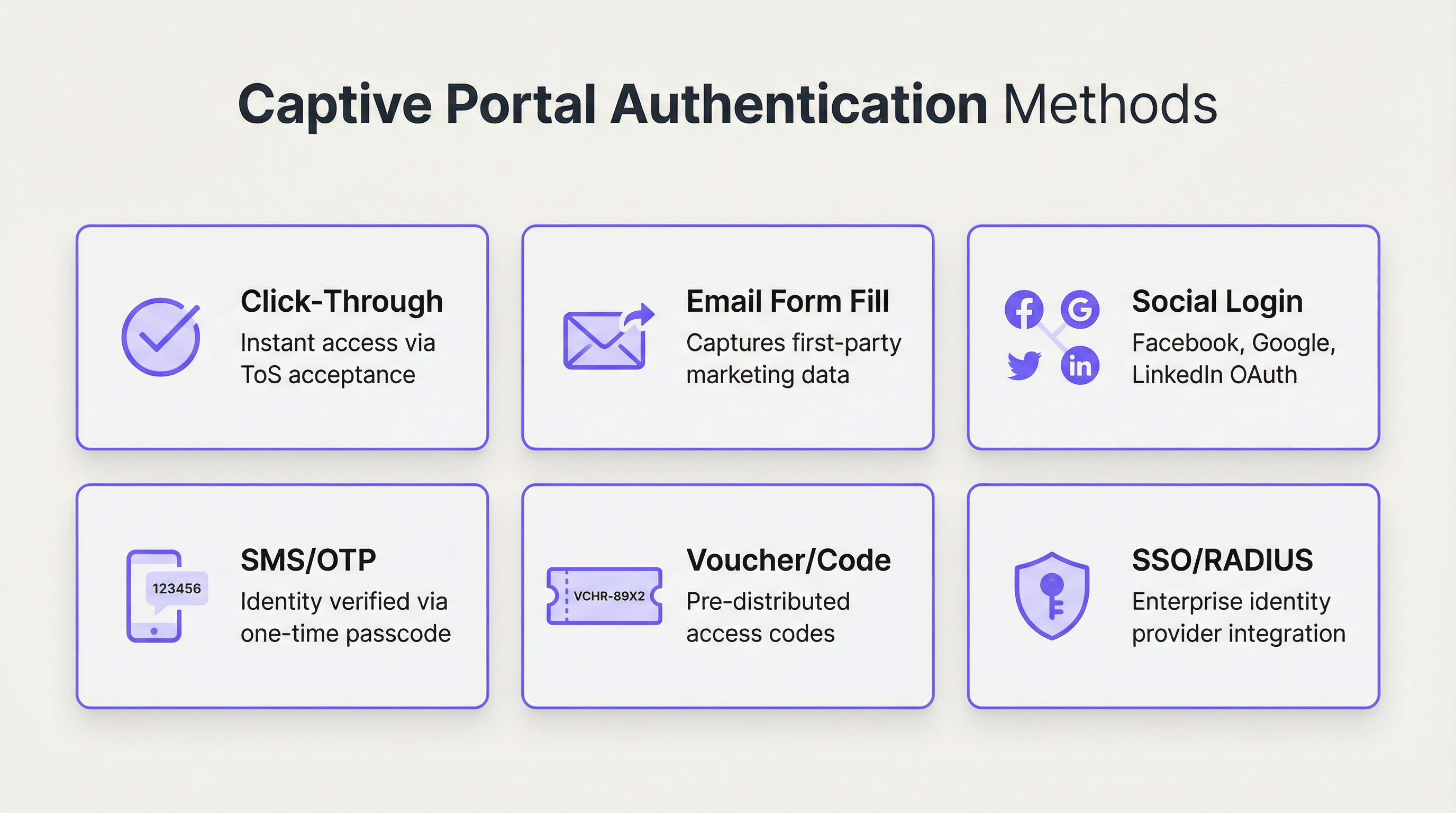
Le choix de la méthode d'authentification est la décision de conception la plus lourde de conséquences, équilibrant directement la friction utilisateur par rapport aux exigences de sécurité et aux objectifs de collecte de données. Les plateformes d'entreprise modernes prennent en charge un large éventail d'options, chacune adaptée à différents environnements opérationnels.
| Méthode | Cas d'usage principal | Niveau de sécurité | Potentiel de capture de données | Friction utilisateur |
|---|---|---|---|---|
| Clic de validation | Espaces publics, restauration rapide | Très faible | Aucun | Très faible |
| E-mail / Formulaire | Vente au détail axée sur le marketing, hôtellerie | Faible | Élevé (données first-party) | Moyenne |
| Connexion sociale | Lieux ciblant le marketing grand public | Faible–Moyen | Moyen (profil social) | Faible–Moyenne |
| SMS / OTP | Hôtels, centres de conférence, transports | Moyen | Moyen (numéro de téléphone) | Moyenne |
| Bon / Code | WiFi payant, événements, accès limité | Moyen | Faible | Moyenne–Élevée |
| RADIUS / 802.1X | Entreprise, éducation, gouvernement | Très élevé | Élevé (données d'annuaire) | Faible (pour les utilisateurs) |
| SSO (SAML / OIDC) | Invités d'entreprise et accès interne | Très élevé | Élevé (données IdP) | Très faible |
Protocoles et normes de sécurité
Une solution de Captive Portal robuste doit reposer sur des normes de sécurité solides et reconnues par l'industrie. S'appuyer sur un réseau ouvert non chiffré n'est plus acceptable dans aucun contexte d'entreprise.
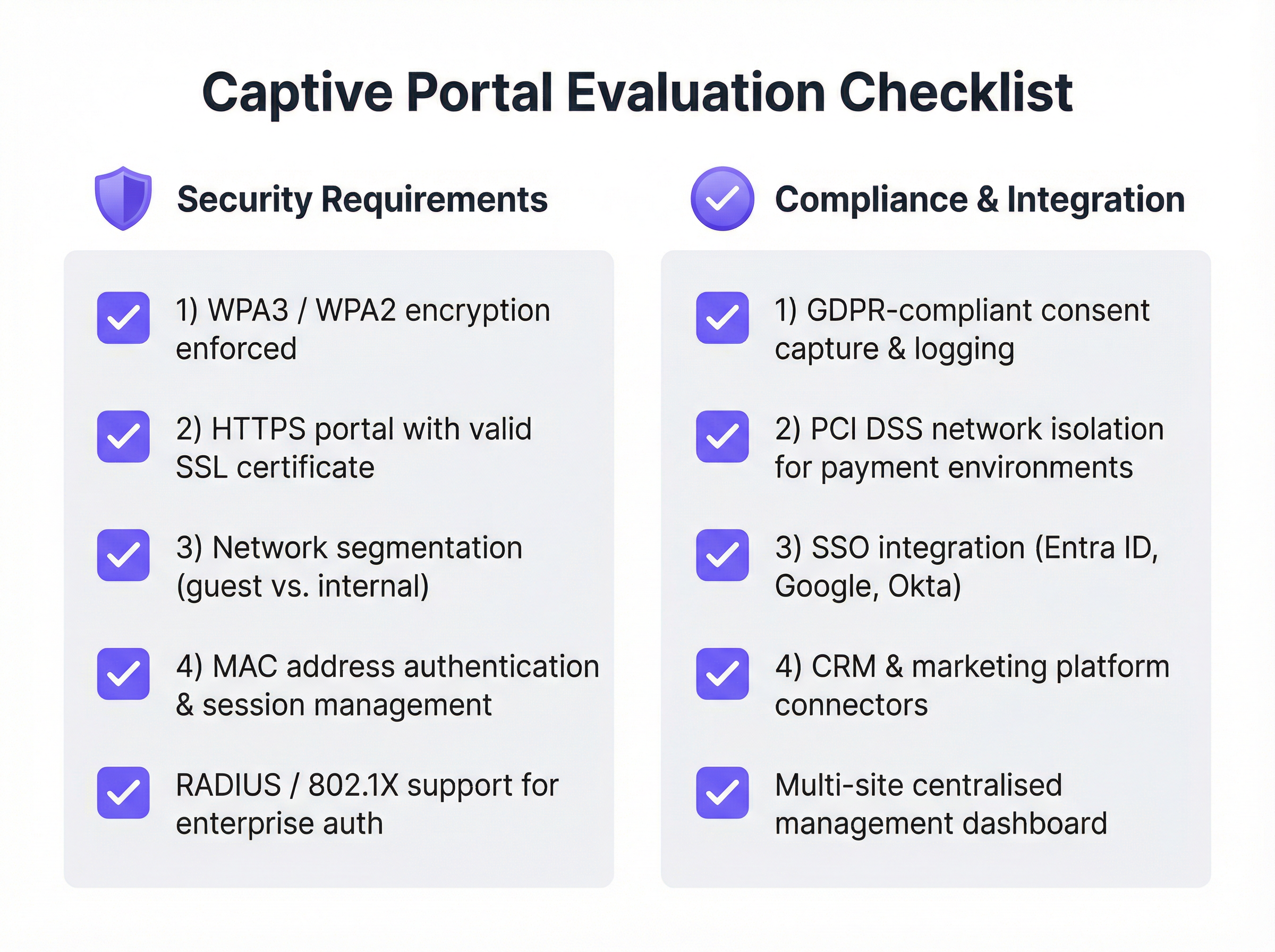
WPA3 / WPA2-Enterprise doit être appliqué au niveau de la couche sans fil, souvent en conjonction avec IEEE 802.1X. Cela chiffre le trafic entre l'appareil client et le point d'accès dès le tout premier paquet de données, empêchant ainsi les écoutes passives. La page du Captive Portal elle-même doit être servie via HTTPS avec un certificat SSL valide et publiquement approuvé. Cela empêche les attaques de l'homme du milieu (man-in-the-middle) où un attaquant pourrait usurper la page du portail pour récolter des identifiants. La segmentation du réseau est le contrôle de sécurité le plus critique : le réseau invité doit être complètement isolé du réseau d'entreprise interne à l'aide de VLAN et de règles de pare-feu strictes. Enfin, l'isolation des clients doit être activée sur les points d'accès pour empêcher les appareils invités connectés de communiquer entre eux, atténuant ainsi la propagation latérale des logiciels malveillants.
Guide de mise en œuvre
Le déploiement d'une solution de Captive Portal de niveau entreprise nécessite une planification minutieuse et une approche par phases. L'objectif est d'obtenir un système sécurisé, fiable et évolutif qui répond aux exigences informatiques et commerciales.
Phase 1 : Recueil des besoins et sélection du fournisseur. Définissez l'objectif principal — qu'il s'agisse d'un simple accès sécurisé, de la génération de leads, d'offres de services à plusieurs niveaux ou de la conformité réglementaire. Identifiez toutes les parties prenantes, y compris l'informatique, le marketing, le service juridique et les opérations, pour vous assurer que toutes les exigences sont prises en compte. Auditez votre matériel réseau actuel (AP, commutateurs, pare-feu) pour vérifier sa compatibilité avec les solutions de Captive Portal modernes, car la plupart des plateformes de premier plan s'intègrent aux principaux fournisseurs, notamment Cisco Meraki, Aruba et Ubiquiti. Évaluez les fournisseurs à l'aide de la liste de contrôle ci-dessous, privilégiez les plateformes gérées dans le cloud pour leur évolutivité, et exécutez une preuve de concept (POC) dans une zone limitée avant de vous engager dans un déploiement complet.
Phase 2 : Conception et configuration. Finalisez l'architecture réseau, y compris la conception des VLAN pour la segmentation du trafic invité, l'adressage IP et la configuration DNS. Choisissez la ou les méthodes d'authentification qui correspondent à vos objectifs et configurez les intégrations avec tout système externe tel qu'un serveur RADIUS ou un fournisseur d'identité SSO. Concevez les pages du portail destinées aux utilisateurs avec une image de marque cohérente et un parcours utilisateur clair. Rédigez la politique d'utilisation acceptable (AUP) en collaboration avec votre équipe juridique, et configurez les politiques utilisateur, y compris les limites de temps de session, la limitation de la bande passante et les règles de filtrage de contenu.
Phase 3 : Déploiement et tests. Déployez d'abord la solution sur un seul site ou une petite section d'un grand lieu. Testez le parcours utilisateur complet sur une variété d'appareils — iOS, Android, Windows et macOS — pour garantir un comportement cohérent sur les différents Captive Network Assistants. Formez le personnel sur place à l'assistance aux utilisateurs et au dépannage des problèmes courants.
Phase 4 : Surveillance et optimisation. Examinez régulièrement le tableau de bord analytique de la plateforme pour surveiller les taux de réussite des connexions, le volume d'utilisateurs et l'état du matériel. Recueillez les commentaires des utilisateurs et du personnel pour identifier les points de friction, et utilisez les données pour affiner la conception du portail, ajuster les politiques de bande passante et optimiser l'expérience globale.
Bonnes pratiques
Priorisez la sécurité dès le premier jour. Ne déployez jamais un réseau invité ouvert et non chiffré. Appliquez le WPA3 ou le WPA2 et assurez-vous que votre portail fonctionne via HTTPS. La segmentation du réseau entre le trafic invité et interne est non négociable, quelle que soit la taille du déploiement.
Adoptez la gestion centralisée dans le cloud. Pour les organisations multi-sites, une plateforme de gestion basée sur le cloud est essentielle pour une application cohérente des politiques, des rapports centralisés et une administration simplifiée. Les solutions exclusivement sur site créent des frais généraux opérationnels importants et introduisent des dérives de configuration entre les sites.
Respectez les réglementations sur la confidentialité des données. Si vous collectez des données personnelles — y compris une adresse e-mail ou un profil social — vous devez vous conformer au GDPR, au CCPA et aux autres réglementations locales applicables. Cela nécessite d'obtenir un consentement explicite et éclairé, d'enregistrer ce consentement avec un horodatage et de fournir aux utilisateurs un mécanisme clair pour gérer ou supprimer leurs données. Collaborez avec un conseiller juridique pour rédiger une AUP et une politique de confidentialité conformes avant la mise en production.
Concevez pour l'expérience utilisateur. Un processus de connexion frustrant donne une mauvaise image de votre marque et augmente les frais d'assistance. Gardez un design épuré, minimisez le nombre de clics et fournissez des instructions claires. Pour les environnements d'entreprise, tirez parti du SSO ou de l'authentification basée sur des certificats pour une expérience véritablement fluide qui ne nécessite aucune interaction de la part de l'utilisateur.
Intégrez-vous à votre pile technologique existante. La véritable puissance d'un Captive Portal moderne se révèle grâce à l'intégration. Connectez-le à votre CRM pour l'automatisation du marketing, à votre système de gestion hôtelière (PMS) dans l'hôtellerie pour des expériences personnalisées, ou à votre plateforme de Business Intelligence pour des analyses de fréquentation plus approfondies.
Dépannage et atténuation des risques
| Problème ou risque | Stratégie d'atténuation |
|---|---|
| La page du portail ne se charge pas | Vérifiez les règles d'interception et de redirection DNS sur la passerelle. Vérifiez les règles de pare-feu bloquant l'accès au serveur du portail. Confirmez que l'appareil possède une adresse IP valide provenant de la plage DHCP invité. |
| Avertissements de certificat SSL | Utilisez un certificat SSL valide et publiquement approuvé. Les certificats auto-signés déclenchent des avertissements de sécurité sur tous les navigateurs et systèmes d'exploitation modernes, et bloqueront l'accès sur iOS et Android. |
| Boucles de connectivité des appareils | Certains appareils Android réessaient de manière agressive les vérifications de connectivité. Assurez-vous que le portail est performant et que la passerelle met correctement sur liste blanche les URL de vérification de connectivité nécessaires pour tous les principaux systèmes d'exploitation. |
| Violations de conformité au GDPR | Obtenez un consentement explicite et enregistré avant de collecter des données personnelles. Mettez en œuvre une politique de conservation des données et un mécanisme permettant aux utilisateurs de demander leur suppression. Réalisez une analyse d'impact sur la protection des données (DPIA) pour les déploiements à grande échelle. |
| Violation du réseau invité | Traitez le réseau invité comme un environnement hostile et non fiable. Mettez en œuvre une segmentation VLAN stricte et l'isolation des clients. Envisagez de déployer un pare-feu d'application web (WAF) pour protéger le Captive Portal lui-même des attaques basées sur le web. |
| Volume élevé d'appels d'assistance | Investissez dans une conception UX de portail claire et simple. Fournissez au personnel un guide de dépannage de référence rapide. Mettez en place un mécanisme de réinitialisation de mot de passe ou de bon en libre-service lorsque cela est possible. |
ROI et impact commercial
L'investissement dans une solution de Captive Portal d'entreprise offre des rendements mesurables en matière de sécurité, d'opérations et de marketing. Quantifier ce rendement nécessite le suivi de métriques dans trois domaines.
Les métriques de sécurité et de conformité incluent une réduction des tickets d'assistance informatique liés à l'accès invité, des résultats positifs lors des audits de conformité pour la norme PCI DSS et le GDPR, et zéro incident de sécurité provenant du réseau invité. Le coût d'une seule violation de données — y compris les amendes réglementaires, les dommages à la réputation et les coûts de remédiation — éclipse généralement le coût annuel d'une solution de Captive Portal robuste.
Les métriques opérationnelles incluent une utilisation accrue du WiFi invité, des scores de satisfaction utilisateur positifs et une réduction du temps d'intégration des invités. Pour un hôtel, l'intégration du portail au PMS élimine une étape d'enregistrement manuel pour l'accès WiFi, réduisant directement la charge de travail à la réception.
Les métriques marketing et commerciales incluent la croissance de la base de données d'e-mails marketing, le nombre d'inscriptions au programme de fidélité via le portail, les revenus générés par les niveaux d'accès payants ou échelonnés, et la valeur des données de fréquentation et de temps de séjour capturées grâce aux analyses WiFi. Pour une chaîne de vente au détail capturant 10 000 nouvelles adresses e-mail de clients par mois, les revenus supplémentaires d'une seule campagne d'e-mailing ciblée peuvent justifier le coût annuel total de la plateforme. Pour un hôtel faisant la promotion d'un forfait spa sur la page d'accueil post-connexion, le taux de conversion est directement mesurable et attribuable. Un Captive Portal moderne transforme le WiFi invité d'un centre de coûts nécessaire en un atout stratégique à ROI positif.
Termes clés et définitions
Captive Portal
A web-based gateway that intercepts all HTTP/HTTPS traffic from a newly connected device on a WiFi network, redirecting it to a controlled landing page where the user must complete an action before being granted internet access.
IT teams encounter captive portals as the primary mechanism for managing guest WiFi access. Understanding their architecture is essential for correct configuration, troubleshooting, and security design.
RADIUS (Remote Authentication Dial-In User Service)
A networking protocol that provides centralised Authentication, Authorisation, and Accounting (AAA) management for users connecting to a network service, typically integrating with a directory service such as Microsoft Active Directory.
For enterprise IT teams, RADIUS is the robust, scalable method for integrating WiFi authentication with a central user directory. It enables user-based policies, provides a detailed audit log, and is a cornerstone of IEEE 802.1X-based network access control.
IEEE 802.1X
An IEEE standard for port-based Network Access Control (PNAC) that provides an authentication mechanism for devices wishing to attach to a LAN or WLAN, preventing unauthorised devices from connecting before credentials are verified.
Network architects specify 802.1X when designing high-security wireless environments. It works in conjunction with RADIUS to ensure that a device must be authenticated by the network before it receives an IP address or can communicate with any other network resource.
WPA3 (Wi-Fi Protected Access 3)
The third generation of the WPA security certification programme, offering enhanced protection against offline dictionary attacks via Simultaneous Authentication of Equals (SAE), and providing Opportunistic Wireless Encryption (OWE) for open networks.
CTOs and security architects should mandate WPA3 support as a minimum requirement for any new wireless hardware procurement. It is a critical component of a modern, forward-looking security posture.
Network Segmentation (VLAN)
The practice of dividing a physical network into multiple, logically isolated virtual networks (VLANs) using network switches and firewalls, ensuring that traffic from one segment cannot reach another without explicit permission.
This is the single most important security control in a guest WiFi deployment. Without strict VLAN segmentation, a compromised guest device could potentially access internal corporate systems, POS terminals, or sensitive data stores.
SSO (Single Sign-On)
An authentication scheme that allows a user to authenticate once with a central identity provider (IdP) and gain access to multiple systems without re-entering credentials, typically implemented using SAML 2.0 or OpenID Connect (OIDC) protocols.
Enterprise IT managers use SSO to allow employees to access the corporate WiFi network using their existing credentials from providers like Microsoft Entra ID, Google Workspace, or Okta. This eliminates password management overhead and provides a seamless, secure user experience.
Passpoint (Hotspot 2.0)
A Wi-Fi Alliance certification programme based on the IEEE 802.11u standard that enables mobile devices to automatically discover and securely connect to WiFi networks without requiring any user interaction or captive portal login.
Venue operators and network architects should be aware of Passpoint as the emerging alternative to traditional captive portals. It provides a cellular-like connection experience and is increasingly supported by major identity federations through OpenRoaming.
GDPR (General Data Protection Regulation)
A regulation in EU law on data protection and privacy that mandates how organisations collect, store, process, and protect the personal data of EU residents, with significant financial penalties for non-compliance.
Any organisation deploying a captive portal that collects personal data — including email addresses, phone numbers, or social profiles — must ensure their solution and processes are fully GDPR-compliant. This includes obtaining explicit, informed consent, providing a clear privacy policy, and enabling users to exercise their data rights.
iPSK (Individual Pre-Shared Key)
A security method where each device or user is assigned a unique, individually managed pre-shared key to access a WiFi network, providing device-level accountability without requiring 802.1X infrastructure.
IT teams use iPSK as a pragmatic solution for connecting devices that do not support 802.1X, such as IoT sensors, smart displays, or legacy hardware. It provides a level of accountability and revocability that a single shared password cannot offer.
Études de cas
A 250-room upscale hotel wants to replace its outdated, unreliable guest WiFi system. The goals are to provide a seamless, secure experience for guests, reduce front-desk support calls, and use the WiFi to promote on-site amenities like the spa and restaurant. How should the captive portal be configured?
Step 1 — Infrastructure: Deploy a cloud-managed WiFi solution (such as Purple integrated with Cisco Meraki or Aruba hardware) with full venue coverage and redundant access points in high-density areas such as the lobby and conference rooms.
Step 2 — Network Design: Create two primary SSIDs. A secure WPA3-Enterprise network for staff, authenticated via RADIUS integrated with Active Directory. A guest SSID using WPA2 with a captive portal. Implement strict VLAN segmentation between guest, staff, and management networks, with firewall rules preventing any cross-VLAN traffic.
Step 3 — Guest Authentication: Configure the captive portal with a primary authentication method of 'Room Number + Surname', integrated with the hotel's Property Management System (PMS) via API. This ensures only registered guests can connect, eliminates anonymous access, and ties WiFi sessions to a known guest record.
Step 4 — Portal Logic: Upon successful PMS authentication, present guests with a branded welcome page featuring dynamic content: a 'Book a Spa Treatment' button (deep-linking to the spa booking page) and a 'View Restaurant Menu' link. These are served dynamically based on the guest's stay dates and any existing bookings.
Step 5 — Tiered Access: Implement a two-tier bandwidth policy. A complimentary 5 Mbps tier for standard browsing and email. A premium 50 Mbps tier offered for a daily fee, targeted at business travellers and families streaming content. This is presented as a clear upsell option on the welcome page.
Step 6 — Staff Training: Train front-desk staff to assist guests with the PMS login process and explain the premium speed option, with a simple troubleshooting guide for the five most common issues.
A retail chain with 50 stores across the country wants to understand customer behaviour in-store and grow its loyalty programme. They currently offer a basic, unsecured guest WiFi network with no login. What captive portal strategy should they adopt?
Step 1 — Platform Selection: Choose a captive portal platform with strong analytics, CRM integration, and multi-site management capabilities. The platform must support centralised policy management so that changes can be pushed to all 50 stores simultaneously.
Step 2 — Authentication Strategy: Set the primary authentication method to 'Email Form Fill' with an optional 'Social Login' (Google or Facebook). To incentivise sign-ups, present a 10% discount voucher on the welcome page, delivered to the user's email address after successful login. This creates a clear value exchange.
Step 3 — Loyalty Integration: Use the platform's API to connect the captive portal to the chain's loyalty programme database. When a known loyalty member logs in with their registered email, the portal displays their current points balance and a personalised offer, enhancing the experience for existing customers.
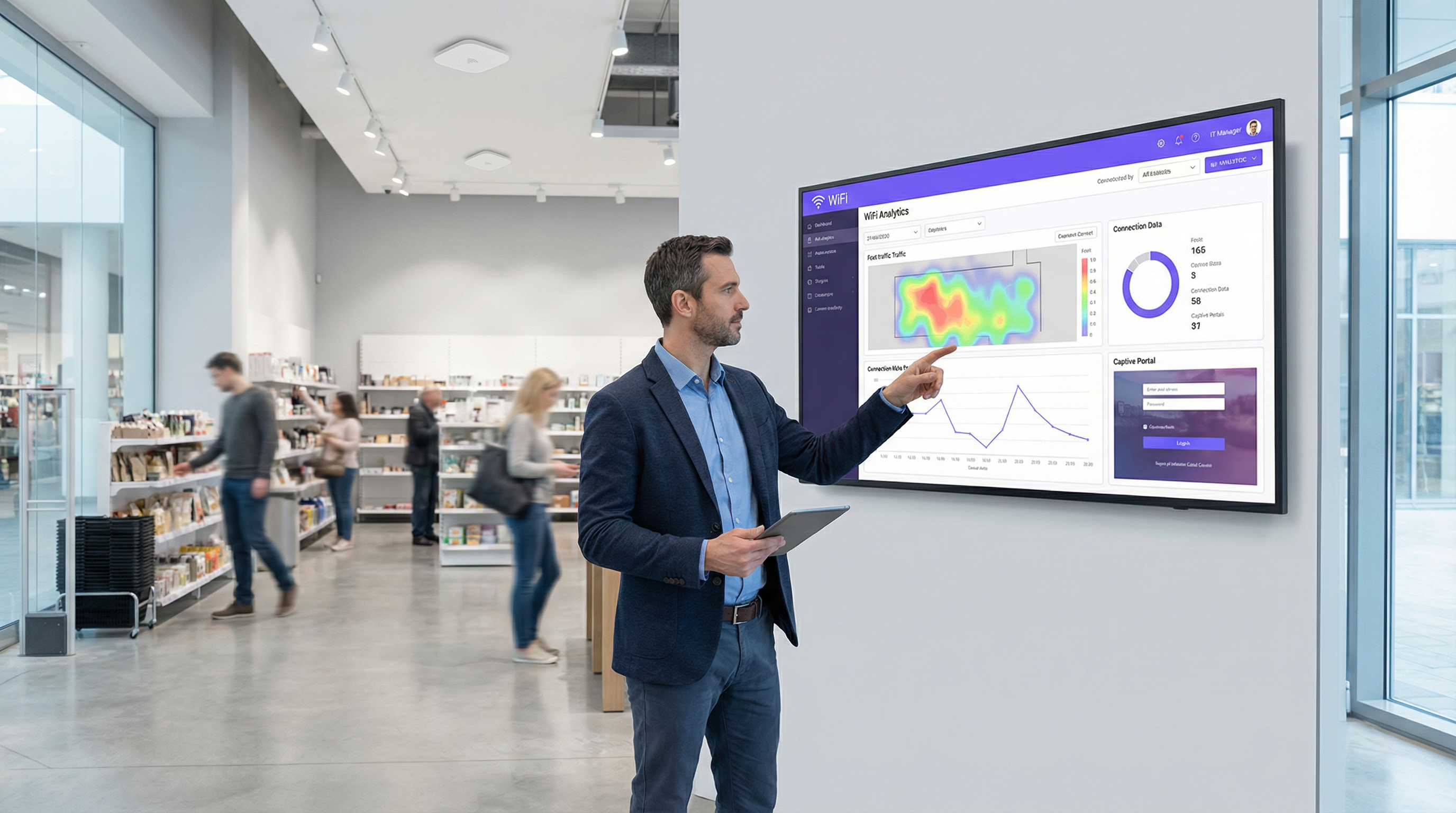
Step 4 — Analytics Deployment: Activate the platform's WiFi analytics features to generate foot traffic heatmaps, dwell time reports, and visit frequency data for each store. This data is surfaced in a centralised dashboard accessible to the operations and marketing teams.
Step 5 — Marketing Automation: Configure an integration with the company's CRM (such as HubSpot or Salesforce). All new email addresses captured via the portal are automatically added to a 'New In-Store WiFi Subscribers' segment, triggering a welcome email series and enrolling them in the loyalty programme.
Step 6 — Staged Rollout: Deploy and test at three to five pilot stores before a full chain-wide rollout. Monitor analytics to measure the impact on loyalty sign-ups, email list growth, and customer dwell time before scaling.
Analyse de scénario
Q1. You are the network architect for a large conference centre that hosts multiple simultaneous events for different corporate clients. Each client wants a branded WiFi experience for their attendees, and access must be restricted to registered attendees only. How would you design the captive portal solution to support this multi-tenant requirement?
💡 Astuce :Consider how you can provide multi-tenancy and dynamic branding while ensuring secure, segregated access for each event running concurrently.
Afficher l'approche recommandée
Implement a cloud-managed captive portal platform that supports multi-tenancy and dynamic portal customisation via API. For each event, create a unique SSID or a unique portal URL, each mapped to a separate VLAN to ensure complete traffic isolation between events. Use the Voucher or Code authentication method. Generate a batch of unique, single-use access codes for each event and provide them to the event organiser for distribution to their registered attendees. The portal for each event is dynamically branded with the client's logo, colours, and welcome message, configured via the platform's API or management dashboard. All event networks are on separate VLANs with firewall rules preventing inter-event traffic. A centralised dashboard allows the venue's IT team to monitor all events simultaneously.
Q2. A city council wants to provide free public WiFi in its downtown core. The legal department is concerned about liability for illicit user activity and the IT department is concerned about network abuse. The marketing department wants to gather data to justify the ongoing expense. What captive portal configuration would you recommend?
💡 Astuce :Balance the need for maximum public accessibility with the requirements for legal protection, network stability, and justifiable data collection.
Afficher l'approche recommandée
Deploy a Click-Through portal as the primary access method to ensure the lowest possible friction for public access. The portal must present a clear and concise Acceptable Use Policy that users must explicitly accept before connecting, with consent logged server-side. This provides a layer of legal protection by establishing that users have agreed to the terms of use. To address the IT department's concerns, implement per-user bandwidth throttling (for example, 5 Mbps per device) and DNS-based content filtering to block known malicious and illegal sites. For the marketing department, include an optional, clearly marked email sign-up form on the portal page, with a transparent explanation of how the data will be used. This captures data on a fully consented, GDPR-compliant basis while keeping the primary access path friction-free. Monthly analytics reports on connection volumes, peak usage times, and geographic distribution of access points provide the data needed to justify the infrastructure investment.
Q3. Your company is deploying a new guest WiFi network across 100 global offices. The CISO demands that guest access be as secure and auditable as employee access. The Head of HR wants employees to be able to connect their personal devices to the guest network without needing to contact IT for a password. How do you reconcile these requirements in a single architecture?
💡 Astuce :Consider enterprise-grade authentication methods that provide both high security and a seamless user experience. How can you differentiate between trusted employees and external guests on the same network?
Afficher l'approche recommandée
Deploy a unified captive portal solution that supports multiple authentication methods on the same SSID. Configure the primary authentication method as Single Sign-On integrated with the company's identity provider, for example Microsoft Entra ID. Employees can then connect their personal devices to the guest network by authenticating with their corporate credentials. This satisfies the CISO's requirement for security and auditability, as every connection is tied to a known corporate identity and logged in the IdP's audit trail. It also satisfies HR's requirement, as employees can self-serve without contacting IT. For non-employee guests and visitors, configure a secondary option on the portal for self-registration via email or SMS OTP, generating a time-limited session (for example, 8 hours) that requires renewal. This creates a two-tiered system on a single network infrastructure, with different session policies and bandwidth allocations applied based on the authentication method used. All connections are logged centrally, providing the CISO with a complete audit trail.
Points clés à retenir
- ✓A captive portal is a strategic network gateway that enforces authentication, compliance, and engagement at the point of WiFi access — it is far more than a simple login page.
- ✓The choice of authentication method is the most consequential design decision, requiring a deliberate balance between user friction, security requirements, and data collection objectives.
- ✓Security is non-negotiable: enforce WPA3 or WPA2 encryption, serve the portal over HTTPS with a valid certificate, and implement strict VLAN segmentation to isolate guest traffic from internal systems.
- ✓Modern cloud-managed platforms offer centralised multi-site control, deep analytics, and seamless integration with CRM, identity providers, and property management systems.
- ✓Compliance with GDPR and other data privacy regulations is a legal requirement for any portal that collects personal data, necessitating explicit consent, audit logging, and a clear privacy policy.
- ✓Real-world deployments in hospitality and retail demonstrate that a well-configured captive portal can generate measurable ROI through ancillary revenue, loyalty programme growth, and actionable footfall analytics.
- ✓The industry is evolving towards seamless, identity-based access via Passpoint and OpenRoaming, but traditional captive portals remain the most effective tool for venues that require user engagement, data capture, or explicit terms acceptance.




