

Règles de pare-feu pour les réseaux WiFi invités
This guide provides IT managers and network architects with an authoritative reference for configuring firewall rules for guest WiFi networks, specifically in support of a Purple deployment. It offers actionable, vendor-neutral guidance on network segmentation, port configuration, and security best practices to ensure both seamless guest access and robust protection of corporate assets.
🎧 Écouter ce guide
Voir la transcription
Synthèse
Pour l'entreprise moderne, offrir un WiFi invité n'est plus un luxe : c'est un service critique qui stimule l'engagement client, fournit des analyses précieuses et améliore l'expérience sur site. Cependant, un réseau invité mal sécurisé représente l'un des vecteurs d'attaque les plus importants vers l'environnement de l'entreprise. Ce guide de référence technique fournit un cadre exploitable pour les responsables informatiques et les architectes réseau afin de mettre en œuvre des configurations de pare-feu robustes, sécurisées et performantes pour les réseaux WiFi invités. Il se concentre sur les principes fondamentaux de l'isolation réseau, de l'accès au moindre privilège et de la surveillance proactive. En adhérant à ces bonnes pratiques indépendantes des fournisseurs, les entreprises peuvent atténuer les risques de sécurité, garantir la conformité réglementaire (comme PCI DSS et le GDPR) et maximiser le retour sur investissement de leur infrastructure WiFi. Ce document va au-delà de la théorie académique pour offrir des conseils pragmatiques étape par étape et des exemples concrets adaptés aux professionnels techniques très occupés, responsables du déploiement et de la gestion des réseaux d'entreprise dans l'hôtellerie, la vente au détail et les grands lieux publics.
Analyse technique approfondie
Le principe fondamental d'une architecture WiFi invité sécurisée est une segmentation stricte du réseau. Le réseau invité doit être traité comme un environnement externe non fiable, logiquement séparé du réseau local (LAN) d'entreprise de confiance où résident les systèmes métiers critiques, les serveurs et les données des employés. Ceci est réalisé le plus efficacement en utilisant des réseaux locaux virtuels (VLAN), avec un pare-feu agissant comme point de contrôle entre eux.
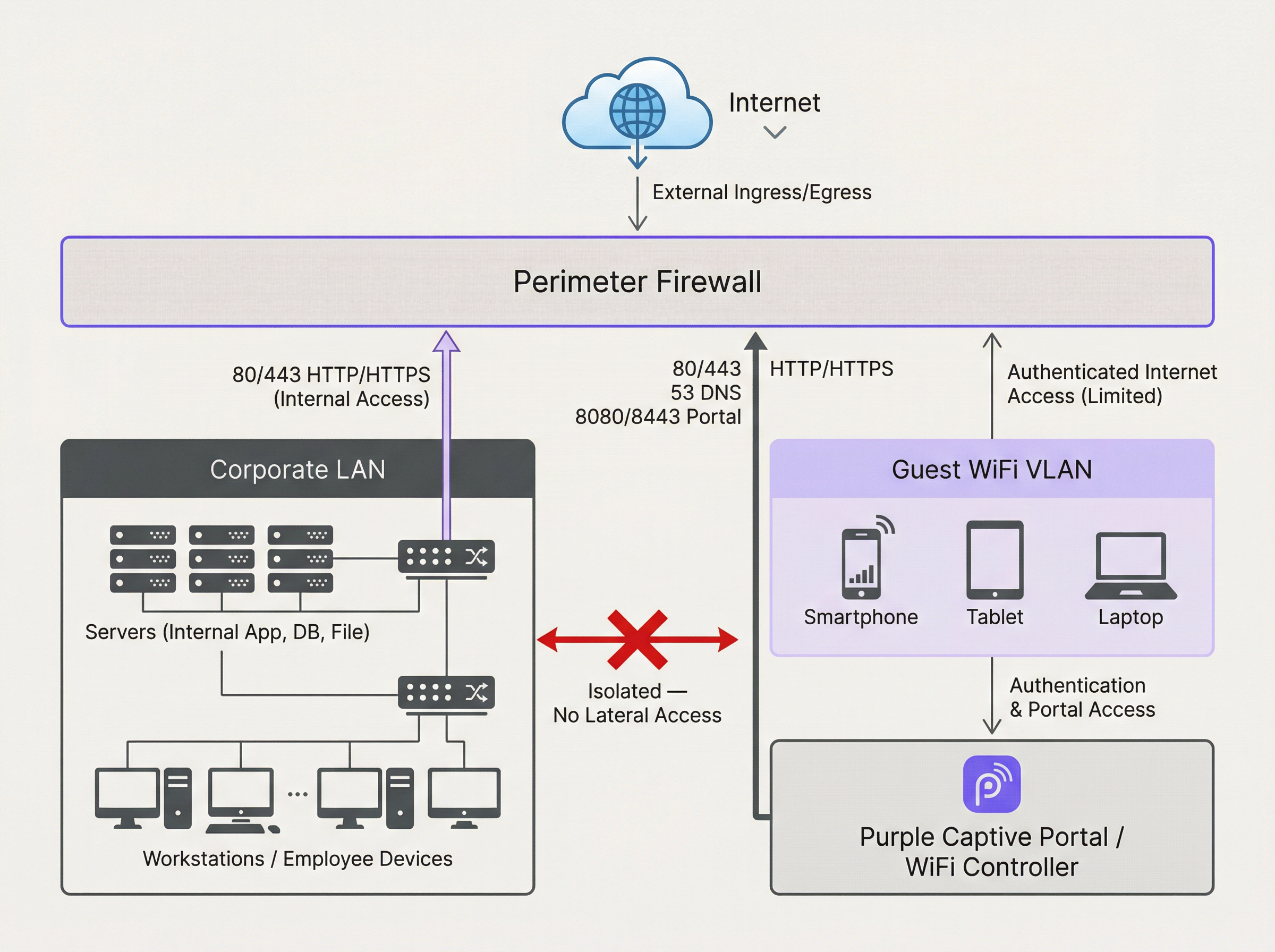
Le schéma ci-dessus illustre l'architecture idéale. Tout le trafic provenant du VLAN WiFi invité est filtré par le pare-feu et inspecté avant de pouvoir atteindre Internet ou tout autre segment du réseau. Il est crucial qu'une règle de pare-feu soit en place pour refuser explicitement tout trafic initié depuis le VLAN invité vers le LAN de l'entreprise. Cela empêche l'utilisation d'un appareil invité compromis comme point de pivot pour attaquer les ressources internes.
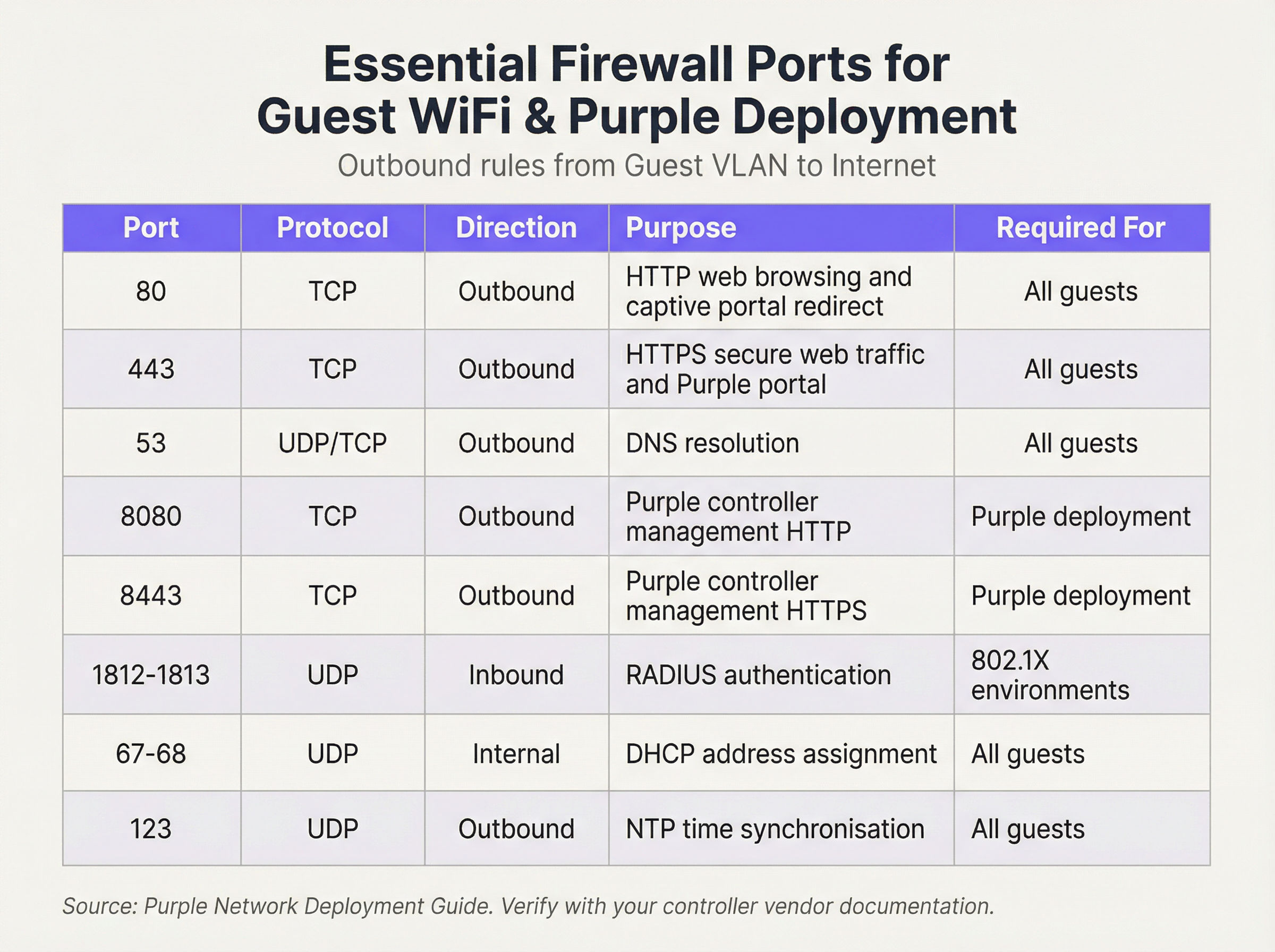
Nous opérons sur une posture de sécurité de « Refus par défaut » (Default Deny). Cela signifie que le pare-feu bloquera tout le trafic à moins qu'une règle ne l'autorise explicitement. Les règles sortantes suivantes constituent la base d'un réseau invité fonctionnel et sécurisé :
Règles entrantes et redirection de port :
Pour le VLAN invité, la politique entrante est simple : refuser tout trafic initié depuis Internet. Il n'y a aucune raison commerciale valable pour qu'une entité externe initie une connexion vers l'appareil d'un invité. La seule exception concerne le matériel sur site. Si vous hébergez votre propre contrôleur WiFi ou serveur Captive Portal au sein de votre réseau (par opposition à l'utilisation d'une solution hébergée dans le cloud), vous devrez créer une règle spécifique de redirection de port (ou NAT de destination). Cette règle mappe un port spécifique de votre adresse IP publique vers l'adresse IP interne et le port du contrôleur, par exemple, en redirigeant le trafic entrant sur le port TCP 443 vers 192.168.100.10:8443. Cette règle doit être aussi restrictive que possible, en spécifiant la source exacte (si connue), la destination et le port.
Guide de mise en œuvre
- Création de VLAN : Dans vos commutateurs réseau, créez un nouveau VLAN dédié au trafic invité (par ex., VLAN 100). Attribuez cet ID de VLAN au SSID qui diffuse votre réseau invité.
- Configuration de l'interface du pare-feu : Configurez une nouvelle interface ou sous-interface sur votre pare-feu et attribuez-la au VLAN invité. Cette interface servira de passerelle par défaut pour tous les appareils invités.
- Service DHCP : Configurez un serveur DHCP pour le VLAN invité afin d'attribuer automatiquement les adresses IP. Assurez-vous que l'étendue DHCP ne fournit que l'adresse IP, le masque de sous-réseau et l'interface invité du pare-feu comme passerelle par défaut. Les serveurs DNS fournis doivent être des résolveurs publics (par ex., 1.1.1.1, 8.8.8.8).
- Règles de pare-feu sortantes : Créez les règles de pare-feu sortantes essentielles telles que détaillées dans le tableau de référence des ports. Commencez par les règles les plus spécifiques et terminez par une règle « Tout refuser » (Deny All). L'ordre est critique. Le pare-feu évalue les règles de haut en bas, et la première correspondance détermine l'action.
- Isolation des clients : Sur vos points d'accès sans fil, activez la fonctionnalité « Isolation des clients » (parfois appelée « Isolation AP » ou « Mode invité »). Il s'agit d'un contrôle critique qui empêche les appareils invités sur le même réseau WiFi de communiquer entre eux, atténuant ainsi le risque d'attaques peer-to-peer.
- Journalisation et surveillance : Activez la journalisation détaillée pour toutes les règles de pare-feu, en particulier pour le trafic refusé. Transférez ces journaux vers un système SIEM (Security Information and Event Management) central pour la corrélation et l'alerte sur les activités anormales.
Bonnes pratiques
- Utiliser un pare-feu à inspection d'état (Stateful) : Un pare-feu à inspection d'état suit l'état des connexions actives et autorise automatiquement le trafic de retour pour les sessions établies. Cela simplifie la création de règles, car vous n'avez besoin de définir que des règles sortantes pour le trafic initié par l'invité.
- Auditer régulièrement : Planifiez des examens trimestriels de votre ensemble de règles de pare-feu. Supprimez toutes les règles temporaires, inutilisées ou trop permissives. La sécurité est un processus, pas une configuration ponctuelle.
- Prendre en compte l'IPv6 : Assurez-vous que vos règles de pare-feu s'appliquent au trafic IPv4 et IPv6. De nombreux appareils modernes utilisent l'IPv6 par défaut, et l'ignorer peut laisser une faille de sécurité importante.
- Se référer aux normes de l'industrie : Alignez votre configuration sur les cadres de sécurité établis. Pour le commerce de détail, l'exigence 1.2.1 de la norme PCI DSS exige explicitement de restreindre le trafic entre les réseaux de confiance et non fiables. Pour le traitement des données personnelles, le GDPR impose des « mesures techniques et organisationnelles » pour protéger les données, pour lesquelles la segmentation du réseau est un contrôle fondamental.
Dépannage et atténuation des risques
- Problème : le Captive Portal ne se charge pas : Il s'agit presque toujours d'un problème de DNS ou de règle de pare-feu. Assurez-vous que l'invité peut résoudre le nom d'hôte du portail (vérifiez le port 53) et que le trafic vers l'adresse IP et le port du portail (généralement 80/443) est autorisé avant l'authentification.
- Problème : WiFi invité lent : Des règles de pare-feu trop permissives peuvent permettre à des tempêtes de diffusion ou à un trafic malveillant de consommer la bande passante. Mettez en œuvre le principe du moindre privilège pour restreindre le trafic uniquement à ce qui est nécessaire.
- Risque : Ver Zero-Day : Un invité se connecte avec un appareil infecté par un ver zero-day qui se propage automatiquement. Atténuation : L'isolation des clients est votre principale défense, car elle empêche le ver de se propager à d'autres invités sur le même réseau WiFi. Un filtrage strict en sortie peut également bloquer le trafic de commande et de contrôle dont le malware a besoin pour fonctionner.
ROI et impact commercial
Un réseau WiFi invité sécurisé et bien géré contribue directement au succès de l'entreprise. Dans les environnements de vente au détail, il permet d'accéder aux analyses de Purple, fournissant des informations sur la fréquentation, les temps de séjour et le comportement des clients qui éclairent directement les décisions marketing et opérationnelles. Dans l'hôtellerie, un réseau invité performant est un moteur clé de la satisfaction des clients et des avis positifs. En investissant dans une architecture de pare-feu appropriée, vous ne vous contentez pas d'atténuer les risques ; vous garantissez la fiabilité et les performances d'une plateforme critique de Business Intelligence et d'engagement client. Un déploiement sécurisé renforce la confiance et protège la marque, offrant un retour sur investissement clair en évitant les violations de données coûteuses et les défauts de conformité.

Briefing en podcast
Pour un résumé audio de ces points clés, écoutez notre briefing technique de 10 minutes.
Termes clés et définitions
VLAN (Virtual LAN)
A method of creating logically separate networks on the same physical network infrastructure. Devices on different VLANs cannot communicate without passing through a router or firewall.
IT teams use VLANs as the primary tool to enforce segmentation between the guest network and the corporate network, which is a foundational requirement for security and compliance.
Firewall Egress Filtering
The practice of filtering traffic as it leaves a network, as opposed to when it enters. It controls what outbound connections internal devices are permitted to make.
For a guest network, egress filtering is critical. By only allowing outbound traffic on specific ports (like 80 and 443), you can block malware, prevent users from running unauthorised services, and reduce your attack surface.
Client/AP Isolation
A security feature on wireless access points that prevents devices connected to the same WiFi network from communicating directly with each other.
This is a critical defence against peer-to-peer attacks on the guest network. If one guest's device is compromised, Client Isolation prevents it from attacking other guests' laptops or phones in the same venue.
Stateful Firewall
A firewall that tracks the state of network connections (e.g., TCP streams). It automatically allows return traffic for connections that were initiated from inside the network.
Using a stateful firewall simplifies administration. An IT manager only needs to write a rule allowing a guest to connect to a website on port 443; the firewall automatically handles the return traffic without needing a complex inbound rule.
Default Deny
A security posture where any traffic that is not explicitly permitted by a firewall rule is blocked.
This is a best-practice principle for all firewall configuration. It ensures that any new or un-categorised traffic is blocked by default, providing a much higher level of security than a 'default allow' policy.
PCI DSS
The Payment Card Industry Data Security Standard, a set of security standards designed to ensure that all companies that accept, process, store or transmit credit card information maintain a secure environment.
For any retail or hospitality business, proving that the guest WiFi network is robustly isolated from the network that handles payments (the Cardholder Data Environment) is a fundamental requirement for passing a PCI DSS audit.
Captive Portal
A web page that the user of a public-access network is obliged to view and interact with before access is granted. It is used for authentication, payment, or accepting terms of service.
The firewall must be configured to allow unauthenticated users to access the captive portal (and its supporting services like DNS) before they have full internet access. This pre-authentication access is often managed via a walled-garden configuration.
Port Forwarding (Destination NAT)
A technique used to redirect a communication request from one address and port number combination to another while the packets are traversing a network gateway, such as a router or firewall.
If a venue hosts its own on-premise WiFi controller, IT teams must configure port forwarding to allow guest devices on the internet to reach the captive portal on the internal network. This is a critical step for enabling the guest journey.
Études de cas
A 200-room hotel is experiencing frequent guest complaints about slow WiFi and connection drops. An initial check reveals a flat network architecture where guest and hotel operational traffic (CCTV, staff PCs) share the same subnet. The firewall has a permissive 'allow any-to-any' rule for all internal traffic.
- Immediate Action: Create a new Guest VLAN (e.g., VLAN 200) and a corresponding guest SSID. 2. Segmentation: Migrate all guest-facing access points to the new VLAN. 3. Firewall Policy: Create a new zone and interface for the Guest VLAN on the firewall. Implement a strict outbound policy allowing only ports 53, 80, 443, and 123. Add a rule to explicitly deny any traffic from the Guest VLAN to the corporate VLAN. 4. Enable Client Isolation: Activate AP/Client Isolation on the wireless controller for the guest SSID. 5. Remove Permissive Rule: Once guest traffic is successfully segmented, remove the legacy 'allow any-to-any' rule and replace it with specific rules for required corporate traffic.
A retail chain is opening a new flagship store and needs to provide guest WiFi that is compliant with PCI DSS 4.0. The store will have point-of-sale (POS) terminals, inventory scanners, and corporate PCs on the same physical network infrastructure.
- Define CDE: The first step is to define the Cardholder Data Environment (CDE). Create a dedicated VLAN for all POS terminals. 2. Isolate Guest Network: Create a separate VLAN for guest WiFi. 3. Isolate Corporate Services: Create a third VLAN for other corporate services like inventory scanners and staff PCs. 4. Firewall Enforcement: The firewall must enforce strict segmentation. There must be an explicit 'deny all' rule for any traffic originating from the Guest VLAN or the Corporate Services VLAN to the CDE VLAN. 5. Restrict CDE Egress: The CDE VLAN should only be allowed outbound access to the specific IP addresses of the payment processor, and nothing else. 6. Prove Isolation: Use tools like
nmapor a vulnerability scanner to run tests from the guest network to prove that no CDE hosts or ports are reachable.
Analyse de scénario
Q1. A stadium is hosting a major sporting event and expects 50,000 concurrent users on its guest WiFi. What is the most critical firewall consideration to ensure network stability and security?
💡 Astuce :Consider the impact of broadcast and multicast traffic in such a high-density environment.
Afficher l'approche recommandée
The most critical consideration is the aggressive filtering of all unnecessary traffic, particularly broadcast and multicast traffic (like mDNS), at the firewall and access point level. In a high-density environment, this traffic can quickly lead to a broadcast storm, consuming all available bandwidth and bringing the network to a halt. Strict egress rules allowing only essential web and DNS traffic, combined with Client Isolation, are paramount.
Q2. You discover that a previous administrator has configured the guest network to use the internal corporate DNS servers. What are the risks, and what is the immediate remediation?
💡 Astuce :What information can be gleaned from internal DNS records?
Afficher l'approche recommandée
The risks are significant. It exposes the names and IP addresses of all internal corporate servers (e.g., payroll.internal.corp, dc01.internal.corp) to anyone on the guest network, providing a detailed map for an attacker. It also creates a potential vector for DNS cache poisoning attacks against the corporate network. The immediate remediation is to change the DHCP configuration for the guest VLAN to assign public DNS servers only (e.g., 1.1.1.1, 8.8.8.8) and ensure the firewall blocks the guest VLAN from sending any traffic to the internal DNS servers.
Q3. A user reports they cannot access their corporate VPN over the guest WiFi. Your firewall logs show denied UDP traffic on port 500 and 4500 from the user's IP. What is the issue and how would you decide whether to resolve it?
💡 Astuce :What protocol uses UDP ports 500 and 4500?
Afficher l'approche recommandée
The issue is that the firewall is blocking the IKE and IPsec NAT-T protocols, which are commonly used to establish IPsec VPN tunnels. The decision to resolve this is a policy-level one. For a venue catering to business travellers (like a hotel or conference centre), allowing VPN access is often a business requirement. The resolution would be to create a specific outbound firewall rule to allow UDP traffic on ports 500 and 4500. For a public library or school, the policy might be to block VPNs to ensure traffic can be filtered. The decision must balance user needs against the organisation's security policy and risk tolerance.
Points clés à retenir
- ✓Always isolate guest WiFi traffic on its own dedicated VLAN.
- ✓Operate on a 'Default Deny' firewall policy; only allow what is essential.
- ✓Enable Client Isolation on access points to prevent peer-to-peer attacks.
- ✓Use public DNS servers for guests; never expose internal DNS.
- ✓Strictly limit inbound traffic and only use port forwarding for specific, on-premise services.
- ✓Regularly audit firewall rules and monitor logs for anomalies.
- ✓A secure guest network is a prerequisite for compliance (PCI DSS, GDPR) and leveraging WiFi analytics.




