

Captive Portals pour WiFi invité : Le guide ultime pour créer une expérience utilisateur fluide et sécurisée
This guide provides IT leaders and venue operators with a comprehensive technical reference for designing, implementing, and securing guest WiFi captive portals at enterprise scale. It covers the full authentication architecture from RADIUS to CRM integration, GDPR compliance requirements, advanced customisation options including A/B testing and personalised content delivery for Purple AI users, and a proven ROI framework with real-world case studies from hospitality and retail environments.
🎧 Écouter ce guide
Voir la transcription

Synthèse
Pour les responsables informatiques, les architectes réseau et les exploitants de sites, le réseau WiFi invité est passé d'une simple commodité à un atout commercial essentiel. Un Captive Portal pour WiFi invité bien exécuté est la passerelle vers cet atout — le premier point d'interaction avec les clients et les visiteurs, et un moteur puissant pour la collecte de données, l'engagement envers la marque et la génération de revenus. Ce guide fournit une référence technique complète pour la conception, la mise en œuvre et la sécurisation des Captive Portals afin de créer une expérience utilisateur fluide tout en débloquant une valeur commerciale significative.
Nous explorons les composants fondamentaux de l'architecture d'un Captive Portal, de l'association initiale de l'utilisateur à l'authentification backend et l'intégration CRM. Les sujets clés incluent la conformité aux réglementations sur la confidentialité des données telles que le GDPR et le GDPR britannique, la mise en œuvre de mesures de sécurité robustes alignées sur WPA3 et IEEE 802.1X, les options de personnalisation avancées, y compris les tests A/B et la diffusion de contenu personnalisé, ainsi que les stratégies pour maximiser le retour sur investissement. Pour les professionnels de l'informatique de haut niveau, ce guide propose des recommandations pratiques et indépendantes des fournisseurs pour éclairer les décisions d'achat et les stratégies de déploiement de ce trimestre. En se concentrant sur un parcours utilisateur sans friction, une posture de sécurité robuste et une personnalisation basée sur les données, les entreprises peuvent transformer leur WiFi invité d'un centre de coûts en un outil puissant d'engagement client et de business intelligence.
Analyse technique approfondie
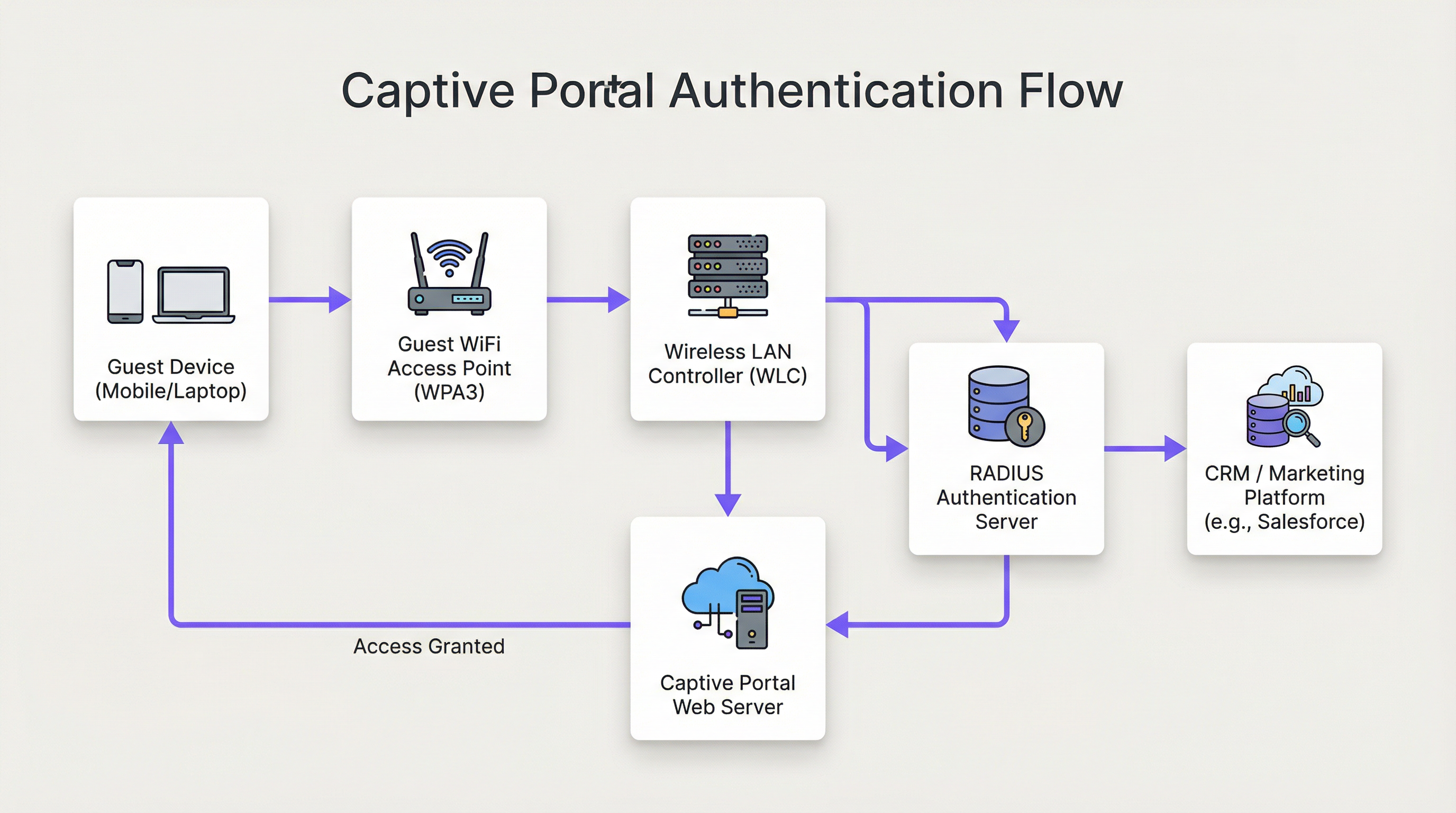
L'architecture d'une solution moderne de Captive Portal pour WiFi invité implique une interaction sophistiquée entre le matériel réseau, les logiciels et les services cloud. Fondamentalement, le Captive Portal intercepte le trafic web d'un utilisateur et le redirige vers une page web spécifique pour authentification avant d'accorder un accès plus large au réseau. Comprendre ce flux en détail est essentiel pour tout architecte réseau responsable du déploiement ou de la maintenance d'un tel système.
Étape 1 — Association sans fil : L'appareil de l'utilisateur découvre et se connecte au SSID du WiFi invité. À ce stade, l'appareil est dans un état de « walled garden » (jardin clos) pré-authentifié. Le WLC ou l'AP attribue à l'appareil une adresse IP via DHCP, mais restreint tout le trafic sortant, à l'exception d'une liste définie de domaines sur liste blanche et de l'hôte du Captive Portal lui-même.
Étape 2 — Redirection HTTP/S : Lorsque l'utilisateur ouvre un navigateur ou toute application effectuant une requête HTTP/S, le WLC l'intercepte. En utilisant soit le détournement DNS (où toutes les requêtes DNS reçoivent comme réponse l'IP du portail), soit la redirection HTTP 302, l'utilisateur est redirigé vers le serveur web du Captive Portal. Pour les déploiements modernes, la redirection HTTP est privilégiée pour sa fiabilité sur les clients iOS, Android et Windows.
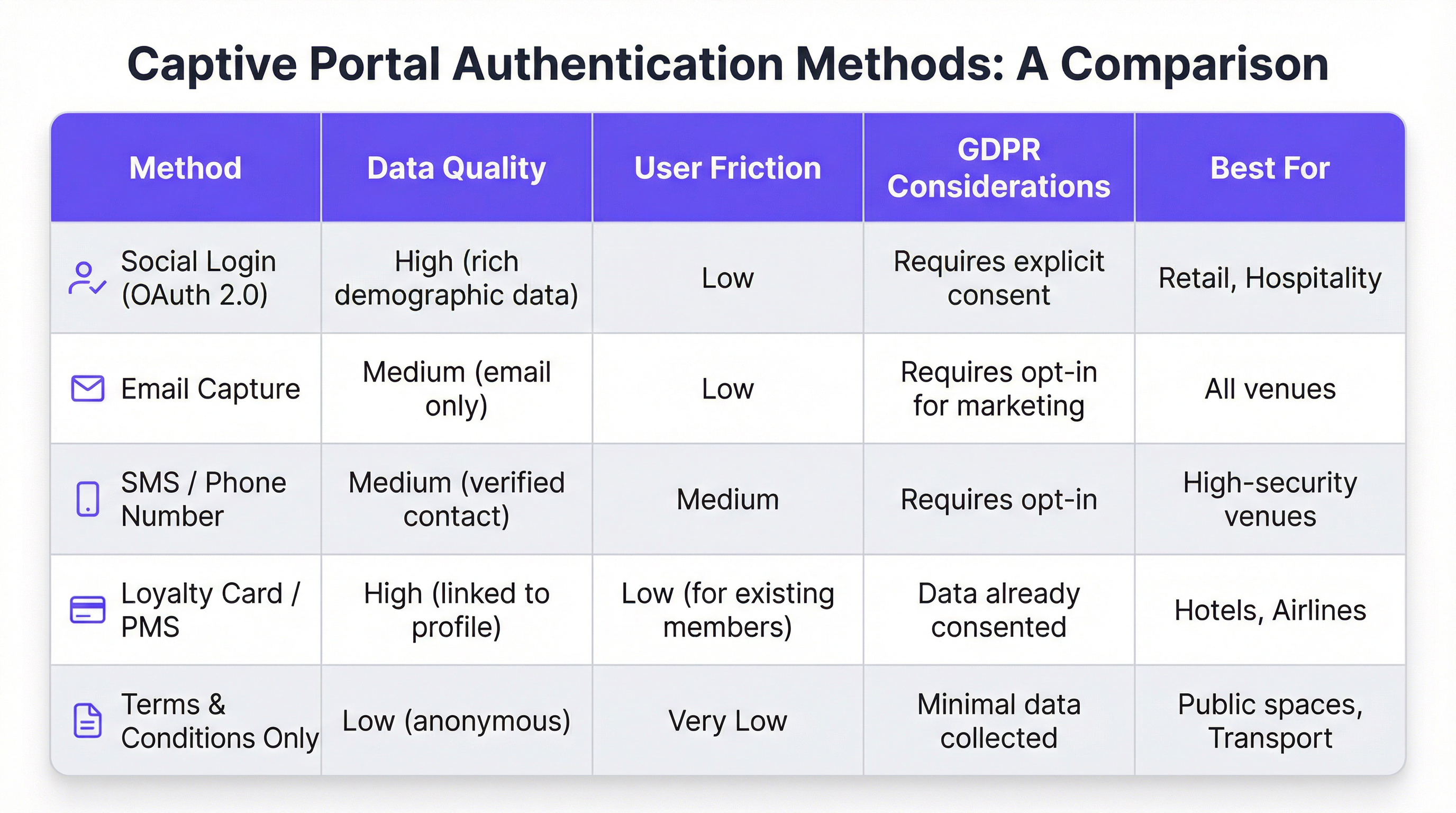
Étape 3 — Interaction avec le portail et authentification : La page du Captive Portal est présentée à l'utilisateur. Les méthodes d'authentification incluent la connexion sociale via OAuth 2.0 (Facebook, Google, LinkedIn), la capture d'e-mails ou de SMS, l'acceptation des conditions générales, ou l'intégration avec un programme de fidélité ou un système de gestion hôtelière (PMS) via une API REST. Le choix de la méthode détermine directement la qualité des données capturées et la friction introduite dans le parcours utilisateur.
Étape 4 — Authentification RADIUS : Lors de la soumission du formulaire, le service du portail communique avec un serveur RADIUS (RFC 2865). Le serveur RADIUS valide les identifiants par rapport à un magasin de données backend — une base de données locale, un annuaire LDAP, un CRM ou une plateforme de marketing automation. Les attributs RADIUS tels que Session-Timeout et Idle-Timeout sont utilisés pour appliquer les politiques de session.
Étape 5 — Accès accordé : En cas d'authentification réussie, le serveur RADIUS signale au WLC de modifier l'état d'autorisation de l'utilisateur, accordant un accès complet à Internet. Les politiques de bande passante, les règles de filtrage de contenu et les limites de durée de session sont appliquées à ce stade via le moteur de politiques du WLC.
D'un point de vue sécuritaire, WPA3-Enterprise avec IEEE 802.1X offre le plus haut niveau de protection, en chiffrant le trafic entre le client et l'AP avec une sécurité de 192 bits en mode WPA3-Enterprise. Pour le portail lui-même, toutes les communications doivent utiliser HTTPS avec TLS 1.2 ou supérieur. La conformité à la norme PCI DSS v4.0 est obligatoire lorsque des traitements de paiement ont lieu dans le flux du portail.
Pour les utilisateurs de Purple AI, des capacités de personnalisation avancées étendent considérablement cette architecture. La plateforme Purple prend en charge les tests A/B des conceptions de portails au niveau du site, permettant aux opérateurs de tester différentes mises en page, appels à l'action et flux d'authentification pour optimiser les taux de conversion. La diffusion de contenu personnalisé après la connexion — comme des offres ciblées basées sur le profil CRM d'un client ou son niveau de fidélité — est réalisée via des appels API en temps réel vers Salesforce, HubSpot ou toute plateforme de marketing automation dotée d'une API REST. Le moteur d'analyse de Purple fournit également des superpositions de cartes de chaleur et une analyse du temps de séjour, permettant aux exploitants de sites de corréler les données d'engagement WiFi avec les modèles de fréquentation physique.
Guide de mise en œuvre
Le déploiement d'un Captive Portal pour WiFi invité à l'échelle de l'entreprise nécessite une approche structurée et progressive. Le cadre suivant est indépendant des fournisseurs et applicable aux environnements de l'hôtellerie, de la vente au détail, de l'événementiel et du secteur public.
Phase 1 — Définir les objectifs commerciaux : Avant le début de tout travail technique, documentez les objectifs spécifiques du service WiFi invité. Les objectifs courants incluent la création d'une base de données marketing de première partie, l'augmentation de la fréquentation dans des zones spécifiques d'un site, l'accroissement des revenus annexes grâce à des promotions ciblées, ou simplement la fourniture d'un service fiable. Ces objectifs détermineront chaque décision de conception ultérieure, de la méthode d'authentification à la stratégie de contenu post-connexion.
Phase 2 — Évaluation de l'infrastructure réseau : Réalisez un audit complet de votre infrastructure sans fil existante. Vérifiez que vos AP et WLC prennent en charge la redirection vers un Captive Portal, le marquage VLAN et l'intégration RADIUS externe. Pour les environnements à haute densité — stades, centres de conférence, pôles de transport — commandez une étude de site RF professionnelle pour garantir une couverture et une capacité adéquates. Un réseau peu performant compromettra même le portail le mieux conçu.
Phase 3 — Sélection de la plateforme : Évaluez les plateformes de Captive Portal par rapport à vos objectifs commerciaux. Les critères clés incluent l'agnosticisme matériel (essentiel pour les parcs multi-fournisseurs), la profondeur des intégrations CRM et de marketing automation, la qualité des analyses et des rapports, les outils de conformité au GDPR, et la capacité à personnaliser la conception du portail sans ressources de développement. Pour les organisations ayant des exigences d'intégration complexes, évaluez la documentation de l'API de la plateforme et la prise en charge des webhooks.
Phase 4 — Conception du parcours utilisateur : Cartographiez l'expérience utilisateur complète, de la découverte du WiFi à l'engagement post-connexion. Visez un maximum de trois interactions avant que l'utilisateur n'obtienne l'accès à Internet. Effectuez des tests A/B sur différentes conceptions de portails pour identifier la mise en page et le flux d'authentification qui maximisent les taux de complétion. Assurez-vous que le portail est entièrement réactif et optimisé pour une utilisation mobile-first.
Phase 5 — Configuration et intégration : Configurez le WLC pour rediriger les utilisateurs non authentifiés vers l'URL du portail. Définissez le walled garden pour autoriser l'accès à l'hôte du portail, aux domaines de connexion sociale (accounts.google.com, www.facebook.com, www.linkedin.com) et à toutes les ressources CDN nécessaires pour afficher le portail. Configurez les secrets partagés RADIUS et testez le flux d'authentification complet de bout en bout avant la mise en production.
Phase 6 — Pilote et déploiement : Déployez sur un seul site pilote et surveillez les taux d'authentification, les durées de session et les journaux d'erreurs pendant au moins deux semaines avant un déploiement complet. Établissez des KPI de référence par rapport auxquels vous mesurerez le succès du déploiement.
Bonnes pratiques
Prioriser l'expérience utilisateur : Un Captive Portal lent, confus ou peu fiable donne une mauvaise image de votre marque. Visez un temps d'authentification de bout en bout inférieur à 15 secondes. Gardez une conception de portail épurée, des instructions claires et un appel à l'action bien visible. Chaque clic ou champ de formulaire supplémentaire que vous ajoutez réduira votre taux de complétion.
Imposer une conception Mobile-First : Plus de 75 % des connexions au WiFi invité proviennent d'appareils mobiles. Votre portail doit être entièrement réactif, avec des éléments d'interface utilisateur tactiles et un texte lisible sans zoom. Testez sur iOS et Android sur plusieurs tailles d'écran avant le déploiement.
Être transparent sur la collecte de données : Présentez une explication claire et en langage simple des données que vous collectez et de la manière dont elles seront utilisées. Fournissez un lien vers votre politique de confidentialité et assurez-vous que votre mécanisme de consentement est conforme à l'article 7 du GDPR. Les cases de consentement pré-cochées ne sont pas valides en vertu du GDPR.
Segmenter rigoureusement votre réseau : Utilisez des VLAN pour isoler le trafic invité de votre réseau d'entreprise. Il s'agit d'un contrôle de sécurité fondamental. Mettez en œuvre des règles de pare-feu pour empêcher les appareils invités d'accéder à l'espace d'adressage RFC 1918 sur votre réseau d'entreprise. Activez l'isolation des clients sur vos AP pour empêcher les appareils invités de communiquer entre eux.
Maintenir et surveiller : Les déploiements de Captive Portal ne sont pas des solutions que l'on configure et que l'on oublie. Établissez un rythme régulier pour examiner les journaux d'authentification, mettre à jour le firmware des AP et des WLC, et auditer la configuration de votre walled garden. Configurez des alertes pour les pics de taux d'échec d'authentification, qui sont souvent le premier indicateur d'une mauvaise configuration ou d'un incident de sécurité.
Dépannage et atténuation des risques
Le mode de défaillance le plus courant dans les déploiements de Captive Portal pour WiFi invité est l'échec du chargement du portail. Cela est presque toujours causé par l'un des trois problèmes suivants : un échec de résolution DNS (le client ne peut pas résoudre le nom d'hôte du portail), un walled garden trop restrictif (les ressources CDN du portail sont bloquées) ou une règle de pare-feu empêchant l'accès au serveur web du portail sur le port 443. Un diagnostic systématique à l'aide d'une capture de paquets sur l'interface de liaison montante du WLC identifiera rapidement la cause première.
Les échecs d'authentification sont le deuxième problème le plus courant. Ils proviennent généralement de secrets partagés RADIUS incorrects, d'un décalage d'horloge entre le WLC et le serveur RADIUS (ce qui provoque des échecs d'authentification EAP) ou de problèmes avec le magasin de données backend. L'activation de la journalisation RADIUS détaillée et la corrélation des horodatages entre le WLC, le serveur RADIUS et les journaux de l'application du portail constituent l'approche de diagnostic la plus efficace.
Du point de vue des risques de sécurité, le vecteur de menace le plus important pour un réseau WiFi invité est un SSID non chiffré ou faiblement chiffré. Un SSID ouvert sans chiffrement expose tout le trafic utilisateur à une interception passive. Imposez toujours le chiffrement WPA2 ou WPA3. Analysez régulièrement votre espace aérien à la recherche de points d'accès malveillants diffusant votre SSID — un vecteur d'attaque courant connu sous le nom d'attaque « evil twin » (jumeau maléfique). Mettez en œuvre des capacités de détection et de prévention des intrusions sans fil (WIDS/WIPS) sur votre WLC ou en tant que système de superposition autonome.
ROI et impact commercial
L'analyse de rentabilisation d'un Captive Portal pour WiFi invité sophistiqué va bien au-delà de la fourniture d'une simple connexion Internet. Le tableau suivant résume les principaux moteurs de ROI selon les différents types de sites :
| Type de site | Principal moteur de ROI | KPI typique | Exemple de résultat |
|---|---|---|---|
| Hôtel | Augmentation des revenus annexes | Réservations Spa/Restauration par les utilisateurs WiFi | +42 % de réservations de spa (étude de cas d'un hôtel de 200 chambres) |
| Vente au détail | Croissance de la base de données marketing | Nouveaux contacts opt-in par mois | Plus de 8 000 contacts en 6 mois (étude de cas d'une enseigne de 500 magasins) |
| Stade / Événements | Activation des sponsors | Impressions du portail aux couleurs de la marque | Taux de complétion du portail de plus de 95 % lors d'événements majeurs |
| Centre de conférence | Engagement des délégués | Taux d'enregistrement aux sessions via WiFi | Données de fréquentation en temps réel pour les organisateurs d'événements |
| Secteur public | Engagement citoyen | Taux de complétion des enquêtes | Annonces publiques ciblées aux résidents vérifiés |
Le calcul du ROI pour un investissement dans le WiFi invité doit prendre en compte à la fois l'impact direct sur les revenus (ventes annexes, revenus des campagnes marketing) et les avantages indirects (amélioration des scores de satisfaction client, réduction du taux de désabonnement, données de première partie plus riches). Pour un hôtel de 200 chambres avec un taux d'occupation moyen de 70 %, une augmentation de 42 % des réservations de spa attribuable aux promotions via le WiFi peut représenter des dizaines de milliers de livres sterling de revenus annuels supplémentaires — un rendement qui justifie généralement l'investissement dans la plateforme dès la première année de déploiement.
Termes clés et définitions
Captive Portal
A web page that a network operator presents to a newly connected user before granting broader access to the internet. The portal intercepts all HTTP/S traffic from the unauthenticated device and redirects it to a designated URL.
This is the primary mechanism for authenticating, communicating with, and collecting data from users on a guest WiFi network. IT teams configure this at the WLC or AP level to control access and gather marketing consent.
RADIUS (Remote Authentication Dial-In User Service)
A networking protocol (RFC 2865) that provides centralised Authentication, Authorization, and Accounting (AAA) management for users connecting to a network service. It operates over UDP and uses a shared secret for security.
RADIUS is the backend authentication engine for most enterprise captive portal deployments. When a user submits their login credentials, the portal sends an Access-Request to the RADIUS server, which responds with an Access-Accept or Access-Reject. IT teams must configure the correct RADIUS shared secret on both the WLC and the portal platform.
Walled Garden
A restricted network environment in which a pre-authenticated user can only access a defined list of approved domains and IP addresses, typically limited to the captive portal itself and any resources required to render it.
Before a user completes the captive portal login, they are in a walled garden. Network architects must carefully define the walled garden whitelist to include all resources required for the portal to function (including social login provider domains) while blocking all other internet access.
IEEE 802.1X
An IEEE standard for port-based Network Access Control (PNAC) that provides an authentication mechanism for devices wishing to attach to a LAN or WLAN. It requires a supplicant (client device), an authenticator (AP or switch), and an authentication server (RADIUS).
802.1X is the foundation of enterprise-grade wireless security. When combined with WPA3-Enterprise, it provides per-user, per-session encryption keys and strong mutual authentication. Network architects should specify 802.1X for any deployment where security is a primary concern.
WPA3 (Wi-Fi Protected Access 3)
The third generation of the WPA security certification programme for wireless networks, introduced by the Wi-Fi Alliance in 2018. WPA3-Personal uses Simultaneous Authentication of Equals (SAE) to replace the vulnerable PSK handshake, while WPA3-Enterprise offers 192-bit security mode.
WPA3 should be the default security protocol for any new guest WiFi deployment. It provides significant security improvements over WPA2, including protection against offline dictionary attacks and forward secrecy. IT teams should verify WPA3 client support before mandating it as the sole security mode.
GDPR (General Data Protection Regulation)
A regulation in EU law (Regulation 2016/679) on data protection and privacy, applicable to all organisations processing personal data of individuals in the EU/EEA. The UK GDPR is a retained version of the regulation applicable in the United Kingdom post-Brexit.
GDPR compliance is a legal obligation for any organisation collecting personal data via a guest WiFi captive portal. Key requirements include a lawful basis for processing (typically consent), transparent privacy notices, the right to erasure, and data minimisation. Non-compliance can result in fines of up to €20 million or 4% of global annual turnover, whichever is higher.
OAuth 2.0
An open standard for access delegation (RFC 6749) that allows users to grant third-party applications limited access to their accounts on other services without exposing their passwords. It is the protocol underpinning social login functionality.
OAuth 2.0 is the technology that powers 'Log in with Google/Facebook/LinkedIn' on captive portals. It provides a secure, user-friendly authentication flow and, with the user's consent, allows the portal to retrieve profile data (name, email, age range, gender) from the social platform. IT teams must register the portal as an OAuth application with each social provider and configure the correct redirect URIs.
PCI DSS (Payment Card Industry Data Security Standard)
A set of security standards (currently v4.0) designed to ensure that all companies that accept, process, store, or transmit credit card information maintain a secure environment. Compliance is mandated by the major card schemes.
PCI DSS compliance is mandatory for any captive portal that processes payments for premium WiFi access or any other service. Key requirements include network segmentation, encryption of cardholder data in transit and at rest, and regular penetration testing. IT teams should engage a Qualified Security Assessor (QSA) to validate compliance.
VLAN (Virtual Local Area Network)
A logical segmentation of a physical network into multiple isolated broadcast domains, configured at the switch or WLC level. Traffic on one VLAN cannot communicate with traffic on another VLAN without passing through a router or firewall.
VLAN segmentation is the primary mechanism for isolating guest WiFi traffic from the corporate network. IT teams should assign guest WiFi traffic to a dedicated VLAN and enforce strict firewall rules at the inter-VLAN routing point to prevent guest devices from accessing internal resources.
Études de cas
A 200-room luxury hotel wants to replace its outdated voucher-based guest WiFi system with a modern captive portal. The goals are to provide a seamless login experience for guests, promote hotel amenities, and integrate with their existing CRM (Salesforce) to track guest preferences. The hotel has a mixed-vendor wireless estate comprising both Cisco WLCs and Meraki cloud-managed APs.
The recommended approach is to deploy a cloud-based, hardware-agnostic captive portal platform such as Purple, which offers native support for both Cisco and Meraki hardware and a pre-built Salesforce integration. The implementation proceeds as follows: (1) Create a dedicated guest SSID on both the Cisco WLC and Meraki dashboard, tagged to a guest VLAN (e.g., VLAN 100) that is isolated from the corporate network. (2) Configure both controllers to redirect unauthenticated HTTP/S traffic to the Purple-hosted captive portal URL. Define the walled garden to permit access to the portal host, Salesforce domains, and social login providers. (3) Design a branded portal with two authentication paths: social login (LinkedIn, Facebook) for transient guests, and room number plus surname authentication for registered guests, validated in real-time against the hotel's PMS via a REST API call. (4) Configure the post-login redirect to a personalised welcome page that queries Salesforce for the guest's loyalty tier and surfaces relevant offers for the hotel's spa and restaurant. (5) Configure Purple's Salesforce connector to push all login events, demographic data, and session metadata to Salesforce in real-time, enriching the guest's contact record. (6) Enable Purple's analytics dashboard to track daily active users, authentication method split, and dwell time by venue zone. Establish a baseline and review monthly.
A national retail chain with 500 stores wants to implement guest WiFi to track in-store footfall, build a first-party marketing database, and send personalised promotional offers to customers. The IT team is concerned about the cost and disruption of replacing the diverse range of wireless hardware across the estate, which includes equipment from at least four different vendors.
The critical success factor for this deployment is hardware agnosticism. Select a cloud-based captive portal platform that supports all four vendors via standard RADIUS and HTTP redirection protocols, avoiding any hardware replacement. The implementation proceeds as follows: (1) Conduct a hardware audit across all 500 stores to document AP and controller models, firmware versions, and current SSID configurations. Identify any hardware that cannot support external RADIUS or HTTP redirection and plan for targeted upgrades at those locations only. (2) Deploy the captive portal platform in a phased rollout, starting with a 20-store pilot in a single region. Configure each store's hardware to redirect guest traffic to the centralised portal. (3) Design a single, mobile-optimised portal page with email capture as the primary authentication method, supplemented by social login. Ensure the consent mechanism is GDPR-compliant with a clear opt-in for marketing communications. (4) Configure the platform's marketing automation connector to push new contacts to the chain's email marketing platform (e.g., Klaviyo or Salesforce Marketing Cloud) in real-time. (5) Implement Purple's footfall analytics to track dwell time and repeat visit frequency by store. Use this data to identify high-performing stores and replicate their layout and offer strategies. (6) After a 4-week pilot, review KPIs (authentication rate, opt-in rate, email open rate) and iterate on the portal design before rolling out to the remaining 480 stores.
Analyse de scénario
Q1. A 500-store national retail chain wants to implement guest WiFi across its entire estate to build a first-party marketing database. The IT director has confirmed that the chain uses wireless hardware from four different vendors and has no budget for hardware replacement. The marketing director wants to send personalised promotional emails to customers within 24 hours of their in-store WiFi session. What is the most critical platform selection criterion, and what integration architecture would you recommend?
💡 Astuce :Consider the hardware diversity challenge and the real-time data pipeline requirement between the captive portal and the email marketing platform.
Afficher l'approche recommandée
The most critical platform selection criterion is hardware agnosticism — the platform must support all four wireless vendors via standard RADIUS and HTTP redirection protocols without requiring proprietary hardware or firmware modifications. For the integration architecture, configure the platform to push login events and contact data to the email marketing platform via a real-time webhook or API connector. This ensures that new contacts are available for campaign targeting within minutes of authentication, well within the 24-hour window. Ensure the consent mechanism on the portal captures explicit opt-in for marketing emails (GDPR Article 7), and configure the email platform to suppress contacts who have not opted in. Implement a data deduplication process to handle users who log in at multiple stores.
Q2. A conference centre is hosting a high-profile international event for 5,000 attendees over three days. The event organiser wants to provide a fast, seamless WiFi experience with a branded captive portal, but the centre's IT team is concerned about: (a) the security implications of 5,000 unknown devices on the network, (b) the performance of the captive portal under peak load, and (c) GDPR compliance given the international audience. What are your recommendations for each concern?
💡 Astuce :Address each concern separately: security (segmentation and encryption), performance (load testing and CDN), and GDPR (consent mechanism and data residency).
Afficher l'approche recommandée
(a) Security: Implement WPA3-Personal or WPA3-Enterprise on the event SSID. Create a dedicated VLAN for event traffic, completely isolated from the centre's corporate network. Enable client isolation on all APs to prevent device-to-device communication. Deploy a content filtering policy to block known malicious domains. Enable WIDS/WIPS to detect rogue APs. (b) Performance: Load test the captive portal platform to verify it can handle 5,000 concurrent authentication requests. Use a cloud-based portal platform with auto-scaling capabilities. Ensure the portal page is served from a CDN to minimise latency for international attendees. Pre-stage the RADIUS server with event attendee credentials if using pre-registration, to reduce authentication latency. (c) GDPR: Ensure the consent mechanism is available in all relevant languages. Use a cloud-based portal platform with data residency options to ensure EU citizen data is processed and stored within the EU/EEA. Implement a data retention policy that deletes personal data within the timeframe specified in your privacy notice. Appoint a Data Protection Officer if not already in place.
Q3. Following a routine security audit, your organisation's penetration testers have identified that the guest WiFi captive portal at your flagship venue is being served over HTTP rather than HTTPS, and that the guest VLAN has a misconfigured firewall rule that permits access to a subnet containing file servers. Describe the specific risks these two findings present and the remediation steps you would take.
💡 Astuce :Consider the attack vectors enabled by each misconfiguration: man-in-the-middle for the HTTP finding, and lateral movement for the VLAN finding.
Afficher l'approche recommandée
Finding 1 (HTTP portal): The risk is a man-in-the-middle (MitM) attack. An attacker on the same network segment can intercept the unencrypted HTTP traffic between the user's device and the portal server, capturing login credentials, session tokens, and any personal data submitted via the portal form. Remediation: Immediately provision a TLS certificate for the portal domain (a free Let's Encrypt certificate is acceptable for most deployments) and configure the portal web server to enforce HTTPS and redirect all HTTP requests to HTTPS. Update the WLC redirect URL to use HTTPS. Verify the certificate chain is valid and that HSTS is configured. Finding 2 (VLAN misconfiguration): The risk is lateral movement. A guest device that has authenticated to the WiFi network could access the file server subnet, potentially exfiltrating sensitive data or deploying malware. Remediation: Immediately review and correct the firewall ACL at the inter-VLAN routing point to deny all traffic from the guest VLAN to the file server subnet. Implement a default-deny policy on the guest VLAN firewall rule set, with explicit permit rules only for internet-bound traffic. Review all inter-VLAN rules as part of a broader firewall audit.
Points clés à retenir
- ✓A guest WiFi captive portal is a strategic business asset — not a utility. It is the primary mechanism for customer data collection, brand engagement, and revenue generation from your wireless network.
- ✓The authentication method you choose (social login, email capture, PMS integration, T&C only) directly determines the quality of data you collect and the friction you introduce. Match the method to your business objectives.
- ✓Security is non-negotiable: enforce WPA3 encryption, segment guest traffic onto a dedicated VLAN, serve the portal over HTTPS, and comply with PCI DSS if processing payments.
- ✓GDPR compliance requires a valid lawful basis for processing (typically explicit consent), a transparent privacy notice, and a documented data retention and deletion policy. Fines of up to 4% of global turnover apply for non-compliance.
- ✓Hardware agnosticism is the most critical platform selection criterion for multi-site, multi-vendor deployments. A cloud-based platform avoids costly hardware replacement programmes.
- ✓The 15-Second Rule: if end-to-end authentication takes longer than 15 seconds, completion rates will drop significantly. Benchmark and optimise your RADIUS response times and portal page load speed.
- ✓Measure ROI using concrete business metrics: marketing database growth, ancillary revenue uplift, customer dwell time, and repeat visit frequency. These metrics justify the investment and guide ongoing optimisation.




