

Intégration de Juniper Mist avec Purple WiFi
This guide provides a comprehensive technical reference for integrating Juniper Mist's AI-driven wireless platform with Purple's enterprise guest WiFi and analytics solution. It covers the full integration architecture — from the Mist external captive portal and REST API authorisation flow through to PurpleConnex Passpoint and RadSec configuration for seamless repeat-visitor connectivity. Venue operators and IT teams will find actionable deployment guidance, real-world implementation scenarios, and a clear framework for measuring the business impact of a Mist-Purple deployment.
🎧 Écouter ce guide
Voir la transcription

Synthèse
L'intégration du WiFi Juniper Mist avec Purple représente l'une des combinaisons les plus performantes disponibles aujourd'hui pour les exploitants de sites d'entreprise. La plateforme sans fil cloud-native et pilotée par l'IA de Mist offre la fiabilité d'infrastructure et l'intelligence opérationnelle qu'exigent les architectes réseau, tandis que la couche de Captive Portal, d'analyse et d'automatisation marketing de Purple transforme cette infrastructure en un atout commercial mesurable. L'intégration fonctionne via le mécanisme de redirection de portail externe de Mist, sécurisé par un API Secret par WLAN, et est complétée par une solution WiFi sécurisée basée sur Passpoint — PurpleConnex — pour une connectivité fluide des visiteurs réguliers utilisant WPA2/WPA3-Enterprise et RadSec. Pour les responsables informatiques évaluant ce déploiement, les points de décision clés sont : s'il faut mettre en œuvre l'intégration de base du Captive Portal seule, ou déployer également PurpleConnex pour les clients réguliers ; comment structurer le walled garden ; et comment exploiter les analyses de Purple pour générer un retour sur investissement mesurable. Ce guide aborde ces trois points en profondeur, avec des spécificités de configuration, des exemples pratiques issus des secteurs de l'hôtellerie et de la vente au détail, et un cadre de dépannage clair.
Analyse technique approfondie
L'intégration de Juniper Mist et Purple repose sur une séparation claire des responsabilités. Mist gère l'environnement des fréquences radio, la gestion des points d'accès et la couche d'application des politiques. Purple gère l'expérience client, la capture des données, ainsi que la couche d'analyse et d'engagement. Les deux plateformes communiquent via un contrat API bien défini, à la fois sécurisé et simple à configurer.
Architecture d'intégration
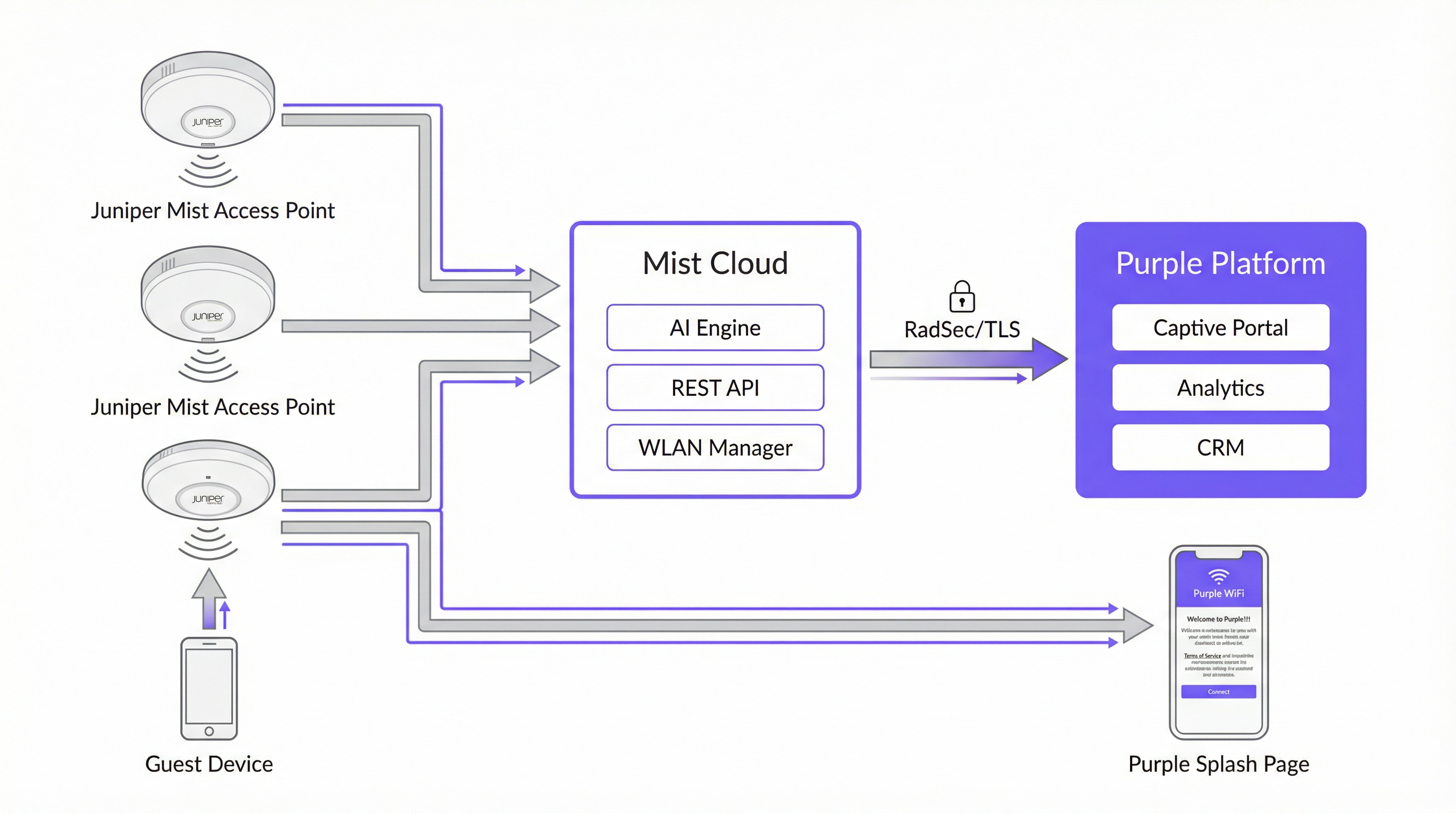
Le tableau ci-dessous résume le rôle de chaque composant dans l'intégration.
| Composant | Rôle |
|---|---|
| Points d'accès Juniper Mist | Fournissent la couverture sans fil ; appliquent les politiques WLAN ; redirigent les invités non authentifiés vers le Captive Portal Purple via HTTP 302. |
| Juniper Mist Cloud | Plateforme de gestion cloud centralisée. Héberge la configuration WLAN, le RRM piloté par l'IA, les SLE Wi-Fi Assurance et l'API REST utilisée pour l'autorisation des appareils invités. |
| Plateforme Purple | Héberge le Captive Portal externe ; capture et stocke les données des invités en toute conformité ; fournit des tableaux de bord d'analyse, une intégration CRM et l'automatisation du marketing. |
| Mist API Secret | Une clé cryptographique par WLAN (HMAC-SHA1) qui sécurise l'échange d'autorisation entre Purple et le Mist Cloud. |
| PurpleConnex (Passpoint) | Un second WLAN utilisant WPA2/WPA3-Enterprise et Passpoint pour fournir une connectivité automatique et sécurisée aux invités de retour sans nécessiter de réauthentification sur le portail. |
| RadSec (RFC 6614) | RADIUS sur TLS. Sécurise le trafic d'authentification entre le Mist Cloud et les serveurs RADIUS de Purple pour le WLAN PurpleConnex. |
Le flux d'authentification du Captive Portal
Lorsqu'un appareil invité s'associe au SSID invité, Mist vérifie si l'adresse MAC de l'appareil a été préalablement autorisée. Si ce n'est pas le cas, Mist intercepte la première requête HTTP de l'invité et émet une redirection 302 vers l'URL du portail Purple. Cette redirection ajoute plusieurs paramètres dont Purple a besoin pour terminer le cycle d'autorisation :
| Paramètre | Description | Requis ? |
|---|---|---|
wlan_id |
UUID de l'objet WLAN dans Mist | Oui |
ap_mac |
Adresse MAC du point d'accès de service | Oui |
client_mac |
Adresse MAC de l'appareil invité | Oui |
url |
L'URL d'origine demandée par l'invité | Non |
ap_name |
Nom lisible par l'homme du point d'accès | Non |
site_name |
Nom lisible par l'homme du site | Non |
Une fois que l'invité a rempli le formulaire de connexion sur le portail Purple, Purple construit une demande d'autorisation signée vers le backend Mist à l'adresse portal.mist.com/authorize. Cette requête inclut une signature HMAC-SHA1 calculée à l'aide de l'API Secret du WLAN, un jeton encodé en base64 contenant le wlan_id, l'ap_mac, la client_mac et la durée de la session, ainsi qu'un horodatage d'expiration. Mist valide la signature et, si elle est valide, autorise l'appareil invité à accéder à Internet.
Note architecturale clé : Juniper Mist ne prend pas en charge l'authentification ou la comptabilisation RADIUS pour le flux du Captive Portal. Cela signifie que les rapports de comptage d'utilisateurs en temps réel et certaines métriques de session réseau dans le tableau de bord Mist ne refléteront pas les sessions du Captive Portal. La propre plateforme d'analyse de Purple fournit des rapports de session complets et doit être utilisée comme source principale d'informations sur le WiFi invité.
PurpleConnex : Passpoint et RadSec
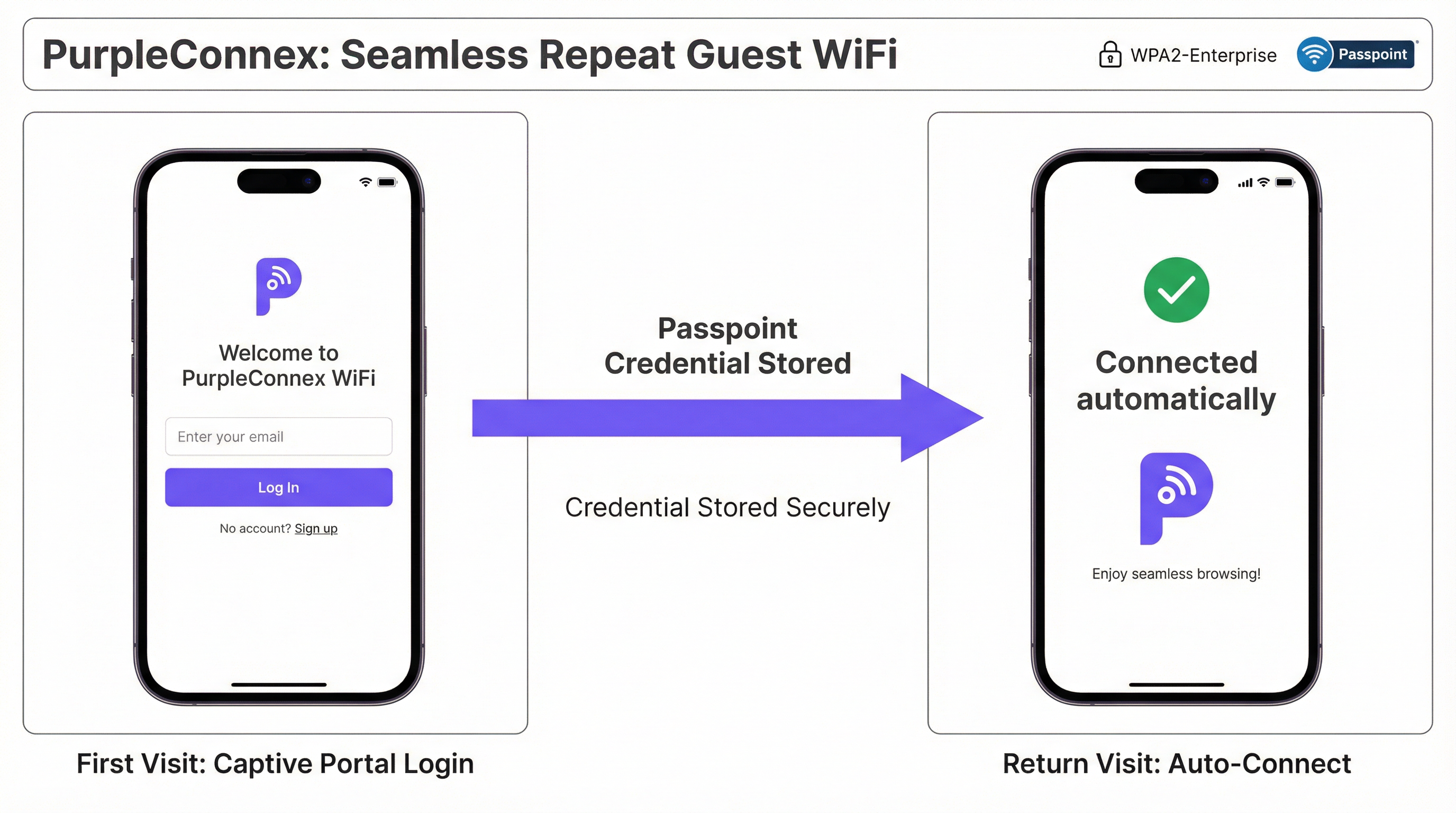
Pour les sites accueillant une proportion importante de visiteurs réguliers — hôtels, campus d'entreprise, chaînes de magasins —, la solution PurpleConnex élimine le besoin d'authentifications répétées sur le portail. Après la première connexion d'un invité via le Captive Portal, Purple fournit un profil Passpoint (Hotspot 2.0) à l'appareil de l'invité. Lors de toutes les visites ultérieures, l'appareil sélectionne automatiquement le SSID PurpleConnex et s'authentifie silencieusement en utilisant WPA2-Enterprise (ou WPA3-Enterprise sur les points d'accès compatibles 6 GHz) via EAP-TTLS auprès des serveurs RadSec de Purple.
La configuration RadSec dans Mist nécessite deux entrées de serveur — rad1-secure.purple.ai et rad2-secure.purple.ai, toutes deux sur le port 2083 — et l'installation du certificat RadSec de Purple dans les paramètres d'organisation (Organisation Settings) de Mist. Le NAS Identifier doit être défini sur MIST-{{DEVICE_MAC}} pour garantir que Purple puisse identifier correctement le point d'accès qui s'authentifie.
Guide de mise en œuvre
Les étapes suivantes supposent un accès administratif au tableau de bord Juniper Mist Cloud (manage.mist.com) ainsi qu'au portail Purple. Pour les déploiements multisites, les étapes 1 à 3 doivent être effectuées dans un modèle d'organisation Mist (Organisation Template) plutôt qu'au niveau du site.
Phase 1 : Configuration du WLAN invité (Mist)
Étape 1. Connectez-vous à manage.mist.com et accédez à Network > WLANs. Cliquez sur Add WLAN.
Étape 2. Configurez le WLAN avec les paramètres suivants :
| Paramètre | Valeur |
|---|---|
| SSID | Guest WiFi (ou le nom de votre choix) |
| WLAN Status | Enabled |
| Security Type | Open Access |
| Guest Portal | Forward to an external portal |
| Portal URL | Fournie par Purple (l'URL d'accès de votre site) |
| Allowed Hostnames | Tous les domaines Purple — consultez la liste blanche des domaines Walled Garden de Purple |
| Bypass portal on exception | Laissez décoché (recommandé) |
Étape 3. Cliquez sur Save. Rouvrez le WLAN et localisez l'API Secret. Copiez cette valeur.
Phase 2 : Configuration du site Purple
Étape 4. Connectez-vous au portail Purple et accédez aux paramètres de votre site.
Étape 5. Collez l'API Secret de Mist dans le champ Mist API secret.
Étape 6. Confirmez que l'URL du portail dans le WLAN Mist correspond à l'URL d'accès indiquée dans les paramètres du site Purple.
Phase 3 : Configuration du WLAN PurpleConnex (Passpoint) (Optionnel mais recommandé)
Étape 7. Dans le tableau de bord Mist, créez un second WLAN avec les paramètres suivants :
| Paramètre | Valeur |
|---|---|
| SSID | PurpleConnex |
| Security Type | WPA2 Enterprise (802.1X) |
| Passpoint | Enabled |
| Operators | OpenRoaming-Settlement-Free |
| Venue Name | Le nom de votre site |
| Domain Name | securewifi.purple.ai |
| Roaming Consortium ID | 5A03BA0000, 004096 |
| NAI Realm Name | securewifi.purple.ai |
| NAI Realm EAP Type | TTLS |
| Auth Server Type | RadSec |
| Auth Server 1 | rad1-secure.purple.ai, Port 2083 |
| Auth Server 2 | rad2-secure.purple.ai, Port 2083 |
| NAS Identifier | MIST-{{DEVICE_MAC}} |
| Guest Portal | No portal (accès direct à Internet) |
Étape 8. Accédez à Organisation Settings et téléchargez le certificat RadSec de Purple sous RadSec Certificates.
Bonnes pratiques
Utilisez des modèles d'organisation pour les déploiements multisites. Pour tout déploiement s'étendant sur plus d'un site, configurez les deux WLAN dans un modèle d'organisation Mist (Organisation Template). Cela garantit la cohérence de la configuration sur l'ensemble du parc et permet de déployer les modifications sur tous les sites simultanément. Une chaîne de magasins gérant cinquante points de vente, par exemple, peut mettre à jour l'URL de son portail invité ou les entrées de son walled garden une seule fois et voir la modification se propager à chaque site en quelques minutes.
Maintenez un Walled Garden complet et à jour. Le walled garden est la source la plus fréquente d'échecs d'intégration. Un walled garden incomplet signifie que les invités non authentifiés ne peuvent pas accéder au Captive Portal, ce qui entraîne une expérience WiFi défaillante. Tenez à jour une liste de tous les domaines Purple requis, des domaines des fournisseurs de connexion sociale et de toute autre ressource dont dépend le portail. Révisez cette liste chaque fois que vous ajoutez de nouvelles méthodes d'authentification au portail.
Prévoyez deux SSID dès le premier jour. Déployez à la fois le SSID ouvert Guest WiFi et le SSID Passpoint PurpleConnex dès le départ, même si l'adoption de Passpoint est initialement faible. À mesure que le parc d'appareils compatibles Passpoint s'agrandit — et il croît rapidement, la majorité des appareils iOS et Android modernes prenant en charge la norme —, l'expérience fluide pour les visiteurs réguliers deviendra de plus en plus précieuse.
Alignez-vous sur les feuilles de route IEEE 802.1X et WPA3. Pour tout nouveau déploiement Mist, en particulier ceux intégrant des bandes radio 6 GHz, prévoyez le WPA3-Enterprise sur le SSID PurpleConnex. Le WPA3 est obligatoire sur les réseaux 6 GHz et offre un chiffrement nettement plus fort grâce à son mode de sécurité 192 bits. Cela positionne également le déploiement pour une conformité à long terme avec l'évolution des normes de sécurité.
Intégrez Purple à votre CRM. Les données des invités capturées via le Captive Portal ont une valeur significative au-delà de la gestion du WiFi. La connexion de Purple à votre CRM — qu'il s'agisse de Salesforce, HubSpot ou d'un PMS spécifique à l'hôtellerie — crée un profil client unifié qui peut stimuler le marketing personnalisé, l'intégration de programmes de fidélité et l'amélioration du service client.
Dépannage et atténuation des risques
| Symptôme | Cause probable | Résolution |
|---|---|---|
| L'invité n'est pas redirigé vers le Captive Portal | URL du portail incorrecte dans le WLAN Mist, ou le WLAN n'est pas défini sur "Forward to external portal" | Vérifiez l'URL du portail et le paramètre Guest Portal dans la configuration du WLAN Mist. |
| La page du Captive Portal ne se charge pas | Walled garden incomplet — les domaines Purple sont bloqués pour les utilisateurs non authentifiés | Ajoutez tous les domaines Purple et les domaines des fournisseurs de connexion sociale requis à la liste Allowed Hostnames du WLAN Mist. |
| L'invité termine la connexion mais n'a pas accès à Internet | API Secret incorrect dans les paramètres du site Purple, ou pare-feu bloquant le trafic vers portal.mist.com |
Vérifiez l'API Secret et contrôlez les règles du pare-feu. Assurez-vous que portal.mist.com (ou l'équivalent régional) est accessible depuis le Mist Cloud. |
| Le SSID PurpleConnex n'apparaît pas sur les appareils invités | Passpoint n'est pas activé sur le WLAN, ou l'appareil n'a pas de profil Passpoint configuré | Confirmez que Passpoint est activé dans les paramètres du WLAN Mist. Vérifiez que l'invité s'est préalablement authentifié via le Captive Portal et que le profil Passpoint a été fourni. |
| Échecs d'authentification RadSec pour PurpleConnex | Certificat RadSec manquant ou incorrect, ou adresses/port de serveur incorrects | Téléchargez à nouveau le certificat RadSec à partir de la documentation d'assistance de Purple. Vérifiez les adresses des serveurs et le port 2083. |
| Rapports de comptage d'utilisateurs en temps réel indisponibles dans Mist | Comportement attendu — Mist ne prend pas en charge la comptabilisation RADIUS pour les sessions du Captive Portal | Utilisez le tableau de bord d'analyse de Purple pour les rapports de session invité. Il s'agit de la source de données correcte et prévue pour cette intégration. |
ROI et impact commercial

L'analyse de rentabilisation d'un déploiement Juniper Mist et Purple va bien au-delà de la connectivité. L'intégration crée une infrastructure de collecte de données et d'engagement qui génère des rendements mesurables à plusieurs niveaux.
Engagement client et automatisation du marketing. Chaque invité qui s'authentifie via le Captive Portal Purple devient un contact connu. Les outils d'automatisation du marketing de Purple permettent aux exploitants de sites d'envoyer des communications ciblées et basées sur le consentement — enquêtes post-visite, offres promotionnelles, notifications d'événements — qui stimulent les visites répétées et augmentent les dépenses moyennes. Pour une chaîne hôtelière, cela se traduit directement par une amélioration des taux de réservation directe et une dépendance réduite aux commissions des OTA.
Intelligence opérationnelle. Les analyses de fréquentation de Purple fournissent aux équipes d'exploitation des sites des données granulaires sur le comportement des visiteurs : quelles zones d'un site attirent le plus de temps de présence, comment les modèles de trafic évoluent selon l'heure de la journée et le jour de la semaine, et comment les taux de visiteurs réguliers évoluent au fil du temps. Ces informations éclairent les décisions en matière de personnel, l'optimisation de l'agencement des magasins et la planification des événements.
Génération de revenus. Pour des sites tels que les aéroports, les centres de conférence et les stades, les capacités de bande passante hiérarchisée de Purple permettent la monétisation de l'accès WiFi premium. Un exploitant d'aéroport a signalé un ROI de 842 % après la mise en œuvre du modèle d'accès hiérarchisé de Purple, démontrant le potentiel de revenus important d'un déploiement de WiFi invité bien configuré.
Atténuation des risques de conformité. Une violation du GDPR ou du CCPA comporte des risques financiers et de réputation substantiels. La gestion intégrée du consentement de Purple, les outils de droits des personnes concernées et l'architecture de traitement des données conforme réduisent considérablement ce risque, offrant une posture de conformité défendable qui satisfait à la fois les équipes juridiques et les délégués à la protection des données.
Ce guide est géré par l'équipe de contenu technique de Purple. Pour obtenir les derniers détails de configuration, consultez le portail d'assistance Purple et la documentation Juniper Mist.
Termes clés et définitions
Captive Portal
A web page presented to newly connected WiFi users before they are granted broader network access. It is the primary mechanism for guest authentication, data capture, and terms-of-service acceptance in a guest WiFi deployment.
In the Mist-Purple integration, the captive portal is hosted by Purple and is triggered by a Mist HTTP 302 redirect. IT teams configure the Portal URL in the Mist WLAN settings and the API Secret in Purple to link the two platforms.
Walled Garden
A restricted set of hostnames and IP ranges that unauthenticated users on a captive portal network are permitted to access before completing the login process. The walled garden must include the portal itself and all resources it depends on.
Network engineers must configure the Allowed Hostnames list in the Mist WLAN settings to include all Purple domains and any social login provider domains. An incomplete walled garden is the most common cause of captive portal failures.
API Secret (Mist)
A per-WLAN cryptographic key automatically generated by Mist when a Guest WLAN with an external portal is created. It is used as the HMAC-SHA1 signing key for the authorisation requests that Purple sends to the Mist backend to grant guest devices internet access.
The API Secret must be copied from the Mist WLAN configuration and pasted into the Purple venue settings. It is the trust anchor for the entire integration and should be treated as a sensitive credential.
Passpoint (Hotspot 2.0)
An IEEE 802.11u-based standard that enables mobile devices to automatically discover, select, and connect to WiFi networks using pre-provisioned credentials, without requiring user interaction or portal authentication.
PurpleConnex uses Passpoint to provide a seamless, automatic connection experience for repeat guests. After an initial captive portal login, a Passpoint profile is provisioned to the guest's device, enabling silent authentication on all future visits.
RadSec (RADIUS over TLS)
A protocol defined in RFC 6614 that secures RADIUS authentication and accounting traffic by tunnelling it over a TLS connection. It replaces the traditional UDP-based RADIUS transport, which is vulnerable to interception and replay attacks.
The PurpleConnex WLAN uses RadSec to secure authentication traffic between the Mist Cloud and Purple's RADIUS servers. Network engineers must configure the RadSec server addresses, port (2083), and certificate in the Mist WLAN and Organisation Settings.
IEEE 802.1X
An IEEE standard for port-based Network Access Control that provides an authentication framework for devices connecting to a LAN or WLAN. It requires each user or device to authenticate with unique credentials before gaining network access.
The PurpleConnex WLAN uses WPA2/WPA3-Enterprise with 802.1X to provide strong, per-user authentication for repeat guests. This is the same authentication framework used in corporate enterprise networks and is significantly more secure than pre-shared key (PSK) authentication.
Mist AI (Wi-Fi Assurance)
Juniper Mist's cloud-based machine learning engine that continuously analyses wireless network telemetry to optimise radio resource management, predict and resolve connectivity issues, and provide service level experience (SLE) metrics for each user session.
While Mist AI operates independently of the Purple integration, it is a key reason why Mist is selected as the infrastructure platform for enterprise guest WiFi deployments. Its proactive fault detection and automated RRM reduce the operational burden on IT teams and improve the reliability of the guest WiFi experience.
GDPR (General Data Protection Regulation)
EU Regulation 2016/679, which governs the collection, processing, and storage of personal data of individuals in the European Union and European Economic Area. It requires explicit, informed consent for data collection and grants individuals rights over their personal data.
Any guest WiFi deployment that collects personal data — including email addresses, names, or device identifiers — from EU residents must comply with GDPR. Purple's platform provides built-in consent management tools, data subject rights workflows, and compliant data processing agreements to support GDPR compliance.
OpenRoaming
A Wireless Broadband Alliance (WBA) initiative that enables seamless, automatic WiFi roaming across participating networks globally, using Passpoint technology and a federated identity framework. The Settlement-Free tier allows users to roam without per-session charges.
The PurpleConnex WLAN is configured with the OpenRoaming-Settlement-Free operator profile, which enables devices with OpenRoaming credentials from other providers to connect automatically to the PurpleConnex SSID. This extends the seamless connectivity benefit beyond Purple's own user base.
NAS Identifier
A RADIUS attribute (Attribute 32) that identifies the Network Access Server — in this context, the Mist access point — to the RADIUS server. It is used by the RADIUS server to apply per-AP policies and to log authentication events with AP-level granularity.
In the PurpleConnex WLAN configuration, the NAS Identifier is set to MIST-{{DEVICE_MAC}}, where {{DEVICE_MAC}} is a Mist variable that is replaced with the MAC address of the authenticating AP at runtime. This allows Purple's RADIUS servers to identify the specific AP handling each authentication request.
Études de cas
A 200-room four-star hotel wants to provide a seamless WiFi experience for guests. The general manager requires that first-time guests see a branded captive portal, that repeat guests connect automatically without a login prompt, and that the marketing team can send post-stay email campaigns to guests who have consented. How would you configure the Juniper Mist and Purple integration to meet these requirements?
The solution requires a dual-SSID architecture. First, create a 'Guest WiFi' WLAN in the Mist dashboard with Open Access security and the Guest Portal set to 'Forward to an external portal', using the Purple portal URL. Configure the walled garden with all required Purple domains. Retrieve the Mist API Secret and enter it into the Purple venue settings. In Purple, configure the captive portal with the hotel's branding, a simple email-and-name form, and explicit marketing consent checkboxes that comply with GDPR Article 7. Second, create a 'PurpleConnex' WLAN with WPA2-Enterprise, Passpoint enabled, and the RadSec server details from Purple. Upload Purple's RadSec certificate to the Mist Organisation Settings. After a guest's first login through the captive portal, Purple automatically provisions a Passpoint profile to their device. On all subsequent visits, the device silently connects to PurpleConnex. The marketing team can then use Purple's CRM integration to push consented guest email addresses into the hotel's email marketing platform for post-stay campaigns.
A retail chain with 75 stores across the UK and Ireland wants to deploy guest WiFi to understand foot traffic patterns, measure the impact of store layout changes on dwell time, and send targeted promotions to opted-in customers. The IT team has a small central team and cannot manage per-site configurations individually. How should the Mist and Purple deployment be structured?
The deployment should be built around Mist's Organisation Templates for centralised management. Create a single WLAN template containing both the 'Guest WiFi' (open, captive portal) and 'PurpleConnex' (WPA2-Enterprise, Passpoint) WLANs, and apply this template to all 75 sites. This ensures that any configuration change — such as updating the walled garden or rotating the API Secret — propagates to all sites simultaneously without manual intervention. In Purple, create a location hierarchy that mirrors the retail estate: group stores by region or country to enable segmented analytics. Configure Purple's foot traffic analytics to track dwell time by zone within each store, using the AP placement data from Mist to map signal coverage to physical store areas. Integrate Purple with the retailer's existing marketing platform via Purple's API or native CRM connectors. Use Purple's campaign tools to send geo-targeted promotions — for example, a discount notification to customers who have been in the store for more than 15 minutes without making a purchase.
Analyse de scénario
Q1. A 500-seat conference centre is deploying a Mist and Purple guest WiFi solution. The events team wants to offer a free basic tier (2 Mbps per device) and a paid premium tier (20 Mbps per device) for delegates who need reliable video conferencing. The IT team has two network engineers and cannot manage per-event configurations manually. How would you structure the deployment to meet these requirements?
💡 Astuce :Consider how Purple's tiered bandwidth feature works alongside Mist's WLAN configuration, and how Mist Organisation Templates reduce operational overhead.
Afficher l'approche recommandée
Deploy a single 'Guest WiFi' SSID configured in a Mist Organisation Template with the Purple captive portal redirect. In Purple, configure two access tiers: a free tier with a 2 Mbps per-device bandwidth cap and a paid premium tier at 20 Mbps, with a payment gateway integrated into the portal for premium access purchases. The captive portal should clearly present both options to connecting guests. Use Purple's event management features to create event-specific portal pages that can be activated by the events team without IT involvement, reducing the operational burden on the two-engineer team. For the PurpleConnex Passpoint SSID, configure it to automatically grant premium-tier bandwidth to returning guests who have previously purchased a premium pass, using Purple's CRM data to identify them.
Q2. A hotel group's IT security team has raised a concern that the Open Access guest SSID creates a risk of guest-to-guest traffic interception. The network architect needs to address this concern without removing the captive portal functionality. What Mist configuration options are available, and how do they interact with the Purple integration?
💡 Astuce :Consider Mist's client isolation features and how they apply to an Open Access WLAN. Also consider the role of WPA3 OWE (Opportunistic Wireless Encryption).
Afficher l'approche recommandée
There are two primary mitigations. First, enable client isolation on the Guest WiFi WLAN in Mist. This prevents guest devices from communicating directly with each other at the Layer 2 level, eliminating the risk of ARP spoofing and direct traffic interception between guests on the same SSID. This setting does not affect the captive portal redirect or the Purple authorisation flow. Second, for deployments on APs that support it, consider enabling WPA3 OWE (Opportunistic Wireless Encryption) on the guest SSID. OWE provides per-session encryption for open networks without requiring a password, protecting guest traffic from passive eavesdropping. OWE is transparent to the captive portal flow — Mist still redirects unauthenticated devices to Purple regardless of the encryption mode. Note that OWE requires client device support, which is now widespread on modern iOS and Android devices but may not be universal across all guest devices.
Q3. After deploying the Mist-Purple integration at a 30-store retail chain, the IT team reports that approximately 15% of guests are completing the captive portal login but not receiving internet access. The remaining 85% are connecting successfully. What is the most likely cause, and what is the diagnostic approach?
💡 Astuce :Think about what could cause the Mist authorisation API call from Purple to fail for a subset of users. Consider timing, firewall rules, and the API Secret.
Afficher l'approche recommandée
The most likely cause is a race condition or timeout in the Purple-to-Mist authorisation API call, potentially caused by firewall rules at specific stores blocking outbound HTTPS traffic to portal.mist.com, or by network latency causing the authorisation request to expire before Mist processes it. The diagnostic approach is: (1) Check Purple's server-side logs for authorisation API call failures — Purple's support team can provide these. Look for HTTP error codes (401 Unauthorized suggests an API Secret mismatch; 504 Gateway Timeout suggests a connectivity issue). (2) Identify whether the failures are concentrated at specific stores, which would point to a per-site firewall or routing issue rather than a platform-wide problem. (3) Verify that the API Secret in Purple matches the API Secret in the Mist WLAN for the affected stores — if Organisation Templates were not used consistently, there may be mismatches. (4) Check that the correct regional Mist portal endpoint is being used — Mist API endpoints vary by region (US, EU, APAC), and using the wrong endpoint will cause authorisation failures.
Q4. A public-sector organisation — a local council — wants to deploy free guest WiFi across 12 libraries using Mist and Purple. Their data protection officer has specified that no personal data may be collected without explicit, granular consent, and that the organisation must be able to demonstrate compliance with a subject access request within 30 days. How should the Purple captive portal be configured to meet these requirements?
💡 Astuce :Focus on GDPR Articles 7 (consent), 15 (right of access), and 17 (right to erasure). Consider how Purple's compliance features map to these requirements.
Afficher l'approche recommandée
Configure the Purple captive portal with the following GDPR-compliant settings: (1) Use a simple, unbundled consent mechanism — present separate, opt-in checkboxes for each data processing purpose (e.g., 'I consent to my email being used for service notifications' and 'I consent to my usage data being used for analytics'). Pre-ticked boxes are not valid consent under GDPR Article 7. (2) Link to a clear, plain-English privacy notice that identifies the council as the data controller, lists the categories of data collected, and explains the legal basis for processing. (3) Configure Purple to capture only the minimum data necessary — for a public-sector library, this may be as simple as a device identifier and session timestamp, with no personal data required for basic access. (4) Enable Purple's data subject rights tools, which allow the DPO to respond to subject access requests by exporting all data associated with a specific email address or device, and to process erasure requests within the statutory 30-day window. (5) Ensure that a Data Processing Agreement (DPA) is in place between the council and Purple, as Purple processes personal data on behalf of the council as a data processor under GDPR Article 28.
Points clés à retenir
- ✓The Juniper Mist and Purple integration uses Mist's external captive portal redirect and a per-WLAN API Secret to securely authenticate guest devices and capture visitor data through Purple's hosted portal.
- ✓A dual-SSID architecture — an open Guest WiFi SSID for first-time visitors and a WPA2/WPA3-Enterprise PurpleConnex SSID for repeat guests — is the industry best practice for balancing accessibility, security, and user experience.
- ✓The walled garden configuration in Mist is the most common source of integration failures; always ensure all Purple domains and social login provider domains are included in the Allowed Hostnames list before going live.
- ✓For multi-site deployments, Mist Organisation Templates are essential — they enable consistent configuration across the entire estate and allow changes to propagate to all sites simultaneously, dramatically reducing operational overhead.
- ✓Juniper Mist does not support RADIUS accounting for captive portal sessions; use Purple's analytics platform as the primary source of guest session reporting and business intelligence.
- ✓Purple's GDPR and CCPA compliance tools — including granular consent management, data subject rights workflows, and Data Processing Agreements — are critical for any deployment that collects personal data from EU or California residents.
- ✓The ROI of a Mist-Purple deployment extends beyond connectivity: guest data analytics, marketing automation, CRM integration, and tiered bandwidth monetisation can deliver measurable returns that far exceed the cost of the infrastructure.




