

LogicFlow : Automatisation des événements et déclencheurs WiFi
This authoritative technical reference guide covers Purple's LogicFlow, an enterprise-grade WiFi event automation engine that enables IT managers and network architects to build intelligent, trigger-based workflows across hospitality, retail, stadium, and public-sector venues. It details the platform's Event-Decision-Action architecture, explores the full range of available triggers, and provides concrete implementation guidance with real-world case studies from hotel and retail deployments. For venue operators and IT teams, this guide demonstrates how to transform passive WiFi infrastructure into a proactive, revenue-generating, and operationally efficient platform.
🎧 Écouter ce guide
Voir la transcription
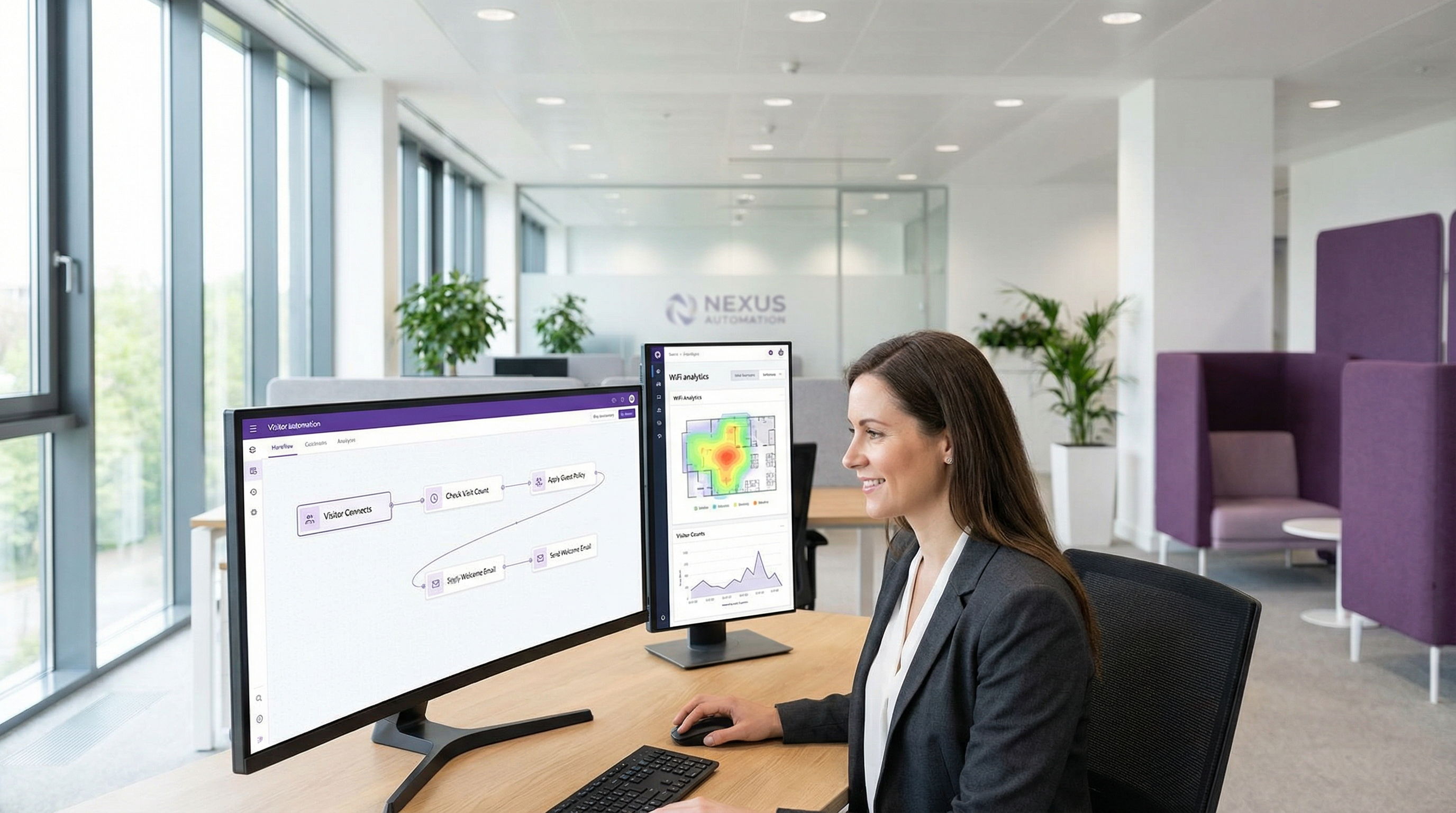
Synthèse
Dans le paysage concurrentiel des réseaux d'entreprise, la capacité d'automatiser les réponses aux événements en temps réel n'est plus un luxe mais une exigence opérationnelle fondamentale. Pour les responsables informatiques, les architectes réseau et les exploitants de sites, le défi consiste à traduire les données brutes du réseau en actions immédiates et créatrices de valeur. LogicFlow de Purple est un moteur d'automatisation de niveau entreprise conçu pour relever directement ce défi. Il offre une interface visuelle par glisser-déposer pour créer des flux de travail sophistiqués, initiés par un large éventail d'événements liés au WiFi et aux visiteurs. Ce guide propose une analyse technique approfondie de LogicFlow, allant au-delà des concepts marketing pour fournir des conseils de mise en œuvre concrets. Nous décortiquerons l'architecture de la plateforme, explorerons des scénarios de déploiement courants dans des secteurs tels que l'hôtellerie et la vente au détail, et quantifierons le retour sur investissement (ROI) en termes d'efficacité opérationnelle, d'amélioration de l'engagement client et d'atténuation des risques. Pour le directeur technique (CTO), ce document décrit une stratégie permettant d'exploiter l'infrastructure WiFi existante comme un système proactif et intelligent qui génère des résultats commerciaux. Pour le responsable informatique et le développeur, il s'agit d'un manuel pratique pour déployer des flux de travail robustes et automatisés, conformes aux principales normes telles que le GDPR et la norme PCI DSS, garantissant à la fois la sécurité et une expérience utilisateur fluide.
Analyse technique approfondie
LogicFlow fonctionne comme le système nerveux central de la plateforme Purple, traitant un flux continu de points de données pour déclencher des actions prédéfinies. Son architecture s'articule autour de trois concepts fondamentaux : les Événements, les Décisions et les Actions. Ce modèle permet la création de flux de travail complexes et avec état (stateful), capables de s'adapter aux changements de conditions en temps réel.
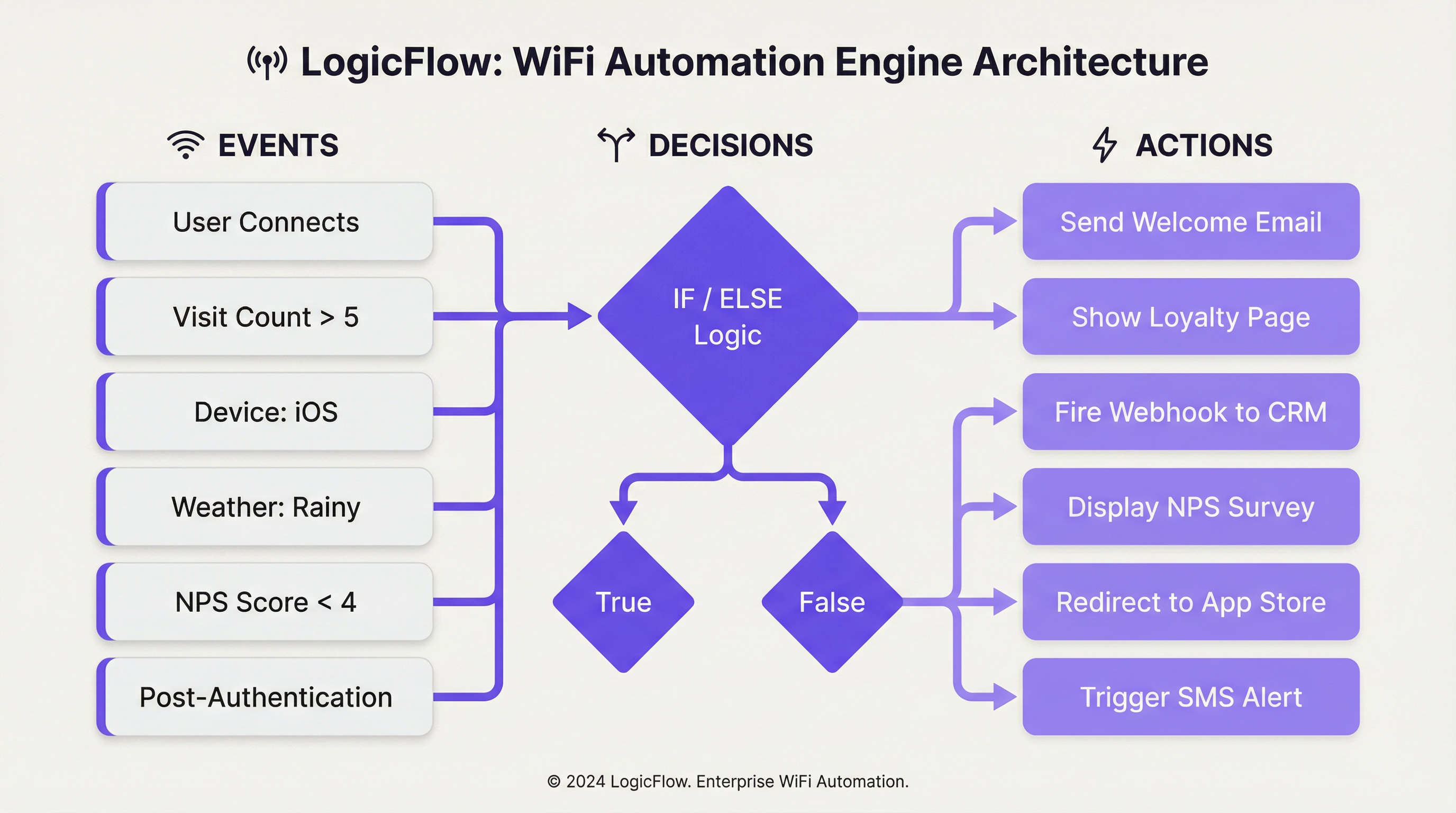
Déclencheurs d'événements : Le processus commence lorsqu'un événement est détecté. LogicFlow prend en charge un ensemble complet de déclencheurs, qui peuvent être globalement classés comme suit :
| Catégorie | Déclencheurs spécifiques | Contexte technique |
|---|---|---|
| Événements d'intégration | Pré-authentification, Post-authentification, En ligne | Ceux-ci correspondent aux phases distinctes du parcours de connexion WiFi de l'invité. Les actions de pré-authentification sont limitées car l'utilisateur n'est pas encore en ligne, tandis que les déclencheurs post-authentification et en ligne peuvent exploiter un ensemble de données plus riche. |
| Démographie des visiteurs | Âge, Sexe, Langue, Adresse e-mail, Nombre de visites | Provenant du formulaire de connexion du Captive Portal ou de l'authentification via les réseaux sociaux, ces données permettent des parcours utilisateur hautement personnalisés. La conformité aux réglementations sur la confidentialité des données telles que le GDPR est primordiale lors de l'utilisation de ces données. |
| Appareil et Réseau | Système d'exploitation, Navigateur, SSID, MAC/Nom du point d'accès, Fabricant | Essentiel pour l'optimisation spécifique à l'appareil (par ex., proposer le téléchargement d'une application aux utilisateurs iOS) ou pour des actions spécifiques à l'emplacement en fonction du point d'accès (AP) auquel un utilisateur est connecté. |
| Données environnementales | Emplacement du site (Pays, Tags), Météo (Conditions, Température), Heure/Jour/Date | Permet une automatisation sensible au contexte, comme l'affichage d'une offre « jour de pluie » sur la page d'accueil d'un magasin de détail ou la modification du contenu en fonction des jours fériés nationaux. |
| Comportement de l'utilisateur | Réponse NPS, Réponses aux micro-sondages, Méthode de connexion, Forfait WiFi payant | Déclencheurs basés sur les retours directs ou les choix des utilisateurs, permettant une récupération immédiate du service ou des opportunités de vente incitative. |
Nœuds de décision : Une fois qu'un événement est déclenché, il est transmis à un nœud de décision. C'est là que réside la « logique » de LogicFlow. À l'aide d'instructions « Vrai/Faux » (True/False) ou « Si/Sinon » (If/Else), les administrateurs peuvent créer des chemins de ramification en fonction des conditions remplies par les données de l'événement. Par exemple, un nœud « Si/Sinon » peut vérifier le visit_count (nombre de visites) d'un visiteur. S'il est supérieur à 5 (un client fidèle), il suit le chemin « Vrai » ; sinon, il suit le chemin « Faux » pour les nouveaux visiteurs. Plusieurs conditions peuvent être regroupées à l'aide de la logique « ET »/« OU » (AND/OR), permettant un ciblage très granulaire.
Nœuds d'action : L'étape finale est le nœud d'action, qui exécute une tâche spécifique. Les actions dépendent du contexte en fonction du type d'événement.
- Pré-authentification : Principalement l'action
Splash Page(Page d'accueil), permettant une image de marque dynamique en fonction de l'emplacement ou de l'heure de la journée. - Post-authentification : Une gamme plus large d'actions est disponible, y compris la présentation de
NPS/Micro-survey(NPS/Micro-sondage), le déclenchement d'unWebhookvers un système tiers, l'affichage deMedia(par ex., une publicité vidéo) ou l'attribution à un niveau dePaid WiFi(WiFi payant). - En ligne : Actions qui se produisent une fois que l'utilisateur a un accès complet au réseau, telles que la
Redirect(Redirection) vers une URL spécifique, l'envoi d'uneEmail/SMS Campaign(Campagne e-mail/SMS) ou l'affichage d'uneSplash Pagedifférente lors de sa prochaine visite.
Cette approche structurée garantit que les flux de travail sont à la fois puissants et maintenables, en respectant les meilleures pratiques standard en matière d'automatisation et d'architecture orientée événements.
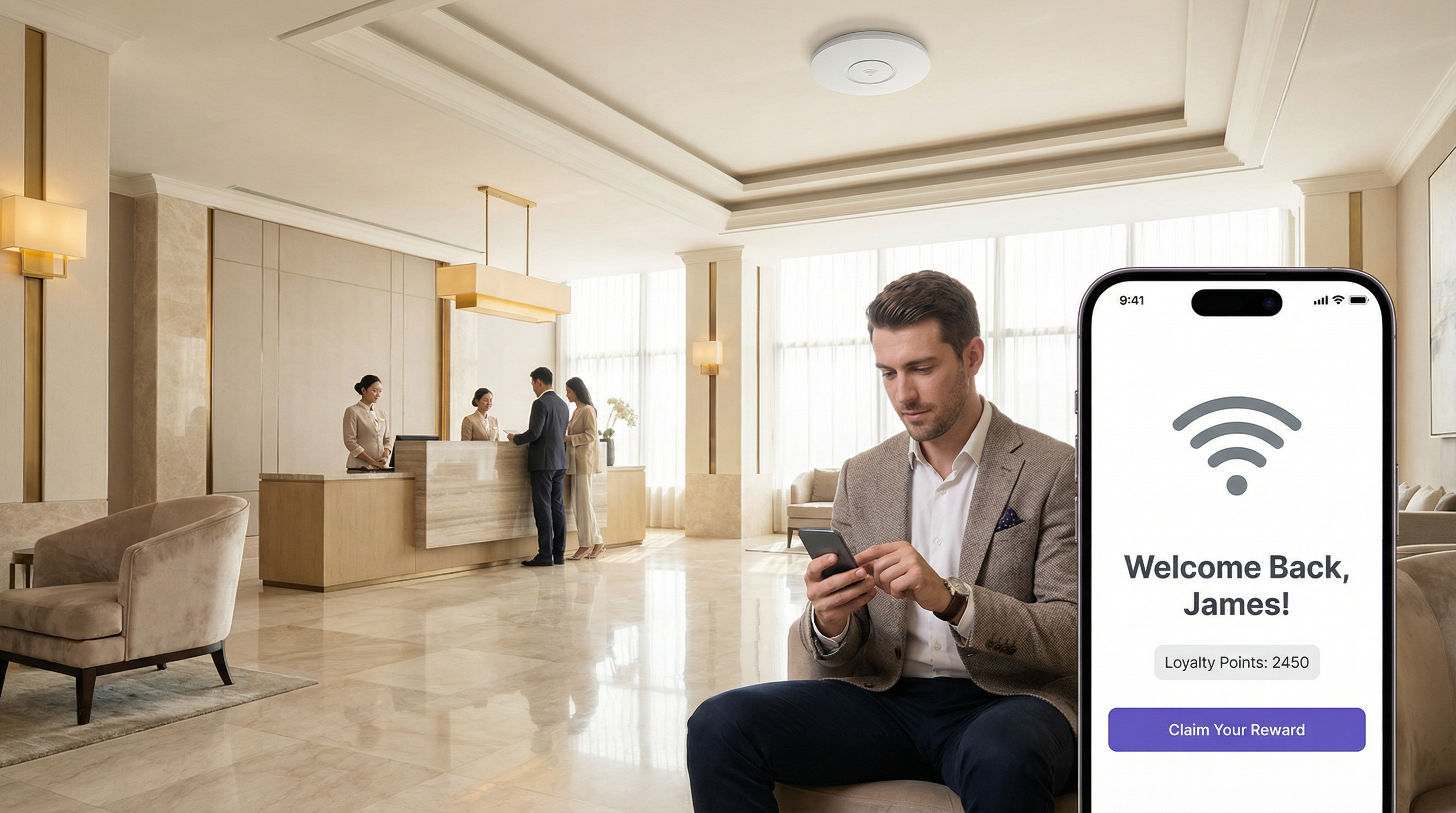
Guide de mise en œuvre
Déployer LogicFlow efficacement nécessite une approche structurée, passant des objectifs stratégiques à la configuration tactique. Les étapes suivantes fournissent un cadre de mise en œuvre indépendant de tout fournisseur.
Étape 1 — Définir les objectifs commerciaux : Avant de créer un flux de travail, définissez clairement le résultat souhaité. L'objectif est-il d'augmenter les téléchargements de l'application de fidélité, d'améliorer les scores de satisfaction des clients ou de stimuler la fréquentation d'une zone spécifique ? Un objectif clair dicte les déclencheurs et les actions requis.
Étape 2 — Cartographier le parcours client : Identifiez les points de contact clés de l'expérience visiteur où l'automatisation peut apporter une valeur ajoutée. Cela correspond généralement aux phases de pré-authentification, de post-authentification et en ligne du parcours d'accès WiFi.
Étape 3 — Créer le flux de travail : Commencez par un flux de travail unique et simple. Par exemple, un message de « Bon retour » pour les visiteurs récurrents. Dans LogicFlow v2, sélectionnez « Add logic flow » (Ajouter un flux logique) et choisissez le type d'événement approprié. Faites glisser un nœud de décision « Visitor » (Visiteur) sur le canevas et configurez-le avec une condition « True/False » (Vrai/Faux) : visit_count est greater than (supérieur à) 1. Pour le chemin « True », ajoutez un nœud d'action Email Campaign (Campagne e-mail) et sélectionnez un modèle d'e-mail « Bon retour » préconfiguré. Pour le chemin « False » (nouveaux visiteurs), ajoutez une action différente, comme un e-mail de « Remise pour première visite ». Connectez tous les nœuds, en vous assurant que chaque chemin se termine par un nœud « End » (Fin).
Étape 4 — Valider et publier : Utilisez l'outil intégré « Validate » (Valider) pour vérifier les erreurs dans la logique. Une fois valide, cliquez sur « Publish » (Publier) pour le flux de travail.
Étape 5 — Attribuer au parcours d'accès : Liez le LogicFlow publié à un parcours d'accès spécifique (l'expérience du Captive Portal pour un site ou un SSID donné). Cela active le flux de travail.
Étape 6 — Surveiller et itérer : Utilisez les analyses de la plateforme pour mesurer l'impact du flux de travail. Suivez les taux d'ouverture des e-mails, les taux d'utilisation et la fréquence des visites. Utilisez ces données pour affiner la logique et améliorer les performances au fil du temps.
Bonnes pratiques
Commencer simple, évoluer intelligemment : Évitez de créer des flux de travail monolithiques et trop complexes dès le départ. Commencez par des flux à usage unique et combinez-les à mesure que vous gagnez en confiance et recueillez des données. Un seul flux de travail bien réglé offrant des résultats mesurables vaut mieux que dix flux mal ciblés.
Respecter les normes de conformité : Lors de l'utilisation de données démographiques, assurez-vous que votre logique respecte le consentement de l'utilisateur et s'aligne sur des réglementations telles que le GDPR. Créez un nœud de décision qui vérifie l'indicateur emailable avant de déclencher des actions marketing. Pour les sites traitant des données de paiement, assurez-vous que les flux de travail impliquant des transactions financières sont examinés par rapport aux exigences PCI DSS.
Exploiter les Webhooks pour l'intégration : Les Webhooks sont un outil puissant pour étendre les capacités de LogicFlow. Utilisez-les pour transmettre des données à des systèmes CRM externes, déclencher des alertes dans des tableaux de bord opérationnels (tels que Slack ou Microsoft Teams) ou les intégrer à des systèmes de gestion de bâtiments. Cela favorise une stratégie d'intégration API-first, indépendante des fournisseurs, qui protège votre investissement technologique.
Utiliser des conventions de nommage : À mesure que le nombre de flux de travail augmente, une convention de nommage cohérente — par exemple, [Site]-[Objectif]-[Déclencheur] — devient essentielle pour la maintenabilité et la collaboration en équipe.
Auditer et nettoyer régulièrement : Examinez périodiquement tous les flux de travail actifs pour vous assurer qu'ils restent alignés sur les objectifs commerciaux actuels. Désactivez ou archivez les flux obsolètes pour réduire la complexité et atténuer le risque de conséquences inattendues.
Dépannage et atténuation des risques
Problème — Le flux de travail ne se déclenche pas : Le problème le plus courant est une erreur de configuration dans l'attribution. Vérifiez que le LogicFlow est correctement publié et attribué au parcours d'accès actif pour le site cible ou le SSID. Vérifiez également la logique dans les nœuds de décision ; une condition trop restrictive peut empêcher le déclenchement.
Problème — Expérience utilisateur inattendue : Un flux de travail complexe avec de nombreuses branches peut entraîner des résultats inattendus. Utilisez l'outil « Validate » (Valider) et testez de manière approfondie avec un SSID hors production avant le déploiement dans un environnement réel. Tenez compte de l'ordre des opérations, en particulier dans les flux de post-authentification où plusieurs actions (par ex., un sondage et une redirection) pourraient entrer en conflit.
Risque — Fatigue des alertes : L'automatisation des alertes via e-mail ou webhooks est puissante, mais peut entraîner une « fatigue des alertes » si elle n'est pas gérée avec soin. Mettez en œuvre une logique de décision qui ne déclenche des alertes que pour les événements hautement prioritaires — par exemple, un score NPS de 1 à 3, indiquant une défaillance de service significative — plutôt que pour chaque événement de connexion.
Risque — Violation de la confidentialité des données : L'utilisation de données personnelles (âge, sexe, e-mail) est une fonctionnalité clé mais aussi une responsabilité importante. L'atténuation implique le strict respect du principe de minimisation des données. Ne collectez que les données nécessaires à une fin spécifique et définie, et assurez-vous que tous les flux de travail utilisant ces données vérifient le consentement de l'utilisateur. Examinez régulièrement les flux par rapport aux obligations du GDPR et tenez à jour un registre de traitement des données.
ROI et impact commercial
Efficacité opérationnelle : L'automatisation de tâches telles que les alertes de récupération de service ou les inscriptions aux programmes de fidélité réduit la charge de travail manuelle du personnel. Un hôtel peut déclencher automatiquement un ticket de maintenance et alerter le responsable de la réception si un client laisse une mauvaise note NPS après s'être connecté au WiFi, permettant une intervention immédiate. Cela se traduit directement par une réduction des frais généraux d'exploitation et une résolution plus rapide des problèmes — mesurable en heures de personnel économisées et en scores de satisfaction des clients.
Augmentation de la valeur vie client (CLV) : En personnalisant l'expérience client, les sites peuvent accroître la fidélité et les visites récurrentes. Une chaîne de magasins qui utilise LogicFlow pour envoyer un bon de réduction ciblé aux visiteurs qui n'ont pas été vus depuis 90 jours s'efforce activement de prévenir l'attrition des clients. Le succès de cette démarche peut être mesuré en suivant le taux d'utilisation de ces offres et la fréquence de visite ultérieure de la cohorte ciblée.
Intelligence de site améliorée : Les données générées par LogicFlow fournissent des informations approfondies sur le comportement des visiteurs. Un stade peut analyser quelles zones de restauration sont les plus populaires pendant des périodes spécifiques en suivant la densité des appareils près de certains points d'accès (AP), et utiliser ces données pour optimiser le personnel et les stocks pour les événements futurs. Cette approche de la gestion de site axée sur les données conduit à un débit plus élevé et à une augmentation des revenus par visiteur.
Conformité et atténuation des risques : L'automatisation des contrôles de conformité — comme s'assurer que chaque utilisateur se voit présenter les dernières conditions générales lors de sa première visite de l'année — réduit les risques juridiques et financiers. Le coût de la non-conformité à des réglementations telles que le GDPR peut être substantiel, faisant de l'application automatisée un élément essentiel de tout calcul de ROI.
Termes clés et définitions
LogicFlow
A visual, drag-and-drop workflow automation engine within the Purple platform that enables the triggering of specific actions based on a wide range of WiFi events, visitor demographics, device data, and environmental context.
IT teams use LogicFlow to move beyond providing simple connectivity, transforming their WiFi network into an intelligent, responsive system that can drive marketing, operational, and security objectives without manual intervention.
Event-Driven Architecture (EDA)
A software architecture paradigm that promotes the production, detection, consumption of, and reaction to events. LogicFlow is a practical, no-code application of EDA principles for enterprise WiFi networks.
For a network architect, understanding that LogicFlow is based on EDA principles clarifies its asynchronous, non-blocking nature. It is not about polling for status; it is about reacting instantly when a specific event, such as a new user connection or a negative survey response, occurs.
Webhook
An automated HTTP callback sent from one application to another when a specific event occurs. In LogicFlow, a webhook is an action node that can push data to an external system in real-time upon a trigger condition being met.
A developer can use a webhook action in LogicFlow to send guest data to a corporate CRM, trigger an alert in a Slack channel, or instruct a building management system to take an action, providing limitless integration possibilities with any platform that exposes a REST API.
Access Journey
The complete sequence of steps and pages a visitor interacts with from the moment they connect to a WiFi SSID to the point they are granted online access. A published LogicFlow must be assigned to an Access Journey to become active.
Venue operations directors are concerned with the Access Journey as a whole. LogicFlow gives them the power to make this journey dynamic, ensuring the branding, messaging, and any required steps are appropriate for the specific venue, event, or user type.
Captive Portal
A web page that is displayed to newly connected users of a WiFi network before they are granted broader access to network resources. It is the primary source of demographic and consent data for many LogicFlow triggers.
While IT managers deploy captive portals for authentication and security, LogicFlow allows them to transform the portal from a simple gatekeeper into a strategic tool for data collection and personalised engagement, without requiring changes to the underlying network infrastructure.
Decision Node
A component in the LogicFlow canvas that evaluates incoming event data against a set of predefined conditions and directs the workflow down a specific path based on the outcome, using True/False or If/Else logic.
For an IT professional configuring a workflow, the Decision Node is the core component for creating targeted logic. It is where the 'if-then' intelligence of the automation is defined, ensuring actions are only performed on the intended segment of users.
SSID (Service Set Identifier)
The public name of a wireless local area network (WLAN). A single venue may broadcast multiple SSIDs — for example, 'Hotel-Guest', 'Hotel-Conference', and 'Hotel-Staff' — each of which can be assigned a different Access Journey and LogicFlow.
Network architects can use the SSID as a trigger in LogicFlow to apply completely different automation rules depending on which network a user connects to, ensuring that a conference delegate and a hotel guest in the same building have entirely different and contextually appropriate online experiences.
GDPR (General Data Protection Regulation)
A regulation in EU law on data protection and privacy for all individuals within the European Union and the European Economic Area, governing how personal data is collected, processed, and stored.
When a CTO or IT Manager designs a LogicFlow that uses personal data such as email address or age, they must build in checks to ensure compliance with GDPR. This means using LogicFlow's capabilities to verify consent before triggering any marketing actions, mitigating significant legal and financial risk.
NPS (Net Promoter Score)
A widely used customer experience metric that measures customer loyalty by asking respondents to rate, on a scale of 0 to 10, how likely they are to recommend a product or service. Scores of 9–10 are Promoters, 7–8 are Passives, and 0–6 are Detractors.
In LogicFlow, an NPS survey can be presented as a Post-Authentication or Online action, and the resulting score can be used as a decision trigger. This enables real-time service recovery for Detractors and automated review solicitation for Promoters, directly impacting online reputation management.
Études de cas
A 500-room luxury hotel wants to improve its guest satisfaction scores and encourage positive online reviews. They have identified two key visitor segments: first-time guests and returning VIP members. How can they use LogicFlow to create a tailored experience for each segment?
The IT Director implements a multi-path LogicFlow triggered on the 'Post-Authentication' event.
Workflow Configuration:
- Start Node: Triggers after a guest successfully authenticates on the hotel WiFi.
- Decision Node 1 (If/Else): Checks the visitor's profile for a 'VIP Member' tag, synced from the hotel's Property Management System via the Purple API.
- IF True (VIP Member): Route to Path A.
- ELSE (First-Time or Regular Guest): Route to Path B.
- Path A — VIP Member:
- Action Node 1:
Redirectthe guest to a personalised welcome page (https://hotel.com/vip-welcome) with exclusive offers and an upgrade prompt. - Action Node 2:
Email Campaigntriggered with a 1-hour delay, sending a 'Welcome Back' email with a direct link to book spa treatments.
- Action Node 1:
- Path B — First-Time Guest:
- Action Node 1:
NPS Surveypresented immediately to capture initial sentiment. - Decision Node 2 (If/Else): Evaluates the NPS Survey response.
- IF
NPS Scoreis between 9 and 10 (Promoter): Trigger anEmail Campaignwith a 24-hour delay, thanking the guest and providing a direct link to leave a review on TripAdvisor. - ELSE (Score 0–8): Trigger a
Webhookaction that sends an immediate alert to the Front Desk Manager's Slack channel with the guest's name and room number, enabling proactive service recovery.
- IF
- Action Node 1:
- End Node: All paths terminate here.
A large retail shopping centre with over 200 stores wants to increase downloads of its new loyalty and wayfinding app. How can they leverage their existing guest WiFi infrastructure to drive app adoption without disrupting the experience for loyal customers?
The Head of Digital Marketing deploys a LogicFlow that specifically targets users based on device type and visit frequency.
Workflow Configuration:
- Start Node: Triggers on the 'Online' event, once the visitor has full network access.
- Decision Node 1 (True/False): Checks if
visit_countisless than3. This targets newer visitors who are less likely to have downloaded the app. - Decision Node 2 (True/False): Nested under the 'True' path of Node 1. Checks if
Operating SystemisiOSORAndroid. This filters out laptops and other non-mobile devices where an app download is not relevant. - Action Node (True path of Node 2):
Redirectthe user to a custom, mobile-friendly landing page. This page explains the benefits of the app — interactive maps, exclusive offers, loyalty points — and has prominent, one-click buttons to the Apple App Store and Google Play Store. - Alternative Paths: The 'False' path from either decision node (a visitor with more than 3 visits, or a laptop user) proceeds without any redirect, ensuring a standard browsing experience for loyal customers or those on non-mobile devices.
- End Node: All paths terminate here.
Analyse de scénario
Q1. A multi-national coffee chain wants to ensure a consistent global brand experience while also promoting location-specific specials. How would you configure LogicFlow to show a global branding page to all visitors, but also surface a location-specific offer for visitors in specific cities?
💡 Astuce :Consider using a combination of Pre-Authentication and Online event triggers. How can venue tags or venue names be used as decision criteria?
Afficher l'approche recommandée
You would implement two LogicFlows. The first is a Pre-Authentication flow assigned globally to all venues. It contains a single Action node to display the main corporate-branded Splash Page, ensuring brand consistency across all locations. The second is an Online flow. It uses a Decision node based on 'Venue Name' or 'Venue Tags'. For each specific venue (e.g., tagged 'London-Covent-Garden'), you create a path that redirects the user to a page for the local special offer. Venues without a specific tag follow a default path with no redirect. This layered approach meets both requirements without requiring separate infrastructure configurations per venue.
Q2. A stadium is hosting a major sporting event and wants to manage network congestion. How could LogicFlow be used to mitigate performance issues for general attendees while preserving bandwidth for press and VIP guests?
💡 Astuce :Think about how different SSIDs can be used in conjunction with LogicFlow. What actions can influence user behaviour to reduce bandwidth consumption during peak periods?
Afficher l'approche recommandée
The network architect should configure multiple SSIDs: 'Stadium-Public', 'Stadium-VIP', and 'Stadium-Press'. The VIP and Press SSIDs receive higher QoS priority at the network infrastructure level (IEEE 802.11e/WMM). A LogicFlow is then applied to the 'Stadium-Public' Access Journey with a 'Day/Time' decision node. During peak periods such as halftime, the flow triggers a 'Redirect' action that sends public users to a cached, lightweight page with game statistics and social media feeds rather than allowing unrestricted internet access. This contains traffic and reduces load on the main internet uplink. The VIP and Press SSIDs have no such restriction, preserving their performance for critical use cases.
Q3. A conference centre wants to gather feedback on individual speaker sessions. How can they use LogicFlow to send a targeted micro-survey to attendees shortly after a specific session ends, without surveying attendees who were in a different room?
💡 Astuce :This requires integrating location data from the network infrastructure. How can AP naming conventions and time-based triggers be combined to achieve room-level targeting?
Afficher l'approche recommandée
This use case requires precise AP naming. Each conference room's access points are named with a room identifier (e.g., 'Room-101-AP1'). An Online LogicFlow uses a Decision node checking the 'Access Point Name' field. If a user was associated with an AP containing 'Room-101' between the session start and end times (using the 'Time' decision node), they are added to a tagged segment. A second LogicFlow, triggered 15 minutes after the session end time, sends an Email Campaign or Micro Survey to all visitors in that segment, asking specifically about the session in Room 101. This requires disciplined AP naming conventions and careful time-based logic, but delivers highly relevant, timely feedback that is directly attributable to a specific session.
Points clés à retenir
- ✓LogicFlow is Purple's visual, event-driven automation engine that transforms passive WiFi infrastructure into an intelligent, responsive business platform.
- ✓Every workflow follows the Event-Decision-Action architecture: a trigger event feeds into If/Else logic, which executes a targeted action.
- ✓Key trigger categories include visitor demographics, device and network data, environmental context (including real-time weather), and user behaviour such as NPS responses.
- ✓Common high-value use cases include real-time service recovery, personalised loyalty engagement, targeted app download campaigns, and dynamic venue branding.
- ✓Webhooks are the primary integration mechanism, enabling LogicFlow to communicate with external CRMs, operational dashboards, and building management systems via REST APIs.
- ✓GDPR compliance must be built into every marketing workflow by checking user consent flags before triggering any communications.
- ✓Implementation best practice is to start with single-purpose, clearly-scoped workflows, validate thoroughly on a non-production SSID, and iterate based on measurable outcomes.




