

MDU Login : Simplifier l'accès WiFi dans les immeubles collectifs
This technical reference guide provides IT managers, network architects, and CTOs with a definitive framework for deploying and managing WiFi access in Multi-Dwelling Units (MDUs), covering the trade-offs between shared PSK, WPA3-Enterprise 802.1X, and Identity PSK (iPSK) authentication models. It addresses the core operational challenges of RF interference, security segmentation, and resident lifecycle management, and demonstrates how a managed WiFi platform such as Purple transforms connectivity from a cost centre into a measurable revenue asset. Drawing on real-world deployment scenarios and referencing standards including IEEE 802.1X, WPA3, GDPR, and PCI DSS, the guide equips venue operators with the architecture, implementation steps, and ROI metrics needed to make an informed investment decision this quarter.
🎧 Écouter ce guide
Voir la transcription
Synthèse
Le WiFi dans les immeubles collectifs n'est plus un élément différenciateur — c'est le service essentiel par excellence. Les résidents des appartements locatifs, des logements étudiants et des espaces de coliving placent désormais la fiabilité de la connexion Internet au-dessus du parking, de l'accès à la salle de sport et de la buanderie lors de l'évaluation d'un bien. Pour les équipes informatiques et opérationnelles chargées de fournir cette connectivité, le défi est triple : offrir une expérience de MDU login fluide et compatible avec tous les appareils, maintenir une sécurité de niveau entreprise pour des centaines d'utilisateurs simultanés, et gérer le réseau sans recourir à une armée de techniciens sur site.
Les approches traditionnelles — un mot de passe partagé pour tout le bâtiment ou une multitude de routeurs grand public dans chaque appartement — sont architecturalement obsolètes. La première crée un réseau plat et non sécurisé où les résidents peuvent voir les appareils des autres, et où la fuite d'un seul mot de passe compromet l'ensemble du bâtiment. La seconde engendre un cauchemar d'interférences de radiofréquences (RF) et un parc matériel ingérable. La réponse moderne est une plateforme WiFi gérée reposant sur l'Identity PSK (iPSK), qui fournit un identifiant réseau privé et unique par appartement, applique une isolation des appareils de niveau 2 via des Personal Area Networks (PANs), et automatise l'ensemble du cycle de vie des résidents grâce à l'intégration avec votre système de gestion immobilière (PMS). Ce guide explique comment concevoir, déployer et évaluer cette solution.
Analyse technique approfondie
Les trois modèles de MDU login : Une analyse comparative
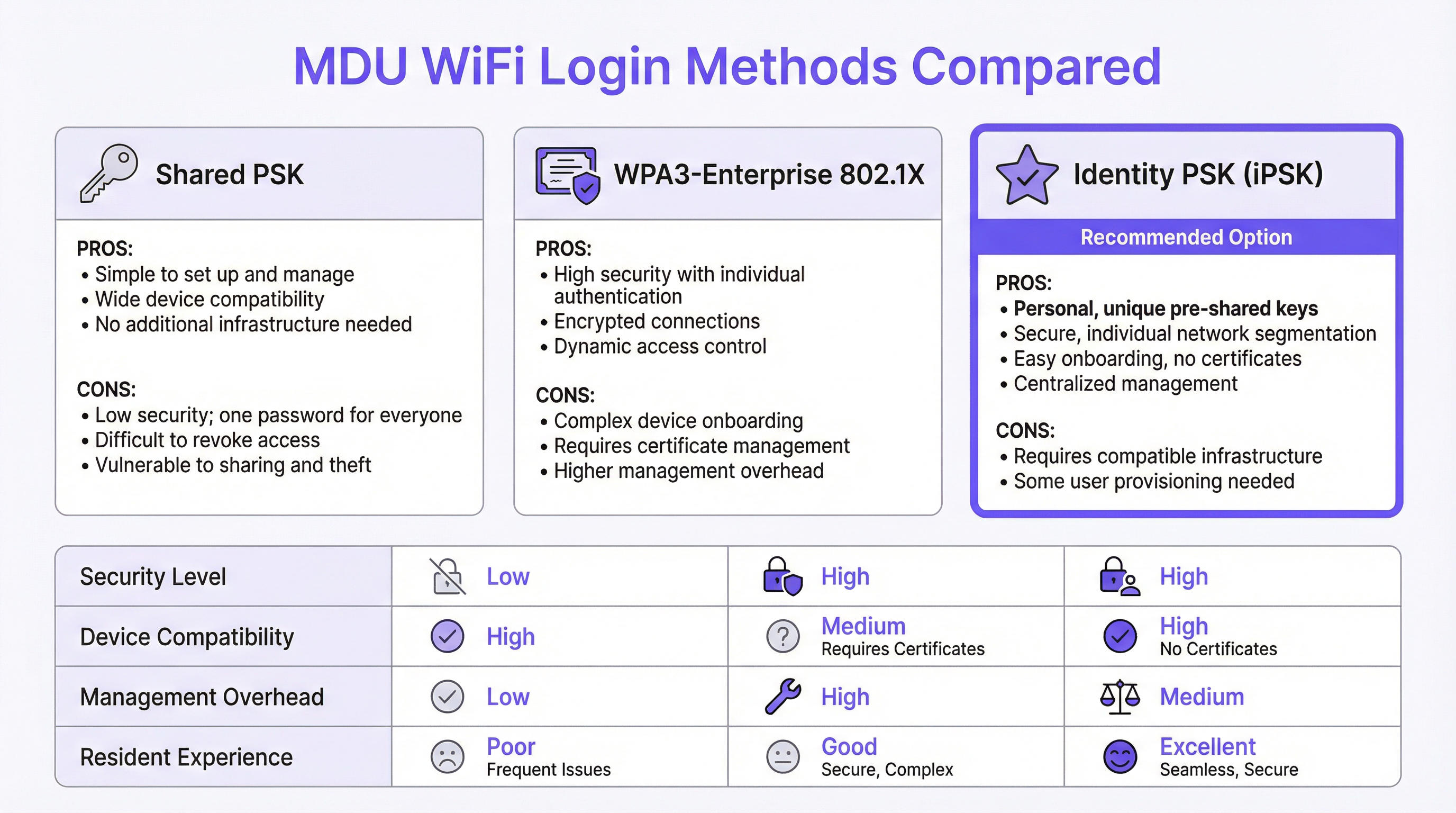
Chaque déploiement WiFi en immeuble collectif repose sur l'un des trois paradigmes d'authentification, chacun ayant des implications distinctes en matière de sécurité, d'utilisabilité et d'exploitation.
La Shared Pre-Shared Key (PSK) (clé pré-partagée) est la norme pour la plupart des déploiements existants. Un seul SSID et un seul mot de passe sont distribués à tous les résidents, généralement inclus dans un livret d'accueil ou communiqués oralement par le personnel de l'immeuble. Sa simplicité opérationnelle est sa seule vertu. D'un point de vue sécuritaire, elle est fondamentalement incompatible avec les environnements multi-locataires : il n'existe aucun mécanisme de segmentation par utilisateur, ce qui signifie que tous les appareils des résidents partagent un seul domaine de diffusion. Un résident avec un appareil mal configuré ou des intentions malveillantes peut facilement énumérer les équipements réseau de ses voisins. Révoquer l'accès d'un locataire sur le départ nécessite de changer le mot de passe pour tout le bâtiment, créant une perturbation opérationnelle que la plupart des exploitants préfèrent éviter — laissant ainsi aux anciens résidents un accès réseau indéfini.
Le WPA3-Enterprise avec IEEE 802.1X représente l'approche axée sur la sécurité, standard dans les environnements d'entreprise. Chaque utilisateur s'authentifie avec des identifiants individuels ou un certificat numérique, validés par un serveur RADIUS. Le protocole fournit des clés de chiffrement par session, une authentification mutuelle forte et des politiques de contrôle d'accès granulaires. Cependant, il est mal adapté au contexte résidentiel pour une raison critique : une proportion importante d'appareils grand public et IoT — y compris les téléviseurs intelligents, les consoles de jeux, les assistants vocaux et les hubs domotiques — ne prennent pas en charge les suppliants 802.1X. Obliger les résidents à configurer des certificats pour une PlayStation ou un thermostat Nest génère un volume disproportionné de tickets d'assistance et crée une perception de service médiocre, quelle que soit la qualité sous-jacente du réseau.
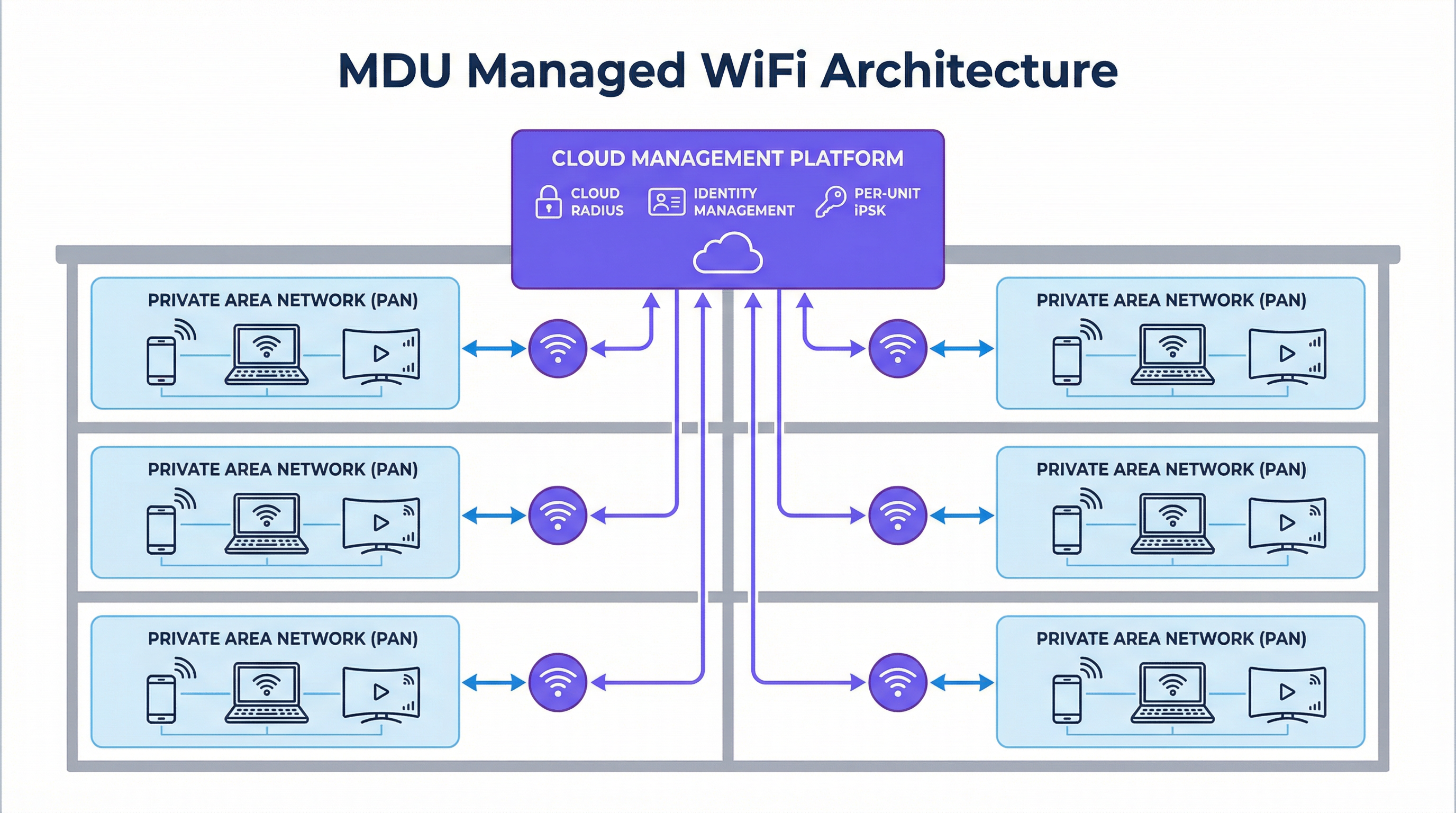
L'Identity PSK (iPSK) résout cette tension. Chaque appartement ou résident se voit attribuer une clé pré-partagée unique, générée et gérée de manière centralisée par la plateforme. Pour le résident, l'expérience est identique à la connexion à un routeur domestique privé : il entre un mot de passe et il est en ligne. Côté infrastructure, le serveur RADIUS associe chaque clé unique à un profil de politique spécifique, plaçant les appareils du résident dans un Private Area Network (PAN) dédié — un micro-segment isolé de niveau 2 qui est logiquement invisible pour tous les autres résidents sur la même infrastructure physique. La plateforme prend en charge la réflexion mDNS au sein du PAN, permettant aux résidents de diffuser sur leur propre Chromecast ou d'imprimer sur leur propre imprimante sans aucune visibilité inter-locataires. Ce modèle prend en charge 100 % des appareils grand public, ne nécessite aucune infrastructure de certificats et est entièrement géré via un tableau de bord cloud.
| Attribut | Shared PSK | WPA3-Enterprise (802.1X) | Identity PSK (iPSK) |
|---|---|---|---|
| Segmentation de sécurité | Aucune | Par utilisateur | Par utilisateur |
| Prise en charge IoT / Appareils sans interface | Complète | Limitée | Complète |
| Charge de gestion | Faible (statique) | Élevée | Moyenne (automatisée) |
| Friction d'intégration des résidents | Faible | Élevée | Faible |
| Départ des locataires | Perturbateur | Granulaire | Granulaire (automatisé) |
| Conformité GDPR | Faible | Forte | Forte |
| Recommandé pour les MDU | Non | Non | Oui |
Architecture RF : Éliminer le problème des interférences
L'environnement RF dans un immeuble collectif dense est l'un des plus complexes en matière de réseaux d'entreprise. Un déploiement conventionnel — un routeur grand public par logement — se traduit par des dizaines ou des centaines de radios 2,4 GHz et 5 GHz indépendantes en concurrence pour le même spectre. Les interférences co-canal dégradent le débit pour tous les utilisateurs simultanément, et le problème s'aggrave avec l'augmentation du taux d'occupation. Un bâtiment de 200 logements avec un routeur par appartement génère un minimum de 200 radios 2,4 GHz concurrentes, fonctionnant souvent sur des canaux qui se chevauchent.
Un déploiement iPSK géré remplace cela par une architecture radio planifiée et centralisée. Des points d'accès de niveau entreprise sont positionnés sur la base d'une étude de site RF professionnelle, utilisant des canaux non chevauchants, une puissance de transmission contrôlée et le band steering pour répartir les clients de manière optimale sur les bandes 2,4 GHz, 5 GHz et — dans les déploiements WiFi 6E et WiFi 7 — la bande 6 GHz. Le résultat est une réduction spectaculaire des interférences co-canal et une amélioration mesurable du débit par utilisateur. Fait essentiel, le réseau étant géré de manière centralisée, l'opérateur peut ajuster les paramètres radio, appliquer des mises à jour de firmware et diagnostiquer les problèmes à distance, sans avoir à dépêcher un technicien dans chaque logement.
Sécurité, conformité et paysage réglementaire
Pour les exploitants gérant des immeubles collectifs comprenant des commerces au rez-de-chaussée, des espaces de restauration ou de coworking, les exigences de conformité vont au-delà de la simple confidentialité. La norme PCI DSS impose une stricte segmentation du réseau entre les environnements de données des titulaires de cartes et toute infrastructure réseau partagée. Un réseau MDU plat qui mélange le trafic résidentiel et commercial crée un risque direct de non-conformité. L'iPSK avec marquage VLAN par profil de politique fournit la limite de segmentation requise pour satisfaire à l'exigence 1.3 de la norme PCI DSS, en isolant les systèmes de paiement du trafic résidentiel au niveau de la couche réseau.
Le GDPR introduit un ensemble différent d'obligations. Tout réseau qui capture des données d'utilisateurs — y compris les adresses MAC, les horodatages de connexion et les métadonnées de navigation — doit le faire sur une base légale et doit mettre en œuvre des garanties techniques appropriées. Une plateforme WiFi gérée avec un Captive Portal conforme ou un flux d'intégration basé sur une application fournit le mécanisme de consentement et les contrôles de minimisation des données requis par les articles 5 et 6 du GDPR. Les exploitants doivent s'assurer que la plateforme choisie fournit un accord de traitement des données (DPA) et opère dans les limites juridictionnelles appropriées pour le stockage des données.
Guide de mise en œuvre
Phase 1 : Découverte et conception (Semaines 1–2)
Commencez par une étude de site exhaustive. Ce n'est pas facultatif. Un modèle RF prédictif, validé par une visite physique à l'aide d'un analyseur de spectre, permettra d'identifier les zones mortes, les sources d'interférences et les emplacements optimaux des points d'accès. Documentez les matériaux de construction du bâtiment — le béton et l'acier atténuent les signaux de manière beaucoup plus importante que les constructions à ossature bois — et cartographiez les emplacements de toutes les sources d'interférences électriques, y compris les fours à micro-ondes, les téléphones DECT et les réseaux voisins.
Lors de la phase de découverte, auditez votre infrastructure existante. Vérifiez si votre parc de commutateurs prend en charge le marquage VLAN 802.1Q (requis pour la segmentation du trafic), si votre liaison montante offre une marge de bande passante suffisante (prévoyez un minimum de 25 Mbps par logement pour un déploiement résidentiel standard, et de 50 à 100 Mbps pour les niveaux premium), et si votre système de gestion immobilière expose une API pour l'approvisionnement automatisé des utilisateurs.
Phase 2 : Déploiement de l'infrastructure (Semaines 3–6)
Déployez des points d'accès de niveau entreprise conformément au plan de l'étude de site. Pour un immeuble collectif résidentiel standard, un point d'accès pour deux à quatre logements constitue un point de départ raisonnable, à ajuster en fonction de la construction du bâtiment et de la densité des logements. Assurez-vous que tous les points d'accès sont alimentés via PoE+ (IEEE 802.3at) ou PoE++ (IEEE 802.3bt) afin d'éliminer le besoin de prises de courant locales dans les plafonds ou les couloirs.
Configurez votre infrastructure de commutation avec les VLAN requis : au minimum un VLAN de gestion, un VLAN de données par résident (ou un VLAN partagé avec application du PAN au niveau du contrôleur), et un VLAN invité/visiteur. Établissez votre connexion RADIUS cloud et validez les flux d'authentification avant d'intégrer des résidents.
Phase 3 : Intégration des identités et onboarding (Semaines 5–8)
Intégrez la plateforme WiFi gérée à votre système de gestion immobilière via API. Configurez le flux de travail d'approvisionnement automatisé : lorsqu'une nouvelle location est créée dans le PMS, la plateforme doit générer automatiquement une iPSK unique, l'associer au profil de politique approprié (VLAN, niveau de bande passante, groupe PAN) et transmettre les identifiants au résident par e-mail ou via l'application résident. Testez l'ensemble du flux de travail de bout en bout avant la mise en production, y compris le processus de départ — la révocation des identifiants doit être immédiate et totale à la fin du bail.
Pour les résidents possédant des appareils IoT sans interface, fournissez un portail en libre-service ou un flux basé sur une application qui génère une clé secondaire spécifique à l'appareil au sein du même PAN. Cela permet à une télévision intelligente ou à une console de jeux de rejoindre le réseau sans compromettre l'architecture de sécurité.
Phase 4 : Mise en production et optimisation (À partir de la semaine 8)
Procédez à un déploiement progressif, en commençant par un étage ou un bâtiment pilote avant le déploiement complet. Surveillez les taux de réussite des connexions, les échecs d'authentification et le nombre de clients par point d'accès dans le tableau de bord de gestion. Ajustez la puissance de transmission et l'attribution des canaux en fonction des données RF en temps réel. Établissez une base de référence pour le volume de tickets d'assistance au cours des 30 premiers jours ; une solution WiFi gérée bien déployée devrait réduire les demandes d'assistance liées à la connectivité de 70 à 80 % par rapport à un déploiement Shared PSK existant.
Bonnes pratiques
Les recommandations suivantes, indépendantes de tout fournisseur, reflètent le consensus actuel de l'industrie pour les déploiements WiFi à grande échelle dans les immeubles collectifs.
Appliquez le WPA3 dans la mesure du possible. Le WPA3-SAE (Simultaneous Authentication of Equals) élimine la vulnérabilité aux attaques par dictionnaire hors ligne présente dans le WPA2-PSK. Pour les déploiements iPSK, activez le mode de transition WPA3 afin de maintenir la rétrocompatibilité avec les anciens appareils tout en migrant progressivement le parc vers le WPA3 au fur et à mesure du remplacement des appareils.
Mettez en œuvre le 802.11r (Fast BSS Transition) et le 802.11k/v (Radio Resource Management). Dans les grands déploiements MDU, les résidents se déplacent entre les espaces communs, les couloirs et leurs propres logements. Sans itinérance rapide (fast roaming), un appareil peut rester connecté à un point d'accès éloigné bien après qu'un point d'accès plus proche soit disponible, ce qui dégrade le débit. Le 802.11r permet des transferts d'itinérance inférieurs à 100 ms, tandis que le 802.11k et le 802.11v fournissent au client des rapports de voisinage et des requêtes de gestion de transition BSS pour faciliter des décisions d'itinérance intelligentes.
Séparez le trafic IoT au niveau de la couche réseau. Même au sein d'un PAN, envisagez de placer les appareils IoT sur un SSID dédié avec un accès Internet restreint et aucun routage intra-PAN. Cela limite le rayon d'action d'un appareil IoT compromis et s'aligne sur les principes de réseau Zero Trust.
Maintenez un processus de gestion des changements documenté. Les réseaux MDU sont des environnements en direct avec une rotation continue des résidents. Chaque changement de configuration — modification de VLAN, mise à jour de firmware, changement de politique — doit être testé dans un environnement de pré-production et déployé pendant une fenêtre de maintenance définie avec une procédure de retour en arrière validée.
Dépannage et atténuation des risques
Modes de défaillance courants
Échecs d'authentification à grande échelle. Si une proportion importante de résidents ne parvient pas à se connecter après une mise à jour de la plateforme ou un changement d'infrastructure, la cause la plus probable est une mauvaise configuration du serveur RADIUS ou l'expiration d'un certificat sur le point de terminaison RADIUS cloud. Validez le secret partagé RADIUS, vérifiez les dates de validité des certificats et confirmez que les points d'accès peuvent atteindre le serveur RADIUS sur les ports UDP 1812 et 1813. Une architecture RADIUS hébergée dans le cloud élimine le risque de point de défaillance unique d'un serveur sur site.
Connectivité intermittente dans des logements spécifiques. Les problèmes de connectivité persistants dans des logements isolés sont presque toujours un problème de couverture RF, et non un problème d'authentification. Utilisez les données d'association des clients par point d'accès de la plateforme de gestion pour déterminer si les résidents concernés se connectent à un point d'accès éloigné. Ajustez la puissance de transmission ou déployez un point d'accès supplémentaire pour éliminer la zone d'ombre.
Échecs d'intégration des appareils IoT. Les appareils qui ne parviennent pas à se connecter malgré un mot de passe correct tentent généralement de négocier un protocole (tel que le 802.1X) que le SSID ne prend pas en charge, ou ils sont rejetés par un filtre d'adresse MAC. Confirmez que le SSID est configuré pour WPA2/WPA3-Personal (et non Enterprise), désactivez le filtrage MAC sur le SSID résident, et vérifiez que les paramètres réseau de l'appareil ne sont pas codés en dur sur une bande de fréquences spécifique qui serait indisponible.
Fuite de trafic entre résidents. Si des résidents signalent pouvoir voir les appareils de leurs voisins, la politique d'application du PAN n'a pas été correctement mise en œuvre. Vérifiez que l'attribut RADIUS renvoyant le VLAN ou la politique de groupe correcte est présent dans la réponse Access-Accept, et que le firmware du point d'accès prend en charge le mécanisme d'application du PAN spécifique utilisé par la plateforme (généralement un attribut spécifique au fournisseur ou une attribution dynamique de VLAN).
Purple Technical Briefing Podcast — Écoutez le briefing complet de 10 minutes de nos consultants sur les stratégies de MDU WiFi login, les recommandations de mise en œuvre et l'analyse du ROI.
ROI et impact commercial
Quantifier le dossier d'investissement
L'argumentaire financier pour un déploiement WiFi MDU géré s'articule autour de trois flux de valeur distincts.
Réduction des coûts opérationnels. Un déploiement existant de routeurs grand public — un par logement dans un bâtiment de 200 logements — implique un cycle de remplacement du matériel de trois à cinq ans, plus des coûts d'assistance continus pour les problèmes signalés par les résidents. Le WiFi géré consolide cela en un nombre réduit de points d'accès de niveau entreprise avec un cycle de vie de sept à dix ans, un seul abonnement de gestion cloud et un volume de tickets d'assistance considérablement réduit. Les exploitants signalent systématiquement une réduction de 70 à 80 % des demandes d'assistance liées au WiFi suite à un déploiement géré, ce qui se traduit directement par une réduction du temps passé par le personnel et des coûts d'assistance tiers.
Génération de revenus. L'architecture basée sur l'identité de l'iPSK permet de proposer des offres de services à plusieurs niveaux. Un niveau résidentiel standard peut être inclus dans les charges, tandis que des niveaux premium — bande passante plus élevée, QoS dédiée pour les jeux ou la visioconférence — peuvent être proposés comme des options payantes sous forme d'abonnement mensuel. Dans un bâtiment de 200 logements, même un taux d'adoption de 30 % pour un niveau premium à 10 £/mois génère 7 200 £ de revenus supplémentaires annuels. Pour les exploitants de propriétés à usage mixte, la même infrastructure peut desservir les locataires de commerces et de coworking sur des profils de politique distincts, chacun avec des SLA et une facturation appropriés.
Valeur de l'actif et fidélisation des locataires. Dans le secteur de l'immobilier locatif, la qualité du WiFi est systématiquement citée parmi les trois principaux facteurs dans les enquêtes de satisfaction des locataires. Les propriétés offrant une connectivité manifestement supérieure justifient une prime de loyer et connaissent des taux de vacance plus faibles. La valeur capitalisée de la réduction des périodes de vacance — même une amélioration d'un point de pourcentage de l'occupation dans un bâtiment de 200 logements avec un loyer moyen de 1 500 £/mois — représente 36 000 £ de revenus annuels, un chiffre qui éclipse le coût annuel d'un abonnement WiFi géré.
| Flux de valeur | Bâtiment de 200 logements (Annuel) | Base |
|---|---|---|
| Réduction des coûts d'assistance | 15 000 £ – 25 000 £ | Réduction de 75 % des tickets d'assistance WiFi |
| Revenus du niveau premium | 7 200 £+ | Taux d'adoption de 30 % à 10 £/mois |
| Réduction du taux de vacance (amélioration de 1 %) | 36 000 £ | Loyer moyen de 1 500 £/mois |
| Bénéfice annuel indicatif total | 58 200 £ – 68 200 £ |
Ces chiffres sont indicatifs et varieront en fonction du marché, du type de propriété et de l'infrastructure existante. Une analyse formelle du ROI doit être menée en utilisant les données réelles de coûts et de revenus de l'exploitant.
Termes clés et définitions
MDU Login
The authentication mechanism by which residents, guests, or devices in a Multi-Dwelling Unit gain access to the shared WiFi network. MDU login methods range from simple shared passwords to identity-based systems that assign unique credentials per unit or per user.
IT teams encounter this term when scoping a WiFi deployment for apartment buildings, student accommodation, co-living spaces, or extended-stay hotels. The choice of MDU login method determines the security architecture, management overhead, and resident experience of the entire deployment.
Identity PSK (iPSK)
A WiFi authentication method in which each user, device, or unit is assigned a unique pre-shared key. The RADIUS server maps each key to a specific policy profile — including VLAN assignment, bandwidth limits, and PAN group membership — enabling per-user segmentation without requiring 802.1X certificate infrastructure.
iPSK is the recommended authentication model for MDU deployments because it combines the simplicity of a password-based connection (compatible with all consumer devices) with the granular access control and segmentation of an enterprise network. IT architects encounter iPSK as the primary differentiator between basic managed WiFi platforms and enterprise-grade MDU solutions.
Private Area Network (PAN)
A logical network segment that isolates a specific group of devices — typically those belonging to a single resident or apartment — from all other devices on the same physical infrastructure. PANs enforce Layer 2 isolation while enabling intra-group device discovery via mDNS reflection.
PANs are the technical mechanism that delivers the 'private home network' experience in a shared MDU infrastructure. Network architects specify PAN support as a mandatory requirement when evaluating managed WiFi platforms for residential deployments, particularly where IoT device interoperability (Chromecast, AirPlay, smart-home hubs) is a resident expectation.
IEEE 802.1X
An IEEE standard for port-based network access control that provides an authentication framework for devices connecting to a LAN or WLAN. It requires a supplicant (client), an authenticator (access point), and an authentication server (RADIUS), and supports multiple EAP methods including EAP-TLS (certificate-based) and PEAP (username/password).
802.1X is the authentication standard underpinning WPA3-Enterprise deployments. IT teams encounter it when evaluating whether their existing infrastructure can support enterprise WiFi, and when assessing the device compatibility implications of an enterprise-only SSID in a mixed residential/commercial environment.
RADIUS (Remote Authentication Dial-In User Service)
A networking protocol that provides centralised authentication, authorisation, and accounting (AAA) for users connecting to a network. In WiFi deployments, the RADIUS server validates credentials and returns policy attributes (VLAN, bandwidth tier, PAN group) to the access point in the Access-Accept response.
RADIUS is the back-end infrastructure component that makes iPSK and 802.1X authentication possible. IT teams must decide between on-premises RADIUS (higher control, single point of failure) and cloud RADIUS (lower maintenance overhead, high availability). For MDU deployments, cloud RADIUS is strongly preferred to eliminate the operational burden of server maintenance.
WPA3-SAE (Simultaneous Authentication of Equals)
The authentication handshake introduced in WPA3 that replaces the WPA2 4-way handshake for personal (PSK) networks. SAE is resistant to offline dictionary attacks because it does not expose the password hash in the handshake, even if an attacker captures the full exchange.
WPA3-SAE is the current best practice for PSK-based WiFi security. IT teams should specify WPA3 Transition Mode (supporting both WPA2 and WPA3 clients) for new MDU deployments to progressively improve security as older devices are replaced, without creating compatibility issues for existing residents.
RF Site Survey
A systematic assessment of the radio frequency environment in a physical space, used to determine optimal access point placement, channel assignments, and transmit power settings. A site survey includes both a predictive model (using building plans and construction materials) and a physical validation walk using a spectrum analyser.
An RF site survey is the mandatory first step in any MDU WiFi deployment. IT teams and network architects commission site surveys to avoid the most common deployment failure: coverage gaps and co-channel interference caused by suboptimal AP placement. The survey output directly informs the bill of materials and the installation plan.
Co-Channel Interference (CCI)
Signal degradation caused by multiple access points or devices transmitting on the same WiFi channel simultaneously. In dense MDU environments, CCI is the primary cause of throughput degradation and is significantly worsened by the deployment of multiple consumer routers operating on default channel settings.
CCI is the technical explanation for why adding more consumer routers to an MDU makes the network worse, not better. Network architects use CCI analysis — typically visualised as a channel utilisation heatmap — to justify the transition from distributed consumer hardware to a centrally managed enterprise AP deployment with coordinated channel planning.
Property Management System (PMS) Integration
The API-level connection between a managed WiFi platform and the property management software used to administer tenancies, leases, and resident records. PMS integration enables automated WiFi credential provisioning at lease signing and immediate credential revocation at tenancy termination.
PMS integration is the operational feature that separates a scalable MDU WiFi deployment from one that creates ongoing manual management overhead. IT teams should treat PMS integration as a mandatory requirement — not a nice-to-have — when evaluating managed WiFi platforms for deployments of more than 50 units.
mDNS Reflection
A network function that forwards multicast DNS (mDNS) packets between devices within a defined group (such as a PAN), enabling device discovery protocols like Apple Bonjour, Google Cast, and AirPlay to function across VLAN boundaries within the same logical segment.
mDNS reflection is the specific technical capability that enables IoT and smart-home devices to function correctly within a PAN. Without it, a resident's Chromecast or AirPlay-enabled speaker will be invisible to their phone, even if both devices are on the same iPSK. IT architects must verify mDNS reflection support when evaluating managed WiFi platforms for residential deployments.
Études de cas
A 350-unit build-to-rent development in Manchester is preparing to launch. The developer currently plans to install a consumer router in each apartment and provide residents with a building-wide shared WiFi password for common areas. The IT director has been asked to evaluate whether this approach is fit for purpose and, if not, to propose an alternative architecture for the board.
The proposed architecture has three critical failure modes that will manifest within the first quarter of operation. First, the shared password for common areas provides no tenant isolation: residents will be able to enumerate each other's devices in the lobby, gym, and co-working space, creating both a privacy risk and a GDPR exposure. Second, 350 consumer routers operating simultaneously will create severe RF interference across the 2.4 GHz and 5 GHz bands, degrading throughput for all residents and generating a disproportionate volume of support requests. Third, the absence of centralised management means that every connectivity issue requires a physical visit to the affected unit.
The recommended architecture is a managed iPSK deployment using enterprise-grade access points positioned based on a professional RF site survey — approximately 120–140 APs for a building of this density, depending on construction materials. Each apartment is assigned a unique iPSK, delivered automatically via integration with the developer's property management system at the point of lease signing. Common areas are served by the same infrastructure, with residents' PANs extending seamlessly as they move through the building. A dedicated guest SSID with a captive portal provides visitor access without exposing the resident network.
Configuration steps: (1) Commission RF site survey and produce AP placement plan. (2) Deploy structured cabling to all AP locations with PoE+ switching. (3) Configure cloud management platform with per-unit iPSK policy profiles and VLAN assignments. (4) Integrate platform API with the PMS for automated provisioning and offboarding. (5) Configure 802.11r/k/v for seamless roaming across common areas. (6) Deploy resident app for self-service device management and speed tier upgrades. (7) Conduct staged go-live by floor, monitoring authentication success rates and AP client counts.
A 120-room extended-stay hotel in London is experiencing a high volume of WiFi complaints from long-term guests (stays of 30+ days). Investigation reveals that guests are using the same shared hotel WiFi password as transient guests, and several long-term guests have reported that their smart-home devices (Alexa, Chromecast, smart plugs) do not work reliably. The hotel's IT manager needs to design a solution that provides long-term guests with a private, home-like WiFi experience without replacing the existing Cisco Meraki access point infrastructure.
The existing Cisco Meraki infrastructure is fully compatible with an iPSK deployment when combined with a managed WiFi platform such as Purple. The solution does not require hardware replacement; it requires a configuration change at the platform layer and the addition of a cloud RADIUS service.
The architecture separates guests into two distinct profiles. Transient guests (stays under 7 days) continue to use the existing captive portal SSID with a shared PSK, which is appropriate for their use case. Long-term guests (stays of 7+ days) are migrated to a dedicated SSID configured for iPSK authentication. At check-in, the property management system triggers the automatic generation of a unique iPSK for the guest's room, delivered via the hotel's pre-arrival email sequence. The guest enters this key once on their primary device; all subsequent devices in the room connect using the same key and are automatically placed in the same PAN.
For smart-home devices that cannot display a password entry screen, the hotel app generates a QR code that the guest scans with their phone to provision the device directly. The PAN ensures that the guest's Alexa, Chromecast, and smart plugs can communicate with each other but remain completely invisible to other guests on the network. Upon checkout, the iPSK is automatically revoked, and the room's PAN is dissolved.
Configuration steps: (1) Enable RADIUS authentication on the long-stay SSID in Cisco Meraki dashboard. (2) Configure Purple as the cloud RADIUS provider with the Meraki shared secret. (3) Map long-stay guest profiles in the PMS to iPSK policy profiles in Purple. (4) Configure PAN enforcement via dynamic VLAN assignment per iPSK. (5) Enable mDNS reflection within PANs for IoT device discovery. (6) Test full lifecycle: provisioning, device onboarding, mDNS functionality, and revocation.
Analyse de scénario
Q1. A 500-unit mixed-use development includes 450 residential apartments, 30 retail units, and a ground-floor food hall. The developer wants a single managed WiFi platform to serve all tenants. The retail units include a café that processes card payments via a cloud-based POS system. What are the critical network segmentation requirements, and how should the WiFi architecture be structured to meet them?
💡 Astuce :Consider the PCI DSS requirement for cardholder data environment isolation and how VLAN tagging per policy profile can satisfy this alongside the residential PAN requirement.
Afficher l'approche recommandée
The critical requirement is strict Layer 3 segmentation between the retail cardholder data environment (CDE) and all other network traffic, as mandated by PCI DSS Requirement 1.3. The architecture should implement at minimum four distinct network segments: (1) a residential iPSK segment with per-unit PANs for the 450 apartments; (2) a retail general-purpose segment for non-payment retail devices; (3) a dedicated CDE segment for POS terminals and payment infrastructure, with no routing to any other segment; and (4) a visitor/guest segment with captive portal access for food hall customers. Each segment is implemented as a separate VLAN, with inter-VLAN routing disabled by default and explicit firewall rules permitting only the specific flows required (e.g., POS terminals to payment gateway over HTTPS). The managed WiFi platform must support dynamic VLAN assignment per iPSK policy profile to enable this segmentation without deploying separate physical SSIDs for each segment. A quarterly PCI DSS scope review should verify that no new devices have been inadvertently placed in the CDE VLAN.
Q2. An IT manager at a 200-unit student accommodation block reports that WiFi performance degrades significantly between 7pm and 11pm each evening, with residents in upper floors experiencing the worst throughput. The current deployment uses a shared PSK and a mix of consumer routers provided by residents and a small number of building-managed access points in corridors. What is the most likely cause, and what is the remediation path?
💡 Astuce :Consider the RF environment in a dense residential building during peak usage hours and the impact of uncoordinated consumer router deployments on co-channel interference.
Afficher l'approche recommandée
The most likely cause is severe co-channel interference during peak usage hours. With 200 units, each potentially containing one or more consumer routers operating on default channel settings (typically channel 6 on 2.4 GHz and channel 36 or 40 on 5 GHz), the RF environment becomes saturated as usage peaks in the evening. Upper floors typically experience worse performance because the signal from lower-floor routers propagates upward, increasing the number of competing radios visible to upper-floor devices. The remediation path has two phases: immediate and structural. The immediate mitigation is to conduct an RF spectrum scan to identify the most congested channels and manually configure the building-managed APs to use the least-congested non-overlapping channels (1, 6, 11 on 2.4 GHz; 36, 40, 44, 48 on 5 GHz). The structural remediation is to migrate to a managed iPSK deployment that eliminates resident-owned routers entirely, replacing them with a planned enterprise AP deployment with coordinated channel assignment and transmit power control. This removes the root cause of the interference rather than managing around it.
Q3. A property management company is evaluating two managed WiFi platforms for a 300-unit build-to-rent portfolio. Platform A offers a lower per-unit monthly cost but does not provide a PMS integration API, requiring manual credential management. Platform B costs 40% more per unit but provides full bidirectional API integration with the operator's existing PMS. The finance director is pushing for Platform A on cost grounds. How do you construct the business case for Platform B?
💡 Astuce :Quantify the operational cost of manual credential management at scale, including the security risk of delayed offboarding, and compare against the incremental cost of Platform B.
Afficher l'approche recommandée
The business case for Platform B rests on three quantified arguments. First, operational cost: manual credential management for a 300-unit portfolio with typical BTR churn of 30–40% annually means 90–120 manual provisioning and revocation events per year. At a conservative 30 minutes of staff time per event (including error correction and resident communication), this represents 45–60 hours of management time annually, or approximately £1,350–£1,800 at a £30/hour blended rate. The incremental cost of Platform B at 40% more — assuming a base cost of £5/unit/month, the premium is £2/unit/month, or £7,200/year for 300 units — is not offset by staff savings alone. Second, security risk: delayed offboarding creates a quantifiable compliance exposure. Under GDPR, continued network access by a former tenant whose data should have been deleted constitutes a data breach risk. A single ICO investigation or data breach notification event carries costs — legal, reputational, and potential fines — that dwarf the annual platform cost differential. Third, revenue enablement: Platform B's API integration enables automated tiered service upgrades, allowing the operator to offer premium bandwidth tiers as a self-service upsell. Even a 20% uptake of a £5/month premium tier across 300 units generates £3,600/year in incremental revenue. The combined case — staff savings, risk mitigation, and revenue enablement — comfortably justifies the Platform B premium.
Points clés à retenir
- ✓Shared PSK is architecturally incompatible with MDU environments of any meaningful scale: it provides no security segmentation, no device isolation, and no granular offboarding capability. It should be treated as a legacy configuration, not a deployment option.
- ✓Identity PSK (iPSK) is the current best-practice authentication model for MDUs, delivering per-unit credential uniqueness, Layer 2 device isolation via Private Area Networks, and full compatibility with IoT and consumer devices — without the certificate complexity of WPA3-Enterprise 802.1X.
- ✓RF interference from uncoordinated consumer router deployments is the primary cause of poor WiFi performance in dense MDUs. Replacing distributed consumer hardware with a planned enterprise AP deployment, guided by a professional site survey, resolves the root cause rather than managing around it.
- ✓PMS integration is not optional at scale. Automated credential provisioning and revocation — triggered directly by tenancy events in the property management system — is the operational mechanism that makes a managed WiFi deployment sustainable for portfolios of 50 units or more.
- ✓Compliance requirements (GDPR, PCI DSS) are best addressed at the network architecture layer, not through policy alone. Per-user segmentation via PANs and VLAN isolation of cardholder data environments are the technical controls that demonstrate compliance to auditors.
- ✓The ROI case for managed MDU WiFi operates across three value streams: operational cost reduction (fewer support tickets, no per-unit hardware), revenue generation (tiered service offerings), and asset value improvement (higher tenant satisfaction, lower void rates). The combined annual benefit for a 200-unit building typically ranges from £58,000 to £68,000.
- ✓WPA3 Transition Mode is the recommended security configuration for new MDU deployments: it enforces WPA3-SAE for capable clients while maintaining backward compatibility for legacy devices, progressively improving the security posture of the estate without creating connectivity disruptions.




