

Sécurisation des réseaux avec le Wi-Fi 7 : une analyse technique approfondie
This guide provides a comprehensive technical reference on Wi-Fi 7 security features for enterprise IT teams, covering the mandatory enforcement of WPA3 encryption, the security implications of Multi-Link Operation (MLO), and the practical challenges of supporting legacy devices during migration. It equips network architects, IT managers, and CTOs at hotels, retail chains, stadiums, and public-sector organisations with actionable deployment strategies, compliance guidance aligned to PCI DSS and GDPR, and real-world case studies with measurable outcomes. Understanding these changes is critical for any organisation planning a wireless infrastructure upgrade this year, as Wi-Fi 7 represents a fundamental shift in the security baseline for enterprise wireless networks.
🎧 Écouter ce guide
Voir la transcription

Synthèse
Le Wi-Fi 7 (IEEE 802.11be) n'est pas un simple renouvellement matériel de routine. Il s'agit de la mise à niveau de sécurité la plus importante dans les réseaux sans fil d'entreprise depuis que le WPA2 a remplacé le WEP, et elle implique des obligations de conformité que tout directeur technique (CTO) et directeur informatique doit comprendre avant d'approuver un plan de dépenses d'investissement.
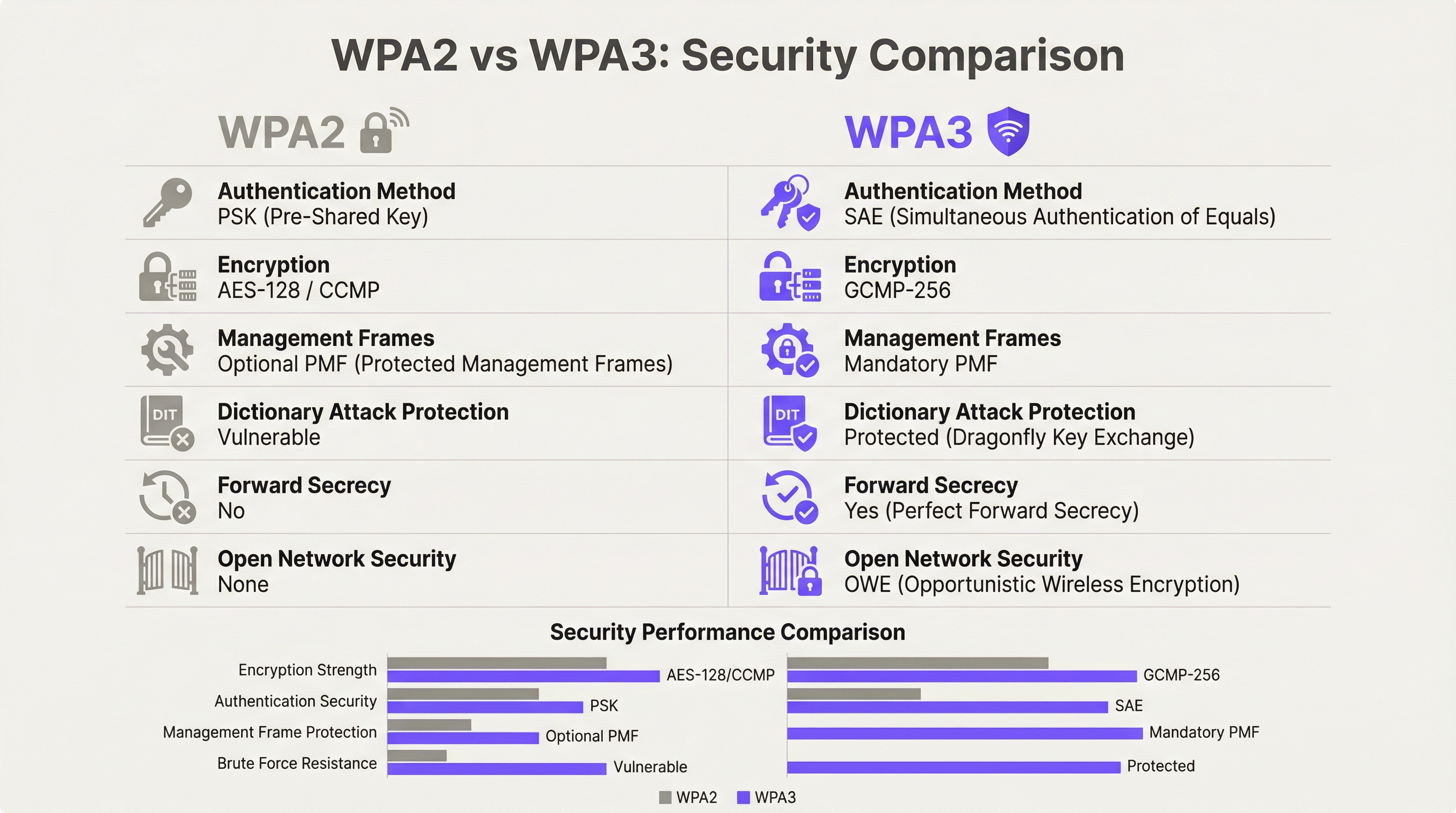
Le changement principal est sans équivoque : le chiffrement WPA3 est obligatoire pour tous les appareils Wi-Fi 7 utilisant le Multi-Link Operation (MLO) et les débits de données 802.11be complets. Cette obligation s'étend simultanément à toutes les bandes radio, fermant ainsi les vecteurs d'attaque par repli (downgrade) qui persistent depuis des années dans les réseaux sans fil d'entreprise. Outre le WPA3, le Wi-Fi 7 introduit le chiffrement GCMP-256 (remplaçant l'AES-128 CCMP), les trames de gestion protégées obligatoires (Protected Management Frames, 802.11w) et l'Opportunistic Wireless Encryption (OWE) pour les réseaux ouverts avec Captive Portal.
Pour les exploitants de sites — hôtels, chaînes de distribution, stades, centres de conférence et organisations du secteur public — les implications pratiques sont triples. Premièrement, votre parc d'appareils IoT existants (terminaux de point de vente, contrôleurs de chambre, systèmes IPTV) nécessitera une segmentation du réseau, et non un remplacement immédiat. Deuxièmement, votre niveau de conformité aux normes PCI DSS v4.0 et GDPR s'améliore considérablement avec une architecture Wi-Fi 7 correctement déployée. Troisièmement, les gains de performances liés au MLO — un fonctionnement multibande simultané offrant un débit théorique allant jusqu'à 46 Gbps — ne sont accessibles qu'aux appareils répondant aux exigences de sécurité du WPA3.
Les organisations qui considèrent cette évolution comme une mise à niveau stratégique de la sécurité, plutôt que comme un simple remplacement de matériel à l'identique, en ressortiront avec une posture de risque nettement renforcée et une infrastructure réseau adaptée pour la prochaine décennie.
Analyse technique approfondie
L'obligation du WPA3 et ce qu'elle change réellement
La norme IEEE 802.11be rend obligatoire la prise en charge du WPA3 pour tous les appareils souhaitant exploiter les fonctionnalités du Wi-Fi 7. Il s'agit d'une rupture par rapport aux générations précédentes : les points d'accès Wi-Fi 6 et Wi-Fi 6E pouvaient utiliser le WPA2 sans restriction. Sous le Wi-Fi 7, le WPA3 est un prérequis pour le Multi-Link Operation et les débits de données EHT (Extremely High Throughput) complets. Le programme de certification de la Wi-Fi Alliance impose cette exigence, ce qui signifie que tout appareil portant le badge de certification Wi-Fi 7 doit prendre en charge le WPA3.
Le WPA3 apporte quatre améliorations substantielles en matière de sécurité par rapport à son prédécesseur.
Authentification : le SAE remplace le PSK. Le WPA3-Personal remplace le modèle de clé pré-partagée (PSK) par l'authentification simultanée des égaux (SAE), qui utilise le protocole d'échange de clés Dragonfly. Le SAE résiste aux attaques par dictionnaire hors ligne — une vulnérabilité critique du WPA2-PSK où une poignée de main (handshake) à quatre voies capturée pouvait être soumise à des tentatives de force brute hors ligne illimitées. Le mécanisme de preuve à divulgation nulle de connaissance du SAE garantit que même une poignée de main capturée ne fournit aucune information exploitable sans accès à la phrase secrète d'origine.
Chiffrement : le GCMP-256 remplace l'AES-128 CCMP. Le Wi-Fi 7 introduit le protocole Galois/Counter Mode avec des clés de 256 bits (GCMP-256) comme suite de chiffrement principale. Le GCMP-256 chiffre le champ Frame Body de chaque MPDU, offrant simultanément la confidentialité des données, l'authentification, l'intégrité et la protection contre le rejeu. Les points d'accès Wi-Fi 7 annoncent à la fois le GCMP-256 et l'ancien AES-128 CCMP dans leurs éléments d'information RSN, permettant aux anciens clients de se connecter avec une force de chiffrement réduite tandis que les clients plus récents négocient le protocole le plus robuste.
Protection des trames de gestion : 802.11w obligatoire. Sous WPA2, les trames de gestion — les signaux de contrôle 802.11 régissant l'association, la dissociation et l'itinérance — étaient transmises en clair. Cela permettait les attaques par désauthentification et l'usurpation de points d'accès (evil twin). Le WPA3 rend obligatoire la norme 802.11w (Protected Management Frames, ou PMF), qui authentifie et chiffre les trames de gestion unicast et broadcast. Ceci est obligatoire pour les opérations à lien unique et multi-liens dans le Wi-Fi 7.
Sécurité des réseaux ouverts : OWE. L'Opportunistic Wireless Encryption fournit un chiffrement par session sur les réseaux ouverts sans nécessiter de mot de passe. Chaque appareil qui se connecte négocie une session chiffrée individualisée à l'aide de l'échange de clés Diffie-Hellman, ce qui signifie que le trafic sur un réseau ouvert partagé est chiffré et ne peut pas être intercepté par d'autres utilisateurs sur le même SSID. Pour les opérateurs du secteur de l'hôtellerie et du secteur public gérant un réseau WiFi invité avec Captive Portal, l'OWE est le mécanisme qui apporte une protection des données conforme au GDPR aux accès sans fil ouverts.
Multi-Link Operation : performances et architecture de sécurité
Le MLO est la fonctionnalité de performance déterminante du Wi-Fi 7, permettant à un seul appareil de maintenir simultanément des connexions actives sur les bandes 2,4 GHz, 5 GHz et 6 GHz. L'architecture de sécurité du MLO est plus exigeante que celle des opérations à lien unique, et sa compréhension est essentielle pour la planification des déploiements en entreprise.
La norme IEEE 802.11be introduit deux nouvelles suites d'authentification et de gestion des clés (AKM) spécifiquement pour le MLO : AKM 24 (00-0F-AC:24) et AKM 25 (00-0F-AC:25). Celles-ci fournissent une authentification par MLD (Multi-Link Device), établissant une clé maîtresse unique (Pairwise Master Key, PMK) qui est synchronisée sur tous les liens actifs. Cette conception garantit que la hiérarchie des clés est cohérente sur toutes les bandes, empêchant ainsi un scénario où un lien compromis de sécurité inférieure pourrait être utilisé pour attaquer la session sur une bande de sécurité supérieure.
Point crucial, la norme interdit explicitement le mode de transition WPA3 sur toute connexion compatible MLO. Le mode de transition — la configuration mixte WPA2/WPA3 qui autorise les deux versions du protocole sur un seul SSID — est interdit pour le MLO. Il s'agit d'une mesure délibérée contre les attaques par repli (anti-downgrade). Dans un environnement en mode de transition, un adversaire peut forcer un client à négocier le WPA2 même lorsque le WPA3 est disponible ; l'architecture de sécurité du MLO élimine entièrement ce vecteur d'attaque en exigeant le WPA3 sur chaque lien.
Pour les architectes d'entreprise, cela a une implication directe : tout appareil ne prenant pas en charge le WPA3 ne peut pas participer au MLO. Ces appareils basculeront sur un fonctionnement à bande unique et à lien unique sur la bande qu'ils prennent en charge, au niveau de sécurité qu'ils supportent. Il ne s'agit pas d'une défaillance du réseau ; c'est le comportement normal d'un déploiement Wi-Fi 7 correctement configuré.
Mode WPA3-Enterprise 192 bits
Pour les organisations opérant dans des secteurs réglementés — gouvernement, défense, santé et services financiers — le mode WPA3-Enterprise 192 bits (Suite B) offre le profil de sécurité sans fil le plus élevé disponible. Ce mode utilise le GCMP-256 pour le chiffrement des données, le SHA-384 pour le hachage et l'ECDH/ECDSA avec des courbes elliptiques de 384 bits pour l'échange de clés et l'authentification. Il s'aligne sur les exigences de la suite CNSA (Commercial National Security Algorithm) et convient aux réseaux traitant des données classifiées ou hautement sensibles.
Guide de mise en œuvre
Phase 1 : Audit des appareils et conception de la segmentation
Avant même l'installation d'un seul point d'accès, réalisez un audit complet des appareils. Chaque appareil de votre réseau doit être catégorisé selon le protocole de sécurité maximal qu'il prend en charge : WPA3-Enterprise, WPA3-Personal, WPA2-Enterprise, WPA2-Personal ou hérité (WPA/TKIP). Cet audit oriente toutes les décisions architecturales ultérieures.
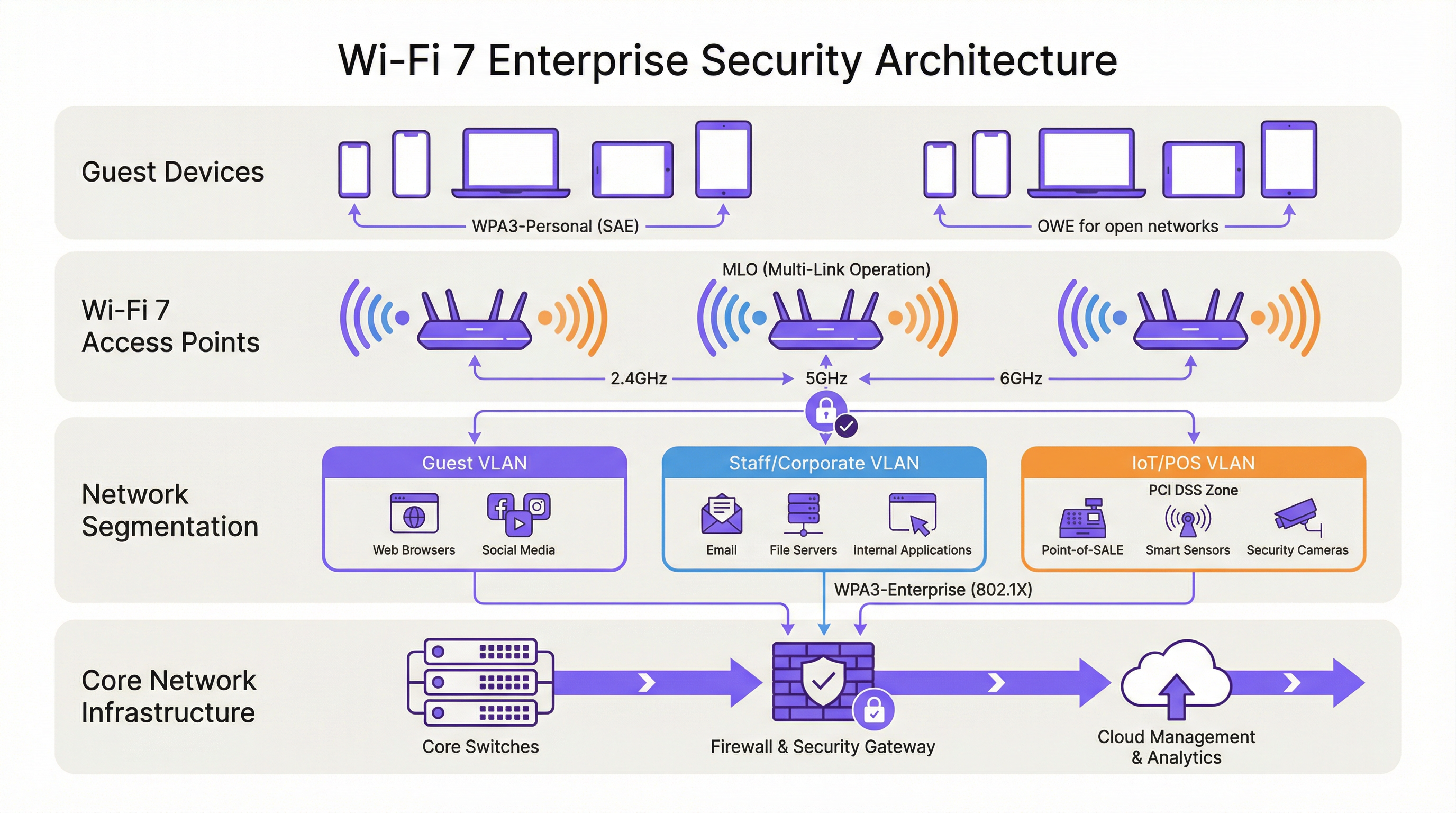
Le résultat de cet audit doit définir trois niveaux de réseau :
| Niveau | Bande | Protocole de sécurité | Appareils cibles |
|---|---|---|---|
| Niveau 1 — Entreprise/Personnel | 6 GHz | WPA3-Enterprise (802.1X) | Ordinateurs portables du personnel, appareils mobiles d'entreprise, terminaux Wi-Fi 7 |
| Niveau 2 — Invités/BYOD | 5 GHz | WPA3-Personal (SAE) ou WPA3-Enterprise | Appareils invités, BYOD, smartphones modernes |
| Niveau 3 — Hérité/IoT | 2,4 GHz | WPA2-Personal (VLAN isolé) | Terminaux de point de vente, contrôleurs de chambre, IPTV, anciens scanners |
Chaque niveau doit être isolé par un VLAN avec des politiques de pare-feu inter-VLAN qui interdisent explicitement tout mouvement latéral. Les appareils du Niveau 3 ne doivent avoir aucun accès aux segments réseau des Niveaux 1 ou 2, et l'accès à Internet doit être restreint aux destinations spécifiques requises pour le fonctionnement de l'appareil.
Phase 2 : Préparation de l'infrastructure RADIUS et PKI
Les déploiements WPA3-Enterprise nécessitent un serveur RADIUS (généralement FreeRADIUS, Cisco ISE ou Aruba ClearPass) configuré pour prendre en charge l'EAP-TLS avec des suites de chiffrement modernes. Vérifiez que votre implémentation RADIUS prend en charge TLS 1.2 ou 1.3, et que votre infrastructure d'autorité de certification est capable d'émettre des certificats clients à l'échelle requise. Pour le mode WPA3-Enterprise 192 bits, confirmez que votre serveur RADIUS prend en charge l'EAP-TLS avec les suites de chiffrement de la Suite B.
Si votre infrastructure RADIUS existante a été déployée il y a plus de cinq ans, une évaluation de l'état de préparation est conseillée avant de s'engager sur un calendrier de déploiement du Wi-Fi 7.
Phase 3 : Architecture SSID et évitement du mode de transition
Configurez vos SSID selon le modèle à trois niveaux ci-dessus. Résistez à la tentation de déployer le mode de transition WPA3 comme configuration permanente. Le mode de transition est une mesure à court terme appropriée lors d'une migration contrôlée, mais il ne doit pas constituer l'état final. Le mode de transition annonce simultanément le WPA2 et le WPA3 sur le même SSID ; tout appareil qui négocie le WPA2 sur ce SSID réduit la sécurité effective de l'ensemble du segment réseau aux niveaux du WPA2.
L'architecture à long terme correcte est un WPA3 strict sur les SSID des Niveaux 1 et 2, avec les appareils hérités explicitement assignés au SSID isolé du Niveau 3. Cette approche offre la posture de sécurité la plus robuste pour les appareils modernes tout en maintenant la continuité opérationnelle pour le matériel hérité.
Phase 4 : Déploiement de l'OWE pour les réseaux invités
Pour les réseaux invités avec Captive Portal, déployez l'OWE comme mécanisme de sécurité. L'OWE fonctionne de manière transparente pour les utilisateurs finaux — aucun mot de passe n'est requis, et le flux d'authentification du Captive Portal reste inchangé. La différence réside dans le fait que le trafic de chaque appareil est chiffré avec une clé de session individualisée, offrant une protection des données conforme au GDPR sans ajouter de friction à l'expérience d'intégration des invités.
Notez que le mode de transition OWE (analogue au mode de transition WPA3) permet aux appareils non-OWE de se connecter au même SSID. Tout comme pour le mode de transition WPA3, cela doit être traité comme une mesure temporaire pendant la migration, et non comme une configuration permanente.
Phase 5 : Surveillance, politique et gouvernance continue
Déployez un système de prévention des intrusions sans fil (WIPS) pour surveiller les points d'accès malveillants (rogue AP), les attaques par désauthentification et les appareils non autorisés. Bien que le PMF obligatoire du WPA3 réduise considérablement l'efficacité des attaques par désauthentification, un WIPS fournit la couche de visibilité nécessaire à la réponse aux incidents et aux rapports de conformité.
Mettez à jour votre politique de sécurité de l'information pour rendre obligatoire la prise en charge du WPA3 comme exigence minimale pour tout nouvel achat d'appareil sans fil. Ce changement de politique est la mesure à long terme la plus efficace pour réduire l'accumulation d'appareils hérités.
Bonnes pratiques
Les bonnes pratiques suivantes, indépendantes des fournisseurs, reflètent les normes actuelles de l'industrie et s'appliquent à toutes les principales plateformes sans fil d'entreprise.
La segmentation du réseau est non négociable. Le contrôle d'accès au réseau basé sur la norme IEEE 802.1X, combiné à la segmentation VLAN, constitue le fondement d'une architecture sans fil d'entreprise défendable. Aucune catégorie d'appareils — invités, personnel, IoT ou points de vente — ne doit partager un segment réseau avec des appareils d'un niveau de confiance différent.
Évitez le mode de transition WPA3 comme configuration permanente. Comme l'ont documenté les chercheurs en sécurité, le mode de transition est exploitable pour les attaques par repli (downgrade). Utilisez-le uniquement comme aide à la migration limitée dans le temps, avec une date de fin définie pour la prise en charge du WPA2 sur chaque SSID.
Appliquez l'authentification basée sur des certificats pour les réseaux du personnel. Le WPA3-Enterprise avec EAP-TLS et certificats clients offre la posture d'authentification la plus robuste pour les terminaux d'entreprise. Les méthodes EAP basées sur des mots de passe (PEAP-MSCHAPv2) restent vulnérables au vol d'identifiants ; l'authentification par certificat élimine ce risque.
Considérez la bande 6 GHz comme exclusivement WPA3 par conception. La bande 6 GHz est exclusive au WPA3 depuis le Wi-Fi 6E. Utilisez cette bande exclusivement pour votre niveau de sécurité et de performance le plus élevé. N'essayez pas d'étendre la prise en charge des appareils hérités au 6 GHz.
Mettez en œuvre un contrôle d'accès au réseau (NAC) pour le profilage des appareils. Une solution NAC qui profile les appareils se connectant et applique la politique de sécurité en fonction du type d'appareil et de son état de conformité est essentielle dans les environnements mixtes. Les appareils qui ne respectent pas la politique de sécurité minimale doivent être mis en quarantaine ou redirigés vers un VLAN de remédiation.
Alignez la politique d'achat sur les exigences de sécurité du Wi-Fi 7. Tout nouvel appareil acheté pour être utilisé sur votre réseau doit obligatoirement prendre en charge le WPA3 au minimum. Cette politique, appliquée de manière cohérente, réduira naturellement votre parc d'appareils hérités sur un cycle de renouvellement matériel de trois à cinq ans.
Dépannage et atténuation des risques
Échecs de connexion des appareils hérités. Le problème de déploiement le plus courant est l'incapacité des appareils hérités à se connecter après un déploiement Wi-Fi 7. La cause principale est presque toujours que l'appareil ne prend pas en charge le WPA3 et que le SSID a été configuré en mode WPA3 strict. Résolution : confirmez le protocole de sécurité maximal pris en charge par l'appareil, assignez-le au SSID de Niveau 3 approprié et assurez-vous que le SSID diffuse sur une bande prise en charge par l'appareil (2,4 GHz pour la plupart des IoT hérités).
Attaques par repli en mode de transition WPA3. Si vous utilisez le mode de transition pendant la migration, surveillez votre WIPS pour repérer les clients se connectant via WPA2 sur des SSID compatibles WPA3. Cela peut indiquer une attaque par repli en cours ou un client mal configuré. Enquêtez et remédiez-y rapidement.
Échecs d'authentification RADIUS avec WPA3-Enterprise. Si les clients échouent à l'authentification 802.1X après une migration WPA3-Enterprise, vérifiez que le certificat TLS du serveur RADIUS est approuvé par les appareils clients, que la méthode EAP est correctement configurée à la fois sur le serveur RADIUS et sur le supplicant client, et que le serveur RADIUS prend en charge les suites de chiffrement requises par le WPA3-Enterprise.
Problèmes de connexion MLO. Les appareils qui prennent en charge le Wi-Fi 7 mais qui ne parviennent pas à établir des connexions MLO rencontrent généralement un échec de négociation WPA3 sur une ou plusieurs bandes. Vérifiez que toutes les bandes du point d'accès sont configurées pour le WPA3 et que le pilote Wi-Fi 7 du client est à jour. Des mises à jour de pilotes pour la prise en charge du MLO Wi-Fi 7 ont été activement publiées tout au long de 2024 et 2025.
Détection des points d'accès malveillants. Le PMF obligatoire dans le WPA3 réduit considérablement l'efficacité des attaques de type evil twin, mais n'élimine pas le risque de points d'accès malveillants sur votre réseau. Maintenez un WIPS avec une analyse active et des alertes pour tout point d'accès diffusant vos SSID qui ne figure pas dans votre inventaire de points d'accès autorisés.
ROI et impact commercial

Réduction des risques de conformité
Le ROI le plus quantifiable d'un déploiement de sécurité Wi-Fi 7 est la réduction des risques de conformité. Sous PCI DSS v4.0, l'Exigence 4 impose une cryptographie forte pour les données des titulaires de carte en transit. Le chiffrement GCMP-256 du WPA3 satisfait à cette exigence ; l'AES-128 CCMP du WPA2 est de plus en plus examiné par les QSA comme étant insuffisant pour les nouveaux déploiements. Une architecture Wi-Fi 7 correctement segmentée avec WPA3-Enterprise sur les segments réseau des points de vente réduit la portée de votre audit PCI DSS et les coûts de remédiation associés.
Sous le GDPR, l'Article 25 (Protection des données dès la conception et par défaut) et l'Article 32 (Sécurité du traitement) exigent des mesures techniques appropriées pour protéger les données personnelles. L'OWE sur les réseaux invités, combiné au WPA3 sur les réseaux authentifiés, fournit un contrôle technique démontrable qui appuie la documentation de conformité au GDPR.
Gains d'efficacité opérationnelle
La capacité MLO du Wi-Fi 7 offre des améliorations de débit mesurables dans les environnements à haute densité. Dans les déploiements de stades et de centres de conférence, où des centaines ou des milliers d'utilisateurs simultanés se disputent la bande passante, la capacité du MLO à agréger la capacité sur plusieurs bandes simultanément réduit la congestion et améliore l'expérience utilisateur. Pour les exploitants d'hôtels, cela se traduit directement par des scores de satisfaction des clients et une réduction des appels d'assistance liés aux performances du WiFi.
Évitement des coûts liés aux incidents de sécurité
Le coût moyen d'une violation de données au Royaume-Uni dépasse 3,4 millions de livres sterling selon les références du secteur. La compromission des réseaux sans fil — par le vol d'identifiants facilité par les vulnérabilités du WPA2-PSK, les attaques par désauthentification ou l'interception par des points d'accès malveillants — est un vecteur d'attaque documenté dans les environnements de l'hôtellerie et de la vente au détail. L'authentification SAE du WPA3, le PMF obligatoire et le chiffrement OWE par session éliminent collectivement les vecteurs d'attaque sans fil les plus courants, réduisant ainsi la probabilité d'une violation provenant de la couche sans fil.
Planification des dépenses d'investissement
Un déploiement progressif du Wi-Fi 7 — en commençant par les zones à fort trafic et à forte valeur ajoutée, puis en étendant progressivement la couverture — permet aux organisations d'étaler les dépenses d'investissement tout en offrant des avantages immédiats en matière de sécurité dans les zones les plus à risque. La bande 6 GHz, disponible uniquement pour les appareils Wi-Fi 7 et Wi-Fi 6E, offre un environnement vierge exclusivement WPA3 qui peut être déployé immédiatement sans problèmes de compatibilité avec les systèmes hérités, tandis que les bandes 2,4 et 5 GHz continuent de desservir le parc d'appareils existant pendant la période de transition.
Termes clés et définitions
WPA3 (Wi-Fi Protected Access 3)
The third generation of the Wi-Fi Protected Access security certification, introduced by the Wi-Fi Alliance in 2018 and mandated for all Wi-Fi 7 devices. WPA3 replaces PSK authentication with SAE, upgrades encryption to GCMP-256, mandates Protected Management Frames (802.11w), and introduces OWE for open networks. WPA3 comes in two variants: WPA3-Personal (using SAE) and WPA3-Enterprise (using 802.1X/EAP authentication).
IT teams encounter WPA3 as the mandatory security baseline for Wi-Fi 7 deployments. Understanding the distinction between WPA3-Personal and WPA3-Enterprise is essential for designing the correct authentication architecture for each network segment.
SAE (Simultaneous Authentication of Equals)
The authentication protocol used in WPA3-Personal, replacing the Pre-Shared Key (PSK) model of WPA2. SAE uses the Dragonfly key exchange mechanism, a zero-knowledge proof protocol that is resistant to offline dictionary attacks. Even if an attacker captures the SAE handshake, they cannot perform offline brute-force attacks against the passphrase.
SAE is the reason WPA3-Personal is materially more secure than WPA2-PSK for environments where a shared passphrase is used, such as hotel guest WiFi with a posted password or retail customer WiFi.
MLO (Multi-Link Operation)
Wi-Fi 7's headline performance feature, enabling a single device (a Multi-Link Device, or MLD) to simultaneously maintain active connections across multiple radio bands — 2.4 GHz, 5 GHz, and 6 GHz — at the same time. MLO aggregates bandwidth across bands, reduces latency through load balancing, and improves resilience by maintaining connectivity if one band becomes congested. WPA3 is mandatory on all links in an MLO connection.
Network architects need to understand MLO's WPA3 requirement when planning device compatibility. Devices that cannot support WPA3 will not benefit from MLO and will connect as single-link clients.
OWE (Opportunistic Wireless Encryption)
A Wi-Fi security mechanism that provides per-session encryption on open networks without requiring a password. OWE uses Diffie-Hellman key exchange to establish an individualised encrypted session for each connecting device, preventing other users on the same open network from intercepting traffic. OWE is transparent to end users.
OWE is the recommended security mechanism for captive portal guest networks in hospitality, retail, and public-sector environments. It provides GDPR-aligned data protection without adding friction to the guest onboarding experience.
PMF (Protected Management Frames) / 802.11w
An IEEE 802.11 amendment that authenticates and encrypts wireless management frames, including deauthentication and disassociation frames. Without PMF, these frames are transmitted in plaintext and can be spoofed by an attacker to forcibly disconnect devices from the network. PMF is mandatory in WPA3 and is a prerequisite for all Wi-Fi 7 connections.
PMF is the technical control that prevents deauthentication attacks and significantly reduces the effectiveness of evil twin access point attacks. IT security teams should verify that PMF is enabled on all WPA3-capable SSIDs.
GCMP-256 (Galois/Counter Mode Protocol, 256-bit)
The primary cipher suite for Wi-Fi 7, replacing AES-128 CCMP used in WPA2. GCMP-256 uses 256-bit keys and provides authenticated encryption with associated data (AEAD), simultaneously providing confidentiality, integrity, and authentication for each transmitted frame. GCMP-256 is computationally more efficient than CCMP at high data rates.
GCMP-256 is the encryption standard that satisfies PCI DSS v4.0 Requirement 4's mandate for strong cryptography in cardholder data environments. IT teams should verify that their wireless infrastructure supports GCMP-256 and that it is correctly negotiated by WPA3-capable clients.
WPA3-Enterprise 192-Bit Mode (Suite B)
The highest-security WPA3 profile, using GCMP-256 for data encryption, SHA-384 for hashing, and ECDH/ECDSA with 384-bit elliptic curves for key exchange and authentication. Suite B aligns with the US NSA's Commercial National Security Algorithm (CNSA) Suite and is designed for government, defence, healthcare, and financial services environments.
Public-sector and regulated-industry organisations should evaluate WPA3-Enterprise 192-bit mode for their highest-security network segments. Deployment requires a RADIUS server and PKI infrastructure capable of supporting Suite B cipher suites.
802.1X (Port-Based Network Access Control)
An IEEE standard for port-based network access control, providing an authentication framework for devices attempting to connect to a network. In wireless deployments, 802.1X is used with WPA3-Enterprise to authenticate users or devices against a RADIUS server using EAP methods such as EAP-TLS (certificate-based) or PEAP-MSCHAPv2 (password-based).
802.1X is the authentication backbone of WPA3-Enterprise deployments. IT teams planning a Wi-Fi 7 rollout must ensure their RADIUS infrastructure is correctly configured and that client supplicants are configured to use the correct EAP method.
MLD (Multi-Link Device)
A Wi-Fi 7 device capable of Multi-Link Operation, maintaining simultaneous connections across multiple radio bands. An MLD has a single MAC address at the logical layer (the MLD MAC address) but may have multiple physical radio interfaces. Authentication in Wi-Fi 7 is performed at the MLD level, with a single Pairwise Master Key shared across all links.
Network architects should be aware that MLDs present differently in network management tools than single-link devices. DHCP leases, RADIUS accounting records, and network monitoring data will reference the MLD MAC address, not the individual link MAC addresses.
WPA3 Transition Mode
A configuration mode in which a single SSID advertises support for both WPA2 and WPA3 simultaneously, allowing devices that support only WPA2 to connect alongside WPA3-capable devices. Transition mode is intended as a temporary migration aid. It is explicitly prohibited for Multi-Link Operation in Wi-Fi 7 and is vulnerable to downgrade attacks.
IT teams should use WPA3 transition mode only as a time-limited migration measure, with a defined sunset date. Transition mode should never be the permanent configuration for any SSID that carries sensitive data or is within PCI DSS scope.
Études de cas
A 350-room hotel is upgrading from Wi-Fi 5 to Wi-Fi 7. The property runs a captive portal guest WiFi network, a staff network used by front-of-house and back-office employees, and a building management network serving IPTV systems, door lock controllers, and HVAC sensors. The IPTV system vendor has confirmed that their devices only support WPA2-Personal. The hotel's IT director wants to achieve WPA3 across the entire property and meet PCI DSS requirements for the payment terminals at the front desk. How should the network be architected?
The deployment should be structured across four distinct network segments, each mapped to a dedicated SSID and VLAN. Segment 1 (Staff/Corporate): WPA3-Enterprise with 802.1X authentication on the 6 GHz band. All staff laptops, tablets, and corporate mobile devices connect here. The RADIUS server authenticates users against Active Directory using EAP-TLS with client certificates. This segment has full access to the hotel's PMS, back-office applications, and internet. Segment 2 (PCI DSS Zone): A separate WPA3-Enterprise SSID, also 802.1X authenticated, dedicated exclusively to payment terminals at the front desk and any other card-present transaction points. This segment is isolated by firewall from all other VLANs, with outbound traffic restricted to the payment processor's IP ranges. This satisfies PCI DSS v4.0 Requirement 4 and reduces the audit scope to this segment alone. Segment 3 (Guest WiFi): An OWE-enabled SSID on the 5 GHz band, fronted by the captive portal. OWE provides per-session encryption without requiring a password, satisfying GDPR Article 32's requirement for appropriate technical measures. The captive portal collects only the minimum data required for network access. This segment has internet access only, with no access to hotel internal resources. Segment 4 (Legacy IoT/Building Management): A WPA2-Personal SSID on the 2.4 GHz band, isolated in its own VLAN. The IPTV systems, door lock controllers, and HVAC sensors connect here. Strict firewall rules permit only the specific traffic flows required for device operation. No internet access. No access to any other VLAN. A Network Access Control policy enforces a device allowlist, preventing unauthorised devices from joining this segment. The migration timeline should prioritise Segments 1 and 2 (staff and PCI) in the first phase, followed by guest WiFi (Segment 3), with the legacy IoT segment (Segment 4) maintained on the existing Wi-Fi 5 infrastructure until a planned replacement cycle for the IPTV system.
A national retail chain with 120 stores is planning a Wi-Fi 7 rollout. Each store has a mix of devices: modern Android and iOS point-of-sale tablets (WPA3 capable), legacy barcode scanners running embedded Linux firmware that only supports WPA2-Personal, customer-facing WiFi for in-store browsing, and a back-office network for inventory management systems. The IT security team has flagged that the current WPA2-PSK network for barcode scanners uses a single shared passphrase that has not been rotated in three years. How should the security architecture be designed, and what is the recommended approach for the legacy scanner estate?
The retail architecture should deploy four SSIDs per store, managed centrally via a cloud-based wireless management platform. SSID 1 (POS Tablets — WPA3-Enterprise): The modern POS tablets connect to a WPA3-Enterprise SSID using 802.1X with certificate-based EAP-TLS. Certificates are issued and managed via the chain's PKI, with automatic renewal. This SSID operates on the 5 GHz and 6 GHz bands. The POS VLAN is isolated and has outbound access only to the payment processor and the chain's retail management platform. SSID 2 (Customer WiFi — OWE + Captive Portal): An OWE-enabled SSID on the 5 GHz band provides encrypted guest access. The captive portal is configured to collect only the data required for GDPR-compliant marketing consent. Customer traffic is internet-only with no access to store internal systems. SSID 3 (Back Office — WPA3-Personal or WPA3-Enterprise): Inventory management systems and back-office PCs connect to a WPA3 SSID. If device management allows, WPA3-Enterprise with 802.1X is preferred. SSID 4 (Legacy Scanners — WPA2-Personal, Isolated VLAN): The legacy barcode scanners are assigned to a dedicated WPA2-Personal SSID on the 2.4 GHz band. The immediate priority is passphrase rotation — the three-year-old shared passphrase represents a critical risk. The central management platform should enforce a passphrase rotation policy (minimum 90-day rotation) and generate unique passphrases per store to limit blast radius in the event of a compromise. The VLAN for this segment should have access only to the inventory management system's specific API endpoints, with all other traffic blocked. A device allowlist should be implemented to prevent unauthorised devices joining this segment. The medium-term roadmap should include a business case for replacing the legacy scanners with WPA3-capable hardware at the next refresh cycle, targeting complete elimination of WPA2 from the estate within 24 months.
Analyse de scénario
Q1. A conference centre hosts 50 events per year, ranging from small boardroom meetings to 5,000-delegate conferences. The venue's IT team is planning a Wi-Fi 7 upgrade. During a site survey, they discover that the venue's digital signage system — 120 screens throughout the building — uses embedded WiFi adapters that only support WPA2-Personal with a shared passphrase. The signage vendor has stated that a firmware update to support WPA3 is 'on the roadmap' but has no committed delivery date. The IT director wants to deploy WPA3-only across the entire venue. What is the recommended approach, and what risks must be documented?
💡 Astuce :Consider the operational impact of the signage system going offline, the security risk of maintaining WPA2 for the signage VLAN, and the contractual leverage available with the signage vendor.
Afficher l'approche recommandée
The recommended approach is to deploy a dedicated WPA2-Personal SSID on the 2.4 GHz band exclusively for the digital signage system, isolated in its own VLAN with firewall rules permitting only the specific traffic required for signage operation. All other SSIDs should be configured for WPA3. The risks to document are: (1) the signage VLAN represents a persistent WPA2 segment — implement MAC address allowlisting and monitor for unauthorised associations; (2) the shared passphrase for the signage system should be rotated immediately and managed centrally with a rotation schedule; (3) the vendor's firmware roadmap commitment should be formalised in writing with a contractual deadline for WPA3 support delivery; (4) if the signage system handles any data within GDPR or PCI DSS scope, this must be assessed and documented. The IT director's goal of WPA3-only is achievable for all other network segments; the signage system represents a time-limited exception that should be governed by a formal risk acceptance process and a documented remediation timeline.
Q2. A regional hospital trust is deploying Wi-Fi 7 across three hospital sites. The trust's CISO has mandated WPA3-Enterprise 192-bit mode for all clinical networks carrying patient data. The network architect has identified that the trust's existing RADIUS infrastructure (FreeRADIUS 3.0, deployed six years ago) may not support Suite B cipher suites. The project timeline requires the first site to go live in eight weeks. How should the architect proceed?
💡 Astuce :Consider the RADIUS infrastructure upgrade path, the risk of delaying the go-live, and whether a phased approach to 192-bit mode is feasible.
Afficher l'approche recommandée
The architect should immediately conduct a RADIUS capability assessment to confirm whether the existing FreeRADIUS 3.0 deployment supports EAP-TLS with Suite B cipher suites. FreeRADIUS 3.0 has limited Suite B support; FreeRADIUS 3.2 and later versions provide full Suite B capability. If the existing deployment cannot support 192-bit mode, the architect has two options: (1) upgrade FreeRADIUS to version 3.2 or later before the go-live date — this is the preferred path if the eight-week timeline permits; (2) deploy WPA3-Enterprise standard mode (128-bit) for the initial go-live, with a documented plan to migrate to 192-bit mode following the RADIUS upgrade. Option 2 is acceptable as an interim measure because WPA3-Enterprise standard mode still provides materially stronger security than WPA2-Enterprise. The risk acceptance for Option 2 must be documented and approved by the CISO, with a committed timeline for the 192-bit mode migration. The PKI infrastructure must also be assessed: 192-bit mode requires ECDSA certificates with P-384 curves, which may require new certificate templates and CA configuration.
Q3. A large retail bank is conducting a PCI DSS v4.0 compliance assessment. The QSA has flagged that the bank's branch WiFi networks — used by customer-facing staff for tablet-based banking applications — are running WPA3 transition mode, with WPA2 clients still connecting. The QSA has indicated that the transition mode configuration may not satisfy Requirement 4.2.1's mandate for strong cryptography. The bank's IT team argues that WPA3 is available on the SSID and that the WPA2 clients are legacy devices being phased out. How should the bank respond to the QSA's finding, and what remediation steps are required?
💡 Astuce :Focus on the QSA's specific concern about Requirement 4.2.1, the definition of 'strong cryptography' in PCI DSS v4.0, and the practical steps to demonstrate compliance.
Afficher l'approche recommandée
The QSA's finding is technically valid. WPA3 transition mode allows WPA2 clients to connect to the same SSID, and any WPA2 connection on that SSID is subject to WPA2's AES-128 CCMP encryption, not WPA3's GCMP-256. PCI DSS v4.0 Requirement 4.2.1 requires that strong cryptography is used to safeguard PAN during transmission over open, public networks. The bank's response should acknowledge the finding and present a remediation plan with three components: (1) Immediate: identify all WPA2 clients connecting to the branch WiFi SSIDs within PCI DSS scope. Provide the QSA with a documented inventory and a committed timeline for their replacement or removal. (2) Short-term (within 90 days): migrate all WPA2 clients to WPA3-capable hardware or remove them from PCI DSS scope by assigning them to a separate, isolated SSID that does not carry cardholder data. (3) Medium-term: convert all PCI DSS scope SSIDs to strict WPA3-Enterprise mode, eliminating transition mode. The bank should also present evidence that the WPA2 clients are not handling cardholder data directly — if the tablet-based banking applications are the primary PCI DSS scope devices and they are all WPA3-capable, the QSA may accept a compensating control while the legacy device remediation is completed.
Points clés à retenir
- ✓Wi-Fi 7 (IEEE 802.11be) mandates WPA3 encryption for all devices using Multi-Link Operation and full 802.11be data rates — this is not optional, and it is the most significant security baseline change in enterprise wireless since WPA2.
- ✓WPA3 delivers four critical improvements over WPA2: SAE authentication (resistant to offline dictionary attacks), GCMP-256 encryption (256-bit vs AES-128), mandatory Protected Management Frames (802.11w), and OWE for encrypted open networks.
- ✓MLO requires WPA3 on every simultaneous band connection — WPA3 transition mode is explicitly prohibited for MLO connections, eliminating the downgrade attack vector that has persisted in enterprise wireless.
- ✓Legacy device compatibility requires a three-tier SSID architecture: WPA3-Enterprise on 6 GHz for modern corporate devices, WPA3-Personal/OWE on 5 GHz for guests and BYOD, and WPA2-Personal on 2.4 GHz in an isolated VLAN for legacy IoT — never mix security tiers on the same SSID.
- ✓WPA3 transition mode is a migration tool, not a destination — every SSID running transition mode must have a documented sunset date, as it is vulnerable to downgrade attacks and does not provide WPA3-level security for WPA2 clients.
- ✓PCI DSS v4.0 Requirement 4 and GDPR Article 32 are both materially satisfied by a properly deployed Wi-Fi 7 architecture: GCMP-256 for cardholder data networks, OWE for guest networks, and 802.1X for staff authentication.
- ✓Conduct a device audit before designing your architecture — the audit output determines your SSID design, VLAN structure, migration timeline, and hardware replacement roadmap, and skipping it is the primary cause of deployment failures.




