
WiFi pour le personnel : Un guide complet pour un accès réseau sécurisé et efficace pour les employés
A comprehensive technical reference for IT leaders on designing, deploying, and managing secure, high-performance staff WiFi networks. This guide provides actionable best practices for authentication, network segmentation, and bandwidth management to enhance operational efficiency and mitigate security risks.
Écouter ce guide
Voir la transcription du podcast

Résumé exécutif
Pour toute entreprise moderne opérant dans l'hôtellerie, la vente au détail ou les grands lieux publics, le WiFi pour le personnel n'est plus une simple commodité ; c'est une infrastructure opérationnelle critique. Un réseau sans fil pour le personnel bien conçu se traduit directement par une productivité accrue, un service client amélioré et une posture de sécurité renforcée. À l'inverse, un réseau mal configuré introduit des risques de conformité importants, des goulots d'étranglement opérationnels et des vulnérabilités. Ce guide sert de référence technique définitive pour les responsables informatiques, les architectes réseau et les directeurs techniques (CTO) chargés de fournir un accès sans fil sécurisé et efficace aux employés. Il va au-delà de la théorie académique pour fournir des conseils pratiques, indépendants des fournisseurs et fondés sur des scénarios de déploiement réels. Nous aborderons les principes architecturaux essentiels de la segmentation réseau, l'importance critique de l'authentification IEEE 802.1X par rapport aux clés pré-partagées non sécurisées, et l'analyse de rentabilité de la migration vers la norme de sécurité WPA3-Enterprise. De plus, ce document fournit un cadre de mise en œuvre étape par étape, des études de cas détaillées issues de secteurs pertinents et des outils pratiques pour mesurer le retour sur investissement (ROI) d'une solution WiFi pour le personnel correctement conçue. La conclusion principale est qu'un investissement stratégique dans le WiFi pour le personnel est un investissement dans la colonne vertébrale opérationnelle de l'ensemble de l'organisation.
Analyse technique approfondie
L'impératif architectural : la segmentation
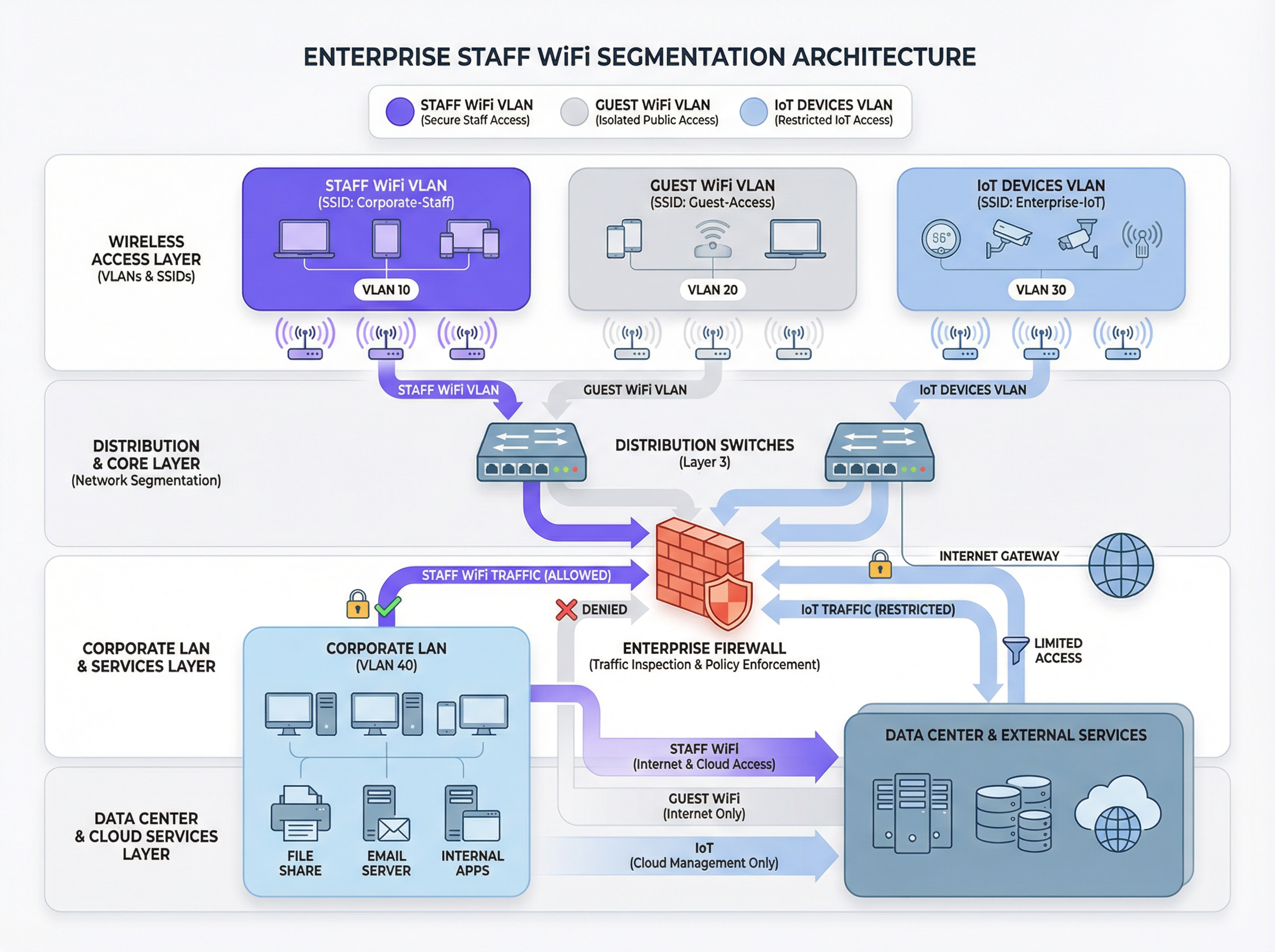
Le principe fondamental d'un WiFi sécurisé pour le personnel est la segmentation du réseau. Un réseau plat où coexistent les appareils du personnel, les appareils des invités, le matériel IoT et les systèmes back-office sensibles constitue une faille de sécurité majeure. Le principal mécanisme permettant de réaliser la segmentation dans un environnement sans fil est l'utilisation de VLAN (Virtual Local Area Networks). Chaque SSID doit correspondre à un VLAN distinct, créant ainsi des domaines de diffusion logiquement isolés qui sont appliqués au niveau du commutateur réseau.
Une architecture typique basée sur les meilleures pratiques comprend au moins trois VLAN distincts :
- VLAN Personnel : Pour les appareils appartenant à l'entreprise et gérés par celle-ci, utilisés par les employés. Ce VLAN bénéficie d'un accès contrôlé aux ressources internes telles que les serveurs de fichiers, les systèmes de point de vente (POS) et les systèmes de gestion immobilière (PMS) via des règles de pare-feu spécifiques.
- VLAN Invité : Pour l'accès WiFi public. Ce VLAN doit être complètement isolé de toutes les ressources internes de l'entreprise. Le trafic de ce VLAN doit être acheminé directement vers Internet, avec l'isolation des clients activée pour empêcher les appareils invités de communiquer entre eux.
- VLAN IoT : Pour les appareils « sans interface » (headless) tels que les caméras de sécurité, l'affichage dynamique et les systèmes CVC. Ces appareils ont souvent des capacités de sécurité plus simples et doivent être isolés sur leur propre segment de réseau avec des règles très restrictives, n'autorisant l'accès qu'aux serveurs spécifiques dont ils ont besoin pour fonctionner.
Cette approche segmentée n'est pas une simple recommandation ; pour toute organisation soumise à la norme Payment Card Industry Data Security Standard (PCI DSS), il s'agit d'une exigence obligatoire [1]. Le fait de ne pas segmenter l'environnement des données des titulaires de carte des autres réseaux constitue un manquement majeur à la conformité.
Authentification et contrôle d'accès : au-delà de la clé pré-partagée
L'erreur la plus courante et la plus critique dans le déploiement du WiFi pour le personnel est l'utilisation d'une seule clé pré-partagée (PSK) pour tous les employés. Bien que simple à configurer, une PSK n'offre aucune responsabilité individuelle et crée un risque de sécurité important lorsqu'un employé quitte l'organisation. La solution standard de l'industrie est IEEE 802.1X, qui fournit un contrôle d'accès au réseau basé sur les ports.
Dans un déploiement 802.1X, un serveur central RADIUS (Remote Authentication Dial-In User Service) agit comme autorité d'authentification. Le flux de travail est le suivant :
- Suppliant (Appareil client) : L'appareil de l'employé demande l'accès au SSID du personnel.
- Authentificateur (Point d'accès sans fil) : Le point d'accès (AP) intercepte la demande et demande les identifiants.
- Serveur d'authentification (RADIUS) : L'AP transmet les identifiants au serveur RADIUS, qui les valide par rapport à un annuaire d'utilisateurs (par exemple, Active Directory, LDAP, ou un fournisseur d'identité cloud comme Azure AD ou Okta).
- Autorisation : En cas d'authentification réussie, le serveur RADIUS renvoie un message
Access-Acceptà l'AP, qui accorde ensuite à l'appareil l'accès au réseau. Le serveur RADIUS peut également renvoyer des attributs d'autorisation, tels qu'un ID de VLAN spécifique ou un profil de qualité de service (QoS), permettant un contrôle d'accès basé sur les rôles.
Ce modèle fournit une authentification par utilisateur et une piste d'audit détaillée, ce qui est essentiel pour les enquêtes de sécurité et les rapports de conformité.
Protocoles de sécurité : WPA2-Enterprise vs WPA3-Enterprise
Bien que la norme 802.1X gère l'authentification, le trafic sans fil lui-même doit être chiffré. Le choix du protocole a des implications importantes en matière de sécurité.
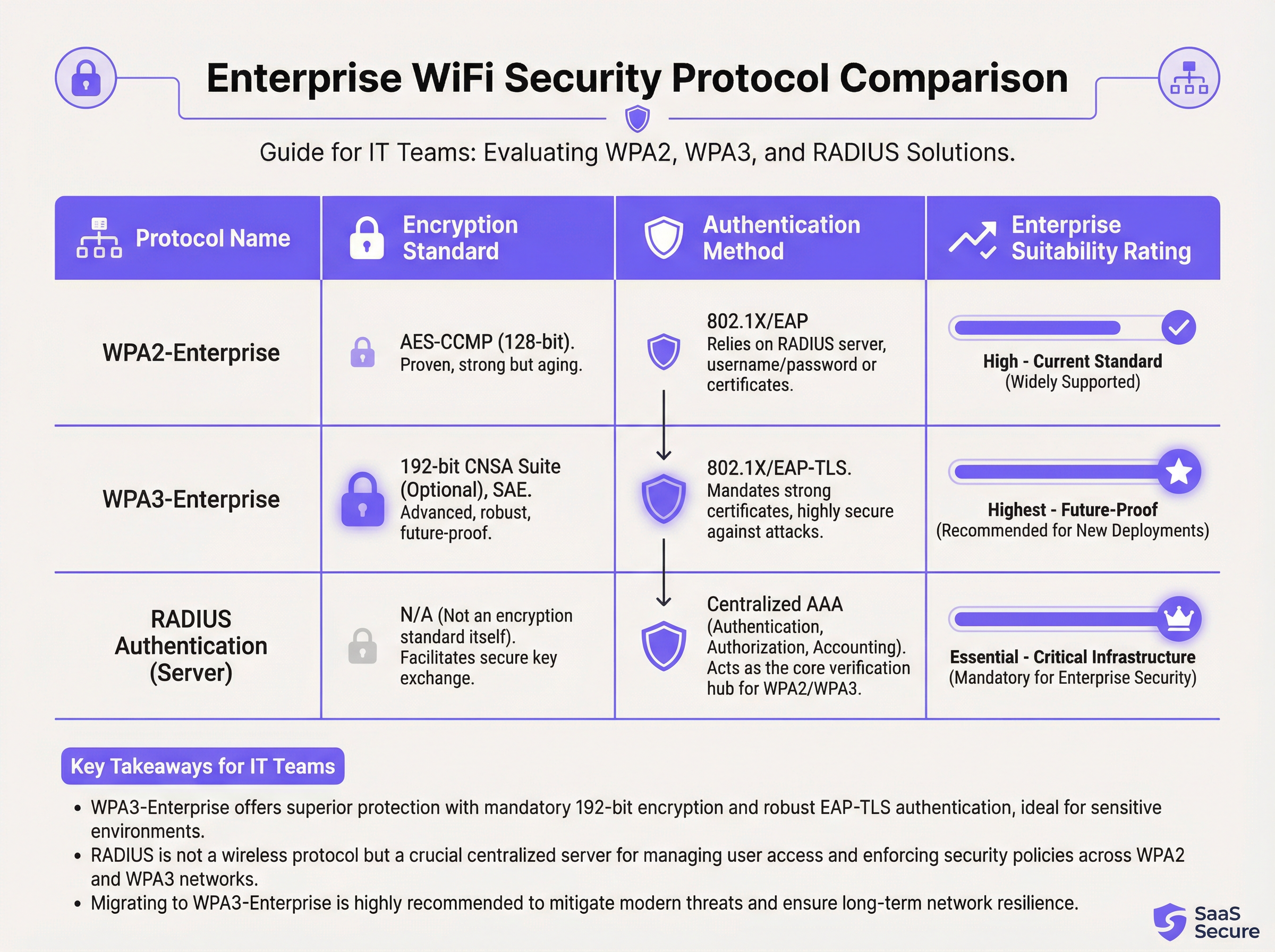
- WPA2-Enterprise (Wi-Fi Protected Access 2) : La norme d'entreprise de longue date, utilisant le chiffrement AES-CCMP 128 bits. Elle est robuste et largement prise en charge. Cependant, elle est vulnérable aux attaques par dictionnaire hors ligne si un attaquant parvient à capturer la poignée de main initiale à quatre voies (four-way handshake).
- WPA3-Enterprise (Wi-Fi Protected Access 3) : La génération actuelle de sécurité. Elle remplace la poignée de main WPA2 par l'Authentification simultanée des égaux (SAE), qui résiste aux attaques par dictionnaire hors ligne. WPA3-Enterprise rend également obligatoire l'utilisation de Trames de gestion protégées (PMF) pour empêcher l'écoute clandestine et la falsification du trafic de gestion. Pour les environnements de haute sécurité, elle propose une suite de sécurité optionnelle de 192 bits alignée sur la suite CNSA (Commercial National Security Algorithm) [2].
Pour tout nouveau déploiement ou renouvellement de matériel, WPA3-Enterprise doit être la norme par défaut. Les avantages en matière de sécurité l'emportent largement sur la charge de mise en œuvre minimale, à condition que les appareils clients et l'infrastructure la prennent en charge.
Guide de mise en œuvre
Le déploiement d'un réseau WiFi sécurisé et efficace pour le personnel est un processus en plusieurs étapes qui nécessite une planification minutieuse.
Phase 1 : Découverte et conception
- Auditer l'infrastructure existante : Identifiez tous les appareils nécessitant un accès sans fil et catégorisez-les (personnel, invité, IoT, BYOD).
- Définir les politiques d'accès : Pour chaque catégorie, définissez les ressources réseau auxquelles ils doivent accéder. Créez une matrice de politiques qui orientera vos règles de pare-feu.
- Concevoir le schéma VLAN et IP : Concevez votre architecture VLAN et attribuez des sous-réseaux IP pour chaque VLAN. Assurez-vous que vos commutateurs et routeurs de cœur de réseau sont configurés pour prendre en charge les nouveaux VLAN.
Phase 2 : Déploiement de l'infrastructure
- Déployer le(s) serveur(s) RADIUS : Configurez un serveur RADIUS principal et un secondaire pour la redondance. Intégrez-les à l'annuaire d'utilisateurs de votre choix.
- Configurer le contrôleur de réseau local sans fil (WLC) : Créez les nouveaux SSID (par exemple,
Staff-Secure,Guest-WiFi). Configurez le SSID du personnel pour WPA3-Enterprise avec authentification 802.1X, en pointant vers vos serveurs RADIUS. - Associer les SSID aux VLAN : Assurez-vous que chaque SSID est correctement balisé avec son ID de VLAN correspondant.
Phase 3 : Tests et déploiement
- Tests pilotes : Inscrivez un petit groupe de personnel informatique et opérationnel à un programme pilote. Testez l'authentification, l'accès aux ressources et les performances d'itinérance (roaming).
- Intégration des appareils : Développez un processus clair pour l'enregistrement des appareils nouveaux et existants. Pour les appareils appartenant à l'entreprise, cela doit être automatisé via une plateforme de gestion des appareils mobiles (MDM).
- Déploiement complet : Une fois les tests pilotes réussis, procédez à un déploiement progressif dans toute l'organisation. Fournissez une documentation claire et une assistance aux utilisateurs finaux.
Phase 4 : Surveillance et optimisation
- Mettre en œuvre la surveillance : Utilisez une plateforme d'intelligence réseau comme Purple pour surveiller les taux de réussite/d'échec de l'authentification, les performances du réseau et l'activité au niveau des appareils.
- Configurer la QoS : Mettez en œuvre des politiques de qualité de service pour prioriser les applications critiques (par exemple, la voix, le trafic POS) et empêcher le trafic non essentiel de consommer toute la bande passante disponible.
- Audits réguliers : Planifiez des examens trimestriels des règles de pare-feu, des droits d'accès des utilisateurs et des mesures de performance du réseau.
Bonnes pratiques
- Appliquer l'authentification basée sur des certificats : Pour les appareils appartenant à l'entreprise, utilisez EAP-TLS, qui s'appuie sur des certificats numériques au lieu de noms d'utilisateur et de mots de passe. Cela élimine le risque de hameçonnage des identifiants et fournit la forme d'authentification la plus forte.
- Mettre en œuvre l'itinérance rapide (802.11r) : Dans les grands espaces, assurez une itinérance rapide et transparente entre les points d'accès pour éviter les coupures de connexion pour le personnel mobile.
- Isoler le trafic BYOD : Si vous autorisez les employés à connecter des appareils personnels (Bring Your Own Device), placez-les sur un VLAN séparé et plus restrictif que celui des appareils appartenant à l'entreprise.
- Mener des études RF régulières : Effectuez des études de radiofréquence (RF) pour identifier et atténuer les sources d'interférence et garantir un placement optimal des AP pour la couverture et la capacité.
- Désactiver les protocoles obsolètes : Désactivez activement les protocoles obsolètes et non sécurisés tels que WEP, WPA et TKIP sur votre infrastructure sans fil.
Dépannage et atténuation des risques
| Problème courant | Cause fondamentale | Stratégie d'atténuation |
|---|---|---|
| Échecs d'authentification | Identifiants incorrects, certificats expirés, panne du serveur RADIUS. | Mettre en œuvre une surveillance robuste sur les serveurs RADIUS. Utiliser le MDM pour automatiser le renouvellement des certificats. Fournir des directives claires aux utilisateurs sur la gestion des identifiants. |
| Mauvaises performances d'itinérance | Absence de prise en charge 802.11r/k/v, niveaux de puissance des AP mal configurés. | S'assurer que le contrôleur et les AP sont configurés pour les normes d'itinérance rapide. Mener une étude RF post-déploiement pour optimiser les paramètres des AP. |
| Congestion du réseau | Bande passante insuffisante, manque de QoS, saturation par du trafic non essentiel. | Mettre en œuvre des politiques de QoS pour prioriser le trafic critique. Utiliser une plateforme d'analyse réseau pour identifier et limiter le débit des applications gourmandes en bande passante. |
| Points d'accès pirates (Rogue AP) | AP non autorisés branchés sur le réseau de l'entreprise par des employés. | Activer la détection des AP pirates sur votre contrôleur sans fil. Utiliser la sécurité des ports 802.1X sur les commutateurs filaires pour empêcher les appareils non autorisés d'accéder au réseau. |
ROI et impact commercial
L'investissement dans un réseau WiFi sécurisé pour le personnel offre des rendements mesurables dans plusieurs domaines :
- Productivité accrue : Un WiFi fiable et performant permet au personnel d'utiliser des applications mobiles, d'accéder à des informations et de communiquer sans interruption, améliorant directement l'efficacité opérationnelle. Une étude de la Wi-Fi Alliance a révélé que le WiFi contribue à plus de 5 000 milliards de dollars de valeur économique mondiale annuelle [3].
- Réduction des incidents de sécurité : Une segmentation appropriée et une authentification forte réduisent considérablement la surface d'attaque, entraînant moins d'incidents de sécurité, des coûts de remédiation inférieurs et un risque réduit de violations de données coûteuses.
- Conformité simplifiée : Un réseau basé sur 802.1X avec une journalisation détaillée simplifie les audits de conformité pour des normes telles que PCI DSS, GDPR et HIPAA, permettant d'économiser des centaines d'heures de travail.
- Agilité commerciale améliorée : Une base sans fil évolutive et sécurisée permet le déploiement rapide de nouvelles initiatives axées sur le mobile (mobile-first), de la commande à table dans les restaurants aux points de vente mobiles dans le commerce de détail.
Pour calculer le ROI, comparez le coût total de possession (TCO) de la nouvelle infrastructure aux avantages quantifiables, tels que le temps gagné grâce à une efficacité améliorée, l'évitement des coûts d'une potentielle violation de données et la réduction des coûts d'audit de conformité.
Références
[1] PCI Security Standards Council. (2022). Payment Card Industry Data Security Standard (PCI DSS) v4.0. https://www.pcisecuritystandards.org/documents/PCI-DSS-v4_0.pdf [2] Wi-Fi Alliance. (2024). WPA3™ Specification. https://www.wi-fi.org/discover-wi-fi/security [3] Wi-Fi Alliance. (2021). The Global Economic Value of Wi-Fi. https://www.wi-fi.org/file/the-global-economic-value-of-wi-fi
Définitions clés
IEEE 802.1X
An IEEE standard for port-based Network Access Control (PNAC). It provides an authentication mechanism to devices wishing to attach to a LAN or WLAN.
This is the core technology that enables per-user authentication on a WiFi network, moving away from insecure shared passwords. IT teams implement 802.1X to meet compliance requirements and enable robust access control.
RADIUS
A networking protocol that provides centralized Authentication, Authorization, and Accounting (AAA) management for users who connect and use a network service.
The RADIUS server is the 'brain' of an 802.1X deployment. It checks the user's credentials against a directory and tells the access point whether to allow or deny access. A failed RADIUS server means no one can log in.
VLAN
A Virtual Local Area Network is any broadcast domain that is partitioned and isolated in a computer network at the data link layer (OSI layer 2).
VLANs are the primary tool for segmenting a network. IT teams use VLANs to create separate, isolated networks for staff, guests, and IoT devices on the same physical hardware, preventing traffic from one from spilling over into another.
WPA3-Enterprise
The third generation of the Wi-Fi Protected Access security protocol, designed for enterprise environments. It uses 192-bit encryption and replaces the PSK handshake with Simultaneous Authentication of Equals (SAE).
This is the current, most secure standard for enterprise WiFi. Network architects should specify WPA3-Enterprise for all new deployments to protect against modern threats and ensure long-term security.
EAP-TLS
Extensible Authentication Protocol-Transport Layer Security. An EAP method that uses digital certificates for mutual authentication between the client and the server.
This is the gold standard for 802.1X authentication. Instead of a user typing a password, the device presents a certificate that is cryptographically verified. It is immune to phishing and credential theft.
QoS (Quality of Service)
The use of mechanisms or technologies to control traffic and ensure the performance of critical applications to the level required by the business.
In a staff WiFi context, QoS is used to prioritize applications like voice calls or payment processing over less important traffic like software updates or web browsing, ensuring operational systems are always responsive.
Client Isolation
A security feature on a wireless access point that prevents wireless clients connected to the same AP from communicating with each other.
This is a mandatory feature for guest WiFi networks. It prevents a malicious guest from attacking another guest's device on the same network. It should be enabled on all non-staff VLANs.
PCI DSS
The Payment Card Industry Data Security Standard is an information security standard for organizations that handle branded credit cards from the major card schemes.
For any business that processes, stores, or transmits credit card information, PCI DSS compliance is mandatory. A key requirement is the segmentation of the network that handles card data from all other networks, which directly impacts staff WiFi design.
Exemples concrets
A 300-room luxury hotel needs to upgrade its staff WiFi network. The current system uses a single PSK for all staff, including front desk, housekeeping, and management. The hotel uses a cloud-based Property Management System (PMS) and has corporate-owned tablets for housekeeping staff and BYOD for most other employees. They must comply with PCI DSS.
- Architecture: Design a three-VLAN architecture:
VLAN 10 (Staff-Corp)for corporate tablets,VLAN 20 (Staff-BYOD)for personal devices, andVLAN 30 (Guest). - Authentication: Deploy a redundant cloud-based RADIUS solution integrated with the hotel's Azure AD. Configure two SSIDs:
Hotel-Staffusing WPA3-Enterprise with EAP-TLS (certificate-based) for the corporate tablets, andHotel-BYODusing WPA2-Enterprise with PEAP-MSCHAPv2 (credential-based) for personal devices. - Access Control: The
Staff-CorpVLAN is granted access to the PMS cloud endpoints and internal management systems. TheStaff-BYODVLAN is only allowed internet access and access to the PMS cloud endpoints. TheGuestVLAN is completely isolated and routes directly to the internet. - Onboarding: Use the hotel's MDM (e.g., Intune) to automatically provision certificates and the
Hotel-Staffprofile to all corporate tablets. Provide a self-service portal for BYOD users to connect to theHotel-BYODnetwork after authenticating with their Azure AD credentials.
A retail chain with 50 stores wants to deploy staff WiFi for inventory management scanners and manager tablets. The scanners are ruggedized Android devices, and the tablets are iPads. The primary goal is to ensure reliable connectivity in both the front-of-store and back-of-house/stockroom areas, with secure access to the central inventory management system.
- RF Design: Conduct a predictive RF survey for a template store layout, focusing on achieving -67 dBm or better signal strength in all operational areas, especially the dense shelving of the stockroom. Plan for sufficient AP density to handle the capacity of all devices operating concurrently.
- Network Design: Implement a standardized two-VLAN staff architecture across all stores:
VLAN 50 (Scanners)andVLAN 60 (Management). Both SSIDs will use WPA3-Enterprise with 802.1X authentication against a central RADIUS server located at the corporate data center. - Authentication: Use certificate-based authentication (EAP-TLS) for both the Android scanners and the iPads, managed via an MDM platform. This avoids staff having to type complex passwords on devices without full keyboards.
- QoS: Configure QoS policies to prioritize the inventory management application's traffic over any other traffic on the network. This ensures that scanner updates and lookups are always responsive, even during busy periods.
- Roaming: Enable 802.11r (Fast BSS Transition) to ensure the inventory scanners, which are constantly in motion, can roam seamlessly between access points without dropping their connection to the inventory system.
Questions d'entraînement
Q1. A large conference center is hosting a high-profile tech event with 1,000 attendees and 200 event staff. The staff need reliable access to an event management app, while attendees need basic internet access. How would you structure the wireless network to ensure the staff app remains performant?
Conseil : Consider both segmentation and bandwidth management.
Voir la réponse type
Deploy at least two SSIDs: Event-Staff and Event-Guest. The Event-Staff SSID would be on its own VLAN with WPA2/3-Enterprise authentication. Crucially, implement QoS policies to prioritize the event management app's traffic and assign a guaranteed minimum bandwidth (e.g., 20% of total capacity) to the Staff VLAN. The Event-Guest SSID would be on an isolated VLAN with a per-client bandwidth limit to prevent attendees from impacting staff network performance.
Q2. Your CFO has questioned the expense of deploying a RADIUS server, suggesting that a complex, rotating PSK would be sufficient for the 150 employees in your office. How do you justify the need for 802.1X?
Conseil : Focus on accountability, compliance, and operational overhead.
Voir la réponse type
The justification has three parts: 1. Accountability: With a PSK, all actions are anonymous. With 802.1X, every connection is logged against a specific user, which is essential for security incident response. 2. Compliance: Many regulatory frameworks (like PCI DSS or HIPAA) require individual accountability, making a shared key non-compliant. 3. Operational Efficiency: With 802.1X, terminating an employee's access is as simple as disabling their Active Directory account. With a PSK, the entire key must be changed and redistributed to all 149 other employees, which is inefficient and disruptive.
Q3. You are deploying a new staff WiFi network in a hospital. The primary users are doctors and nurses using corporate-owned tablets to access patient records (EHR). What is the single most effective security configuration you can implement, and why?
Conseil : Think beyond just encryption. How do you provide the strongest possible authentication for sensitive data?
Voir la réponse type
The single most effective configuration is WPA3-Enterprise with EAP-TLS (certificate-based) authentication. The use of WPA3 provides the strongest available encryption. However, the critical element is EAP-TLS. By using device-specific digital certificates managed by an MDM platform, you eliminate passwords entirely for this user group. This prevents credential theft via phishing or social engineering, which is a major attack vector. Given the sensitivity of patient data (EHR), removing the password from the equation provides a fundamental security uplift that credential-based methods cannot match.
Continuer la lecture de cette série
Qu'est-ce qu'une requête de sonde (Probe Request) ? Comprendre comment les appareils découvrent les réseaux
Ce guide de référence technique offre une analyse approfondie des requêtes de sonde IEEE 802.11, de la distinction entre balayage actif et passif, et de l'impact de la randomisation MAC sur l'analyse des lieux. Il fournit des stratégies de mise en œuvre concrètes pour les architectes réseau afin d'optimiser les déploiements à haute densité, d'atténuer les tempêtes de sondes et d'assurer une collecte de données précise et conforme au GDPR en utilisant des couches d'identité authentifiées.
Comment réparer un WiFi lent sans améliorer votre forfait Internet
Un guide de référence technique complet pour les responsables informatiques et les architectes réseau sur l'optimisation des performances WiFi d'entreprise sans augmenter la bande passante de l'ISP. Couvre le réglage RF, la gestion de la densité des clients, la mise en œuvre de la QoS et comment exploiter les analyses WiFi pour diagnostiquer et résoudre les goulots d'étranglement.
La Checklist pour la Migration d'un NAC Hérité vers un NAC Cloud-Natif
Ce guide de référence technique faisant autorité fournit une checklist structurée en trois phases pour la migration d'un système de contrôle d'accès réseau (NAC) hérité vers une architecture cloud-native. Il dote les responsables informatiques et les architectes réseau de stratégies concrètes pour gérer l'intégration des identités, la parité des politiques et la conformité sans perturber les opérations des sites.