

Le guide ultime de la sélection des canaux WiFi : optimiser les performances et éviter les interférences
This guide provides a comprehensive, step-by-step explanation of how to change WiFi channels on different routers and operating systems. It covers the reasons for changing channels (interference, congestion), how to identify the least congested channels using WiFi analyzer tools (with specific recommendations and screenshots), and the potential impact on network performance. It differentiates itself by offering practical advice for both home and business users, including advanced configurations and troubleshooting tips for common issues.
🎧 Écouter ce guide
Voir la transcription
Résumé exécutif
Pour les responsables informatiques gérant la connectivité dans les espaces commerciaux à fort trafic, des performances WiFi sous-optimales ne sont pas un simple désagrément ; elles constituent un obstacle direct aux revenus et à l'efficacité opérationnelle. Ce guide fournit un cadre de référence exploitable pour la sélection des canaux WiFi, allant au-delà de la théorie académique pour offrir des conseils de déploiement pratiques. Nous abordons les défis omniprésents des interférences de radiofréquence (RF) et de la congestion des canaux qui dégradent le débit et la fiabilité du réseau dans des environnements denses tels que les hôtels, les chaînes de magasins et les stades. La thèse centrale est qu'une stratégie de gestion des canaux délibérée et basée sur les données n'est pas un ajustement facultatif, mais un composant fondamental d'une architecture sans fil d'entreprise. En maîtrisant les principes des canaux non chevauchants dans la bande des 2,4 GHz, en exploitant stratégiquement les largeurs de canal dans la bande des 5 GHz et en comprenant les implications opérationnelles de la sélection dynamique de fréquence (DFS), les architectes réseau peuvent atténuer les risques, améliorer l'expérience utilisateur et maximiser le retour sur investissement de leur infrastructure sans fil. Cette référence fournit l'analyse technique approfondie, les étapes de mise en œuvre indépendantes des fournisseurs et l'analyse de l'impact commercial nécessaires pour justifier et exécuter un projet d'optimisation des canaux robuste.
Analyse technique approfondie
Le spectre des radiofréquences (RF) est une ressource finie et partagée, régie par des lois physiques et des domaines réglementaires. Une gestion efficace des canaux WiFi repose sur une compréhension approfondie de la manière dont ce spectre est alloué et des caractéristiques inhérentes aux bandes de fréquences principales : 2,4 GHz et 5 GHz.
La bande des 2,4 GHz : une voie utilitaire encombrée
La bande des 2,4 GHz est le pilier historique du WiFi, offrant une excellente propagation du signal et une bonne pénétration des murs. Cependant, elle est notoirement encombrée et sensible aux interférences. Au Royaume-Uni et en Europe, cette bande est divisée en 13 canaux, mais en raison de leur espacement réduit (5 MHz) et de leur largeur (20-22 MHz), ils se chevauchent considérablement. Cela crée des interférences de canaux adjacents et co-canaux, où les points d'accès (AP) se crient littéralement dessus, corrompant les paquets de données et forçant les retransmissions. La seule façon d'atténuer ce problème est d'utiliser les trois canaux qui ne se chevauchent pas : 1, 6 et 11. Il s'agit d'une bonne pratique non négociable pour tout déploiement professionnel. Tout AP configuré sur un canal autre que 1, 6 ou 11 contribue activement à la pollution du spectre.
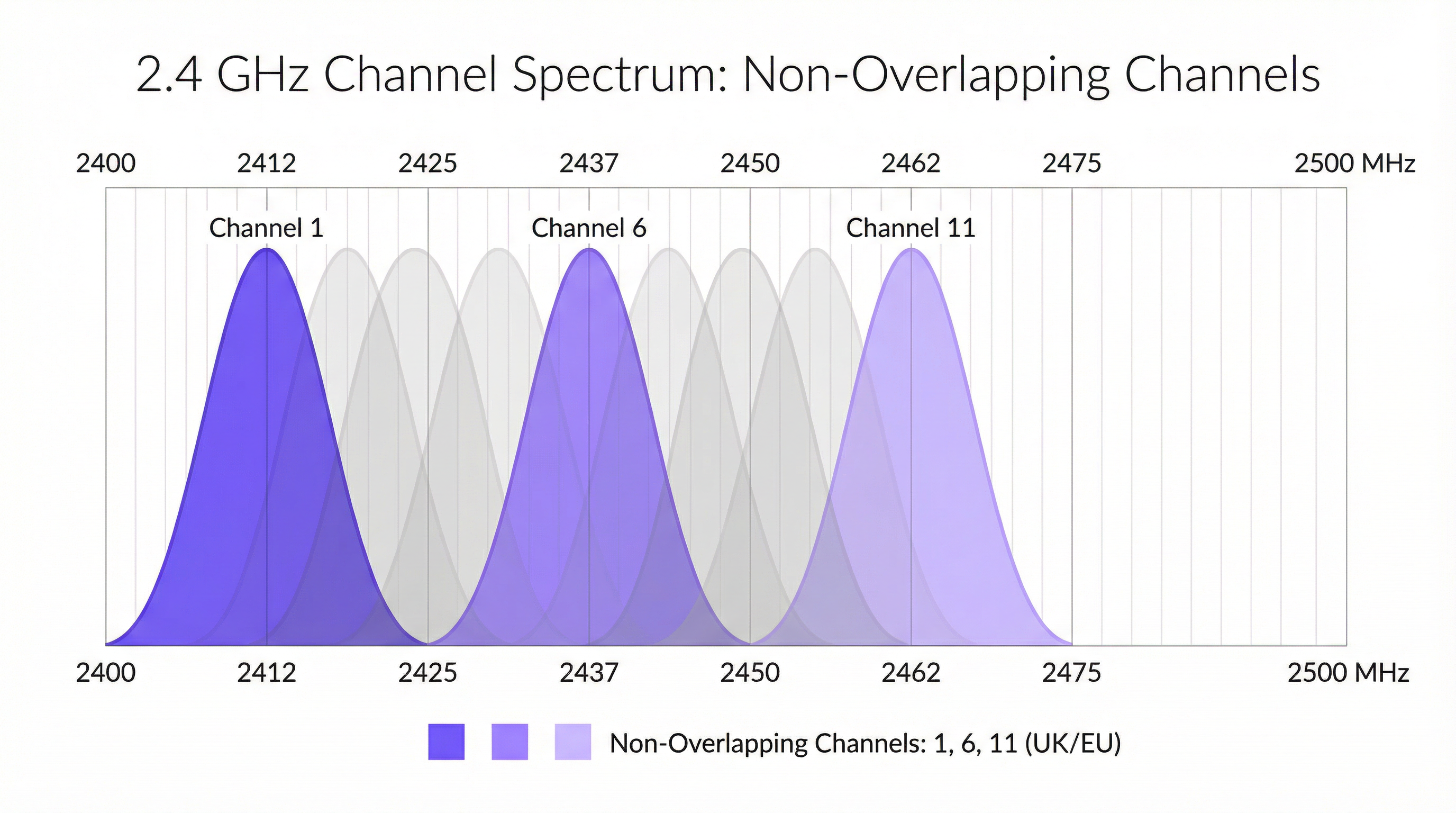
De plus, la bande des 2,4 GHz est un spectre sans licence, ce qui signifie qu'elle est libre d'accès pour d'innombrables autres appareils, notamment les périphériques Bluetooth, les fours à micro-ondes, les téléphones sans fil et les capteurs IoT basés sur Zigbee. Ces interférences non WiFi ajoutent une couche supplémentaire de bruit imprévisible qui peut gravement dégrader les performances.
La bande des 5 GHz : l'autoroute à grande vitesse
La bande des 5 GHz est la clé d'un WiFi haute performance. Elle offre beaucoup plus de canaux (plus de 20 au Royaume-Uni) qui, par conception, ne se chevauchent pas, et elle subit beaucoup moins d'interférences non WiFi. Cela en fait le choix incontournable pour les applications gourmandes en bande passante telles que le streaming vidéo, la voix sur IP (VoIP) et les transferts de fichiers volumineux. Cependant, ses signaux à plus haute fréquence ont une portée plus courte et sont plus facilement atténués par les obstacles physiques comme les murs et les planchers.
Dans la bande des 5 GHz, les architectes réseau peuvent également configurer la largeur de canal pour augmenter le débit :
- 20 MHz : La largeur de base. Offre le moins de potentiel d'interférence et est idéale pour les environnements à haute densité où de nombreux AP sont colocalisés.
- 40 MHz : Combine deux canaux de 20 MHz. Double le débit de données potentiel mais double également l'empreinte spectrale, la rendant plus sensible aux interférences.
- 80 MHz : Combine quatre canaux de 20 MHz. Offre des débits de données très élevés mais ne doit être utilisée que dans des environnements RF propres avec une faible densité d'AP.
- 160 MHz : Combine huit canaux de 2,4 GHz. Bien que prise en charge par le 802.11ac/ax, elle est rarement pratique dans les environnements d'entreprise en raison de sa consommation massive de spectre.
Sélection dynamique de fréquence (DFS)
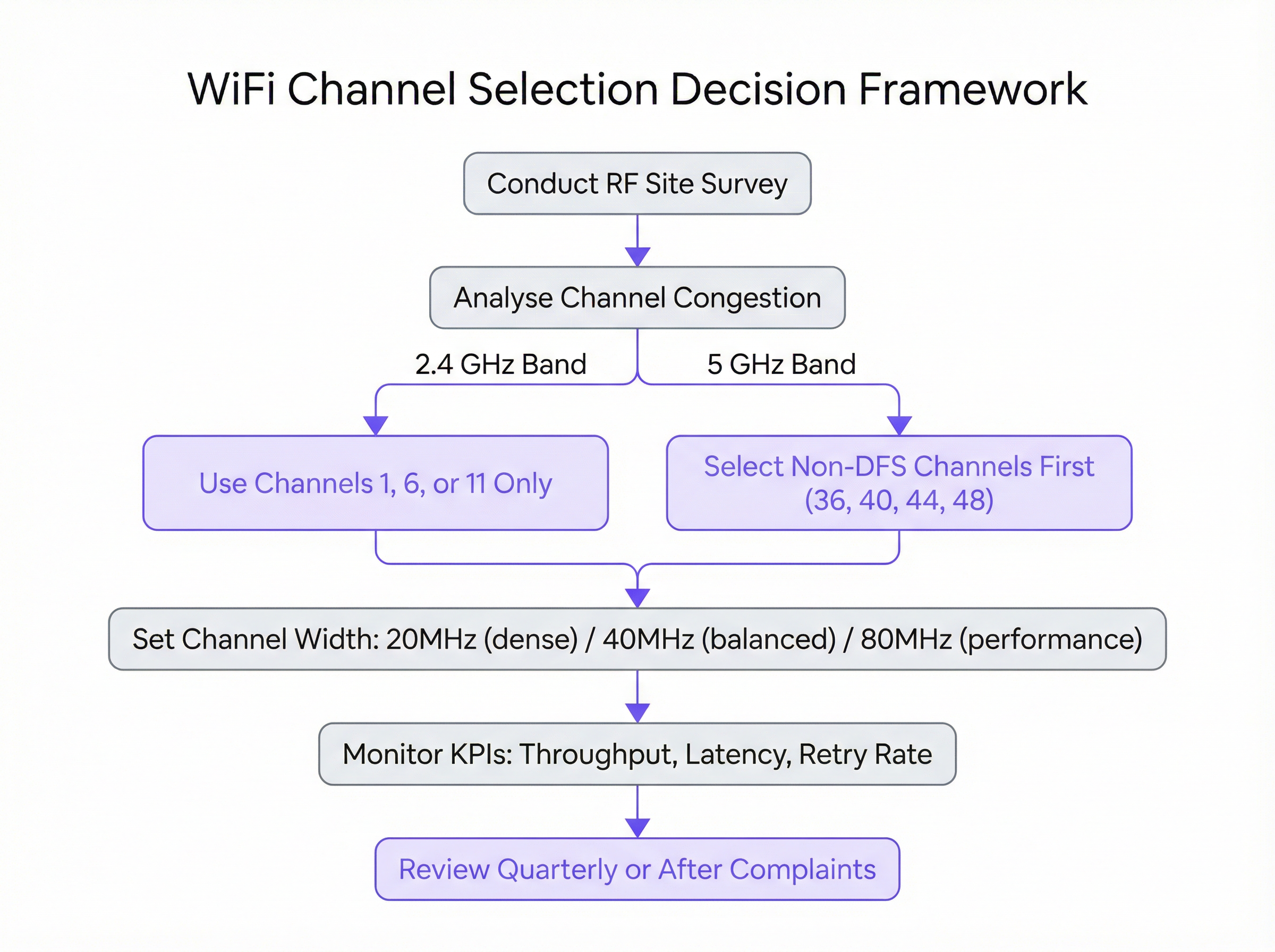
Une considération critique dans la bande des 5 GHz est la sélection dynamique de fréquence (DFS). Certains canaux des bandes UNII-2 et UNII-2e sont partagés avec les systèmes de radars météorologiques et militaires. La norme IEEE 802.11h exige que si un AP détecte un signal radar sur un canal DFS, il doit immédiatement libérer ce canal pendant au moins 30 minutes. Pour les utilisateurs, cela peut provoquer une coupure de connexion brutale, bien que brève. Bien que les canaux DFS ouvrent une vaste quantité de spectre supplémentaire, leur utilisation nécessite une planification minutieuse. Une étude de site est essentielle pour déterminer le risque d'événements radar dans un emplacement spécifique. Pour les déploiements critiques, il est souvent prudent de restreindre initialement les AP aux canaux non-DFS (par exemple, 36, 40, 44, 48) pour garantir une stabilité maximale.
Guide de mise en œuvre
La transition de la théorie à un environnement de production en direct nécessite une approche méthodique et prudente. Les étapes suivantes fournissent un plan d'action indépendant des fournisseurs pour exécuter une mise à jour du plan de canaux.
Étape 1 : Réaliser une étude de site RF de référence Avant d'apporter des modifications, vous devez comprendre votre environnement RF actuel. À l'aide d'un outil d'analyse WiFi professionnel (par exemple, Ekahau, NetSpot ou les outils intégrés à votre contrôleur WLAN d'entreprise), effectuez une étude de site complète pendant les heures de pointe. L'objectif est de cartographier tous les réseaux WiFi existants, en identifiant leurs canaux, la force de leurs signaux (RSSI) et la largeur de leurs canaux. Ces données constituent la base empirique de votre nouveau plan de canaux.
Étape 2 : Élaborer le plan de canaux Sur la base de l'étude de site, créez un plan de canaux formel.
- Pour le 2,4 GHz : Attribuez les canaux 1, 6 et 11 selon un modèle rotatif sur vos AP, en veillant à ce qu'aucun AP adjacent ne partage le même canal. L'objectif est de maximiser la distance physique entre les AP sur le même canal.
- Pour le 5 GHz : Commencez par attribuer des canaux uniques non-DFS avec une largeur de 20 MHz à chaque AP. Si vous avez plus d'AP que de canaux non-DFS disponibles, vous pouvez commencer à réutiliser les canaux, en garantissant toujours une séparation physique maximale. N'envisagez des largeurs de 40 MHz ou 80 MHz que dans les zones à faible densité d'AP et avec un besoin avéré de débit plus élevé.
Étape 3 : Mise en œuvre progressive N'appliquez jamais de modifications de canaux à l'ensemble de votre réseau simultanément. Mettez en œuvre le nouveau plan de manière progressive, en commençant par un seul AP ou une petite zone à faible risque. Cela vous permet de valider l'impact du changement de manière contrôlée. Si le changement est concluant, vous pouvez passer au groupe d'AP suivant.
Étape 4 : Configuration spécifique au fournisseur Bien que les principes soient universels, les étapes de configuration spécifiques varient selon le fournisseur :
- Cisco Meraki : Accédez à
Wireless > Radio settings. Vous pouvez définir les canaux manuellement par AP ou configurer le profilAuto RFpour n'utiliser que les canaux désignés. - Aruba Central : Sous
Devices > Access Points > Config > Radios, vous pouvez configurer les paramètresAdaptive Radio Management (ARM)pour définir les canaux et les largeurs de canal valides. - Ruckus SmartZone : Utilisez
ChannelFlyetBackground Scanningpour une gestion automatisée, ou remplacez-les par AP pour un contrôle manuel. - Juniper Mist : Définissez un
RF Templatesous l'ongletOrganizationpour spécifier vos paramètres de canal et de puissance, que le moteur Mist AI utilisera ensuite comme contraintes opérationnelles.

Bonnes pratiques
Le respect des bonnes pratiques du secteur garantit un réseau sans fil stable, évolutif et performant.
- Prioriser le 5 GHz : Dirigez agressivement les appareils clients compatibles vers la bande des 5 GHz. Cela réserve le spectre 5 GHz, plus propre et plus rapide, aux appareils qui peuvent en tirer parti, laissant la bande des 2,4 GHz aux clients existants et aux appareils IoT.
- Contrôler la puissance de transmission : Une puissance de transmission élevée n'est pas toujours préférable. Les AP émettant à puissance maximale peuvent augmenter les interférences co-canaux et faire en sorte que les appareils clients dotés de radios plus faibles (comme les smartphones) restent connectés à un AP distant. Utilisez le contrôle automatique de la puissance ou ajustez manuellement les niveaux de puissance pour créer des cellules de couverture de taille appropriée.
- Réaliser des audits réguliers : L'environnement RF est dynamique. De nouveaux réseaux voisins apparaissent et la configuration des bâtiments change. Effectuez un bref audit RF tous les trimestres et une étude de site complète chaque année pour vous assurer que votre plan de canaux reste optimal.
- Tout documenter : Conservez une documentation détaillée de votre plan de canaux, y compris des plans d'étage indiquant l'emplacement des AP et les canaux qui leur sont attribués. Cela est inestimable pour le dépannage et les extensions futures.
Dépannage et atténuation des risques
Même avec un plan bien conçu, des problèmes peuvent survenir. Le mode de défaillance le plus courant après un changement de canal est la rencontre d'interférences imprévues. Si les performances se dégradent, le principal suspect est une interférence intermittente non WiFi. Un analyseur de spectre (par opposition à un analyseur WiFi) peut aider à identifier ces sources.
Un autre problème courant est celui du « sticky client », où un appareil reste associé à un AP distant bien qu'un autre plus proche soit disponible. Cela résulte souvent d'une puissance de transmission réglée trop haut sur les AP. Réduire la puissance de transmission des AP peut aider à réduire les cellules de couverture et encourager les clients à basculer plus tôt vers un meilleur AP.
Pour atténuer les risques, ayez toujours un plan de retour en arrière. Documentez les paramètres de canal d'origine avant d'apporter des modifications et assurez-vous de disposer d'une fenêtre de maintenance pour revenir à la configuration précédente si le nouveau plan entraîne des problèmes opérationnels importants.
ROI et impact commercial
L'investissement dans une gestion appropriée des canaux offre un retour sur investissement (ROI) clair et mesurable. Pour un hôtel, cela se traduit par des scores de satisfaction client plus élevés et moins d'avis négatifs liés à un mauvais WiFi. Pour un magasin de vente au détail, cela garantit la fiabilité des systèmes de point de vente mobiles (mPOS) et offre une expérience fluide aux clients utilisant le réseau invité. Dans un centre de conférence, cela signifie fournir la connectivité fiable qu'exigent les organisateurs d'événements et les participants.
Les principaux impacts commerciaux sont :
- Augmentation du débit : Un canal propre peut augmenter le débit de données de 50 à 100 % ou plus, ce qui a un impact direct sur les performances des applications.
- Réduction des tickets d'assistance : La gestion proactive des canaux réduit considérablement les problèmes signalés par les utilisateurs liés aux lenteurs et aux pertes de connexion, libérant ainsi des ressources informatiques.
- Amélioration de l'expérience utilisateur : Une connectivité fiable est désormais une attente fondamentale. Un réseau bien optimisé contribue directement à la satisfaction et à la fidélité des clients et des employés.
- Maximisation du ROI matériel : Une bonne gestion RF garantit que vous tirez le maximum de performances de votre matériel de point d'accès existant, retardant potentiellement des mises à niveau coûteuses.
Termes clés et définitions
Radio Frequency (RF)
A frequency or range of frequencies in the electromagnetic spectrum suitable for transmission of information. WiFi operates in the 2.4 GHz and 5 GHz RF bands.
IT teams must manage the RF environment to minimize interference and ensure reliable communication for their wireless networks.
Channel Congestion
A scenario where multiple WiFi networks are operating on the same or overlapping channels in the same physical area, forcing devices to wait for their turn to transmit.
In a dense urban environment, high channel congestion is the primary cause of slow WiFi speeds. Identifying and moving to a less congested channel is the main goal of channel optimization.
RSSI (Received Signal Strength Indicator)
A measurement of the power present in a received radio signal, typically expressed in negative decibels-milliwatts (-dBm).
When analyzing a WiFi network, an RSSI of -50 dBm indicates a very strong signal, while -90 dBm is very weak. It's used to determine the coverage area of an AP and the potential for interference from other APs.
Co-Channel Interference (CCI)
Interference that occurs when two or more access points operating on the same channel are in close proximity. The APs must contend for the same airtime, reducing throughput for all.
A proper channel plan using staggered channels (e.g., 1, 6, 11) is designed specifically to minimize co-channel interference between a venue's own access points.
Adjacent-Channel Interference (ACI)
Interference that occurs when access points are on overlapping (but not identical) channels, such as channels 2 and 3 in the 2.4 GHz band.
ACI is a major problem in the 2.4 GHz band and is why the 1, 6, 11 channel plan is critical. It is not a significant issue in the 5 GHz band where channels do not overlap.
Dynamic Frequency Selection (DFS)
A mechanism that allows WiFi devices to use 5 GHz channels that are also used by radar systems. If radar is detected, the device must automatically switch to a different channel.
IT teams must decide whether the benefit of extra channels outweighs the risk of potential service interruptions when using DFS channels, especially in locations near airports or weather stations.
Channel Width
The width of the radio band that a WiFi channel uses to transmit data, measured in megahertz (MHz). Wider channels allow for higher data rates.
Network architects must choose an appropriate channel width (20, 40, or 80 MHz) as a trade-off between single-client speed and overall network capacity in a dense environment.
Site Survey
The process of planning and designing a wireless network to provide a solution that will deliver the required wireless coverage, data rates, network capacity, and quality of service.
A site survey is a mandatory first step before any significant WiFi deployment or optimization project. It provides the empirical data needed to make informed decisions about AP placement and channel selection.
Études de cas
A 200-room luxury hotel is experiencing frequent guest complaints about slow and unreliable WiFi, particularly during the evenings when occupancy is high. The hotel has a mix of 802.11ac and 802.11ax access points. How would you diagnose and resolve the issue?
- Diagnosis: Conduct an RF site survey between 7 PM and 10 PM to capture the network state under peak load. Use a WiFi analyzer to map channel usage on both 2.4 GHz and 5 GHz bands across all floors. The likely hypothesis is high co-channel interference from the hotel's own APs and neighboring residential networks. Pay close attention to the retransmission rate KPI in the WLAN controller, which is likely to be high.
- Channel Plan Redesign: Based on the survey, create a new channel plan. For the 2.4 GHz radios, ensure all APs are strictly on channels 1, 6, or 11, with no adjacent APs on the same channel. For the 5 GHz radios, set a uniform 20 MHz channel width to maximize the number of available channels and reduce interference in the high-density environment. Assign unique non-DFS channels first (36, 40, 44, 48, etc.).
- Implementation: Implement the new channel plan floor by floor during a low-traffic period (e.g., mid-morning). Disable lower data rates (below 12 Mbps) to encourage faster roaming and prevent clients from sticking to distant APs.
- Validation: Monitor throughput and latency metrics post-change. Solicit feedback from staff and a few friendly guests to confirm a tangible improvement in user experience.
A national retail chain with 50+ stores wants to ensure reliable performance for its new mobile point-of-sale (mPOS) terminals and guest WiFi network. The stores are often located in busy shopping malls with high levels of RF interference. What is a scalable strategy for channel management?
- Create a Standardized RF Template: Instead of creating a bespoke channel plan for each store, develop a standardized RF template within their central WLAN management platform (e.g., Meraki, Aruba Central). This template will enforce best practices across the entire estate.
- Template Configuration: The template should mandate that 2.4 GHz radios are disabled on every other AP to reduce interference, with the remaining APs locked to channels 1, 6, and 11. For the 5 GHz radios, the template should restrict channels to the non-DFS UNII-1 and UNII-3 bands (e.g., 36, 40, 44, 48 and 149, 153, 157, 161) and enforce a 20 MHz channel width. This provides a stable, predictable RF environment for the critical mPOS devices.
- Automated Deployment & Monitoring: Apply this template to all stores. Leverage the platform's automated RF management for transmit power control, but with the channel assignments locked by the template. Use the platform's reporting tools to centrally monitor key metrics like transaction success rates on the mPOS VLAN and guest WiFi satisfaction scores.
- Exception Handling: For stores that still report issues, an on-site survey can be performed to create a custom plan, but this becomes the exception rather than the rule.
Analyse de scénario
Q1. You are deploying WiFi in a new, multi-floor conference centre. The client requires seamless roaming for VoIP calls and support for high-bandwidth video streaming in the main auditorium. How do you approach your 5 GHz channel and power plan?
💡 Astuce :Consider the different requirements of coverage (roaming) and capacity (auditorium). Think about how transmit power affects cell size.
Afficher l'approche recommandée
For the general conference space, I would design a 5 GHz plan with 20 MHz channels to maximize the number of channels and minimize co-channel interference, supporting seamless roaming. Transmit power would be carefully tuned to create smaller, well-defined coverage cells to encourage clients to roam effectively. In the main auditorium, a high-density area, I would use directional antennas and a higher density of APs, also on 20 MHz channels. For the specific high-bandwidth requirement, I might consider using 40 MHz channels if the RF survey shows the spectrum is clean enough, but stability for the large number of users would be the priority.
Q2. A stadium deployment is experiencing major performance degradation during events. The existing network uses the vendor's 'auto-channel' feature. A site survey reveals extreme levels of co-channel interference on both bands. What is your immediate recommendation?
💡 Astuce :Is an automated system appropriate for such a high-density, high-stakes environment?
Afficher l'approche recommandée
My immediate recommendation is to disable the 'auto-channel' feature and implement a static, manually assigned channel plan based on a professional site survey. Automated systems are not suitable for extreme-density environments like stadiums, as they can cause unpredictable channel changes during peak usage. A meticulous manual plan, likely using 20 MHz channels on 5 GHz and a minimal 2.4 GHz deployment, is required to provide predictable capacity and performance.
Q3. Your company is located near a regional airport. You want to use 5 GHz channels to improve performance, but you are concerned about DFS events causing drops for your executive video conferencing system. What is a safe, phased approach to introducing 5 GHz?
💡 Astuce :Are all 5 GHz channels DFS channels? How can you test the waters?
Afficher l'approche recommandée
The safest approach is to begin by exclusively using the non-DFS channels (UNII-1 and UNII-3 bands). Configure the executive video conferencing system's dedicated APs to use only these channels (e.g., 36, 40, 44, 48). For the general office network, you can enable DFS channels but closely monitor the WLAN controller for any radar detection events over a period of several weeks. If no events are detected, you can be more confident in rolling out DFS channels more broadly, while still keeping the mission-critical systems on the guaranteed-stable non-DFS channels.
Points clés à retenir
- ✓In the 2.4 GHz band, only use channels 1, 6, and 11 to avoid interference.
- ✓The 5 GHz band is superior for performance; use it for all critical and high-bandwidth applications.
- ✓Use 20 MHz channel widths in high-density environments to maximize capacity and stability.
- ✓A data-driven site survey is the mandatory first step before any channel plan changes.
- ✓Manual channel planning almost always outperforms automatic selection in complex, high-density venues.
- ✓Be cautious with DFS channels in locations near airports or weather radar, as they can cause connection drops.
- ✓Proper channel management delivers measurable ROI through increased throughput, reduced support tickets, and improved user experience.




